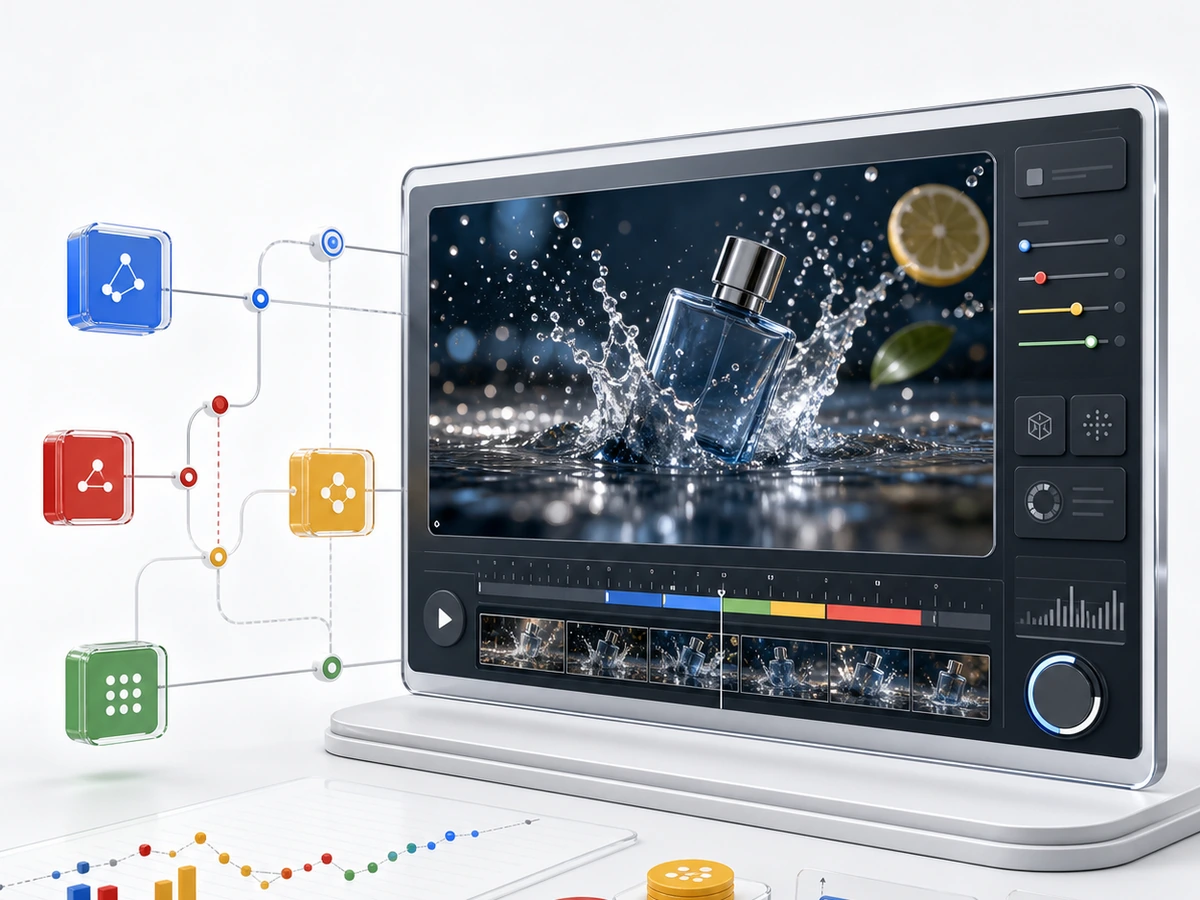
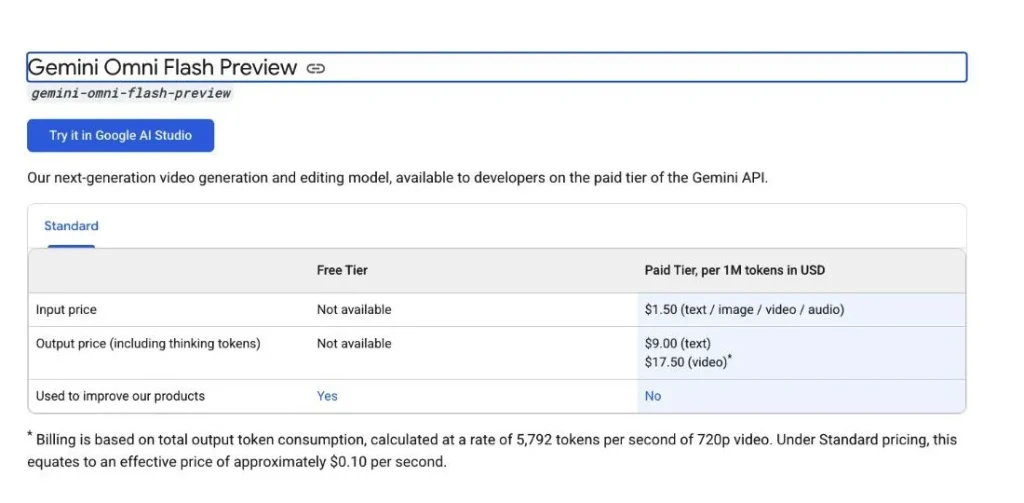
Gemini Omni Flash is Google’s new preview model for multimodal video generation and conversational video editing. For API users, the model ID to know is gemini-omni-flash-preview. The simple pricing picture is this: Harga API Gemini lists video output at $17.50 per 1 million video output tokens, which Google describes as about $0.10 per second for 720p video.
The confusing part is that “Gemini Omni Flash pricing” can mean three different things. Developers may care about Gemini API token pricing. Creators may care about Google AI subscriptions and Flow credits. Everyday users may care less about SDKs and more about whether they can open one workspace and start generating with the model.
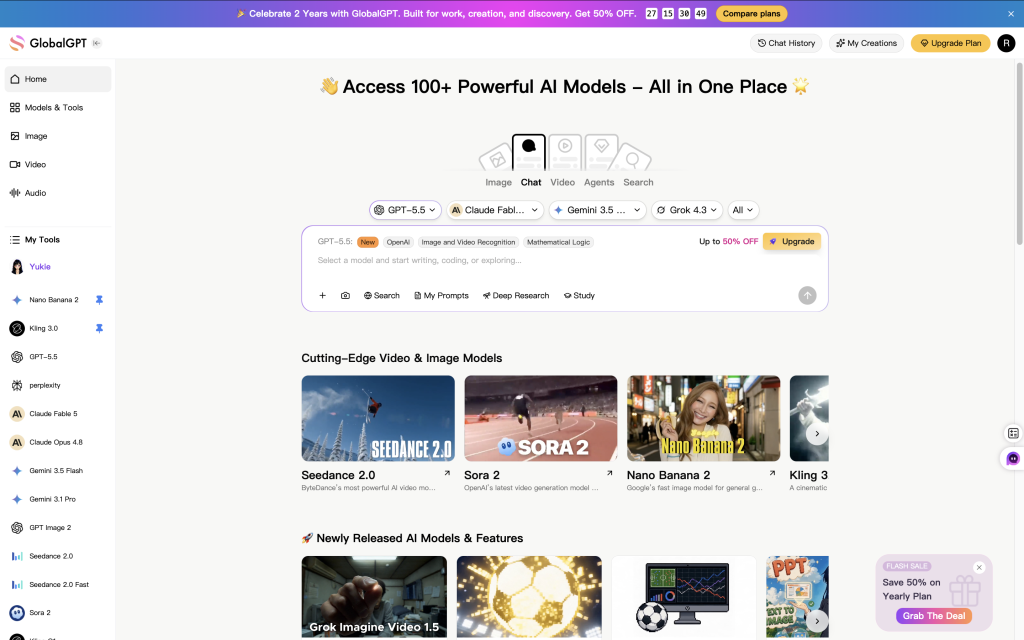
Di situlah GlobalGPT fits naturally. GlobalGPT Pro plan now includes Gemini Omni Flash access, along with the broader model lineup on the platform except Google Veo 3.1, which is available The current GlobalGPT Pro price is $10.8 per month when billed annually, atau $15 per month on the current monthly promotion. For users who want to try Omni without setting up API keys, billing projects, or SDK calls, that can be the cleaner route.
Below is the practical breakdown: what Omni costs through the API, what Google AI plans include, what limits apply in the preview release, and how to decide between API access, Google Flow, and GlobalGPT Pro.
Daftar isi
- Gemini Omni Flash pricing: the short version
- What is Gemini Omni Flash?
- How to access Gemini Omni Flash
- Gemini Omni Flash API pricing explained
- Google AI plans vs GlobalGPT
- Gemini Omni Flash limits
- Gemini Omni Flash hands-on test results
- Prompt tips to avoid wasting credits
- Who should use the API, Flow, or GlobalGPT?
- PERTANYAAN YANG SERING DIAJUKAN
Gemini Omni Flash Pricing: The Short Version
If you only need the numbers, Gemini Omni Flash is a paid model in the Gemini API. There is no free API tier for Omni Flash. Google AI paid subscriptions also include Omni access through Flow credits, while GlobalGPT Pro gives users a simpler multi-model route when they do not want to manage API setup.
| Rute akses | Confirmed price | Paling cocok | Main caution |
|---|---|---|---|
| Antarmuka Pemrograman Aplikasi Gemini | $1.50 / 1M input tokens; $9 / 1M text output tokens; $17.50 / 1M video output tokens; about $0.10 per second for 720p video | Developers, product teams, automation, batch testing | No free API tier; requires API setup and usage monitoring |
| Google AI Plus | $4.99 per month, 200 Flow credits | Light testing inside Google’s consumer creative tools | The exact Omni credit cost per generation still needs live Flow verification before publishing a per-video credit table |
| Google AI Pro | $19.99 per month, 1,000 Flow credits | Creators who already work inside Google Flow | Credits are useful, but they are not the same thing as API billing |
| Google AI Ultra | $99.99 per month with 10,000 Flow credits, or $199.99 per month with 25,000 Flow credits | Heavy Google Flow users and high-volume creative workflows | Higher monthly spend only makes sense if Flow is already central to the workflow |
| GlobalGPT Pro | $10.8 per month when billed annually; $15 per month on the current monthly promotion | Users who want Omni plus multiple AI models in one subscription | Not a replacement for a developer API console or every official Google app feature |
What Is Gemini Omni Flash?
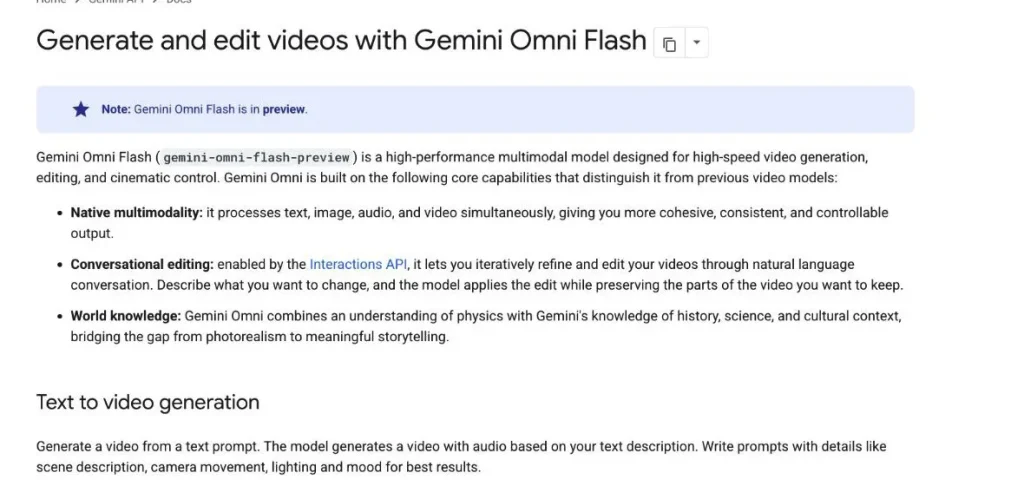
Gemini Omni Flash is a preview video model in the Gemini API. Google’s Omni API documentation positions it around native multimodality, conversational editing, and world knowledge. In practical terms, it is designed to generate short videos from text, use reference images, and keep enough context for follow-up edits when the workflow supports it.
The API model ID is gemini-omni-flash-preview. The word “preview” matters. It means the model is available for testing and early production exploration, but pricing, limits, feature coverage, and behavior can still change faster than a stable model line.
The strongest use cases are short product shots, social-video concepts, animated creative tests, and video edits where the requested change is specific. It is not a full long-form video editor. The current preview limits are better understood as a fast generation layer for short clips, not a complete post-production suite.
How to Access Gemini Omni Flash
There are three practical access routes: the Gemini API, Google AI plans with Flow credits, and GlobalGPT Pro. They overlap, but they solve different problems.
Option 1: Gemini API
The Gemini API route is for developers and technical teams. It makes the most sense when you need to build Omni into a product, run repeatable tests, generate clips from structured prompts, or track costs at the request level. The tradeoff is setup: you need billing, API access, request handling, storage, and your own workflow around retries and media files.
For teams already comparing video-generation costs, the API route is the cleanest way to calculate cost per clip. A 10-second 720p output is roughly $1.00 in video-output cost before accounting for input tokens and surrounding infrastructure. Shorter 3-second and 8-second clips are proportionally cheaper.
Option 2: Google AI Plans and Flow Credits
Google AI subscriptions are easier for creators who want to use Omni through Google’s creative interfaces. In the United States, the paid Rencana AI Google show Omni access and monthly Flow credits: Plus at $4.99 with 200 credits, Pro at $19.99 with 1,000 credits, and Ultra at $99.99 with 10,000 credits or $199.99 with 25,000 credits.
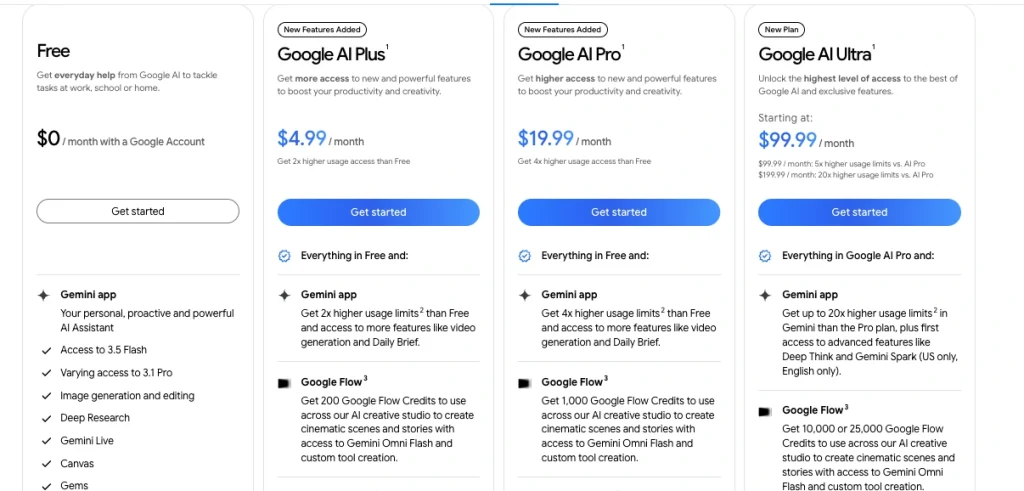
Flow credits should not be confused with Gemini API token billing. Credits are a consumer-product allowance. API tokens are a developer billing unit. If your main question is “how much will my app spend per generated second?”, use the API price. If your main question is “how many creative attempts do I get inside Flow?”, use the Google AI plan and credit allowance.
Option 3: GlobalGPT Pro
GlobalGPT Pro is the most practical route for users who want to try Gemini Omni Flash without turning the task into an API setup project. The current annual price is $10.8 per month when billed annually, while the current monthly promotion shows Pro at $15 per month. GlobalGPT Pro also gives access to the platform’s broader model lineup, excluding Google Veo 3.1.
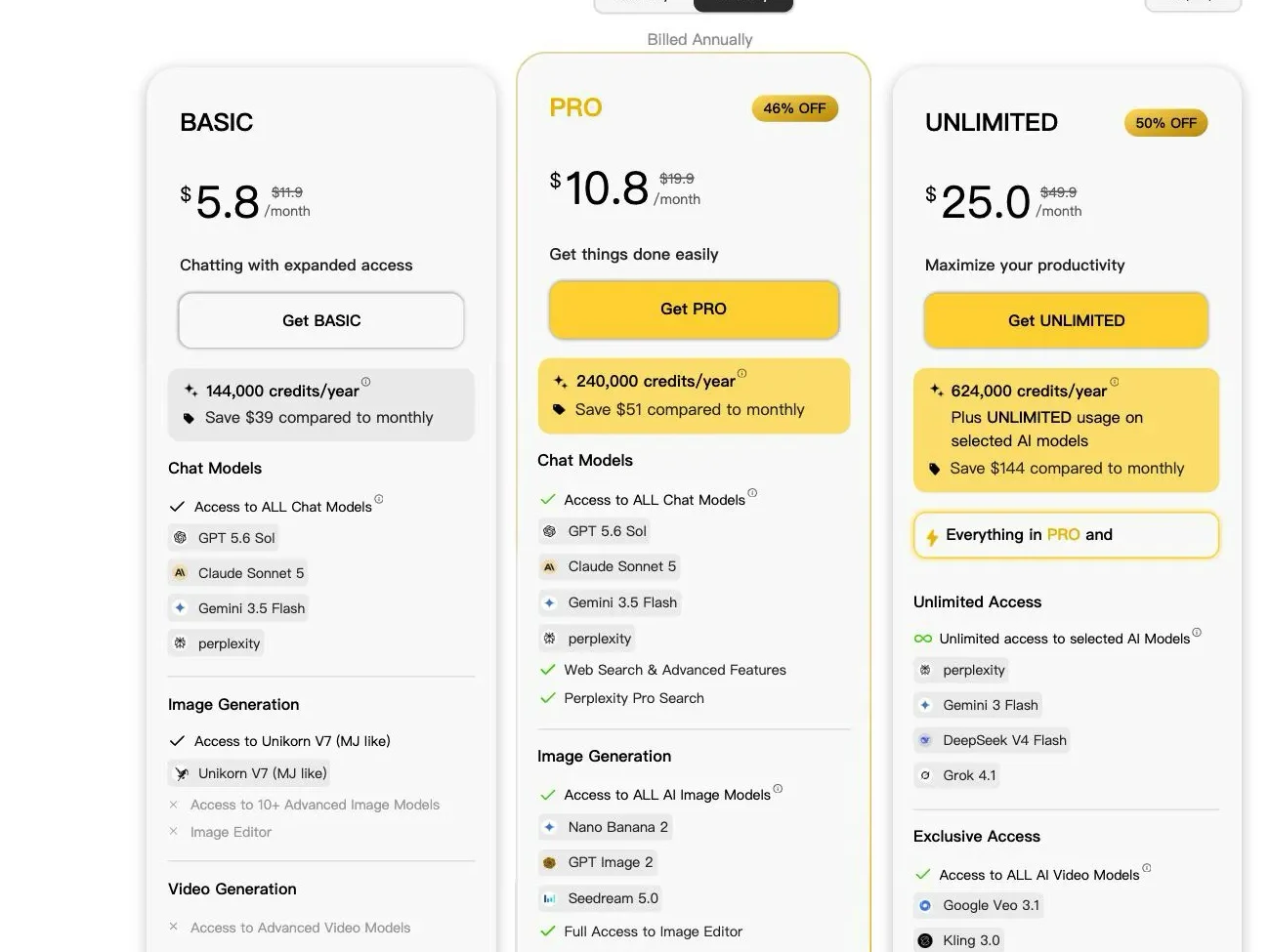
The value is not that GlobalGPT replaces the Gemini API. It does not. The value is that many users do not need an API console for everyday testing. They need a place to move between models, compare outputs, and create without keeping separate paid subscriptions open for every provider.
Gemini Omni Flash API Pricing Explained
Google’s rate card is compact, but the headline rate alone does not show whether Omni Flash is good value. The useful comparison is cost per successful clip: what the model delivers for the video-output charge after instruction adherence, retries, resolution, and workflow reliability are taken into account.
- Masukan: $1.50 per 1 million tokens.
- Output teks: $9.00 per 1 million tokens.
- Video output: $17.50 per 1 million tokens, described by Google as about $0.10 per second for 720p video.
- Free API tier: not available for Gemini Omni Flash.
Estimated video-output cost by duration
| Requested duration | Approx. API video-output cost | Catatan |
|---|---|---|
| 3 seconds | About $0.30 | Useful for quick motion tests and transitions |
| 8 detik | About $0.80 | A practical length for product demos and social clips |
| 10 detik | About $1.00 | The upper end of the current API duration range |
These estimates use Google’s 720p video-output guidance. Input tokens, storage, retries, and any surrounding app costs are separate.
Does Omni Flash performance justify the API price?
There is no single public benchmark score that turns video quality into a clean price-performance number, so our hands-on test set is more useful than a synthetic score here. It measures whether the model returned the requested format, preserved key visual details, followed timed actions, and completed the workflow reliably.
Practical price-performance benchmark
| Measured item | Observed result | What it means for value |
|---|---|---|
| Completed base or generation requests | 5 of 5 | Text-to-video, portrait output, image-to-video, a base clip, and a timed sequence all returned playable video. |
| Successful footage and estimated video-output cost | 42 seconds for about $4.27 | The list price translated into several usable short clips without a large test budget. |
| Controlled completion time | 25.7-39.2 seconds for completed 8-10 second jobs | Fast enough for iterative concept work; these timings are not GlobalGPT interface-speed measurements. |
| Format and consistency | Native 9:16 and reference-image tests passed | The price is easier to justify when the first output already has the required orientation and retains the subject. |
| Stateful follow-up edit | 0 of 1; HTTP 502 | Editing reliability can raise the effective cost if a production workflow depends on retries. |
On this evidence, the API price is well matched to rapid ideation, product shots, social concepts, and reference-based motion tests. An 8- or 10-second 720p result costs less than a dollar or about a dollar in video output, and the successful runs completed quickly enough to support prompt iteration.
The value is weaker for final-delivery or long-form work. Output is capped at 720p and 10 seconds, precise timing was approximate in our test, and the stateful edit failed once. A project that needs many retries, stitched clips, upscaling, or dependable follow-up edits can cost materially more than the headline per-second rate suggests.
Google AI Plans vs GlobalGPT: Which Price Makes Sense?
These options should be judged by utilization rather than by repeating their monthly prices. Google sells progressively larger capacity inside its own creative environment. GlobalGPT spreads subscription value across Omni and other models. Neither approach makes the underlying Omni model produce a better clip simply because the user chooses a more expensive plan.
How to read Google’s pricing ladder
The table matters more than another price recap. Each step increases the Flow allowance faster than the monthly charge, so the nominal cost per included credit falls as usage commitment rises. That makes Pro the more balanced tier for regular Flow iteration, while Ultra is a capacity purchase for users who can actually consume a much larger allowance and benefit from Google’s other premium features.
| Google AI plan | US monthly price | Flow credits | Nominal cost per included credit | Paling cocok |
|---|---|---|---|---|
| AI Plus | $4.99 | 200 | About 2.50 cents | The lowest-cost official entry point for occasional Flow use |
| AI Pro | $19.99 | 1,000 | About 2.00 cents | Regular creators who expect to iterate in Flow each month |
| AI Ultra | $99.99 | 10,000 | About 1.00 cent | High-volume Flow work and users who also value Ultra features |
| AI Ultra, higher-limit option | $199.99 | 25,000 | About 0.80 cent | Very heavy official-tool usage where the larger allowance will actually be used |
From Plus to Pro, the allowance grows fivefold while the fee grows by roughly four times, reducing the nominal cost per included credit by about 20%. The first Ultra level doubles that efficiency again compared with Pro. That looks strong on paper, but lower unit cost is not the same as lower total spend: unused capacity can make Plus or Pro the better value even when Ultra has the best ratio.
The hands-on API result of 42 successful video seconds for about $4.27 is a useful performance reference, but it cannot be used to calculate how many Omni clips a Flow plan will produce. Flow credits and API video tokens are different billing units, and the live credit consumption for each Omni operation still needs separate verification.
Where GlobalGPT Pro fits
GlobalGPT’s value is horizontal rather than volume-based. If Omni is the only model you intend to use, the Gemini API or a Google AI plan is easier to evaluate because the billing unit maps directly to requests or Flow capacity. If the same subscription is also used for writing, research, image work, and comparisons across several models, its effective value improves because the cost is shared across more workflows. It still does not replace native Flow features or developer-level API control.
Which option is actually cost-effective?
| If you are… | Choose… | Mengapa |
|---|---|---|
| Building Omni into an app | Antarmuka Pemrograman Aplikasi Gemini | You need request control, predictable per-second costs, and technical integration. |
| Trying Omni in official Google Flow with the lowest monthly commitment | Google AI Plus | It limits total commitment while providing enough capacity to judge whether Flow fits the workflow. |
| Creating and iterating in Flow every month | Google AI Pro | The allowance grows faster than the fee compared with Plus, making it the most balanced regular-use tier. |
| Running high-volume work in Google’s official creative tools | Google AI Ultra | Its unit economics are strongest only when high Flow capacity and the additional Google features are genuinely used. |
| Testing Omni alongside several AI models for content work | GlobalGPT Pro | Its value rises with the number of models and non-video workflows used, rather than with Omni generation volume alone. |
If your AI video research includes other tools, GlobalGPT also has related guides on Harga API Sora 2, Pembuatan video Sora, dan Veo 3.1 vs Sora 2. Those are useful next reads when you are comparing Omni with other video models instead of judging it in isolation.
Gemini Omni Flash Limits You Should Know
Omni Flash is powerful, but the preview has clear boundaries. Understanding them before you spend credits matters more than memorizing a model announcement.
Duration and resolution
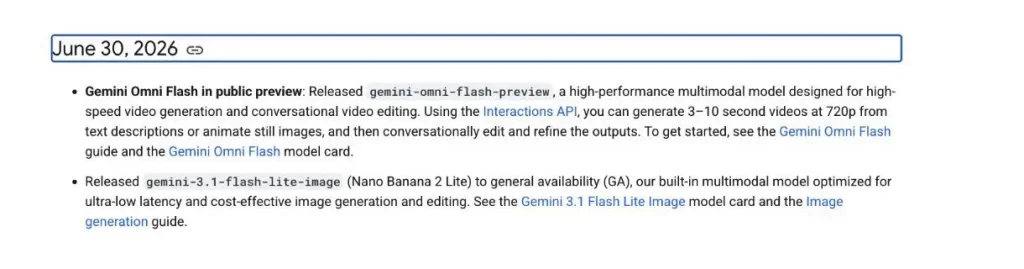
The current API preview supports videos from 3 to 10 seconds di 720p, as noted in Google’s Gemini API release notes. That makes Omni Flash a short-clip generator. It can be excellent for product moments, social concepts, transitions, and quick visual tests, but it is not designed to generate a full multi-minute video in one request.
Perbandingan aspek
Pemandangan 16:9 is the default. Portrait 9:16 can also be requested, which is useful for TikTok, Reels, Shorts, and mobile-first ad testing.
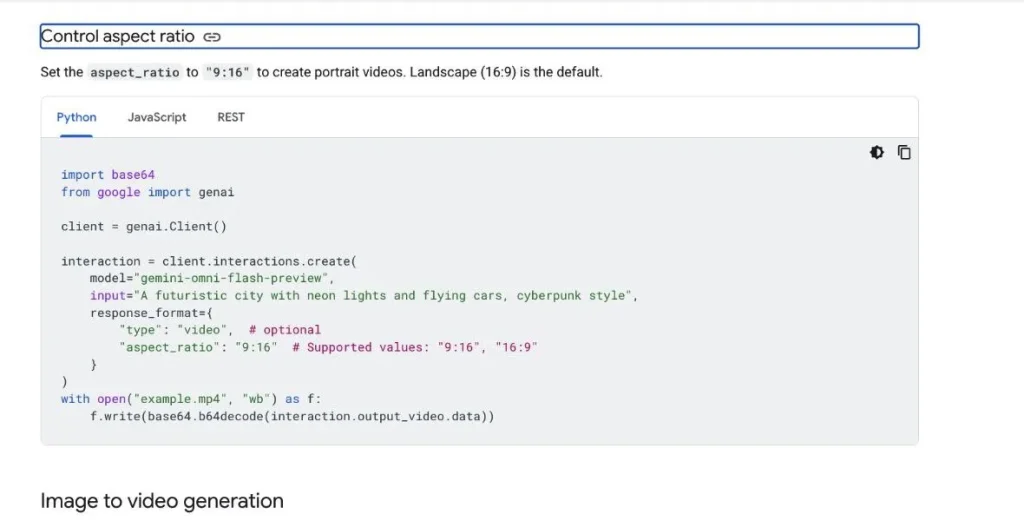
Image-to-video
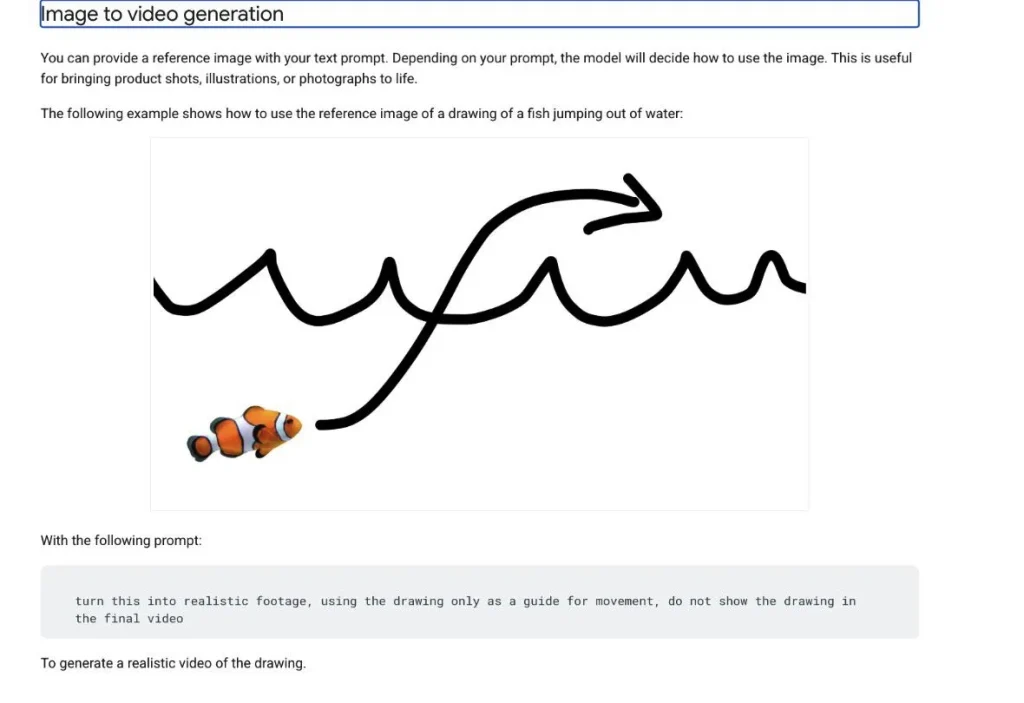
Omni supports reference-image workflows. That matters for product shots because you can start with a visual anchor instead of asking the model to invent the object from text alone. The reference image still needs a clear motion instruction. A good prompt describes what should move, what should stay consistent, and how the camera should behave.
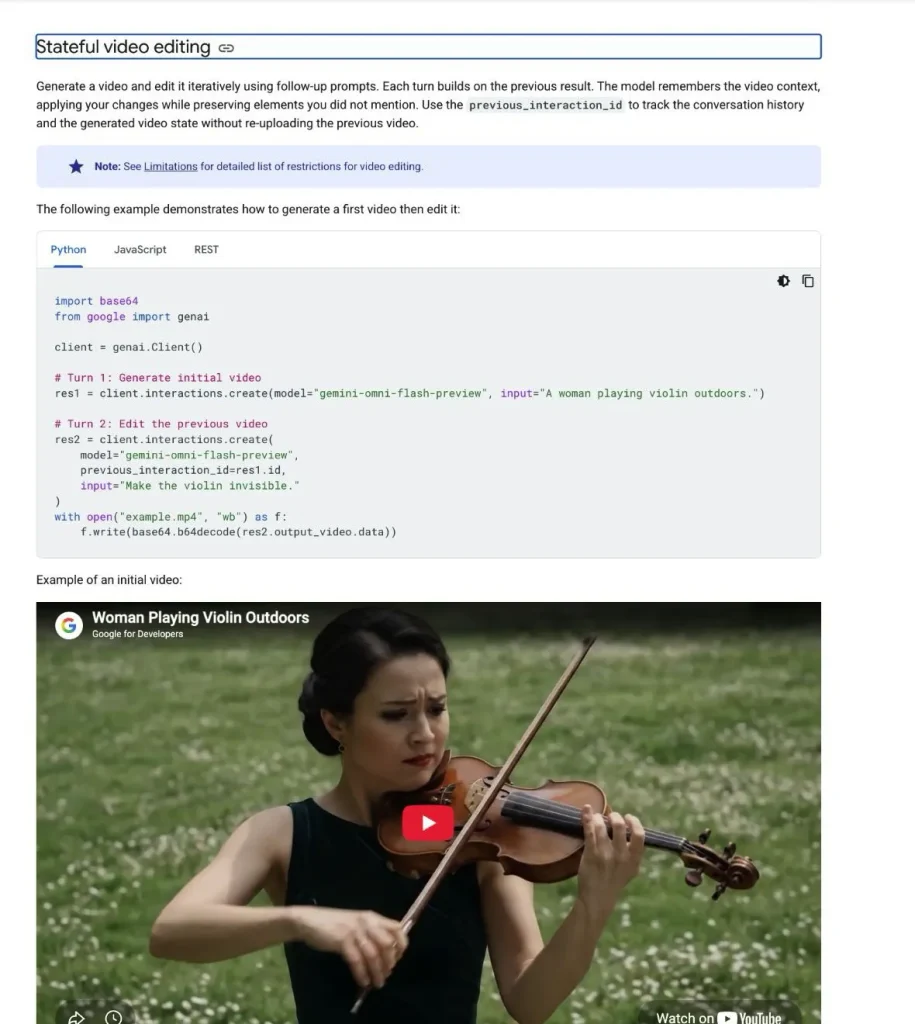
Stateful video editing
The Interactions API can preserve video context for follow-up edits through a previous interaction. For users, that means you can ask for a change like swapping a product color or adjusting a scene detail without rewriting the entire original prompt. The best edits are still narrow and concrete.
Preview restrictions
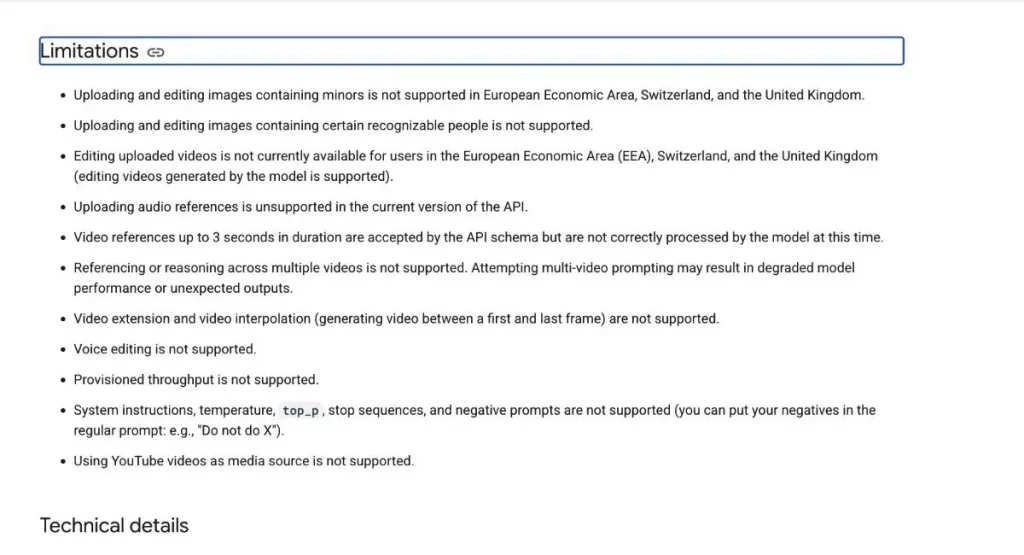
The preview also has important technical restrictions. Google’s documentation lists limitations around region availability, reference media, voice editing, interpolation, advanced parameters, and some instruction controls. Generated videos also include SynthID, and safety filters can affect outputs.
The simple point is that Omni Flash should be tested like a preview tool: strong enough to build workflows around, but not something to treat as a fully settled production surface without monitoring changes.
Gemini Omni Flash Hands-On Test Results
We tested the same gemini-omni-flash-preview model available on GlobalGPT Pro through a controlled API workflow.
In our tests, we checked five practical workflows: baseline text-to-video, native 9:16 output, reference-image consistency, a stateful follow-up edit, and a timed 10-second sequence.
How to read the results: Each output video is paired with its measured data and review notes. Run time is the measured end-to-end time in the controlled workflow, not GlobalGPT interface speed.
T1 · Text to video
Café latte-art motion test
The rosetta pattern stays recognizable, steam remains visible, and the hand interaction is clean in the sampled frames. The cup is lifted slightly around the midpoint instead of only rotating in place, so instruction adherence was good but not exact.
Bawa pulang: A usable result with strong visual realism, but small physical-action details still need frame-by-frame review.
View exact prompt
Create an 8-second, 16:9 photorealistic video in one continuous shot. A ceramic cup of latte sits on a walnut café table beside a sunlit window. A barista’s hand gently rotates the cup about 30 degrees, revealing a crisp rosetta latte-art pattern. Thin, realistic steam rises naturally and curls in the morning light; the liquid surface and hand motion should obey real-world physics. Use a slow, subtle camera push-in, shallow depth of field, warm natural light, and authentic café ambience. No dialogue, no music, no cuts, no captions, no visible brand names, no logos, and no watermark.
T2 · Vertical video
9:16 product-opening test
The output respected the requested portrait format. The case stays centered, the lid opens, and both earbuds remain visible. The hand stays in frame after opening, but the product geometry is stable and no logo or text appears in the sampled frames.
Bawa pulang: Gemini Omni Flash can return a genuinely vertical product clip rather than a cropped landscape output.
View exact prompt
Create an 8-second vertical 9:16 photorealistic product video in one continuous shot. Center a matte cobalt-blue wireless earbud charging case on a clean light-gray studio pedestal. A human hand enters from the lower edge, opens the lid smoothly, and reveals two matching blue earbuds. At the same time, the camera performs a controlled half-orbit from front-left to front-right while keeping the case centered and fully visible. Use soft commercial studio lighting, realistic materials, stable geometry, and precise hand-object interaction. No logo, no text, no cuts, no extra objects, no distorted fingers, and no watermark.
T3 · Image to video
Reference-image consistency test
The blue body, yellow handle, short spout, stone surface, and sunlit-kitchen context remain consistent. Steam appears after the opening frame. The video uses a slightly wider framing than the source image, so preservation is strong rather than pixel-identical.
Bawa pulang: The reference image provided useful identity control without freezing the scene into a static frame.
View exact animation prompt
Animate this reference image into an 8-second, 16:9 photorealistic video. Preserve the teapot’s exact cobalt-blue body, bright-yellow handle, proportions, spout shape, tabletop position, lighting direction, and overall composition. Add a thin stream of realistic steam rising from the spout while the camera makes a slow, smooth rightward orbit of about 20 degrees. Keep the teapot rigid and visually consistent with the reference; do not add, remove, recolor, or reshape any object. No text, no logo, no cuts, no people, and no watermark.
T4 · Stateful editing
Blue-to-red bicycle follow-up
The base clip correctly shows an adult woman in a yellow raincoat beside a stable blue bicycle on a wet street. The follow-up used the same session and targeted the persisted base-video message, but the edit returned a non-streaming 502 response, no media, and no usage event.
Bawa pulang: This run does not prove that stateful editing works reliably. It is a real failed attempt, and continuity could not be evaluated.
View base and follow-up prompts
Base: Create an 8-second, 16:9 photorealistic cinematic video in one continuous shot. An adult woman in a bright yellow raincoat stands beside a blue city bicycle on a wet urban street just after rain. She lightly holds the handlebar while reflections shimmer on the pavement and a few raindrops fall from an awning. Use a slow lateral camera move, overcast natural light, realistic human anatomy, stable bicycle geometry, and consistent colors. No dialogue, no text, no logo, no cuts, and no watermark. Follow-up: Change the bicycle from blue to red. Keep everything else the same.
T5 · Timing and limits
10-second timeline-control test
Observed boundary samples: the box was still closed at 4.0s, the lid was open by 4.5s, and stars were visible by 6.5s. The sequence was correct, but the first transition started later than requested.
Bawa pulang: The model followed the event order and returned the full 10-second maximum, but second-level timing was approximate rather than frame-exact.
View exact prompt
Create a 10-second, 16:9 photorealistic studio video in one continuous locked-off shot. A small matte-red gift box with a gold ribbon sits centered on a dark neutral tabletop. Follow this exact timeline: [0-3s] the box remains completely closed and still; [3-6s] the lid opens slowly and smoothly by itself while the box stays in place; [6-10s] several small metallic-gold paper stars rise gently from inside the open box and drift upward. Keep the camera, background, box position, scale, lighting, and object identity unchanged for the full shot. No people, no text, no logo, no cuts, no extra objects, no sudden motion, and no watermark.
Prompt Tips to Avoid Wasting Credits
Omni Flash pricing is low enough to encourage experimentation, but wasted prompts still add up. The best prompts are specific without becoming overloaded.
Use one continuous shot when you want stability
If the clip should feel coherent, say “single continuous shot” or “one uninterrupted camera move.” This reduces the chance that the model invents abrupt cuts or changes the subject halfway through the clip.
Describe the camera, not only the subject
A product prompt should not stop at “a blue headphone case.” Add motion: “slow half-orbit camera move,” “hand opens the case,” “soft studio reflections,” or “camera pushes in slightly.” Camera language usually produces more usable output than adding more adjectives to the object.
State the aspect ratio early
For mobile content, request 9:16 directly. For website or YouTube-style clips, use 16:9. Aspect ratio is not just a formatting choice; it changes how much room the model has for hands, products, and background motion.
For edits, keep the change narrow
Stateful editing works best when the follow-up is simple: “Change the bicycle from blue to red. Keep everything else the same.” Avoid asking for several unrelated changes at once unless you are comfortable paying for retries.
For timed actions, use time brackets
If the clip has a sequence, use brackets like [0-3s], [3-6s], dan [6-10s]. This gives the model a visible structure for pacing. It does not guarantee frame-perfect control, but it is much clearer than writing the timing as a loose paragraph.
Who Should Use the API, Google Flow, or GlobalGPT?
Gunakan Antarmuka Pemrograman Aplikasi Gemini if you are building, automating, or measuring. The API is the right choice when you need programmatic control, per-request cost tracking, and repeatable prompts.
Gunakan Google Flow through a Google AI plan if you already want Google’s native creative environment. Plus, Pro, and Ultra make sense when the credit system fits how you create and you want official consumer-tool access.
Gunakan GlobalGPT Pro if your main goal is to use Gemini Omni Flash alongside other leading models without managing separate subscriptions and API consoles. Pro is currently $10.8 per month when billed annually, or $15 per month on the monthly promotion. For many users, that is the practical value: Omni is available inside a broader workspace where you can also compare other models for writing, planning, research, and creative work.

Pilih GlobalGPT Tanpa Batas if your model usage is high enough that a larger plan is more comfortable. The current annual Unlimited price is $25 per month, while the current monthly promotion shows Unlimited at $37 per month.
Keputusan Akhir
Gemini Omni Flash is one of the more interesting short-video models to watch because it combines video generation, reference media, and conversational editing in a relatively affordable package. At about $0.10 per second for 720p API video output, the cost is easy to reason about. The limits are also clear: 3-10 seconds, 720p, preview status, and several technical restrictions around advanced editing and parameters.
If you are a developer, start with the Gemini API and track cost per generated second. If you are already inside Google’s creative tools, compare the Google AI plan tiers by Flow credits. If you simply want to use Gemini Omni Flash without building an API workflow, GlobalGPT Pro is the more direct everyday option, especially because it also gives you access to other models in the same workspace.
PERTANYAAN YANG SERING DIAJUKAN
Is Gemini Omni Flash free?
No, not through the Gemini API. Google lists Gemini Omni Flash as a paid-tier API model with no free API tier. Google AI subscriptions may include Flow credits, but those credits are a consumer-plan allowance, not the same thing as free API access.
How much does Gemini Omni Flash API cost?
Gemini Omni Flash API pricing is $1.50 per 1 million input tokens, $9 per 1 million text output tokens, and $17.50 per 1 million video output tokens. Google describes the video output price as about $0.10 per second for 720p video.
What is the Gemini Omni Flash API model ID?
The API model ID is gemini-omni-flash-preview.
Is Gemini Omni Flash included in Google AI Pro?
Yes. The Google AI Pro plan is listed at $19.99 per month and includes 1,000 Flow credits with Omni access.
Does GlobalGPT include Gemini Omni Flash?
Yes. GlobalGPT Pro includes Gemini Omni Flash access. The current Pro price is $10.8 per month when billed annually, or $15 per month on the current monthly promotion.
What are Gemini Omni Flash video limits?
The current API preview supports 3-10 second video generation at 720p. Landscape 16:9 is the default, and portrait 9:16 can be requested.
Can Gemini Omni Flash do image-to-video?
Yes. Gemini Omni Flash supports reference-image workflows, so users can provide an image and prompt the model to generate motion from that visual reference.
Can Gemini Omni Flash edit existing videos?
Google’s documentation supports stateful follow-up editing for generated videos through the Interactions API. In our single hands-on attempt, the base video succeeded but the follow-up edit returned HTTP 502 and no edited media. The feature should therefore be tested against the exact workflow you need, especially while the model remains in preview.