Gemini Omni Flash won our matched first-output test, but this was a close result rather than a clean sweep. Across eight identical prompts, Omni won five tasks to Veo 3.1 Fast’s three and finished at 4.124/5 versus 4.009/5. Omni followed the brief more closely and returned results faster through our connected route; Veo produced the stronger visual finish, steadier subjects, and better audio result.
That split is the real story. Omni Flash is a 720p model built to generate a short clip and then keep working on it through conversation. Veo 3.1 is a wider family with native audio, higher-resolution modes, first-and-last-frame control, and video extension. The right choice depends less on a single beauty score than on whether you need exact first-pass execution and quick iteration, or a more cinematic route to a longer, higher-resolution production.
If you want one workspace for the whole AI workflow, GlobalGPT is the practical route. Besides Gemini Omni Flash and Veo 3.1, it brings leading chat, research, image, and video models together, so you can shape the idea, polish the prompt, generate visuals, and choose the strongest video model for the final shot without paying for several separate AI tools. The annual Pro plan is $10,80/mes, while Unlimited is $25/mes and includes Veo 3.1 access.
Omni wins the test; Veo keeps the higher production ceiling
Gemini Omni Flash leads Veo 3.1 Fast by 0.115 points.
Omni wins motion, constraints, physics, camera direction, and text.
| Prioridad | Mejor ajuste | Por qué |
|---|---|---|
| Exact prompt following | Gemini Omni Flash | Higher average adherence and cleaner completion of constrained scenes. |
| Cinematic finish and subject stability | Veo 3.1 Rápido | Higher visual-quality and temporal-consistency averages. |
| Fast 720p iteration | Gemini Omni Flash | 29.29-second average in our route, plus conversational editing. |
| Audio-first scenes in this test | Veo 3.1 Rápido | The cafe clip had a much stronger, more usable audio level. |
| 4K, frame control, or extension | Veo 3.1 family | These are documented Veo workflow options beyond Omni’s current 720p ceiling. |
Conclusión: Choose Omni as the better default for fast, instruction-sensitive short video. Choose Veo when visual polish and the wider production pipeline matter more.
Índice
Gemini Omni Flash vs Veo 3.1 at a Glance
The cleanest way to understand the comparison is to stop treating “Veo 3.1” as one fixed product. Google documents Standard, Fast, and Lite variants. Our hands-on test uses Veo 3.1 Rápido, because that is the tier closest to Omni Flash in both speed-focused positioning and 720p API price. When we discuss 4K, maximum quality, or the full Veo feature set, we are talking about the wider Veo 3.1 family, not claiming that every Fast output uses those settings.
| Capacidad | Gemini Omni Flash | Veo 3.1 family |
|---|---|---|
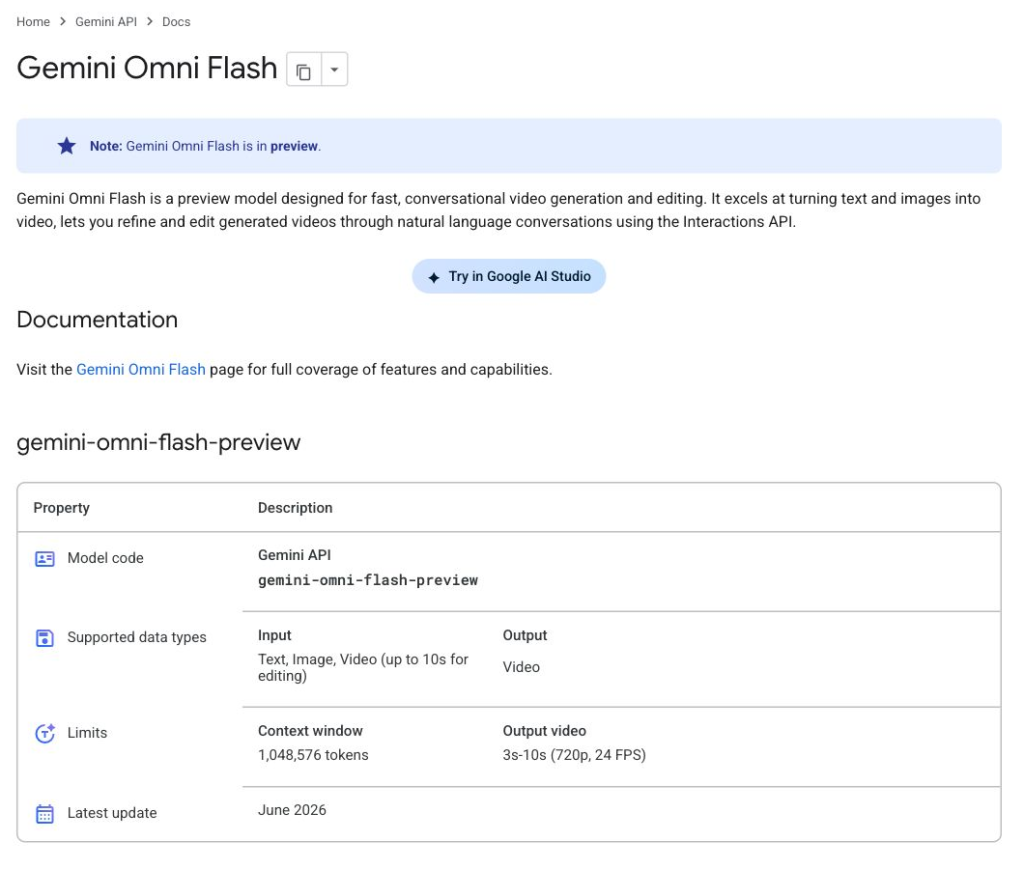
| Official model status | Preview; model ID gemini-omni-flash-preview | Preview in the Gemini API; Standard, Fast, and Lite model IDs are listed separately |
| Core job | Fast video generation plus natural-language, multi-turn editing | Video generation with cinematic controls, higher-resolution modes, and extension |
| Output length | 3 to 10 seconds | 4, 6, or 8 seconds; some advanced modes require 8 seconds |
| Resolución | 720p at 24 FPS | 720p, 1080p, or 4K; Lite does not support 4K |
| Relación de aspecto | 16:9 or 9:16 | 16:9 or 9:16 |
| Audio | Generated with the video; uploaded audio references are not supported in the current API | Natively generated audio, including dialogue and sound effects |
| Reference inputs | Text, images, and video, with reference-to-video and editing tasks | Image-to-video plus up to three reference images |
| Editing and continuation | Stateful conversational editing; no video extension or first/last-frame interpolation | First-and-last-frame generation and 7-second video extensions; no equivalent conversational editing loop in the Veo API guide |
| Provenance | Invisible SynthID watermarking | Marca de agua SynthID |
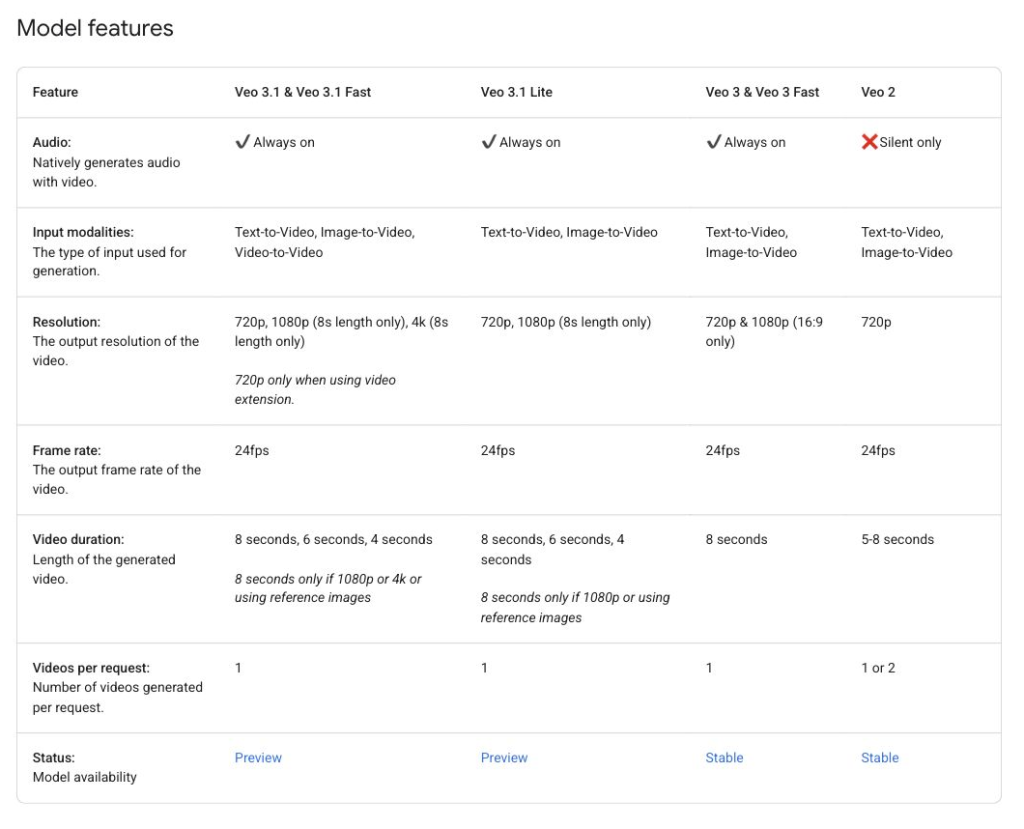
That feature split matters more than the marketing labels. Omni behaves like a video model with an editor built into the conversation: generate, ask for a change, preserve the rest, and continue. Veo behaves more like a shot-generation system: define the format, references, frames, and resolution, then build or extend the sequence. One is optimized around revision; the other gives you a broader rendering pipeline.
If you need a fuller introduction to the Veo product family before comparing tiers, our complete Veo 3.1 guide covers the model and its main access routes.
What the Public Benchmarks Actually Say
Análisis artificial ranks video models through blind comparisons. A voter sees two outputs made from the same text prompt or input image, does not know which model produced either clip, and chooses the one they prefer. Those votes feed an Elo rating. This is much more useful than asking a model vendor to grade its own demo reel, but it is still a preference test, not a laboratory measurement of prompt completeness or physical accuracy.
Artificial Analysis leaderboards with audio
Text to video
Image to video
Checked July 15, 2026. Text-to-video sample counts: Omni Flash 3,488; Veo 3.1 7,411; Veo 3.1 Fast 8,235. Image-to-video sample counts: 2,834; 6,926; and 7,319 respectively. Rankings change as new votes and models are added.
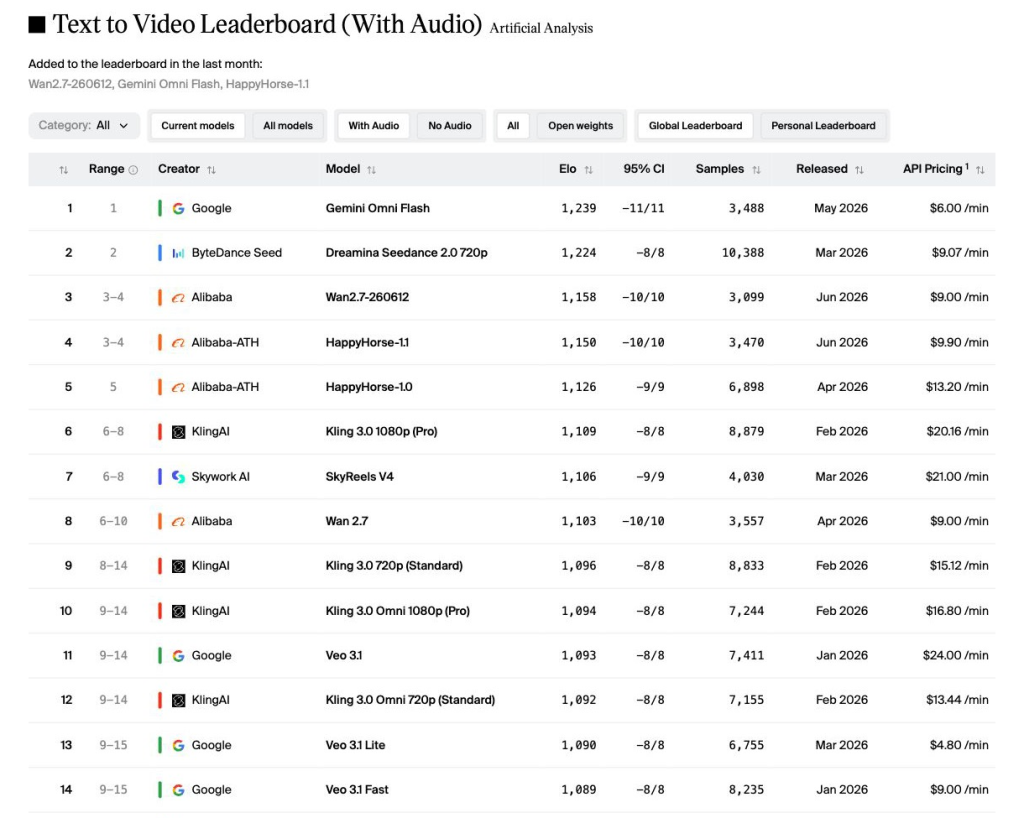
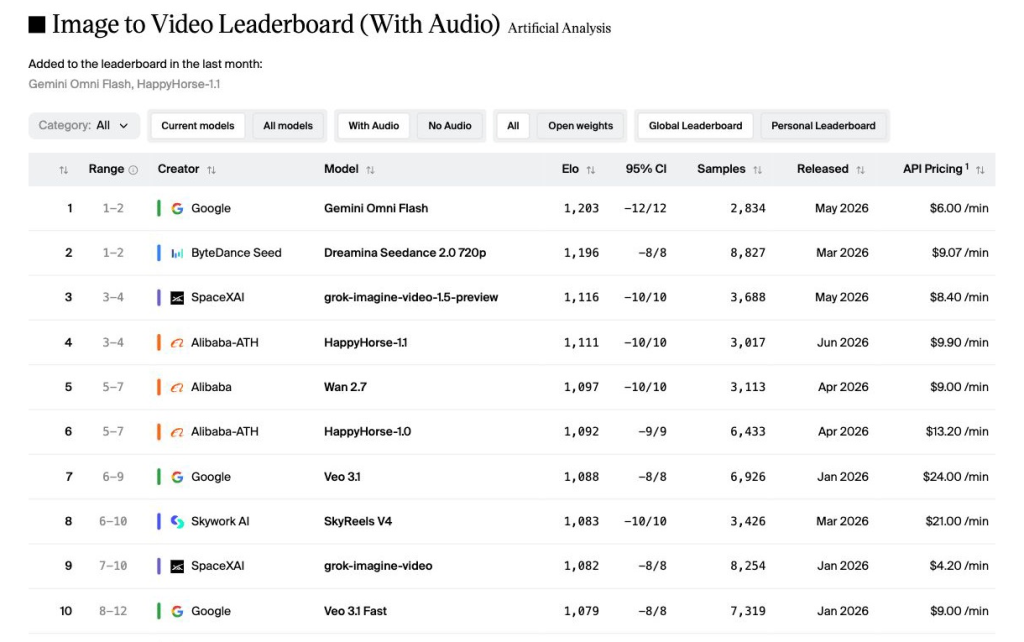
The gap is not subtle. Omni leads Veo 3.1 Fast by 150 Elo points in text-to-video and 124 points in image-to-video. Both Veo models have been judged on more samples, so Omni is not leading merely because it appeared in a tiny, early test. On the question Artificial Analysis asks – “Which result would a person rather watch?” – Omni Flash is the stronger model in this snapshot.
But that sentence needs its second half. A blind preference vote can reward a more attractive composition, cleaner motion, better color, or simply a more immediately pleasing interpretation. It does not tell us whether the model kept every requested object, whether a camera move followed the exact path, whether a brand can revise the clip efficiently, or whether the output can be delivered in 4K. That is why a leaderboard should set a hypothesis for a hands-on test, not replace one.
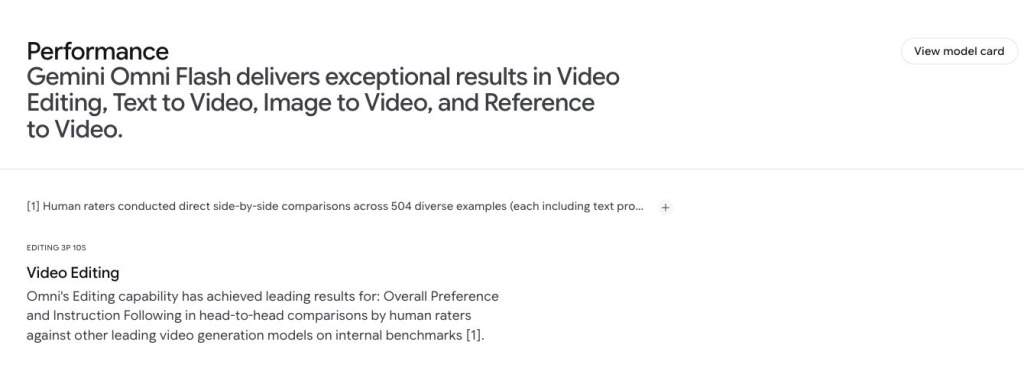
Google DeepMind also reports an internal video-editing evaluation in which Omni Flash led other major video models for overall preference and instruction following. Human raters compared outputs across 504 editing examples. That supports Google’s claim that conversational editing is a genuine strength, but it is a vendor-run study and the public text does not expose a directly comparable Veo 3.1 score. We therefore treat it as evidence about Omni’s editing focus, not as an independent verdict on the whole comparison.
Gemini Omni Flash vs Veo 3.1 Pricing
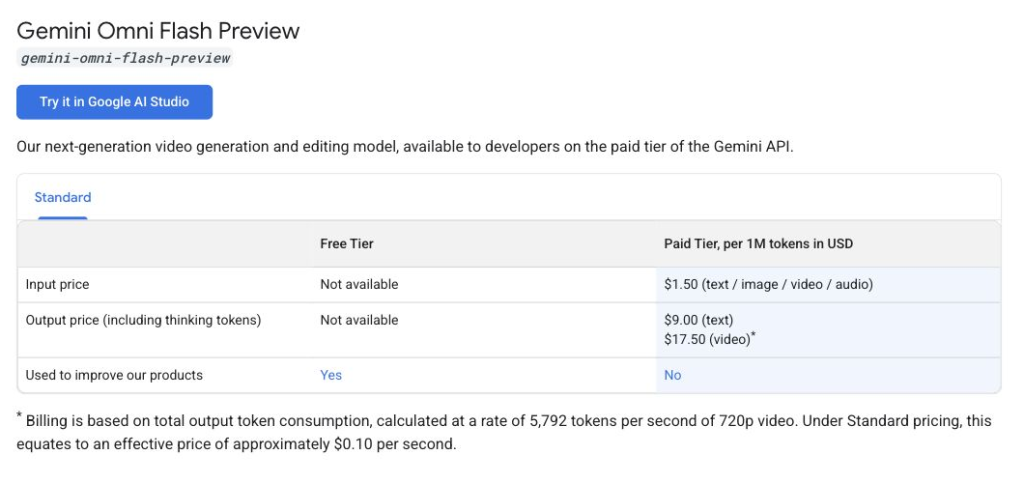
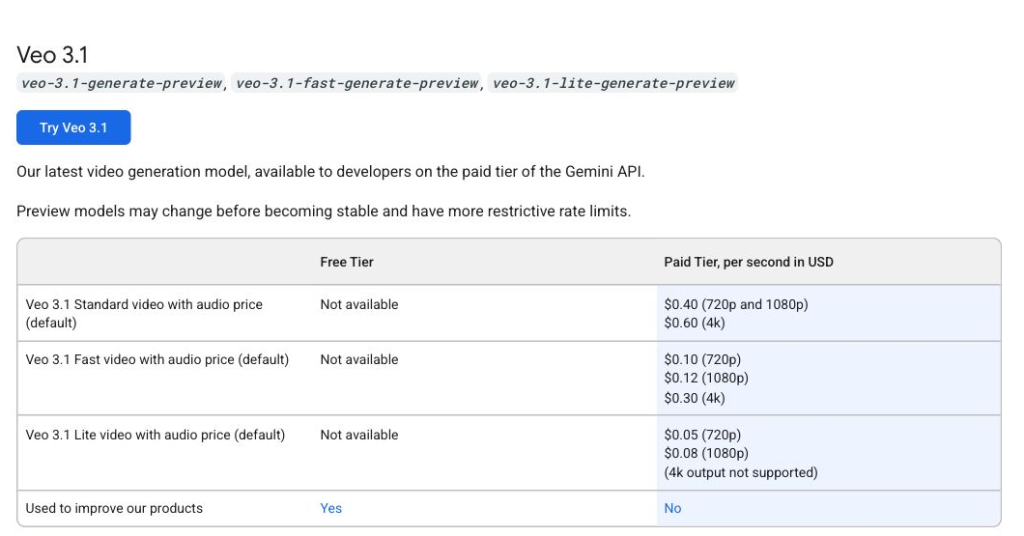
Google prices these models by the second of successful video output. The table below uses the rates shown on the Gemini Developer API pricing page and calculates the cost of the clip lengths relevant to this comparison. This is the only rate table in the article; later recommendations refer back to the practical trade-off rather than repeating it.
| Modelo | Official API rate | 6-second 720p clip | 8-second 720p clip | 8-second higher-resolution option |
|---|---|---|---|---|
| Gemini Omni Flash | $0,10/segundo | $0.60 | $0.80 | Not available above 720p |
| Veo 3.1 Estándar | $0.40/sec at 720p or 1080p; $0.60/sec at 4K | $2.40 | $3.20 | $3.20 at 1080p; $4.80 at 4K |
| Veo 3.1 Rápido | $0.10/sec at 720p; $0.12/sec at 1080p; $0.30/sec at 4K | $0.60 | $0.80 | $0.96 at 1080p; $2.40 at 4K |
| Veo 3.1 Lite | $0.05/sec at 720p; $0.08/sec at 1080p | $0.30 | $0.40 | $0.64 at 1080p; 4K is not supported |
The most important rate-card result is that Omni Flash and Veo 3.1 Fast both cost $0.10 per second at 720p. A delivered six-second file is therefore about $0.60. In our connected test route, however, Omni returned 6.02-second clips while Veo returned 8.00-second files despite the six-second request. The delivered-file estimates for this batch were consequently about $0.60 and $0.80 per clip. We treat Veo’s extra two seconds as a route-format mismatch, not proof that the underlying model cannot produce six-second video.
Veo Standard is a different decision. Its higher price buys access to the quality-focused tier and to resolutions Omni cannot produce. Calling Omni “one-quarter the price of Veo” is accurate only when the comparison is specifically against Veo Standard at 720p or 1080p. It is false when the comparison is against Veo Fast, and incomplete when Veo is being chosen for 4K output. The premium makes sense only if the extra resolution or Standard-tier rendering quality survives the rest of the production process.
List price also misses the cost that creators feel most: rerolls. A cheap clip that needs five attempts can be more expensive than a costly clip that works on the first try. Because our policy forbids quality rerolls and all 16 saved files were valid, this batch can report cost per delivered first-valid file. It cannot promise a universal cost per usable result, which depends on each project’s acceptance bar. Google notes that Veo generations blocked by audio-processing or safety issues are not charged, although platform-level billing can differ from the direct API.
For subscription and consumer-product access, see our separate guides to Veo 3.1 subscription pricing y whether Veo 3.1 is free. The figures above are developer API rates, not consumer-plan prices.
How We Designed the Hands-On Test
A fair comparison needs to remove the easiest escape routes. We used the same eight English prompts, targeted six seconds at 16:9 and 720p, requested natural audio where the scene called for it, and scored the first valid output. Provider-level failures could be retried to obtain a decodable file, but an unattractive valid result could not be replaced. That last rule matters because quality rerolls quietly turn a review into a highlight reel.
Same brief, first valid output, no quality rerolls
| Modelos | Gemini Omni Flash and Veo 3.1 Fast |
|---|---|
| Prompt policy | Identical prompt text for both models; no model-specific rewriting |
| Target output | 6 seconds, 16:9, 720p, with scene-appropriate audio |
| Run policy | First valid output scored; provider failures could be retried, but no valid clip received a quality reroll |
| Scoring | 0 to 5 editorial score, judged from the saved first valid output |
| Measured route speed | End-to-end waiting time in our connected workflow, not a universal model-only latency claim |
Alcance: The hands-on Veo result is for Veo 3.1 Fast through the tested route, not for every Veo tier or consumer surface.
The weighted score gives prompt adherence and visual quality 20% each; motion realism and temporal consistency 15% each; and audio match, speed and reliability, and practical usability 10% each. We keep those dimensions separate because a gorgeous clip can still fail the job. A product bottle that changes shape is not a usable ad. A poster with almost-correct text is not correct. Natural cafe ambience does not rescue a hand that melts into the cup.
All 16 saved files contain an AAC audio track. Audio scores are deliberately conservative: they use track presence, measured level, and frequency activity, not an invented claim that every requested sound cue was heard and identified perfectly.
Hands-On Results: Eight Prompts, Two Models
Each test isolates a different failure mode. The point is not to find eight pretty subjects. It is to see whether a model remains dependable when the prompt asks for people, exact objects, collisions, controlled camera paths, synchronized sound, readable text, or an unusual visual idea. Omni takes the overall test 5-3, but the individual clips show why the 0.115-point score gap is small.
Test 1: Human Motion and Face Consistency
Why this test matters
A rain-soaked tracking shot looks cinematic even when the model is making small mistakes. Watching the face, hands, umbrella, walking rhythm, and backward camera move together reveals whether the scene is coherent or merely atmospheric.
| Métrico | Gemini Omni Flash | Veo 3.1 |
|---|---|---|
| Output file | 6.02s · 1280×720 · 24 FPS · AAC | 8.00s · 1280×720 · 24 FPS · AAC |
| Connected-route time | 32.1s | 104.9s |
| Approx. delivered-file list cost | $0.60 | $0.80 |
| Prompt adherence | 4.4 | 3.5 |
| Visual quality | 4.3 | 4.6 |
| Motion realism | 4.1 | 3.3 |
| Temporal consistency | 3.8 | 4.6 |
| Audio match | 3.7 | 3.8 |
| Weighted total | 4.225/5 | 3.935/5 |
The woman walks rather than simply gliding, and the yellow coat, umbrella, rain, alley, and backward tracking move all survive the shot. The face and hair drift slightly.
The face, hood, umbrella, and alley are exceptionally stable and polished. The waist-up subject changes so little, however, that the requested walk reads more like a held pose.
Veredicto: Veo wins consistency, but Omni performs the actual motion brief more convincingly and returns the requested-length format.
View exact prompt
Create a 6-second cinematic video, 16:9, 720p. A young woman in a yellow raincoat walks through a rainy Tokyo alley at night, holding a transparent umbrella. Neon signs reflect on wet pavement. The camera slowly tracks backward in front of her. Natural body movement, consistent face and hands, realistic rain, no text overlays.
Test 2: Product Commercial Quality
Why this test matters
Product video is unforgiving. The glass bottle must keep the same silhouette while the camera travels around it, and moving highlights must describe the object rather than redraw it. A polished frame is not enough if the product mutates halfway through the orbit.
| Métrico | Gemini Omni Flash | Veo 3.1 Rápido |
|---|---|---|
| Output file | 6.02s · 1280×720 · 24 FPS · AAC | 8.00s · 1280×720 · 24 FPS · AAC |
| Connected-route time | 27.2s | 103.1s |
| Approx. delivered-file list cost | $0.60 | $0.80 |
| Prompt adherence | 3.6 | 3.8 |
| Visual quality | 4.2 | 4.6 |
| Motion realism | 3.7 | 4.2 |
| Temporal consistency | 2.8 | 3.7 |
| Audio match | 3.5 | 3.6 |
| Weighted total | 3.725/5 | 4.005/5 |
The golden light and marble reflections look premium, but the bottle body, neck, and cap change proportions and color as the camera moves.
The warm commercial treatment is stronger and the bottle is more stable. The cap and silhouette still drift, so this remains a concept clip rather than a product-accuracy pass.
Veredicto: Veo creates the more usable commercial mockup. Neither model fully locks the product’s identity through the orbit.
View exact prompt
Create a 6-second premium product commercial, 16:9, 720p. A clear glass perfume bottle stands on a black marble table. Soft golden light moves across the bottle. The camera makes a slow 180-degree orbit. The bottle shape must stay consistent. No readable brand text, no extra objects.
Test 3: Multi-Object Prompt Adherence
Why this test matters
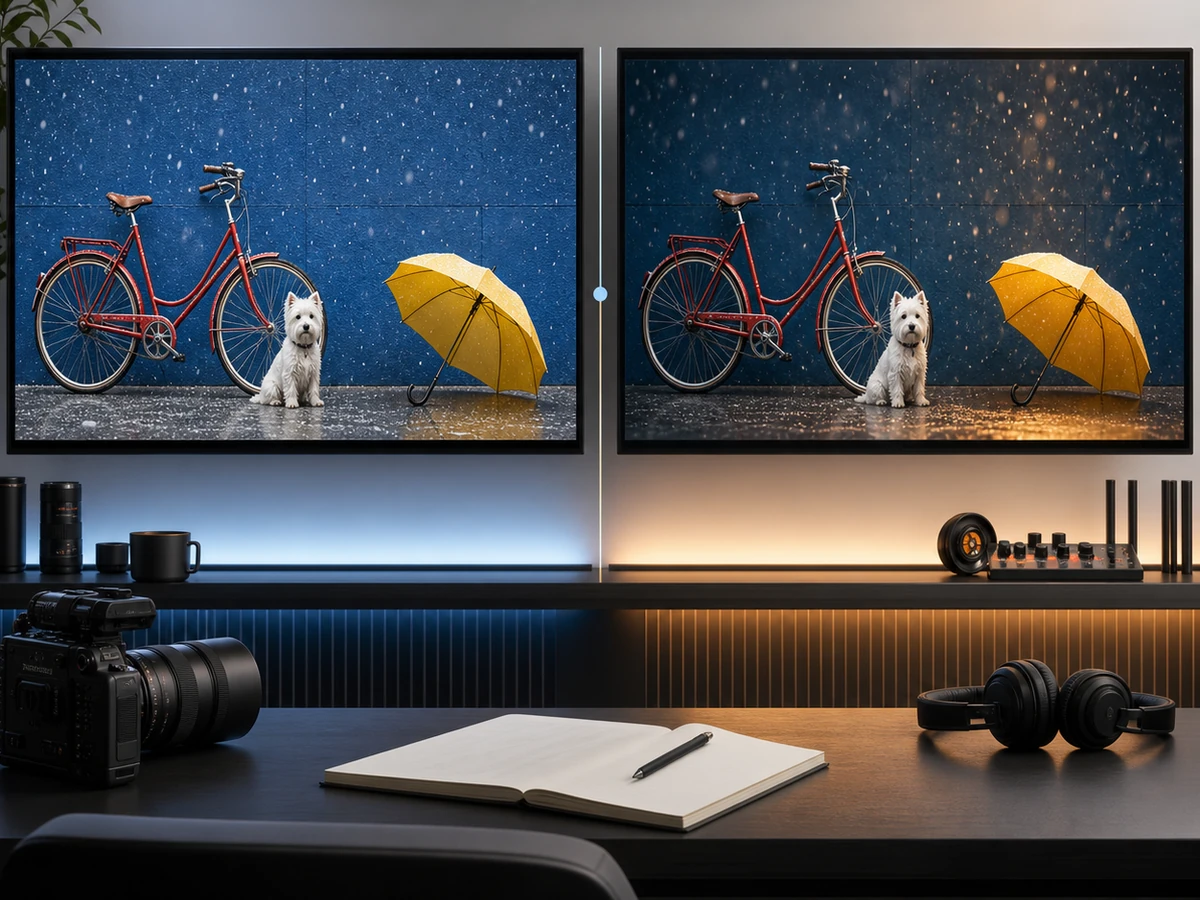
This is deliberately less glamorous. The model must keep a red bicycle, blue wall, white dog, and yellow umbrella visible while snow falls and the camera stays locked. A beautiful output that drops an object or moves the camera has failed the instruction.
| Métrico | Gemini Omni Flash | Veo 3.1 Rápido |
|---|---|---|
| Output file | 6.02s · 1280×720 · 24 FPS · AAC | 8.00s · 1280×720 · 24 FPS · AAC |
| Connected-route time | 27.8s | 91.5s |
| Approx. delivered-file list cost | $0.60 | $0.80 |
| Prompt adherence | 4.9 | 4.2 |
| Visual quality | 4.1 | 4.4 |
| Motion realism | 4.0 | 3.8 |
| Temporal consistency | 4.6 | 4.5 |
| Audio match | 3.0 | 3.2 |
| Weighted total | 4.360/5 | 4.065/5 |
The red bicycle, blue wall, white dog, open yellow umbrella, falling snow, and locked camera remain clear for the full clip.
Every required object and color appears, but the umbrella sits partly behind the bicycle and dog, making the requested separate object less clear.
Veredicto: Both outputs are usable. Omni turns the checklist into the cleaner visual answer and comes closest to literal prompt completion.
View exact prompt
Create a 6-second realistic video, 16:9, 720p. A red bicycle leans against a blue wall. A small white dog sits beside it. A yellow umbrella is open on the ground. Light snow falls. The camera is locked off with no zoom. Keep all three objects visible for the whole video.
Test 4: Physics and Collision Realism
Why this test matters
Physics errors often hide inside fluid motion. Here the sequence is inspectable: a marble rolls down a spiral track, touches three bells, and comes to rest. We look for believable gravity, contact at the right moment, stable object geometry, and a stop that feels caused rather than animated on cue.
| Métrico | Gemini Omni Flash | Veo 3.1 Rápido |
|---|---|---|
| Output file | 6.02s · 1280×720 · 24 FPS · AAC | 8.00s · 1280×720 · 24 FPS · AAC |
| Connected-route time | 32.0s | 87.5s |
| Approx. delivered-file list cost | $0.60 | $0.80 |
| Prompt adherence | 3.3 | 2.8 |
| Visual quality | 4.2 | 4.3 |
| Motion realism | 3.6 | 3.1 |
| Temporal consistency | 4.0 | 3.2 |
| Audio match | 3.3 | 3.4 |
| Weighted total | 3.810/5 | 3.365/5 |
The marble follows a continuous wooden path and three bells appear, but the three separate impacts and final stop are not clearly resolved.
The objects look polished, but the bells enter through a ghosted transition and the marble appears to pass beneath them without three readable collisions.
Veredicto: Omni is the less broken sequence, not a physics winner we would trust. Neither model reliably completes the three collisions and final stop.
View exact prompt
Create a 6-second close-up video, 16:9, 720p. A glass marble rolls down a wooden spiral track, bumps gently into three small metal bells, then stops at the bottom. Realistic gravity, believable collisions, stable object shape, shallow depth of field.
Test 5: Cinematic Camera Movement
Why this test matters
A smooth drone reveal tests whether the model understands a continuous three-dimensional space. Sudden cuts, rubbery canyon walls, or a river that appears without a plausible line of sight can create spectacle without genuine camera control.
| Métrico | Gemini Omni Flash | Veo 3.1 Rápido |
|---|---|---|
| Output file | 6.02s · 1280×720 · 24 FPS · AAC | 8.00s · 1280×720 · 24 FPS · AAC |
| Connected-route time | 28.2s | 91.5s |
| Approx. delivered-file list cost | $0.60 | $0.80 |
| Prompt adherence | 4.6 | 3.8 |
| Visual quality | 4.4 | 4.8 |
| Motion realism | 4.3 | 4.4 |
| Temporal consistency | 4.1 | 4.5 |
| Audio match | 3.8 | 3.8 |
| Weighted total | 4.390/5 | 4.235/5 |
The shot begins high, descends between the canyon walls, and reveals the river late. It follows the requested visual grammar closely, apart from a small transition artifact.
The image is richer and the camera move is smooth, but the river is visible from the opening frame, weakening the requested reveal.
Veredicto: Veo wins image polish; Omni wins the directed camera story and takes the test by a narrow margin.
View exact prompt
Create a 6-second cinematic drone shot, 16:9, 720p. The camera starts above a desert canyon, descends smoothly between two rock walls, then reveals a small river at sunset. Smooth camera movement, no sudden cuts, realistic scale, warm natural lighting.
Test 6: Native Audio and Scene Match
Why this test matters
Audio quality is not simply “sound present: yes.” The pour should line up with the milk stream, the cafe should feel quiet rather than empty, and the model must respect the instruction to avoid music. We also inspect the hand, cup, and foam because audio cannot compensate for a broken close-up.
| Métrico | Gemini Omni Flash | Veo 3.1 Rápido |
|---|---|---|
| Output file | 6.02s · 1280×720 · 24 FPS · AAC | 8.00s · 1280×720 · 24 FPS · AAC |
| Connected-route time | 27.8s | 106.7s |
| Approx. delivered-file list cost | $0.60 | $0.80 |
| Prompt adherence | 3.6 | 4.0 |
| Visual quality | 4.6 | 4.5 |
| Motion realism | 4.5 | 4.5 |
| Temporal consistency | 4.5 | 4.6 |
| Audio match | 2.3 | 4.0 |
| Weighted total | 4.120/5 | 4.265/5 |
The pour and evolving latte pattern are visually excellent. The saved audio track is extremely quiet, making it less useful without post-processing.
The pitcher, stream, cup, and finished foam pattern remain stable across the longer take. Its audio track has substantially more level and dynamic range.
Veredicto: The visual race is close, but Veo better satisfies this audio-first brief. The judgment is based on track presence, measured level, and frequency activity rather than an unsupported claim about every individual sound cue.
View exact prompt
Create a 6-second video with natural audio, 16:9, 720p. A barista pours steamed milk into a cup of coffee in a quiet cafe. The sound should include soft milk pouring, light cafe ambience, and no music. Close-up shot, realistic foam movement.
Test 7: Text Rendering Accuracy
Why this test matters
The requested phrase is short enough that there is nowhere to hide. The model must render “AI VIDEO TEST” exactly, keep it readable during a push-in, and preserve the letters over time while a person passes without blocking the poster.
| Métrico | Gemini Omni Flash | Veo 3.1 Rápido |
|---|---|---|
| Output file | 6.02s · 1280×720 · 24 FPS · AAC | 8.00s · 1280×720 · 24 FPS · AAC |
| Connected-route time | 28.3s | 100.9s |
| Approx. delivered-file list cost | $0.60 | $0.80 |
| Prompt adherence | 4.5 | 3.6 |
| Visual quality | 4.2 | 4.3 |
| Motion realism | 4.0 | 3.9 |
| Temporal consistency | 4.7 | 4.3 |
| Audio match | 3.0 | 3.0 |
| Weighted total | 4.315/5 | 3.860/5 |
“AI VIDEO TEST” stays exact and readable during the push-in. The passerby overlaps a small part of the poster, so the no-blocking instruction is not perfect.
The phrase is generally stable, but the person is much larger in frame and obscures more of the poster during the pass.
Veredicto: Omni preserves the text and the intended composition more dependably, even though neither output obeys the no-blocking clause perfectly.
View exact prompt
Create a 6-second video, 16:9, 720p. A clean white poster on a studio wall displays exactly this text: “AI VIDEO TEST”. A person walks past the poster without blocking it. The camera slowly pushes in. Keep the text readable and unchanged.
Test 8: Creative Macro Realism
Why this test matters
A tiny robot chef combines an imaginative subject with a realistic photographic style. The result must avoid drifting into cartoon aesthetics while keeping the robot body stable, the cake-making action readable, and delicate effects such as steam and flour particles physically convincing.
| Métrico | Gemini Omni Flash | Veo 3.1 Rápido |
|---|---|---|
| Output file | 6.02s · 1280×720 · 24 FPS · AAC | 8.00s · 1280×720 · 24 FPS · AAC |
| Connected-route time | 30.8s | 93.0s |
| Approx. delivered-file list cost | $0.60 | $0.80 |
| Prompt adherence | 3.9 | 4.4 |
| Visual quality | 4.5 | 4.8 |
| Motion realism | 4.0 | 4.4 |
| Temporal consistency | 3.4 | 4.5 |
| Audio match | 3.5 | 3.5 |
| Weighted total | 4.050/5 | 4.345/5 |
The robot, cake, steam, and macro look are attractive, but several hard shot changes make the robot’s body less consistent between views.
The skeletal chef stays recognizable while the cake, steam, flour, utensils, and miniature scale form a more coherent production.
Veredicto: Veo delivers the stronger miniature story and the more stable hero subject.
View exact prompt
Create a 6-second cinematic video, 16:9, 720p. A tiny robot chef prepares a strawberry cake in a miniature kitchen. The style is realistic macro photography, not cartoon. Steam rises from a small pot, flour particles float in the air, and the robot’s metal body stays consistent.
Omni’s adherence and speed outweigh Veo’s finish by 0.115 points
Five task wins; strongest in prompt adherence and route speed.
Three task wins; strongest in visual finish, consistency, and audio.
| Average dimension score | Omni Flash | Veo 3.1 Rápido | Líder |
|---|---|---|---|
| Prompt adherence | 4.100 | 3.763 | Omni |
| Visual quality | 4.313 | 4.538 | Veo |
| Motion realism | 4.025 | 3.950 | Omni |
| Temporal consistency | 3.988 | 4.238 | Veo |
| Audio match | 3.263 | 3.538 | Veo |
| Velocidad y fiabilidad | 5.000 | 3.500 | Omni |
| Practical usability | 4.138 | 4.175 | Veo, near tie |
| Weighted total | 4.124 | 4.009 | Omni |
How to read this: The overall score rewards getting the requested shot, not just producing the prettiest frame. Veo’s visual advantage is real; Omni’s instruction-following and turnaround advantage was slightly more valuable under this rubric.
Same 720p rate, different returned duration and waiting time
| Measured batch result | Gemini Omni Flash | Veo 3.1 Rápido |
|---|---|---|
| Official 720p rate | $0,10/segundo | $0,10/segundo |
| Average end-to-end route time | 29.29s | 97.40s |
| Average returned duration | 6.02s | 8.00s |
| Approx. list cost per delivered file | $0.60 | $0.80 |
| Approx. eight-file batch cost | $4.80 | $6.40 |
| Saved, decodable outputs | 8/8 | 8/8 |
Boundary: These times measure our connected workflow, not model-only infrastructure. The Veo route returned eight-second files for six-second requests; that raised the delivered-file estimate but should not be generalized into a claim that Veo cannot produce six-second output.
The Bigger Difference: Iteration vs Production Control
The benchmark battle can make this comparison look like a race for the prettier first render. In practice, the models diverge most sharply after that first render exists.
Omni Flash is built around changing your mind
Through Google’s Interactions API, an Omni session remembers the previous generated video. You can ask to change the lighting, remove an object, swap a background, or alter the style without re-uploading and re-describing the whole scene. Google says developers can chain up to three sequential edits. That turns the prompt from a one-shot production brief into the beginning of a conversation.
The trade-off is that Omni’s present API ceiling is firm. It outputs 720p, cannot extend a scene, cannot interpolate between a specified first and last frame, and does not accept uploaded audio references. Its value comes from controllable iteration inside a short clip, not from covering every stage of a long-form video pipeline.
Veo 3.1 is built around defining and extending the shot
Veo gives you controls that matter when the final delivery format is already clear. You can guide a subject with reference images, specify a starting and ending frame, choose higher-resolution output, and extend a Veo-generated clip in seven-second steps. Google allows up to 20 extensions, although extension output is limited to 720p and each continuation adds another opportunity for identity or motion to drift.
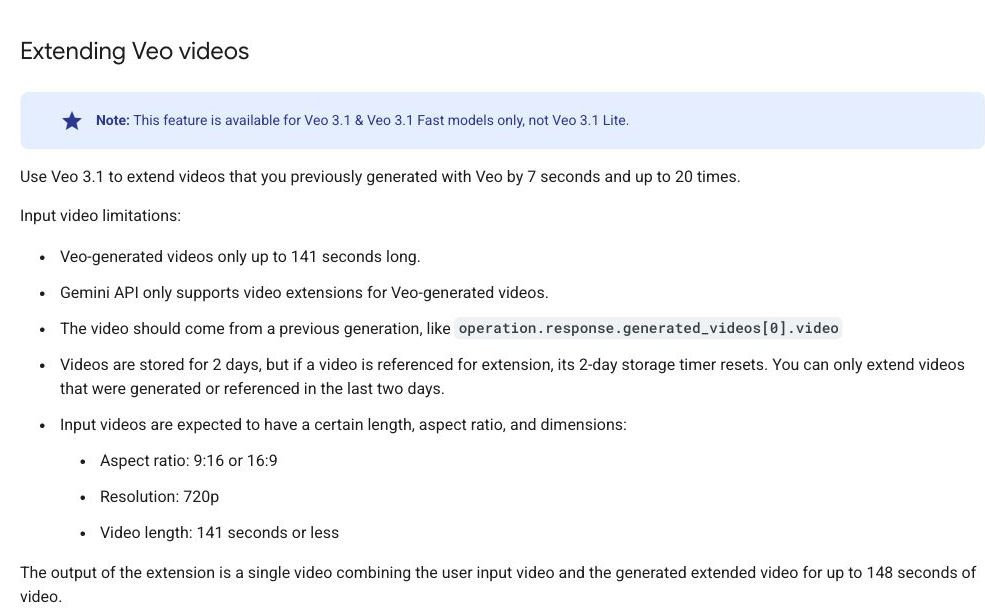
This is why “Which model is better?” has two legitimate answers. Omni is easier to recommend when the work is exploratory and revision-heavy. Veo becomes more compelling when the brief requires a defined endpoint: an 8-second 4K shot, a controlled transition between frames, or a sequence that must continue beyond the original clip. You are choosing a creative loop, not only a rendering engine.
For a deeper look at native sound, see how Veo 3.1 handles audio. For extension workflows, our guide to Veo 3.1 video length explains how short generations become longer sequences.
Which Model Should You Use?
For a general first choice, our evidence favors Gemini Omni Flash. It won the matched test, leads both current Artificial Analysis leaderboards cited above, and reached a valid output about three times faster through our route. That recommendation changes when the brief values stable cinematic finish, stronger delivered audio, 4K, frame control, or extension more than exact short-form execution.
Choose Gemini Omni Flash when iteration is the product
Omni is the stronger fit for rapid concepts, social clips, constrained prompts, readable text, reference-driven transformations, and teams that expect the brief to change after they see the first result. It won five of our eight tasks and averaged 4.100/5 for prompt adherence. Its public preference lead gives that workflow a strong starting point: you are not accepting obviously weaker first-generation quality just to gain editing convenience.
Choose Veo 3.1 Fast when finish matters more than turnaround
Fast is the fairest direct alternative to Omni at 720p. It won the product-commercial, cafe-audio, and creative-macro tests, and it led the visual-quality average 4.538 to 4.313. Choose it when a stable hero subject and a polished first impression matter more than literal timing or the quickest connected-route response. It also keeps you inside a family that can move to higher resolutions and more structured shot controls when the project calls for them.
Choose Veo 3.1 Standard when the output ceiling justifies the premium
Standard is not the sensible default for every short clip. It is the tier to consider when the shot is important enough that maximum rendering quality and 4K delivery matter more than iteration cost. That is a production decision, not a benchmark decision: a 4K option has value only if the final channel, edit, and audience can preserve the difference.
Use both when creation and revision are separate stages
A mixed workflow can be more practical than brand loyalty. Veo can define a high-resolution or frame-controlled master shot; Omni can handle rapid short-form generation and conversational changes to supported uploaded videos. The boundary is regional and technical – uploaded-video editing is unavailable through the Omni API in the EEA, Switzerland, and the UK – so this should be treated as a workflow to validate, not a promise that every surface exposes every feature.
Where GlobalGPT fits into the workflow
GlobalGPT is most useful when the work begins before the final video prompt exists. It keeps planning, prompt development, generation, and model comparison in one workspace instead of splitting the process across several apps.
- Develop the brief: Use models such as GPT-5.6 Sol, Claude Opus 4.8, or Gemini 3.1 Pro to turn a rough concept into clear requirements for the subject, camera, motion, style, and sound.
- Create and compare drafts: Use Gemini Omni Flash for fast, instruction-sensitive generations, or try Sora 2, Kling 3.0, and Seedance 2.0 when a different motion style or cost profile fits the job better.
- Move to a polished pass: Use Veo 3.1 when cinematic finish and subject stability matter more than the fastest turnaround.
With annual billing, Pro is $10,80/mes and covers nearly all video models except Veo 3.1. Unlimited is $25/mes and adds Veo 3.1 access, making it the better fit when you want the full comparison workflow. The pricing page lists the complete model access for each plan.
For projects that depend on 4K, extension, or frame-specific controls, verify those settings in the relevant official API workflow before production.
Limitations of This Comparison
- We test Veo 3.1 Fast, not Veo 3.1 Standard or Lite. Official family features are labeled separately from hands-on evidence.
- One output is realistic but not statistically exhaustive. The no-reroll rule captures the experience of paying for a first attempt, while another run could look different.
- End-to-end latency includes the connected route. It should not be read as a universal promise about Google’s infrastructure or every provider.
- The Veo route returned eight-second files for six-second requests. We scored and priced the files that arrived, but we do not treat this connector mismatch as proof that Veo itself lacks six-second output.
- Audio review is partly instrument-based. We verified AAC tracks, loudness, peaks, and frequency activity; we do not claim that we identified every requested cue by ear.
- The shared test is text-to-video at 720p. Image-to-video, conversational editing, first/last-frame generation, extension, and 4K remain official-feature comparisons unless separately tested.
- Public leaderboards move. Artificial Analysis results are a dated snapshot, and Google can also revise preview models before stable release.
Preguntas frecuentes
Is Gemini Omni Flash better than Veo 3.1?
Gemini Omni Flash is the better default for instruction-sensitive 720p video in our evidence. It beat Veo 3.1 Fast 5-3 and 4.124/5 to 4.009/5 in our first-output test, and it leads the current Artificial Analysis text-to-video and image-to-video leaderboards with audio. Veo remains stronger for cinematic stability and workflow range, including 1080p, 4K, first-and-last-frame generation, and extension.
Is Veo 3.1 Fast the same as Veo 3.1?
No. Veo 3.1 Fast is the speed-focused variant in the same family. It supports native audio and many of the family’s core generation controls, but its pricing and optimization target differ from Standard. Hands-on results for Fast should not be presented as a direct test of Standard’s maximum-quality mode.
Which is cheaper, Gemini Omni Flash or Veo 3.1?
At 720p, Omni Flash and Veo 3.1 Fast have the same official API rate of $0.10 per second. In our batch, Omni delivered roughly six-second files for about $0.60 each, while the tested Veo route returned eight-second files for about $0.80 each. Veo Lite is cheaper; Veo Standard and Veo’s higher-resolution modes cost more.
Does Gemini Omni Flash support 4K video?
No. Google’s current model page lists Omni Flash output as 720p at 24 FPS. Veo 3.1 and Veo 3.1 Fast can generate 4K in supported eight-second modes, while Veo 3.1 Lite tops out at 1080p.
Can Gemini Omni Flash edit existing videos?
Yes. Omni Flash supports stateful conversational editing and can edit uploaded videos through the Files API. Uploaded-video editing is not available in the EEA, Switzerland, or the UK, and the current API does not support voice editing, video extension, or uploaded audio references.
Do Gemini Omni Flash and Veo 3.1 generate audio?
Yes. Both generate an audio track with video. In our cafe test, Veo’s saved track had a substantially stronger level and wider dynamics, while Omni’s was extremely quiet. Prompting still matters: describe dialogue, ambience, music, or unwanted sound explicitly. Google says Veo outputs blocked by audio processing or safety checks are not charged.
Is Veo 3.1 available for free?
The Gemini Developer API pricing table does not offer Veo 3.1 on its free tier. Access through Google AI Studio, Gemini, Flow, subscriptions, or third-party platforms is a separate question because each surface has its own limits and plan rules.
Can I use Veo 3.1 videos commercially?
Commercial use depends on the terms of the service through which the video was generated, the rights in your prompt and reference assets, and local law. Review the applicable terms before using a clip in paid advertising or client work; our Veo 3.1 commercial-use guide covers that question in detail.
Veredicto final
Gemini Omni Flash is our overall winner for this comparison. It won five of eight first-output tasks, scored 4.124/5 to Veo 3.1 Fast’s 4.009/5, followed constrained prompts more closely, and was much faster through the tested route. The margin is too small to call Veo obsolete or inferior across the board: Veo produced the better product commercial, the stronger audio result, and the most coherent macro scene.
The practical decision is clean. Use Omni when you need a faithful short clip quickly and expect to revise it conversationally. Use Veo when cinematic finish, subject stability, 4K delivery, first-and-last-frame control, or extension is worth more than exact six-second delivery and fast iteration. Omni wins the round we actually ran; Veo still owns the broader production toolbox.
Try the workflow with your own prompt: Open GlobalGPT, outline the concept with a chat model, turn it into a tighter video prompt, then run the brief through Gemini Omni Flash, Veo 3.1, or another video model that fits the scene. If you are deciding between plans, the pricing page lists the exact model choices available in each package.