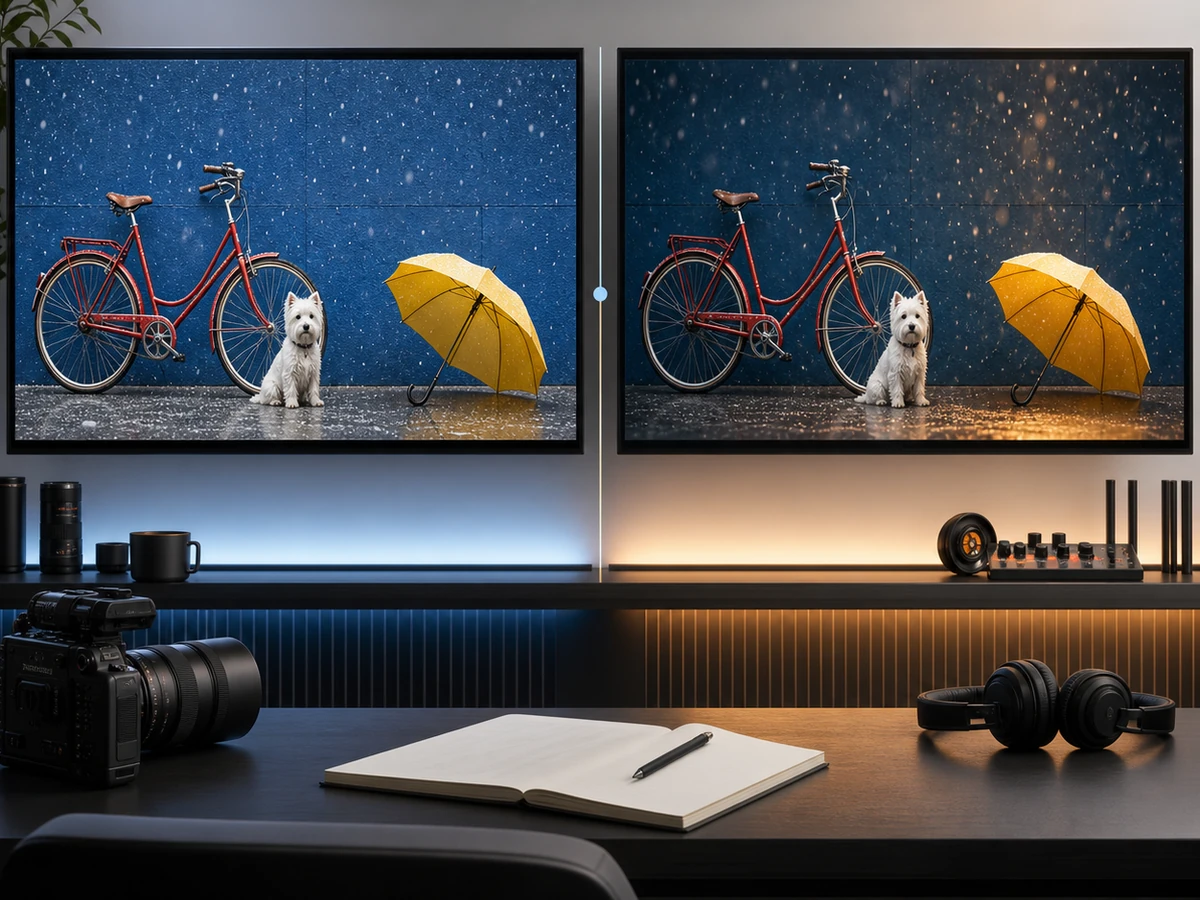
Seedream 5.0 Pro looks impressive in ByteDance’s demos. So why can your own results feel less polished, less accurate, or harder to control? The prompt is often the missing piece.
Below are four copyable templates for the jobs Seedream handles best: design briefs, dense infographics, image editing, and multilingual graphics. Each one is based on a real test, including the parts that failed.
Índice
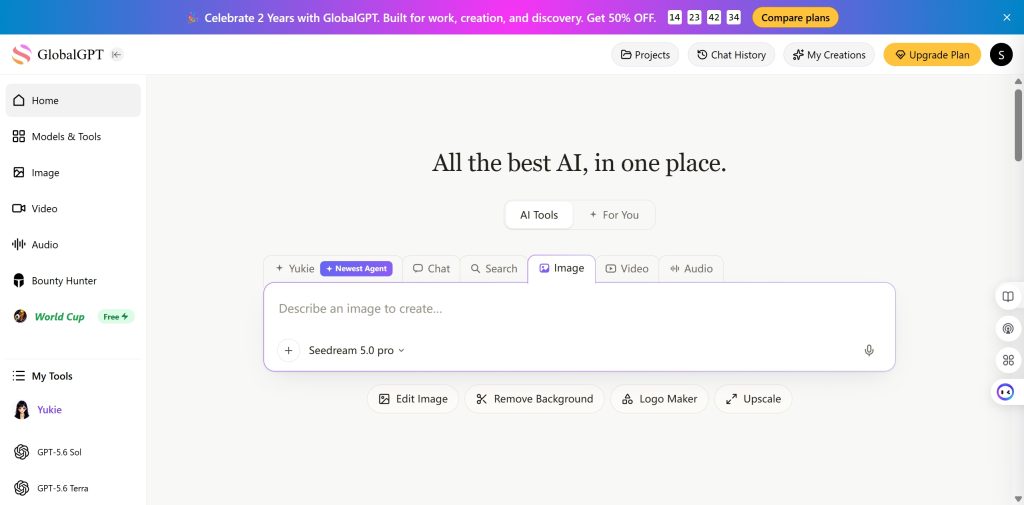
If Seedream still does not fit the image you need, GLBGPT gives you one place to try other image models, including GPT Image 2 and Nano Banana Pro, without rebuilding the prompt from scratch. Its image downloads are also watermark-free, which makes them easier to reuse as clean reference inputs.
Respuesta rápida
Goal + Source Material + Canvas/Layout + Exact Text/Data + Style System + Constraints + Preservation Rules
| Prompt part | What to specify |
|---|---|
| Design job | Landing-page hero, research poster, product edit, menu, or label |
| Source material | Brief, dataset, sketch, photo, or reference images |
| Diseño | Ratio, zones, hierarchy, reading order, and negative space |
| Exact content | Copy, prices, dates, labels, and chart values |
| Preservation rules | What must keep its shape, position, lighting, order, or wording |
| Exclusions | What the model must not invent, repeat, translate, or redesign |
The last two parts matter most in editing tasks. Seedream is willing to finish the design for you, including details you never requested.
What Makes Seedream 5.0 Pro Different?
Seedream 5.0 Pro is ByteDance Seed’s image generation and editing model for work that has a design problem to solve. Its official examples emphasize information visualization, interactive editing, photographic quality, and multilingual graphics.
- It can turn structured notes into a designed poster or infographic.
- It can read sketches, guide boxes, and regional editing instructions.
- It can change one material or object while preserving the rest of the image.
- It can render layouts that mix English with Chinese, Japanese, and other languages.
That does not mean a long prompt is always better. Give the model the decisions that affect usability; leave decorative choices open.
Seedream 5.0 Pro Prompt Templates
These four templates map to the model’s main design strengths. Start with the task closest to yours, then replace the example content without removing its layout, accuracy, or preservation rules.
A General Design Prompt Template
A marketer rarely needs “a cool speaker image.” The actual job may be a website hero with fixed copy, product placement, benefits, and room for navigation.
| Realistic first attempt | What is missing |
|---|---|
| Use this brief to make a bold landing-page hero for the TrailTone Mini speaker. | Seedream still has to guess the layout, copy hierarchy, CTA, product position, and what belongs in the empty space. |
Create [asset type] for [product/brand/campaign].
Use [source material or brief] as the main reference.
Canvas/layout: [ratio, zones, hierarchy, reading order].
Exact visible text: [headline, subheadline, CTA, labels].
Only allowed text: [complete list of every word or number permitted in the image].
Empty zones: [areas that must remain blank].
Style system: [colors, typography direction, visual mood, materials].
Constraints: [readability, spacing, brand rules, no extra text, no added elements].
Output goal: [where the design will be used and what it should help the viewer do].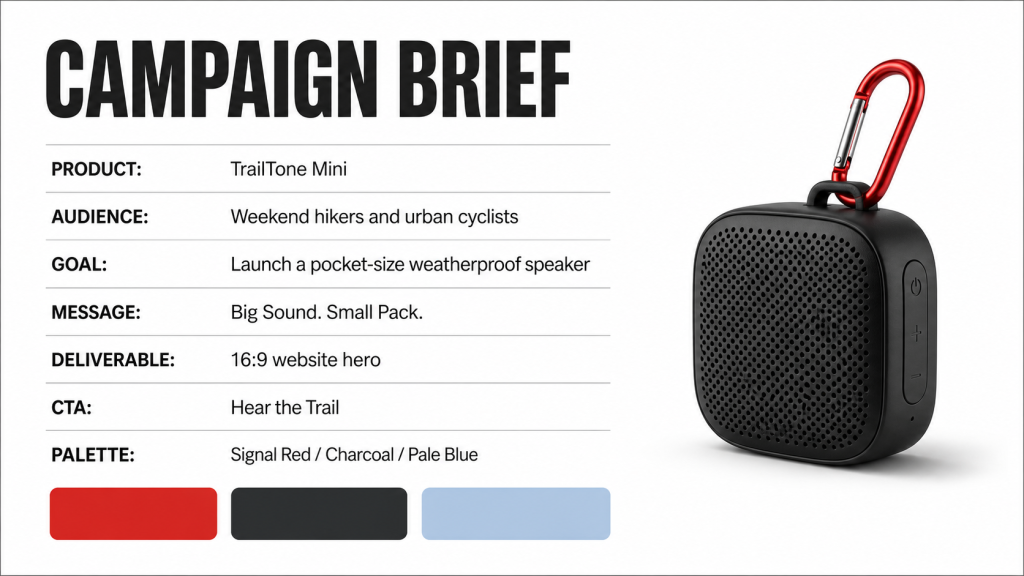
After a few rounds, the reliable fix was to define every permitted text element and state which areas must remain empty. Here is the final prompt:
Create a finished 16:9 landing-page hero for the TrailTone Mini outdoor speaker. This is hero artwork only, not a screenshot of a website. Do not create a navigation bar, browser frame, header, menu, search icon, account icon, or interface chrome.

Use a split composition: the left 42% is a pale-blue text area and the right 58% shows a compact charcoal speaker with a red clip attached to a dark hiking backpack beside a rocky mountain trail.

The only visible text allowed anywhere in the image is: "Big Sound. Small Pack."; "Weatherproof"; "12-Hour Battery"; "Pocket Size"; "Hear the Trail". Keep the entire top edge empty. Do not add filler text, logos, prices, ratings, claims, or any other letters or numbers.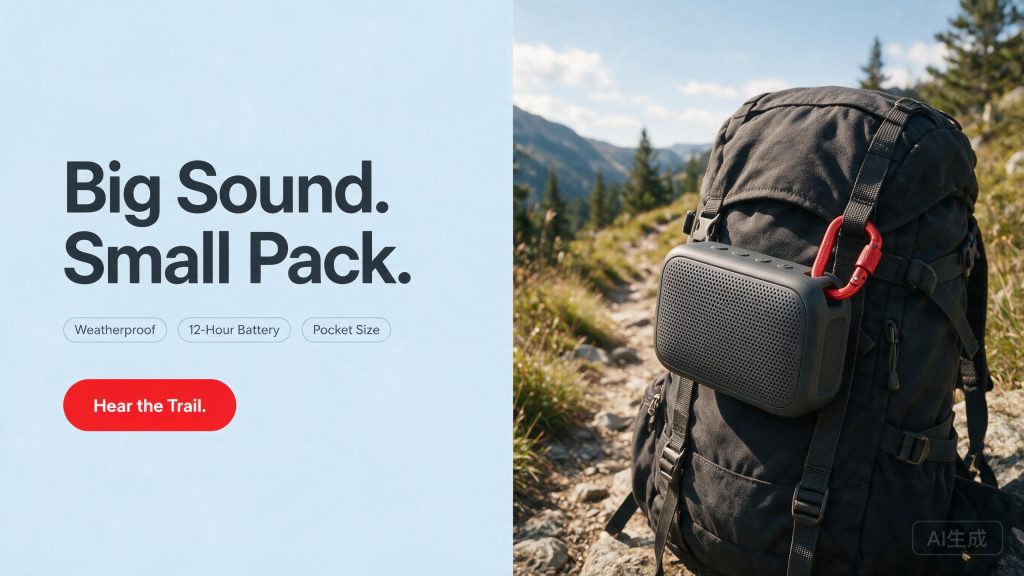
A High-Density Infographic Template
Start this task with text and data, not a finished poster. The point is to test whether Seedream can build the information hierarchy itself.
Create a [poster/infographic/panel] from the following text and data.
Main title: [exact title].
Canvas/layout: [vertical/horizontal, columns, modules, reading order].
Sections to include: [section names].
Data/visual evidence: [charts, map, timeline, table, diagram, callouts].
Text budget: [word limit or density rule].
Accuracy rule: [stay faithful to source, do not invent statistics].
Style/readability: [scientific/editorial/brand style, contrast, viewing distance].
After several rounds, two issues kept appearing: repeated statistics could drift, and open-ended panels invited invented methodology. The final prompt shows each number once and supplies the exact copy allowed in every panel.
Final prompt:
Create a vertical 3:4 academic conference poster for urban-planning researchers.

Use only the following visible copy and data:
- Title: "Urban Heat Exposure and Tree Canopy Coverage"
- Research question: "How does tree canopy coverage relate to midday surface temperature?"
- Method: "Compare average midday surface temperature across 42 urban neighborhoods grouped as low, medium, or high canopy."
- Chart values: Low canopy 36.2 C; Medium canopy 33.1 C; High canopy 31.4 C
- Finding 1: "Low-canopy neighborhoods were 4.8 C warmer than high-canopy neighborhoods at midday."
- Finding 2: "A 10% canopy increase was associated with a 1.2 C lower surface temperature."
- Finding 3: "Priority locations: schools, bus stops, and dense housing blocks."
- Implication: "Prioritize tree planting in heat-exposed public spaces and residential areas."

Use one title band, one question panel, one method strip, one three-bar chart, three finding cards, and one implications panel. Use icons, not a map. Show each statistic once. Do not add thresholds, satellite methods, GIS, citations, institutions, slogans, footer copy, or recommendations.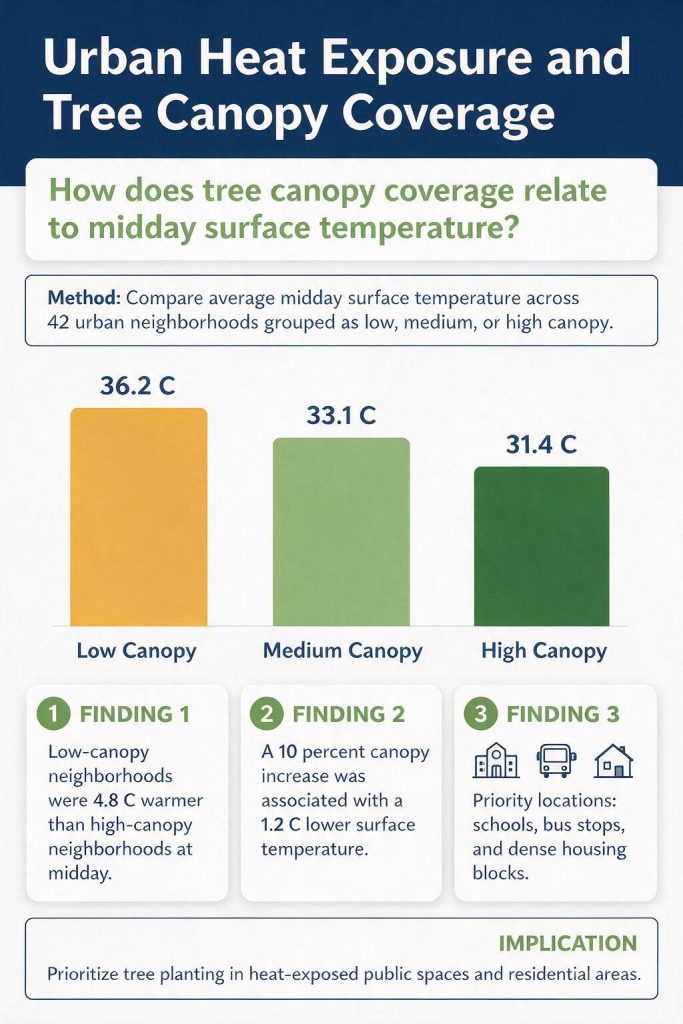
| Infographic task | Add to the template |
|---|---|
| Bar chart | Exact categories, values, units, and one chart only |
| Timeline | Exact dates, milestones, phase names, and reading direction |
| Comparison matrix | Fixed columns, fixed rows, and wording that cannot be expanded |
| Dashboard | KPI definitions, chart types, date range, and no forecasts unless supplied |
An Interactive Editing Prompt Template
For editing, describe the target region first. Then list what must stay unchanged.
| Tarea de edición | What the prompt must define |
|---|---|
| Sketch-to-image | What the lines, boxes, arrows, and labels mean |
| Local object or label edit | The exact edit region and protected areas |
| Color or material replacement | The target surface, new finish, and preserved geometry |
| Multi-image fusion | One role for each uploaded image, plus scale and lighting rules |
| Layer separation | The subject, text, background, and decorations to isolate; confirm the chosen product can export separate layers |
Edit only [specific region/object/text area] in the uploaded image.
Change it to [new content/design/detail].
Exact visible text, if any: [text].
Preserve: [objects, lighting, camera angle, shadows, background, identity, materials].
Blend rule: [match perspective, curvature, lighting, texture, depth of field].
Do not change: [explicit no-change list].
Sketch-to-image:
Use the uploaded packaging sketch as a construction guide. Turn the bottle and carton into a photorealistic botanical sparkling-water set. Read black lines as object boundaries and blue boxes as placement instructions. Replace the handwritten logo instruction with the exact brand name "VERDANT". Add the carton window and leaf pattern only where marked. Keep the bottle proportions, carton structure, cap shape, and side-by-side composition. Remove every sketch line, arrow, guide box, and construction label. Add no text other than "VERDANT".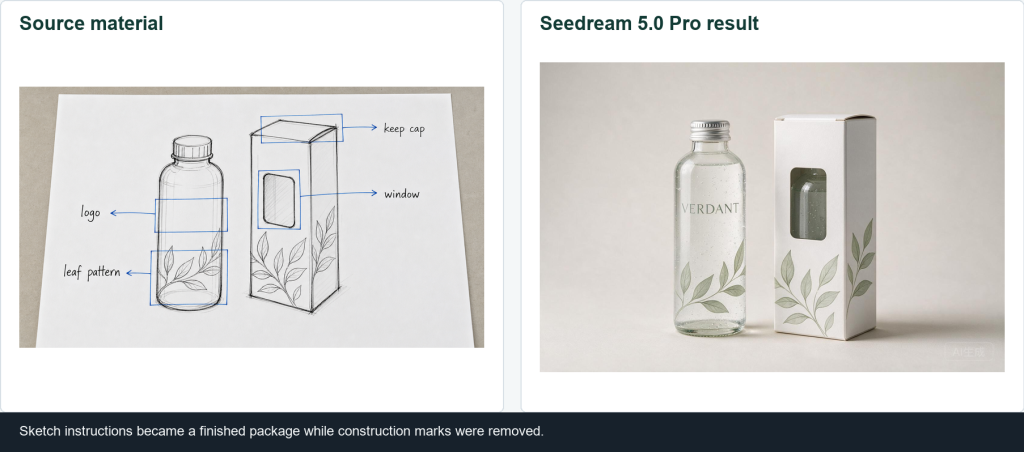
Local color and material edit:
Edit only the orange heel panel on the uploaded sneaker. Change it to saturated cobalt-blue suede with a fine matte nap. Keep the white upper, cream sole, gray laces, stitching, panel boundaries, shoe shape, camera angle, background, lighting, crop, and shadow unchanged. Do not recolor any other panel or add logos or text.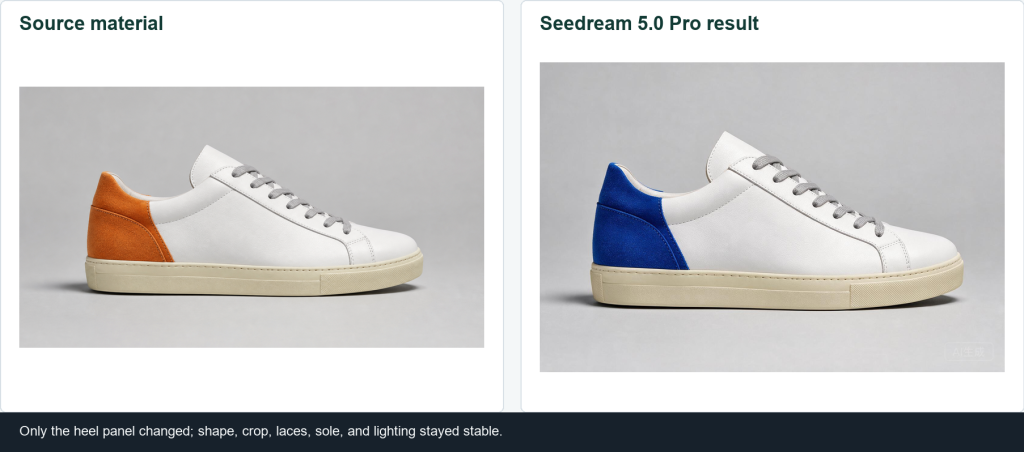
Material replacement:
Replace only the red molded-plastic seat and backrest with deep forest-green velvet upholstery. Keep the chair silhouette, seat thickness, chrome legs, floor, wall, camera position, crop, lighting direction, and cast shadow unchanged. Add realistic velvet pile and subtle edge seams. Do not add cushions, buttons, piping, props, or text.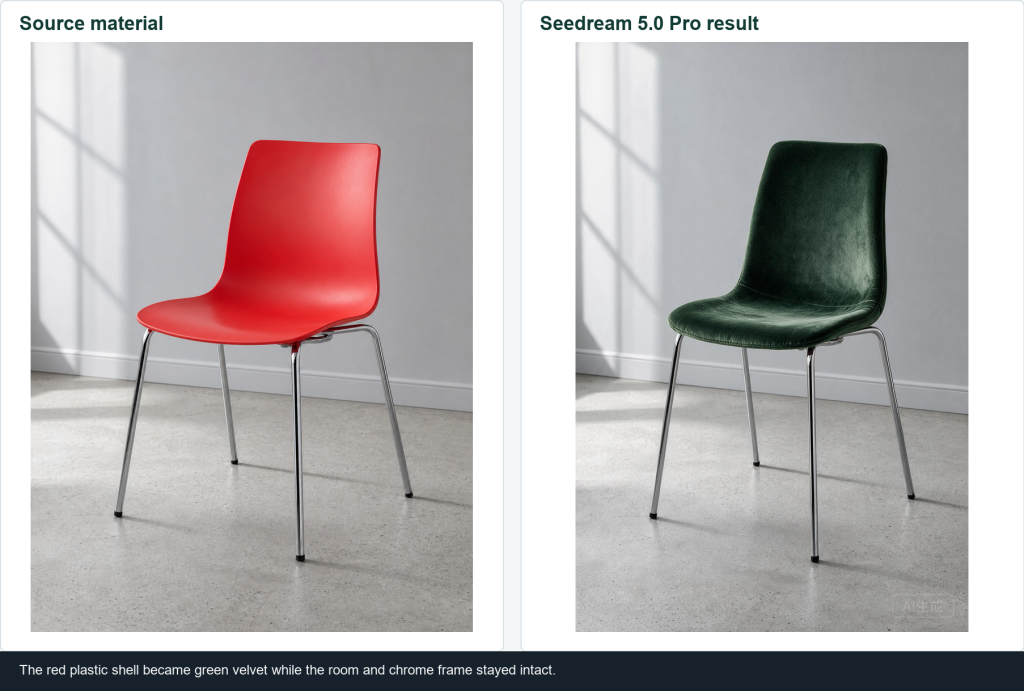
Multi-image fusion: assign one role to each upload. Separate files make the source-to-output relationship easier to control than a single collage.
| Cargar | Assigned role | What Seedream should use |
|---|---|---|
| Imagen 1 | Asunto | Cyclist identity, clothing, and bicycle design |
| Imagen 2 | Accessory | Coral helmet design |
| Image 3 | Medio ambiente | Rainy street, reflections, dusk light, and atmosphere |
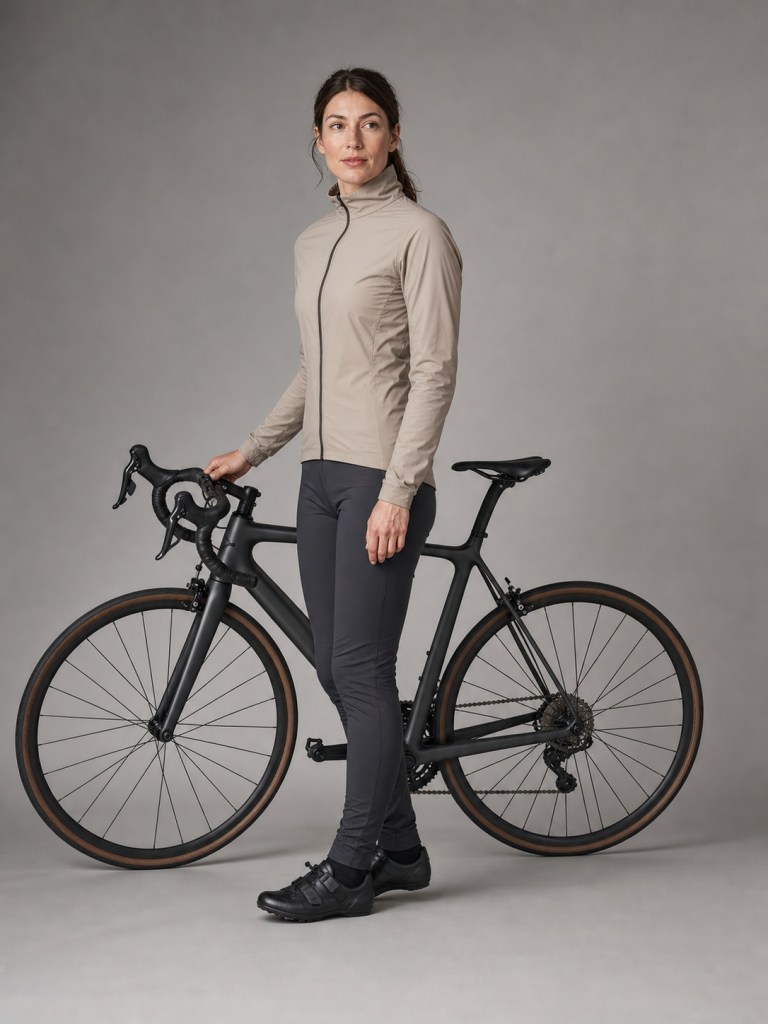
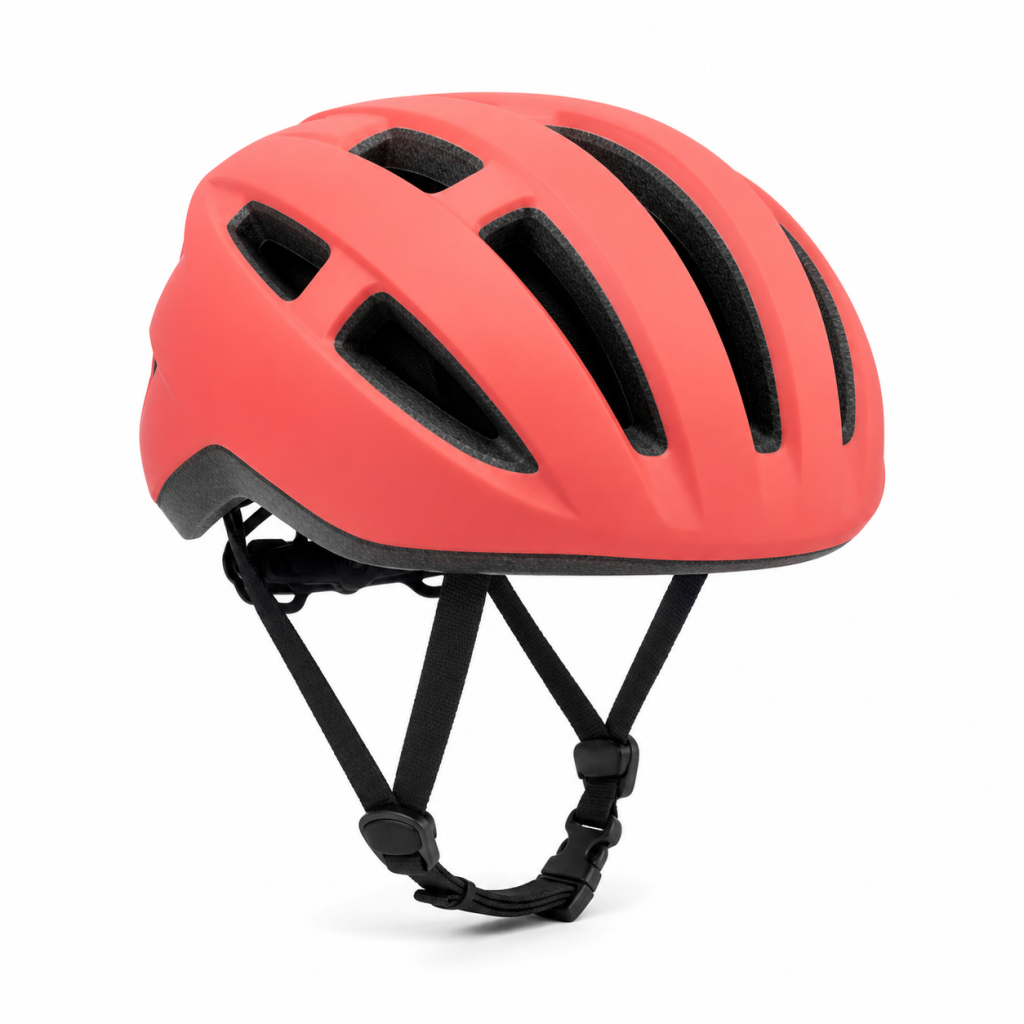
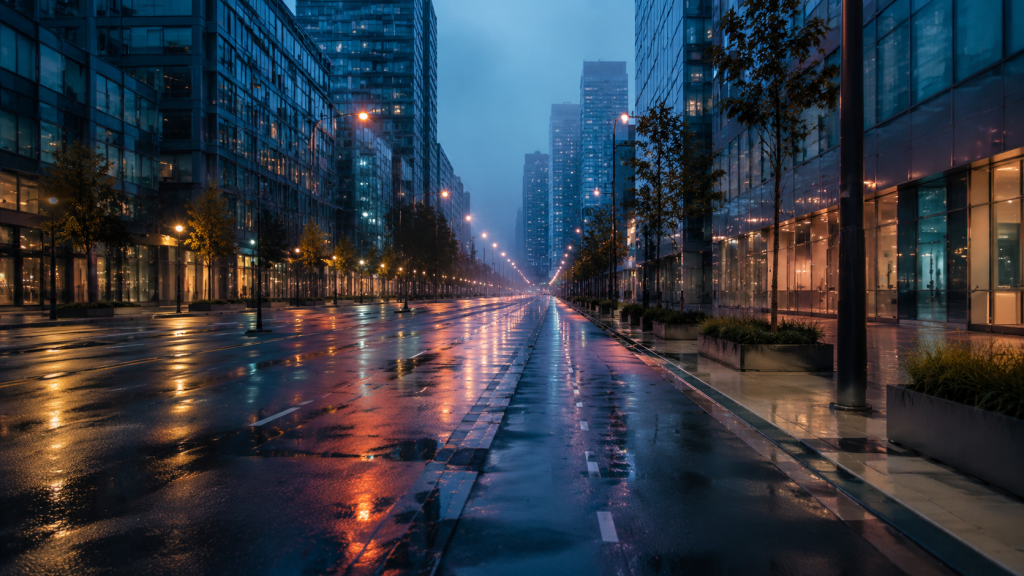
The first draft of this prompt asked Seedream to preserve the standing pose and also make the cyclist ride. Those instructions conflict, so the final prompt keeps identity and product details while explicitly allowing the pose to change.
Create a cinematic 16:9 cycling campaign image by assigning one role to each uploaded image.

Image 1 is the subject reference: preserve the cyclist's identity, facial features, beige jacket, dark pants, and black road bicycle design, but change the standing pose into a natural riding pose.
Image 2 is the accessory reference: use the coral cycling helmet design and place it naturally on the cyclist's head.
Image 3 is the environment reference: use the rainy city street, wet reflections, dusk lighting, and atmosphere.

Place the cyclist in the right third, riding toward the left, with clean negative space on the left. Match scale, perspective, rain, edge lighting, shadows, and color temperature. Do not create a collage. Do not add text, logos, extra riders, extra bicycles, or a second helmet.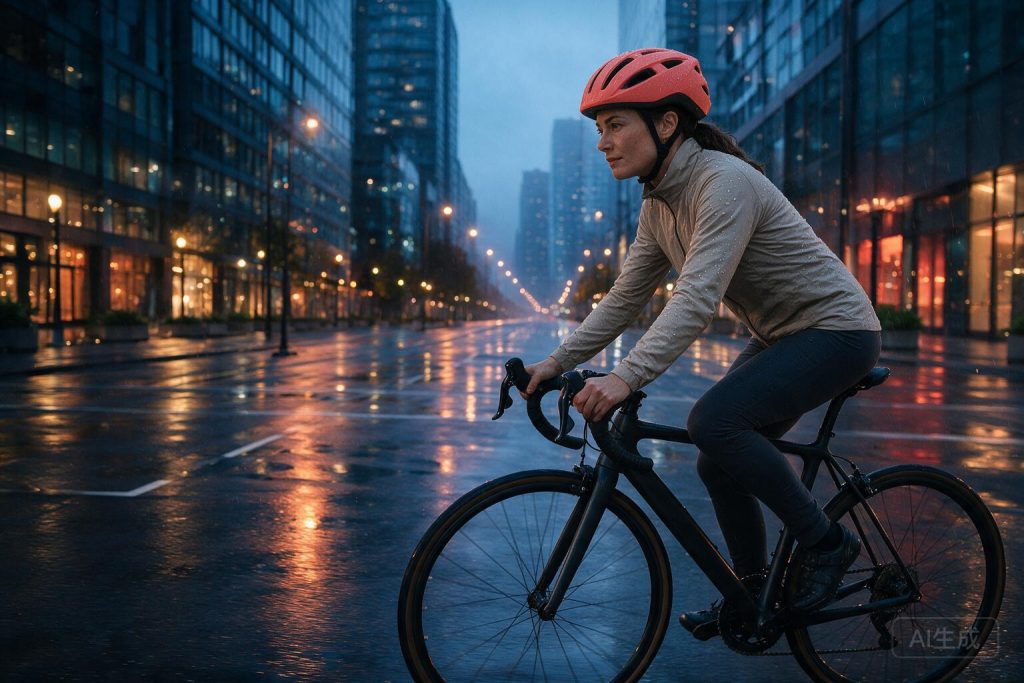
The final image uses the subject, helmet, and environment in their assigned roles while leaving usable space on the left.
A Multilingual Poster or Menu Template
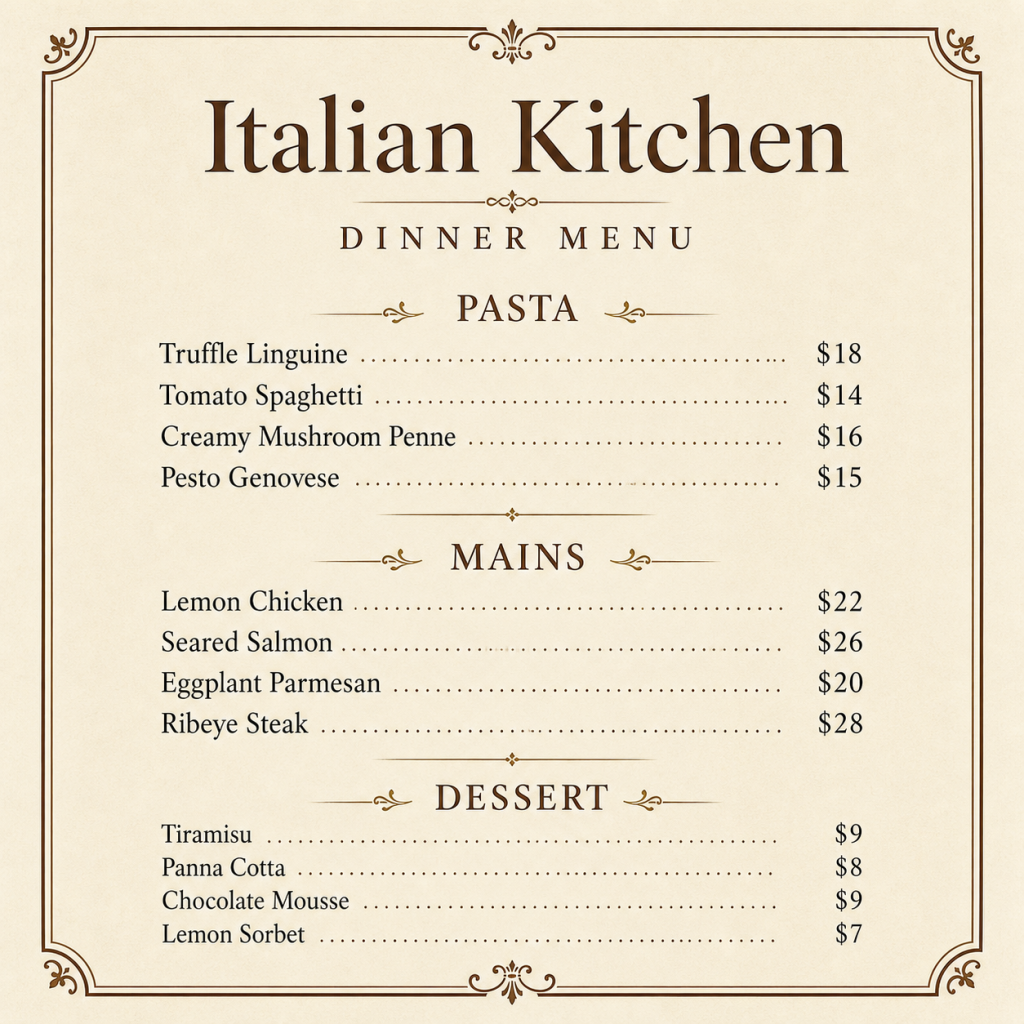
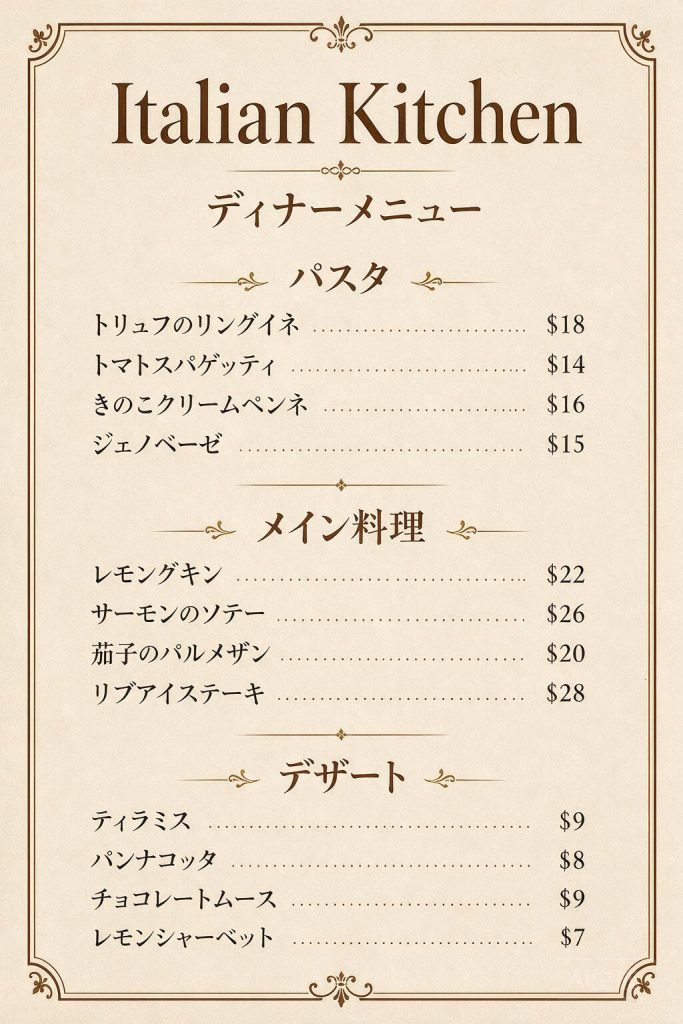
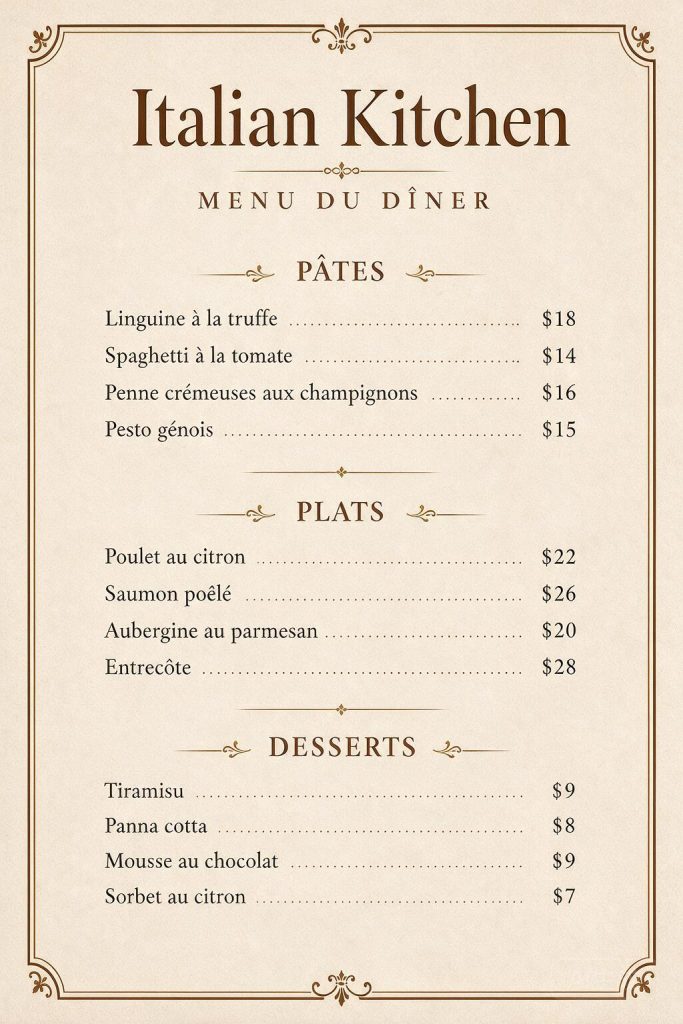
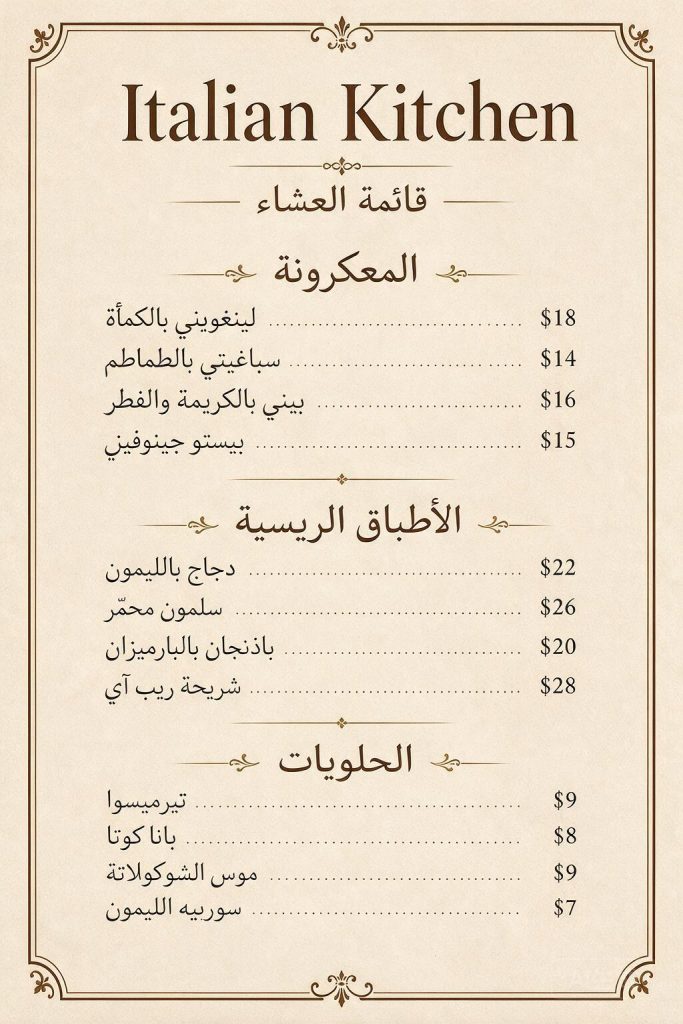
A useful multilingual test needs enough text to expose omissions, spelling errors, price drift, and layout problems. We used one 12-item English menu and translated it into Simplified Chinese, Japanese, French, and Arabic.
Create one [poster, menu, or label] in [ONE TARGET LANGUAGE].
Use only this source-to-target copy map: [PASTE EVERY HEADING AND TEXT ITEM].
Keep unchanged: [brand name, prices, dates, measurements, and item order].
Preserve: [canvas, hierarchy, line breaks, leaders, spacing, colors, and border].
Reading direction: [LEFT-TO-RIGHT / RIGHT-TO-LEFT].
Final check: only [ALLOWED WORDS] may remain in the source language.
Do not translate freely, combine languages, or add, remove, rename, or reorder content.
Run the template once per language. Asking for four translations in one output tests a collage layout, not whether the model can preserve a usable menu.
| Target language | Extra rule added to the prompt |
|---|---|
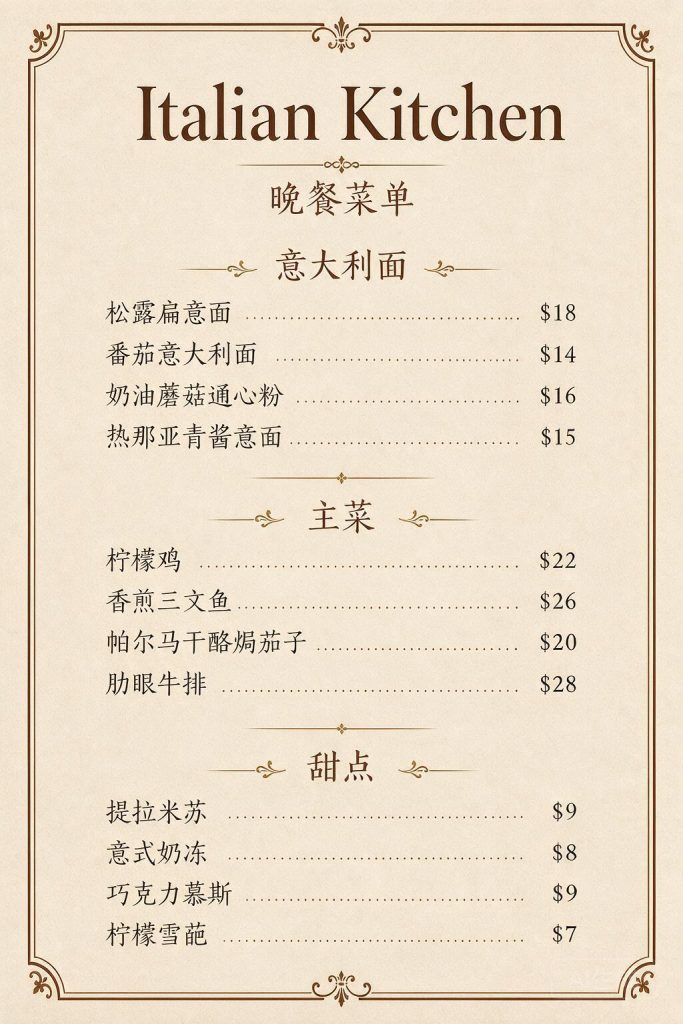
| Simplified Chinese | Only “Italian Kitchen” may remain in English; translate every other label and dish name. |
| Japanese | Use the supplied Japanese dish names and keep all dollar prices in their original rows. |
| French | Preserve accents such as Î, Â, y é instead of simplifying the spelling. |
| Arabic | Set dish names right-to-left while keeping prices in the original right-hand column. |
Copyable menu prompt:
Create one [TARGET LANGUAGE] version of the uploaded English restaurant menu. Do not place multiple languages in the same image. Keep "Italian Kitchen" in English. Preserve the square canvas, cream paper, brown ornamental border, three-section hierarchy, item order, dotted leaders, spacing, and every price exactly.

Use only this translation map:
[PASTE EVERY SECTION AND DISH AS SOURCE = APPROVED TRANSLATION]

Keep $18, $14, $16, $15, $22, $26, $20, $28, $9, $8, $9, and $7 unchanged and aligned with the correct dishes.

[FOR ARABIC: Set dish names right-to-left while keeping prices in the original right-hand price column.]

Final text check: the only English words allowed are [STATE ALLOWED ENGLISH WORDS]. Every other English heading and dish name must disappear. Do not add, remove, rename, or reorder any item.
The Chinese version needed one extra round because the first result left “DINNER MENU” in English. Adding “The only English text allowed is Italian Kitchen” fixed it. The other three versions preserved all dishes, prices, and section order on the first run.
Common Seedream 5.0 Pro Prompt Mistakes and How to Fix Them
Most weak results came from instructions that sounded reasonable but left one production decision open. These are the six gaps that showed up in testing.
- Leaving empty areas undefinedLo que pasó: Seedream filled a navigation area with nonsense text. Solución: Say the area must remain empty.
- Repeating the same statisticLo que pasó: A secondary chart changed 33.1 C to 31.1 C. Solución: Show each statistic once.
- Naming a panel without supplying its copyLo que pasó: The model invented methods and recommendations. Solución: Provide the exact sentence allowed in the panel.
- Using “keep everything else” aloneLo que pasó: The protected area remained open to interpretation. Solución: Name the shape, crop, lighting, background, and objects to preserve.
- Asking for several languages without fixed zonesLo que pasó: Text could be omitted or moved. Solución: List the approved text and its destination.
- Expecting a layered file from the image APILo que pasó: The standard endpoint returned a flattened raster image. Solución: Use layer-specific edit instructions, but do not promise PSD export.
PREGUNTAS FRECUENTES
These answers cover the setup questions that matter when you adapt the templates or move from a browser tool to the API.
What is Seedream 5.0 Pro?
It is ByteDance Seed’s image generation and editing model for structured design, information graphics, reference-based editing, multilingual text, and photographic images.
What changed in Seedream 5.0 Pro compared with earlier image models?
Seedream 5.0 Pro is more design-aware. It is built for structured layouts, dense information, controlled edits, multilingual text, and polished visual output rather than style imitation alone.
¿Seedream es lo mismo que Seedance?
No. Seedream is the image model line. Seedance is used for video and audio-video generation.
What is the best prompt format for Seedream 5.0 Pro?
Use a goal, source material, canvas and layout, exact text or data, a style system, constraints, and preservation rules.
Can Seedream 5.0 Pro make accurate infographics?
It can build strong layouts, but dense prompts still need strict data rules. Use one chart, show each number once, and ban unsupported methods, thresholds, citations, and conclusions.
Can Seedream 5.0 Pro edit a specific part of an image?
Yes. Name the edit region, desired replacement, exact text if needed, and every part of the image that must stay unchanged.
Can the Seedream API return editable layers?
The model can follow layer-specific editing instructions, but the standard image API returns a flattened image rather than a PSD or editable layer stack.
Can Seedream 5.0 Pro generate multilingual text?
Yes. In our menu test, it translated 12 dishes into Chinese, Japanese, French, and Arabic while preserving prices and section order. Exact translation maps and direction rules made the results more reliable.
What should I do if the output text is wrong?
Reduce the text volume, supply exact copy, remove duplicated statistics, and edit complex designs in smaller sections. Proofread every visible word before publishing.
Is Seedream 5.0 Pro better than GPT Image 2?
That depends on the task. See the dedicated Seedream 5.0 Pro vs GPT Image 2 comparison for access, pricing, and same-prompt tests.
The practical rule: define the job, lock the content, protect what matters, and name what Seedream must not invent.
Start with one of the four templates above. If the result still needs too many retries, run the same task in another image model on GLBGPT and keep the output that is easiest to use.