GlobalGPT

How Much Is Seedance 2.0? Full Pricing & Subscription Guide

How Much Is Seedance 2.0? Full Pricing & Subscription Guide

Seedance 2.0 pricing is not as simple as one fixed monthly fee. Depending on where you access it, the cost may appear as a consumer subscription, a limited free trial, a credit-based allowance, a daily generation quota, API pay-as-you-go billing, or a third-party web access plan.

That is why many users get confused when they ask one basic question: how much is Seedance 2.0?

The short answer is that Seedance 2.0 can sometimes be tested for free, but stable use usually requires a paid route. Some users may find free credits through platforms such as Jimeng, Xiaoyunque, or Doubao. Others may need a paid subscription, API access, or a simpler international access option such as GlobalGPT.

This guide explains how Seedance 2.0 pricing works in 2026. We will cover official subscription plans, free trials, free credits, API cost, hidden limitations, and the best access options for different types of users.

For international creators who do not want to deal with Chinese phone numbers, RMB payments, or region-specific app access, GlobalGPT offers a simpler web-based way to try Seedance 2.0 alongside other AI video models.

Seedance 2.0 Pricing at a Glance

Seedance 2.0 does not have one universal price across every platform. The cost depends on whether you use a consumer app, a free-credit platform, a developer API, or a multi-model AI platform.

For most users, the practical decision is not simply “free or paid.” The real decision is whether you want official app access, free testing, stable international access, or developer-level API access.

Quick Pricing Table

Access RouteBest ForFree OptionPaid CostMain Limitation
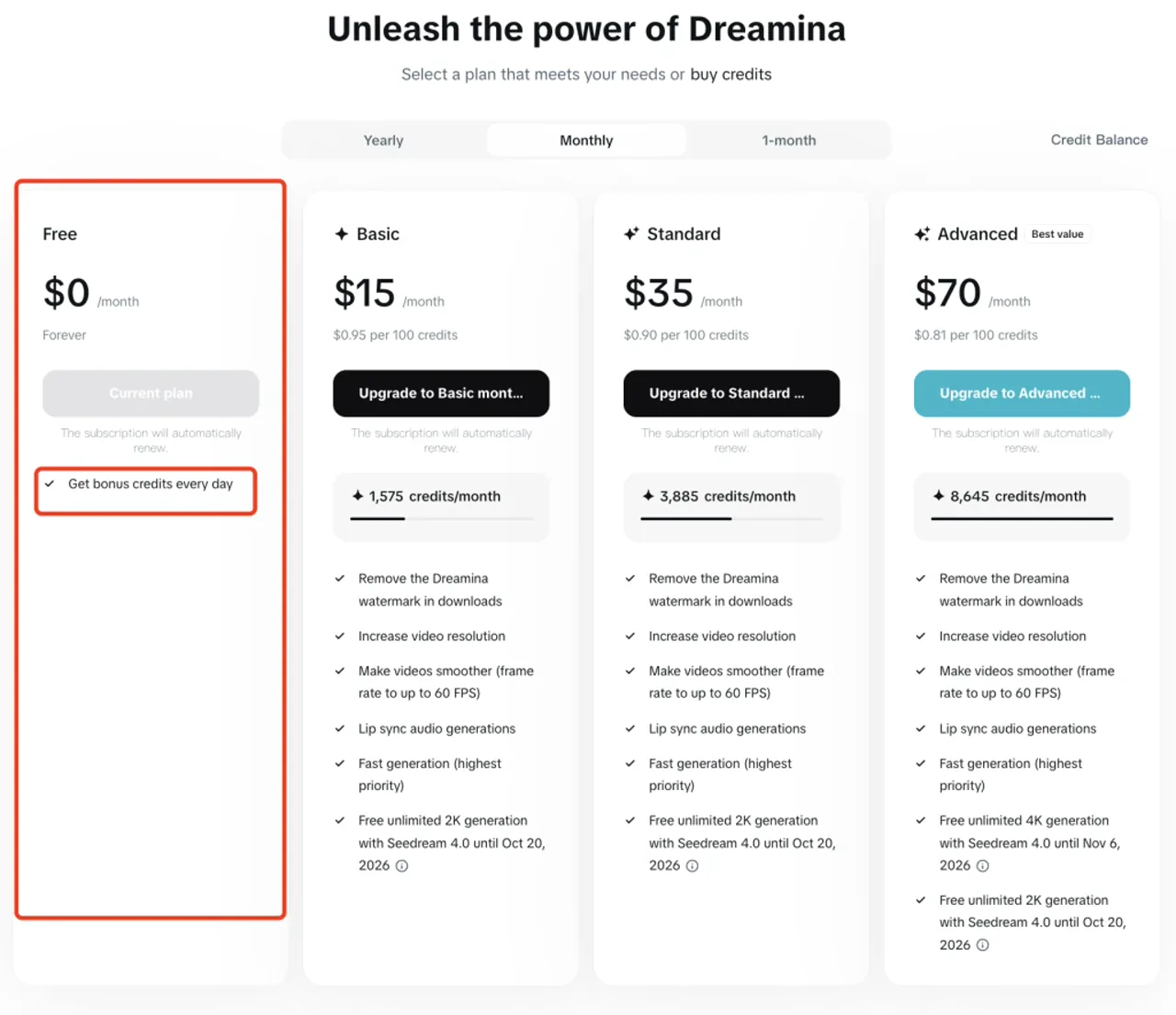
DreaminaOfficial global consumer accessFree plan with daily bonus credits$15/month Basic, $35/month Standard, $70/month AdvancedCredit-based usage; heavy users may need higher tiers
Jimeng / Chinese consumer appsOfficial China-side consumer accessTrial credits or limited free use may appearPricing may vary by account, region, and local offerOften depends on Chinese app environment, account eligibility, and local payment options
XiaoyunqueFree testing and trial creditsMay offer generous free credits or temporary trial accessPaid details may vary by platform statusAvailability, credit rules, and stability may change
DoubaoCasual daily video generationDaily free generation allowance may appear for some usersPaid options may varyFeature visibility can depend on account, region, and platform updates
Volcengine / BytePlus APIDevelopers and businessesTrial credits may be available for eligible accountsBytePlus lists Dreamina Seedance 2.0 at $0.39–$0.86 per video; Volcengine uses China-side model pricingRequires developer setup, business verification, and technical integration
GlobalGPTInternational creators who want easier accessDepends on GlobalGPT planPro plan starts from $10.8/monthWeb-based platform access, not the official ByteDance API route

The Real Question: Free, Subscription, API, or Global Access?

The cheapest route is usually to test Seedance 2.0 through whatever free credits or trial access your account can see. This is useful for casual testing, early exploration, or comparing Seedance 2.0 with other AI video models.

The most direct official consumer route is usually Jimeng or Dreamina. This makes sense if you are already in the Chinese app ecosystem, have access to Chinese payment methods, and want to use the official ByteDance consumer environment.

The API route is different. It is not meant for casual users who just want to make a few videos. API access is better for developers, agencies, or businesses that need automated video generation, product integration, batch workflows, or usage-based billing.

For international creators, GlobalGPT may be easier than switching between region-specific apps, payment systems, and account requirements. It is especially useful if you want to access Seedance 2.0 together with other AI video models in one workspace.

Is Seedance 2.0 Free?

Seedance 2.0 is partly free, but it is not fully free in the way many users hope. Some platforms may give users limited trial credits, daily generation allowances, temporary access windows, or low-cost introductory offers. These options can be useful, but they usually come with restrictions.

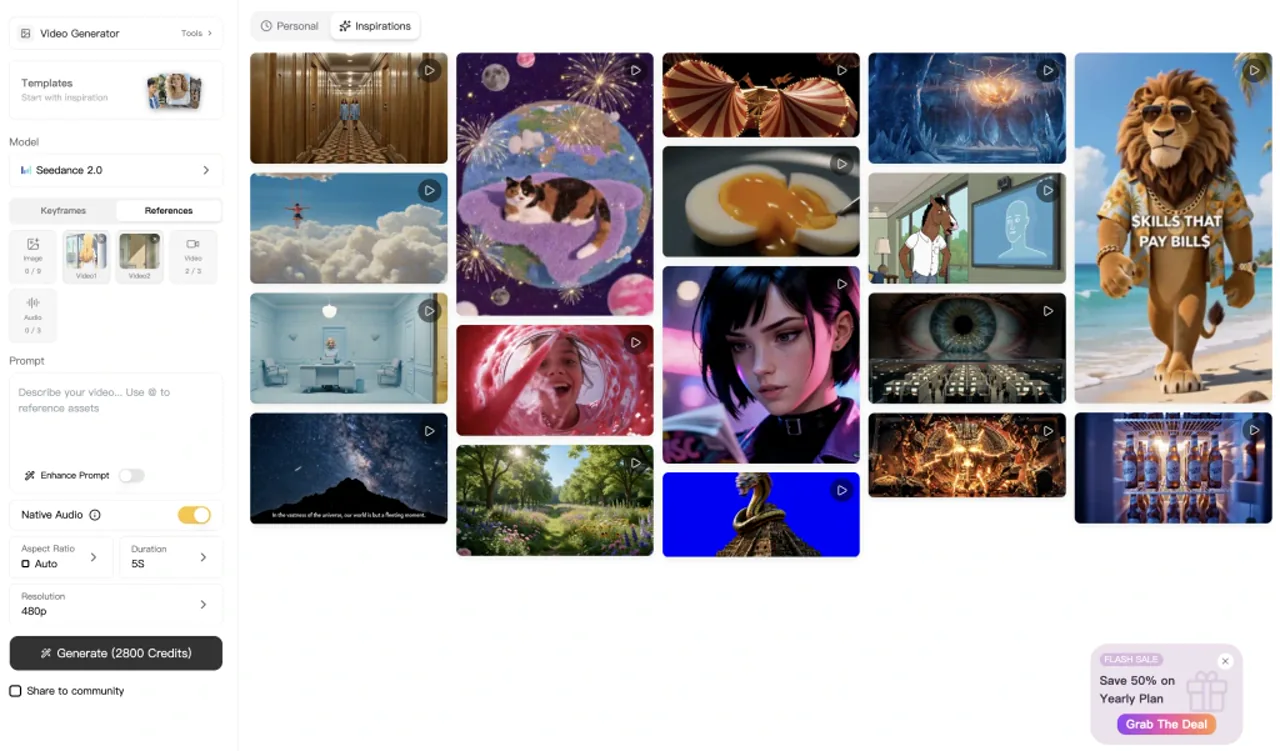
Dreamina homepage free-use entry / “Try free” interface

Free access is best understood as a testing path, not a stable production workflow.

Short Answer

Seedance 2.0 can sometimes be used for free, but free access is usually limited.

You may be able to generate a small number of videos through trial credits, daily allowances, or platform-specific promotions. However, free access may include watermarks, slower queues, shorter video lengths, limited resolution, regional restrictions, account eligibility requirements, or unstable feature availability.

So the real answer is:

Seedance 2.0 is not completely free. It may offer limited free access, but serious use usually requires a paid plan, a subscription route, or API access.

What Free Access Usually Includes

Free access to Seedance 2.0 usually appears in one of four forms.

The first form is limited credits. A platform may give new users a certain number of credits that can be used to generate videos. Once those credits run out, users need to wait for a reset, earn more credits, or pay.

The second form is a daily generation allowance. This means users may be able to generate a small number of videos each day. The exact number can vary by platform, account status, and region.

The third form is a trial membership. Some users may see low-cost or short-term trial offers that unlock paid features temporarily.

The fourth form is temporary app access. In some cases, a model or feature may be available to selected users during a beta, rollout, or campaign period, but not permanently available to everyone.

When Free Access Is Not Enough

Free access is usually enough for basic testing, but it is rarely enough for serious creators.

If you need high-resolution exports, longer videos, faster generation, no watermark, stable access, repeatable output quality, or commercial production workflows, free credits will usually feel too limited.

AI video generation also requires retries. Even when the model is strong, one prompt may not produce the perfect result immediately. You may need several generations to refine the camera movement, subject consistency, lighting, motion, background, or final composition. That makes limited free credits disappear quickly.

For this reason, free access is best for testing whether Seedance 2.0 fits your workflow. If you plan to use it regularly, you should compare paid subscription access, GlobalGPT access, and API access.

For a deeper breakdown of free access routes, read our full guide: Is Seedance 2.0 Free? The Real Answer in 2026.

Seedance 2.0 Official Subscription Plans

Seedance 2.0 can appear inside different ByteDance-related products, but the clearest consumer-facing pricing example is Dreamina’s subscription page. Dreamina separates consumer plans from API billing. That distinction matters because a creator subscription is designed for manual web or app-based generation, while API pricing is designed for developers who need programmable access.

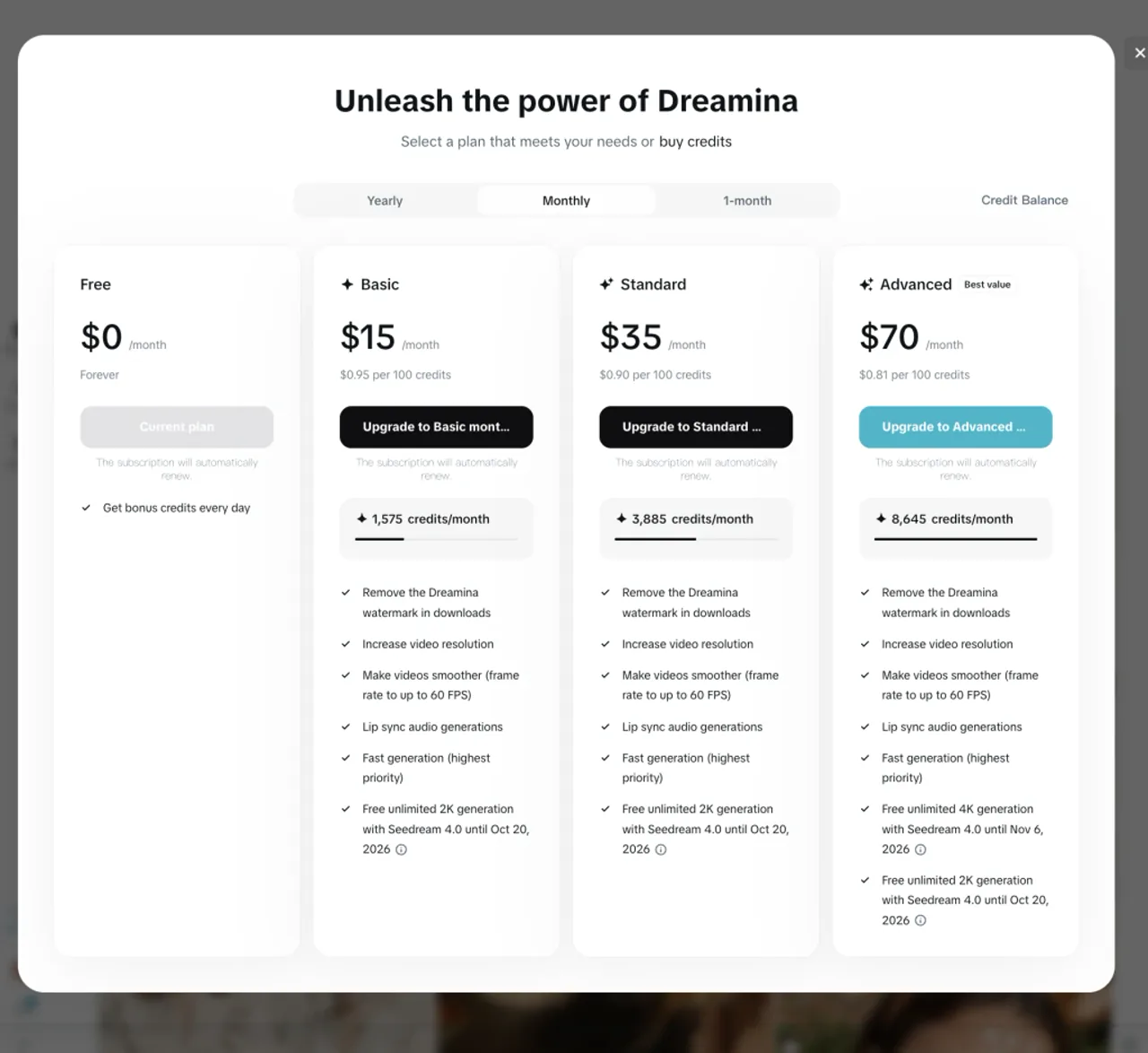
According to the Dreamina pricing page shown above, the monthly consumer plans include a Free plan, Basic, Standard, and Advanced. The paid tiers are credit-based, so the real value depends on how many usable videos you can generate from the monthly credit allowance.

Seedance 2.0 Official Subscription Plans

Dreamina Monthly Subscription Pricing

PlanMonthly PriceMonthly CreditsEffective Credit PriceBest For
Free$0/monthDaily bonus creditsFirst-time testing and casual exploration
Basic$15/month1,575 credits/month$0.95 per 100 creditsLight creators who want watermark-free downloads
Standard$35/month3,885 credits/month$0.90 per 100 creditsRegular creators who need more monthly generations
Advanced$70/month8,645 credits/month$0.81 per 100 creditsHeavy creators who need the best credit value

The Free plan is useful for testing, but it is not designed for serious production. Basic costs $15/month and gives 1,575 credits per month. Standard costs $35/month and gives 3,885 credits per month. Advanced costs $70/month and gives 8,645 credits per month, which brings the effective credit price down to $0.81 per 100 credits.

What Paid Membership Usually Unlocks

Dreamina’s paid plans are not only about monthly credits. The pricing page also shows several creator-facing benefits: removing the Dreamina watermark in downloads, increasing video resolution, making videos smoother with frame rates up to 60 FPS, and supporting lip sync audio generations.

The Advanced plan also shows an extra benefit around free unlimited 4K generation with Seedream 4.0 until Nov 6, 2026, while Basic and Standard show free unlimited 2K generation with Seedream 4.0 until Oct 20, 2026. These Seedream benefits are image-generation related, not Seedance 2.0 video API pricing, but they still matter for creators who use Dreamina as a broader visual creation workspace.

What the Credit Price Means

The credit price is important because Seedance 2.0 is not just a one-click tool for most serious users. AI video generation often requires several attempts before the result is good enough to export or publish.

Basic costs about $0.95 per 100 credits. Standard lowers that to about $0.90 per 100 credits. Advanced lowers it further to about $0.81 per 100 credits. In practice, the higher plans become more attractive when you generate frequently, test multiple prompts, or need several versions of the same video concept.

For casual users, the Free or Basic plan may be enough. For creators who produce AI videos every week, Standard is likely more practical. For heavy users who need a larger monthly credit pool and the best credit value, Advanced is the strongest Dreamina subscription tier.

Who Should Choose Dreamina

Dreamina is a good fit if you want a clear consumer subscription instead of developer API access. It is especially useful for creators who want watermark-free downloads, higher-resolution video output, smoother video generation, and lip sync-related features inside a visual creation platform.

However, Dreamina subscription pricing should not be confused with Seedance 2.0 API pricing. If you are building an app, automating video generation, or integrating Seedance 2.0 into a product workflow, you should look at BytePlus or Volcengine ModelArk pricing instead.

Seedance 2.0 Free Trial and Free Credits Explained

Free trial and free credits are often discussed together, but they are not the same thing. Understanding the difference can help you avoid confusion when comparing Jimeng, Xiaoyunque, Doubao, GlobalGPT, and API access.

A free trial usually gives temporary access to paid features. Free credits give a limited amount of generation quota. A daily allowance gives a small number of generations or credits that refresh over time.

None of these should be understood as unlimited free access.

Seedance 2.0 Free Trial and Free Credits Explained

Free Trial vs Free Credits

A free trial is usually time-based or membership-based. It may unlock premium features for a short period, sometimes through a low-cost introductory offer or a limited new-user campaign.

Free credits are usage-based. They let you generate a certain number of videos or consume a certain amount of video generation capacity. Once the credits are used, you may need to wait for a reset or purchase more.

Daily allowance is a third form. It means users may receive a limited number of generations each day. This is useful for casual exploration, but it is not ideal for creators who need batch output or commercial consistency.

The practical difference is simple: a trial gives temporary access, credits give limited usage, and daily allowance gives recurring but restricted testing capacity.

Jimeng Free Trial

Jimeng may offer trial credits, introductory offers, or low-cost first-month access for some users. This can be a good way to test Seedance 2.0 without committing to a full subscription immediately.

However, trial visibility may depend on account status, region, platform rollout, and current campaign rules. Two users may not always see the same offer.

This is why you should treat Jimeng free trial information as account-dependent. Before relying on it, check what your own account actually shows inside the app.

Xiaoyunque Free Credits

Xiaoyunque can be attractive for users who are mainly looking for free Seedance-style testing. It has been associated with more generous trial credits or temporary free-use windows than some other routes.

The main advantage is that it may let users experiment with more prompts before paying. This is useful if you want to test Seedance 2.0’s visual quality, motion control, character consistency, or prompt-following ability.

The limitation is stability. Credit rules, availability, model access, queue speed, and platform requirements may change. Xiaoyunque may be useful for testing, but it should not be treated as a guaranteed long-term production route.

Doubao Daily Generations

Doubao may provide casual users with daily video generation access in some situations. This can be useful if you want to test a few prompts each day without paying immediately.

However, Doubao access may depend on account eligibility, region, feature rollout, and the version of the product you can access. Some users may see video generation features clearly, while others may not.

Doubao is best for casual testing rather than professional production. If you need stable output, higher volume, or repeatable creative workflows, you may eventually need paid access through another route.

For a credit-by-credit comparison, see our Seedance 2.0 Free Credits Guide.

Jimeng vs Xiaoyunque vs Doubao vs GlobalGPT: Which Access Route Should You Choose?

Different Seedance 2.0 access routes are useful for different users. The best choice depends on whether you care most about official access, free testing, international convenience, or developer integration.

Jimeng vs Xiaoyunque vs Doubao vs GlobalGPT: Which Access Route Should You Choose?

There is no single best route for everyone. A casual user, a creator outside China, a Chinese app user, and a developer building an AI video product may all need different solutions.

Best for Official Access

Jimeng or Dreamina is usually the best route if you want official consumer access.

This route makes the most sense for users who are already comfortable with Chinese apps, local payment methods, and ByteDance’s consumer product ecosystem. It also makes sense if you want to use Seedance 2.0 in the environment where it is most directly supported.

The tradeoff is accessibility. International users may face phone verification, payment, language, app availability, or account eligibility barriers.

Best for Free Testing

Xiaoyunque and Doubao may be useful for users who want to test Seedance 2.0 with limited free credits or daily generation access.

This route is best if your goal is exploration rather than production. You can test prompt quality, motion control, style rendering, subject consistency, and overall output quality before deciding whether to pay.

The tradeoff is reliability. Free routes may have changing rules, limited availability, watermarks, queue delays, or unclear long-term access.

Best for International Creators

GlobalGPT is usually the easiest route for international creators who want web-based access without dealing with Chinese app registration, RMB payment, or region-specific app friction.

GlobalGPT is not the official ByteDance API. It is a web-based AI platform that gives users a simpler way to access Seedance 2.0 and compare it with other video models such as Veo, Kling, Wan, and Sora-style tools in one workspace.

This is useful if you want to test multiple AI video models, compare output quality, and avoid managing separate accounts across different platforms. GlobalGPT’s Pro plan starts from $10.8/month, making it a practical option for users who want a lower-friction creative workflow.

Best for Developers

Volcengine or BytePlus API access is the better route for developers, product teams, and businesses.

This route is useful if you need automated video generation, backend integration, batch workflows, product-level video output, or usage-based billing.

The tradeoff is complexity. API access usually requires developer setup, documentation reading, request handling, async task management, rate-limit awareness, and possibly business verification.

If you only want to create videos manually, API access is usually unnecessary.

How Much Does the Seedance 2.0 API Cost?

Seedance 2.0 API pricing is separate from Dreamina’s consumer subscription plans. Dreamina’s $15, $35, and $70 monthly plans are designed for creators using the web or app interface. The API route is designed for developers and businesses that need programmable video generation.

The official API pricing should be checked through BytePlus ModelArk for international users and Volcengine ModelArk for China-side users. BytePlus lists Dreamina Seedance 2.0 pricing in USD per video, while Volcengine lists Doubao Seedance 2.0 under its China-side model pricing system.

API Pricing Model

BytePlus ModelArk lists Dreamina Seedance 2.0 at $0.39–$0.86 per video. The lowest price corresponds to 2–4 seconds input, while the highest price corresponds to 15 seconds input. This means the final cost is not a flat monthly subscription. It depends on the video task and the API billing rules.

Volcengine’s China-side ModelArk pricing page lists Doubao Seedance 2.0 under video generation model pricing. The page is organized around model pricing, video generation, and Doubao Seedance 2.0 documentation. For China-side billing, users should check the Volcengine console and official pricing page directly because the final charge may depend on output duration, resolution, input type, and the current model version.

API Price vs Dreamina Subscription Price

The API and Dreamina subscription plans are built for different users.

Dreamina’s Basic plan costs $15/month and includes 1,575 credits. Standard costs $35/month and includes 3,885 credits. Advanced costs $70/month and includes 8,645 credits. These plans are better for creators who manually generate and edit videos through a visual interface.

BytePlus API pricing, by contrast, is usage-based. At $0.39–$0.86 per video, the API can be more flexible for developers, but it can also become expensive at scale if your product generates many videos or requires many retries.

For example, if a creator only generates a few videos per week, a Dreamina subscription may be simpler. If a developer needs to generate videos automatically inside an app, the API is usually the better fit. The real cost depends on how many videos are generated, how often generation fails, how many retries are needed, and whether the final outputs are usable.

API Access Channels

For international developers, BytePlus ModelArk is the cleaner reference point because it provides English documentation, ModelArk pricing, and video generation API documentation in the same documentation system.

For China-side developers, Volcengine ModelArk is the official reference point. It includes the model price page, Doubao Seedance 2.0 series tutorials, and related prompt guidance.

Some unofficial third-party API gateways may also appear online, but they should not be treated as official Seedance 2.0 API pricing. They may carry privacy, latency, reliability, compliance, or account-risk issues. For production use, official BytePlus or Volcengine access is safer.

API vs Subscription

For casual creators, a web or app subscription is usually simpler than API access. You can open Dreamina, use your credits, generate videos, and export results without writing code.

For developers, API access may be more flexible because it supports product integration, automated workflows, batch generation, and backend control.

For agencies and businesses, the right choice depends on volume. If you only need occasional videos, Dreamina or a multi-model web platform may be enough. If you need automated generation at scale, BytePlus or Volcengine API access may be worth the setup effort.

For non-technical users, API access is usually unnecessary. A consumer subscription, official app access, or GlobalGPT-style web platform will usually be easier.

For setup details, pricing logic, payload examples, and developer limitations, read our Seedance 2.0 API Guide.

Is Seedance 2.0 Worth Paying For?

Whether Seedance 2.0 is worth paying for depends on how often you use AI video, what quality you need, and whether free access gives you enough control.

For some users, free credits are enough. For others, a paid plan is more practical because the real value is not only access to the model, but also stability, speed, output quality, and the ability to iterate without constantly worrying about limits.

For Casual Users

Casual users should usually start with free credits or trial access before paying.

If you only want to test Seedance 2.0, compare it with other models, or generate a few fun clips, there is no need to rush into a paid subscription or API setup. Free access through Jimeng, Xiaoyunque, Doubao, or another available route may be enough for initial testing.

The main goal at this stage is to understand whether the model fits your needs. Test different prompts, video lengths, styles, camera movements, and subject types. If the output quality does not match your expectations, paying more may not solve the problem.

For Content Creators

For content creators, paying for Seedance 2.0 can make sense if you need more stable and repeatable output.

Short-form video creators, AI filmmakers, marketers, YouTubers, TikTok creators, and social media teams often need more than one generation. They may need to test hooks, opening shots, transitions, product angles, character scenes, backgrounds, and multiple versions of the same concept.

In that case, free credits can disappear quickly. A paid subscription or multi-model platform may be more practical because it gives you more room to iterate.

GlobalGPT can be useful for creators who want to access Seedance 2.0 together with other AI video models in one web-based workspace. This is especially helpful if you compare Seedance 2.0 with Veo, Kling, Wan, or other video tools before choosing the best output.

For Agencies and Studios

Agencies and studios should evaluate Seedance 2.0 based on usable output, not only listed price.

Client work usually requires repeatability, quality control, clear workflow management, and predictable turnaround time. A low-cost plan may still be expensive if it creates too many unusable generations, long delays, or inconsistent outputs.

For agencies, the better question is:

How much does it cost to produce one usable final clip?

That calculation should include failed attempts, revisions, prompt testing, export quality, team workflow, and the time spent moving between tools.

If the team only creates videos occasionally, a subscription or multi-model web platform may be enough. If the team needs large-scale generation, API access may become more suitable.

For Developers

Developers should pay for Seedance 2.0 only if API access solves a real product or workflow need.

API access makes sense if you need automated generation, user-facing video creation, backend integration, batch rendering, dynamic video templates, or programmatic control over generation tasks.

It is less useful if you only want to manually generate videos for content creation. In that case, the API adds unnecessary technical complexity.

Before choosing the API route, developers should estimate expected volume, average video length, retry rate, moderation failure rate, storage cost, queue time, and user experience requirements. API pricing can be flexible, but it can also become expensive if the product requires many generations per user.

Best Way to Access Seedance 2.0 Outside China

For users outside China, the main challenge is not only price. It is access.

A plan may look affordable on paper, but the actual experience can be difficult if the platform requires Chinese phone verification, local app access, RMB payment, or account-specific feature visibility.

That is why international users should compare not only cost, but also convenience, reliability, and workflow fit.

Why Direct Access Can Be Difficult

Direct access may involve several barriers.

Some official routes may require a Chinese phone number. Some may require Alipay, WeChat Pay, or another RMB payment method. Some features may be easier to access inside Chinese apps than on global web platforms. Some accounts may not see the same video generation features because product rollout is not always uniform.

There may also be language and interface barriers. If the platform is built primarily for Chinese users, international creators may need extra time to understand menus, credit rules, membership plans, and export settings.

These barriers do not mean direct access is impossible. They simply mean that the official route may not be the easiest route for every user.

Why GlobalGPT Is Easier for International Users

GlobalGPT is easier for many international users because it provides web-based access without forcing users to manage multiple region-specific apps.

Instead of switching between separate platforms, users can try Seedance 2.0 alongside other AI video models in one workspace. This makes it easier to compare output quality, test different models, and choose the best tool for each creative task.

GlobalGPT is especially useful for users who want:

  • access through a standard web interface
  • international payment options
  • Seedance 2.0 plus other AI video models
  • fewer region-specific setup steps
  • a simpler workflow for testing and comparison

This does not make GlobalGPT the official ByteDance API. It is better understood as a practical web-based access path for creators who want less friction.

When You Should Still Use Official Access

Official access may still be the better choice in some cases.

If you are based in China, already use Jimeng or Doubao, have access to Chinese payment methods, and want the official ByteDance consumer environment, direct access may be the most natural option.

Official access may also be better if you want to stay closest to ByteDance’s original product interface, membership system, and feature rollout.

For developers and businesses, official API-style access through Volcengine or BytePlus may be more appropriate than any creator-facing web platform.

The best route depends on your situation. Chinese app users may prefer official access. International creators may prefer GlobalGPT. Developers may prefer API access.

FAQ

Is Seedance 2.0 free?

Seedance 2.0 is partly free, but not fully free.

Some users may find free credits, trial access, daily generation allowances, or temporary access windows through platforms such as Jimeng, Xiaoyunque, or Doubao. However, free access usually comes with limits such as watermarks, queue delays, lower quotas, shorter video length, region restrictions, or unstable feature availability.

If you only want to test Seedance 2.0, free access may be enough. If you need stable output for real creative work, you will probably need a paid route.

How much is Seedance 2.0 per month?

Seedance 2.0 consumer pricing may start around 69 RMB/month through official app-style access such as Jimeng or Dreamina, depending on the user’s account, region, membership tier, and current platform offer.

The exact price can change. Always check the latest price inside the platform before subscribing.

For international users, GlobalGPT’s Pro plan starts from $10.8/month and provides a web-based way to access Seedance 2.0 alongside other AI video models.

Does Seedance 2.0 have a free trial?

Seedance 2.0 may have free trials, trial credits, intro offers, or limited free access depending on the platform and account status.

Some users may see free credits in Jimeng, Xiaoyunque, Doubao, or related platforms. Other users may not see the same offer because trial access can depend on region, account eligibility, product rollout, or current campaign rules.

A free trial should not be treated as unlimited free access. It is better understood as a temporary testing opportunity.

How many free credits does Seedance 2.0 give?

The number of free credits depends on the platform.

Jimeng, Xiaoyunque, Doubao, and other access routes may use different credit systems, daily allowances, or trial rules. The amount may also change over time.

For a detailed platform-by-platform comparison, read our Seedance 2.0 Free Credits Guide.

Can I use Seedance 2.0 outside China?

Yes, but direct official access may be harder outside China.

Some official routes may involve Chinese phone verification, RMB payment, local app access, or account-specific feature visibility. International users may also face language barriers or regional rollout differences.

GlobalGPT is one easier web-based option for international creators who want to try Seedance 2.0 without managing Chinese app registration or local payment friction.

Does Seedance 2.0 have an API?

Yes. Seedance 2.0 API-style access is available through developer or business channels such as Volcengine and BytePlus, depending on region, account eligibility, and platform access rules.

The API route is mainly designed for developers, product teams, and businesses that need programmable video generation. It is not necessary for casual creators who only want to generate videos manually.

For more details, read our Seedance 2.0 API Guide.

Is Seedance 2.0 cheaper than Veo or Kling?

It depends on what you compare.

If you compare only listed prices, one platform may look cheaper than another. But the real cost depends on free credits, paid membership, API rates, retry rate, output resolution, video length, queue time, watermark rules, and how many generations are needed to get one usable clip.

For creators, the better comparison is not simply “which model is cheapest.” The better question is which model produces the most usable video for your workflow at the lowest practical cost.

What is the cheapest way to use Seedance 2.0?

The cheapest way is to start with any available free credits, daily allowances, or trial access your account can see.

If free access is enough for testing, you may not need to pay immediately. If you need stable access, more generations, better export quality, or fewer regional barriers, compare official subscription routes with GlobalGPT or API access.

For most non-technical international users, a web-based platform may be easier than direct official access or API setup.

Conclusion

Seedance 2.0 does not have one universal price. The cost depends on how you access it, what kind of user you are, and how much video generation you actually need.

Casual users should start with free credits or trial access when available. Creators who need stable output should compare official subscriptions, GlobalGPT, and other web-based options. Developers and businesses should evaluate API access separately because API cost depends on usage, video duration, resolution, retries, and integration needs.

The key is to calculate cost by usable output, not just listed price. A low-cost route is only valuable if it helps you create videos efficiently and consistently.

If you want a simpler way to try Seedance 2.0 without dealing with Chinese app registration, RMB payment, or separate model subscriptions, GlobalGPT gives you access to Seedance 2.0 and other leading AI video models in one place.

Share the Post:

Related Posts