NinjaChat promete algo que muchos usuarios de IA desean: un único chat capaz de gestionar archivos, aplicaciones conectadas y distintos tipos de entradas. Pero, ¿es eso motivo suficiente para elegirlo? ¿Y qué aspectos conviene comparar antes de pagar?
Esta reseña sobre NinjaChat AI repasa los aspectos más importantes que hay que tener en cuenta antes de realizar el pago y, a continuación, compara cinco alternativas en cuanto a modelos más amplios, compatibilidad con navegadores, creación de contenidos multimedia u organización de equipos.
Respuesta rápida: NinjaChat resulta especialmente interesante para los usuarios que desean contar con un único asistente de IA que funcione en todos sus servicios conectados. Su página web oficial indica que puede conectarse con Gmail, Slack, Notion, GitHub y más de 500 servicios adicionales, y que es capaz de leer, escribir y actuar en todos ellos. Las páginas de precios y modelos consultadas el 24 de septiembre de 2026 mostraban tres planes de pago y 51 modelos para chat, imágenes y vídeo. No hemos realizado una prueba independiente con la misma tarea, por lo que esta reseña no garantiza la fiabilidad probada de las acciones ni una mejor calidad de los resultados. Comparar GLBGPT En primer lugar, si quieres un espacio de trabajo más amplio que abarque múltiples modelos, imágenes, vídeos y agentes.
¿Qué es NinjaChat AI?
NinjaChat se presenta como un producto de IA «todo en uno» diseñado en torno a una única conversación. Su página web oficial y página de integraciones Afirman que una única conexión segura puede vincular Gmail, Slack, Notion, GitHub y más de 500 servicios adicionales, lo que permite al asistente leer, escribir y actuar en todas las herramientas conectadas.
La misma conversación puede iniciarse a partir de un PDF, una entrada de voz o una frase escrita. Por lo tanto, NinjaChat se asemeja más a un espacio de trabajo orientado a la acción que a un chatbot básico.
- Entrada: texto, voz o PDF.
- Contexto: información procedente de los servicios conectados.
- Acción: leer, escribir o realizar acciones mediante una herramienta autorizada.
- Prueba de compra: si los permisos, las autorizaciones y los registros de acciones están claros.
En la forma en que un agente de IA utiliza las herramientas es más importante que la etiqueta de “agente”.
Reseña de NinjaChat AI: qué problema pretende resolver el producto
El problema que pretende resolver
Una tarea de trabajo típica puede empezar en el correo electrónico, requerir un documento, continuar en Slack y terminar como una actualización del proyecto. NinjaChat intenta mantener ese contexto en una sola conversación.
Norma de revisión: Las páginas oficiales respaldan el procedimiento previsto; este artículo no ha comprobado de forma independiente la finalización ni la exactitud de dichas acciones.
La verdadera prueba está en los permisos y en la calidad de la ejecución
- ¿Se pueden limitar los permisos por aplicación, cuenta, carpeta o acción?
- ¿NinjaChat muestra una vista previa de una acción de escritura antes de ejecutarla?
- ¿Existe un registro de finalización y un estado de fallo claro?
- ¿Se puede detener o revertir una acción errónea?
A quién puede irle bien NinjaChat
| Probablemente sea una buena opción | Compara primero las alternativas |
|---|---|
|
|
Esos compradores deberían comparar NinjaChat con una gama más amplia de plataforma de IA todo en uno.
Funcionalidades de NinjaChat y flujo de trabajo con aplicaciones conectadas
Conexiones de aplicaciones
La página web oficial y catálogo de integraciones Menciona Gmail, Slack, Notion y GitHub, y dice que se pueden conectar más de 500 servicios.
- Cobertura prevista: comunicación, documentos, código, calendarios y trabajo en proyectos.
- Comprueba también: si cada conector admite la lectura, la escritura o ambas.
- Empieza con precaución: Conecta únicamente la cuenta y los permisos necesarios para una tarea.
Archivos, voz y texto en un mismo chat
- Voz: Resulta útil cuando no es práctico escribir.
- PDF: proporciona el contexto de origen sin necesidad de volver a generar la indicación.
- Texto: ofrece una redacción precisa para las solicitudes delicadas.
- Comprueba lo siguiente antes de basarte en los archivos: límites de tamaño, formatos, conservación, citas y separación de fuentes.
Leer, escribir y actuar
“Leer, escribir y actuar” es la promesa más importante de NinjaChat. Pruébalo por etapas:
- Conecta un espacio de trabajo no crítico.
- Pide un resumen de un conjunto pequeño y conocido de elementos.
- Solicita un borrador sin permitir su envío ni su publicación.
- Amplía los permisos solo cuando la selección de la fuente y las instrucciones sean fiables.
Cobertura de modelos y herramientas creativas
La página oficial de NinjaChat página de modelos mostrado 51 modelos A fecha de 24 de septiembre de 2026: 35 modelos de chat, 9 modelos de imagen y 7 modelos de vídeo. Entre los ejemplos visibles se encontraban Claude Opus 5, GPT-5.6 Sol, Gemini 3.1 Pro, Claude Sonnet 4.6, GPT-5.4, DeepSeek V4 Pro, Kimi K3 y Llama 4 Maverick, además de opciones de imagen y vídeo como Veo 3.1, Seedance 2.0, Kling 2.6, Imagen 4, Nano Banana y GPT Image 2.
Catálogo de 51 modelos de NinjaChat
Catálogo público consultado el 24 de septiembre de 2026. Las cifras indican los modelos incluidos en la lista, no la calidad de impresión comprobada de forma independiente.
Se trata de un catálogo muy amplio, pero el hecho de que un modelo aparezca en la lista no garantiza que las cuotas, la configuración, los límites de contexto o la calidad de los resultados sean los mismos. Si la elección del modelo es fundamental para tu trabajo, abre el selector en tiempo real antes de suscribirte y comprueba que el modelo concreto se pueda seleccionar en tu plan.
Preguntas sobre los precios y los planes de NinjaChat
La página oficial de NinjaChat página de precios Mostraba una vista de facturación anual a fecha de 24 de septiembre de 2026. Indicaba que los planes anuales se facturan una vez al año y cuestan 25% menos que el pago mensual. Los precios mensuales efectivos visibles eran de $9 para el plan Starter, $18 para el plan Pro y $25 para el plan Expert.
| Plan | Se muestra el precio mensual efectivo | Créditos AI | Imágenes | Vídeos |
|---|---|---|---|---|
| Entrante | $9/mes | 1,500 | 50 generaciones | 10 creaciones |
| Pro | $18 al mes | 5,000 | 150 generaciones | 20 creaciones |
| Experto | $25/mes | 10,000 | 400 generaciones | 35 creaciones |
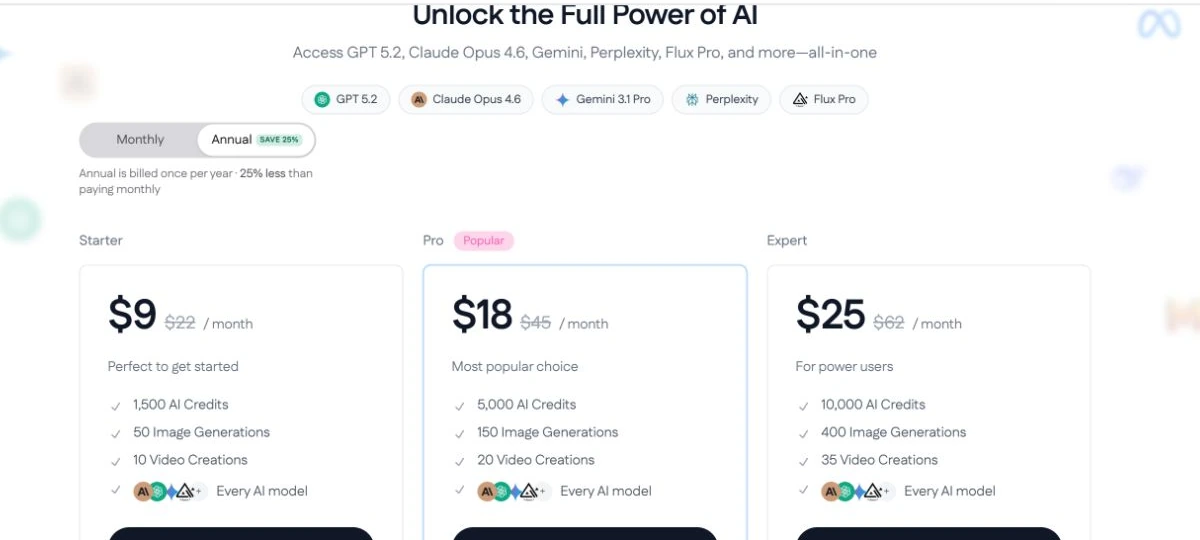
En la descripción anual se indicaba que todos los planes incluían todos los modelos de IA y se mostraba el mensaje “Cancela en cualquier momento. Sin compromiso”. Dado que la facturación anual se cobra una vez al año, comprueba si la cancelación detiene la renovación o modifica el periodo de pago actual. Las tarjetas de los planes capturadas no especificaban las normas relativas a impuestos, reembolsos, traspaso de saldo y excedentes.
- No compares los créditos, las generaciones de imágenes y las creaciones de vídeo como si fueran la misma unidad.
- Ejecuta una tarea periódica y anota el cargo real en la tarjeta de crédito.
- Comprueba los impuestos, las devoluciones, las transferencias, los importes excedentes y las restricciones de conexión al finalizar la compra.
Ventajas e inconvenientes de NinjaChat
Pros
- La herramienta oficial conecta el chat con las aplicaciones empresariales, en lugar de limitarse a dar respuestas.
- La introducción de datos en formato PDF, de voz y de texto puede reducir las dificultades cuando las tareas se inician en distintos formatos.
- Entre las conexiones mencionadas se encuentran Gmail, Slack, Notion y GitHub.
- Una sola conversación podría conservar más contexto de la tarea que varias herramientas independientes.
Contras
- Los créditos, la generación de imágenes y la creación de vídeos utilizan diferentes unidades de asignación.
- El hecho de que haya más de 500 conectores no revela el alcance ni los permisos de cada integración.
- No se llevó a cabo ninguna prueba práctica controlada para evaluar la precisión de las acciones ni la calidad del resultado.
- Los controles de privacidad, los registros, los reembolsos, la prórroga y la administración del equipo aún requieren una verificación en el momento de la compra.
Esas limitaciones no significan que NinjaChat sea un mal producto; lo que significan es que la decisión de compra requiere más argumentos que una simple promesa de «todo en uno». Si buscas una selección de modelos más clara, una integración más sólida con el navegador, mayores posibilidades de creación de contenidos multimedia o un espacio de trabajo en equipo más consolidado, lo más sensato es comparar las alternativas a NinjaChat antes de decidirte.
Las 5 mejores alternativas a NinjaChat con IA
Estas alternativas abordan diferentes aspectos del mismo problema. GLBGPT es la primera comparación que abarca una amplia variedad de modelos y acceso a los medios; Poe se centra en los chats basados en modelos y los bots; Monica y Merlin hacen hincapié en la productividad del navegador; y Magai se centra en los espacios de trabajo organizados.
| Plataforma | Lo mejor para | Punto fuerte principal | Principal dilema |
|---|---|---|---|
| GLBGPT | Amplio trabajo multimodelo | Herramientas de chat, imágenes, vídeo y para agentes en un único espacio de trabajo | Aún tienes que elegir el modelo y el plan adecuados |
| Poe | Modelos y bots | Gran modelo conversacional y ecosistema de bots | Más centrado en el chat que en un espacio de trabajo operativo |
| Mónica | Ayuda con el navegador | Redacción, traducción y ayuda con la navegación por la página | La mejor relación calidad-precio depende de si se realiza un uso intensivo del navegador |
| Merlín | Investigación en Internet | Resúmenes, investigación y redacción de contenidos web | La producción creativa no es su eje central más evidente |
| Magai | Organización del equipo | Espacios de trabajo multimodelo compartidos y estructura del proyecto | Las funciones del espacio de trabajo pueden resultar innecesarias para un uso individual y poco intensivo |
Los modelos, los límites gratuitos, los precios y las características de los planes están sujetos a cambios. La comparación describe la idoneidad del producto, no una prueba normalizada de precio o de calidad del resultado.
1. GLBGPT: La mejor alternativa a NinjaChat en general
GLBGPT Es la mejor primera opción cuando “todo en uno” significa la elección del modelo más herramientas de imagen, vídeo y agentes. En nuestra prueba de la interfaz, se podía acceder directamente a su espacio de trabajo para agentes sin necesidad de un código de invitación ni de la autorización de un administrador; no obstante, se siguen aplicando las condiciones habituales de cuenta y uso.
- Lo mejor para: una obra mixta que abarca desde la investigación y la escritura hasta las imágenes o el vídeo.
- ¿Por qué elegirlo?: Un espacio de trabajo ofrece rutas para el agente, el chat, la búsqueda, las imágenes, el vídeo, el audio y los modelos.
- Cuidado: Para lograr un acceso generalizado, sigue siendo necesario contar con el modelo adecuado, la configuración correcta, los permisos necesarios y una comparación de ofertas de crédito.
Utilice el los mejores generadores de imágenes con IA y Guía sobre generadores de vídeo con IA para reducir las opciones de especialistas.
Ajuste óptimo: Elige GLBGPT si quieres una única cuenta para diferentes familias de modelos, soportes creativos y herramientas de agente. Abre GLBGPT y empieza con tu tarea real., y actualiza solo cuando tu uso sea constante.
2. Poe: la mejor opción por su variedad de modelos y bots
Poe se basa en conversaciones con diferentes modelos y bots diseñados específicamente para ello.
- Lo mejor para: exploración de modelos, bots especializados y experiencias compartidas con bots.
- ¿Por qué elegirlo?: La decisión principal es qué modelo o bot debe responder.
- Cuidado: está más orientado a la conversación que un espacio de trabajo dedicado a las operaciones o a la producción audiovisual.
Compara los puntos de consumo actuales al finalizar la compra o consulta más información Alternativas a Poe AI.
3. Monica: la mejor opción para la productividad en el navegador
Mónica coloca la asistencia de IA junto a la página que ya estás leyendo o escribiendo.
- Lo mejor para: resúmenes de páginas, traducciones, respuestas y correcciones rápidas de textos.
- ¿Por qué elegirlo?: La integración con el navegador reduce la necesidad de copiar entre pestañas.
- Cuidado: La facilidad de uso del navegador puede ser más importante que la variedad de modelos o la profundidad de las acciones.
Véase el Las mejores alternativas a Monica si necesitas una cobertura mediática más amplia o que abarque varios modelos.
4. Merlin: ideal para búsquedas en Internet y resúmenes
Merlín combina la ayuda en la navegación con la investigación, los resúmenes y la redacción de contenidos web.
- Lo mejor para: resultados de búsqueda, artículos, documentos y resúmenes en vídeo.
- ¿Por qué elegirlo?: El asistente se mantiene cerca de la fuente que se está revisando.
- Cuidado: La investigación sobre navegadores es un punto fuerte más evidente que la producción creativa.
Para la producción de contenidos más extensos, compara la situación actual Herramientas de redacción basadas en IA.
5. Magai: la mejor opción para espacios de trabajo en equipo bien organizados
Magai hace hincapié en el trabajo multimodelo organizado para profesionales y equipos.
- Lo mejor para: chats compartidos, continuidad de los proyectos y contexto de equipo reutilizable.
- ¿Por qué elegirlo?: Las invitaciones, el uso compartido en modo de solo lectura y los archivos unificados facilitan la colaboración.
- Cuidado: Las funciones del espacio de trabajo aportan poco valor cuando se trata de consultas personales esporádicas.
Los usuarios individuales pueden comparar de forma más sencilla Alternativas a ChatGPT antes de invertir en la estructura del equipo.
¿Qué alternativa a NinjaChat deberías elegir?
- Elige GLBGPT si quieres disponer de una amplia selección de modelos, además de herramientas de imagen, vídeo y de gestión de agentes, todo en una sola cuenta.
- Elige a Poe si tu prioridad es descubrir modelos, bots y asistentes conversacionales.
- Elige a Mónica si quieres disfrutar de textos, traducciones y explicaciones mientras navegas a diario.
- Elige Merlin si tu trabajo se centra principalmente en la búsqueda de información en Internet, la elaboración de resúmenes, la redacción de documentos y la redacción basada en fuentes.
- Elige Magai si lo más importante son los proyectos compartidos y los espacios de trabajo organizados para el equipo.
Si NinjaChat está disponible en tu región, inclúyelo en la misma prueba. Asigna a cada plataforma una tarea realista, utiliza el mismo material de origen y registra el tiempo de configuración, los permisos, las correcciones, las acciones completadas y el coste de uso actual. No te bases únicamente en el número de funciones a la hora de elegir.
Preguntas frecuentes
¿Qué es NinjaChat AI?
NinjaChat se presenta como un asistente de IA «todo en uno» capaz de procesar entradas de texto, voz o PDF y de interactuar con aplicaciones conectadas. En su descripción oficial, indexada para búsquedas, se mencionan Gmail, Slack, Notion, GitHub y más de 500 servicios adicionales.
¿Es fiable NinjaChat AI?
NinjaChat disponía de páginas oficiales accesibles sobre la página de inicio, precios, planes e integraciones cuando se comprobó el 24 de septiembre de 2026. Esto respalda la existencia de un producto activo y un canal de ventas, pero no demuestra que todos los planes sean adecuados para ti. Comprueba los datos de la empresa, los términos y condiciones, la política de privacidad, los controles de permisos y las normas de reembolso antes de realizar el pago o facilitar datos confidenciales.
¿Es gratuita la IA de NinjaChat?
La página oficial de precios consultada el 24 de septiembre de 2026 mostraba los planes de pago «Starter», «Pro» y «Expert». No hemos comprobado que exista un plan gratuito permanente. Consulta el proceso de registro actual para ver si hay una prueba o una cuota gratuita limitada antes de dar por hecho que se incluye.
¿Cuánto cuesta NinjaChat?
En la vista de facturación anual consultada el 24 de septiembre de 2026, NinjaChat mostraba precios mensuales efectivos de $9 para el plan Starter, $18 para el plan Pro y $25 para el plan Expert, con el importe anual facturado una vez al año. Comprueba la opción de facturación mensual, los impuestos y las condiciones antes de comprar, ya que los precios pueden variar.
¿Cuál es la mejor alternativa a NinjaChat?
GLBGPT es la primera alternativa que debes tener en cuenta si buscas una amplia variedad de modelos, herramientas para imágenes y vídeos, y un espacio de trabajo accesible para los agentes. Poe destaca en cuanto a modelos y bots; Monica y Merlin se centran en la productividad en el navegador; y Magai hace hincapié en los espacios de trabajo organizados para equipos.
¿Es GLBGPT mejor que NinjaChat?
GLBGPT es la mejor opción cuando se da más importancia a una amplia compatibilidad con múltiples modelos y a la conexión con medios que a un asistente centrado en los conectores. NinjaChat puede ser la mejor opción cuando las acciones de sus aplicaciones conectadas se adaptan a tu trabajo diario y sus permisos en tiempo real, su precio y su fiabilidad cumplen con tus expectativas. Para esta reseña no se ha realizado ninguna prueba controlada con tareas idénticas.
Veredicto final
NinjaChat tiene una idea muy atractiva: permitir que una misma conversación acepte diferentes tipos de entradas, llegue a las aplicaciones donde ya se desarrolla el trabajo y pase de la lectura a la acción. Sus páginas oficiales respaldan ese posicionamiento y muestran un amplio catálogo de modelos de chat, imágenes y vídeo. La calidad de la ejecución no se ha sometido a pruebas independientes para esta reseña.
Por eso, NinjaChat es un producto que hay que probar con cuidado, no uno que se pueda descartar. Empieza con una tarea de bajo riesgo, limita los permisos del conector, revisa cada acción y confirma las condiciones de funcionamiento antes de añadir datos de la empresa.
Para una primera comparación lo más amplia posible, elige GLBGPT. Se adapta mejor a los usuarios que buscan diferentes modelos de chat, herramientas creativas y un espacio de trabajo para agentes, todo en una sola cuenta. Elige Poe para los bots, Monica o Merlin para trabajar en el navegador y Magai para una colaboración organizada en equipo.