من السهل التغاضي عن حدود ChatGPT Plus إلى أن تتطلب إحدى المهام عدة محاولات. لنفترض أنك أرسلت 20,000 توكن من المادة المصدرية وحصلت على إجابة تبلغ 2,000 توكن. أي ما مجموعه 22,000 توكن من المدخلات والمخرجات. إذا أرسلت تلك المادة نفسها أربع مرات للحصول على أربعة إجابات منفصلة من هذا الحجم، فسيصل المجموع إلى 88,000 توكن. هذا مثال، وليس حدًا ثابتًا لخدمة Plus، لكنه يوضح كيف أن مقارنة المستندات أو إعادة كتابة الكود قد تتطلب نصوصًا أكثر بكثير من أربعة أسئلة قصيرة. كما أن الاستدلال والأدوات لها حدودها الخاصة أيضًا، لذا دفع $20 شهريًّا مقابل باقة Plus قد يتركك في انتظار حتى انتهاء العمل.
الجزء المحبط هو أن هناك أكثر من حد واحد يجب إدارته. فقد يكون للرسائل النموذجية، وعمليات الاستدلال، وعمليات التحميل، وأدوات البحث حدود استهلاك مختلفة وفترات إعادة تعيين مختلفة. قد تظل قادرًا على إرسال رسالة بسيطة في الوقت الذي تكون فيه الميزة التي تعتمد عليها مهمتك غير متاحة. وهذا يترك لك خيار الانتظار، أو تغيير طريقة عملك، أو دفع تكلفة اشتراك آخر. وعندما يقترب الموعد النهائي، فإن هذه الانقطاعات تكلف أكثر من الرسوم الشهرية.
واجهتُ المشكلة نفسها في عملي. فبحلول الوقت الذي ظهرت فيه قيود ما، كنتُ قد قطعتُ شوطًا في إنجاز مهمة ما، وأردتُ إكمالها بينما التفاصيل لا تزال حاضرة في ذهني. قضيتُ وقتًا في البحث عن طرق للتغلب على تلك المقاطعات دون الاشتراك في خدمة أخرى باهظة الثمن. وقد قادني هذا البحث إلى جلوبال جي بي تي تي. ما لفت انتباهي هو إمكانية تجربة نماذج مختلفة من خلال حساب واحد. أردت أن أرى ما إذا كان بإمكاني نقل مهمة إلى مكان آخر عندما يصل ChatGPT إلى الحد الأقصى، بدلاً من تعليق المهمة بأكملها حتى تتم إعادة ضبطه.
في هذه الصفحة:
- إجابة سريعة
- الحدود الحالية للرسائل
- كيف تعمل الحدود
- قيود الرسائل والمطالبات
- ماذا يحدث بعد بلوغ الحد الأقصى؟
- الملفات، والصور، والأبحاث، والتسجيلات الصوتية، والأدوات
- ماذا نفعل بعد ذلك؟
- الأسئلة الشائعة
إجابة سريعة: ما هو الحد الأقصى لاستخدام ChatGPT Plus؟
ChatGPT Plus ليس غير محدود. يحصل مستخدمو Plus على حدود أعلى من المستخدمين المجانيين، لكن النماذج المتقدمة، وأوضاع التفكير، وتحميل الملفات، وتوليد الصور، والأدوات لا يزال بإمكانهم الوصول إلى حدود الاستخدام القصوى.
اعتبارًا من 15 سبتمبر 2026،, يُدرج OpenAI مادة GPT-5.6 Sol في فئات Plus Instant و Medium و High. لا يحدد الدليل الحالي عددًا ثابتًا لرسائل «Plus». فكل من «Thinking» والأدوات الفردية لها حدود سعة منفصلة؛ ويُظهر «ChatGPT» وقت إعادة الضبط عندما يكون متاحًا، وقد يقدم نموذجًا آخر بعد بلوغ الحد الأقصى لـ «Thinking».
إذا كنت تقارن ChatGPT Go مقابل Plus, ، لا يكمن الفرق الأكبر في السعر فحسب، بل في مدى سرعة وصول تدفقات العمل الجادة إلى الحدود القصوى.
| الخطة أو الوضع | الحد الحالي أو حق الوصول | ماذا سيحدث بعد ذلك |
|---|---|---|
| مجاني / Go GPT-5.6 Luna | محادثات نصية يومية غير محدودة، مع مراعاة الإجراءات الوقائية | لا تزال الأدوات تخضع لحدود منفصلة |
| بالإضافة إلى GPT-5.6 Sol Instant | الدليل الحالي لا يحدد عددًا ثابتًا لرسائل «Plus» | استخدم إشعار الحد الموضح في حسابك |
| Plus GPT-5.6 Sol متوسط / مرتفع | بدل التفكير المنفصل؛ لم يُنشر أي رقم حالي محدد | قد يستمر طراز ChatGPT مع طراز آخر متوفر |
| محترف | الوصول إلى GPT-6 Pro وGPT-5.6 Sol Pro | لا تزال الإعفاءات الخاصة بالنماذج المنفصلة أو المشتركة سارية |
قبعات رسائل ChatGPT Plus الحالية في عام 2026
- الحدود الحالية لعدد الرسائل في خدمة «Current Plus»: يعمل معالج GPT-5.6 على تشغيل ميزة «Instant on Plus». أما معالج OpenAI فلا ينشر رقمًا موحدًا لعدد الرسائل في «Current Plus». إذا كنت تقوم بأعمال بحثية مكثفة أو برمجة مكثفة، فقد تصل مع ذلك إلى الحد الأقصى المسموح به للنموذج أو الأداة.
- GPT-5.6: الاستدلال المنطقي: يتضمن برنامج «Plus» مستويي التفكير «المتوسط» و«المتقدم». لا تنشر OpenAI عددًا ثابتًا واحدًا لحالات التفكير في برنامج «Plus»؛ فبعد بلوغ الحد المسموح به، قد تستمر ChatGPT باستخدام نموذج آخر متاح. الـ دليل التسعير والاستخدام لـ GPT-5.6 يوضح مكانة النموذج ضمن مختلف الباقات.
- قراءة إشعار إعادة الضبط: لا تتم إعادة تعيين جميع الحدود عند منتصف الليل. يعرض ChatGPT وقت إعادة التعيين عندما تكون هذه المعلومات متاحة، لذا استخدم الوقت الموضح في حسابك بدلاً من افتراض أن إعادة التعيين تتم يوميًا.
| نوع الحد | المعلومات الحالية |
|---|---|
| مجاني / انطلق | محادثات نصية يومية غير محدودة مع GPT-5.6 Luna؛ أما الأدوات فلكل منها حدودها الخاصة |
| بالإضافة إلى «Instant» | GPT-5.6 Sol؛ لا يوجد تيار ثابت بالإضافة إلى عدد الرسائل الواردة في الدليل الرسمي |
| التفكير الإيجابي | متوسط وعالي باستخدام محلول GPT-5.6؛ بدل منفصل |
| بعد انتهاء مهلة التفكير | قد يتم عرض طراز آخر متوفر؛ استخدم وقت إعادة الضبط المعروض |
| GPT-6 Astra على Plus | مُدرج في «Work» و«Codex»، مع قواعد استخدام وإسناد منفصلة |
كيف تعمل حدود استخدام ChatGPT Plus
ChatGPT Plus قد تكون لها حدود استخدام تختلف حسب ظروف النظام:
- قيود أعلى خلال ساعات الذروة العالمية
- حدود أكثر سخاءً خلال أوقات خارج أوقات الذروة
- استهلاك أسرع للحدود عند استخدام النماذج المتقدمة
- الاختناق التلقائي إذا تم إرسال الرسائل بسرعة كبيرة جداً

هذا يعني أن تجربتك قد تختلف بشكل كبير على مدار اليوم.
حدود الرسائل وقيود المطالبات
قيود الرسائل هي القيد الأكثر وضوحاً لمستخدمي ChatGPT Plus. قد تواجهك:
- حدود الرسائل المخصصة لكل طراز
- فترات توقف بعد محادثات طويلة أو تستهلك موارد كثيرة
- “رسائل ”حاول مرة أخرى لاحقاً" عند تجاوز الحدود المسموح بها
| نوع التقييد | الوصف | أمثلة | مستوى التأثير | كيفية تقليل التأثير |
|---|---|---|---|---|
| حد الاستخدام النموذجي | تعتمد الحدود على الطراز والخطة وظروف النظام. | تم التوصل إلى بدل النموذج أو الأداة. | متوسط إلى مرتفع | اجمع الطلبات المتكررة ونقل الأعمال البسيطة إلى نموذج آخر متاح. |
| القيود الخاصة بكل طراز | يُخصص مبلغ منفصل لتقييم المنطق في GPT-5.6. | قد يستمر نموذج آخر متاح بعد بلوغ حد التفكير. | عالية | احتفظ بالتفكير المتقدم للخطوات الحاسمة. |
| المحادثات الطويلة | تستحوذ المحادثات المطولة على نافذة السياق المتاحة. | تفقد التفاصيل السابقة أهميتها في سلسلة من التعليقات الطويلة جدًّا. | متوسط | ابدأ موضوعًا جديدًا وانقل إليه ملخصًا تم التحقق من صحته. |
| “رسائل ”حاول مرة أخرى لاحقًا» | تظهر بعد تطبيق حد السرعة أو الحصة المسموح بها أو تقييد مؤقت للنظام. | يتم حظر الطلب أثناء فترات الازدحام الشديد. | عالية | استخدم وقت إعادة الضبط المعروض، أو تردد الطلب البطيء، أو قم بالتبديل بين الأوضاع. |
| الاستهلاك المعقد الفوري | قد تستهلك المطالبات الكبيرة وطلبات الأدوات سعة سياق أو سعة أداة منفصلة. | التعليمات المطولة، والملفات، والتحليلات متعددة الخطوات. | متوسط إلى مرتفع | قسّم المهام إلى أجزاء أصغر وتخلص من السياق غير ذي الصلة. |
تستهلك المطالبات المعقدة أيضًا موارد معالجة أكثر، مما يجعل من السهل الوصول إلى الحدود القصوى.
القيود المؤقتة ورسائل “حاول مرة أخرى لاحقًا”
حظر الاستخدام المؤقت أمر طبيعي ويحدث عادةً في الحالات التالية:
- سعة النظام محملة فوق طاقتها الاستيعابية
- تجاوزت حدود الأسعار المحلية
- النماذج المتقدمة تصل إلى حدود قصوى مؤقتة للموارد
تُفرغ بعض مجموعات الأسعار في غضون دقائق، بينما تتبع الحدود القصوى للطرازات والأدوات وقت إعادة الضبط المبين في ChatGPT.
Plus مثالي للاستخدام المعتدل، ولكنه غير مناسب لعمليات العمل المكثفة.
قيود الأداء: أولوية الوصول ولكن السرعة غير مضمونة
ChatGPT Plus أسرع من الفئة المجانية، ولكن الأداء لا يزال يعتمد على حركة المرور العالمية. قد يواجه المستخدمون:
- بطء الاستجابات خلال ساعات الذروة، خاصة عندما يطلب المستخدمون لماذا تعتبر ChatGPT بطيئة جداً
• عدم التوفر مؤقتًا
• أولوية أقل مقارنة بمشتركي باقات «Pro» و«Business»
تعد خدمة OpenAI مستخدمي «Plus» بأولوية الوصول خلال فترات الازدحام، لكنها لا تنشر ضمانًا محددًا لوقت الاستجابة.
Plus يحسن الأداء — ولكنه لا يضمن سرعات ثابتة.
ماذا يحدث عندما تصل إلى حد استخدام ChatGPT Plus الخاص بك؟
- عندما يتغير النموذج: بعد انتهاء مهلة التفكير، يمكن لـ ChatGPT المتابعة باستخدام نموذج آخر متاح. تحقق من النموذج المحدد قبل متابعة مهمة صعبة.
- احرص على تخصيص المهام الصعبة للنموذج المناسب: إذا كنت تكتب كودًا حاسوبيًا معقدًا، فقد يفوت النموذج الأبسط بعض التبعيات أو الحالات الاستثنائية. استخدم اختبارًا موجزًا قبل أن تكلفه بإنجاز بقية المهمة.
- أغطية منفصلة للبحوث والأدوات: تُطبق حدود منفصلة على «البحث المتعمق» و«الملفات» و«الصور» و«الصوت» و«كوديكس». ولا يعني بلوغ أحد هذه الحدود تلقائيًا استنفاد جميع الأدوات، ولكن قد تصبح كل أداة غير متاحة إلى أن تتم إعادة تعيين الحد المخصص لها.
- التتبع في الوقت الحقيقي: لا يعرض جهاز ChatGPT عدادًا واحدًا شاملاً لكل ميزة. بل يعرض شريطًا يوضح وقت إعادة الضبط أو الحد الأقصى عندما تكون هذه المعلومات متوفرة.
الجزء المحبط هو أن ChatGPT لا يُظهر دائمًا عدادًا مباشرًا واضحًا قبل أن تصل إلى الحد الأقصى. العديد من المستخدمين لا يدركون أنهم مقيدون إلا بعد اختفاء نموذج، أو ظهور أداة باللون الرمادي، أو ظهور تحذير.
| المهمة | الطراز الرائد | نموذج بديل متاح |
|---|---|---|
| أسئلة وأجوبة بسيطة | قوي | عادةً ما تكون جيدة |
| ملخصات | قوي | عادةً ما تكون جيدة |
| مهام الترميز الطويلة | تحسين التفكير المنطقي وتصحيح الأخطاء | أكثر عرضة لتفويت الحالات الحادة |
| الأبحاث المعقدة | توليف أفضل | قد تفقد الفوارق الدقيقة |
| تحليل كثيف البيانات | أفضل مع الأدوات/السياق | قد يواجه صعوبة في السياق الكبير |
| الكتابة الاستراتيجية | أكثر اتساقًا | يمكن أن تصبح عامة |
إذا كان هناك نموذج آخر متاح بعد بلوغ الحد الأقصى، فإنه لا يزال بإمكانه المساعدة في كتابة المسودات والملخصات والتعديلات البسيطة. أما بالنسبة للبرمجة المعقدة، أو الاستدلال القانوني، أو البحث التقني، أو الوثائق الطويلة، فمن الأفضل عادةً انتظار إعادة ضبط النموذج الرئيسي.
إذا حدث ذلك كثيرًا، فإن مقارنة أفضل بدائل ChatGPT يمكن أن يساعدك على تجنب الانتظار على نافذة إعادة تعيين نموذج واحد.
لماذا تتغير حدود ChatGPT Plus خلال اليوم؟
يمكن أن تبدو حدود ChatGPT غير متناسقة لأنها تتأثر بالطلب على النماذج، وتحميل الخادم، والأدوات المختارة، ونوع المهمة. خلال ساعات الذروة، قد يخفض OpenAI بعض الحدود لإبقاء النماذج متاحة لمزيد من المستخدمين.
عادةً ما تستهلك المهام الثقيلة السعة بشكل أسرع من الدردشة العادية. ومن الأمثلة على ذلك:
- المهام المنطقية الطويلة
- عمليات إعادة كتابة الأكواد البرمجية الكبيرة
- تحليل الملفات
- توليد الصور
- الأبحاث العميقة
- العديد من الرسائل السريعة في فترة قصيرة
- التحميلات الفاشلة المتكررة
الحدود المخفية: تحميلات الملفات، والتحليل المتقدم للبيانات، ونافذة السياق
حدود ChatGPT Plus هي ليس فقط عن الرسائل النصية. يمكن أن يكون لتحميلات الملفات، والتحليل المتقدم للبيانات، وتحميلات الصور، والمشاريع، والمحادثات الطويلة حدود منفصلة.
- الحد الأقصى لحجم الملف وعدد الملفات: دليل تحميل الملفات على جهاز ChatGPT Plus يغطي سير العمل بالتفصيل. يتيح OpenAI إضافة ما يصل إلى 80 ملفًا كل 3 ساعات، بحد أقصى 512 ميغابايت لكل ملف، و2 مليون رمز لكل ملف نصي أو مستند، و20 ميغابايت لكل صورة، و25 جيجابايت من سعة التخزين للمستخدم. تدعم مشاريع «Plus» ما يصل إلى 25 ملفًا، وقد تكون حدود التحميل في ساعات الذروة أقل.
- قيود نافذة السياق: OpenAI’s يُبيّن جدول الأسعار أن نافذة السياق الإجمالية تبلغ 54 كيلوبايت لخدمة «GPT Instant» في باقة «Plus»، و256 كيلوبايت لخدمة «GPT Reasoning». المساحة المتاحة لإدخالك أصغر لأن تعليمات النظام والأدوات والذاكرة والاستدلال والإجابة تتقاسمون تلك النافذة.
- واجهة برمجة التطبيقات (API) مقابل واجهة الويب: يختلف كل من موقع ChatGPT وواجهة برمجة التطبيقات (API) المخصصة للمطورين من حيث الأسعار والنماذج وحدود الاستخدام. ولا يتضمن حساب $20 Plus أرصدة API.
- توليد الصور: يتوفر الإصدار ChatGPT Images 2.5 في جميع المستويات، بينما تتوفر الصور المزودة بخاصية التفكير في مستويات Plus وPro وBusiness. لا تحدد صفحات «Plus» الحالية في OpenAI حدًا رقميًا ثابتًا لعدد الصور التي يمكن إنشاؤها.
- الأبحاث العميقة: يتضمن الإصدار «Plus» ميزة «Deep Research» الموسعة، ولكن لا تنشر صفحة الأسعار الحالية لـ OpenAI حصة «Plus» رقمية ثابتة واحدة. اعتبر الرصيد المتبقي وإشعار إعادة الضبط الظاهرين في حسابك بمثابة الرصيد المتاح حالياً.
- الصوت: تتضمن باقة ChatGPT Plus 3 ساعات من استخدام GPT-Live-1 في الدردشة على مدار 24 ساعة متجددة. يُعلمك تطبيق ChatGPT عند بلوغ الحد الأقصى؛ أما ميزة «Voice in Desktop» فلها قواعد استخدام منفصلة.
- أدوات «كوديكس» و«أجينتيك»: يمكن لوكلاء Codex وChatGPT Work وExcel وWorkspace الاستعانة بمجموعة وكلاء مشتركة. تشير OpenAI إلى أن استخدام المهام يختلف باختلاف النموذج، ومدى التعقيد، وحجم قاعدة الكود، وموقع التشغيل, ، ولذلك فهي لا تنشر رقمًا موحدًا لعدد المهام لكل مستخدم من مستخدمي «Plus».
إن الحدود الرسمية لتحميل الملفات سرعة التحميل وحجم الملف وسعة التخزين الإجمالية كل على حدة. وقد يُحتسب التحميل الفاشل أحيانًا ضمن حد السرعة المسموح به.
قد يصبح من الصعب إدارة المحادثات الطويلة حتى قبل أن تصل إلى الحد الأقصى للرسائل المرئية. إذا كانت المحادثة تحتوي على العديد من الملفات أو كتل التعليمات البرمجية أو التعليمات أو المسودات السابقة، فقد ينخفض الأداء. في هذه الحالة، اطلب من ChatGPT تلخيص سلسلة المحادثات الحالية والمتابعة في محادثة جديدة.
بالنسبة للعمل على مستوى المجلد، فإن السؤال الأكثر صلة بالموضوع هو ما إذا كان هل يمكن ل ChatGPT قراءة مجلد كامل ومعالجته دون كسر السياق أو حدود التحميل.
تُحسّن باقة ChatGPT Plus السرعة وإمكانية الوصول مقارنةً بالباقة المجانية، لكنها ليست باقة غير محدودة. وللحفاظ على استقرار النظام لملايين المستخدمين، تفرض باقة OpenAI عدة أنواع من القيود:
- حدود الرسائل المخصصة لكل طراز
- حدود الحد الأقصى لمعدل الاستخدام
- حدود توفر الطراز المتقدم
- تقييد مؤقت للسرعة خلال فترات الحمل المرتفع
- قيود استخدام الميزات والأدوات
تمنع هذه الضوابط تحميل النظام بشكل زائد، ولكنها تخلق أيضًا فجوات ملحوظة للمستخدمين اليوميين أو المحترفين.
ماذا تفعل عندما تصل إلى حد ChatGPT Plus
إذا وصلت إلى حد ChatGPT Plus، جرّب هذه الخيارات:
- انتظر نافذة إعادة الضبط.
- انتقل إلى طراز آخر متوفر لأداء المهام البسيطة.
- ابدأ محادثة جديدة بملخص.
- ضغط الملفات الكبيرة أو تقسيمها قبل الرفع.
- احفظ وضع التفكير للمشاكل الصعبة.
- استخدم API أو Pro أو Pro أو Business أو مساحة عمل متعددة النماذج لمهام سير العمل الشاقة.
تجنب إضاعة رسائل النماذج المتقدمة في التنسيق البسيط أو إعادة الكتابة القصيرة أو العصف الذهني الأساسي. احتفظ بها للمهام التي تكون فيها الجودة مهمة حقًا.
إذا وصل ChatGPT Plus إلى الحد الأقصى المؤقت، يمكنك متابعة المهام الأقل خطورة أو المهام الموازية باستخدام Claude أو Gemini أو نماذج الصور أو أدوات الفيديو. أدوات الذكاء الاصطناعي المتكاملة احتفظ بهذه الخيارات في مساحة عمل واحدة. وهذا مفيد للمبدعين والمسوقين والمطورين والباحثين الذين لا يرغبون في أن يعتمد سير عملهم بالكامل على نافذة إعادة تعيين نموذج واحد.
هل لا يزال ChatGPT Plus يستحق $20 نظراً للقيود الحالية؟
- مقارنة القيمة: بالنسبة لخطة $20، تحصل على أداة جيدة، لكنها محدودة. تبدأ خطة Pro من $100 شهريًّا. تم تعليق الاشتراكات الجديدة في باقة $200 والترقيات إليها منذ 10 سبتمبر 2026؛ ولا يتأثر تجديد الاشتراكات الحالية في باقة $200. والسؤال الحقيقي هو هل يستحق جهاز ChatGPT Pro الشراء؟ لعبء العمل الخاص بك.
- تكلفة الاشتراكات المجزأة: يجد الكثيرون أن باقة «ChatGPT Plus» غير كافية. كما يدفعون مبلغ «$20» مقابل باقة «Claude Pro» وحوالي «$20» مقابل باقة الذكاء الاصطناعي المدفوعة من Google. وبحلول نهاية الشهر، يكونون قد أنفقوا $60 أو أكثر فقط لكي يتوفر لديهم “الحصة” الكافية من الذكاء الاصطناعي لإنجاز عملهم.
- متى يجب التبديل: إذا وجدت نفسك تنتظر إعادة تعيين الحدود أكثر من مرتين في الأسبوع، فقد حان الوقت للمقارنة ChatGPT Plus مقابل ChatGPT Business أو تجاوز نموذج الاشتراك الفردي.
OpenAI تفاصيل باقة Pro اشرح سبب تعليق فئة $200. إن إلغاء هذه الفئة يعني أنه لا يمكنك شراؤها مرة أخرى طالما ظل التعليق ساريًا.

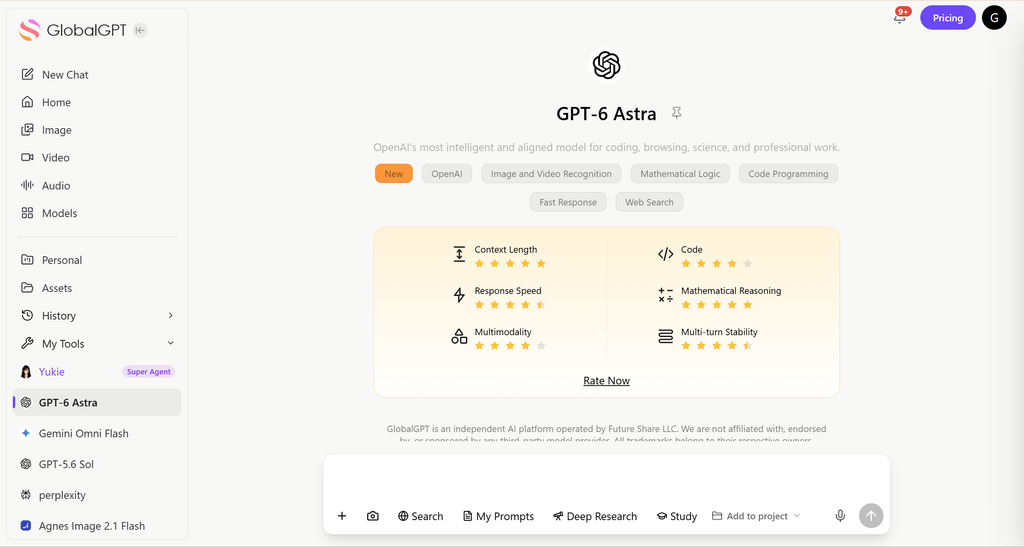
- GlobalGPT: جهاز تبديل النماذج متعدد الوظائف: بدلاً من أن تظل مقيدًا بشركة واحدة، يمنحك GlobalGPT “مفتاحًا رئيسيًّا” يتيح لك الوصول إلى أكثر من 100 نموذج. يمكنك استخدام GPT-6 Astra في عمليات الاستدلال المعقدة، ثم التبديل إلى Claude Opus 5 في نفس مساحة العمل.
- لماذا يُعد تغيير النموذج الحل الأمثل: عندما يتم تقييد نموذج ما، قد يكون هناك نموذج آخر حالي بنفس القوة في مجالات البرمجة أو البحث أو الكتابة الإبداعية. ويجعل GlobalGPT عملية التبديل هذه سلسة، بحيث لا يضطر عملك إلى الانتظار حتى تتم إعادة ضبط أحد النماذج.
- توزيع التكلفة - الكفاءة - التكلفة: تبلغ تكلفة باقة GlobalGPT $8.9 شهريًّا أو $5.8 شهريًّا في حالة الدفع السنوي. لا توفر باقة OpenAI خيار الدفع السنوي لخيار «Plus»؛ و دليل الخطة السنوية لـ ChatGPT Plus وهذا يفسر الفرق في السعر.
- سير العمل السلس: لا تقتصر إمكانياتك على النص فقط. في GlobalGPT، يمكنك الانتقال من الدردشة النصية إلى إنشاء الصور أو مقاطع الفيديو الاحترافية. كل شيء متوفر في مكان واحد.
ملخص نهائي: ما الذي يجب أن يتوقعه المستخدمون من ChatGPT Plus Limits
يوفر ChatGPT Plus وصولاً مُحسَّناً على الفئة المجانية، ولكنه لا يزال يتضمن حدوداً قصوى للرسائل، وحدوداً للمعدّل، وقيوداً متقدمة على الطراز. تتقلب هذه الحدود بناءً على حمل النظام. بالنسبة للاستخدام الأثقل أو الاحترافي، فإن المنصات ذات القيود الأقل - مثل جلوبال جي بي تي تي-توفر مرونة أكبر وقيمة إجمالية أفضل.
الأسئلة الشائعة
ما هو حد ChatGPT Plus؟
اعتبارًا من 15 سبتمبر 2026، ستتضمن باقة «Plus» حصصًا مخصصة للنماذج والأدوات بدلاً من عدد رسائل موحد. تعمل خدمة «GPT-5.6 Sol» على مستويات «Instant» و«Medium» و«High»؛ يرجى الاطلاع على الحد الأقصى وإشعار إعادة الضبط الموضحين في حسابك.
هل ChatGPT Plus غير محدود؟
لا، إن ChatGPT Plus لديه حدود أعلى من المجاني، لكنه لا يزال يتضمن حدودًا قصوى للرسائل، وحدود التحميل، وحدود الأدوات، والقيود المؤقتة.
متى يتم إعادة تعيين حد ChatGPT Plus؟
لا توجد فترة إعادة تعيين موحدة لجميع ميزات «Plus». يمكن أن تستخدم عمليات تحميل الملفات فترة متجددة مدتها 3 ساعات، بينما تستخدم ميزة «Live Voice» فترة مدتها 24 ساعة، أما حدود استخدام النماذج أو الأدوات فتتبع الإشعار الموجود في حسابك.
لماذا تحولت ChatGPT إلى نموذج مصغر؟
قد يقدم ChatGPT نموذجًا آخر متاحًا بعد بلوغ حد التفكير. لا يضمن الدليل الحالي وجود خيار احتياطي مصغر واحد ثابت؛ يرجى التحقق من النموذج المحدد وإشعار إعادة الضبط في حسابك.
هل لدى ChatGPT Plus حدود لتحميل الملفات؟
نعم. يسرد OpenAI حدود حجم الملف ومعدل التحميل والمشروع والتخزين. بالإضافة إلى أنه يمكن للمستخدمين تحميل ما يصل إلى 80 ملفًا كل 3 ساعات، ولكن قد تكون الحدود أقل خلال ساعات الذروة.
ماذا تعني عبارة “لقد وصلت إلى حد الاستخدام المسموح به”؟
يعني عادةً أنك وصلت إلى نموذج أو رسالة أو تحميل أو أداة أو حد مؤقت للنظام. انتظر إعادة التعيين أو تبديل النماذج أو تقليل تكرار الطلب.
ما هي نماذج GPT التي يتضمنها ChatGPT Plus؟
تتضمن باقة «Plus» خدمات GPT-5.6 Sol Instant، والمستوى المتوسط، والمستوى العالي في «Chat». أما خدمة GPT-6 Astra فهي متوفرة في باقتي ChatGPT Work و«Codex»؛ بينما تتطلب خدمة GPT-6 Pro في «Chat» العادي باقة مؤهلة أعلى.
هل يتضمن باقة ChatGPT Plus رصيدًا لـ API أم فوترة سنوية؟
الخطة رقم OpenAI تُفوَّت شهريًّا بمبلغ ChatGPT Plus عند $20، ولا توفر خيار الدفع المسبق السنوي لخطة Plus، كما تُفرض رسوم منفصلة على استخدام واجهة برمجة التطبيقات (API) بمبلغ OpenAI.
هل ChatGPT Pro أفضل من Plus؟
Pro أفضل للاستخدام الفردي الكثيف. أما Plus فهو أفضل لمعظم المستخدمين اليوميين، في حين أن Pro أو Business أو API أو GlobalGPT قد يناسب المستخدمين الذين يصلون إلى حدود الاستخدام بشكل متكرر.
هل يمكنني استخدام GPT-6 Astra على جهاز GlobalGPT؟
نعم. يوفر GlobalGPT نموذج GPT-6 Astra في مساحة عمل تتيح لك التبديل بين نماذج النصوص والصور والفيديو. ويُعد الوصول إلى GlobalGPT والحدود المسموح بها فيه منفصلين عن اشتراك OpenAI وChatGPT.