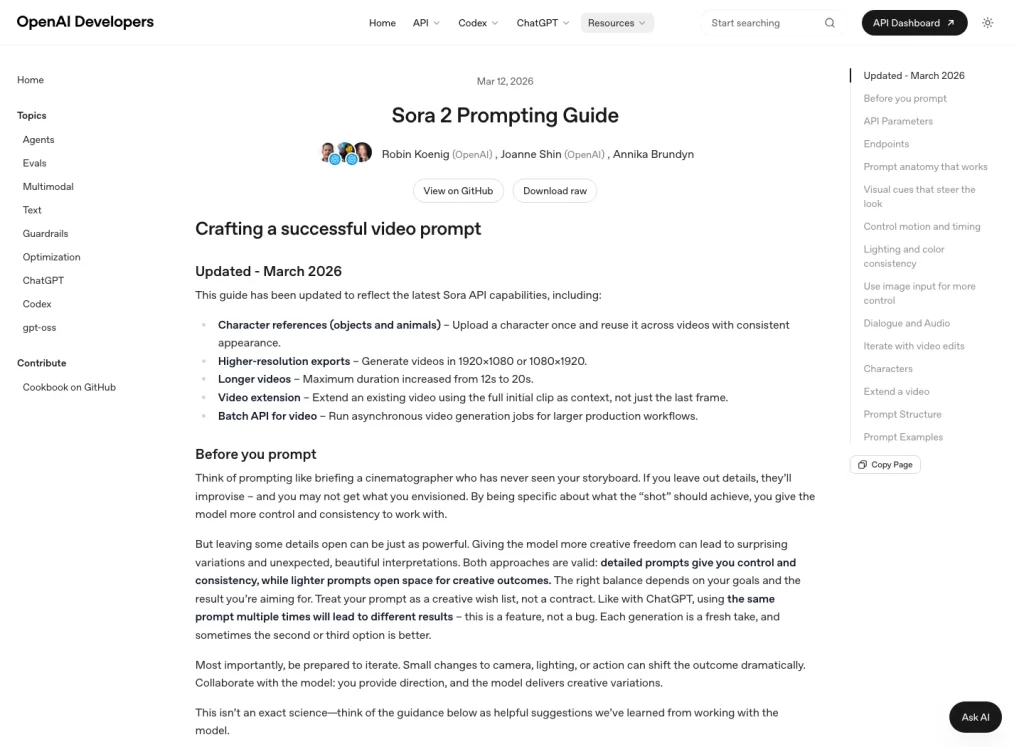
Быстрый ответ: Полезный сториборд Sora 2 в 2026 году — это не столько нажатие постоянной кнопки “сториборд”, сколько составление пошагового сценария перед созданием, доработкой или редактированием видео. Собственный OpenAI Руководство по вводу команд Sora 2 описывает «подсказку» как инструктаж оператора, который никогда не видел ваш раскадровку. Это самый надежный способ описать данный рабочий процесс.
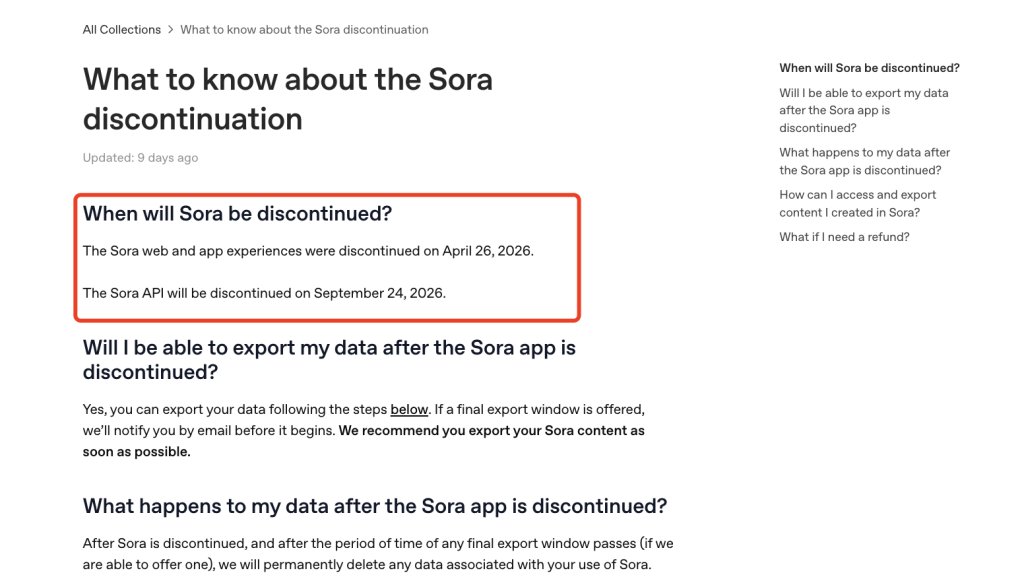
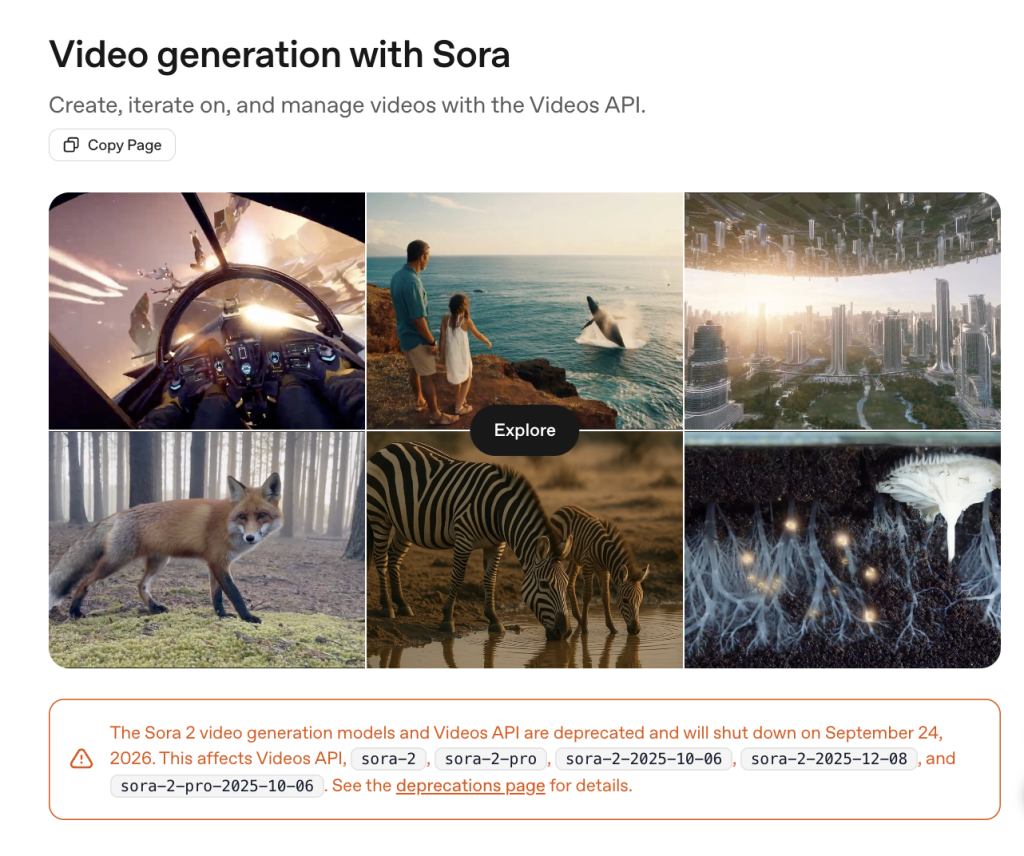
Ситуация с доступом имеет большое значение. По состоянию на 13 июля 2026 года у OpenAI Уведомление о прекращении выпуска Sora сообщается, что работа веб-версии и мобильного приложения Sora была прекращена 26 апреля 2026 года, а также OpenAI Руководство по API «Видео» сообщается, что API «Videos» и API «Sora 2» признаны устаревшими, а дата их отключения назначена на 24 сентября 2026 года. На практике следует перестать исходить из того, что каждый читатель может открыть один и тот же интерфейс приложения Sora, и сосредоточиться на тех аспектах, которые по-прежнему остаются универсальными для всех инструментов: планирование кадров, структура подсказок, хронометраж, ссылки, непрерывность и проверка доступа в день публикации.
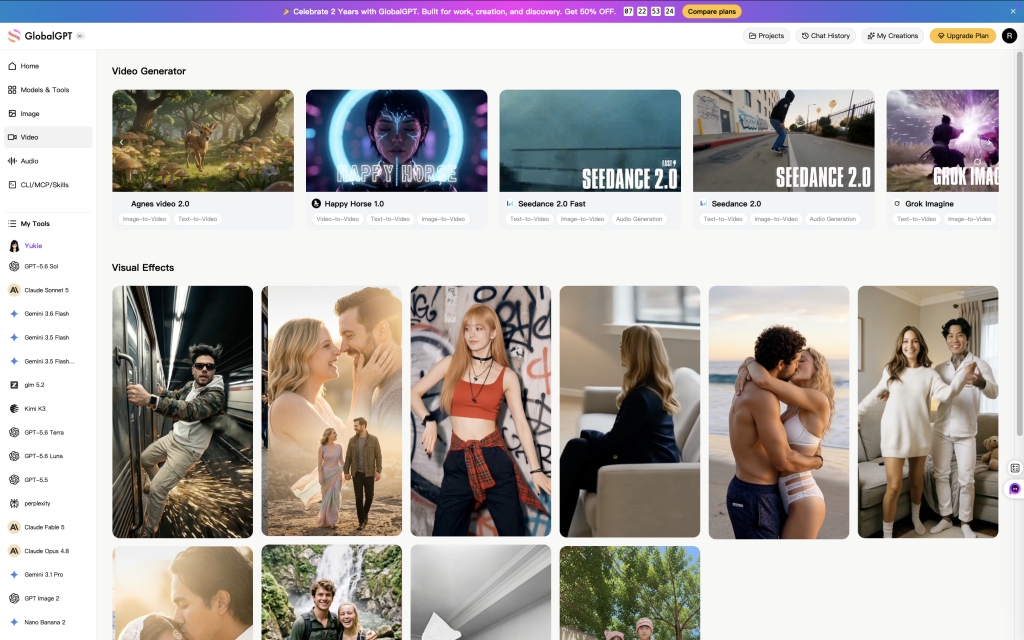
Если вы все еще занимаетесь составлением сценариев, списков кадров, вариантов реплик или производственных заметок, GlobalGPT — это удобная платформа для сравнения идей, полученных с помощью различных моделей ИИ, прежде чем тратить кредиты на видео. Преимущество заключается в оптимизации рабочего процесса: единое рабочее пространство для вариантов сценария, доработки карт кадров, обратной связи от моделей и более удобного переключения между ними, вместо того чтобы распределять этап планирования по отдельным подпискам и вкладкам браузера. Когда Рабочий процесс с видео Sora 2 доступно в вашем аккаунте, воспользуйтесь им, когда сториборд будет достаточно отлажен для рендеринга.
Состояние разработки сценария Sora 2 в 2026 году
Если вы задаетесь вопросом: “Можно ли по-прежнему использовать сториборды Sora 2?”, то ответ из официальной документации таков: сначала проверьте функционал продукта. В старых учебных материалах по Sora сториборды часто рассматривались как стабильная функция пользовательского интерфейса Sora 2. Это больше не соответствует информации в общедоступном справочном центре OpenAI, где указано, что веб-версия и мобильное приложение Sora уже сняты с поддержки, а в документации для разработчиков говорится, что API «Видео» и модели Sora 2 являются устаревшими и их поддержка будет прекращена 24 сентября 2026 года.
Это не означает, что планирование с помощью сторибордов бесполезно. Это означает, что более эффективный подход заключается в том, чтобы перестать обещать единый официальный алгоритм действий и использовать рабочий процесс, который охватывает API, сторонние видеоредакторы и обычное предпроизводственное планирование. Поисковый запрос по-прежнему актуален: пользователи хотят иметь больше контроля над хронометражем, движением камеры, непрерывностью и переходами. Метод заключается в том, чтобы составить четкий список кадров до генерации, а затем использовать генерацию, расширение, монтаж и ссылки там, где это поддерживается платформой.
OpenAI Контрольные точки жизненного цикла Sora для планирования сториборда
Проверено 13 июля 2026 года: проект по потребительскому приложению уже был завершен, тогда как для проекта по API по-прежнему требовался план вывода из эксплуатации с учетом всех нюансов.
Источник: Справочный центр OpenAI и руководство по API OpenAI Videos, проверено 13 июля 2026 года.
Что термин “сториборд” означает для Sora 2 в настоящее время
В случае Sora 2 сториборд лучше всего рассматривать как структурированный видео-бриф: последовательность кадров, каждый из которых имеет собственные настройки камеры, действия объекта съемки, освещение, звуковые сигналы, примечания по последовательности сцен и параметры генерации. В руководстве по подсказкам OpenAI для Sora 2 напрямую используется аналогия со сторибордом: если модель не видела задуманный вами сториборд, ваша подсказка должна содержать указания по постановке.
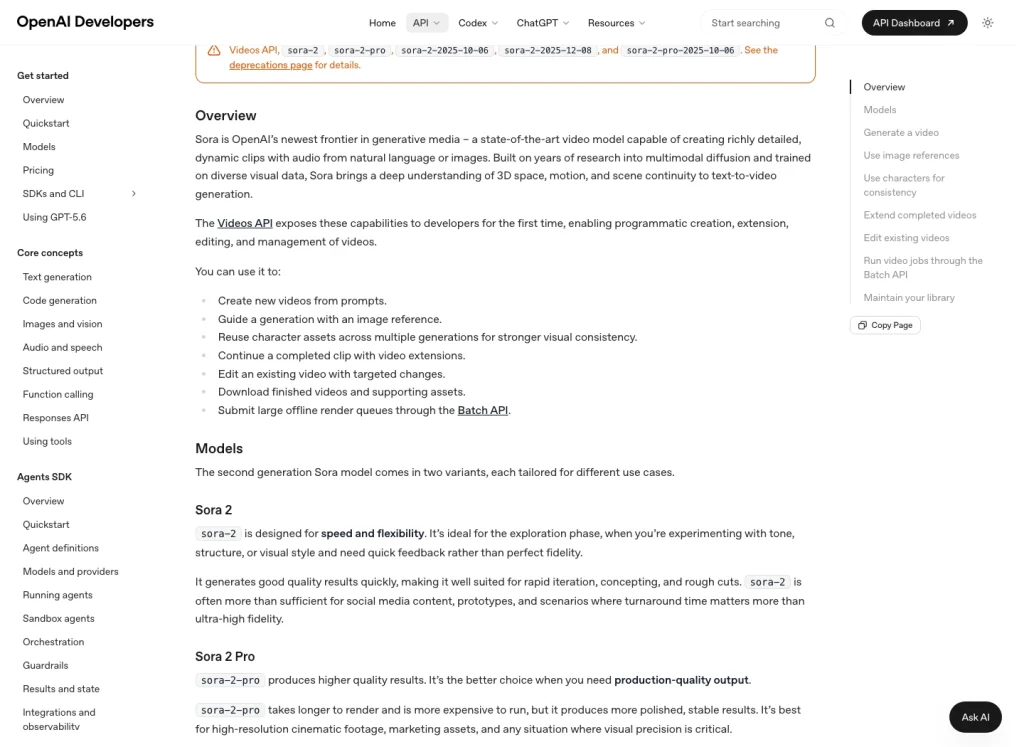
Важное различие заключается в следующем: “сториборд” не указан в качестве отдельного параметра API Videos в руководстве по генерации видео от OpenAI. API работает с подсказками, выбором моделей, размерами, продолжительностью, ссылками на изображения, персонажами, расширениями, редактированием, загрузками и пакетными заданиями. Таким образом, ваш сториборд существует в вашем документе планирования и структуре подсказок, а затем преобразуется в вызовы API или действия платформы.
Прежде чем следовать каким-либо рекомендациям по созданию сторибордов от Sora, воспользуйтесь простым критерием отбора: придерживайтесь инструкций, применимых к различным поверхностям продукта, отделяйте факты о параметрах от рекомендаций по подсказкам и отдавайте предпочтение редактируемым карточкам кадров, а не одному длинному «кинематографическому» абзацу. Именно поэтому в приведенном ниже рабочем процессе делается акцент на четком определении продолжительности и размера, использовании эталонных ресурсов (если это возможно) и алгоритме принятия решений «создать-расширить-отредактировать».
Практический рабочий процесс создания сториборда для Sora 2
В открытой документации по OpenAI указаны три практических элемента управления: параметры, ввод справочной информации или символов, а также действия по созданию, расширению и редактированию. Приведённый ниже рабочий процесс превращает эти элементы управления в производственный чек-лист для пользователей, которые хотят получить кинематографический контроль, не полагаясь на один экран приложения, которое больше не поддерживается. Он подойдёт как для подготовки запросов к API OpenAI Videos, пока оно ещё доступно, так и для планирования генерации видео с помощью сторонних инструментов или составления раскадровки перед передачей работы видеоредактору.
1. Начните с задания на вывод, а не с подсказки
Сформулируйте одно предложение, определяющее конечный результат видеозадания: “20-секундный вертикальный тизер продукта для туристического приложения”, “сцена с талисманом-животным, состоящая из четырёх кадров” или “12-секундный образовательный ролик с дикторским текстом”. Это не даст раскадровке превратиться в беспорядочный набор подсказок. Если видео предназначено для коммерческого или публичного использования, перед созданием ознакомьтесь с условиями лицензирования, правами и правилами платформы; Руководство по коммерческому использованию Sora 2 — это полезная статья для дальнейшего чтения.
2. Перед съемкой кадров определитесь с форматом и продолжительностью
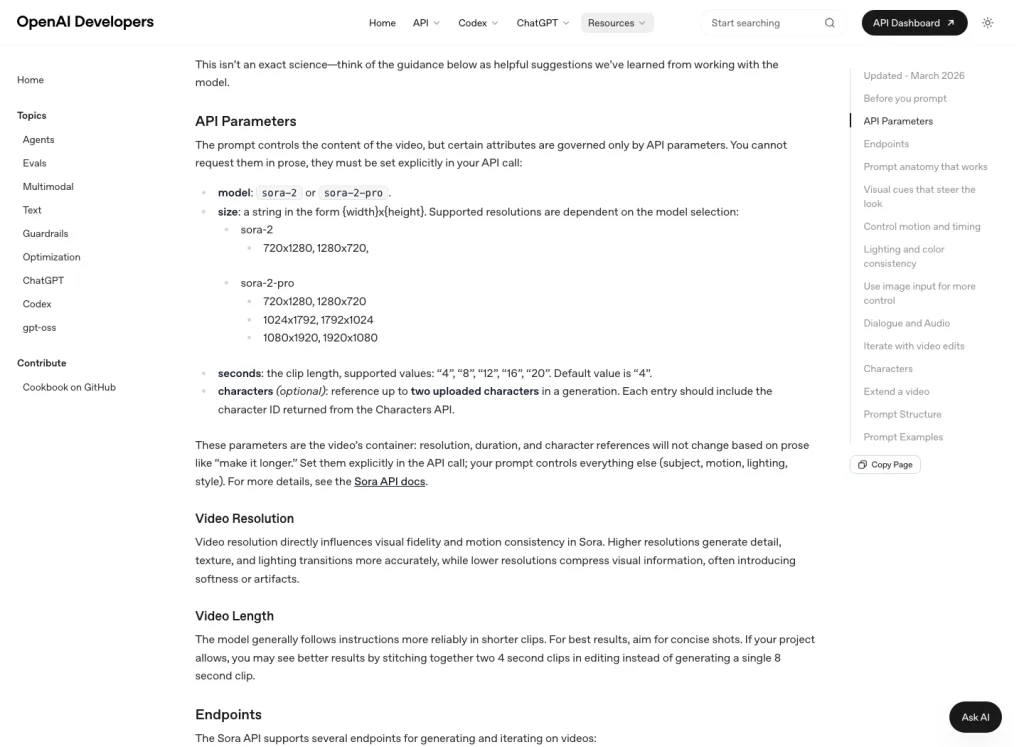
В руководстве по созданию промптов OpenAI для Sora 2 указано, что разрешение и продолжительность регулируются параметрами, а не текстом промпта. Другими словами, фраза “сделать длиннее” не равнозначна установке длительности клипа. Прежде чем составлять список кадров, определитесь, нужен ли вам экспорт в горизонтальном, вертикальном формате или с высоким разрешением. Более подробную информацию о планировании продолжительности просмотра см. в руководство по продолжительности видео Sora 2.
Варианты разрешения по модели Sora 2
На практике выбор прост: используйте базовую версию Sora 2 для итераций в разрешении 720p, а переходите на Sora 2 Pro, когда для задачи требуются форматы с особо высоким разрешением, перечисленные в списке OpenAI для версии Pro.
720×1280, 1280×720
720×1280, 1280×720, 1024×1792, 1792×1024, 1080×1920, 1920×1080
Источник: Руководство по вводу команд для моделей OpenAI и Sora 2, проверено 13 июля 2026 года.
3. Разбить идею на карточки с кадрами
Каждая карточка кадра должна содержать одну настройку камеры, одно основное действие, одну визуальную атмосферу и одно примечание по непрерывности. Распространённой ошибкой является описание всего короткометражного фильма одним абзацем. Модели, снимающие в стиле “Сора”, лучше реагируют, когда перед камерой стоит чётко видимая задача: “общий план, лиса пересекает заснежённую дорогу тремя шагами” звучит убедительнее, чем «красивая сцена с лисой».”
4. Сделайте движение внутри каждого кадра простым
Рекомендации OpenAI по этому вопросу однозначны: движение и синхронизация — это сложно, поэтому используйте наглядные ориентиры. Описывайте действия в виде шагов, пауз, поворотов, жестов и временных ориентиров. Если для одного кадра требуется три разных движения камеры и пять действий объекта съемки, разбейте его на две или три карточки кадра.
5. Используйте ссылки для обеспечения преемственности, если это целесообразно
Если рабочий процесс поддерживает ввод изображений, используйте эталонное изображение для начального кадра, дизайна персонажей, костюмов, окружения или стиля бренда. Если рабочий процесс поддерживает повторно используемых персонажей, используйте их для нечеловеческих объектов или предметов, которые должны сохранять одинаковый внешний вид во всех кадрах. В руководстве по генерации видео OpenAI эталонные изображения отделены от повторно используемых персонажей, поэтому не следует рассматривать их как один и тот же элемент управления.
6. Выберите «Создать», «Расширить» или «Редактировать» в зависимости от задачи
Используйте «новое поколение», когда прорабатываете кадр. Используйте «расширение», когда первый клип удался, и вы хотите, чтобы следующий такт плавно вытекал из него. Используйте «редактирование», когда структура устроена правильно, но требуется скорректировать какую-то деталь, например, цветовую гамму, освещение или второе действие. Чем меньше изменение, тем выше вероятность, что при редактировании удастся сохранить то, что уже сработало.
7. Сохраняйте каждый удачный кадр в качестве рабочей памяти
Когда кадр получается удачным, сохраните подсказку, модель, размер, продолжительность, исходное изображение, идентификатор персонажа, примечание к редактированию и местоположение конечного файла. Это не только вопрос организованности. Это поможет вам сохранить преемственность, если понадобится воссоздать последовательность, сменить поставщика услуг или перейти от черновых концепций к отполированному монтажу.
Шаблон сториборда для многократного использования
Используйте эту таблицу в качестве компактного шаблона сценария для Sora 2. Сделайте его достаточно простым, чтобы его можно было скопировать в документ, электронную таблицу или в поле ввода модели.
| Поле | О чем писать | Пример |
|---|---|---|
| Идентификатор снимка | Стабильная метка для кадра. | кадр-001 |
| Продолжительность | Максимальная длина зажима, поддерживаемая вашим инструментом. | 8 секунд |
| Кадр и камера | Размер кадра, угол съемки, ощущение от объектива и движение камеры. | Средне-широкий план, на уровне глаз, медленное перемещение камеры влево. |
| Субъект и действие | Один заметный объект и одно основное действие. | Красный журавль делает два шага по мелководью, останавливается, а затем опускает голову. |
| Освещение и цветовая гамма | Источник света, атмосфера и от двух до пяти цветовых акцентов. | Мягкий рассветный свет, серебристая вода, красные перья, теплый желтый хвост. |
| Звуковой сигнал | Краткое указание по звуковому сопровождению или диалогу, если необходимо. | Тихий ручей, лёгкий шелест крыльев, никакой музыки. |
| Примечание о непрерывности | Что должно оставаться неизменным от кадра к кадру. | Та же конструкция крана, то же место на реке, то же утреннее освещение. |
| Примечание о поколении | Создание, расширение, редактирование, ссылки или инструкции по работе с символами. | Сделайте первый дубль; если движение получилось, продлите его до момента наклона головы. |
Пример задания для создания сториборда
Вот краткий пример сценария для видеоролика о дикой природе. Он составлен в форме производственного задания, а не в виде расплывчатого описания.
Проект: 12-секундный короткометражный ролик о природе, горизонтальный формат.

Стиль: спокойные кинематографические кадры дикой природы, естественная цветопередача, мягкий свет рассвета, реалистичное движение воды.

Кадр 1, 0–4 секунды:
Широкий план на уровне глаз. Красный журавль с желтым хвостом стоит в мелком ручье. Птица находится в центре кадра, неподвижна и насторожена. Над серебристо-голубой водой висит лёгкий туман. Звуковое сопровождение — тихое журчание ручья и отдалённые утренние птичьи голоса.

Кадр 2, 4–8 секунд:
Средний план, тот же журавль и тот же ручей. Журавль делает два медленных шага вперёд, останавливается и опускает голову к воде. Желтый хвост должен оставаться в кадре, а контровое освещение на рассвете — оставаться неизменным.

Кадр 3, 8–12 секунд:
Ближний средний план. Журавль поднимает голову, с его клюва капают мелкие капельки воды. Камера держится ровно. Никаких посторонних животных, никаких резких переходов камеры, никакой драматичной музыки.
Обратите внимание, что демонстрирует этот пример: в каждом кадре показывается только одно видимое действие, повторяются важные детали, характеризующие персонажа, сохраняется единообразие освещения, а для модели используется простая структура хронологии. Если с одним непрерывным клипом возникают трудности, сначала создайте «Кадр 1», а затем расширьте его или отредактируйте, исходя из полученного лучшего результата.
Ограничения, влияющие на планирование сториборда
Даже самый убедительный сториборд должен учитывать ограничения продукта. Именно эти ограничения определяют разницу между полезным производственным планом и заданием, которое звучит хорошо, но не работает в данном инструменте.
Продолжительность и разрешение — это параметры
В руководстве по созданию подсказок OpenAI для Sora 2 приведены поддерживаемые длины клипов и разрешения, зависящие от модели. Там также указано, что такие параметры контейнера, как разрешение и продолжительность, необходимо задавать явно. Это означает, что ваш раскадровка должна содержать строку с параметрами для каждого кадра, а не только текстовую подсказку.
Поддерживаемые длины зажимов Sora 2
В OpenAI перечислены пять поддерживаемых значений. При планировании сториборда рассматривайте их как продолжительность отдельных кадров, а не сцен: более короткие клипы проще режиссировать, а более длинные лучше оставлять для простых непрерывных эпизодов.
Источник: Руководство по вводу команд для моделей OpenAI и Sora 2, проверено 13 июля 2026 года.
Более длинные клипы сложнее контролировать
Более длинные клипы могут быть полезны для создания более насыщенных сцен, но они сопряжены с дополнительным риском. В руководстве по подсказкам OpenAI отмечается, что более короткие клипы, как правило, позволяют более надежно следовать инструкциям. Для многих видеороликов, созданных по сториборду, последовательность коротких клипов, смонтированных вместе на этапе редактирования, будет проще контролировать, чем один длинный клип со слишком большим количеством смен.
Ссылки и персонажи — это не одно и то же
Изображение-ориентир может служить ориентиром для первого кадра нового поколения. Многоразовый ассет персонажа, при его поддержке, предназначен для сохранения образа нечеловеческого персонажа или объекта на протяжении нескольких поколений. Если в сториборде важно, чтобы талисман, животное, продукт или реквизит оставались неизменными, укажите, используете ли вы изображение-ориентир, ассет персонажа или повторяющуюся описательную формулировку.
Правила безопасности могут нарушить план съёмок
В руководстве по генерации видео OpenAI перечислены ограничения, касающиеся персонажей, защищенных авторским правом, музыки, защищенной авторским правом, реальных людей, изображений людей и данных о лицах. Если сценарий зависит от публичной личности, персонажа, защищенного авторским правом, узнаваемой песни или лица реального человека, перед генерацией необходимо переписать концепцию. Что касается типичных случаев сбоев, то Руководство по ограничениям контента в игре «Sora 2» — это правильный следующий шаг.
Доступ может измениться до выпуска вашего проекта
Поскольку в 2026 году изменился жизненный цикл приложения Sora и API от OpenAI, производственные команды должны проверять действующий маршрут доступа, прежде чем давать обещания относительно процесса доставки. Если пользователю требуется альтернативный маршрут, сравните варианты в Руководство по альтернативам игре «Sora 2» а не строить план, исходя из наличия инструментальной поверхности, которая может оказаться недоступной.
Где находит применение GlobalGPT
GlobalGPT лучше всего подходит в тех случаях, когда узким местом является не конечный рендеринг, а этап планирования. Этот инструмент полезен для составления сценариев, сравнения вариантов подсказок, упрощения списков кадров, переработки дикторского текста и систематизации отзывов по различным моделям в едином рабочем пространстве. Практическое преимущество заключается в том, что вам не придется подписываться на множество разрозненных источников и постоянно переключаться между вкладками, пока вы решаете, какие кадры стоит рендерить.
Этот инструмент хорошо подходит для авторов, которым нужно единое место для подготовки вариантов сценариев, карт кадров и внесения правок перед запуском рендеринга. Он менее подходит для задач, которые зависят от экспорта данных из старой версии Sora, прямого выставления счетов через API OpenAI или средств корпоративного контроля. Для работы с платным видео откройте Страница с ценами на GlobalGPT и ознакомьтесь с процессом организации прямой трансляции перед оплатой, а затем выберите подходящий вариант, соответствующий вашему бюджету, возможностям модели и срокам выполнения заказа.
Устранение типичных проблем со сторибордами
Модель игнорирует среднюю часть запроса
Разбейте задание на более короткие блоки кадров. Для каждого блока четко определите настройки камеры, действие и особенности освещения. Если средний момент по-прежнему теряется, сначала создайте первый кадр, а затем развивайте сцену, отталкиваясь от него, вместо того чтобы пытаться создать всю последовательность за один раз.
Переход кажется резким
Следите за тем, чтобы направление камеры, освещение и цветовая гамма оставались неизменными в соседних кадрах. Резкая смена ракурса, движения или цветовой гаммы может создать ощущение, будто происходит срез, даже если сюжет должен восприниматься как непрерывный.
Персонаж меняет внешность
Повторите важные идентифицирующие детали: цвет, одежду, форму, размер, материал и любые отличительные черты. Если платформа поддерживает многоразовые персонажи для вашего типа объекта, используйте их, а не полагайтесь исключительно на описательный текст.
Клип заблокирован
Удалите персонажей, защищенных авторским правом, общественных деятелей, образы реальных людей, защищенную музыку и неоднозначные или небезопасные инструкции. Замените их общими творческими описаниями: “вымышленная поп-звезда в серебристом сценическом костюме” — это более безопасный вариант, чем упоминание имени реального артиста.
Финальное видео необходимо скачать или сохранить в архиве
Не стоит полагать, что сгенерированные видео будут доступны вечно. В видеоруководстве OpenAI указаны сроки действия ссылок для скачивания, а в уведомлении о прекращении поддержки в справочном центре особо подчеркиваются сроки экспорта. Если вы работаете с уже существующими клипами Sora, то Руководство по загрузке Sora 2 может облегчить рабочий процесс на стороне пользователя.
ЧАСТО ЗАДАВАЕМЫЕ ВОПРОСЫ
Сценарий Sora 2 до сих пор доступен?
Не следует полагать, что доступен стабильный официальный интерфейс пользователя для раскадровки. По состоянию на 13 июля 2026 года, согласно OpenAI, веб-версия и приложение Sora были прекращены 26 апреля 2026 года, а API Videos и API Sora 2 объявлены устаревшими с датой отключения 24 сентября 2026 года. Рассматривайте Storyboard как рабочий процесс планирования кадров, если только вы не проверите интерфейс конкретного инструмента в день публикации.
Является ли «storyboard» параметром API OpenAI Videos?
В видеодокументации по № OpenAI перечислены подсказки, модель, размер, количество секунд, ссылки на изображения, символы, расширения, правки, загрузки и пакетные задания, но отсутствует отдельный параметр для сториборда. Ваш сториборд следует преобразовать в подсказки, параметры, ссылки, расширения, правки или пакетные запросы.
Как правильно составить задание для создания сториборда Sora 2?
Описывайте каждый кадр по отдельности. В описании каждого кадра должны быть указаны: кадр, движение камеры, объект съемки, видимое действие, освещение, цветовая гамма, звуковой сигнал и примечание о последовательности. При съемке многокадровых эпизодов выделяйте каждый блок кадров отдельно, чтобы у модели было меньше противоречивых указаний.
Какой длительности должен быть каждый кадр сториборда?
Короткие кадры легче контролировать. В руководстве по подсказкам OpenAI для Sora 2 указано, что поддерживаемые длины клипов составляют 4, 8, 12, 16 и 20 секунд, а также отмечается, что более короткие клипы чаще выполняют инструкции более надежно. Для сложных сцен запланируйте несколько коротких кадров и соедините их воедино.
Можно ли использовать эталонные изображения в раскадровке Sora 2?
Да, если рабочий процесс поддерживает ввод изображений. В руководстве по генерации видео для OpenAI указано, что входное изображение может служить ориентиром для первого кадра видео. Используйте его для композиции, брендовых элементов, персонажей, гардероба или стиля окружающей среды, а также убедитесь, что исходное изображение соответствует формату инструмента и правилам безопасности.
В чем GlobalGPT помогает при работе со сторибордом Sora 2?
GlobalGPT полезен на этапе планирования: для составления сценариев, сравнения вариантов подсказок, переработки списков кадров и систематизации отзывов от различных моделей в едином рабочем пространстве. Этот инструмент подходит пользователям, которые хотят сократить количество отдельных подписок при подготовке сториборда. Перед окончательным рендерингом видео ознакомьтесь с рабочим процессом создания видео в реальном времени и уточните детали плана, прежде чем производить оплату или назначать дату сдачи.
Что необходимо проверить перед публикацией руководства по созданию сториборда Sora 2?
Уточните, какой маршрут доступа к Sora используется в данный момент, жизненный цикл API или платформы, поддерживаемые сроки действия и разрешения, ограничения на контент, цены, а также проверьте, отображается ли упомянутый вами интерфейс пользователя. Не публикуйте инструкции, в которых упоминаются устаревшие кнопки, процедуры приглашения или экраны приложения, пока не проверите эту информацию заново.