Сайт OpenAI Audio Speech API turns text into spoken audio through POST https://api.openai.com/v1/audio/speech. Send a model, your input text, and a voice; save the response as an MP3 or another supported audio format. For a new integration that needs instructions for tone and delivery, start with gpt-4o-mini-tts.
A working request is only the first step. You also need the right billing unit, a playable output file, and a plan for long scripts. OpenAI’s newer TTS model uses text and audio tokens for pricing; its older TTS models use characters. That difference matters when you estimate a month of narration.
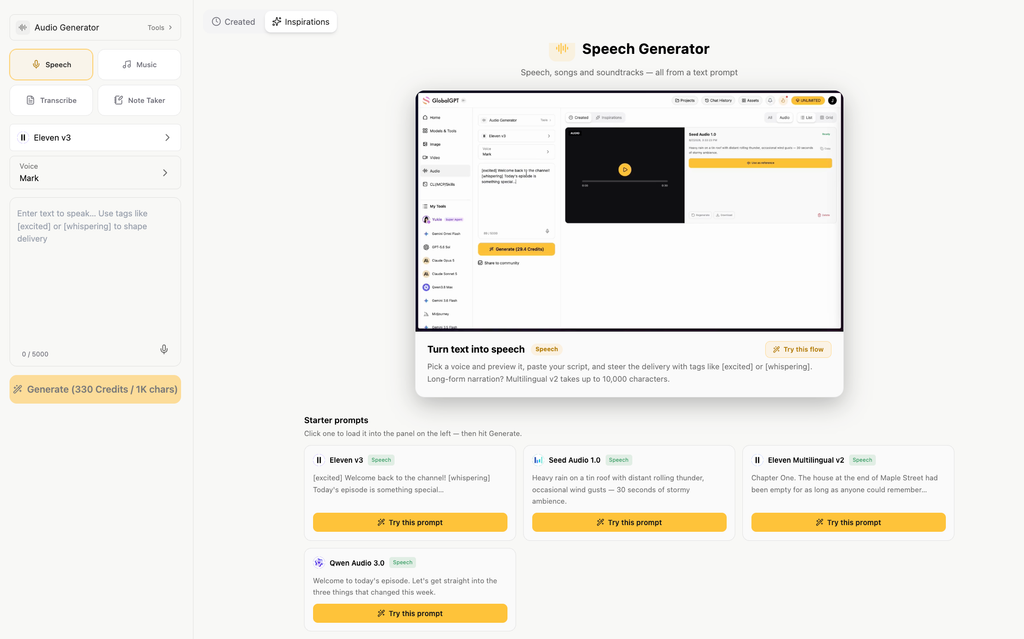
If your job also includes writing the script, making visuals, and assembling a video, Аудиорабочая среда GlobalGPT brings speech generation into an affordable multi-model subscription platform. You can work across text, voice, images, and video in one dashboard, then use its API and CLI for repeatable production work. Its public TTS API uses a separate task workflow, covered below.
What does the OpenAI Audio Speech API do?
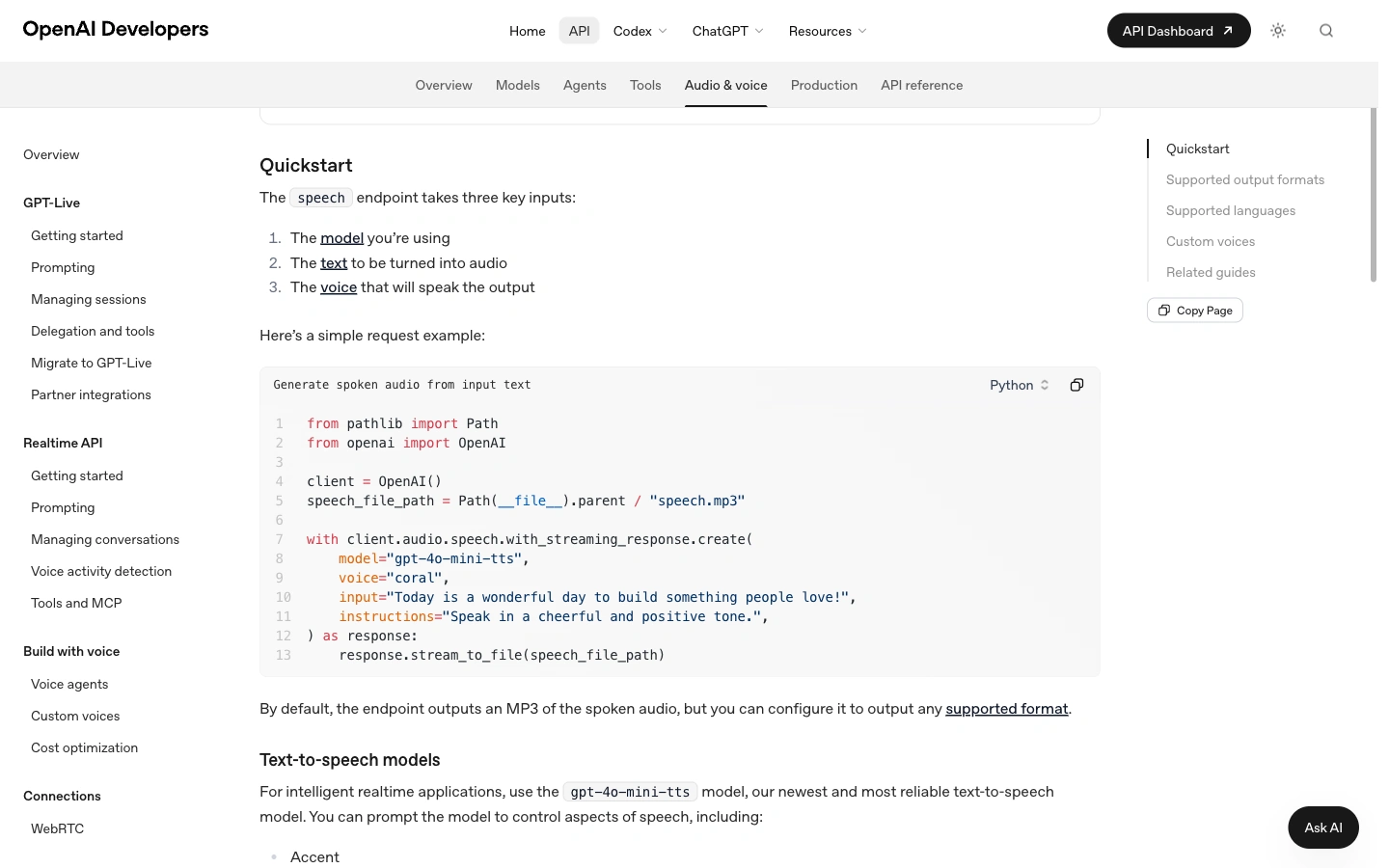
The Speech API is a text-to-speech endpoint: your application supplies written words and receives generated speech. Typical uses include product walkthroughs, accessibility narration, learning material, and short voiceovers. You control the text before it is spoken, which makes it useful when the wording must follow an approved script.
For transcription, the direction is reversed: recorded audio goes in and text comes out. A live voice assistant adds another requirement—listening and responding through a conversation. OpenAI’s audio documentation separates these workflows. Choose the Speech endpoint when you already have the text you want read aloud.
Speech generation supports streaming, so an application can receive audio in chunks. Saving that stream to a file does not automatically play it in a browser or create a conversational agent; your application still handles playback and any conversation logic. OpenAI also requires clear disclosure to listeners that the voice is AI-generated.
Generate your first audio file with the OpenAI Speech API
Run the request on a server or your development machine, with an OpenAI API key stored in the OPENAI_API_KEY environment variable. Keep the key out of browser JavaScript. The following examples use the same short product-tour script and save the result as openai-product-tour.mp3.
Option 1: make a curl request
OpenAI Speech API · curl
#!/bin/sh
# Set OPENAI_API_KEY in your server environment first.
curl --fail-with-body --show-error \
  https://api.openai.com/v1/audio/speech \
  -H "Authorization: Bearer $OPENAI_API_KEY" \
  -H "Content-Type: application/json" \
  -d '{
    "model": "gpt-4o-mini-tts",
    "input": "Welcome to the Acorn Studio product tour. In three steps, you can turn a short script into an audio guide. First, write the message. Next, choose a voice. Finally, save the audio file and test playback on your phone.",
    "voice": "coral",
    "instructions": "Speak clearly in a warm, conversational tone.",
    "response_format": "mp3"
  }' \
  --output openai-product-tour.mp3
The response contains audio bytes, so save it to a file rather than attempting to parse it as JSON. The --fail-with-body option gives curl a failing exit status for an HTTP error. Check that status before opening the file: an error response can still leave JSON in the file named .mp3.
Option 2: use the Python SDK
Install the OpenAI package with python -m pip install openai. The SDK reads the API key from the environment. This example writes the response as it arrives, which avoids loading the entire audio response into your own Python buffer.
OpenAI Speech API · Python
"""Install: python -m pip install openai. Set OPENAI_API_KEY on the server."""
from pathlib import Path
from openai import OpenAI

client = OpenAI(max_retries=0)
script = (
    "Welcome to the Acorn Studio product tour. In three steps, you can turn "
    "a short script into an audio guide. First, write the message. Next, "
    "choose a voice. Finally, save the audio file and test playback on your phone."
)

with client.audio.speech.with_streaming_response.create(
    model="gpt-4o-mini-tts",
    voice="coral",
    input=script,
    instructions="Speak clearly in a warm, conversational tone.",
    response_format="mp3",
) as response:
    response.stream_to_file(Path("openai-product-tour.mp3"))

print("Saved openai-product-tour.mp3")
The three essential fields are модель, ввод, и voice. Here, instructions asks for a warm, conversational delivery; it guides the voice rather than adding words to the spoken script. This field works with GPT-4o Mini TTS and is unsupported by tts-1 и tts-1-hd.
For a longer document, split the text at sentence or paragraph boundaries, number the segments, and save each output with that number. Keep the same voice and instructions across segments. Leave enough context for natural phrasing, and listen across the joins before distributing the assembled recording.
Choose a model, voice, and output format
| Модель | Как выбрать | Delivery instructions |
|---|---|---|
gpt-4o-mini-tts | A starting point for controllable narration and spoken delivery. | Поддержка instructions for tone, style, and pace. |
tts-1 | OpenAI positions this model for lower-latency speech generation. | Use its supported voice and speed controls; omit instructions. |
tts-1-hd | OpenAI positions this model for higher-quality speech than TTS-1. | Use its supported voice and speed controls; omit instructions. |
Сайт GPT-4o Mini TTS model page maps the model alias to the gpt-4o-mini-tts-2025-12-15 snapshot. If reproducible behavior is important to your application, choose a documented snapshot deliberately and record it alongside your saved scripts.
Built-in voices and input limits
The Speech API reference lists 13 built-in voices for GPT-4o Mini TTS: alloy, ash, ballad, coral, echo, fable, onyx, nova, sage, shimmer, verse, marin, and cedar. OpenAI recommends marin или cedar for best quality. That is OpenAI’s recommendation; choose your production voice by listening to your own names, numbers, and sentence patterns.
The earlier TTS models support a smaller set: alloy, ash, coral, echo, fable, onyx, nova, sage, and shimmer. Do not assume every voice works with every model. The Speech API reference also accepts a speed between 0.25 and 4.0, с 1.0 as the default.
There are two input limits to account for: the endpoint reference limits ввод на 4,096 characters, and the Mini TTS model page specifies a maximum of 2,000 input tokens. Characters and tokens are different measurements. Check both constraints for Mini TTS, especially with multilingual text, and split large scripts before submitting them.
Choose the file format for its destination
| Формат | Практическое применение |
|---|---|
| MP3 | Default output; a convenient compressed file for sharing and web playback. |
| Опус | Useful for streaming and communication applications that support the codec. |
| AAC | Consider when your playback environment or media workflow calls for AAC. |
| FLAC | Lossless compression for workflows that need to retain the audio signal. |
| WAV | Uncompressed audio in a familiar container for editing and processing. |
| PCM | Raw 24 kHz, 16-bit signed little-endian samples with no file header; your player needs those settings. |
Start with MP3 for a download link or a simple audio player. Choose WAV when the next step is editing. Select raw PCM only when your application knows how to interpret it; changing a filename from .pcm на .wav does not create a WAV header.
What does the OpenAI Speech API cost?
As checked on September 28, 2026, OpenAI lists GPT-4o Mini TTS at $0.60 per million text input tokens плюс $12 per million audio output tokens. TTS-1 costs $15 per million characters, and TTS-1 HD costs $30 per million characters. Calculate each model in its own units.
Speech API pricing: keep the units separate
OpenAI bills its newer TTS model by tokens and its two earlier TTS models by characters. GlobalGPT lists its TTS tasks in credits.
| Route and model | Оценить | Пример |
|---|---|---|
| OpenAI · GPT-4o Mini TTS | $0.60 / 1M text input tokens $12 / 1M audio output tokens | $0.0606 for 1,000 text input tokens + 5,000 audio output tokens |
| OpenAI · TTS-1 | $15 / 1M characters | $0.015 for 1,000 characters |
| OpenAI · TTS-1 HD | $30 / 1M characters | $0.030 for 1,000 characters |
| GlobalGPT · Eleven v3, Eleven Multilingual v2, or Qwen Audio 3.0 TTS Flash | 330 credits / 1,000 characters | 330 credits at the listed 1,000-character rate; request an estimate before submitting |
These are pricing examples, not charges from the audio samples below. Tokens, characters, minutes, and credits are different units. The GlobalGPT task estimate supplies the applicable credit amount; the table does not convert credits into dollars.
Rates checked September 28, 2026. Sources: Цены на API OpenAI и GlobalGPT API documentation.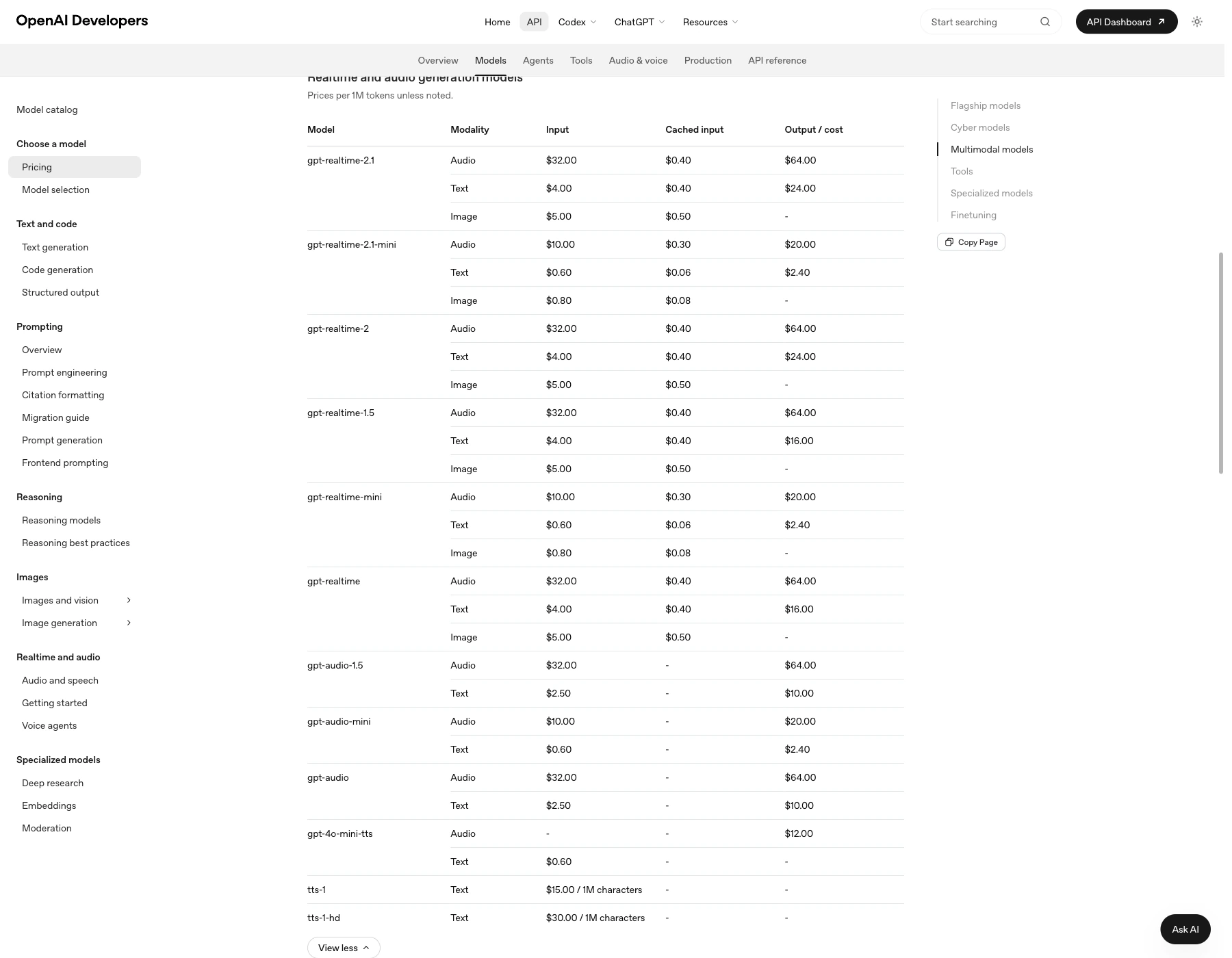
For example, 100 scripts of 1,000 characters each total 100,000 characters. At the listed rates, that is $1.50 with TTS-1 или $3.00 with TTS-1 HD, before other application costs. The same character count is insufficient to calculate Mini TTS exactly: you need the text input and audio output token quantities.
Estimate your speech-generation cost
Enter the units your chosen route bills. There is no automatic character-to-token or minute-to-token conversion.
Formula: characters × $15 ÷ 1,000,000. A text total may span several API requests.
Rates checked September 28, 2026: OpenAI · GlobalGPT. Excludes storage, hosting, taxes, and other parts of your application.
For planning, enter actual usage counts or explicit assumptions in the calculator. Treat the Mini TTS audio-token field as a budget input until you have measured usage. Do not turn an approximate per-minute figure into a guaranteed price for every voice, speaking pace, or language.
The GlobalGPT model catalog expresses TTS prices in credits, and its estimate endpoint gives a quote for the request you intend to send. Keep API credit spending separate from choosing a multi-model workspace subscription for everyday writing and media work. This makes the budget easier to follow without assuming the two products share one billing allowance.
Build a TTS workflow with the GlobalGPT API
For a repeatable script-to-voice-to-video workflow, create speech in GlobalGPT and keep the rest of the project in the same workspace. The GlobalGPT API exposes media generation as tasks, while the GlobalGPT CLI connects that work with your terminal and development tools.
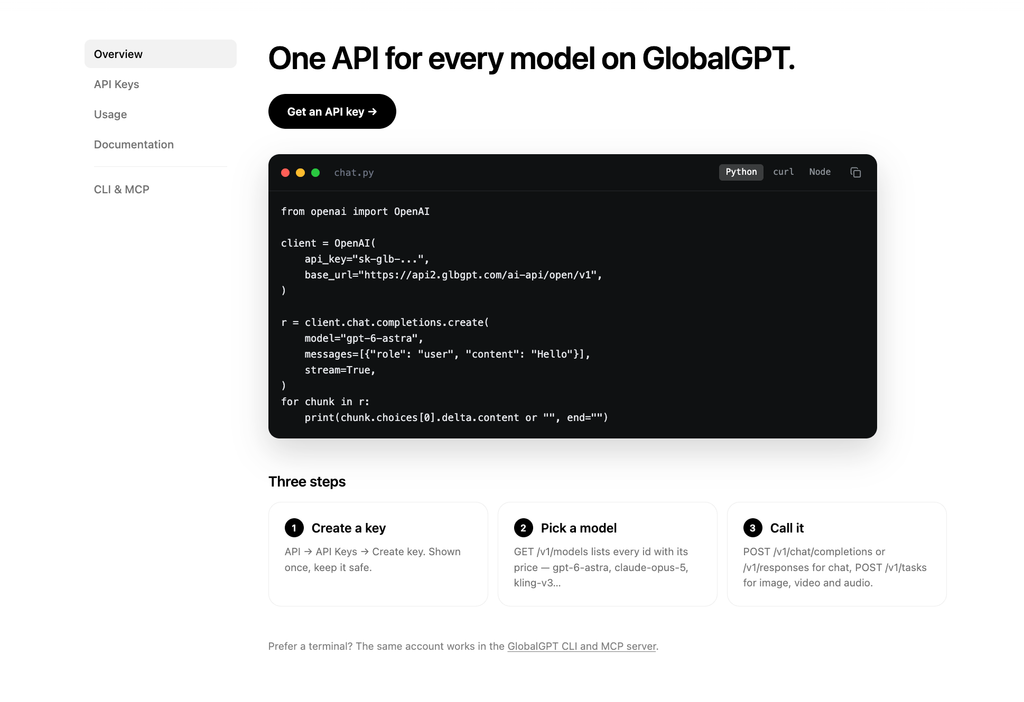
Use the public base URL https://api2.glbgpt.com/ai-api/open/v1. Send TTS requests to POST /tasks, query GET /tasks/{id}, and download output.url after the task succeeds. The text field is подсказка. Implement this task contract directly; it differs from OpenAI’s immediate audio response.
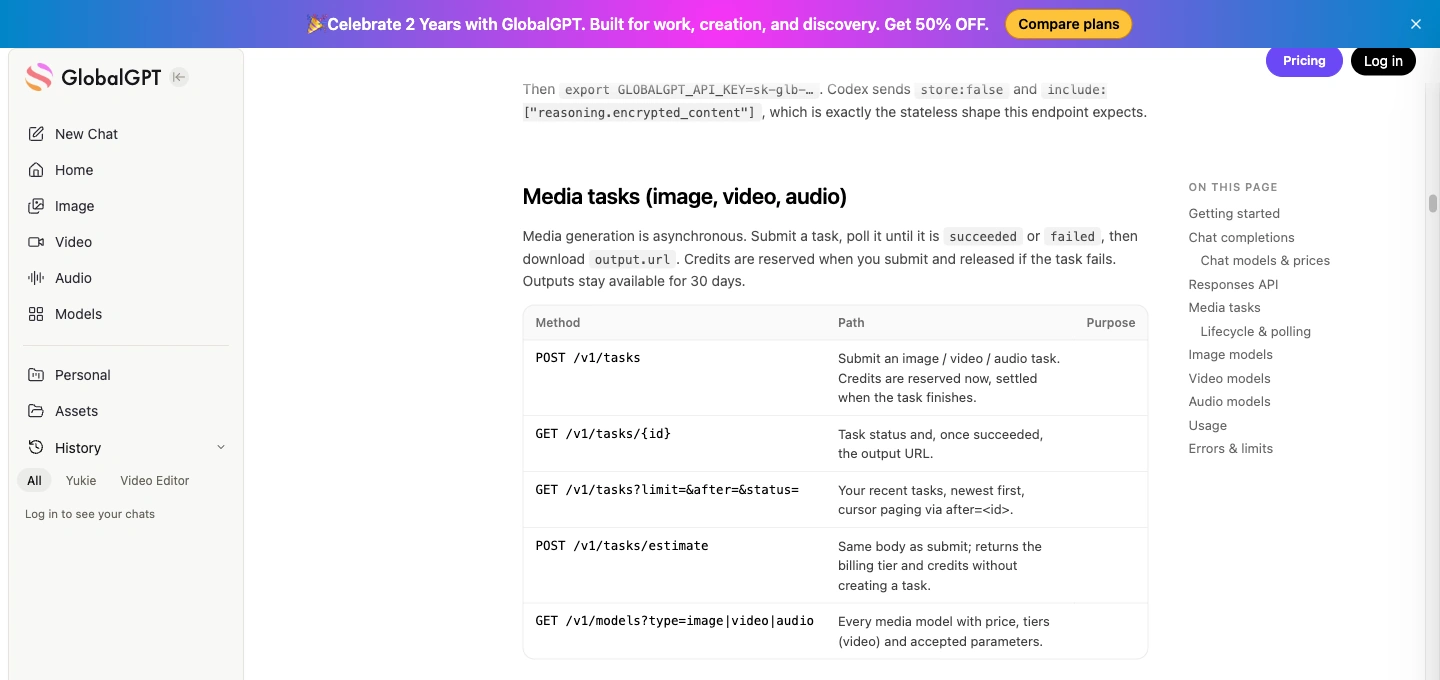
Pick a documented GlobalGPT TTS model
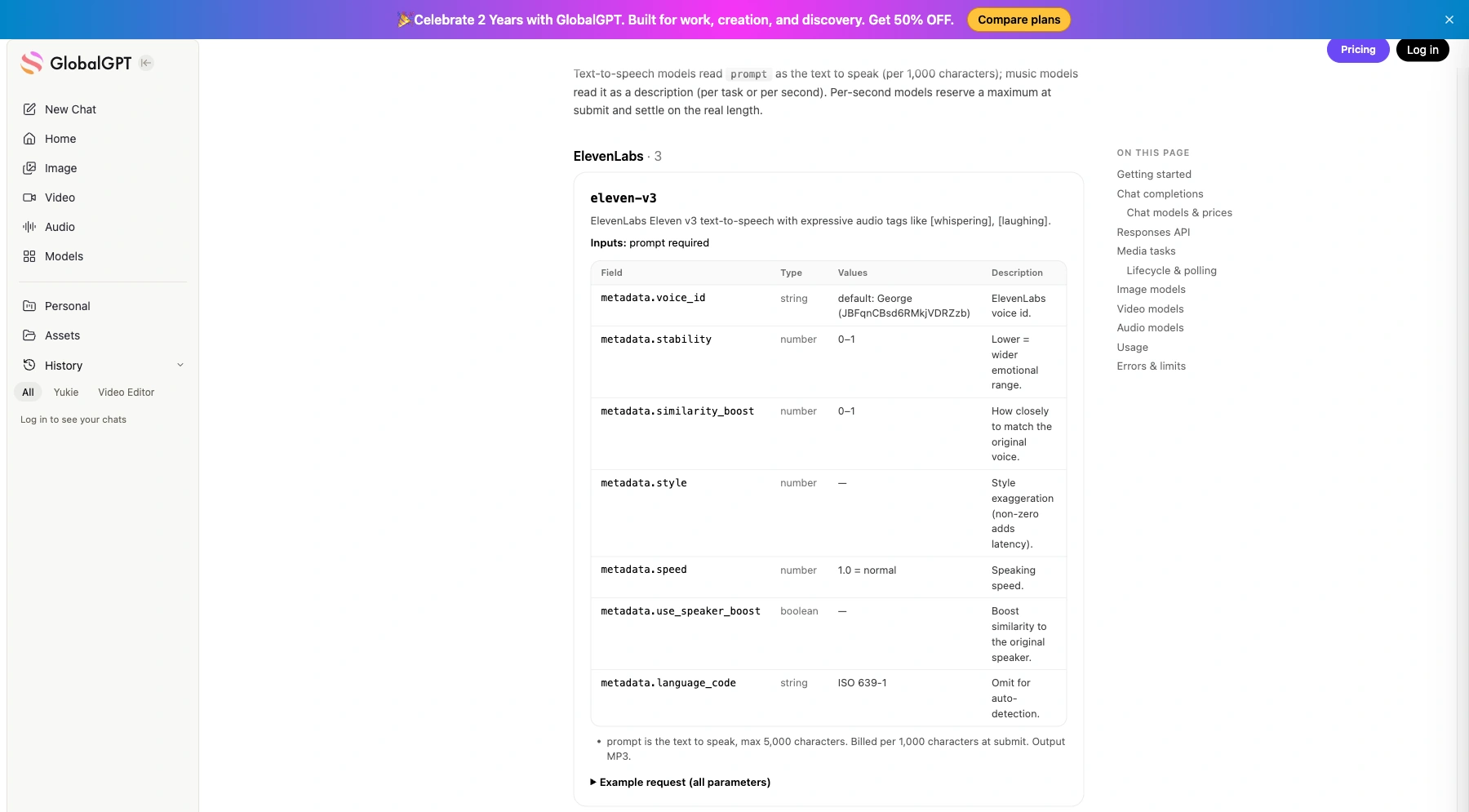
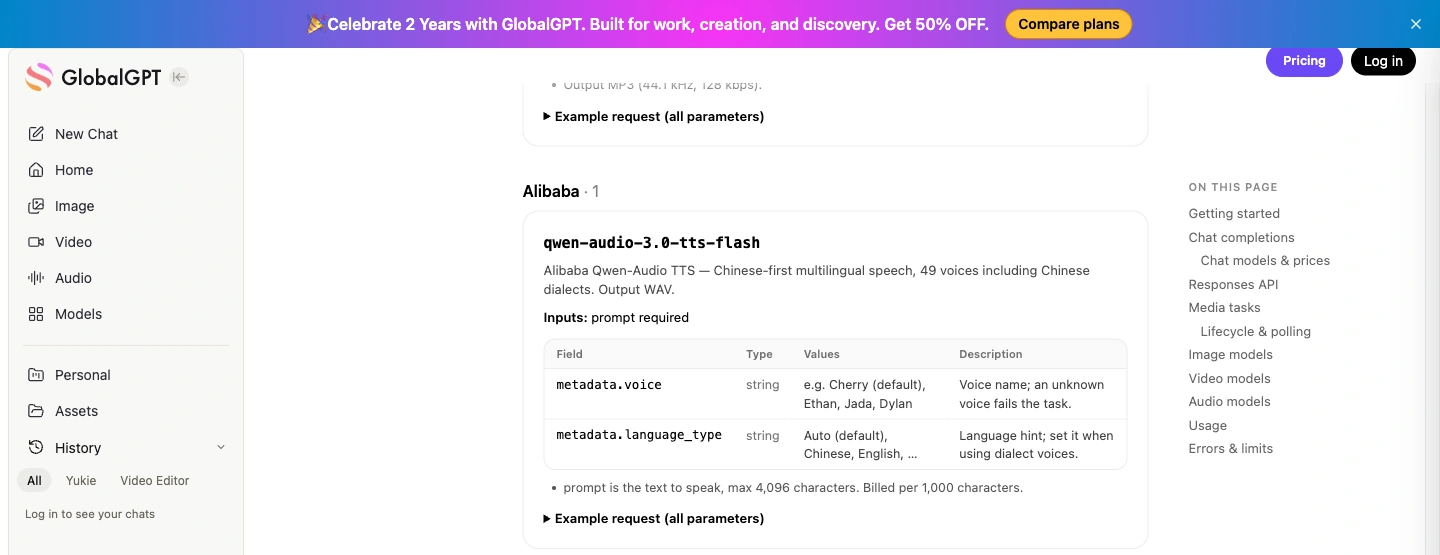
| Идентификатор модели | Вход и выход | Useful distinction |
|---|---|---|
eleven-v3 | Up to 5,000 characters; MP3 | Supports expressive audio tags. |
eleven-multilingual-v2 | Up to 10,000 characters; MP3 | 29 languages; audio tags are read as text. |
qwen-audio-3.0-tts-flash | Up to 4,096 characters; WAV | 49 voices; voice and language controls use Qwen-specific fields. |
All three entries list 330 кредитов за 1 000 символов. Используйте POST /tasks/estimate with the intended request body for the applicable estimate; the documentation says this creates no task and reserves no credits. Public API access uses paid credits.
For the broader creation workflow, see text-to-speech workflows in GlobalGPT. If you are researching the separately named open-source Qwen3-TTS family, read Qwen3-TTS models and API options; do not treat the Qwen-Audio model ID above as an interchangeable Qwen3-TTS deployment.
Estimate, submit once, then poll the saved task
Установить requests с python -m pip install requests и установить GLOBALGPT_API_KEY on the server. The example below uses Eleven v3, selects a documented public voice ID, and sets an illustrative ceiling of 500 credits. Change that ceiling to match your own budget before running it.
GlobalGPT public TTS task API · Python
"""Install requests; set GLOBALGPT_API_KEY. Uses GlobalGPT's public task API."""
import json
import os
import time
import uuid
from pathlib import Path
import requests

BASE = "https://api2.glbgpt.com/ai-api/open/v1"
STATE = Path("globalgpt-tts-job.json")
OUTPUT = Path("globalgpt-product-tour.mp3")
MAX_CREDITS = 500  # Your per-job ceiling; edit before running.

payload = {
    "model": "eleven-v3",
    "prompt": (
        "Welcome to the Acorn Studio product tour. In three steps, you can turn "
        "a short script into an audio guide. First, write the message. Next, "
        "choose a voice. Finally, save the audio file and test playback on your phone."
    ),
    "metadata": {
        "voice_id": "JBFqnCBsd6RMkjVDRZzb",
        "stability": 0.5,
        "language_code": "en",
    },
}

api = requests.Session()
api.headers["Authorization"] = "Bearer " + os.environ["GLOBALGPT_API_KEY"]

if STATE.exists():
    job = json.loads(STATE.read_text())
    if job["payload"] != payload:
        raise RuntimeError("This job belongs to different input. Use a new state filename.")
else:
    estimate = api.post(BASE + "/tasks/estimate", json=payload, timeout=30)
    estimate.raise_for_status()
    quote = estimate.json()
    print("Estimated credits:", quote["credits"])
    if quote["credits"] > MAX_CREDITS:
        raise RuntimeError("Estimate exceeds your per-job ceiling.")
    job = {"payload": payload, "idempotency_key": str(uuid.uuid4())}
    STATE.write_text(json.dumps(job, indent=2))

if "task_id" not in job:
    # The persisted key keeps a transport retry tied to this exact request.
    submitted = api.post(
        BASE + "/tasks", json=payload,
        headers={"Idempotency-Key": job["idempotency_key"]}, timeout=60,
    )
    submitted.raise_for_status()
    task = submitted.json()
    job["task_id"] = task["id"]
    STATE.write_text(json.dumps(job, indent=2))
    if task.get("ignored_parameters"):
        print("Ignored parameters:", task["ignored_parameters"])

print("Task:", job["task_id"])
deadline = time.monotonic() + 600
while time.monotonic() < deadline:
    checked = api.get(BASE + "/tasks/" + str(job["task_id"]), timeout=30)
    checked.raise_for_status()
    task = checked.json()
    if task.get("ignored_parameters"):
        print("Ignored parameters:", task["ignored_parameters"])
    if task["status"] == "failed":
        raise RuntimeError("Generation failed: " + json.dumps(task.get("error", {})))
    if task["status"] == "succeeded":
        # Use a fresh request: do not send the API key to the media host.
        audio = requests.get(task["output"]["url"], timeout=60)
        audio.raise_for_status()
        OUTPUT.write_bytes(audio.content)
        print("Saved:", OUTPUT)
        break
    time.sleep(10)
else:
    raise TimeoutError("Task still pending. Rerun to poll the saved task ID.")
The job file saves the exact request, an idempotency key, and the task ID. If your connection drops, rerun the same job so the code can resume the existing task. To intentionally generate different audio, use a new job filename. Keep the job file private if its script contains confidential information.
Проверьте ignored_parameters so an unsupported setting does not silently become your assumed configuration. ElevenLabs controls such as voice_id differ from Qwen’s voice и language_type fields. Poll every 5–10 seconds, handle a failed status, and save successful files promptly: the documented result retention is 30 дней.
Listen to two product-tour examples
These two AI-generated samples use the same 216-character product-tour script with Eleven v3 and Qwen Audio 3.0 TTS Flash. Each is the first output from one request, with default voice settings. They give you two short files to inspect and audition; they are not a controlled comparison of matched voices or an OpenAI voice benchmark.
Eleven v3: product-tour audio
eleven-v3 · product-tour sample
- Выход
- MP3 · mono · 44.1 kHz
- Длина
- About 15.6 seconds
- Поколение
- First output · 1 request
Настройки: the exact text below, default voice and other settings; no voice override or delivery instruction. The default voice identity was not recorded.
Status and timing: generation succeeded. The task's server timestamps show 13 seconds from submission to completion; this is one request, not a latency benchmark.
File observation: The MP3 contains a mono stream at 44.1 kHz and is approximately 251 kB. Its frames can be read to the end of the file.
Cost reference: the public catalog rate is 330 credits per 1,000 characters. Use a task estimate for a new request; this rate is not an invoice for the sample.
Practical use: A compact MP3 for auditioning a short product tour. Check the full wording and playback on your target device before using it in a release.
Read the exact input · 216 characters
Welcome to the Acorn Studio product tour. In three steps, you can turn a short script into an audio guide. First, write the message. Next, choose a voice. Finally, save the audio file and test playback on your phone.
Qwen Audio 3.0 TTS Flash: product-tour audio
qwen-audio-3.0-tts-flash · product-tour sample
- Выход
- WAV · mono · 24 kHz
- Длина
- 15.52 seconds of PCM data
- Поколение
- First output · 1 request
Настройки: the exact text below, default voice and other settings; no voice override or delivery instruction. The default voice identity was not recorded.
Status and timing: generation succeeded. The task's server timestamps show 17 seconds from submission to completion; this is one request, not a latency benchmark.
File observation: The WAV contains mono, 16-bit PCM at 24 kHz and is approximately 745 kB. Its header declares more data than the file contains; the original output is preserved here.
Cost reference: the public catalog rate is 330 credits per 1,000 characters. Use a task estimate for a new request; this rate is not an invoice for the sample.
Practical use: A WAV sample for evaluating a narration workflow. Resolve the header-length inconsistency in your production pipeline and check complete playback before distribution.
Read the exact input · 216 characters
Welcome to the Acorn Studio product tour. In three steps, you can turn a short script into an audio guide. First, write the message. Next, choose a voice. Finally, save the audio file and test playback on your phone.
The Qwen sample is about three times the size of the Eleven sample at a similar duration, reflecting the different WAV and MP3 formats. Its WAV header also declares more data than the file physically contains. That is a file-packaging issue worth checking in your target player; it does not by itself establish anything about the quality of the spoken voice.
Fix common speech-generation problems
| Симптом | Что следует проверить в первую очередь |
|---|---|
| The saved MP3 will not play | Check the HTTP status and response type. An API error may have been saved with an audio extension. |
| The request rejects a voice or instruction | Match the voice and optional fields to the selected model. Older OpenAI TTS models do not accept instructions. |
| A long script is rejected | Check the route’s character limit and the Mini TTS token limit, then split at natural boundaries. |
| A 401 or 429 response appears | Check the key/account for 401. For 429, distinguish rate limits from insufficient quota before retrying. |
| A GlobalGPT request remains pending | Poll the saved task ID and inspect status; a timeout is not a reason to submit a duplicate job. |
| The voice does not match the requested settings | Check model-specific metadata and ignored_parameters before assuming the setting was applied. |
| An audio duration or seek bar looks wrong | Compare file metadata with the actual media payload and test the complete file in your target player. |
For an OpenAI error, start with its error-code guidance. For a GlobalGPT task, save the task ID and returned error details. During development, keep transport failures, billing failures, and an unsatisfactory voice take separate: each calls for a different fix.
Before shipping narration, listen to the whole recording on the device your audience will use. Check the opening, names and numbers, transitions, and final sentence. Include an AI-voice disclosure near playback, and keep a copy of the exact text and model settings so an edited script can be regenerated deliberately.
Часто задаваемые вопросы
What is the OpenAI Audio Speech API endpoint?
Use POST https://api.openai.com/v1/audio/speech. The required fields are model, input, and voice. The response is generated audio; MP3 is the default format.
Is the OpenAI Speech API free?
The Speech API has usage-based pricing. Budget using the current API rates rather than assuming a free allowance: GPT-4o Mini TTS is billed by text input and audio output tokens, while TTS-1 and TTS-1 HD are billed by characters.
Can I control the voice and speaking style?
Choose a voice supported by your model. GPT-4o Mini TTS also accepts instructions for delivery, such as a warm or calm tone. The instructions field does not work with TTS-1 or TTS-1 HD.
Does the Speech API support streaming?
Yes. It can stream generated audio in chunks. Your application still needs to handle playback; streaming text-to-speech alone does not provide a complete live voice conversation.
Can I use GlobalGPT by changing the OpenAI base URL?
Use GlobalGPT’s documented media-task workflow for TTS: submit to POST /tasks, poll GET /tasks/{id}, and download output.url after success. Its documented TTS catalog includes ElevenLabs and Qwen models with their own model IDs and parameters.
Which audio format should I start with?
Start with MP3 for a simple download or web player. WAV is useful when the next step is editing. Raw PCM needs a player configured for its sample rate and bit depth because it has no file header.
Start with one short script, one voice, and one saved file. Once playback and costs are predictable, add chunking, retries, and the rest of your media workflow. Keep the chosen API’s request format, billing units, and output handling together in your implementation.
Give your next script a voice
Draft a short product tour, create a voiceover with ElevenLabs or Qwen, and continue with images and video in GlobalGPT's multi-model workspace.
Create voice audio with GlobalGPT