GPT-5.5 — это передовая модель OpenAI, предназначенная для выполнения сложных профессиональных задач, в частности, разработка программного обеспечения, анализ в широком контексте, агенты с интенсивным использованием инструментов, обобщение результатов исследований и рабочие процессы, ориентированные на клиентов. Согласно Документация по модели GPT-5.5 от OpenAI, идентификатор модели — gpt-5.5, с вводом текста и изображений, выводом текста, контекстным окном длиной 1 050 000 токенов и выводом длиной до 128 000 токенов.
Для тех, кто ищет ответ на вопрос “Что такое GPT-5.5?”, вот Основные выводы:
- Что это такое: GPT-5.5 — это передовая модель OpenAI, предназначенная для выполнения сложных профессиональных задач.
- Доступ: Списки OpenAI
gpt-5.5в своей официальной документации по API. - Ценообразование: GPT-5.5 стоит дороже, чем GPT-5.4 и GPT-5.4 mini.
- Ограничения: Это решение не идеально подходит для всех задач; здесь важны такие факторы, как затраты, задержка, ограничения по тонкой настройке и ограничения, связанные с исходной модальностью.
- По сравнению с GPT-5.4: GPT-5.5 демонстрирует более высокую эффективность при решении сложных задач, связанных с программированием, использованием инструментов, обработкой длинных контекстов и логическим мышлением.
Для большинства пользователей настоящий вопрос заключается в том, Где GPT-5.5 находит своё место в реальном рабочем процессе. Если вы сравниваете GPT-5.5 с Claude, Gemini, Perplexity или другими моделями ИИ, Вот рабочая область для работы с несколькими моделями — GlobalGPT. Вы можете протестировать различные модели, чтобы определить, какая из них лучше всего подходит для вашей конкретной задачи, воспользовавшись базовым тарифным планом, стоимость которого начинается примерно с $5.8.

Что такое GPT-5.5?
GPT-5.5 лучше подходит для производственные процессы чем просто для случайных экспериментов. Оно наиболее полезно, когда задача включает:
- Несколько ограничений которые необходимо соблюдать одновременно
- Обширный исходный материал, например отчеты, контракты, документация или кодовые базы
- Вызовы инструментов, такие как поиск, извлечение файлов, выполнение кода или структурированные выводы
- Высококачественные конечные результаты, например, планы, сводки, сравнения, обзоры или ответы клиентам
Сложные задачи для GPT-5.5 часто начинаются с некоторой неразберихи. У пользователя может быть неполный контекст, противоречивые требования или необходимость привести доказательства. GPT-5.5 создает ценность, превращая эту сложность в четкий следующий шаг.
Основы официальной модели
OpenAI‘На официальной странице модели указаны следующие основные технические характеристики GPT-5.5:
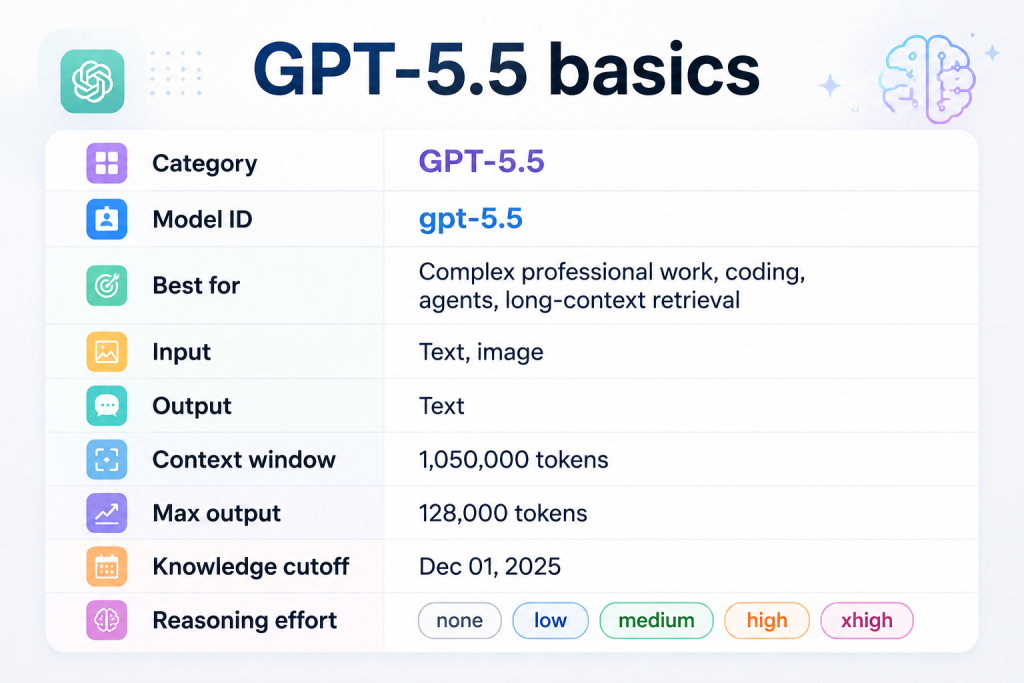
Эти детали важны, поскольку они определяют Что может и чего не может GPT-5.5:
- Настраиваемый уровень сложности рассуждений помогает командам найти оптимальный баланс между качеством, задержкой и затратами.
- Ввод текста и изображений это означает, что GPT-5.5 может обрабатывать визуальные данные в рамках поддерживаемых рабочих процессов.
- Вывод текста то есть его не следует называть встроенным генератором видео или аудио.
- Широкий контекст благодаря чему он удобен для работы с длинными документами и в рамках обширных проектов.
GPT-5.5 является новинкой, поскольку в нем сочетаются более эффективное рассуждение, более выраженная ориентация на инструменты, и более прямой и удобный для производства результат.
| Улучшение | Значение |
|---|---|
| Более эффективное построение рассуждений | Позволяет сократить количество напрасно затрачиваемых токенов рассуждений в сложных рабочих процессах |
| Выполнение с приоритетом результата | Помогает преобразовать намерения пользователя в конкретные действия |
| Более активное использование инструментов | Повышает надежность работы агентов и систем автоматизации |
| Прямой стиль по умолчанию | Полезно для повышения продуктивности, но может потребоваться настройка тона |
| Координация кодирования | Более подходит для планирования, редактирования, тестирования и проверки |
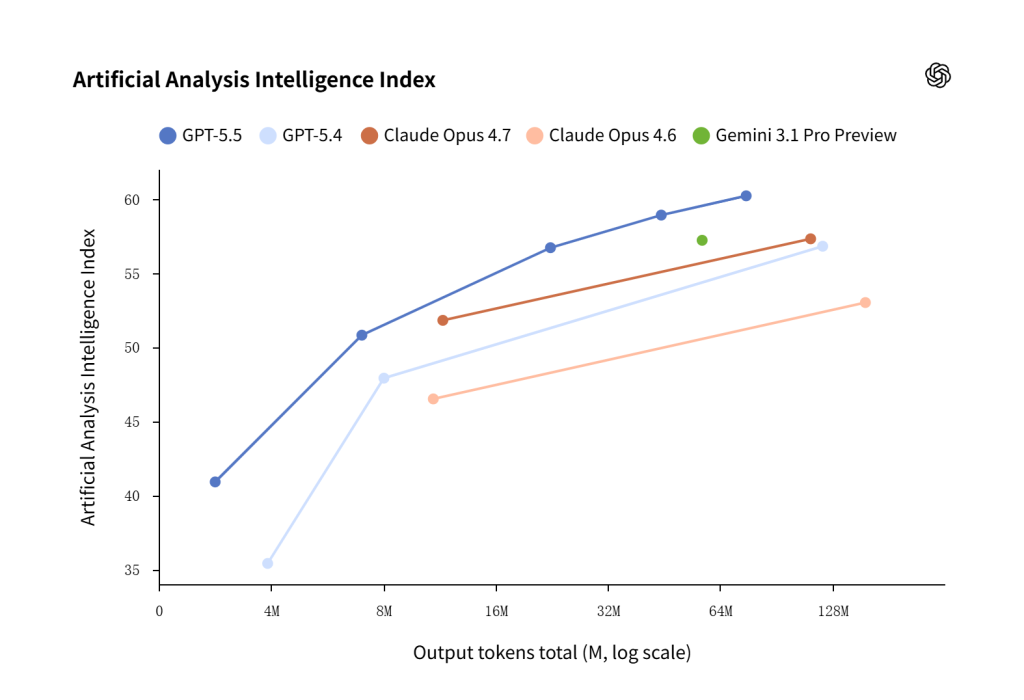
GPT-5.5 не просто умнее; он более эффективен в решении задач, зачастую обеспечивая более качественные результаты с меньшим количеством токенов и меньшим числом попыток. По индексу программирования компании Artificial Analysis GPT-5.5 демонстрирует передовой уровень интеллекта за половину стоимости конкурентных моделей кодирования границ.
Доступ к GPT-5.5 и доступность модели
По состоянию на 17 июня 2026 года, Документация по модели GPT-5.5 от OpenAI указывает GPT-5.5 в качестве официальной модели API с идентификатором модели gpt-5.5. OpenAI’s Страница, посвящённая запуску GPT-5.5 Кроме того, в ней описывается более широкая доступность модели и приводятся примеры из реальной жизни.
Разработчики могут протестировать модель с помощью API-интерфейсов OpenAI. В руководстве по GPT-5.5 от OpenAI делается акцент на тщательной миграции, своевременном обновлении, настройке уровня сложности рассуждений и ясности описания инструментов, а не на простой замене названия модели в старой интеграции.
Доступ через API и доступ через ChatGPT
доступ к API и Доступ к ChatGPT — это не одно и то же.
| Тип доступа | Что это означает | Лучший источник для проверки |
|---|---|---|
| доступ к API | Разработчики могут вызвать gpt-5.5 в приложениях или рабочих процессах | Документация по моделям API OpenAI |
| Доступ к ChatGPT | Пользователи могут выбрать модель в интерфейсе продукта ChatGPT | Выбор модели ChatGPT, настройки плана или примечания к выпуску от OpenAI |
| Доступ к рабочему пространству с поддержкой нескольких моделей | Пользователи сравнивают поведение моделей в рамках одной среды разработки | Список моделей рабочей области в режиме реального времени и поддерживаемые инструменты |
Почему снимки состояния модели имеют важное значение
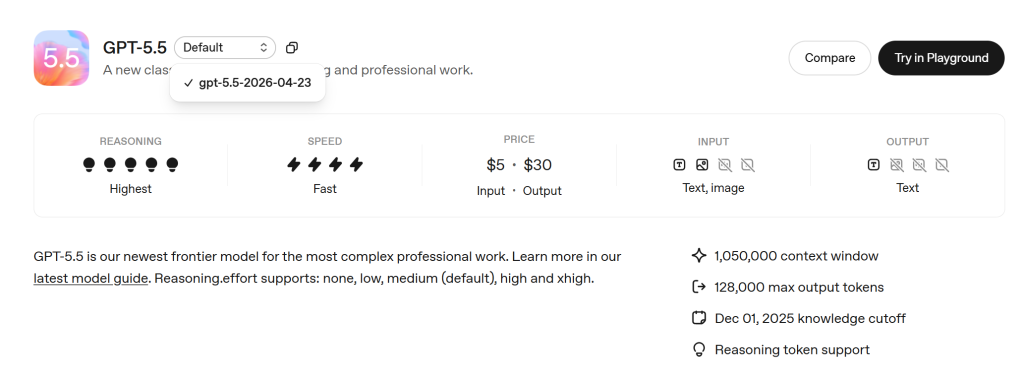
На странице модели OpenAI приведен снэпшот gpt-5.5-2026-04-23. Снимок модели — это устаревшая версия модели что помогает командам снизить отклонение от установленных норм поведения.
Снимки состояния полезны в тех случаях, когда важна стабильность, например:
- Специалисты по работе с клиентами
- Инструменты для рецензирования кода
- Рабочие процессы по обеспечению соответствия
- Системы анализа документов
- Внутренние факторы производительности
Генерал gpt-5.5 Идентификатор модели пригодится, когда команды хотят текущая версия по умолчанию. Снимок с указанием даты полезен, когда командам требуется обеспечить воспроизводимость результатов при тестировании, развертывании или мониторинге в производственной среде.
Технические характеристики GPT-5.5
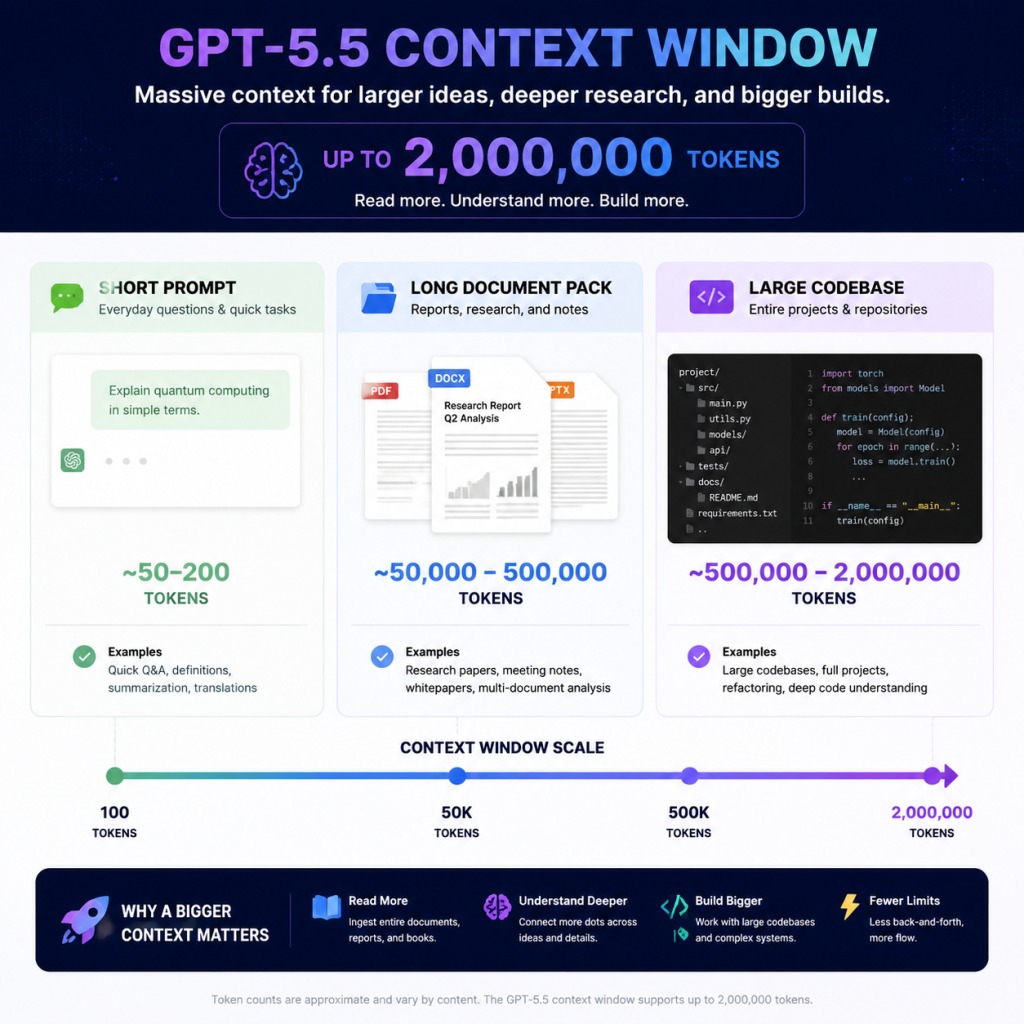
Технические характеристики GPT-5.5 объясняют, почему эта модель полезна для сложных рабочих процессов. Два ключевых показателя:
- Контекстное окно на 1 050 000 токов
- Максимальный объем выпуска — 128 000 токенов
Эти цифры впечатляют, но они не должны подталкивать к беспорядочному вводу данных. Большое окно контекста — это возможность, а не повод вставлять в модель всё подряд.
1. Окно контекста и длина вывода
Благодаря контекстному окну объемом 1 050 000 токенов GPT-5.5 может работать с объемные входные данные, например:
- Объемные технические руководства
- Юридические документы
- Наборы для исследований
- Технические характеристики продукта
- Внутренние базы знаний
- Общий контекст кодовой базы
Максимальный объем вывода в 128 000 токенов также имеет большое значение, однако в большинстве рабочих процессов нет необходимости в чрезмерно длинных ответах. Им требуется правильный формат вывода:
- Меморандум о принятии решения
- Сравнительная таблица
- Краткое резюме
- Структурированный результат в формате JSON
- Анализ кода
- Пошаговый план реализации
Практическое правило: Используйте расширенный контекст только в тех случаях, когда ответ зависит от множества фактов. Если достаточно нескольких отрывков, обычно лучше воспользоваться функцией поиска и целенаправленного выбора контекста.
Советы по вводу длинного контекста:
| Цель | Совет по вводу команды |
|---|---|
| Избегайте перегрузки контекстом | “Используйте только те разделы, которые имеют отношение к [решению/вопросу], и игнорируйте повторяющиеся”.” |
| Обязательное использование доказательств | “После каждого ключевого утверждения указывайте раздел источника или название файла”.” |
| Управление длинными выходами | “Сначала представьте резюме объемом 300 слов, а затем таблицу с подтверждающими данными”.” |
| Повысить качество поиска | “Прежде чем отвечать, выберите 5 наиболее значимых отрывков и объясните, почему они важны”.” |
Краткий пример:
Проанализируйте приложенный пакет нормативных документов. Опирайтесь исключительно на сведения, содержащиеся в этих документах.
Результат: 1) прямой ответ, 2) таблица доказательств, 3) риски, 4) дальнейшие действия.
Объем ответа не должен превышать 700 слов, за исключением случаев, когда имеющиеся данные противоречат друг другу.
2. Способы и выходные данные в языке-источнике
| Возможности | GPT-5.5 |
|---|---|
| Ввод текста | Поддерживается |
| Ввод изображения | Поддерживается |
| Вывод текста | Поддерживается |
| Аудио | Не указано в качестве традиционного метода лечения |
| Видео | Не указано в качестве традиционного метода лечения |
GPT-5.5 может быть частью рабочего процесса, в котором используются инструменты для генерации изображений, видео или аудио, но при этом не означает GPT-5.5 сама по себе представляет собой модель, работающую с видео- или аудиоданными.
Однако для пользователей, желающих создавать изображения, GPT-5.5 может стать частью рабочих процессов по генерации изображений через API «Ответы», хотя созданием изображений занимаются специальные инструменты для генерации изображений.
Советы по вводу запросов для изображений и методов диагностики:
- Для анализа изображений: “Опишите то, что видно, а затем отделите факты от предположений”.”
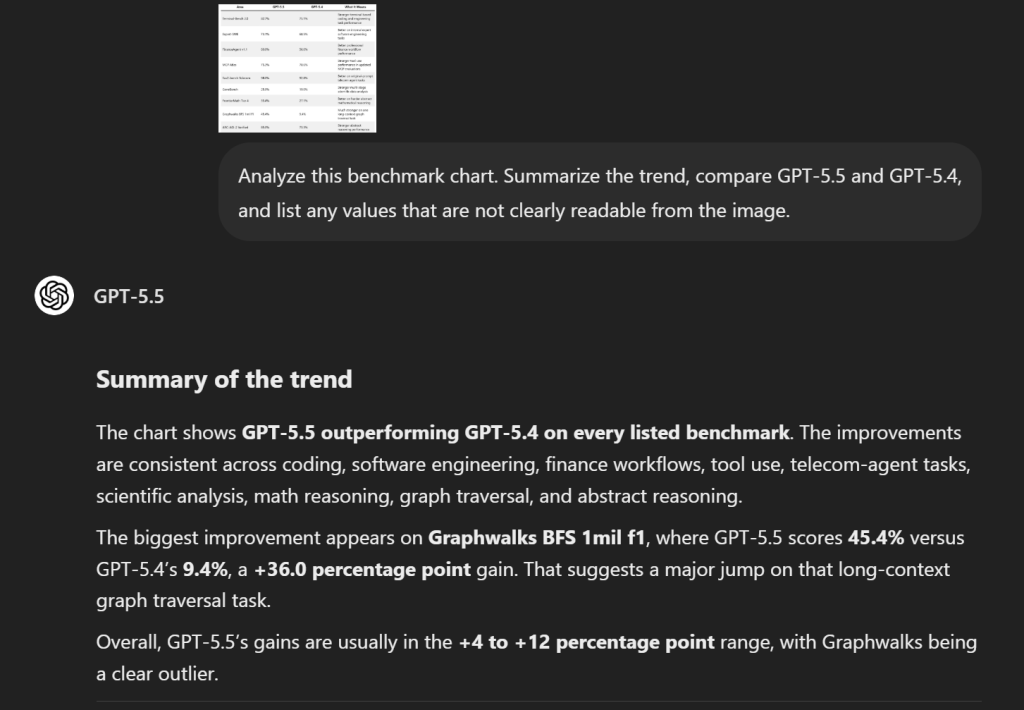
- Скриншоты графиков: “Извлеките те данные, которые вы можете прочитать, а непонятные значения пометьте как неопределённые”.”
- Для генерации изображений: “Воспользуйтесь инструментом для генерации изображений, чтобы создать…” а не подразумевая, что GPT-5.5 сама по себе является моделью обработки изображений.
- Для работы с видео или аудио: укажите внешний инструмент или модель, которые должны отвечать за создание медиафайлов.
Краткий пример:
3. Инструменты, структурированные результаты и точная настройка
GPT-5.5 поддерживает функции для разработчиков, важные для производственных систем:
| Категория инструментов | Практическое применение |
|---|---|
| Поиск в Интернете | Подтвердить актуальность информации |
| Поиск файлов | Извлечение доказательств из документов |
| Интерпретатор кода | Анализировать данные или запускать код |
| Виртуальная оболочка | Поддержка технических рабочих процессов на основе инструментов |
| Применить патч | Обеспечение процессов редактирования кода |
| Использование компьютера | Работа с задачами, управляемыми через пользовательский интерфейс |
| MCP и поиск инструментов | Подключение к внешним инструментам и системам |
Тонкая настройка указана как не поддерживается для GPT-5.5. Если команде требуется настроить поведение модели под свои нужды, ей следует рассмотреть такие варианты, как разработка подсказок, поиск информации, структурированные выводы, оценка результатов или использование другой модели, поддерживающей тонкую настройку.
Советы по использованию инструментов и структурированным результатам:
| Нужда | Совет по вводу команды |
|---|---|
| Использование инструментов | “Используйте веб-поиск только для поиска актуальных сведений; для поиска загруженных документов используйте поиск по файлам”.” |
| Структурированный вывод | “Верните корректный JSON с следующими полями: резюме, доказательства, риски, рекомендация.” |
| Проверка человеком | “Отмечайте все заявки, требующие проверки специалистом перед публикацией”.” |
| Вариант точной настройки | “Следуйте данному руководству по стилю и используйте эти 3 примера в качестве шаблона для вывода”.” |
Стоимость GPT-5.5 и затраты на обработку длинных контекстов
GPT-5.5 — это модель премиум-класса. Согласно OpenAI, стандартные цены на него составляют:
- $5.00 / 1M входных жетонов
- $0.50 / 1M кэшированных входных токенов
- $30.00 / 1M жетонов на выходе
Поэтому планирование затрат играет важную роль. GPT-5.5 может оказаться полезной для рабочих процессов экспертного уровня, но это не значит, что она автоматически подходит для каждого запроса.
Стандартные тарифы на API
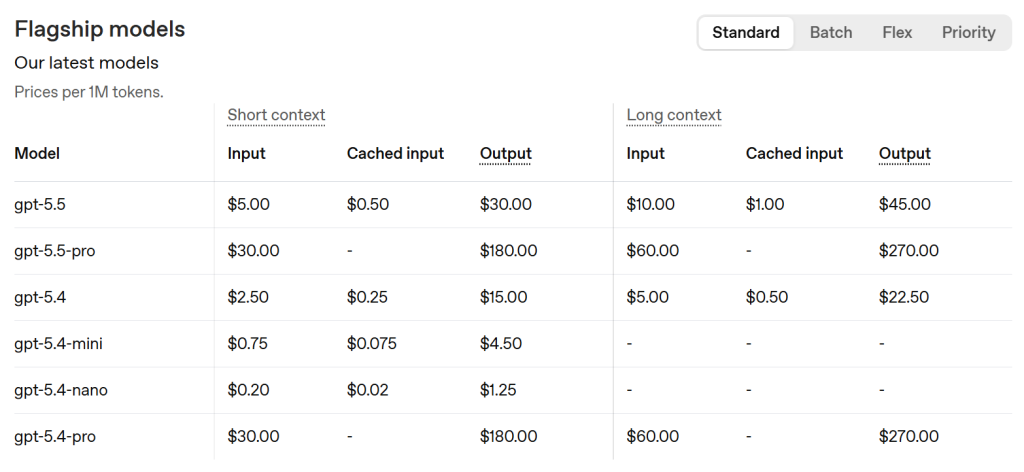
Компромисс очевиден:
- GPT-5.5 стоит дороже.
- GPT-5.4 может оказаться достаточным для многих стандартных рабочих процессов.
- GPT-5.4 mini может лучше подходить для выполнения задач с большим объемом и низкой степенью сложности.
Наибольшее значение имеют выходные токены. Стоимость вывода GPT-5.5 выше, чем стоимость ввода, поэтому командам следует контролировать длину ответов, избегать излишне развернутых черновых вариантов и передавать более простые задачи на обработку более дешевым моделям.
Предостережение относительно ценообразования с учетом долгосрочного контекста
Страница с ценами OpenAI содержит оговорку, касающуюся длинного контекста: приведенные выше подсказки 272K входных лексем стоят 2x вход и 1,5-кратный выход на весь сеанс.
Это не значит, что длинный контекст — это плохо. Это означает, что рабочие процессы с длинным контекстом требуют дисциплины.
Используйте широкий контекст в следующих случаях:
- Ответ зависит от множества документов.
- Модель должна сравнивать несколько файлов или политик.
- Доказательства распределены по обширному набору источников.
- Эта задача представляет достаточную ценность, чтобы оправдать затраты.
Не следует использовать обширный контекст в следующих случаях:
- Важны лишь несколько отрывков.
- Задача носит повторяющийся характер или не имеет большого значения.
- С помощью поиска можно сначала найти нужные материалы.
- Даже более компактная модель может соответствовать установленным стандартам качества.
GPT-5.5 против GPT-5.4
Полезный вопрос заключается не только в том, “лучше ли GPT-5.5, чем GPT-5.4?”. Более уместный вопрос звучит так: В чем GPT-5.5 настолько превосходит предыдущие версии, что это оправдывает более высокую цену?
OpenAI проводит прямое сравнение моделей GPT-5.5 и GPT-5.4 по таким критериям, как программирование, профессиональная деятельность, использование инструментов, академическое мышление, кибербезопасность, работа с длинными контекстами и абстрактное мышление. Наблюдаемая картина остается неизменной: GPT-5.5, как правило, превосходит GPT-5.4 в решении более сложных задач, требующих логического мышления и выполнения действий, хотя GPT-5.4 по-прежнему может быть целесообразным выбором, когда стоимость и масштаб имеют большее значение.
Основное отличие
Главное отличие надежность при выполнении сложных задач. Проще говоря: GPT-5.5 — более мощная модель для решения сложных задач; GPT-5.4 по-прежнему полезна для стандартных задач, где важно контролировать затраты.
OpenAI также отмечает, что GPT-5.5 стоит дороже, чем GPT-5.4, но при этом более эффективен с точки зрения использования токенов в Codex, где для многих пользователей он позволяет добиться лучших результатов с меньшим количеством токенов. Это означает, что при сравнении реальных затрат следует учитывать не только цену токена, но и:
- Сколько попыток потребуется для выполнения задачи
- Пригоден ли первый ответ
- Насколько необходима корректировка со стороны человека
- Удаются ли вызовы инструментов
- Не останавливается ли модель слишком рано
Стоимость, масштаб и практические компромиссы
OpenAI сообщает о нескольких прямых различиях в результатах оценки GPT-5.5 и GPT-5.4:
| Площадь | GPT-5.5 | GPT-5.4 | Что это значит |
|---|---|---|---|
| Terminal-Bench 2.0 | 82.7% | 75.1% | Повышение эффективности выполнения задач по программированию и разработке на терминалах |
| Эксперт-SWE | 73.1% | 68.5% | Лучше справляется с внутренними задачами, связанными с разработкой программного обеспечения |
| FinanceAgent v1.1 | 60.0% | 56.0% | Повышение эффективности профессиональных финансовых рабочих процессов |
| Атлас MCP | 75.3% | 70.6% | Улучшение показателей использования инструментов в обновленных оценках MCP |
| Tau2-bench Telecom | 98.0% | 92.8% | Лучше справляется с задачами оператора телекоммуникационной службы, сформулированными в исходном запросе |
| GeneBench | 25.0% | 19.0% | Более тщательный многоэтапный анализ научных данных |
| FrontierMath, уровень 4 | 35.4% | 27.1% | Лучше справляется с более сложными абстрактными математическими рассуждениями |
| Graphwalks BFS 1 млн f1 | 45.4% | 9.4% | Значительно более высокая эффективность при выполнении одной задачи обхода графа с длинным контекстом |
| ARC-AGI-2 Проверено | 85.0% | 73.3% | Более высокие показатели в области абстрактного мышления |
Результаты теста «Terminal-Bench 2.0» особенно актуальны для разработчиков, поскольку в ходе тестирования проверяются навыки решения инженерных задач в терминале, а не просто выполнение коротких заданий по программированию.
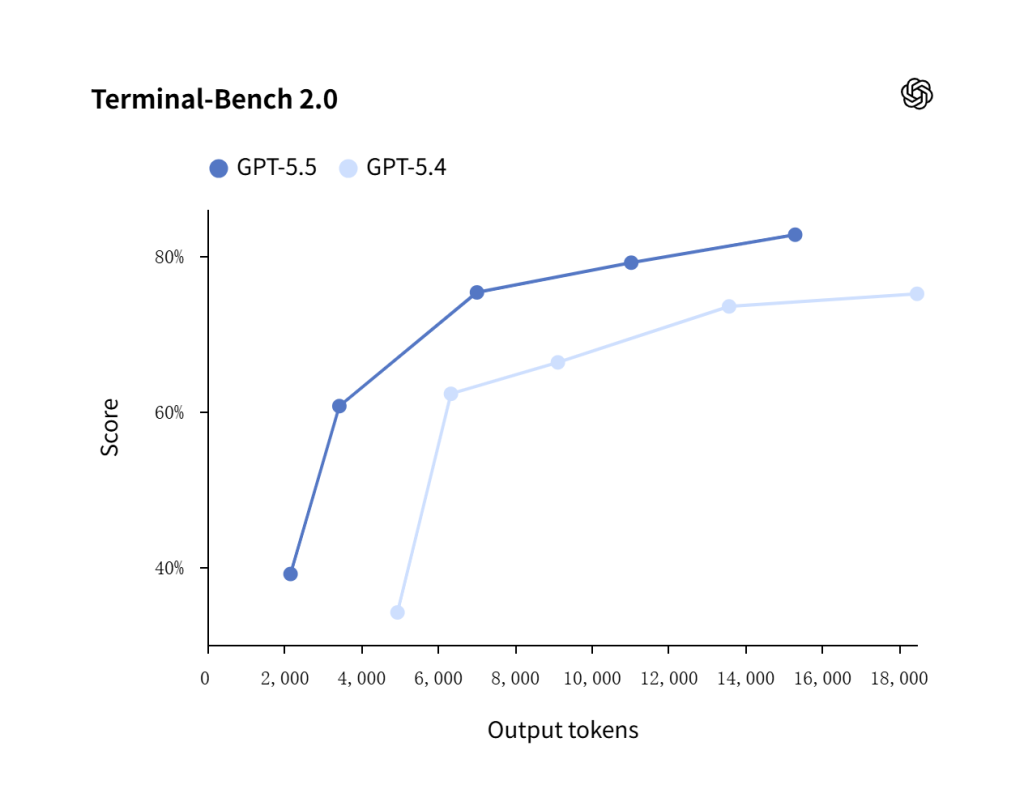
GPT-5.5 демонстрирует более высокую производительность при решении инженерных задач в терминальной среде по сравнению с GPT-5.4 во всем протестированном диапазоне выходных токенов, что подтверждает его статус более мощной модели для программирования агентов и разработки программных рабочих процессов.
| Пример использования | Лучшая отправная точка | Почему |
|---|---|---|
| Комплексный кодирующий агент | GPT-5.5 | OpenAI сообщает об улучшении результатов в области программирования и выполнения терминальных задач |
| Обширный обзор результатов исследований | GPT-5.5 | Оценки с длинным контекстом демонстрируют значительное превосходство над GPT-5.4 |
| Научный или математический анализ | GPT-5.5 | Результаты тестов GeneBench и FrontierMath свидетельствуют в пользу GPT-5.5 |
| Производственный агент с большим количеством инструментов | GPT-5.5 | Оценки использования инструментов, такие как MCP Atlas и Tau2-bench, показывают преимущество GPT-5.5 |
| Простые чертежи опор | GPT-5.4 или mini | Более низкая стоимость может иметь большее значение, чем рассуждения о пиковых показателях |
| Варианты массового контента | GPT-5.4 или mini | Работа с большими объёмами требует контроля затрат |
Это сравнение также показывает, почему стратегия использования одной модели зачастую оказывается неэффективной. В зрелом рабочем процессе ИИ задачи распределяются в зависимости от уровня сложности, а не направляются все подряд в самую мощную модель.
Миграция — это не просто замена «на лету»
Переход с GPT-5.4 на GPT-5.5 не следует рассматривать как простую замену названия модели. Практический план миграции:
- Направляйте на выполнение только те задачи, в которых GPT-5.5 явно улучшает результаты.
- Выберите От 20 до 50 реальных примеров из производственного или внутреннего использования.
- Запустите GPT-5.4 и GPT-5.5 одновременно.
- Сравните точность, задержку, стоимость и конечную полезность.
- Оптимизируйте интенсивность вычислений и уровень детализации.
- Обновить описания инструментов и форматы вывода.
Или можно сравнивать GPT-5.5 и GPT-5.4, а также другие модели, такие как Claude, Gemini и Perplexity, на универсальной платформе GlobalGPT. Вы можете протестировать различные модели, чтобы выбрать наиболее подходящую, при этом базовый тарифный план начинается примерно с $5.8.
Лучшие варианты применения GPT-5.5
GPT-5.5 лучше всего использовать в тех случаях, когда логика, контекст и качество выполнения создавать ощутимую ценность.
Программирование и разработка программного обеспечения
Программирование — один из наиболее перспективных вариантов применения GPT-5.5, поскольку задачи в сфере разработки программного обеспечения часто сочетают в себе:
- Требования к естественному языку
- Код
- Файлы
- Тесты
- Инструменты
- Крайние случаи
GPT-5.5 может помочь в следующих случаях:
Преобразование требований к продукту в инженерные задачи
- Отладка
- Планирование внедрения
- Проверка пулл-реквеста
- Генерация тестов
- Предложения по рефакторингу
- Навигация по кодовой базе
Внутренний тест OpenAI ’Expert-SWE» позволяет более конкретно оценить преимущества GPT-5.5 перед GPT-5.4 с точки зрения программной инженерии.
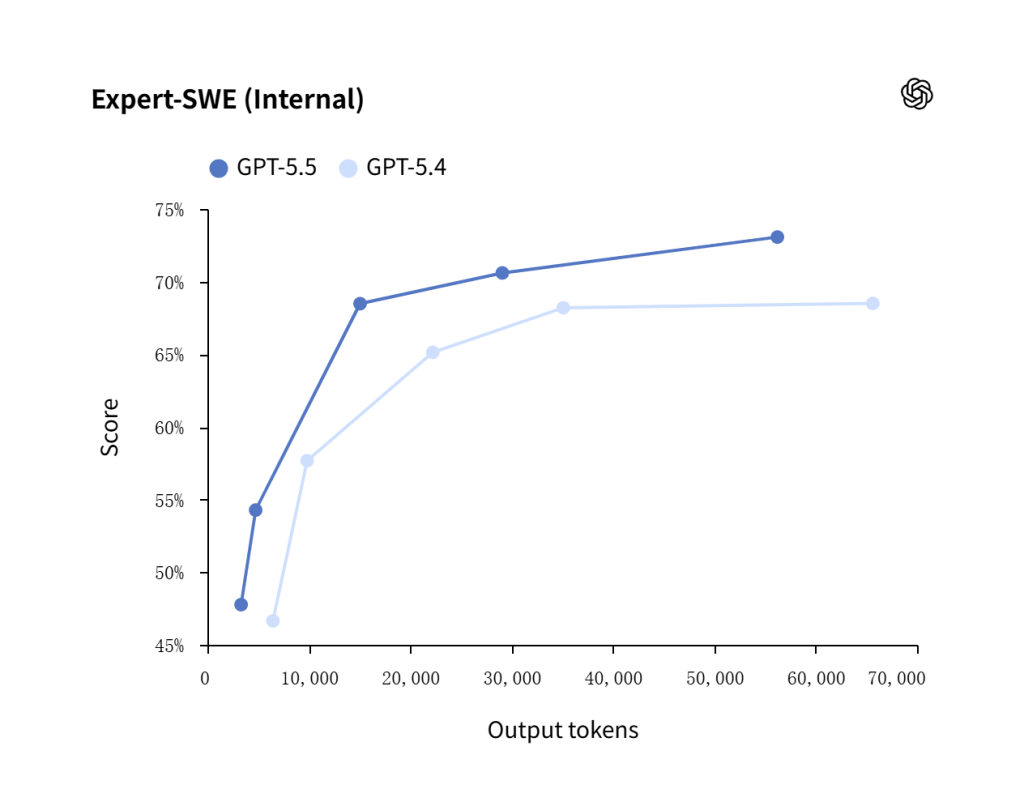
GPT-5.5 показывает лучшие результаты, чем GPT-5.4, при решении внутренних экспертных задач в области разработки программного обеспечения, что делает его более эффективной отправной точкой для отладка, навигация по коду, слияние веток и планирование реализации.
Агенты, инструменты и работа с длинными контекстами
GPT-5.5 хорошо подходит для агентов, которым необходимо одновременно использовать инструменты и контекст.
GeneBench позволяет использовать преимущества GPT-5.5 в области обработки длинных контекстов и логического мышления в научных рабочих процессах.
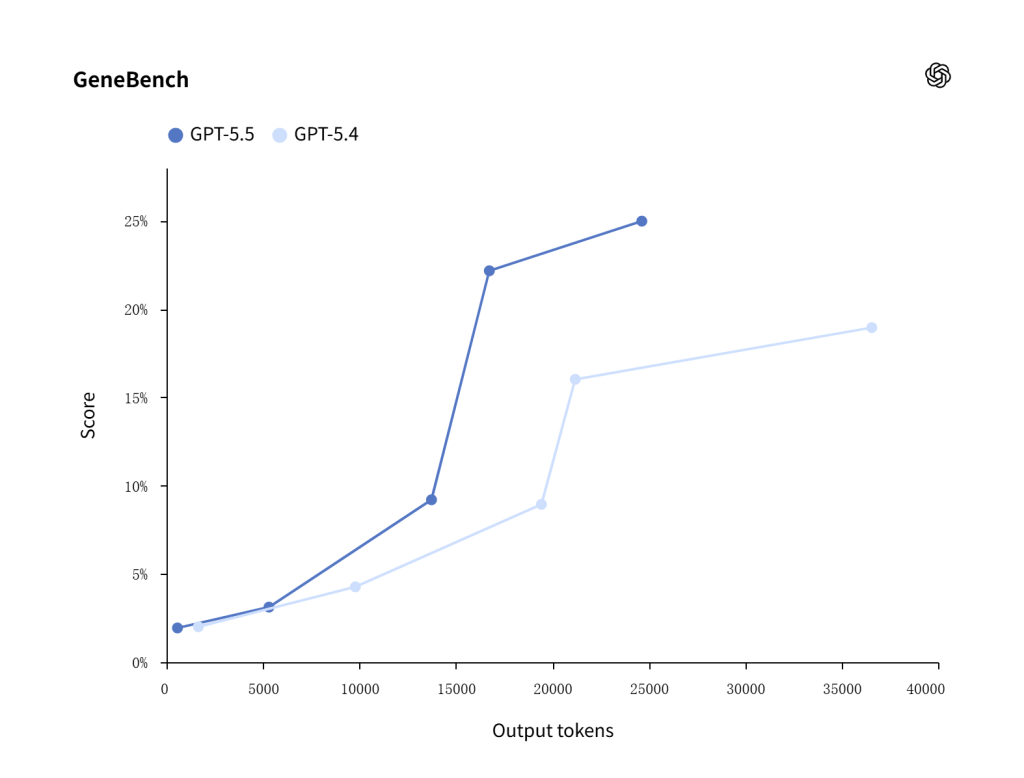
GPT-5.5 демонстрирует более высокие результаты, чем GPT-5.4, в тесте GeneBench, показывая более высокую эффективность при решении многоэтапных задач научного анализа, таких как интерпретация данных о генной экспрессии.
Примеры практических подсказок для агентов и работы с длинными контекстами:
Задание на анализ длинного документа:
Ознакомьтесь с загруженным набором документов и ответьте на вопрос пользователя, опираясь исключительно на предоставленные источники.
Сначала определите 5 наиболее актуальных разделов.
Затем предоставьте: прямой ответ, таблицу доказательств, перечень противоречий или недостающей информации, а также рекомендации относительно дальнейших действий.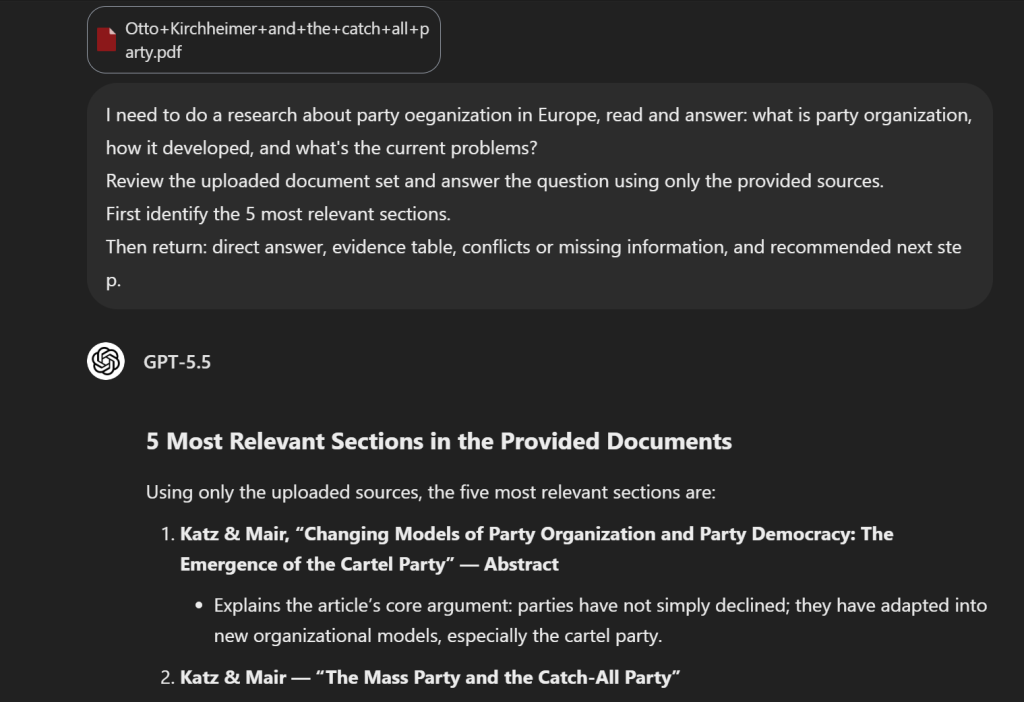
OpenAI также приводит два убедительных примера с длинным контекстом:
| Пример | Внимание: следует использовать с осторожностью |
|---|---|
| Проверка налоговой декларации K-1 | OpenAI сообщает, что с помощью GPT-5.5 за примерно две недели удалось проверить 24 771 налоговую декларацию формы K-1 общим объемом 71 637 страниц |
| Еженедельная отчетность по бизнесу | OpenAI отмечает, что GPT-5.5 помогает автоматизировать составление еженедельных отчетов, на которые раньше уходило 5–10 часов |
Эти примеры показывают, что почему важен широкий контекст. Ценность GPT-5.5 заключается не в том, что он способен обрабатывать огромные объемы входных данных как таковые. Его ценность в том, что он может помочь систематизировать, проанализировать и обобщить обширные наборы исходных данных, если рабочий процесс имеет достаточно четкую структуру.
Профессиональные и клиентоориентированные рабочие процессы
GPT-5.5 может поддерживать такие профессиональные рабочие процессы, как:
- Рабочий процесс в сфере коммуникаций: помощь в обработке запроса на выступление с учетом контекста и ограничений
- Рабочий процесс в сфере финансов: обеспечение регулярной отчетности и анализа документов с большим объемом документации
- Научный рабочий процесс: содействие в анализе данных о экспрессии генов, включающих 62 образца и 28 000 генов
- Математическая визуализация: помощь в создании приложения по алгебраической геометрии в ходе короткого интерактивного занятия
В рабочих процессах, связанных с взаимодействием с клиентами, GPT-5.5 может помочь в подготовке качественных ответов, но для работы всей системы по-прежнему необходимо:
- Правила интонации
- Правила эскалации
- Границы политики
- Утвержденные источники знаний
- Ручная проверка в случаях с высоким уровнем риска
Примеры практических подсказок для профессиональных рабочих процессов:
Задание на составление краткого содержания:
Превратите эти заметки в одностраничное резюме для руководства.
Включите в него: контекст, необходимое решение, возможные варианты, риски, рекомендацию и дальнейшие действия.
Используйте лаконичный деловой язык и избегайте необоснованных утверждений.
Сообщение службы поддержки клиентов:
Отвечайте клиенту, используя исключительно текст утвержденной политики, приведенный ниже.
Тон: четкий, спокойный и доброжелательный.
Если политика не дает ответа на вопрос, укажите, какой информации не хватает, и передайте запрос на рассмотрение вышестоящему уровню.
Объем ответа не должен превышать 150 слов.Внутренний запрос к базе знаний:
Создайте ответ для базы знаний на основе этих исходных документов.
Результат: краткий ответ, пошаговая инструкция, исключения, а также ссылки или названия источников.
Отметьте любую устаревшую или противоречивую информацию.Ограничения и риски GPT-5.5
В серьёзной статье о GPT-5.5 следует объяснить, в каких случаях эта модель не является оптимальным выбором. К числу основных рисков относятся: стоимость, задержка, качество миграции, и пределы возможностей.
Риски, связанные с затратами и задержками
GPT-5.5 стоит дороже, чем GPT-5.4 и GPT-5.4 mini. Сеансы с длинным контекстом также могут обойтись дорого, если запросы превышают установленный OpenAI порог длины контекста.
Обратите внимание на следующие риски:
- Более сложные вычисления могут увеличить задержку.
- Длинные выводы могут быстро привести к увеличению затрат.
- Объемные запросы могут повлечь за собой применение тарифов для запросов с большим объемом контекста.
- Простые задачи, возможно, не принесут достаточной выгоды, чтобы оправдать использование GPT-5.5.
Практическое правило: Используйте более сложные методы рассуждения только в тех случаях, когда это действительно необходимо для решения задачи. Оцените качество, задержку и стоимость, прежде чем сделать GPT-5.5 моделью по умолчанию.
Риски, связанные с миграцией и оценкой
Старые промпты для GPT-5.4 могут работать не так эффективно с GPT-5.5. При прямой замене названия модели можно упустить ее сильные стороны или вызвать неожиданные изменения в стиле, поведении инструментов или формате вывода.
Перед использованием в производстве необходимо оценить:
- Реальные примеры, а не выдуманные задания
- Крайние случаи и неоднозначные входные данные
- Поведение при вызове инструмента
- Длина и формат вывода
- Результаты экспертной оценки
- Стоимость одного успешно выполненного задания
Производственным группам по-прежнему нужны оценки. Даже надежная модель может допускать ошибки, неправильно использовать инструменты или давать уверенные ответы без достаточных доказательств.
Как эффективно задавать запросы GPT-5.5
GPT-5.5 работает наиболее эффективно, когда в промте четко сформулирована задача. Хороший промт должен давать ответы на четыре вопроса:
- Что необходимо сделать?
- Что считается хорошим ответом?
- Какую информацию или инструменты можно использовать?
- Как должен выглядеть конечный результат?
Начинайте с результатов, а не с длительной процедуры
Подход «сначала результат» подразумевает определение конечного результата и границ, а не написание длинного сценария с описанием процедуры.
Пример:
Цель: Сравните GPT-5.5 и GPT-5.4 в качестве помощника по работе с клиентами.
Критерии успешности: Рекомендуется использовать одну модель для запросов, требующих особого внимания к качеству, и другую — для рутинных запросов с большим объемом.
Правила доказывания: Используйте только официальные цены и задокументированные характеристики моделей.
Вывод: Краткая таблица решений, за которой следует рекомендация объемом 150 слов.
Сознательно настраивайте усилия, направленные на логическое мышление
Уровень сложности рассуждений должен соответствовать задаче. Не следует по привычке выбирать самый высокий уровень сложности.
| Усилия по осмыслению | Лучшее для |
|---|---|
нет | Задачи, чувствительные к задержкам, не требующие логического вывода |
низкий | Эффективные методы рассуждений для относительно простых задач |
средний | Сбалансированные настройки по умолчанию для многих профессиональных рабочих процессов |
высокий | Комплексный анализ, кодирование и задачи агентов |
xhigh | Наиболее сложные асинхронные задачи или задачи, требующие интенсивных вычислений |
Единица измерения:
- Точность
- Задержка
- Качество вызова инструмента
- Стоимость
- Результаты экспертной оценки
Если средний такое рассуждение дает тот же результат, что и высокий, средний возможно, это более подходящие условия для производства.
Длина, формат и стиль речи
GPT-5.5 может генерировать длинные ответы, но длиннее — не всегда лучше. Ограничьте длину ответа с помощью:
- Ограничения по количеству слов
- Форматы таблиц
- Количество пуль
- Требования к схеме
- Инструкции по тональности
- Правила цитирования
Примеры:
- “Ответьте не более чем 120 словами и укажите один следующий шаг”.”
- “Предоставьте таблицу решений и краткую рекомендацию”.”
- “Указывайте источник после каждого утверждения, основанного на фактах”.”
- “Используйте лаконичный, деловой стиль изложения, без рекламных оттенков”.”
Часто задаваемые вопросы о GPT-5.5
GPT-5.5 лучше, чем GPT-5.4?
GPT-5.5 лучше подходит для сложная профессиональная работа, в частности программирование, поиск информации в обширных контекстах, агенты, активно использующие инструменты, а также рабочие процессы, требующие интенсивного логического мышления. GPT-5.4 по-прежнему может оказаться более подходящим вариантом для задач, где важна экономия, или для задач с меньшей степенью сложности.
Сколько стоит GPT-5.5?
Страница с тарифами на API OpenAI указывает GPT-5.5 как $5.00 за 1M входных токенов, $0,50 за 1 млн кэшированных входных токенов, и $30.00 за 1М жетонов на выходе. Для запросов, объем входных токенов которых превышает 272K, действуют дополнительные правила ценообразования с учетом длинного контекста.
Поддерживает ли GPT-5.5 изображения?
Да. Документация по модели GPT-5.5 от OpenAI списки ввод текста и изображений. В нём перечислены вывод текста, поэтому поддержку ввода изображений не следует путать с встроенной функцией вывода изображений.
Может ли GPT-5.5 генерировать изображения?
GPT-5.5 делает не генерирует изображения напрямую в качестве автономной модели, предназначенной для вывода изображений. Однако она может помочь пользователям создавать изображения путем вызова функции инструмент для создания изображений в API «Responses» или с помощью специальных моделей для генерации изображений. OpenAI’s руководство по созданию изображений объясняет, какие инструменты используются для создания изображений.
Поддерживает ли GPT-5.5 аудио или видео?
На странице модели GPT-5.5 компании OpenAI аудио и видео не указаны в качестве встроенных поддерживаемых типов данных для данной модели. GPT-5.5 может использоваться в рамках более широких рабочих процессов, включающих мультимедийные инструменты, однако в документации к самой модели указаны входные данные в виде текста и изображений, а также текстовый вывод.
Стоит ли мне заменить GPT-5.4 на GPT-5.5?
Не автоматически. Проведите тестирование GPT-5.5 по сравнению с GPT-5.4 на реальных примерах. Сравните точность, задержка, качество вызова инструмента, полезность результатов и стоимость. Используйте GPT-5.5 в тех случаях, когда это позволяет добиться настолько значительного улучшения результатов, что оправдывает более высокую цену.