
An AI presentation maker becomes useful when it saves time through the whole job: a clear story, credible numbers, readable slides and a file you can finish. Yukie’s agent framing makes it worth evaluating for that workflow. Begin with the decision your audience must make, then judge the output against explicit review criteria.
What should an AI presentation maker actually do?
An AI presentation maker should turn a defined brief into a reviewable story: audience and decision, source material, outline, claims, visuals, notes and an export you can open and edit. If one link is missing, a deck may look finished while still creating work for the presenter.
Start by stating the audience, the decision they need to make, the available facts, and the limits on invention. Then ask for a slide count and an explicit order. A good request separates supplied numbers from assumptions and asks the system to flag missing evidence. This is especially important for charts: a visual can make an unsupported estimate look authoritative.
The second requirement is controlled revision. Teams often discover one weak slide after reading the complete narrative. An AI PowerPoint generator is more useful when it can revise that slide while keeping the title, notes, style and untouched slides stable. Test text and objects; a similar-looking screenshot is not proof of preservation.
그리고 Plus AI editing page is a useful comparison if updating an existing presentation is your main need. Ask how a tool identifies a target slide and reports its changes.
What Yukie publicly shows today
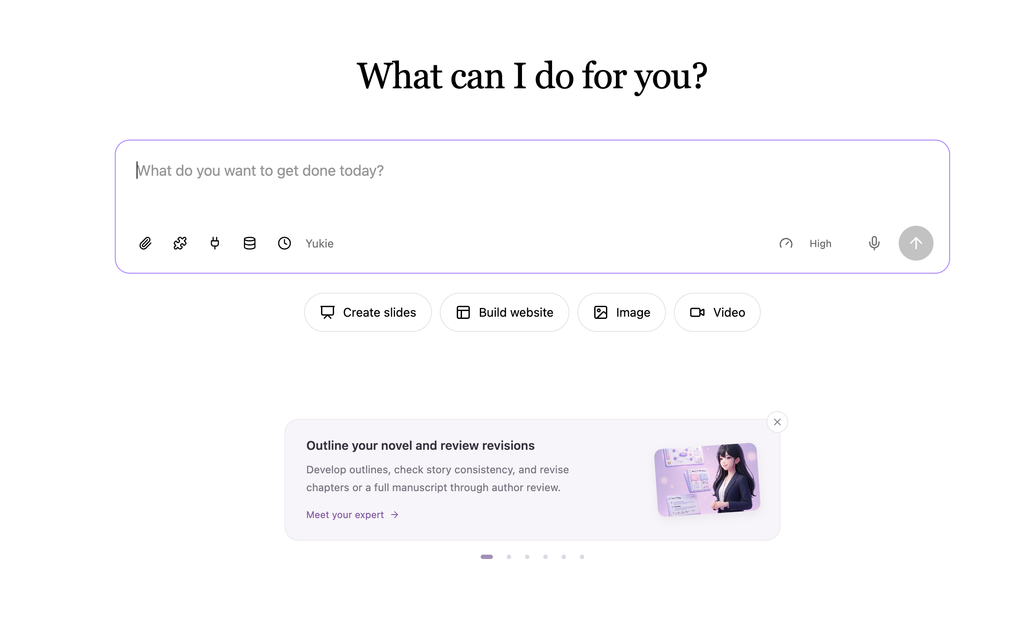
Yukie’s public page presents a “Create slides” entry.
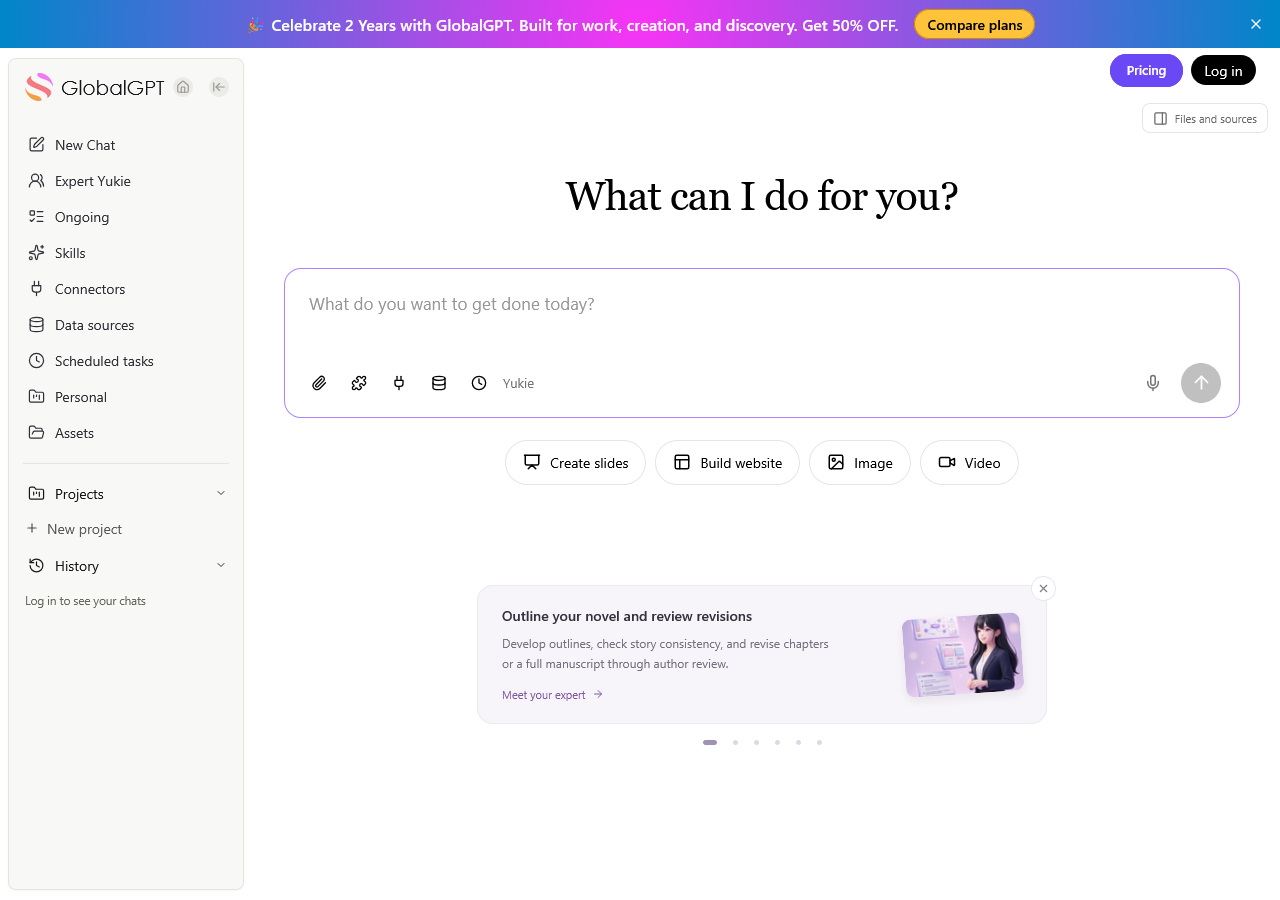
GlobalGPT’s homepage describes the agent as “Your agent, not just a chat box,” with a goal-to-plan-to-tools workflow and a “Create slides — Deck with speaker notes” example.

An agent and a slide editor serve different needs. The guide to using ChatGPT Agent explains the broader goal-and-task pattern. For a presentation, the important question is how well planning, review, revision and file handoff connect in your actual workflow.
그리고 guide to creating presentations with Gemini 3 Pro offers another workflow to compare. Use your own acceptance criteria—facts, notes, edit control and final file—when choosing a route.
How to create a presentation with AI in Yukie
Start with the audience, decision and source boundary
Write the decision first: approve, reject, fund, teach, explain or choose. Add the audience’s level of knowledge and the meeting context. List every number the deck may use, and tell Yukie to label an assumption when the brief does not supply a fact. This keeps a polished narrative from silently becoming a fictional business case.
For research-heavy decks, collect sources before asking for design. A workflow such as how to use ChatGPT Deep Research can help organize public material. Check source dates, scope and relevance, then give Yukie the approved facts and open questions.
Ask for a fixed structure and a reviewable chart
Specify the slide count, exact titles and the narrative job of each slide. Ask for one simple chart only when the supplied numbers support it. Require units, a source or assumption note, and a note for every slide. A chart should communicate the decision, not decorate it.
Initial deck test prompt
This is the exact fictional brief used in our signed-in Yukie browser test. We selected 8 pages, English and the Executive Strategy template, with High effort.
Create an 8-slide presentation for a fictional product team deciding whether to launch a privacy-first analytics dashboard for small ecommerce stores in the United States. Audience: product leaders and finance. Goal: approve a 90-day pilot. Use only the supplied facts below; if a fact is missing, mark it as an assumption instead of inventing a statistic.

Facts: pilot budget $45,000; duration 90 days; target 20 stores; current reporting takes 6 hours per store per month; proposed workflow target is 2 hours; success gate is 80% weekly active store usage; risks are data quality, onboarding time and attribution confusion.

Deliver: exactly 8 slides in this order: 1 “Decision”, 2 “Reporting gap”, 3 “Pilot design”, 4 “Time-saving target”, 5 “Pilot economics”, 6 “Adoption gate”, 7 “Risks”, 8 “Next decision”. Include a clear decision narrative, one simple comparison chart using only these numbers, speaker notes for every slide, a source/assumption note, and an editable PPTX or PPT-compatible deck if the workspace offers that export. Keep the recommendation conditional on the stated pilot gate.
Exact test input. See the dated hands-on results and limits in this article. You can also select the full text and press Ctrl/Cmd+C.
Inspect before you polish
Our test returned a coherent decision deck with the requested eight-part sequence, a 6-versus-2-hour comparison and an explicit 80% adoption gate. PowerPoint rendered all eight pages with no obvious clipping in our inspection. The chart shows a target, not measured savings; the four-hour difference is correct. Notes appeared on every slide, and the cost-per-store calculation was $45,000 ÷ 20 = $2,250.
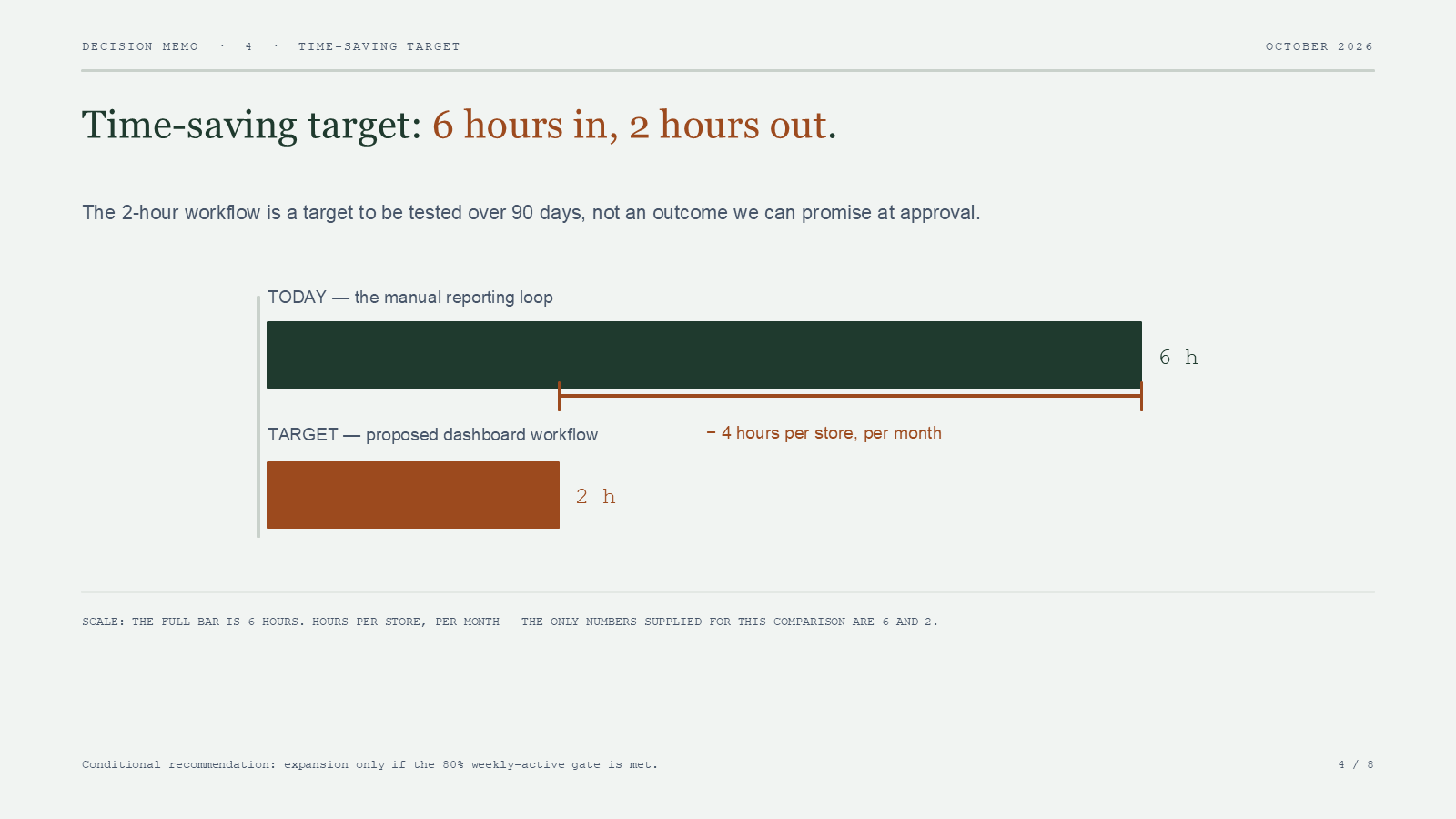
The result still needed an editorial pass. Yukie rewrote the main titles instead of using the exact requested titles, although slides 2–8 retained section labels. It also described the existing workflow as manual without labeling that inference, and treated 90 days as roughly three reporting months. Equal budget allocation and the Day-90 interpretation of the adoption gate should be confirmed. Small footer labels deserve a check on the actual presentation screen.
- 확인
- Slide count and sequence
- 관측된 결과
- 8 slides in the requested topic order
- 이 조항이 규정하는 내용
- Structure delivered; exact title wording differed
- 확인
- Speaker notes
- 관측된 결과
- Notes on all 8 slides
- 이 조항이 규정하는 내용
- Notes exist in the downloaded original
- 확인
- Reporting comparison
- 관측된 결과
- 6 hours today, 2-hour target, 4-hour difference
- 이 조항이 규정하는 내용
- Correct supplied-value comparison
- 확인
- Editable content
- 관측된 결과
- Native text and shapes; no raster slide pictures
- 이 조항이 규정하는 내용
- Content can be edited as slide objects
- 확인
- Chart format
- 관측된 결과
- Editable bars and labels; no native chart part
- 이 조항이 규정하는 내용
- Shape editing is available; spreadsheet-linked chart editing was not delivered
- 확인
- Conditional decision
- 관측된 결과
- Expansion depends on the 80% gate
- 이 조항이 규정하는 내용
- Recommendation retained the supplied condition
- 확인
- Evidence quality
- 관측된 결과
- Source/assumption notes included, with some unlabeled inferences
- 이 조항이 규정하는 내용
- Human fact review remains necessary
Read the slide titles in order. Check whether the opening slide names a decision and whether the closing slide states the next approval step. Read every number against the source list. Inspect notes separately from visible slide text. Then check the chart’s labels and units at a normal presentation size and on a narrow screen.
Visual planning deserves a separate pass. The PPT covers and presentation graphics guide can help shape a cover or illustration brief. Define what each graphic explains before producing it.
For custom assets, compare the options in 최고의 AI 이미지 생성기. Prefer diagrams that clarify the decision over decoration, and check generated text and labels manually.
Using Yukie as an AI PowerPoint generator
When comparing products, Slidesgo’s AI presentation maker is a relevant reference for text-to-presentation expectations. Judge Yukie by its own output and export path.
If you need PowerPoint, make the exported file part of your acceptance criteria. Record the format actually offered, download it and reopen it in a compatible editor. Check slide count, text objects, chart elements, image placement, fonts and notes. A deck made of rendered images may be presentable but offers less editing control.
In this test, Yukie’s file panel offered Download original for the PPTX. Its in-app presentation preview was unavailable, so we saved the original file provided by that control and reopened it locally with PowerPoint’s rendering engine. The initial file was 45,771 bytes; the edited file was 45,846 bytes. Both contained eight slides and speaker notes. Structural inspection found native text and shapes rather than slide-sized pictures. We did not test manual object editing in the PowerPoint interface or native Google Slides integration.
How to edit AI-generated slides without rewriting the whole deck
Editing begins with a change request that names the slide, the allowed facts and the objects that must remain. Keep a before snapshot. Record the requested change, the returned change summary and a comparison of every untouched slide. “Looks the same” is weaker than separate checks for text, order, notes and layout.
An agent can draft a change brief while an editor gives you precise object control. ChatGPT Canvas for writing and coding offers a useful editing comparison: know which tool owns the content, and which owns the finished layout.
Targeted slide-edit test prompt
Use this follow-up after retaining the initial deck:
Change only slide 5, titled “Pilot economics”. Replace its body with a two-column break-even explanation using only the supplied $45,000 budget, 20-store target and 90-day duration. Keep the slide title, speaker-note intent and visual style. Do not change any other slide, chart, note, order or layout. Return a change summary listing every modified object.
Exact test input. See the dated hands-on results and limits in this article. You can also select the full text and press Ctrl/Cmd+C.
The wording requests a break-even explanation but supplies no revenue, margin or hourly-cost assumptions. A useful result separates the cost that must be recovered from evidence that the business can recover it. It should not invent a labor rate, revenue forecast or proven payback period.
How to change one slide with AI
Compare slide 5 before and after, then inspect slides 1–4 and 6–8 for text, order, notes, objects and layout. Record those dimensions separately. A screenshot can support a visual comparison; it cannot prove that underlying objects stayed identical. A regenerated full deck needs a complete review.
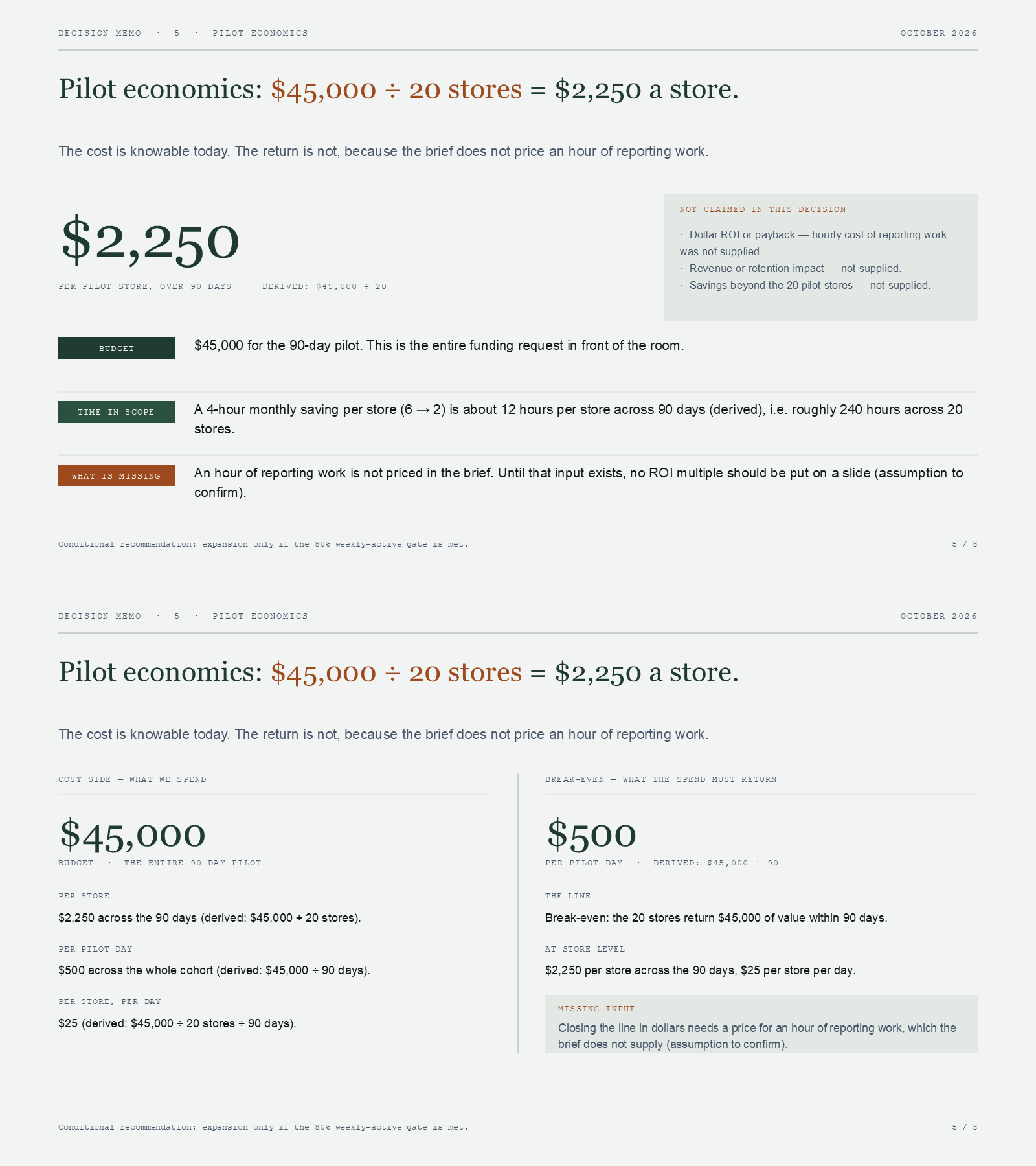
Yukie replaced slide 5’s body with two columns: pilot cost and the value required to recover it. It correctly derived $2,250 per store, $500 per pilot day and $25 per store per day, and identified the missing hourly-cost input. Those are allocations of the supplied budget, not evidence of actual ROI. The slide title and visual style stayed intact; its note was rewritten to match the new body while retaining the cost-versus-unknown-return explanation.
We retained both downloads and compared all 67 decompressed presentation parts. Slides 1–4 and 6–8, their notes, relationships, layouts, masters and theme matched. Slide 5 and its note changed, as did document metadata. Independently rendered pixels for the seven untouched slides were also checked. This supports a successful isolated edit for this sample, rather than a guarantee for every deck. Yukie’s change summary grouped removed and added objects; it was not a complete object-ID inventory.
A practical quality gate before you present
Run these checks in order:
- 범위: audience, decision, source set and assumptions are visible to the reviewer.
- Narrative: slide order leads from context to evidence, recommendation and next decision.
- Facts: every number, date and comparison matches an approved source; missing data is marked as an assumption.
- Charts: labels, units and totals are legible; visual emphasis does not imply a stronger result than the data supports.
- Notes: every slide has the intended speaker context, and any export preserves it only if the re-open test confirms that.
- Edit test: the requested slide changed, and untouched slides were compared for text, notes, order and layout.
- 내보내기: the exact offered format was downloaded and reopened; editability is recorded object by object.
- Presentation view: open the deck in slideshow mode on the screen you will use. Check titles, chart labels and image clarity; if you will share it for mobile viewing, inspect that version too.
- Decision safety: the recommendation stays conditional on the stated gate, budget and risks.
Also ask who owns the next action and what evidence would reverse the recommendation.
When Yukie is a good fit — and when a dedicated slide editor wins
Yukie is a candidate when you want an agent entry point from a structured brief and are prepared to review the result. Founders, marketers, teachers and analysts can use the same decision-first approach even though their decks serve different audiences.
A dedicated slide editor may fit better when you need precise alignment, object-by-object changes, established templates or a known export path. An agent can propose the story and an editor can finish it. Make editable charts, persistent notes and isolated revisions explicit acceptance tests.
For wording and notes, 2026년 최고의 AI 글쓰기 도구 offers a comparison lens. Choose according to your deck’s requirements and the output you can inspect.
Try Yukie for your next slide deck with a bounded brief. Retain the output, review revisions and verify the final file before presenting.
FAQ: AI presentation maker and AI PowerPoint generator
1. What is an AI presentation maker?
It is a tool or agent that turns a brief and source material into a proposed slide narrative, visuals and supporting text. Quality depends on factual review, layout inspection and a verified output path.
2. Can Yukie create a PowerPoint or PPTX file?
Yes. Our October 14 browser test returned an eight-slide PPTX. We saved the file offered by Download original and reopened it with PowerPoint’s rendering engine; native text, shapes and notes were present.
3. How do I create a presentation with AI from a short brief?
State the audience, decision, slide count, exact facts, source boundary and missing-data rule. Request a fixed outline, notes, chart constraints and an assumption label before reviewing the generated slides.
4. Can I edit AI-generated slides without regenerating the deck?
That depends on the product’s editing controls and file model. Ask for a named-slide change, keep a before snapshot and compare every other slide before claiming that regeneration was avoided.
5. Can I change only one slide with AI?
In our sample, Yukie changed slide 5 while the other seven slides and their notes matched the original. Keep both versions and compare content and layout before relying on the same behavior for another deck.
6. Does a slide edit preserve speaker notes and untouched slides?
In our single-slide test, the seven untouched slides and notes matched; slide 5’s note changed to follow its revised body. Notes remained present on all eight pages. Inspect your own exported file after revision.
7. What should I check before presenting an AI-generated deck?
Check sources, assumptions, slide order, chart units, legibility, notes, export format, editable objects, risks and the exact next decision. Reopen the exported file whenever export is part of the promise.
8. Is Yukie better than a dedicated presentation editor for every use case?
No universal winner is established. Yukie may fit agent-led brief-to-draft work, while a dedicated editor may fit precise layout and known export needs. Choose from your acceptance tests and evidence.