へ turn your video into cinema using Wan camera control, give the camera a reason to move. A slow push toward a product can make its texture feel important. A pullback can reveal the world around it. A sideways move can turn a flat scene into a space with depth.
Start that creative process in グローバルGPT, where Wan sits alongside writing, image, video, and audio tools in one dashboard. Its affordable multi-model subscription lets you develop the shot idea, prepare a reference, generate footage, and shape the supporting copy in the same workspace. You can also explore models such as Seedance and Kling when another visual approach fits the project.
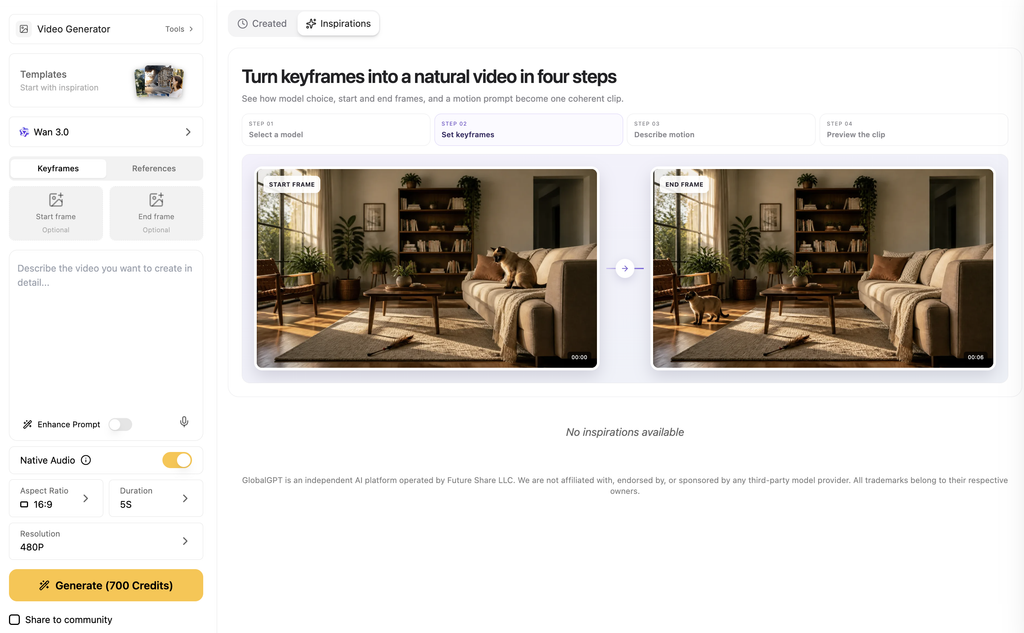
This guide walks through the choices that create a cinematic shot, then shows four new Wan 2.6 reference-video generations from the same original clip. You can watch the outputs, read the exact prompts, and use the differences to plan your own movement.
このガイドでは
What Wan camera control means in practice
Camera movement changes how a viewer discovers a scene. A dolly-in moves closer to the subject; a pullback reveals more of the setting; an orbit changes the viewing angle; lateral tracking moves across the scene. These choices work best when they support the story instead of competing with it.
With prompt-directed generation, you describe the desired motion in words. Wan’s reference-video route can use a subject from a supplied clip to generate a new scene. It is a creative generation process, so the result may also change framing, background, or small product details. Think of the reference as visual guidance for a new shot, rather than a promise to preserve every original frame.
| Approach | What you control | When to use it |
|---|---|---|
| Prompt-directed movement | A camera description such as slow dolly-in | Developing a cinematic shot with a simple brief |
| Wan 2.6 reference-to-video | A reference subject plus the new action and scene | Creating a new shot around a recognizable subject |
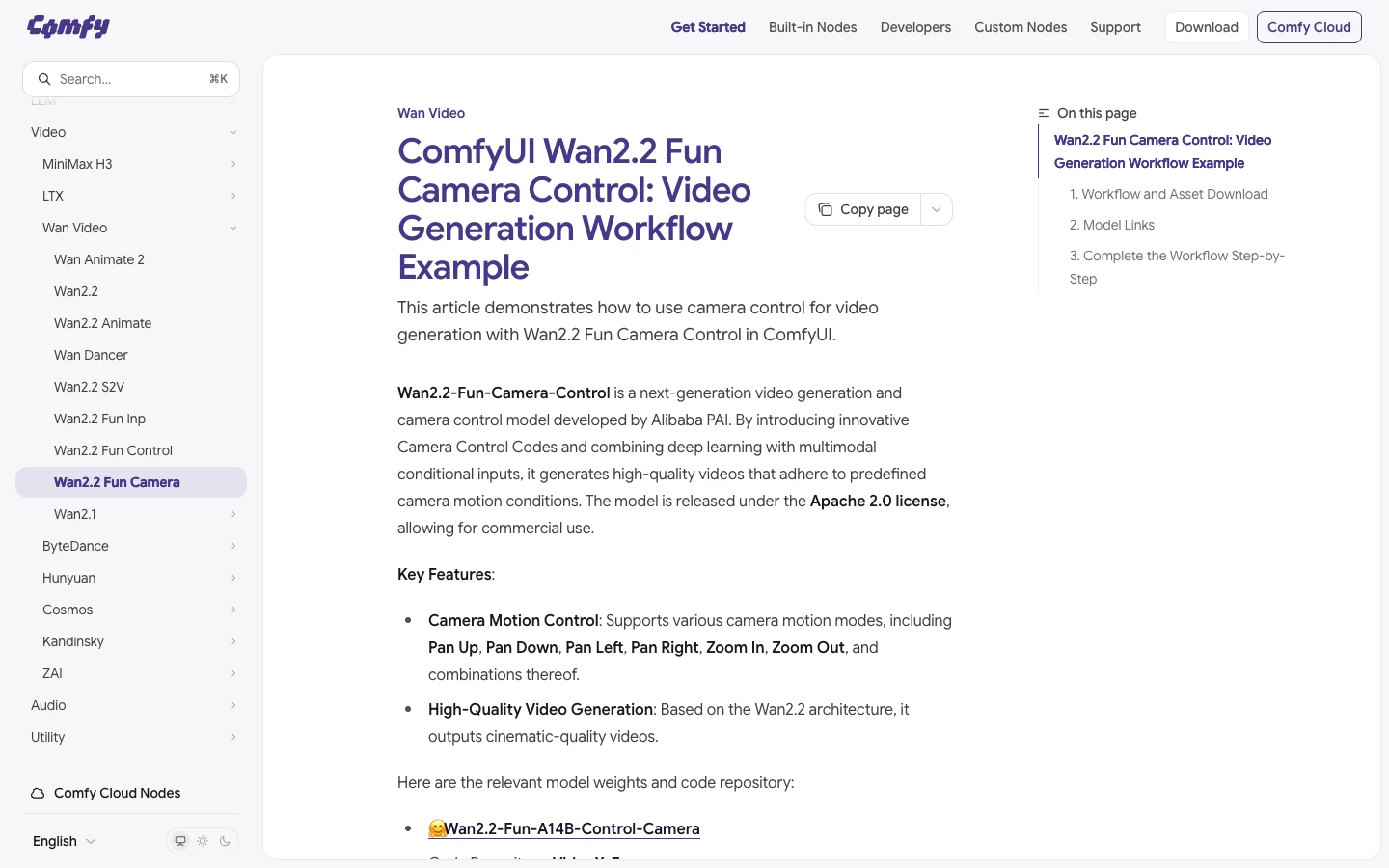
| Wan2.2 Fun Camera workflow | Explicit camera-motion conditions in a dedicated workflow | Working with a technical camera-control setup |
The last route is a distinct model and workflow. ComfyUI’s Wan2.2 Fun Camera guide documents camera-motion choices and settings in a WanCameraEmbedding node. The examples below use Wan 2.6 reference generation with natural-language prompts, not that dedicated node workflow.
Choose the movement before writing the prompt
| Movement | What the viewer feels | 有効活用 | Composition to protect |
|---|---|---|---|
| Slow dolly-in | Attention narrows toward a detail | Product texture, expression, important object | Leave enough space for the ending close-up |
| Orbit | The subject has volume and presence | Hero product reveal, sculpture, packaging | Keep the whole subject visible as the view changes |
| Pullback | A larger story is revealed | Lifestyle setting, scene opening, transition | Make sure the subject remains identifiable |
| Lateral tracking | Foreground and background have depth | Environmental mood, spatial reveal | Keep foreground objects away from the key detail |
For a short clip, choose one main move and let the subject stay relatively simple. If the camera circles, zooms, cranes, and changes focus while the subject also performs several actions, it becomes harder to tell the model which moment matters. You can build a more elaborate sequence by editing several clear shots together.
Movement alone does not create cinema. A consistent light source, a readable subject, controlled pacing, and a useful final composition give the motion a purpose. Ask what the viewer should notice at the start and what they should understand at the end.
Prepare a reference with room for the camera
Choose a clear subject and a scene with some spatial structure. A foreground leaf, a product on a table, and a window behind it create three distances the camera can move through. Avoid starting with a heavily cropped product if the final shot needs to show its whole shape.
For our examples, we created a new five-second reference of a metal camping lantern on a wooden table. The foreground leaves and background window make changes in viewpoint easier to see. This is the same reference supplied to all four Wan 2.6 runs below.
Video input and settings
Read the complete video prompt
Create one continuous five-second landscape 16:9 reference video with a completely locked camera. One unbranded brushed-silver camping lantern with a dark handle stands still near the middle of a wide oak table in a quiet window-lit studio. The complete lantern is visible in a medium-wide frame with ample empty table around it. A small out-of-focus green leaf occupies the far left foreground without covering the lantern. A large window frame and a softly lit beige wall sit several meters behind the lantern to provide clear foreground, middle-ground and background layers. Soft neutral daylight, realistic metal, consistent proportions. Nothing moves, no flicker, no camera movement, no cuts, no people, no second lantern, no subtitles, no writing, no letters, no labels, no numbers, no logos, no watermark, no interface elements.
Generation settings and reference inputs
{
  "model": "wan3.0-video",
  "duration": 5,
  "resolution": "720P",
  "aspect_ratio": "16:9"
}
For your own product, use a reference you have the right to use and make important details visible: color, silhouette, handle, cap, or packaging. If an exact label matters, plan a real pack shot or an editing layer for it. A reference is most useful when it makes the subject easy to recognize.
Write a prompt that describes the shot
Build the prompt around the subject, the camera move, the pace, and the ending frame. Then describe lighting and any behavior that should stay constant. “Cinematic” can communicate a mood, but “slowly move closer while keeping the complete lantern in frame” gives the generation a concrete visual task.
A reusable camera prompt
Use the supplied reference subject in [scene].
The subject remains [stationary / one simple action].
The camera [one main movement] at a [slow / moderate] pace.
Begin with [opening composition] and end with [ending composition].
Keep [important product details and state] consistent.
Lighting: [one coherent light source and mood].
One continuous shot, no cuts, no subtitles, no text, no logos.
Adapt the subject wording to the reference controls you are using. The movement and composition are the creative instructions; the exact way a platform attaches a reference can differ.
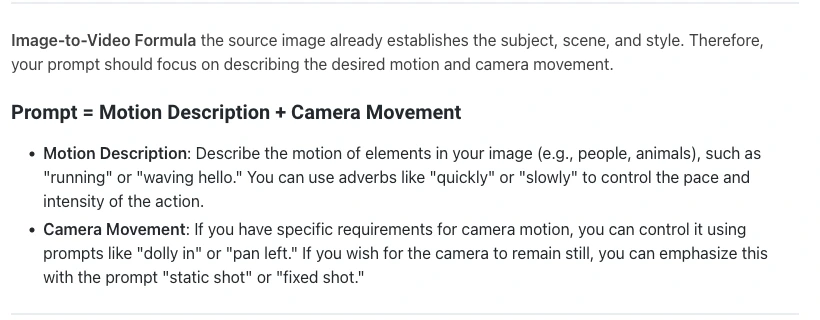
Alibaba’s Wan prompt guide uses motion plus camera movement for image-to-video and a reference subject plus action and scene for reference-to-video. The useful habit is the same: tell the camera what to do, and keep that instruction separate from what the subject does.
Four camera-movement examples from the same reference
We generated these four clips on GlobalGPT with Wan 2.6 R2V on September 28, 2026. Each used the same new reference and a five-second, 1080p request. The videos shown are the first successful outputs, with complete prompts included. The comparisons focus on visible movement, composition, and subject continuity.
1. Dolly-in: make the product detail feel important
The lantern becomes progressively larger, bringing the metal and glass into focus as the scene moves toward a close-up. That gives a small object more presence. The ending also crops the bottom of the lantern, despite the request to keep it complete, and the background is reinterpreted. For a hero product shot, start wider or end the edit earlier so the move emphasizes the product without losing an important edge.
入力全文を読む
Use character1, the exact single brushed-silver camping lantern with dark handle on the oak table, from the reference video. Preserve its silhouette, material, proportions and the window-lit studio setting, with a soft leaf at the far left foreground and a window frame in the distant background. Make one continuous five-second cinematic shot. The camera slowly and smoothly dollies physically closer to the lantern, starting medium-wide and ending closer with the complete lantern still visible. Keep the lantern and table stationary, the lantern centered, and background parallax physically plausible. No orbit, no side tracking, no tilt, no digital zoom. Soft natural window light, shallow depth of field. No cuts, no duplicate objects, no subtitles, no writing, no letters, no labels, no numbers, no logos, no watermark, no interface elements.
参照入力
- Open the original reference
https://static.futureshareai.com/anywhere-test/task_W8zepXOh4PHul58uB2LH85lZro8bapkI.mp4
世代設定
{
  "model": "wan2.6-r2v",
  "duration": 5,
  "resolution": "1080p",
  "images": [
    "https://static.futureshareai.com/anywhere-test/task_W8zepXOh4PHul58uB2LH85lZro8bapkI.mp4"
  ]
}
2. Orbit: give a static subject a stronger sense of form
The changing relationship between the lantern, window, and leaves creates a clear sense of moving around the subject. The lantern remains fully in frame, making this a useful reveal for a product with an interesting silhouette. The requested angle describes the intention, not a measured camera path. Judge whether the movement shows the right surfaces and whether the object remains convincing throughout.
入力全文を読む
Use character1, the exact single brushed-silver camping lantern with dark handle on the oak table, from the reference video. Preserve its silhouette, material, proportions and the window-lit studio setting, with a soft leaf at the far left foreground and a window frame in the distant background. Make one continuous five-second cinematic shot. The camera slowly and smoothly orbits clockwise roughly 45 degrees around the stationary lantern at a constant distance and height. Keep the entire lantern centered and approximately the same apparent size, while the table and distant background reveal a visibly different angle. No dolly-in, no dolly-out, no tilt, no digital zoom. Soft natural window light, shallow depth of field. No cuts, no duplicate objects, no subtitles, no writing, no letters, no labels, no numbers, no logos, no watermark, no interface elements.
参照入力
- Open the original reference
https://static.futureshareai.com/anywhere-test/task_W8zepXOh4PHul58uB2LH85lZro8bapkI.mp4
世代設定
{
  "model": "wan2.6-r2v",
  "duration": 5,
  "resolution": "1080p",
  "images": [
    "https://static.futureshareai.com/anywhere-test/task_W8zepXOh4PHul58uB2LH85lZro8bapkI.mp4"
  ]
}
3. Pullback: reveal the setting around the product
The wider ending gives the tabletop and room a greater role, which is useful when a product needs lifestyle context. The generation also turns the lantern on partway through, although the prompt did not ask for that state change. For a mood piece, the glow may suggest a new creative direction; for a precise product sequence, check that the light state matches the surrounding shots. The opening handle is tight to the frame, so allow more headroom in your next brief.
入力全文を読む
Use character1, the exact single brushed-silver camping lantern with dark handle on the oak table, from the reference video. Preserve its silhouette, material, proportions and the window-lit studio setting, with a soft leaf at the far left foreground and a window frame in the distant background. Make one continuous five-second cinematic shot. Begin with the complete lantern in a medium view. The camera slowly and smoothly dollies backward in a straight line to reveal more oak tabletop, the foreground leaf and the surrounding window-lit studio. Keep the lantern and all scene objects still and the lantern centered, becoming naturally smaller in frame. No orbit, no side tracking, no tilt, no digital zoom. Soft natural window light, natural depth. No cuts, no duplicate objects, no subtitles, no writing, no letters, no labels, no numbers, no logos, no watermark, no interface elements.
参照入力
- Open the original reference
https://static.futureshareai.com/anywhere-test/task_W8zepXOh4PHul58uB2LH85lZro8bapkI.mp4
世代設定
{
  "model": "wan2.6-r2v",
  "duration": 5,
  "resolution": "1080p",
  "images": [
    "https://static.futureshareai.com/anywhere-test/task_W8zepXOh4PHul58uB2LH85lZro8bapkI.mp4"
  ]
}
4. Lateral tracking: create depth with foreground motion
The nearby leaves move across the lantern and window, producing visible parallax and a stronger sense of space. By the end, a leaf partly covers the subject, and the lantern is lit from the start rather than matching the unlit reference. Use this kind of move for atmosphere, but keep the foreground farther from a product’s key feature. A gentle sideways move is most useful when the depth remains readable and the subject stays visible.
入力全文を読む
Use character1, the exact single brushed-silver camping lantern with dark handle on the oak table, from the reference video. Preserve its silhouette, material, proportions and the window-lit studio setting, with a soft leaf at the far left foreground and a window frame in the distant background. Make one continuous five-second cinematic shot. The camera makes a slow smooth horizontal truck to the right, staying at a constant height and constant forward distance from the table. Gently pan only as needed to keep the complete lantern near the center. The nearby leaf should move across the left edge faster than the distant window, creating clear parallax without covering the lantern. Keep the lantern and scene objects still and coherent. No circular orbit, no forward or backward dolly, no tilt, no digital zoom. Soft natural window light, shallow depth of field. No cuts, no duplicate objects, no subtitles, no writing, no letters, no labels, no numbers, no logos, no watermark, no interface elements.
参照入力
- Open the original reference
https://static.futureshareai.com/anywhere-test/task_W8zepXOh4PHul58uB2LH85lZro8bapkI.mp4
世代設定
{
  "model": "wan2.6-r2v",
  "duration": 5,
  "resolution": "1080p",
  "images": [
    "https://static.futureshareai.com/anywhere-test/task_W8zepXOh4PHul58uB2LH85lZro8bapkI.mp4"
  ]
}| ショット | What the example shows | Best editing decision |
|---|---|---|
| ドリーイン | Stronger detail; base cropped at the end | Use the close-up before the crop becomes distracting |
| Orbit | Changing viewpoint; whole lantern stays visible | Use as the main product reveal |
| Pullback | More room context; lantern turns on | Match the light state with adjacent shots |
| Lateral | Foreground depth; leaves partly obscure the product | Trim before the obstruction or use as a transition |
For this subject, the orbit is the clearest choice when the whole lantern needs to remain visible. The push-in suits a detail-led cut, the pullback suits a scene reveal, and the lateral move suits atmosphere. Those are creative choices from this one set of outputs, not a ranking of every possible Wan generation.
Build the shot into a complete video in GlobalGPT
オープン Wan 2.6 on GlobalGPT, add your reference, and describe the new shot. The current page presents an image-or-video upload area, a prompt field, and duration, size, and resolution controls. Choose the settings for the current generation, check the displayed credit amount, then create the shot.
The wider GlobalGPT workflow is useful before and after that generation. Develop the shot list with a language model, prepare a visual reference with an image model, generate the video, and use the available editing tools to assemble your sequence. One affordable subscription connects those stages, rather than making the camera prompt the end of the project.

For a longer sequence, plan the order of shots first. A wide scene can establish the setting, a medium shot can introduce the subject, and a closer detail can finish the idea. Our script-to-video guide shows how to organize that handoff. If you are preparing product visuals, start with a clear product reference image.
Finish with pacing, continuity, and a clean frame
Watch the whole clip before choosing your edit points. The best section may be shorter than the full generation. Leave a small pause for the viewer to recognize the subject, let the move do its job, then cut before an unwanted crop or obstruction takes attention away.
- Check continuity: product color, silhouette, light state, and background should work with adjacent shots.
- Check the ending: the product or face should still be readable when the movement finishes.
- Keep typography separate: add sharp, editable English text only when the story needs it; no subtitles are required for a visual-only shot.
- Choose sound deliberately: listen to any generated audio before using it, or add a suitable licensed track and effects in the edit.
- Match the destination: reframe carefully for vertical placements instead of cropping away the subject.
If the motion feels weak, simplify the move, give the camera a clearer ending composition, and choose a reference with more visible depth. If the subject changes too much, reduce the number of simultaneous actions and make its important details explicit. Generate a purposeful next version rather than adding more cinematic adjectives.
Start with one subject and one movement you can explain in a sentence. Then make the cut that best serves the story. Create your next cinematic Wan shot in GlobalGPT and carry it from idea to finished sequence in one workspace.
よくある質問
Can Wan use an existing video as a reference?
Wan 2.6 reference-to-video can use a subject from a reference clip to generate a new scene. The reference guides the result; it does not guarantee that every original frame or background detail stays unchanged.
Is Wan camera control the same as Wan2.2 Fun Camera?
No. A natural-language camera prompt and the dedicated Wan2.2 Fun Camera workflow are different approaches. The examples here use Wan 2.6 reference-video generation, while Fun Camera has explicit camera-condition settings.
What camera move should I try first?
Choose a slow push-in for a detail, an orbit for a product reveal, a pullback for context, or lateral tracking for depth. Start with one main movement per short clip.
Why does the product change during the shot?
Reference generation creates new footage rather than copying the original frame by frame. Keep the subject and action simple, specify important details, and review the output for changes before using it.
Can I do the full creative workflow in GlobalGPT?
GlobalGPT brings language, image, video, audio, and editing tools into one dashboard. You can develop a brief, prepare references, generate shots, and assemble creative assets within that broader workflow.
Does a Wan prompt guarantee an exact camera angle?
No exact geometric angle is claimed for these prompt-directed examples. Describe the intended movement and judge the output by framing, visible viewpoint changes, and subject continuity.