Risposta rapida: Install Node.js 18 or later, run
npm i -g @glbgpt/cli, authorize withglbgpt login, then runglbgpt skill install. Restart Claude Code in your project directory and ask it to use GlobalGPT for an image, video, or bulk text task. Use--estimatebefore media generation so you can review the credit cost first.
GlobalGPT CLI brings chat, image generation, video generation, and non-interactive AI tasks into the terminal. When you connect it to Claude Code, Claude can choose the right GlobalGPT command, work with files in your project, estimate media costs before generation, and run repeatable content workflows without requiring you to build a custom API integration.
Questa guida mostra how to use GlobalGPT CLI in Claude Code from start to finish: check the prerequisites, install GlobalGPT CLI, sign in with your GlobalGPT account, install the bundled Agent Skill, validate the connection, generate media safely, automate structured tasks, and fix the DNS and browser-authorization problems that can interrupt setup on Windows.
What Is GlobalGPT CLI, and Why Use It with Claude Code?
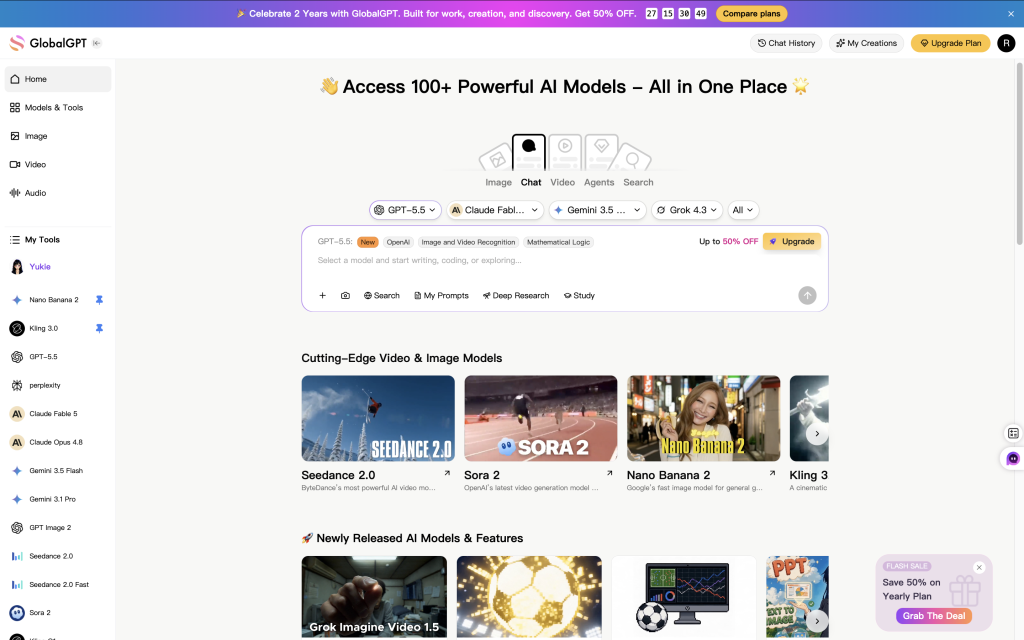
GlobalGPT CLI is the official command-line client for accessing GlobalGPT chat models, image generators, video generators, account information, and task history. The stable npm package exposes both glbgpt e globalgpt commands and includes an eseguire interface for scripts and external agents.
Claude Code supplies the reasoning and project context. GlobalGPT CLI supplies the model and media actions. The bundled globalgpt-generate Agent Skill teaches Claude Code when and how to call the CLI, including how to estimate media costs, select from the live model catalog, attach reference images, wait for tasks, and avoid accidental duplicate charges.
The Three Ways to Connect GlobalGPT and Claude Code
| Integrazione | Il migliore per | Principale compromesso |
|---|---|---|
| Agent Skill + CLI | Claude Code users who want natural-language image, video, and bulk text workflows | Claude Code needs permission to run shell commands |
| Direct CLI commands | Developers writing scripts, CI jobs, or explicit terminal workflows | You must specify and maintain the commands yourself |
| CLI-hosted MCP server | Teams that want MCP tools and a per-session media credit cap | Adds MCP configuration and another tool surface |
For most Claude Code users, Agent Skill + CLI is the best starting point. It keeps the setup small, uses Claude Code’s existing shell capability, and lets you work in natural language while preserving explicit cost checks.
Prerequisites Before You Start
You need:
- Node.js 18 or later. The current GlobalGPT CLI package declares
node >=18. - npm, which is normally installed with Node.js.
- Claude Code, installed and authenticated.
- A GlobalGPT account with access to the models or media tools you plan to use.
- A trusted project directory where Claude Code is allowed to run terminal commands.
- Approximately 10 to 20 minutes for a normal setup. Network or browser-authorization issues can make the first setup longer.
Run these checks in PowerShell, Terminal, or your preferred shell:
The local Windows validation used Node.js v24.18.0, npm 11.16.0, and Claude Code 2.1.211. Those versions are examples, not minimum requirements; Node.js 18 or later is the relevant GlobalGPT CLI requirement.
Step 1: Install GlobalGPT CLI
GlobalGPT CLI is available as a stable npm release. Install the latest stable version with:
After installation, verify the command and version:
The package installs two interchangeable command names: glbgpt e globalgpt. This guide uses the shorter glbgpt form.
Installation time and package count vary with your npm version, network conditions, and dependency updates. A successful installation completes without an npm error. The npm message packages are looking for funding is informational and does not indicate a failed installation.
Step 2: Sign In with Your GlobalGPT Account
GlobalGPT CLI uses browser authorization with your GlobalGPT account, so you do not need to create or paste an API key into the command line.
Run:
Keep the terminal open while the browser page is active. Sign in on the page that opens and approve the request. The CLI will continue after it receives the local callback.
If a browser cannot open automatically, use:
For a headless machine or SSH session, use the one-time code flow:
Never share the one-time code, authorization state, or callback URL. Only enter a code for a login flow you initiated yourself.
Verify the session after authorization:
glbgpt whoami confirms the signed-in account. glbgpt account shows membership and credit information, which is useful before media generation.
Step 3: Test GlobalGPT CLI Before Connecting Claude Code
Testing the CLI on its own isolates authentication or network problems from Claude Code integration problems.
Start the interactive terminal interface:
Send a short message such as hi. A successful response confirms that the CLI can start, read your account session, reach a chat model, and display a result.
Inside the GlobalGPT terminal interface, type / to see available commands. Common commands include /modello, /models, /image, /video, /tasks, /status, /account, /cost, /help, e /exit.
For a non-interactive test, use eseguire:
Il eseguire command prints the model’s answer and exits, making it a better fit for scripts and external agents.
Step 4: Install the GlobalGPT Agent Skill for Claude Code
GlobalGPT CLI includes a bundled Agent Skill named globalgpt-generate. Install it with:
By default, the installer creates links in the agent skill directories, including ~/.claude/skills e ~/.agents/skills. Linked installation means a future CLI update can also update the bundled skill.
If your environment does not support links or you prefer standalone files, use:
Re-running the copy option overwrites the copied skill, so do not make permanent custom edits inside that copied directory.
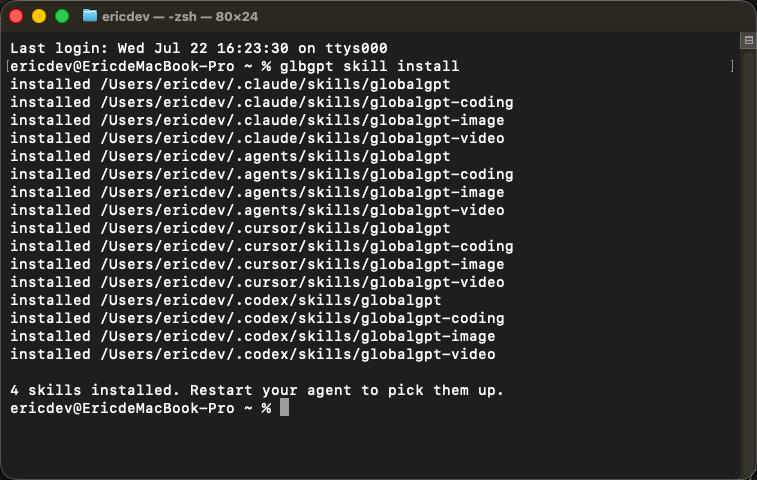
Restart Claude Code after installation so it discovers the new skill:
On Windows PowerShell, the directory command might look like:
Step 5: Verify GlobalGPT CLI Inside Claude Code Without Spending Credits
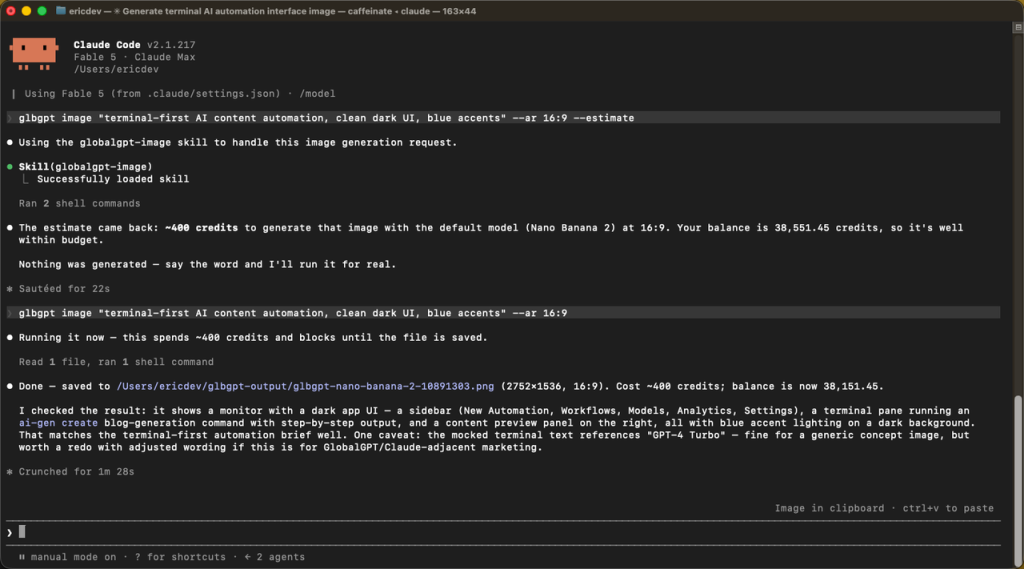
Start with a price estimate. This confirms that Claude Code can discover the skill, execute GlobalGPT CLI, query the current model catalog, and return a cost estimate without generating media.
Use a prompt like this in Claude Code:
The important phrase is “Do not generate the image.” The GlobalGPT skill is designed to use --estimate for this stage, but the explicit instruction makes your approval boundary clear.
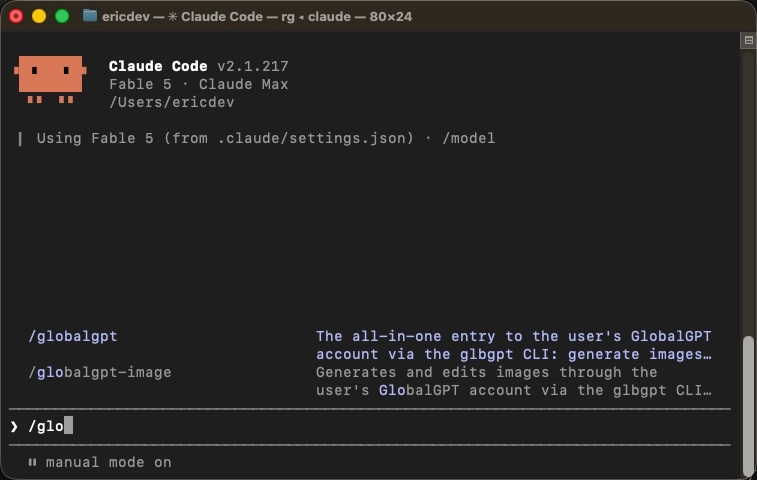
You can also invoke the skill explicitly with /globalgpt-generate if your Claude Code interface lists it as a slash command. Natural-language requests are usually enough when the skill is installed and the task clearly involves GlobalGPT image or video generation.
Step 6: Generate an Image from Claude Code
Once you approve the estimate, ask Claude Code to proceed. A precise request might be:
GlobalGPT CLI can list the live image catalog with:
It can inspect a model’s supported parameters with:
Avoid hard-coding a model name in a reusable Claude Code prompt unless your workflow requires it. The catalog is served dynamically and can change. Let Claude list the available models, then choose one that supports the requested aspect ratio, resolution, reference images, or other requirements.
Direct CLI equivalents include:
Completed files are saved under ./glbgpt-output/ unless you pass --out.
Step 7: Generate a Video from Claude Code
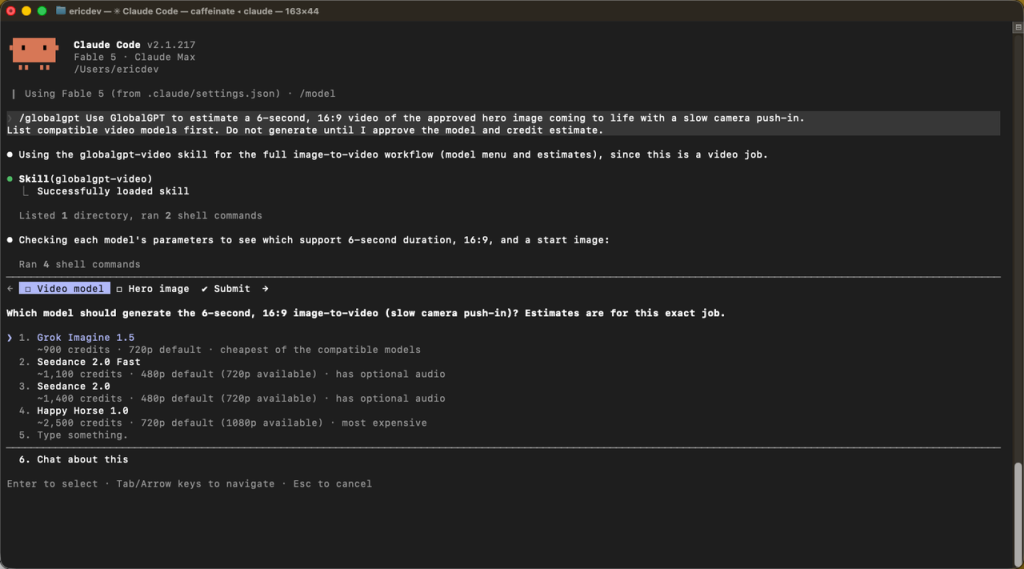
Video requests should specify the scene and only the parameters you actually need. Support for duration, resolution, aspect ratio, audio, and reference frames varies by model.
Start with an estimate:
After approval, Claude Code can use a command shaped like:
The CLI waits for the completed file by default. Video generation can take several minutes. Do not build an unnecessary polling loop, and do not automatically resubmit if a command is interrupted; the original server task may still be running and a second submission could spend credits twice.
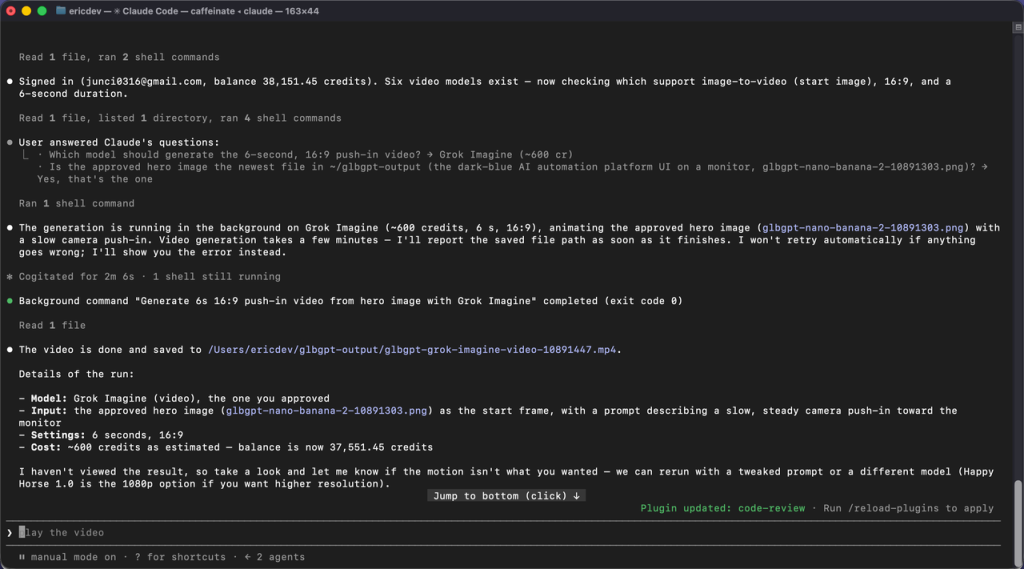
Check interrupted or detached tasks with:
Step 8: Automate Bulk Text Work with glbgpt exec
glbgpt exec runs one non-interactive model request and returns plain text, JSON, or JSONL. It is useful when Claude Code needs to apply the same operation across many files or keep a very large source file out of the main Claude Code conversation.
Example direct command:
For structured output, define a JSON Schema file and pass it with --output-schema:
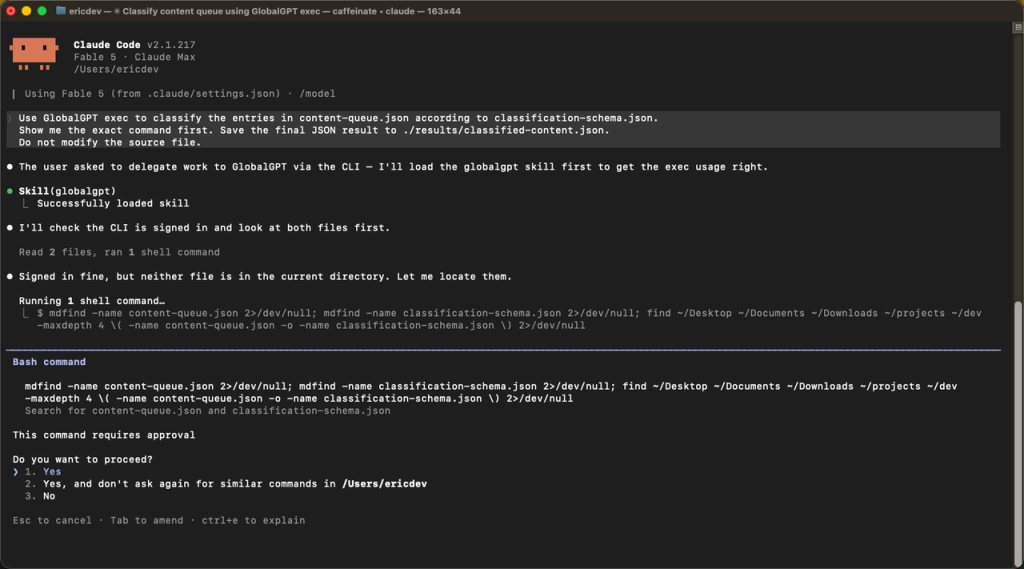
In Claude Code, you can say:
Use this pattern for repetitive or high-volume work, not for a one-line question that Claude Code can answer directly.
Optional: Connect GlobalGPT as an MCP Server
The Agent Skill is the recommended path when Claude Code can execute shell commands. GlobalGPT CLI can also run an MCP server over standard input/output:
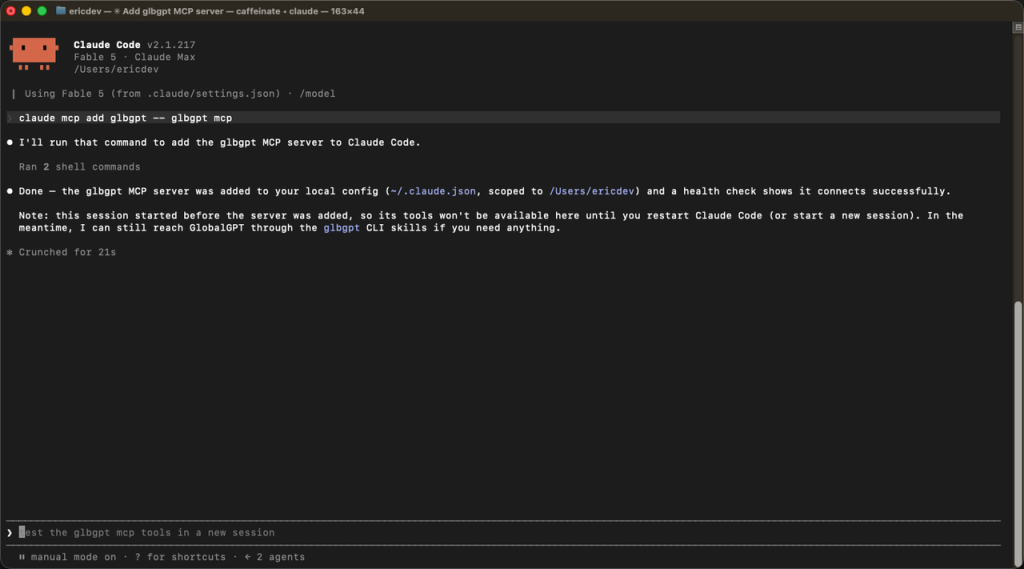
This exposes GlobalGPT chat, image generation, video generation, task checking, and model listing as MCP tools.
Media generation is capped at 4,000 credits per MCP server session by default. You can set a different session cap:
To disable MCP media spending while retaining non-media capabilities, use --max-credits 0.
Choose MCP when you want explicit MCP tools or session-level credit enforcement. Choose the Agent Skill when you want Claude Code to drive the normal CLI with minimal configuration.
Troubleshooting GlobalGPT CLI on Windows
npm Returns ENOTFOUND o getaddrinfo
Un ENOTFOUND error means npm could not resolve the registry hostname. It does not prove that the GlobalGPT package is missing or damaged.
Check the active registry and DNS resolution:
If npm is configured to use a mirror, test that hostname as well. Changing registries will not solve a DNS failure when neither hostname resolves.
In the validated Windows case, the active WLAN DNS server could not resolve npm domains. The first reset failed because PowerShell did not have administrator permission. After opening an elevated PowerShell window, resetting DNS to automatic, and clearing the cache, both Resolve-DnsName e npm ping succeeded.
First identify the active adapter:
Then run the reset from PowerShell as Administrator, replacing WLAN if your active interface uses another name:
If your organization manages DNS or network policy, contact the administrator instead of overriding it.
Browser Authorization Times Out
Timed out waiting for browser authorization means the local waiting window ended. It does not mean npm installation failed.
Esegui glbgpt login again and finish the browser flow while the terminal remains open. If the browser opens on another machine or the callback cannot reach the terminal, use glbgpt login --code.
glbgpt Is Not Recognized After Installation
Open a new terminal and try again. If the command is still unavailable, inspect the global npm prefix:
Confirm that npm’s global executable directory is on your PATH, then rerun glbgpt --version.
Claude Code Does Not Detect the Skill
Esegui glbgpt skill install again, confirm that it reports a Claude skill directory, fully exit Claude Code, and start a new session. You can also try /globalgpt-generate to invoke the skill explicitly.
A Model or Parameter Is Rejected
The model catalog is dynamic, and parameter support differs by model. Refresh the catalog and inspect the selected model:
Use a listed value or omit the optional flag so the model default applies.
A Generation Command Appears to Hang
Image and video commands wait for the final file by default. Video generation can take minutes. If the terminal was interrupted, inspect the existing task before considering another submission:
Never retry a paid generation blindly.
How to Measure Time and Token Use for Each Claude Code Task
Before each measured Claude Code task:
- Esegui
/usoand record the session values displayed. - Record the wall-clock start time.
- Run only the task being measured.
- Record the finish time and run
/usoagain. - Calculate the elapsed time and, when exact token counts are available, the before/after token delta.
Claude Code’s current documentation states that the /uso command provides token usage for API users. Subscription interfaces may show plan usage rather than a precise token count, so record exactly what the current interface exposes and label unavailable values as N/D; do not estimate or invent token counts.
For GlobalGPT media tasks, also record the account or transaction balance before and after generation. Claude Code tokens and GlobalGPT media credits are different units and should be reported separately.
Domande frequenti
Do I need a GlobalGPT API key?
No. GlobalGPT CLI uses browser authorization with your GlobalGPT account. Run glbgpt login, complete the approval flow, and let the CLI store its local session credential. Do not paste one-time login codes or authorization URLs into project files, screenshots, or shared chat logs.
Can I use GlobalGPT CLI without Claude Code?
Yes. Run glbgpt for an interactive chat, glbgpt image o glbgpt video for media, and glbgpt exec for non-interactive scripts. Claude Code adds project context, reasoning, file orchestration, and natural-language control, but the CLI works independently.
Should I use the Agent Skill or MCP?
Use the Agent Skill when Claude Code can run shell commands and you want the simplest natural-language workflow. Use MCP when you prefer explicit MCP tools or need the MCP server’s session-level media credit cap. Both surfaces use the same GlobalGPT account.
Where does GlobalGPT save generated files?
By default, generated images and videos are saved under glbgpt-output/ relative to the directory where the command or server started. Pass --out <directory> when you need a different location. The command prints the saved path after completion.
How can I avoid accidental media spending?
Utilizzo --estimate before every new media configuration, ask Claude Code to wait for explicit approval, and avoid unattended batches. For MCP, set --max-credits 0 to disable media or choose a deliberate session cap. Never automatically retry an interrupted generation.
Is GlobalGPT CLI stable?
As of July 21, 2026, GlobalGPT CLI is available as a stable npm release, version 0.1.0. Install it with npm i -g @glbgpt/cli, then run glbgpt --version to confirm the installed version.
Punti chiave
- Install the stable CLI with
npm i -g @glbgpt/cliand verify it before involving Claude Code. - Use browser authorization; no API key is required for the documented login flow.
- Esegui
glbgpt skill install, then restart Claude Code so it can discoverglobalgpt-generate. - Begin every media workflow with
--estimateand explicit human approval. - Record Claude Code usage and GlobalGPT media credits separately.
- On Windows, treat npm
ENOTFOUNDas a DNS problem first, not as proof of a broken CLI package. - If a generation is interrupted, inspect the existing task before retrying.
Now that you know how to use GlobalGPT CLI in Claude Code, you can turn Claude Code into a practical control layer for chat, image, video, and structured content workflows. Start with a no-spend estimate, validate one small task end to end, and only then scale the workflow into batches or scheduled automation.