The old question was whether ChatGPT could answer aloud. The more useful question now is which surface you are using: a spoken conversation, dictation that produces editable prompt text, or desktop Voice that directs a task. The official desktop Voice guide makes that task distinction explicit.
For work, fluent speech is only the beginning. You still need a written record that separates an idea from an approval and an assigned owner from “someone should do this.” GlobalGPT can help with that later text-review job, without claiming to replace ChatGPT native Voice.
Live conversation, dictation and desktop task Voice
Legacy mode names and older demonstrations are not a current access checklist. Use the controls in your actual account and the documentation for that surface. Do not transfer a desktop allowance to ordinary Chat Voice or an audio API application.
This distinction changes how you evaluate the rollout. Conversation quality matters for live discussion, but dictation should be judged by the editable text it produces. Desktop task Voice adds another layer: whether the requested work used the intended task, model and permissions.
A later text recap is also a different capability. Article summarization explains how to condense supplied text; it does not prove a model listened accurately to speech. Review the source transcript before judging the recap.
Desktop availability and separate usage budgets
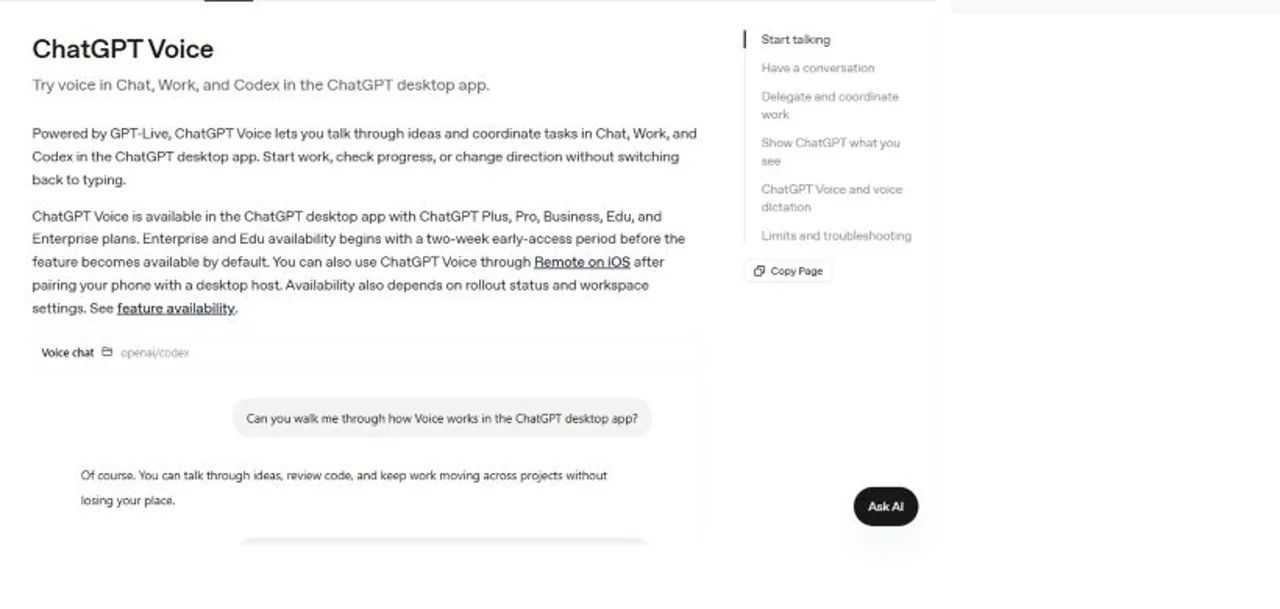
OpenAI documents desktop Voice for Plus, Pro, Business, Edu and Enterprise, subject to rollout and workspace settings. Enterprise and Edu start with a two-week early-access period before default availability. Voice can also work through a paired iOS Remote connection where supported. These are native desktop availability rules, not GlobalGPT plan benefits.
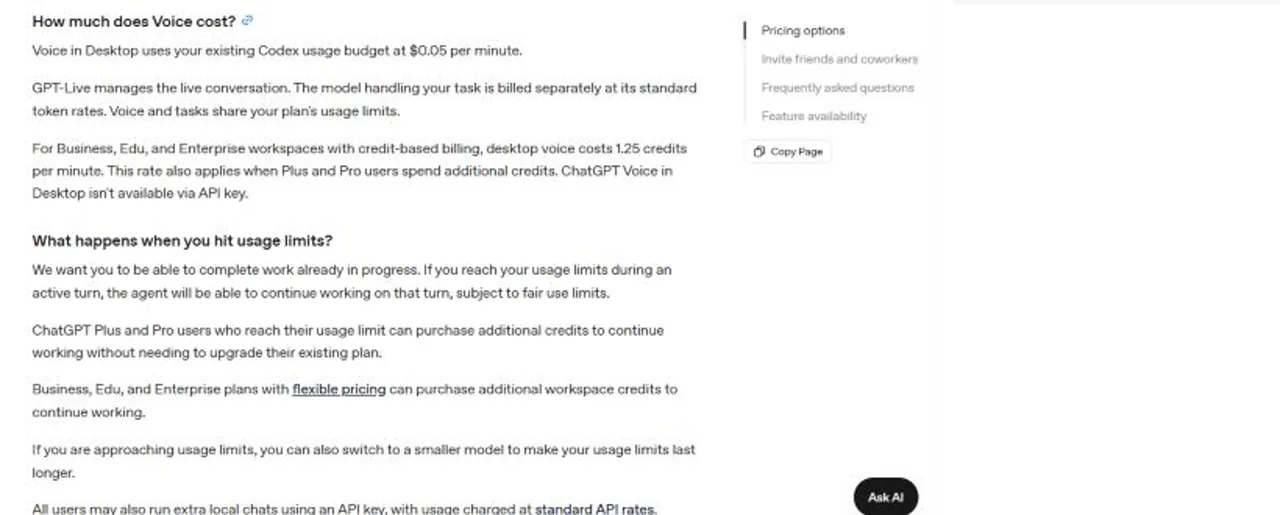
These values come from OpenAI desktop Voice pricing, checked September 16, 2026. GPT-Live manages the live conversation, while the model handling the task is billed separately. Voice and tasks share the plan’s usage limits.
If your workflow also includes paid text-model requests, treat those as a third billing scope. Our GPT-5.6 pricing explanation separates API, account and platform usage; a model’s token price is not a native desktop Voice minute allowance.
Starting Voice and troubleshooting missing access
In a supported desktop task, choose Start voice chat; for a new chat or task, use Start new voice chat. First use requires microphone permission and a voice choice. End the session with Stop voice chat.
Voice in existing Codex tasks is still rolling out. If the control is absent, update the desktop app and the host running the task, check account/workspace eligibility and microphone access, and check for another active session. OpenAI documents only one active desktop Voice chat at a time. A missing control is not evidence that a different platform can unlock it.
Check plan, rollout and workspace settings.
Update the desktop app and connected host.
Verify microphone permission and selected input.
Close or return to the one active Voice chat.
If Voice starts but the task does not behave as expected, verify the task rather than repeating the command louder. Check which conversation is active, which model the task selected, whether the required tool is allowed and whether another task already owns the work.
A desktop conversation can check work, send follow-up instructions or change direction. It uses the permissions of the tasks it directs. Saying “issue a refund” does not demonstrate a connected order system, identity verification or a completed refund.
What to verify in the written record
Pay special attention to negation, changed decisions, amounts and ownership. “Do not send” is not a minor transcription detail. “We could offer $20” is not approval. “Ask the delivery team tomorrow” is not an accepted assignment.
Ideas, corrections and interruptions.
Use only the transcript or notes you are allowed to process.
Decisions, rejected suggestions, open questions and owners.
Confirm consequential facts before action.
The review should preserve sequence when a later sentence changes an earlier one. It should also keep missing ownership visible. A summary that assigns an unaccepted task can be more operationally dangerous than one that is merely wordy.
The same source discipline applies to document input. If policy arrives in an attachment, our PDF summarization guide helps check what text the model received. A recap cannot safely fill a missing policy from general knowledge.
Turn an approved conversation record into a GlobalGPT recap
Use a separate GlobalGPT text task after you have an approved, redacted record. Ask for decisions, unapproved suggestions, open questions and owners. Our multi-model workflow guide explains why the same source and rubric matter when comparing outputs.
In our September 16, 2026 fictional text test, a lead first suggested a $20 shipping credit, then explicitly withdrew it. We requested GPT-5.6 Sol through GlobalGPT MCP. The response kept the final no-credit/no-customer-message decision, assigned only the accepted internal recap to Maya and left investigation ownership and timing unknown.
Select All + Ctrl/Cmd+C
Select All + Ctrl/Cmd+C
This is a worked text example, not an audio-quality test. No microphone interaction, recognition accuracy, interruption handling or latency was measured. The gateway did not independently certify backend model identity.
For a team, agree on the review fields before choosing a favorite writing style. Our lean AI workflow for teams describes a handoff between source owner, draft producer and reviewer. Keep consequential actions outside the summary step.
GlobalGPT is a practical place to compare available text-model outputs instead of switching among separate everyday tools. Check the product scope in our all-in-one AI subscription guide; that benefit does not claim the same native Voice controls or quotas.
Privacy boundaries before sharing the conversation
Pejabat desktop Voice guide warns that macOS screen context can capture an appshot of the frontmost window, including accessible text outside the visible scroll area. Organization settings can disable it. Avoid sharing a window with sensitive information simply because the visible area looks harmless.
Necessary task context, approved notes and final decisions.
Names, account details, visible tabs and text outside the scroll area.
Credentials, unrelated personal data and unapproved customer records.
Treat the frontmost window as a broader data source than the pixels you can see. Accessible text may extend beyond the visible scroll position, so switching to a clean task window is safer than relying on careful cropping after capture.
Review the full data path before exporting a conversation to another workspace. Our AI data privacy guide distinguishes provider settings, retention and third-party handling. Redact credentials, identifiers and unnecessary personal details, and use only organization-approved input.
For a custom audio or text API workflow, OpenAI API data controls are a separate reference: API no-training defaults do not mean zero retention and do not establish a third-party app’s own terms. Ending a Voice session is not proof that every recording, transcript or downstream copy has been deleted.
Choose native Voice for the conversation or supported desktop task. Choose GlobalGPT for the approved text review that follows. Keeping those jobs separate makes the benefits clearer and the claims more accurate.
Pertanyaan yang Sering Diajukan
Who can use ChatGPT desktop Voice?
OpenAI documents desktop Voice for Plus, Pro, Business, Edu and Enterprise, subject to rollout and workspace settings. Enterprise and Edu have a two-week early-access period before default availability.
Why is Start voice chat missing in my task?
Voice in existing Codex tasks is rolling out. Check plan and workspace eligibility, update the desktop app and connected Codex host, review microphone permissions and confirm no other desktop Voice chat is active.
Is voice dictation the same as a live conversation?
No. Dictation converts speech into prompt text. ChatGPT Voice supports a live conversation and, in supported desktop tasks, can start or steer work. Use editable text when names, amounts and action wording need review.
How is ChatGPT Voice in Desktop charged?
OpenAI says Voice in Desktop uses the existing Codex budget at $0.05 per minute. The task model is billed separately at standard token rates; credit-billed workspaces and extra-credit use cost 1.25 credits per minute.
Does paying for Voice make task execution unlimited?
No. GPT-Live manages the conversation, while the model handling the task is billed separately at its standard token rates. Voice and tasks also share the plan’s usage limits.
Can I access ChatGPT desktop Voice with an API key?
OpenAI says ChatGPT Voice in Desktop is not currently available via API Key. An audio API application is a separate product and should not be treated as access to the same native desktop workflow.
Di mana posisi GlobalGPT dalam alur kerja ini?
Use GlobalGPT for a separate approved text task: summarize a redacted conversation record, distinguish decisions from suggestions and compare missing owners or deadlines. This does not imply access to native ChatGPT Voice modes.
Did this article test voice recognition or audio latency?
No. The observed example was a fictional text recap through a GlobalGPT model route. It did not record audio or measure recognition, interruptions or latency. Native Voice behavior and quotas are attributed to official documentation.