Windows 上的 Perplexity:浏览器和 PWA 设置指南
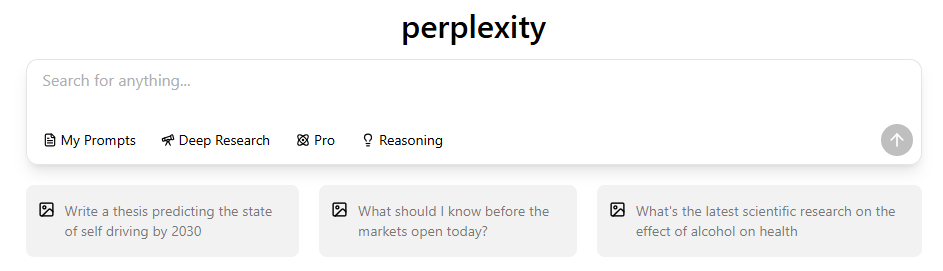
Perplexity Windows 应用程序可以 不 作为本机桌面应用程序存在,也没有正式的 .exe 下载 Windows 10 或 11。在 Windows 上使用 Perplexity 的唯一支持方式是通过浏览器,或通过 Microsoft Edge 或 Google Chrome 浏览器将其安装为渐进式网络应用程序(PWA),这样就能获得类似应用程序的体验,而无需依赖不安全的第三方安装程序。.
更新于2026年9月22日
虽然 Perplexity 可以提供快速、有引文支持的答案,但它的 Windows 体验仅限于浏览器或基本的 PWA。许多用户仍然需要其他人工智能模型来进行更深入的推理、处理长篇文档、编码或创意工作--在这些领域,仅靠 Perplexity 无法完全满足他们的需求。.
GlobalGPT 为 Windows 用户提供了一个包含 100 多个模型的工作区,其中包括 GPT-5.6 Sol, Claude Sonnet 5、Gemini 3.1 Pro 和 Sora 2 Pro,用于搜索、推理和多模态创作,无需管理多个独立工具。.
Windows 上的 Perplexity:您的选择
| 选项 | 官方地位 | 安全等级 | 更新方法 | 离线支持 | 系统集成 |
| 困惑网 | ✔ 官方 | 高 | 自动通过浏览器 | 没有 | 无 |
| Perplexity PWA(边缘/铬色) | ✔ 官方 | 高 | 通过网络自动更新 | 没有 | 最小化(窗口模式,任务栏针脚) |
| 微软商店 “困惑 ”应用程序 | ✖ 非官方 | 低/未知 | 取决于第三方包装器 | 没有 | 无(仅限 WebView 容器) |
| 本地 Windows 应用程序(.exe) | ✖ 不详 | 不适用 | 不适用 | 不适用 | 不适用 |
人们寻找 Windows 应用程序的原因有以下几点:
- 竞争激烈的人工智能工具现在可以提供真正的桌面客户端。.ChatGPT、DeepSeek 等版本都有官方的 Windows 安装程序,这让人自然会认为 Perplexity 也应该有一个。.
- 困惑 出现在微软商店中。. 许多用户认为那里列出的任何东西都一定是官方的--即使发布者不是 Perplexity AI 公司。.
- 博客文章和下载网站误导用户。. 一些第三方网站错误地描述了 “Perplexity Windows 安装程序”,造成了进一步的混淆。.
- 他们希望访问更快捷。相比于在浏览器中查找标签页,专用的应用窗口会更方便。.
- Perplexity 的界面看起来已经像一个应用程序了。其简洁的布局让一些用户期待会有桌面版。.
实际上,"困惑 "确实 不 提供本机 Windows 应用程序,而所有 “Windows 应用程序 ”的外观都来自 PWA 或非官方封装。.
有官方的 Windows 应用吗?
基于 Perplexity 的公开文档和平台公告:
- 无窗口 安装包 存在。. Perplexity 从未发行过
.exe,.msix, 或任何可安装的桌面软件包。. - 官方只支持三个平台:
- 网络(全面体验)
- iOS 应用程序
- 安卓应用程序
- 网络版提供全套功能。. Perplexity 的快速更新周期依赖于通过浏览器部署用户界面和搜索改进。.
- 虚假下载页面造成混乱。. 许多非官方网站与合法经销商相似,但与 Perplexity 无关。.
- 安全验证至关重要。. 如果一个文件声称是 Perplexity 安装程序,那么根据定义,它就是非官方的。.
查看 Microsoft Store 发行商
| 风险类别 | 严重性 | 可能性 | 说明 |
| 出版商身份不明 | 高 | 高 | 用户无法确认谁控制了应用程序或其代码。. |
| 会话或标记暴露 | 高 | 中型 | WebView 封装程序可能会错误处理身份验证或不安全地存储会话数据。. |
| 数据拦截或注入 | 高 | 中型 | 封装器可以注入脚本或捕获通过嵌入式浏览器的流量。. |
| 缺乏官方更新 | 中型 | 高 | 如果 Perplexity 更新了网络接口,包装器可能会崩溃或出现不可预知的行为。. |
| 无安全审计或保证 | 高 | 高 | 第三方应用程序不经过 Perplexity 的安全审查流程。. |
| 误导性的合法外观 | 中型 | 高 | 进入微软应用商店会让用户误以为该应用是官方应用。. |
| 企业合规风险 | 高 | 中型 | 对于敏感数据,企业不能信任未知的第三方容器。. |

在将任何带有“Perplexity”品牌的 Microsoft Store 商品信息视为官方信息之前,请先核实其发布者。.
- 请确认该发行商与Perplexity官方网站上所列的公司是否一致。.
- 请确认该列表描述的是原生应用,还是用于打开该网站的封装程序。.
- 登录前,请仔细阅读发布商的隐私政策和支持信息。.
- 未经验证的封装程序处理会话数据的方式可能与官方网站不同。.
- 请查看该应用的更新记录和支持的 Windows 版本。.
- 在工作场所使用时,请遵守贵组织关于软件审批和数据处理的要求。.
浏览器和网络应用选项
| 特点 | 浏览器(Chrome/Edge) | PWA(渐进式网络应用程序) |
| 便利性 | 可通过任何标签轻松访问;适合多任务处理 | 在专用窗口中打开;行为更像桌面应用程序 |
| 性能 | 快速;取决于浏览器环境 | 单独打开一个窗口可以减少标签页的杂乱,但并不能保证人工智能的响应速度更快。. |
| 可靠性 | 使用正式网站;可用性取决于服务和网络连接。. | 在专用窗口中打开实时网站。. |
| 界面体验 | 与标签页和浏览器 UI 元素相混合 | 简洁、类似应用程序的界面,无干扰 |
| 更新方法 | 网站更改通过在线方式发布;浏览器更新则单独管理。. | 网站更改通过在线方式发布;浏览器更新则单独管理。. |
| 需要安装 | 没有 | 是的,通过浏览器的应用安装菜单。. |
| 安全 | 使用浏览器的安全保护功能;检查网站权限。. | 采用基于浏览器的安全防护措施;检查应用权限。. |
| 离线支持 | 无 | 无 |
| 最适合 | 多任务处理、休闲使用、快速研究 | 用户希望获得类似应用程序的感觉和专用工作空间 |
Perplexity 正式支持两种 Windows 访问方法:
- 浏览器(Chrome、Edge、Firefox)
- 始终保持最新功能
- 功能的可用性取决于您的账户、套餐和平台。.
- 无需安装
- 使用官方网站的登录流程。.
- 渐进式 网络应用程序 (PWA)
- 提供类似应用程序的界面
- 可出现在 "开始 "菜单或任务栏中
- 在专用窗口中运行 Perplexity
- 在轻量级的专用窗口中使用该网站。.
- 请检查权限并保持浏览器更新;没有任何安装方式是完全没有风险的。.
Web 应用的工作原理
- Perplexity 的产品架构以网络为先
- 更新在服务器一级集中推出
- 单独的窗口本身并不提供离线 AI 处理功能。.
使用 Microsoft Edge 安装
要在单独的窗口中打开 Perplexity:
- 打开 Microsoft Edge。.
- 开放 Perplexity的网站.
- 开放 设置和其他(…)→ 更多工具 → 应用 → 将此网站安装为应用, 紧随其后 微软 Web 应用的安装步骤.

- 确认应用名称并选择 安装.
- 可选:将应用固定到“开始”菜单或任务栏。.
- 要卸载,请打开
edge://apps, ,选择该应用的 详细信息, ,然后选择 卸载.
使用 Google Chrome 安装
- 打开 Google Chrome。.
- 参观 https://www.perplexity.ai.
- 开放 更多 (⋮) → 投屏、保存和分享 → 将页面安装为应用…, ,然后按照提示操作。某些网站还在地址栏中显示了一个“安装”图标。参见 谷歌的网络应用使用说明.

- 可选:将应用固定到“开始”菜单或任务栏。.
- 要卸载,请打开该网页应用并选择 更多 → 卸载 [应用名称] → 删除.
应该选择哪个 Windows 选项?
浏览器
- 最灵活
- 无需安装
- 直接访问网站以及通过服务器推送的功能更新。.
Web 应用(Edge 或 Chrome)
- 可在单独的窗口中方便地访问。.
- 类似应用程序的体验
- 由浏览器管理的安装和权限设置。.
未经验证的商店应用
- 未由 Perplexity AI 发布
- 未知的安全模式
- 包装器本身并不会增加离线 AI 功能。.
- 凭证处理不当的潜在风险
摘要
大多数用户应该
- 使用 浏览器 进行多任务处理,或
- 安装 PWA 营造类似应用程序的感觉
功能与限制
可用功能
- 快速运行引文搜索
- 利用链接资料探索复杂的主题
- 使用实时事实查询
- 使用 Perplexity Pro 功能(如已订阅)
- 跨设备同步历史记录
需检查的限制条件
- 离线使用 Perplexity
- 在桌面上处理大型文件
- 原生执行多模态生成(图像、视频
- 利用多个模型执行长式推理
- 使用系统级集成
Web 应用与桌面应用的对比
产品原因
- 基于云的架构意味着无需在设备上进行计算。.
- 仅靠桌面界面并不能保证人工智能的响应会更快或更准确。.
- 基于浏览器的部署允许即时功能更新。.
工程原因
- 维护 Windows 安装程序需要打补丁和进行版本管理。.
- 跨 Windows 版本测试会增加开销。.
- 性能取决于应用程序、服务和工作负载。.
用户体验原因
- 在 PWA 模式下,用户界面已经表现得像一个应用程序。.
- Web 界面可以在不同平台上提供一致的使用体验。.
Perplexity 最适合哪些人?
如果您符合以下情况,请选择 Perplexity:
- 需要快速的来源支持答案
- 重视搜索准确性和引文
- 开展日常事实研究
- 想要轻便、简约的设置
如果您符合以下情况,请比较各种方案:
- 处理长文档或复杂的工作流程
- 需要多模式生成(图像/视频)
- 需要多个人工智能模型进行比较
- 依赖桌面级集成或离线工具
一种多模型替代方案
其他需要考虑的因素
- 无本地处理
- 没有多模型推理
- 无多媒体工具
- 没有综合工作空间方法
为什么要比较各种方案?
- 许多用户需要的是桌面风格的AI工作区,而不仅仅是一个搜索界面。.
- 更广泛的模型生态系统支持在同一平台上进行创建、分析和推理。.
为什么选择 GlobalGPT?

- 将 100 多种领先的人工智能模型集于一身
- 包括 GPT-5.6 Sol、Claude Sonnet 5、Gemini 3.1 Pro 和 Sora 2 Pro
- 适用于写作、编码、分析、研究和多模式创作
- 取代多次订阅的需要
- 通过统一界面在 Windows 上流畅运行
- 使用基于网页的工作区,无需非官方的 Perplexity 安装程序。.
安全使用 Perplexity
要避免账户或不安全应用程序受到威胁,请遵守以下规则:
- 请访问 Perplexity 的官方网站。.
- 请避免从未经核实的第三方下载网站安装程序。.
- 在信任 Microsoft Store 中的某个应用条目之前,请先核实其发布者和官方下载链接。.
- 使用浏览器配置文件隔离工作数据和个人数据
- 在共享设备上使用 Perplexity 后登出
- 请保持浏览器更新,以获取安全修复程序。.
哪种选项适合您的工作流程?
在 Windows 上使用 Perplexity 最安全可靠的方法是通过浏览器或通过 Edge 或 Chrome 安装的 PWA。这些选项可以提供完整的官方体验,而不会有非官方应用程序或应用商店包装程序的安全风险。.