Kimi K3 is one of those launches that gets more interesting once you look past the headline numbers. Yes, it has 2.8 trillion total parameters, a 1,048,576-token context window, and image input. More importantly, the early benchmark picture points to a model built for demanding coding, research, and knowledge-work tasks rather than quick throwaway chats.
My take: start with K3 if you write or debug code, work through large research packs, or regularly give an AI more material than a normal chat window can handle. Moonshot AI’s coding and knowledge-work results are strong, and early third-party benchmarks support the idea that this is a serious frontier model. The trade-off is that K3 thinks hard by default, so it makes more sense for important work than for rapid-fire drafting.
If K3 is the kind of model you want to try for serious work, GlobalGPT gives you a fuller way to build around it. One workspace covers chat, research, writing, coding help, document review, image generation, video creation, and model switching, so K3 can take the long-context reasoning jobs while GPT, Claude, Gemini, Perplexity, and other models handle the steps where they fit better. With annual billing, Pro is $10.80/月 and Unlimited is $25/月, making GlobalGPT a practical way to use multiple leading AI tools without paying for a separate subscription for every part of the workflow.
What Is Kimi K3?
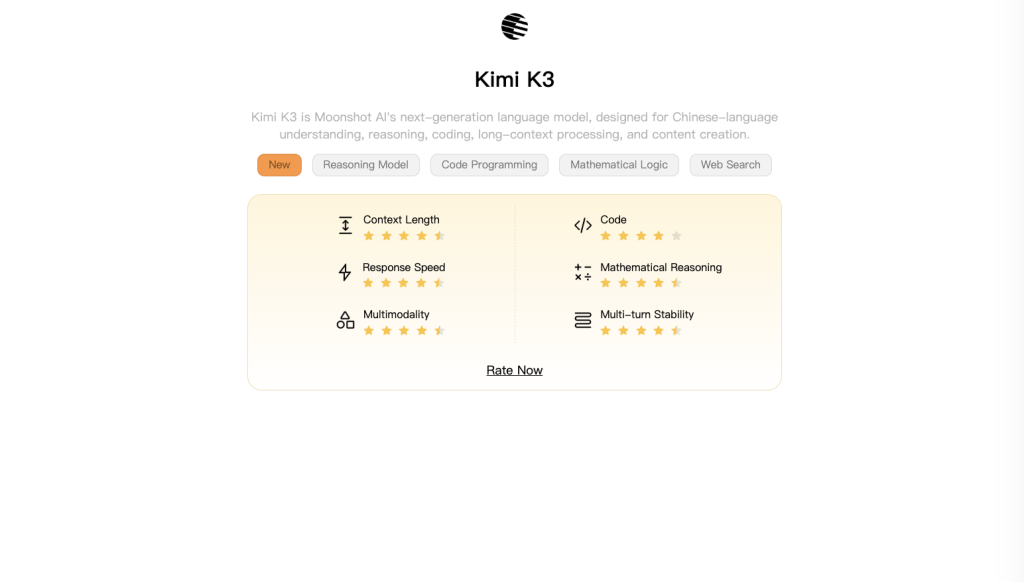
Kimi K3 is Moonshot AI’s flagship reasoning model, released on July 16, 2026. The official launch post describes a mixture-of-experts model with 2.8 trillion total parameters, Kimi Delta Attention, Attention Residuals, native visual understanding, and a one-million-token context window. It accepts text and images and returns text.
The 2.8T headline needs a little translation. K3 does not use every parameter for every token. Moonshot says it routes each step through 16 of 896 experts, which is a practical way to put more capacity behind difficult requests without treating every small question like a heavyweight job.
Kimi K3 at a glance
| 发布 | July 16, 2026 |
|---|---|
| Total parameters | 2.8T MoE; 16 of 896 experts active |
| 背景 | 1,048,576 tokens |
| Modalities | Text and image input; text output |
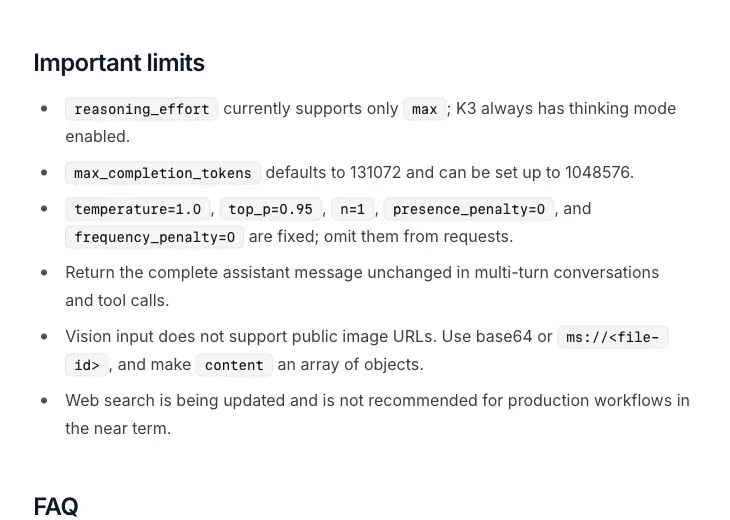
| Launch API | Max reasoning only; fixed sampling settings |
What the architecture is trying to solve
Kimi Delta Attention and Attention Residuals are Moonshot’s answers to a familiar long-context problem: keeping relevant information available when the input becomes very large. Moonshot says the approach improves scaling efficiency versus Kimi K2. That is a vendor claim, so it should be read as design intent rather than an independently reproduced efficiency result.
The launch API has a more immediate consequence for buyers. Its official quickstart supports only max reasoning, with fixed request settings including 温度 1.0, top_p 0.95, and n 1. In other words, K3 is aimed at hard problems first; you cannot yet dial it down for a cheap, fast rewrite.
Kimi K3 Benchmarks: Official Claims vs Independent Results
K3 has arrived with a fuller benchmark story than most launches. Moonshot’s own results cover coding, agents, browsing, spreadsheets, and knowledge work. Artificial Analysis adds an independent intelligence index, while Arena gives an early view of how people respond to its outputs. Taken together, the numbers make a strong case for putting K3 on the shortlist.
Moonshot AI’s reported results
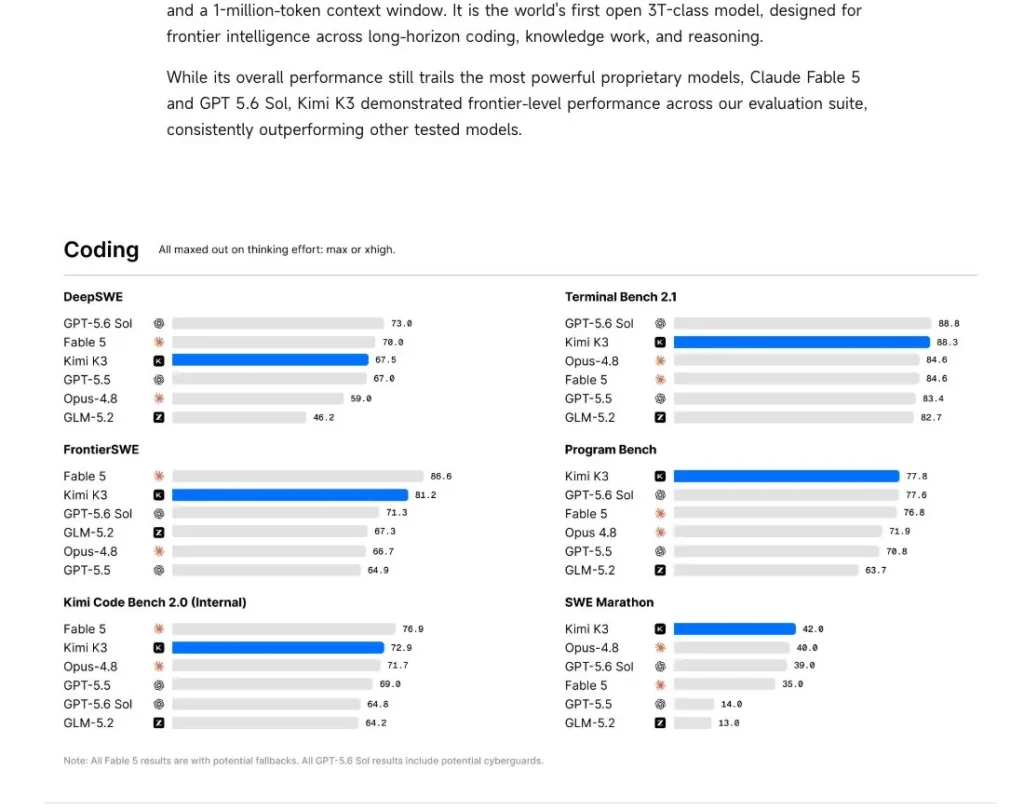
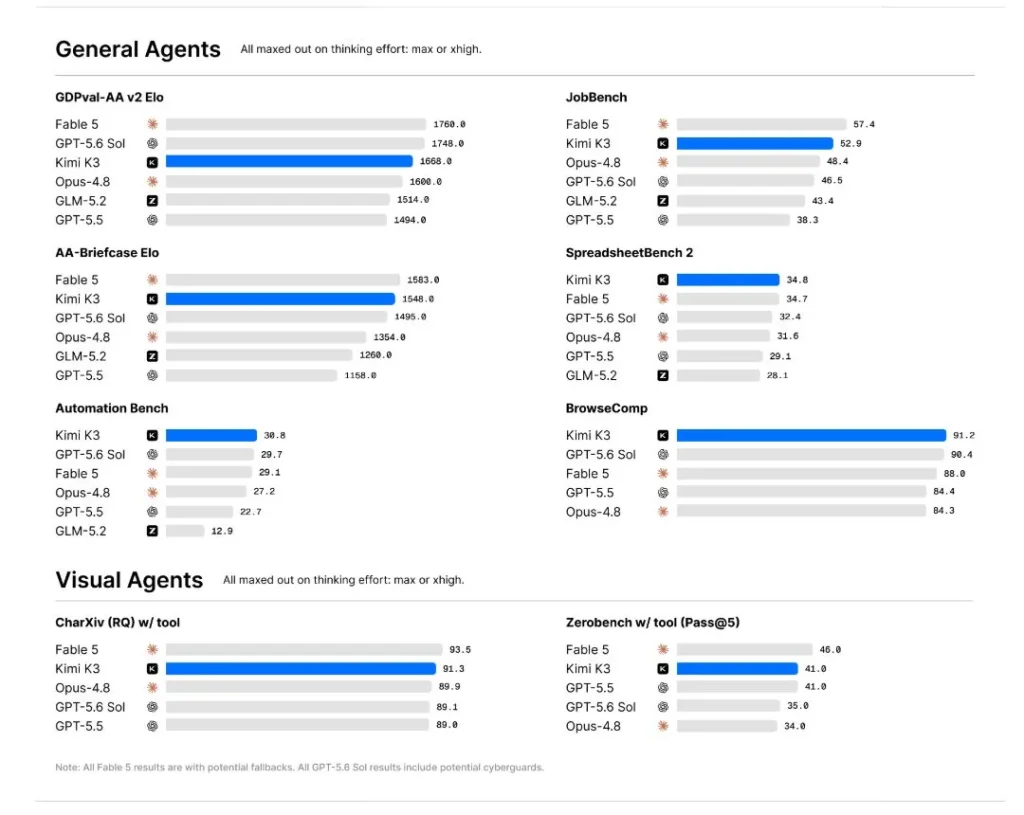
Moonshot reports particularly strong results on tasks that look like long-horizon coding, agent work, web research, and knowledge work. Highlights include 88.3 on Terminal-Bench 2.1, 81.2 on FrontierSWE, 77.8 on Program Bench, a GDPval-AA v2 Elo of 1668, and 91.2 on BrowseComp. Its visual-agent chart lists 91.3 on CharXiv research questions with tools.
The practical takeaway is straightforward. K3 looks especially well placed for multi-step coding, research-heavy work, and tasks where the model has to keep a lot of context in view. Moonshot also places it in the frontier group rather than claiming it wins every category, which feels like the right way to position a new model with such a broad target audience.


| 基准 | Reported result |
|---|---|
| 终端平台 2.1 | 88.3 |
| FrontierSWE | 81.2 |
| GDPval-AA v2 | 1668 Elo |
| BrowseComp | 91.2 |
| CharXiv RQ with tools | 91.3 |
Vendor-reported results are useful screening evidence, not independent replication.
K3 is already sitting near the top tier
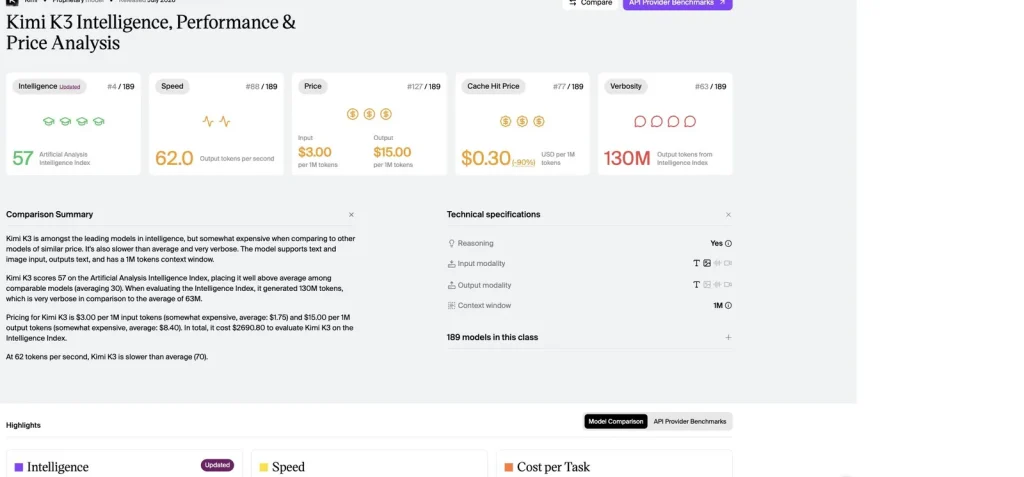
One of the clearest early signs is where K3 lands outside Moonshot’s own charts. It scored 57 on the Artificial Analysis Intelligence Index, placing fourth among 189 comparable models when captured on July 17, 2026. That is a strong opening for a new release, especially because K3 is aiming at the harder end of the market: coding, agent-style work, scientific reasoning, and complex analysis rather than simple chat.
Its performance profile also makes sense. K3 starts responding in about 1.99 seconds and generates roughly 62 output tokens per second, but it uses more output than the comparison average. In plain English, it is built to work through a problem instead of racing to a short answer. That is exactly what you want when debugging code, analysing a report, or pulling together research. For a quick rewrite or a one-line reply, it is probably more horsepower than you need.

Its early WebDev result is hard to ignore
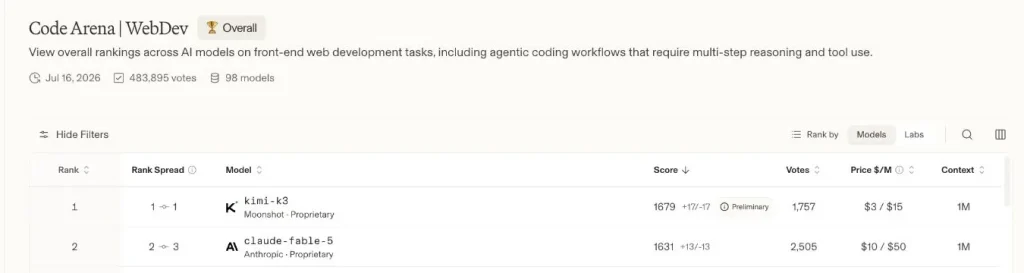
K3 opened in first place on Arena’s preliminary Code WebDev board, with a score of 1679 +17/-17 from 1,757 votes. Its general text result was lower, at ninth place with 1486 ±11 from 3,024 votes. That split tells a useful story: K3 is not trying to win with casual conversation alone. Its early edge shows up when the task looks like real product work.
If you build front ends, prototype a product idea, or spend your day translating between code and product requirements, K3 is worth trying now. The WebDev signal also lines up with Moonshot’s own coding results, so this is more than a single flashy number. For a broader market view, see our guide to the best AI models.

- K3’s launch results are strongest in coding, agents, browsing, and knowledge work.
- Third-party figures support its place among the more capable models available today.
- The 1M context window gives it a real edge on source-heavy tasks.
- Use it where deeper reasoning is worth the extra time and output cost.
Where Kimi K3 Looks Most Useful
K3 is not trying to be the default answer to every AI task. Its strongest early signals point toward work that has real depth: large documents, research synthesis, code, and multi-step projects. Here is where I would start using it.
The 1M-token context window gives K3 room for reports, research packs, and long project histories without chopping everything into tiny prompts.
Long documents: a natural place to start
A 1M-token window gives K3 room for annual reports, legal exhibits, research packs, and large project histories. That alone makes it appealing if you are tired of splitting documents into fragments before asking a question. Its knowledge-work benchmarks reinforce the point. For document analysis, I would use K3 for the first pass, then check the figures and page references that matter most. Our guide to how AI assistants read PDFs explains why the extraction step matters as much as the model.
K3 looks particularly useful for turning a large source pack into a clear brief, mapping competing claims, and finding the thread through messy research.
Research synthesis: good for the messy middle
Research usually gets difficult in the middle: too many sources, small disagreements, and a lot of context to hold at once. BrowseComp, the independent intelligence score, and K3’s context window make it a good candidate for that stage of the job. Use it to map an argument, pull out disagreements, and turn a long source pack into a useful brief. Moonshot’s web-search tool was still being updated at launch, so for time-sensitive work, bring your own sources and keep them close.
K3’s coding benchmarks and early WebDev result make it a strong option for bugs, feature work, and projects with more than one moving part.
Coding: the clearest reason to try it
K3’s official coding suite and its Arena WebDev result are the clearest reason to try it. This is the model I would reach for when the request has several moving parts: understand the codebase, trace a bug, make a change, and explain the trade-offs. A proper trial should use one real bug or feature-sized change from your own repository, not a generic coding prompt. That is where its long context and reasoning budget have a chance to earn their keep.
Native image input makes K3 a good companion for reports, charts, diagrams, and screenshots when you need the main story quickly.
Charts and visual analysis: useful for first-pass analysis
Native image input makes K3 more useful than a text-only model when a report is full of charts, diagrams, and screenshots. Moonshot’s visual-agent results are encouraging, especially for teams that spend more time in decks and reports than in clean CSV files. I would use it to surface the story in a chart, then make a quick habit of checking the axis, legend, and units before passing the conclusion on.
K3 has the context headroom for meeting notes, multi-document summaries, and analysis packs that would overwhelm a normal chat.
Office and multi-file work: a sensible productivity play
Meeting notes, multi-document summaries, and analysis packs are all sensible K3 use cases. The model has the context headroom for the source material and the professional-work benchmarks to make the idea credible. The full experience will depend on the files and tools around it, but for everyday knowledge work this is a model I would put in the first group to try. If you need to process several source files, this guide to working with an entire folder is a useful checklist for what to verify.
K3 is an interesting choice when an agent needs to gather context, reason through several steps, and finish a well-defined piece of work.
Agent workflows: promising when the task has a clear goal
K3’s agent benchmarks make it an interesting option for work with a clear finish line: investigate an issue, gather the relevant material, make a change, or prepare a brief. Kimi Work and Kimi Code can add useful tools around the model, while API users can build their own route. The best results will come from giving the agent a clear objective and a way to check its work. For research-oriented agents, our deep research workflow guide covers the habits worth keeping.
What to try first
What to try first
| 工作流程 | Why K3 fits | Best starting task |
|---|---|---|
| 编码 | Strongest early signal | A real bug or feature-sized change |
| 长文件 | 1M 上下文窗口 | An annual report or research pack |
| 研究 | Good at holding competing sources together | A source-backed briefing |
| Visual analysis | Native image input | A chart-heavy report |
| Office work | Useful context headroom | Meeting notes plus supporting files |
Reasons to evaluate
- 1M-token context window
- Strong early coding signal
- 文本和图像输入
- Competitive independent index result
Reasons to be careful
- Max reasoning only at launch
- $15/M output tokens
- Task-level reliability unverified here
- Weights and technical report not released at capture
Kimi K3 Limitations and Launch-Day Caveats
The main thing to know before you buy into K3 is that it is tuned for serious work. Maximum reasoning is always on, and the fixed sampling controls give you less room to tune speed, cost, and response style. That is a fair trade for debugging or research. It is overkill for high-volume classifications, short rewrites, or a task where a long answer is mostly waste.
Output is the expensive side of the bill. At $15 per million output tokens, a model that thinks out loud can get costly quickly. That is not necessarily a deal-breaker: a few cents or dollars may be trivial when it saves an engineer an afternoon. It does mean you should look at both input and output on the tasks you run every week before setting a budget.
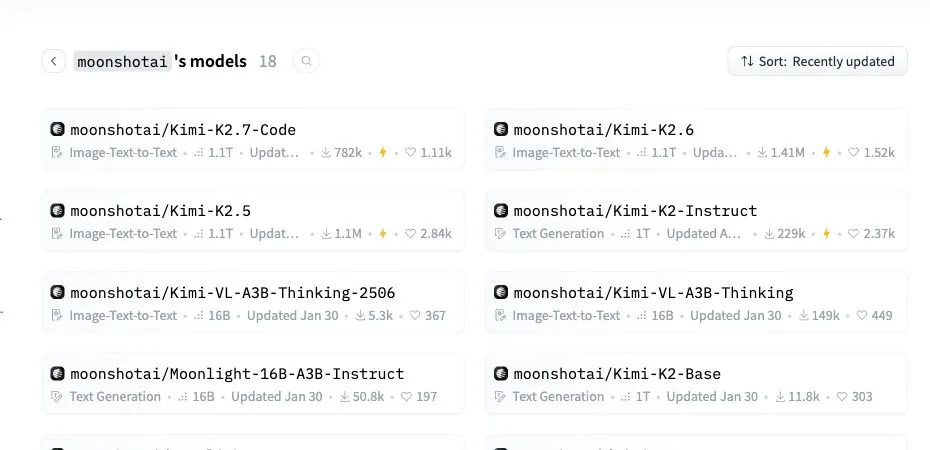
Third, K3’s open-weight story was still a promise at the evidence date. Moonshot said full weights would arrive by July 27, 2026, together with more technical detail. When checked on July 17, the official Moonshot AI Hugging Face organization did not list K3. Until the repository, license, model card, and files are live, “planned open-weight release” is more precise than “available to self-host.”


Launch-day limits to keep in view
- The API supports maximum reasoning only and fixed sampling settings.
- Output cost can dominate a long reasoning workflow.
- The official web-search tool was marked as being updated.
- A product feature or third-party integration is not automatically a base-model capability.
Kimi K3 Pricing
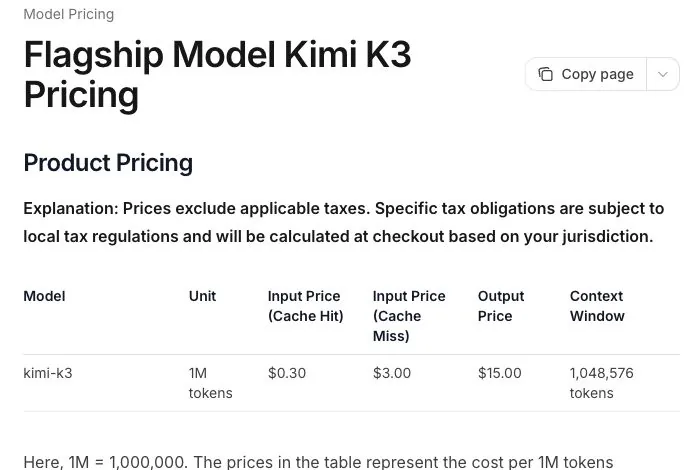
Moonshot listed Kimi K3 API pricing at $0.30 per million cache-hit input tokens, $3 per million uncached input tokens, and $15 per million output tokens on July 17, 2026. The context window is 1,048,576 tokens. These are official API list prices, before taxes and any third-party provider markup.

Official API pricing per million tokens
Cost is mostly a question of output
The calculation is simple: input tokens at the relevant cache rate, plus output tokens at $15 per million. A request with 100,000 uncached input tokens and 10,000 output tokens works out to about $0.45. A 200,000-token report with 5,000 output tokens is about $0.675. A million uncached input tokens and 50,000 output tokens would be about $3.75. These are arithmetic examples, not bills from a private test run.
Illustrative API cost examples
| 要求 | 估计费用 |
|---|---|
| 100K uncached input + 10K output | $0.45 |
| 200K uncached input + 5K output | $0.675 |
| 1M uncached input + 50K output | $3.75 |
Consumer access and API access are different purchases
A consumer plan, a direct API account, and a third-party multi-model subscription solve different problems. Consumer plans are usually the easier route for chat and files; APIs are for building workflows and tracking tokens. Plan entitlements and regional availability change, so check the route you intend to use before treating a launch price as a permanent offer.
Choose the access route for the job
Consumer plans are usually the simplest route for chat and files. APIs are for building and measuring workflows. Multi-model workspaces can be practical when you want to compare the same real task across models. Availability and quotas can change by plan and region.
Where Can You Try Kimi K3?
You can evaluate K3 through Moonshot’s consumer products or API, subject to the availability and usage limits of each route. If your practical question is “which model handles this piece of work best?”, a multi-model workspace can be the less painful place to start: use the same representative prompt and files, then compare the result without rebuilding an API setup for every model.
Try Kimi K3 in GlobalGPT if you want to test it alongside other available models in one workspace. That is an access option, not a claim that every plan includes every K3 feature or that it replaces a direct API for development.
- Moonshot consumer products for general chat and file workflows.
- Moonshot API for development, token tracking, and custom integrations.
- A multi-model workspace for comparing one representative task across available models.
Who Should Put Kimi K3 on a Shortlist?
K3 is a strong fit for researchers, analysts, and developers who regularly work with difficult source material or large projects. It is also worth trying for chart-heavy reports and office work when the brief is substantial enough to benefit from real reasoning rather than a quick template response.
I would look elsewhere if the priority is the lowest possible token cost, a lightweight mode for routine work, or self-hosted weights today. Everyone else should treat K3 as a compelling new option: give it a real task, compare the result with the tools you already trust, and see whether the extra reasoning is worth the wait.
最终结论
Kimi K3 is one of the more interesting model launches of the year. The early independent numbers and WebDev signal support what Moonshot is claiming, while the 1M context window gives it a clear practical angle. Start with coding, research, and large-document work; those are the places where its design looks most useful.
K3 will not be the best choice for every prompt, and it is not priced like a casual chat model. But if the work is complex enough to justify a model that spends time thinking, it deserves a place in your toolkit. The simplest way to decide is to give it the sort of task that normally slows your team down and compare the result with the model you use today.
If you want a simpler way to compare the practical fit, see GlobalGPT plans and run the same real task through the models available to you.
常见问题
What is Kimi K3?
Kimi K3 is Moonshot AI’s flagship reasoning model, released on July 16, 2026. Moonshot says it has 2.8 trillion total parameters, activates 16 of 896 experts, accepts text and images, and supports a 1,048,576-token context window.
Is Kimi K3 open source or open weight?
Moonshot AI said full K3 weights would be released by July 27, 2026. When checked on July 17, the official Hugging Face organization did not list K3. Until the repository and license are published, planned open-weight release is the most precise description.
How much does Kimi K3 cost?
The official API price captured on July 17 was $0.30 per million cached input tokens, $3 per million uncached input tokens, and $15 per million output tokens. Taxes, provider markups, quotas, and regional pricing can change the final cost.
Can I try Kimi K3 for free?
Kimi’s consumer pricing page showed a free Adagio tier on July 17, and K3 was also available through paid or quota-based routes. Free availability can be limited by region, capacity, and usage allowance, so it should not be assumed to be unlimited.
Does Kimi K3 really support a 1M-token context window?
Yes. The official quickstart and pricing page list a 1,048,576-token context window. That is a maximum context capacity, not a guarantee that every long-document answer will be accurate or fully cited.
Can Kimi K3 analyze PDFs, charts, and spreadsheets?
K3 accepts text and images, and Moonshot reports results on spreadsheet and visual-agent benchmarks. This review does not present task-level verification of PDFs, charts, or spreadsheets, so users should check exact values, page references, legends, formulas, and omitted rows.
Is Kimi K3 good for research and office work?
The available benchmark evidence makes K3 worth shortlisting for research and office work, especially long documents and structured analysis. It does not yet verify citation accuracy, multi-file reliability, or deliverable quality on a specific workflow.
Can I use Kimi K3 in Codex?
Moonshot publishes a Codex integration guide using CC Switch to translate Codex Responses API traffic to Kimi Chat Completions. CC Switch is third-party software, so organizations should review its data route and security requirements before using confidential repositories or documents.
What is the difference between Kimi K3 and Kimi Work?
Kimi K3 is the model. Kimi Work is a product environment that combines models with files, tools, browser actions, Office creation, scheduled tasks, and other workflow features. A feature shown in Kimi Work is not automatically a capability of a plain K3 API call.