คำตอบด่วน: ติดตั้ง Node.js 18 หรือเวอร์ชันที่ใหม่กว่า แล้วเรียกใช้
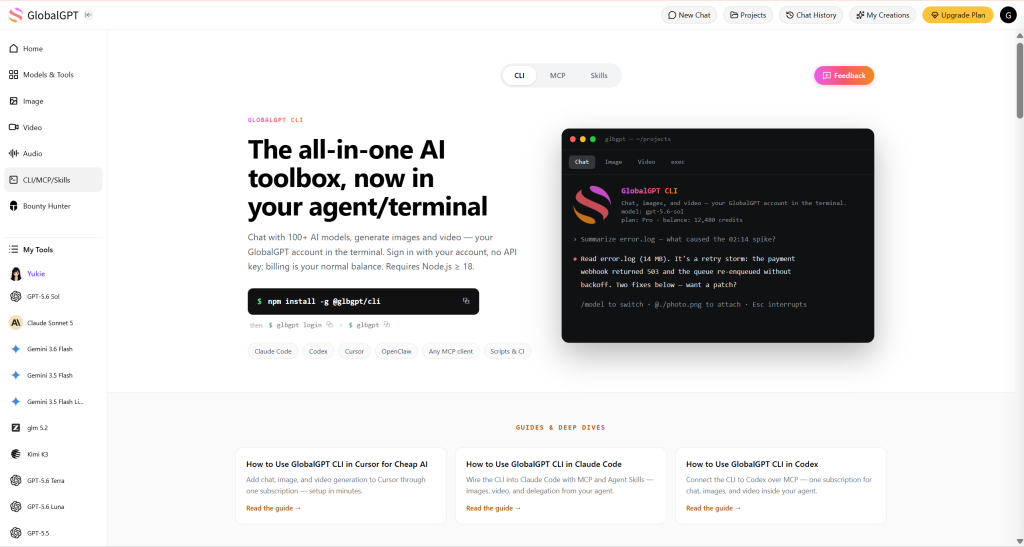
npm i -g @glbgpt/cli, ให้สิทธิ์ด้วยเข้าสู่ระบบ glbgpt, แล้วเรียกใช้ติดตั้งทักษะ glbgpt. ให้เริ่มต้นใหม่โค้ด Claude ในโฟลเดอร์โครงการของคุณ และกำหนดให้ใช้ GlobalGPT สำหรับงานที่เกี่ยวข้องกับภาพ วิดีโอ หรือข้อความจำนวนมาก ใช้--ประมาณการก่อนที่จะสร้างสื่อ เพื่อให้คุณสามารถตรวจสอบค่าใช้จ่ายเครดิตก่อน.
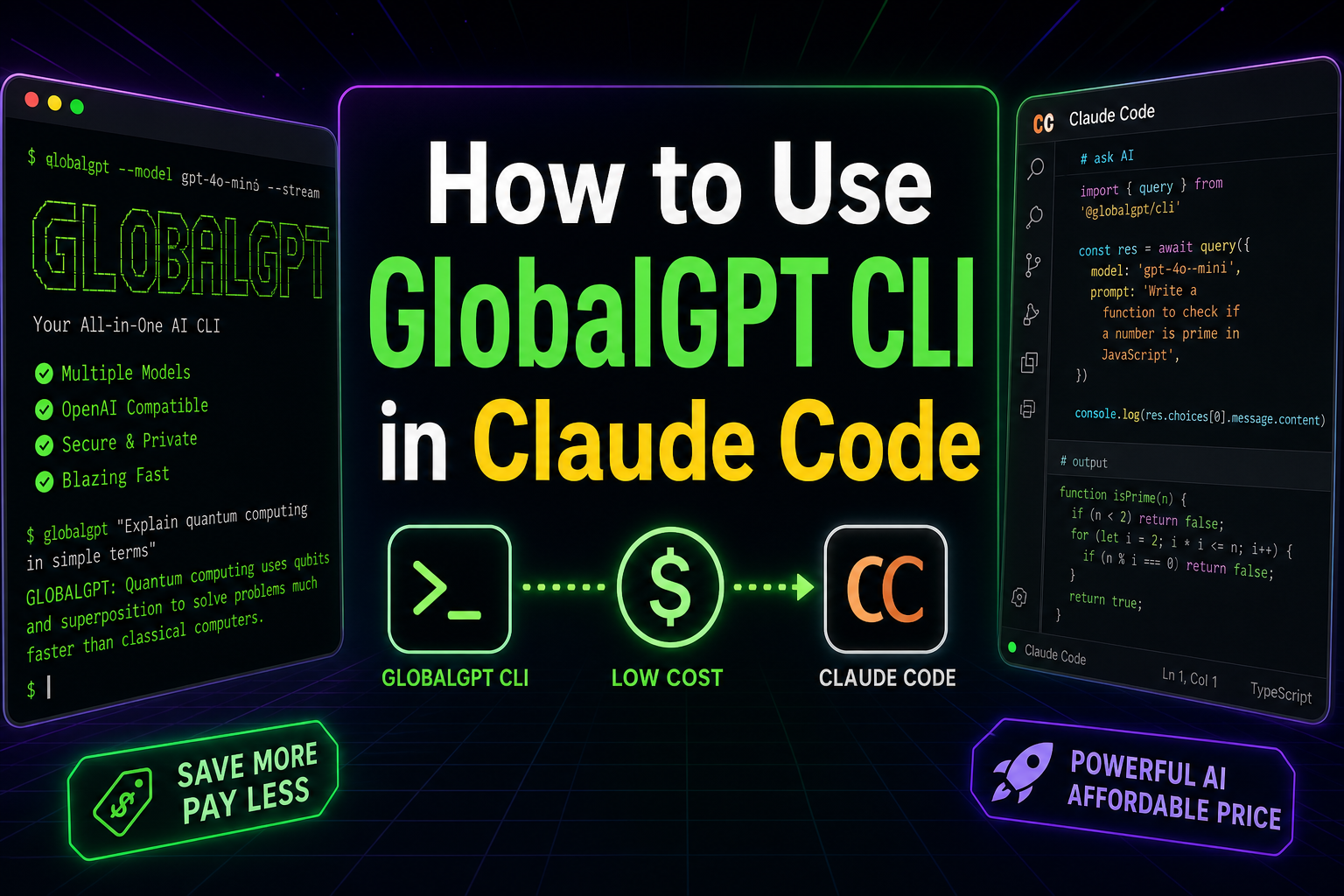
GlobalGPT CLI นำฟังก์ชันการแชท การสร้างภาพ การสร้างวิดีโอ และงาน AI ที่ไม่ต้องการการโต้ตอบมาใช้ในเทอร์มินัล เมื่อคุณเชื่อมต่อกับ Claude Code, Claude สามารถเลือกคำสั่ง GlobalGPT ที่เหมาะสม ทำงานกับไฟล์ในโครงการของคุณ ประเมินค่าใช้จ่ายสื่อก่อนการสร้าง และดำเนินการเวิร์กโฟลว์เนื้อหาที่สามารถทำซ้ำได้ โดยไม่จำเป็นต้องสร้างการบูรณาการ API แบบกำหนดเอง.
คู่มือนี้แสดง วิธีใช้ CLI ของ GlobalGPT ในโค้ด Claude ตั้งแต่ต้นจนจบ: ตรวจสอบเงื่อนไขเบื้องต้น, ติดตั้ง GlobalGPT CLI, ลงชื่อเข้าใช้ด้วยบัญชี GlobalGPT ของคุณ, ติดตั้ง Agent Skill ที่มาพร้อมชุด, ตรวจสอบความถูกต้องของการเชื่อมต่อ, สร้างสื่ออย่างปลอดภัย, อัตโนมัติงานที่มีโครงสร้าง, และแก้ไขปัญหา DNS และการอนุญาตของเบราว์เซอร์ที่อาจทำให้การตั้งค่าบน Windows ถูกขัดจังหวะ.
GlobalGPT CLI คืออะไร และทำไมจึงควรใช้ร่วมกับรหัส Claude?
GlobalGPT CLI เป็นโปรแกรมลูกค้าแบบบรรทัดคำสั่งอย่างเป็นทางการ สำหรับการเข้าถึงโมเดลแชท GlobalGPT เครื่องสร้างภาพ เครื่องสร้างวิดีโอ ข้อมูลบัญชี และประวัติงาน แพ็กเกจ npm เวอร์ชันเสถียรนี้ให้เข้าถึงได้ทั้ง glbgpt และ globalgpt คำสั่งและรวมถึง เรียกใช้คำสั่ง อินเทอร์เฟซสำหรับสคริปต์และเอเจนต์ภายนอก.
รหัส Claude ให้เหตุผลและบริบทของโครงการ ส่วน CLI GlobalGPT ให้โมเดลและคำสั่งสำหรับสื่อ ส่วนที่รวมไว้ globalgpt-generate หลักสูตร Agent Skill สอนรหัส Claude เกี่ยวกับเวลาและวิธีการเรียกใช้ CLI รวมถึงวิธีการประมาณค่าใช้จ่ายสื่อ การเลือกจากแคตตาล็อกโมเดลสด การแนบภาพอ้างอิง การรอให้งานเสร็จสิ้น และการหลีกเลี่ยงการเรียกเก็บเงินซ้ำโดยไม่ตั้งใจ.
สามวิธีในการเชื่อมต่อรหัส GlobalGPT และ Claude
| การบูรณาการ | เหมาะที่สุดสำหรับ | ข้อแลกเปลี่ยนหลัก |
|---|---|---|
| ทักษะของเอเย่นต์ + CLI | ผู้ใช้รหัส Claude ที่ต้องการกระบวนการทำงานด้วยภาษาธรรมชาติสำหรับภาพ วิดีโอ และข้อความจำนวนมาก | รหัส Claude ต้องการสิทธิ์เพื่อเรียกใช้คำสั่งเชลล์ |
| คำสั่ง CLI โดยตรง | ผู้พัฒนาที่เขียนสคริปต์ งาน CI หรือขั้นตอนการทำงานในเทอร์มินัลที่กำหนดไว้อย่างชัดเจน | คุณต้องกำหนดและดูแลคำสั่งเหล่านั้นด้วยตัวเอง |
| เซิร์ฟเวอร์ MCP ที่ CLI เป็นผู้จัดโฮสต์ | ทีมที่ต้องการเครื่องมือ MCP และขีดจำกัดเครดิตสื่อต่อเซสชัน | เพิ่มการตั้งค่า MCP และพื้นผิวเครื่องมืออีกชิ้น |
สำหรับผู้ใช้รหัส Claude ส่วนใหญ่, ทักษะของเอเจนต์ + CLI เป็นจุดเริ่มต้นที่ดีที่สุด. ระบบนี้ช่วยรักษาขนาดการตั้งค่าให้เล็ก ใช้ความสามารถของเชลล์ที่มีอยู่ของ Claude Code และให้คุณทำงานด้วยภาษาธรรมชาติ พร้อมทั้งรักษาการตรวจสอบค่าใช้จ่ายอย่างชัดเจนไว้ หากคุณมีทีมที่ทำงานผ่านตัวแทนการเขียนโค้ดหลายตัว คุณยังสามารถเปรียบเทียบการตั้งค่านี้กับคู่มือที่เกี่ยวข้องสำหรับ การใช้ CLI GlobalGPT ใน Codex และ การใช้ GLBGPT CLI ใน Cursor.
สิ่งที่ต้องเตรียมก่อนเริ่ม
คุณจำเป็นต้องมี:
- Node.js 18 หรือเวอร์ชันที่ใหม่กว่า แพ็กเกจ CLI GlobalGPT ปัจจุบันระบุว่า
โหนด >=18. - npm ซึ่งโดยทั่วไปจะติดตั้งมาพร้อมกับ Node.js.
- รหัส Claude ได้ติดตั้งและยืนยันแล้ว.
- บัญชี GlobalGPT ที่มีสิทธิ์เข้าถึงโมเดลหรือเครื่องมือสื่อที่คุณวางแผนจะใช้.
- ไดเรกทอรีโครงการที่เชื่อถือได้ ซึ่งอนุญาตให้ Claude Code ดำเนินการคำสั่งเทอร์มินัล.
- การตั้งค่าปกติใช้เวลาประมาณ 10 ถึง 20 นาที แต่ปัญหาเกี่ยวกับเครือข่ายหรือการยืนยันสิทธิ์ผ่านเบราว์เซอร์อาจทำให้การตั้งค่าครั้งแรกใช้เวลานานขึ้น.
ดำเนินการตรวจสอบเหล่านี้ใน PowerShell, Terminal หรือ shell ที่คุณชอบ:
ระบบตรวจสอบความถูกต้องของ Windows ในระดับท้องถิ่นได้ใช้ Node.js v24.18.0, npm 11.16.0, และรหัส Claude 2.1.211. เวอร์ชันดังกล่าวเป็นตัวอย่างเท่านั้น ไม่ใช่ข้อกำหนดขั้นต่ำ; Node.js 18 หรือเวอร์ชันที่ใหม่กว่าคือข้อกำหนดของ CLI GlobalGPT ที่เกี่ยวข้อง.
ขั้นตอนที่ 1: ติดตั้ง GlobalGPT CLI
GlobalGPT CLI มีให้ใช้งานในรูปแบบการปล่อยเวอร์ชันที่เสถียรผ่าน npm ติดตั้งเวอร์ชันเสถียรล่าสุดด้วยคำสั่งต่อไปนี้:
หลังจากติดตั้งแล้ว ให้ตรวจสอบคำสั่งและเวอร์ชัน:
แพ็กเกจนี้ติดตั้งชื่อคำสั่งสองชื่อที่สามารถใช้สลับกันได้: glbgpt และ globalgpt. คู่มือนี้ใช้เวอร์ชันที่สั้นกว่า glbgpt แบบฟอร์ม.
เวลาการติดตั้งและจำนวนแพ็กเกจจะแตกต่างกันไปตามเวอร์ชัน npm ของคุณ สภาพเครือข่าย และการอัปเดตความพึ่งพา การติดตั้งที่สำเร็จจะเสร็จสิ้นโดยไม่มี ข้อผิดพลาดของ npm. ข้อความจาก npm โครงการต่าง ๆ กำลังหาแหล่งทุน เป็นข้อมูลเท่านั้น และไม่บ่งชี้ว่าการติดตั้งล้มเหลว.
ขั้นตอนที่ 2: ลงชื่อเข้าใช้ด้วยบัญชี GlobalGPT ของคุณ
GlobalGPT CLI ใช้การอนุญาตผ่านเบราว์เซอร์กับบัญชี GlobalGPT ของคุณ ดังนั้นคุณจึงไม่จำเป็นต้องสร้างหรือวางคีย์ API ลงในบรรทัดคำสั่ง.
รัน:
ให้เปิดเทอร์มินัลไว้จนกว่าหน้าเว็บจะยังคงเปิดอยู่ ลงชื่อเข้าใช้บนหน้าที่เปิดขึ้นและอนุมัติคำขอ CLI จะดำเนินการต่อหลังจากรับการเรียกกลับจากระบบท้องถิ่น.
หากเบราว์เซอร์ไม่สามารถเปิดได้โดยอัตโนมัติ ให้ใช้:
สำหรับเครื่องที่ไม่มีอินเทอร์เฟซผู้ใช้หรือเซสชัน SSH ให้ใช้ขั้นตอนการป้อนรหัสใช้ครั้งเดียว:
อย่าเปิดเผยรหัสใช้ครั้งเดียว สถานะการอนุญาต หรือ URL การเรียกกลับเด็ดขาด ให้ป้อนรหัสเฉพาะในขั้นตอนการเข้าสู่ระบบที่คุณเป็นผู้เริ่มต้นเองเท่านั้น.
ตรวจสอบเซสชันหลังจากได้รับอนุญาต:
glbgpt whoami ยืนยันบัญชีที่เข้าสู่ระบบแล้ว. บัญชี glbgpt แสดงข้อมูลสมาชิกและข้อมูลเครดิต ซึ่งมีประโยชน์ก่อนการสร้างสื่อ.
ขั้นตอนที่ 3: ทดสอบ CLI ของ GlobalGPT ก่อนเชื่อมต่อรหัส Claude
การทดสอบ CLI แบบแยกเดี่ยวจะช่วยแยกปัญหาด้านการยืนยันตัวตนหรือปัญหาเครือข่ายออกจากปัญหาการบูรณาการโค้ด Claude.
เปิดอินเทอร์เฟซเทอร์มินัลแบบโต้ตอบ:
ส่งข้อความสั้นๆ เช่น สวัสดี. การตอบกลับที่สำเร็จจะยืนยันว่า CLI สามารถเริ่มต้นได้ อ่านเซสชันบัญชีของคุณ เข้าถึงโมเดลแชท และแสดงผลลัพธ์.
ในส่วนติดต่อผู้ใช้ของ GlobalGPT ให้พิมพ์ / เพื่อดูคำสั่งที่มีอยู่ คำสั่งทั่วไป ได้แก่ /model, /แบบจำลอง, /ภาพ, /วิดีโอ, /งาน, /status, /บัญชี, /ค่าใช้จ่าย, /help, และ /exit.
สำหรับการทดสอบแบบไม่โต้ตอบ ให้ใช้ เรียกใช้คำสั่ง:
The เรียกใช้คำสั่ง คำสั่งนี้จะพิมพ์คำตอบของโมเดลและปิดโปรแกรมลง ทำให้มันเหมาะสมยิ่งขึ้นสำหรับการใช้งานในสคริปต์และเอเจนต์ภายนอก.
ขั้นตอนที่ 4: ติดตั้งทักษะเอเจนต์ GlobalGPT สำหรับรหัส Claude
GlobalGPT CLI มีทักษะของเอเจนต์ที่มาพร้อมในชุดชื่อ globalgpt-generate. ติดตั้งด้วย:
ตามค่าเริ่มต้น โปรแกรมติดตั้งจะสร้างลิงก์ในโฟลเดอร์ทักษะของเอเจนต์ ซึ่งรวมถึง ~/.claude/skills และ ~/.agents/skills. การติดตั้งแบบเชื่อมโยงหมายความว่า การอัปเดต CLI ในอนาคตจะสามารถอัปเดตทักษะที่มาพร้อมกันด้วย.
หากระบบของคุณไม่สนับสนุนลิงก์ หรือคุณต้องการใช้ไฟล์แบบอิสระ ให้ใช้:
การดำเนินการตัวเลือกการคัดลอกอีกครั้งจะเขียนทับทักษะที่คัดลอกมา ดังนั้นอย่าทำการแก้ไขแบบถาวรภายในโฟลเดอร์ที่คัดลอกมาดังกล่าว.
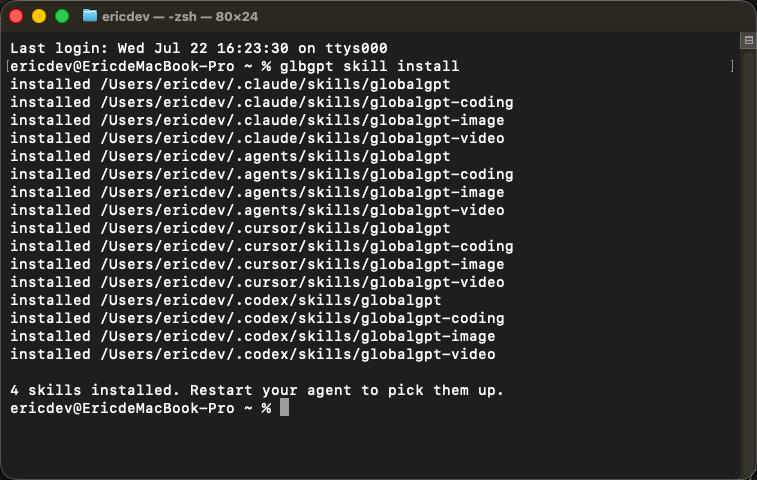
รีสตาร์ทโค้ด Claude หลังจากติดตั้ง เพื่อให้ระบบตรวจพบทักษะใหม่:
ใน Windows PowerShell คำสั่ง directory อาจมีรูปแบบดังต่อไปนี้:
ขั้นตอนที่ 5: ตรวจสอบ CLI ของ GlobalGPT ภายในโค้ดของ Claude โดยไม่ต้องใช้เครดิต
เริ่มด้วยการประมาณราคา สิ่งนี้ยืนยันว่า Claude Code สามารถตรวจพบทักษะ ดำเนินการ GlobalGPT CLI สอบถามแคตตาล็อกโมเดลปัจจุบัน และส่งคืนการประมาณราคาโดยไม่สร้างสื่อ.
ใช้คำสั่งแบบนี้ในโค้ด Claude:
คำสำคัญคือ “อย่าสร้างภาพนั้น” ทักษะ GlobalGPT ได้รับการออกแบบมาเพื่อใช้ --ประมาณการ สำหรับขั้นตอนนี้ แต่การให้คำแนะนำอย่างชัดเจนจะช่วยให้ขอบเขตการอนุมัติของคุณชัดเจนขึ้น.
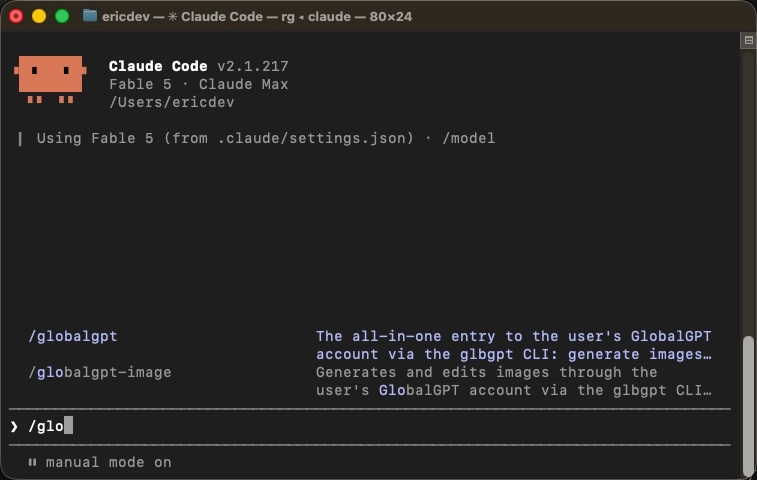
คุณยังสามารถเรียกใช้ทักษะนี้โดยตรงได้ด้วย /globalgpt-generate หากอินเทอร์เฟซรหัส Claude ของคุณแสดงมันเป็นคำสั่งแบบสแลช (slash command) การใช้คำสั่งด้วยภาษาธรรมชาติมักเพียงพอเมื่อทักษะได้ติดตั้งแล้ว และงานนั้นเกี่ยวข้องอย่างชัดเจนกับการสร้างภาพหรือวิดีโอ GlobalGPT.
ขั้นตอนที่ 6: สร้างภาพจากรหัส Claude
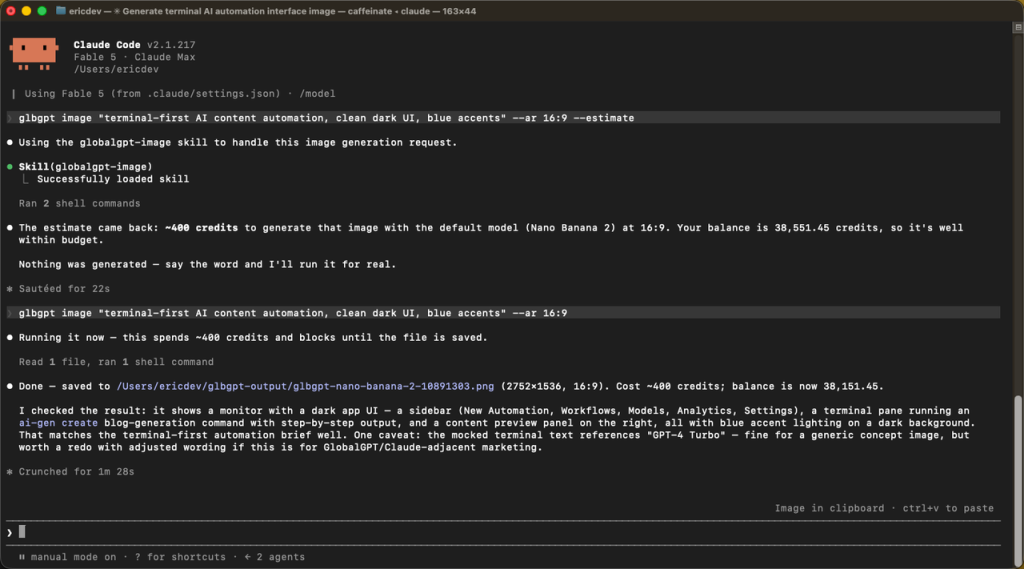
เมื่อคุณอนุมัติใบประมาณการแล้ว ให้แจ้งให้ Claude Code ดำเนินการต่อ คำขอที่ชัดเจนอาจมีดังนี้:
GlobalGPT CLI สามารถแสดงรายชื่อแคตตาล็อกภาพสดได้โดยใช้คำสั่ง:
สามารถตรวจสอบพารามิเตอร์ที่รองรับของโมเดลได้โดยใช้:
หลีกเลี่ยงการกำหนดชื่อโมเดลแบบคงที่ในพรอมต์โค้ด Claude ที่สามารถใช้ซ้ำได้ เว้นแต่ขั้นตอนการทำงานของคุณจะต้องการเช่นนั้น เนื่องจากแคตตาล็อกถูกให้บริการแบบไดนามิกและอาจมีการเปลี่ยนแปลงได้ ให้ Claude แสดงรายการโมเดลที่มีอยู่ แล้วเลือกโมเดลที่รองรับอัตราส่วนภาพ ความละเอียด ภาพอ้างอิง หรือข้อกำหนดอื่น ๆ ตามที่ต้องการ.
คำสั่ง CLI ที่เทียบเท่าโดยตรง ได้แก่:
ไฟล์ที่เสร็จสิ้นแล้วจะถูกเก็บไว้ภายใต้ ./glbgpt-output/ เว้นแต่ว่าคุณจะผ่าน --ออก.
ขั้นตอนที่ 7: สร้างวิดีโอจากรหัส Claude
เมื่อส่งคำขอวิดีโอ ควรระบุฉากและเพียงพารามิเตอร์ที่จำเป็นเท่านั้น การสนับสนุนด้านระยะเวลา ความละเอียด อัตราส่วนภาพ เสียง และเฟรมอ้างอิงจะแตกต่างกันไปตามรุ่น.
เริ่มด้วยการประมาณการ:
หลังจากได้รับการอนุมัติแล้ว รหัส Claude สามารถใช้คำสั่งที่มีรูปแบบดังต่อไปนี้:
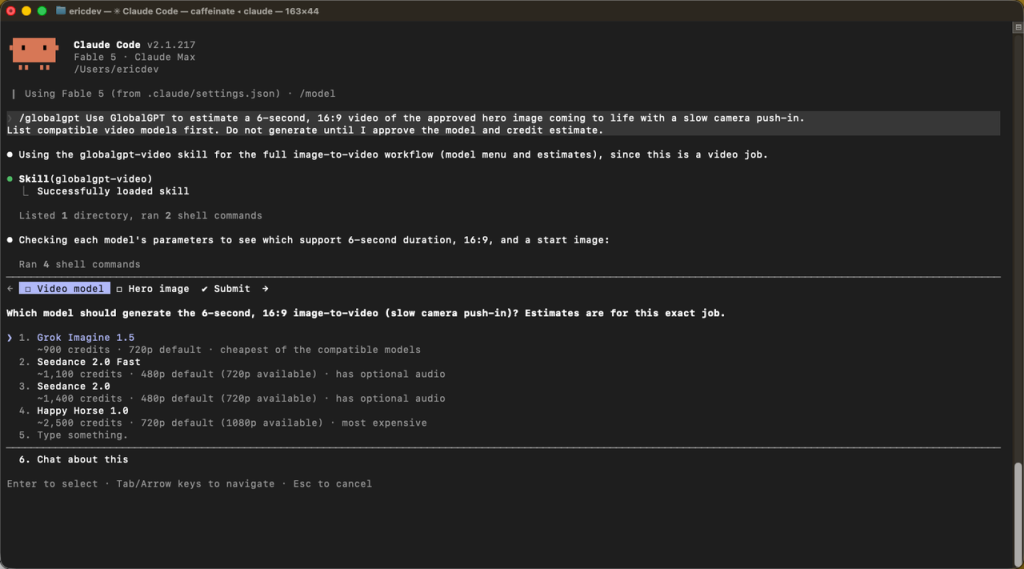
โดยค่าเริ่มต้น CLI จะรอจนกว่าไฟล์จะเสร็จสิ้น การสร้างวิดีโออาจใช้เวลาหลายนาที อย่าสร้างวงจรตรวจสอบที่ไม่จำเป็น และอย่าส่งคำสั่งใหม่โดยอัตโนมัติหากคำสั่งถูกขัดจังหวะ เพราะงานบนเซิร์ฟเวอร์เดิมอาจยังกำลังทำงานอยู่ และการส่งคำสั่งครั้งที่สองอาจทำให้เครดิตถูกหักสองครั้ง.
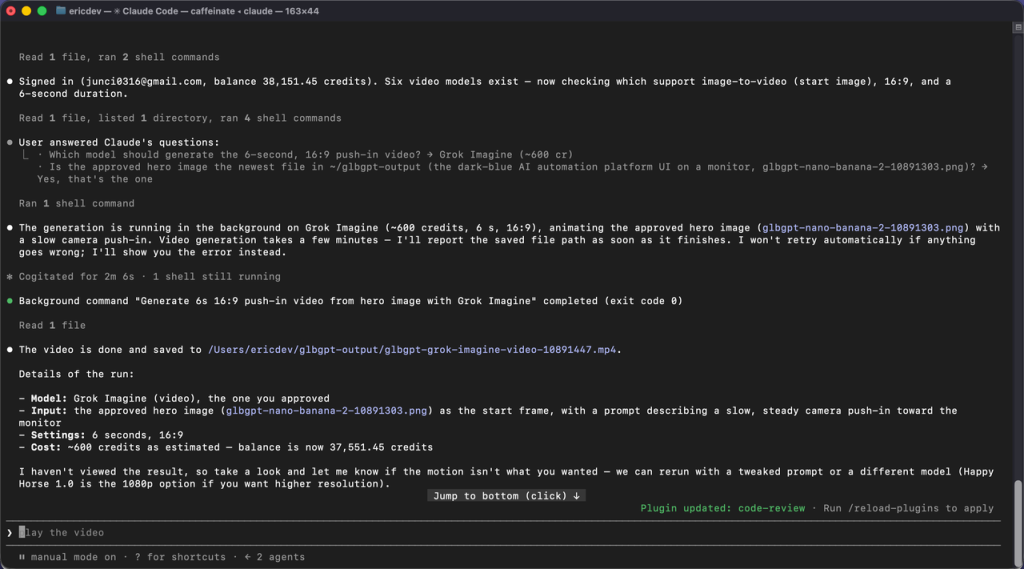
ตรวจสอบงานที่ถูกขัดจังหวะหรือถูกยกเลิกด้วย:
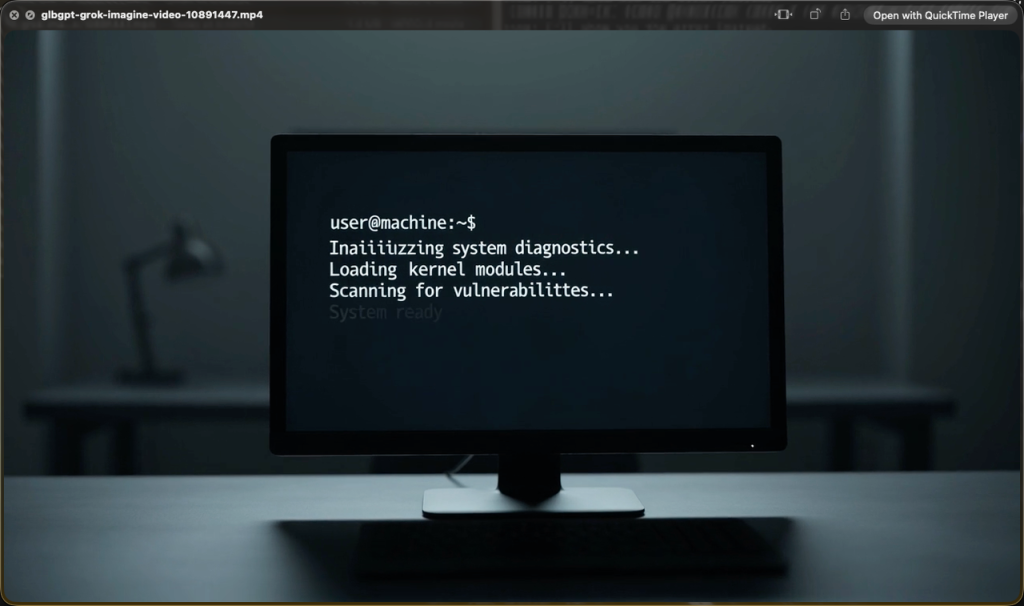
ขั้นตอนที่ 8: อัตโนมัติการทำงานกับข้อความจำนวนมากโดยใช้ glbgpt exec
glbgpt exec เรียกใช้คำขอแบบจำลองที่ไม่โต้ตอบหนึ่งครั้ง และส่งคืนผลลัพธ์ในรูปแบบข้อความธรรมดา JSON หรือ JSONL ซึ่งมีประโยชน์เมื่อโค้ด Claude จำเป็นต้องดำเนินการเดียวกันกับไฟล์หลายไฟล์ หรือเพื่อไม่ให้ไฟล์ต้นฉบับที่มีขนาดใหญ่มากเข้ามาเกี่ยวข้องกับการสนทนาหลักของโค้ด Claude.
ตัวอย่างคำสั่งโดยตรง:
สำหรับผลลัพธ์ที่มีโครงสร้าง ให้กำหนดไฟล์ JSON Schema และส่งมันไปพร้อมกับ --output-schema:
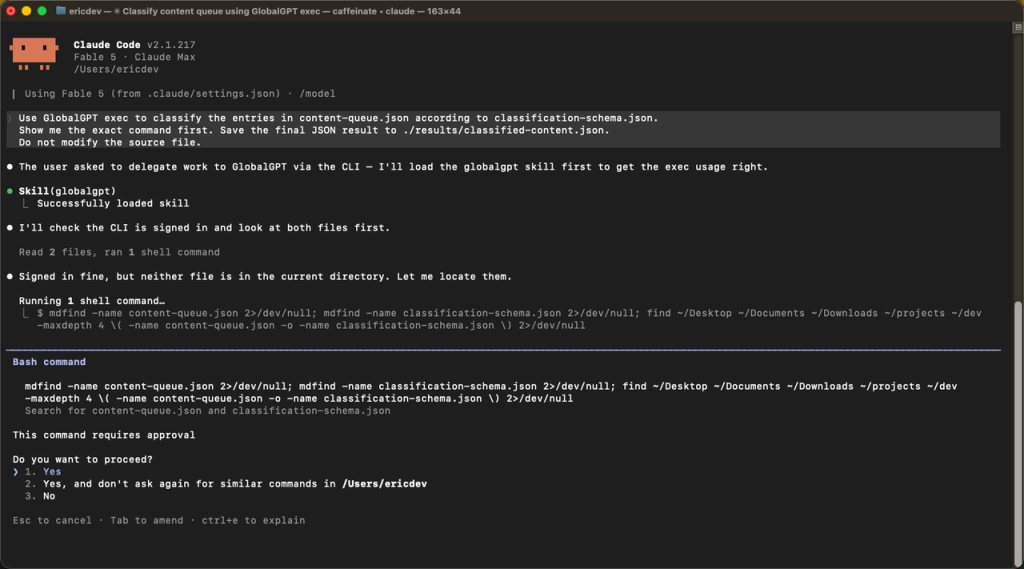
ในรหัส Claude คุณสามารถเขียนได้ดังนี้:
ใช้รูปแบบนี้สำหรับงานที่ต้องทำซ้ำหรือมีปริมาณมาก ไม่ใช่สำหรับคำถามเพียงหนึ่งบรรทัดที่โค้ด Claude สามารถตอบได้โดยตรง.
(ไม่บังคับ): เชื่อมต่อ GlobalGPT ในฐานะเซิร์ฟเวอร์ MCP
ทักษะ Agent เป็นเส้นทางที่แนะนำเมื่อโค้ด Claude สามารถดำเนินการคำสั่งเชลล์ได้ ส่วน GlobalGPT CLI ก็สามารถรันเซิร์ฟเวอร์ MCP ผ่านทางอินพุต/เอาต์พุตมาตรฐานได้เช่นกัน:
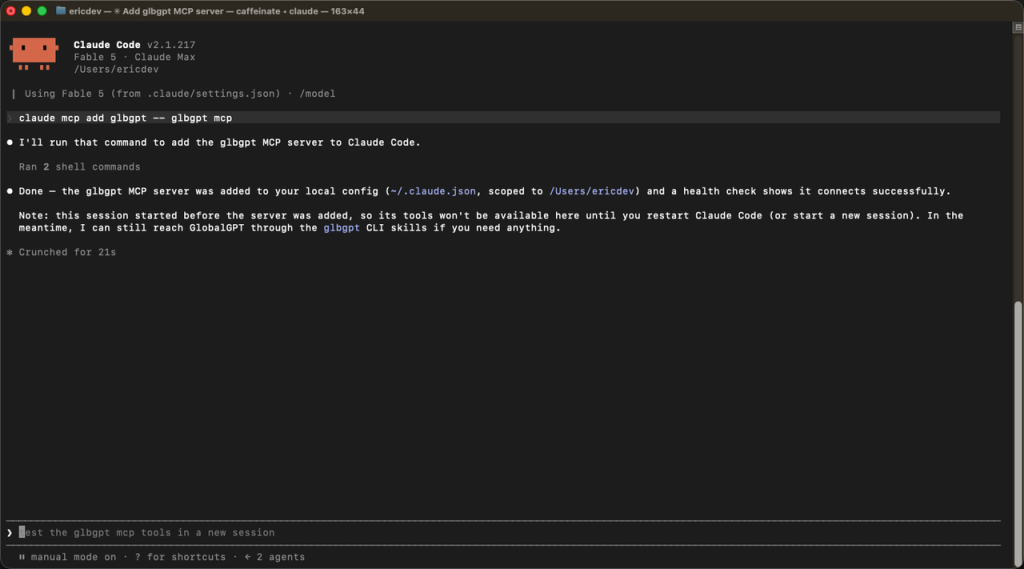
สิ่งนี้ทำให้เครื่องมือ MCP เช่น การแชท GlobalGPT การสร้างภาพ การสร้างวิดีโอ การตรวจสอบงาน และการแสดงรายชื่อโมเดล ปรากฏขึ้น.
จำนวนสื่อที่สร้างได้ถูกจำกัดไว้ที่ ค่าเริ่มต้นคือ 4,000 เครดิตต่อเซสชันเซิร์ฟเวอร์ MCP. คุณสามารถกำหนดขีดจำกัดเซสชันที่ต่างออกไปได้:
เพื่อปิดการใช้งานการใช้จ่ายด้านสื่อของ MCP โดยยังคงรักษาความสามารถด้านอื่น ๆ ที่ไม่เกี่ยวข้องกับสื่อไว้ ให้ใช้ --max-credits 0.
เลือก MCP เมื่อคุณต้องการเครื่องมือ MCP ที่ชัดเจนหรือการบังคับใช้เครดิตระดับเซสชัน เลือก Agent Skill เมื่อคุณต้องการให้โค้ด Claude ควบคุม CLI ปกติด้วยการตั้งค่าที่น้อยที่สุด.
การแก้ไขปัญหา CLI ของ GlobalGPT บน Windows
ผลลัพธ์ของ npm ENOTFOUND หรือ getaddrinfo
An ENOTFOUND ข้อผิดพลาดนี้หมายความว่า npm ไม่สามารถระบุชื่อโฮสต์ของรีจิสทรีได้ ซึ่งไม่ได้หมายความว่าแพ็กเกจ GlobalGPT ขาดหายไปหรือเสียหาย.
ตรวจสอบรีจิสทรีที่ใช้งานอยู่และการแปลง DNS:
หาก npm ได้รับการตั้งค่าให้ใช้เซิร์ฟเวอร์มิเรอร์ ให้ทดสอบชื่อโฮสต์นั้นด้วย การเปลี่ยนรีจิสทรีจะไม่ช่วยแก้ไขปัญหา DNS เมื่อชื่อโฮสต์ทั้งสองไม่สามารถแปลชื่อได้.
ในกรณี Windows ที่ได้รับการตรวจสอบแล้ว เซิร์ฟเวอร์ DNS ของ WLAN ที่กำลังทำงานอยู่ไม่สามารถแปลชื่อโดเมน npm ได้ การรีเซ็ตครั้งแรกไม่สำเร็จ เนื่องจาก PowerShell ไม่มีสิทธิ์ผู้ดูแลระบบ หลังจากเปิดหน้าต่าง PowerShell ด้วยสิทธิ์ผู้ดูแลระบบ ตั้งค่า DNS กลับเป็นอัตโนมัติ และล้างแคช ทั้งสอง Resolve-DnsName และ npm ping ประสบความสำเร็จ.
ก่อนอื่น ให้ระบุอะแดปเตอร์ที่กำลังทำงานอยู่:
จากนั้นให้ดำเนินการรีเซ็ตจาก PowerShell ในฐานะผู้ดูแลระบบ, แทนที่ WLAN หากอินเทอร์เฟซที่กำลังใช้งานอยู่ใช้ชื่ออื่น:
หากองค์กรของคุณจัดการ DNS หรือนโยบายเครือข่าย โปรดติดต่อผู้ดูแลระบบแทนที่จะทำการแทนที่นโยบายดังกล่าว.
การอนุญาตของเบราว์เซอร์หมดเวลา
หมดเวลาขณะรอการอนุญาตจากเบราว์เซอร์ หมายความว่าช่วงเวลาการรอในระบบท้องถิ่นได้สิ้นสุดลงแล้ว ซึ่งไม่ได้หมายความว่าการติดตั้ง npm ล้มเหลว.
วิ่ง เข้าสู่ระบบ glbgpt อีกครั้งและเสร็จสิ้นกระบวนการทำงานของเบราว์เซอร์ ในขณะที่เทอร์มินัลยังคงเปิดอยู่ หากเบราว์เซอร์เปิดขึ้นบนเครื่องอื่น หรือ callback ไม่สามารถติดต่อกับเทอร์มินัลได้ ให้ใช้ glbgpt login --code.
glbgpt ไม่ถูกตรวจพบหลังการติดตั้ง
เปิดเทอร์มินัลใหม่และลองอีกครั้ง หากคำสั่งนั้นยังไม่สามารถใช้งานได้ ให้ตรวจสอบคำนำหน้า npm ระดับโลก:
ตรวจสอบว่าไดเรกทอรีไฟล์ปฏิบัติการแบบทั่วโลกของ npm อยู่ใน PATH, แล้วรันใหม่ glbgpt --version.
รหัส Claude ไม่ตรวจพบทักษะ
วิ่ง ติดตั้งทักษะ glbgpt อีกครั้ง ให้ตรวจสอบว่าระบบรายงานไดเรกทอรีทักษะ Claude แล้ว ปิดโปรแกรม Claude Code อย่างสมบูรณ์ และเริ่มเซสชันใหม่ คุณยังสามารถลอง /globalgpt-generate เพื่อเรียกใช้ทักษะนั้นอย่างชัดเจน.
โมเดลหรือพารามิเตอร์ถูกปฏิเสธ
แคตตาล็อกรุ่นเป็นแบบไดนามิก และการสนับสนุนพารามิเตอร์แตกต่างกันไปตามรุ่น โปรดรีเฟรชแคตตาล็อกและตรวจสอบรุ่นที่เลือก:
ใช้ค่าที่ระบุไว้ หรือไม่ระบุตัวกำหนดตัวเลือกเพื่อให้ใช้ค่าเริ่มต้นของโมเดล.
แอป Generation Command ดูเหมือนจะค้าง
คำสั่งสำหรับภาพและวิดีโอจะรอไฟล์สุดท้ายโดยค่าเริ่มต้น การสร้างวิดีโออาจใช้เวลาหลายนาที หากเทอร์มินัลถูกขัดจังหวะ ให้ตรวจสอบงานที่มีอยู่ก่อนที่จะส่งคำสั่งใหม่:
อย่าลองทำกระบวนการสร้างเนื้อหาแบบชำระเงินซ้ำไปซ้ำมาโดยไม่คิดให้รอบคอบ.
วิธีวัดเวลาและการใช้โทเคนสำหรับแต่ละงานที่มีรหัส Claude
ก่อนเริ่มแต่ละงานวัดผลตามรหัส Claude:
- วิ่ง
/การใช้งานและบันทึกค่าเซสชันที่แสดงอยู่. - บันทึกเวลาเริ่มต้นตามนาฬิกาบนผนัง.
- ให้ทำงานเฉพาะงานที่กำลังถูกวัดเท่านั้น.
- บันทึกเวลาที่ถึงจุดสิ้นสุดและวิ่ง
/การใช้งานอีกครั้ง. - คำนวณเวลาที่ผ่านไปแล้ว และเมื่อมีจำนวนโทเคนอย่างแม่นยำ ก็คำนวณความแตกต่างของโทเคนก่อนและหลัง.
เอกสารปัจจุบันของรหัส Claude ระบุว่า /การใช้งาน คำสั่งนี้แสดงข้อมูลการใช้โทเค็นให้กับผู้ใช้ API อินเทอร์เฟซการสมัครสมาชิกอาจแสดงข้อมูลการใช้ตามแพ็กเกจแทนที่จะเป็นจำนวนโทเค็นที่แม่นยำ ดังนั้นควรบันทึกข้อมูลที่อินเทอร์เฟซปัจจุบันแสดงไว้อย่างแม่นยำ และติดป้ายกำกับค่าที่ไม่มีให้ใช้ว่า ไม่เกี่ยวข้อง; อย่าประมาณหรือสร้างจำนวนโทเคนขึ้นมา.
สำหรับงานสื่อ GlobalGPT ให้บันทึกยอดบัญชีหรือยอดธุรกรรมก่อนและหลังการสร้างด้วย โทเค็นรหัส Claude และเครดิตสื่อ GlobalGPT เป็นหน่วยที่ต่างกัน จึงต้องรายงานแยกกัน.
คำถามที่พบบ่อย
ผมจำเป็นต้องมีกุญแจ API GlobalGPT หรือไม่?
No. GlobalGPT CLI ใช้การยืนยันตัวตนผ่านเบราว์เซอร์กับบัญชี GlobalGPT ของคุณ ดำเนินการ เข้าสู่ระบบ glbgpt, ดำเนินการตามขั้นตอนการอนุมัติให้เสร็จสิ้น และให้ CLI เก็บข้อมูลรับรองเซสชันท้องถิ่นไว้ อย่าคัดลอกรหัสเข้าสู่ระบบแบบใช้ครั้งเดียวหรือ URL การอนุญาตลงในไฟล์โครงการ ภาพหน้าจอ หรือบันทึกการสนทนาที่แชร์.
สามารถใช้ CLI ของ GlobalGPT ได้หรือไม่ โดยไม่ต้องใช้รหัส Claude?
ใช่ครับ. ดำเนินการ glbgpt เพื่อสนทนาแบบโต้ตอบ, ภาพ glbgpt หรือ วิดีโอ glbgpt สำหรับสื่อมวลชน และ glbgpt exec สำหรับสคริปต์ที่ไม่มีการโต้ตอบ Claude Code เพิ่มบริบทของโครงการ การวิเคราะห์เหตุผล การจัดการไฟล์ และการควบคุมด้วยภาษาธรรมชาติ แต่ CLI ยังทำงานได้อย่างอิสระ.
ควรใช้ Agent Skill หรือ MCP ดีกว่า?
ใช้ Agent Skill เมื่อรหัส Claude สามารถรันคำสั่งเชลล์ได้ และคุณต้องการกระบวนการทำงานด้วยภาษาธรรมชาติที่เรียบง่ายที่สุด ใช้ MCP เมื่อคุณต้องการใช้เครื่องมือ MCP แบบชัดเจน หรือต้องการใช้ขีดจำกัดเครดิตสื่อระดับเซสชันของเซิร์ฟเวอร์ MCP ทั้งสองอินเทอร์เฟซใช้บัญชี GlobalGPT เดียวกัน.
GlobalGPT บันทึกไฟล์ที่สร้างขึ้นไว้ที่ไหน?
ตามค่าเริ่มต้น ภาพและวิดีโอที่สร้างขึ้นจะถูกบันทึกไว้ใน glbgpt-output/ เมื่อเทียบกับไดเรกทอรีที่คำสั่งหรือเซิร์ฟเวอร์ถูกเริ่มต้นขึ้น ส่งผ่าน --out เมื่อคุณต้องการเปลี่ยนตำแหน่ง คำสั่งนี้จะแสดงเส้นทางที่บันทึกไว้หลังจากเสร็จสิ้น.
ทำอย่างไรเพื่อหลีกเลี่ยงการใช้จ่ายด้านสื่อแบบไม่ตั้งใจ?
ใช้ --ประมาณการ ก่อนที่จะกำหนดค่าสื่อใหม่ทุกครั้ง ให้ขอให้ Claude Code รอจนได้รับการอนุมัติอย่างชัดเจน และหลีกเลี่ยงการดำเนินการแบบแบตช์ที่ไม่มีผู้ควบคุม สำหรับ MCP ให้ตั้งค่า --max-credits 0 เพื่อปิดการใช้งานสื่อหรือกำหนดขีดจำกัดจำนวนเซสชันอย่างตั้งใจ อย่าพยายามดำเนินการสร้างที่ถูกขัดจังหวะใหม่อัตโนมัติเด็ดขาด.
CLI ของ GlobalGPT มีความเสถียรหรือไม่?
ตั้งแต่วันที่ 21 กรกฎาคม 2026 CLI GlobalGPT ได้ถูกปล่อยออกมาเป็นเวอร์ชัน npm ที่เสถียรแล้ว, เวอร์ชัน 0.1.0. ติดตั้งด้วย npm i -g @glbgpt/cli, แล้วเรียกใช้ glbgpt --version เพื่อตรวจสอบเวอร์ชันที่ติดตั้งอยู่.
ประเด็นสำคัญ
- ติดตั้ง CLI เวอร์ชันเสถียรด้วย
npm i -g @glbgpt/cliและตรวจสอบให้แน่ใจก่อนที่จะใช้รหัส Claude. - ใช้การอนุญาตผ่านเบราว์เซอร์; ไม่จำเป็นต้องใช้ API key สำหรับขั้นตอนการเข้าสู่ระบบที่ระบุไว้ในเอกสาร.
- วิ่ง
ติดตั้งทักษะ glbgpt, แล้วเริ่มต้นใหม่ Claude Code เพื่อให้มันสามารถค้นหาได้globalgpt-generate. - เริ่มต้นทุกขั้นตอนการทำงานของสื่อด้วย
--ประมาณการและความเห็นชอบอย่างชัดเจนจากมนุษย์. - บันทึกการใช้รหัส Claude และเครดิตสื่อ GlobalGPT แยกกัน.
- ใน Windows ให้ใช้ npm
ENOTFOUNDให้พิจารณาว่าเป็นปัญหา DNS ก่อน ไม่ใช่หลักฐานที่แสดงว่าแพ็กเกจ CLI มีข้อผิดพลาด. - หากกระบวนการสร้างรุ่นถูกขัดจังหวะ ให้ตรวจสอบงานที่มีอยู่ก่อนที่จะลองทำใหม่.
ตอนนี้ที่คุณรู้แล้ว วิธีใช้ CLI ของ GlobalGPT ในโค้ด Claude, คุณสามารถเปลี่ยนโค้ด Claude ให้กลายเป็นชั้นควบคุมที่ใช้งานได้จริงสำหรับกระบวนการทำงานที่เกี่ยวข้องกับแชท รูปภาพ วิดีโอ และเนื้อหาที่มีโครงสร้าง เริ่มต้นด้วยการประเมินค่าใช้จ่ายแบบไม่เสียเงิน ทดสอบงานเล็กๆ หนึ่งงานตั้งแต่ต้นจนจบ และหลังจากนั้นจึงขยายกระบวนการทำงานเป็นชุดงานหรือระบบอัตโนมัติตามกำหนดเวลา.