รีวิว Claude Opus 5: รุ่นใหม่ของ Anthropic คุ้มค่าหรือไม่?

รีวิว Claude Opus 5: รุ่นใหม่ของ Anthropic คุ้มค่าหรือไม่?

รีวิว Claude Opus 5: รุ่นใหม่ของ Anthropic คุ้มค่าหรือไม่?

ตรวจสอบความถูกต้องเมื่อวันที่ 28 กรกฎาคม 2569.

บทสรุปสั้นๆ: บทรีวิว Claude Opus 5 นี้ได้พบว่ารุ่นระดับสูงนี้น่าสนใจอย่างยิ่งสำหรับนักพัฒนาซอฟต์แวร์ ผู้จัดการกระบวนการทำงานทางธุรกิจที่ซับซ้อน และผู้ซื้อที่ต้องการประสิทธิภาพที่ใกล้เคียงกับระดับสูงสุด โดยไม่ต้องจ่ายค่าสำหรับ Fable 5 ทุกครั้ง Anthropic คิดค่าบริการ $5 ต่อหนึ่งล้านโทเคนอินพุต และ $25 ต่อหนึ่งล้านโทเคนเอาต์พุต โดยโมเดลนี้รองรับหน้าต่างบริบทขนาด 1 ล้านโทเคน และเอาต์พุตได้สูงสุด 128,000 โทเคนใน Messages API แบบซิงโครนัส นี่ไม่ใช่ตัวเลือกที่ดีที่สุดโดยอัตโนมัติสำหรับการสนทนาแบบง่ายๆ การสรุปสั้นๆ หรือคำขอปริมาณมากแต่ค่าต่ำ.

ข้อได้เปรียบที่ชัดเจนที่สุดคือด้านปฏิบัติมากกว่าด้านความอลังการ: Opus 5 ผสมผสานพื้นที่สำหรับการวิเคราะห์อย่างจริงจังกับต้นทุนที่จัดการได้ง่ายกว่าระดับแนวหน้าของ Anthropic ในการทดสอบการดีบักครั้งเดียวของเรา โมเดลนี้พบข้อผิดพลาดที่ตรงกับคำนำหน้าอย่างแม่นยำ เสนอแพตช์ที่มีขนาดเล็กที่สุด เพิ่มการทดสอบการถดถอยที่มุ่งเน้นเฉพาะจุด และให้คำสั่งตรวจสอบที่ผ่านการทดสอบในระบบท้องถิ่นได้ นี่เป็นหลักฐานที่มีประโยชน์สำหรับงานนี้ — ไม่ใช่หลักฐานที่แสดงว่าโมเดลนี้จะชนะทุกงานเขียนโค้ด.

เหมาะที่สุดสำหรับ: ระบบอัตโนมัติสำหรับการเขียนโค้ด, การวิเคราะห์บริบทระยะยาว, การอัตโนมัติในองค์กร, และทีมที่ความล้มเหลวซึ่งก่อให้เกิดค่าใช้จ่ายสูงทำให้การใช้อุปกรณ์ระดับพรีเมียมเป็นสิ่งที่สมเหตุสมผล. ข้ามไปเมื่อ: ความเร็วและต้นทุนต่อหน่วยมีความสำคัญมากกว่าคุณภาพของส่วนท้ายสุดในกระบวนการให้เหตุผล.

Claude Opus 5 คืออะไร?

Claude Opus 5 เป็นรุ่นพรีเมียมสำหรับใช้งานประจำวันของ Anthropic ที่ออกแบบมาเพื่อการเข้ารหัสแบบเอเจนต์ที่ซับซ้อนและงานระดับองค์กร. Anthropic ได้ประกาศเรื่องนี้เมื่อวันที่ 24 กรกฎาคม 2569, โดยอธิบายว่าโมเดลนี้มีความรอบคอบ มีความเป็นเชิงรุก และมีประสิทธิภาพสูงกว่าโมเดลอื่น ๆ มันได้แทนที่โมเดล Claude Opus 4.8 กลายเป็นโมเดลเริ่มต้นบน Claude Max และกลายเป็นโมเดลที่มีประสิทธิภาพสูงสุดที่มีอยู่บน Claude Pro.

ประกาศ Anthropic ที่แสดงชื่อ Claude Opus 5 วันที่ 24 กรกฎาคม 2026 และข้อความว่า “มีจำหน่ายวันนี้”
Anthropic ได้ประกาศเปิดตัว Claude Opus 5 เมื่อวันที่ 24 กรกฎาคม 2569 และระบุว่าผลิตภัณฑ์ดังกล่าวมีจำหน่ายตั้งแต่วันนั้น.

การนำเสนอผลิตภัณฑ์นี้ถือว่าไม่ธรรมดาสำหรับผลิตภัณฑ์ของ Opus: มันไม่ได้ถูกกำหนดให้เป็นเพียงโมเดลที่มีระดับความฉลาดสูงสุดเท่านั้น Anthropic ต้องการให้ผลิตภัณฑ์นี้ถูกใช้งานทุกวัน โดยสามารถปรับระดับความพยายามได้ และมีค่าความล่าช้าในระดับปานกลาง สิ่งนี้ทำให้การนำโมเดลนี้ไปใช้กับเอเจนต์ที่ทำงานต่อเนื่องเป็นเวลานานและงานผลิตที่ซับซ้อนเป็นเรื่องที่สมเหตุสมผลมากขึ้น ในขณะที่งานที่มีภาระงานน้อยกว่าสามารถส่งต่อไปยังโมเดลที่เร็วกว่าและราคาถูกกว่าได้.

การเข้าถึงขึ้นอยู่กับช่องทาง ผู้ใช้ทั่วไปสามารถใช้งาน Opus 5 ได้ผ่านแพ็กเกจ Claude ที่ตรงตามเงื่อนไข ส่วนผู้พัฒนาสามารถเรียกใช้งานผ่าน API ของ Claude และแพลตฟอร์มคลาวด์ที่รองรับ GlobalGPT ยังมีหน้าผลิตภัณฑ์เฉพาะด้วย ผู้อ่านที่ต้องการเปรียบเทียบระดับการสมัครสมาชิกของ Anthropic สามารถใช้ การเปรียบเทียบแพ็กเกจ Free, Pro และ Max ของ Claude ก่อนที่จะเลือกวิธีการเรียกเก็บเงิน.

Claude Opus 5 ราคา, API และคุณสมบัติหลัก

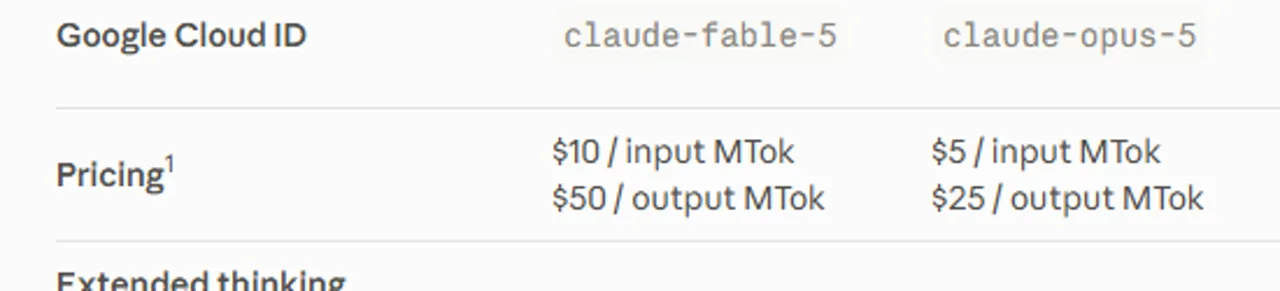
เจ้าหน้าที่ ราคา API Claude คือ $5 ต่อหนึ่งล้านโทเคนเข้า และ $25 ต่อหนึ่งล้านโทเคนออกสู่ตลาด. นี่คืออัตราค่าบริการ API พื้นฐาน ไม่ใช่ราคาของแพ็กเกจสมัครสมาชิก Claude สำหรับผู้ใช้ทั่วไป หรือแพ็กเกจแพลตฟอร์มของฝ่ายที่สาม การเก็บแคชแบบทันทีและการประมวลผลแบบกลุ่มมีอัตราค่าบริการแยกต่างหาก ดังนั้นควรเปรียบเทียบรูปแบบการขอข้อมูลทั้งหมด แทนที่จะนำราคาค่าบริการหลักมาคูณเพียงอย่างเดียว.

สนามClaude Opus 5หมายความว่า
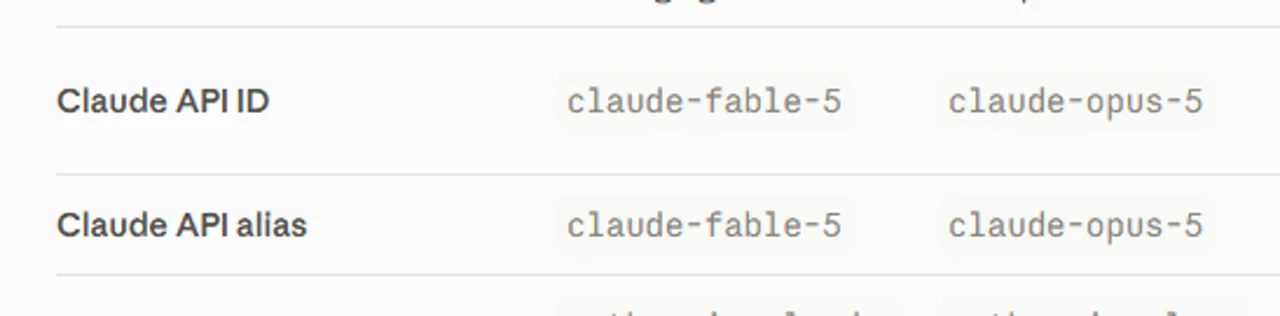
Claude API IDclaude-opus-5ใช้ค่าของรุ่นนี้อย่างถูกต้องในคำขอ API Claude อย่างเป็นทางการ.
ราคาซื้อพื้นฐาน$5 / MTokอัตราการแปลงข้อมูลเข้าเป็นโทเคนมาตรฐาน ก่อนการเก็บไว้ในแคชหรือการลดราคาแบบกลุ่ม.
ราคาขายพื้นฐาน$25 / MTokเอเจนต์ที่มีปริมาณข้อมูลออกสูงอาจทำให้ค่าใช้จ่ายเพิ่มขึ้นอย่างรวดเร็ว.
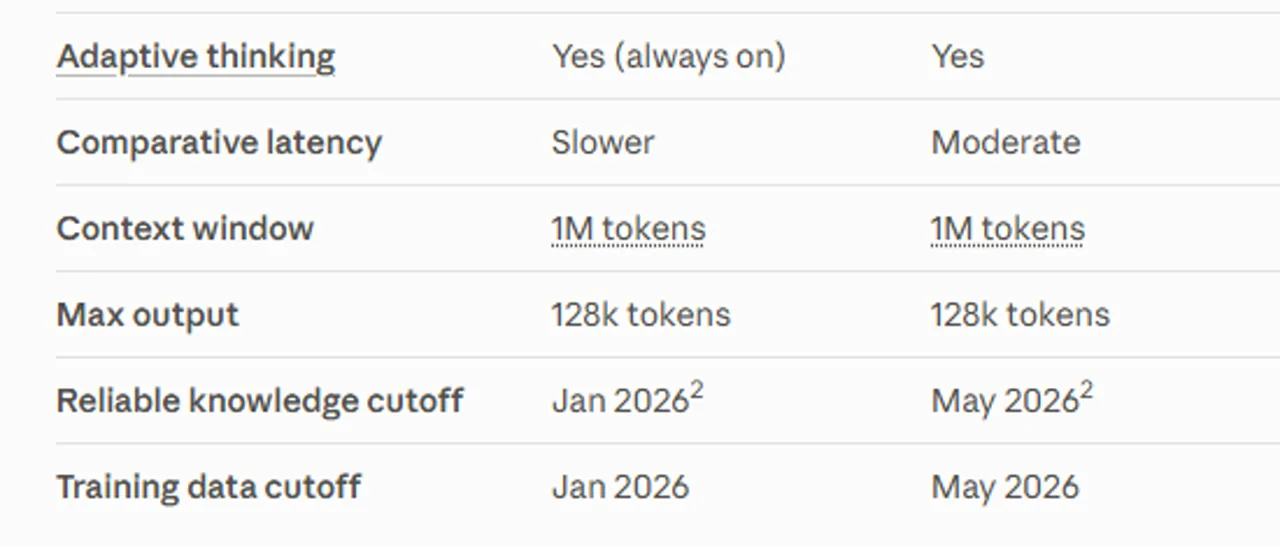
หน้าต่างบริบท1 ล้านโทเค็นเหมาะสำหรับคลังข้อมูลและชุดเอกสารขนาดใหญ่ โดยขึ้นอยู่กับคุณภาพของคำขอและกลยุทธ์การค้นหา.
กำลังออกสูงสุดโทเค็น 128Kใช้กับ API Messages แบบซิงโครนัส; ส่วน Message Batches มีเส้นทางเบต้าแยกต่างหากที่รองรับได้สูงสุด 300K.
จุดตัดความรู้ที่เชื่อถือได้พฤษภาคม 2026ตามมาตรฐานของรุ่นล่าสุด แต่ไม่สามารถแทนที่การค้นหาข้อมูลแบบเรียลไทม์ได้.
ความล่าช้าแบบเปรียบเทียบปานกลางไม่ใช่รุ่นที่เร็วที่สุดของ Anthropic; ความล่าช้ายังคงเปลี่ยนแปลงไปตามระดับความพยายาม เครื่องมือ และปริมาณงาน.
ตารางเอกสารแพลตฟอร์ม Claude ที่แสดง ID API และชื่อเรียกของ Claude Opus 5
แพลตฟอร์ม Claude ระบุว่า claude-opus-5 เป็น ID API และชื่อเรียกแทนของ Opus 5 ในปัจจุบัน.
ตารางเอกสารแพลตฟอร์ม Claude ที่แสดงข้อมูลเกี่ยวกับราคา Claude Opus 5, บริบท, กำลังออกสูงสุด และข้อกำหนดการตัดสัญญาณ
แพลตฟอร์ม Claude ระบุค่า Opus 5 อยู่ที่ $5/$25 ต่อหนึ่งล้านโทเคนอินพุต/เอาต์พุต โดยมีหน้าต่างบริบทขนาด 1 ล้านโทเคน ปริมาณเอาต์พุตสูงสุด 128k โทเคน และกำหนดเส้นตายในเดือนพฤษภาคม 2026.
เอกสารแพลตฟอร์ม Claude: บริบท แถวผลลัพธ์ และแถวตัดสำหรับ Claude Opus 5
แพลตฟอร์ม Claude ระบุว่ามีหน้าต่างบริบทขนาด 1M, ปริมาณผลลัพธ์สูงสุด 128k และกำหนดวันตัดรอบในเดือนพฤษภาคม 2026.

เพื่อให้ผู้บริโภคสามารถเข้าถึงได้, Anthropic ระบุ Claude Pro ที่ $20 สำหรับการชำระรายเดือน หรือ $17 ต่อเดือน เมื่อ $200 ถูกเรียกเก็บเงินรายปี; Claude Max เริ่มต้นที่ $100 ต่อเดือน Anthropic ระบุว่า Opus 5 เป็นรุ่นที่ทรงพลังที่สุดบน Pro และเป็นค่าเริ่มต้นบน Max แต่โควตาของแพ็กเกจและคุณสมบัติของผลิตภัณฑ์นั้นแยกต่างหากจากการใช้งาน API ที่ถูกวัดตามปริมาณ.

หากท่านต้องการรายละเอียดค่าใช้จ่ายที่ละเอียดยิ่งขึ้น, แผน AI Claude และคู่มือราคา API แยกการสมัครสมาชิกของผู้ใช้ทั่วไป การคิดค่าบริการ API และขีดจำกัดการใช้งาน การแยกแยะนี้มีความสำคัญ: “รวมอยู่ในแพ็กเกจ” ไม่ได้หมายความว่าการเรียก API ไม่จำกัด และอัตราค่าบริการ API ก็ไม่ได้บอกคุณว่าคุณจะได้รับสิทธิ์การเข้าถึงแชทของผู้ใช้ทั่วไปเท่าใด.

Claude Opus 5 ผลลัพธ์การทดสอบประสิทธิภาพ

ขอบเขตสำคัญ: ตัวเลขต่อไปนี้คือ ผลการทดสอบประสิทธิภาพที่เผยแพร่โดย Anthropic, ไม่ใช่ผลการวัดที่ดำเนินการอย่างอิสระสำหรับการรีวิวครั้งนี้ ข้อมูลเหล่านี้มีประโยชน์ในการเข้าใจตำแหน่งด้านประสิทธิภาพและต้นทุนที่ Anthropic ตั้งใจจะนำเสนอ แต่ไม่สามารถรับประกันได้ว่าผลลัพธ์จะเหมือนกันกับคำสั่ง เครื่องมือ ที่เก็บข้อมูล หรืองบประมาณความล่าช้าของคุณ.

การประเมินคำกล่าวอ้างที่ Anthropic ได้เผยแพร่วิธีอ่าน
Frontier-Bench v0.1Opus 5 มีประสิทธิภาพมากกว่า Opus 4.8 เป็นสองเท่าขึ้นไป ด้วยต้นทุนต่องานที่ต่ำกว่า.สัญญาณประสิทธิภาพของตัวแทนที่กว้างขวาง ไม่ใช่การปรับปรุงสองเท่าแบบทั่วไป.
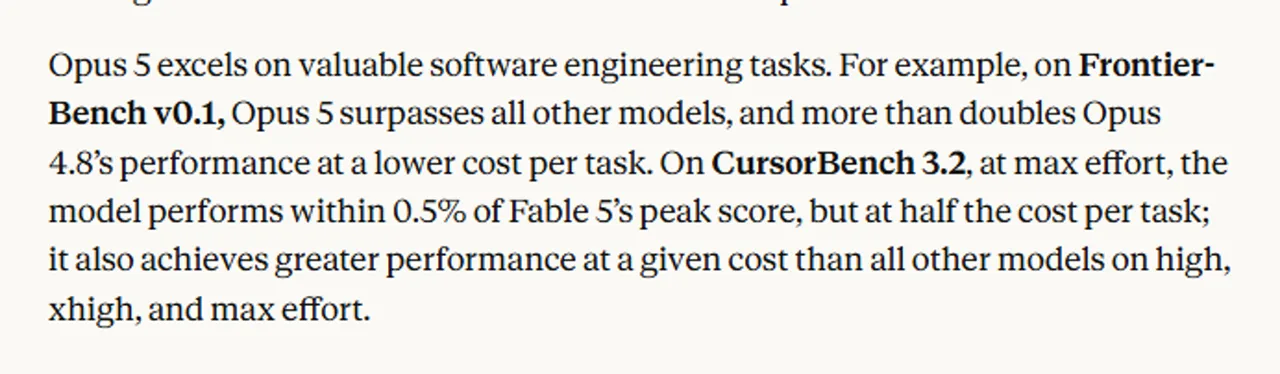
CursorBench 3.2เมื่อทำงานด้วยความพยายามสูงสุด Opus 5 มีคะแนนห่างจากคะแนนสูงสุดของ Fable 5 เพียง 0.5% โดยใช้ค่าใช้จ่ายต่องานเพียงครึ่งเดียว.ประสิทธิภาพทางเศรษฐกิจของตัวแทนการเขียนโค้ดที่แข็งแกร่งภายใต้การตั้งค่าความพยายามที่ผ่านการทดสอบของ Anthropic.
Zapier AutomationBenchประมาณ 1.5 เท่าของอัตราผ่านที่ดีที่สุดอันดับถัดไป ด้วยค่าใช้จ่ายต่องานที่เท่ากัน.มีศักยภาพสูงในการอัตโนมัติธุรกิจแบบครบวงจร; แต่การออกแบบกระบวนการทำงานยังคงมีความสำคัญ.
OSWorld 2.0ให้ผลลัพธ์ที่ดีกว่าผลลัพธ์ที่ดีที่สุดของ Fable 5 ด้วยค่าใช้จ่ายเพียงกว่าหนึ่งในสามเท่านั้น.ชี้ให้เห็นถึงประสิทธิภาพการใช้งานคอมพิวเตอร์ที่น่าประทับใจในผลการทดสอบนี้.
ข้อความประกาศ Anthropic พร้อมการเปรียบเทียบประสิทธิภาพและค่าใช้จ่ายระหว่าง Claude Opus 5 CursorBench 3.2
Anthropic ระบุว่า Opus 5 สามารถทำคะแนน CursorBench 3.2 ได้ใกล้เคียงกับคะแนนสูงสุดของ Fable 5 ในระยะ 0.5% ด้วยค่าใช้จ่ายต่องานเพียงครึ่งเดียว.
ข้อความเปรียบเทียบผลการทดสอบ Anthropic กับ Claude Opus 5 บน Zapier AutomationBench และ OSWorld 2.0
Anthropic รายงานว่ามีความได้เปรียบด้านอัตราการผ่านทดสอบ 1.5 เท่าบน Zapier AutomationBench และมีความได้เปรียบด้านค่าใช้จ่ายบน OSWorld 2.0.

ความพยายามเป็นส่วนหนึ่งของผลลัพธ์ Anthropic ระบุว่า Opus 5 ตั้งค่าเริ่มต้นเป็นความพยายามระดับสูงใน API Claude และโค้ด Claude ส่วนการเปรียบเทียบของมันก็ใช้การตั้งค่าระดับสูง xสูง หรือสูงสุดเช่นกัน ระดับความพยายามที่สูงขึ้นสามารถเพิ่มอัตราความสำเร็จของงานที่ยากได้ แต่ในขณะเดียวกันก็อาจทำให้จำนวนโทเคน ความล่าช้า หรือทั้งสองอย่างเพิ่มขึ้นด้วย ดังนั้น การวัดต้นทุนต่องาน (benchmark cost per task) จึงให้ข้อมูลที่มีประโยชน์มากกว่าการดูเพียงราคาต่อโทเคน (price per token) เท่านั้น — แต่ไม่มีตัวชี้วัดใดที่สามารถแทนที่การทดสอบนำร่อง (pilot) บนเวิร์กโหลดของคุณเองได้.

วิธีที่เราทดสอบ Claude Opus 5

เราได้ดำเนินการงานการวิเคราะห์หาสาเหตุหลักแบบกระชับหนึ่งครั้งกับชุดทดสอบ CommonJS ที่ประกอบด้วยไฟล์สามไฟล์ คำสั่งให้โมเดลต้องระบุสาเหตุหลักก่อนการแก้ไข เสนอการแก้ไขที่เล็กที่สุดเท่าที่เป็นไปได้ เพิ่มการทดสอบการถดถอยที่มุ่งเน้นเฉพาะจุด หลีกเลี่ยงการเปลี่ยนแปลงที่ไม่เกี่ยวข้อง และให้คำสั่งการตรวจสอบที่ถูกต้อง.

จากนั้น เราได้ตรวจสอบแพตช์นั้นด้วยตัวเอง แทนที่จะถือว่าคำตอบนั้นถูกต้องเพียงเพราะฟังดูมั่นใจ คำสั่ง local คือ node --test test/account-summary.test.cjs. ก่อนการแก้ไข ชุดทดสอบนี้ให้ผลผ่าน 1 ครั้งและไม่ผ่าน 1 ครั้ง หลังจากติดตั้งแพตช์ความเท่ากันแบบแม่นยำแล้ว ชุดทดสอบนี้ให้ผลผ่าน 2 ครั้งและไม่ผ่าน 0 ครั้ง.

วิธีนี้ให้ข้อมูลที่มีประโยชน์เกี่ยวกับกระบวนการแก้ไขข้อผิดพลาดหนึ่ง ได้แก่ การวินิจฉัยปัญหา การจัดการแพตช์อย่างมีวินัย คุณภาพการทดสอบการถดถอย และความสามารถในการตรวจสอบได้ แต่วิธีนี้ไม่วัดความสามารถในการนำทีมด้านการเขียนโค้ดในภาพรวม ความน่าเชื่อถือของเอเจนต์ในระยะยาว ความเร็ว หรือประสิทธิภาพในการเขียนโค้ดข้ามภาษา.

Claude Opus 5 รีวิวจากประสบการณ์จริง

การวิเคราะห์หาสาเหตุหลัก: ถูกต้อง, เรียบง่าย และสามารถตรวจสอบได้

ในการทดสอบของเรา Claude Opus 5 ได้ระบุตำแหน่งข้อบกพร่องได้อย่างถูกต้องว่า normalizedQuery.startsWith(account.id.toLowerCase()). ด้วยคำสั่งค้นหา ACCT-10, การตรวจสอบคำนำหน้าตรงกัน acct-1 ก่อนอื่น, ดังนั้น Array.prototype.find ส่งบัญชีที่ผิดไปก่อนที่จะถึง ID ที่ถูกต้อง.

การแก้ไขที่เสนอได้เปลี่ยนการจับคู่คำนำหน้าให้เป็นการเทียบเท่าอย่างแม่นยำ และเพิ่มกรณีการทดสอบการถดถอยหนึ่งกรณีสำหรับข้อความที่มีช่องว่างเติมและตัวอักษรผสม ACCT-10 ข้อมูลที่ป้อนเข้าไป มันไม่ได้เขียนโค้ดที่ไม่เกี่ยวข้องใหม่ การจำกัดนี้มีความสำคัญในรีโพซิทอรีจริง ซึ่งการ “ทำความสะอาด” ที่กว้างเกินไปอาจก่อให้เกิดงานตรวจสอบมากขึ้นกว่าข้อผิดพลาดเดิม.

ส่วนที่แข็งแกร่งที่สุดคือวงจรครบวงจร: ระบุสาเหตุหลัก อธิบายว่าทำไมการทดสอบที่มีอยู่จึงไม่ตรวจพบปัญหาดังกล่าว ทำการเปลี่ยนแปลงเล็กน้อยที่สุด เพิ่มการทดสอบการถดถอยที่เหมาะสม และระบุคำสั่งเพื่อตรวจสอบ ผลลัพธ์นี้สอดคล้องกับตำแหน่งของ Opus 5 ในฐานะเครื่องมือช่วยเขียนโค้ด แต่ยังคงเป็นเพียงเครื่องมือทดสอบเดียว สำหรับคู่มือเบื้องต้นเกี่ยวกับกระบวนการทำงานที่กว้างขึ้น โปรดดู วิธีใช้ Claude AI สำหรับการเขียนโค้ด.

คำถามและคำตอบสำหรับ T1–T4 ครบถ้วน พร้อมโค้ดที่สามารถคัดลอกได้

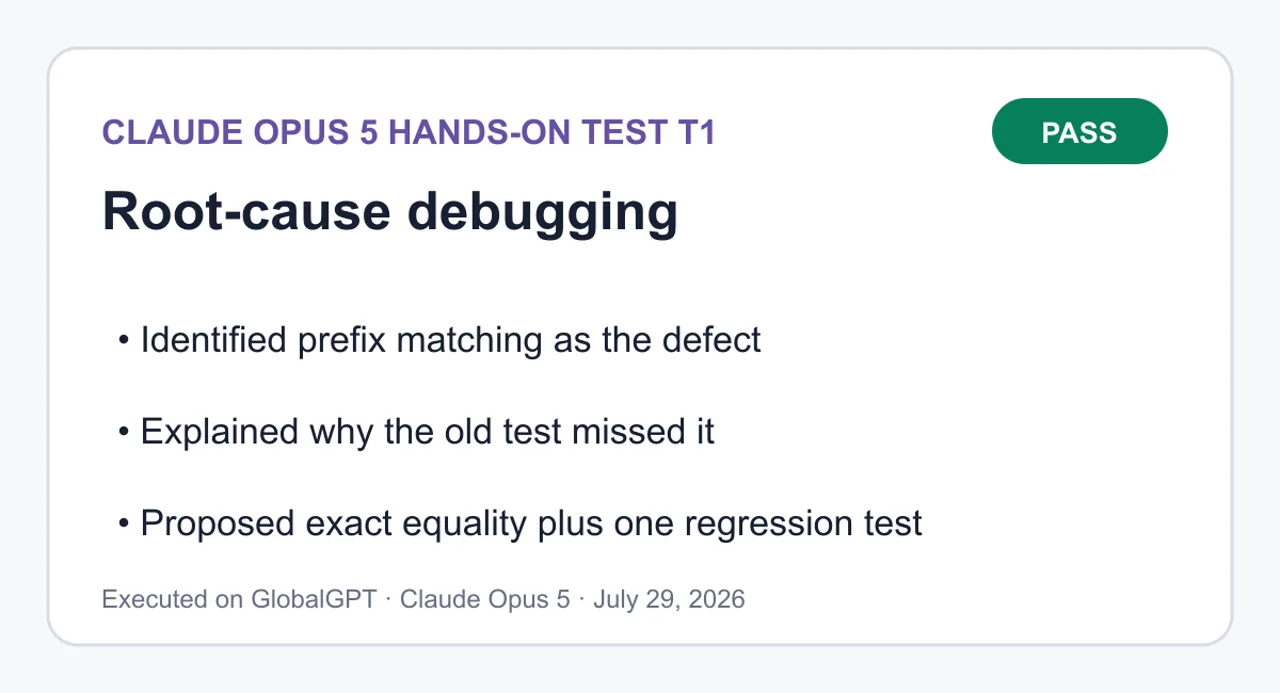
T1: การวิเคราะห์หาสาเหตุหลัก

ผ่าน — พบข้อบกพร่องในการจับคู่คำนำหน้า, เสนอแพตช์ที่มีขนาดเล็กที่สุด และเพิ่มการทดสอบการถดถอยที่มุ่งเน้น.

Claude Opus 5 ผลลัพธ์จากการวิเคราะห์หาสาเหตุหลักแบบปฏิบัติจริง
ระบุว่าการไม่ตรงกันของคำนำหน้าเป็นข้อบกพร่อง; อธิบายเหตุผลที่การทดสอบเดิมไม่ตรวจพบข้อบกพร่องนี้; เสนอการทดสอบการถดถอยแบบความเท่ากันแบบแม่นยำบวกหนึ่ง.
ดูคำถามและคำตอบ T1 ฉบับเต็ม
คำสั่งที่ครบถ้วน
คุณกำลังแก้ไขข้อผิดพลาดใน fixture CommonJS ที่ถูกออกแบบให้มีขนาดเล็กโดยเจตนา ให้ทำงานเฉพาะจากไฟล์สามไฟล์ด้านล่างนี้และขั้นตอนการจำลองข้อผิดพลาดที่ระบุไว้

ข้อกำหนด:
1. ระบุสาเหตุหลักก่อนที่จะเสนอการแก้ไขใดๆ
2. เสนอแพตช์ที่เล็กที่สุดที่สามารถแก้ไขข้อผิดพลาดได้
3. เพิ่มการทดสอบการถดถอย (regression test) ที่มุ่งเน้นเฉพาะจุด ซึ่งล้มเหลวก่อนการแก้ไขและผ่านหลังการแก้ไข
4. ให้คำสั่งการตรวจสอบ (verification command) ที่ถูกต้องเพื่อรันจากรากของ fixture
5. อย่าเขียนโค้ดที่ไม่เกี่ยวข้องใหม่ อย่าเปลี่ยนชื่อไฟล์ เพิ่มการพึ่งพา หรือเปลี่ยนแปลง API สาธารณะ
6. ส่งคืนส่วนเหล่านี้ตามลำดับอย่างถูกต้อง: `ROOT CAUSE`, `PATCH`, `VERIFICATION`, `LIMITATIONS`.
7. ในส่วน `PATCH`, ให้ระบุ diff แบบรวมไว้ในบล็อก `diff` ที่ถูกกั้นไว้ ในส่วน `VERIFICATION`, ให้ระบุคำสั่งเดียวไว้ในบล็อก `text` ที่ถูกกั้นไว้

การจำลองข้อผิดพลาด: `summarizeAccount(accounts, ' ACCT-10 ')` ควรคืนค่า `{ id: 'acct-10', name: 'Nimbus', seats: 24 }` แต่กลับคืนค่าบัญชี `acct-1` แทน

ไฟล์: `src/find-account.cjs`
```js
function findAccount(accounts, query) {
  const normalizedQuery = query.trim().toLowerCase();
  return accounts.find((account) =>
    normalizedQuery.startsWith(account.id.toLowerCase()),
  );
}

module.exports = { findAccount };
```

ไฟล์: `src/account-summary.cjs`
```js
const { findAccount } = require('./find-account.cjs');

function summarizeAccount(accounts, requestedId) {
  const account = findAccount(accounts, requestedId);
  if (!account) return null;
  return { id: account.id, name: account.name, seats: account.seats };
}

module.exports = { summarizeAccount };
```

ไฟล์: `test/account-summary.test.cjs`
```js
const test = require('node:test');
const assert = require('node:assert/strict');
const { summarizeAccount } = require('../src/account-summary.cjs');

const accounts = [
  { id: 'acct-1', name: 'Atlas', seats: 5 },
  { id: 'acct-10', name: 'Nimbus', seats: 24 },
];

test('สรุป ID บัญชีที่ตรงกัน', () => {
  assert.deepEqual(summarizeAccount(accounts, 'acct-1'), {
    id: 'acct-1',
    name: 'Atlas',
    seats: 5,
  });
});
```
Claude Opus 5

สาเหตุหลัก

findAccount ค้นหาตามส่วนต้นของชื่อ ไม่ใช่ตามความเท่ากัน:

เจเอส
normalizedQuery.startsWith(account.id.toLowerCase())

Array.prototype.find คืนค่าองค์ประกอบแรกที่ตรงกับเงื่อนไข สำหรับ ‘ACCT-10‘ คำสั่งค้นหาที่ปรับให้เป็นมาตรฐานคือ ‘acct-10’ และ ID ของบัญชีแรก ‘acct-1’ เป็นส่วนนำหน้าของคำสั่งนั้น ดังนั้น startsWith จึงมีค่าเป็น true และ acct-1 จะทำให้การค้นหาหยุดลงก่อนที่จะมีการตรวจสอบ acct-10 เลย.
การปรับรูปแบบด้วย trim().toLowerCase() นั้นถูกต้อง — ช่องว่างและตัวอักษรใหญ่-เล็กไม่ใช่ปัญหา summarizeAccount เป็นฟังก์ชันที่ส่งผ่านข้อมูลเท่านั้น และไม่มีส่วนเกี่ยวข้องกับปัญหานี้.
การทดสอบที่มีอยู่ไม่สามารถตรวจพบสิ่งนี้ได้: ‘acct-1’ เป็นคำนำหน้าของตัวมันเองและยังเป็นองค์ประกอบแรก ดังนั้นการจับคู่คำนำหน้าและการจับคู่แบบตรงตัวจึงไม่สามารถแยกแยะได้สำหรับข้อมูลเข้าดังกล่าว.

PATCH

diff
--- a/src/find-account.cjs+++ b/src/find-account.cjs@@ -1,8 +1,8 @@ function findAccount(accounts, query) {   const normalizedQuery = query.trim().toLowerCase();-  return accounts.find((account) =>-    normalizedQuery.startsWith(account.id.toLowerCase()),-  );+  return accounts.find(+    (account) => account.id.toLowerCase() === normalizedQuery,+  ); }  module.exports = { findAccount };--- a/test/account-summary.test.cjs+++ b/test/account-summary.test.cjs@@ -14,3 +14,11 @@ test('summarizes an exact account ID', () => {     seats: 5,   }); });++test('matches the full ID rather than a prefix, with padding and mixed case', () => {+  assert.deepEqual(summarizeAccount(accounts, ' ACCT-10 '), {+    id: 'acct-10',+    name: 'Nimbus',+    seats: 24,+  });+});
--- a/src/find-account.cjs
+++ b/src/find-account.cjs
@@ -1,8 +1,8 @@
 function findAccount(accounts, query) {
   const normalizedQuery = query.trim().toLowerCase();
-  return accounts.find((account) =>
-    normalizedQuery.startsWith(account.id.toLowerCase()),
-  );
+  return accounts.find(
+    (account) => account.id.toLowerCase() === normalizedQuery,
+  );
 }

 module.exports = { findAccount };
--- a/test/account-summary.test.cjs
+++ b/test/account-summary.test.cjs
@@ -14,3 +14,11 @@
 test('สรุป ID บัญชีที่ตรงกันทุกประการ', () => {
 seats: 5,
   });
 });
+
+test('จับคู่กับ ID ทั้งหมดแทนที่จะเป็นส่วนนำหน้า พร้อมการเติมช่องว่างและตัวอักษรใหญ่-เล็กผสมกัน', () => {
+  assert.deepEqual(summarizeAccount(accounts, ' ACCT-10 '), {
+    id: 'acct-10',
+    name: 'Nimbus',
+    seats: 24,
+  });
+});

ก่อนการแก้ไข การทดสอบใหม่จะล้มเหลวกับวัตถุ acct-1 / Atlas / 5; หลังจากแก้ไขแล้ว การทดสอบจะผ่าน.

การตรวจสอบ

ข้อความ
node --test test/account-summary.test.cjs

ข้อจำกัด

• ขอบเขต: มีการเปลี่ยนแปลงโอเปอเรเตอร์หนึ่งตัว ไม่มีการเปลี่ยนชื่อ ไม่มีการเพิ่มการพึ่งพาใหม่ และรูปแบบของฟังก์ชัน findAccount / summarizeAccount รวมถึงรูปแบบของค่าที่ส่งคืนยังคงไม่เปลี่ยนแปลง.
• พฤติกรรมที่มีอยู่เดิมที่ไม่ได้แก้ไข (อยู่นอกขอบเขตของข้อผิดพลาดนี้):
• ค่า requestedId ที่ไม่ใช่สตริง (null หรือตัวเลข) จะยังคงทำให้เกิดข้อผิดพลาดเมื่อเรียกใช้ .trim().
• ID บัญชีเองจะไม่ถูกตัดส่วนเกิน ดังนั้น ‘acct-10’ ที่ถูกเก็บไว้จะยังคงไม่ตรงกัน — มีเพียงคำสั่งค้นหาเท่านั้นที่ถูกปรับให้เป็นมาตรฐาน.
• Casing ใช้ฟังก์ชัน plain toLowerCase(); ไม่มีการปรับมาตรฐาน Unicode หรือการปรับรูปแบบตามภาษาท้องถิ่น.
• ID ที่ซ้ำกันจะยังคงถูกกำหนดให้ตรงกับผลลัพธ์ที่ตรงกันครั้งแรก และการค้นหาจะยังคงมีเวลาการทำงานเป็น O(n).
• ความครอบคลุมของการทดสอบ: การทดสอบการถดถอยครั้งเดียวนี้มุ่งเป้าไปที่การจำลองข้อผิดพลาดที่รายงานไว้อย่างแม่นยำ ส่วนเส้นทางที่ไม่พบ (null) และข้อมูลนำเข้าที่มีรูปแบบผิดยังคงไม่ได้รับการทดสอบ.

ROOT CAUSE
findAccount matches by prefix, not by equality:

```js
normalizedQuery.startsWith(account.id.toLowerCase())
```

Array.prototype.find returns the first element satisfying the predicate. For ' ACCT-10 ' the normalized query is 'acct-10', and the first account's ID 'acct-1' is a prefix of it, so startsWith is true and acct-1 short-circuits the search before acct-10 is ever tested.
The trim().toLowerCase() normalization is correct — whitespace and casing are not the problem. summarizeAccount is a pass-through and is not at fault.
The existing test cannot catch this: 'acct-1' is a prefix of itself and is the first element, so prefix matching and exact matching are indistinguishable for that input.
PATCH

```diff
--- a/src/find-account.cjs
+++ b/src/find-account.cjs
@@ -1,8 +1,8 @@
 function findAccount(accounts, query) {
   const normalizedQuery = query.trim().toLowerCase();
-  return accounts.find((account) =>
-    normalizedQuery.startsWith(account.id.toLowerCase()),
-  );
+  return accounts.find(
+    (account) => account.id.toLowerCase() === normalizedQuery,
+  );
 }

 module.exports = { findAccount };
--- a/test/account-summary.test.cjs
+++ b/test/account-summary.test.cjs
@@ -14,3 +14,11 @@
 test('summarizes an exact account ID', () => {
     seats: 5,
   });
 });
+
+test('matches the full ID rather than a prefix, with padding and mixed case', () => {
+  assert.deepEqual(summarizeAccount(accounts, ' ACCT-10 '), {
+    id: 'acct-10',
+    name: 'Nimbus',
+    seats: 24,
+  });
+});
```

Before the fix the new test fails with the acct-1 / Atlas / 5 object; after the fix it passes.
VERIFICATION

```text
node --test test/account-summary.test.cjs
```

LIMITATIONS
• Scope: one operator changed. No renames, no new dependencies, and findAccount / summarizeAccount signatures and return shapes are unchanged.
• Pre-existing behavior left alone (out of scope for this bug):
• A non-string requestedId (null, a number) still throws on .trim().
• Account IDs themselves are not trimmed, so a stored ' acct-10' still will not match — only the query is normalized.
• Casing uses plain toLowerCase(); no Unicode normalization or locale-aware folding.
• Duplicate IDs still resolve to the first match, and lookup remains O(n).
• Test coverage: the single regression test targets exactly the reported reproduction. The not-found (null) path and malformed input remain untested.

T2: การวิเคราะห์สภาพบัญชี

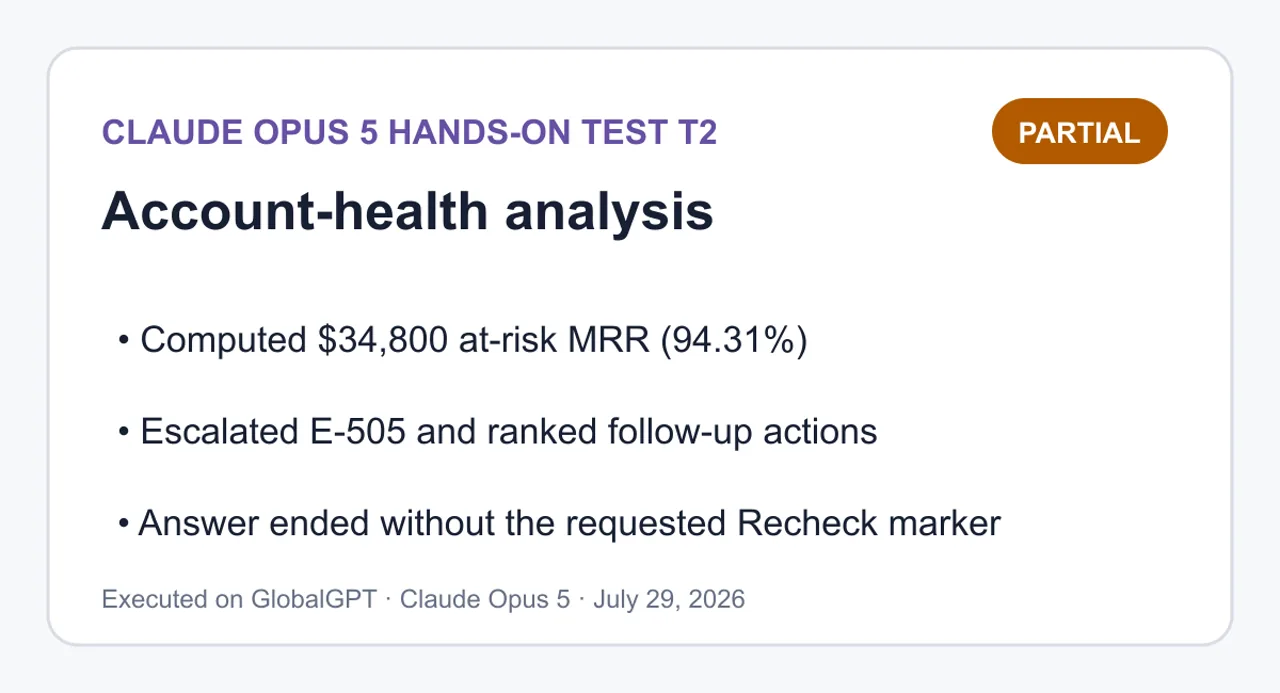
ไม่สมบูรณ์ — ได้คำนวณตัวชี้วัดหลักและจัดลำดับความสำคัญของมาตรการแล้ว แต่คำตอบที่บันทึกไว้สิ้นสุดลงโดยไม่มีเครื่องหมาย Recheck ตามที่ขอ.

Claude Opus 5 ผลวิเคราะห์สภาพบัญชีแบบปฏิบัติจริง
คำนวณ MRR ที่มีความเสี่ยง $34,800 (94.31%); ได้ปรับระดับ E-505 และจัดลำดับการดำเนินการติดตามผล; คำตอบสิ้นสุดลงโดยไม่มีตัวบ่งชี้การตรวจสอบซ้ำ (Recheck marker) ตามที่ขอ.
ดูคำถามและคำตอบ T2 แบบเต็ม
คำสั่งที่ครบถ้วน
วิเคราะห์ไฟล์ `account-health.csv` ที่ได้รับมาในฐานะชุดข้อมูลที่ปิด (closed dataset) อย่าใช้ข้อมูลจากแหล่งภายนอก และอย่าสร้างค่าที่ขาดหายไป

กฎความเสี่ยง (ประเมินแต่ละข้ออย่างอิสระ):
- `inactivity`: `days_since_login >= 30`
- `payment`: `failed_payments >= 2`
- `low_utilization`: `seats_used / seats_purchased = 80` ในขณะที่บัญชีอยู่ในสถานะ `at-risk`
- `weak_health_without_risk`: `health_score = 9` และ `open_tickets >= 3`

ข้อกำหนด:
1. คำนวณธงความเสี่ยงและธงความขัดแย้งที่ถูกทริกเกอร์สำหรับทุกบัญชี
2. รายงานค่ารวมของชุดข้อมูลสำหรับบัญชี, MRR, บัญชีที่อยู่ในความเสี่ยง, MRR ที่อยู่ในความเสี่ยง, บัญชีที่ต้องส่งต่อ, แถวความขัดแย้ง, จำนวนที่นั่งที่ซื้อ และจำนวนที่นั่งที่ใช้
3. สร้างตารางการดำเนินการที่มีคอลัมน์ห้าคอลัมน์อย่างแม่นยำ: `บัญชี | สัญญาณความเสี่ยง | ความขัดแย้ง | ลำดับความสำคัญ | การดำเนินการที่แนะนำ`.
4. วางค่าที่คำนวณโดยตรงภายใต้หัวข้อ `Measured facts` และผลการตัดสินใจภายใต้หัวข้อ `Inference`.
5. ภายใต้หัวข้อ `Recheck` ให้แสดงการคำนวณทางคณิตศาสตร์ที่เพียงพอเพื่อตรวจสอบใหม่ทุกยอดรวมและทุกค่าขีดจำกัดอย่างอิสระ รวมถึงกรณีที่ค่าเท่ากับ 0.50
6. อย่าแก้ไขหรือตีความกฎใหม่โดยไม่แจ้งให้ทราบ หากสัญญาณใดดูขัดกับสัญชาตญาณ ให้บันทึกไว้เป็นความขัดแย้งแทนที่จะเปลี่ยนการจัดประเภทของมัน

`account-health.csv`:
```csv
account_id,account_name,plan,mrr_usd,days_since_login,failed_payments,seats_purchased,seats_used,health_score,nps,open_tickets
A-101,Aster,Enterprise,12000,45,0,100,82,92,9,1
B-202,Beacon,Pro,4200,4,2,20,18,70,7,0
C-303,Cinder,Pro,3600,12,0,20,8,65,10,4
D-404,Dahlia,Starter,900,5,0,5,4,42,6,0
E-505,Ember,Enterprise,15000,65,3,200,70,35,3,6
F-606,Fjord,Starter,1200,29,1,4,2,85,9,3
```
Claude Opus 5

ข้อมูลที่วัดได้

แหล่งข้อมูล: account-health.csv, 6 แถว, ถือว่าปิดแล้ว ไม่มีการเติมค่าที่ขาด.

การประเมินกฎตามบัญชี

บัญชี
วัน ≥ 30
ล้มเหลว ≥ 2
util < 0.50
จำนวนความเสี่ยง
สถานะ
A-101 Aster
✅ 45
❌ 0
❌ 0.82
1
กลุ่มเสี่ยง
B-202 Beacon
❌ 4
✅ 2
❌ 0.90
1
กลุ่มเสี่ยง
C-303 Cinder
❌ 12
❌ 0
✅ 0.40
1
กลุ่มเสี่ยง
D-404 ดาลียา
❌ 5
❌ 0
❌ 0.80
0
ไม่อยู่ในกลุ่มเสี่ยง
E-505 Ember
✅ 65
✅ 3
✅ 0.35
3
กลุ่มเสี่ยง + ขยายตัว
F-606 ฟยอร์ด
❌ 29
❌ 1
❌ 0.50
0
ไม่อยู่ในกลุ่มเสี่ยง
เครื่องหมายเตือนความขัดแย้งต่อบัญชี
บัญชี
สุขภาพที่แข็งแรงพร้อมความเสี่ยง
สุขภาพอ่อนแอ แต่ไม่มีความเสี่ยง
promoter_with_ticket_load
A-101 Aster
✅ (92 ≥ 80, กลุ่มเสี่ยง)

❌ (คะแนน NPS 9 ✓, จำนวนตั๋ว 1 ✗)
B-202 Beacon
❌ (70 < 80)
❌ (70 ≥ 50)
❌ (nps 7)
C-303 Cinder
❌ (65 < 80)
❌ (65 ≥ 50)
✅ (NPS 10, จำนวนตั๋ว 4)
D-404 ดาลียา

✅ (42 < 50, ไม่อยู่ในกลุ่มเสี่ยง)
❌ (nps 6)
E-505 Ember
❌ (35 < 80)
❌ (35 < 50 แต่อยู่ในกลุ่มเสี่ยง)
❌ (nps 3)
F-606 ฟยอร์ด
❌ (85 ≥ 80 แต่ไม่อยู่ในกลุ่มเสี่ยง)
❌ (85 ≥ 50)
✅ (NPS 9, จำนวนตั๋ว 3)
จำนวนข้อมูลทั้งหมด
เมตริก
มูลค่า
บัญชี
6
MRR รวม
$36,900
บัญชีที่มีความเสี่ยง
4 (A-101, B-202, C-303, E-505)
MRR ที่มีความเสี่ยง
$ 34,800 (คิดเป็น 94.31% ของทั้งหมด)
อัปเกรดบัญชี
1 (E-505)
แถวที่มีความขัดแย้ง
4 (A-101, C-303, D-404, F-606)
ธงแสดงข้อขัดแย้ง
4 (1 คนสุขภาพดีแต่มีความเสี่ยง, 1 คนสุขภาพไม่ดีแต่ไม่มีความเสี่ยง, 2 ผู้จัดงานที่มีตั๋ว)
ที่นั่งที่ซื้อแล้ว
349
ที่นั่งที่ใช้แล้ว
184
การอนุมาน
ลำดับความสำคัญและมาตรการที่แนะนำด้านล่างนี้เป็นผลจากการตัดสินใจ ไม่ใช่ผลลัพธ์จากกฎเกณฑ์ ระบบจัดอันดับของฉันให้น้ำหนักกับสถานะที่เพิ่มระดับความรุนแรงก่อน ตามด้วย MRR ที่มีความเสี่ยง และสัญญาณความขัดแย้ง.
บัญชี
ปัจจัยที่ก่อให้เกิดความเสี่ยง
ความขัดแย้ง
ลำดับความสำคัญ
ขั้นตอนที่แนะนำ
E-505 Ember
ไม่มีการใช้งาน, การชำระเงิน, การใช้งานต่ำ

P0
กฎทั้งสามข้อถูกทริกเกอร์สำหรับบัญชีที่มีขนาดใหญ่ที่สุด ($15,000 MRR) ให้ถือว่าเป็นการสูญเสียลูกค้าที่กำลังใช้งานอยู่: ฟื้นฟูวิธีการชำระเงิน แล้วดำเนินการตรวจสอบโดยผู้บริหารสำหรับที่นั่ง 130 ที่ยังไม่ได้ใช้งาน.
A-101 Aster
การไม่เคลื่อนไหว
สุขภาพที่แข็งแรงพร้อมความเสี่ยง
P1
$ มี MRR 12,000 แม้มีช่วงเวลาไม่ใช้งาน 45 วัน ทั้งที่มีคะแนน 92 และอัตราการใช้งาน 82% ที่อยู่ในเกณฑ์ดี โปรดตรวจสอบว่าช่วงเวลาที่ไม่ได้เข้าสู่ระบบนั้นเป็นผลจากการเลิกใช้งานจริง หรือเป็นผลจากข้อผิดพลาดในการติดตาม (SSO, การใช้งานผ่าน API เท่านั้น) ก่อนที่จะดำเนินการตามคะแนนดังกล่าว.
C-303 Cinder
การใช้งานต่ำ
promoter_with_ticket_load
P1
Promoter (nps 10) มีตั๋วเปิด 4 ใบ ที่ระดับการใช้งาน 40% ปริมาณตั๋วที่ค้างอยู่เป็นปัจจัยที่อาจขัดขวางการนำระบบไปใช้; ให้เคลียร์คิวให้เรียบร้อย แล้วจึงดำเนินการเปิดใช้งานที่นั่ง.
B-202 Beacon
การชำระเงิน

P2
กรณีที่มีสาเหตุเดียวที่ชัดเจน: การชำระเงินล้มเหลว 2 ครั้ง โดยมีการเข้าสู่ระบบล่าสุดเมื่อ 4 วันก่อน และอัตราการใช้งานอยู่ที่ 90% ดำเนินการติดตามการเรียกเก็บเงินเท่านั้น ไม่จำเป็นต้องดำเนินการกับฝ่ายบริการลูกค้า.
F-606 ฟยอร์ด

promoter_with_ticket_load
P3
อยู่ในขอบเขตที่กำหนดทุกด้าน (29 วัน, การชำระเงินล้มเหลว 1 ครั้ง, อัตราการใช้งาน 0.50 อย่างแม่นยำ) ไม่ถือว่าอยู่ในความเสี่ยงตามกฎ แต่หากมีวันว่างเพิ่มอีก 1 วัน หรือการชำระเงินล้มเหลวอีก 1 ครั้ง สถานการณ์จะเปลี่ยนไปทันที ให้ติดตามและแก้ไขตั๋วทั้ง 3 ใบ.
D-404 ดาลียา

สุขภาพอ่อนแอ แต่ไม่มีความเสี่ยง
P3
ได้คะแนน 42 โดยไม่มีกฎใดถูกทริกเกอร์ และอัตราการใช้งานอยู่ที่ 80% บน MRR $900 หรือ

ข้อมูลที่วัดได้
แหล่งที่มา: account-health.csv, 6 แถว, ถือว่าปิดแล้ว ไม่มีการเติมค่าที่ขาด
การประเมินกฎตามบัญชี
บัญชี
วัน≥30
ล้มเหลว≥2
util <0.50
จำนวนความเสี่ยง
สถานะ
A-101 Aster
✅ 45
❌ 0
❌ 0.82
1
อยู่ในกลุ่มเสี่ยง
B-202 Beacon
❌ 4
✅ 2
❌ 0.90
1
อยู่ในกลุ่มเสี่ยง
C-303 Cinder
❌ 12
❌ 0
✅ 0.40
1
อยู่ในความเสี่ยง
D-404 Dahlia
❌ 5
❌ 0
❌ 0.80
0
ไม่อยู่ในความเสี่ยง
E-505 Ember
✅ 65
✅ 3
✅ 0.35
3
มีความเสี่ยง + ส่งต่อ
F-606 Fjord
❌ 29
❌ 1
❌ 0.50
0
ไม่มีความเสี่ยง
ธงความขัดแย้งต่อบัญชี
บัญชี
strong_health_with_risk
weak_health_without_risk
promoter_with_ticket_load
A-101 Aster
✅ (92 ≥ 80, มีความเสี่ยง)
❌
❌ (nps 9 ✓, ตั๋ว 1 ✗)
B-202 Beacon
❌ (70 < 80)
❌ (70 ≥ 50)
❌ (nps 7)
C-303 Cinder
❌ (65 < 80)
❌ (65 ≥ 50)
✅ (nps 10, tickets 4)
D-404 Dahlia
❌
✅ (42 < 50, ไม่มีความเสี่ยง)
❌ (nps 6)
E-505 Ember
❌ (35 < 80)
❌ (35 < 50 แต่มีความเสี่ยง)
❌ (nps 3)
F-606 Fjord
❌ (85 ≥ 80 แต่ไม่อยู่ในกลุ่มเสี่ยง)
❌ (85 ≥ 50)
✅ (nps 9, ตั๋ว 3)
รวมข้อมูลชุด
ตัวชี้วัด
ค่า
บัญชี
6
MRR รวม
$36,900
บัญชีที่อยู่ในความเสี่ยง
4 (A-101, B-202, C-303, E-505)
MRR ที่อยู่ในความเสี่ยง
$34,800 (94.31% ของทั้งหมด)
บัญชีที่ต้องส่งต่อ
1 (E-505)
แถวที่มีความขัดแย้ง
4 (A-101, C-303, D-404, F-606)
ธงความขัดแย้ง
4 (1 strong_health_with_risk, 1 weak_health_without_risk, 2 promoter_with_ticket_load)
ที่นั่งที่ซื้อ
349
ที่นั่งที่ใช้
184
การสรุป
ลำดับความสำคัญและมาตรการที่แนะนำด้านล่างนี้เป็นผลจากการตัดสินใจ ไม่ใช่ผลลัพธ์จากกฎเกณฑ์ น้ำหนักการจัดอันดับของผมจะให้ความสำคัญกับสถานะที่เพิ่มระดับก่อน แล้วตามด้วย MRR ที่มีความเสี่ยง และสัญญาณความขัดแย้ง
บัญชี
ปัจจัยกระตุ้นความเสี่ยง
ความขัดแย้ง
ลำดับความสำคัญ
การดำเนินการที่แนะนำ
E-505 Ember
ไม่มีการใช้งาน, การชำระเงิน, การใช้งานต่ำ
—
P0
กฎทั้งสามทำงานกับบัญชีที่มีขนาดใหญ่ที่สุด ($15,000 MRR) ให้ปฏิบัติเหมือนการสูญเสียลูกค้าที่ยังใช้งานอยู่: ฟื้นฟูวิธีการชำระเงิน แล้วดำเนินการตรวจสอบโดยผู้บริหารสำหรับที่นั่ง 130 ที่ยังไม่ได้ใช้งาน
A-101 Aster
ไม่มีการใช้งาน
สุขภาพดีแต่มีความเสี่ยง
P1
$12,000 MRR ที่ไม่มีการใช้งานเป็นเวลา 45 วัน แม้คะแนนจะอยู่ที่ 92 และอัตราการใช้งานที่ 82% อยู่ในสภาพดี ตรวจสอบว่าช่วงเวลาที่ไม่ได้เข้าสู่ระบบเป็นความไม่ผูกพันที่แท้จริงหรือเป็นผลจากระบบติดตาม (SSO, การใช้งานผ่าน API เท่านั้น) ก่อนดำเนินการตามคะแนน
C-303 Cinder
low_utilization
promoter_with_ticket_load
P1
Promoter (nps 10) มีตั๋วเปิด 4 ใบ ที่อัตราการใช้งาน 40% ภาระตั๋วอาจเป็นอุปสรรคหลักในการใช้งาน; ให้เคลียร์คิวตั๋ว แล้วจึงส่งเสริมการเปิดใช้งานที่นั่ง
B-202 Beacon
payment
—
P2
กรณีที่มีสาเหตุเดียวที่ชัดเจน: การชำระเงินล้มเหลว 2 ครั้ง พร้อมการเข้าสู่ระบบล่าสุดเมื่อ 4 วันก่อน และอัตราการใช้งาน 90% ดำเนินการติดตามเรื่องการเรียกเก็บเงินเท่านั้น ไม่จำเป็นต้องดำเนินการด้านบริการลูกค้า
F-606 Fjord
—
promoter_with_ticket_load
P3
อยู่พอดีภายในทุกขอบเขต (29 วัน, การชำระเงินล้มเหลว 1 ครั้ง, การใช้งาน 0.50 พอดี) ไม่ถือว่าอยู่ในความเสี่ยงตามกฎ แต่หากมีวันไม่ใช้งานเพิ่มอีก 1 วัน หรือการชำระเงินล้มเหลวเพิ่มอีก 1 ครั้ง สถานะจะเปลี่ยนไป ติดตามและแก้ไขตั๋ว 3 ใบ
D-404 Dahlia
—
weak_health_without_risk
P3
คะแนน 42 โดยไม่มีกฎใดถูกทริกเกอร์ และอัตราการใช้งาน 80% บน MRR $900 ทั้งสองกรณี

T3: การสร้างส่วนติดต่อผู้ใช้ที่ปรับตัวได้

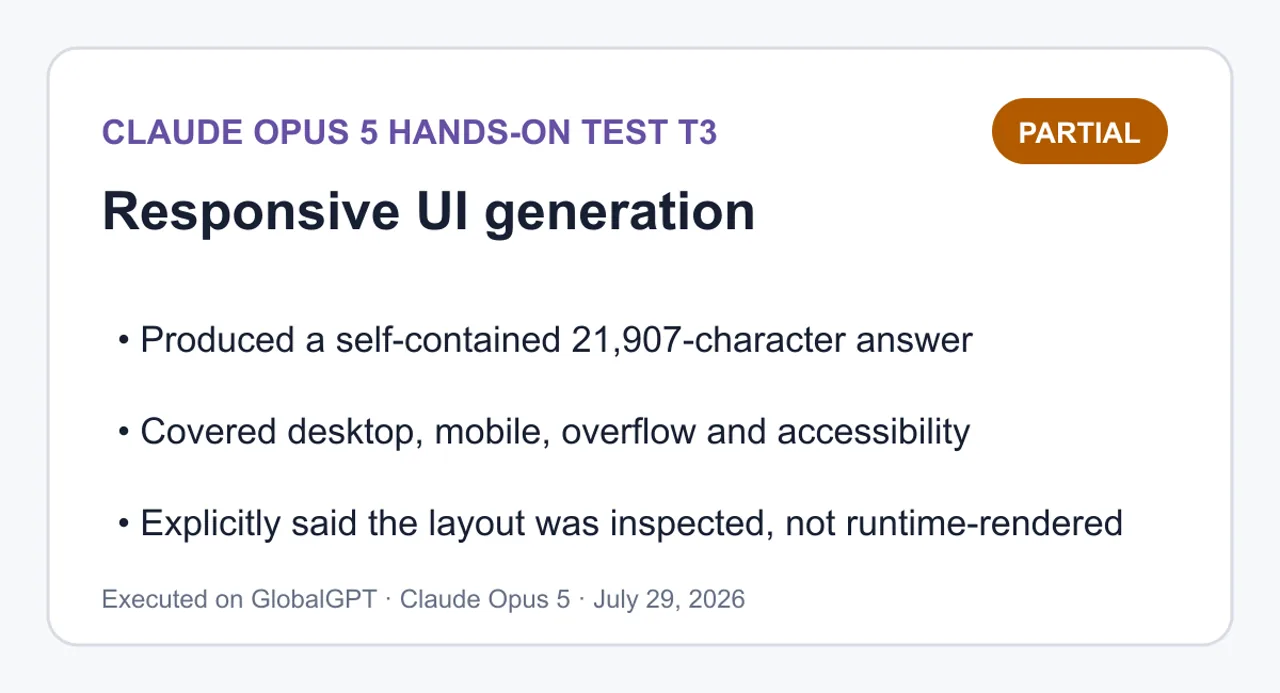
Partial — ได้สร้างการนำไปใช้ที่สมบูรณ์ในตัวเองและระบบตรวจสอบตัวเองแบบครบวงจร โดยยอมรับอย่างชัดเจนว่าได้ตรวจสอบหน้าเว็บแทนที่จะแสดงผลหน้าเว็บในระหว่างการทำงาน.

Claude Opus 5 ผลลัพธ์จากการสร้าง UI ที่ตอบสนองแบบปฏิบัติจริง
สร้างคำตอบที่ครบถ้วนในตัวเองจำนวน 21,907 ตัวอักษร; ครอบคลุมการใช้งานบนเดสก์ท็อป อุปกรณ์มือถือ การแสดงผลส่วนเกิน และความสามารถในการเข้าถึง; ระบุอย่างชัดเจนว่าได้ตรวจสอบการจัดวางแล้ว ไม่ใช่การแสดงผลขณะรันไทม์.
ดูคำถามและคำตอบของ T3 แบบเต็ม
คำสั่งที่ครบถ้วน
สร้างอินเทอร์เฟซเปรียบเทียบผลิตภัณฑ์ที่ดูเรียบร้อยเป็นไฟล์ HTML เดียวที่สามารถรันได้ โดยใช้ข้อมูลผลิตภัณฑ์ด้านล่างนี้เท่านั้น

ข้อกำหนด:
1. ส่งคืนบล็อกโค้ด `html` ที่ถูกห่อด้วยแท็ก `fenced` เพียงหนึ่งบล็อกเท่านั้น ตามด้วยส่วน `SELF-CHECK` ห้ามแบ่ง HTML, CSS หรือ JavaScript เป็นไฟล์แยกต่างหาก
2. ใช้ HTML ที่มีความหมาย (semantic HTML), CSS ที่ฝังในโค้ด และ JavaScript แบบ vanilla ที่ฝังในโค้ดเท่านั้น: ห้ามใช้เฟรมเวิร์กภายนอก, แพ็กเกจ, ฟอนต์, รูปภาพ, การร้องขอเครือข่าย หรือขั้นตอนการสร้าง
3. จัดเตรียมแท็บสามแท็บที่สามารถเข้าถึงได้ด้วยคีย์บอร์ด (`Overview`, `Pricing`, `Limits`) พร้อมด้วยเซมานติกที่ถูกต้องของ `tablist`, `tab` และ `tabpanel` ปุ่มลูกศรซ้าย/ลูกศรขวาต้องเคลื่อนย้ายและเปิดใช้งานแท็บ; ปุ่ม Home/End ต้องกระโดดไปยังและเปิดใช้งานแท็บแรก/แท็บสุดท้าย โฟกัสต้องยังคงมองเห็นได้
4. แท็บที่เลือกต้องแสดงผลผ่าน `aria-selected`, `tabindex` และแผงที่มองเห็นได้; แผงที่ไม่ใช้งานต้องถูกซ่อน
5. เป้าหมายสำหรับเดสก์ท็อป: ความกว้าง 1440px เป้าหมายสำหรับมือถือ: ความกว้าง 390px โดยไม่มีส่วนเกินของหน้าในแนวนอน ไม่มีปุ่มควบคุมที่ถูกตัดทอน พื้นที่แตะต้องมีความสูงอย่างน้อย 44px และบัตรเปรียบเทียบจัดเรียงในหนึ่งคอลัมน์
6. รวมส่วนหัวที่กระชับ คำแนะนำที่ชัดเจน บัตรผลิตภัณฑ์สามใบ และตารางเปรียบเทียบที่กะทัดรัด
7. รักษาความคมชัดของสีและหลีกเลี่ยงการเคลื่อนไหวที่เป็นการตกแต่ง รักษาความต่างของสีให้อ่านได้ชัดเจน และหลีกเลี่ยงการเคลื่อนไหวเพื่อตกแต่ง
7. ใช้ข้อมูลผลิตภัณฑ์ตามนี้อย่างแม่นยำ และไม่เพิ่มคำกล่าวอ้าง:
   - Atlas: `$19/mo`, `20 projects`, `10 GB`, `Email support`, เหมาะที่สุดสำหรับงานเดี่ยว
   - Beacon: `$49/mo`, `โครงการไม่จำกัด`, `100 GB`, `การสนับสนุนแบบเร่งด่วน`, ดีที่สุดโดยรวมสำหรับทีมที่กำลังเติบโต.
   - Cove: `$99/mo`, `โครงการไม่จำกัด`, `1 TB`, `การสนับสนุนแบบเฉพาะ`, เหมาะที่สุดสำหรับกิจกรรมที่อยู่ในกรอบกฎระเบียบ
8. ให้ Beacon มีป้าย `Best overall` ที่มองเห็นได้ชัดเจน โดยไม่ทำให้บัตรอื่นๆ ดูเหมือนถูกปิดใช้งาน
9. ใน `SELF-CHECK`, รายงานอย่างชัดเจนเกี่ยวกับการตรวจสอบแท็บเชิงความหมาย พฤติกรรมของคีย์บอร์ด การจัดวาง 1440px การจัดวาง 390px การล้นแนวนอน และส่วนที่พึ่งพาภายนอก อย่าอ้างว่าคุณได้เรนเดอร์วิวพอร์ตจริง ๆ เว้นแต่คุณจะทำจริง; แยกการตรวจสอบโค้ดออกจากการตรวจสอบขณะรันไทม์

ชุดข้อมูลผลิตภัณฑ์ (เก็บไว้ที่ `fixtures/T3-responsive-ui/product-data.json`):
```json
{
  "products": [
    {"name":"Atlas","price":"$19/mo","projects":"20 projects","storage":"10 GB","support":"Email support","bestFor":"solo work"},
    {"name":"Beacon","price":"$49/mo","projects":"Unlimited projects","storage":"100 GB","support":"Priority support","bestFor":"growing teams","badge":"Best overall"},
    {"name":"Cove","price":"$99/mo","projects":"Unlimited projects","พื้นที่จัดเก็บ":"1 TB","การสนับสนุน":"การสนับสนุนแบบเฉพาะตัว","เหมาะสำหรับ":"การดำเนินงานที่อยู่ภายใต้การกำกับดูแล"}
  ]
}
```
Claude Opus 5
html
<!DOCTYPE html><html lang="en"><head><meta charset="utf-8"><meta name="viewport" content="width=device-width, initial-scale=1"><title>Compare plans — Atlas, Beacon, Cove</title><style>  :root {    --bg: #f6f7f9;    --surface: #ffffff;    --ink: #16191f;    --ink-soft: #4a515c;    --line: #d3d8df;    --line-strong: #b6bdc7;    --accent: #10457e;    --accent-soft: #e8f0f9;    --focus: #0b2f56;    --radius: 10px;  }   * {box-sizing: border-box; }   html { -webkit-text-size-adjust: 100%; }   body {    margin: 0;    padding: 0;    background: var(--bg);    color: var(--ink);    font-family: system-ui, -apple-system, "Segoe UI", Roboto, Helvetica, Arial, sans-serif;    font-size: 16px;    line-height: 1.5;    overflow-x: hidden;  }   .wrap {    width: 100%;    max-width: 1120px;    margin: 0 auto;    padding: 32px 24px 64px;  }   /* ---------- Header ---------- */   .page-header { margin-bottom: 24px; }   .page-header h1 {    margin: 0 0 8px;    font-size: 1.75rem;    line-height: 1.25;    letter-spacing: -0.01em;  }   .page-header p {    margin: 0;    max-width: 60ch;    color: var(--ink-soft);  }   /* ---------- Recommendation ---------- */   .recommendation {    display: flex;    flex-wrap: wrap;    gap: 4px 10px;    align-items: baseline;    margin: 0 0 28px;    padding: 14px 16px;    background: var(--accent-soft);    border: 1px solid #c2d5e8;    border-left: 4px solid var(--accent);    border-radius: var(--radius);  }   .recommendation strong { color: var(--accent); }   .recommendation span { color: #23405e; }   /* ---------- Tabs ---------- */   .tabs {    display: flex;    flex-wrap: wrap;    gap: 8px;    margin: 0 0 20px;    padding: 0;    border-bottom: 1px solid var(--line);  }   [role="tab"] {    appearance: none;    min-height: 44px;    padding: 10px 18px;    font: inherit;    font-weight: 600;    color: var(--ink-soft);    background: transparent;    border: 1px solid transparent;    border-bottom: 3px solid transparent;    border-radius: 8px 8px 0 0;    cursor: pointer;  }   [role="tab"]:hover { color: var(--ink); background: #eceff3; }   [role="tab"][aria-selected="true"] {    color: var(--accent);    background: var(--surface);    border-color: var(--line) var(--line) var(--accent);    border-bottom-width: 3px;  }   :focus-visible {    outline: 3px solid var(--focus);    outline-offset: 2px;  }   [role="tabpanel"] { outline: none; }   [role="tabpanel"]:focus-visible {    outline: 3px solid var(--focus);    outline-offset: 4px;    border-radius: var(--radius);  }   [hidden] { display: none !important; }   .panel-intro {    margin: 0 0 20px;    max-width: 62ch;    color: var(--ink-soft);  }   /* ---------- Cards ---------- */   .card-grid {    display: grid;    grid-template-columns: repeat(3, minmax(0, 1fr));    gap: 20px;    margin: 0;    padding: 0;    list-style: none;    align-items: start;  }   .card {    display: flex;    flex-direction: column;    height: 100%;    padding: 20px;    background: var(--surface);    border: 1px solid var(--line);    border-radius: var(--radius);  }   .card.is-featured {    border-color: var(--accent);    border-width: 2px;    padding: 19px;  }   .card-head {    display: flex;    flex-wrap: wrap;    gap: 8px;    align-items: center;    justify-content: space-between;    margin-bottom: 4px;  }   .card h3 {    margin: 0;    font-size: 1.2rem;  }   .badge {    padding: 3px 10px;    font-size: 0.75rem;    font-weight: 700;    letter-spacing: 0.02em;    text-transform: uppercase;    color: #ffffff;    background: var(--accent);    border-radius: 999px;    white-space: nowrap;  }   .price {    margin: 8px 0 2px;    font-size: 1.6rem;    font-weight: 700;    letter-spacing: -0.02em;  }   .best-for {    margin: 0 0 14px;    font-size: 0.9375rem;    color: var(--ink-soft);  }   .spec-list {    margin: 0;    padding: 14px 0 0;    border-top: 1px solid var(--line);    font-size: 0.9375rem;  }   .spec-list div {    display: flex;    gap: 12px;    justify-content: space-between;    padding: 5px 0;  }   .spec-list dt { color: var(--ink-soft); }   .spec-list dd {    margin: 0;    font-weight: 600;    text-align: right;  }   /* ---------- Table ---------- */   .table-section { margin-top: 36px; }   .table-section h2 {    margin: 0 0 12px;    font-size: 1.125rem;  }   .table-scroll {    max-width: 100%;    overflow-x: auto;    background: var(--surface);    border: 1px solid var(--line);    border-radius: var(--radius);  }   table {    width: 100%;    border-collapse: collapse;    font-size: 0.9375rem;  }   caption {    padding: 12px 14px;    text-align: left;    color: var(--ink-soft);    font-size: 0.875rem;  }   th, td {    padding: 10px 14px;    text-align: left;    border-top: 1px solid var(--line);    white-space: nowrap;  }   thead th {    background: #eef1f5;    border-top: none;    font-weight: 700;  }   tbody th { font-weight: 600; color: var(--ink-soft); }   th[scope="col"].is-featured { color: var(--accent); }   /* ---------- Mobile ---------- */   @media (max-width: 720px) {    .wrap { padding: 20px 16px 48px; }     .page-header h1 { font-size: 1.4rem; }     .tabs {      gap: 4px;      overflow-x: auto;      -webkit-overflow-scrolling: touch;      flex-wrap: nowrap;    }     [role="tab"] {      flex: 1 0 auto;      padding: 10px 12px;      font-size: 0.9375rem;    }     .card-grid { grid-template-columns: minmax(0, 1fr); }     th, td { padding: 10px 12px; }  }   @media (prefers-reduced-motion: reduce) {    * {transition: none !important; animation: none !important; }  }</style></head><body><main class="wrap">   <header class="page-header">    <h1>Compare plans</h1>    <p>Three plans across projects, storage, and support. Pick a tab to focus on the details that matter to you.</p>  </header>   <p class="recommendation">    <strong>Recommended: Beacon</strong>    <span>Best overall for growing teams — $49/mo, unlimited projects, 100&nbsp;GB, priority support.</span>  </p>   <div class="tabs" role="tablist" aria-label="Plan comparison views">    <button type="button" role="tab" id="tab-overview" aria-controls="panel-overview" aria-selected="true" tabindex="0">Overview</button>    <button type="button" role="tab" id="tab-pricing" aria-controls="panel-pricing" aria-selected="false" tabindex="-1">Pricing</button>    <button type="button" role="tab" id="tab-limits" aria-controls="panel-limits" aria-selected="false" tabindex="-1">Limits</button>  </div>   <!-- Overview -->  <section role="tabpanel" id="panel-overview" aria-labelledby="tab-overview" tabindex="0">    <p class="panel-intro">Every plan side by side, with the full set of published facts for each one.</p>     <ul class="card-grid">      <li class="card">        <div class="card-head"><h3>Atlas</h3></div>        <p class="price">$19/mo</p>        <p class="best-for">Best for solo work</p>        <dl class="spec-list">          <div><dt>Projects</dt><dd>20 projects</dd></div>          <div><dt>Storage</dt><dd>10 GB</dd></div>          <div><dt>Support</dt><dd>Email support</dd></div>        </dl>      </li>       <li class="card is-featured">        <div class="card-head">          <h3>Beacon</h3>          <span class="badge">Best overall</span>        </div>        <p class="price">$49/mo</p>        <p class="best-for">Best overall for growing teams</p>        <dl class="spec-list">          <div><dt>Projects</dt><dd>Unlimited projects</dd></div>          <div><dt>Storage</dt><dd>100 GB</dd></div>          <div><dt>Support</dt><dd>Priority support</dd></div>        </dl>      </li>       <li class="card">        <div class="card-head"><h3>Cove</h3></div>        <p class="price">$99/mo</p>        <p class="best-for">Best for regulated operations</p>        <dl class="spec-list">          <div><dt>Projects</dt><dd>Unlimited projects</dd></div>          <div><dt>Storage</dt><dd>1 TB</dd></div>          <div><dt>Support</dt><dd>Dedicated support</dd></div>        </dl>      </li>    </ul>     <section class="table-section">      <h2>All plans at a glance</h2>      <div class="table-scroll" tabindex="0" role="region" aria-label="Full plan comparison table, scrollable">        <table>          <caption>Published facts for Atlas, Beacon, and Cove.</caption>          <thead>            <tr>              <th scope="col">Plan</th>              <th scope="col">Price</th>              <th scope="col">Projects</th>              <th scope="col">Storage</th>              <th scope="col">Support</th>              <th scope="col">Best for</th>            </tr>          </thead>          <tbody>            <tr>              <th scope="row">Atlas</th>              <td>$19/mo</td><td>20 projects</td><td>10 GB</td><td>Email support</td><td>Solo work</td>            </tr>            <tr>              <th scope="row">Beacon</th>              <td>$49/mo</td><td>Unlimited projects</td><td>100 GB</td><td>Priority support</td><td>Growing teams</td>            </tr>            <tr>              <th scope="row">Cove</th>              <td>$99/mo</td><td>Unlimited projects</td><td>1 TB</td><td>Dedicated support</td><td>Regulated operations</td>            </tr>          </tbody>        </table>      </div>    </section>  </section>   <!-- Pricing -->  <section role="tabpanel" id="panel-pricing" aria-labelledby="tab-pricing" tabindex="0" hidden>    <p class="panel-intro">Monthly price and the audience each plan is built for.</p>     <ul class="card-grid">      <li class="card">        <div class="card-head"><h3>Atlas</h3></div>        <p class="price">$19/mo</p>        <p class="best-for">Best for solo work</p>        <dl class="spec-list">          <div><dt>Support</dt><dd>Email support</dd></div>        </dl>      </li>       <li class="card is-featured">        <div class="card-head">          <h3>Beacon</h3>          <span class="badge">Best overall</span>        </div>        <p class="price">$49/mo</p>        <p class="best-for">Best overall for growing teams</p>        <dl class="spec-list">          <div><dt>Support</dt><dd>Priority support</dd></div>        </dl>      </li>       <li class="card">        <div class="card-head"><h3>Cove</h3></div>        <p class="price">$99/mo</p>        <p class="best-for">Best for regulated operations</p>        <dl class="spec-list">          <div><dt>Support</dt><dd>Dedicated support</dd></div>        </dl>      </li>    </ul>     <section class="table-section">      <h2>Price and support</h2>      <div class="table-scroll" tabindex="0" role="region" aria-label="Pricing comparison table, scrollable">        <table>          <caption>Monthly price, support tier, and intended fit.</caption>          <thead>            <tr>              <th scope="col">Plan</th>              <th scope="col">Price</th>              <th scope="col">Support</th>              <th scope="col">Best for</th>            </tr>          </thead>          <tbody>            <tr><th scope="row">Atlas</th><td>$19/mo</td><td>Email support</td><td>Solo work</td></tr>            <tr><th scope="row">Beacon</th><td>$49/mo</td><td>Priority support</td><td>Growing teams</td></tr>            <tr><th scope="row">Cove</th><td>$99/mo</td><td>Dedicated support</td><td>Regulated operations</td></tr>          </tbody>        </table>      </div>    </section>  </section>   <!-- Limits -->  <section role="tabpanel" id="panel-limits" aria-labelledby="tab-limits" tabindex="0" hidden>    <p class="panel-intro">Project counts and storage allowances for each plan.</p>     <ul class="card-grid">      <li class="card">        <div class="card-head"><h3>Atlas</h3></div>        <p class="price">$19/mo</p>        <p class="best-for">Best for solo work</p>        <dl class="spec-list">          <div><dt>Projects</dt><dd>20 projects</dd></div>          <div><dt>Storage</dt><dd>10 GB</dd></div>        </dl>      </li>       <li class="card is-featured">        <div class="card-head">          <h3>Beacon</h3>          <span class="badge">Best overall</span>        </div>        <p class="price">$49/mo</p>        <p class="best-for">Best overall for growing teams</p>        <dl class="spec-list">          <div><dt>Projects</dt><dd>Unlimited projects</dd></div>          <div><dt>Storage</dt><dd>100 GB</dd></div>        </dl>      </li>       <li class="card">        <div class="card-head"><h3>Cove</h3></div>        <p class="price">$99/mo</p>        <p class="best-for">Best for regulated operations</p>        <dl class="spec-list">          <div><dt>Projects</dt><dd>Unlimited projects</dd></div>          <div><dt>Storage</dt><dd>1 TB</dd></div>        </dl>      </li>    </ul>     <section class="table-section">      <h2>Projects and storage</h2>      <div class="table-scroll" tabindex="0" role="region" aria-label="Limits comparison table, scrollable">        <table>          <caption>Project allowance and storage per plan.</caption>          <thead>            <tr>              <th scope="col">Plan</th>              <th scope="col">Projects</th>              <th scope="col">Storage</th>            </tr>          </thead>          <tbody>            <tr><th scope="row">Atlas</th><td>20 projects</td><td>10 GB</td></tr>            <tr><th scope="row">Beacon</th><td>Unlimited projects</td><td>100 GB</td></tr>            <tr><th scope="row">Cove</th><td>Unlimited projects</td><td>1 TB</td></tr>          </tbody>        </table>      </div>    </section>  </section> </main> <script>(function () {  'use strict';   var tablist = document.querySelector('[role="tablist"]');  if (!tablist) return;   var tabs = Array.prototype.slice.call(tablist.querySelectorAll('[role="tab"]'));   function panelFor(tab) {    return document.getElementById(tab.getAttribute('aria-controls'));  }   function activate(index, moveFocus) {    if (index < 0 || index >= tabs.length) return;     tabs.forEach(function (tab, i) {      var selected = i === index;      var panel = panelFor(tab);       tab.setAttribute('aria-selected', selected ? 'true' : 'false');      tab.setAttribute('tabindex', selected ? '0' : '-1');       if (panel) {        if (selected) {          panel.removeAttribute('hidden');        }else {          panel.setAttribute('hidden', '');        }      }    });     if (moveFocus !== false) tabs[index].focus();  }   function currentIndex() {    var i = tabs.findIndex(function (tab) {      return tab.getAttribute('aria-selected') === 'true';    });    return i === -1 ? 0 : i;  }   tabs.forEach(function (tab, i) {    tab.addEventListener('click', function () {      activate(i);    });  });   tablist.addEventListener('keydown', function (event) {    var last = tabs.length - 1;    var i = currentIndex();    var next = null;     switch (event.key) {      case 'ArrowRight':        next = i === last ?0 : i + 1;        break;      case 'ArrowLeft':        next = i ===0 ? last : i - 1;        break;      case 'Home':        next =0;        break;      case 'End':        next = last;        break;      default:        return;    }     event.preventDefault();    activate(next);  });   // Normalize initial state from markup.  activate(currentIndex(), false);}());</script></body></html>
<!DOCTYPE html>
<html lang="en">
<head>
<meta charset="utf-8">
<meta name="viewport" content="width=device-width, initial-scale=1">
<title>Compare plans — Atlas, Beacon, Cove</title>
<style>
  :root
 {
    --bg: #f6f7f9
;
    --surface: #ffffff
;
    --ink: #16191f
;
    --ink-soft: #4a515c
;
    --line: #d3d8df
;
    --line-strong: #b6bdc7
;
    --accent: #10457e
;
    --accent-soft: #e8f0f9
;
    --focus: #0b2f56
;
    --radius: 10px
;
  }

  * {
box-sizing
: border-box; }

  html { -webkit-text-size-adjust: 100%
; }

  body
 {
    margin: 0
;
    padding: 0
;
    background: var
(--bg);
    color: var
(--ink);
    font-family: system-ui, -apple-system, "Segoe UI"
, Roboto, Helvetica, Arial, sans-serif;
    font-size: 16px
;
    line-height: 1.5
;
    overflow-x
: hidden;
  }

  .wrap
 {
    width: 100%
;
    max-width: 1120px
;
    margin: 0
 auto;
    padding: 32px 24px 64px
;
  }

  /* ---------- Header ---------- */

  .page-header { margin-bottom: 24px
; }

  .page-header h1
 {
    margin: 0 0 8px
;
    font-size: 1.75rem
;
    line-height: 1.25
;
    letter-spacing: -0.01em
;
  }

  .page-header p
 {
    margin: 0
;
    max-width: 60ch
;
    color: var
(--ink-soft);
  }

  /* ---------- Recommendation ---------- */

  .recommendation
 {
    display
: flex;
    flex-wrap
: wrap;
    gap: 4px 10px
;
    align-items
: baseline;
    margin: 0 0 28px
;
    padding: 14px 16px
;
    background: var
(--accent-soft);
    border: 1px solid #c2d5e8
;
    border-left: 4px solid var
(--accent);
    border-radius: var
(--radius);
  }

  .recommendation strong { color: var
(--accent); }

  .recommendation span { color: #23405e
; }

  /* ---------- Tabs ---------- */

  .tabs
 {
    display
: flex;
    flex-wrap
: wrap;
    gap: 8px
;
    margin: 0 0 20px
;
    padding: 0
;
    border-bottom: 1px solid var
(--line);
  }

  [role="tab"]
 {
    appearance
: none;
    min-height: 44px
;
    padding: 10px 18px
;
    font
: inherit;
    font-weight: 600
;
    color: var
(--ink-soft);
    background
: transparent;
    border: 1px
 solid transparent;
    border-bottom: 3px
 solid transparent;
    border-radius: 8px 8px 0 0
;
    cursor
: pointer;
  }

  [role="tab"]:hover { color: var(--ink); background: #eceff3
; }

  [role="tab"][aria-selected="true"]
 {
    color: var
(--accent);
    background: var
(--surface);
    border-color: var(--line) var(--line) var
(--accent);
    border-bottom-width: 3px
;
  }

  :focus-visible
 {
    outline: 3px solid var
(--focus);
    outline-offset: 2px
;
  }

  [role="tabpanel"] { outline
: none; }

  [role="tabpanel"]:focus-visible
 {
    outline: 3px solid var
(--focus);
    outline-offset: 4px
;
    border-radius: var
(--radius);
  }

  [hidden] { display: none !important
; }

  .panel-intro
 {
    margin: 0 0 20px
;
    max-width: 62ch
;
    color: var
(--ink-soft);
  }

  /* ---------- Cards ---------- */

  .card-grid
 {
    display
: grid;
    grid-template-columns: repeat(3, minmax(0, 1
fr));
    gap: 20px
;
    margin: 0
;
    padding: 0
;
    list-style
: none;
    align-items
: start;
  }

  .card
 {
    display
: flex;
    flex-direction
: column;
    height: 100%
;
    padding: 20px
;
    background: var
(--surface);
    border: 1px solid var
(--line);
    border-radius: var
(--radius);
  }

  .card.is-featured
 {
    border-color: var
(--accent);
    border-width: 2px
;
    padding: 19px
;
  }

  .card-head
 {
    display
: flex;
    flex-wrap
: wrap;
    gap: 8px
;
    align-items
: center;
    justify-content
: space-between;
    margin-bottom: 4px
;
  }

  .card h3
 {
    margin: 0
;
    font-size: 1.2rem
;
  }

  .badge
 {
    padding: 3px 10px
;
    font-size: 0.75rem
;
    font-weight: 700
;
    letter-spacing: 0.02em
;
    text-transform
: uppercase;
    color: #ffffff
;
    background: var
(--accent);
    border-radius: 999px
;
    white-space
: nowrap;
  }

  .price
 {
    margin: 8px 0 2px
;
    font-size: 1.6rem
;
    font-weight: 700
;
    letter-spacing: -0.02em
;
  }

  .best-for
 {
    margin: 0 0 14px
;
    font-size: 0.9375rem
;
    color: var
(--ink-soft);
  }

  .spec-list
 {
    margin: 0
;
    padding: 14px 0 0
;
    border-top: 1px solid var
(--line);
    font-size: 0.9375rem
;
  }

  .spec-list div
 {
    display
: flex;
    gap: 12px
;
    justify-content
: space-between;
    padding: 5px 0
;
  }

  .spec-list dt { color: var
(--ink-soft); }

  .spec-list dd
 {
    margin: 0
;
    font-weight: 600
;
    text-align
: right;
  }

  /* ---------- Table ---------- */

  .table-section { margin-top: 36px
; }

  .table-section h2
 {
    margin: 0 0 12px
;
    font-size: 1.125rem
;
  }

  .table-scroll
 {
    max-width: 100%
;
    overflow-x
: auto;
    background: var
(--surface);
    border: 1px solid var
(--line);
    border-radius: var
(--radius);
  }

  table
 {
    width: 100%
;
    border-collapse
: collapse;
    font-size: 0.9375rem
;
  }

  caption
 {
    padding: 12px 14px
;
    text-align
: left;
    color: var
(--ink-soft);
    font-size: 0.875rem
;
  }

  th, td
 {
    padding: 10px 14px
;
    text-align
: left;
    border-top: 1px solid var
(--line);
    white-space
: nowrap;
  }

  thead th
 {
    background: #eef1f5
;
    border-top
: none;
    font-weight: 700
;
  }

  tbody th { font-weight: 600; color: var
(--ink-soft); }

  th[scope="col"].is-featured { color: var
(--accent); }

  /* ---------- Mobile ---------- */

  @media (max-width: 720px
) {
    .wrap { padding: 20px 16px 48px
; }

    .page-header h1 { font-size: 1.4rem
; }

    .tabs
 {
      gap: 4px
;
      overflow-x
: auto;
      -webkit-
overflow
-scrolling: touch;
      flex-wrap
: nowrap;
    }

    [role="tab"]
 {
      flex: 1 0
 auto;
      padding: 10px 12px
;
      font-size: 0.9375rem
;
    }

    .card-grid { grid-template-columns: minmax(0, 1
fr); }

    th, td { padding: 10px 12px
; }
  }

  @media (prefers-reduced-motion
: reduce) {
    * {
transition: none !important; animation: none !important
; }
  }
</style>
</head>
<body>
<main class="wrap">

  <header class="page-header">
    <h1>Compare plans</h1>
    <p>Three plans across projects, storage, and support. Pick a tab to focus on the details that matter to you.</p>
  </header>

  <p class="recommendation">
    <strong>Recommended: Beacon</strong>
    <span>Best overall for growing teams — $49/mo, unlimited projects, 100&nbsp;GB, priority support.</span>
  </p>

  <div class="tabs" role="tablist" aria-label="Plan comparison views">
    <button type="button" role="tab" id="tab-overview" aria-controls="panel-overview" aria-selected="true" tabindex="0">Overview</button>
    <button type="button" role="tab" id="tab-pricing" aria-controls="panel-pricing" aria-selected="false" tabindex="-1">Pricing</button>
    <button type="button" role="tab" id="tab-limits" aria-controls="panel-limits" aria-selected="false" tabindex="-1">Limits</button>
  </div>

  <!-- Overview -->
  <section role="tabpanel" id="panel-overview" aria-labelledby="tab-overview" tabindex="0">
    <p class="panel-intro">Every plan side by side, with the full set of published facts for each one.</p>

    <ul class="card-grid">
      <li class="card">
        <div class="card-head"><h3>Atlas</h3></div>
        <p class="price">$19/mo</p>
        <p class="best-for">Best for solo work</p>
        <dl class="spec-list">
          <div><dt>Projects</dt><dd>20 projects</dd></div>
          <div><dt>Storage</dt><dd>10 GB</dd></div>
          <div><dt>Support</dt><dd>Email support</dd></div>
        </dl>
      </li>

      <li class="card is-featured">
        <div class="card-head">
          <h3>Beacon</h3>
          <span class="badge">Best overall</span>
        </div>
        <p class="price">$49/mo</p>
        <p class="best-for">Best overall for growing teams</p>
        <dl class="spec-list">
          <div><dt>Projects</dt><dd>Unlimited projects</dd></div>
          <div><dt>Storage</dt><dd>100 GB</dd></div>
          <div><dt>Support</dt><dd>Priority support</dd></div>
        </dl>
      </li>

      <li class="card">
        <div class="card-head"><h3>Cove</h3></div>
        <p class="price">$99/mo</p>
        <p class="best-for">Best for regulated operations</p>
        <dl class="spec-list">
          <div><dt>Projects</dt><dd>Unlimited projects</dd></div>
          <div><dt>Storage</dt><dd>1 TB</dd></div>
          <div><dt>Support</dt><dd>Dedicated support</dd></div>
        </dl>
      </li>
    </ul>

    <section class="table-section">
      <h2>All plans at a glance</h2>
      <div class="table-scroll" tabindex="0" role="region" aria-label="Full plan comparison table, scrollable">
        <table>
          <caption>Published facts for Atlas, Beacon, and Cove.</caption>
          <thead>
            <tr>
              <th scope="col">Plan</th>
              <th scope="col">Price</th>
              <th scope="col">Projects</th>
              <th scope="col">Storage</th>
              <th scope="col">Support</th>
              <th scope="col">Best for</th>
            </tr>
          </thead>
          <tbody>
            <tr>
              <th scope="row">Atlas</th>
              <td>$19/mo</td><td>20 projects</td><td>10 GB</td><td>Email support</td><td>Solo work</td>
            </tr>
            <tr>
              <th scope="row">Beacon</th>
              <td>$49/mo</td><td>Unlimited projects</td><td>100 GB</td><td>Priority support</td><td>Growing teams</td>
            </tr>
            <tr>
              <th scope="row">Cove</th>
              <td>$99/mo</td><td>Unlimited projects</td><td>1 TB</td><td>Dedicated support</td><td>Regulated operations</td>
            </tr>
          </tbody>
        </table>
      </div>
    </section>
  </section>

  <!-- Pricing -->
  <section role="tabpanel" id="panel-pricing" aria-labelledby="tab-pricing" tabindex="0" hidden>
    <p class="panel-intro">Monthly price and the audience each plan is built for.</p>

    <ul class="card-grid">
      <li class="card">
        <div class="card-head"><h3>Atlas</h3></div>
        <p class="price">$19/mo</p>
        <p class="best-for">Best for solo work</p>
        <dl class="spec-list">
          <div><dt>Support</dt><dd>Email support</dd></div>
        </dl>
      </li>

      <li class="card is-featured">
        <div class="card-head">
          <h3>Beacon</h3>
          <span class="badge">Best overall</span>
        </div>
        <p class="price">$49/mo</p>
        <p class="best-for">Best overall for growing teams</p>
        <dl class="spec-list">
          <div><dt>Support</dt><dd>Priority support</dd></div>
        </dl>
      </li>

      <li class="card">
        <div class="card-head"><h3>Cove</h3></div>
        <p class="price">$99/mo</p>
        <p class="best-for">Best for regulated operations</p>
        <dl class="spec-list">
          <div><dt>Support</dt><dd>Dedicated support</dd></div>
        </dl>
      </li>
    </ul>

    <section class="table-section">
      <h2>Price and support</h2>
      <div class="table-scroll" tabindex="0" role="region" aria-label="Pricing comparison table, scrollable">
        <table>
          <caption>Monthly price, support tier, and intended fit.</caption>
          <thead>
            <tr>
              <th scope="col">Plan</th>
              <th scope="col">Price</th>
              <th scope="col">Support</th>
              <th scope="col">Best for</th>
            </tr>
          </thead>
          <tbody>
            <tr><th scope="row">Atlas</th><td>$19/mo</td><td>Email support</td><td>Solo work</td></tr>
            <tr><th scope="row">Beacon</th><td>$49/mo</td><td>Priority support</td><td>Growing teams</td></tr>
            <tr><th scope="row">Cove</th><td>$99/mo</td><td>Dedicated support</td><td>Regulated operations</td></tr>
          </tbody>
        </table>
      </div>
    </section>
  </section>

  <!-- Limits -->
  <section role="tabpanel" id="panel-limits" aria-labelledby="tab-limits" tabindex="0" hidden>
    <p class="panel-intro">Project counts and storage allowances for each plan.</p>

    <ul class="card-grid">
      <li class="card">
        <div class="card-head"><h3>Atlas</h3></div>
        <p class="price">$19/mo</p>
        <p class="best-for">Best for solo work</p>
        <dl class="spec-list">
          <div><dt>Projects</dt><dd>20 projects</dd></div>
          <div><dt>Storage</dt><dd>10 GB</dd></div>
        </dl>
      </li>

      <li class="card is-featured">
        <div class="card-head">
          <h3>Beacon</h3>
          <span class="badge">Best overall</span>
        </div>
        <p class="price">$49/mo</p>
        <p class="best-for">Best overall for growing teams</p>
        <dl class="spec-list">
          <div><dt>Projects</dt><dd>Unlimited projects</dd></div>
          <div><dt>Storage</dt><dd>100 GB</dd></div>
        </dl>
      </li>

      <li class="card">
        <div class="card-head"><h3>Cove</h3></div>
        <p class="price">$99/mo</p>
        <p class="best-for">Best for regulated operations</p>
        <dl class="spec-list">
          <div><dt>Projects</dt><dd>Unlimited projects</dd></div>
          <div><dt>Storage</dt><dd>1 TB</dd></div>
        </dl>
      </li>
    </ul>

    <section class="table-section">
      <h2>Projects and storage</h2>
      <div class="table-scroll" tabindex="0" role="region" aria-label="Limits comparison table, scrollable">
        <table>
          <caption>Project allowance and storage per plan.</caption>
          <thead>
            <tr>
              <th scope="col">Plan</th>
              <th scope="col">Projects</th>
              <th scope="col">Storage</th>
            </tr>
          </thead>
          <tbody>
            <tr><th scope="row">Atlas</th><td>20 projects</td><td>10 GB</td></tr>
            <tr><th scope="row">Beacon</th><td>Unlimited projects</td><td>100 GB</td></tr>
            <tr><th scope="row">Cove</th><td>Unlimited projects</td><td>1 TB</td></tr>
          </tbody>
        </table>
      </div>
    </section>
  </section>

</main>

<script>
(
function (
) {
  'use strict'
;

  var tablist = document.querySelector('[role="tablist"]'
);
  if (!tablist) return
;

  var tabs = Array.prototype.slice.call(tablist.querySelectorAll('[role="tab"]'
));

  function panelFor(tab
) {
    return document.getElementById(tab.getAttribute('aria-controls'
));
  }

  function activate(index, moveFocus
) {
    if (index < 0 || index >= tabs.length) return
;

    tabs.
forEach(function (tab, i
) {
      var
 selected = i === index;
      var panel = panelFor
(tab);

      tab.
setAttribute('aria-selected', selected ? 'true' : 'false'
);
      tab.
setAttribute('tabindex', selected ? '0' : '-1'
);

      if
 (panel) {
        if
 (selected) {
          panel.
removeAttribute('hidden'
);
        }
else
 {
          panel.
setAttribute('hidden', ''
);
        }
      }
    });

    if (moveFocus !== false) tabs[index].focus
();
  }

  function currentIndex(
) {
    var i = tabs.findIndex(function (tab
) {
      return tab.getAttribute('aria-selected') === 'true'
;
    });
    return i === -1 ? 0
 : i;
  }

  tabs.
forEach(function (tab, i
) {
    tab.
addEventListener('click', function (
) {
      activate
(i);
    });
  });

  tablist.
addEventListener('keydown', function (event
) {
    var last = tabs.length - 1
;
    var i = currentIndex
();
    var next = null
;

    switch (event.key
) {
      case 'ArrowRight'
:
        next = i === last ?
0 : i + 1
;
        break
;
      case 'ArrowLeft'
:
        next = i ===
0 ? last : i - 1
;
        break
;
      case 'Home'
:
        next =
0
;
        break
;
      case 'End'
:
        next = last;
        break
;
      default
:
        return
;
    }

    event.
preventDefault
();
    activate
(next);
  });

  // Normalize initial state from markup.
  activate(currentIndex(), false
);
}());
</script>
</body>
</html>

การตรวจสอบด้วยตนเอง

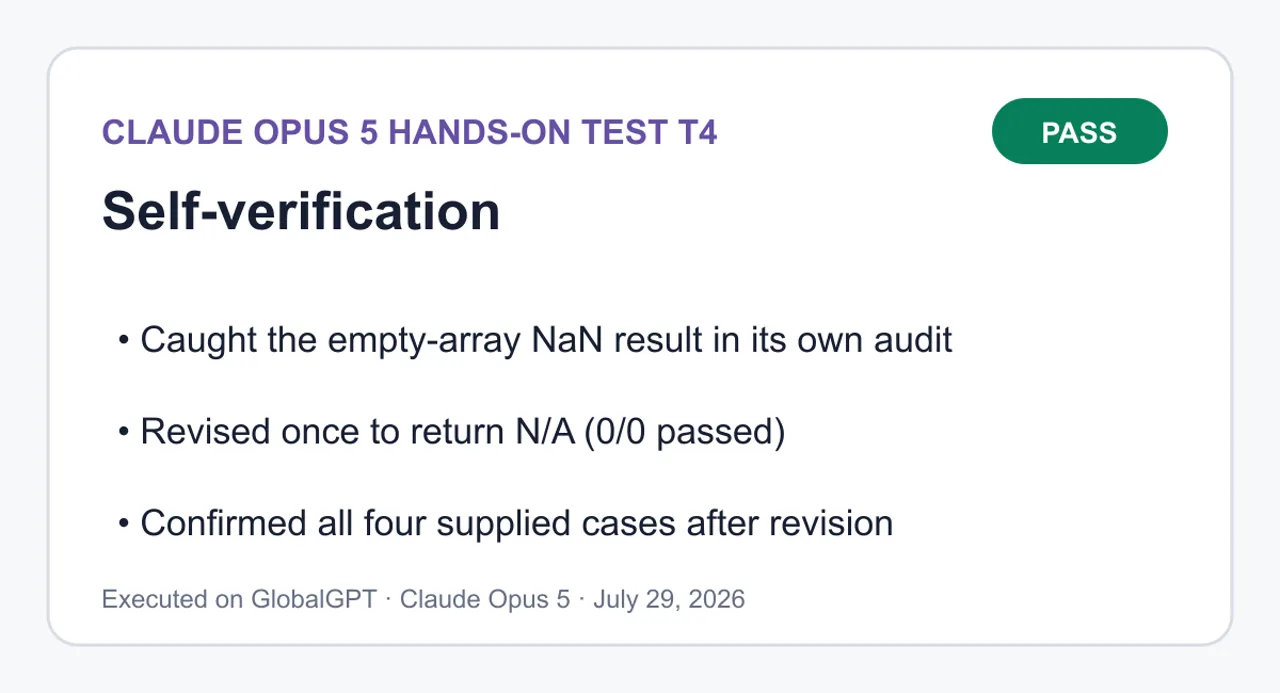
คำกล่าวทั้งหมดด้านล่างนี้มาจากการตรวจสอบโค้ดเท่านั้น ผมไม่ได้เปิดเบราว์เซอร์ ไม่แสดงผลวิวพอร์ต ไม่ใช้โปรแกรมอ่านหน้าจอ และไม่เรียกใช้ฟังก์ชันจัดการคีย์บอร์ด ดังนั้นข้อมูลทั้งหมดนี้ยังไม่ได้รับการตรวจสอบในสภาพแวดล้อมการทำงานจริง สำหรับกรณีที่คำกล่าวใดขึ้นอยู่กับพฤติกรรมของเครื่องยนต์จัดวาง ผมจะระบุไว้อย่างชัดเจน.
แท็บเชิงความหมาย — ได้รับการตรวจสอบแล้ว และมีความสอดคล้องกัน
div[role="tablist"] หนึ่งตัวที่มี aria-label="Plan comparison views" ประกอบด้วยปุ่ม[type="button"][role="tab"] สามตัว แต่ละแท็บมี id ที่ไม่ซ้ำกัน และ aria-controls ที่ชี้ไปยัง section[role="tabpanel"]; แต่ละ panel มี aria-labelledby ที่ชี้กลับไปยังแท็บของตัวเอง ผมได้ติดตามทั้งสามคู่ด้วยมือ: tab-overview/panel-overview, tab-pricing/panel-pricing, tab-limits/panel-limits. ไม่มี ID ซ้ำกัน และไม่มีการอ้างอิงที่ขาดหาย แผงใช้ tabindex="0" เพื่อให้สามารถเข้าถึงเนื้อหาของแผงได้หลังจากคลิกแท็บ.
การทำงานของคีย์บอร์ด — ตรวจสอบเท่านั้น ไม่ดำเนินการ
ตัวรับฟัง keydown เดียวบน tablist จะจัดการกับปุ่มลูกศรขวา ลูกศรซ้าย Home และ End โดยเรียกใช้ event.preventDefault() สำหรับปุ่มทั้งสี่นี้เท่านั้น และจะคืนค่าก่อนกำหนดในกรณีอื่น ปุ่มลูกศรจะวนกลับที่ทั้งสองด้าน เนื่องจากฟังก์ชัน activate() ทั้งอัปเดต aria-selected/tabindex/hidden และย้ายโฟกัส ปุ่มลูกศรและ Home/End จึงย้ายและเปิดใช้งานในขั้นตอนเดียว ซึ่งเป็นรูปแบบการเปิดใช้งานอัตโนมัติที่ข้อกำหนดต้องการ การเคลื่อนที่ด้วย Tab/Shift+Tab ขึ้นอยู่กับ tabindex ที่เปลี่ยนไปเรื่อยๆ: มีแท็บเดียวเท่านั้นที่มี tabindex="0" ส่วนที่เหลือเป็น -1 ซึ่งถูกจัดการโดยฟังก์ชัน activate() การแสดงโฟกัสมาจากกฎ :focus-visible ระดับโกลบอล ที่มีเส้นขอบ 3px และระยะห่าง 2px; ผมไม่ได้แทนที่หรือลบเส้นขอบค่าเริ่มต้นใดๆ ผมยังไม่ได้ตรวจสอบการทำงานของปุ่มในเบราว์เซอร์จริง.
การสะท้อนในสถานะที่เลือก — ได้รับการตรวจสอบแล้ว
ฟังก์ชัน activate() ตั้งค่าสัญญาณทั้งสามในลูปเดียวกัน ดังนั้น aria-selected="true", tabindex="0" และการไม่มีแอตทริบิวต์ hidden จึงไม่ถูกแยกออกจากกัน แผงที่ไม่ได้ใช้งานจะได้รับแอตทริบิวต์ hidden และ [hidden] { display: none !important; } จะป้องกันกฎการแสดงผลที่อาจทำให้แอตทริบิวต์นี้ถูกยกเลิก — การป้องกันนี้สำคัญเพราะแผงดังกล่าวมีองค์ประกอบลูกที่มี display: grid activate(currentIndex(), false) จะทำงานเมื่อโหลดหน้าเพื่อปรับสถานะให้สอดคล้องกับมาร์กอัปโดยไม่แย่งโฟกัส หาก JavaScript ไม่ทำงาน มาร์กอัปจะส่งมาพร้อมกับ Overview ที่ถูกเลือกและแผงอีกสองแผงถูกซ่อนไว้ ทำให้หน้าเว็บถูกลดระดับลงเหลือเพียงแผงเดียวที่อ่านได้.
การจัดวาง 1440px — ตรวจสอบแล้ว แต่ยังไม่แสดงผล
.wrap มี max-width: 1120px และ margin: 0 auto ดังนั้นเมื่อความกว้างเป็น 1440px เนื้อหาจะจัดอยู่ตรงกลางด้วยช่องว่างระหว่างคอลัมน์ประมาณ 160px แทนที่จะยืดออก การ์ดใช้ grid-template-columns: repeat(3, minmax(0, 1fr)) พร้อมช่องว่าง 20px ทำให้ได้สามคอลัมน์เท่ากัน; align-items: start ช่วยป้องกันไม่ให้การ์ดยืดตัวจนมีความสูงร่วมกัน ในขณะที่ .card { height: 100% } ถูกทำให้เป็นกลางด้วยวิธีนี้ การใช้ minmax(0, 1fr) เป็นความตั้งใจ — 1fr เพียงอย่างเดียวอาจปฏิเสธที่จะย่อขนาดลงต่ำกว่าความกว้างของเนื้อหา และทำให้กริดขยายกว้างขึ้น ผมไม่ได้วัดผลลัพธ์จริงเป็นพิกเซล.
การจัดวาง 390px — ตรวจสอบแล้ว แต่ยังไม่แสดงผล
บล็อกที่มีค่า max-width: 720px จะเปลี่ยนกริดการ์ดเป็น minmax(0, 1fr) ซึ่งเป็นคอลัมน์เดียว ทำให้การ์ดเรียงซ้อนกัน ค่า padding ลดลงเหลือ 16px ต่อด้าน ทำให้ความกว้างของเนื้อหาเหลือประมาณ 358px เป้าหมายการแตะ: ทุก [role="tab"] มี min-height: 44px และ padding แนวนอนลดลงเหลือ 12px แทนที่จะลดความสูงลง ดังนั้นพื้นที่ขั้นต่ำ 44px จะคงที่แม้ในความกว้างที่แคบ tablist ถูกตั้งค่าเป็น flex-wrap: nowrap พร้อม overflow-x: auto และ flex: 1 0 auto สำหรับองค์ประกอบลูก ดังนั้นแท็บสามแท็บจะจัดวางหรือเลื่อนภายใน tablist เอง แทนที่จะถูกตัดหรือจัดวางใหม่กลางองค์ประกอบ มีอยู่ แต่ยังไม่ได้รับการตรวจสอบใน viewport ที่มีความกว้างจริง 390px.
การล้นออกด้านแนวนอน — ได้รับการตรวจสอบแล้ว, มีส่วนเลื่อนที่ถูกจำกัดไว้อย่างตั้งใจหนึ่งส่วน
body { overflow-x: hidden } เป็นกลไกป้องกัน แต่ผมก็พยายามไม่พึ่งพาสิ่งนี้ * { box-sizing: border-box } ช่วยรักษา padding ให้อยู่ภายในความกว้างที่กำหนดไว้ ตารางเปรียบเทียบใช้ white-space: nowrap บนเซลล์ ดังนั้นตาราง Overview ที่มี 6 คอลัมน์จะมีความกว้างเกิน 358px บนอุปกรณ์มือถือ; ซึ่งถูกควบคุมโดย .table-scroll { max-width: 100%; overflow-x: auto } ที่ทำให้พื้นที่ตารางเลื่อนแทนที่จะเลื่อนหน้าเว็บ ตัวห่อนี้มี tabindex="0" และ role="region" พร้อมด้วย label เพื่อให้ผู้ใช้คีย์บอร์ดสามารถเข้าถึงและเลื่อนได้ ส่วนลูกของ Flex และ grid ที่อาจไม่ยอมย่อขนาดได้ถูกจัดการด้วย minmax(0, 1fr) บน grid และ flex-wrap: wrap บน .card-head และ .recommendation. ความเสี่ยงเดียวที่ยังเหลืออยู่ ซึ่งผมไม่สามารถตัดทิ้งได้โดยไม่แสดงผล คือข้อความยาวที่ต่อเนื่องกันในเซลล์ตาราง แต่ค่าของ fixture ทั้งหมดล้วนสั้น.
ความพึ่งพาจากภายนอก — ได้รับการตรวจสอบแล้ว, ไม่มี
ไม่ <link>, <script src>, <img>, @import, url(), fetch, XMLHttpRequest, web font, or CDN reference. Fonts are a system-ui stack. The badge and featured border are CSS only, no icon assets. Everything is inline in one file, so it runs from file:// with no build step.
ความต่างสีและภาพเคลื่อนไหว — ได้รับการตรวจสอบแล้ว
ข้อความหลัก #16191f บนพื้นหลัง #f6f7f9 และข้อความรอง #4a515c บนพื้นหลังสีขาว ทั้งสองล้วนมีอัตราส่วนความคมชัดมากกว่า 4.5:1; ตราสัญลักษณ์มีสีขาวบนพื้นสี #10457e และแท็บที่กำลังใช้งานมีสี #10457e บนพื้นสีขาว ผมคำนวณค่าเหล่านี้โดยการประมาณอัตราส่วนจากค่า hex ไม่ใช่ด้วยเครื่องมือวัดความต่างสี ไม่มีการเปลี่ยนสี การเคลื่อนไหว หรือการแปลงรูปใด ๆ ทั้งสิ้น; บล็อก prefers-reduced-motion เป็นเพียงมาตรการป้องกันแบบไม่ทำงาน (no-op) มากกว่าที่จะเป็นการแก้ไขการเคลื่อนไหวที่มีอยู่.
ความแม่นยำของแบบจำลอง — ได้รับการตรวจสอบแล้ว
ทั้งสามแผนปรากฏในทั้งสามแผง รวมถึงตารางของแต่ละแผงด้วย ผมได้ตรวจสอบข้ามทุกข้อมูลเกี่ยวกับราคา จำนวนโครงการ ปริมาณพื้นที่จัดเก็บ และระดับการสนับสนุนกับไฟล์ JSON: Atlas
19
/
20
𝑝
𝑟
𝑜
𝑗
𝑒
𝑐
𝑡
𝑠
/
10
𝐺
𝐵
/
𝐸
𝑚
𝑎
𝑖
𝑙
,
𝐵
𝑒
𝑎
𝑐
𝑜
𝑛
49/ไม่จำกัด/100 GB/Priority, Cove $99/ไม่จำกัด/1 TB/Dedicated. Beacon มีตราสัญลักษณ์ "Best overall" และเส้นขอบเน้น 2px; Atlas และ Cove ยังคงใช้ข้อความความทึบเต็ม เส้นขอบปกติ และการจัดรูปแบบตัวอักษรที่เหมือนกัน ทำให้ดูเหมือนว่ายังใช้งานได้อยู่แทนที่จะถูกปิดใช้งาน ส่วน "Best for values" จะแสดงเป็นป้ายสั้น ("Best for solo work") — คำอธิบายถูกเพิ่มรอบค่าของอุปกรณ์ โดยไม่มีการอ้างสิทธิ์ผลิตภัณฑ์ใหม่.
ช่องว่างที่ทราบแล้ว
ไม่มีการตรวจสอบการทำงานในขณะรันไทม์ในรูปแบบใดทั้งสิ้น เนื้อหาของแผงถูกคัดลอกไปทั้งสามแผงในรูปแบบมาร์กอัปแบบคงที่ แทนที่จะถูกเรนเดอร์จาก JSON ดังนั้น ฟิกเจอร์จึงเป็นแหล่งข้อมูลที่ถูกต้องโดยการคัดลอก ไม่ใช่โดยการผูกข้อมูล — การเปลี่ยนแปลงข้อมูลในอนาคตจะต้องแก้ไขในหลายจุด.

```html
<!DOCTYPE html>
<html lang="en">
<head>
<meta charset="utf-8">
<meta name="viewport" content="width=device-width, initial-scale=1">
<title>Compare plans — Atlas, Beacon, Cove</title>
<style>
  :root
 {
    --bg: #f6f7f9
;
    --surface: #ffffff
;
    --ink: #16191f
;
    --ink-soft: #4a515c
;
    --line: #d3d8df
;
    --line-strong: #b6bdc7
;
    --accent: #10457e
;
    --accent-soft: #e8f0f9
;
    --focus: #0b2f56
;
    --radius: 10px
;
  }

  * {
box-sizing
: border-box; }

  html { -webkit-text-size-adjust: 100%
; }

  body
 {
    margin: 0
;
    padding: 0
;
    background: var
(--bg);
    color: var
(--ink);
    font-family: system-ui, -apple-system, "Segoe UI"
, Roboto, Helvetica, Arial, sans-serif;
    font-size: 16px
;
    line-height: 1.5
;
    overflow-x
: hidden;
  }

  .wrap
 {
    width: 100%
;
    max-width: 1120px
;
    margin: 0
 auto;
    padding: 32px 24px 64px
;
  }

  /* ---------- Header ---------- */

  .page-header { margin-bottom: 24px
; }

  .page-header h1
 {
    margin: 0 0 8px
;
    font-size: 1.75rem
;
    line-height: 1.25
;
    letter-spacing: -0.01em
;
  }

  .page-header p
 {
    margin: 0
;
    max-width: 60ch
;
    color: var
(--ink-soft);
  }

  /* ---------- Recommendation ---------- */

  .recommendation
 {
    display
: flex;
    flex-wrap
: wrap;
    gap: 4px 10px
;
    align-items
: baseline;
    margin: 0 0 28px
;
    padding: 14px 16px
;
    background: var
(--accent-soft);
    border: 1px solid #c2d5e8
;
    border-left: 4px solid var
(--accent);
    border-radius: var
(--radius);
  }

  .recommendation strong { color: var
(--accent); }

  .recommendation span { color: #23405e
; }

  /* ---------- Tabs ---------- */

  .tabs
 {
    display
: flex;
    flex-wrap
: wrap;
    gap: 8px
;
    margin: 0 0 20px
;
    padding: 0
;
    border-bottom: 1px solid var
(--line);
  }

  [role="tab"]
 {
    appearance
: none;
    min-height: 44px
;
    padding: 10px 18px
;
    font
: inherit;
    font-weight: 600
;
    color: var
(--ink-soft);
    background
: transparent;
    border: 1px
 solid transparent;
    border-bottom: 3px
 solid transparent;
    border-radius: 8px 8px 0 0
;
    cursor
: pointer;
  }

  [role="tab"]:hover { color: var(--ink); background: #eceff3
; }

  [role="tab"][aria-selected="true"]
 {
    color: var
(--accent);
    background: var
(--surface);
    border-color: var(--line) var(--line) var
(--accent);
    border-bottom-width: 3px
;
  }

  :focus-visible
 {
    outline: 3px solid var
(--focus);
    outline-offset: 2px
;
  }

  [role="tabpanel"] { outline
: none; }

  [role="tabpanel"]:focus-visible
 {
    outline: 3px solid var
(--focus);
    outline-offset: 4px
;
    border-radius: var
(--radius);
  }

  [hidden] { display: none !important
; }

  .panel-intro
 {
    margin: 0 0 20px
;
    max-width: 62ch
;
    color: var
(--ink-soft);
  }

  /* ---------- Cards ---------- */

  .card-grid
 {
    display
: grid;
    grid-template-columns: repeat(3, minmax(0, 1
fr));
    gap: 20px
;
    margin: 0
;
    padding: 0
;
    list-style
: none;
    align-items
: start;
  }

  .card
 {
    display
: flex;
    flex-direction
: column;
    height: 100%
;
    padding: 20px
;
    background: var
(--surface);
    border: 1px solid var
(--line);
    border-radius: var
(--radius);
  }

  .card.is-featured
 {
    border-color: var
(--accent);
    border-width: 2px
;
    padding: 19px
;
  }

  .card-head
 {
    display
: flex;
    flex-wrap
: wrap;
    gap: 8px
;
    align-items
: center;
    justify-content
: space-between;
    margin-bottom: 4px
;
  }

  .card h3
 {
    margin: 0
;
    font-size: 1.2rem
;
  }

  .badge
 {
    padding: 3px 10px
;
    font-size: 0.75rem
;
    font-weight: 700
;
    letter-spacing: 0.02em
;
    text-transform
: uppercase;
    color: #ffffff
;
    background: var
(--accent);
    border-radius: 999px
;
    white-space
: nowrap;
  }

  .price
 {
    margin: 8px 0 2px
;
    font-size: 1.6rem
;
    font-weight: 700
;
    letter-spacing: -0.02em
;
  }

  .best-for
 {
    margin: 0 0 14px
;
    font-size: 0.9375rem
;
    color: var
(--ink-soft);
  }

  .spec-list
 {
    margin: 0
;
    padding: 14px 0 0
;
    border-top: 1px solid var
(--line);
    font-size: 0.9375rem
;
  }

  .spec-list div
 {
    display
: flex;
    gap: 12px
;
    justify-content
: space-between;
    padding: 5px 0
;
  }

  .spec-list dt { color: var
(--ink-soft); }

  .spec-list dd
 {
    margin: 0
;
    font-weight: 600
;
    text-align
: right;
  }

  /* ---------- Table ---------- */

  .table-section { margin-top: 36px
; }

  .table-section h2
 {
    margin: 0 0 12px
;
    font-size: 1.125rem
;
  }

  .table-scroll
 {
    max-width: 100%
;
    overflow-x
: auto;
    background: var
(--surface);
    border: 1px solid var
(--line);
    border-radius: var
(--radius);
  }

  table
 {
    width: 100%
;
    border-collapse
: collapse;
    font-size: 0.9375rem
;
  }

  caption
 {
    padding: 12px 14px
;
    text-align
: left;
    color: var
(--ink-soft);
    font-size: 0.875rem
;
  }

  th, td
 {
    padding: 10px 14px
;
    text-align
: left;
    border-top: 1px solid var
(--line);
    white-space
: nowrap;
  }

  thead th
 {
    background: #eef1f5
;
    border-top
: none;
    font-weight: 700
;
  }

  tbody th { font-weight: 600; color: var
(--ink-soft); }

  th[scope="col"].is-featured { color: var
(--accent); }

  /* ---------- Mobile ---------- */

  @media (max-width: 720px
) {
    .wrap { padding: 20px 16px 48px
; }

    .page-header h1 { font-size: 1.4rem
; }

    .tabs
 {
      gap: 4px
;
      overflow-x
: auto;
      -webkit-
overflow
-scrolling: touch;
      flex-wrap
: nowrap;
    }

    [role="tab"]
 {
      flex: 1 0
 auto;
      padding: 10px 12px
;
      font-size: 0.9375rem
;
    }

    .card-grid { grid-template-columns: minmax(0, 1
fr); }

    th, td { padding: 10px 12px
; }
  }

  @media (prefers-reduced-motion
: reduce) {
    * {
transition: none !important; animation: none !important
; }
  }
</style>
</head>
<body>
<main class="wrap">

  <header class="page-header">
    <h1>Compare plans</h1>
    <p>Three plans across projects, storage, and support. Pick a tab to focus on the details that matter to you.</p>
  </header>

  <p class="recommendation">
    <strong>Recommended: Beacon</strong>
    <span>Best overall for growing teams — $49/mo, unlimited projects, 100&nbsp;GB, priority support.</span>
  </p>

  <div class="tabs" role="tablist" aria-label="Plan comparison views">
    <button type="button" role="tab" id="tab-overview" aria-controls="panel-overview" aria-selected="true" tabindex="0">Overview</button>
    <button type="button" role="tab" id="tab-pricing" aria-controls="panel-pricing" aria-selected="false" tabindex="-1">Pricing</button>
    <button type="button" role="tab" id="tab-limits" aria-controls="panel-limits" aria-selected="false" tabindex="-1">Limits</button>
  </div>

  <!-- Overview -->
  <section role="tabpanel" id="panel-overview" aria-labelledby="tab-overview" tabindex="0">
    <p class="panel-intro">Every plan side by side, with the full set of published facts for each one.</p>

    <ul class="card-grid">
      <li class="card">
        <div class="card-head"><h3>Atlas</h3></div>
        <p class="price">$19/mo</p>
        <p class="best-for">Best for solo work</p>
        <dl class="spec-list">
          <div><dt>Projects</dt><dd>20 projects</dd></div>
          <div><dt>Storage</dt><dd>10 GB</dd></div>
          <div><dt>Support</dt><dd>Email support</dd></div>
        </dl>
      </li>

      <li class="card is-featured">
        <div class="card-head">
          <h3>Beacon</h3>
          <span class="badge">Best overall</span>
        </div>
        <p class="price">$49/mo</p>
        <p class="best-for">Best overall for growing teams</p>
        <dl class="spec-list">
          <div><dt>Projects</dt><dd>Unlimited projects</dd></div>
          <div><dt>Storage</dt><dd>100 GB</dd></div>
          <div><dt>Support</dt><dd>Priority support</dd></div>
        </dl>
      </li>

      <li class="card">
        <div class="card-head"><h3>Cove</h3></div>
        <p class="price">$99/mo</p>
        <p class="best-for">Best for regulated operations</p>
        <dl class="spec-list">
          <div><dt>Projects</dt><dd>Unlimited projects</dd></div>
          <div><dt>Storage</dt><dd>1 TB</dd></div>
          <div><dt>Support</dt><dd>Dedicated support</dd></div>
        </dl>
      </li>
    </ul>

    <section class="table-section">
      <h2>All plans at a glance</h2>
      <div class="table-scroll" tabindex="0" role="region" aria-label="Full plan comparison table, scrollable">
        <table>
          <caption>Published facts for Atlas, Beacon, and Cove.</caption>
          <thead>
            <tr>
              <th scope="col">Plan</th>
              <th scope="col">Price</th>
              <th scope="col">Projects</th>
              <th scope="col">Storage</th>
              <th scope="col">Support</th>
              <th scope="col">Best for</th>
            </tr>
          </thead>
          <tbody>
            <tr>
              <th scope="row">Atlas</th>
              <td>$19/mo</td><td>20 projects</td><td>10 GB</td><td>Email support</td><td>Solo work</td>
            </tr>
            <tr>
              <th scope="row">Beacon</th>
              <td>$49/mo</td><td>Unlimited projects</td><td>100 GB</td><td>Priority support</td><td>Growing teams</td>
            </tr>
            <tr>
              <th scope="row">Cove</th>
              <td>$99/mo</td><td>Unlimited projects</td><td>1 TB</td><td>Dedicated support</td><td>Regulated operations</td>
            </tr>
          </tbody>
        </table>
      </div>
    </section>
  </section>

  <!-- Pricing -->
  <section role="tabpanel" id="panel-pricing" aria-labelledby="tab-pricing" tabindex="0" hidden>
    <p class="panel-intro">Monthly price and the audience each plan is built for.</p>

    <ul class="card-grid">
      <li class="card">
        <div class="card-head"><h3>Atlas</h3></div>
        <p class="price">$19/mo</p>
        <p class="best-for">Best for solo work</p>
        <dl class="spec-list">
          <div><dt>Support</dt><dd>Email support</dd></div>
        </dl>
      </li>

      <li class="card is-featured">
        <div class="card-head">
          <h3>Beacon</h3>
          <span class="badge">Best overall</span>
        </div>
        <p class="price">$49/mo</p>
        <p class="best-for">Best overall for growing teams</p>
        <dl class="spec-list">
          <div><dt>Support</dt><dd>Priority support</dd></div>
        </dl>
      </li>

      <li class="card">
        <div class="card-head"><h3>Cove</h3></div>
        <p class="price">$99/mo</p>
        <p class="best-for">Best for regulated operations</p>
        <dl class="spec-list">
          <div><dt>Support</dt><dd>Dedicated support</dd></div>
        </dl>
      </li>
    </ul>

    <section class="table-section">
      <h2>Price and support</h2>
      <div class="table-scroll" tabindex="0" role="region" aria-label="Pricing comparison table, scrollable">
        <table>
          <caption>Monthly price, support tier, and intended fit.</caption>
          <thead>
            <tr>
              <th scope="col">Plan</th>
              <th scope="col">Price</th>
              <th scope="col">Support</th>
              <th scope="col">Best for</th>
            </tr>
          </thead>
          <tbody>
            <tr><th scope="row">Atlas</th><td>$19/mo</td><td>Email support</td><td>Solo work</td></tr>
            <tr><th scope="row">Beacon</th><td>$49/mo</td><td>Priority support</td><td>Growing teams</td></tr>
            <tr><th scope="row">Cove</th><td>$99/mo</td><td>Dedicated support</td><td>Regulated operations</td></tr>
          </tbody>
        </table>
      </div>
    </section>
  </section>

  <!-- Limits -->
  <section role="tabpanel" id="panel-limits" aria-labelledby="tab-limits" tabindex="0" hidden>
    <p class="panel-intro">Project counts and storage allowances for each plan.</p>

    <ul class="card-grid">
      <li class="card">
        <div class="card-head"><h3>Atlas</h3></div>
        <p class="price">$19/mo</p>
        <p class="best-for">Best for solo work</p>
        <dl class="spec-list">
          <div><dt>Projects</dt><dd>20 projects</dd></div>
          <div><dt>Storage</dt><dd>10 GB</dd></div>
        </dl>
      </li>

      <li class="card is-featured">
        <div class="card-head">
          <h3>Beacon</h3>
          <span class="badge">Best overall</span>
        </div>
        <p class="price">$49/mo</p>
        <p class="best-for">Best overall for growing teams</p>
        <dl class="spec-list">
          <div><dt>Projects</dt><dd>Unlimited projects</dd></div>
          <div><dt>Storage</dt><dd>100 GB</dd></div>
        </dl>
      </li>

      <li class="card">
        <div class="card-head"><h3>Cove</h3></div>
        <p class="price">$99/mo</p>
        <p class="best-for">Best for regulated operations</p>
        <dl class="spec-list">
          <div><dt>Projects</dt><dd>Unlimited projects</dd></div>
          <div><dt>Storage</dt><dd>1 TB</dd></div>
        </dl>
      </li>
    </ul>

    <section class="table-section">
      <h2>Projects and storage</h2>
      <div class="table-scroll" tabindex="0" role="region" aria-label="Limits comparison table, scrollable">
        <table>
          <caption>Project allowance and storage per plan.</caption>
          <thead>
            <tr>
              <th scope="col">Plan</th>
              <th scope="col">Projects</th>
              <th scope="col">Storage</th>
            </tr>
          </thead>
          <tbody>
            <tr><th scope="row">Atlas</th><td>20 projects</td><td>10 GB</td></tr>
            <tr><th scope="row">Beacon</th><td>Unlimited projects</td><td>100 GB</td></tr>
            <tr><th scope="row">Cove</th><td>Unlimited projects</td><td>1 TB</td></tr>
          </tbody>
        </table>
      </div>
    </section>
  </section>

</main>

<script>
(
function (
) {
  'use strict'
;

  var tablist = document.querySelector('[role="tablist"]'
);
  if (!tablist) return
;

  var tabs = Array.prototype.slice.call(tablist.querySelectorAll('[role="tab"]'
));

  function panelFor(tab
) {
    return document.getElementById(tab.getAttribute('aria-controls'
));
  }

  function activate(index, moveFocus
) {
    if (index < 0 || index >= tabs.length) return
;

    tabs.
forEach(function (tab, i
) {
      var
 selected = i === index;
      var panel = panelFor
(tab);

      tab.
setAttribute('aria-selected', selected ? 'true' : 'false'
);
      tab.
setAttribute('tabindex', selected ? '0' : '-1'
);

      if
 (panel) {
        if
 (selected) {
          panel.
removeAttribute('hidden'
);
        }
else
 {
          panel.
setAttribute('hidden', ''
);
        }
      }
    });

    if (moveFocus !== false) tabs[index].focus
();
  }

  function currentIndex(
) {
    var i = tabs.findIndex(function (tab
) {
      return tab.getAttribute('aria-selected') === 'true'
;
    });
    return i === -1 ? 0
 : i;
  }

  tabs.
forEach(function (tab, i
) {
    tab.
addEventListener('click', function (
) {
      activate
(i);
    });
  });

  tablist.
addEventListener('keydown', function (event
) {
    var last = tabs.length - 1
;
    var i = currentIndex
();
    var next = null
;

    switch (event.key
) {
      case 'ArrowRight'
:
        next = i === last ?
0 : i + 1
;
        break
;
      case 'ArrowLeft'
:
        next = i ===
0 ? last : i - 1
;
        break
;
      case 'Home'
:
        next =
0
;
        break
;
      case 'End'
:
        next = last;
        break
;
      default
:
        return
;
    }

    event.
preventDefault
();
    activate
(next);
  });

  // Normalize initial state from markup.
  activate(currentIndex(), false
);
}());
</script>
</body>
</html>
```

SELF-CHECK
All statements below come from code inspection only. I did not open a browser, render a viewport, run a screen reader, or execute the keyboard handlers, so nothing here is runtime-verified. Where a claim depends on layout engine behavior, I say so.
Semantic tabs — inspected, consistent
One div[role="tablist"] with aria-label="Plan comparison views" holds three button[type="button"][role="tab"]. Each tab has a unique id and an aria-controls pointing at a section[role="tabpanel"]; each panel carries aria-labelledby pointing back at its tab. I traced all three pairs by hand: tab-overview/panel-overview, tab-pricing/panel-pricing, tab-limits/panel-limits. No duplicate IDs, no dangling references. Panels use tabindex="0" so the panel body is reachable after the tab.
Keyboard behavior — inspected, not executed
A single keydown listener on the tablist handles ArrowRight, ArrowLeft, Home, and End, calls event.preventDefault() for those four keys only, and returns early otherwise. Arrow keys wrap at both ends. Because activate() both updates aria-selected/tabindex/hidden and moves focus, arrow and Home/End keys move andactivate in one step, which is the automatic-activation pattern the requirement asks for. Tab/Shift+Tab traversal relies on roving tabindex: exactly one tab is tabindex="0", the rest -1, maintained by activate(). Focus visibility comes from a global :focus-visible rule with a 3px outline and 2px offset; I did not override or remove any default outline. I have not confirmed key handling in a real browser.
Selected-state reflection — inspected
activate() sets all three signals in the same loop, so aria-selected="true", tabindex="0", and the absence of hidden cannot drift apart. Inactive panels get the hidden attribute, and [hidden] { display: none !important; } guards against the display rules that would otherwise defeat it — that guard matters because the panels contain display: grid children. activate(currentIndex(), false) runs on load to normalize state from markup without stealing focus. If JavaScript does not run, the markup ships with Overview selected and the other two panels hidden, so the page degrades to one readable panel.
1440px layout — inspected, not rendered
.wrap is max-width: 1120px with margin: 0 auto, so at 1440px the content centers with roughly 160px gutters rather than stretching. Cards use grid-template-columns: repeat(3, minmax(0, 1fr)) with a 20px gap, giving three equal columns; align-items: start keeps cards from stretching to a shared height while .card { height: 100% } is neutralized by that. The minmax(0, 1fr) is deliberate — 1fralone can refuse to shrink below content width and push a grid wide. I did not measure actual pixel output.
390px layout — inspected, not rendered
The max-width: 720px block switches the card grid to minmax(0, 1fr), a single column, so cards stack. Padding drops to 16px per side, leaving about 358px of content width. Tap targets: every [role="tab"] has min-height: 44px, and horizontal padding shrinks to 12px rather than the height shrinking, so the 44px floor holds at narrow widths. The tablist becomes flex-wrap: nowrap with overflow-x: auto and flex: 1 0 auto children, so three tabs either fit or scroll within the tablist itself instead of being clipped or wrapped mid-control. <meta name="viewport" content="width=device-width, initial-scale=1"> is present. Not verified at an actual 390px viewport.
Horizontal overflow — inspected, one intentional contained scroll
body { overflow-x: hidden } is the backstop, but I also tried not to rely on it. * { box-sizing: border-box } keeps padding inside declared widths. The comparison tables use white-space: nowrap on cells, so the six-column Overview table will exceed 358px on mobile; that is contained by .table-scroll { max-width: 100%; overflow-x: auto }, which scrolls the table region rather than the page. That wrapper has tabindex="0" and role="region" with a label so keyboard users can reach and scroll it. Flex and grid children that could otherwise refuse to shrink are handled with minmax(0, 1fr) on the grid and flex-wrap: wrap on .card-head and .recommendation. The one remaining risk I cannot rule out without rendering is a long unbroken string in a table cell, but all fixture values are short.
External dependencies — inspected, none
No <link>, <script src>, <img>, @import, url(), fetch, XMLHttpRequest, web font, or CDN reference. Fonts are a system-ui stack. The badge and featured border are CSS only, no icon assets. Everything is inline in one file, so it runs from file:// with no build step.
Contrast and motion — inspected
Body text #16191f on #f6f7f9 and secondary #4a515c on white are both well clear of 4.5:1; the badge is white on #10457e, and the active tab is #10457e on white. I computed these by ratio estimate from the hex values, not with a contrast tool. There are no transitions, animations, or transforms anywhere; the prefers-reduced-motion block is a no-op safety net rather than a fix for existing motion.
Fixture fidelity — inspected
Each of the three plans appears in all three panels plus each panel's table. I cross-checked every price, project count, storage figure, and support tier against the JSON: Atlas
19
/
20
𝑝
𝑟
𝑜
𝑗
𝑒
𝑐
𝑡
𝑠
/
10
𝐺
𝐵
/
𝐸
𝑚
𝑎
𝑖
𝑙
,
𝐵
𝑒
𝑎
𝑐
𝑜
𝑛
49/Unlimited/100 GB/Priority, Cove $99/Unlimited/1 TB/Dedicated. Beacon carries the Best overall badge and a 2px accent border; Atlas and Cove keep full-opacity text, normal borders, and identical type treatment, so they read as available rather than disabled. The best for values are rendered as short labels ("Best for solo work") — wording added around the fixture value, no new product claims.
Known gaps
No runtime verification of any kind. Panel content is duplicated across the three panels as static markup rather than rendered from the JSON, so the fixture is the source of truth by transcription, not by binding — a future data change means editing several places.

T4: การตรวจสอบด้วยตนเอง

ผ่าน — พบข้อผิดพลาด NaN ในอาร์เรย์ว่างระหว่างการตรวจสอบภายใน ได้แก้ไขหนึ่งครั้ง และยืนยันว่าทุกกรณีที่ให้มาถูกต้อง.

Claude Opus 5 ผลลัพธ์การตรวจสอบด้วยตนเองแบบปฏิบัติจริง
พบผลลัพธ์ NaN จากอาร์เรย์ว่างในกระบวนการตรวจสอบของตัวเอง; ได้แก้ไขครั้งหนึ่งเพื่อคืนค่า N/A (ผ่านการทดสอบ 0/0); ยืนยันว่าทั้งสี่กรณีที่ให้มาผ่านการตรวจสอบหลังการแก้ไขแล้ว.
ดูคำถามและคำตอบ T4 ฉบับเต็ม
คำสั่งที่ครบถ้วน
ทำภารกิจข้อจำกัดที่มีหมายเลขนี้ให้เสร็จสิ้น แล้วตรวจสอบและแก้ไขเพียงครั้งเดียวหากจำเป็น

ข้อจำกัดของภารกิจ:
1. เขียนฟังก์ชัน JavaScript แบบธรรมดาที่มีชื่อ `summarizeChecks(checks)`; `checks` เป็นอาร์เรย์ของค่าบูลีน
2. สำหรับข้อมูลเข้าที่ไม่ว่าง ให้คืนค่าเป็น `% (/ passed)` โดยที่ `rate` มีทศนิยมหนึ่งตำแหน่ง และเป็นตัวแทนร้อยละของค่าที่เป็น `true` ตัวอย่าง: `[true, true, false, true]` คืนค่า `75.0% (3/4 passed)`
3. ห้ามเปลี่ยนแปลงข้อมูลเข้า
4. ห้ามใช้ `for`, `while`, `forEach`, `eval`, ไลบรารีภายนอก หรือฟังก์ชันอื่น
5. ตัวฟังก์ชันอาจมีคำสั่งได้สูงสุดสามคำสั่ง การประกาศตัวแปรพร้อมตัวกำหนดค่าเริ่มต้นนับเป็นหนึ่งคำสั่ง
6. กำหนดฟังก์ชันให้กับ `globalThis.summarizeChecks` หลังการประกาศ เพื่อให้ระบบทดสอบอิสระสามารถเรียกใช้ได้

รูปแบบคำตอบที่จำเป็น:
- `FIRST ANSWER`: ให้คำตอบเริ่มต้นในบล็อก `js` ที่ถูกกั้นด้วยเครื่องหมาย `{}` ก่อนดำเนินการตรวจสอบ
- `AUDIT`: ตรวจสอบคำตอบแรกตามข้อจำกัด 1–6 และกรณีขอบที่ซ่อนอยู่ดังนี้: เมื่อข้อมูลเข้าเป็นค่าว่าง ต้องคืนค่าเป็น `N/A (0/0 ผ่าน)` เท่านั้น ระบุสถานะผ่าน/ไม่ผ่านสำหรับแต่ละข้อ
- หากมีรายการตรวจสอบใดไม่ผ่าน ให้แก้ไขเพียงครั้งเดียวเท่านั้น ห้ามแก้ไขมากกว่าหนึ่งครั้ง
- `FINAL ANSWER`: ให้คำตอบสุดท้ายในบล็อก `js` ที่ถูกกั้นไว้หนึ่งบล็อก รักษาข้อจำกัดเดิมทั้งหมดไว้พร้อมทั้งตอบสนองกรณีขอบสำหรับข้อมูลเข้าว่าง

ใช้กรณีตรวจสอบอิสระต่อไปนี้ในการตรวจสอบ:
```text
[] -> N/A (0/0 ผ่าน)
[true] -> 100.0% (1/1 ผ่าน)
[false] -> 0.0% (ผ่าน 0/1)
[true, true, false, true] -> 75.0% (ผ่าน 3/4)
```
Claude Opus 5

คำตอบแรก

เจเอส
function summarizeChecks(checks) {  const total = checks.length;  const passed = checks.filter(Boolean).length;  return `${((passed / total) * 100).toFixed(1)}% (${passed}/${total} ผ่าน)`;} globalThis.summarizeChecks = summarizeChecks;
function summarizeChecks(checks) {
  const total = checks.length;
  const passed = checks.filter(Boolean).length;
  return `${((passed / total) * 100).toFixed(1)}% (${passed}/${total} passed)`;
}

globalThis.summarizeChecks = summarizeChecks;

การตรวจสอบ

#
ข้อจำกัด
ผลลัพธ์
1
ฟังก์ชันแบบธรรมดาที่มีชื่อว่า summarizeChecks(checks)
PASS — การประกาศแบบธรรมดา มีพารามิเตอร์หนึ่งตัว ไม่มีคลาสหรือตัวห่อแบบลูกศร.
2
รูปแบบ % (/ ผ่าน), แสดงอัตราเป็นทศนิยมหนึ่งตำแหน่ง
PASS สำหรับข้อมูลเข้าที่ไม่ว่าง — toFixed(1) กำหนดตำแหน่งทศนิยมให้คงที่ และระยะห่างระหว่างตัวเลขตรงตามข้อกำหนดอย่างแม่นยำ.
3
ไม่มีการกลายพันธุ์ของอินพุต
PASS — .length และ .filter เป็นทั้งสองตัวที่อ่านได้เท่านั้น; filter คืนค่าเป็นอาร์เรย์ใหม่.
4
ไม่ใช้ for, while, forEach, eval, library หรือ second function
PASS — .filter เป็นการวนซ้ำเพียงครั้งเดียว Boolean เป็นตัวแปรในตัวระบบที่ใช้เป็นอ้างอิงของเงื่อนไข ไม่ใช่ฟังก์ชันที่ฉันกำหนดขึ้น.
5
ในส่วนเนื้อหาสามารถมีข้อความได้สูงสุดสามข้อ
PASS — รวมทั้งหมดสามตัวแปร: การประกาศตัวแปรสองตัวที่ได้รับการกำหนดค่าเริ่มต้น และตัวแปรที่ส่งคืน.
6
ถูกกำหนดให้ใช้กับ globalThis.summarizeChecks หลังจากประกาศตัวแปร
PASS — การกำหนดค่าจะตามมาหลังการประกาศในระดับบนสุด.
กรณีตรวจสอบอิสระ:
อินพุต
คาดหวัง
จริง
ผลลัพธ์
[]
ไม่มี (ผ่าน 0/0)
NaN% (ผ่าน 0/0)
ไม่ผ่าน
[true]
100.0% (ผ่าน 1/1)
100.0% (ผ่าน 1/1)
ผ่าน
[false]
0.0% (ผ่าน 0/1)
0.0% (ผ่าน 0/1)
ผ่าน
[จริง, จริง, ผิด, จริง]
75.0% (ผ่าน 3/4)
75.0% (ผ่าน 3/4)
ผ่าน
เกิดข้อผิดพลาดหนึ่งครั้ง เมื่อรับค่าอินพุตเป็นศูนย์ / ผลรวมเป็น 0 / 0 ซึ่งเท่ากับ NaN; NaN.toFixed(1) จะคืนค่าเป็นสตริง "NaN" แทนที่จะทำให้เกิดข้อผิดพลาด ดังนั้นฟังก์ชันนี้จึงส่งค่า NaN% (0/0 ถูกส่งเข้ามา) โดยไม่แจ้งเตือน.
แก้ไขหนึ่งครั้ง การแก้ไขนี้ยังคงอยู่ภายในคำสั่ง return ที่มีอยู่เดิมในรูปแบบของนิพจน์เงื่อนไข ดังนั้นจำนวนคำสั่งจึงไม่เปลี่ยนแปลง สัญลักษณ์ % ถูกย้ายเข้าไปภายในสาขาที่ไม่ว่าง เนื่องจากผลลัพธ์ที่คาดว่าจะว่างคือ N/A (0/0 ผ่าน) โดยไม่มีสัญลักษณ์เปอร์เซ็นต์.

คำตอบสุดท้าย

เจเอส
function summarizeChecks(checks) {  const total = checks.length;  const passed = checks.filter(Boolean).length;  return `${total === 0 ? 'N/A' : `${((passed / total) * 100).toFixed(1)}%`} (${passed}/${total} ผ่าน)`;} globalThis.summarizeChecks = summarizeChecks;
function summarizeChecks(checks) {
  const total = checks.length;
  const passed = checks.filter(Boolean).length;
  return `${total === 0 ? 'N/A' : `${((passed / total) * 100).toFixed(1)}%`} (${passed}/${total} ผ่าน)`;
}

globalThis.summarizeChecks = summarizeChecks;

การยืนยันหลังการแก้ไขในทั้งสี่กรณี: [] → N/A (ผ่าน 0/0), [true] → 100.0% (ผ่าน 1/1), [false] → 0.0% (ผ่าน 0/1), [true, true, false, true] → 75.0% (3/4 ผ่าน). ตัวโค้ดยังคงมีสามคำสั่ง ข้อมูลเข้ายังไม่ถูกแก้ไข และไม่มีการนำโครงสร้างที่ถูกห้ามมาใช้.

คำตอบแรก

```js
function summarizeChecks(checks) {
  const total = checks.length;
  const passed = checks.filter(Boolean).length;
  return `${((passed / total) * 100).toFixed(1)}% (${passed}/${total} passed)`;
}

globalThis.summarizeChecks = summarizeChecks;
```

การตรวจสอบ
#
ข้อจำกัด
ผลลัพธ์
1
ฟังก์ชันธรรมดาชื่อ summarizeChecks(checks)
ผ่าน — การประกาศแบบธรรมดา มีพารามิเตอร์หนึ่งตัว ไม่มีคลาสหรือตัวห่อลูกศร
2
รูปแบบ % (/ passed), rate ถึงหนึ่งทศนิยม
ผ่าน สำหรับข้อมูลเข้าที่ไม่ว่าง — toFixed(1) กำหนดตำแหน่งทศนิยมให้คงที่ และช่องว่างตามค่าคงที่ตรงกับข้อกำหนดอย่างแม่นยำ
3
ไม่มีการเปลี่ยนแปลงข้อมูลเข้า
ผ่าน — .length และ .filter เป็นแบบอ่านอย่างเดียว; filter คืนค่าเป็นอาร์เรย์ใหม่
4
ไม่มี for, while, forEach, eval, library หรือฟังก์ชันที่สอง
ผ่าน — .filter เป็นกระบวนการวนซ้ำเพียงอย่างเดียว; Boolean เป็นฟังก์ชันในตัวที่ใช้เป็นอ้างอิงเงื่อนไข ไม่ใช่ฟังก์ชันที่ฉันกำหนด
5
มีคำสั่งในตัวหลักได้สูงสุดสามคำสั่ง
ผ่าน — มีสามคำสั่งพอดี: การประกาศตัวแปรสองตัวที่ตั้งค่าเริ่มต้น บวกกับคำสั่ง return
6
กำหนดค่าให้กับ globalThis.summarizeChecks หลังการประกาศ
ผ่าน — การกำหนดค่าเกิดขึ้นหลังการประกาศที่ระดับบนสุด
กรณีตรวจสอบอิสระ:
ข้อมูลเข้า
ที่คาดไว้
ที่จริง
ผลลัพธ์
[]
N/A (ผ่าน 0/0)
NaN% (ผ่าน 0/0)
ไม่ผ่าน
[true]
100.0% (ผ่าน 1/1)
100.0% (ผ่าน 1/1)
ผ่าน
[false]
0.0% (ผ่าน 0/1)
0.0% (ผ่าน 0/1)
ผ่าน
[true, true, false, true]
75.0% (ผ่าน 3/4)
75.0% (ผ่าน 3/4)
ผ่าน
มีข้อผิดพลาด 1 ครั้ง เมื่อใช้ข้อมูลเข้าที่ว่าง ผ่าน / รวมเป็น 0 / 0 ซึ่งเท่ากับ NaN; NaN.toFixed(1) คืนค่าเป็นสตริง "NaN" แทนที่จะเกิดข้อผิดพลาด ดังนั้นฟังก์ชันจึงส่ง NaN% (ผ่าน 0/0) โดยไม่แจ้งเตือน
แก้ไขหนึ่งครั้ง การแก้ไขยังคงอยู่ภายในคำสั่ง return ที่มีอยู่เดิมในรูปแบบนิพจน์เงื่อนไข ดังนั้นจำนวนคำสั่งจึงไม่เปลี่ยนแปลง สัญลักษณ์ % ย้ายเข้าไปในสาขาที่ไม่ว่าง เนื่องจากผลลัพธ์ที่ว่างที่คาดไว้คือ N/A (0/0 ผ่าน) โดยไม่มีสัญลักษณ์เปอร์เซ็นต์
คำตอบสุดท้าย

```js
function summarizeChecks(checks) {
  const total = checks.length;
  const passed = checks.filter(Boolean).length;
  return `${total === 0 ? 'N/A' : `${((passed / total) * 100).toFixed(1)}%`} (${passed}/${total} ผ่าน)`;
}

globalThis.summarizeChecks = summarizeChecks;
```

การยืนยันหลังการแก้ไขในทั้งสี่กรณี: [] → N/A (0/0 ผ่าน), [true] → 100.0% (1/1 ผ่าน), [false] → 0.0% (0/1 ผ่าน), [true, true, false, true] → 75.0% (3/4 ผ่าน). ส่วนตัวหลักยังคงมีคำสั่งสามบรรทัด ข้อมูลเข้ายังไม่ถูกแก้ไข และไม่มีการนำโครงสร้างที่ถูกห้ามมาใช้.

ทีมที่เลือกใช้ผู้ให้บริการหลายรายควรยังคงทดสอบระบบเก็บข้อมูล (repository) ชุดเครื่องมือ (tool stack) และภาระงานในการตรวจสอบของตนเองต่อไป ส่วนในภาพรวม Claude กับ ChatGPT เพื่อเปรียบเทียบการเข้ารหัส ช่วยให้มองเห็นภาพรวมของการแลกเปลี่ยนผลประโยชน์เหล่านั้นได้ชัดเจนขึ้น โดยไม่จำกัดอยู่เพียงผลลัพธ์เดียวนี้.

Claude Opus 5 เทียบกับ Opus 4.8 เทียบกับ Fable 5

วิธีที่ชัดเจนที่สุดในการเข้าใจ Opus 5 คือการมองมันเป็นเครื่องทำงานหลักระดับพรีเมียมรุ่นใหม่ Opus 4.8 เป็นรุ่นก่อนหน้า ส่วน Fable 5 ยังคงเป็นมาตรฐานอ้างอิงระดับแนวหน้า เอกสารเปิดตัวของ Anthropic ระบุว่า Opus 5 มีต้นทุนพื้นฐานเท่ากับ Opus 4.8 แต่สามารถเทียบเคียงกับ Fable 5 ในบางการประเมิน โดยใช้ต้นทุนต่องานที่ต่ำกว่าอย่างมีนัยสำคัญ.

แบบจำลองตำแหน่งสัญญาณความคุ้มค่าต่อประสิทธิภาพเหมาะสมที่สุด
Claude Opus 5รุ่นพรีเมียมสำหรับใช้ในชีวิตประจำวัน; รุ่นต่อจาก Opus 4.8$5/$25 ต่อ MTok ของการรับ/ส่งข้อมูล; ผลลัพธ์ค่าใช้จ่ายต่องานที่เผยแพร่โดย Anthropic ซึ่งมีความน่าเชื่อถือสูงการเขียนโค้ดที่ซับซ้อน การอัตโนมัติ และงานระดับองค์กรที่ความน่าเชื่อถือเป็นสิ่งสำคัญ
โคลด ออปุส 4.8รุ่น Opus ก่อนหน้าราคาพื้นฐานเท่ากันกับ Opus 5 ตามการเปรียบเทียบเมื่อเปิดตัวของ Anthropicกระบวนการทำงานที่ถูกตรึงไว้ที่มีอยู่ ซึ่งยังต้องผ่านการตรวจสอบความถูกต้องในการย้ายข้อมูล
โคลด เฟเบล 5ระดับข้อมูลข่าวกรองแนวหน้าจุดอ้างอิงสูงสุด; Anthropic ระบุว่า Opus 5 มีผลการทดสอบใกล้เคียงกับ CursorBench แต่มีค่าใช้จ่ายต่องานเพียงครึ่งหนึ่งงานที่ยากที่สุดเมื่อประสิทธิภาพสูงสุดมีความสำคัญมากกว่าด้านเศรษฐกิจ

เลือก Opus 5 แทน Opus 4.8 เมื่อคุณสามารถทำการทดสอบการถดถอย (regression testing) สำหรับการย้ายระบบ และต้องการใช้โมเดลที่ใหม่กว่าโดยไม่เพิ่มอัตรา API พื้นฐาน เลือก Fable 5 เมื่อผลการประเมินของคุณเองแสดงให้เห็นว่าความสามารถเพิ่มเติมของมันส่งผลต่อผลลัพธ์มากพอที่จะคุ้มค่ากับค่าใช้จ่ายเพิ่มเติม เพื่อดูรายละเอียดระดับกลุ่มผลิตภัณฑ์ปัจจุบันที่รวมถึง Sonnet 5 ด้วย ให้ใช้ การเปรียบเทียบระหว่าง Claude Opus 5 กับ Fable 5 และ Sonnet 5.

ปฏิกิริยาจากผู้พัฒนาและภาคอุตสาหกรรม

โพสต์บนโซเชียลมีเดียให้ข้อมูลที่เป็นประโยชน์เกี่ยวกับการใช้งานในช่วงแรก แต่ไม่ใช่เกณฑ์วัดผลที่เป็นกลาง บัญชีทางการของ Claude ได้อธิบาย Opus 5 ว่ามีแนวคิดที่รอบคอบและเชิงรุก ใกล้เคียงกับเทคโนโลยีล้ำสมัยของ Fable 5 แต่มีราคาเพียงครึ่งหนึ่ง นั่นคือกลยุทธ์การเปิดตัวของ Anthropic เอง ไม่ใช่การยืนยันจากแหล่งอิสระ.

โพสต์ X ดั้งเดิมของ Claude ที่ประกาศเกี่ยวกับ Claude Opus 5 เมื่อวันที่ 24 กรกฎาคม 2026
Claude ได้ประกาศเปิดตัว Opus 5 บน X โดยระบุว่าเป็นโมเดลที่ได้รับการออกแบบอย่างพิถีพิถันและมีความริเริ่ม ซึ่งอยู่ในระดับใกล้เคียงกับระบบปัญญาประดิษฐ์ Fable 5 แต่มีราคาเพียงครึ่งหนึ่ง.

JetBrains รายงานว่าผลการประเมินของบริษัทเองแสดงให้เห็นว่า 45% มีอัตราการผ่าน Python สูงกว่า Opus 4.8, พร้อมทั้งความเข้าใจที่ลึกซึ้งยิ่งขึ้นเกี่ยวกับโค้ดเบส นี่เป็นข้อสังเกตที่เป็นรูปธรรมและเกี่ยวข้องจากบริษัทผู้พัฒนาเครื่องมือสำหรับนักพัฒนา แต่ผลลัพธ์นี้เป็นส่วนหนึ่งของการประเมินของ JetBrains และไม่ควรนำไปใช้ทั่วไปกับทุกการทดสอบประสิทธิภาพหรือรีโพสิตอรีของ Python.

บทความบน JetBrains X รายงานว่า Claude Opus 5 ช่วยเพิ่มอัตราการผ่านสอบ Python และเพิ่มความเข้าใจในโค้ดอย่างลึกซึ้งยิ่งขึ้น
JetBrains ระบุว่าผลการประเมินของบริษัทแสดงให้เห็นว่าอัตราผ่าน Python สูงขึ้น 45% เมื่อเทียบกับ Opus 4.8 และมีความเข้าใจในโค้ดเบสที่ลึกซึ้งยิ่งขึ้น.

Harvey รายงานว่ามีการปรับปรุงอย่างมีนัยสำคัญเมื่อเทียบกับ Opus 4.8 ในด้านคุณภาพและประสิทธิภาพการใช้โทเคน ในกระบวนการทำงานทางกฎหมายต่าง ๆ รวมถึงการกำกับดูแลกิจการและการอนุญาโตตุลาการ สิ่งนี้มีความสำคัญต่อผู้ซื้อเทคโนโลยีทางกฎหมาย แต่ยังคงเป็นการประเมินของ Harvey ต่อกระบวนการทำงานในสาขาการปฏิบัติงานของบริษัทเอง ไม่ใช่หลักฐานที่แสดงถึงความถูกต้องทางกฎหมายในทุกกรณี.

โพสต์ของ Harvey X ที่รายงานว่า Claude Opus 5 ได้ปรับปรุงคุณภาพงานทางกฎหมายและประสิทธิภาพของโทเคน
Harvey รายงานว่า Opus 5 ได้ปรับปรุงคุณภาพงานด้านกฎหมายและประสิทธิภาพการใช้โทเคน รวมถึงด้านการกำกับดูแลกิจการและกระบวนการอนุญาโตตุลาการ.

เมื่อพิจารณาโดยรวมแล้ว โพสต์เหล่านี้ชี้ให้เห็นว่าผู้ใช้งานกลุ่มแรกเริ่มสังเกตเห็นการปรับปรุงในด้านการเข้าใจโค้ดเบสและการทำงานที่เกี่ยวข้องกับความรู้เฉพาะด้าน ขั้นตอนต่อไปที่ควรดำเนินการคือการทดลองนำร่องแบบตัวแทน โดยใช้การทดสอบการยอมรับของคุณเอง งบประมาณโทเคน และกระบวนการตรวจสอบโดยมนุษย์.

Claude Opus 5 API: รหัสแบบจำลอง, ตัวอย่าง และหมายเหตุเกี่ยวกับการย้ายข้อมูล

ID แบบจำลอง API Claude อย่างเป็นทางการและชื่อเรียกแทนทั้งสองคือ claude-opus-5. ต่อไปนี้คือตัวอย่างที่เรียบง่ายที่สุด Anthropic API ตัวอย่างคำขอ ตัวอย่างนี้แสดงเพียงจุดปลายทาง Messages อย่างเป็นทางการเท่านั้น; ไม่มีการอธิบายหรือรับประกันเกี่ยวกับการพัฒนาส่วนหลังของ GlobalGPT.

curl https://api.anthropic.com/v1/messages \
  --header "x-api-key: $ANTHROPIC_API_KEY" \
  --header "anthropic-version: 2023-06-01" \
  --header "content-type: application/json" \
  --data '{
    "model": "claude-opus-5",
    "max_tokens": 1024,
    "messages": [
 {
 "role": "user",
 "content": "หาสาเหตุหลัก เสนอการแก้ไขที่น้อยที่สุด และให้คำสั่งตรวจสอบ."
      }
    ]
  }'

รายการตรวจสอบการย้ายข้อมูล

  • เปลี่ยนค่าของโมเดลเป็น claude-opus-5, แล้วดำเนินการวิเคราะห์การถดถอยและการประเมินความปลอดภัยของคุณเองอีกครั้ง.
  • ตั้งงบประมาณตามค่าอินพุต $5 และค่าเอาต์พุต $25 ต่อ MTok; ตรวจสอบวงจรเอเจนต์ที่มีเอาต์พุตสูงและจำนวนครั้งที่เครื่องมือพยายามใหม่.
  • อย่านำระบบเก่ามาใช้ต่อ thinking.type: "เปิด" การตั้งค่า. คู่มือการคิดของ Anthropic ระบุว่ากำลังมีการพิจารณาเกี่ยวกับ Opus 5 แล้ว และบันทึกการตั้งค่าที่ปรับให้เหมาะสม.
  • ให้ถือว่า 128K เป็นค่าสูงสุดของปริมาณข้อมูลที่ส่งออกได้สำหรับ Messages API แบบซิงโครนัส ส่วนฟีเจอร์ Message Batches เวอร์ชันเบต้าที่แยกออกมาสามารถรองรับได้สูงสุด 300K โดยใช้ส่วนหัวเบต้าที่ระบุไว้ในเอกสารของ Anthropic.
  • ตรวจสอบชื่อรุ่นและสิทธิ์การเข้าถึงของผู้ให้บริการแต่ละราย เอกสาร Anthropic anthropic.claude-opus-5 สำหรับ Amazon Bedrock และ claude-opus-5 สำหรับ Google Cloud.

สำหรับนักพัฒนาที่ต้องการใช้กระบวนการทำงานผ่านบรรทัดคำสั่งควบคู่กับ Claude Code คู่มือการตั้งค่าที่ใช้งานได้จริงคือ วิธีใช้ CLI ของ GlobalGPT ในโค้ด Claude. ให้แยกกระบวนการทำงานนี้ออกจากตัวอย่าง API Anthropic อย่างเป็นทางการข้างต้น เพื่อให้ข้อมูลการรับรองความถูกต้อง การเรียกเก็บเงิน และพฤติกรรมของผู้ให้บริการยังคงชัดเจน.

Claude Opus 5 คุ้มค่าหรือไม่?

ใช่—เมื่อความล้มเหลวมีราคาสูง และปริมาณงานนั้นยากจริงๆ. Opus 5 จะให้ผลลัพธ์ที่ดีที่สุดเมื่อการวินิจฉัยที่ดีขึ้น การใช้เครื่องมือ หรือการตัดสินใจในบริบทที่กว้างขึ้นสามารถช่วยประหยัดเวลาของวิศวกรหรือนักวิเคราะห์ได้ การผสมผสานระหว่างหน้าต่างบริบทขนาด 1 ล้านโทเคน ขีดจำกัดการส่งออกแบบซิงโครนัสที่ 128K และการอ้างอิงค่าใช้จ่ายต่องานที่น่าเชื่อถือ ทำให้ Opus 5 มีตำแหน่งที่มั่นคงในฐานะเครื่องมือหลักระดับพรีเมียมที่น่าเชื่อถือ.

ใครควรใช้ Claude Opus 5?

  • ทีมวิศวกรรมที่ใช้งานเอเจนต์การเขียนโค้ดกับรีโพสิตอรีขนาดใหญ่.
  • ทีมปฏิบัติการกำลังนำระบบอัตโนมัติมาใช้กับงานธุรกิจที่มีหลายขั้นตอน พร้อมด้วยเกณฑ์การยอมรับที่สามารถวัดได้.
  • ทีมด้านกฎหมาย การเงิน หรือการวิจัย ที่สามารถนำโมเดลไปใช้ร่วมกับกระบวนการตรวจสอบในสาขาเฉพาะและแหล่งข้อมูลแบบเรียลไทม์.
  • นักพัฒนาที่สามารถควบคุมค่าใช้จ่ายได้ผ่านการใช้ระบบแคช การประมวลผลแบบกลุ่ม การกำหนดเส้นทาง และการทดสอบการถดถอย.

ใครควรเลือกอย่างอื่น?

  • แอปพลิเคชันที่มีปริมาณข้อมูลสูง ซึ่งส่วนใหญ่เป็นการสกัดข้อมูล การจัดประเภท หรือการเขียนใหม่ในรูปแบบสั้น.
  • ผลิตภัณฑ์ที่ไวต่อความล่าช้า ซึ่งโมเดลระดับกลางทำงานช้าเกินไป.
  • ทีมที่ไม่มีชุดข้อมูลสำหรับการประเมินผล การติดตามค่าใช้จ่าย หรือแผนการตรวจสอบโดยมนุษย์สำหรับผลลัพธ์สำคัญ.
  • ผู้ซื้อที่ต้องการใช้การสนทนาทั่วไปเป็นครั้งคราวเท่านั้น และจะไม่ใช้คุณสมบัติบริบทเพิ่มเติมหรือความสามารถของเอเจนต์.

หาก Opus 5 ดูเหมือนมีราคาสูงเกินไปหรือเป็นผลิตภัณฑ์ที่เฉพาะเจาะจงเกินไป ให้ลองเปรียบเทียบกับ ทางเลือก AI สำหรับ Claude ในปี 2026. เพื่อรับมุมมองตลาดที่กว้างขึ้น คู่มือสำหรับ โมเดล AI ที่ดีที่สุดสำหรับกรณีการใช้งานในโลกจริง ช่วยปรับให้ปริมาณงานสอดคล้องกับประเภทโมเดล.

ผู้ซื้อระบบการเขียนโค้ดควรเปรียบเทียบตัวเลือกที่มีอยู่ก่อนที่จะกำหนดมาตรฐานกระบวนการทำงานของทีม; โมเดล AI ที่ดีที่สุดสำหรับการเขียนโค้ดในปี 2026 นำความสามารถและราคาเข้ามาพิจารณาในบริบทที่กว้างขึ้น.

คำตัดสินสุดท้าย: Claude Opus 5 คุ้มค่าที่จะลองใช้สำหรับงานการเขียนโค้ดแบบแข็ง (hard coding) การทำงานอัตโนมัติ และงานที่ใช้ความรู้ ซึ่งผลลัพธ์ที่ดีขึ้นสามารถชดเชยค่าใช้จ่ายของโทเคนระดับพรีเมียมได้ สเปกอย่างเป็นทางการของมันมีความแข็งแกร่ง ผลการทดสอบประสิทธิภาพของ Anthropic แสดงให้เห็นถึงความประหยัดค่าใช้จ่ายอย่างน่าประหลาดใจ และผลการดีบักที่เราตรวจสอบแล้วมีความแม่นยำและเป็นระบบ ซื้อมันมาใช้สำหรับงานที่ยากและมีผลลัพธ์ที่วัดได้ — ไม่ใช่เพราะทุกงานจำเป็นต้องใช้โมเดลระดับ Opus.

Claude Opus 5 คำถามที่พบบ่อย

ราคาของ Claude Opus 5 เป็นเท่าไร?

ราคาพื้นฐานอย่างเป็นทางการของ API Claude คือ $5 ต่อหนึ่งล้านโทเคนเข้า และ $25 ต่อหนึ่งล้านโทเคนออก แพ็กเกจ Claude สำหรับผู้ใช้ทั่วไปมีราคาแยกต่างหาก: แพ็กเกจ Pro มีราคา $20 ต่อเดือน หรือ $17 ต่อเดือนเมื่อชำระแบบรายปี ส่วนแพ็กเกจ Max เริ่มต้นที่ $100 ต่อเดือน.

ทำอย่างไรถึงจะเข้าถึง Claude Opus 5 ได้?

Anthropic ระบุว่า Opus 5 เป็นรุ่นมาตรฐานบน Claude Max และเป็นรุ่นที่ทรงพลังที่สุดบน Claude Pro ผู้พัฒนาสามารถใช้ API ของ Claude ได้ ส่วนเส้นทางคลาวด์ที่ได้รับการสนับสนุน ได้แก่ Amazon Bedrock และ Google Cloud ซึ่งมีข้อกำหนดการเข้าถึงเฉพาะของผู้ให้บริการ.

ID ของโมเดล API Claude Opus 5 คืออะไร?

ID แบบจำลองและชื่อเรียกแทนอย่างเป็นทางการของ API Claude คือ claude-opus-5 ทั้งสองค่า ให้ใช้ค่าดังกล่าวอย่างถูกต้องในช่อง model สำหรับคำขอ API Anthropic Messages จากนั้นให้ดำเนินการทดสอบการถดถอยและการประเมินความปลอดภัยของคุณเองอีกครั้ง ก่อนที่จะย้ายไปยังระบบผลิต.

ข้อจำกัดด้านบริบทและผลลัพธ์ของ Claude Opus 5 คืออะไร?

Claude Opus 5 มีหน้าต่างบริบทขนาด 1 ล้านโทเคน และปริมาณผลลัพธ์สูงสุด 128,000 โทเคน ใน Messages API แบบซิงโครนัส ส่วน Anthropic ระบุไว้อย่างแยกต่างหากว่าสามารถให้ผลลัพธ์ได้สูงสุด 300,000 โทเคน สำหรับ Message Batches ที่มีส่วนหัวแบบเบต้า.

ผลการทดสอบมาตรฐาน Claude Opus 5 ได้รับการตรวจสอบอย่างอิสระหรือไม่?

ตัวเลขเปรียบเทียบที่กล่าวถึงในที่นี้ได้รับการเผยแพร่โดย Anthropic และไม่ได้ถูกสร้างขึ้นใหม่แบบอิสระสำหรับการรีวิวนี้ ตัวเลขเหล่านี้แสดงตำแหน่งด้านประสิทธิภาพและต้นทุนที่ Anthropic ได้ทดสอบไว้ แต่ผู้ซื้อควรตรวจสอบคุณภาพ ความล่าช้า การใช้งานเครื่องมือ และต้นทุนรวมด้วยตนเองบนเวิร์กโหลดของตนเอง.

Claude Opus 5 ดีกว่า Opus 4.8 หรือ Fable 5 หรือไม่?

Opus 5 เป็นรุ่นต่อมาที่ใหม่กว่าของ Opus 4.8 ด้วยราคาพื้นฐานที่เท่ากัน ทำให้มันเป็นตัวเลือกที่เหมาะสมที่สุดสำหรับการเปลี่ยนระบบหลังการทดสอบการถดถอย ส่วน Fable 5 ยังคงเป็นมาตรฐานอ้างอิงระดับสูงที่สุด; ให้เลือกใช้รุ่นนี้เฉพาะเมื่อผลการประเมินของคุณแสดงให้เห็นว่าความสามารถเพิ่มเติมของมันคุ้มค่ากับค่าใช้จ่ายที่สูงขึ้น.

Claude Opus 5 มีให้ใช้บน GlobalGPT ได้หรือไม่?

ใช่ครับ GlobalGPT มีหน้า 5 ที่จัดไว้เฉพาะสำหรับ Claude Opus ความพร้อมใช้งานอาจขึ้นอยู่กับสถานะบัญชีและเงื่อนไขของแพลตฟอร์ม ดังนั้นควรตรวจสอบสิทธิ์การเข้าถึงก่อนดำเนินการกับกระบวนการทำงานที่มีเวลาจำกัด และควรแยกสิทธิ์การเข้าถึงแพลตฟอร์มออกจากระบบการเรียกเก็บเงินอย่างเป็นทางการของ API Anthropic.

ใครควรจ่ายค่าบริการ Claude Opus 5?

Opus 5 เหมาะที่สุดสำหรับทีมที่ดำเนินการงานเขียนโค้ดที่ซับซ้อน งานอัตโนมัติ หรืองานที่ต้องใช้ความรู้ในบริบทที่กว้าง ซึ่งคำตอบที่ดีกว่าสามารถช่วยประหยัดเวลาของมนุษย์ได้อย่างมีนัยสำคัญ ส่วนงานที่เรียบง่ายกว่า มีปริมาณมาก หรือต้องคำนึงถึงความหน่วงเวลา มักจะเหมาะกับการใช้โมเดลที่มีราคาถูกกว่าและทำงานได้เร็วกว่า.

แชร์โพสต์:

โพสต์ที่เกี่ยวข้อง

กระบวนการผลิตวิดีโอ YouTube แบบไม่แสดงหน้า พร้อมด้วยบทเขียน คำบรรยาย สตอรีบอร์ด และไทม์ไลน์การตัดต่อ

วิธีสร้างวิดีโอ YouTube ที่ไม่มีใบหน้าด้วย Faceless Studio

สร้างวิดีโอ YouTube ที่ไม่มีใบหน้าด้วย Faceless Studio ตั้งแต่ขั้นตอนการคิดไอเดียช่องไปจนถึงขั้นตอนการตรวจสอบคุณภาพขั้นสุดท้าย ดูขั้นตอนการทำงานจริง ค่าใช้จ่ายในการให้เครดิต และกฎการสร้างรายได้.

อ่านเพิ่มเติม
รีวิว meshy-v7

รีวิว Meshy V7: การแปลงภาพเป็น 3D, โครงสร้างเครือข่ายอัจฉริยะ และราคา

รีวิว Meshy V7: ดูผลการทดสอบการสร้างภาพ 3D จากภาพต้นฉบับครั้งแรก, ผลลัพธ์ของ Smart Topology, ผลการวิเคราะห์การทำความสะอาดเมช, ราคา, ความเร็ว, ความน่าเชื่อถือ และข้อมูลค่าใช้จ่ายของเส้นทางที่ให้บริการแบบโฮสต์.

อ่านเพิ่มเติม

Higgsfield: โทรศัพท์ระดับสูง vs กล้องถ่ายภาพ: สิ่งที่ AI ไม่สามารถแก้ไขได้

Higgsfield: โทรศัพท์ระดับสูง vs กล้องถ่ายภาพ: มาดูกันว่า AI สามารถปรับปรุงภาพให้คมชัดได้อย่างไร อุปกรณ์กล้องยังคงมีบทบาทสำคัญในด้านใด และวิธีเลือกกระบวนการทำงานที่เหมาะสมก่อนที่จะตัดสินใจซื้อ.

อ่านเพิ่มเติม

รีวิวเบื้องต้น DeepSeek V4.1: ผลทดสอบประสิทธิภาพ ราคา และคุณสมบัติใหม่

บทรีวิว Flash ของ DeepSeek V4.1 ที่ครอบคลุมผลการทดสอบประสิทธิภาพอย่างเป็นทางการ ราคา API การสนับสนุนระบบวิชัน ข้อจำกัด การเปลี่ยนแปลงระบบการกำหนดเส้นทางของ V4 Pro น้ำหนักแบบเปิด และเส้นทางเข้าถึง.

อ่านเพิ่มเติม