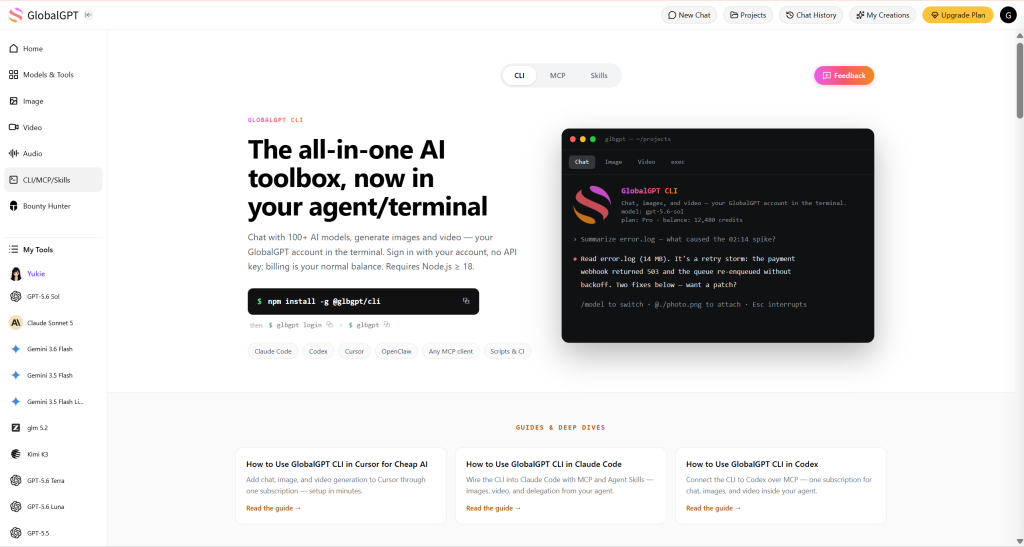
Быстрый ответ: Если вам уже нравится Cursor, но вы не хотите платить за несколько отдельных подписок на ИИ, GLBGPT CLI позволяет вам с меньшими затратами добавить в рабочую среду Cursor справку в формате GPT, функции генерации изображений и видео, а также терминальные команды, напоминающие работу чат-ботов.
Cursor — это мощный бесплатный редактор кода. Расходы начинаются тогда, когда вам требуется расширенный доступ к GPT, генерация творческого контента и повторяемые команды ИИ, работающие из папки вашего проекта. GLBGPT CLI полезен тем, что позволяет запускать эти задачи из терминала прямо в Cursor, вместо того чтобы создавать полную конфигурацию API с нуля.
- Команды терминала в стиле GPT
- Создание изображений и видео
- Чистый экспорт творческих материалов
Содержание
- Почему GLBGPT CLI — разумный выбор для пользователей Free Cursor
- Какой способ подключения курсора лучше выбрать?
- Как разблокировать интерфейс командной строки GLBGPT в программе Cursor за два шага
- Необязательно: преобразовать GLBGPT CLI в навык «Курсор»
- Необязательно: добавьте GLBGPT в качестве сервера MCP для курсора
- Пример: разработайте идею для своего первого видео в TikTok в Cursor
- GLBGPT CLI против отдельных инструментов искусственного интеллекта: за что вы платите?
- Распространенные проблемы
- ЧАСТО ЗАДАВАЕМЫЕ ВОПРОСЫ
- Заключительный вывод
Почему GLBGPT CLI — разумный выбор для пользователей Free Cursor
Главная причина использования GLBGPT CLI в Cursor — не его новизна, а стоимость. Многие начинают с бесплатной версии Cursor, а затем понимают, что им всё же нужны ответы качества GPT, команды с учетом контекста проекта, графические ресурсы, а иногда и генерация видео. Покупка каждого инструмента по отдельности может превратить простую среду для программирования в целую кучу подписок.
Ценовой контекст: подписка на базовый план GLBGPT и стандартные подписки на ИИ
На этом графике сравниваются типичные стартовые цены на недорогие конфигурации для работы с ИИ. Это график, отражающий ценовой контекст, а не сравнительный анализ по функциональным характеристикам.
Цены и условия тарифных планов могут изменяться. Рассматривайте эту информацию как краткую справку о стоимости, а перед покупкой обязательно проверьте актуальные цены на соответствующих страницах.
CLI-интерфейс GLBGPT предлагает вам более удобный подход. Вы можете продолжать использовать Cursor в качестве редактора, открыть встроенный терминал и запускать команды GLBGPT прямо из той же папки проекта, в которой уже находятся ваш код, скрипты, черновики блогов или файлы контента.
| Нужда | Дорогой маршрут | Маршрут GLBGPT CLI |
| Помощь в программировании в стиле GPT | Оплатить настройку отдельного чата или API | Запустите GLBGPT из терминала Cursor |
| Подсказки с учетом файлов | Копирование и вставка файлов вручную | Прикреплять файлы с помощью команды glbgpt exec –file |
| Графические ресурсы | Подписаться на отдельный инструмент для работы с изображениями | Создание ресурсов с помощью glbgpt image |
| Короткие видеоролики | Воспользуйтесь другой творческой платформой | Создание видеозадач с помощью glbgpt video |
| Чистый экспорт творческих материалов | Используйте бесплатные инструменты, которые могут добавлять видимые водяные знаки | Используйте GLBGPT для вывода изображений и видео без водяных знаков, если это поддерживается выбранной моделью и тарифным планом |
| Рабочие процессы в стиле «агент» | Создание пользовательской инфраструктуры API | Используйте команду exec, структурированный вывод или mcp |
Вот в чём заключается его главное преимущество: GLBGPT CLI превращает бесплатную настройку Cursor в лёгкую рабочую среду для ИИ, не заставляя вас начинать с более дорогого стека. Если позже вам понадобятся дополнительные руководства по настройке GLBGPT и работе с моделями, то Направляющая втулки GlobalGPT — это логичное следующее место, где стоит поискать.
Какой способ подключения курсора лучше выбрать?
Существует три практических способа подключения GLBGPT к Cursor. Эти способы не являются взаимоисключающими. Рассматривайте их как последовательные этапы: начните с командной строки (CLI), добавьте навык, если вам нужна подсказка по командам со слэшем, и добавьте MCP, если вы хотите, чтобы GLBGPT работал в качестве сервера инструментов.
| Способ подключения | Лучшее для | Основной компромисс |
|---|---|---|
| Прямые команды CLI | Пользователи, которым нужна максимально удобная конфигурация: запускайте команды, прикрепляйте файлы, создавайте изображения и видео прямо из терминала Cursor. | Вы вводите или вставляете команды самостоятельно. |
| Навык «Курсор» + CLI | Пользователи Cursor Agent, которым нужны команды с косой чертой на естественном языке для выполнения задач в чате GLBGPT, программирования, работы с изображениями и видео. | Чтобы навыки стали доступны, необходимо их установить и перезапустить Cursor. |
| Сервер MCP, размещенный на CLI | Пользователи или команды, которые хотят, чтобы Cursor обнаруживал GLBGPT в качестве сервера инструментов с ограничением количества медиа-кредитов на сеанс. | Вы добавляете конфигурацию MCP и управляете ещё одним интерфейсом инструмента. |
Для большинства пользователей бесплатной версии Cursor, Команды CLI — лучший первый шаг. Добавьте навыки «Cursor», если хотите, чтобы меню агента распознавало задачи GLBGPT, а навыки «MCP» добавляйте только в тех случаях, когда важно обнаружение инструментов или ограничение на количество медиа-кредитов.
Если вы также используете другие средства кодирования, в той же документации по настройке GLBGPT CLI имеются специальные руководства по использование командной строки GlobalGPT в Codex и Использование командной строки GlobalGPT в коде Claude.
Как разблокировать интерфейс командной строки GLBGPT в программе Cursor за два шага
Вам понадобятся только Cursor, Node.js версии 18 или более поздней, npm или npx, а также учётная запись GLBGPT. Откройте свой проект в Cursor, а затем запустите встроенный терминал из папки этого проекта.
1. Запустите или установите GLBGPT CLI
Если вы хотите сначала протестировать CLI, запустите его с помощью npx:
npx @glbgpt/cli@test --helpЕсли вы хотите glbgpt команда доступна в глобальном контексте, установите её:
npm install -g @glbgpt/cli@testЗатем убедитесь, что команда работает:
glbgpt --helpВ Windows успешная глобальная установка может завершиться строкой вида добавлено 169 пакетов. Если npm также сообщает, что для некоторых пакетов требуется финансирование, это обычное уведомление npm, а не ошибка установки.
2. Войдите в систему и подтвердите свою учетную запись
Авторизуйтесь в CLI с помощью своей учетной записи GlobalGPT:
Вход в glbgptCLI открывает страницу авторизации в браузере. Если вы находитесь на удаленном компьютере или браузер открылся в другом окне, воспользуйтесь ссылкой «Печатный код» и вставьте одноразовый код обратно в терминал.
glbgpt login --no-browserВставляйте код входа только в том случае, если вы сами инициировали вход в систему. Не вставляйте код, присланный вам кем-то другим.
Как выглядит успешный вход в систему
После авторизации на терминале должно появиться сообщение о том, что вы вошли в систему, после чего откроется интерфейс CLI GlobalGPT. На стартовом экране могут отображаться информация о вашей текущей модели, баланс счета и краткое меню команд.
Самый быстрый способ проверить это на практике — набрать короткое сообщение:
ПриветЕсли модель отвечает, значит, весь процесс работает: установка npm, запуск CLI, авторизация учетной записи и ответ модели.
В интерактивном интерфейсе командной строки введите / чтобы открыть меню команд. Среди полезных начальных команд можно выделить следующие: /модели для отображения списка моделей, работающих в чате, с изображениями и видео; /модель чтобы сменить модель чата; /изображение для создания изображения; /видео для создания видео; /задачи для просмотра задач генерации; /статус для проверки сеанса; /аккаунт для просмотра сведений об учетной записи; и /выход чтобы уйти.
Необязательно: преобразовать GLBGPT CLI в навык «Курсор»
Если вы хотите, чтобы GLBGPT отображался в меню команд агента Cursor, установите входящие в комплект навыки GLBGPT после того, как CLI начнёт работать. Это необязательно; приведённые выше терминальные команды будут работать даже в том случае, если вы не добавите эти навыки.
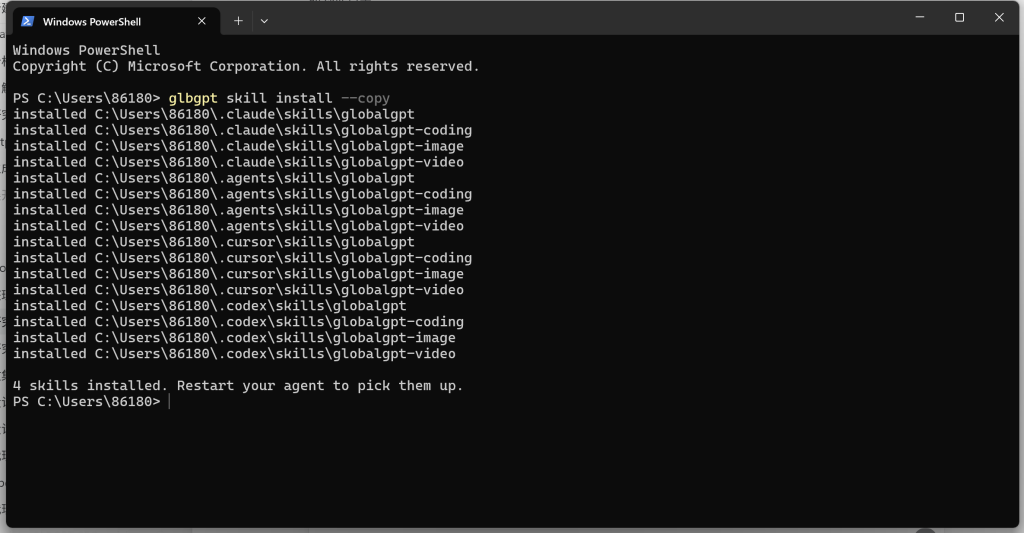
glbgpt skill install --copyВ Windows, --копия является более безопасным вариантом, поскольку при этом файлы навыков копируются, а не используются символьные ссылки. При успешном выполнении устанавливаются четыре входящих в пакет навыка: globalgpt, globalgpt-кодирование, globalgpt-image, и globalgpt-video. Если на вашем компьютере уже установлен Cursor, программа установки записывает их в ~/.cursor/skills а затем предлагает перезапустить агент.
После перезапуска программы Cursor введите / в поле ввода агента. Вы должны увидеть записи GLBGPT, например: /globalgpt, /globalgpt-coding, /globalgpt-image, и /globalgpt-video. Это означает, что Cursor может вызывать команды навыка GLBGPT, в то время как фактическая работа по генерации по-прежнему проходит через вашу учетную запись GLBGPT CLI.
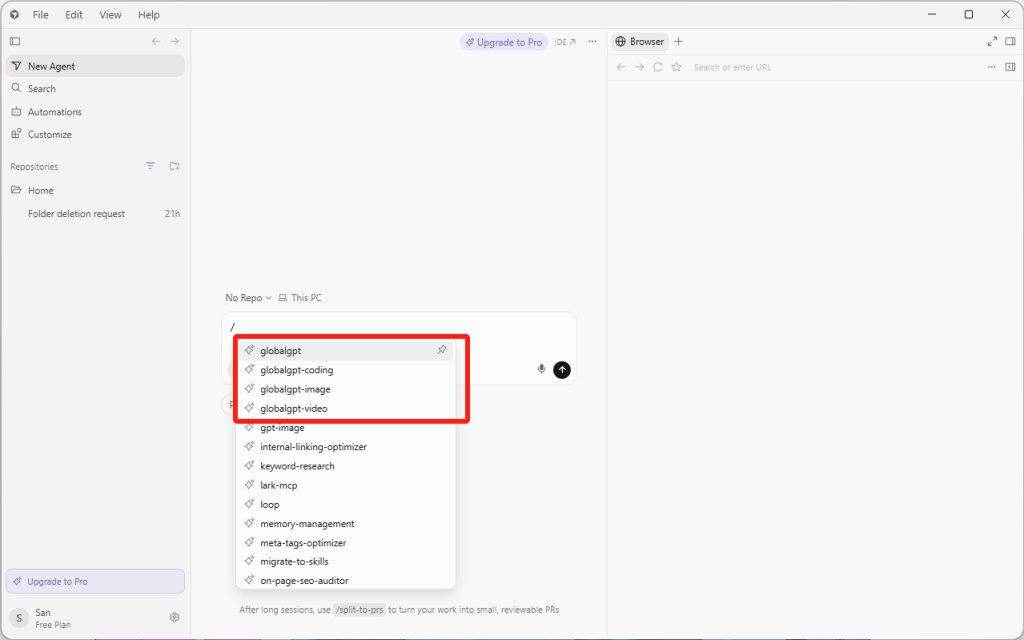
Чтобы провести быструю проверку, создайте новое сообщение агента Cursor, начав его со слова /globalgpt и попросите выполнить небольшое задание, например, предложить пять идей для видео в TikTok или составить краткий чек-лист для рецензирования кода. Используйте /globalgpt-image или /globalgpt-video когда вы хотите, чтобы Cursor передал запрос на генерацию графического объекта в GLBGPT.
Необязательно: добавьте GLBGPT в качестве сервера MCP для курсора
Навык Cursor указывает агенту, как использовать GLBGPT. Сервер MCP предоставляет GLBGPT в виде вызываемых инструментов. Если вы хотите, чтобы агент Cursor обнаруживал GLBGPT через MCP, добавьте небольшую конфигурацию MCP после Вход в glbgpt уже работает.
Для установки в Windows создайте или отредактируйте файл конфигурации Cursor MCP. Используйте ~/.cursor/mcp.json для глобальной настройки, либо .cursor/mcp.json в рамках одного проекта, если вы хотите, чтобы GLBGPT был доступен только там.
{
  "mcpServers": {
    "globalgpt": {
 "command": "cmd",
 "args": ["/c", "glbgpt", "mcp", "--max-credits", "4000"]
    }
  }
}
Сайт cmd /c Оболочка полезна в Windows, поскольку Cursor может не распознавать глобально установленную команду npm так же, как это делает ваш терминал. Если вы используете macOS или Linux, обычно можно вместо этого использовать прямую команду:
{
  "mcpServers": {
    "globalgpt": {
 "command": "glbgpt",
 "args": ["mcp", "--max-credits", "4000"]
    }
  }
}
Сайт --max-credits Это значение задает лимит сеанса для генерации медиафайлов через сервер MCP. Во время тестирования рекомендуется установить умеренное значение или использовать --max-credits 0 если вам нужны только инструменты для чата, и вы не хотите, чтобы MCP запускал генерацию изображений или видео.
Перезапустите Cursor, откройте настройки MCP или «Инструменты» и убедитесь, что globalgpt сервер включен. Затем попросите Cursor выполнить небольшой тест в режиме «только для чтения», например, вывести список доступных инструментов GLBGPT или составить пять идей. Как только это заработает, вы сможете использовать MCP для более сложных рабочих процессов агента, сохранив при этом доступ к командам навыка GLBGPT для прямого использования с помощью слэш-команд.
Пример: разработайте идею для своего первого видео в TikTok в Cursor
Для тестирования идеи короткометражного ролика вам не понадобятся ни камера, ни запись экрана, ни собственный голос. В ходе этого теста GLBGPT CLI преобразовал запрос на концепцию, сформулированный на естественном языке, в девятисекундное вертикальное видео, созданное с помощью ИИ: маленький брелок, который можно снять, дарит пушистой белой собачке мягкий лавандовый «бонус».
Эти же команды CLI можно запускать из терминала Cursor. Приведенные ниже скриншоты были сделаны в настольном терминале Codex, поэтому они иллюстрируют рабочий процесс GLBGPT CLI, а не сам интерфейс Cursor.
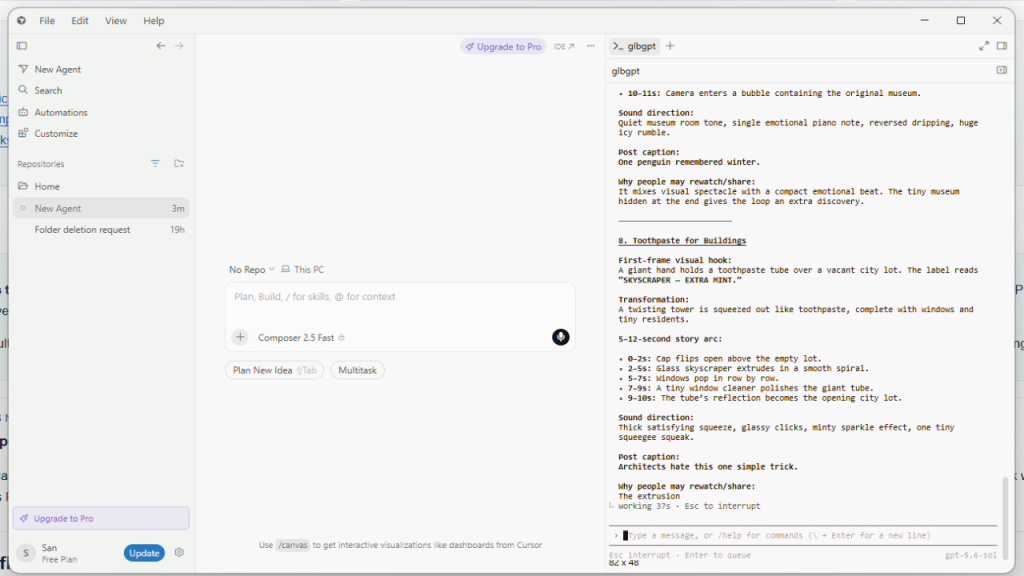
Шаг 1: Запросите концепции на естественном языке
Запустите интерактивную командную строку с помощью команды glbgpt, а затем пришлите краткое описание, написанное простым и понятным языком. Полезным ограничением является не конкретная тема, а формат материала: быстрое, наглядное видео, созданное с использованием ИИ, которое можно понять даже без участия автора перед камерой.
Вы — креативный директор в TikTok, специализирующийся на необычных, динамичных и увлекательных видеороликах, созданных с помощью ИИ. Я хочу запустить новый аккаунт в TikTok с первым постом 100%, созданным с помощью ИИ. Я не буду появляться в кадре, записывать экран или использовать свой голос. Придумайте 12 оригинальных концепций видео, рассчитанных на высокую запоминаемость и количество репостов. Пока ничего не генерируйте. В конце ранжируйте три лучшие концепции.Выбрав одну из идей, попросите GLBGPT принять окончательные решения по производству. Это позволит сохранить естественность взаимодействия и в то же время предоставить модели конкретное техническое задание на производство.
Шаг 2: Позвольте CLI создать носитель
Выбранная концепция превратилась в простой цикл: рука показывает крошечный брелок, собака реагирует, появляется лавандовый энергетический эффект, а в финальной позе композиция возвращается к начальной. Ролик достаточно короткий, чтобы его было удобно смотреть на экране телефона, и достаточно простой, чтобы его хотелось пересматривать.
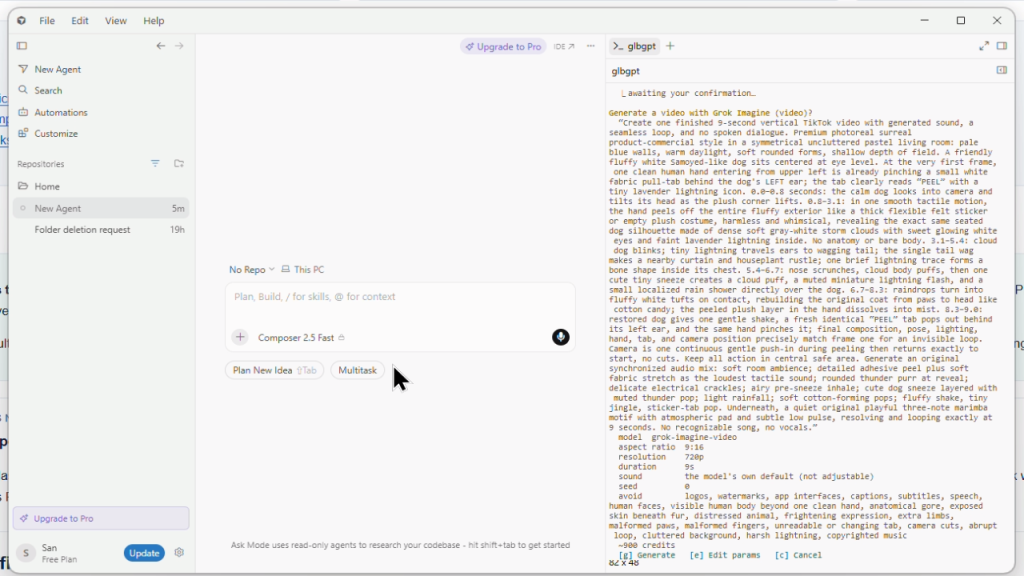
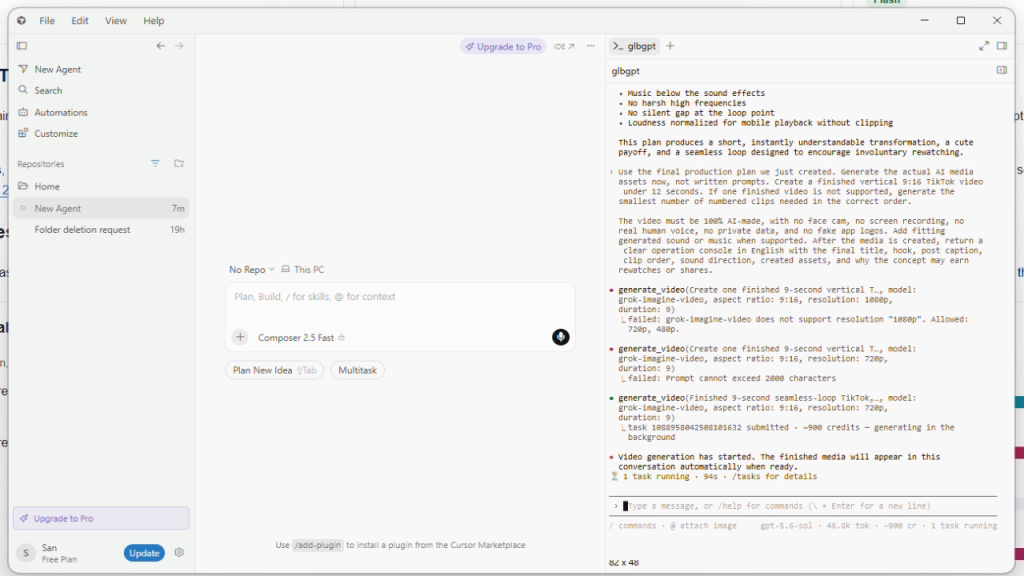
Результат: один непрерывный 9-секундный файл MP4 в формате 9:16. В успешно выполненном задании использовался grok-imagine-video и создал ресурс с разрешением 720p. На экране задач CLI было указано, что за этот прогон начислено около 900 кредитов GLBGPT. Речь идет о рекордном количестве кредитов для платформы, а не о стоимости в долларах.
Чему нас научил этот забег
- Генерация идей с использованием естественного языка дает хорошие результаты, когда в техническом задании определены формат и целевая аудитория, но концепция остаётся открытой.
- Для первого теста проще оценить один непрерывный визуальный цикл, чем сложный монтаж из нескольких клипов.
- Ограничения модели имеют значение. В ходе этого прогона система отклонила запрос на разрешение 1080p и слишком длинный промпт, после чего удалось успешно выполнить окончательную задачу с разрешением 720p.
- Cursor Agent не является обязательным. При запуске GLBGPT в терминале Cursor используются собственная модель GLBGPT и его медиа-кредиты, а не квота Cursor Agent.
Почему этот формат заслуживает повторного просмотра
Вступительный кадр таит в себе небольшую загадку. В центральной части происходит явная трансформация. Финальная композиция завершается достаточно спокойно, чтобы плавно вернуться к вступлению. Это не гарантирует, что пост станет вирусным, но придаёт короткому видео, созданному с помощью ИИ, гораздо более эффективную структуру, удерживающую внимание зрителя, чем медленное введение или типичная демонстрация возможностей инструмента.
Предлагаемое название публикации: Одна крошечная кожура. Одно очень мощное усиление.
GLBGPT CLI против отдельных инструментов искусственного интеллекта: за что вы платите?
На самом деле вопрос не в том, заменит ли GLBGPT CLI все специализированные ИИ-продукты. Вопрос в том, нужно ли вам покупать несколько инструментов, чтобы начать выполнять полезную работу в Cursor. Если ваша цель — создать более экономичную систему, похожую на агент, сравнивайте весь стек в целом, а не отдельные функции по отдельности.
Стек, который лучше не создавать
В типичном стеке инструментов для разработчиков ИИ функции помощи в программировании, модели чата, генерация изображений, инструменты для работы с видео и обходные решения могут быть распределены по разным продуктам. GLBGPT CLI пригодится, если вам нужна единая и более доступная по стоимости точка входа из терминала Cursor.
| Маршрут | Что вы получаете | Где возникают затраты или препятствия | Сравнение GLBGPT CLI |
| Только бесплатный курсор | Хорошие навыки работы с текстовым редактором и базовый опыт программирования с использованием искусственного интеллекта. | Возможно, вам по-прежнему потребуются более мощные подсказки в стиле GPT, терминальные задачи с использованием файлов, генерация изображений или видео. | GLBGPT CLI добавляет внешний слой искусственного интеллекта, не заменяя Cursor. |
| Подписка на ChatGPT | Проработанный интерфейс чата и доступ к моделям OpenAI через ChatGPT. | Работа часто ведётся за пределами терминала Cursor, а для творческих задач и работы с мультимедиа по-прежнему могут потребоваться другие инструменты. | GLBGPT CLI в большей степени ориентирован на работу в терминале: запуск командных строк, прикрепление файлов и сохранение результатов в папке проекта. |
| Прямые API моделей | Гибкий доступ для разработчиков, желающих создавать собственные скрипты и интеграции. | Вы самостоятельно управляете ключами API, биллингом, форматами запросов, выбором моделей и обработкой ошибок. | CLI GLBGPT предоставляет готовые команды, такие как exec, image, video, model и task. |
| Отдельные инструменты для работы с изображениями и видео | Специализированные творческие интерфейсы для визуального производства. | Каждый инструмент может стать ещё одним аккаунтом, подпиской, рабочим процессом, этапом экспорта или ограничением по количеству водяных знаков. | CLI-интерфейс GLBGPT позволяет создавать изображения и видео на основе одного и того же рабочего процесса Cursor, причем одним из ключевых преимуществ для авторов является высокое качество конечных результатов. Информацию о публикации видео см. в соответствующем руководство по созданию видео без водяных знаков. |
| CLI GLBGPT в Cursor | Команды в стиле GPT, контекст файлов, генерация изображений, генерация видео, управление задачами, поддержка MCP и чистый экспорт творческих материалов. | Вам необходимо иметь базовые навыки работы с командами терминала, а создание медиафайлов по-прежнему расходует кредиты тарифного плана. | Идеально подходит, если вам нужен бесплатный курсор и более недорогой ИИ-движок для программирования и работы с контентом. |
Именно поэтому эта конфигурация лучше всего подходит для разработчиков, независимых авторов, SEO-копирайтеров, создателей коротких видеороликов и небольших команд, которые уже активно используют Cursor. Вы не платите за более привлекательный интерфейс терминала. Вы стремитесь избежать завышенных расходов на ИИ, при этом по-прежнему получая помощь GPT, творческие материалы без водяных знаков и команды генерации прямо там, где ведется работа.
Распространенные проблемы
| Проблема | Вероятная причина | Что стоит попробовать |
|---|---|---|
glbgpt не распознается | Глобальная папка npm bin не включена в переменную PATH, либо терминал не обновился. | Используйте npx @glbgpt/cli@test --help, заново запустите терминал Cursor или проверьте глобальный путь к npm. |
| PowerShell блокирует npm | Политика выполнения Windows может заблокировать npm.ps1. | Используйте npm.cmd или запустите команду из другого терминала. |
npm показывает ENOTFOUND во время установки | Возможно, хост реестра npm не удается определить при ваших текущих настройках сети или DNS. | Проверьте подключение к реестру с помощью npm ping. В Windows вы также можете проверить работу DNS с помощью Регистр Resolve-DnsName.npmjs.org или на ваш настроенный зеркальный сервер. |
Сбой при изменении настроек DNS с ошибкой Доступ запрещен | PowerShell запущен без прав администратора. | Перед запуском команд по восстановлению сети откройте PowerShell от имени администратора. После изменения настроек DNS очистите кэш и запустите npm ping снова. |
| При входе в систему браузер не открывается | Терминал не может запустить сеанс браузера. | Запустить glbgpt login --no-browser и вручную откройте указанный URL-адрес. |
| Истекает время ожидания при входе в систему во время авторизации в браузере | Срок действия окна подтверждения в браузере истек или оно не было заполнено вовремя. | Запустить Вход в glbgpt снова или начать glbgpt и во второй раз выполните инструкции по входу в систему. |
| Вы не уверены, какой идентификатор модели использовать | Для выполнения некоторых команд генерации CLI требуются точные идентификаторы моделей. | Запустить Список моделей glbgpt, Изображение списка моделей glbgpt, или список моделей glbgpt — видео. |
| Вас беспокоят расходы на рекламу в СМИ | Задачи, связанные с обработкой изображений и видео, могут потреблять кредиты. | Добавить --оценка перед генерацией. |
| Файлы не найдены | Терминал Cursor открыт не в том каталоге. | Откройте папку проекта в программе Cursor и запустите команды из этой папки. |
| Навыки GLBGPT не отображаются в Cursor | Cursor не перезарядил свои навыки, либо ~/.cursor/skills не существовал во время запуска программы установки. | Полностью перезапустите Cursor. Если папка отсутствует, создайте её ~/.cursor/skills, а затем запустите glbgpt skill install --copy снова. |
| Сервер GLBGPT MCP не подключается | Курсор не может найти glbgpt команда, файл JSON находится не в той области видимости или в CLI не выполнен вход в систему. | Запустить glbgpt --help и Вход в glbgpt сначала в обычном терминале. В Windows используйте команду cmd /c glbgpt mcp config, а затем перезапустите Cursor. |
Заключительный вывод
Free Cursor предоставляет вам рабочее пространство для программирования. GLBGPT CLI предлагает недорогой ИИ-слой для промптов в стиле GPT, команд с учетом контекста проекта, генерации изображений и видео. Вместе они могут стать компактной конфигурацией агента для программирования и создания контента, позволяющей избежать затрат, связанных с использованием нескольких отдельных инструментов.
Если вы хотите попробовать эту конфигурацию, начните с малого: установите GLBGPT CLI, войдите в систему и запустите одну glbgpt exec команду из текущего проекта Cursor. Как только это заработает, добавьте контекст файла, генерацию изображений или генерацию видео только в том случае, если это необходимо для выполнения задачи.
ЧАСТО ЗАДАВАЕМЫЕ ВОПРОСЫ
Можно ли использовать GLBGPT CLI с бесплатной версией Cursor?
Да. Cursor и GLBGPT CLI — это отдельные инструменты. Вы можете открыть терминал Cursor и запускать команды GLBGPT CLI из папки вашего проекта, если у вас установлены Node.js и npm или npx.
Является ли GLBGPT CLI расширением Cursor?
Нет. GLBGPT CLI — это терминальный клиент, а не традиционное расширение для Cursor. После установки CLI вы можете по желанию установить входящие в комплект навыки GLBGPT, чтобы меню агента Cursor могло вызывать GLBGPT с помощью команд со слэшем.
Что лучше использовать: навык GLBGPT или сервер GLBGPT MCP?
Используйте этот с킬, если вам нужна простая поддержка команд с косой чертой в Cursor. Используйте MCP, если хотите, чтобы агент Cursor обнаружил GLBGPT в качестве сервера инструментов. Можно использовать и то, и другое: с килом проще начать работу, а MCP лучше подходит для более сложных рабочих процессов агентов, основанных на использовании инструментов.
Не дешевле ли GLBGPT, чем оплата нескольких инструментов искусственного интеллекта?
Это возможно, в зависимости от ваших потребностей. Стоимость GLBGPT Basic начинается примерно с $5.8 в месяц, что значительно упрощает тестирование рабочего процесса на базе GPT без необходимости переходить на более масштабный ИИ-стек. Тарифные планы, представленные в таблице цен, не идентичны по набору функций, но разница между ними объясняет, почему бесплатный Cursor в сочетании с GLBGPT CLI может быть привлекательным вариантом.
Может ли GLBGPT CLI генерировать изображения?
Да. CLI включает в себя изображение команда с параметрами, определяющими идентификатор модели, соотношение сторон, разрешение, эталонные изображения, папку для сохранения результатов и ориентировочную стоимость.
Может ли GLBGPT CLI создавать видео?
Да. CLI включает в себя видео команда с параметрами, определяющими соотношение сторон, разрешение, продолжительность, звук, эталонные изображения, папку для сохранения результатов и обработку автономных задач.
Имеют ли изображения и видео, выводимые через GLBGPT, водяные знаки?
GLBGPT позиционируется как инструмент для создания контента без водяных знаков, и возможность генерации изображений и видео без водяных знаков является одним из его практических преимуществ. Перед публикацией коммерческих материалов рекомендуется проверить выбранную модель и условия тарифного плана, поскольку правила в сфере медиа могут изменяться.
Мне нужен ключ API?
Обычно вход осуществляется с помощью Вход в glbgpt. CLI осуществляет авторизацию через вашу учетную запись GlobalGPT, а затем сохраняет учетные данные для последующего использования на терминале.
Что лучше использовать: npx или глобальную установку?
Используйте npx, если хотите протестировать GLBGPT CLI без глобальной установки. Выполните глобальную установку, если планируете запускать glbgpt часто из Cursor.