Созданные с помощью ИИ ролики YouTube Shorts остаются актуальными и в 2026 году, но рабочий процесс больше не начинается с устаревшего потребительского интерфейса Sora 2. Творческая задача осталась прежней: превратить одну чёткую идею в лаконичную последовательность вертикальных кадров, которая привлечёт внимание, не перегружая зрителя.
Сейчас целесообразно сохранить метод производства и сменить формат: разработать лаконичный сюжет, создать несколько вертикальных кадров с помощью имеющегося в наличии видеоинструмента, смонтировать их в редакторе, а затем проверить титры, звук, права и соответствие требованиям платформы. Если вы все еще выбираете инструмент, этот обзор существующие варианты генераторов видео с использованием ИИ предоставляет вам удобную платформу для сравнения результатов в этой области. Ни одна модель не может гарантировать, что ролик «Short» станет вирусным, но дисциплинированный рабочий процесс позволяет гораздо быстрее тестировать идеи.
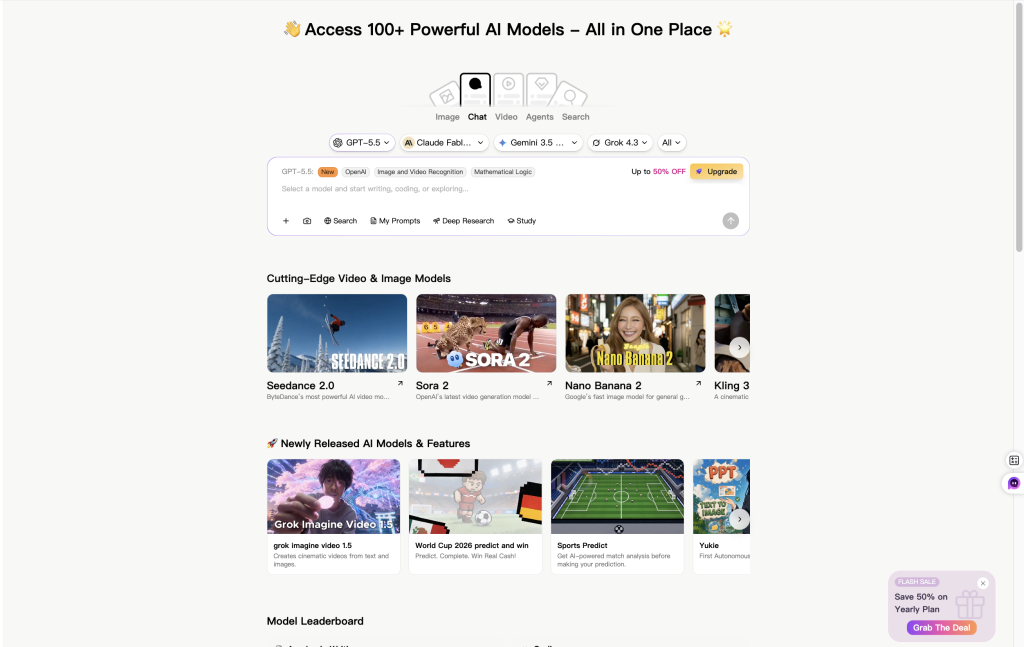
Если вы хотите, чтобы весь рабочий процесс проходил в одном месте, Видеогенератор GlobalGPT объединяет несколько видеомоделей в единое рабочее пространство. Вы можете использовать модели, доступные в данный момент в вашей учетной записи, без необходимости открывать отдельный веб-сайт для каждого инструмента, а затем переносить сгенерированные кадры в один и тот же сториборд и рабочий процесс монтажа. Доступные модели, квоты, регионы и настройки могут различаться, поэтому перед началом производства ознакомьтесь с актуальным меню и условиями использования учетной записи.
Быстрый ответ: Вы по-прежнему можете использовать видео с искусственным интеллектом для создания роликов YouTube Shorts, однако прежний рабочий процесс Sora 2 для потребителей больше недоступен. 26 апреля 2026 года OpenAI прекратил поддержку веб-версии и мобильного приложения Sora. Для API Sora установлена отдельная дата прекращения поддержки — 24 сентября 2026 года.
Можно ли по-прежнему использовать Sora 2?
Не через прежний веб-сайт или приложение Sora. В текущем Справочном центре OpenAI указано, что обе версии сервиса для потребителей были закрыты 26 апреля 2026 года. Если вы перешли на эту страницу по ссылке из старого руководства, то описанные в нём шаги по работе с интерфейсом, приглашениями, предустановками и публикацией в один клик больше не являются надежным способом.
API представляет собой отдельный интерфейс продукта. В документе OpenAI указано, что API «Видео» и семейство моделей Sora 2 будут выведены из эксплуатации 24 сентября 2026 года. Этот временный график для API не предусматривает восстановления потребительского приложения, и его не следует путать с правилами начисления кредитов, описанными в документе ChatGPT/Sora. Более подробную информацию о статусах см. в Что продолжает работать после закрытия Sora.
| Пункт | Текущее состояние по состоянию на 31 июля 2026 года | Что это означает |
|---|---|---|
| Веб и приложение Sora | Снято с производства 26 апреля 2026 года | Не следуйте инструкциям, в которых требуется использование прежнего потребительского интерфейса Sora. |
| API Sora / API «Видео» | Планируемое прекращение работы — 24 сентября 2026 года | Существующим разработчикам необходим план миграции; речь не идет о новом способе доступа к потребительским приложениям. |
| Приобретены кредиты ChatGPT/Sora | OpenAI утверждает, что их по-прежнему можно использовать для Codex, если пользователь того пожелает | Не следует отождествлять дату закрытия API с датой истечения срока действия универсального кредита. |
| Ценообразование API | Отдельно от потребительских кредитов | Не конвертируйте сборы API в кредиты приложения, если только на официальном ресурсе продукта не указано такое соотношение. |
Жизненный цикл Sora: важные даты
В графике указаны три отдельных события. 24 марта разработчики были уведомлены о прекращении поддержки API, 26 апреля прекратилась работа веб-сайта и приложения, а 24 сентября планируется прекратить работу API. Разделение этих событий позволяет избежать распространённой ошибки: восприятия срока прекращения поддержки API как доказательства того, что приложение по-прежнему можно использовать, или как универсальной даты истечения срока действия приобретённых кредитов.
Разработчики были уведомлены о том, что API «Videos» и API «Sora 2» больше не поддерживаются.
Прекращена поддержка веб-версии и мобильного приложения Sora.
API «Видео» и перечень моделей API Sora 2, которые планируется вывести из эксплуатации.
Источник: Справочный центр OpenAI и информация об устаревших функциях API OpenAI. Проверено 31 июля 2026 года.
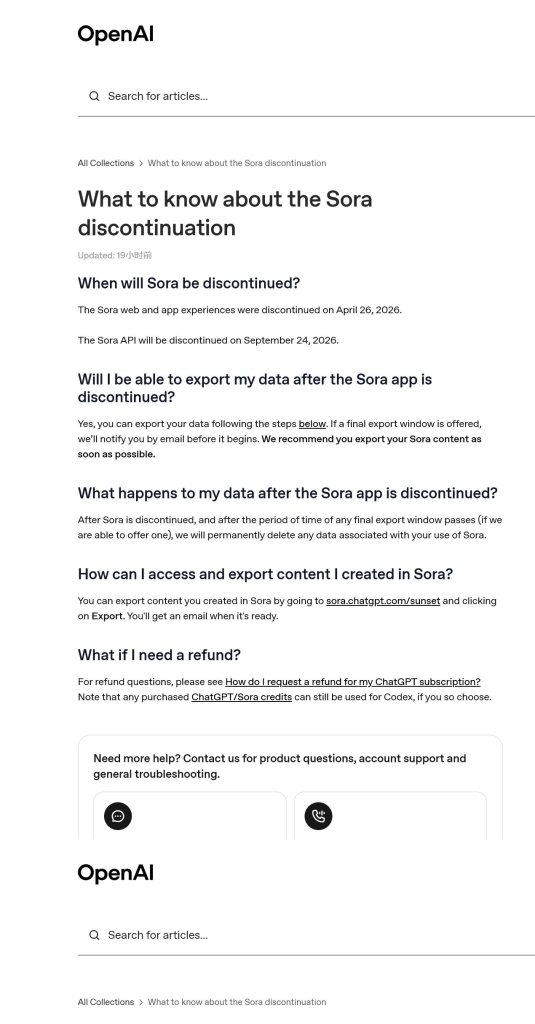
Если вы создали работу в Sora, OpenAI предлагает пользователям sora.chatgpt.com/sunset для экспорта доступного контента. Экспорт старых работ — это архивирование; это не способ запуска новых поколений Sora.
Практический рабочий процесс с использованием ИИ для YouTube Shorts
Эффективный рабочий процесс при создании короткометражных фильмов начинается ещё до создания видео. Рассматривайте модель как инструмент для создания кадров, а не как одновременно монтажёра, стратега и систему распространения.
- Выберите одно обещание. Напишите, что именно зритель должен понять, почувствовать или захотеть попробовать после просмотра.
- Сначала сделайте крючок. Разработайте вступительную фразу и первый визуальный акцент одновременно. Вступление должно сформулировать четкий вопрос, создать контраст или дать зрителю ожидаемый результат, не прибегая к кликбейту, который видео не сможет оправдать.
- Развивайте эту идею в виде от трёх до шести кадров. Каждый кадр должен быть посвящён одному действию. Короткие и простые эпизоды легче воспроизводить и перекомпоновывать, чем одну длинную сцену.
- Подготовить небольшую пробную партию. Используйте одну из доступных в данный момент моделей в рамках того продукта или аккаунта, которым вы уже располагаете. Начните с одного показательного кадра, прежде чем тратить время или кредиты на съемку полной серии.
- Редактируйте вне генератора. Сделайте паузы при монтаже, разместите самый яркий визуальный элемент в начале, добавьте подписи, смонтируйте звук и оставьте достаточно времени, чтобы зритель успел воспринять последний кадр.
- Проверьте перед загрузкой. Проверьте достоверность фактов, наличие визуальных артефактов, вопросы авторских прав, необходимость раскрытия информации, а также соответствие видеоролика действующим требованиям YouTube к роликам серии «Shorts».
Доступность моделей, ограничения и цены могут различаться в зависимости от учетной записи и могут изменяться, поэтому перед запуском производственной партии необходимо уточнить актуальную информацию на странице продукта.
Пример сториборда: 20-секундный совет по использованию продукта
| Бит | Цель | Пример |
|---|---|---|
| 0–2 секунды | Крючок | Сначала покажите неутешительный результат, а затем задайте прямой вопрос. |
| 2–7 секунд | Настройка | Раскройте причину с помощью одного четкого крупного плана или кадра, напоминающего схему. |
| 7–15 секунд | Выигрыш | Продемонстрируйте усовершенствованный метод в виде двух кратких наглядных шагов. |
| 15–20 секунд | Завершить | Подержите конечный результат достаточно долго, чтобы успеть прочитать подпись; добавьте сдержанный следующий шаг. |
Как выбрать новую модель видеокамеры
Не стоит выбирать исключительно по качеству демо-ролика. При создании короткометражных роликов обычно большее значение имеют такие аспекты рабочего процесса, как вертикальная компоновка кадра, поддержка эталонных изображений, плавность движения, соблюдение временных рамок, продолжительность клипа, сроки выполнения заказа, стоимость повторного создания и условия лицензии, предусмотренные вашим тарифным планом.
- Для создания видеороликов на основе текста: Проверьте, следует ли инструмент инструкциям по работе с камерой и соблюдению непрерывности при съемке объекта.
- Для быстрой итерации в социальных сетях: Сравните, сколько подходящих вариантов вы сможете создать, не утратив при этом суть снимка или композицию.
- По вопросам управления движением и справочной информации: Протестируйте именно тот рабочий процесс, который вам нужен, а не исходите из того, что все учетные записи имеют одинаковые средства управления.
- Для использования отснятого материала в других целях: Маршрут «видео-к-видео» может быть более удобным в управлении, чем генерация каждого кадра с нуля. Ознакомьтесь с рабочим процессом для превращение существующих клипов в новые видеоролики.
GlobalGPT наиболее полезен в данном случае как универсальная рабочая среда для работы с видео, а не как доказательство того, что снятое с производства приложение Sora по-прежнему работает. Вместо перехода между отдельными сайтами моделей вы можете использовать доступные в данный момент в вашем аккаунте видеомодели из одного места, создавать нужные кадры и продолжать процесс монтажа без перерыва. Доступные модели, регионы, квоты, фильтры безопасности и элементы управления зависят от текущего состояния аккаунта.
Шаблон подсказки для многократного использования в вертикальном видео
Надежный бриф описывает один кадр с конкретными визуальными решениями. Он не должен напоминать полноценный маркетинговый бриф. Укажите целевую аудиторию и цель в примечаниях к плану, а затем предоставьте видеооператору информацию о предмете съемки, действии, месте съемки, камере, освещении, движении, деталях непрерывности съемки и четком заключительном кадре.
Создайте вертикальное видео в формате 9:16 для YouTube Shorts.
Цель: [один четкий вывод для зрителя]
Аудитория: [конкретный зритель]
Целевая продолжительность: [продолжительность клипа, поддерживаемая выбранным инструментом]
Кадр: [объект + действие + обстановка]
Камера: [кадрирование + движение]
Освещение и стиль: [конкретная визуальная концепция]
Движение: [одно основное действие; избегайте конкурирующих действий]
Непрерывность: [детали, которые должны оставаться неизменными]
Ограничения: никаких логотипов, никакого нечитаемого текста, никаких лишних конечностей, никаких резких смен сцен
Заключительный кадр: [четкий визуальный акцент, который можно использовать для подписи или перехода]
Снимите первый кадр и просмотрите его на обычной скорости воспроизведения. Если кадрирование неверное, скорректируйте расположение камеры и объекта съемки, прежде чем добавлять дополнительные стилистические элементы. Если движение прерывается, упростите действие. Если нарушается непрерывность, повторите только те несколько деталей, которые должны оставаться неизменными.
Редактируйте, проверяйте и публикуйте рассказ
Съемка — это лишь исходный материал. Именно монтаж определяет, сможет ли зритель следить за сюжетом. Воспользуйтесь привычным редактором, чтобы монтировать по ключевым моментам, удалить «мертвое время», сбалансировать голос и музыку, а также сделать титры читаемыми на экране телефона. Если Veo входит в ваш рабочий процесс, проверьте как варианты длины клипа влияют на план съемки прежде чем создавать временную шкалу.
- Не размещайте важные объекты и подписи вблизи краев, закрытых элементами интерфейса.
- Используйте крупные, контрастные подписи и разбивайте строки по естественным фразам.
- Посмотрите первый кадр без звука; он все равно должен передавать суть темы.
- Посмотрите один раз с выключенным звуком, а другой — не обращая внимания на субтитры.
- Экспортируйте чистый вертикальный файл, а затем ознакомьтесь с актуальными правилами загрузки на YouTube в Справке YouTube.
- После публикации используйте реальные данные по удержанию аудитории и её составу, чтобы скорректировать «зацепку» или темп повествования; не приписывайте результаты исключительно генератору.
Что следует автоматизировать, а что оставить на усмотрение человека
Автоматизация полезна для выполнения повторяющихся производственных задач: преобразования утвержденного плана в список кадров, применения правил именования, создания черновых вариантов подписей, проверки соотношения сторон и подготовки контрольного списка для загрузки. Редакционные решения должны оставаться в руках человека: определение концепции, проверка фактов, проверка прав, окончательный отбор и решение о публикации.
| Задание | Подходит ли это для автоматизации? | Проверка человеком |
|---|---|---|
| Оформление списка дублей | Да | Помогает ли каждый кадр раскрыть одну чёткую идею? |
| Очередь пакетного генерации | Иногда | Понятно ли, что такое затраты, лимиты счетов и обработка ошибок? |
| Черновик подписи | Да | Укажите правильные имена, цифры, временные рамки и разрывы строк. |
| Утверждения, основанные на фактах | Отсутствие полной автоматизации | Сверьте информацию с актуальными первоисточниками. |
| Права и раскрытие информации | Отсутствие полной автоматизации | Ознакомьтесь с материалами, участниками, музыкой и правилами платформы. |
| Опубликовать решение | Нет | Окончательный вариант должен быть утвержден ответственным лицом. |
Проверка безопасности, происхождения и целевого назначения
Не обещайте, что конечный результат, полученный с помощью Sora, будет без водяных знаков. В документации по безопасности технологии Sora от OpenAI упоминаются видимые водяные знаки на этапе запуска, а также метаданные C2PA и другие сигналы, указывающие на происхождение. Другие инструменты имеют собственные правила маркировки, нанесения водяных знаков и метаданных, которые могут различаться в зависимости от тарифного плана и интерфейса продукта.
Перед коммерческим использованием проверьте условия, применимые к модели и плану, которые вы фактически использовали, права на загруженные исходные материалы, лицензии на музыку и голосовые записи, согласие узнаваемых лиц, а также любые обязательства по раскрытию информации. Этот обзор проверка видеоматериалов с использованием ИИ в коммерческих целях может помочь систематизировать вопросы, однако определяющим источником остаются действующие условия поставщика.
Часто задаваемые вопросы
Доступен ли Sora 2 по-прежнему в приложении или на сайте Sora?
В документе № OpenAI указано, что поддержка веб-версии и мобильного приложения Sora была прекращена 26 апреля 2026 года. Любая страница или руководство, в которых потребительский интерфейс Sora по-прежнему представлен как действующий вариант, являются устаревшими.
API Sora по-прежнему доступно?
В документе OpenAI 24 сентября 2026 года указано в качестве даты прекращения поддержки API «Видео» и соответствующих моделей API, описанных в документе Sora 2. Доступность до этой даты по-прежнему может зависеть от наличия действующей учетной записи API, прав доступа, квоты и требований политики.
Истекает ли срок действия приобретенных кредитов Sora после закрытия API?
В OpenAI не говорится, что все приобретенные кредиты истекают в день отключения API. В Справочном центре указано, что приобретенные кредиты ChatGPT/Sora по-прежнему можно использовать для Codex, если пользователь того пожелает. Кредиты приложения, биллинга API и отключения API — это отдельные вопросы.
Можно ли создавать ролики для YouTube Shorts без Sora 2?
Да. Рабочий процесс не зависит от конкретной модели: напишите хук, составьте краткий список кадров, сгенерируйте вертикальные клипы с помощью доступной видеомодели, добавьте подписи и звук, а затем проверьте окончательный монтаж перед публикацией. A более полный перечень доступных на данный момент альтернатив модели Sora 2 может помочь вам сузить круг вариантов при первом тесте.
Какая альтернатива Sora 2 лучше всего подходит для коротких позиций?
Универсального победителя нет. Выбирайте, ориентируясь на необходимые вам параметры, такие как вертикальный выходной сигнал, поддержка эталонного изображения, стабильность движения, продолжительность клипа, скорость генерации, стоимость и коммерческие условия. Перед тем как заказать партию, проведите небольшой тест.
Может ли ИИ гарантировать, что ролик в YouTube Shorts станет вирусным?
Нет. Модель может ускорить производство контента, но не может гарантировать охват аудитории. По-прежнему важны привлекательность, ясность изложения, темп повествования, соответствие целевой аудитории, оформление и удержание внимания, а заявления об эффективности должны основываться на реальных данных аналитики канала, а не на обещаниях инструмента.
Источники
Данные и статус продукта были проверены 31 июля 2026 года. Информация о наличии продукта, ценах, квотах и правилах платформы может измениться.