Snel antwoord: Begin met een scherpe productfoto in hoge resolutie en een achtergrond met een geloofwaardige camerahoek. Vraag Nano Banana Pro om de vorm, het logo, de tekst op het etiket, de kleur en de materialen van het product te behouden en tegelijkertijd het perspectief, de belichting, de schaduwen en de reflecties aan te passen aan de nieuwe scène. Maak eerst een concept en corrigeer vervolgens één detail tegelijk.
Realistische productafbeeldingen maken met Nano Banana is eenvoudig en efficiënt. Met de krachtige AI-gestuurde beeldbewerkingsmogelijkheden kun je producten naadloos in elke scène plaatsen met nauwkeurige belichting, schaduwen en reflecties. Hierdoor zien je productafbeeldingen er professioneel uit, zelfs zonder een echte fotostudio.
Trouwens, als je Nano Banana wilt gebruiken met Tweelingen en andere top AI-modellen tegen een extreem lagere prijs, Global GPT biedt een geïntegreerde alles-in-één ervaring.

Wat is Nano Banana virtuele fotostudio
Nano Banana is ontstaan uit de Gemini 2.5 Flash Image-ervaring van Google. De huidige professionele upgrade is Nano Banana Pro, op basis van Gemini 3 Pro-afbeelding, met meer controle over beeldbewerking, compositie, tekstweergave en visueel werk dat direct klaar is voor productie, dat het internet stormenderhand veroverd.
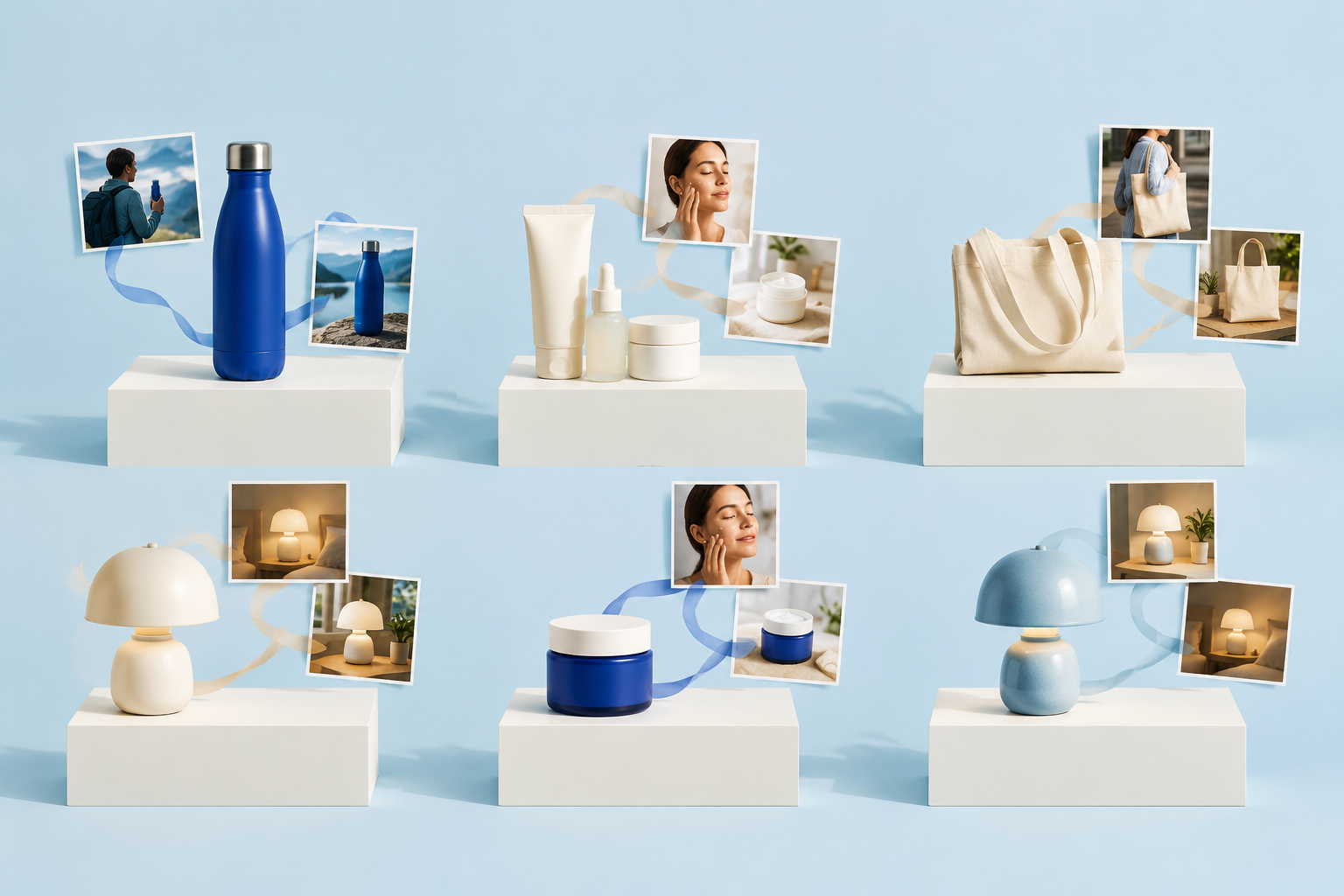
Gebruikers hebben verschillende creatieve manieren ontdekt om Nano Banana te gebruiken. Zo kunnen ze bijvoorbeeld een productafbeelding uploaden samen met een achtergrondscène en Nano Banana de opdracht geven om het product op een natuurlijke manier te plaatsen. De AI past automatisch de belichting, schaduwen en reflecties aan, waardoor afbeeldingen zo realistisch worden dat ze echte foto's evenaren.
Deze functie, die vooral handig is voor e-commerce en productontwerp, staat bekend als de Virtuele fotostudio.
Er zijn nog meer wilde manieren om Nano Banana te gebruiken, zoals AI-gezicht verwisselen, outfit veranderingen, cosplay ,3D AI beeldjeen De houding van een personage wijzigen.
Stap-voor-stap handleiding voor het maken van realistische productafbeeldingen
1 Upload je productafbeelding
Begin met een hoogwaardige afbeelding van je product, zoals een lamp, gadget of kledingstuk.

2 Selecteer een achtergrondscène
Kies of upload een achtergrondafbeelding waar het product moet verschijnen, zoals een woonkamer, slaapkamer of studio.

3 Een gedetailleerde prompt invoeren
Voorbeeld: “Plaats deze tafellamp naadloos op het nachtkastje met realistische schaduwen en verlichting.”
4 De afbeelding genereren
Nano Banana verwerkt de scène en past automatisch de plaatsing van het product, reflecties en omgevingskleuren aan.
In de afbeelding hieronder kun je zien dat de resultaten ongelooflijk realistisch en verbluffend zijn.

5 Itereren voor verfijning
Gebruik extra aanwijzingen om hoeken, rekwisieten of belichting aan te passen tot de foto er perfect uitziet.
Nano Banana Pro: sjabloon voor productafbeeldingen
Gebruik dit sjabloon nadat je de productfoto en de gewenste achtergrond hebt geüpload:
Plaats het product uit afbeelding 1 in de scène uit afbeelding 2. Behoud de exacte vorm, verhoudingen, het logo, de tekst op de verpakking, de kleur, de materialen en de zichtbare accessoires van het product. Zorg ervoor dat de camerahoek, brandpuntsafstand, perspectief, lichtrichting, kleurtemperatuur, contactschaduw, reflecties en scherptediepte van de scène overeenkomen. Zorg ervoor dat het product volledig herkenbaar blijft en verzin geen nieuwe labels, knoppen, aansluitingen, ingrediënten, claims of verpakkingsdetails. Lever een strakke e-commerceafbeelding op met [beeldverhouding] en voldoe aan [eisen inzake compositie en lege ruimte].
Behandel bij merkverpakkingen de leesbaarheid van de tekst als een aparte kwaliteitscontrole. De handleiding voor tekst, logo's en huisstijl toevoegen met Nano Banana laat zien waar doorgaans extra herzieningen nodig zijn.
Als het product uit meerdere artikelnummers moet bestaan, gebruik dan de workflow voor het samenvoegen van meerdere afbeeldingen en aan elke bronafbeelding één duidelijke rol toewijzen.
Waarom Nano Banana perfect is voor e-commerce
- Professionele resultaten zonder studio - Je hebt geen dure apparatuur of foto-opstellingen nodig.
- Tijdbesparend - Genereer snel meerdere productafbeeldingen voor online winkels, catalogi en marketing.
- Hoge mate van maatwerk – Pas de productplaatsing, achtergronden of rekwisieten eenvoudig aan met behulp van duidelijke instructies. Vergelijk bij het kiezen van een pakket de huidige Prijsopties voor Nano Banana Pro.
- Consistente stijl voor alle afbeeldingen – Zorg voor een uniforme belichting en visuele stijl bij meerdere productfoto’s. Controleer de limieten voor het uploaden van meerdere afbeeldingen voordat je een grote referentiedatumset gaat samenstellen.
Tips voor de beste resultaten
- Gebruik hoge-resolutie productafbeeldingen voor heldere resultaten.
- Kies achtergronden met een natuurlijk perspectief en natuurlijke belichting voor een realistische plaatsing.
- Experimenteer met iteratieve aanwijzingen om schaduwen, reflecties en uitlijning te verfijnen.
- Combineer met nabewerkingstools als je extra glans wilt.
Checklist voor productnauwkeurigheid vóór publicatie
Een realistisch beeld kan commercieel gezien toch verkeerd zijn. Vergelijk elk gegenereerd beeldmateriaal met het originele product voordat het op een productpagina, in een advertentie, in een marktplaatsvermelding of in een catalogus terechtkomt.
| Controleer | Wat moet kloppen | Veelvoorkomende fout bij AI |
|---|---|---|
| Vorm en omvang | Afmetingen, silhouet, plaatsing van onderdelen | Opgerekte verpakkingen of verzonnen onderdelen |
| Merkopbouw | Logo, tekst op het etiket, spelling, wettelijk vereiste aanduidingen | Onleesbare woorden of een gewijzigde vorm van het logo |
| Kleur en materiaal | Werkelijke kleur, afwerking en textuur van het product | Verkeerde kleur, metaal dat er plasticachtig uitziet, nepglans |
| Verlichting | Lichtrichting, contactschaduw, reflecties | Zwevend product of tegenstrijdige schaduwen |
| Meegeleverde onderdelen | Accessoires en inhoud van de verpakking | Ontbrekende of verzonnen accessoires |
| Aanspraken | Alleen echte functies en goedgekeurde teksten | Verzonnen specificaties of voordelen |
Als je kleurvarianten wilt creëren, volg dan een gestructureerde werkwijze voor het opnieuw inkleuren van objecten en vergelijk het resultaat met de goedgekeurde kleurreferenties van het merk of het product.
Populaire toepassingen van nanobananen in e-commerce
- Productplaatsing: Lampen, elektronica of huisdecoratie geplaatst in een lifestyle omgeving.
- Kleding en mode: Overlap outfits naadloos op mannequins of modellen.
- Marketingmateriaal: Maak posts voor sociale media of catalogusafbeeldingen zonder een volledige fotoshoot. Als je twijfelt tussen verschillende renderprogramma’s, gebruik dan de Vergelijking tussen Flux 2 en Nano Banana Pro.
Beperkingen om in gedachten te houden
- Multi-product of complexe scènes kunnen iteratieve verfijningen nodig hebben.
- De beeldkwaliteit kan enigszins afnemen na meerdere opeenvolgende bewerkingen.
- Sommige zeer specifieke bewerkingen vereisen mogelijk onmiddellijke aanpassingen voor nauwkeurigheid.
- Afhankelijk van de route kunnen de gegenereerde uitvoerresultaten een watermerk of herkomstsignaal bevatten; bekijk de Handleiding voor het Nano Banana Pro-watermerk vóór de commerciële levering.
Door gebruik te maken van Nano Banana virtuele fotostudio, wordt het maken van realistische productafbeeldingen voor e-commerce een fluitje van een cent. Doordat AI de plaatsing, belichting en reflecties voor zijn rekening neemt, kunnen verkopers zich richten op marketing en verkoop met behoud van hoogwaardige afbeeldingen.
Veelgestelde vragen
Kan Nano Banana Pro realistische productafbeeldingen maken?
Ja. Het programma kan een product in een nieuwe scène plaatsen en het perspectief, de belichting, de schaduwen, de reflecties en de kleuren van de omgeving hierop afstemmen. De beste resultaten worden bereikt met een scherpe bronfoto en instructies waarin expliciet wordt aangegeven dat de vorm, het merk, de materialen en de verhoudingen van het product behouden moeten blijven.
Welk Nano Banana-model moet ik gebruiken voor productfotografie?
Nano Banana Pro, op basis van Gemini 3 Pro Image, is momenteel de beste keuze voor productafbeeldingen die gericht zijn op productie. De eerdere versie van Nano Banana blijft nuttig, maar de Pro-versie is beter geschikt voor gedetailleerde composities, tekstweergave, het werken met meerdere afbeeldingen en gecontroleerde bewerking.
Welke bronfoto levert het beste resultaat op?
Gebruik een scherpe afbeelding met een hoge resolutie waarop het volledige product zichtbaar is, met zo min mogelijk bewegingsonscherpte, nauwkeurige kleuren en scherpe randen. Een neutrale achtergrond vergemakkelijkt het uitsnijden. Voeg extra hoeken toe wanneer de vorm, de verpakking, de aansluitingen of de accessoires exact moeten worden weergegeven.
Hoe zorg ik ervoor dat logo’s en verpakkingsteksten correct zijn?
Geef het model de opdracht om het exacte logo en de tekst op het etiket te behouden, en controleer vervolgens elk woord op volledige grootte. Gebruik bij belangrijke verpakkingen de gegenereerde scène als concept en vervang of corrigeer cruciale tekst met goedgekeurde ontwerpmaterialen vóór publicatie.
Mag ik afbeeldingen van Nano Banana Pro gebruiken voor mijn e-commerce-advertenties?
Je mag door AI gegenereerde productafbeeldingen gebruiken als je de rechten op de bronbestanden bezit en de uiteindelijke afbeelding geen verkeerd beeld van het artikel geeft. Controleer de kleuren, afmetingen, materialen, meegeleverde accessoires, labels en productclaims aan de hand van het daadwerkelijke product en de regels van het verkoopplatform.
Hoe zorg ik ervoor dat het product er stevig staat in plaats van te zweven?
Stel eerst de camerahoek en de horizon in, en geef vervolgens de schaduw van het contactpunt, de lichtrichting, de reflectiesterkte, de oppervlaktestructuur en de scherptediepte op. Vraag om één correctie per keer als het product nog steeds los van de scène lijkt te staan.
Kan Nano Banana Pro meerdere productvarianten aanmaken?
Ja, maar gebruik voor elke echte kleur of verpakkingsvariant een goedgekeurde referentie. Laat het model geen verkoopbare variant verzinnen. Leg de instructies voor de camera en de belichting vast, zodat de uiteindelijke catalogusset visueel consistent blijft.
Kan ik Nano Banana Pro gebruiken op GlobalGPT?
Ja. GlobalGPT biedt een Nano Banana Pro-route voor het genereren van afbeeldingen en stelt gebruikers in staat om in dezelfde werkruimte met andere afbeeldings-, tekst- en videomodellen te werken. Bekijk de live productinterface voor de huidige beschikbaarheid van modellen en de details van het abonnement voordat u een grote batch start.