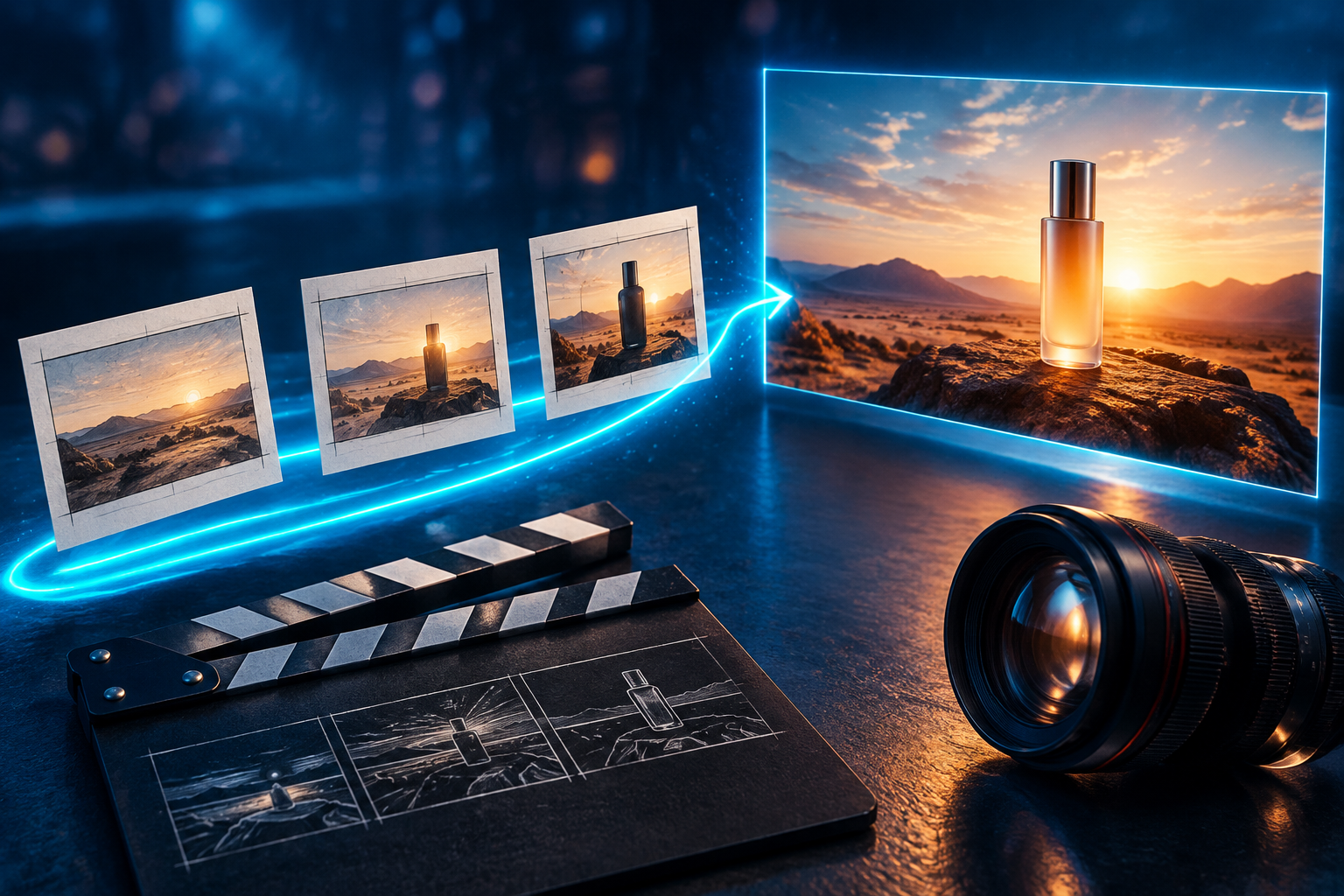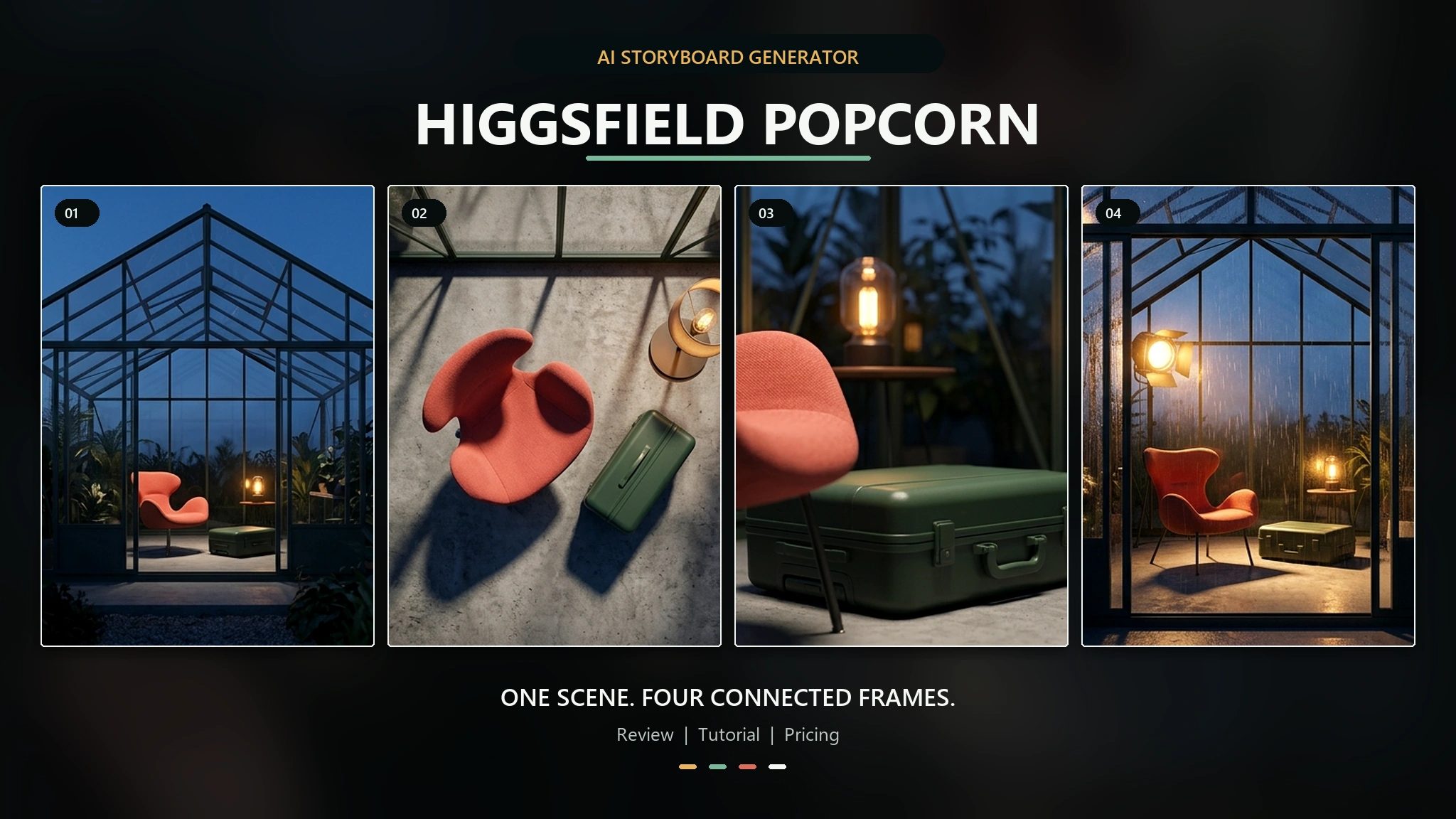
Snel antwoord: Higgsfield Popcorn is een AI-storyboardgenerator die op basis van prompts en maximaal vier referentieafbeeldingen samenhangende beelden genereert. Het sterkste punt van het programma is continuïteit: in plaats van elke afbeelding als een afzonderlijke taak te behandelen, helpt het je om een personage, product, setting en visuele stijl door een reeks beelden heen te laten terugkomen. Je kunt het beter zien als een AI-storyboardmaker dan als een conventionele fotobewerker.
Popcorn is geen onbeperkt gratis programma. Higgsfield vermeldt een gratis abonnement met “beperkt gebruik”, terwijl in de openbare prijstabel 1,5 credits per Popcorn-afbeelding in rekening wordt gebracht. De site publiceert geen gegarandeerd Popcorn-tegoed voor elk gratis account, dus het eerlijke antwoord is dat je het misschien kunt uitproberen met de beschikbare credits, maar dat herhaald gebruik voor storyboards betaalde of promotiecredits vereist.
Als je de ingebouwde storyboard-bedieningselementen van Popcorn nodig hebt, gebruik dan Higgsfield zelf. Als je grootste probleem ligt in het betalen voor en beheren van meerdere afzonderlijke AI-abonnementen, De alles-in-één AI-werkruimte van GlobalGPT brengt diverse tools voor chat, onderzoek, afbeeldingen, video en klantenservice samen onder één account en abonnement. Die bredere werkruimte kan het productieproces rond een storyboard vereenvoudigen, maar mag niet worden gepresenteerd als vervanging voor de specifieke interface van Popcorn.

Inhoudsopgave
- Wat is Higgsfield Popcorn AI?
- Hoe Higgsfield Popcorn werkt
- Handleiding voor Higgsfield-popcorn
- Hoe zorg je ervoor dat personages consistent blijven?
- Recensie van Higgsfield Popcorn
- Prijzen en gratis toegang
- Higgsfield Popcorn tegen Nano Banana 2
- Voor wie is Popcorn bedoeld?
- Veelvoorkomende problemen en oplossingen
- Veelgestelde vragen
- Eindoordeel
Wat is Higgsfield Popcorn AI?
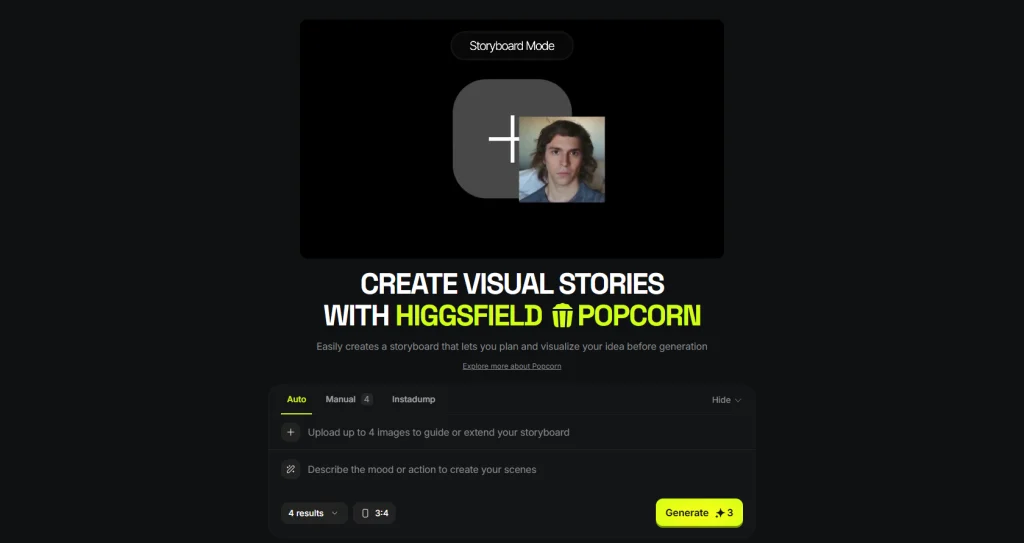
Higgsfield Popcorn is een functie voor visuele storyboards binnen Higgsfield. Op de productpagina wordt het beschreven als een manier om een idee te plannen en te visualiseren voordat het wordt gerealiseerd. De interface biedt de modi ‘Auto’, ‘Manual’ en ‘Instadump’, stelt je in staat om maximaal vier referentieafbeeldingen te uploaden en laat je het aantal resultaten en de beeldverhouding kiezen.
Het sleutelwoord is reeks. Een gewone AI-beeldgenerator kan een aantrekkelijk beeld genereren, maar in het volgende beeld kunnen het gezicht, het jasje, de vorm van het product, de belichting of de cameralogica onopgemerkt veranderen. Popcorn is ontworpen rond onderling samenhangende beelden, waardoor de continuïteit van personages en scènes een integraal onderdeel van de workflow wordt in plaats van een bijzaak.
Daardoor is het geschikt voor filmprevisualisatie, campagneconcepten, reeksen posts op sociale media, productverhalen en visuele pitches. Hierdoor valt Popcorn bovendien in een smallere categorie dan de tools in een algemene Vergelijking van AI-beeldgeneratoren: de belangrijkste taak ervan is niet alleen om de best geïsoleerde foto te maken, maar ook om ervoor te zorgen dat verschillende foto’s samen één verhaal vormen.
| Item | Wat u moet weten |
|---|---|
| Producttype | AI-storyboardgenerator en AI-beeldgenerator voor meerdere frames |
| Belangrijkste troef | Het samenstellen van samenhangende visuele reeksen op basis van aanwijzingen en referentieafbeeldingen |
| Referentie-ingangen | Maximaal vier afbeeldingen op de live-productpagina |
| Modi | Automatisch, handmatig en Instadump |
| Openbare eenheidskosten | 1,5 studiepunten per Popcorn-afbeelding, gecontroleerd op 3 september 2026 |
| Beste pasvorm | Voorbeeldweergave, advertentieconcepten, verhaallijnen en consistente campagnebeelden |
| Geen vervanging voor | Een applicatie voor het volledige beheer van storyboards, animaties of videobewerking |
Popcorn vs Soul ID
Popcorn en Soul ID lossen verwante, maar toch verschillende problemen op. Higgsfield’s richtlijn voor consistentie van personages Volgens Popcorn zorgt het voor visuele continuïteit tussen afbeeldingsframes en storyboardsequenties binnen een sessie. Soul ID is een getrainde identiteitslaag die bedoeld is om een persoon door sessies, afbeeldingen, video’s en meerdere modellen heen te begeleiden.
Gebruik Popcorn wanneer het eindproduct een samenhangend storyboard is. Overweeg Soul ID wanneer een terugkerend personage herkenbaar moet blijven in een uitgebreidere productiepijplijn. Ga er niet vanuit dat elke bewering over Soul ID automatisch ook geldt voor Popcorn.
Hoe Higgsfield Popcorn werkt
Referentieafbeeldingen vormen de visuele ankerpunten
Je kunt maximaal vier afbeeldingen uploaden om het storyboard te ondersteunen of uit te breiden. Een praktische set zou bijvoorbeeld kunnen bestaan uit één duidelijk personageportret, één locatie, één belangrijk voorwerp en één referentie voor de stijl of belichting. Je hoeft niet elk vakje in te vullen. Een zwakke of tegenstrijdige referentie kan meer verwarring veroorzaken dan een leeg vakje.
In de automatische modus staat snelheid voorop
De automatische modus is de snelste manier als je de verhaallijn al kent, maar niet elk frame zelf hoeft te regisseren. Schrijf één gestructureerde opdracht, kies het aantal resultaten en de verhouding, en laat het systeem de volgorde voorstellen. Dit is handig voor het bedenken van ideeën, presentatieborden en om te testen of een concept voldoende visuele variatie biedt om verder uit te werken.
In de handmatige modus ligt de nadruk op controle op het niveau van de afzonderlijke opname
De handmatige modus is zinvoller wanneer de volgorde van de opnames van belang is. Bepaal wat er in elk beeld verandert en herhaal daarbij de details die hetzelfde moeten blijven. Dit kost meer tijd, maar vergroot de kans dat de kleding, rekwisieten, regieaanwijzingen en de bedoeling van de camerabeelden behouden blijven.
Instadump is een afzonderlijke workflow voor snelle uitvoer
De live Popcorn-interface biedt ook Instadump aan als derde modus. Op de openbare productpagina van Higgsfield worden de volledige gebruiksregels niet in de zichtbare tekst uitgelegd; beschouw het daarom als een afzonderlijke interfaceoptie en controleer het gedrag ervan in je account voordat je er een client-workflow omheen bouwt.
Higgsfield Popcorn-handleiding: stap voor stap een storyboard maken
Stap 1: Schrijf de verhaalmoment op voordat je de afbeelding te zien krijgt
Begin met een driedelige opbouw: waar het personage begint, wat er verandert en waar de scène eindigt. “Een koerier komt een rustig hotel binnen, ontdekt een rode envelop en vertrekt via een drukke keuken” geeft de generator een duidelijkere opbouw dan “maak een filmisch storyboard voor een spionageverhaal.”
Stap 2: Zorg voor schone referentieafbeeldingen
Gebruik referenties met één duidelijke functie. Kies een helder, naar voren gericht personagebeeld; een locatie zonder visuele rommel; een product of rekwisiet in een goed leesbare hoek; en een stijlreferentie met consistente kleuren en belichting. Vermijd het gebruik van vier losstaande, voltooide composities die met elkaar concurreren om de aandacht.
Stap 3: Kies ‘Automatisch’ of ‘Handmatig’
- Kies 'Auto' voor snelle concepten, het verkennen van de sfeer en vroege pitchboards.
- Kies ‘Handmatig’ wanneer de volgorde van de opnames, de camerahoek, de kleding of de consistentie van de rekwisieten van essentieel belang zijn.
- Probeer Instadump eens apart uit voordat u het gebruikt voor een opdracht met een strakke deadline, omdat het volledige gedrag ervan niet is gedocumenteerd in de openbaar toegankelijke productdocumentatie.
Stap 4: Schrijf een opdracht waarbij de continuïteit voorop staat
Zet het terugkerende thema vóór de wisselende scène. Higgsfield’s officieel artikel over de Popcorn-workflow raadt aan om eerst de hoofdpersoon te introduceren en vervolgens de omgeving en de handeling te beschrijven. Een herbruikbare structuur is:
[Personage of product] + [actie] + [locatie] + [camera/kadrering] + [belichting] + [details die ongewijzigd moeten blijven]
Voorbeeld: “De vrouw uit referentie één loopt vanuit de lobby van het hotel de dienstgang in, medium tracking shot, koel ochtendlicht. Houd haar gezicht, korte zwarte bob, groene jas, rode envelop en de realistische filmstill-stijl ongewijzigd.”
Stap 5: Kies het aantal frames en de beeldverhouding
Gebruik minder frames terwijl je de visuele logica test. Vier sterke frames zijn nuttiger dan acht repetitieve of inconsistente frames. Kies een verticale verhouding voor korte sociale media-planning, een vierkante verhouding voor flexibele campagne-indelingen of een liggende verhouding voor filmische previsualisatie. Controleer de beschikbare verhoudingen in de live-interface, aangezien de voorinstellingen kunnen veranderen.
Stap 6: Continuïteit genereren en controleren
Beoordeel niet alleen het mooiste beeld. Vergelijk de hele strip en let op de gezichtsstructuur, het kapsel, de kleur van de kleding, de voorwerpen die het personage vasthoudt, de lichtval, de achtergrond en de positie van het personage van beeld tot beeld. Als één element afwijkt, pas dan die beperking aan voordat je de hele prompt wijzigt.
Stap 7: Verfijn één variabele tegelijk
Als het gezicht stabiel blijft maar de vacht verandert, zet je de beschrijving van de vacht dan vast en laat je de instructie voor het gezicht ongewijzigd. Als alle frames te veel op elkaar lijken, varieer dan de cameraafstand of de beweging in plaats van een nieuwe stijl te introduceren. Deze gecontroleerde aanpak is ook nuttig bij het maken van een stripverhaal op basis van één bronafbeelding: de continuïteit wordt beter als elke herziening één duidelijk doel heeft.
Hoe maak je een consistent storyboard voor een personage?
Een consistent storyboard voor een personage ontstaat niet door in elke zin “hetzelfde personage” te herhalen. Het model heeft een stabiel visueel anker nodig en een korte lijst met identiteitskenmerken die gemakkelijk tussen de verschillende frames kunnen worden vergeleken.
- Gebruik één hoofdafbeelding. Te veel verschillende portretten van dezelfde persoon kunnen tot tegenstrijdige gelaatskenmerken leiden.
- Noem de vergrendelde eigenschappen. Herhaal het kapsel, de belangrijkste gelaatstrekken, de kenmerkende kleding en één belangrijk rekwisiet.
- Maak een onderscheid tussen identiteit en handelen. Houd de identiteitsclausule ongewijzigd en wijzig alleen de actie- of instellingsclausule.
- De schermoriëntatie behouden. Als het onderwerp rechts uit beeld verdwijnt, mag het volgende shot geen onverklaarbare ommekeer suggereren.
- Bekijk de reeks in miniatuurformaat. Grote afbeeldingen verbergen continuïteitsfouten die duidelijk worden wanneer de beelden naast elkaar worden geplaatst.
Dezelfde principes gelden ook buiten Popcorn. Een speciale Nano Banana-workflow met consistente tekens laat zien hoe de keuze van referentiepunten en herhaalde identiteitsbeperkingen van invloed zijn op scènewisselingen in een algemene beeldbewerkingsprogramma.
Recensie van Higgsfield Popcorn: waar het goed scoort en waar niet
Deze beoordeling is gebaseerd op de live openbare interface van Higgsfield, de officiële documentatie en gepubliceerde voorbeelden van workflows. Hiermee wordt niet beweerd dat er een betaalde generatietest is uitgevoerd. Dat onderscheid is van belang, omdat officiële voorbeelden weliswaar de beoogde workflow kunnen toelichten, maar alleen herhaalde generaties in een echt account het percentage mislukkingen, de snelheid en identiteitsafwijkingen kunnen meten.
Sterk: de interface begint met de reeks
Het grootste voordeel van Popcorn is het productontwerp. Het aantal frames, de beeldverhouding, meerdere referenties en automatische of handmatige bediening zijn allemaal geïntegreerd in één storyboard-workflow. Je hoeft geen vier losstaande afbeeldingen te maken en deze ergens anders samen te voegen voordat je kunt zien of het verhaal klopt.
Sterk: het ondersteunt zowel het bedenken van ideeën als het bepalen van de koers
Dankzij de automatische modus is de tool toegankelijk voor makers die snel over opties willen beschikken. De handmatige modus biedt regisseurs, ontwerpers en marketeers meer ruimte om bewust keuzes te maken. Deze workflow met twee niveaus is nuttiger dan de belofte van een “consistent personage” met één druk op de knop, omdat verschillende productiefasen een verschillende mate van controle vereisen.
Veelbelovend, maar test het even: continuïteit van personages en objecten
Higgsfield beschrijft Popcorn als een tool die identiteit, belichting, perspectief en sfeer behoudt in aaneengesloten beelden. Dit zijn beweringen van de leverancier en geen garantie dat elke complexe reeks beelden stabiel blijft. Test, voordat je de tool voor een betaalde campagne gebruikt, precies het onderwerp, de kleding, de productgeometrie en de scènewisselingen die voor jouw project nodig zijn.
Beperkt: dit is geen volledige productietijdlijn
Popcorn helpt bij het opstellen van het visuele plan. Het is geen vervanging voor timing, dialoogbewerking, audio, motion design, goedkeuring van opnames, versiebeheer of de uiteindelijke videomontage. Als je eindproduct een animatie moet worden, plan dan een tweede fase in met een tool voor het omzetten van afbeeldingen naar video of voor het genereren van video. De richtlijn om te bepalen of Met Nano Banana Pro kun je video's maken legt dezelfde ‘image-first’-benadering uit vanuit het perspectief van Google op de markt.
Voor- en nadelen
| Voordelen | Nadelen |
|---|---|
| Een interface waarbij het storyboard centraal staat, in plaats van afzonderlijke afbeeldingstaken | Officiële voorbeelden kunnen de drift snelheid voor uw onderwerp niet voorspellen |
| Maximaal vier referentieafbeeldingen | Meer verwijzingen kunnen ook tot tegenstrijdige instructies leiden |
| Automatische modus voor snelheid en handmatige modus voor belichtingsregeling | Bij handmatige continuïteit is nog steeds zorgvuldige en snelle discipline vereist |
| Handig voor voorvisualisatie, presentaties en campagne-sequenties | Geen tool voor volledige animatie, videobewerking of productiebeheer |
| Duidelijk openbaar tarief per afbeelding | De totale kosten stijgen met elk frame en elke herziening |
Prijzen van Higgsfield Popcorn: is het gratis?
Higgsfield Popcorn is niet onbeperkt gratis. Op 3 september 2026 zal de officiële prijspagina van Higgsfield gaf aan dat het gratis abonnement bestemd was voor “beperkt gebruik” en stelde de prijs voor Popcorn vast op 1,5 credits per gegenereerde afbeelding. In de overzichtstabel van de abonnementen werd geen gegarandeerd Popcorn-specifiek quotum voor elk gratis account vermeld.
| Plan | Openbare prijs bij jaarlijkse facturering | Toegestane hoeveelheid volgens het gepubliceerde plan | Kosten van popcorn |
|---|---|---|---|
| Gratis | $0 | Beperkt gebruik; er wordt geen vaste popcorntoelage weergegeven | 1,5 credits per afbeelding, indien er credits beschikbaar zijn |
| Voorgerecht | $19 per maand, jaarlijks gefactureerd | 270 studiepunten per maand | 1,5 studiepunten per afbeelding |
| Plus | $47 per maand, jaarlijks gefactureerd | 1.200 credits per maand | 1,5 studiepunten per afbeelding |
| Ultra | $99 per maand, jaarlijks gefactureerd | 3.000 credits per maand op het standaard weergegeven niveau | 1,5 studiepunten per afbeelding |
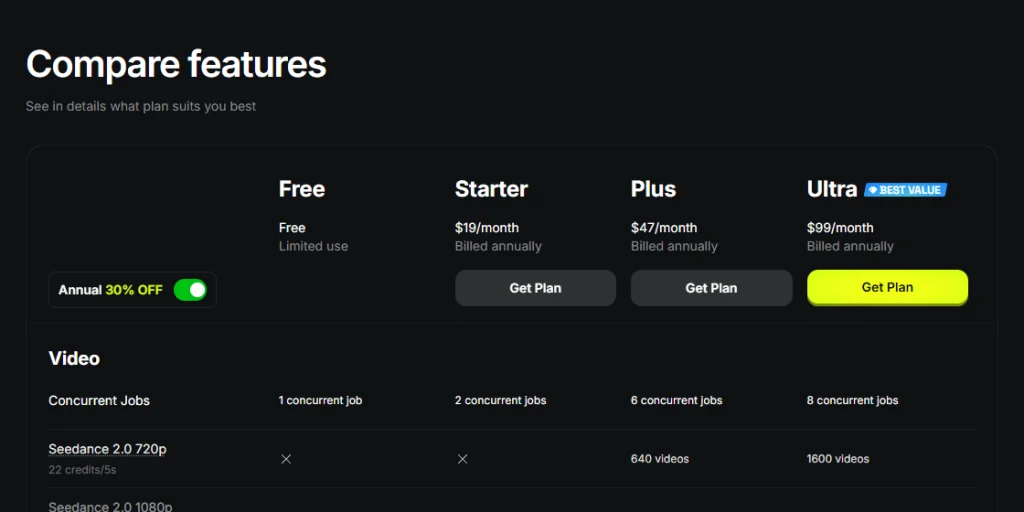
Dit zijn platformabonnementen, geen abonnementen die uitsluitend voor Popcorn gelden, en op de pagina was tijdens de verificatie gekozen voor jaarlijkse facturering plus een promotiekorting. Belastingen, regionale afrekenbedragen, de inhoud van de abonnementen en promoties kunnen veranderen. Raadpleeg de officiële prijspagina voor de definitieve aankoopbeslissing.
Hoe de werkelijke kosten van een storyboard kunt inschatten
Gebruik deze eenvoudige formule:
Frames × 1,5 studiepunten × aantal pogingen om de volledige reeks te voltooien
- Een eerste poging met vier frames kost 6 credits.
- Een eerste poging met acht frames kost 12 credits.
- Drie volledige pogingen bij vier frames kosten 18 credits.
De werkelijke kosten hangen af van het aantal bruikbare frames, niet van de eerste generatie. Begin met vier frames, breng de volgordelogica op orde en breid pas uit als het personage en de artistieke richting vaststaan.
Higgsfield Popcorn tegen Nano Banana 2
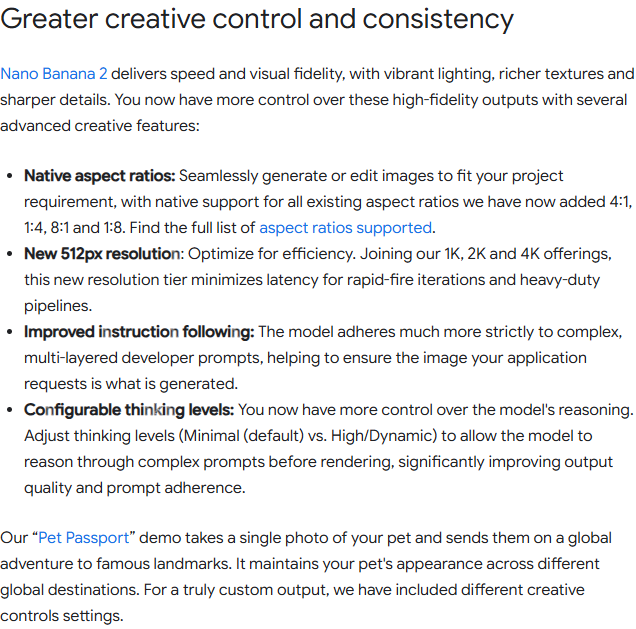
Het zoekwoord ‘comparison’ wordt soms verkeerd gespeld, maar de productnaam van Google is Nano banaan. De nieuwste algemene Flash-update is Nano Banana 2, officieel Gemini 3.1 Flash Image genoemd. Google omschrijft het als een model voor het genereren en bewerken van afbeeldingen met snellere geavanceerde bewerkingsmogelijkheden, een betere naleving van instructies, meerdere beeldverhoudingen, uitvoeropties van 512px tot 4K, tekstweergave en verbeterde visuele consistentie.
Popcorn en Nano Banana 2 overlappen elkaar, maar het zijn geen identieke producten. Popcorn is een workflow voor storyboards. Nano Banana 2 is een algemeen beeldmodel dat binnen verschillende applicaties en API’s kan worden gebruikt. Google’s officiële aankondiging van Nano Banana 2 legt de nadruk op het op schaalbare wijze maken en bewerken van afbeeldingen, en niet op een speciale interface voor het beeld voor beeld opstellen van een storyboard.
| Beslissingsmoment | Higgsfield Popcorn | Nano Banaan 2 |
|---|---|---|
| Kernproduct | AI-storyboardmaker in Higgsfield | Algemeen model voor het genereren en bewerken van afbeeldingen |
| De beste werkwijze | Gekoppelde frames, visuele presentaties en previsualisatie | Flexibele integraties voor het maken en bewerken van afbeeldingen, tekst, lokalisatie en productie |
| Sequentiecontrole | Automatische en handmatige storyboardmodi | Dat hangt af van de toepassing, de structuur van de prompt en de referentieworkflow |
| Omgang met bronvermeldingen | Maximaal vier begeleidende afbeeldingen in de live Popcorn-interface | Ondersteunt het aanmaken en bewerken op basis van referenties; de beperkingen zijn afhankelijk van het toegangsoppervlak |
| Ontwikkelaarsroute | In eigen beheer ontwikkelde webworkflow voor Higgsfield; de openbare pagina bevat ook links naar de bredere MCP- en CLI-producten | Gemini API, Google AI Studio, Vertex AI en andere Google-platforms |
| Kies deze optie wanneer | Je wilt dat het storyboard zelf het werkvlak is | Je hebt een breed beeldmodel nodig voor bewerking, tekst, automatisering of aangepaste toepassingen |
Kies ‘Popcorn’ wanneer de volgorde van de sequentie en de frames met elkaar vermenigvuldigd zijn. Kies ‘Nano Banana 2’ wanneer het beeldmodel geschikt moet zijn voor vele soorten visueel werk. Om te zien wat een algemeen model kan doen met herhaalde gezichtspunten, vergelijk je de Nano Banana-workflow voor multi-shot-bursts.
Ook de kosten verschillen per ecosysteem. Higgsfield verkoopt platformcredits en hanteert voor Popcorn een prijs van 1,5 credits per afbeelding. Het model van Google is toegankelijk via interfaces voor consumenten en ontwikkelaars, met verschillende factureringsregels. De Nano Banana 2: handleiding voor prijzen, API en abonnementen scheidt die routes van elkaar in plaats van ze als één prijs te behandelen.
Als geen van beide workflows duidelijk geschikt is, dan de Vergelijking tussen Flux 2 en Nano Banana Pro voegt een nuttig derde perspectief toe op het gebied van promptbeheer, bewerking en de beeldkwaliteit van de eindproductie.
Voor wie is Higgsfield Popcorn bedoeld?
Gebruik Popcorn als je:
- Een filmmaker of regisseur die vóór de productie de volgorde van de opnames in gedachten uitwerkt.
- Een creatief team dat een reclamepresentatie ontwikkelt rond één personage of product.
- Een social media-maker die een gekoppelde carrousel, een Reel of een kort verhaal aan het plannen is.
- Een ontwerper die meerdere afbeeldingen nodig heeft om één visuele wereld tot uitdrukking te brengen.
- Een klantgericht team dat sneller een overzichtelijk storyboard nodig heeft dan een gepolijste definitieve campagne.
Sla de popcorn over als je:
- Ik heb maar één op zichzelf staande afbeelding nodig.
- Heb je animaties nodig die tot op het beeld nauwkeurig zijn, audio of een complete montagetijdlijn?.
- Er is een getrainde identiteit nodig die in meerdere sessies en videomodellen behouden blijft.
- Ik heb een native-API voor ontwikkelaars nodig voor een op maat gemaakte productie-applicatie.
- Geef meer prioriteit aan de laagst mogelijke kosten per afbeelding dan aan het gebruiksgemak van het storyboard.
Makers die de visuele aanpak van Higgsfield waarderen, maar behoefte hebben aan een andere prijs, API of een ander productiemodel, kunnen de de beste alternatieven voor Higgsfield voor videomakers. Voor teams die veel met automatisering werken, is de GLBGPT vs Higgsfield vs Magnific: handleiding voor CLI en MCP legt de nadruk op workflow-integratie in plaats van op de esthetiek van het storyboard.
Veelvoorkomende problemen en wat je kunt proberen
| Probleem | Waarschijnlijke reden | Wat je kunt proberen |
|---|---|---|
| Het gezicht verandert van beeld tot beeld | Een zwakke identiteitsreferentie of te veel tegenstrijdige beelden | Gebruik één duidelijke hoofdfoto en herhaal twee of drie karaktertrekken |
| Kleding of rekwisieten verdwijnen | De opdracht richt zich op actie, maar niet op vaststaande details | Voeg aan elk handmatig frame een korte clausule toe met de tekst “ongewijzigd laten” |
| Elk beeld ziet er bijna identiek uit | De prompt beschrijft een sfeer, maar geen ontwikkeling | Geef elk beeld een eigen actie, afstand of cameradoel |
| De volgorde komt ruimtelijk verwarrend over | De schermrichting en de geografische locatie zijn niet gedefinieerd | De ligging van de in- en uitgangen en de stand van de camera’s moet consistent zijn |
| Credits raken sneller op dan verwacht | Te veel frames of herhalingen van de volledige reeks | Maak een prototype met vier frames en pas telkens één variabele aan |
| Met het gratis abonnement kan het storyboard niet worden voltooid | De gratis toegang is beperkt en er wordt geen vast Popcorn-quotum beloofd | Controleer het actuele saldo en de koers van de rekening voordat u de transactie genereert |
Veelgestelde vragen
Wat is Higgsfield Popcorn?
Higgsfield Popcorn is een AI-storyboardgenerator binnen Higgsfield. Het maakt gebruik van prompts en maximaal vier referentieafbeeldingen om onderling samenhangende visuele frames te creëren. Het belangrijkste doel ervan is het plannen van sequenties met meer samenhang tussen personages, objecten, belichting en omgevingen dan bij een reeks losstaande, op zichzelf staande afbeeldingen.
Is Higgsfield Popcorn gratis?
Higgsfield biedt een gratis abonnement aan met de naam “Beperkt gebruik”, maar geeft geen gegarandeerde Popcorn-specifieke limiet per gratis account. Popcorn kost 1,5 credits per afbeelding. Je kunt het wellicht uitproberen met de beschikbare credits, maar het herhaaldelijk maken van storyboards is niet onbeperkt gratis.
Hoeveel kost Higgsfield Popcorn?
Op de openbare prijspagina van Higgsfield stond op 3 september 2026 vermeld dat Popcorn 1,5 credits per gegenereerde afbeelding kost. Een poging met vier frames kost dus 6 credits, exclusief eventuele herzieningen. De prijzen voor abonnementen en het aantal inbegrepen credits variëren per abonnement, factureringsperiode, aanbieding, belasting en regio.
Hoeveel referentieafbeeldingen kan ik uploaden naar Popcorn?
Op de live-pagina van Higgsfield Popcorn staat dat je maximaal vier afbeeldingen kunt uploaden om een storyboard te ondersteunen of uit te breiden. Een handige set kan bestaan uit een personage, een locatie, een voorwerp en een stijlreferentie, maar een kleiner aantal duidelijke referenties werkt wellicht beter dan vier afbeeldingen met tegenstrijdige visuele informatie.
Kan Higgsfield Popcorn in elk beeld hetzelfde karakter behouden?
Popcorn is ontworpen om de samenhang tussen de verschillende storyboardframes te verbeteren, maar geen enkele generatieve workflow garandeert bij elke poging een perfecte overeenkomst. Gebruik één sterke identiteitsreferentie, herhaal een paar vaste kenmerken en wijzig telkens slechts één belangrijke variabele. Test het exacte personage voordat je het definitief vrijgeeft voor productie door de klant.
Wat is het verschil tussen Higgsfield Popcorn en Soul ID?
Popcorn richt zich op visuele continuïteit binnen beeldsequenties en storyboards. Soul ID is een geavanceerd identiteitssysteem dat bedoeld is om de identiteit van een persoon te behouden in verschillende sessies, afbeeldingen, video’s en verschillende modellen. Gebruik Popcorn voor het plannen van shots; overweeg Soul ID voor een consistente identiteit binnen een bredere productiepijplijn.
Is Higgsfield Popcorn beter dan Nano Banana 2?
Popcorn is de betere keuze als je een speciale storyboard-interface wilt met aan elkaar gekoppelde frames en handmatige controle over de opnames. Nano Banana 2 is flexibeler als algemeen model voor het genereren en bewerken van afbeeldingen, met name voor tekst, lokalisatie, automatisering en aangepaste toepassingen. Welke keuze het beste is, hangt af van de workflow.
Kan ik een Popcorn-storyboard omzetten in een video?
Je kunt storyboard-frames gebruiken als visuele referenties of als uitgangspunt voor een latere videoproductie, maar Popcorn zelf moet niet worden verward met een volwaardige videobewerkingsprogramma. Bekijk de opties voor live-export of overdracht in je account en plan vervolgens de bewegingen, het geluid, de timing en de uiteindelijke montage apart.
Eindoordeel: Is Higgsfield Popcorn het geld waard?
Higgsfield Popcorn is het overwegen waard wanneer je echte uitdaging niet ligt in het maken van één aantrekkelijke afbeelding, maar in het zorgen dat meerdere afbeeldingen zich als een reeks gedragen. De combinatie van meerdere referenties, automatische ideeënvorming, handmatige controle over de opnames en een canvas waarbij het storyboard voorop staat, geeft het een duidelijke bestaansreden.
De afweging is al even duidelijk. De consistentie moet nog worden getest, elke herziening kost meer credits en het storyboard is slechts één fase van de productie. Gebruik het gratis abonnement om de workflow te bekijken als je account over voldoende credits beschikt, en voer vervolgens een klein project van vier frames uit voordat je een grotere campagne aanschaft.
Kies Higgsfield Popcorn voor geïntegreerde visuele planning. Kies Nano Banana 2 voor uitgebreidere beeldgeneratie en -bewerking. Kies een alles-in-één-platform wanneer het samenvoegen van abonnementen en toegang tot meerdere AI-mogelijkheden belangrijker zijn dan één native storyboard-interface.