KLING AI · CHARACTER CONSISTENCY
Kling AI character consistency is the model’s ability to keep a character’s face, clothing, and hairstyle recognizable across multiple generated videos, helping reduce the “face melting” problem. In 2026, Kling AI achieves this through its built-in “Subject Library” and “Element Binding” tools, allowing users to upload a clear reference photo of a character so the AI can use those physical traits as a reference across a 15-second cinematic sequence. For multi-image elements, use 2–4 separate reference images. Midjourney is optional: Kling’s Element Library can also help generate extra views.
Paying for a separate image generator just to create your reference photos, and then paying again for Kling AI to animate them, quickly drains your monthly budget. Constantly exporting heavy images from one website and uploading them to another ruins your workflow and breaks your creative focus.
GlobalGPT removes this frustrating barrier by providing an all-in-one platform where you can generate and animate your characters in one place. With the Pro Plan at $10.80 per month billed annually ($129.60 a year), or $15 paid monthly, you can use Midjourney to create character reference sheets, then upload the saved images to Kling 3.0 for animation without switching tabs or dealing with regional access restrictions.
Model update — September 29, 2026: Kling’s official site lists Kling 4.0 and early access to 4.0 Flash. GlobalGPT offers Kling 3.0. For the workflow below, use the VIDEO 3.0 controls described in each step.
- Kling AI Character Consistency Explained: What Is Character Drift?
- How Do You Use the Kling 3.0 Subject Library and Element Binding?
- What Is the Ultimate Cross-Model Workflow for Recurring Characters?
- How Does Kling AI Compare to Runway Gen-4.5 for Storytelling?
- How Can You Create Consistent Characters Without Huge Subscription Costs?
- What Are the Best Negative Prompts to Stop Character Morphing?
- FAQs
- Conclusion
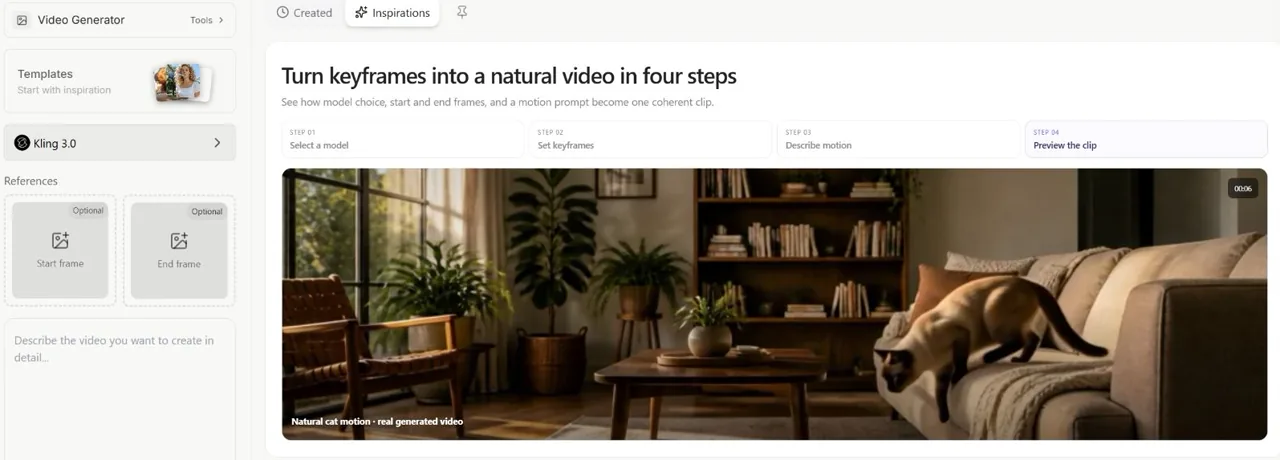
Kling AI Character Consistency Explained: What Is Character Drift?
Character drift happens when the AI video generator loses track of your subject’s details, causing their face, age, or clothing to morph into someone else as the camera moves. Kling uses reference images and reusable character elements to help keep those details consistent.
- The Problem of Face Melting: When a character turns their head, the model has to infer details that are missing from the reference. This can result in distorted features or sudden changes in eye color.
- How Kling’s Reference Models Help: Kling VIDEO 3.0 and VIDEO 3.0 Omni (the successor to O1) use references to help preserve a character’s appearance. Reusing the same views gives the model more detail to work with during head turns and camera movement.
| Problem | Common signs of drift | What to check after generation |
|---|---|---|
| Head Turns | Face distorts or melts | Face matches the reference across angles |
| Outfit Details | Logos and buttons change randomly | Clothing details match across shots |
| Lighting Changes | Character age appears to change | Skin tone and age remain consistent |
How Do You Use the Kling 3.0 Subject Library and Element Binding?
You use the Kling 3.0 Subject Library by uploading a high-resolution start frame, then opening “Bind Subject to Enhance Consistency” to create or select an element. The Element Library guide specifies 2–4 images per multi-image element and up to 3 bound elements for VIDEO 3.0. Bind characters that appear in the start frame.
- Upload Multi-Angle Photos: For the best results, do not just upload a single selfie. Upload 2–4 separate images showing the character from the front, side, and a 3/4 angle; crop a character sheet into individual views first. The Subject Library stores these angles to give the model more detail to use during head turns.
- Lock Specific Details: The Element Binding tool is not just for faces. If your character wears a specific glowing necklace or a unique jacket, uploading a clear reference of those items helps the model carry those details into shot two.
- Avoid Cluttered Backgrounds: When uploading a reference image to the Subject Library, a simple background helps keep the character clear; white or green is an option, not a stated requirement. Keep distracting objects away from the face and clothing.
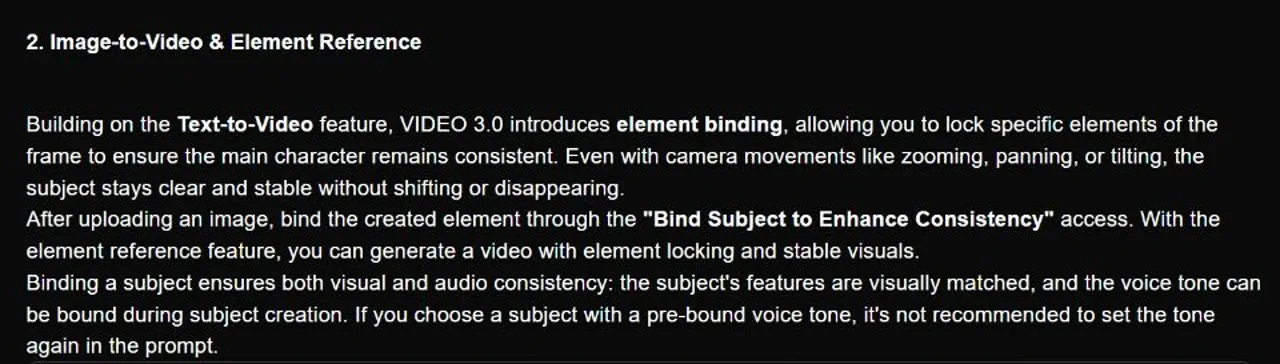
For start-frame setup, follow the Kling image-to-video workflow.
What Is the Ultimate Cross-Model Workflow for Recurring Characters?
The ultimate cross-model workflow can use a dedicated image generator to design a flawless character first, and then import that design into Kling AI for video animation. You can also start with an existing image or use Kling’s own image tools; a separate image subscription is optional.
- Step 1: Generate with Midjourney: Use a model like Midjourney (available inside GlobalGPT) to create your base character. Aim for a character sheet with consistent lighting and matching facial features across views.
- Step 2: Clean the Background: Ensure the Midjourney image has a simple, uncluttered background. This makes it easier for Kling to separate the character from the environment.
- Step 3: Animate in Kling AI: In Kling’s own studio, use your approved reference views to create an element, then bind it to the start frame. Now, when you tell Kling to make the character “run through a forest,” it uses the reference to guide the character’s appearance.
In GlobalGPT, upload the image through the start-frame controls; use Element Library binding in Kling’s own studio. The Kling 3.0 prompt guide helps separate character action from camera direction.
Pro-Level Character Sheet Prompt (Copy & Paste)
Use this prompt in Midjourney to create a character-sheet reference before uploading to Kling:
Multiple angles character design sheet, a 30-year-old cyberpunk mechanic wearing a yellow jacket and goggles, showing front view, side profile, and 3/4 view, perfectly consistent face, flat white background, studio lighting, hyper-realistic, 8k --ar 16:9
How Does Kling AI Compare to Runway Gen-4.5 for Storytelling?
Kling and Runway both offer reference tools in their own interfaces. Kling lets you bind saved character elements to a start frame. Runway’s Gen-4 Image References creates a character image that you can use as the input for a video model such as Gen-4.5.
- Built-in Reference Workflows: Runway offers Gen-4 Image References inside its own interface, with up to three references to create a consistent character image. You can then use that image for video generation; ComfyUI is not required. Kling’s element binding provides a direct way to reuse saved characters.
- Long-Form Narrative: Because Kling 3.0 supports 3–15 seconds per generation, reuse the same references across clips, check the character in each take, and edit the matching shots into a short film.
Use the same references when building a longer film from consistent clips.
How Can You Create Consistent Characters Without Huge Subscription Costs?
You can create consistent characters without huge subscription costs by utilizing centralized AI platforms that give you access to both image generators and the video generators under one subscription.
- The Financial Trap: Midjourney Basic costs $10 monthly or $96 annually ($8 per month); Standard costs $30 monthly or $288 annually ($24 per month). A separate video plan adds another bill. Kling’s VIDEO 3.0 credit table lists 6 credits per second for 720p without native audio: 30 Kling credits for 5 seconds, or 90 for 15 seconds. These are Kling credits, not GlobalGPT credits.
- The Seamless Pipeline: Platforms like GlobalGPT solve this by offering both tools inside one dashboard. Generate the character with the included Midjourney model, then save and upload the image to the Kling video model in the same workspace, saving time and cutting costs drastically.
The official Kling credit table provides the per-second rates above. For GlobalGPT Pro, twelve $15 monthly payments total $180; the $129.60 annual option saves $50.40 before any tax or payment fees. The annual plan lists 240,000 credits, generally allocated and reset monthly.
Choose the billing period on GlobalGPT’s pricing page to compare the monthly payment with the annual commitment.

📺 Watch Kling Character Consistency in Action:
Want to see how professionals use the Subject Library to lock faces during complex camera movements? Watch this detailed breakdown:
What Are the Best Negative Prompts to Stop Character Morphing?
Negative prompts can target physical deformities and visual blending when the selected interface provides a separate negative-prompt field. If there is only one prompt box, describe the appearance and motion you want in positive terms.
- Ban physical mutations: In a separate negative-prompt field, target the body details that are going wrong. Use phrases like “extra fingers, morphed face, melting eyes, disjointed limbs, double heads.”
- Isolate the background: If your character is walking through a neon city, watch for neon colors bleeding into the character’s skin. In a negative-prompt field, try terms like “color bleeding, background merging, double exposure.”
If the character still drifts, simplify the camera movement before adding more prompt terms.
| Issue | Negative Prompt Keyword | What to check in the result |
|---|---|---|
| Hand Deformities | extra fingers, missing fingers, broken hands | Normal, realistic hands |
| Face Melting | morphed face, asymmetric eyes, melting features | Sharp, stable facial structure |
| Background Blending | double exposure, color bleeding, ghostly | Clean separation between actor and set |
FAQs
What is Kling AI character consistency?
Kling AI character consistency is the model’s ability to keep a character’s face, clothing, and physical traits recognizable across clips or during camera movements. Reference images help, but you still need to review each result.
How do I use the Kling Subject Library?
You use the Subject Library by uploading 2–4 separate reference images and binding the saved element to your start frame, giving the model the same character references to use in each clip.
Why does my AI character’s face melt?
AI character faces can drift when the model infers unseen angles or missing details incorrectly. Add clear multi-angle references and simplify the movement. Negative prompts may help when the interface provides a separate field for them.
Can Kling AI keep characters the same across multiple videos?
Yes, by using the Element Binding feature in VIDEO 3.0, Kling AI can reuse your character references across multiple different 3–15-second video sequences.
Do I need Midjourney to use Kling’s Element Library?
No. You can use suitable reference images you already have. Kling’s Element Library also provides AI-assisted extra views. Midjourney is an optional character-design tool.
Conclusion
Mastering Kling AI’s character consistency completely transforms amateur AI clips into commercial short films. By understanding the mechanics of the Subject Library and utilizing a cross-model workflow—generating clean character sheets first before animating—you reduce the frustrating issue of face melting and character drift. Consolidating this workflow into a single, comprehensive platform not only speeds up your production time but significantly reduces the high costs associated with jumping between multiple standalone AI subscriptions.