

Se Sora sembra improvvisamente non funzionare, la risposta dipende dal contesto in cui stai cercando di utilizzarlo. OpenAI ha interrotto il supporto per le esperienze web e app di Sora su 26 aprile 2026, quindi pagine vuote, link non funzionanti o controlli di generazione mancanti sono solitamente indici di un prodotto fuori produzione, non di un'interruzione temporanea.
L'API per sviluppatori segue una tempistica diversa. OpenAI afferma che l'API Sora verrà dismessa il 24 settembre 2026, offrendo ai team API una finestra di migrazione separata. Anche i crediti sono di nuovo distinti: secondo il Centro assistenza di OpenAI, i crediti ChatGPT/Sora acquistati possono ancora essere utilizzati per Codex, se lo si desidera. L'accesso all'app, la disponibilità dell'API e i crediti non dovrebbero essere considerati come un unico problema.
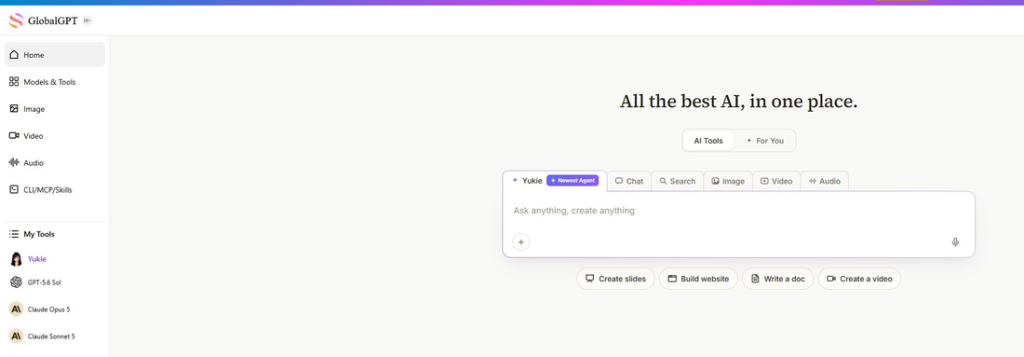
Per la maggior parte delle persone, il passo successivo più utile è esportare tutto ciò che è ancora disponibile e trasferire i nuovi lavori in un flusso di lavoro video aggiornato. Se si desidera confrontare diversi modelli video senza dover aprire una serie di strumenti separati, L'area di lavoro del modello video di GlobalGPT è un'ottima occasione per testare le opzioni di backup. Si tratta di un servizio multimodello a sé stante, non di una versione ripristinata dell'app Sora di OpenAI, e continuano ad applicarsi le regole relative alla disponibilità dei modelli e all'utilizzo proprie di tale servizio.

Piattaforma AI all-in-one per la scrittura, la generazione di immagini e video con GPT-5, Nano Banana e molto altro.
Risposta rapida: Perché Sora non funziona?
Probabilmente Sora non funziona perché le versioni ufficiali del sito web e dell'app di Sora destinate al pubblico sono già state dismesse. OpenAI indica il 26 aprile 2026 come data di dismissione per il sito web e l'app, mentre l'API di Sora segue un calendario di chiusura separato, previsto per il 24 settembre 2026.
Se ti capita di vedere una schermata vuota dell'app, un link Sora non funzionante, messaggi relativi all'esportazione o vecchi contenuti condivisi che non si caricano più, non perdere ore a svuotare la cache o a cambiare browser. Queste soluzioni possono aiutarti a problemi comuni relativi a ChatGPT, ma non possono riportare in vita un’esperienza con Sora ormai conclusa.
L'unica eccezione è l'API. Se sei uno sviluppatore e la tua richiesta Sora raggiunge ancora un endpoint OpenAI, si tratta di una scadenza per la migrazione, non di una normale interruzione del servizio per le app destinate ai consumatori. In tal caso, controlla il nome del modello, l’endpoint, i log e il piano di ripiego prima del 24 settembre 2026.
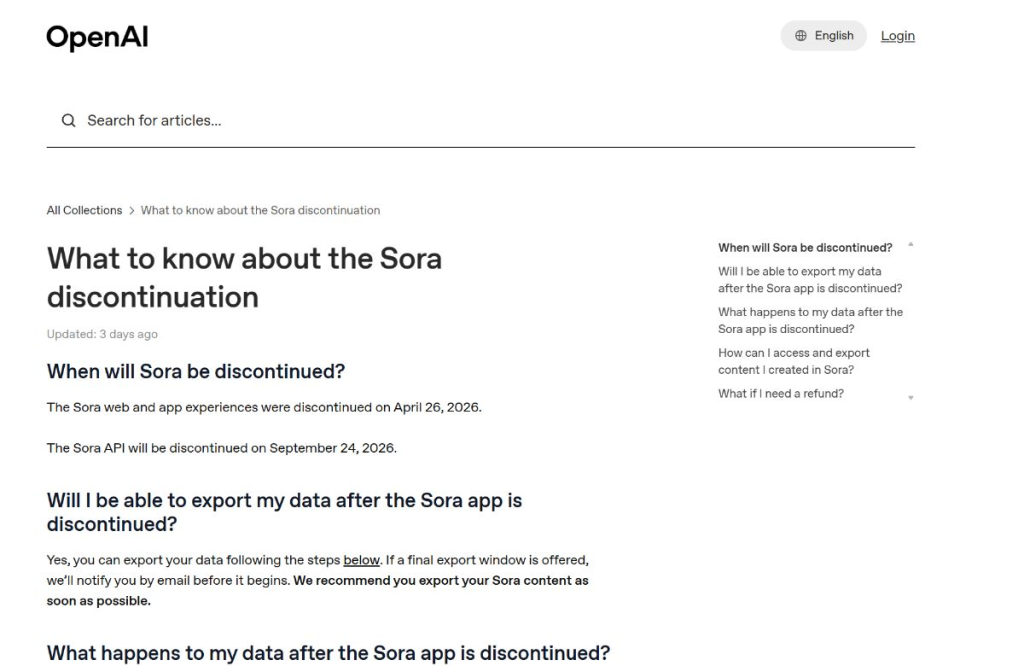
Cronologia ufficiale di Sora: app, API, dati e crediti
Il modo più sicuro per interpretare la chiusura di Sora è quello di considerarla suddivisa in quattro aspetti distinti: accesso alle app per i consumatori, accesso alle API per gli sviluppatori, esportazione/gestione dei dati e crediti. Tenendoli separati è più facile capire cosa è terminato, cosa ha ancora una scadenza e cosa potrebbe rimanere utilizzabile altrove.
Per gli sviluppatori, la pagina dedicata alle API deprecate di OpenAI rappresenta la fonte principale. In essa si legge che gli sviluppatori sono stati informati il 24 marzo 2026 che l’API Videos e gli alias/snapshot del modello Sora 2 sarebbero stati rimossi dall’API il 24 settembre 2026. Tale data di marzo è la data di preavviso, non la data di chiusura del sito web o dell’app.
Questa distinzione chiarisce gran parte della confusione relativa alle date. Il 24 marzo 2026 si riferisce all’avviso di obsolescenza dell’API, il 26 aprile 2026 alla cessazione del servizio web/app e il 24 settembre 2026 alla chiusura dell’API. Le domande relative ai crediti e ai rimborsi seguono linee guida separate, pertanto si prega di consultarle a parte.
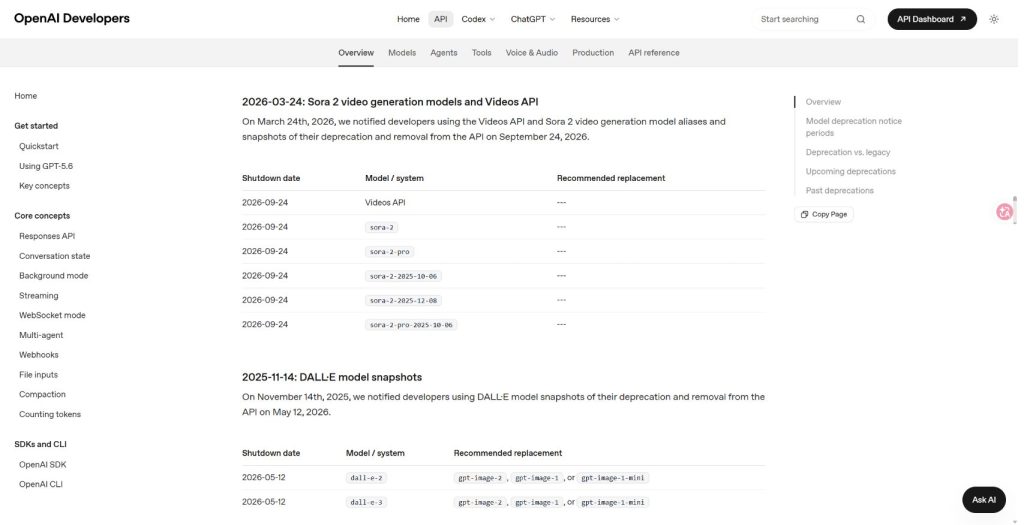
Perché gli errori di Sora si verificano proprio ora
Le pagine Sora meno recenti possono presentare diversi tipi di malfunzionamenti. Un link a un video condiviso non più attivo potrebbe comportarsi come una risorsa mancante. Una pagina di un’app potrebbe comunque caricare una parte dell’interfaccia sufficiente a farla sembrare attiva, mentre la generazione non funziona più. Una richiesta dello sviluppatore potrebbe continuare a funzionare solo fino alla data di disattivazione dell’API, a seconda dell’accesso all’account e del comportamento dell’endpoint.
Ecco perché “Sora non funziona” non è più una semplice domanda relativa alla risoluzione dei problemi. È una domanda sullo stato del sistema. Prima di modificare le impostazioni, chiediti quale percorso stai utilizzando:
- App Sora o sito web: considerarlo come ritirato, quindi consultare le istruzioni di esportazione del OpenAI.
- Vecchi contenuti condivisi su Sora: Non dare per scontato che il link rimanga disponibile; esporta i contenuti di tua proprietà, ove possibile.
- API Sora: Verificate il vostro endpoint, l'alias del modello, i log e il piano di migrazione prima del 24 settembre 2026.
- Crediti o note legali: distinguere le domande relative agli abbonamenti e ai rimborsi da quelle relative ai prezzi delle API e ai limiti di utilizzo.
Vecchi link condivisi e video eliminati
Se un vecchio link Sora non si apre più, l'ipotesi più plausibile è che la risorsa non sia più disponibile tramite l'interfaccia pubblica dell'app. Ciò non significa automaticamente che il tuo account OpenAI sia completamente inattivo. Significa piuttosto che il link potrebbe rimandare a contenuti, feed o pagine dell'app collegati a una sezione del prodotto che OpenAI ha ritirato.
Errori API e risposte 410
Una risposta di tipo 404 indica solitamente che una risorsa non è stata trovata. Una risposta di tipo 410 è più significativa: sul web, indica che una risorsa è stata rimossa definitivamente, anziché essere temporaneamente non disponibile. Se riscontri questo tipo di risposta durante l’utilizzo dell’API Sora, considerala come un segnale di migrazione e consulta la tabella di deprecazione delle API di OpenAI prima di dedicare tempo alle correzioni del codice locale.
Attività in coda e “si è verificato un errore”
Alcuni errori sono meno evidenti. Una coda bloccata, un messaggio generico del tipo “si è verificato un errore” o un’interfaccia parziale possono sembrare una breve interruzione del servizio. Il test pratico è semplice: se il problema si verifica nell’app Sora o nell’esperienza web, lo stato del ciclo di vita è più importante del testo dell’errore. Se invece si verifica nella propria integrazione API, i log e il nome del modello sono più importanti della risoluzione dei problemi del browser.
Cosa fare ora se Sora non funziona
Inizia con la conservazione dei dati, non con ripetuti tentativi. Se hai creato contenuti in Sora, segui la procedura di esportazione indicata da OpenAI e salva una copia locale di tutto ciò di cui hai ancora bisogno. Se viene visualizzata una finestra di esportazione, non aspettare che si chiuda. È facile perdere traccia dei vecchi progetti video basati sull’intelligenza artificiale una volta che i link smettono di funzionare, specialmente se stai anche cercando di capire Che fine hanno fatto i video di Sora? dopo la chiusura.
Successivamente, valuta se hai bisogno della continuità ufficiale OpenAI o semplicemente di una pipeline di creazione video funzionante. Se gestisci un prodotto API, la risposta è la pianificazione della migrazione. Se sei un creatore che sta cercando di completare clip, spot pubblicitari, video esplicativi o brevi video per i social, la risposta è solitamente un modello di backup o un flusso di lavoro multimodello. Per i progetti realizzati a partire da filmati esistenti, un Flusso di lavoro video-video basato sull'intelligenza artificiale potrebbe essere un passo successivo migliore rispetto al tentativo di ricreare tutto partendo da un prompt testuale.
Prima esportare, poi ricompilare
Il Centro assistenza di OpenAI indirizza gli utenti verso sora.chatgpt.com/sunset per l'esportazione. Se hai a disposizione questa opzione di esportazione, utilizzala prima di riorganizzare il tuo flusso di lavoro. Salva i file video, le note relative al prompt, le immagini di riferimento e qualsiasi altro elemento contestuale del progetto di cui potresti aver bisogno in seguito. Una cartella locale contenente il prompt, il clip finale e i riferimenti di origine può sembrare banale, ma è molto più facile da riutilizzare rispetto a un link condiviso non funzionante.
Non dare troppo peso alla questione dei crediti
È facile fraintendere la questione dei crediti. OpenAI non afferma che tutti i crediti relativi a Sora scadano semplicemente alla data di chiusura dell’API. Il suo Centro assistenza precisa che i crediti ChatGPT/Sora acquistati possono ancora essere utilizzati per il Codex, se lo si desidera. Se avete domande relative alla fatturazione, tenetele separate dall’accesso all’app e dalla migrazione dell’API. Questa distinzione permette di evitare molti consigli sbagliati.
Scegli il flusso di lavoro successivo in base al lavoro, non al marchio
Se hai bisogno di un processo di conversione da testo a video in stile cinematografico, prova un modello video già esistente. Se hai bisogno di animare o modificare lo stile di filmati esistenti, inizia con la conversione da video a video. Se hai bisogno di un flusso di lavoro di produzione, mantieni la scrittura dello script, le immagini di riferimento, il rendering e il montaggio come fasi separate. La scomparsa di Sora non significa che ogni progetto video debba partire da zero; significa semplicemente che il vecchio percorso di Sora non è più al centro del flusso di lavoro.
Cosa devono fare gli utenti dell'API prima del 24 settembre 2026
Se il tuo prodotto utilizza l'API Videos, sora-2, sora-2-pro, oppure uno snapshot Sora 2 con data specifica, considerare il 24 settembre 2026 come termine ultimo per la migrazione. Verificare tutti i nomi dei modelli hardcoded, i processi pianificati, la logica di riprova, la documentazione, i nomi delle funzionalità visibili agli utenti e le ipotesi di fatturazione. Se i costi rientrano in tale revisione della migrazione, prendere nota separatamente di Prezzi dell'API Sora e differenze tra i fornitori anziché inserirlo nella risoluzione dei problemi dell'app.
Non utilizzare il termine “crediti dell’app” nella documentazione dell’API. I costi dell’API, i limiti di rate, la disponibilità dei modelli e i crediti delle app degli utenti sono sistemi distinti. Se la tua dashboard spiega agli utenti il concetto di “crediti”, assicurati che indichi chiaramente a quale sistema di crediti si riferisce.
Una pratica lista di controllo per la migrazione è breve ma importante: fare un inventario di tutte le stringhe dei modelli Sora, identificare le funzionalità visibili agli utenti che dipendono dalla generazione di video, aggiungere un chiaro messaggio di errore prima della data di chiusura e decidere quali attività debbano essere trasferite a un altro fornitore di servizi video. Se il vostro prodotto mette a disposizione dei clienti i video generati, verificate anche le risorse archiviate e le regole di conservazione, in modo che gli utenti non si trovino in seguito di fronte all’assenza delle anteprime.
Per i team che gestiscono più ambienti, controllate anche gli ambienti di staging, i processi in background e le vecchie demo. I nomi dei modelli obsoleti spesso rimangono nascosti negli script di esempio, nelle attività pianificate o nei vecchi progetti di controllo qualità anche molto tempo dopo l'aggiornamento dell'app principale.
Alternative a Sora e flussi di lavoro per il backup dei video
Per i nuovi progetti, la scelta più pratica è quella di mantenere la propria pipeline video portabile. Google descrive la generazione di video nell’API Gemini con Gemini Omni Flash e Veo, inclusa la versione Veo 3.1 per la generazione di video ad alta fedeltà. Anche altri modelli video, come Kling, Wan, Runway e Seedance, potrebbero adattarsi a stili specifici o esigenze regionali, ma è necessario verificare la disponibilità, i prezzi e le regole di utilizzo nello strumento che si utilizza effettivamente.
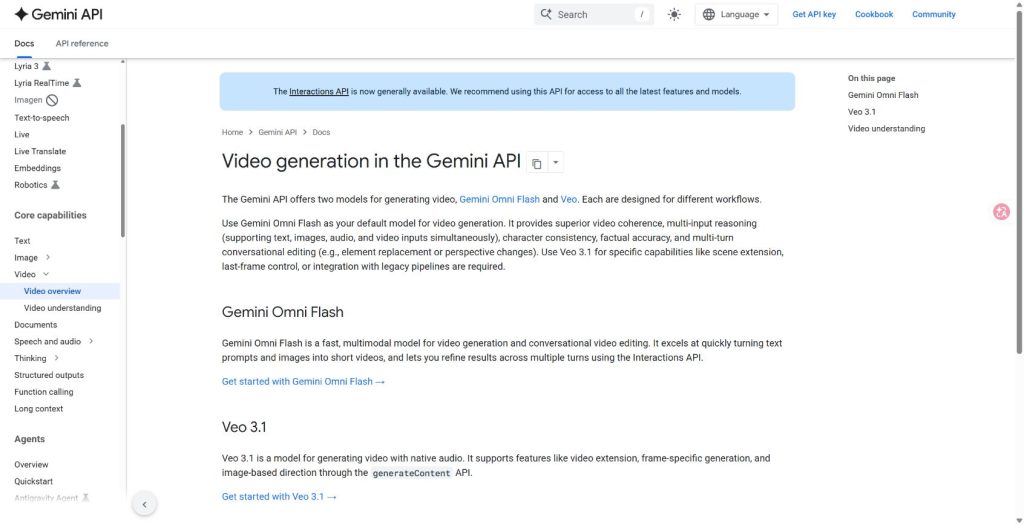
È qui che una configurazione multimodello può rivelarsi utile. Se un modello video ha difficoltà con una ripresa, uno stile o un prompt, è possibile provare un altro modello prima di modificare l’intero progetto. Non aspettatevi troppo: questo tipo di flusso di lavoro vi aiuta a confrontare i modelli e a proseguire il lavoro video utilizzando diversi modelli, ma non sostituisce l’app ufficiale Sora di OpenAI né la relativa API.
Se la tua esigenza principale è la selezione del modello, inizia con un confronto più ampio, ad esempio i migliori generatori di video basati sull'intelligenza artificiale. Se sai già che vuoi un percorso alternativo in stile Sora, passa a un percorso specifico Elenco ristretto delle alternative a Sora invece di provare uno per uno strumenti video a caso.
Come scegliere senza perdersi
Utilizza il lavoro come filtro. Per i filmati sui prodotti, verifica la coerenza degli oggetti e la fluidità dei movimenti di macchina. Per i filmati sui personaggi, verifica il movimento delle mani, l'andatura, la direzione dello sguardo e la continuità della scena. Per i post sui social, la velocità e la ripetibilità potrebbero essere più importanti del fotogramma più cinematografico. Per i prodotti API, la documentazione, i limiti di velocità, i prezzi e la gestione dei dati sono importanti tanto quanto il video di esempio.
GlobalGPT è la soluzione ideale quando si desidera confrontare rapidamente diverse direzioni di modello: un prompt per una versione cinematografica, un altro per una versione social veloce e un altro ancora per un montaggio più controllato. È meno utile se si necessita di un endpoint ufficiale OpenAI, di controlli specifici per le aziende o di una funzionalità garantita da un unico fornitore. In altre parole, utilizzatelo come uno spazio di lavoro flessibile, non come una garanzia che ogni funzionalità ufficiale di Sora abbia un sostituto esatto.
FAQ
Sora è fuori produzione o non viene più commercializzato?
Per quanto riguarda l'esperienza utente sul web e nelle app, "sospesa" è il termine più appropriato. Secondo OpenAI, le esperienze utente su web e nelle app di Sora sono state sospese il 26 aprile 2026. L'API di Sora ha invece una data di chiusura distinta, fissata per il 24 settembre 2026.
Il modello Sora è stato tolto dal mercato il 24 marzo 2026?
Il 24 marzo 2026 era la data dell'avviso di obsolescenza dell'API per gli sviluppatori che utilizzavano i modelli API Videos e API Sora 2. Non va interpretata come la data di chiusura del sito web o dell'app.
Posso ancora esportare i contenuti di Sora?
Il Centro assistenza di OpenAI indirizza gli utenti alla procedura di esportazione in vista della chiusura di Sora e raccomanda di esportare i contenuti di Sora il prima possibile. Se hai ancora accesso all'opzione di esportazione, utilizzala prima di affidarti ai vecchi link condivisi.
I crediti Sora non utilizzati scadono quando l'API Sora viene disattivata?
Non dare nulla per scontato. Il Centro assistenza di OpenAI precisa che i crediti ChatGPT/Sora acquistati possono comunque essere utilizzati per Codex, se lo desideri. Tieni ben distinte le questioni relative ai crediti dell’app, ai prezzi delle API, ai limiti di utilizzo delle API e ai rimborsi.
Cosa dovrei usare al posto di Sora?
Per i nuovi progetti video, valuta i modelli video attualmente disponibili, come la linea video Veo/Gemini di Google, Kling, Wan, Runway, Seedance, oppure uno spazio di lavoro multimodello che ti consenta di confrontare i risultati. La scelta migliore dipende dalle vostre esigenze: integrazione API, qualità cinematografica, velocità, controllo sull’editing o una dashboard per i creatori più semplice.





