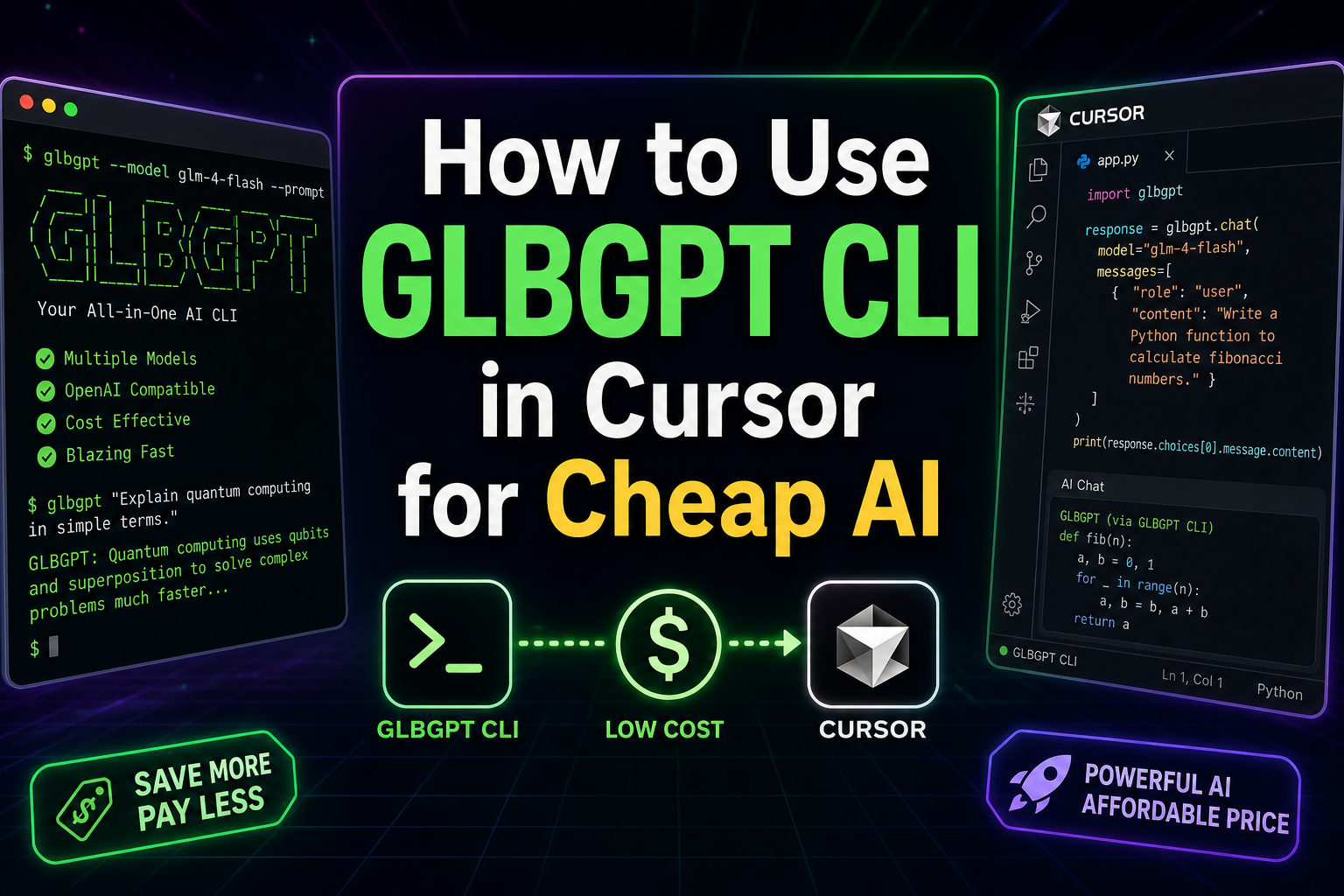
Risposta rapida: Se ti piace già Cursor ma non vuoi pagare diversi abbonamenti separati all'intelligenza artificiale, GLBGPT CLI ti offre un modo più economico per aggiungere al tuo spazio di lavoro Cursor funzioni di aiuto in stile GPT, generazione di immagini e video, nonché comandi da terminale simili a quelli di un agente.
Cursor può essere un potente editor di codice gratuito. I costi iniziano a farsi sentire quando si desidera un accesso più avanzato a GPT, la generazione di contenuti creativi e comandi IA ripetibili che funzionino dalla cartella del proprio progetto. GLBGPT CLI è utile perché consente di eseguire tali operazioni dal terminale all’interno di Cursor, invece di dover configurare un’API completa da zero.
- Comandi da terminale in stile GPT
- Generazione di immagini e video
- Esportazioni creative pulite
Indice
- Perché la CLI di GLBGPT è la scelta giusta per gli utenti di Free Cursor
- Quale metodo di connessione del cursore dovresti utilizzare?
- Come sbloccare la CLI GLBGPT in Cursor in due passaggi
- Opzionale: trasformare la CLI di GLBGPT in un'abilità del cursore
- Opzionale: aggiungere GLBGPT come server MCP per Cursor
- Esempio: crea la tua prima idea per un video TikTok in Cursor
- GLBGPT CLI vs strumenti di IA separati: per cosa stai pagando?
- Problemi comuni
- FAQ
- Conclusione finale
Perché la CLI di GLBGPT è la scelta giusta per gli utenti di Free Cursor
Il motivo principale per cui utilizzare GLBGPT CLI in Cursor non è la novità, bensì il costo. Molti iniziano con la versione gratuita di Cursor, per poi rendersi conto di volere comunque risposte di qualità GPT, comandi specifici per i progetti, risorse grafiche e, talvolta, la generazione di video. Acquistare ogni strumento separatamente può trasformare una semplice configurazione di programmazione in una montagna di abbonamenti.
Contesto dei prezzi: abbonamenti GLBGPT Basic e Common AI
Questo grafico mette a confronto i prezzi di partenza più comuni per una configurazione di lavoro con IA a basso costo. Si tratta di un grafico che illustra il contesto dei prezzi, non di un benchmark che metta a confronto le caratteristiche equivalenti.
I prezzi e i dettagli dei piani possono subire variazioni. Considera queste informazioni come una rapida panoramica dei costi e verifica le rispettive pagine con i prezzi aggiornati prima di effettuare l'acquisto.
La CLI di GLBGPT ti offre un approccio più pratico. Puoi continuare a utilizzare Cursor come editor, aprire il terminale integrato ed eseguire i comandi GLBGPT dalla stessa cartella di progetto in cui si trovano già il tuo codice, gli script, le bozze del blog o i file di contenuto.
| Necessità | Percorso costoso | Percorso CLI GLBGPT |
| Aiuto per la programmazione in stile GPT | Paga per una configurazione separata della chat o dell'API | Esegui GLBGPT dal terminale Cursor |
| Prompt sensibili al file | Copiare e incollare i file manualmente | Allega i file con glbgpt exec –file |
| Risorse grafiche | Iscriviti a uno strumento dedicato alle immagini | Genera risorse con l’immagine glbgpt |
| Brevi filmati | Utilizza un'altra piattaforma creativa | Crea attività video con glbgpt video |
| Esportazioni creative pulite | Utilizza strumenti gratuiti che potrebbero aggiungere filigrane visibili | Utilizza GLBGPT per ottenere immagini e video senza filigrana, purché il modello e il piano selezionati lo supportino |
| Flussi di lavoro in stile agente | Realizzare un'infrastruttura API personalizzata | Utilizza exec, l'output strutturato o mcp |
Ecco il vero vantaggio: GLBGPT CLI trasforma una configurazione Cursor gratuita in un ambiente di lavoro AI leggero, senza costringerti a partire da uno stack più costoso. Se in seguito vorrai ulteriori guide alla configurazione e ai modelli GLBGPT, il Guida del mozzo GlobalGPT è il passo logico successivo da compiere.
Quale metodo di connessione del cursore dovresti utilizzare?
Esistono tre modi pratici per collegare GLBGPT a Cursor. Non si tratta di configurazioni alternative. Consideratele come livelli: iniziate con la CLI, aggiungete lo skill quando desiderate una guida ai comandi con il simbolo "/" e aggiungete MCP quando volete che GLBGPT sia esposto come server di strumenti.
| Metodo di connessione | Il migliore per | Principale compromesso |
|---|---|---|
| Comandi diretti della CLI | Utenti che desiderano una configurazione il più possibile intuitiva: eseguite comandi, allegate file, generate immagini e create video direttamente dal terminale di Cursor. | I comandi li scrivi o li incolli tu stesso. |
| Abilità del cursore + CLI | Utenti di Cursor Agent che desiderano comandi con il simbolo "/" in linguaggio naturale per attività di chat, programmazione, immagini e video su GLBGPT. | Per visualizzare le abilità, è necessario installarle e riavviare Cursor. |
| Server MCP ospitato su CLI | Utenti o team che desiderano che Cursor riconosca GLBGPT come server di strumenti, con un limite massimo di crediti multimediali per sessione. | Si aggiunge la configurazione MCP e si gestisce un'altra interfaccia dello strumento. |
Per la maggior parte degli utenti della versione gratuita di Cursor, I comandi diretti della CLI sono il miglior punto di partenza. Aggiungi le competenze "Cursor" quando desideri che il menu dell'agente riconosca le attività GLBGPT, quindi aggiungi MCP solo quando è importante il rilevamento degli strumenti o il limite dei crediti multimediali.
Se utilizzi anche altri agenti di codifica, la stessa configurazione della CLI di GLBGPT prevede guide dedicate per utilizzando la CLI GlobalGPT in Codex e Utilizzo della CLI di GlobalGPT nel codice di Claude.
Come sbloccare la CLI GLBGPT in Cursor in due passaggi
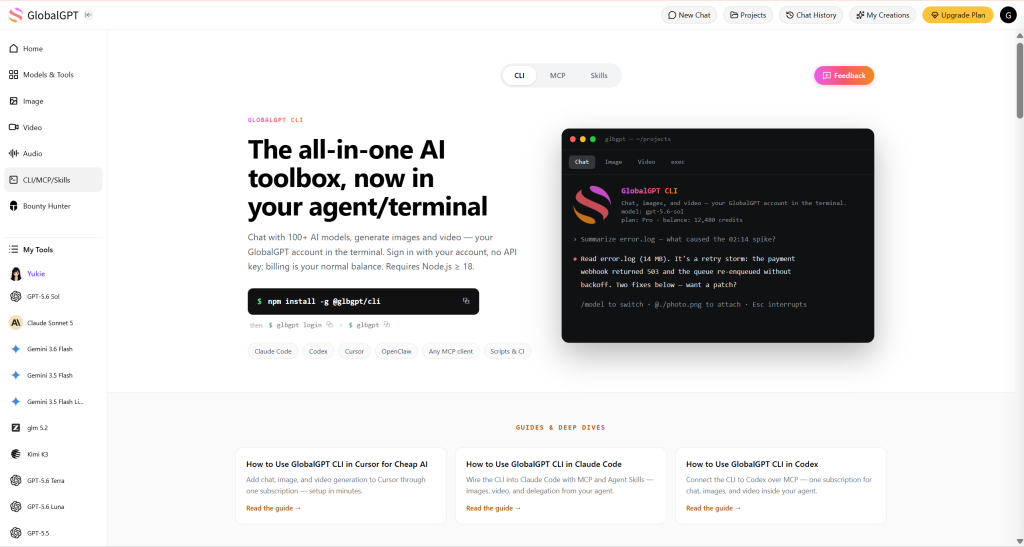
Ti servono solo Cursor, Node.js 18 o versioni successive, npm o npx e un account GLBGPT. Apri il tuo progetto in Cursor, quindi apri il terminale integrato dalla cartella del progetto.
1. Eseguire o installare GLBGPT CLI
Se vuoi provare prima la CLI, eseguila con npx:
npx @glbgpt/cli@test --helpSe desideri il glbgpt Se il comando è disponibile a livello globale, installarlo:
npm install -g @glbgpt/cli@testQuindi verifica che il comando funzioni:
glbgpt --helpSu Windows, un'installazione globale riuscita può terminare con una riga del tipo aggiunti 169 pacchetti. Se npm segnala anche che alcuni pacchetti sono alla ricerca di finanziamenti, si tratta di un normale avviso di npm, non di un errore di installazione.
2. Accedi e verifica il tuo account
Autorizza la CLI con il tuo account GlobalGPT:
Accesso a glbgptLa CLI apre una pagina di autorizzazione del browser. Se ti trovi su una macchina remota, oppure se il browser si apre altrove, utilizza il link "modalità codice" visualizzato e incolla il codice monouso nel terminale.
glbgpt login --no-browserInserisci un codice di accesso solo se hai avviato tu stesso la procedura di accesso. Non inserire un codice che ti è stato inviato da qualcun altro.
Ecco come si presenta un accesso riuscito
Una volta ottenuta l'autorizzazione, il terminale dovrebbe indicare che hai effettuato l'accesso, quindi aprire l'interfaccia CLI GlobalGPT. La schermata iniziale potrebbe mostrare il modello corrente, il saldo del conto e un breve menu di comandi.
Il modo più veloce per provarlo sul serio è digitare un breve messaggio:
CiaoSe il modello risponde, significa che l'intero flusso funziona correttamente: installazione di npm, avvio della CLI, autorizzazione dell'account e risposta del modello.
All'interno della CLI interattiva, digitare / per visualizzare il menu dei comandi. Tra i primi comandi utili figurano /modelli per elencare i modelli di chat, immagini e video; /modello per cambiare il modello di chat; /immagine per generare un'immagine; /video per creare un video; /attività per visualizzare le attività di generazione; /stato per verificare la sessione; /account per visualizzare i dettagli dell'account; e /esci per smettere.
Opzionale: trasformare la CLI di GLBGPT in un'abilità del cursore
Se desideri che GLBGPT compaia nel menu dei comandi dell'agente di Cursor, installa le skill GLBGPT incluse nel pacchetto dopo aver verificato il corretto funzionamento della CLI. Si tratta di un'operazione facoltativa; i comandi da terminale sopra indicati funzionano comunque anche se non aggiungi mai le skill.
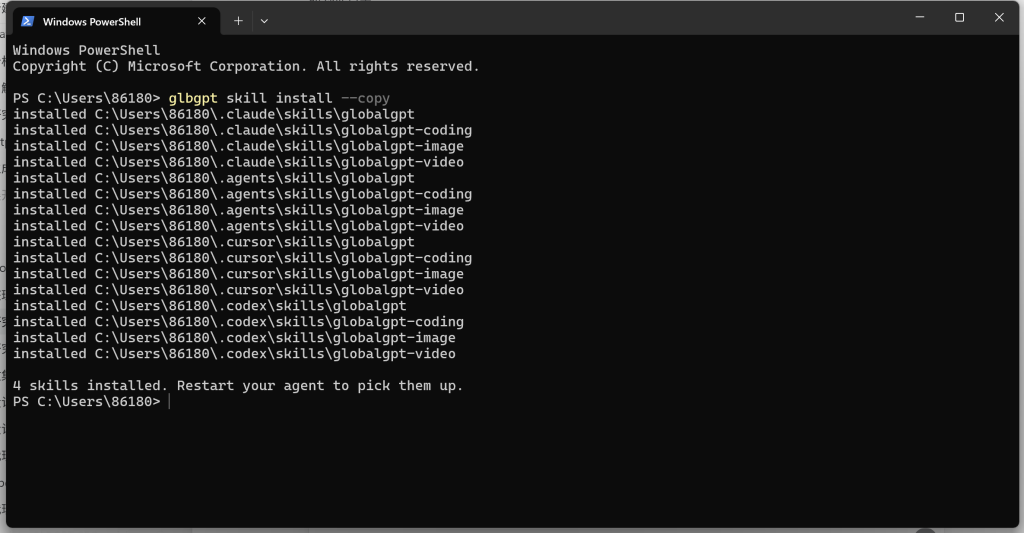
glbgpt skill install --copySu Windows, --copia è la scelta più sicura perché copia i file delle skill invece di ricorrere ai collegamenti simbolici. Una volta completata con successo, l'installazione installa quattro skill incluse nel pacchetto: globalgpt, globalgpt-codifica, globalgpt-immagine, e globalgpt-video. Se Cursor è già installato sul tuo computer, il programma di installazione li salva in ~/.cursor/skills e poi ti chiede di riavviare l'agente.
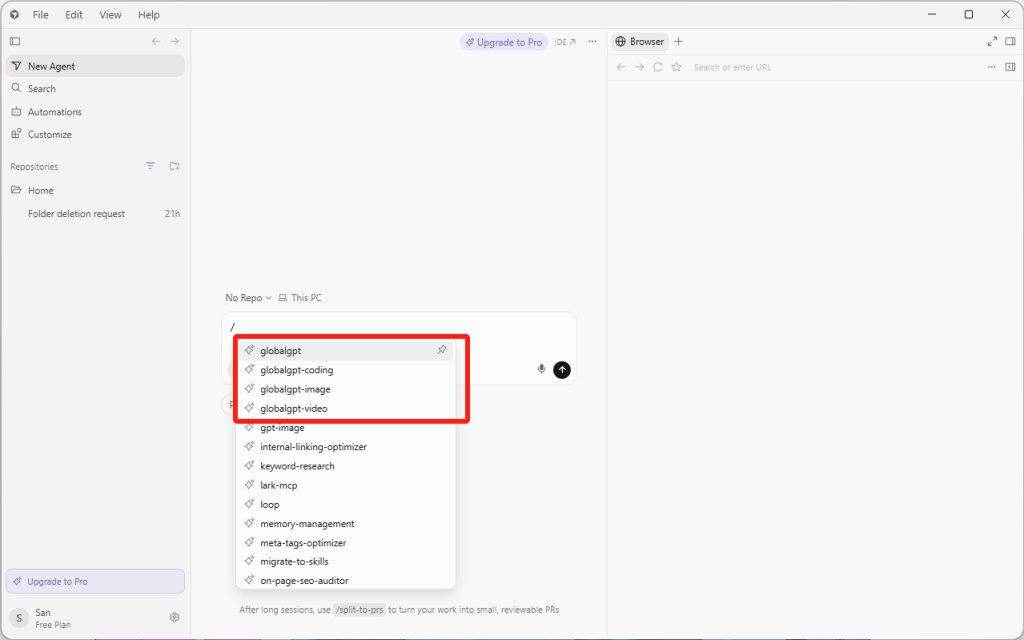
Dopo aver riavviato Cursor, digita / nell'input dell'agente. Dovresti vedere voci GLBGPT del tipo /globalgpt, /globalgpt-coding, /globalgpt-immagine, e /globalgpt-video. Ciò significa che Cursor può richiamare le istruzioni relative alle competenze GLBGPT, mentre l'effettivo lavoro di generazione continua a passare attraverso il tuo account CLI GLBGPT.
Per un test veloce, avvia un nuovo messaggio dell'agente Cursor con /globalgpt e chiedi di svolgere un piccolo compito, come ad esempio cinque idee per video su TikTok o una breve lista di controllo per la revisione del codice. Usa /globalgpt-immagine o /globalgpt-video quando si desidera che Cursor inoltri la richiesta di generazione creativa a GLBGPT.
Opzionale: aggiungere GLBGPT come server MCP per Cursor
Un’abilità di Cursor indica all’agente come utilizzare GLBGPT. Un server MCP rende GLBGPT disponibile come strumenti richiamabili. Se si desidera che l’agente di Cursor rilevi GLBGPT tramite MCP, aggiungere una breve configurazione MCP dopo Accesso a glbgpt funziona già.
Per una configurazione su Windows, crea o modifica il file di configurazione Cursor MCP. Utilizza ~/.cursor/mcp.json per una configurazione globale, oppure .cursor/mcp.json all'interno di un singolo progetto, se si desidera che GLBGPT sia disponibile solo lì.
{
  "mcpServers": {
    "globalgpt": {
 "command": "cmd",
 "args": ["/c", "glbgpt", "mcp", "--max-credits", "4000"]
    }
  }
}
Il cmd /c wrapper è utile su Windows perché Cursor potrebbe non riconoscere un comando npm installato globalmente allo stesso modo del terminale. Se utilizzi macOS o Linux, di solito puoi invece usare il comando diretto:
{
  "mcpServers": {
    "globalgpt": {
 "command": "glbgpt",
 "args": ["mcp", "--max-credits", "4000"]
    }
  }
}
Il --numero massimo di crediti Questo valore definisce il budget di sessione per la generazione di contenuti multimediali tramite il server MCP. Durante i test, è consigliabile impostare un valore moderato oppure utilizzare --max-credits 0 se desideri utilizzare solo gli strumenti di chat e non vuoi che MCP avvii la generazione di immagini o video.
Riavvia Cursor, apri le impostazioni di MCP o Strumenti e assicurati che il globalgpt Il server è abilitato. A questo punto, chiedi a Cursor di eseguire un piccolo test in sola lettura, ad esempio elencando gli strumenti GLBGPT disponibili o abbozzando cinque idee. Una volta che funziona, puoi utilizzare MCP per flussi di lavoro più articolati degli agenti, mantenendo disponibili i comandi della skill GLBGPT per l'uso diretto tramite comandi con barra.
Esempio: crea la tua prima idea per un video TikTok in Cursor
Non servono né una videocamera, né una registrazione dello schermo, né la propria voce per testare un’idea in formato breve. In questa sessione, GLBGPT CLI ha trasformato una richiesta concettuale in linguaggio naturale in un video verticale di nove secondi generato dall’IA: un piccolo ciondolo staccabile conferisce a un soffice cane bianco un potere speciale color lavanda.
Gli stessi comandi CLI possono essere eseguiti dal terminale di Cursor. Le schermate riportate di seguito sono state acquisite in un terminale desktop Codex, pertanto illustrano il flusso di lavoro della CLI di GLBGPT piuttosto che l'interfaccia di Cursor stessa.
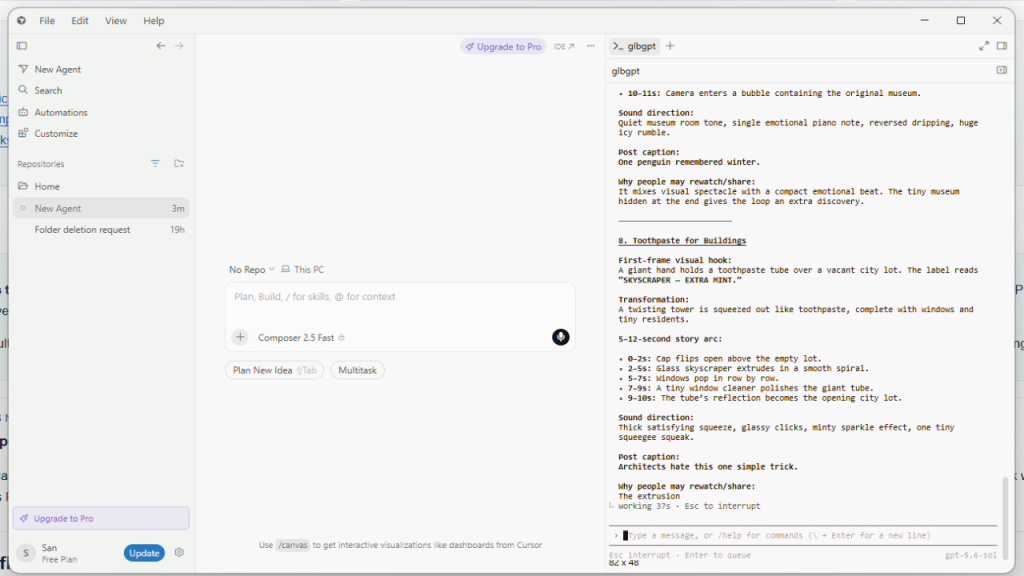
Fase 1: Richiedere concetti in linguaggio naturale
Avvia la CLI interattiva con glbgpt, quindi invia una sintesi scritta in un linguaggio semplice e comprensibile. Il vincolo utile non è un argomento specifico, bensì il formato di produzione: un video veloce, visivo e ottimizzato per l’IA, che possa essere compreso anche senza la presenza del creatore davanti alla telecamera.
Sei un direttore creativo di TikTok specializzato in video strani, veloci e che invogliano a essere rivisti più volte, realizzati interamente con l’IA. Voglio lanciare un nuovo account TikTok con un primo post creato dall’IA con il codice 100%. Non apparirò davanti alla telecamera, non registrerò lo schermo né userò la mia voce. Forniscimi 12 idee originali per video progettate per garantire un'elevata fidelizzazione e un alto numero di condivisioni. Non generare ancora nulla. Alla fine, classifica le tre idee migliori.Dopo aver scelto un'idea, chiedi a GLBGPT di prendere le decisioni definitive relative alla produzione. In questo modo l'interazione rimane naturale, fornendo al contempo al modello un brief di produzione concreto.
Fase 2: Lascia che la CLI crei il supporto
Il concetto scelto si è tradotto in un semplice ciclo: una mano mostra un piccolo ciondolo, il cane reagisce, appare un effetto luminoso color lavanda e la posa finale riprende la composizione iniziale. È abbastanza breve da poter essere seguito sullo schermo di un telefono e abbastanza semplice da poter essere rivisto più volte.
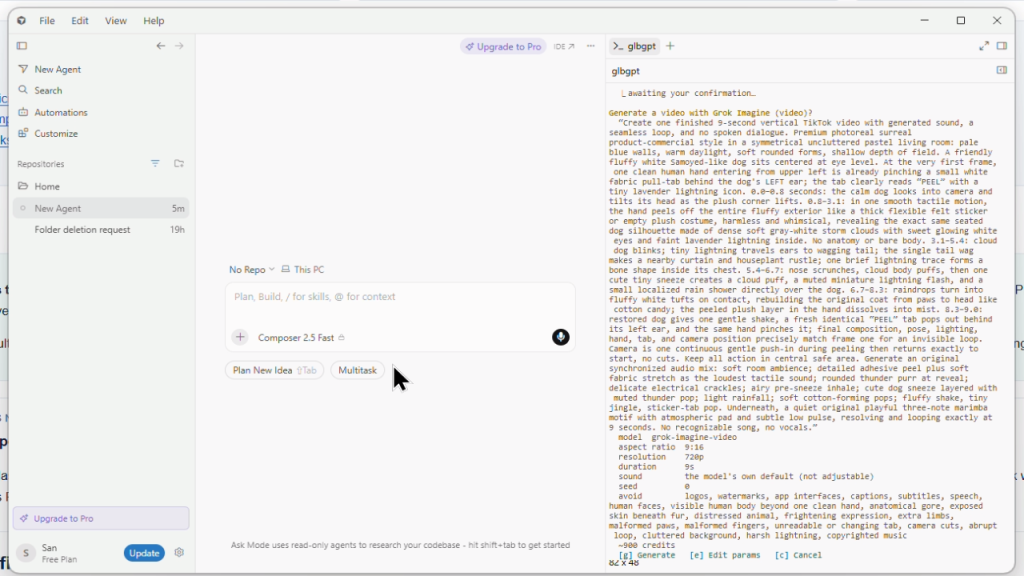
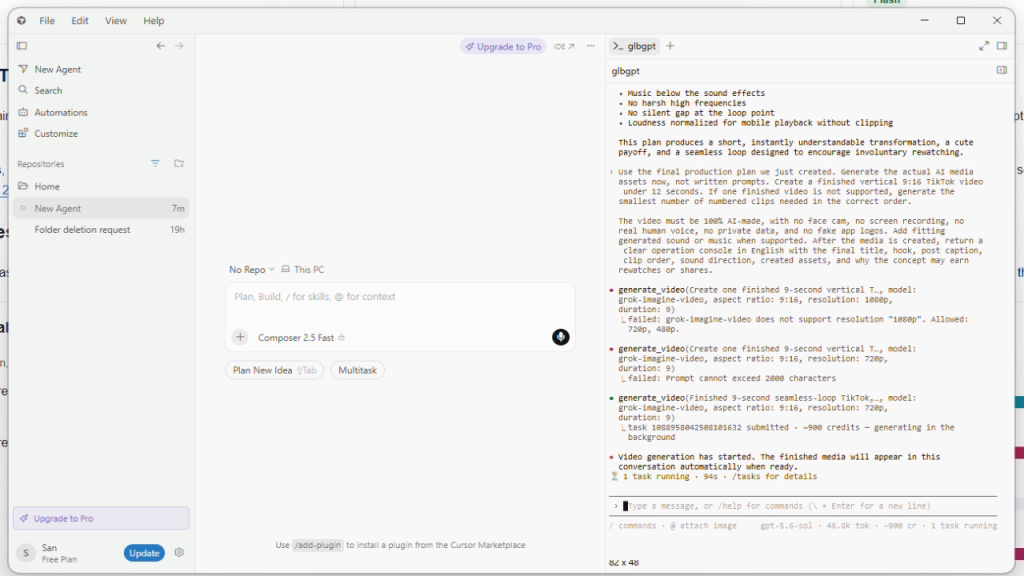
Risultato: un file MP4 unico e ininterrotto della durata di 9 secondi, in formato 9:16. L'operazione riuscita ha utilizzato grok-imagine-video e ha generato una risorsa a 720p. La schermata delle attività della CLI ha riportato circa 900 crediti GLBGPT per questa esecuzione. Si tratta di un record di crediti della piattaforma, non di un prezzo in dollari.
Cosa ci ha insegnato quella corsa
- L'ideazione basata sul linguaggio naturale funziona bene quando il brief definisce il formato e il pubblico di riferimento, lasciando però aperto il concetto.
- Per un primo test, un loop visivo continuo è più facile da valutare rispetto a un montaggio complesso composto da più clip.
- I limiti del modello sono importanti. In questa esecuzione, una richiesta a 1080p e un prompt troppo lungo sono stati rifiutati prima che l'operazione finale a 720p andasse a buon fine.
- Cursor Agent è facoltativo. L'esecuzione di GLBGPT nel terminale di Cursor utilizza il modello e i crediti multimediali propri di GLBGPT, non la quota di Cursor Agent.
Perché questo formato merita di essere rivisto
Il fotogramma iniziale presenta un piccolo mistero. La parte centrale mostra una trasformazione evidente. La composizione finale si conclude con una certa serenità, ricollegandosi all’inizio. Ciò non garantisce che il post diventi virale, ma conferisce a un breve video generato dall’IA una struttura che favorisce molto di più la fidelizzazione dello spettatore rispetto a un’introduzione lenta o a una generica dimostrazione di uno strumento.
Didascalia suggerita per il post: Una minuscola buccia. Un potenziamento davvero notevole.
GLBGPT CLI vs strumenti di IA separati: per cosa stai pagando?
Il vero confronto non sta nel chiedersi se GLBGPT CLI sostituisca ogni prodotto specializzato nell'IA, ma se sia necessario acquistare diversi strumenti prima di poter svolgere un lavoro utile all'interno di Cursor. Se il vostro obiettivo è una configurazione simile a quella di un agente a un costo inferiore, confrontate l'intero stack, non una singola funzionalità presa isolatamente.
Lo stack che è meglio evitare di creare
Uno stack comune per la creazione di contenuti con l'IA può suddividere le funzionalità di assistenza alla programmazione, i modelli di chat, la generazione di immagini, gli strumenti video e le soluzioni alternative di accesso in prodotti distinti. GLBGPT CLI è utile quando si desidera un unico punto di accesso a basso costo dal terminale Cursor.
| Percorso | Cosa ottieni | Dove si manifestano i costi o gli attriti | Confronto tra GLBGPT CLI |
| Solo cursore gratuito | Ottime competenze nell'uso di un editor e un'esperienza di base nella programmazione assistita dall'intelligenza artificiale. | Potresti comunque desiderare prompt più efficaci in stile GPT, operazioni da terminale basate su file, generazione di immagini o generazione di video. | GLBGPT CLI aggiunge un livello di IA esterno senza sostituire Cursor. |
| Abbonamento ChatGPT | Un'interfaccia di chat curata nei dettagli e l'accesso ai modelli OpenAI tramite ChatGPT. | Il lavoro spesso si svolge al di fuori del terminale Cursor, e le esigenze creative e multimediali potrebbero comunque richiedere l'uso di altri strumenti. | GLBGPT CLI è più orientato al terminale: esegue prompt, allega file e salva i risultati dalla cartella del progetto. |
| API dei modelli diretti | Accesso flessibile per gli sviluppatori che desiderano creare i propri script e le proprie integrazioni. | La gestione delle chiavi API, della fatturazione, dei formati delle richieste, della selezione dei modelli e della gestione degli errori è a tuo carico. | La CLI di GLBGPT mette a disposizione comandi predefiniti come exec, image, video, model e task. |
| Strumenti separati per immagini e video | Interfacce creative dedicate alla produzione visiva. | Ogni strumento può tradursi in un altro account, abbonamento, flusso di lavoro, fase di esportazione o limite relativo alla filigrana. | GLBGPT CLI è in grado di generare immagini e video a partire dallo stesso flusso di lavoro di Cursor, offrendo risultati puliti: un vantaggio fondamentale per i creatori di contenuti. Per la pubblicazione di video, consultare la sezione relativa guida video senza filigrana. |
| CLI GLBGPT all'interno di Cursor | Comandi in stile GPT, contesto dei file, generazione di immagini, generazione di video, gestione delle attività, supporto MCP ed esportazioni creative pulite. | È necessario avere una conoscenza di base dei comandi da terminale, e la creazione di file multimediali continua a consumare crediti del piano. | La soluzione ideale quando si desidera un cursore gratuito e un motore di intelligenza artificiale più economico per la programmazione e la creazione di contenuti. |
Ecco perché questa configurazione è ideale per sviluppatori, creatori indipendenti, autori SEO, creatori di video brevi e piccoli team che utilizzano già Cursor. Non stai pagando per una command line più accattivante. Stai cercando di evitare una fattura esorbitante per l’IA, pur continuando a usufruire dell’aiuto di GPT, di output creativi privi di filigrana e di comandi di generazione proprio dove si svolge il lavoro.
Problemi comuni
| Problema | Motivo probabile | Cosa provare |
|---|---|---|
glbgpt non viene riconosciuto | La cartella globale "npm/bin" non è presente nel PATH, oppure il terminale non è stato aggiornato. | Utilizzo npx @glbgpt/cli@test --help, riapri il terminale Cursor oppure controlla il percorso globale di npm. |
| PowerShell blocca npm | La politica di esecuzione di Windows potrebbe bloccare npm.ps1. | Utilizzo npm.cmd oppure eseguire il comando da un'altra shell di terminale. |
npm mostra ENOTFOUND durante l'installazione | È possibile che l'host del registro npm non venga risolto con le impostazioni di rete o DNS attualmente in uso. | Verifica la connessione al registro con npm ping. Su Windows, è anche possibile testare il DNS con Registro Resolve-DnsName.npmjs.org oppure l'host mirror che hai configurato. |
La modifica del DNS non va a buon fine con Autorizzazione negata | PowerShell non è in esecuzione con i permessi di amministratore. | Aprire PowerShell come amministratore prima di eseguire i comandi di riparazione della rete. Dopo aver modificato le impostazioni DNS, svuotare la cache ed eseguire npm ping ancora una volta. |
| Il login non apre il browser | Il terminale non è in grado di avviare una sessione del browser. | Esegui glbgpt login --no-browser e aprire manualmente l'URL stampato. |
| Il tempo di attesa per l'accesso scade durante l'attesa dell'autorizzazione da parte del browser | La finestra di autorizzazione del browser è scaduta o non è stata completata in tempo. | Esegui Accesso a glbgpt di nuovo, oppure iniziare glbgpt e seguire le istruzioni per l'accesso una seconda volta. |
| Non sei sicuro di quale ID modello utilizzare | La CLI richiede gli ID esatti dei modelli per alcuni comandi di generazione. | Esegui Elenco dei modelli glbgpt, Immagine dell'elenco dei modelli glbgpt, o Elenco dei modelli glbgpt - video. |
| Sei preoccupato per i costi dei supporti | Le attività relative a immagini e video potrebbero comportare l'utilizzo di crediti. | Aggiungi --stima prima della generazione. |
| I file non vengono trovati | Il terminale Cursor è aperto nella directory sbagliata. | Apri la cartella del progetto in Cursor ed esegui i comandi da quella cartella. |
| Le competenze GLBGPT non compaiono in Cursor | Il cursore non ha ricaricato le proprie abilità, oppure ~/.cursor/skills non esisteva quando hai eseguito il programma di installazione. | Riavvia completamente Cursor. Se la cartella non è presente, creala ~/.cursor/skills, quindi eseguire glbgpt skill install --copy ancora una volta. |
| Il server MCP GLBGPT non si connette | Il cursore non riesce a trovare il glbgpt comando, il file JSON si trova in un ambito errato oppure la CLI non ha effettuato l'accesso. | Esegui glbgpt --help e Accesso a glbgpt prima in un terminale normale. Su Windows, usa il comando cmd /c glbgpt mcp config, quindi riavvia Cursor. |
Conclusione finale
Free Cursor ti offre uno spazio di lavoro dedicato alla programmazione. GLBGPT CLI ti offre un livello di intelligenza artificiale a basso costo per prompt in stile GPT, comandi specifici per i progetti, generazione di immagini e generazione di video. Insieme, possono costituire una soluzione leggera per la programmazione e la creazione di contenuti, senza i costi legati all’utilizzo di diversi strumenti separati.
Se vuoi provare la configurazione, inizia con qualcosa di semplice: installa GLBGPT CLI, effettua l'accesso ed esegui un comando glbgpt exec comando dal tuo progetto Cursor corrente. Una volta che funziona, aggiungi il contesto del file, la generazione di immagini o la generazione di video solo quando l'attività lo richiede.
FAQ
Posso usare la CLI di GLBGPT con Cursor gratuito?
Sì. Cursor e la CLI di GLBGPT sono strumenti distinti. È possibile aprire il terminale di Cursor ed eseguire i comandi della CLI di GLBGPT dalla cartella del progetto, purché siano disponibili Node.js e npm o npx.
GLBGPT CLI è un'estensione di Cursor?
No. GLBGPT CLI è un client da terminale, non una tradizionale estensione di Cursor. Una volta installata la CLI, è possibile installare facoltativamente le skill GLBGPT incluse nel pacchetto, in modo che il menu dell’agente di Cursor possa richiamare GLBGPT tramite comandi con il simbolo “/”.
È meglio utilizzare la skill GLBGPT o il server GLBGPT MCP?
Utilizza la skill quando desideri una guida semplice tramite comandi con la barra all'interno di Cursor. Utilizza MCP quando desideri che l'agente di Cursor rilevi GLBGPT come server di strumenti. Puoi utilizzare entrambi: la skill è più semplice per iniziare, mentre MCP è più indicato per flussi di lavoro degli agenti più complessi basati sugli strumenti.
GLBGPT è più conveniente rispetto all'acquisto di più strumenti di intelligenza artificiale?
Dipende dall'utilizzo che ne fai. GLBGPT Basic parte da circa $5.8 al mese, il che rende molto più semplice testare un flusso di lavoro basato su GPT senza doversi impegnare con uno stack di IA più ampio. I piani riportati nella tabella dei prezzi non offrono le stesse funzionalità, ma questa differenza spiega perché la combinazione tra la versione gratuita di Cursor e la CLI di GLBGPT possa risultare interessante.
La CLI di GLBGPT è in grado di generare immagini?
Sì. La CLI include un immagine comando con opzioni relative all'ID del modello, alle proporzioni, alla risoluzione, alle immagini di riferimento, alla cartella di output e al preventivo.
La CLI di GLBGPT è in grado di generare video?
Sì. La CLI include un video comando con opzioni relative a proporzioni, risoluzione, durata, audio, immagini di riferimento, cartella di output e gestione delle attività in background.
Le uscite video e immagine GLBGPT presentano filigrane?
GLBGPT si propone come un'opzione per la creazione di contenuti puliti, e la generazione di immagini e video privi di filigrana è uno dei suoi vantaggi pratici. Prima di pubblicare contenuti commerciali, verifica il modello selezionato e i termini del piano, poiché le norme relative ai media possono subire modifiche.
Mi serve una chiave API?
La procedura standard prevede di effettuare l'accesso con Accesso a glbgpt. La CLI effettua l'autenticazione tramite il tuo account GlobalGPT, quindi memorizza le credenziali per un utilizzo futuro del terminale.
È meglio usare npx o un'installazione globale?
Utilizza npx se desideri provare la CLI di GLBGPT senza installarla globalmente. Esegui un’installazione globale se prevedi di eseguire glbgpt spesso da Cursor.