IMAGE GENERATION · REAL OUTPUTS · CREDIT COST
Seedream 5.0 Flash costs half as many credits per generation as Pro in the interface we tested at 2K: 100 versus 200. That makes Flash attractive for exploring ideas. Pro earned its extra credits in our watch photograph by preserving the hands and hour markers that Flash left out. Speed was less predictable: the faster result changed between prompts.
The practical decision is how many attempts you need to get an image you can actually use. A low-cost draft can become expensive if the product is wrong, while a simple poster may look good enough without paying for the higher tier. Below are the original outputs and the exact prompts behind those judgments.
We ran this comparison in GlobalGPT, an all-in-one AI platform for chat, research, image, video and agent models. Its broader value is keeping those tools in one account and subscription. Here, using the same interface also helped us compare the two Seedream options without changing the rest of the workflow.
Seedream 5.0 Flash vs Pro: quick answer
Start with Flash for affordable visual exploration; try Pro when small product details make or break the final image. Both handled our short English poster copy. Neither result set establishes a universal speed winner, and the credit advantage is a GlobalGPT price observation—not ByteDance API pricing.
| Pregunta | Seedream 5.0 Flash | Seedream 5.0 Pro |
|---|---|---|
| Displayed 2K generation cost | 100 créditos | 200 créditos |
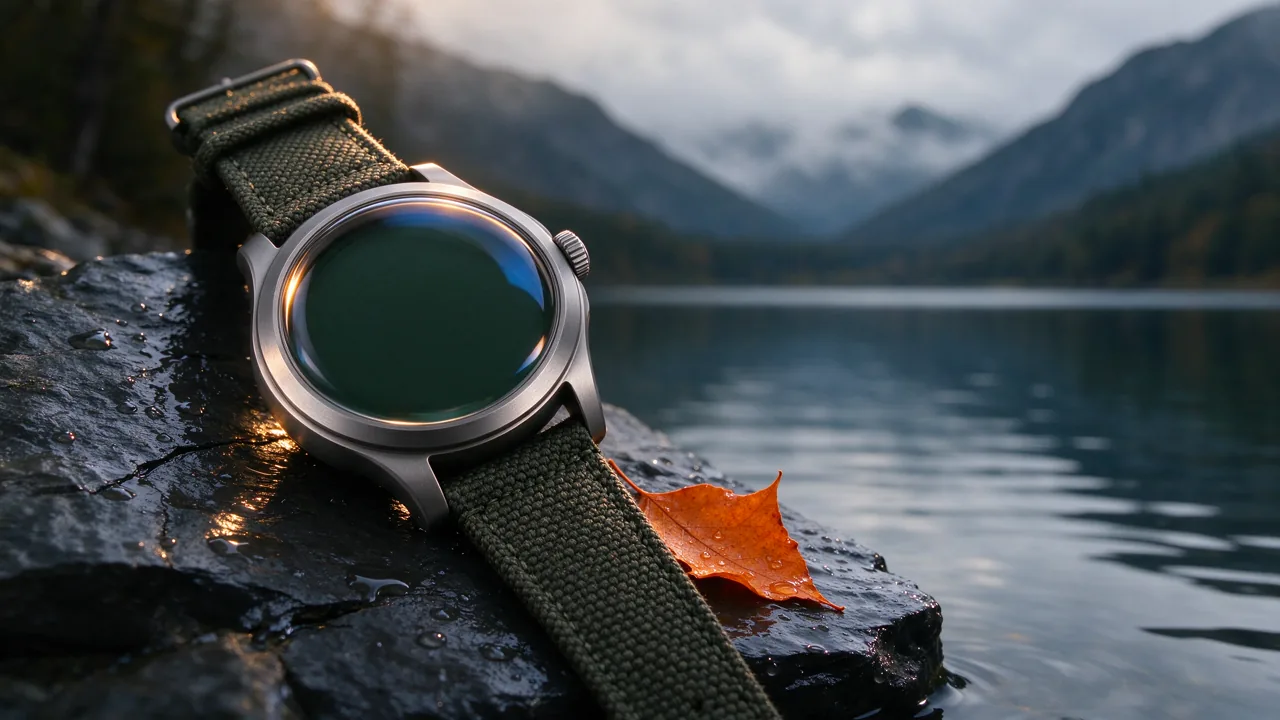
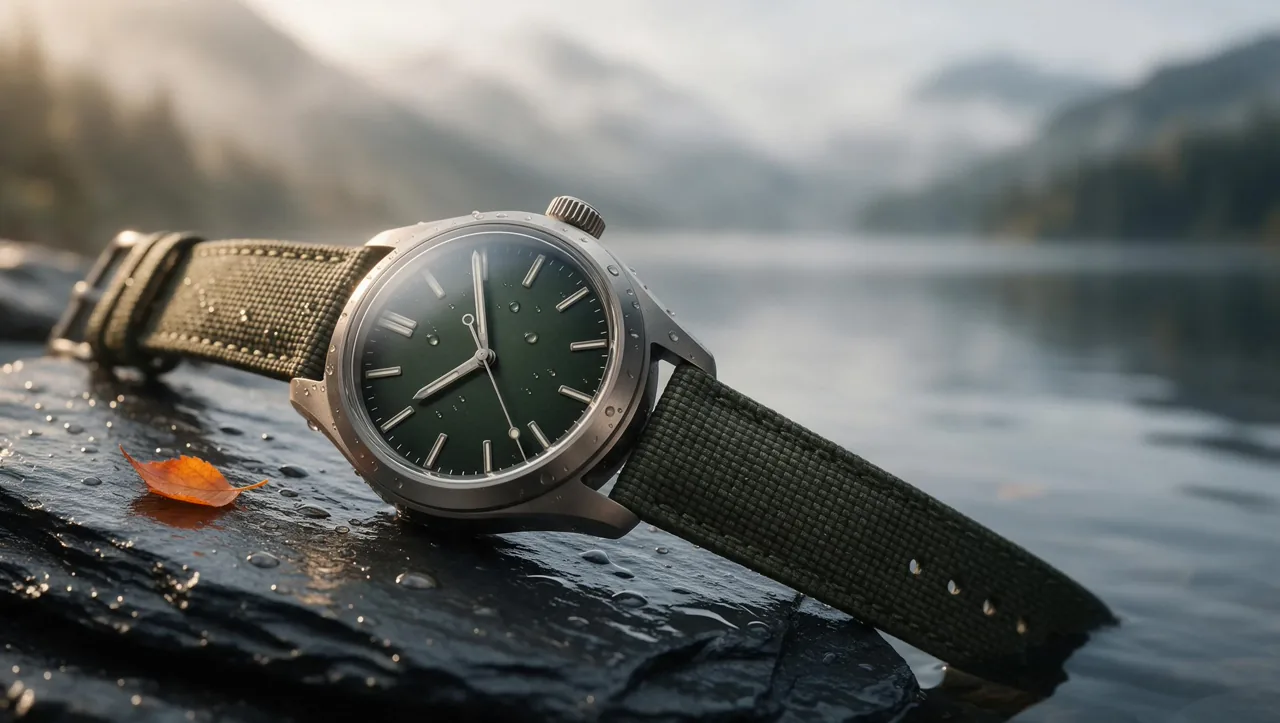
| Watch-product test | Rich materials; missing hands and hour markers | Hands and markers present; more useful product structure |
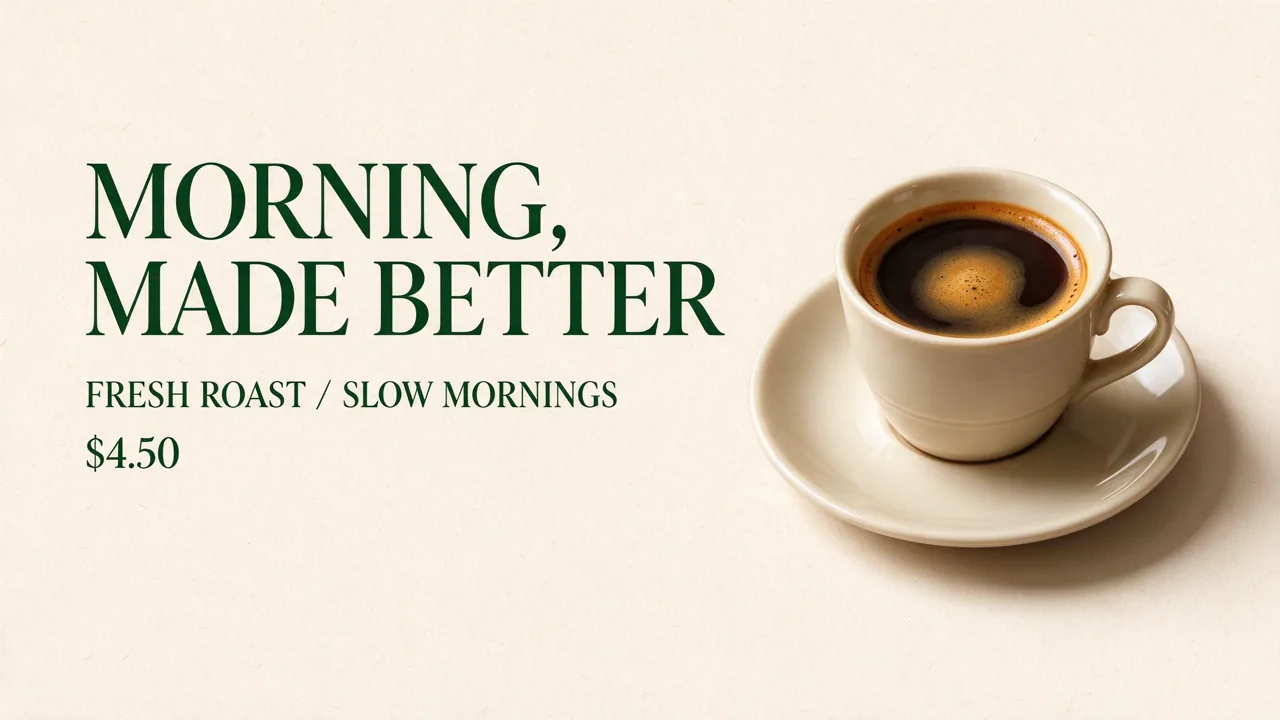
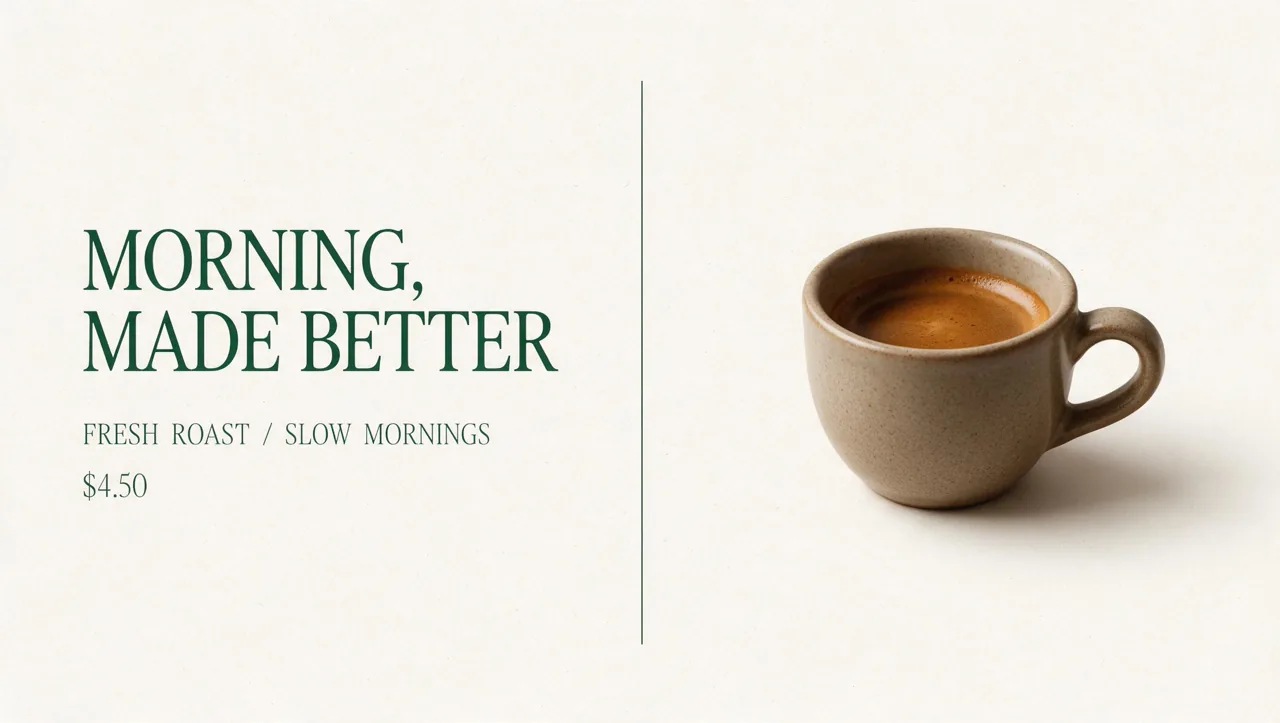
| English poster test | Requested wording and price present; bold layout | Requested wording and price present; more restrained layout |
| Studio composition test | Correct main-object order; fern protrudes above cube | Correct main-object order; fern fits inside cube |
| Speed in this browser session | Faster on the watch prompt | Faster on the poster and studio prompts |
| La mejor razón para elegirlo | Lower credit cost per attempt | The extra detail is worth avoiding a failed final |
Price sources: Flash generation interface y Pro generation interface, checked October 15, 2026. These are displayed generation quotes; we did not audit the account’s credit ledger.
How we tested Flash and Pro
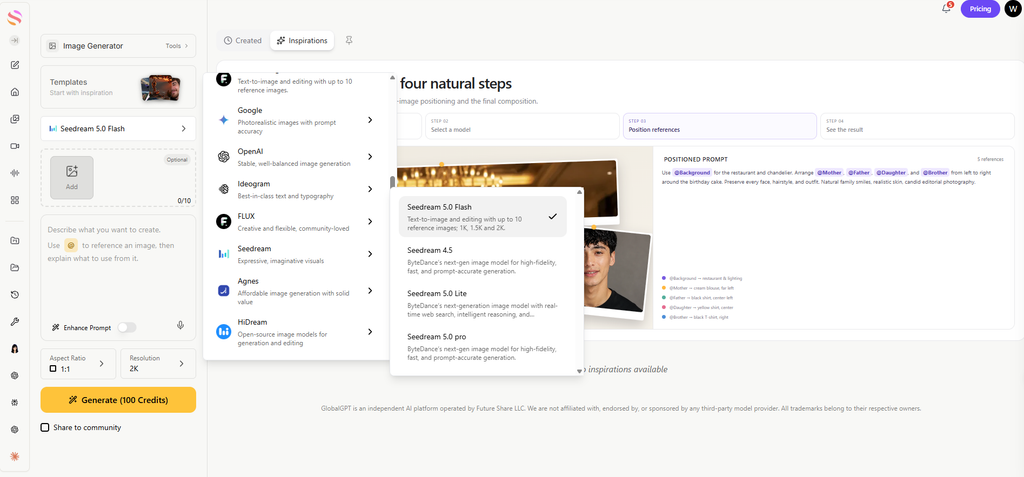
We submitted three matched text-to-image prompts to each model: a watch campaign photograph, a coffee-shop poster, and a studio scene with ordered objects and a hand. Each model received the same prompt for each task. We kept the interface at 2K and 16:9, used no reference images, and left Enhance Prompt and Share to community off. All six first outputs are included; there were no rerolls or touch-ups.
“2K” is the interface setting, not a promise of identical pixel dimensions. Flash returned 2560×1440 for the watch and studio scenes and 2730×1536 for the poster. Pro returned 2720×1536 for all three. We show the complete original frames below; the differences were not created by cropping the comparison images.
This is a small practical test, with one image per prompt per model. We did not control the random seed or test reference-image editing, batch consistency, every resolution, or long-form typography. Our judgments describe these outputs rather than an overall model leaderboard.
Image quality: what changed in the actual outputs?
En official Seedream 5.0 Pro overview emphasizes photographic realism, text-rich images, interactive editing and multilingual generation. We used product photography and English text to check a narrow part of that positioning. The studio prompt added object order, transparent glass, warm lighting and a hand; it was not an editing test.
Compare the complete frames below, then check the same details in each model’s result. Every pair uses one shared prompt; the exact wording is available beneath each comparison.
1. Product photography: inspect the watch dial
Pro kept the functional details that Flash left out. Look at the hands and hour markers, rather than the overall outdoor mood.
SEEDREAM 5.0 FLASH
SEEDREAM 5.0 PRO
| Qué hay que comprobar | Flash | Pro |
|---|---|---|
| Watch dial | No hands or hour markers | Hands and hour markers present |
| Materials & setting | Brushed metal, wet slate, woven strap and misty lake | Same outdoor product concept with visible dial structure |
| Conclusión práctica | An attractive draft with a functional detail missing | A stronger starting point for this watch campaign |
Neither output is a verified photograph of a real SKU: no reference product was supplied. Pro’s more usable structure still needs a product review.
The prompt’s “no text” instruction may have encouraged simplification, but both models received it. That ambiguity is itself useful: for a real product brief, specify which functional features must remain, and distinguish “no branding” from “no dial details.” Our Guía de uso de Seedream 5.0 Pro gives more ways to structure a product brief.
Ver el mensaje compartido exacto
Luxury product photograph for a premium outdoor watch campaign. A single brushed titanium wristwatch with a deep forest-green dial rests diagonally on dark wet slate, beside one small orange autumn leaf. Fine water droplets, physically accurate glass reflections, crisp knurled crown, visible woven strap texture. Soft warm rim light from the upper left and cool ambient fill. Background fades into a misty mountain lake. Cinematic editorial photography, restrained natural colors, generous negative space on the right, no text, no logo, no watermark.
2. English poster text: compare wording and layout
Both reproduced the short copy; neither had a clear spelling advantage. Flash chose bolder type, while Pro used more negative space.
SEEDREAM 5.0 FLASH
SEEDREAM 5.0 PRO
| Qué hay que comprobar | Flash | Pro |
|---|---|---|
| Required copy | “MORNING, MADE BETTER”; “FRESH ROAST / SLOW MORNINGS”; “$4.50” | Same wording, punctuation and price present |
| Line breaks | Headline wraps across two visual lines | Headline also wraps; neither follows a strict three-line total |
| Conclusión práctica | A useful lower-credit option for this short-copy brief | A quieter layout, without a demonstrated text-accuracy gain |
This result does not establish equal performance on dense infographics, small legal text, other languages or brand typography. Short readable English copy is a narrower task, and that is exactly what these two examples demonstrate.
Ver el mensaje compartido exacto
Design a polished landscape poster for an independent coffee shop, with a warm cream background, deep forest-green typography, and one realistic ceramic cup of espresso on the right. Use exactly these three text lines, each once: 'MORNING, MADE BETTER' as the large headline; 'FRESH ROAST / SLOW MORNINGS' as the subheading; '$4.50' as the small price. Keep all letters and punctuation correct. Clear visual hierarchy, tasteful editorial spacing, subtle paper texture, no other text, no logo, no watermark.
3. Complex composition: check order and containment
Both kept the object order; Pro enclosed the fern more precisely. Check where the leaves sit relative to the top of the glass cube.
SEEDREAM 5.0 FLASH
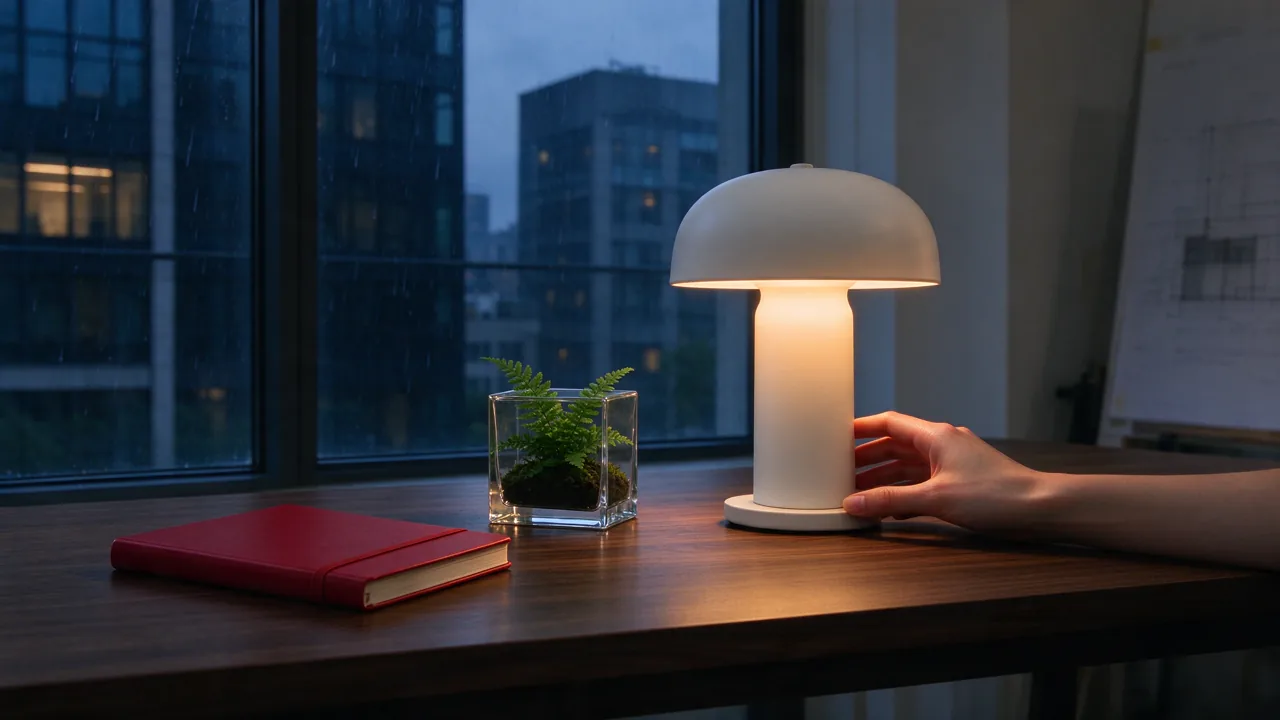
SEEDREAM 5.0 PRO
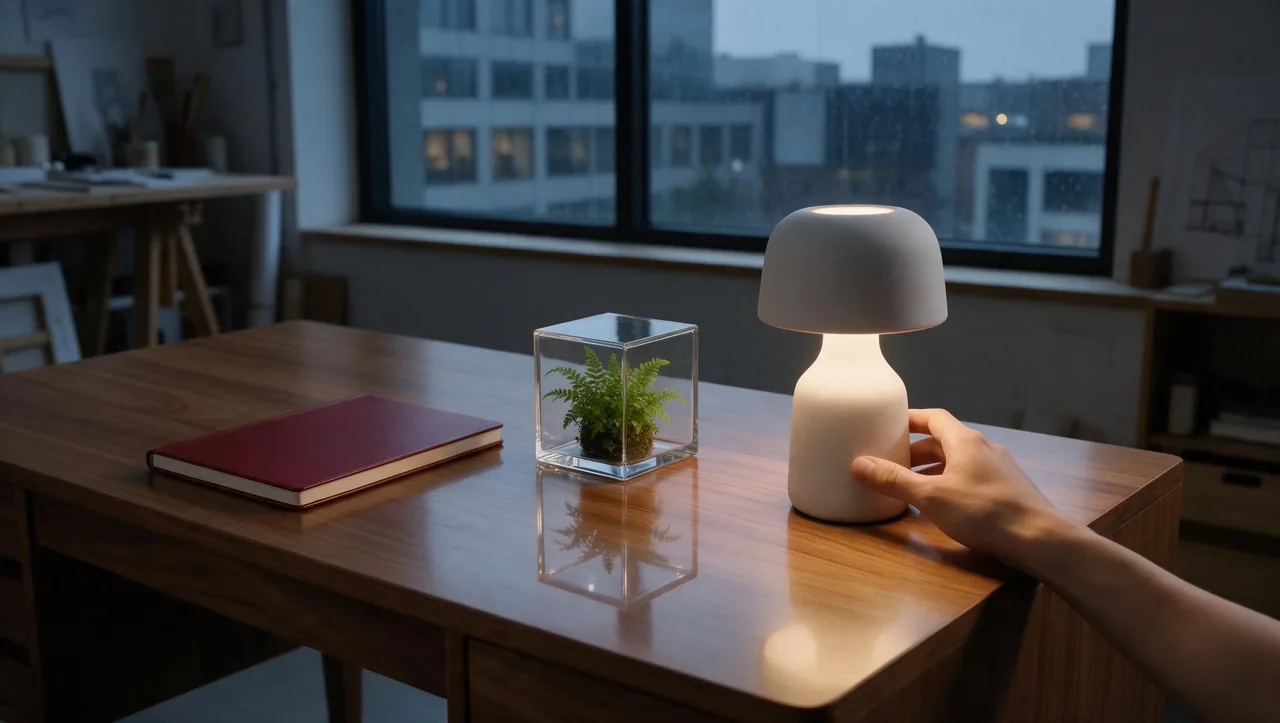
| Qué hay que comprobar | Flash | Pro |
|---|---|---|
| Left-to-right order | Red notebook → glass cube → lit white lamp | Same correct order |
| Fern & framing | Leaves protrude above the cube; closer, more dramatic view | Fern fits inside; wider studio view and strong glass reflection |
| Hand anatomy | Five fully separate fingers cannot be verified | Five fully separate fingers cannot be verified |
For a mood image, either composition could work. For an exact brief, inspect containment, count and contact points before approving the result. Our guide to improving AI image generation accuracy discusses making those requirements explicit.
Ver el mensaje compartido exacto
Cinematic editorial photograph of a quiet architecture studio at dusk, landscape composition. Exactly three objects are arranged on a walnut desk, from left to right: a closed red notebook, a clear glass cube containing a small green fern, and a matte white ceramic lamp with its warm light switched on. Behind the desk, a large window shows a rainy modern city. A single human hand enters from the lower right and touches the lamp base, with five natural fingers. Maintain distinct materials, believable reflections, correct object count and left-to-right order. No text, no logos, no watermark.
Speed: Flash was not consistently faster in this session
We measured from the Generate click to the generated image’s browser load event. Flash reached that event first on the watch task; Pro reached it first on the poster and studio tasks. The figures below are the observed browser waits, rounded to one decimal place.
| Matched prompt | Flash observed wait | Pro observed wait |
|---|---|---|
| Producto | 75.8 seconds | 108.9 seconds |
| Poster | 204.3 seconds | 129.7 seconds |
| Escena | 340.5 seconds | 231.7 seconds |
Observed browser wait · lower is shorter
These are not provider inference-time benchmarks. The models ran in separate browser tabs, which were not continuously foregrounded. Queueing, polling, background-tab behavior and progressive image delivery can affect the load event. In one capture the interface already showed Ready while the image was still partly loading. We therefore cannot isolate model execution speed or declare a stable latency winner from these numbers.
For a deadline, test your own prompt once at the resolution you intend to use. A model’s name is a poor substitute for checking whether the next usable image arrives quickly enough for the job.
Cost: Flash is cheaper per attempt, but retries change the math
At the tested 2K setting, the GlobalGPT interface quoted 100 Credits for Flash and 200 Credits for Pro. Flash’s quoted cost per generation was therefore 50% lower. A fixed credit budget buys twice as many Flash attempts at those quotes. This is a platform-credit comparison, not a dollar conversion or an official ByteDance API price.
| Generation budget | Flash at 100 Credits | Pro at 200 Credits |
|---|---|---|
| 1 attempt | 100 créditos | 200 créditos |
| 10 attempts | 1.000 créditos | 2,000 Credits |
| 50 attempts | 5,000 Credits | 10,000 Credits |
| Our three attempts per model | 300 Credits quoted | 600 Credits quoted |
The six test submissions totalled 900 Credits at the displayed quotes. We did not reconcile those submissions against a transaction ledger, so this total is the quoted test budget, not independently verified account debits. We also did not verify a dollar-per-credit rate or a current official consumer price for Flash; neither is invented here.
The more useful question is cost per accepted image. Two Flash attempts cost 200 Credits—the same quote as one Pro attempt. Three Flash attempts cost 300 Credits, which is 100 more than one Pro attempt. Those are arithmetic scenarios, not measured retry rates. They explain why a more expensive generation can be the cheaper route when a missing product feature forces you to start again.
Our watch result is a good example of that decision. Paying less for a beautiful blank dial may not help a watch campaign. For the coffee poster, however, Flash already included the requested copy, so the lower per-attempt quote has a clearer benefit.
¿Qué modelo deberías elegir?
Choose Flash when inexpensive exploration is the priority
Flash is a sensible first pass for moodboards, social concepts, visual direction and simple short-copy posters when you expect to review several ideas. Its strongest verified advantage here is the lower GlobalGPT credit quote. Inspect the actual output before committing to a larger run, especially when the subject has functional parts.
Choose Pro when missing details are more expensive than the credit difference
Pro was the better starting point for our watch photograph and the more literal option for the enclosed fern. Try it when small structural details, specific object relationships or a costly final review matter. Our sample does not prove it wins every prompt, and Pro’s poster did not show an obvious accuracy advantage over Flash.
A practical workflow is to explore with Flash, then compare one Pro result when a specific weakness appears. Budget for that second attempt: rerunning a prompt in Pro generates a new interpretation; we did not test a workflow that preserves a Flash composition exactly.
PREGUNTAS FRECUENTES
Is Seedream 5.0 Flash cheaper than Pro?
At the GlobalGPT 2K setting tested on October 15, 2026, Flash quoted 100 Credits and Pro 200 Credits per generation. That is 50% fewer credits per attempt; dollar and official API prices were not verified.
Is Seedream 5.0 Flash always faster than Pro?
No consistent advantage appeared in our browser session. Flash loaded first on the watch prompt; Pro loaded first on the other two. Queueing, image delivery and background tabs prevent treating those waits as pure model speed.
Does Pro always produce better image quality?
No. Pro kept important watch details and enclosed the fern more precisely in our tests, while both models produced the requested short English poster copy. The better choice depends on which details your image must get right.
Can both models generate readable English text?
Both included the headline, subheading and price in our coffee-poster test, although the headline wrapped. That single example does not establish equal performance on dense text, multilingual layouts or small print.
Did both models return the same 2K image dimensions?
No. Flash returned 2560×1440 for two tests and 2730×1536 for the poster. Pro returned 2720×1536 for all three. We matched the interface settings and kept the complete frames for comparison.
When is Pro worth the extra credits?
Consider Pro when a missing functional detail or incorrect object relationship would force another attempt. Two Flash generations at the tested quotes cost the same 200 Credits as one Pro generation; actual retry rates were not measured.
Veredicto final
Flash wins the verified per-attempt credit comparison; Pro earned its premium on specific details. Both gave us useful short-copy posters and coherent studio scenes. Pick Flash when inexpensive attempts are valuable, and test Pro when correctness matters more than the next 100 Credits. The speed results are too dependent on this browser session to turn into a universal promise.