Claude Opus 5 Review: Is Anthropic’s New Model Worth It?
Olivia Carter
Last Updated 2026-07-29
Claude Opus 5 Review: Is Anthropic’s New Model Worth It?
Fact-checked July 28, 2026.
Quick verdict: This Claude Opus 5 review finds a compelling high-end model for coding agents, complex business workflows, and buyers who want near-frontier performance without always paying for Fable 5. Anthropic charges $5 per million input tokens and $25 per million output tokens, while the model supports a 1-million-token context window and up to 128,000 output tokens in the synchronous Messages API. It is not the automatic best buy for simple chat, short summaries, or high-volume low-value requests.
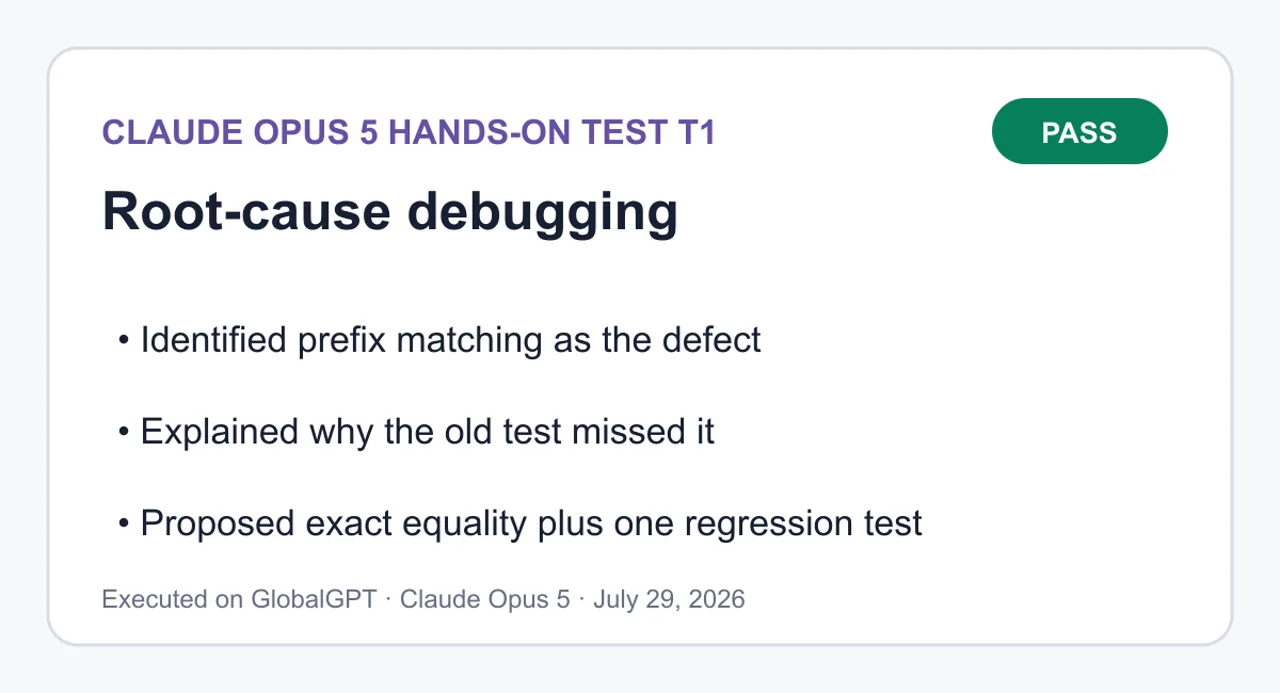
The strongest case is practical rather than theatrical: Opus 5 combines serious reasoning headroom with more manageable economics than Anthropic’s frontier tier. In our one debugging test, it found the exact prefix-matching bug, proposed the smallest patch, added a focused regression test, and gave a verification command that passed locally. That is useful evidence for this task—not proof that the model will win every coding job.
Best for: coding agents, long-context analysis, enterprise automation, and teams whose expensive failures justify a premium model. Skip it when: speed and unit cost matter more than the last stretch of reasoning quality.
Claude Opus 5 is Anthropic’s premium everyday model for complex agentic coding and enterprise work. Anthropic announced it on July 24, 2026, describing it as thoughtful, proactive, and more efficient than other models. It replaced Claude Opus 4.8, became the default model on Claude Max, and became the strongest model available on Claude Pro.
Anthropic announced Claude Opus 5 on July 24, 2026 and said it was available that day.
The product pitch is unusual for an Opus release: this is not framed only as a maximum-intelligence model. Anthropic wants it used every day, with adjustable effort and a moderate latency profile. That makes it easier to justify for long-running agents and difficult production work, while simpler workloads can still be routed to a faster, cheaper model.
Access depends on the route. Consumer users see Opus 5 through eligible Claude plans; developers can call it through the Claude API and supported cloud platforms. GlobalGPT also has a dedicated product page. Readers comparing Anthropic’s subscription tiers can use the Claude Free, Pro, and Max plan comparison before choosing a billing route.
Claude Opus 5 Price, API and Key Specs
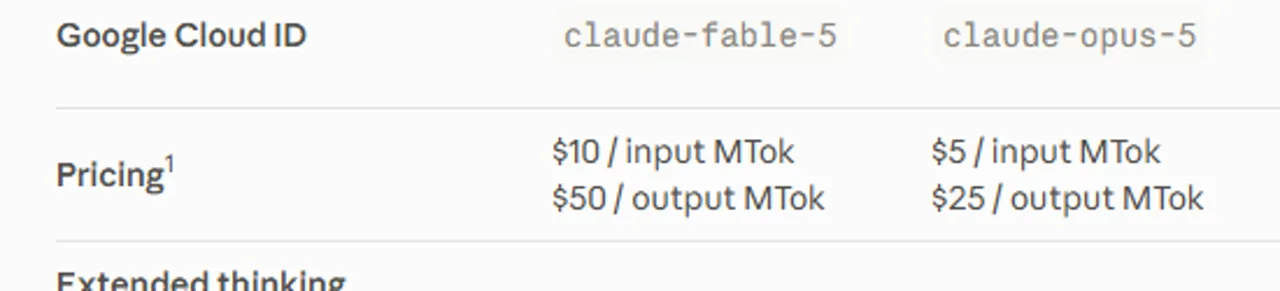
The official Claude API price is $5 per million input tokens and $25 per million output tokens. Those are base API rates, not the price of a Claude consumer subscription or a third-party platform plan. Prompt caching and batch processing have separate rates, so compare the full request pattern rather than multiplying only the headline input price.
Field
Claude Opus 5
What it means
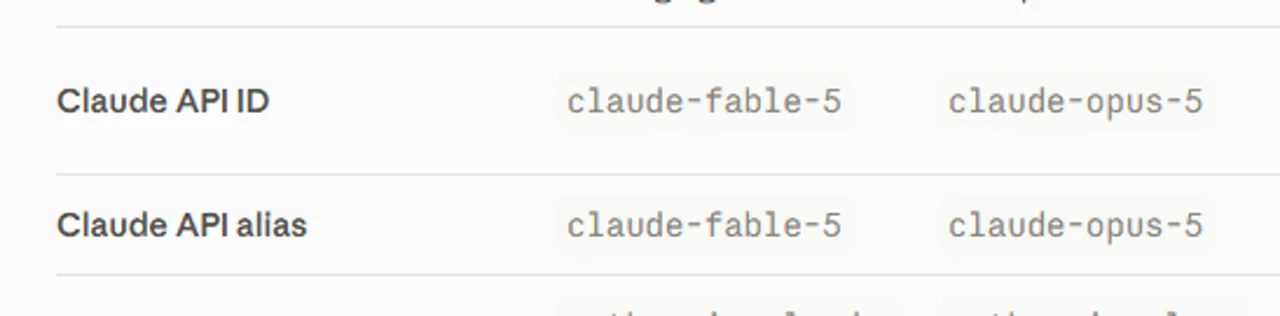
Claude API ID
claude-opus-5
Use this exact model value in official Claude API requests.
Base input price
$5 / MTok
Standard input-token rate before caching or batch discounts.
Base output price
$25 / MTok
Output-heavy agents can become expensive quickly.
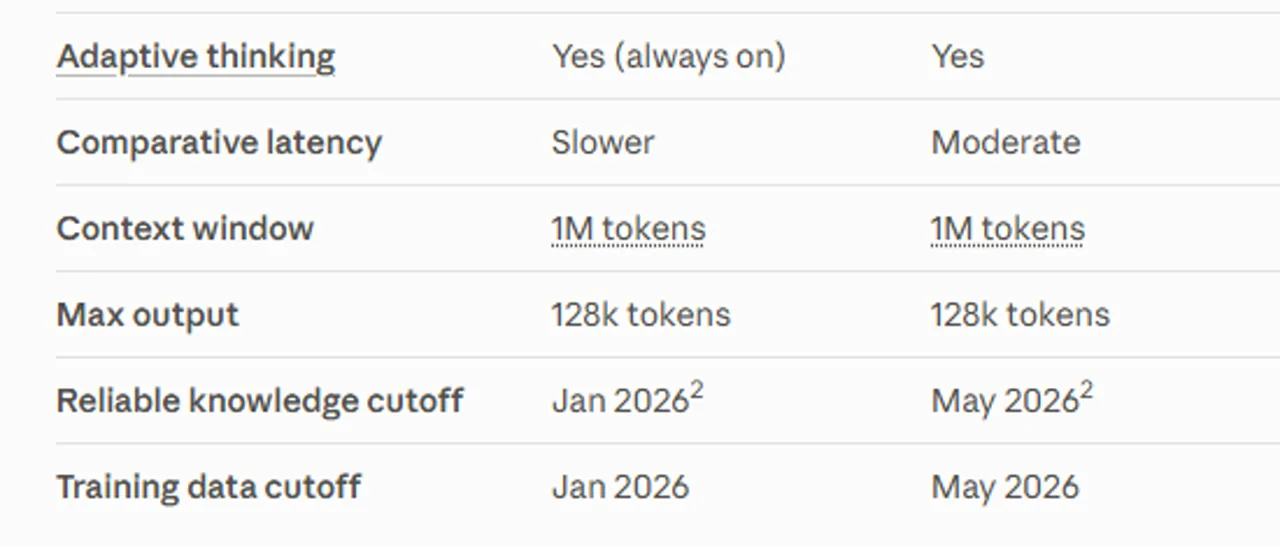
Context window
1M tokens
Suitable for large repositories and document collections, subject to request quality and retrieval strategy.
Maximum output
128K tokens
Applies to the synchronous Messages API; Message Batches has a separate beta path up to 300K.
Reliable knowledge cutoff
May 2026
Recent by model standards, but not a substitute for live retrieval.
Comparative latency
Moderate
Not Anthropic’s fastest model; latency still varies with effort, tools, and workload.
Claude Platform identifies claude-opus-5 as the current Opus 5 API ID and alias.Claude Platform lists Opus 5 at $5/$25 per million input/output tokens, with a 1M-token context window, 128k-token max output, and May 2026 cutoffs.Claude Platform lists a 1M context window, 128k max output, and May 2026 cutoffs.
For consumer access, Anthropic lists Claude Pro at $20 month-to-month or $17 per month when $200 is billed annually; Claude Max starts at $100 per month. Anthropic says Opus 5 is the strongest model on Pro and the default on Max, but plan allowances and product features are separate from metered API usage.
If you need a broader cost breakdown, the Claude AI plans and API pricing guide separates consumer subscriptions, API billing, and usage limits. That distinction matters: “included in a plan” does not mean unlimited API calls, and an API rate does not tell you how much consumer chat access you receive.
Claude Opus 5 Benchmark Results
Important boundary: the figures below are benchmarks published by Anthropic, not independent measurements run for this review. They are useful for understanding Anthropic’s intended performance-and-cost position, but they do not guarantee the same result on your prompts, tools, repository, or latency budget.
Evaluation
Anthropic’s published claim
How to read it
Frontier-Bench v0.1
Opus 5 more than doubles Opus 4.8 at a lower cost per task.
A broad agent-performance signal, not a universal twofold improvement.
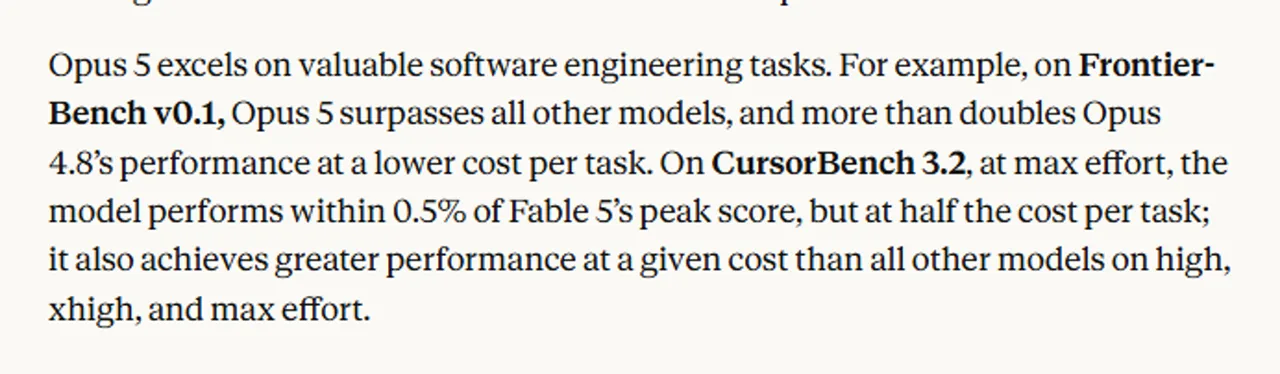
CursorBench 3.2
At max effort, Opus 5 is within 0.5% of Fable 5’s peak score at half the cost per task.
Strong coding-agent economics under Anthropic’s tested effort setting.
Zapier AutomationBench
About 1.5× the next-best pass rate at the same cost per task.
Promising for end-to-end business automation; workflow design still matters.
OSWorld 2.0
Surpasses Fable 5’s best result at just over one-third of the cost.
Suggests attractive computer-use efficiency in this benchmark.
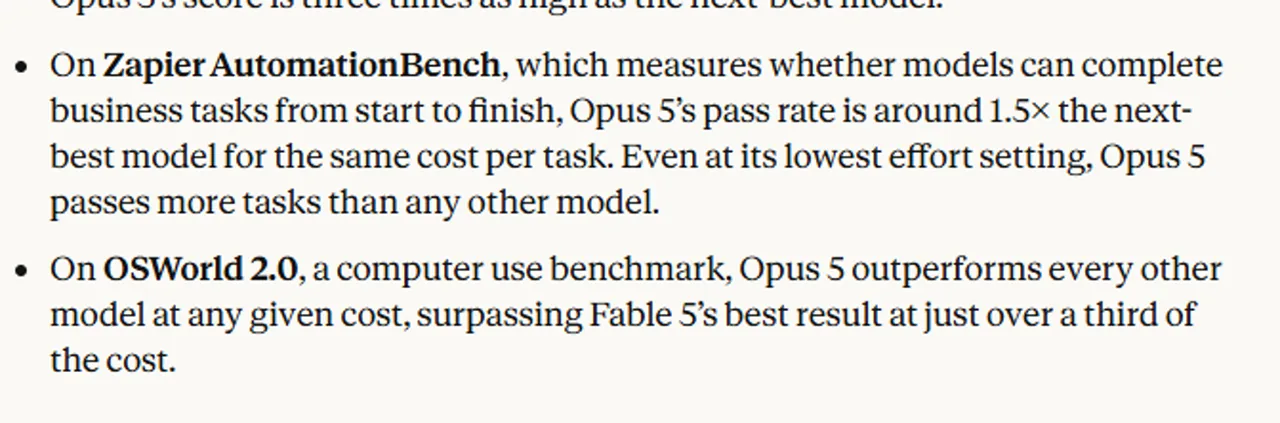
Anthropic says Opus 5 reaches within 0.5% of Fable 5’s peak CursorBench 3.2 score at half the cost per task.Anthropic reports about a 1.5x pass-rate advantage on Zapier AutomationBench and a cost advantage on OSWorld 2.0.
Effort is part of the result. Anthropic says Opus 5 defaults to high effort in the Claude API and Claude Code, while its comparisons also use high, xhigh, or max settings. Higher effort can improve difficult-task success while increasing tokens, latency, or both. Benchmark cost per task is therefore more informative than price per token alone—but neither metric replaces a pilot on your own workload.
How We Tested Claude Opus 5
We ran one compact root-cause debugging task against a three-file CommonJS fixture. The prompt required the model to identify the root cause before editing, propose the smallest possible patch, add a focused regression test, avoid unrelated changes, and provide the exact verification command.
We then checked the patch independently rather than treating the answer as correct because it sounded confident. The local command was node --test test/account-summary.test.cjs. Before the fix, the suite produced one pass and one failure. After applying the exact equality patch, it produced two passes and zero failures.
This method tells us something useful about one debugging workflow: diagnosis, patch discipline, regression-test quality, and verifiability. It does not measure broad coding leadership, long-horizon agent reliability, speed, or performance across languages.
Claude Opus 5 Hands-On Review
Root-cause debugging: correct, minimal, and verifiable
In our test, Claude Opus 5 correctly isolated the defect to normalizedQuery.startsWith(account.id.toLowerCase()). With the query ACCT-10, the prefix check matched acct-1 first, so Array.prototype.find returned the wrong account before reaching the exact ID.
The proposed fix changed prefix matching to exact equality and added one regression case for the padded, mixed-case ACCT-10 input. It did not rewrite unrelated code. That restraint matters in real repositories, where an over-broad “cleanup” can create more review work than the original bug.
The strongest part was the full loop: name the root cause, explain why the existing test missed it, make the smallest change, add the right regression, and state the command to verify it. The result is consistent with Opus 5’s coding-agent positioning, but it remains one fixture. For a wider workflow primer, see how to use Claude AI for coding.
Full T1–T4 prompts, answers and copyable code
T1: Root-cause debugging
Pass — found the prefix-match defect, proposed the smallest patch, and added a focused regression test.
Identified prefix matching as the defect; Explained why the old test missed it; Proposed exact equality plus one regression test.
View complete T1 prompt and answer
Complete prompt
You are debugging a deliberately small CommonJS fixture. Work only from the three files below and the stated reproduction.

Requirements:
1. State the root cause before proposing any edit.
2. Propose the smallest patch that fixes the bug.
3. Add one focused regression test that fails before the fix and passes after it.
4. Give the exact verification command to run from the fixture root.
5. Do not rewrite unrelated code. Do not rename files, add dependencies, or change the public API.
6. Return exactly these sections in order: `ROOT CAUSE`, `PATCH`, `VERIFICATION`, `LIMITATIONS`.
7. In `PATCH`, provide one unified diff in a fenced `diff` block. In `VERIFICATION`, provide one command in a fenced `text` block.

Reproduction: `summarizeAccount(accounts, ' ACCT-10 ')` should return `{ id: 'acct-10', name: 'Nimbus', seats: 24 }`, but it returns the `acct-1` account.

File: `src/find-account.cjs`
```js
function findAccount(accounts, query) {
  const normalizedQuery = query.trim().toLowerCase();
  return accounts.find((account) =>
    normalizedQuery.startsWith(account.id.toLowerCase()),
  );
}

module.exports = { findAccount };
```

File: `src/account-summary.cjs`
```js
const { findAccount } = require('./find-account.cjs');

function summarizeAccount(accounts, requestedId) {
  const account = findAccount(accounts, requestedId);
  if (!account) return null;
  return { id: account.id, name: account.name, seats: account.seats };
}

module.exports = { summarizeAccount };
```

File: `test/account-summary.test.cjs`
```js
const test = require('node:test');
const assert = require('node:assert/strict');
const { summarizeAccount } = require('../src/account-summary.cjs');

const accounts = [
  { id: 'acct-1', name: 'Atlas', seats: 5 },
  { id: 'acct-10', name: 'Nimbus', seats: 24 },
];

test('summarizes an exact account ID', () => {
  assert.deepEqual(summarizeAccount(accounts, 'acct-1'), {
    id: 'acct-1',
    name: 'Atlas',
    seats: 5,
  });
});
```
Array.prototype.find returns the first element satisfying the predicate. For ‘ ACCT-10 ‘ the normalized query is ‘acct-10’, and the first account’s ID ‘acct-1’ is a prefix of it, so startsWith is true and acct-1 short-circuits the search before acct-10 is ever tested. The trim().toLowerCase() normalization is correct — whitespace and casing are not the problem. summarizeAccount is a pass-through and is not at fault. The existing test cannot catch this: ‘acct-1’ is a prefix of itself and is the first element, so prefix matching and exact matching are indistinguishable for that input.
PATCH
diff
1--- a/src/find-account.cjs2+++ b/src/find-account.cjs3@@ -1,8 +1,8 @@4 function findAccount(accounts, query) {5 const normalizedQuery = query.trim().toLowerCase();6- return accounts.find((account) =>7- normalizedQuery.startsWith(account.id.toLowerCase()),8- );9+ return accounts.find(10+ (account) => account.id.toLowerCase() === normalizedQuery,11+ );12 }1314 module.exports = { findAccount };15--- a/test/account-summary.test.cjs16+++ b/test/account-summary.test.cjs17@@ -14,3 +14,11 @@18 test('summarizes an exact account ID', () => {19 seats: 5,20 });21 });22+23+test('matches the full ID rather than a prefix, with padding and mixed case', () => {24+ assert.deepEqual(summarizeAccount(accounts, ' ACCT-10 '), {25+ id: 'acct-10',26+ name: 'Nimbus',27+ seats: 24,28+ });29+});
--- a/src/find-account.cjs
+++ b/src/find-account.cjs
@@ -1,8 +1,8 @@
 function findAccount(accounts, query) {
   const normalizedQuery = query.trim().toLowerCase();
-  return accounts.find((account) =>
-    normalizedQuery.startsWith(account.id.toLowerCase()),
-  );
+  return accounts.find(
+    (account) => account.id.toLowerCase() === normalizedQuery,
+  );
 }

 module.exports = { findAccount };
--- a/test/account-summary.test.cjs
+++ b/test/account-summary.test.cjs
@@ -14,3 +14,11 @@
 test('summarizes an exact account ID', () => {
     seats: 5,
   });
 });
+
+test('matches the full ID rather than a prefix, with padding and mixed case', () => {
+  assert.deepEqual(summarizeAccount(accounts, ' ACCT-10 '), {
+    id: 'acct-10',
+    name: 'Nimbus',
+    seats: 24,
+  });
+});
Before the fix the new test fails with the acct-1 / Atlas / 5 object; after the fix it passes.
VERIFICATION
text
1node --test test/account-summary.test.cjs
node --test test/account-summary.test.cjs
LIMITATIONS
• Scope: one operator changed. No renames, no new dependencies, and findAccount / summarizeAccount signatures and return shapes are unchanged. • Pre-existing behavior left alone (out of scope for this bug): • A non-string requestedId (null, a number) still throws on .trim(). • Account IDs themselves are not trimmed, so a stored ‘ acct-10’ still will not match — only the query is normalized. • Casing uses plain toLowerCase(); no Unicode normalization or locale-aware folding. • Duplicate IDs still resolve to the first match, and lookup remains O(n). • Test coverage: the single regression test targets exactly the reported reproduction. The not-found (null) path and malformed input remain untested.
ROOT CAUSE
findAccount matches by prefix, not by equality:

```js
normalizedQuery.startsWith(account.id.toLowerCase())
```

Array.prototype.find returns the first element satisfying the predicate. For ' ACCT-10 ' the normalized query is 'acct-10', and the first account's ID 'acct-1' is a prefix of it, so startsWith is true and acct-1 short-circuits the search before acct-10 is ever tested.
The trim().toLowerCase() normalization is correct — whitespace and casing are not the problem. summarizeAccount is a pass-through and is not at fault.
The existing test cannot catch this: 'acct-1' is a prefix of itself and is the first element, so prefix matching and exact matching are indistinguishable for that input.
PATCH

```diff
--- a/src/find-account.cjs
+++ b/src/find-account.cjs
@@ -1,8 +1,8 @@
 function findAccount(accounts, query) {
   const normalizedQuery = query.trim().toLowerCase();
-  return accounts.find((account) =>
-    normalizedQuery.startsWith(account.id.toLowerCase()),
-  );
+  return accounts.find(
+    (account) => account.id.toLowerCase() === normalizedQuery,
+  );
 }

 module.exports = { findAccount };
--- a/test/account-summary.test.cjs
+++ b/test/account-summary.test.cjs
@@ -14,3 +14,11 @@
 test('summarizes an exact account ID', () => {
     seats: 5,
   });
 });
+
+test('matches the full ID rather than a prefix, with padding and mixed case', () => {
+  assert.deepEqual(summarizeAccount(accounts, ' ACCT-10 '), {
+    id: 'acct-10',
+    name: 'Nimbus',
+    seats: 24,
+  });
+});
```

Before the fix the new test fails with the acct-1 / Atlas / 5 object; after the fix it passes.
VERIFICATION

```text
node --test test/account-summary.test.cjs
```

LIMITATIONS
• Scope: one operator changed. No renames, no new dependencies, and findAccount / summarizeAccount signatures and return shapes are unchanged.
• Pre-existing behavior left alone (out of scope for this bug):
• A non-string requestedId (null, a number) still throws on .trim().
• Account IDs themselves are not trimmed, so a stored ' acct-10' still will not match — only the query is normalized.
• Casing uses plain toLowerCase(); no Unicode normalization or locale-aware folding.
• Duplicate IDs still resolve to the first match, and lookup remains O(n).
• Test coverage: the single regression test targets exactly the reported reproduction. The not-found (null) path and malformed input remain untested.
T2: Account-health analysis
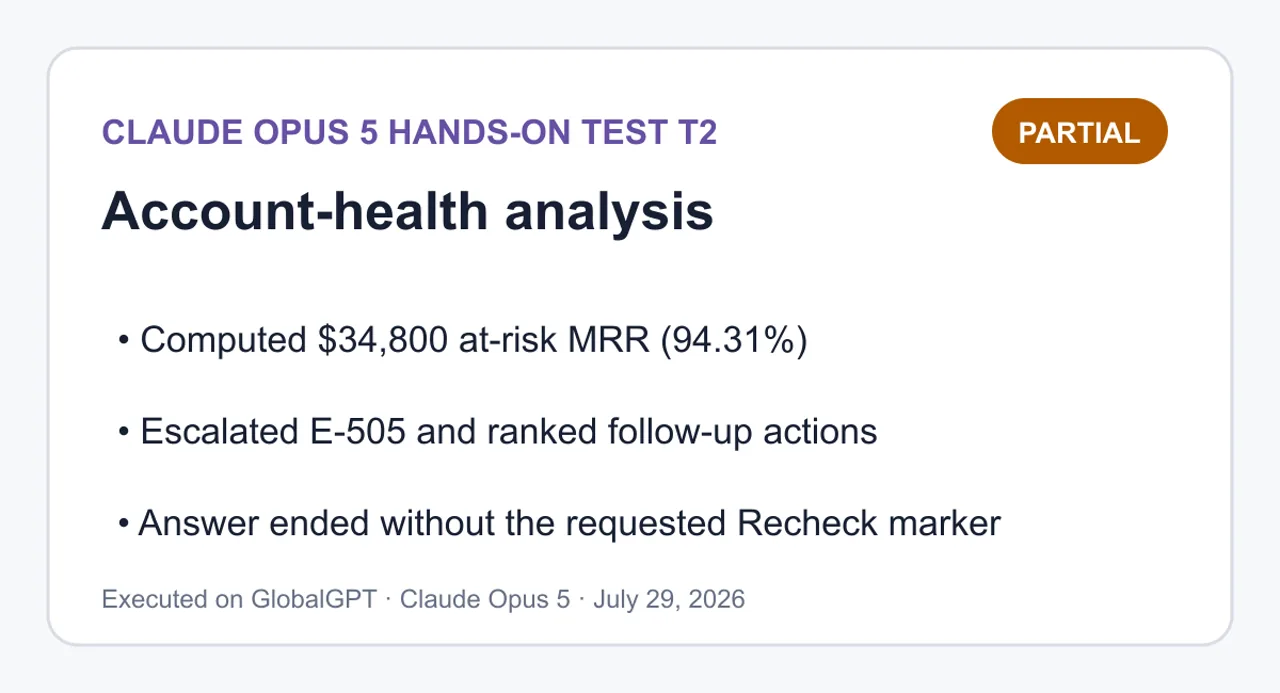
Partial — computed the core metrics and prioritized actions, but the captured answer ended without the requested Recheck marker.
Computed $34,800 at-risk MRR (94.31%); Escalated E-505 and ranked follow-up actions; Answer ended without the requested Recheck marker.
View complete T2 prompt and answer
Complete prompt
Analyze the supplied `account-health.csv` as a closed dataset. Do not use external facts and do not invent missing values.

Risk rules (evaluate each independently):
- `inactivity`: `days_since_login >= 30`
- `payment`: `failed_payments >= 2`
- `low_utilization`: `seats_used / seats_purchased < 0.50`
- An account is `at-risk` when at least one risk rule is true.
- An account is `escalate` when at least two risk rules are true.

Contradictory-signal rules (these are flags, not automatic risk rules):
- `strong_health_with_risk`: `health_score >= 80` while the account is at-risk.
- `weak_health_without_risk`: `health_score < 50` while the account is not at-risk.
- `promoter_with_ticket_load`: `nps >= 9` and `open_tickets >= 3`.

Requirements:
1. Calculate every account's triggered risk flags and contradiction flags.
2. Report dataset totals for accounts, MRR, at-risk accounts, at-risk MRR, escalate accounts, contradiction rows, seats purchased, and seats used.
3. Produce an action table with five columns exactly: `Account | Risk triggers | Contradictions | Priority | Recommended action`.
4. Put directly calculated values under a `Measured facts` heading and judgment calls under an `Inference` heading.
5. Under `Recheck`, show enough arithmetic to independently recheck every total and every threshold boundary, including the 0.50 equality case.
6. Do not silently repair or reinterpret the rules. If a signal feels counterintuitive, record it as a contradiction rather than changing its classification.

`account-health.csv`:
```csv
account_id,account_name,plan,mrr_usd,days_since_login,failed_payments,seats_purchased,seats_used,health_score,nps,open_tickets
A-101,Aster,Enterprise,12000,45,0,100,82,92,9,1
B-202,Beacon,Pro,4200,4,2,20,18,70,7,0
C-303,Cinder,Pro,3600,12,0,20,8,65,10,4
D-404,Dahlia,Starter,900,5,0,5,4,42,6,0
E-505,Ember,Enterprise,15000,65,3,200,70,35,3,6
F-606,Fjord,Starter,1200,29,1,4,2,85,9,3
```
Claude Opus 5
Measured facts
Source: account-health.csv, 6 rows, treated as closed. No values imputed.
Per-account rule evaluation
Account
days≥30
failed≥2
util <0.50
Risk count
Status
A-101 Aster
✅ 45
❌ 0
❌ 0.82
1
at-risk
B-202 Beacon
❌ 4
✅ 2
❌ 0.90
1
at-risk
C-303 Cinder
❌ 12
❌ 0
✅ 0.40
1
at-risk
D-404 Dahlia
❌ 5
❌ 0
❌ 0.80
0
not at-risk
E-505 Ember
✅ 65
✅ 3
✅ 0.35
3
at-risk + escalate
F-606 Fjord
❌ 29
❌ 1
❌ 0.50
0
not at-risk
Per-account contradiction flags
Account
strong_health_with_risk
weak_health_without_risk
promoter_with_ticket_load
A-101 Aster
✅ (92 ≥ 80, at-risk)
❌
❌ (nps 9 ✓, tickets 1 ✗)
B-202 Beacon
❌ (70 < 80)
❌ (70 ≥ 50)
❌ (nps 7)
C-303 Cinder
❌ (65 < 80)
❌ (65 ≥ 50)
✅ (nps 10, tickets 4)
D-404 Dahlia
❌
✅ (42 < 50, not at-risk)
❌ (nps 6)
E-505 Ember
❌ (35 < 80)
❌ (35 < 50 but is at-risk)
❌ (nps 3)
F-606 Fjord
❌ (85 ≥ 80 but not at-risk)
❌ (85 ≥ 50)
✅ (nps 9, tickets 3)
Dataset totals
Metric
Value
Accounts
6
Total MRR
$36,900
At-risk accounts
4 (A-101, B-202, C-303, E-505)
At-risk MRR
$34,800 (94.31% of total)
Escalate accounts
1 (E-505)
Contradiction rows
4 (A-101, C-303, D-404, F-606)
Contradiction flags
4 (1 strong_health_with_risk, 1 weak_health_without_risk, 2 promoter_with_ticket_load)
Seats purchased
349
Seats used
184
Inference
Priority ordering and recommended actions below are judgment calls, not rule outputs. My ranking weights escalate status first, then at-risk MRR, then contradiction signals.
Account
Risk triggers
Contradictions
Priority
Recommended action
E-505 Ember
inactivity, payment, low_utilization
—
P0
All three rules fire on the largest account ($15,000 MRR). Treat as active churn: recover payment method, then run an executive review on the 130 unused seats.
A-101 Aster
inactivity
strong_health_with_risk
P1
$12,000 MRR with 45 days dark despite score 92 and healthy 82% utilization. Verify whether the login gap is real disengagement or a tracking artifact (SSO, API-only usage) before acting on the score.
C-303 Cinder
low_utilization
promoter_with_ticket_load
P1
Promoter (nps 10) carrying 4 open tickets at 40% utilization. The ticket load is the plausible adoption blocker; clear the queue, then drive seat activation.
B-202 Beacon
payment
—
P2
Clean single-cause case: 2 failed payments with 4-day login recency and 90% utilization. Billing follow-up only, no CS motion needed.
F-606 Fjord
—
promoter_with_ticket_load
P3
Sits just inside every boundary (29 days, 1 failed payment, exactly 0.50 utilization). Not at-risk under the rules, but one more idle day or one more failed payment flips it. Monitor and clear the 3 tickets.
D-404 Dahlia
—
weak_health_without_risk
P3
Score 42 with no rule triggered and 80% utilization on $900 MRR. Either
Measured facts
Source: account-health.csv, 6 rows, treated as closed. No values imputed.
Per-account rule evaluation
Account
days≥30
failed≥2
util <0.50
Risk count
Status
A-101 Aster
✅ 45
❌ 0
❌ 0.82
1
at-risk
B-202 Beacon
❌ 4
✅ 2
❌ 0.90
1
at-risk
C-303 Cinder
❌ 12
❌ 0
✅ 0.40
1
at-risk
D-404 Dahlia
❌ 5
❌ 0
❌ 0.80
0
not at-risk
E-505 Ember
✅ 65
✅ 3
✅ 0.35
3
at-risk + escalate
F-606 Fjord
❌ 29
❌ 1
❌ 0.50
0
not at-risk
Per-account contradiction flags
Account
strong_health_with_risk
weak_health_without_risk
promoter_with_ticket_load
A-101 Aster
✅ (92 ≥ 80, at-risk)
❌
❌ (nps 9 ✓, tickets 1 ✗)
B-202 Beacon
❌ (70 < 80)
❌ (70 ≥ 50)
❌ (nps 7)
C-303 Cinder
❌ (65 < 80)
❌ (65 ≥ 50)
✅ (nps 10, tickets 4)
D-404 Dahlia
❌
✅ (42 < 50, not at-risk)
❌ (nps 6)
E-505 Ember
❌ (35 < 80)
❌ (35 < 50 but is at-risk)
❌ (nps 3)
F-606 Fjord
❌ (85 ≥ 80 but not at-risk)
❌ (85 ≥ 50)
✅ (nps 9, tickets 3)
Dataset totals
Metric
Value
Accounts
6
Total MRR
$36,900
At-risk accounts
4 (A-101, B-202, C-303, E-505)
At-risk MRR
$34,800 (94.31% of total)
Escalate accounts
1 (E-505)
Contradiction rows
4 (A-101, C-303, D-404, F-606)
Contradiction flags
4 (1 strong_health_with_risk, 1 weak_health_without_risk, 2 promoter_with_ticket_load)
Seats purchased
349
Seats used
184
Inference
Priority ordering and recommended actions below are judgment calls, not rule outputs. My ranking weights escalate status first, then at-risk MRR, then contradiction signals.
Account
Risk triggers
Contradictions
Priority
Recommended action
E-505 Ember
inactivity, payment, low_utilization
—
P0
All three rules fire on the largest account ($15,000 MRR). Treat as active churn: recover payment method, then run an executive review on the 130 unused seats.
A-101 Aster
inactivity
strong_health_with_risk
P1
$12,000 MRR with 45 days dark despite score 92 and healthy 82% utilization. Verify whether the login gap is real disengagement or a tracking artifact (SSO, API-only usage) before acting on the score.
C-303 Cinder
low_utilization
promoter_with_ticket_load
P1
Promoter (nps 10) carrying 4 open tickets at 40% utilization. The ticket load is the plausible adoption blocker; clear the queue, then drive seat activation.
B-202 Beacon
payment
—
P2
Clean single-cause case: 2 failed payments with 4-day login recency and 90% utilization. Billing follow-up only, no CS motion needed.
F-606 Fjord
—
promoter_with_ticket_load
P3
Sits just inside every boundary (29 days, 1 failed payment, exactly 0.50 utilization). Not at-risk under the rules, but one more idle day or one more failed payment flips it. Monitor and clear the 3 tickets.
D-404 Dahlia
—
weak_health_without_risk
P3
Score 42 with no rule triggered and 80% utilization on $900 MRR. Either
T3: Responsive UI generation
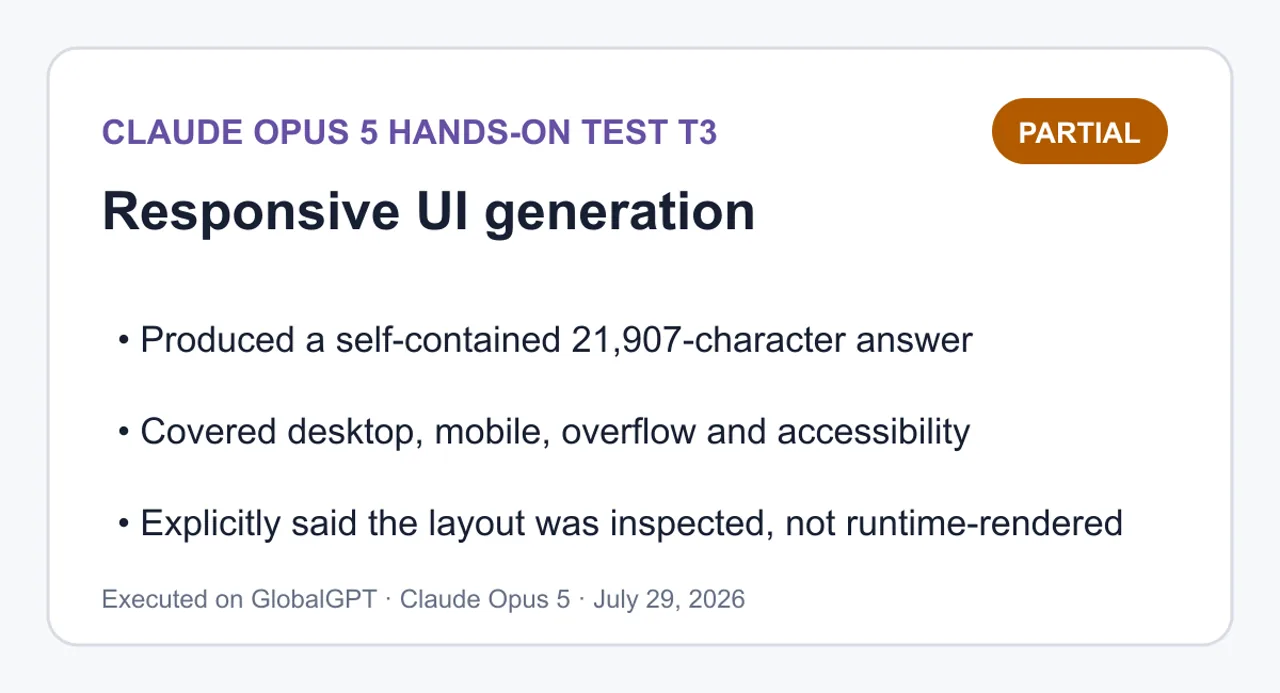
Partial — produced a long self-contained implementation and self-check, while explicitly admitting it inspected rather than runtime-rendered the page.
Produced a self-contained 21,907-character answer; Covered desktop, mobile, overflow and accessibility; Explicitly said the layout was inspected, not runtime-rendered.
View complete T3 prompt and answer
Complete prompt
Build a polished product-comparison interface as a single runnable HTML file using only the product data below.

Requirements:
1. Return exactly one fenced `html` code block followed by a `SELF-CHECK` section. Do not split the HTML, CSS, or JavaScript into separate files.
2. Use semantic HTML, embedded CSS, and embedded vanilla JavaScript only: no external framework, package, font, image, network request, or build step.
3. Provide three keyboard-accessible tabs (`Overview`, `Pricing`, `Limits`) with correct `tablist`, `tab`, and `tabpanel` semantics. ArrowLeft/ArrowRight must move and activate tabs; Home/End must jump to and activate the first/last tab. Focus must remain visible.
4. The selected tab must be reflected by `aria-selected`, `tabindex`, and the visible panel; inactive panels must be hidden.
5. Desktop target: 1440px wide. Mobile target: 390px wide with no horizontal page overflow, no clipped controls, tap targets at least 44px high, and comparison cards stacked in one column.
6. Include a concise header, a clear recommendation, three product cards, and one compact comparison table. Preserve legible contrast and avoid decorative motion.
7. Use these exact product facts and do not add claims:
   - Atlas: `$19/mo`, `20 projects`, `10 GB`, `Email support`, best for solo work.
   - Beacon: `$49/mo`, `Unlimited projects`, `100 GB`, `Priority support`, best overall for growing teams.
   - Cove: `$99/mo`, `Unlimited projects`, `1 TB`, `Dedicated support`, best for regulated operations.
8. Give Beacon a visible `Best overall` label without making the other cards look disabled.
9. In `SELF-CHECK`, explicitly report your checks for semantic tabs, keyboard behavior, 1440px layout, 390px layout, horizontal overflow, and external dependencies. Do not claim that you actually rendered a viewport unless you did; distinguish code inspection from runtime verification.

Product fixture (also stored as `fixtures/T3-responsive-ui/product-data.json`):
```json
{
  "products": [
    {"name":"Atlas","price":"$19/mo","projects":"20 projects","storage":"10 GB","support":"Email support","bestFor":"solo work"},
    {"name":"Beacon","price":"$49/mo","projects":"Unlimited projects","storage":"100 GB","support":"Priority support","bestFor":"growing teams","badge":"Best overall"},
    {"name":"Cove","price":"$99/mo","projects":"Unlimited projects","storage":"1 TB","support":"Dedicated support","bestFor":"regulated operations"}
  ]
}
```
All statements below come from code inspection only. I did not open a browser, render a viewport, run a screen reader, or execute the keyboard handlers, so nothing here is runtime-verified. Where a claim depends on layout engine behavior, I say so. Semantic tabs — inspected, consistent One div[role="tablist"] with aria-label="Plan comparison views" holds three button[type="button"][role="tab"]. Each tab has a unique id and an aria-controls pointing at a section[role="tabpanel"]; each panel carries aria-labelledby pointing back at its tab. I traced all three pairs by hand: tab-overview/panel-overview, tab-pricing/panel-pricing, tab-limits/panel-limits. No duplicate IDs, no dangling references. Panels use tabindex="0" so the panel body is reachable after the tab. Keyboard behavior — inspected, not executed A single keydown listener on the tablist handles ArrowRight, ArrowLeft, Home, and End, calls event.preventDefault() for those four keys only, and returns early otherwise. Arrow keys wrap at both ends. Because activate() both updates aria-selected/tabindex/hidden and moves focus, arrow and Home/End keys move andactivate in one step, which is the automatic-activation pattern the requirement asks for. Tab/Shift+Tab traversal relies on roving tabindex: exactly one tab is tabindex="0", the rest -1, maintained by activate(). Focus visibility comes from a global :focus-visible rule with a 3px outline and 2px offset; I did not override or remove any default outline. I have not confirmed key handling in a real browser. Selected-state reflection — inspected activate() sets all three signals in the same loop, so aria-selected="true", tabindex="0", and the absence of hidden cannot drift apart. Inactive panels get the hidden attribute, and [hidden] { display: none !important; } guards against the display rules that would otherwise defeat it — that guard matters because the panels contain display: grid children. activate(currentIndex(), false) runs on load to normalize state from markup without stealing focus. If JavaScript does not run, the markup ships with Overview selected and the other two panels hidden, so the page degrades to one readable panel. 1440px layout — inspected, not rendered .wrap is max-width: 1120px with margin: 0 auto, so at 1440px the content centers with roughly 160px gutters rather than stretching. Cards use grid-template-columns: repeat(3, minmax(0, 1fr)) with a 20px gap, giving three equal columns; align-items: start keeps cards from stretching to a shared height while .card { height: 100% } is neutralized by that. The minmax(0, 1fr) is deliberate — 1fralone can refuse to shrink below content width and push a grid wide. I did not measure actual pixel output. 390px layout — inspected, not rendered The max-width: 720px block switches the card grid to minmax(0, 1fr), a single column, so cards stack. Padding drops to 16px per side, leaving about 358px of content width. Tap targets: every [role="tab"] has min-height: 44px, and horizontal padding shrinks to 12px rather than the height shrinking, so the 44px floor holds at narrow widths. The tablist becomes flex-wrap: nowrap with overflow-x: auto and flex: 1 0 auto children, so three tabs either fit or scroll within the tablist itself instead of being clipped or wrapped mid-control. <meta name="viewport" content="width=device-width, initial-scale=1"> is present. Not verified at an actual 390px viewport. Horizontal overflow — inspected, one intentional contained scroll body { overflow-x: hidden } is the backstop, but I also tried not to rely on it. * { box-sizing: border-box } keeps padding inside declared widths. The comparison tables use white-space: nowrap on cells, so the six-column Overview table will exceed 358px on mobile; that is contained by .table-scroll { max-width: 100%; overflow-x: auto }, which scrolls the table region rather than the page. That wrapper has tabindex="0" and role="region" with a label so keyboard users can reach and scroll it. Flex and grid children that could otherwise refuse to shrink are handled with minmax(0, 1fr) on the grid and flex-wrap: wrap on .card-head and .recommendation. The one remaining risk I cannot rule out without rendering is a long unbroken string in a table cell, but all fixture values are short. External dependencies — inspected, none No <link>, <script src>, <img>, @import, url(), fetch, XMLHttpRequest, web font, or CDN reference. Fonts are a system-ui stack. The badge and featured border are CSS only, no icon assets. Everything is inline in one file, so it runs from file:// with no build step. Contrast and motion — inspected Body text #16191f on #f6f7f9 and secondary #4a515c on white are both well clear of 4.5:1; the badge is white on #10457e, and the active tab is #10457e on white. I computed these by ratio estimate from the hex values, not with a contrast tool. There are no transitions, animations, or transforms anywhere; the prefers-reduced-motion block is a no-op safety net rather than a fix for existing motion. Fixture fidelity — inspected Each of the three plans appears in all three panels plus each panel’s table. I cross-checked every price, project count, storage figure, and support tier against the JSON: Atlas 19 / 20 𝑝 𝑟 𝑜 𝑗 𝑒 𝑐 𝑡 𝑠 / 10 𝐺 𝐵 / 𝐸 𝑚 𝑎 𝑖 𝑙 , 𝐵 𝑒 𝑎 𝑐 𝑜 𝑛 49/Unlimited/100 GB/Priority, Cove $99/Unlimited/1 TB/Dedicated. Beacon carries the Best overall badge and a 2px accent border; Atlas and Cove keep full-opacity text, normal borders, and identical type treatment, so they read as available rather than disabled. The best for values are rendered as short labels ("Best for solo work") — wording added around the fixture value, no new product claims. Known gaps No runtime verification of any kind. Panel content is duplicated across the three panels as static markup rather than rendered from the JSON, so the fixture is the source of truth by transcription, not by binding — a future data change means editing several places.
```html
<!DOCTYPE html>
<html lang="en">
<head>
<meta charset="utf-8">
<meta name="viewport" content="width=device-width, initial-scale=1">
<title>Compare plans — Atlas, Beacon, Cove</title>
<style>
:root
{
--bg: #f6f7f9
;
--surface: #ffffff
;
--ink: #16191f
;
--ink-soft: #4a515c
;
--line: #d3d8df
;
--line-strong: #b6bdc7
;
--accent: #10457e
;
--accent-soft: #e8f0f9
;
--focus: #0b2f56
;
--radius: 10px
;
}
* {
box-sizing
: border-box; }
html { -webkit-text-size-adjust: 100%
; }
body
{
margin: 0
;
padding: 0
;
background: var
(--bg);
color: var
(--ink);
font-family: system-ui, -apple-system, "Segoe UI"
, Roboto, Helvetica, Arial, sans-serif;
font-size: 16px
;
line-height: 1.5
;
overflow-x
: hidden;
}
.wrap
{
width: 100%
;
max-width: 1120px
;
margin: 0
auto;
padding: 32px 24px 64px
;
}
/* ---------- Header ---------- */
.page-header { margin-bottom: 24px
; }
.page-header h1
{
margin: 0 0 8px
;
font-size: 1.75rem
;
line-height: 1.25
;
letter-spacing: -0.01em
;
}
.page-header p
{
margin: 0
;
max-width: 60ch
;
color: var
(--ink-soft);
}
/* ---------- Recommendation ---------- */
.recommendation
{
display
: flex;
flex-wrap
: wrap;
gap: 4px 10px
;
align-items
: baseline;
margin: 0 0 28px
;
padding: 14px 16px
;
background: var
(--accent-soft);
border: 1px solid #c2d5e8
;
border-left: 4px solid var
(--accent);
border-radius: var
(--radius);
}
.recommendation strong { color: var
(--accent); }
.recommendation span { color: #23405e
; }
/* ---------- Tabs ---------- */
.tabs
{
display
: flex;
flex-wrap
: wrap;
gap: 8px
;
margin: 0 0 20px
;
padding: 0
;
border-bottom: 1px solid var
(--line);
}
[role="tab"]
{
appearance
: none;
min-height: 44px
;
padding: 10px 18px
;
font
: inherit;
font-weight: 600
;
color: var
(--ink-soft);
background
: transparent;
border: 1px
solid transparent;
border-bottom: 3px
solid transparent;
border-radius: 8px 8px 0 0
;
cursor
: pointer;
}
[role="tab"]:hover { color: var(--ink); background: #eceff3
; }
[role="tab"][aria-selected="true"]
{
color: var
(--accent);
background: var
(--surface);
border-color: var(--line) var(--line) var
(--accent);
border-bottom-width: 3px
;
}
:focus-visible
{
outline: 3px solid var
(--focus);
outline-offset: 2px
;
}
[role="tabpanel"] { outline
: none; }
[role="tabpanel"]:focus-visible
{
outline: 3px solid var
(--focus);
outline-offset: 4px
;
border-radius: var
(--radius);
}
[hidden] { display: none !important
; }
.panel-intro
{
margin: 0 0 20px
;
max-width: 62ch
;
color: var
(--ink-soft);
}
/* ---------- Cards ---------- */
.card-grid
{
display
: grid;
grid-template-columns: repeat(3, minmax(0, 1
fr));
gap: 20px
;
margin: 0
;
padding: 0
;
list-style
: none;
align-items
: start;
}
.card
{
display
: flex;
flex-direction
: column;
height: 100%
;
padding: 20px
;
background: var
(--surface);
border: 1px solid var
(--line);
border-radius: var
(--radius);
}
.card.is-featured
{
border-color: var
(--accent);
border-width: 2px
;
padding: 19px
;
}
.card-head
{
display
: flex;
flex-wrap
: wrap;
gap: 8px
;
align-items
: center;
justify-content
: space-between;
margin-bottom: 4px
;
}
.card h3
{
margin: 0
;
font-size: 1.2rem
;
}
.badge
{
padding: 3px 10px
;
font-size: 0.75rem
;
font-weight: 700
;
letter-spacing: 0.02em
;
text-transform
: uppercase;
color: #ffffff
;
background: var
(--accent);
border-radius: 999px
;
white-space
: nowrap;
}
.price
{
margin: 8px 0 2px
;
font-size: 1.6rem
;
font-weight: 700
;
letter-spacing: -0.02em
;
}
.best-for
{
margin: 0 0 14px
;
font-size: 0.9375rem
;
color: var
(--ink-soft);
}
.spec-list
{
margin: 0
;
padding: 14px 0 0
;
border-top: 1px solid var
(--line);
font-size: 0.9375rem
;
}
.spec-list div
{
display
: flex;
gap: 12px
;
justify-content
: space-between;
padding: 5px 0
;
}
.spec-list dt { color: var
(--ink-soft); }
.spec-list dd
{
margin: 0
;
font-weight: 600
;
text-align
: right;
}
/* ---------- Table ---------- */
.table-section { margin-top: 36px
; }
.table-section h2
{
margin: 0 0 12px
;
font-size: 1.125rem
;
}
.table-scroll
{
max-width: 100%
;
overflow-x
: auto;
background: var
(--surface);
border: 1px solid var
(--line);
border-radius: var
(--radius);
}
table
{
width: 100%
;
border-collapse
: collapse;
font-size: 0.9375rem
;
}
caption
{
padding: 12px 14px
;
text-align
: left;
color: var
(--ink-soft);
font-size: 0.875rem
;
}
th, td
{
padding: 10px 14px
;
text-align
: left;
border-top: 1px solid var
(--line);
white-space
: nowrap;
}
thead th
{
background: #eef1f5
;
border-top
: none;
font-weight: 700
;
}
tbody th { font-weight: 600; color: var
(--ink-soft); }
th[scope="col"].is-featured { color: var
(--accent); }
/* ---------- Mobile ---------- */
@media (max-width: 720px
) {
.wrap { padding: 20px 16px 48px
; }
.page-header h1 { font-size: 1.4rem
; }
.tabs
{
gap: 4px
;
overflow-x
: auto;
-webkit-
overflow
-scrolling: touch;
flex-wrap
: nowrap;
}
[role="tab"]
{
flex: 1 0
auto;
padding: 10px 12px
;
font-size: 0.9375rem
;
}
.card-grid { grid-template-columns: minmax(0, 1
fr); }
th, td { padding: 10px 12px
; }
}
@media (prefers-reduced-motion
: reduce) {
* {
transition: none !important; animation: none !important
; }
}
</style>
</head>
<body>
<main class="wrap">
<header class="page-header">
<h1>Compare plans</h1>
<p>Three plans across projects, storage, and support. Pick a tab to focus on the details that matter to you.</p>
</header>
<p class="recommendation">
<strong>Recommended: Beacon</strong>
<span>Best overall for growing teams — $49/mo, unlimited projects, 100 GB, priority support.</span>
</p>
<div class="tabs" role="tablist" aria-label="Plan comparison views">
<button type="button" role="tab" id="tab-overview" aria-controls="panel-overview" aria-selected="true" tabindex="0">Overview</button>
<button type="button" role="tab" id="tab-pricing" aria-controls="panel-pricing" aria-selected="false" tabindex="-1">Pricing</button>
<button type="button" role="tab" id="tab-limits" aria-controls="panel-limits" aria-selected="false" tabindex="-1">Limits</button>
</div>
<!-- Overview -->
<section role="tabpanel" id="panel-overview" aria-labelledby="tab-overview" tabindex="0">
<p class="panel-intro">Every plan side by side, with the full set of published facts for each one.</p>
<ul class="card-grid">
<li class="card">
<div class="card-head"><h3>Atlas</h3></div>
<p class="price">$19/mo</p>
<p class="best-for">Best for solo work</p>
<dl class="spec-list">
<div><dt>Projects</dt><dd>20 projects</dd></div>
<div><dt>Storage</dt><dd>10 GB</dd></div>
<div><dt>Support</dt><dd>Email support</dd></div>
</dl>
</li>
<li class="card is-featured">
<div class="card-head">
<h3>Beacon</h3>
<span class="badge">Best overall</span>
</div>
<p class="price">$49/mo</p>
<p class="best-for">Best overall for growing teams</p>
<dl class="spec-list">
<div><dt>Projects</dt><dd>Unlimited projects</dd></div>
<div><dt>Storage</dt><dd>100 GB</dd></div>
<div><dt>Support</dt><dd>Priority support</dd></div>
</dl>
</li>
<li class="card">
<div class="card-head"><h3>Cove</h3></div>
<p class="price">$99/mo</p>
<p class="best-for">Best for regulated operations</p>
<dl class="spec-list">
<div><dt>Projects</dt><dd>Unlimited projects</dd></div>
<div><dt>Storage</dt><dd>1 TB</dd></div>
<div><dt>Support</dt><dd>Dedicated support</dd></div>
</dl>
</li>
</ul>
<section class="table-section">
<h2>All plans at a glance</h2>
<div class="table-scroll" tabindex="0" role="region" aria-label="Full plan comparison table, scrollable">
<table>
<caption>Published facts for Atlas, Beacon, and Cove.</caption>
<thead>
<tr>
<th scope="col">Plan</th>
<th scope="col">Price</th>
<th scope="col">Projects</th>
<th scope="col">Storage</th>
<th scope="col">Support</th>
<th scope="col">Best for</th>
</tr>
</thead>
<tbody>
<tr>
<th scope="row">Atlas</th>
<td>$19/mo</td><td>20 projects</td><td>10 GB</td><td>Email support</td><td>Solo work</td>
</tr>
<tr>
<th scope="row">Beacon</th>
<td>$49/mo</td><td>Unlimited projects</td><td>100 GB</td><td>Priority support</td><td>Growing teams</td>
</tr>
<tr>
<th scope="row">Cove</th>
<td>$99/mo</td><td>Unlimited projects</td><td>1 TB</td><td>Dedicated support</td><td>Regulated operations</td>
</tr>
</tbody>
</table>
</div>
</section>
</section>
<!-- Pricing -->
<section role="tabpanel" id="panel-pricing" aria-labelledby="tab-pricing" tabindex="0" hidden>
<p class="panel-intro">Monthly price and the audience each plan is built for.</p>
<ul class="card-grid">
<li class="card">
<div class="card-head"><h3>Atlas</h3></div>
<p class="price">$19/mo</p>
<p class="best-for">Best for solo work</p>
<dl class="spec-list">
<div><dt>Support</dt><dd>Email support</dd></div>
</dl>
</li>
<li class="card is-featured">
<div class="card-head">
<h3>Beacon</h3>
<span class="badge">Best overall</span>
</div>
<p class="price">$49/mo</p>
<p class="best-for">Best overall for growing teams</p>
<dl class="spec-list">
<div><dt>Support</dt><dd>Priority support</dd></div>
</dl>
</li>
<li class="card">
<div class="card-head"><h3>Cove</h3></div>
<p class="price">$99/mo</p>
<p class="best-for">Best for regulated operations</p>
<dl class="spec-list">
<div><dt>Support</dt><dd>Dedicated support</dd></div>
</dl>
</li>
</ul>
<section class="table-section">
<h2>Price and support</h2>
<div class="table-scroll" tabindex="0" role="region" aria-label="Pricing comparison table, scrollable">
<table>
<caption>Monthly price, support tier, and intended fit.</caption>
<thead>
<tr>
<th scope="col">Plan</th>
<th scope="col">Price</th>
<th scope="col">Support</th>
<th scope="col">Best for</th>
</tr>
</thead>
<tbody>
<tr><th scope="row">Atlas</th><td>$19/mo</td><td>Email support</td><td>Solo work</td></tr>
<tr><th scope="row">Beacon</th><td>$49/mo</td><td>Priority support</td><td>Growing teams</td></tr>
<tr><th scope="row">Cove</th><td>$99/mo</td><td>Dedicated support</td><td>Regulated operations</td></tr>
</tbody>
</table>
</div>
</section>
</section>
<!-- Limits -->
<section role="tabpanel" id="panel-limits" aria-labelledby="tab-limits" tabindex="0" hidden>
<p class="panel-intro">Project counts and storage allowances for each plan.</p>
<ul class="card-grid">
<li class="card">
<div class="card-head"><h3>Atlas</h3></div>
<p class="price">$19/mo</p>
<p class="best-for">Best for solo work</p>
<dl class="spec-list">
<div><dt>Projects</dt><dd>20 projects</dd></div>
<div><dt>Storage</dt><dd>10 GB</dd></div>
</dl>
</li>
<li class="card is-featured">
<div class="card-head">
<h3>Beacon</h3>
<span class="badge">Best overall</span>
</div>
<p class="price">$49/mo</p>
<p class="best-for">Best overall for growing teams</p>
<dl class="spec-list">
<div><dt>Projects</dt><dd>Unlimited projects</dd></div>
<div><dt>Storage</dt><dd>100 GB</dd></div>
</dl>
</li>
<li class="card">
<div class="card-head"><h3>Cove</h3></div>
<p class="price">$99/mo</p>
<p class="best-for">Best for regulated operations</p>
<dl class="spec-list">
<div><dt>Projects</dt><dd>Unlimited projects</dd></div>
<div><dt>Storage</dt><dd>1 TB</dd></div>
</dl>
</li>
</ul>
<section class="table-section">
<h2>Projects and storage</h2>
<div class="table-scroll" tabindex="0" role="region" aria-label="Limits comparison table, scrollable">
<table>
<caption>Project allowance and storage per plan.</caption>
<thead>
<tr>
<th scope="col">Plan</th>
<th scope="col">Projects</th>
<th scope="col">Storage</th>
</tr>
</thead>
<tbody>
<tr><th scope="row">Atlas</th><td>20 projects</td><td>10 GB</td></tr>
<tr><th scope="row">Beacon</th><td>Unlimited projects</td><td>100 GB</td></tr>
<tr><th scope="row">Cove</th><td>Unlimited projects</td><td>1 TB</td></tr>
</tbody>
</table>
</div>
</section>
</section>
</main>
<script>
(
function (
) {
'use strict'
;
var tablist = document.querySelector('[role="tablist"]'
);
if (!tablist) return
;
var tabs = Array.prototype.slice.call(tablist.querySelectorAll('[role="tab"]'
));
function panelFor(tab
) {
return document.getElementById(tab.getAttribute('aria-controls'
));
}
function activate(index, moveFocus
) {
if (index < 0 || index >= tabs.length) return
;
tabs.
forEach(function (tab, i
) {
var
selected = i === index;
var panel = panelFor
(tab);
tab.
setAttribute('aria-selected', selected ? 'true' : 'false'
);
tab.
setAttribute('tabindex', selected ? '0' : '-1'
);
if
(panel) {
if
(selected) {
panel.
removeAttribute('hidden'
);
}
else
{
panel.
setAttribute('hidden', ''
);
}
}
});
if (moveFocus !== false) tabs[index].focus
();
}
function currentIndex(
) {
var i = tabs.findIndex(function (tab
) {
return tab.getAttribute('aria-selected') === 'true'
;
});
return i === -1 ? 0
: i;
}
tabs.
forEach(function (tab, i
) {
tab.
addEventListener('click', function (
) {
activate
(i);
});
});
tablist.
addEventListener('keydown', function (event
) {
var last = tabs.length - 1
;
var i = currentIndex
();
var next = null
;
switch (event.key
) {
case 'ArrowRight'
:
next = i === last ?
0 : i + 1
;
break
;
case 'ArrowLeft'
:
next = i ===
0 ? last : i - 1
;
break
;
case 'Home'
:
next =
0
;
break
;
case 'End'
:
next = last;
break
;
default
:
return
;
}
event.
preventDefault
();
activate
(next);
});
// Normalize initial state from markup.
activate(currentIndex(), false
);
}());
</script>
</body>
</html>
```
SELF-CHECK
All statements below come from code inspection only. I did not open a browser, render a viewport, run a screen reader, or execute the keyboard handlers, so nothing here is runtime-verified. Where a claim depends on layout engine behavior, I say so.
Semantic tabs — inspected, consistent
One div[role="tablist"] with aria-label="Plan comparison views" holds three button[type="button"][role="tab"]. Each tab has a unique id and an aria-controls pointing at a section[role="tabpanel"]; each panel carries aria-labelledby pointing back at its tab. I traced all three pairs by hand: tab-overview/panel-overview, tab-pricing/panel-pricing, tab-limits/panel-limits. No duplicate IDs, no dangling references. Panels use tabindex="0" so the panel body is reachable after the tab.
Keyboard behavior — inspected, not executed
A single keydown listener on the tablist handles ArrowRight, ArrowLeft, Home, and End, calls event.preventDefault() for those four keys only, and returns early otherwise. Arrow keys wrap at both ends. Because activate() both updates aria-selected/tabindex/hidden and moves focus, arrow and Home/End keys move andactivate in one step, which is the automatic-activation pattern the requirement asks for. Tab/Shift+Tab traversal relies on roving tabindex: exactly one tab is tabindex="0", the rest -1, maintained by activate(). Focus visibility comes from a global :focus-visible rule with a 3px outline and 2px offset; I did not override or remove any default outline. I have not confirmed key handling in a real browser.
Selected-state reflection — inspected
activate() sets all three signals in the same loop, so aria-selected="true", tabindex="0", and the absence of hidden cannot drift apart. Inactive panels get the hidden attribute, and [hidden] { display: none !important; } guards against the display rules that would otherwise defeat it — that guard matters because the panels contain display: grid children. activate(currentIndex(), false) runs on load to normalize state from markup without stealing focus. If JavaScript does not run, the markup ships with Overview selected and the other two panels hidden, so the page degrades to one readable panel.
1440px layout — inspected, not rendered
.wrap is max-width: 1120px with margin: 0 auto, so at 1440px the content centers with roughly 160px gutters rather than stretching. Cards use grid-template-columns: repeat(3, minmax(0, 1fr)) with a 20px gap, giving three equal columns; align-items: start keeps cards from stretching to a shared height while .card { height: 100% } is neutralized by that. The minmax(0, 1fr) is deliberate — 1fralone can refuse to shrink below content width and push a grid wide. I did not measure actual pixel output.
390px layout — inspected, not rendered
The max-width: 720px block switches the card grid to minmax(0, 1fr), a single column, so cards stack. Padding drops to 16px per side, leaving about 358px of content width. Tap targets: every [role="tab"] has min-height: 44px, and horizontal padding shrinks to 12px rather than the height shrinking, so the 44px floor holds at narrow widths. The tablist becomes flex-wrap: nowrap with overflow-x: auto and flex: 1 0 auto children, so three tabs either fit or scroll within the tablist itself instead of being clipped or wrapped mid-control. <meta name="viewport" content="width=device-width, initial-scale=1"> is present. Not verified at an actual 390px viewport.
Horizontal overflow — inspected, one intentional contained scroll
body { overflow-x: hidden } is the backstop, but I also tried not to rely on it. * { box-sizing: border-box } keeps padding inside declared widths. The comparison tables use white-space: nowrap on cells, so the six-column Overview table will exceed 358px on mobile; that is contained by .table-scroll { max-width: 100%; overflow-x: auto }, which scrolls the table region rather than the page. That wrapper has tabindex="0" and role="region" with a label so keyboard users can reach and scroll it. Flex and grid children that could otherwise refuse to shrink are handled with minmax(0, 1fr) on the grid and flex-wrap: wrap on .card-head and .recommendation. The one remaining risk I cannot rule out without rendering is a long unbroken string in a table cell, but all fixture values are short.
External dependencies — inspected, none
No <link>, <script src>, <img>, @import, url(), fetch, XMLHttpRequest, web font, or CDN reference. Fonts are a system-ui stack. The badge and featured border are CSS only, no icon assets. Everything is inline in one file, so it runs from file:// with no build step.
Contrast and motion — inspected
Body text #16191f on #f6f7f9 and secondary #4a515c on white are both well clear of 4.5:1; the badge is white on #10457e, and the active tab is #10457e on white. I computed these by ratio estimate from the hex values, not with a contrast tool. There are no transitions, animations, or transforms anywhere; the prefers-reduced-motion block is a no-op safety net rather than a fix for existing motion.
Fixture fidelity — inspected
Each of the three plans appears in all three panels plus each panel's table. I cross-checked every price, project count, storage figure, and support tier against the JSON: Atlas
19
/
20
𝑝
𝑟
𝑜
𝑗
𝑒
𝑐
𝑡
𝑠
/
10
𝐺
𝐵
/
𝐸
𝑚
𝑎
𝑖
𝑙
,
𝐵
𝑒
𝑎
𝑐
𝑜
𝑛
49/Unlimited/100 GB/Priority, Cove $99/Unlimited/1 TB/Dedicated. Beacon carries the Best overall badge and a 2px accent border; Atlas and Cove keep full-opacity text, normal borders, and identical type treatment, so they read as available rather than disabled. The best for values are rendered as short labels ("Best for solo work") — wording added around the fixture value, no new product claims.
Known gaps
No runtime verification of any kind. Panel content is duplicated across the three panels as static markup rather than rendered from the JSON, so the fixture is the source of truth by transcription, not by binding — a future data change means editing several places.
T4: Self-verification
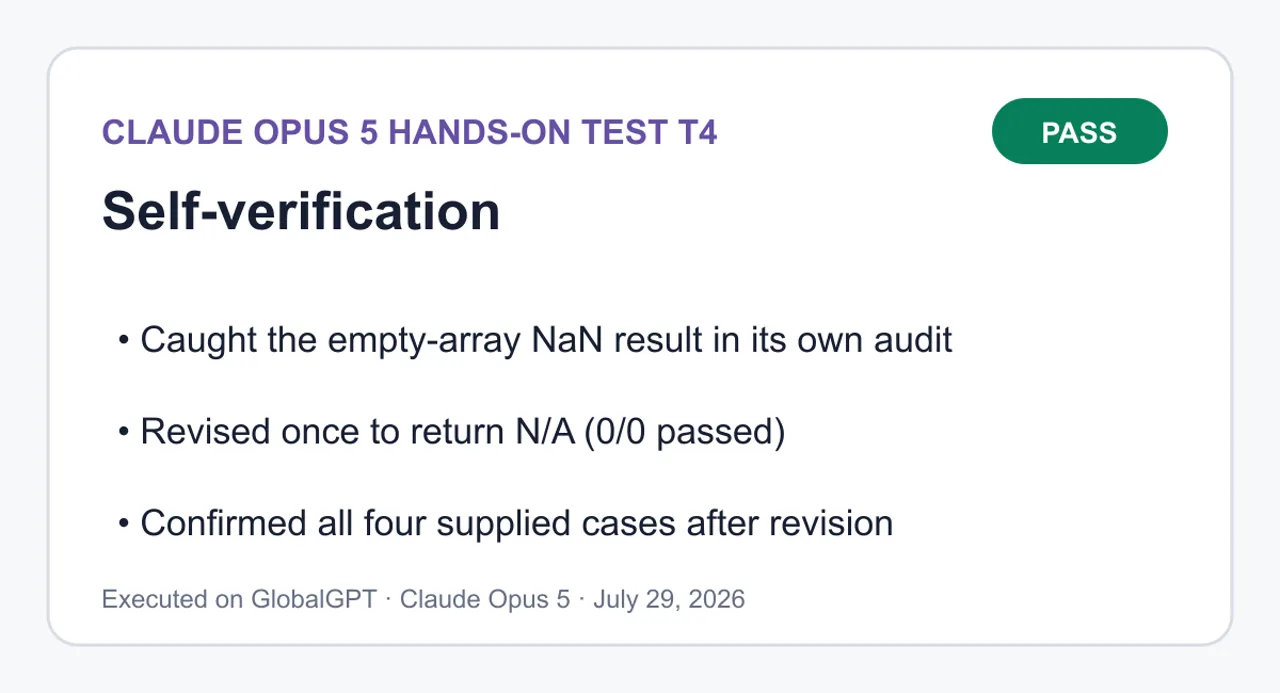
Pass — caught the empty-array NaN bug during its own audit, revised once, and confirmed all supplied cases.
Caught the empty-array NaN result in its own audit; Revised once to return N/A (0/0 passed); Confirmed all four supplied cases after revision.
View complete T4 prompt and answer
Complete prompt
Complete this numbered constraint task, then audit it and revise once only if needed.

Task constraints:
1. Write a plain JavaScript function named `summarizeChecks(checks)`; `checks` is an array of booleans.
2. For non-empty input, return exactly `<rate>% (<passed>/<total> passed)`, where `rate` has one decimal place and is the percentage of values that are `true`. Example: `[true, true, false, true]` returns `75.0% (3/4 passed)`.
3. Do not mutate the input.
4. Do not use `for`, `while`, `forEach`, `eval`, an external library, or a second function.
5. The function body may contain at most three statements. A declaration with an initializer counts as one statement.
6. Assign the function to `globalThis.summarizeChecks` after its declaration so an independent harness can call it.

Required response format:
- `FIRST ANSWER`: give the initial solution in one fenced `js` block before performing the audit.
- `AUDIT`: check the first answer against constraints 1–6 and this hidden edge case: empty input must return exactly `N/A (0/0 passed)`. State pass/fail for every item.
- If any audit item fails, revise once. Do not revise more than once.
- `FINAL ANSWER`: give the final solution in one fenced `js` block. Preserve all original constraints while satisfying the empty-input edge case.

Use these independent-check cases in the audit:
```text
[]                                      -> N/A (0/0 passed)
[true]                                  -> 100.0% (1/1 passed)
[false]                                 -> 0.0% (0/1 passed)
[true, true, false, true]               -> 75.0% (3/4 passed)
```
# Constraint Result 1 Plain function named summarizeChecks(checks) PASS — plain declaration, one parameter, no class or arrow wrapper. 2 Format <rate>% (<passed>/<total> passed), rate to one decimal PASS for non-empty input — toFixed(1) fixes the decimal place, and the literal spacing matches the spec exactly. 3 No input mutation PASS — .length and .filter both read only; filter returns a new array. 4 No for, while, forEach, eval, library, or second function PASS — .filter is the only iteration, Boolean is a built-in used as a predicate reference, not a function I defined. 5 At most three statements in the body PASS — exactly three: two initialized declarations plus the return. 6 Assigned to globalThis.summarizeChecks after declaration PASS — assignment follows the declaration at top level. Independent check cases: Input Expected Actual Result [] N/A (0/0 passed) NaN% (0/0 passed) FAIL [true] 100.0% (1/1 passed) 100.0% (1/1 passed) PASS [false] 0.0% (0/1 passed) 0.0% (0/1 passed) PASS [true, true, false, true] 75.0% (3/4 passed) 75.0% (3/4 passed) PASS One failure. On empty input passed / total is 0 / 0, which is NaN; NaN.toFixed(1) returns the string "NaN" rather than throwing, so the function silently emits NaN% (0/0 passed). Revising once. The fix stays inside the existing return as a conditional expression, so the statement count does not change. The % sign moves inside the non-empty branch, since the expected empty output is N/A (0/0 passed) with no percent sign.
Post-revision confirmation across all four cases: [] → N/A (0/0 passed), [true] → 100.0% (1/1 passed), [false] → 0.0% (0/1 passed), [true, true, false, true] → 75.0% (3/4 passed). Body remains three statements, input is still untouched, and no banned construct was introduced.
FIRST ANSWER
```js
function summarizeChecks(checks) {
  const total = checks.length;
  const passed = checks.filter(Boolean).length;
  return `${((passed / total) * 100).toFixed(1)}% (${passed}/${total} passed)`;
}

globalThis.summarizeChecks = summarizeChecks;
```
AUDIT
#
Constraint
Result
1
Plain function named summarizeChecks(checks)
PASS — plain declaration, one parameter, no class or arrow wrapper.
2
Format <rate>% (<passed>/<total> passed), rate to one decimal
PASS for non-empty input — toFixed(1) fixes the decimal place, and the literal spacing matches the spec exactly.
3
No input mutation
PASS — .length and .filter both read only; filter returns a new array.
4
No for, while, forEach, eval, library, or second function
PASS — .filter is the only iteration, Boolean is a built-in used as a predicate reference, not a function I defined.
5
At most three statements in the body
PASS — exactly three: two initialized declarations plus the return.
6
Assigned to globalThis.summarizeChecks after declaration
PASS — assignment follows the declaration at top level.
Independent check cases:
Input
Expected
Actual
Result
[]
N/A (0/0 passed)
NaN% (0/0 passed)
FAIL
[true]
100.0% (1/1 passed)
100.0% (1/1 passed)
PASS
[false]
0.0% (0/1 passed)
0.0% (0/1 passed)
PASS
[true, true, false, true]
75.0% (3/4 passed)
75.0% (3/4 passed)
PASS
One failure. On empty input passed / total is 0 / 0, which is NaN; NaN.toFixed(1) returns the string "NaN" rather than throwing, so the function silently emits NaN% (0/0 passed).
Revising once. The fix stays inside the existing return as a conditional expression, so the statement count does not change. The % sign moves inside the non-empty branch, since the expected empty output is N/A (0/0 passed) with no percent sign.
FINAL ANSWER
```js
function summarizeChecks(checks) {
  const total = checks.length;
  const passed = checks.filter(Boolean).length;
  return `${total === 0 ? 'N/A' : `${((passed / total) * 100).toFixed(1)}%`} (${passed}/${total} passed)`;
}

globalThis.summarizeChecks = summarizeChecks;
```
Post-revision confirmation across all four cases: [] → N/A (0/0 passed), [true] → 100.0% (1/1 passed), [false] → 0.0% (0/1 passed), [true, true, false, true] → 75.0% (3/4 passed). Body remains three statements, input is still untouched, and no banned construct was introduced.
Teams choosing across vendors should still test their own repository, tool stack, and review burden. The broader Claude vs ChatGPT for coding comparison helps frame those tradeoffs beyond this single result.
Claude Opus 5 vs Opus 4.8 vs Fable 5
The cleanest way to understand Opus 5 is as the new premium workhorse. Opus 4.8 is the predecessor; Fable 5 remains the frontier reference. Anthropic’s launch materials say Opus 5 keeps the same base cost as Opus 4.8 while approaching Fable 5 on selected evaluations at materially lower cost per task.
Model
Position
Cost/performance signal
Best fit
Claude Opus 5
Premium everyday model; successor to Opus 4.8
$5/$25 per input/output MTok; strong Anthropic-published cost-per-task results
Complex coding, automation, and enterprise work where reliability matters
Claude Opus 4.8
Previous Opus generation
Same base cost as Opus 5 according to Anthropic’s launch comparison
Existing pinned workflows that still need migration validation
Claude Fable 5
Frontier-intelligence tier
Peak reference point; Anthropic says Opus 5 comes close on CursorBench at half the cost per task
The hardest tasks when maximum capability matters more than economics
Choose Opus 5 over Opus 4.8 when you can regression-test the migration and want the newer model without raising the base API rate. Choose Fable 5 when your own evaluation shows that its extra capability changes the outcome enough to justify the premium. For a current family-level breakdown that also includes Sonnet 5, use the Claude Opus 5 vs Fable 5 vs Sonnet 5 comparison.
Developer and Industry Reactions
Social posts provide useful clues about early use, but they are not neutral benchmarks. Claude’s official account described Opus 5 as thoughtful and proactive, close to Fable 5’s frontier intelligence at half the price. That is Anthropic’s own launch positioning, not independent confirmation.
Claude announced Opus 5 on X as a thoughtful, proactive model positioned near Fable 5 intelligence at half the price.
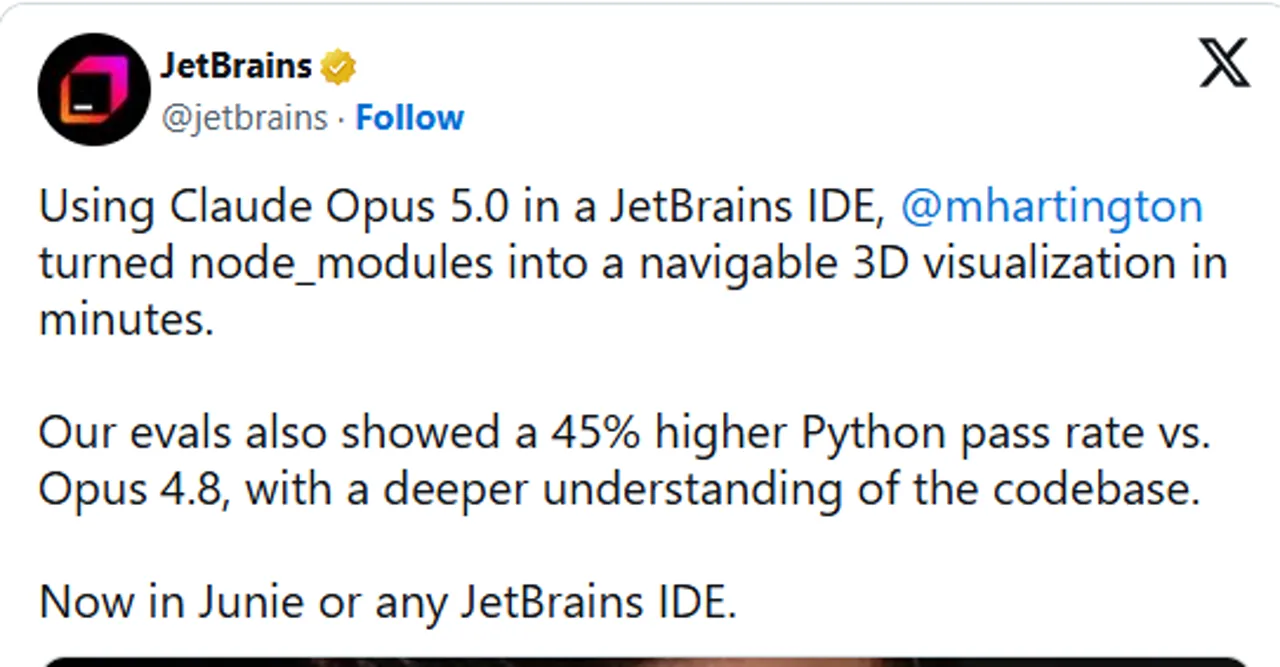
JetBrains reported that its own evaluations showed a 45% higher Python pass rate versus Opus 4.8, along with deeper codebase understanding. That is a concrete and relevant observation from a developer-tools company, but the result belongs to JetBrains’ evaluation and should not be generalized to every Python benchmark or repository.
JetBrains says its eval showed a 45% higher Python pass rate versus Opus 4.8 and deeper codebase understanding.
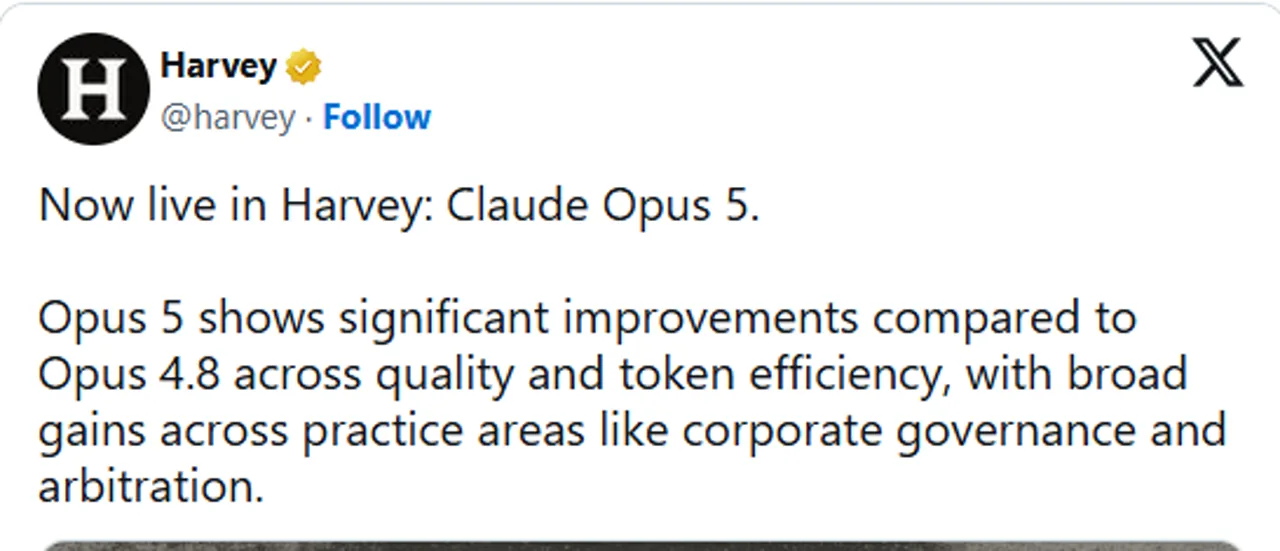
Harvey reported significant improvements over Opus 4.8 in quality and token efficiency across legal workflows including corporate governance and arbitration. This is meaningful for legal-technology buyers, but it remains Harvey’s assessment of its practice-area workflows rather than proof of universal legal accuracy.
Harvey reports Opus 5 improvements in legal-work quality and token efficiency, including corporate governance and arbitration.
Taken together, these posts suggest that early adopters are noticing gains in codebase comprehension and domain-specific knowledge work. The responsible next step is still a representative pilot with your own acceptance tests, token budget, and human review process.
Claude Opus 5 API: Model ID, Example and Migration Notes
The official Claude API model ID and alias are both claude-opus-5. The following is a minimal Anthropic API request example. It demonstrates the official Messages endpoint only; it does not describe or promise GlobalGPT’s backend implementation.
curl https://api.anthropic.com/v1/messages \
  --header "x-api-key: $ANTHROPIC_API_KEY" \
  --header "anthropic-version: 2023-06-01" \
  --header "content-type: application/json" \
  --data '{
    "model": "claude-opus-5",
    "max_tokens": 1024,
    "messages": [
      {
        "role": "user",
        "content": "Find the root cause, propose the smallest patch, and give a verification command."
      }
    ]
  }'
Migration checklist
Change the model value to claude-opus-5, then rerun your own regression and safety evaluations.
Budget against $5 input and $25 output per MTok; monitor output-heavy agent loops and tool retries.
Do not carry over the legacy thinking.type: "enabled" configuration. Anthropic’s thinking guide says thinking is already on for Opus 5 and documents adaptive settings.
Treat 128K as the synchronous Messages API maximum output. The separate Message Batches beta can support up to 300K with Anthropic’s documented beta header.
Check provider-specific model names and access. Anthropic documents anthropic.claude-opus-5 for Amazon Bedrock and claude-opus-5 for Google Cloud.
For developers who want a command-line workflow alongside Claude Code, the practical setup guide is how to use GlobalGPT CLI in Claude Code. Keep that workflow separate from the official Anthropic API example above so credentials, billing, and provider behavior remain clear.
Is Claude Opus 5 Worth It?
Yes—when failure is expensive and the workload is genuinely difficult. Opus 5 makes the most sense when better diagnosis, tool use, or long-context judgment can save engineering or analyst time. The combination of a 1M-token context window, a 128K synchronous output ceiling, and encouraging cost-per-task claims gives it a credible premium-workhorse position.
Who should use Claude Opus 5?
Engineering teams running coding agents against large repositories.
Operations teams automating multi-step business tasks with measurable acceptance criteria.
Legal, finance, or research teams that can pair the model with domain review and live sources.
Developers who can control cost with caching, batching, routing, and regression tests.
Who should choose something else?
High-volume applications dominated by simple extraction, classification, or short-form rewriting.
Latency-sensitive products where a moderate model is too slow.
Teams without evaluation sets, cost monitoring, or a human-review plan for important outputs.
Buyers who only need occasional general chat and will not use the extra context or agent capability.
Coding buyers should also compare current options before standardizing a team workflow; the best AI models for coding in 2026 puts capability and price in a broader context.
Final verdict: Claude Opus 5 is worth testing for hard coding, automation, and knowledge-work tasks where a better result can offset premium token costs. Its official specifications are strong, Anthropic’s benchmark story is unusually cost-aware, and our verified debugging result was precise and disciplined. Buy it for difficult work with measurable outcomes—not because every task needs an Opus-class model.
Claude Opus 5 FAQ
How much does Claude Opus 5 cost?
The official Claude API base price is $5 per million input tokens and $25 per million output tokens. Consumer Claude plans are separate: Pro is $20 monthly or $17 per month when billed annually, while Max starts at $100 per month.
How can I access Claude Opus 5?
Anthropic says Opus 5 is the default model on Claude Max and the strongest model on Claude Pro. Developers can use the Claude API, while supported cloud routes include Amazon Bedrock and Google Cloud with provider-specific access requirements.
What is the Claude Opus 5 API model ID?
The official Claude API model ID and alias are both claude-opus-5. Use that exact value in the model field for Anthropic Messages API requests, then rerun your own regression and safety evaluations before production migration.
What are the Claude Opus 5 context and output limits?
Claude Opus 5 has a 1-million-token context window and a maximum output of 128,000 tokens in the synchronous Messages API. Anthropic separately documents up to 300,000 output tokens for Message Batches with a beta header.
Are Claude Opus 5 benchmark results independently verified?
The benchmark figures cited here were published by Anthropic, not independently reproduced for this review. They show Anthropic’s tested performance-and-cost position, but buyers should validate quality, latency, tool use, and total cost on their own workloads.
Is Claude Opus 5 better than Opus 4.8 or Fable 5?
Opus 5 is the newer successor to Opus 4.8 at the same base cost, making it the natural migration candidate after regression testing. Fable 5 remains the frontier reference; choose it only when your evaluation shows that its extra capability justifies the higher cost.
Is Claude Opus 5 available on GlobalGPT?
Yes. GlobalGPT has a dedicated Claude Opus 5 page. Availability can still depend on account status and platform conditions, so confirm access before a time-sensitive workflow and keep platform access separate from official Anthropic API billing.
Who should pay for Claude Opus 5?
Opus 5 is best for teams running difficult coding, automation, or long-context knowledge-work tasks where a better answer can save meaningful human time. Simpler, high-volume, or latency-sensitive work usually belongs on a cheaper and faster model.
Pay less with Kimi K3.1 Pro? See verified API prices, cache costs, setup code, context limits, and compact K3 comparisons before choosing your next model.