
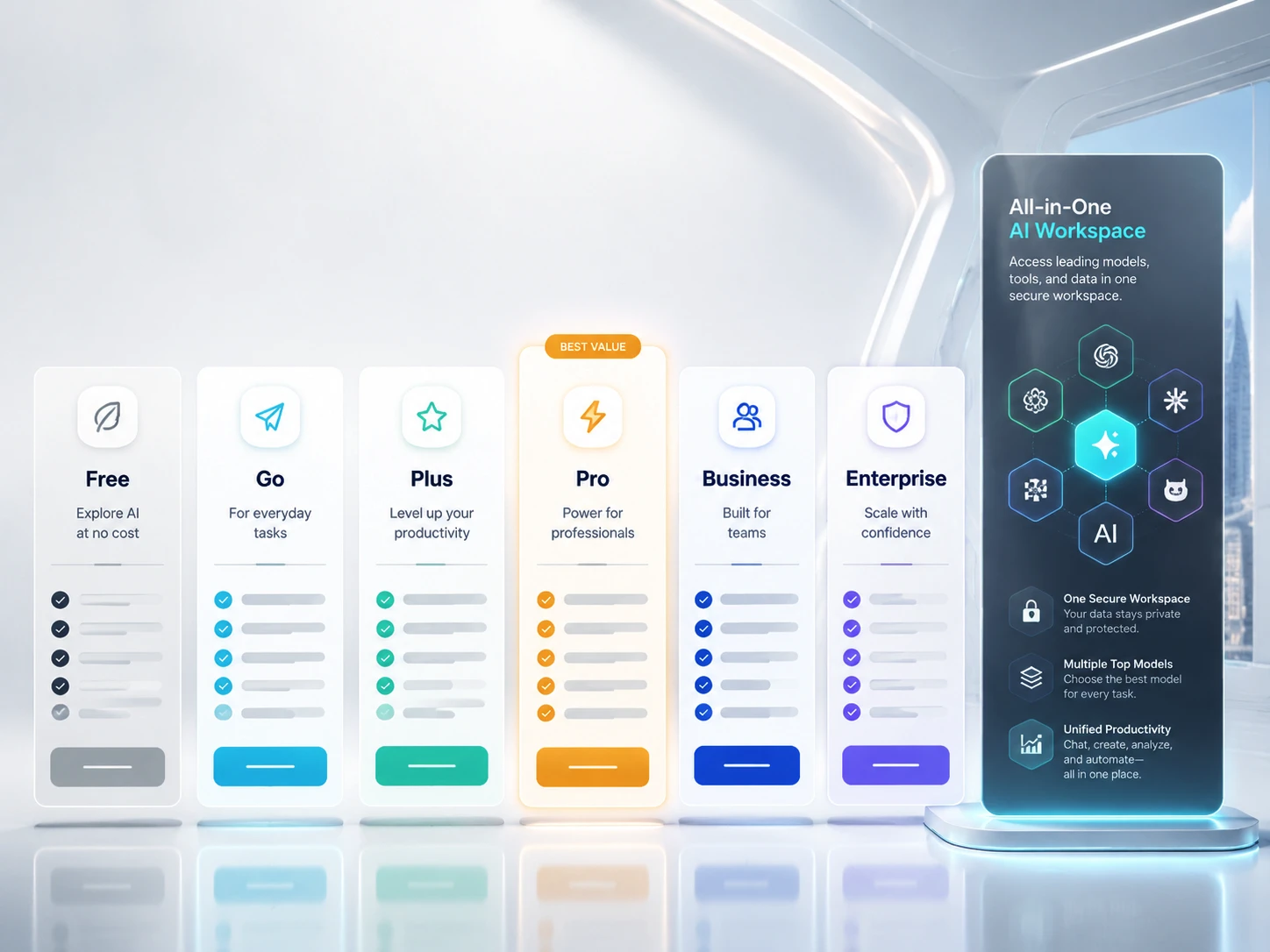
ChatGPT subscription plans at a glance
- Free — $0: start with occasional questions and basic tasks.
- Go — $8/month: more everyday chat, uploads, and image creation than Free.
- Plus — $20/month: daily research, advanced tools, and broader Codex access.
- Pro — $100, $200, or $500/month: higher usage tiers for sustained work.
- Business — $20/user/month billed annually, or $25 monthly: team workspace and administration, with at least two users.
- Enterprise — custom pricing: organization-wide security, governance, and billing.
These are USD reference prices before applicable taxes. Your country and billing route can change the checkout total. See the official pricing and usage guidance.
Estimate your workload and choose a starting plan, or compare the monthly prices below.
ChatGPT Plans Comparison
Here is the practical plan comparison before the detailed breakdown. Prices and currency can vary by country, billing route, and account type, so check the pricing page from your own account before purchasing.
| Plan | USD price | Best for | Main benefits | Watch out for |
|---|---|---|---|---|
| Free | $0 | Occasional questions | Limited chat, files, images, research, and eligible Codex access | Usage caps can interrupt longer tasks |
| Go | $8/month | Budget everyday use | More messages, uploads, image creation, and memory than Free | Advanced-work access differs from higher tiers |
| Plus | $20/month | Daily work and coding | Advanced reasoning, research, agent features, Projects, Tasks, Custom GPTs, and Codex | Included usage remains capped |
| Pro | $100 / $200 / $500 per month | Sustained research and coding | Higher usage tiers; eligible Astra Ultrafast on Pro $500 | Individual plan; compare tier-specific benefits |
| Business | $20/user/month annually; $25 monthly | Managed team workspaces | ChatGPT and Codex, billing, admin, SSO, MFA, and business data controls | At least two users; annual commitment for annual price |
| Enterprise | Custom pricing | Organization-wide governance | Advanced security, access controls, residency, retention, and custom terms | Sales discussion required |
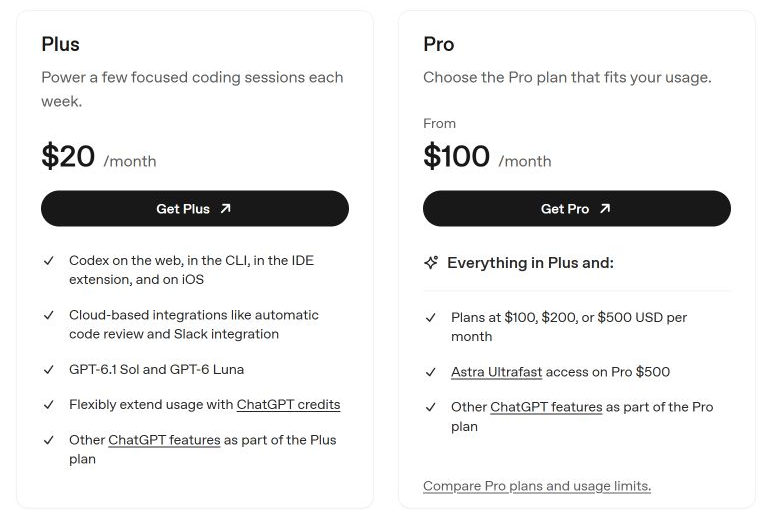
OpenAI’s plan and Codex pricing documentation explains these USD reference prices. Taxes, currencies, and checkout prices can vary by country and billing route.
IN THIS GUIDE
If you are choosing a ChatGPT subscription in 2026, the hard part is no longer just “free or paid.” The plans now differ by model access, usage allowance, context length, image creation, deep research, Codex access, team controls, and whether the account is meant for one person or an organization.
The simple answer is this: use Free for occasional questions, Go for low-cost longer chats where available, Plus for daily productivity, Pro for heavy research and coding, Business for team workspaces, and Enterprise for company-wide governance. The best plan depends less on the logo on the checkout page and more on the specific ceiling you hit first: messages, reasoning, files, Codex, privacy, or admin control.
ChatGPT Free
ChatGPT Free is the $0 entry plan. It includes limited chat, uploads, image creation, and research tools; each feature can have its own allowance.
- Chat messages: The allowance depends on the Chat model and feature you use. Check the in-app limit notice for the applicable allowance and reset time; a single daily count would not describe every tool.
- Work/Codex access: GPT-6 Luna at Standard speed in the desktop app, subject to rollout. The official Work/Codex table does not publish a Free message-count estimate.
- Model restrictions: Free is excluded from the GPT-6.1 Sol launch rollout. Plus message estimates do not apply to Free.
- When you reach a limit: Follow the reset time shown for the affected feature or compare a paid plan. Opening another conversation is not a new subscription allowance.
See OpenAI’s Work and Codex usage limits for the scope of these estimates.
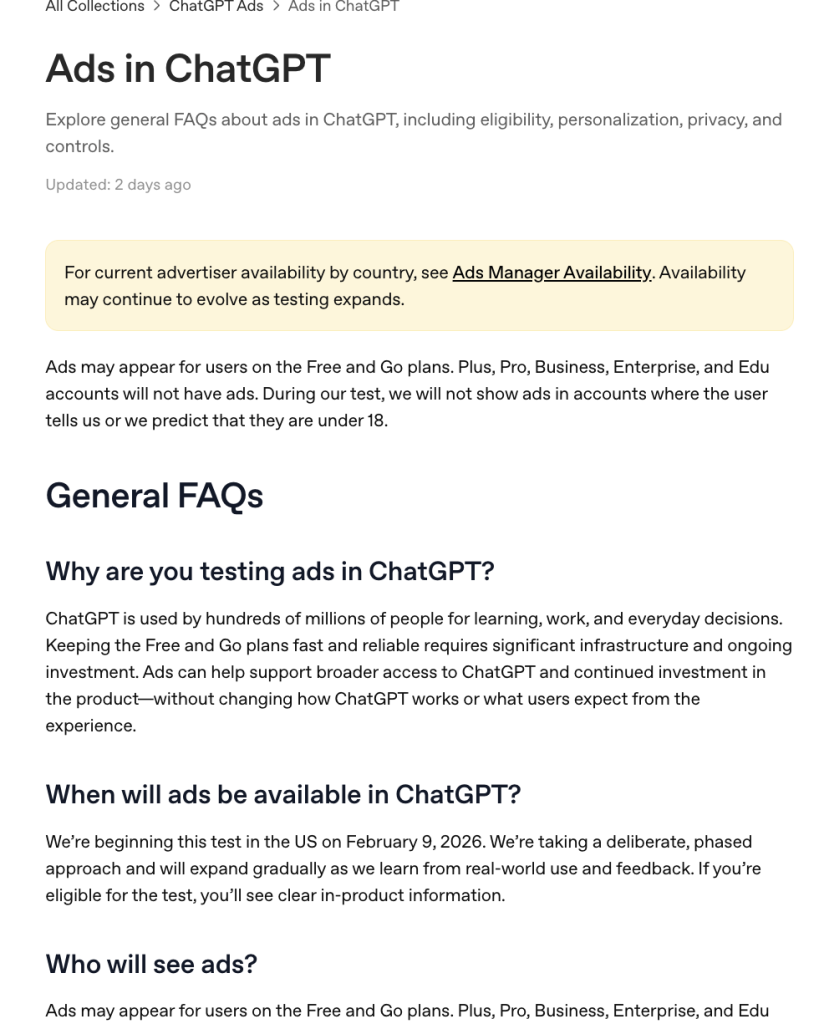
The tradeoff is simple: Free is useful until you run into limits. If ChatGPT is part of your daily work, study, writing, research, or coding, Free will usually feel narrow. OpenAI also says ads may appear for users on Free and Go plans during its ad testing, while Plus, Pro, Business, Enterprise, and Edu accounts will not have ads.
ChatGPT Go
ChatGPT Go costs $8/month and expands everyday chat, uploads, image creation, and memory compared with Free. It is a lower-cost step up for everyday use.
- Chat messages: Use the limit notice for the model selected in Chat. More access than Free does not mean one fixed message allowance across chat, images, files, and research.
- Work/Codex access: GPT-6 Luna at Standard speed in the desktop app, subject to rollout. The official Work/Codex table does not list a Go message-count estimate.
- Model restrictions: Go is excluded from the GPT-6.1 Sol launch rollout; its $8 price does not unlock the paid Work/Codex model lineup.
- When you reach a limit: Check the reset time for that feature. Evaluate Plus if the limitation is advanced model or workflow access rather than occasional chat volume.
See OpenAI’s Work and Codex usage limits for the scope of these estimates.
The important limit is advanced-work access. Go can be a good fit for students, casual writers, and everyday users who mainly want smoother chat access. For sustained research, complex reasoning, or broader Codex workflows, compare Plus before purchasing. If you are deciding between Go and other low-cost options, the separate ChatGPT Go review is a useful next read.
ChatGPT Plus
ChatGPT Plus costs $20/month and includes advanced research and agent features, Projects, Tasks, Custom GPTs, and broader Codex access. Its usage allowance is still limited.
- Chat messages: Ordinary Chat uses its own model and feature limits. The Work/Codex numbers below are not ordinary Chat message caps.
- GPT-6.1 Sol in Work/Codex: An estimated 15–160 local messages per five-hour period. This is a workload-dependent range, not a guaranteed allowance.
- GPT-6 Luna in Work/Codex: An estimated 350–3,000 local messages per five-hour period. Smaller models can stretch the same subscription further.
- Reset and shared usage: Work and Codex share usage. Local messages and cloud chats use the same allowance, and weekly limits may also apply; check the usage dashboard for reset times.
- When you reach a limit: Wait for the allowance to reset or purchase eligible extra credits. API-key usage is billed separately.
See OpenAI’s Work and Codex usage limits for the scope of these estimates.
Plus is the plan to choose if your work includes writing, planning, studying, data cleanup, brainstorming, light coding, or recurring research tasks. The weak point is that it is still a capped personal plan. If your day includes long coding sessions, repeated file analysis, or heavy research loops, Plus can feel strong but not unlimited. If you are hoping a yearly option will lower the monthly cost, check the separate ChatGPT Plus annual plan discount breakdown before you wait for a yearly deal.
When does context matter?
Context describes how much material a model can work with at once. It is different from message allowance and saved memory. For short emails and everyday questions, context is rarely the first reason to upgrade. For long documents, extended conversations, or larger code projects, compare the specific model and feature you will use.
ChatGPT Pro
ChatGPT Pro is available at $100, $200, or $500/month. It offers higher usage tiers than Plus; Pro $500 includes eligible Ultrafast access.
- Chat messages: Do not apply Codex allowances to ordinary Chat. Model-specific Chat limits and any fair-use conditions still need to be checked separately.
- Work/Codex five-hour limit: OpenAI currently states that Pro plans have no five-hour limit. That does not promise unlimited total usage.
- Other usage limits: Use your account dashboard for current allowance and reset times. Task size, model, reasoning, and tool use affect consumption; a fixed number of messages cannot be inferred from the monthly price.
- Faster modes: Fast mode uses included allowance at 2.5× Standard speed usage; GPT-6.1 Sol Ultrafast uses it at 8×. These are consumption multipliers, not guaranteed speed gains.
- When you reach a limit: Eligible Pro users can purchase additional credits. Compare actual consumption before moving to a higher tier.
See OpenAI’s Work and Codex usage limits for the scope of these estimates.
The Pro decision should be based on usage pressure, not status. If you only want better answers from time to time, Plus is usually enough. If ChatGPT is part of your professional research, coding, analysis, or client work all day, Pro can make sense. The monthly premium over Plus is $80, $180, or $480, depending on the Pro tier. If you are comparing the cheapest paid tier with Pro, the ChatGPT Go vs Pro breakdown is a more direct comparison.
ChatGPT Business and Enterprise
Business costs $20 per user per month with annual billing, or $25 with monthly billing, for at least two users. Two seats cost $480 per year on annual billing, versus $50 per month on monthly billing, before any applicable taxes.
- Standard Business: the same published five-hour local-message estimates as Plus: 15–160 for GPT-6.1 Sol and 350–3,000 for GPT-6 Luna. Weekly limits may also apply.
- Enterprise/Edu with flexible pricing: no fixed Work/Codex rate limits; usage scales with credits.
- Enterprise/Edu without flexible pricing: the same per-seat usage limits as Plus for most features.
- Additional usage: eligible flexible-pricing workspaces can purchase more workspace credits; administrators manage workspace access and spending.
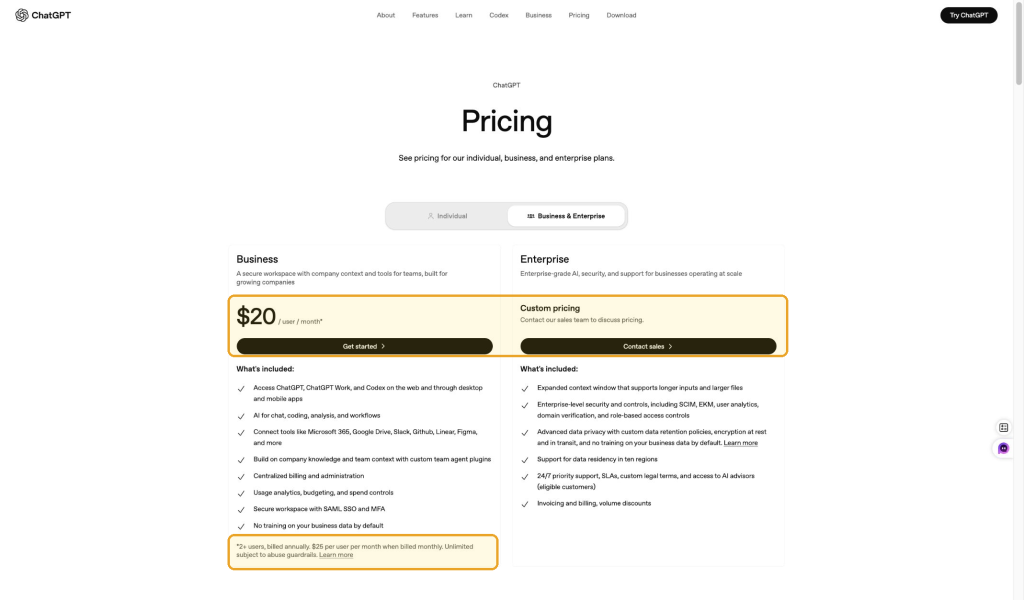
Business and Enterprise are not just “stronger Plus.” They are for organizations. Business is built for teams that need a secure shared workspace, company context, connectors, centralized billing, user management, SAML SSO and MFA, usage analytics, budgeting, spend controls, and business data not used for training by default.
Enterprise extends that with larger-scale governance: expanded context, enterprise security controls, SCIM, EKM, user analytics, domain verification, role-based access controls, data residency support, custom retention policies, encryption, priority support, SLAs, custom legal terms, volume discounts, and invoicing.
If you are choosing for a company, the better comparison is not Plus vs Pro. It is ChatGPT Plus vs Business, because the deciding factors are workspace control, data handling, billing, security, and administration.
Codex Pricing and Limits
You do not need a separate Codex subscription when you use the access included in your eligible ChatGPT plan. Included access has limits, while API-key usage follows a separate billing system.
GPT-6.1 SOL · WORK & CODEX
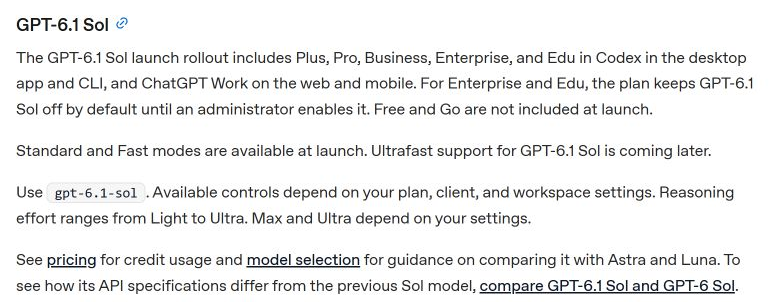
GPT-6.1 Sol is rolling out to Plus, Pro, Business, Enterprise, and Edu in supported Work and Codex clients.
Free and Go are not included in its launch rollout. GPT-6.1 Sol is available in Work and Codex, not ordinary Chat. Workspace administrators may need to enable it.
Which Plans Include Codex?
| Plan | Monthly fee | Codex access |
|---|---|---|
| Free / Go | $0 / $8 | GPT-6 Luna at Standard speed in the desktop app, subject to rollout |
| Plus | $20 | Broader workflows and paid-plan models, including the GPT-6.1 Sol rollout |
| Pro | $100 / $200 / $500 | Higher usage tiers; Astra Ultrafast on eligible Pro $500 accounts |
| Business | $20/user annually; $25 monthly | Team access, workspace controls, and centralized billing |
| Enterprise / Edu | Custom | Organization-managed access and billing |
OpenAI’s GPT-6.1 Sol availability guidance separates plan eligibility from client rollout and administrator settings.
The published five-hour estimates also apply to Standard Business. Pro currently has no five-hour limit. Enterprise/Edu flexible pricing scales with credits rather than a fixed rate limit. These statements describe Work/Codex usage, not ordinary Chat message quotas.
How Much Codex Usage Does Plus Include?
Codex usage is not a fixed number of completed projects. A small script change can use much less allowance than a long debugging session across many files.
For Plus, OpenAI estimates 15–160 local GPT-6.1 Sol messages per five-hour period. That is an estimate, not a guaranteed message count. Model choice, task complexity, context, reasoning, tools, and caching affect consumption. Cloud tasks can consume more allowance, and weekly limits may also apply.
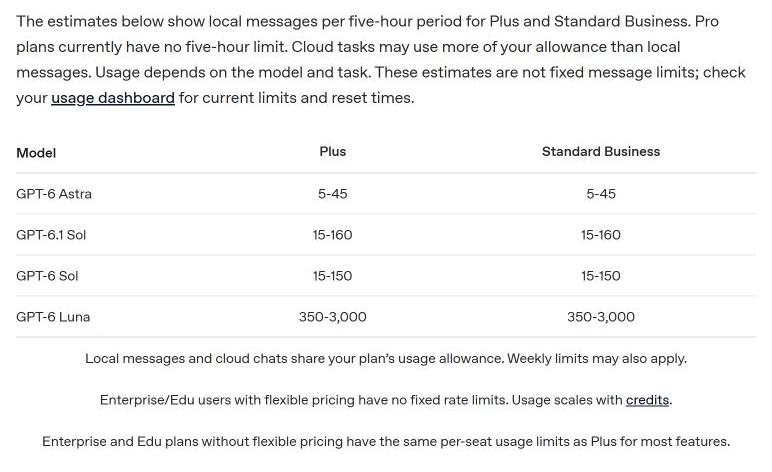
Local messages and cloud tasks share the plan’s allowance. ChatGPT Work and Codex also share usage. Check your account’s usage dashboard for remaining allowance and reset times.
Extra Credits Versus API Billing
1 · Subscription
Use the allowance included in your eligible ChatGPT plan.
2 · Extra credits
Plus and Pro users can purchase credits after reaching included limits.
3 · API key
Supported API-key workflows use separate API billing.
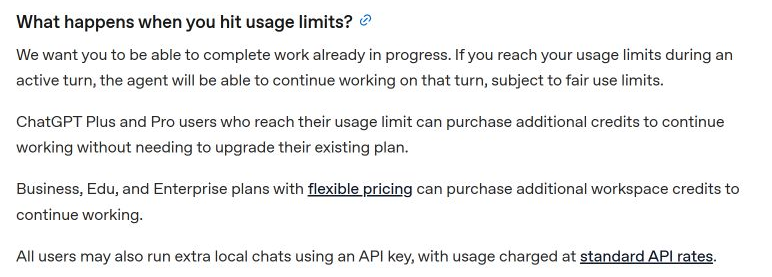
A ChatGPT subscription does not include API credits, and purchased ChatGPT credits are not an API balance. Do not use API token prices to calculate how many coding tasks your subscription includes.
For occasional overflow, compare extra-credit spending with upgrading. Plus costs $20 and Pro starts at $100—a difference of $80/month. If extra-credit spending is consistently below $80, Plus plus credits may cost less. If interruptions are frequent, compare Pro’s allowance and capabilities as well as its price.
Monthly subscription cost comparison
Plus
$20
per month
Pro
$100
per month
Pro
$200
per month
Pro
$500
per month
Subscription fees, not estimates of completed tasks or included token budgets.
YOUR WORKLOAD · YOUR PLAN
Which ChatGPT Plan Should You Choose?
Describe a typical working day. Estimate your token workload, then get a practical starting plan.
Not sure about input tokens? Paste a sample
Approximate tokens: 0
Add file contents and accumulated conversation separately if this sample does not include them.
Monthly input: 792,000 · Monthly visible output: 264,000
Start with Plus and check your actual account usage.
Within the lower end of the official estimatePlus reference: estimated 15–160 local GPT-6.1 Sol messages per five hours. This is a range, not a fixed cap.
How the estimate works
Monthly tokens = tasks per day × interactions per task × average input and response tokens × working days. Busiest-window interactions = daily interactions × the selected percentage, rounded up.
Input should include the context sent on each interaction. Hidden reasoning, additional agent turns, retries, caching discounts, and other shared Work usage are not modeled. Presets are illustrative workloads, not measured benchmarks.
ChatGPT subscriptions do not provide one universal monthly token budget. Token totals are workload estimates, not included allowance or a billing forecast. The Codex recommendation uses the official local-message estimate; ordinary Chat and research recommendations use feature needs. See OpenAI pricing and usage guidance.
Does ChatGPT Still Include Sora?
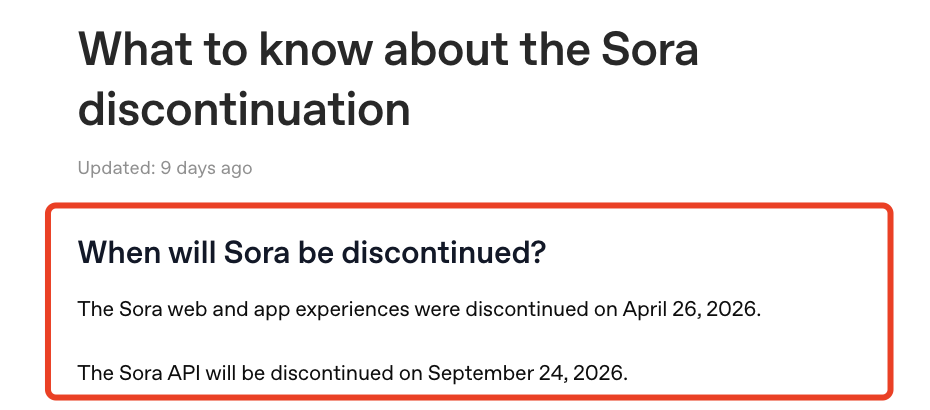
Do not choose a ChatGPT subscription in 2026 because you expect Sora web or app access. OpenAI’s published notice gave April 26, 2026 for web and app discontinuation and September 24, 2026 for the API. That makes Sora a separate availability question, not a clean Plus-vs-Pro selling point.
If your goal is AI video, check the available video tools in the product you plan to use at purchase time. GlobalGPT, for example, lists several video and image tools in its workspace, but model lineups and access rules can change. For background on the shift, see this explanation of why Sora disappeared from ChatGPT.
The Subscription Fatigue Problem
A growing problem in 2026 is subscription stacking. A serious user may pay for ChatGPT, Claude, Gemini, Perplexity, an image generator, and a video generator just to cover writing, coding, search, research, design, and creative work. The monthly cost adds up, and the workflow becomes scattered across tabs, logins, billing pages, and usage systems. If Claude is part of your stack, the separate Claude AI pricing guide helps you judge whether another standalone plan is worth adding.
That is why multi-model platforms are becoming more attractive. If you are comparing ChatGPT with other tools, a broader list of ChatGPT alternatives can help you decide whether you need one official subscription or a broader workspace.
GlobalGPT Alternative
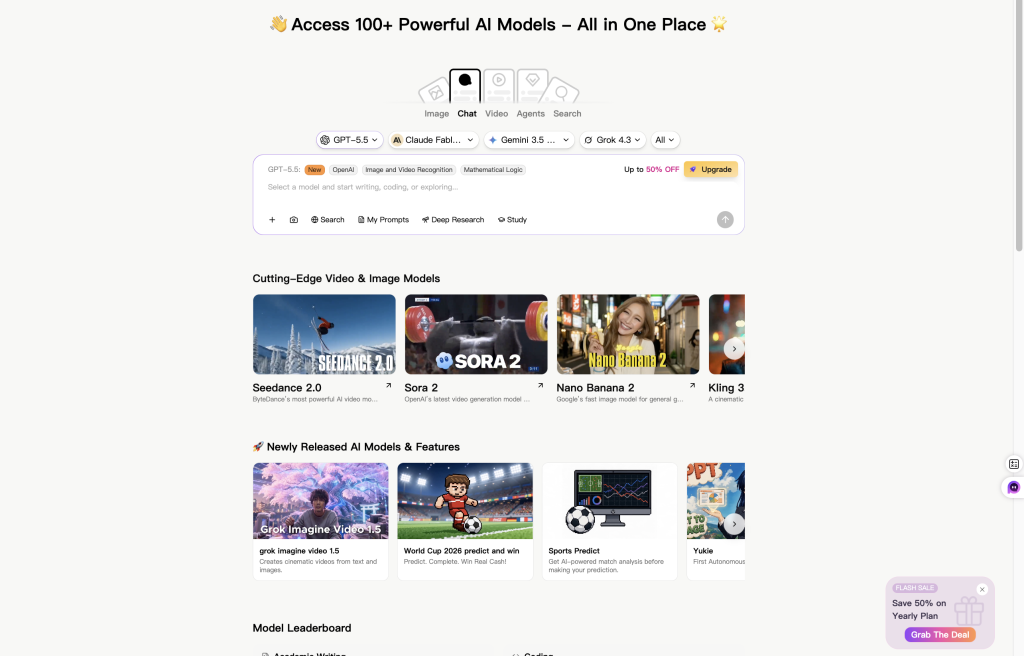
If your real workflow is broader than ChatGPT alone, a multi-model workspace can also make sense. GlobalGPT gives users one account for GPT-6.1 Sol, Claude, Gemini, Perplexity, image tools, and video tools, with plans starting from $5.8/month. That does not make it a replacement for OpenAI’s official Business or Enterprise controls, but it can be a practical alternative for users who are tired of paying for several separate AI subscriptions.
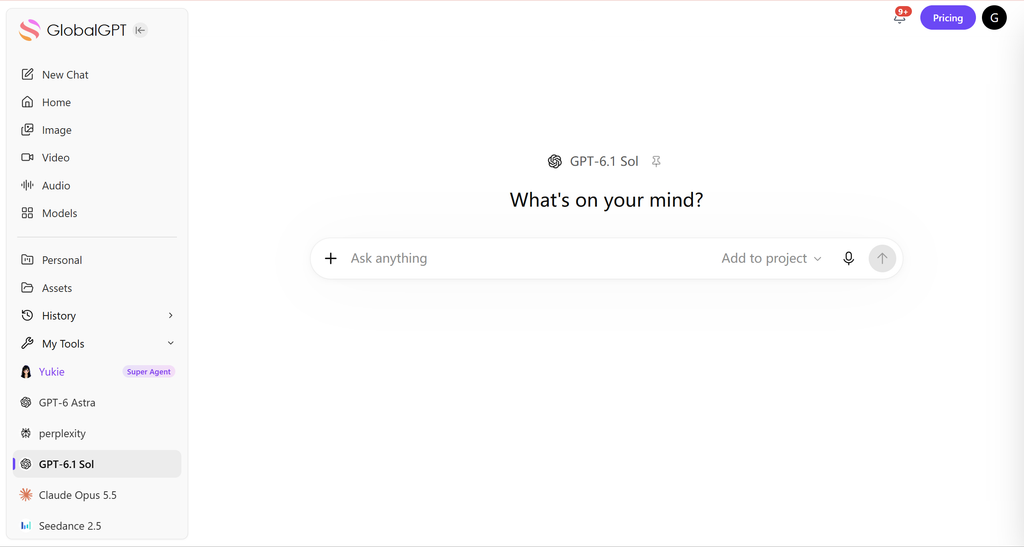
GlobalGPT is useful when your work is not limited to ChatGPT. It gives users one workspace for GPT-6.1 Sol, Claude, Gemini, Perplexity-style search, image tools, video tools, and other AI models. In practical terms, that means you can switch between models for writing, research, coding, summarizing, image generation, and video workflows without buying every official subscription separately.
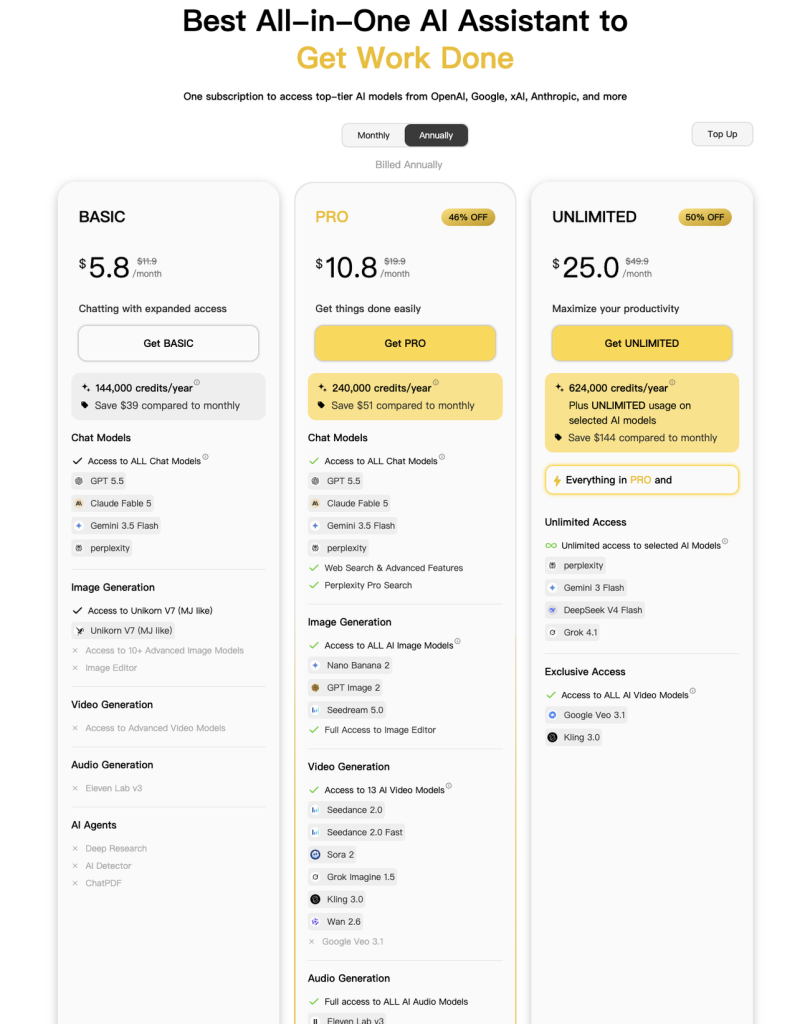
The pricing difference is the obvious hook. GlobalGPT lists a Basic plan from $5.8/month, a Pro plan at $10.8/month, and an Unlimited plan at $25/month on the captured pricing page. That can be more appealing than paying separately for ChatGPT, Claude, Perplexity, image tools, and video tools. If ChatGPT Go is your budget reference point, this list of cheaper ChatGPT Go alternatives gives more low-cost context
The boundary matters. GlobalGPT is not OpenAI, and it does not replace ChatGPT Business, Enterprise governance, official OpenAI API billing, or account-specific admin controls. Access to a model for coding assistance does not mean access to the official Codex repository, IDE, CLI, and cloud workflows. It is better framed as a practical everyday workspace for people who want access to multiple leading models and creative tools from one subscription.
Frequently asked questions
How much does a ChatGPT subscription cost per month?
The USD reference prices are $8/month for Go, $20/month for Plus, and $100, $200, or $500/month for Pro. Free costs $0. Business is $20 per user per month with annual billing or $25 with monthly billing, for at least two users. Enterprise pricing is custom; taxes and regional checkout prices can vary.
Which ChatGPT subscription should I choose?
Use Free for occasional tasks, Go for more everyday chat at a lower monthly cost, and Plus for daily research or coding. Compare Pro after you know which Plus limits interrupt your work. For a team, choose based on workspace administration, billing, and data controls as well as individual usage.
Does ChatGPT Plus Include Codex?
Yes. Plus includes Codex access within its usage allowance. You do not need a second subscription to use that included access, but purchased credits or API-key usage can create separate charges.
Can I Use GPT-6.1 Sol on Free or Go?
Free and Go are not included in the GPT-6.1 Sol launch rollout. Eligible users can access GPT-6 Luna at Standard speed in the desktop app, subject to rollout.
What Happens When I Reach My Codex Limit?
Plus and Pro users can purchase additional credits or wait for the relevant allowance to reset. Supported local API-key workflows use separate API billing.
Is ChatGPT Plus worth it in 2026?
Plus is usually worth considering when ChatGPT is used most days and Free limits interrupt real tasks. It is less compelling for occasional questions or for users who mainly need team administration rather than individual capability.
Is ChatGPT Pro unlimited?
Do not interpret a high-tier subscription as unrestricted use. Plans can still have fair-use, safety, abuse-prevention, feature-specific, and temporary capacity limits. Check the current official terms and plan card.
Does ChatGPT Plus include API credits?
No. ChatGPT subscriptions and API billing are separate. API usage is charged under the API account and pricing structure.
Can I get an annual ChatGPT Plus discount?
Check the checkout page shown to your account. Do not assume an annual option or discount exists because a third-party article mentions one; billing options can differ by plan, account, and region.
Which plan is best for a small team?
Business is the logical tier to evaluate when the need includes shared workspace, centralized billing, user administration, or business data controls. A set of personal Plus or Pro accounts does not provide the same management layer.





