

If you want the exact ChatGPT Plus price in Germany, use the amount shown in your own ChatGPT checkout—not an old article that converts a US dollar price. OpenAI supports euro billing for web subscriptions in the European Economic Area, but the amount on the final purchase screen is still the number that controls your charge.
Three details can change what you see: whether VAT is already included, whether you subscribe on the web or through an app store, and which paid plans are offered to your account. Check all three before confirming the purchase.
If your real goal is access to several AI model families rather than every native ChatGPT account feature, GlobalGPT gives you a connected multi-model workspace for research, writing, reasoning, coding help, images, video, and audio. That can be a more practical subscription path than paying for several standalone AI tools.
Quick answer
German users should be billed in EUR on supported web checkouts, and Germany’s standard VAT rate is 19%. The exact VAT-inclusive ChatGPT Plus total must be read from the checkout screen for your account. If the screen labels the displayed amount as tax-inclusive, do not add another 19%. Web, Apple, and Google billing can show different totals or manage the subscription differently.
How much is ChatGPT Plus in Germany?
The reliable answer is the monthly EUR total displayed on the German checkout screen. OpenAI’s multi-currency billing guidance lists EUR for the EEA. That makes the older “OpenAI charges everyone in USD and your bank converts it” explanation unsuitable for a current Germany price page.
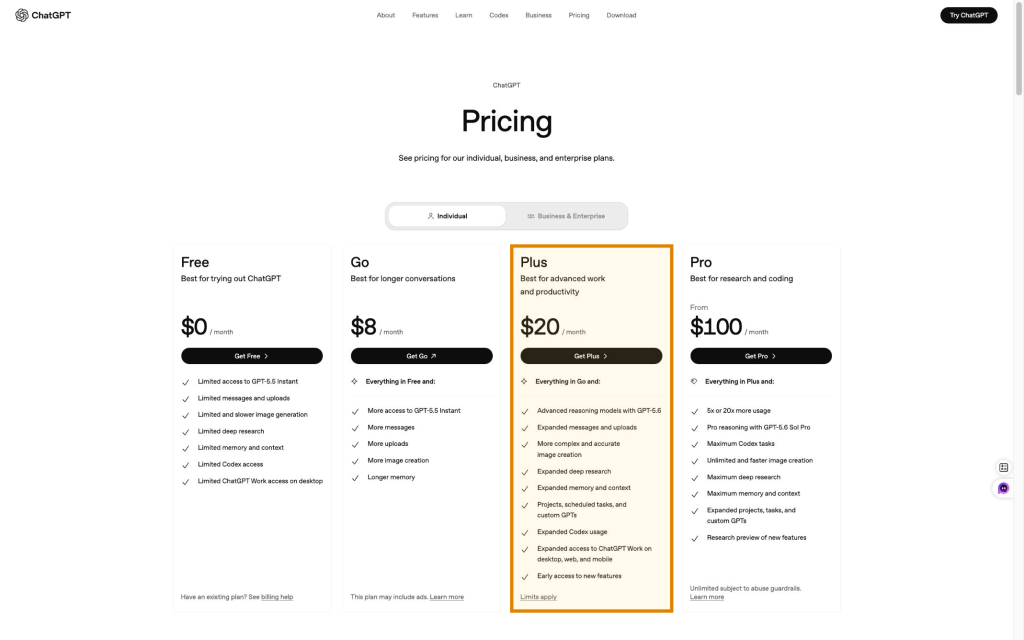
OpenAI’s public ChatGPT pricing page, checked 5 August 2026, lists Free at $0/month, Go at $8/month, Plus at $20/month, and Pro from $100/month. These are the public comparison-card amounts—not a verified German EUR checkout total. Regional billing, taxes, and the payment channel can affect the amount and receipt.
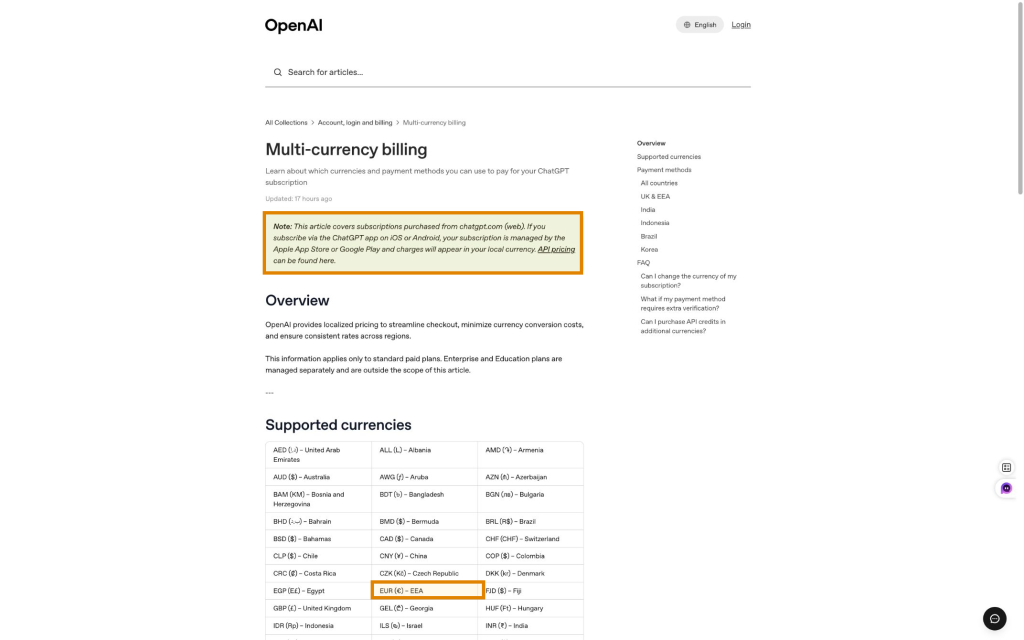
- Use the checkout currency: a Germany-based web checkout should show the amount in EUR when localized billing applies.
- Read the tax line: confirm whether VAT is included in the displayed total or itemized separately.
- Check the renewal wording: Plus is normally presented as a recurring subscription, so note the next billing date before paying.
- Keep the receipt: the invoice or app-store receipt is the record to use for reimbursement and bookkeeping.
Do not rely on euro figures from older conversion-based posts. They omit the current localized-billing context and may also mishandle VAT.
How VAT changes the German total
Germany’s standard VAT rate is 19%. Section 12 of the German VAT Act states that the standard tax is 19% of the taxable amount. For a consumer subscription, the checkout should make clear whether the displayed total already includes that tax.
German VAT calculation
Example: €20.00 net becomes €23.80 gross. This demonstrates the 19% calculation; it is not a claim that €20.00 is OpenAI’s current German net price.
Source: German VAT Act (UStG), §12. Checked 5 August 2026.
The practical rule is simple:
- If checkout says the EUR price includes tax, that displayed total is what you should budget.
- If checkout separately shows a net subtotal and 19% VAT, add the two lines once.
- If you buy for a business, enter the correct legal name, address, and VAT or tax details before the invoice is issued. Do not assume a VAT ID automatically makes every purchase tax-free.
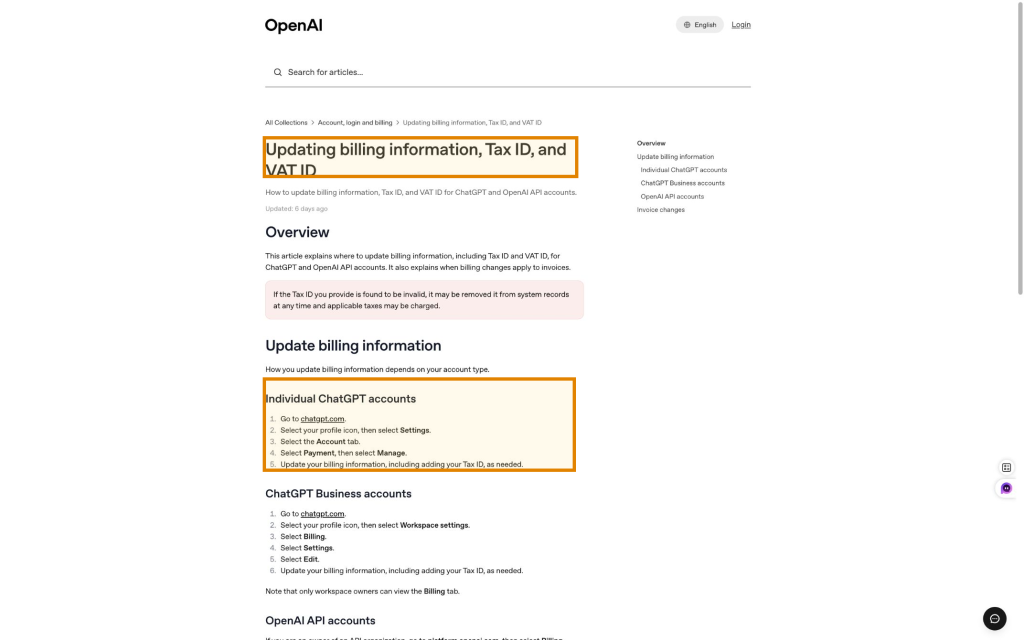
OpenAI’s billing information and VAT ID guide says an individual ChatGPT user can go to Settings → Account → Payment → Manage to update billing information and a Tax ID. Changes apply to future invoices; older invoices are not automatically revised.
Web vs iPhone vs Android billing
The product may be the same Plus subscription, but the billing owner changes. A web purchase is managed through ChatGPT; an iPhone purchase is managed by Apple; an Android purchase is managed by Google Play. Compare the final total on each route before subscribing rather than assuming the app price must match the web price.
| Route | Billing owner | Where to check price | Where to cancel | Best reason to use it |
|---|---|---|---|---|
| Web | OpenAI / ChatGPT | ChatGPT upgrade checkout | ChatGPT account billing settings | Direct account billing and invoice management |
| iPhone / iPad | Apple | Apple purchase sheet | Apple Subscriptions | One place for App Store subscriptions |
| Android | Google Play | Google Play purchase sheet | Google Play subscriptions | One place for Play Store subscriptions |
Pick one route and manage it there. Starting a second subscription on another route can create duplicate charges. If you need step-by-step account instructions, see how to subscribe to ChatGPT Plus.
Free, Go, Plus, and Pro: which plan fits?
Plus is not automatically the best paid plan for every German user. OpenAI’s public plan ladder, checked 5 August 2026, shows Free, Go, Plus, and Pro. It positions Free for trying ChatGPT, Go for longer conversations, Plus for advanced work and productivity, and Pro for research and coding. The dollar figures below describe that public page, not a confirmed Germany checkout.
| Plan | Public card | Best fit | Upgrade when… | Watch for |
|---|---|---|---|---|
| Free | $0/month | Occasional questions; limited GPT-5.5 Instant access | Limits repeatedly interrupt useful work | Lower messages, uploads and tool access |
| Go | $8/month | Longer conversations and more GPT-5.5 Instant access | You need advanced reasoning or Plus tools | Availability and features shown on your account |
| Plus | $20/month | Daily work with GPT-5.6 reasoning, files, research and Codex | Only if Plus limits cost you meaningful time | Usage limits are not a promise of unlimited access |
| Pro | From $100/month | Heavy research/coding use; GPT-5.6 Sol Pro and maximum access | Choose only after Plus has proved insufficient | Large price jump and abuse guardrails still apply |
For a deeper plan comparison, use the ChatGPT subscription plans breakdown and the focused Go vs Plus comparison. Always reconcile those explanations with the live offer on your account.
What Plus includes—and what remains limited
Plus is designed for people who use ChatGPT regularly. On the public pricing page checked 5 August 2026, Plus includes advanced reasoning models with GPT-5.6, expanded messages and uploads, deeper research, more memory and context, projects, scheduled tasks, custom GPTs, expanded Codex use, and broader ChatGPT Work access. Pro adds the GPT-5.6 Sol Pro tier and higher maximum access for research and coding. The exact feature list can change, so use the live pricing card for the purchase decision.
Plus still does not mean unlimited use. Model-specific caps, tool limits, availability during demand spikes, and fair-use controls can change. That matters if you plan to process many files, generate large batches of images, or run long research sessions. The ChatGPT Plus limits guide explains what to check before upgrading.
Is ChatGPT Plus worth it in Germany?
Plus is worth paying for when it removes a recurring bottleneck. If you use ChatGPT every workday for writing, analysis, coding help, files, images, or research, the time saved can justify the monthly total. If you only ask a few simple questions each week, Free or Go is usually the more rational starting point.
Choose by workflow, not by the familiar brand name
- You want native ChatGPT account features.
- Your work is centered on OpenAI’s tools.
- Free or Go limits interrupt daily work.
- You need several leading model families.
- You want research, writing and media tools in one workspace.
- You are trying to avoid stacking multiple subscriptions.
Compare the current GlobalGPT plans with the VAT-inclusive ChatGPT checkout total. The products have different feature boundaries, so compare workflow value—not only the headline amount.
If Plus works but feels too limited, review whether ChatGPT Pro is worth it before accepting the larger price jump. Heavy use alone is not enough; the extra access should save or earn more than it costs.
How to subscribe, manage invoices, and cancel
- Sign in to the ChatGPT account that will use the subscription.
- Open the upgrade or pricing screen and select Plus.
- Confirm the currency is EUR and read the monthly total, VAT wording, renewal terms, and billing owner.
- For business expenses, enter the correct billing name, address, and tax details before the invoice is issued.
- Save the confirmation and invoice after payment.
Cancel through the same channel used to subscribe: ChatGPT billing settings for a web purchase, Apple Subscriptions for an iPhone purchase, or Google Play subscriptions for Android. Cancel before the next renewal date shown by that billing provider.
Do not plan around an annual discount unless the checkout actually offers one. The separate guide to the ChatGPT Plus annual plan tracks that question in more detail.
FAQ
What is the exact ChatGPT Plus price in Germany?
The exact price is the recurring EUR total shown on your German ChatGPT checkout screen. Check whether the displayed total includes VAT before paying; do not substitute an old USD conversion.
Does the German ChatGPT Plus price include VAT?
Read the tax wording on checkout. Germany’s standard VAT rate is 19%, but you should not add 19% again when the displayed consumer total is already labelled as tax-inclusive.
Does OpenAI bill German users in EUR or USD?
OpenAI’s multi-currency billing guidance lists EUR for the EEA. A Germany-based web checkout should therefore be read in EUR when localized billing applies. The invoice remains the final billing record.
Is ChatGPT Plus cheaper on the web or in the app?
It can differ. Apple and Google manage app-store purchases, while a web subscription is managed through ChatGPT. Compare the fully loaded final totals on the same day and choose one billing route.
Should I choose ChatGPT Go or Plus?
Choose Go when you mainly need more access than Free at a lower cost. Choose Plus when the advanced features and higher working limits shown on your account are useful often enough to justify the larger monthly total.
Can I cancel ChatGPT Plus after one month?
ChatGPT Plus is normally managed as a recurring subscription. You can cancel through the provider that billed you—ChatGPT, Apple, or Google—before the next renewal shown in that provider’s subscription settings.
Bottom line: trust the German EUR checkout, confirm the VAT label, compare web and app totals, and choose the lowest plan that removes a real work limit. A familiar headline price is not more reliable than the amount you are about to authorize.





