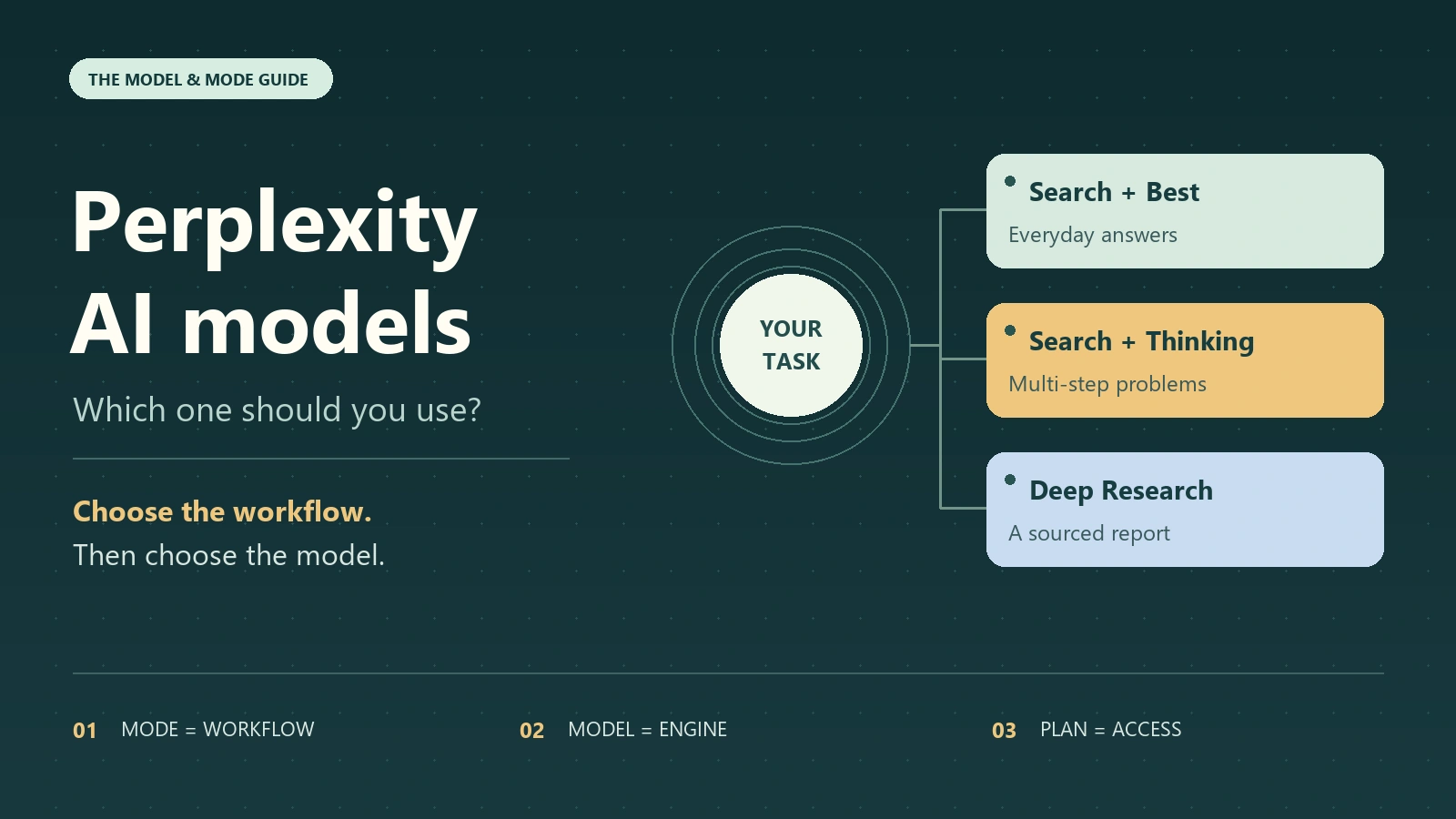
For most people, the best starting point is Search with Best selected. Perplexity AI models are the engines behind its answers; modes decide whether you get a quick answer, a research report, a lesson, or completed work. Use Thinking for a difficult multi-step question and Deep Research when you need a substantial report with sources.
The confusing part is that these choices sit alongside subscription tiers. Pro unlocks manual selection of eligible Search models, while Max adds some higher-tier models and features. Changing the model does not automatically change the workflow, and a familiar model name does not give you every feature of its provider’s own app.
If your work also includes writing, images, and video, GlobalGPT offers an all-in-one workspace with one account and subscription for multiple supported model families. That is useful for consolidating separate AI subscriptions; Perplexity remains the more direct choice when you specifically want its native search and research experience.

Which Perplexity mode should you use?
| مهمتك | ابدأ بـ | لماذا يناسب هذا |
|---|---|---|
| Find a fact, compare a few products, or catch up on a topic | Search + Best | Get a cited answer without choosing an engine yourself. |
| Work through a complex decision, calculation, or coding question | Search + an eligible model with Thinking | Give the model more reasoning time when the setting is available. |
| Prepare a market overview, literature review, or due-diligence report | الأبحاث العميقة | Use a workflow built to gather and synthesize more evidence. |
| Study a concept and check your understanding | وضع التعلم | Get guided explanations, hints, and questions. |
| Explore disagreement across several AI answers | Model Council | Compare multiple perspectives and read a synthesis. |
| Produce files, build an app, or complete connected work | كمبيوتر Perplexity | Delegate a task to an agent with tools. |
Choose by the output you need. A short answer about a company’s pricing belongs in Search; a competitor landscape with source-backed findings belongs in Deep Research; a spreadsheet and presentation built from those findings belongs in Computer.
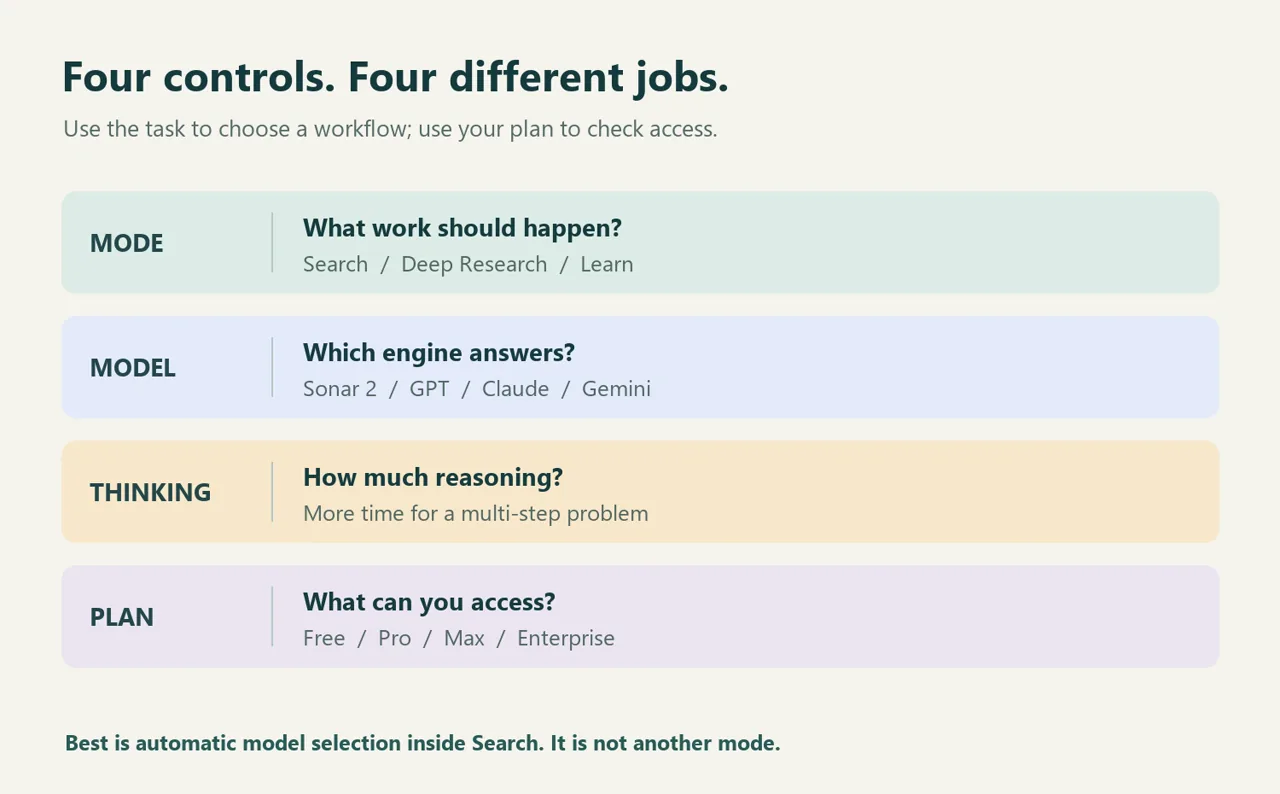
الحيرة official model and mode guide makes the key distinction explicit: Best is an automatic model option inside Search, not a separate mode. Thinking is also a setting on a supported model, rather than another model name.
Perplexity AI models: the current Search lineup
Perplexity uses both its own models and third-party models. The table below covers the consumer Search model selector, using Perplexity’s September 4, 2026 availability snapshot, checked on September 14. It is not the API catalog, the Computer selector, or a benchmark ranking.
| Search model | المزود | محترف | ماكس |
|---|---|---|---|
| Sonar 2 | الحيرة | نعم | نعم |
| GPT-5.6 تيرا | OpenAI | نعم | نعم |
| GPT-5.6 Sol | OpenAI | لا يوجد | نعم |
| Gemini 3.7 فلاش | جوجل | نعم | نعم |
| كلود سونيت 5 | أنثروبي | نعم | نعم |
| Claude Opus 5 | أنثروبي | لا يوجد | نعم |
| كيمي K3 | Moonshot AI | نعم | نعم |
| GLM 5.3 | Z.ai | نعم | نعم |
| Grok 4.6 | xAI | نعم | نعم |
| Nemotron 3 Ultra | NVIDIA | نعم | نعم |
المصدر: Perplexity’s subscription model availability table. Free users can use Best and limited Pro Searches, but cannot manually choose an advanced Search model. Perplexity says the account’s model selector is the source of truth because rollouts, promotions, regional requirements, and organization settings can affect access.
The Enterprise table is different: it lists all ten of these models for both Enterprise Pro and Enterprise Max, subject to administrator and organization controls. Do not apply the consumer Pro restrictions to an Enterprise Pro account.
Pro or Max? For consumer Search access, GPT-5.6 Sol and Claude Opus 5 are the two Max-only entries in this snapshot. That is a reason to consider Max if you need those specific models; it does not make every ordinary search worth upgrading for.
OpenAI models inside Perplexity are not the ChatGPT application. Our explanation of Perplexity’s connection to ChatGPT covers that relationship; model access, app features, subscriptions, and saved conversations remain separate concepts.
Models, modes, Thinking, and source filters are different
A نموذج is the engine producing an answer. A الوضع organizes the work. التفكير gives a supported engine more time to reason. Your خطة determines the choices and allowances you can use. These controls can interact, but changing one does not automatically change the others.
Source selection is another distinction. Choosing where a search should look is different from choosing which model writes the answer. A research task can fail because the sources are unsuitable even when the underlying model is capable.
Older tutorials often group source choices under Focus. Our overview of Perplexity Focus and source selection provides background on that terminology. For the current model names and workflow labels, use the dated Search table above and the options in your own account.
When to use each mode and setting
Search + Best: the everyday default
Start here for definitions, quick checks, current information, and small comparisons. Best chooses a suitable model for the query. You avoid spending more time selecting an engine than asking the question.
If an answer is weak, first make the question more specific: add the date, country, product version, or sources you need. A vague prompt can produce a vague answer across several models. Open the citations before acting on a claim.
Thinking: difficult reasoning in an answer
Use Thinking when a question has several dependencies: debugging a function, weighing conflicting requirements, planning a migration, or checking a calculation. It can help the model reason more carefully, at the cost of extra waiting time. Availability depends on the selected model; some reasoning-focused models use it automatically.
A useful request is: “Check the assumptions, work through the constraints, and explain the result so I can verify it.” Extra reasoning time does not guarantee correct facts or working code.
For programming work, our guide to using Perplexity for coding separates documentation research, code explanation, and debugging from a full development workflow. Run generated code and tests in your own project before relying on it.
Deep Research: a report assembled from evidence
Use Deep Research when the job needs breadth and synthesis: a market analysis, literature review, or comparison of competing explanations. Perplexity selects the models automatically, so manually choosing a Search model is not how you control this workflow.
الحيرة Advanced Deep Research documentation describes broader source gathering, cross-referencing, uploaded-document support, calculations, and a code sandbox. Give it a clear scope and report format so those capabilities serve a defined question.
Research workflows also differ between products. The دليل البحث المتعمق ChatGPT is useful if you are deciding where to carry out a longer investigation, rather than simply which Search model to select.
Learn Mode: understanding before an answer
Choose Learn Mode for guided explanations, hints, questions, and quizzes. It suits a student who wants to understand why a solution works or a professional learning a new subject.
إن Learn Mode help page describes availability for all users but says the visible toggle is limited to verified students. If you cannot see it, do not assume your model is missing: the access route and the selected model are separate issues.
Model Council: compare perspectives
Model Council runs a question across several models and synthesizes their answers. Use it when disagreement matters: identifying the weakest assumption in a proposal, reviewing a decision from different angles, or finding claims that deserve another source check.
إن dedicated Model Council documentation distinguishes two routes. On web and iOS, it is included with Max and Enterprise Max and uses three models. In Computer, it runs as a skill on all paid plans, supports two to eight models, and uses Computer credits.
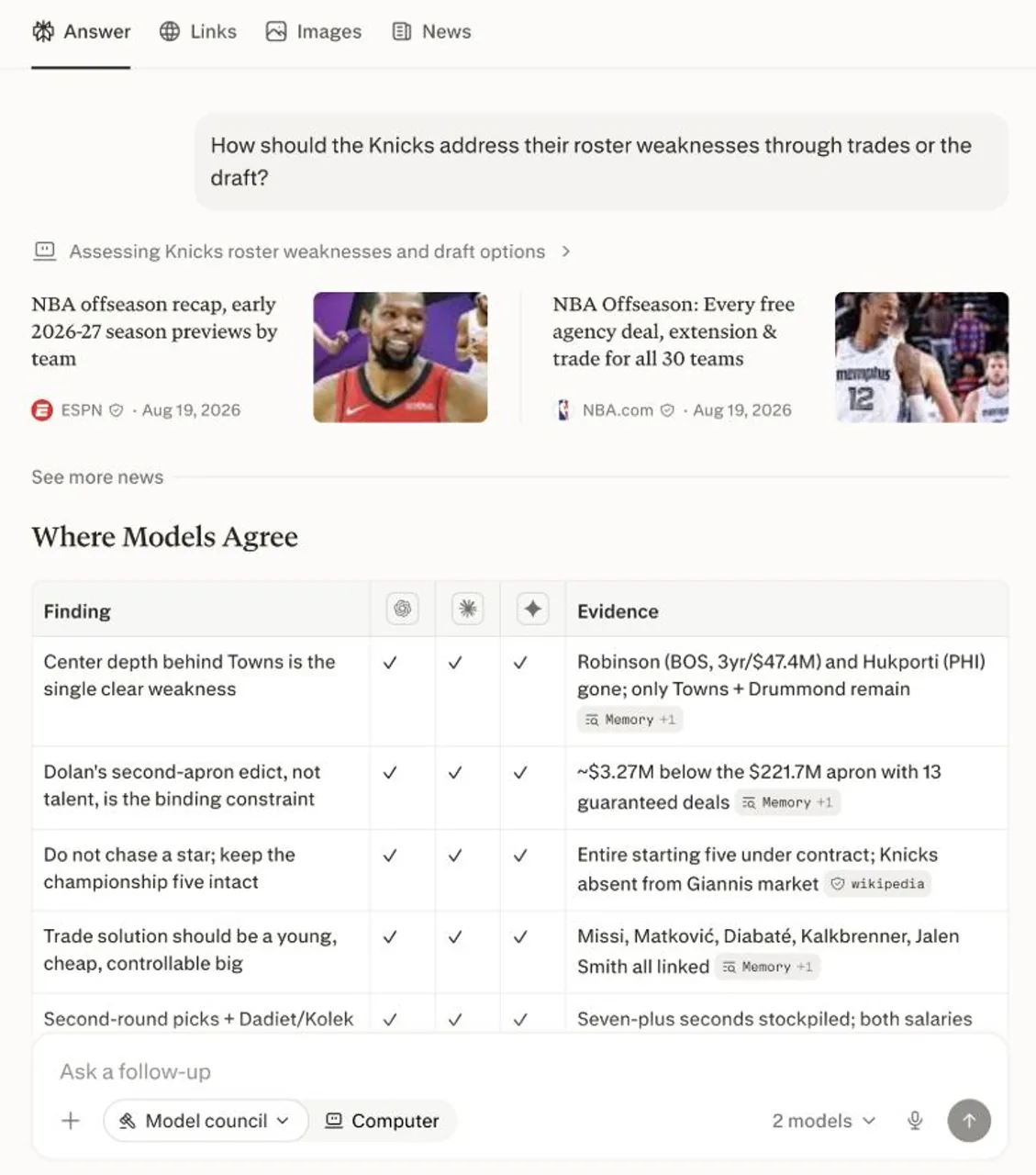
Agreement is useful, but it is not proof. Several models can repeat the same weak source. Read the disagreements and verify the underlying evidence before making a consequential decision.
Computer and Comet: when the task goes beyond an answer
كمبيوتر Perplexity is for work that requires tools and deliverables: researching competitors, building a spreadsheet, creating a presentation, or working with connected apps. It requires an active subscription and available credits; its model selector and usage rules are separate from Search.
Comet is Perplexity’s browser environment for browsing assistance and browser tasks. It also has its own model-selection experience. Choose the product because you need browser help, rather than treating Comet as another model in the Search table.
How to change the AI model in Perplexity
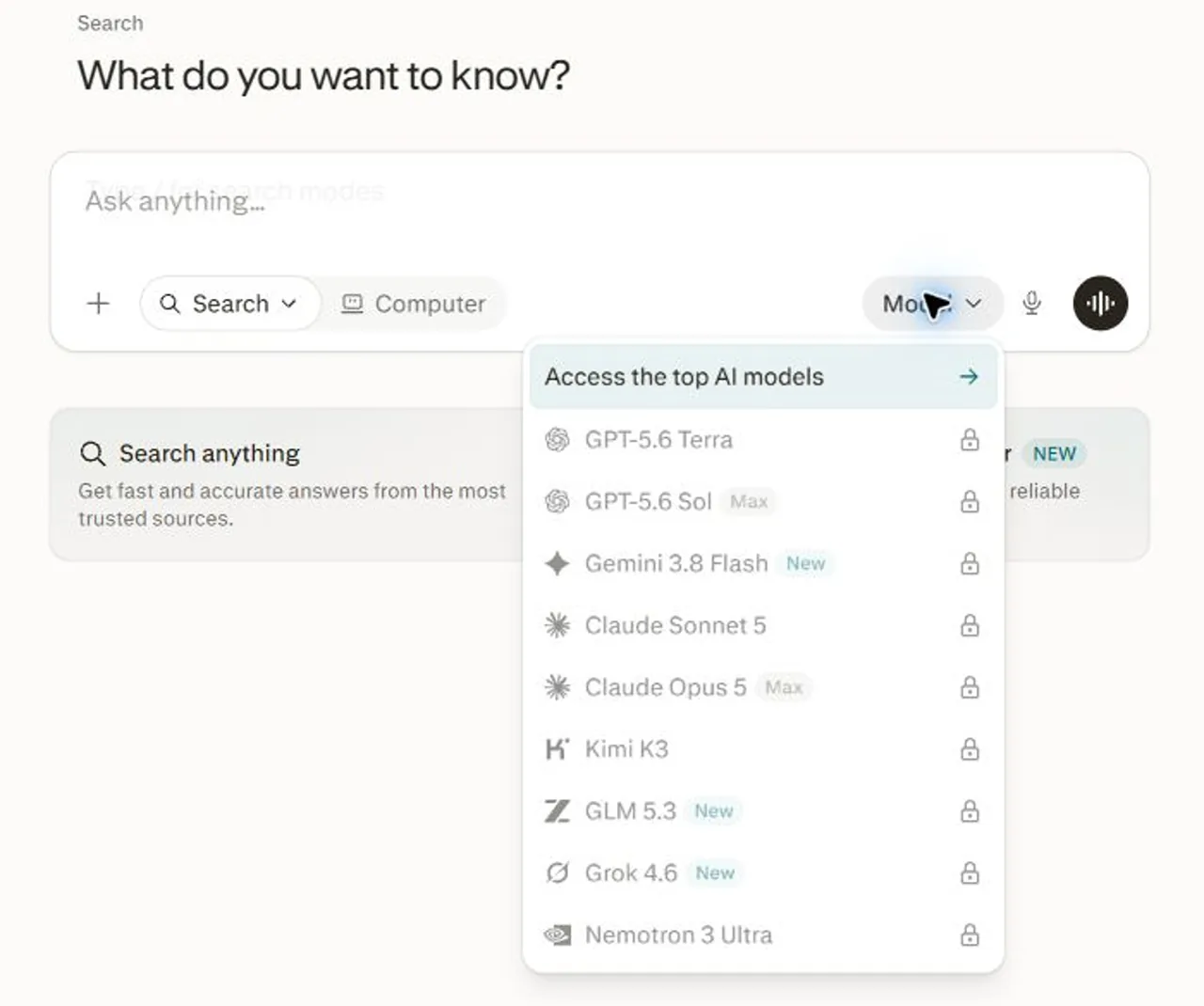
- Open Perplexity and start a Search query. Use an account with a paid plan if you want manual advanced-model selection.
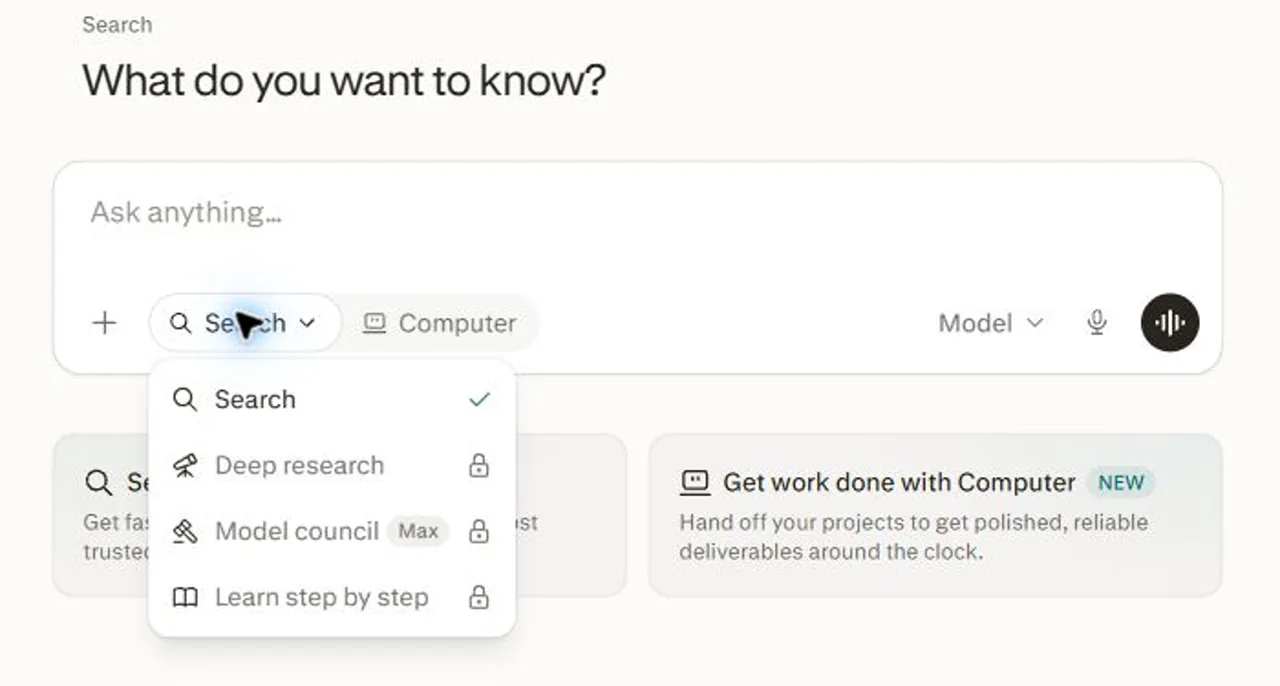
- Open the Model control in the prompt input box. In the web interface captured on September 14, 2026, it is on the right; the Search mode menu is on the left.
- Choose an eligible model, or leave the selection on Best. Turn on Thinking if the chosen model offers it and the task needs more reasoning.
- Submit a specific prompt, inspect the answer and citations, and change one setting at a time if you want to compare the result.
These steps follow Perplexity’s official model-switching instructions. The location is documented for the prompt input; the exact options depend on your account and workflow.
If you are new to the product, start with the Perplexity beginner’s guide for asking questions and reading citations. Use the current selector for model and mode names, since older interface labels can persist in tutorials.
| What you notice | التفسير المحتمل | ماذا تفعل |
|---|---|---|
| Only Best is available | Free access or a restricted account | Check the plan and account you are signed into. |
| A model in this article is missing | Different plan, rollout, region, or Enterprise policy | Compare your plan with the current official list; ask your organization administrator if needed. |
| No manual model picker in Deep Research | The workflow chooses models automatically | Specify scope, sources, and output instead. |
| Thinking is not offered | The selected model does not expose that setting, or uses reasoning automatically | Inspect that model’s available options. |
| The same model gives different answers elsewhere | Different app tools, retrieved sources, instructions, or context | Compare the complete workflow and evidence, not just the model label. |
Which model is best for your task?
There is no verified universal winner in the access table. It tells you what is available, not which model will do your work best. Start with Best, then compare eligible models on a real task only when the default falls short.
Keep the prompt, attachments, and source requirements unchanged. Judge whether the answer is correct, whether its citations support the key claims, and how much editing you need. Prefer the result that helps you finish the job over the one that sounds most confident.
For research: define the evidence standard
Compare three project-management tools for a 12-person design agency. Use official pricing and product documentation, dated as of today. Separate confirmed features from unclear claims. Return a comparison table, five decision criteria, and a short recommendation with citations.Use Search for an initial shortlist. Choose Deep Research if the decision needs a longer investigation across integrations, constraints, and conflicting evidence. Add your real budget and must-have features before running the prompt.
For coding: make the answer verifiable
Explain why this function fails on an empty list. Propose the smallest fix, preserve the public interface, and include tests for empty input, one item, and repeated values. Cite official documentation for any library behavior you rely on.

[Paste the function and exact error here.]
Use a supported model with Thinking for a problem that needs multi-step analysis. Compare proposed fixes by running them, not by counting how many paragraphs the model produces.
For studying: request active recall
Help me understand Bayes’ theorem. First ask what I already know. Use one everyday example, give hints before the solution, and finish with three short questions that test whether I can apply it.Use Learn Mode when available. Adapt the prompt to your subject and level, then check whether you can answer the follow-up questions without help.
Do you need Free, Pro, or Max?
Stay on Free if basic answers and limited Pro Searches meet your needs. Consider Pro when you repeatedly need manual Search model selection. Consider Max for specific Max-only Search models, the web/iOS version of Model Council, or higher usage allowances.
| خطة المستهلك | Verified public pricing basis | اختره عندما |
|---|---|---|
| مجاناً | $0 | You can work with Best and the free allowances. |
| محترف | The official product page displays $17/month when billed annually. | You want manual access to the eligible Pro Search models. |
| ماكس | $200/month or $2,000/year; the product page rounds the annual equivalent to $167/month. | You need Max-only Search models, web/iOS Model Council, or more capacity. |
Pricing checked September 14, 2026. The annual-equivalent Pro and Max display comes from Perplexity’s official subscription page. “Per month when billed annually” is not a month-to-month charge; confirm the full annual total and applicable taxes at checkout.
The exact Max monthly and yearly amounts are stated in the Model Council pricing explanation. For Pro, the price above is the annual-billing equivalent; check checkout for the month-to-month offer.
For a broader feature comparison, see Perplexity Pro versus Max. Match any purchase to the current checkout and usage allowances, rather than assuming that paid access means unlimited use of every model and workflow.
Are Sonar API models the same as Perplexity app models?
No. API models are selected programmatically and billed separately from the consumer app. A Pro or Max subscription does not make API usage part of the same allowance. The Search table above is not a list of API model IDs.
| Legacy Sonar API model | Documented purpose |
|---|---|
| sonar | Lightweight web-grounded answers. |
| sonar-pro | More advanced search and follow-up questions. |
| sonar-reasoning-pro | Multi-step reasoning with web grounding. |
| sonar-deep-research | Extended research and report synthesis. |
إن Sonar API model documentation describes this legacy family. These names should not be treated as interchangeable with Sonar 2 in the consumer Search selector.
Developer update: Perplexity says Sonar Chat Completions will be supported until September 27, 2026 and recommends the Agent API for new projects. Existing integrations should follow the official Sonar-to-Agent API migration guide. This API change is not a notice that the Perplexity consumer app is shutting down.
For a new integration, use the Agent API model catalog to select supported model identifiers and check token pricing. Keep that developer decision separate from choosing Search, Deep Research, or a consumer subscription.
When an all-in-one AI workspace makes more sense
Perplexity is a strong fit when the main job is finding information and producing source-backed answers. A broader workspace makes sense when research is only the first step and you also need drafting, image creation, or video production.
جلوبال جي بي تي تي brings multiple supported model families into one account and subscription. Its practical benefit is consolidating access and reducing repeated logins across provider websites. Choose it for that broader workflow; do not assume it reproduces Perplexity’s native Model Council, Computer, or account controls.
If your main requirement is still unclear, compare the Perplexity alternatives grouped by workflow before buying another subscription. A specialist research tool and an all-in-one creative workspace solve different combinations of tasks.
الأسئلة الشائعة
What AI models does Perplexity use?
Perplexity combines its own Sonar models with third-party models. Its September 4, 2026 Search list includes OpenAI, Anthropic, Google, Moonshot AI, Z.ai, xAI, and NVIDIA options. Access depends on your plan and account.
What is the best Perplexity model for most users?
Start with Best inside Search. It automatically picks a suitable model for your question. Use Thinking for complex reasoning or Deep Research for a full report before assuming you need a different engine.
Can I choose an AI model on the free plan?
Free users can use Best and limited Pro Searches, but cannot manually select an advanced Search model. Manual selection is available on paid plans, subject to model availability and usage limits.
Is Best a separate Perplexity mode?
No. Best is the automatic model option inside Search. Search is the workflow; Best lets Perplexity choose an appropriate model for each query.
Can I choose the model used by Deep Research?
Perplexity selects Deep Research models automatically. Focus on your research question, source requirements, attachments, and output format rather than assuming the Search model picker controls the report.
Is Model Council only available with Max?
On web and iOS, Model Council requires Max or Enterprise Max. In Perplexity Computer, it is available as a skill on all paid plans and uses Computer credits. The two routes have different limits and model counts.
Does Perplexity Pro include ChatGPT Plus or Claude Pro?
No. Access to an OpenAI or Anthropic model inside Perplexity is not a subscription to the provider’s own app. Features, saved conversations, account controls, and usage allowances belong to the product you use.
Is GlobalGPT the same as Perplexity?
No. GlobalGPT is an all-in-one platform for multiple supported AI models and creative workflows. Perplexity has its own native search, research, and agent features. Choose based on the work you need to complete.
أيهما يجب أن تختار؟
Start with Search + Best. Add Thinking for a difficult reasoning task. Move to Deep Research for a substantial report, Learn Mode for studying, Model Council for multiple perspectives, or Computer for completed deliverables. Upgrade only when a specific model, feature, or usage limit is holding your work back.