Seedream 5.0 Pro launched on July 8. Are you still trying to decide whether to use Seedream 5.0 Pro หรือ GPT Image 2?
This comparison looks at the three things that matter most when you actually need to make an image: access, price, and output quality.
We tested the models with practical design tasks, including an infographic, a multilingual event poster, a sketch-to-product conversion, a lifestyle ad, and an e-commerce detail page. Every completed comparison includes the prompt and both outputs below.
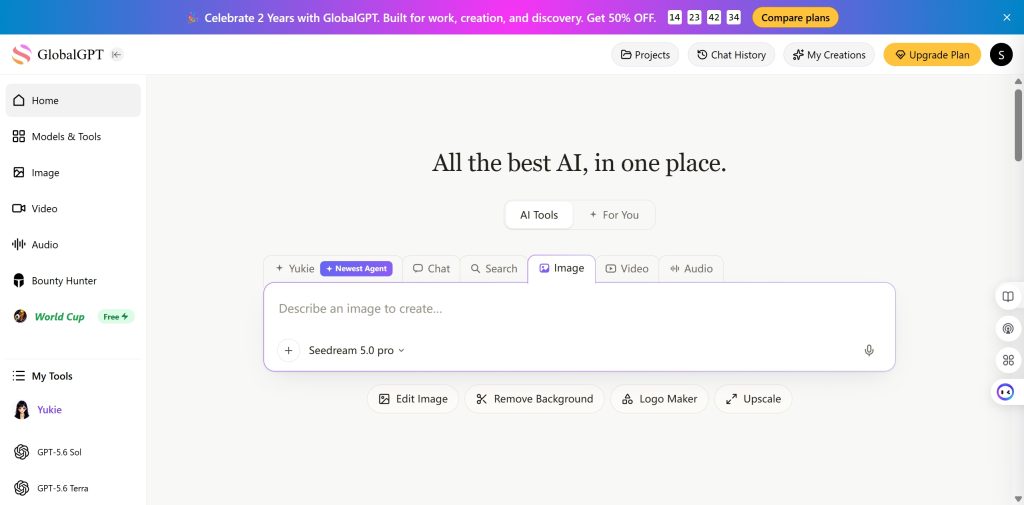
GLBGPT already brings GPT Image 2 together with image, video, and language models in one account. That gives you a simpler place to test creative models before opening separate subscriptions or setting up another API.
Quick Answer: Which One Should You Use?
Start with GPT Image 2 when readable text matters most. In our infographic test, it produced much cleaner supporting copy and a more usable chart.
Test Seedream 5.0 Pro when the job is closer to design production. Its product render and e-commerce page looked polished, structured, and ready for a marketer to refine.
The result is task-specific. GPT Image 2 led on readable infographic text and the cleanest e-commerce copy. Seedream stayed closer to the product sketch and explained the smart-garden hardware more clearly.
Seedream 5.0 Pro and GPT Image 2 at a Glance
| หมวดหมู่ | Seedream 5.0 Pro | GPT Image 2 |
|---|---|---|
| ผู้ให้บริการ | ByteDance Seed; official access through BytePlus and Dreamina | โอเพ่นเอไอ |
| Main strength so far | Product visuals, designed layouts, and long e-commerce graphics | Readable text, clean information graphics, and fast access through ChatGPT or GLBGPT |
| Browser access | Dreamina, Lumina, and BytePlus AI Playground | ChatGPT Images and OpenAI Playground |
| Developer access | ModelArk Image Generation API | Image API and Responses API image tool |
| Pricing style | Per image, packages, or Lumina credits | ChatGPT plan limits or API token billing |
| เหมาะสมที่สุด | Designers and marketers building structured visual assets | ChatGPT users and developers who want readable text and OpenAI tooling |
Access: Where Can You Actually Use Each Model?
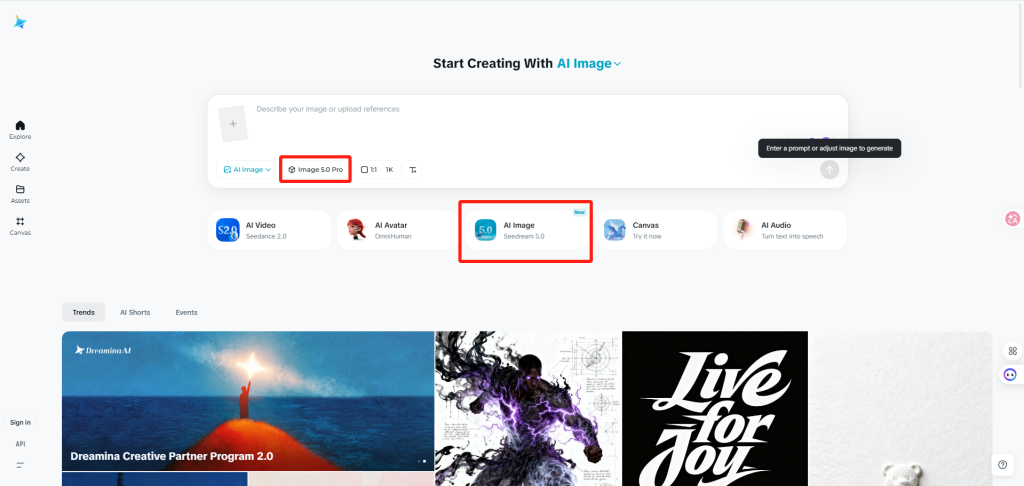
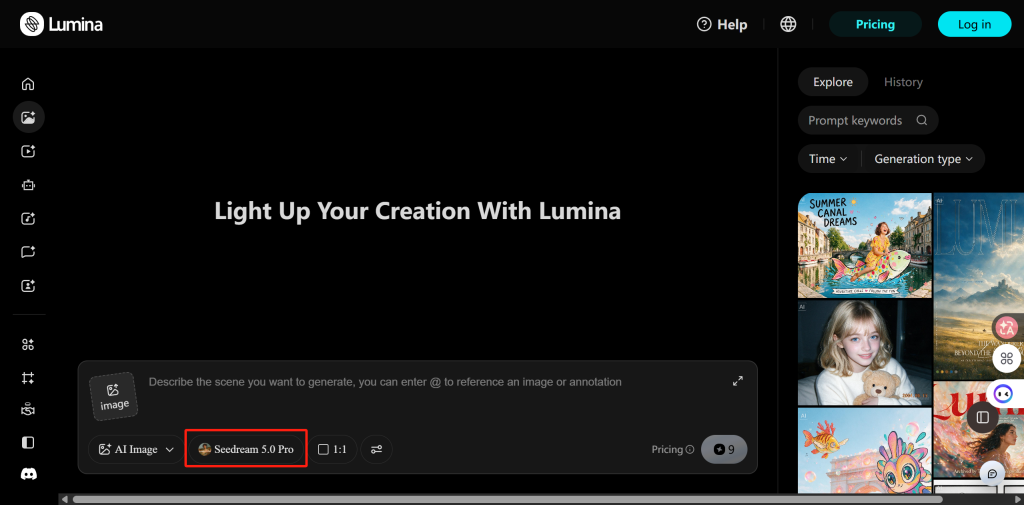
If you want to try Seedream 5.0 Pro in your browser, you can start with Dreamina or Lumina. ModelArk is the better fit when you need developer controls or want to connect the model to an app.
- ดรีมมินา: its signed-in image creator includes Image 5.0 Pro, making it a direct consumer route without code.
- Lumina: Seedream 5.0 Pro appears in the model selector and uses Lumina credits.
- BytePlus AI Playground: useful for browsing and testing models after signing in.
- ModelArk API: the route for apps, automation, and direct request control.
GPT Image 2 is easier to reach as a consumer, but ChatGPT Images and the exact API model are not the same promise.
- รูปภาพ ChatGPT: create and edit images in a conversation, on the Images page, or through a custom GPT.
- OpenAI Playground and Image API: use these when you need to select
gpt-image-2by name. - การตอบสนอง API: lets a mainline GPT model call image generation, although the image tool selects its own GPT Image model.
The good news is that you can try both Seedream 5.0 Pro and GPT Image 2 on GLBGPT without moving between separate platforms. You also get access to a much wider model library, including other image generators, Seedance and other video models, plus leading language models. That makes it easy to test the same idea with several models and keep the result that works best.
Price: Subscription, Credits, or Pay per Image?
ModelArk starts at $0.045 per Seedream image. A 2K image using Auto settings may cost $0.045-$0.090, and additional reference images start at $0.003 after the first reference image.
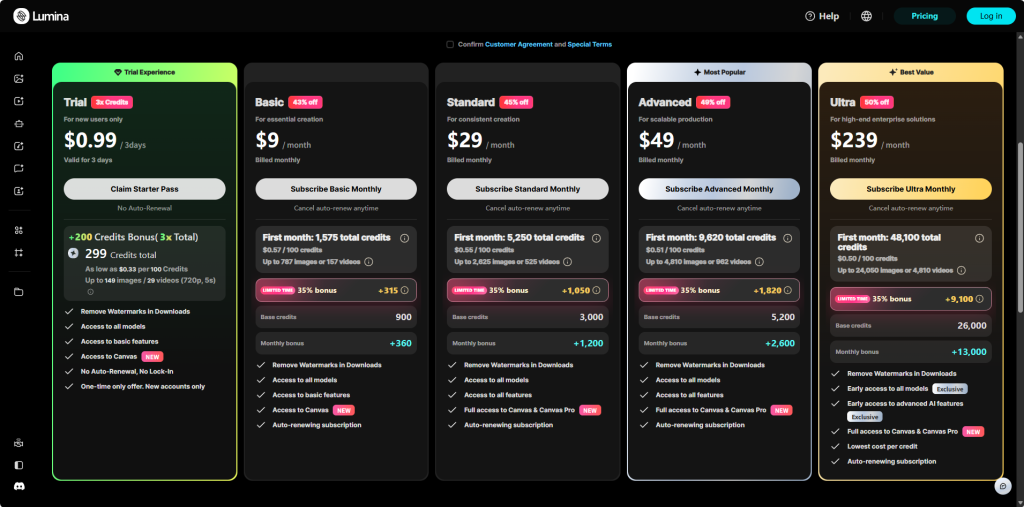
In Lumina, the Seedream setting we checked uses 9 credits. The $0.99 three-day trial includes 299 credits, which is enough for about 33 generations at roughly $0.030 each. First-month monthly-plan rates work out to about $0.045-$0.051 per 9-credit image; after the limited bonus ends, the effective price is about $0.055-$0.064.
GPT Image 2 has two billing paths. ChatGPT includes image creation within plan limits: Free offers limited access, บวกค่าใช้จ่าย $20 ต่อเดือน, และ Pro costs $100 or $200 per month. API use is billed separately.
OpenAI's published 1024 x 1024 output estimates are $0.006 at low quality, $0.053 at medium, and $0.211 at high. Prompts and reference images add input cost.Published per-image cost examples
These settings are not quality-equivalent. Bar length is scaled to $0.211.
These are official examples with different settings, not a quality-equivalent benchmark. Bar length is scaled to $0.211.
*GPT Image 2 figures are estimated image-output cost only. Seedream Lumina figures use the 9-credit setting and regular standalone credit-pack rates.
| Cheapest practical route | Direct answer |
|---|---|
| Short Seedream test | Lumina’s $0.99 trial is the easiest low-cost starting point. |
| Low-quality API drafts | GPT Image 2 is cheaper at the published $0.006 output estimate. |
| Medium API output | Prices are close enough that retries and usable-image rate matter more. |
| High-quality API output | Seedream’s published example is lower than GPT Image 2 high output, although the settings are not equivalent. |
| Existing ChatGPT subscriber | Use the image allowance you already pay for before adding another subscription. |
Hands-On Results: What Happened With the Same Prompts?
We kept the wording unchanged between models whenever both outputs completed. We judged whether the image followed the task, whether the text was readable, and whether a designer or marketer could use the result without rebuilding it.
Test 1: High-Density Infographic
Prompt used for both models
Create a vertical 4:5 infographic for a blog post titled “How Urban Trees Cool a City”. The audience is city residents, not scientists.
Use these exact sections:
1. The problem: paved streets trap heat
2. What trees change: shade, moisture, and surface temperature
3. Simple comparison: street with low tree cover vs street with high tree cover
4. What residents can do: plant, protect, and water young trees
Include one small bar chart comparing “Low tree cover”, “Medium tree cover”, and “High tree cover”. Use simple invented values only for visual illustration: 92°F, 86°F, and 80°F.
Use clean editorial design, readable English text, soft green and warm gray colors, simple icons, strong spacing, and no more than 120 wds total. The image should feel like a polished explanatory graphic for a sustainability article, not a dense scientific poster.
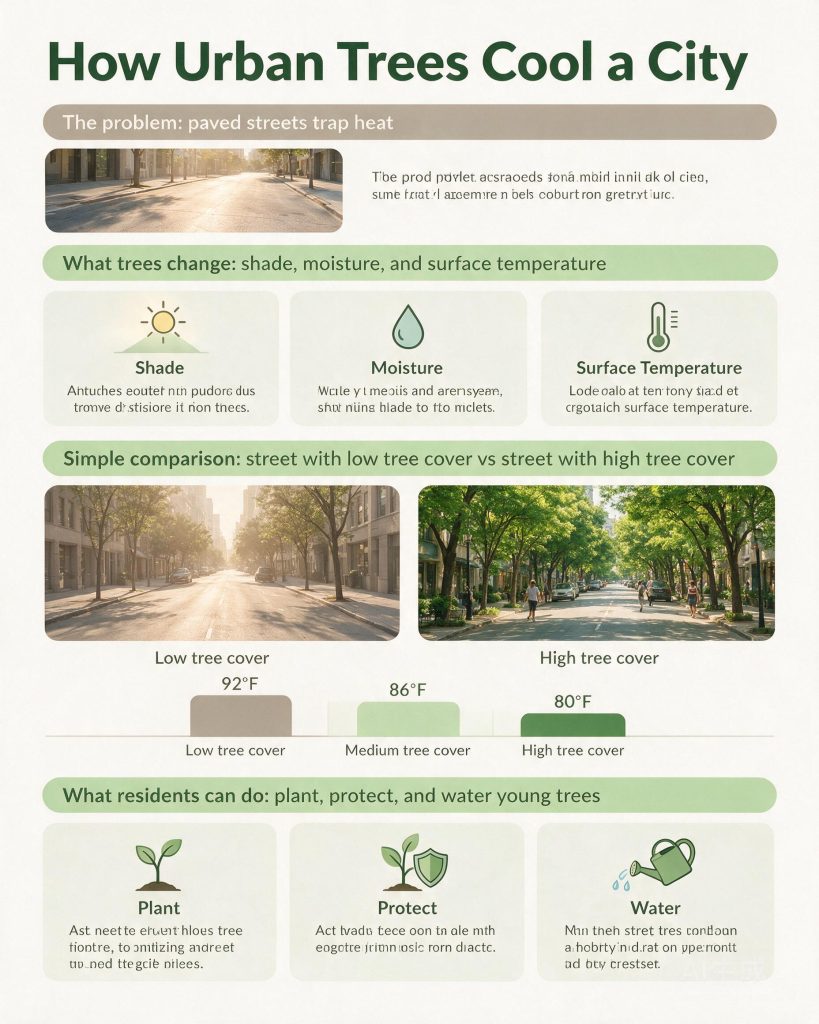
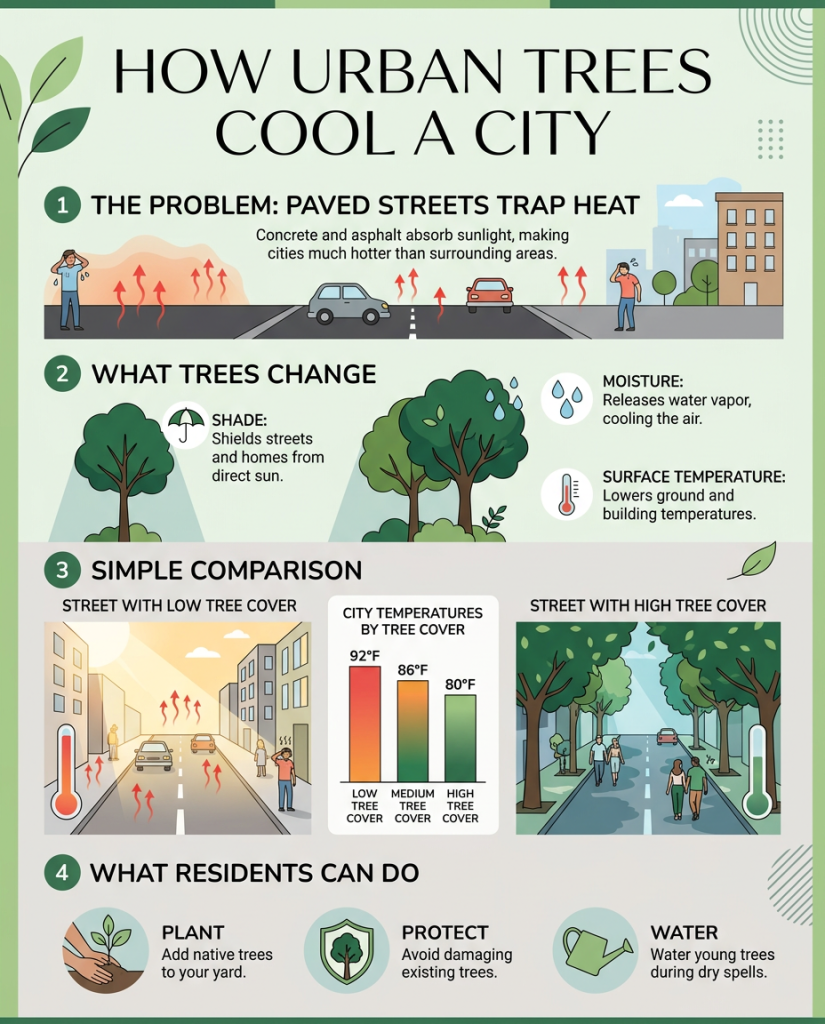
Seedream understood the requested structure. It created all four sections, used the correct 92°F, 86°F, and 80°F values, and made the low-versus-high tree-cover comparison visually clear. The problem is the supporting copy: much of the small text is unreadable filler.
GPT Image 2 handled the same job more reliably. Its title, section labels, explanations, chart values, and action points are readable. It also feels like an infographic that could be published with only light editing.
Winner for this task: GPT Image 2. Seedream understood the layout, but GPT Image 2 produced the more usable information graphic.
Test 2: Multilingual Launch Poster
Prompt used for both models
Design a square launch poster for a fictional creative conference called “Future Studio 2026”.
The poster must include these exact text elements:
– Future Studio 2026
– Design, AI, and Culture
– Shanghai / Tokyo / Seoul
– July 18-20
– Register Now
Also include three small language tags in the layout:
– English
– 中文
– 日本語
Use a modern editorial poster style with a clean grid, bold typography, one abstract 3D object in the center, and enough empty space so the words are readable. Do not add extra event names, fake sponsors, QR codes, or long paragraphs.


Both models preserved the event name, subtitle, cities, date, CTA, and the English, Chinese, and Japanese language tags. Neither added fake sponsors or a QR code.
Seedream used a spacious editorial grid and made the CTA impossible to miss. GPT Image 2 created a denser, more finished campaign poster with a stronger central 3D object. Seedream is easier to scan from a distance; GPT Image 2 feels more art-directed.
Result: no clear winner. Choose Seedream for a bold, sparse poster and GPT Image 2 for a more compact campaign layout.
Test 3: Turning a Rough Sketch Into a Finished Product
This test started with the same rough Luma Arc sketch for both models. The source image matters here: we were not asking for any attractive desk lamp, but for a finished version of a specific base, curve, and light-bar arrangement.
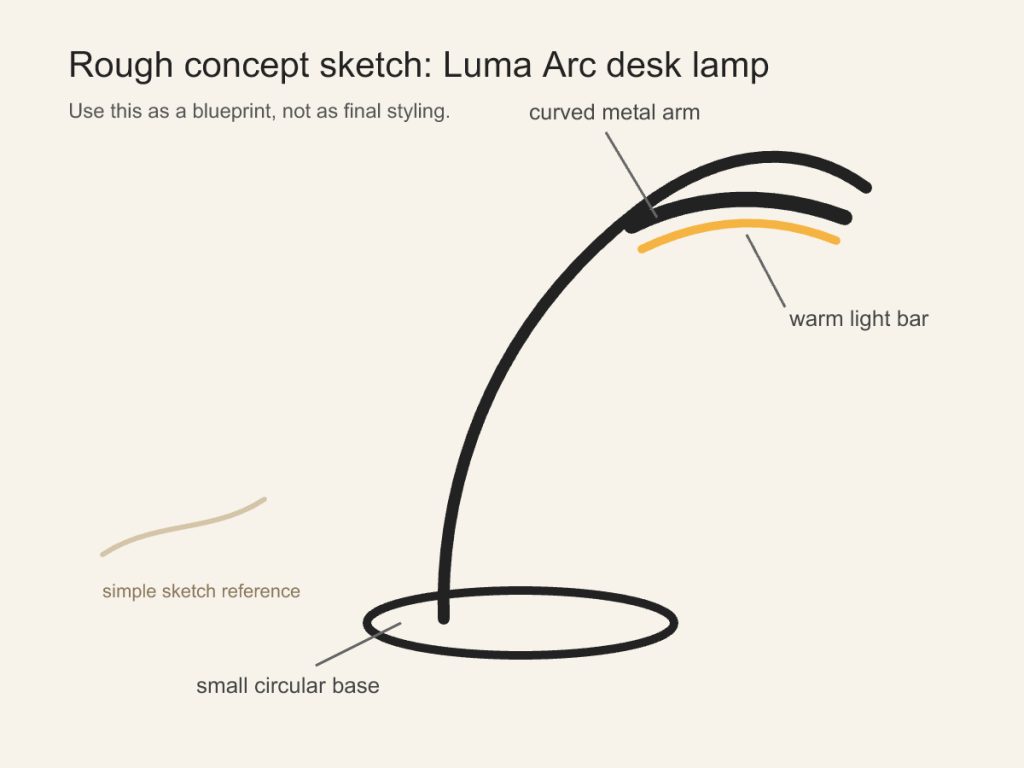
Prompt used with the sketch
Using the uploaded rough sketch as the design blueprint, turn the lamp into a finished product render.
Keep the main idea from the sketch: a small circular base, one curved arm, and a slim light bar under the curve. Make it look like a premium desk lamp named “Luma Arc”. Use matte graphite metal, a warm glowing diffuser, realistic shadows, and a minimal desk setup. Keep the final image clean and product-focused. Do not add extra lamps, extra arms, text blocks, or people.
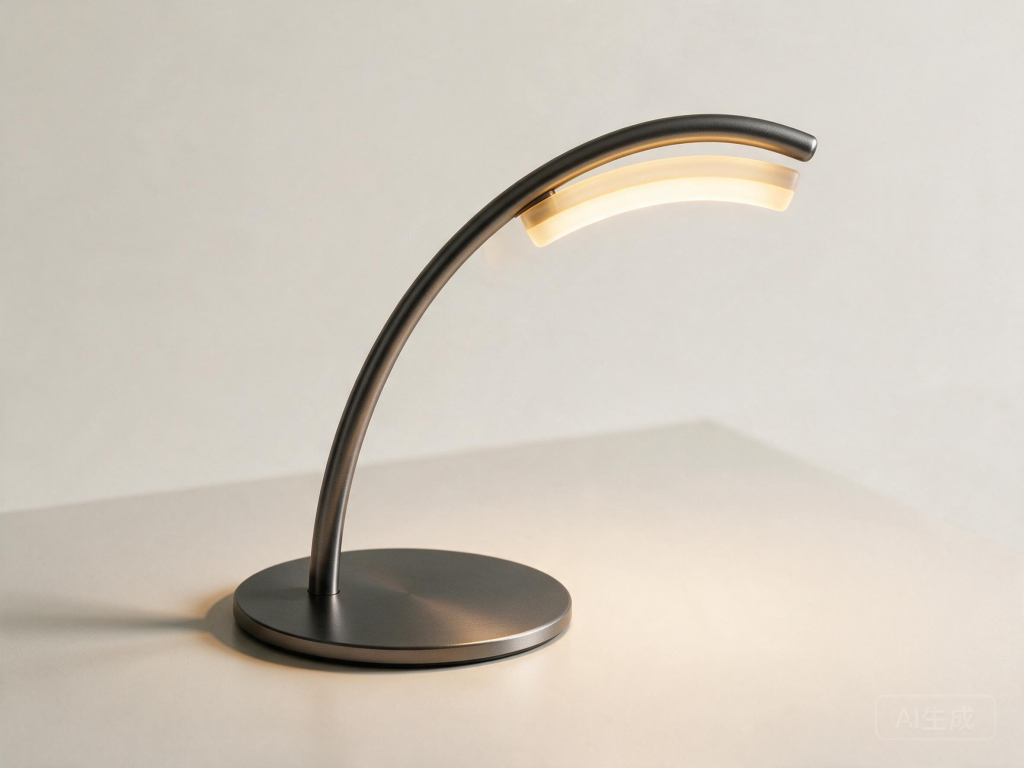

Seedream stayed closer to the source geometry. It kept one continuous curved arm, a broad circular base, and a separate glowing bar tucked under the top curve. It also respected the request for a clean product image without adding a headline or marketing copy.
GPT Image 2 produced the more campaign-ready scene. The product name is clean, the desk styling is richer, and the lighting feels ready for an ad. It also added the unrequested line “Sleek light. Focused design.” and interpreted the top as two stronger structural layers, so it moved further away from the blueprint.
Winner for sketch fidelity: Seedream 5.0 Pro. GPT Image 2 made the stronger advertisement, but Seedream followed the shape and no-extra-text instruction more closely.
Test 4: Photorealistic Lifestyle Ad
Prompt used for both models
Create a realistic lifestyle ad image for a smart indoor garden product on a kitchen counter.
Scene: a small apartment kitchen in the morning, soft window light, one person watering fresh herbs in a compact white smart planter. The product should look modern but believable, with small basil and mint plants growing inside. The person should look natural and relaxed, not like a fashion model. Show realistic hands, realistic skin texture, natural shadows, and a lived-in kitchen background.
Do not add text, logos, brand names, floating UI panels, or unrealistic glowing effects.
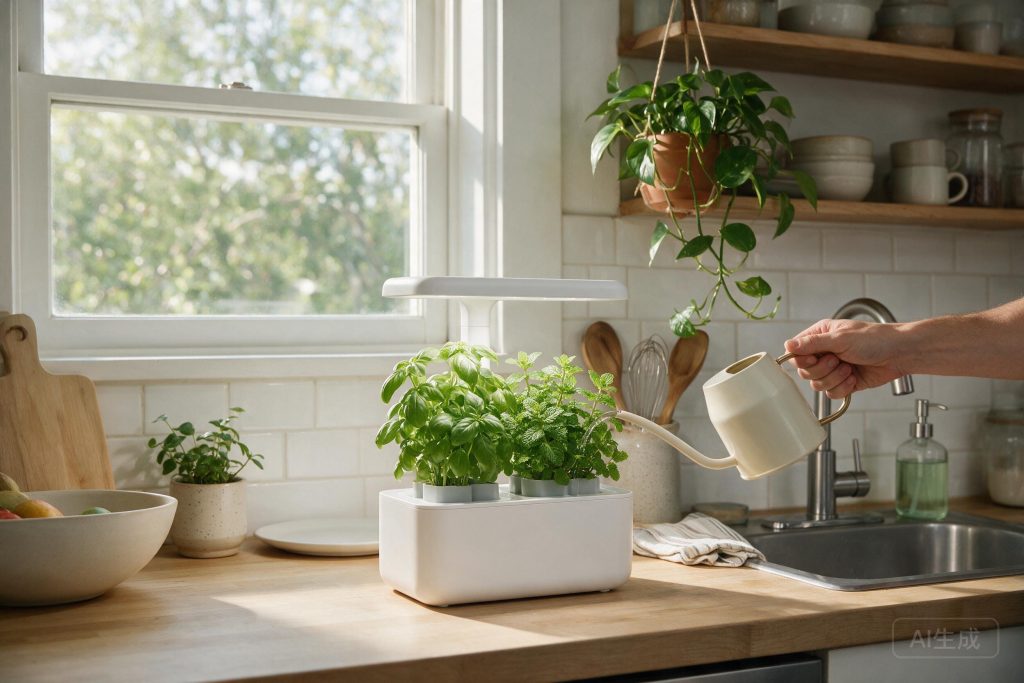
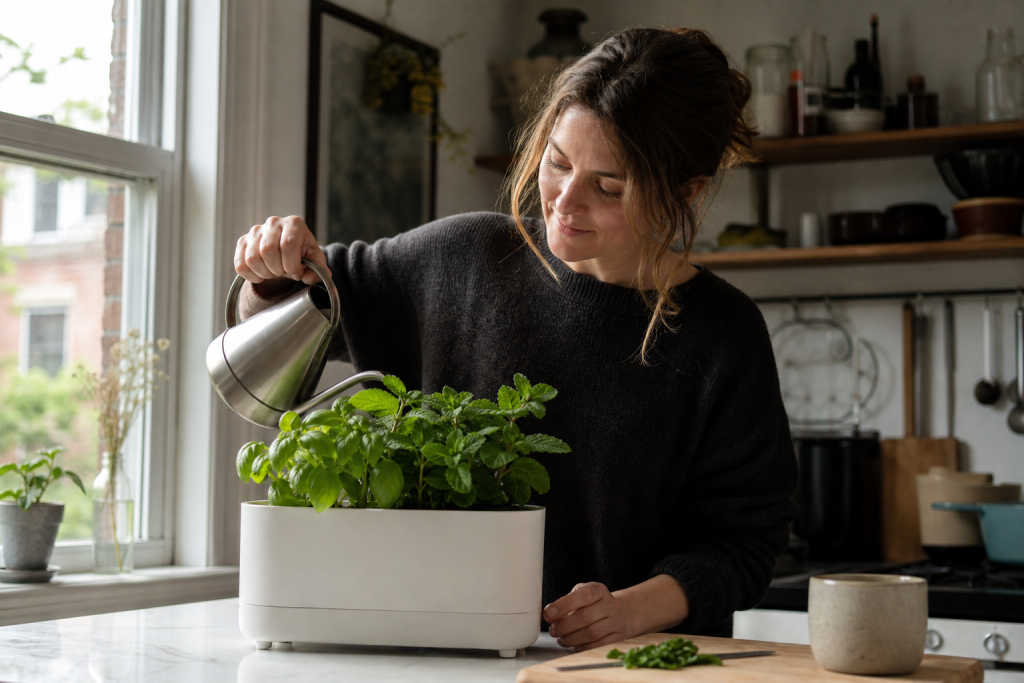
Seedream made the product idea clearer. Its white planter includes a built-in grow light, so the object reads immediately as a smart indoor garden. The kitchen light and herbs look believable, but the person is reduced to a hand and forearm.
GPT Image 2 gave us the more natural human moment. The face, hands, pose, window light, and lived-in kitchen all feel convincing. Its weakness is the product itself: without a grow light or visible controls, it looks more like a clean planter than an obviously smart device.
Result: choose by the job. Seedream explained the product better; GPT Image 2 created the stronger lifestyle photograph.
Test 5: E-Commerce Product Detail Page
Prompt used for both models
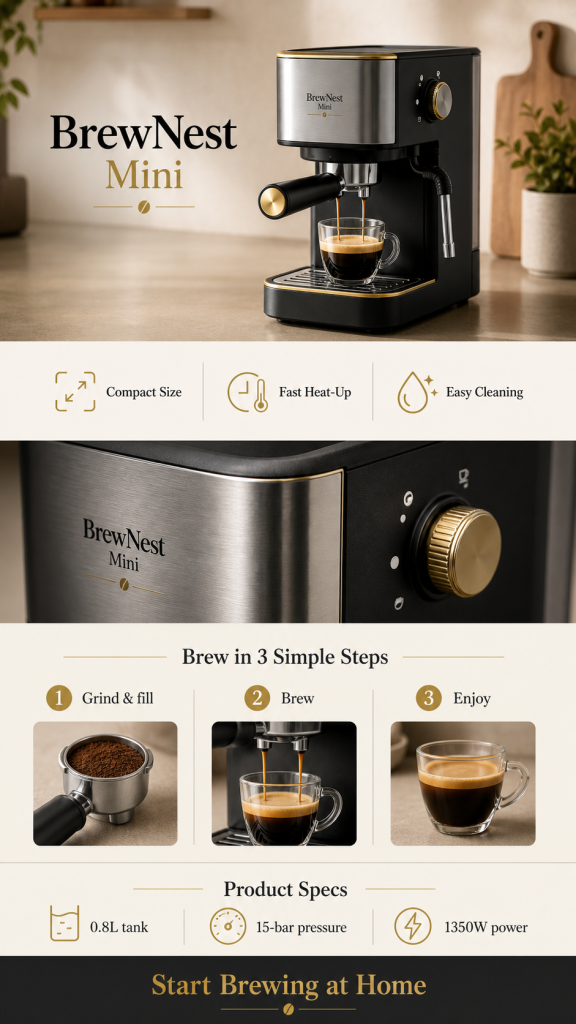
Design a vertical e-commerce product detail image for a fictional compact espresso machine named “BrewNest Mini”.
Use a tall 9:16 layout with six stacked sections:
1. Hero product image with the product name
2. Three key benefits: Compact Size, Fast Heat-Up, Easy Cleaning
3. Close-up material detail
4. Three-step brewing guide
5. Product specs table: 0.8L tank, 15-bar pressure, 1350W power
6. Final CTA: “Start Brewing at Home”
Use warm kitchen photography, matte black and brushed steel materials, cream background, small gold accents, and clean readable English typography. Keep the page premium, uncluttered, and realistic. Do not invent extra specs, fake reviews, discount badges, or QR codes.
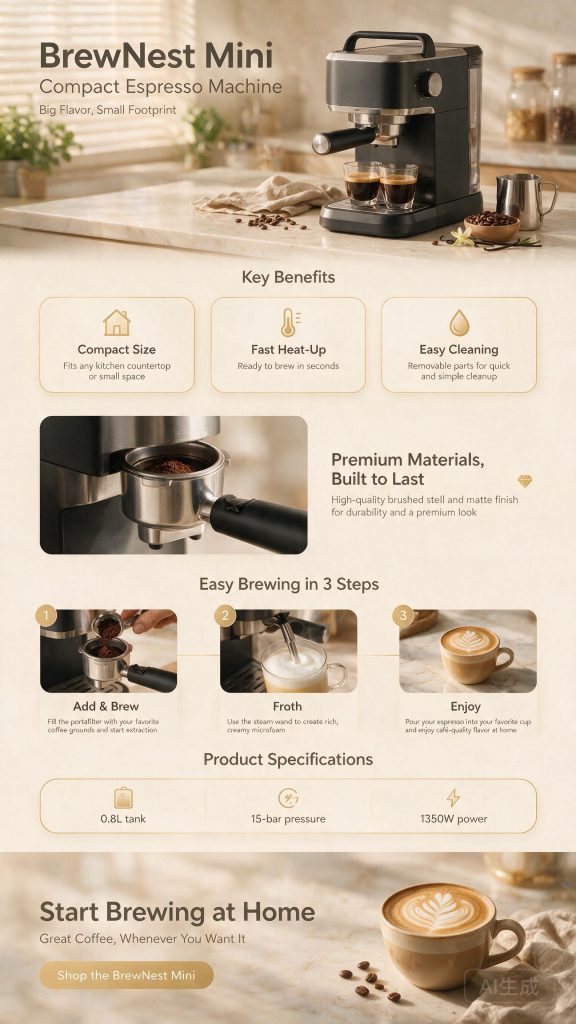
Both models understood that this was a long product page, not a single poster. Seedream included a hero, benefit cards, material close-up, three-step guide, specifications, and final CTA. It also introduced more supporting copy, including one visible spelling error.
GPT Image 2 used less copy and kept the important text unusually clean. The product name, three benefits, three brewing steps, 0.8L tank, 15-bar pressure, 1350W power, and final CTA are all readable. The material detail is shown visually rather than labeled as its own section.
Winner for publishability: GPT Image 2. Seedream built the fuller sales narrative, but GPT Image 2 needed less text cleanup and preserved the requested specifications more cleanly.
Generation Time and Token Use
| Completed request | Observed time | Reported usage |
|---|---|---|
| GPT Image 2 lifestyle ad | 106.16 seconds | 150 input tokens + 1,372 output image tokens |
| GPT Image 2 e-commerce page | 75.63 seconds | 263 input tokens + 1,158 output image tokens |
| Seedream text-to-image tests | 117-173 seconds | The completed task responses did not expose a directly comparable GPT-style token split for every image |
These are local request times, not controlled provider-side latency. They are useful for describing our experience, but network conditions, queue length, image size, and platform load can change the result.
Try the Model That Fits the Image You Need
If readable text and quick iteration matter most, start with GPT Image 2. If you are building a product visual, poster, or structured sales image, Seedream 5.0 Pro is worth testing beside it.
GLBGPT gives you one account for image, video, and language models, so you can test a prompt before committing to another standalone service.
Final Verdict: Which One Is the Better Choice?
For most people, GPT Image 2 is the easier first pick. It is simpler to access through OpenAI’s tools or GLBGPT, its text was cleaner in our infographic and e-commerce tests, and the results needed less cleanup before publishing.
Seedream 5.0 Pro is still the model to watch when the job feels closer to design production than casual image generation. In our tests, it was especially useful for product visuals, structured layouts, and scenes where the model needed to understand a specific design idea.
The practical answer is not to choose one model forever. If you care about cost, access, and output quality, run the same prompt in both models first. GLBGPT makes that comparison easier because Seedream 5.0 Pro and GPT Image 2 sit in the same place, so you can keep the image that actually works for the task.
คำถามที่พบบ่อย
What is Seedream 5.0 Pro?
Seedream 5.0 Pro is ByteDance’s professional image generation and editing model. It is aimed at design-heavy work such as posters, product concepts, infographics, multilingual layouts, and structured commercial visuals.
GPT Image 2 คืออะไร?
GPT Image 2 is OpenAI’s image generation and editing model. Developers can select it through the Image API, while consumers can create and edit images through ChatGPT Images.
Can you use Seedream 5.0 Pro without an API?
Yes. Dreamina and Lumina provide browser access, and BytePlus also offers an AI Playground. ModelArk is the better route when you need developer controls or app integration.
Can you use GPT Image 2 inside ChatGPT?
You can create and edit images in ChatGPT, but OpenAI calls the consumer feature ChatGPT Images and does not promise the exact API model slug for every request. Use the Image API when selecting gpt-image-2 directly matters.
Which model handled text better in our tests?
GPT Image 2 was clearly better in the infographic test because its small supporting copy remained readable. Both models handled the short multilingual poster labels correctly.
Which model is cheaper?
GPT Image 2 is cheaper for published low-quality API output. Seedream’s published per-image examples are more attractive than GPT Image 2 high-quality output, but the resolutions and settings are not equivalent.
Do Seedream 5.0 Pro and GPT Image 2 add watermarks?
The Seedream API images in our test included a visible AI-generated watermark. The GPT Image 2 images downloaded from GLBGPT did not show a visible watermark, so they could be placed in the article without an extra cleanup step. Watermark behavior may vary by platform and generation route.
Which model should you choose?
Choose GPT Image 2 when readable text, natural lifestyle photography, ChatGPT access, or OpenAI API integration is the priority. Choose Seedream 5.0 Pro when sketch fidelity, product structure, or clearer visual explanation of the object matters more.