

ChatGPT Plus has limits, but there is no single messages-per-day allowance covering everything you do. Everyday text chat is listed as unlimited, subject to abuse guardrails. Thinking, file uploads, images, research and agent work have their own rules. The five-hour allowance people often run into belongs to ChatGPT Work and Codex—not every ordinary conversation.
If you have just hit a limit, identify the feature named in the warning first. A Thinking cap calls for a different response from a full file library, and a five-hour reset will not help while a weekly Work allowance is still exhausted. That distinction can save you an unnecessary upgrade.
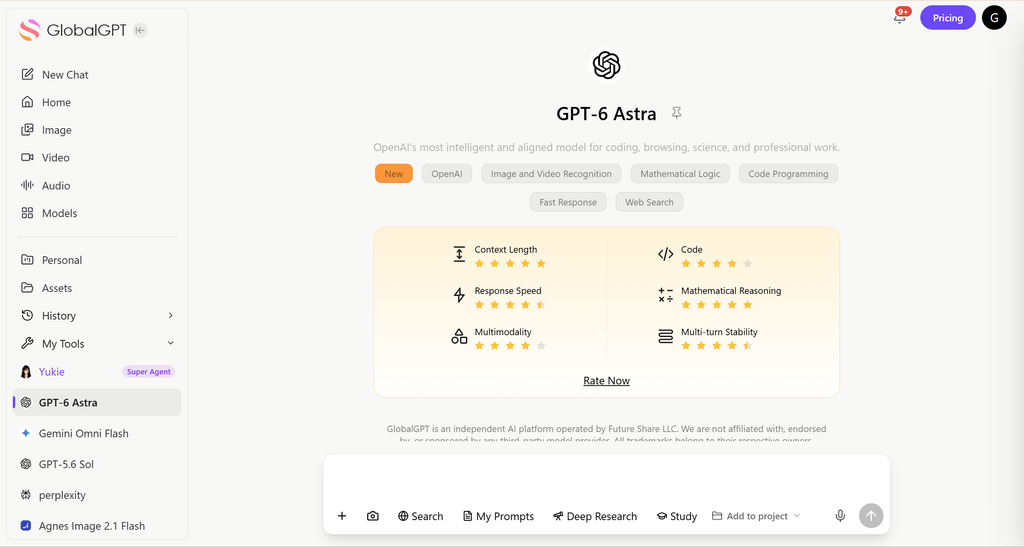
For work that cannot wait, GlobalGPT is a practical, lower-cost option to consider: read a source PDF, develop the draft with GPT-6 or Claude, and move into images or an agent-led task in one workspace. Its Pro annual plan is advertised at $10.8 per month equivalent. If your deadline involves a finished report or campaign rather than another chat reply, that broader workflow is worth looking at.
ChatGPT Plus limits at a glance
O ChatGPT Plus custa $20 por mês, billed monthly. That buys expanded access, not an identical allowance for every feature. The useful question is “Which part of Plus am I using?”
A limit on one row does not tell you how much is left on another. For example, a PDF can be too large even when you have uploaded nothing that day. And having weekly Work usage left does not prevent you from reaching its shorter five-hour allowance.
Message limits: everyday chat versus Thinking
If you mainly ask short questions or revise everyday text, the unlimited-chat description is relevant. If you deliberately select a stronger thinking level, you are using a more demanding capability with a separate allowance. These are different promises within the same subscription.
For Plus, GPT-6 offers Medium and High thinking. When GPT-6 is selected, those levels use GPT-6 Sol. OpenAI’s model guide explains that ChatGPT may continue with another available model when you reach a Thinking limit, and displays a reset time when that information is available. GPT-6 is rolling out to eligible paid accounts; if it has not appeared in your model menu yet, work from the model options your account shows.
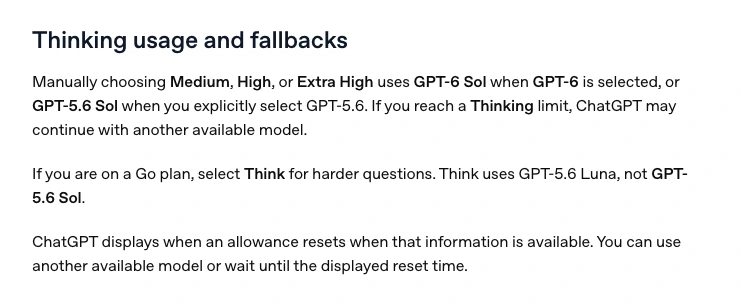
This is why an old “160 messages every three hours” or “3,000 Thinking messages a week” table can send you in the wrong direction. Those numbers are not a reliable description of today’s entire Plus plan. For the task in front of you, use the model name, selected thinking level and limit notice together.
A sensible split is to use ordinary chat for wording, formatting and simple extraction, then reserve deeper reasoning for the difficult decision: checking an argument, reconciling conflicting evidence or solving a hard code problem. You do not need the same level for every step.
The five-hour and weekly Work/Codex limits
ChatGPT Work and Codex share usage. Opening the CLI after using Work does not create a fresh allocation. Local messages and cloud chats also draw on the same plan allowance. The documentação oficial de preços gives the following Plus estimates:
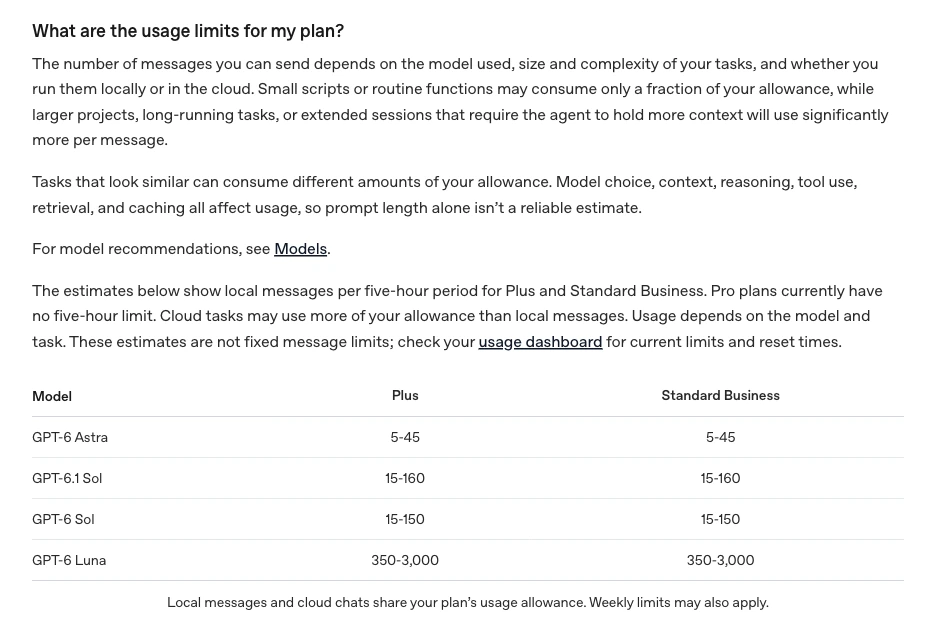
A request to fix one function and a request to investigate an entire repository may each look like “one message” to you. They can involve very different amounts of reading, reasoning and tool work. Prompt length alone will not predict the cost: a short instruction can start a long job.
Before launching a large task, check both the short-window and weekly readings. If you have little left, ask for a bounded result—such as reviewing two named files—rather than a broad request to “improve everything.” For routine tasks, a smaller model can stretch the same allowance. Standard speed also preserves more included usage than Fast: OpenAI lists Fast at 2.5 times the included-subscription usage rate for the same model.
When do ChatGPT Plus limits reset?
There is no universal midnight reset for Plus. Follow the clock attached to the feature you have exhausted:
Can you pay to reset a limit?
For eligible Plus and Pro accounts, OpenAI offers an instant Work/Codex reset through desktop Usage settings, or an offer shown after the weekly allowance is exhausted. A completed purchase restores the five-hour and weekly allowance immediately. The next weekly period begins with your first Work/Codex request after the reset; its next automatic reset is seven days later.
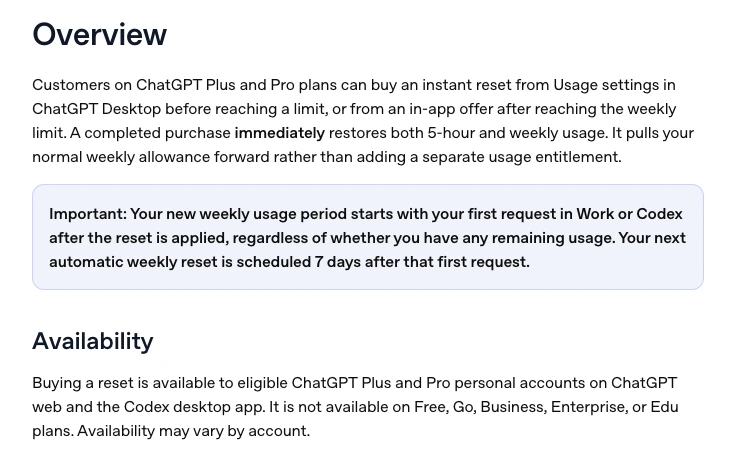
Before paying, look at the price offered to your account, what usage remains and how soon the automatic reset is due. The reset takes effect immediately and cannot be saved for later. Credits are another option for supported usage after included limits run out; they work as a pay-as-you-go balance. A reset is not extra credits, and neither option is a universal purchase for every ChatGPT feature.
File and image upload limits: why waiting may not help
An “upload limit” can mean several things. Check which one applies before repeatedly sending the same file:
- Document or presentation size: up to 512 MB per file.
- Text/document content: up to two million tokens per file. This token cap does not apply to spreadsheets.
- CSV files and spreadsheets: approximately 50 MB, depending on row size.
- Image uploads: 20 MB per image.
- Velocidade de envio: up to 80 files every three hours; OpenAI may reduce this at peak times.
- Shared stored uploads: 25 GB per user.
- Projects on Plus: up to 25 files per project.
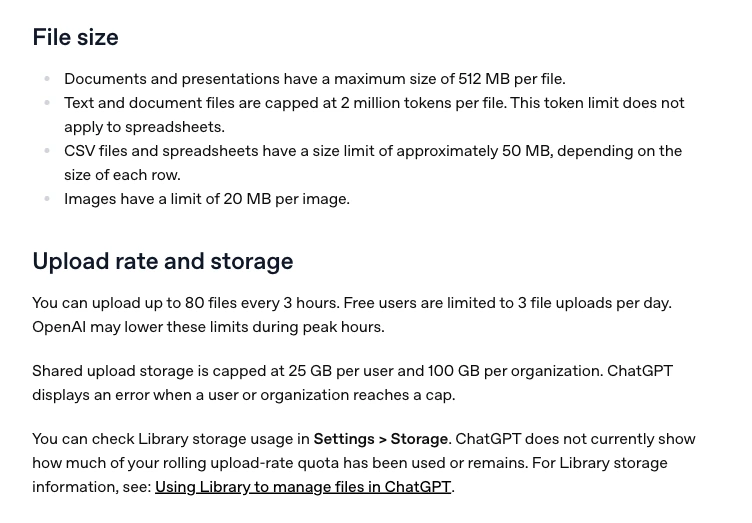
For example, a 30 MB image fails the per-image size rule even if it is your first upload. A 26th file can exceed a Plus project’s capacity even if each file is small. These situations call for resizing or reorganizing the material, not waiting until tomorrow.
Uso Settings → Storage to inspect library capacity. OpenAI does not show a remaining-file counter for the rolling upload-rate quota. Failed uploads can count toward that rate, so repeated retries can make troubleshooting harder. Also check the Library itself when managing space: deleting a conversation does not necessarily remove a file saved in the Library.
Image generation, deep research and Voice
O 20 MB image limit is for uploading an image, not the number of images you can generate. For image creation in Chat, use the tool’s own limit message instead of applying an upload rule or an old fixed images-per-day claim. Image generation inside Work/Codex uses its shared allowance; OpenAI says turns with image generation use included limits roughly three to five times faster on average, depending on image quality and size.
Para deep research, look at the remaining-task counter before starting a large investigation. The official help page ties fixed monthly allowances to 30 days from first use. A quick source lookup and a full research task are different jobs; use a full run when you need the wider investigation.
Para Voice in Chat, the Plus allowance is three hours of GPT-Live-1 per rolling 24 hours. Desktop Voice has separate usage rules. Check which interface you are using before interpreting a voice limit as a problem with your normal chat allowance.
What to do when ChatGPT says “limit reached”
- Read the feature and model named in the notice. Save the reset time if one appears. “Thinking,” “upload,” and “Work” point to different fixes.
- Check the matching meter. For Work/Codex, use the usage dashboard or
/status. For research, use its task counter. For stored files, open Settings → Storage. - Separate a timed allowance from a capacity problem. Waiting can help an upload-rate limit; it will not shrink an oversized file or reduce a full project.
- Protect the work you have already done. Keep the source files, draft, decisions and next step together so you can resume without rebuilding the brief.
- Choose the smallest useful next action. Finish routine edits with an available model, wait for the stated reset, compare eligible paid options, or continue the task in another workspace.
If the displayed reset has passed and the same problem persists, check Status do serviço do OpenAI and contact support with the error, timestamp, timezone and affected feature. Support can investigate a problem, but the model guide says it does not reset ChatGPT or Codex usage limits.
Keep a short handoff brief ready
When a task stops halfway through, save this alongside the files you need:
Goal: What finished result do I need?
Sources: Which files and links matter?
Decisions: What have I already approved?
Current draft: What should the next assistant build on?
Next step: What exactly should it do now?
That brief is useful whether you return after a reset or continue in GlobalGPT. For a research-and-writing task, take the relevant PDF and current draft, then ask for the missing section or a source check. You preserve the work already done and give the next step a clear finish line.
Keep the task moving with GlobalGPT
If interruptions are becoming part of your working day, choose around the result you need. A student finishing a report, a marketer preparing a campaign and a developer building a landing page need different kinds of help. GlobalGPT brings those steps into one affordable workspace, with models such as GPT-6 and Claude alongside tools that carry the output forward.
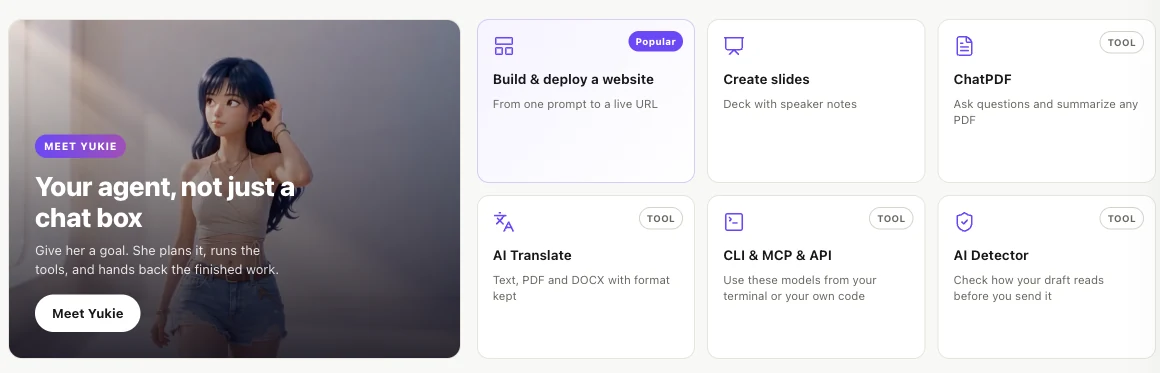
- Research or a client report: use ChatPDF to ask questions about the source document and extract the important points. Bring those points into GPT-6 or Claude to develop the argument, then turn the finished outline into slides when the deliverable is a presentation.
- A campaign that needs words and visuals: draft the copy, generate the image, and use Canvas to continue creating or Animate to develop motion from a still. The benefit is a path from the idea to usable creative material.
- A landing-page project: start with the brief or code question, then continue with Yukie for website development and design. For a terminal-based workflow, GlobalGPT also offers CLI, API and MCP access.
Price matters here. GlobalGPT’s annual-plan offer lists Basic at $5.8, Pro em $10.8 and Unlimited at $25.0 per month equivalent, billed annually. ChatGPT Plus is $20 billed monthly. The lower annual monthly equivalent makes Pro worth considering for everyday document, writing and creative work, especially if you want those tools together. Compare the annual commitment as well as the headline amount.
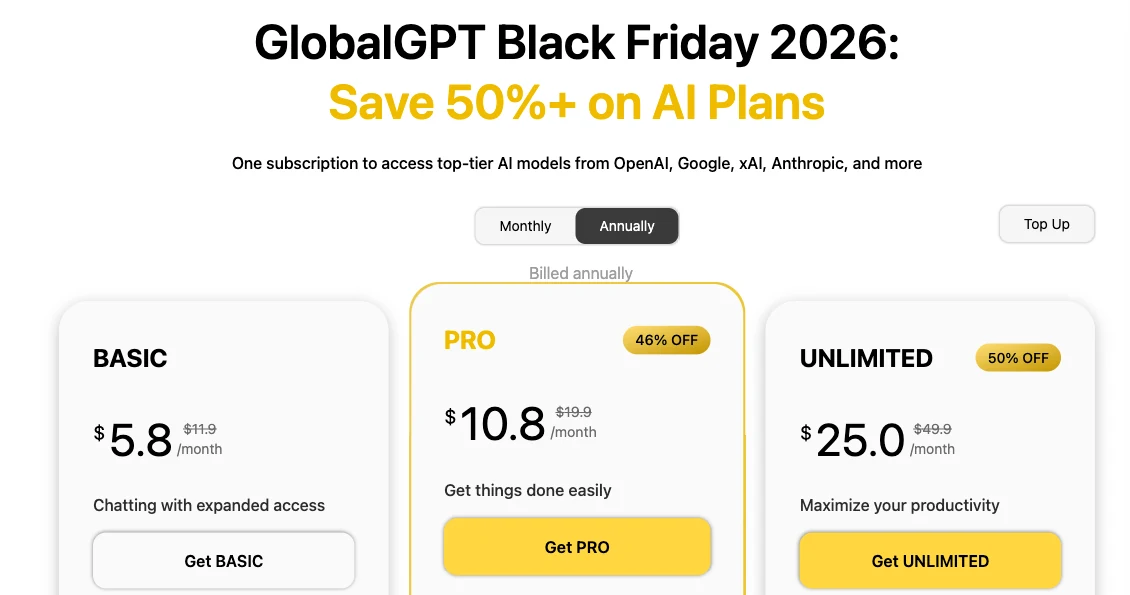
Choose the plan around your workload and its credit allowance. The best value comes from completing the work you actually do—not simply collecting access to another model. For a PDF-to-report-to-presentation workflow, Pro is a sensible starting point to compare.
Have work to finish before the reset?
Bring your source material and the next clear step to GlobalGPT. Read the PDF, finish the draft, and develop the visual or website that comes next—all from one workspace.
Perguntas frequentes
O ChatGPT Plus é ilimitado?
Everyday text chat is listed as unlimited, subject to abuse guardrails. Thinking, file uploads, image generation, deep research, Voice, and Work/Codex have their own limits. Unlimited text chat does not mean unlimited access to every feature.
How many messages can I send with ChatGPT Plus per day?
There is no single published daily number for the whole Plus plan. Ordinary text chat and advanced reasoning have different rules. Work/Codex estimates use five-hour periods, and weekly limits may also apply. Check the feature and model named in your limit notice.
What is the five-hour limit on ChatGPT Plus?
It is a usage allowance for ChatGPT Work and Codex on Plus. OpenAI estimates 15–150 local GPT-6 Sol messages or 15–160 GPT-6.1 Sol messages per five hours, with different estimates for other models. These are task-dependent estimates from a shared allowance, not fixed message counts for everyday Chat.
Can I still be limited after the five-hour reset?
Yes. A weekly Work/Codex allowance may still be exhausted after the shorter window resets. A different feature can also have a separate limit. Check the weekly reading and the exact feature named in the warning.
Does starting a new chat reset my Plus limits?
No. A new conversation does not create a new account allowance. It can help keep a task focused, but it does not clear a Thinking limit, upload-rate limit or shared Work/Codex cap.
Can I buy an immediate reset?
Eligible Plus and Pro accounts may be offered an instant Work/Codex reset. It applies immediately, restores the applicable five-hour and weekly usage, and starts a new weekly period with the first Work/Codex request afterward. Check the account offer for its price and availability.
O ChatGPT Plus inclui o uso da API?
No. The ChatGPT Plus subscription and OpenAI API are billed separately. Using an API key follows API pricing rather than adding free usage to the Plus subscription.



