OpenAI’s GPT Image 2.5 API is a two-model family, not a single callable model named gpt-image-2.5. The current moving aliases are gpt-image-2.5-flare, positioned by OpenAI for fast, high-quality everyday generation, and gpt-image-2.5-sunburst, positioned for precision-focused image editing. Both were released on September 8, 2026. This guide covers the exact IDs, three API paths, supported parameters, custom sizes, official token pricing, rate limits, and a practical cost calculator.
It also reports a separate controlled test through Anywhere’s unified gpt-image-2.5 route. That venue exposed no Flare/Sunburst selector or returned variant label, so its outputs are not presented as native OpenAI API results or assigned to either official model.
What is the GPT Image 2.5 API?
GPT Image 2.5 is OpenAI’s image-generation and editing family released on September 8, 2026. Both official models accept text and return images; editing workflows can also supply image inputs. The important implementation detail is identity: the family name is useful in prose, but production requests should use an exact model ID from the official model pages.
Two models, not one callable family ID
A moving alias follows OpenAI’s current version behind that name. A dated snapshot pins requests to a specific release and is therefore easier to reproduce during regression testing. Use the moving alias when you want compatible model updates without changing code; use a snapshot when consistent behavior matters more than automatically receiving later revisions.
| モデル | Moving alias | Dated snapshot | オフィシャル・ポジショニング | モダリティ |
|---|---|---|---|---|
| フレア | gpt-image-2.5-flare | gpt-image-2.5-flare-2026-09-08 | Fast, high-quality everyday image generation | Text in; image out |
| サンバースト | gpt-image-2.5-sunburst | gpt-image-2.5-sunburst-2026-09-08 | Precision-focused image editing | Text and image in; image out |
These descriptions are OpenAI’s positioning, not a winner determined by our tests. The controlled run later in this article used a third-party unified route that did not disclose which official variant, if either, served a request.
GPT Image 2.5 API quick start
Generate with the Image API
Direct generation uses POST /v1/images/generations. The OpenAI SDK reads your API key from the environment, and GPT Image returns base64-encoded image data rather than a permanent hosted URL. Decode that data and write it using the same extension as output_format.
import base64
from pathlib import Path
from openai import OpenAI

client = OpenAI()
result = client.images.generate(
    model="gpt-image-2.5-flare",
    prompt="A ceramic desk lamp on a white studio sweep, product photo",
    size="1536x1024",
    quality="high",
    output_format="webp",
)

image_bytes = base64.b64decode(result.data[0].b64_json)
Path("lamp.webp").write_bytes(image_bytes)
For a reproducible production test, replace the moving alias with gpt-image-2.5-flare-2026-09-08. Keep the prompt, size, quality, and seed-like application inputs in your own request log; the returned image itself is still the primary artifact.
Edit an image
Direct editing uses POST /v1/images/edits. The API documents multipart uploads and JSON references through image_url または file_id where the selected route supports them. Up to 16 images can be supplied, but that maximum is not a recommendation: fewer, clearly differentiated references are easier to inspect and score.
import base64
from pathlib import Path
from openai import OpenAI

client = OpenAI()
with Path("product.png").open("rb") as source:
    result = client.images.edit(
        model="gpt-image-2.5-sunburst",
        image=[source],
        prompt="Change only the lamp shade to cobalt blue.",
        size="1536x1024",
        output_format="png",
    )

Path("product-edited.png").write_bytes(
    base64.b64decode(result.data[0].b64_json)
)
Use explicit preservation language such as “change only” as a testable constraint, then compare the source and output at full resolution. An edit can satisfy the requested attribute while still reframing or reconstructing untouched regions.
Use the Responses API image-generation tool
You can also call POST /v1/responses with the image-generation tool. This route is useful when image creation is one step in a model-led workflow that also reasons over text or tool results. It is not a drop-in response-shape replacement for the direct Image API: inspect the response output items for the image-generation call instead of assuming data[0].b64_json 存在する。.
response = client.responses.create(
    model="YOUR_RESPONSES_MODEL",
    input="Create a clean product image from this approved brief.",
    tools=[{"type": "image_generation"}],
)

image_calls = [
    item for item in response.output
    if item.type == "image_generation_call"
]
Choose the direct Image API for a narrow generation or edit job with straightforward accounting. Choose Responses when image generation belongs inside a broader agentic sequence. In either case, validate the current official image-generation guide and SDK signature before deploying, because newly released API schemas can evolve.
Parameters, output formats, and size limits
The most useful parameters control quality, output count, progressive previews, moderation, background behavior, format, compression, and dimensions. Treat them as a compatible set rather than independent switches. For example, transparency requires PNG or WebP, while output_compression applies to JPEG and WebP rather than PNG.
| パラメータ | Verified values or rule | Implementation note |
|---|---|---|
品質 | auto, ロー, 中, 高, xhigh, max | Benchmark your own task; a higher label is not automatically the best production choice. |
n | 1-10 | Multiple outputs increase returned work and likely token usage. |
partial_images | 0-3 | Use progressive partials only where supported by the route and client flow. |
moderation | auto または ロー | This setting does not promise that every prompt will be accepted. |
背景 | auto, opaque, transparent | Transparent output requires PNG or WebP. |
output_format | PNG, JPEG, WebP | Returned content is base64 image data. |
output_compression | 0-100 | Applies to JPEG and WebP output. |
Custom dimensions
For a custom size, each side must be a multiple of 16, the aspect ratio must remain between 1:3 and 3:1, neither side may exceed 3,840 pixels, and the total area must fall between 655,360 and 8,294,400 pixels. Sizes above the area of 2560×1440 are documented as experimental.
1536x1024is valid: both sides are multiples of 16, the 3:2 ratio is allowed, and the area is within bounds.1024x1024is valid for the same reasons.1200x800is invalid because 1,200 and 800 are not both multiples of 16, even though the aspect ratio looks reasonable.
Validate dimensions before sending a request so an application bug does not get mixed into model evaluation. Also inspect the decoded file’s actual format and dimensions: a third-party compatibility route may not reproduce every native parameter exactly.
GPT Image 2.5 API pricing
OpenAI prices GPT Image 2.5 by token category. The rates below were verified against the official pricing page on September 10, 2026. GPT Image 2 uses the same listed rates, but equal rates do not mean equal token consumption for the same prompt or image.
| トークンのカテゴリ | 100万トークンあたりの価格 |
|---|---|
| テキスト入力 | $5.00 |
| キャッシュされたテキスト入力 | $1.25 |
| 画像入力 | $8.00 |
| キャッシュされた画像の入力 | $2.00 |
| 画像出力 | $30.00 |
ソース: OpenAI APIの価格設定. USD, before taxes or provider-specific charges.
Calculate a real request cost
For each category, multiply returned tokens by its per-million-token rate, then divide by 1,000,000. Sum the five category costs for one request. The official GPT Image 2 calculator does not estimate GPT Image 2.5 token consumption, so there is no defensible universal “cost per image” without actual usage data.
Official token rates
GPT Image 2.5 API cost calculator
| テキスト入力 | $0.0000 |
|---|---|
| キャッシュされたテキスト入力 | $0.0000 |
| 画像入力 | $0.0000 |
| キャッシュされた画像の入力 | $0.0000 |
| 画像出力 | $0.0000 |
GPT Image 2.5 is priced by token usage. OpenAI’s GPT Image 2 calculator does not estimate GPT Image 2.5 token consumption, so this calculator uses the token counts supplied here rather than inferring them from image size or quality.
For production planning, also track cost per acceptable output: total batch cost divided by the number of outputs that pass your task-specific gate. That is your own operating metric, not an OpenAI billing unit. A request that is cheap but unusable can be more expensive than a higher-token result that ships without regeneration.
Rate limits and production planning
Rate limits include tokens per minute (TPM) and images per minute (IPM). Plan against both: a request can fit the image count limit while still exceeding token throughput. The two official GPT Image 2.5 model pages currently show the same table.
| Usage tier | TPM | IPM |
|---|---|---|
| 無料 | 非対応 | 非対応 |
| ティア1 | 100,000 | 5 |
| ティア2 | 250,000 | 20 |
| ティア3 | 800,000 | 50 |
| ティア4 | 3,000,000 | 150 |
| ティア5 | 8,000,000 | 250 |
Retries, concurrency, and failure classes
Separate authentication, invalid-parameter, rate-limit, capacity, transport, timeout, and invalid-output events in logs. Authentication or parameter errors usually need a configuration fix, not a retry. Rate-limit and capacity responses may justify bounded backoff. Transport failures and timeouts need an idempotency strategy so the application does not accidentally create duplicate billable work.
Most importantly, an operational failure is not an image-quality result. Only score quality after a valid, decodable output exists. Record observed latency with route, date, endpoint, and request conditions; one venue’s latency is not a permanent model speed claim.
What happened in controlled Anywhere GPT Image 2.5 tests
Controlled test setup
- Execution venue
- Anywhere, using its OpenAI-compatible endpoints
- Route tested
gpt-image-2.5, with no exposed Flare/Sunburst selector- Formal test date
- 2026年9月9日
- Evidence rule
- Frozen prompts and inputs; preserve the first valid output; no cosmetic reruns
- 得点
- Task-specific checks for text, count, order, requested edits, preservation, and obvious artifacts
- Cost method
- Anywhere-returned usage mapped to OpenAI’s official token rates; not an Anywhere invoice
These results describe five valid first outputs and five failed cases from this batch. They do not establish native OpenAI performance, identify Flare or Sunburst, or prove production reliability.
The generation, edit, and reference-composition tasks below each used one first valid output. The five successful formal requests had a combined calculated cost of $0.088603. That total excludes failed requests, fixture creation, the readiness probe, and the hero image.
G01: exact-text product ad
The prompt required the line MAKE ROOM FOR IDEAS exactly once, one lamp, a fixed composition, and explicit exclusions. The first valid output reproduced the text once and passed every declared check.
Tested via Anywhere’s unified gpt-image-2.5 route on September 9, 2026.- ステータス
- Valid first output
- タスクの得点
- 10/10
- Elapsed time
- 6,150 ms
- Calculated cost
- $0.041645
Exact request, complete inputs, settings, and objective checks
ステータス valid_output on attempt 1; first valid output preserved.
ルート: Anywhere OpenAI-compatible /images/generations と gpt-image-2.5.
正確なプロンプト
Create a 3:2 horizontal studio product advertisement for a fictional matte-black portable desk lamp on a clean white and pale gray set. Show exactly one lamp, angled slightly to the right, with a soft warm pool of light and generous negative space. Include exactly one line of text: "MAKE ROOM FOR IDEAS". Set that line in clear uppercase sans-serif letters centered in the upper third. No other text, no logo, no watermark, no people, and no extra products.
Complete input: Text only. No image input was supplied.
Actual request settings
サイズ1536x1024品質高output_formatwebp背景opaquen1
客観的なチェック
exact_text2/2
MAKE ROOM FOR IDEAS appears once, complete and correctly spelled; no additional text is visible.
required_object2/2
Exactly one complete matte-black desk lamp is present.
構成2/2
The lamp faces right, the warm light pool is visible, negative space is preserved, and the text sits in the upper third.
prohibitions2/2
No logo, watermark, people, or extra products are visible.
first_output_usability2/2
The first valid output is usable without regeneration or major reconstruction.
Complete output
The complete 1536×1024 first-valid output appears immediately below this evidence panel. The response returned PNG even though the request asked for WebP.

G02: counted-object layout
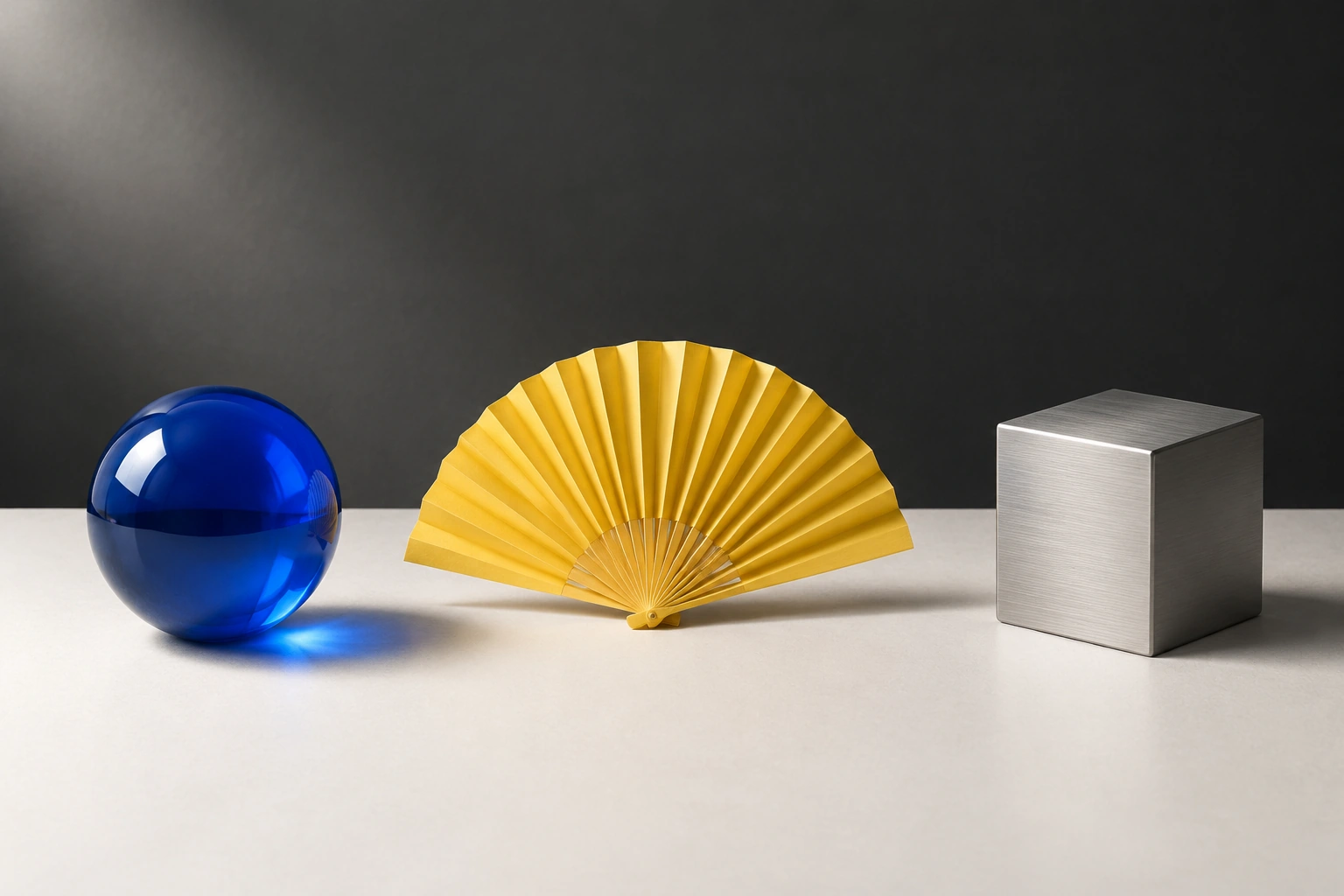
The request specified exactly three objects: a blue glass sphere, a yellow folded fan, and a steel cube in left-to-right order. The first valid output preserved the count, sequence, and recognizable materials.
Tested via Anywhere’s unified gpt-image-2.5 route on September 9, 2026.- ステータス
- Valid first output
- タスクの得点
- 10/10
- Elapsed time
- 33,577 ms
- Calculated cost
- $0.005505
Exact request, complete inputs, settings, and objective checks
ステータス valid_output on attempt 1; first valid output preserved.
ルート: Anywhere OpenAI-compatible /images/generations と gpt-image-2.5.
正確なプロンプト
Create a 3:2 horizontal editorial still life on a charcoal and off-white studio set. Show exactly three objects: one cobalt-blue glass sphere on the left, one folded yellow paper fan in the center, and one brushed-steel cube on the right. Keep all three fully visible, evenly spaced, and lit by one soft light from the upper left. No text, no logo, no watermark, no people, no extra objects, and no decorative symbols.
Complete input: Text only. No image input was supplied.
Actual request settings
サイズ1536x1024品質高output_formatwebp背景opaquen1
客観的なチェック
object_count2/2
Exactly one blue glass sphere, one yellow folded fan, and one steel cube are present.
order_and_visibility2/2
The objects are fully visible in the required left, center, and right order.
materials_and_colors2/2
The glass, paper, and brushed-metal materials and requested colors are clear.
lighting_and_spacing2/2
The scene uses coherent upper-left lighting and even spacing.
prohibitions_and_artifacts2/2
No text, logo, watermark, people, extra objects, or major artifacts are visible.
Complete output
The complete 1536×1024 first-valid output appears immediately below this evidence panel. The response returned PNG even though the request asked for WebP.
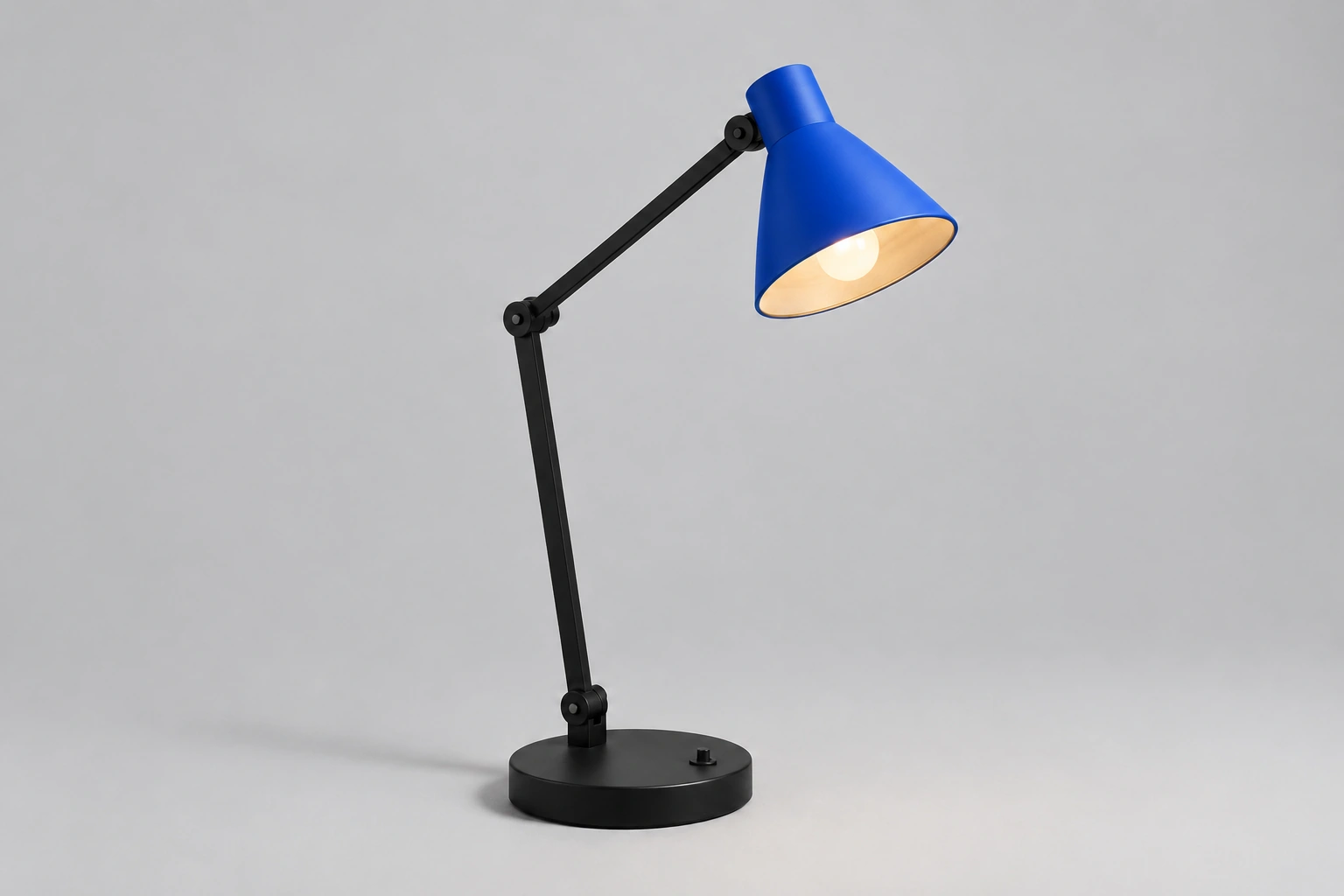
E01: change one color
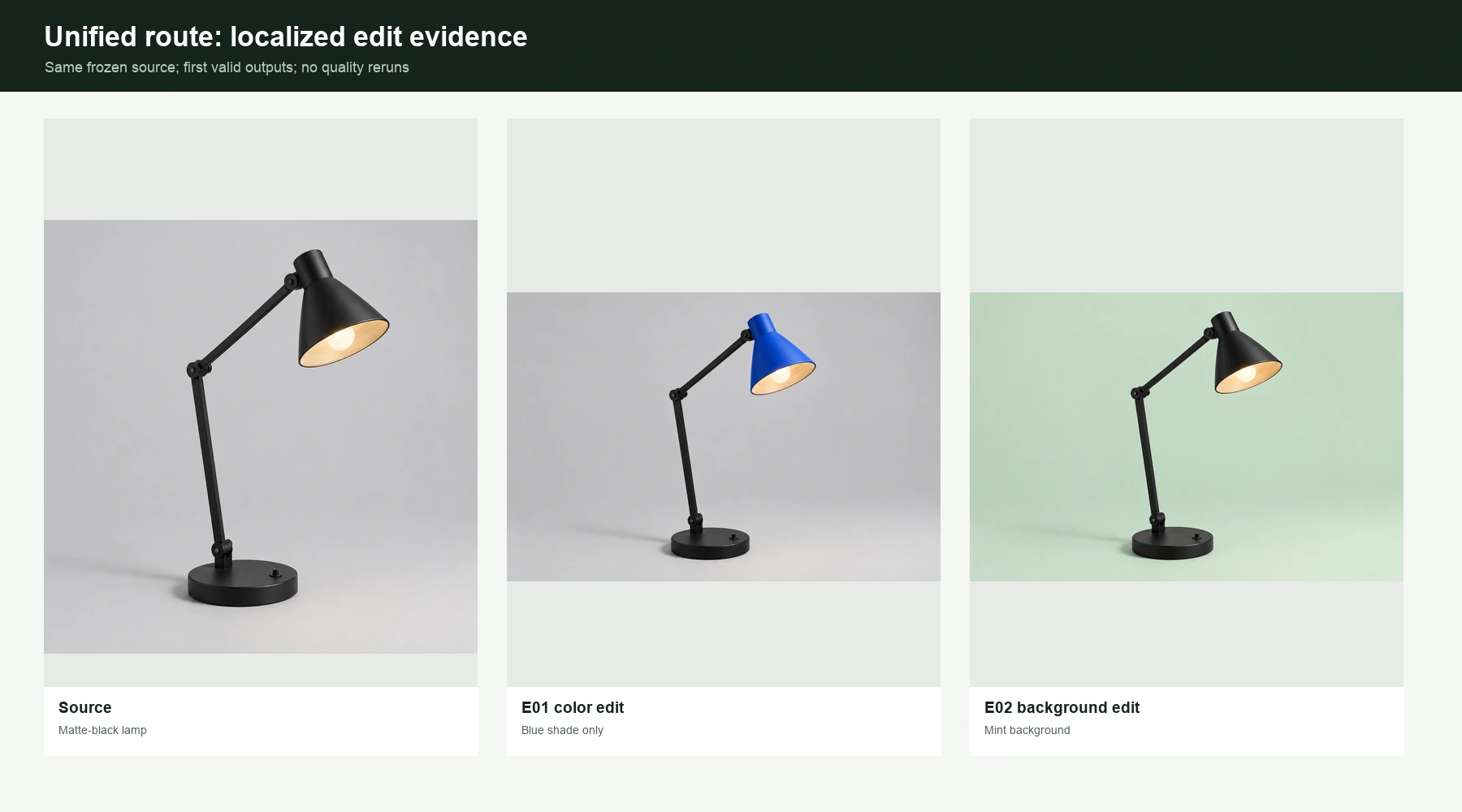
The edit changed the matte-black lamp shade to cobalt blue while keeping the product recognizable. It lost one point because converting the square source to a 3:2 output introduced mild reframing and reconstruction outside the target attribute.
Tested via Anywhere’s unified gpt-image-2.5 route on September 9, 2026.- ステータス
- Valid first output
- タスクの得点
- 9/10
- Elapsed time
- 41,387 ms
- Calculated cost
- $0.016320
Exact request, complete inputs, settings, and objective checks
ステータス valid_output on attempt 1; first valid output preserved.
ルート: Anywhere OpenAI-compatible /images/edits と gpt-image-2.5.
正確なプロンプト
Edit only the lamp shade color from matte black to cobalt blue. Preserve the lamp's exact shape, position, scale, base, arm, switch, shadows, warm light, background, camera angle, crop, and every other visible detail. Add no text, logo, watermark, person, or extra object.
Complete image input:
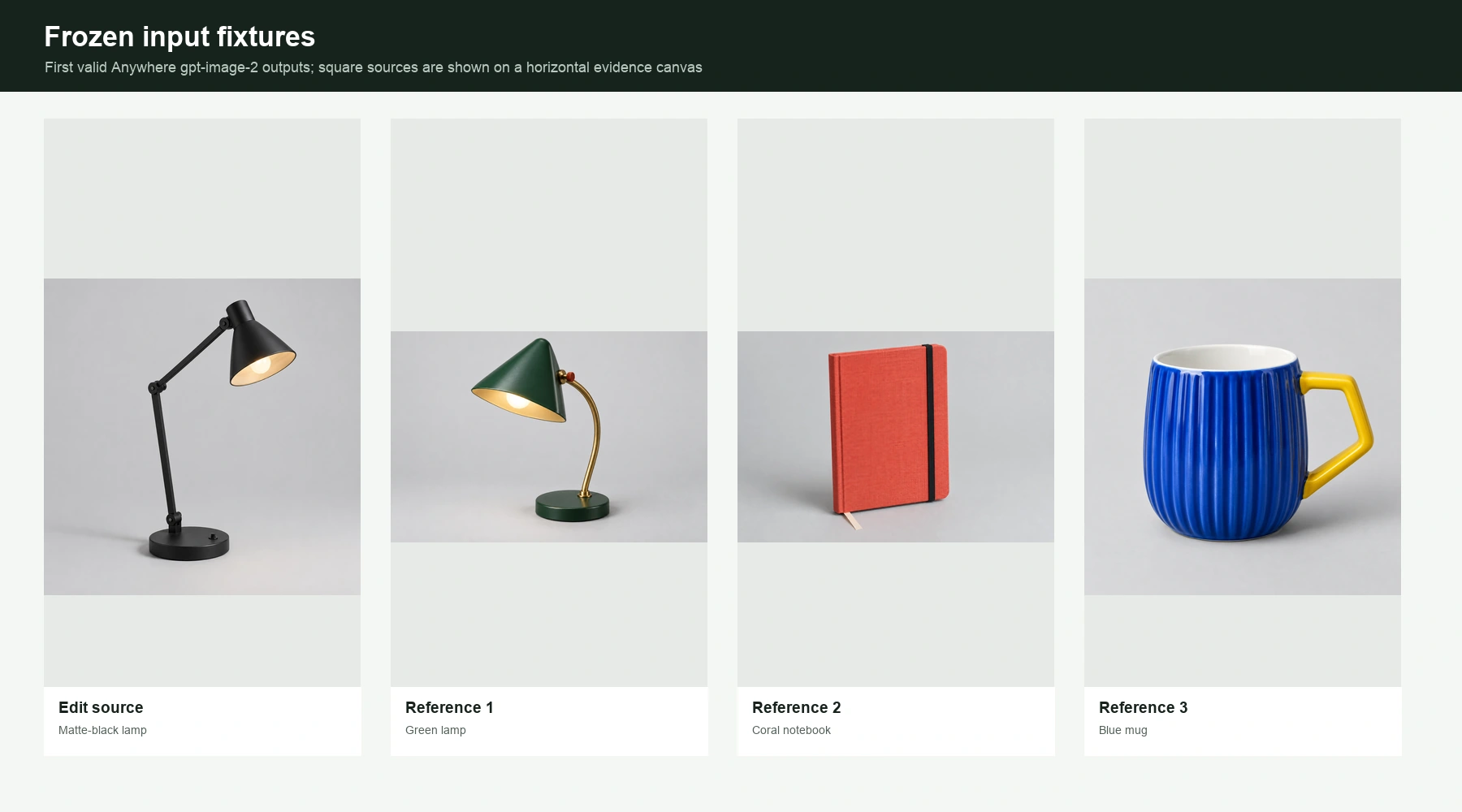
- Input 1:
00-control/fixtures/edit-source-lamp.png(1,328,812 bytes; SHA-256a93d7c90aa57c7949939f011918fcfe531f34fa039859d043556c0cd26dcea2b)
Actual request settings
サイズ1536x1024品質高output_formatwebp背景opaquen1
客観的なチェック
requested_change2/2
The shade changes from matte black to cobalt blue.
geometry_position_scale_crop1/2
The lamp remains recognizable, but the square source is reframed and slightly reconstructed for the 3:2 output.
non_target_preservation2/2
The base, arm, switch, bulb, and black non-target regions remain materially consistent.
lighting_edges_materials2/2
Lighting, shadows, edges, and material rendering remain coherent.
first_output_usability2/2
The first valid output is usable without regeneration or major repair.
Complete output
The complete 1536×1024 first-valid output appears immediately below this evidence panel. The response returned PNG even though the request asked for WebP.
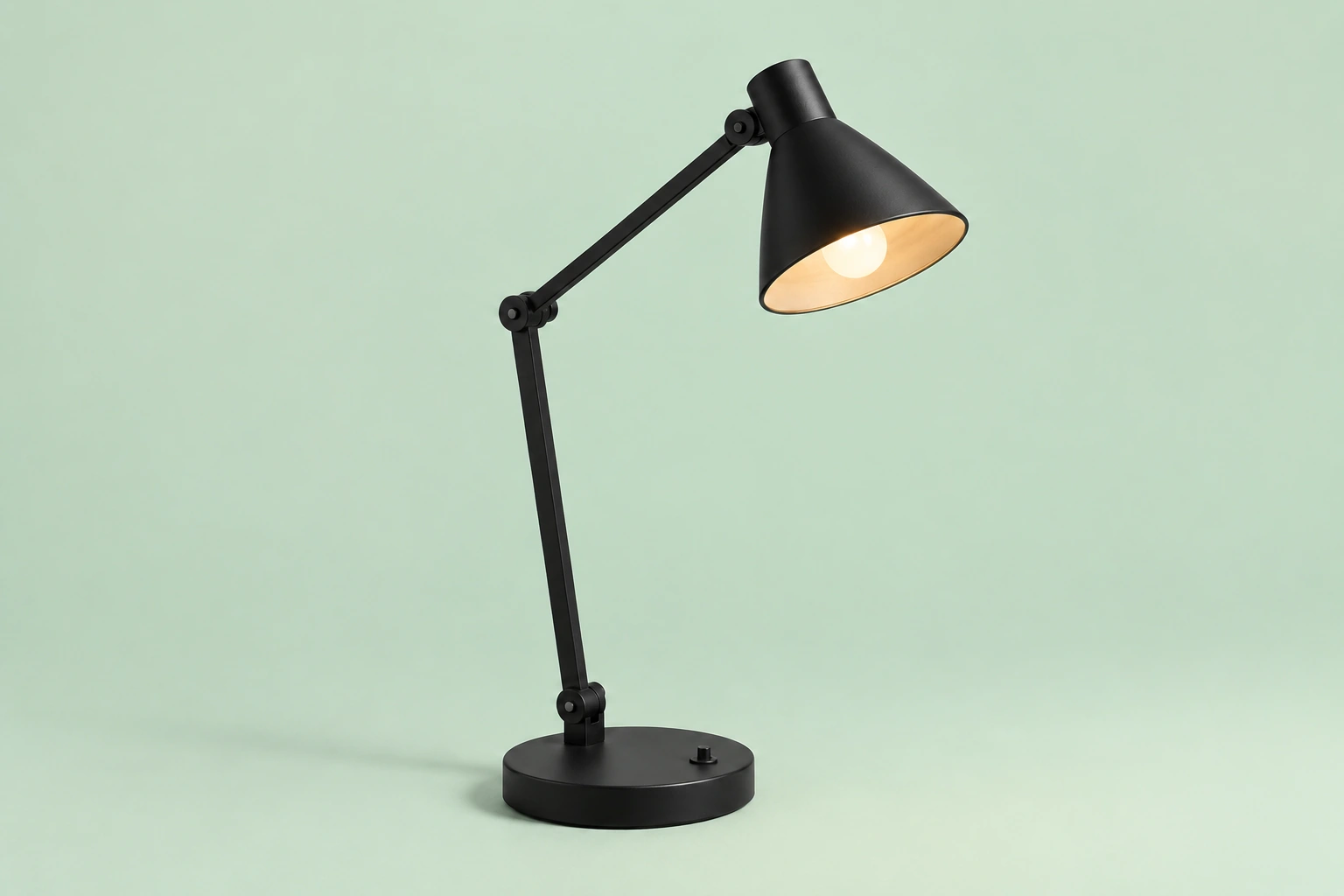
E02: replace the background
The edit changed the background to soft mint green and kept the lamp materially consistent. As with E01, the requested change passed while the aspect-ratio conversion caused slight reframing and reconstruction.
Tested via Anywhere’s unified gpt-image-2.5 route on September 9, 2026.- ステータス
- Valid first output
- タスクの得点
- 9/10
- Elapsed time
- 50,151 ms
- Calculated cost
- $0.007208
Exact request, complete inputs, settings, and objective checks
ステータス valid_output on attempt 1; first valid output preserved.
ルート: Anywhere OpenAI-compatible /images/edits と gpt-image-2.5.
正確なプロンプト
Change only the studio background from pale gray to a flat soft mint green. Preserve every part of the matte-black lamp, including its color, shape, position, scale, base, arm, switch, illuminated bulb, warm light, shadows, camera angle, and crop. Add no text, logo, watermark, person, or extra object.
Complete image input:
- Input 1:
00-control/fixtures/edit-source-lamp.png(1,328,812 bytes; SHA-256a93d7c90aa57c7949939f011918fcfe531f34fa039859d043556c0cd26dcea2b)
Actual request settings
サイズ1536x1024品質高output_formatwebp背景opaquen1
客観的なチェック
requested_change2/2
The studio background changes to soft mint green.
geometry_position_scale_crop1/2
The lamp remains recognizable, but the square source is reframed and slightly reconstructed for the 3:2 output.
non_target_preservation2/2
The lamp remains matte black and retains its major base, arm, shade, switch, and bulb details.
lighting_edges_materials2/2
Lighting, shadows, edges, and materials remain coherent after the background edit.
first_output_usability2/2
The first valid output is usable without regeneration or major repair.
Complete output
The complete 1536×1024 first-valid output appears immediately below this evidence panel. The response returned PNG even though the request asked for WebP.
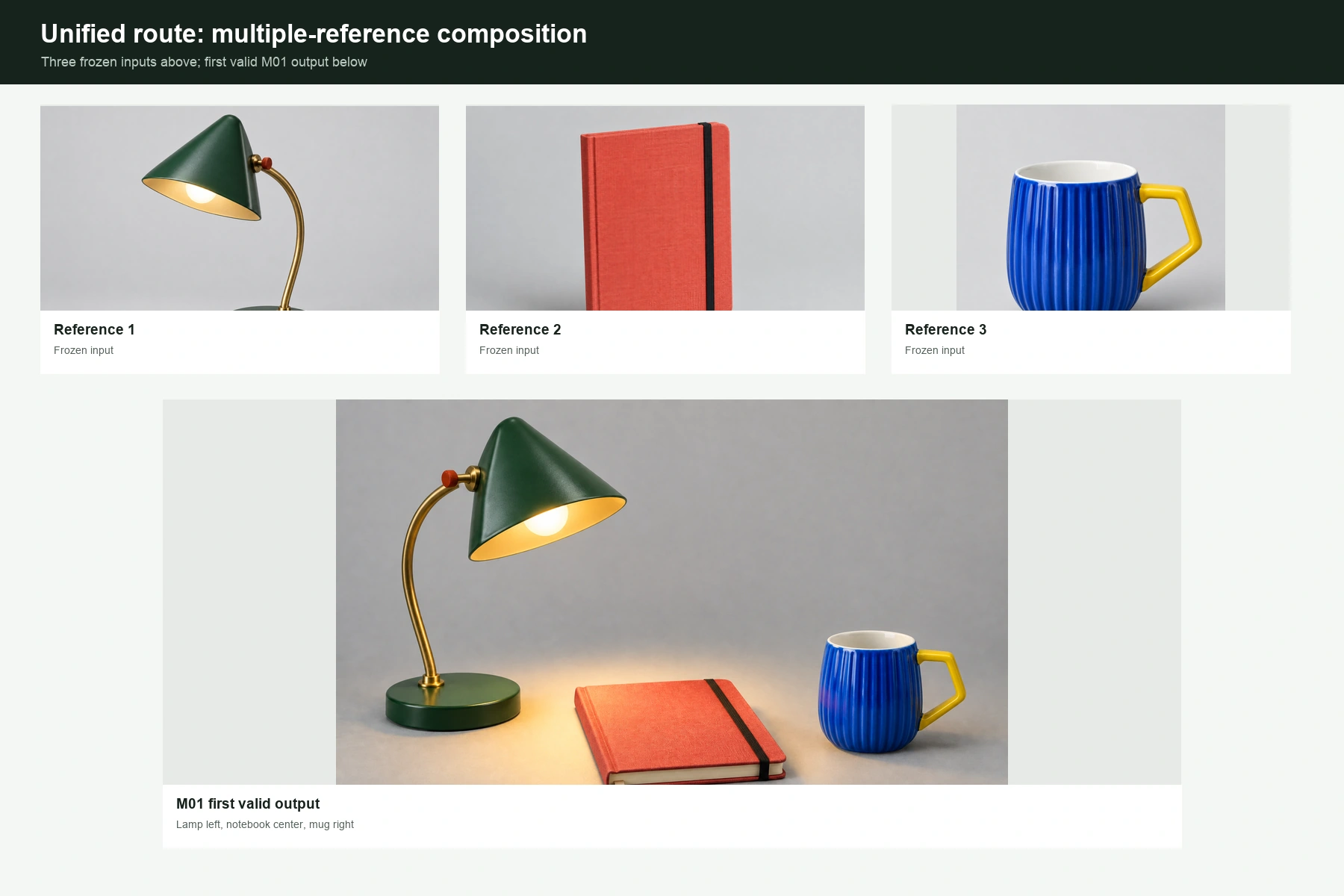
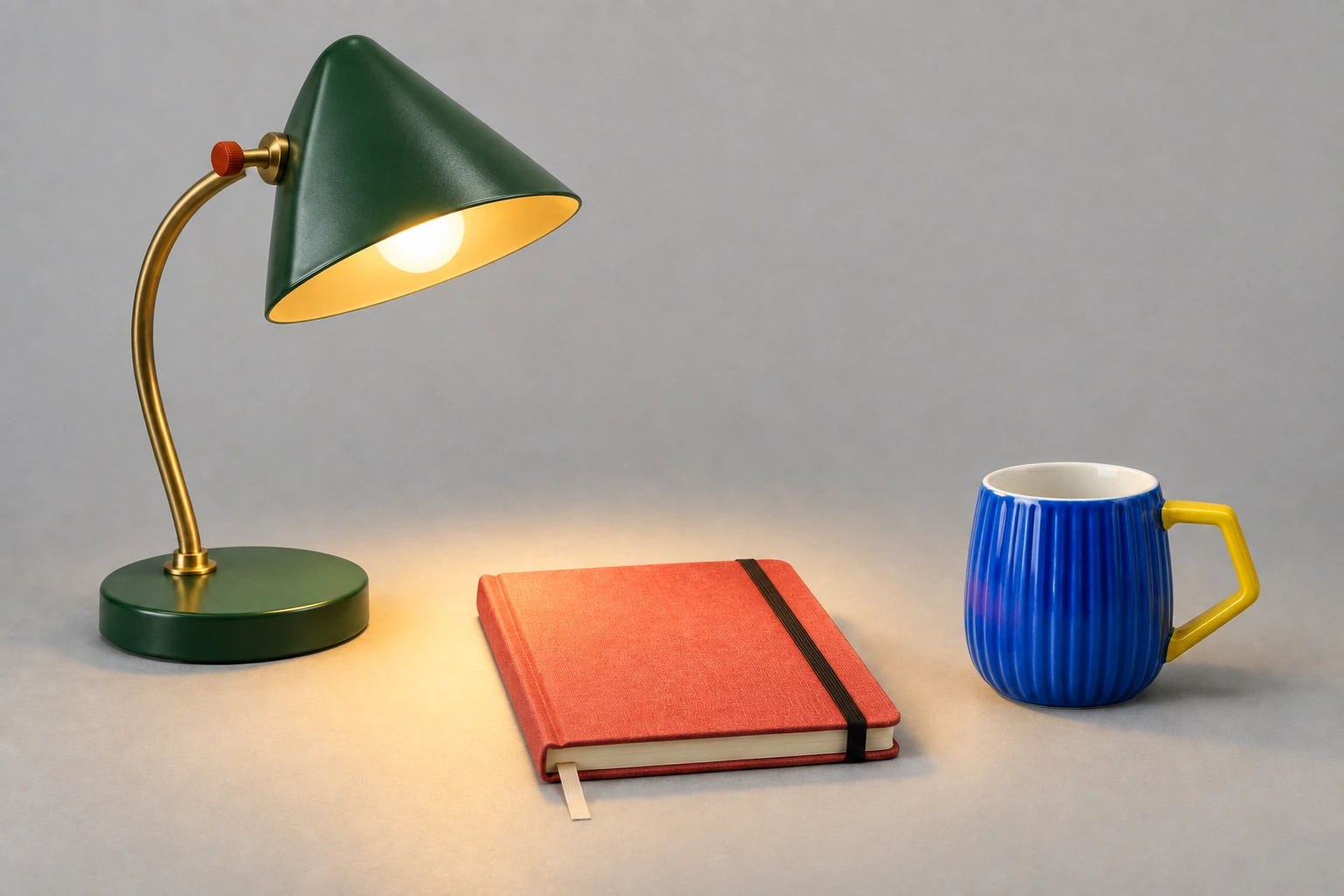
M01: combine three references
The output retained the green lamp, coral notebook, and blue mug and placed them in the requested left-center-right arrangement. This shows success on one frozen three-reference composition, not a general guarantee for the documented maximum of 16 inputs.
Tested via Anywhere’s unified gpt-image-2.5 route on September 9, 2026.- ステータス
- Valid first output
- タスクの得点
- 10/10
- Elapsed time
- 105,469 ms
- Calculated cost
- $0.017925
Exact request, complete inputs, settings, and objective checks
ステータス valid_output on attempt 1; first valid output preserved.
ルート: Anywhere OpenAI-compatible /images/edits と gpt-image-2.5.
正確なプロンプト
Using the three reference images in their supplied order, create a 3:2 horizontal desk scene. Preserve the distinctive shape and material of each reference object. Place the lamp once on the left, the closed notebook once in the center, and the mug once on the right. The lamp casts a warm pool of light across the notebook without hiding it. Clean neutral studio background. No text, no logo, no watermark, no people, no duplicate objects, and no additional products.
Complete image inputs:
- Input 1:
00-control/fixtures/ref-lamp.png(1,334,151 bytes; SHA-25640c72915de60ba32e70de009b12619f3ffa8643460fd8e8326ffe3d94d215987) - Input 2:
00-control/fixtures/ref-notebook.png(2,067,635 bytes; SHA-256e96298c43d0b04ec4f50aa66d9a4005f3236fa51d945394d257303dd9e790179) - Input 3:
00-control/fixtures/ref-mug.png(1,444,324 bytes; SHA-2561d4cec622254b8533c5122fc5c0b2432b38e39fb3c16412dab02b744de5e538f)
Actual request settings
サイズ1536x1024品質高output_formatwebp背景opaquen1
客観的なチェック
object_presence_and_count2/2
One lamp, one closed notebook, and one mug are present.
reference_identity2/2
The green-and-brass lamp, coral notebook, and blue ribbed mug preserve their distinctive identities and materials.
spatial_relation2/2
The lamp is left, notebook center, and mug right as requested.
scene_coherence2/2
Scale, perspective, lighting, shadows, and the warm pool of light are coherent.
prohibitions_and_artifacts2/2
No text, logo, watermark, people, duplicate products, substitutions, or material artifacts are visible.
Complete output
The complete 1536×1024 first-valid output appears immediately below this evidence panel. The response returned PNG even though the request asked for WebP.
Across the five valid first outputs, the declared checks passed strongly: three scored 10/10 and two scored 9/10. The useful boundary is equally important. This is task-level evidence from one compatibility route, with no repeat batch and no disclosed official variant. For better results in your own work, use a fixed brief, explicit constraints, consistent references, and a review gate; this guide to improve AI image generation accuracy expands that workflow.
The tested route also showed a format mismatch worth logging separately: successful formal requests asked for WebP but returned PNG, while preserving the requested 1536×1024 dimensions. A readiness request asked for 1024×1024 WebP and returned a 1254×1254 PNG. These are observations about Anywhere’s unified route on the test date, not behavior attributed to OpenAI’s native API.
How should you choose a GPT Image 2.5 route?
Start with the workflow you need, then validate it against a frozen task. OpenAI’s model descriptions give a sensible first candidate, but they do not replace a test using your own prompts, reference images, acceptance rules, and latency budget.
| ルート | Use it to test | Identity and evidence boundary |
|---|---|---|
gpt-image-2.5-flare | Everyday generation where speed and output quality both matter | Official OpenAI positioning; not hands-on tested in this article |
gpt-image-2.5-sunburst | Editing workflows where precision and source preservation matter | Official OpenAI positioning; not hands-on tested in this article |
| Dated snapshots | Regression tests and reproducible production behavior | Pin the September 8 snapshot instead of the moving alias |
どこでも gpt-image-2.5 | A provider-specific unified compatibility route | Five valid task results reported here; no Flare/Sunburst mapping and no native OpenAI attribution |
Run a representative generation and edit task before committing a production workflow. Compare acceptable-output rate, preservation, latency distribution, and returned usage rather than choosing from a single attractive sample. If your team benefits from routing different jobs to different tools, compare the best AI image generators and keep the selection decision at the task level.
Common implementation errors
- Sending a family label instead of an exact official model ID. 用途
gpt-image-2.5-flareまたはgpt-image-2.5-sunburston the native API, unless your provider explicitly documents a different route. - Parsing every response like the direct Image API. The Responses API returns tool-call output items, so its extraction logic differs from
images.generateまたはimages.edit. - Treating base64 data as a hosted image URL. Decode the bytes, validate the file, and store it in your own approved media system.
- Using an invalid custom size. Check multiples of 16, area, aspect ratio, and maximum side length before the request.
- Combining incompatible output options. Transparency needs PNG or WebP; compression control applies to JPEG and WebP.
- Regenerating until a result looks good, then calling it the first output. Preserve the first valid output and report retries separately if you want an honest model evaluation.
- Scoring a timeout or capacity response as bad image quality. No valid image means no quality score; log the event under availability or transport.
GPT Image 2.5 API FAQ
Does GPT Image 2.5 have an API?
Yes. OpenAI documents direct image generation, direct image editing, and image generation through the Responses API tool.
What are the exact GPT Image 2.5 model IDs?
The moving aliases are gpt-image-2.5-flare そして gpt-image-2.5-sunburst. The September 8, 2026 snapshots add -2026-09-08 to each alias.
How much does the GPT Image 2.5 API cost per image?
There is no verified flat price per image. Cost depends on returned text-input, cached-text, image-input, cached-image, and image-output tokens. Use the official per-million-token rates with actual usage.
Can GPT Image 2.5 edit multiple images?
Yes. The editing API documents up to 16 input images. That is a supported maximum, not a guarantee that every 16-image composition will preserve every detail.
Can GPT Image 2.5 return a transparent PNG or WebP?
Yes. Set the background to transparent and use PNG or WebP output. Verify the decoded file contains an alpha channel before relying on it in a production asset pipeline.
What are the GPT Image 2.5 API rate limits?
Free access is unsupported in the current table. Tier 1 starts at 100,000 TPM and 5 IPM; Tier 5 reaches 8,000,000 TPM and 250 IPM, with Tier 2-4 limits shown above. Check the current model page before launch.
結論
Use Flare or Sunburst according to the official workflow positioning, then verify the choice with your own frozen tasks. Pin a dated snapshot when reproducibility matters, decode and inspect the returned file, and calculate cost from actual token usage rather than a guessed per-image figure. Our Anywhere batch produced five strong task-bounded first outputs, but it did not reveal an official variant, complete the transparency or quality-tier tests, or establish broad reliability.