What Zendesk Voice AI agents actually change
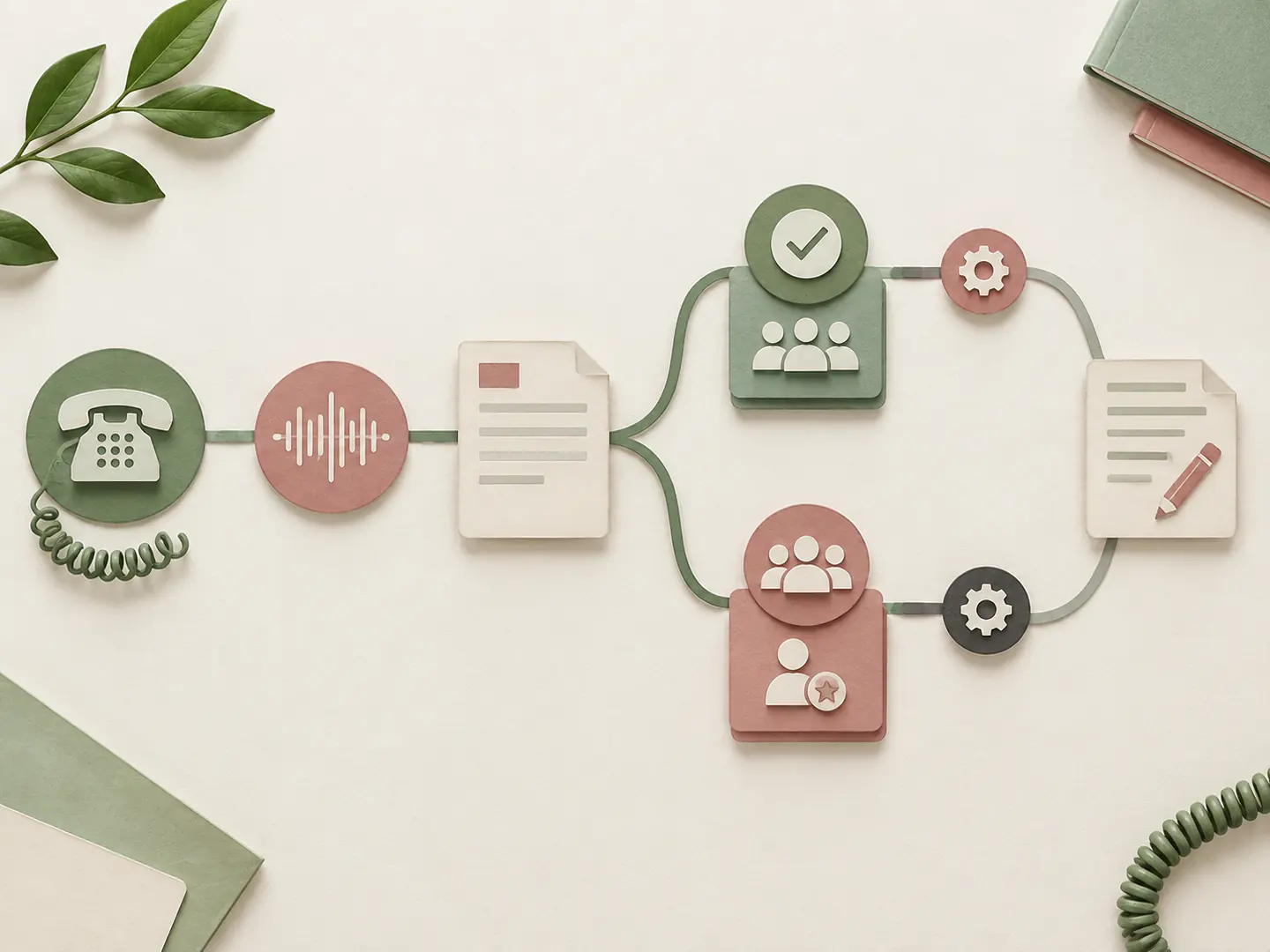
The useful way to think about Zendesk Voice AI agents is as a chain of evidence: spoken conversation, ticket state, routing decision, and human follow-up. Zendesk’s official voice AI documentation says every call creates or updates a ticket. The AI can use connected knowledge, procedures, and actions, while configured ticket fields update during the call.
If the AI resolves the request, the ticket can contain a full transcript, an AI-generated summary, a recording when recording is enabled, a link to conversation logs, and any fields updated by the agent. If it cannot resolve the request, Zendesk posts the transcript and summary before sending the call to the human queue. That gives the receiving agent a starting point instead of forcing the customer to repeat the whole story.
This is different from a standalone voice bot that only returns an audio answer. The Zendesk ticket is the operational record. A useful pilot therefore asks two questions for every call: “Did the caller hear a safe, understandable response?” and “Did Zendesk retain enough context for the next person?”
| Call state | Evidence to inspect in Zendesk | 为什么重要 |
|---|---|---|
| AI resolves the request | Transcript, summary, recording setting, updated fields | Confirms the answer and the audit trail agree |
| AI asks a clarifying question | Spoken wording and ticket field changes | Shows whether ambiguity is handled without guessing |
| AI cannot resolve | Pre-handoff transcript and summary | Prevents a blind transfer |
| Human receives the call | Queue, Group/Skills route, handoff context | Tests whether the right team receives it |
| Call ends after handoff | Voice comment and post-call work | Confirms the ticket remains complete |
For broader text-review workflows, you can compare the approach with 自动支持对话摘要, but that article is not evidence of Zendesk’s native call behavior.
Do not confuse this route with the consumer ChatGPT语音功能上线. A voice-chat product can demonstrate natural conversation without providing Zendesk numbers, ticket updates, Group routing, or a verified human handoff.
Eligibility, costs, and hard limits
Three checks before you design the call flow
Check 1
Check 2
Check 3
Create the first voice AI path
The official creation guide, Creating an AI agent for voice, uses the AI agents workspace. The practical sequence is:
Voice copy needs different editing from chat copy. A caller cannot click a URL, scan a table, or reread a paragraph. Replace “visit the link in your email” with a short spoken next step, and give the caller room to answer. If an action needs more time, a brief filler phrase such as “Give me a second while I check that” is easier to follow than silence.
The first pilot should use a known-answer request, such as an order-status policy or opening-hours question, plus one request that must reach a human. Do not begin with refunds, identity exceptions, emergency language, or a broad “ask me anything” scope.
From workspace to a controlled pilot
步骤 1
步骤 2
步骤 3
步骤 4
步骤 5
Step 6
Design routing and the human handoff
Zendesk can use ticket-field updates to improve routing. With voice routing, an updated Group field can take priority over the phone number’s default group. With omnichannel routing, fields such as Group 或 技能 can influence the standard routing configuration. This is powerful, but it is also where a plausible demo can hide a production mistake: the AI may say it is transferring while the call actually lands in a fallback queue.
Write the handoff in two layers. The caller hears a short bridge; the receiving agent sees a private context summary. For example:
Caller-facing bridge: “I have the details I can verify. I’m connecting you with Billing Support now, and I’ll pass along what you already told me.”
Agent context: “Caller reports an incorrect charge. Identity is not verified. No refund or response time was promised. Confirm identity and review the charge before offering an outcome.”
After escalation, standard phone settings resume. If an existing greeting plays again, the customer may hear a duplicate welcome. Zendesk’s best-practice guidance suggests configuring a one-second silent greeting at the available-agents level when the normal greeting is not desirable after handoff. Test this on the actual number.
Test matrix: what to verify on every call
Use Zendesk’s native test-call guidance, then inspect the associated ticket and conversation logs. A useful six-call matrix is:
| 场景 | Spoken behavior | Ticket and routing check |
|---|---|---|
| Routine knowledge question | Gives a concise, knowledge-grounded answer | Source context, summary, and fields are present |
| Interruption or ambiguity | Asks one clarifying question instead of guessing | No unsupported field update; transcript is readable |
| Failed action | States that it could not complete the action | Error path is explicit; no invented success |
| Explicit human request | Acknowledges the request and bridges to a person | Correct Group/Skills route and handoff context |
| After-hours/no agent | Uses the configured voicemail or fallback | Promised timing is not invented; fallback is recorded |
| Handoff with duplicate greeting risk | Keeps the bridge short | Receiving agent hears the intended greeting once |
Score each call from 0 to 2 for five dimensions: answer correctness, spoken clarity, route correctness, context completeness, and claim discipline. A pilot is ready for a second intent only when the first set has no critical safety failure and the team can explain every failed score.
Review failure patterns rather than chasing one impressive call. A transcript that looks complete may still omit identity status. A correct queue may still receive a vague summary. A recording may exist while the field update that drives routing is missing. Zendesk QA can support ongoing review; the AI-agent evaluation guidance is a useful companion for a recurring sample.
Safe prompt and procedure patterns
The following text is a fictional wording-review prompt for GlobalGPT. It is not a Zendesk configuration command and cannot prove a native phone transfer. Copy it as a single block when testing a text model:
The procedure itself should enforce a few habits: verify identity only through an approved step, ask one question at a time, state uncertainty, never invent an action result, and escalate when the request is outside the approved scope. A text review in GlobalGPT can help a support lead compare two phrasings or flag an unsupported promise. It cannot inspect your Zendesk queue, ticket fields, recording, or routing state. The 如何使用 ChatGPT 代理 guide is useful for separating model-assisted workflow design from native Zendesk actions.
For broader multi-model wording review, all-in-one AI models provide useful editorial context. Use the separate 人工智能数据隐私指南 when defining what fictional transcript data may enter that review; neither page is Zendesk authority.
Rollout and maintenance checklist
Before the pilot, confirm the number, business-hours route, after-hours fallback, recording/privacy policy, knowledge source, and staffed human queue. During the pilot, keep a short log of call ID, intent, route, ticket completeness, and reviewer notes. After launch, sample transcripts and recordings, review unsupported claims, monitor automated-resolution usage and voice charges, and revisit the Group/Skills rules when team ownership changes.
Do not expand by adding every FAQ at once. Add one intent, repeat the six-call matrix, and only then widen the scope. A practical team workflow can include 一款面向团队的全能型人工智能工具 for drafting review notes, but the final decision belongs in the Zendesk workflow and its audit trail.
What to measure after activation
The first week of production data should be treated as a review queue, not a victory lap. Track the percentage of calls that reached the intended Group, the percentage that needed a repeat explanation, and the number of calls where a human had to ask for information that was already spoken. Add a separate count for unsupported promises, such as an invented refund or response time. These measures tell you whether the problem is knowledge quality, voice wording, routing configuration, or procedure scope.
Keep the denominator visible. “Resolved calls” can include calls that ended because the caller hung up, the number reached voicemail, or the AI misunderstood the request. Pair resolution counts with ticket evidence and a small human-reviewed sample. If the recording setting is disabled, rely on transcripts and field history while respecting your retention policy. If the queue receives a call without a useful summary, classify it as a handoff-quality failure even if the human eventually solved the issue.
Review the same intent after every procedure change. A one-word change to a context, Group field, or escalation sentence can alter routing. A dated change note linked to the test-call ID makes rollback possible and helps the team distinguish a model behavior change from a configuration mistake.
If the team is comparing assistants for the review layer, use a criteria-led resource such as the best AI assistant test and ranking only for selection context. It does not replace the Zendesk test-call log.
结论
The reliable way to deploy Zendesk Voice AI agents is to treat the call and the ticket as one system. Start with one low-risk intent, write spoken procedures, test handoff routing, inspect the transcript and summary, and keep a human fallback visible. Use GlobalGPT for fictional wording and transcript review when useful, but keep Zendesk as the source of truth for calls, tickets, recordings, and queue behavior.
Try GlobalGPT for a structured handoff review when you want to compare wording before the next native Zendesk test call.
常见问题
What does a Zendesk Voice AI agent do?
It answers configured phone calls, uses connected knowledge and procedures, updates a Zendesk ticket, and either resolves the request or hands the caller to a human with context.
Does every Voice AI call create a ticket?
Zendesk’s documentation says calls create or update a ticket. The associated ticket is where you verify the transcript, summary, recording status, and field updates.
What reaches the human after escalation?
The AI posts the transcript and summary before routing the call. The receiving agent then follows normal voice routing and can see the handoff context.
Can Voice AI agents use Group or Skills routing?
Yes. Configured ticket-field updates such as Group or Skills can influence voice or omnichannel routing, subject to the account’s routing configuration.
Is call recording automatic?
Recording is on by default for Voice AI calls, but Zendesk says it can be disabled. Confirm the setting and privacy obligations for your account.
Are Zendesk Voice AI agents suitable for emergency calls?
No. Zendesk explicitly excludes emergency-call evaluation, dispatch or prioritization, and emergency healthcare triage use cases.