Nano Banana Pro 可帮助您制作 PPT 封面、背景、分隔线以及演示文稿中的图形素材。实际操作流程是:先确定幻灯片设计方向,生成几种视觉方案,下载选定的图片,然后在 PowerPoint 或 Google 幻灯片中完成可编辑的标题和版面设计。.
如果您的项目涉及研究、写作、图像处理以及其他人工智能任务,, GlobalGPT 将这些模板路线保存在一个工作区中。将其作为“图片”步骤的入口,然后由演示文稿编辑器负责可编辑文本、幻灯片母版和最终演示文稿。.
简答:Nano Banana Pro 能为 PPT 带来什么?
Nano Banana Pro:模型特征与路径选择
谷歌的模型文档 地图 纳米香蕉 Pro 至 双子座 3 Pro 图像 使用 API 模型 ID gemini-3-pro-image. 根据2026年9月30日查阅的官方定价页面显示,标准API路线的定价为每100万个文本/图像输入令牌$2.00, 每100万个文本和思维输出令牌为$12.00,每100万个图像输出令牌为$120.00; 其价格表显示,图像输出在1K/2K分辨率下的价格约为$0.134,在4K分辨率下为$0.24。截图中的“Pro”行标注“免费套餐”不可用。该 图像生成文档 单独列出了图像输出选项(如 1K、2K 和 4K),并展示了采用 16:9 宽高比的 API 示例。这些 API 信息描述了开发者的实现路径;但并不能证明每个客户端或第三方用户界面都会提供相同的控件。.
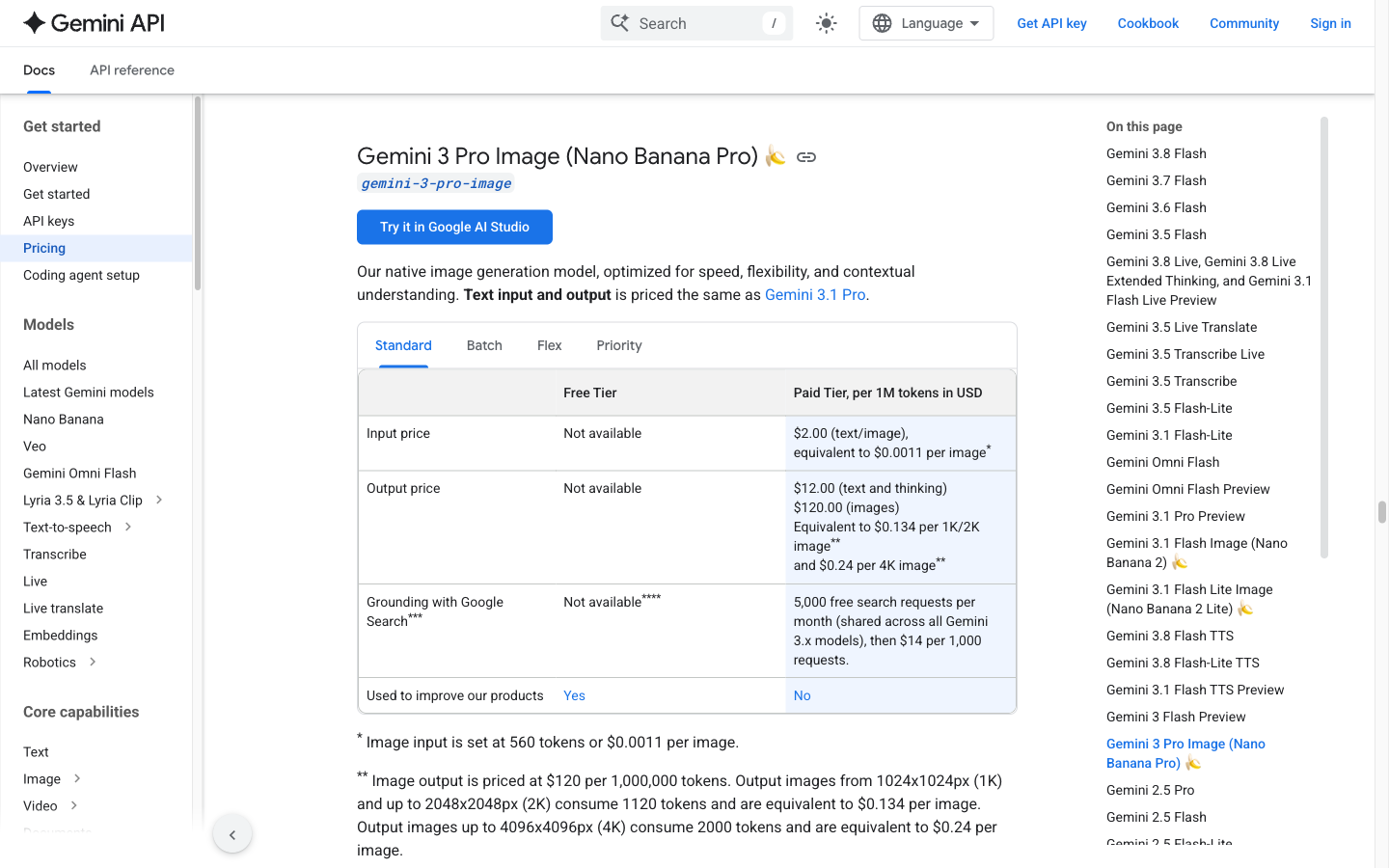
请使用此图片来区分 API 图像输出预估、完整的请求账单或第三方信用余额。.
当您需要实现应用工作流时,请选择“消费者”路径;待您的方案公开后,再将“Pro”留作后续优化阶段使用。.
这是一段路线说明,而非生成的幻灯片结果;请在概念上将“初稿”与“精修稿”区分开来。.
谷歌的 API 定价页面 2026年9月30日查阅的信息显示,标准Gemini 3 Pro Image路线的定价为每100万个文本/图像输入令牌$2.00, 每100万个文本和推理输出令牌为$12.00,每100万个图像输出令牌为$120.00。 该表格显示,每1K/2K图像约相当于$0.134,每4K图像约相当于$0.24,而“免费额度”一栏标注为“不可用”。 图像输入和其他请求组件将单独计费,因此这些数据既不代表完整的请求总量,也不代表 GlobalGPT 积分,更不是每套卡组的预算。.
制定好简报后,打开 GlobalGPT Nano Banana Pro 工作区 尝试“图像”步骤。请勿将生成的 PNG/JPEG/WebP 资源与可编辑的演示文稿文件混为一谈。.
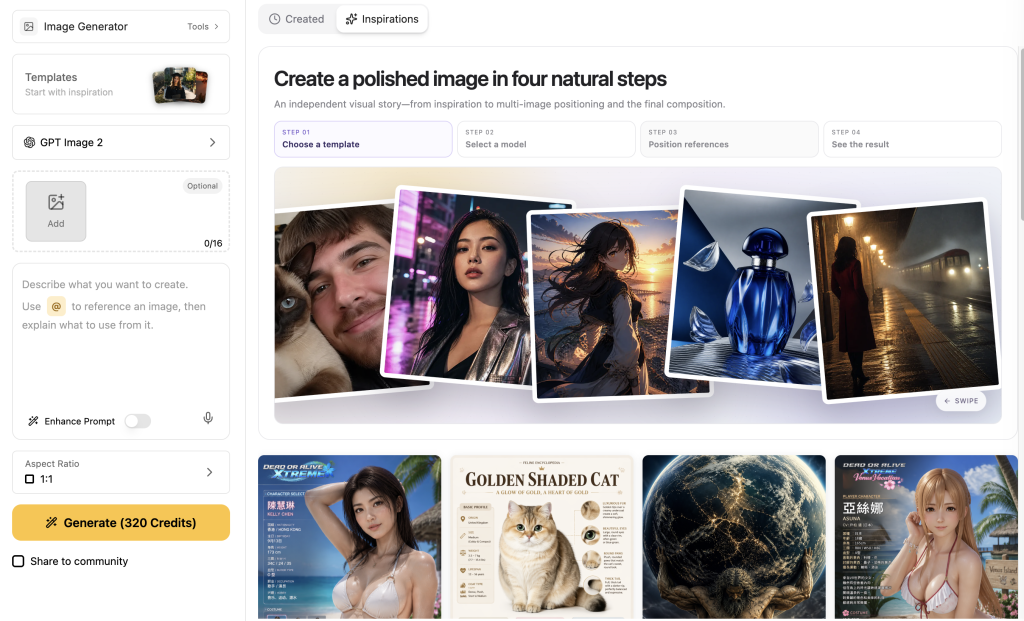
在2026年9月30日检查的当前公开版GlobalGPT界面中,模型选择、参考图像区域、提示词、增强提示词、宽高比和分辨率均显示在同一个工作区中。 初始控件显示为“自动”和“1K”;展开的菜单中列出了1K、2K和4K分辨率,以及“自动”、1:1、2:3、3:2、4:3、16:9和9:16等宽高比选项。 这使得该页面非常适合设置宽屏创作任务,但在生成前仍需确认账户特定的版权信息和可用性。.
什么样的 PowerPoint 封面才算实用?
封面是幻灯片中的导航界面,因此图片应将标题放置在易于预判且易于阅读的位置。在选择视觉风格之前,请先明确该幻灯片的作用。.
- 选择一个焦点主题或形状,然后在对面留出一个简洁的标题区域。.
- 当播放列表将使用标准宽屏布局时,请设置为 16:9 宽屏画布。.
- 使用一种具有明确对比关系的简约配色方案,例如深海军蓝背景搭配暖白色标题区域。.
- 请要求采用边缘安全排版,以确保重要图形不会被裁切、徽标或标题框遮盖。.
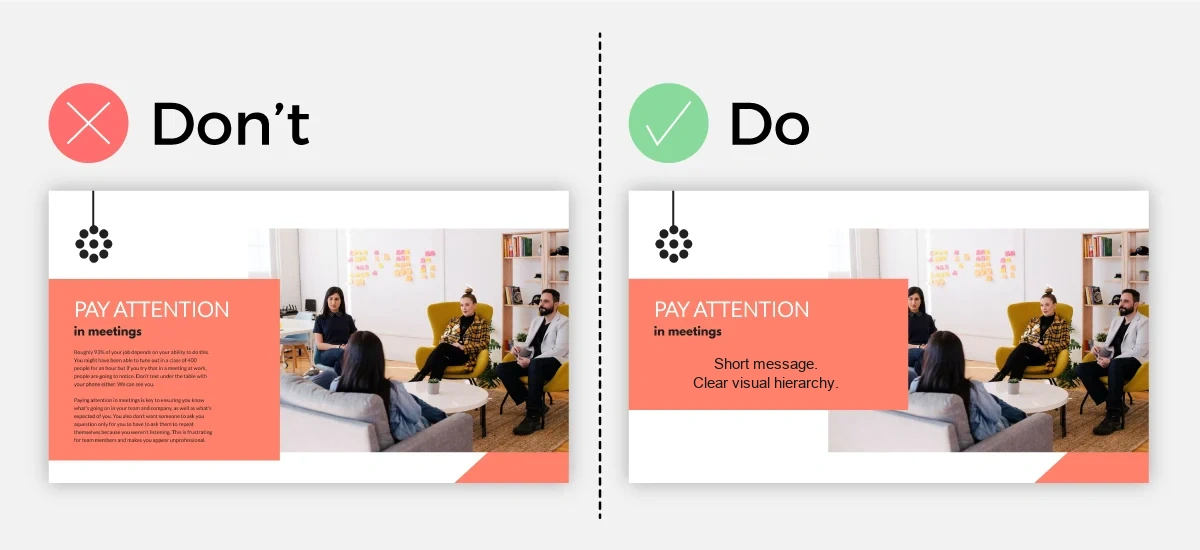
- 封面设计应比信息图更简洁:标题、副标题和一个视觉元素应便于快速浏览。.
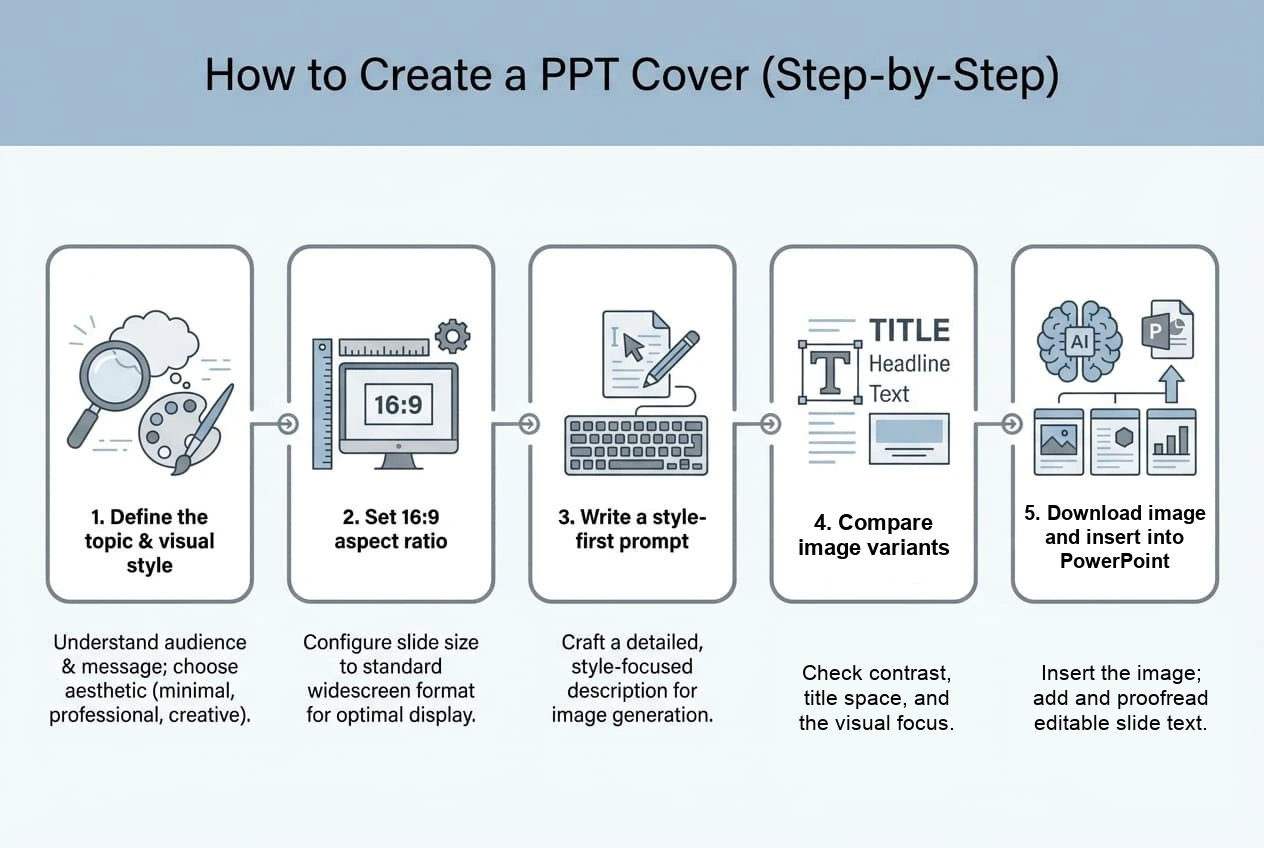
如何一步步制作PPT封面和演示文稿图表
1. 在撰写提示语之前,先对幻灯片进行简要说明
请记录下受众、幻灯片目的、标题长度、整体氛围、品牌颜色、视觉主题,以及标题必须保持清晰的位置。如果标题较长或具有法律重要性,请计划在PowerPoint中进行排版,而不是让图像模特来呈现整个句子。.
2. 选择画布和输出目标
PowerPoint 和 Google Slides 通常采用 16:9 的宽屏画布。 请以此作为您的构图参考,然后检查您正在使用的路径。在 2026 年 9 月 30 日验证的 GlobalGPT 界面中,“自动”和“1K”是默认选项,展开菜单后会显示 16:9 选项以及 1K/2K/4K 分辨率选项。 API 文档中记录了 16:9 以及 1K/2K/4K 的图像尺寸选项;这些是特定于操作路径的控件,因此在生成前请确认您账户中显示的菜单。.
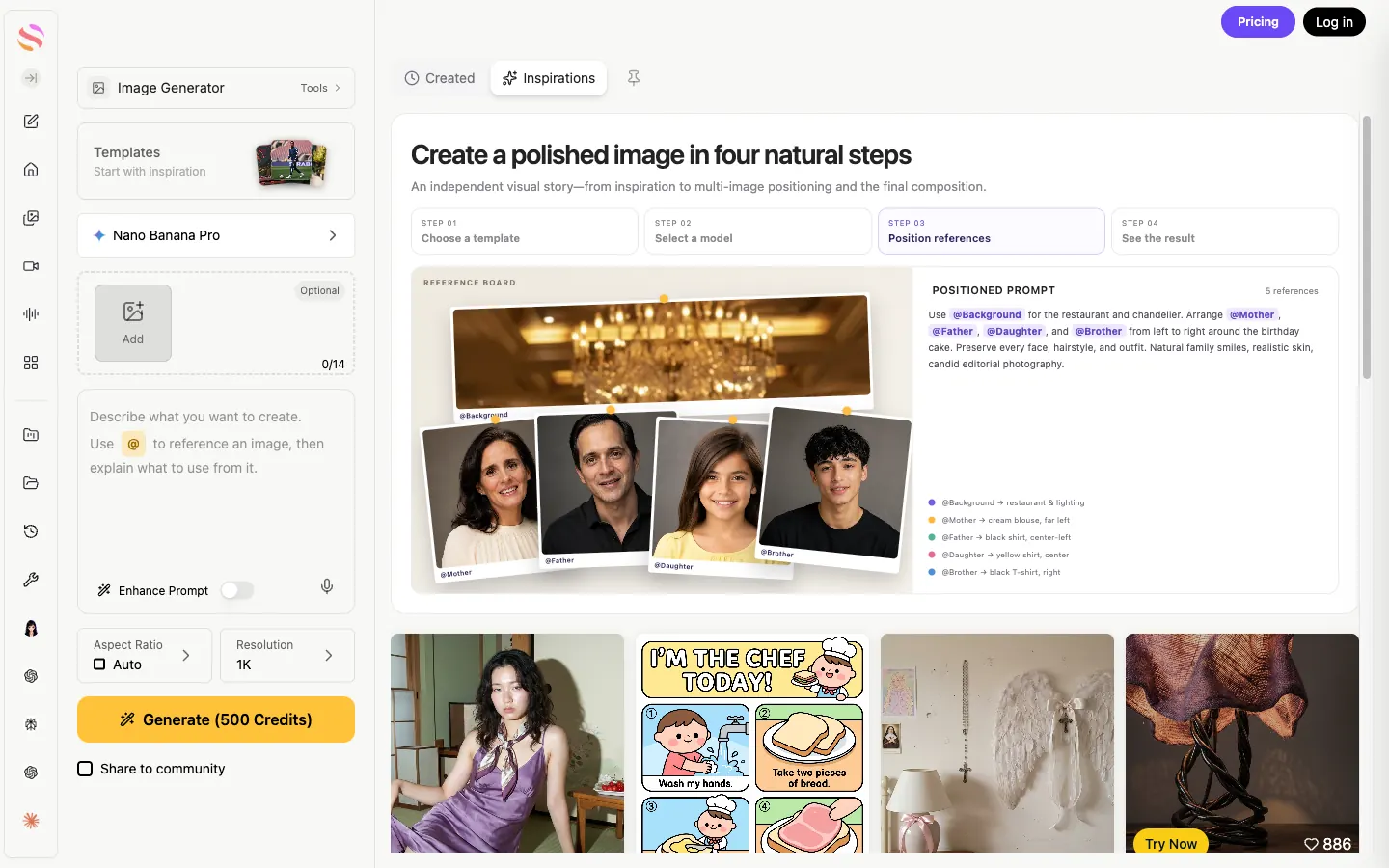
该界面支持“先查看摘要”的工作流程;请根据您的账户信息核对可见的计数器和积分标签,而不是将其视为已验证的限额或账单。.
3. 撰写结构清晰的提示语
按照设计师做出决策的顺序,描述视觉层次结构:主体、构图、标题区、配色方案、光影、质感、宽高比以及设计限制。既要明确说明哪些部分必须留白,也要明确说明哪些部分需要绘制。.

4. 添加参考图片并生成一小组变体
如果该工具支持参考图片,请选择一张能体现你希望延续的视觉语言的图片:配色、几何构图、光影效果或插画风格。明确参考图片的作用。要求提供三种受控变体,每次仅改变一个要素(例如主体位置或背景纹理),以便你在设计方案集中进行对比。.
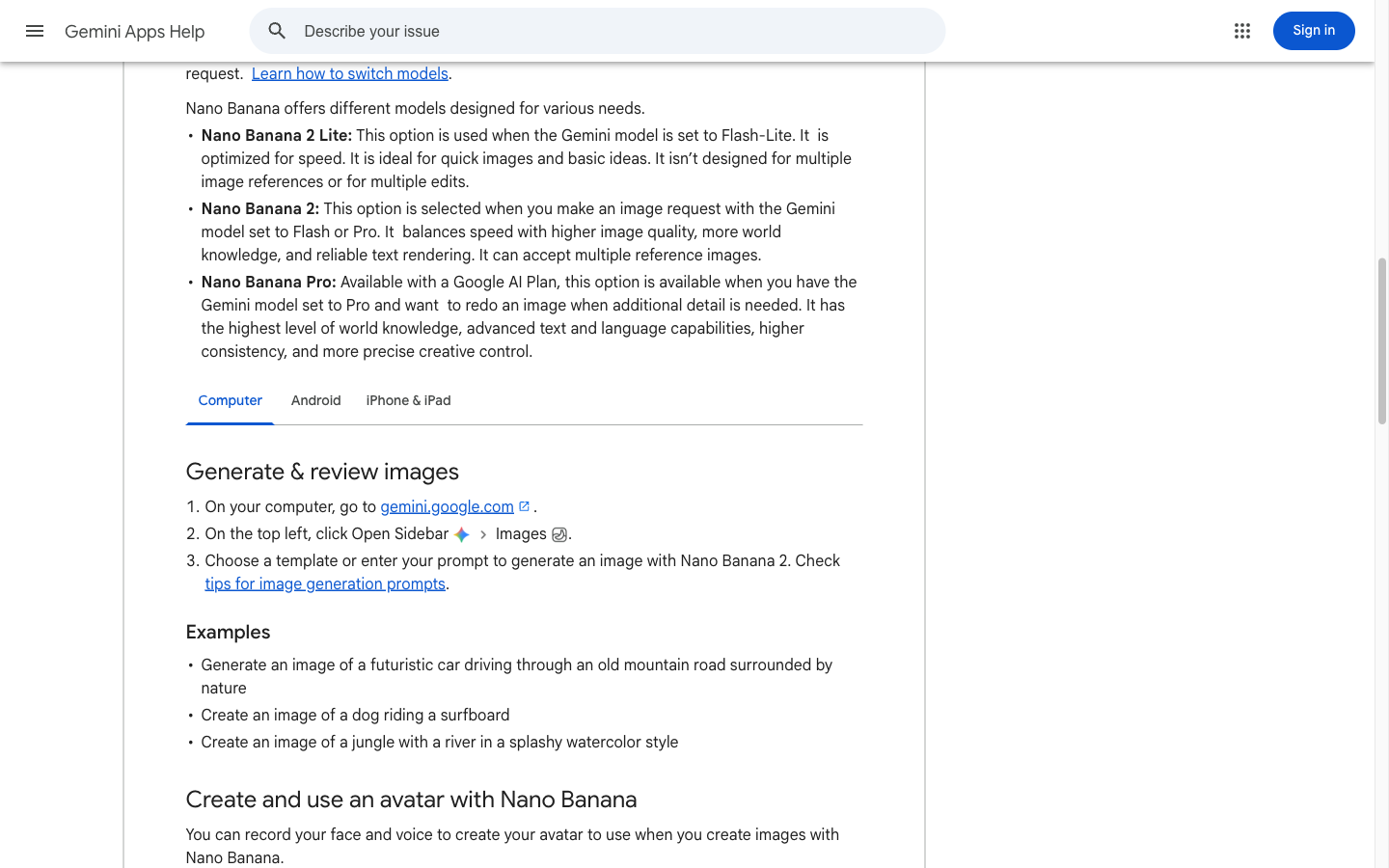
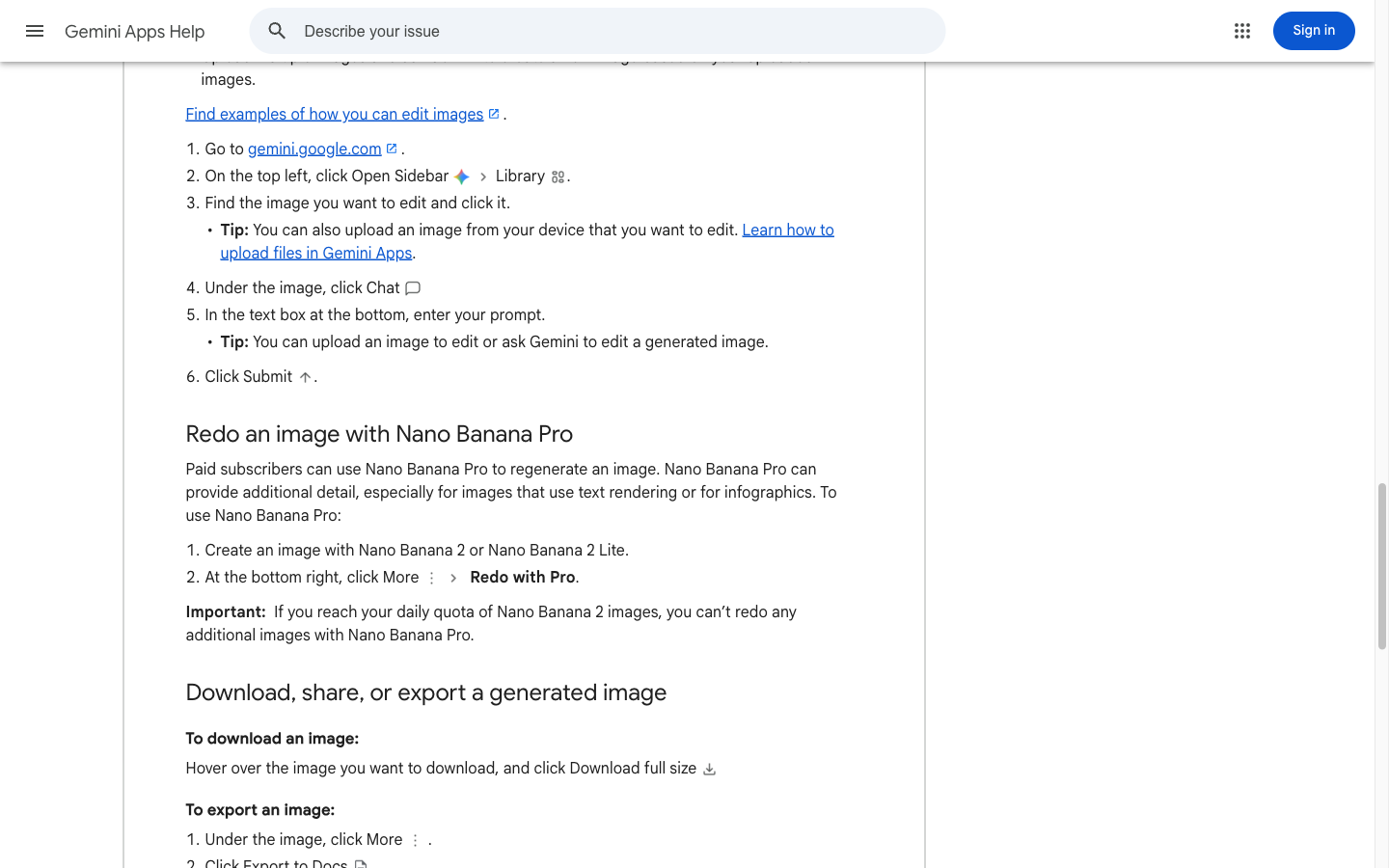
在 Gemini Apps 路线中,谷歌当前的帮助流程从 Nano Banana 2 或 Nano Banana 2 Lite 开始。付费订阅用户可以打开 更多 → 使用 Pro 重新操作 当图像需要额外细节、文本渲染或信息图表控制时。如果 Nano Banana 的每日配额用尽,将无法进行另一次 Pro 级重做,因此该消费者工作流与直接调用 Pro API 模型有所不同。.
- 方案 A:主体位于右侧,左侧为空白标题区。.
- 方案 B:左侧为主体内容,右侧为空白标题区域。.
- 方案 C:素雅的背景,配以一个小巧的焦点标记,并留出最大的标题空间。.
5. 下载图片,将其插入 PowerPoint,并校对幻灯片
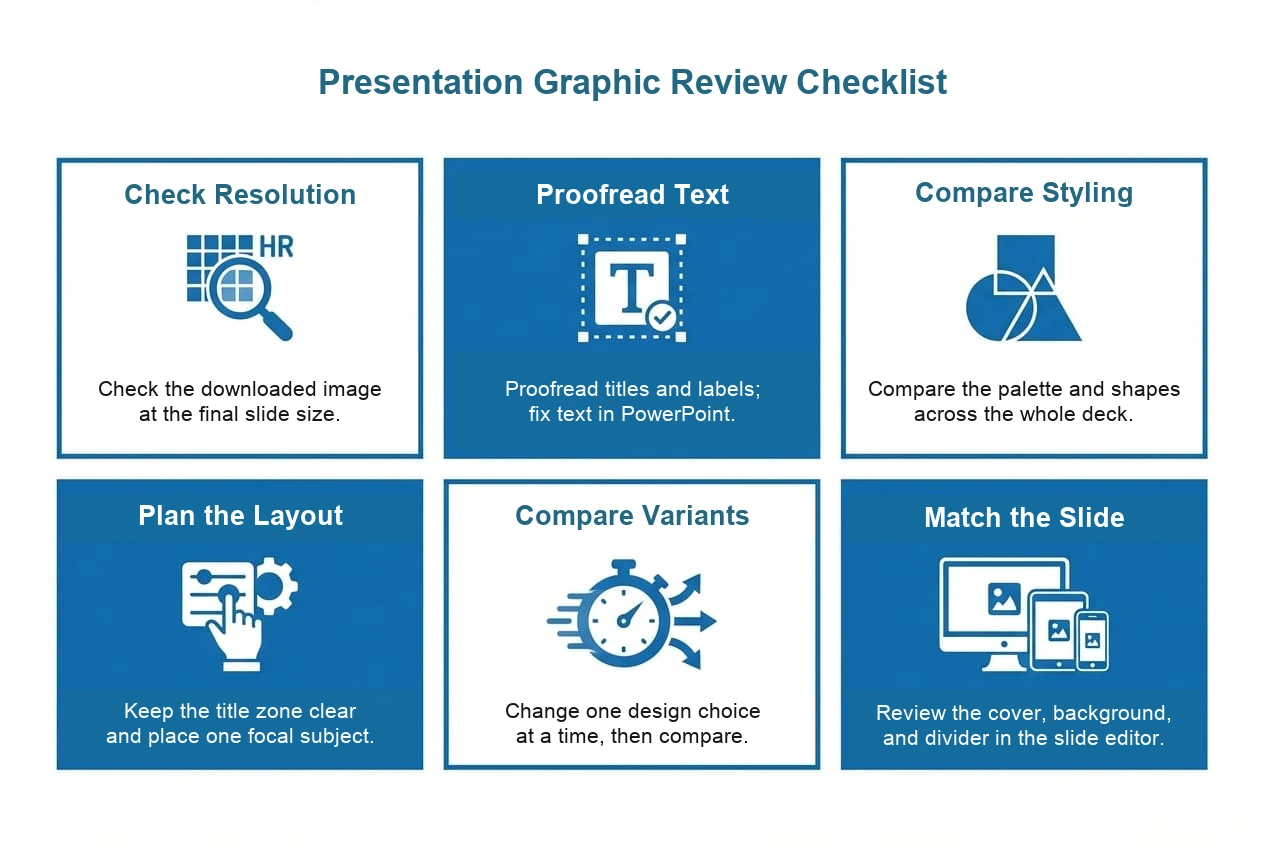
将选定的图像保存为一个有意义的文件名,例如 strategy-cover-v3-16x9.png. 在 PowerPoint 中,选择 插入 → 图片, 将图片放置在幻灯片上,裁剪至幻灯片边界,并添加可编辑的标题和副标题。缩小视图以检查视觉层次结构,然后以演示尺寸查看幻灯片,以发现对比度不足或边缘裁剪的问题。.
- 生成图像资源,并在相同的缩放级别下比较不同版本。.
- 下载所选资源;请勿将浏览器预览图视为最终文件。.
- 将图片插入到 PowerPoint 或 Google 幻灯片中,并设置为 16:9 的幻灯片比例。.
- 在编辑器中添加或修改标题、副标题、徽标和来源信息。.
- 在幻灯片播放模式下检查对比度、裁剪、文件尺寸和可读性。.
除了封面之外,还要制作辅助演示图表
一套幻灯片通常需要多种类型的素材。请根据幻灯片需要呈现的文字量来选择相应的提示。.
章节分隔线
要求设计醒目的视觉标识和宽敞的标签区域。每个主要部分都应重复使用相同的图案,仅更改该部分特有的主题或点缀色。.
背景
背景设计应明确要求视觉噪点少、边缘柔和,且文本区域后方不应出现重要物体。当背景能够衬托内容而不抢占内容风头时,即视为设计成功。.
图标和图表
对于图标系列,请为共用的笔画粗细、圆角半径、视点和配色方案命名。对于图表,如有必要,可使用该模型作为视觉基础,然后将关键标签、箭头和数字重新制作成可编辑的 PowerPoint 形状,以便于后续修改。.
如何确保整副牌在视觉上保持一致
一致性源于重复执行相同的决策,而非寻求诸如‘让它保持一致’之类的模糊指示。请将规则整理成一份简短的样式表,并在每个提示中包含相同的规则。.
适用于演示文稿图形的 Nano Banana Pro 可复制提示语
这些只是起始模板,并非经过测量的性能声明。请替换方括号中的内容,保持标题区域简短,并决定最终文本应放在图片中还是 PowerPoint 中。.
封面提示
为[受众]制作一张关于[主题]的宽屏演示文稿封面图。将[视觉主体]作为其中一个清晰的视觉焦点,采用[构图],并留出画布[左/右/上][百分比]的空白区域用于可编辑的标题。配色方案:[颜色]。 氛围:[氛围]。边缘利落,对比度清晰易读,标题区域内无多余元素,采用 16:9 构图。.
章节分隔符提示
为名为[章节名称]的演示文稿章节设计一张分隔图。请采用与提供的参考图相同的[图案/几何形状]和[配色方案],包含一个焦点标记,并预留充足的留白空间以容纳简短的可编辑标签。图片应简洁、平衡,且适合16:9比例的幻灯片。.
背景提示
为[主题]制作一张细节较少的16:9演示文稿背景。使用[纹理/渐变/抽象图案],确保[区域]保持宁静且对比度较低,以便呈现正文内容;避免出现人脸和微小文字;将重要形状远离裁剪边缘;并保持克制的[配色方案]。.
图示基础提示
为关于[概念]的演示图创建一个简洁的视觉基础。使用统一的图标和线条风格展示[三到五个视觉关系],留出标签区域,使用[配色方案],并避免生成最终数值或冗长标签,因为这些内容将作为可编辑的PowerPoint形状添加。.
故障排除:PPT 图形出现问题时应检查哪些内容
该工作流适用于:商业、教育和研究领域的演示文稿
当演示文稿需要一个独特的视觉起点,但最终内容仍需纳入可编辑的幻灯片系统时,“以图像为先”的工作流程就派上了用场。.
- 商业提案:设计封面和几张分隔页,然后将指标和论点保留为可编辑的文本和图表。.
- 培训幻灯片:应采用简洁的背景和简单的图表,并确保说明文字和屏幕截图具有足够的对比度。.
- 产品演示:在 PowerPoint 中放置 UI 标签和操作步骤时,为特色板块构建可复用的视觉风格。.
- 研究报告:请使用摘要封面或章节插图,但应将方法、参考文献、坐标轴和数字保留为可编辑元素。.
当您准备测试图像步骤时,请使用 Nano Banana Pro 路线在 GlobalGPT 中. 当前的公开页面仅是一个入口,并不代表信用余额固定、生成速度固定或输出标准固定。.
常见问题
Nano Banana Pro 能制作 PowerPoint 幻灯片吗?
Nano Banana Pro 可以为 PowerPoint 幻灯片制作图像素材,例如封面、背景、分隔线和图表。它在此处提供的是图像制作流程;您仍需在 PowerPoint 或 Google 幻灯片中自行组装可编辑的演示文稿。.
它能导出完整的 .pptx 文件吗?
图像工作流会输出一个图像资源。请将其下载,插入到 PowerPoint 或 Google 幻灯片中,添加或修改可编辑文本,然后将完成的演示文稿保存为 .pptx 文件。.
演示文稿封面应该使用什么宽高比?
制作宽屏演示文稿时,请使用 16:9 的演示文稿模板。将其视为设计和导出目标;当前的 GlobalGPT 纵横比菜单中包含 16:9 选项,但初始显示为“自动”和“1K”。在生成前,请确认您所使用的工具中显示的纵横比和分辨率。.
如何让整副牌在视觉上保持一致?
首先建立一个简短的视觉体系:一套简约的配色方案、一种几何语言、一种画面氛围、一个固定的标题区域以及一张参考图。在每次生成提示时重复使用这些限制条件,然后在图集中并排查看生成的素材。.
如何将生成的图片插入到 PowerPoint 中?
下载图片,打开目标幻灯片,选择“插入”>“图片”,选中下载的文件,在 16:9 的画布上对其进行裁剪或调整位置,然后在 PowerPoint 中添加或校对标题。.
Nano Banana 2 和 Nano Banana Pro 之间有什么区别?
谷歌的消费者帮助中心将 Nano Banana 2 或 Nano Banana 2 Lite 的图像生成功能与付费订阅用户的“Redo with Pro”路径区分开来。 该 API 路由将 Nano Banana Pro 映射至模型 ID 为 gemini-3-pro-image 的 Gemini 3 Pro Image。由于这些属于不同的工作流,且产品访问权限和配额可能会发生变化,请务必核对您当前账户或工具中显示的路由信息。.
最后的想法
在更大的演示文稿工作流程中,Nano Banana Pro 作为可视化素材生成工具最为实用。 只需给出明确的创作要求,预留可编辑文本的空间,对比几种经过严格控制的变体,下载图片,然后让 PowerPoint 或 Google 幻灯片来处理最终的字体、版式和幻灯片文件。这种分工使最终成果更易于校对和修改。.
如果该工作流程适合您的下一套牌组,请打开 GlobalGPT Nano Banana Pro 在您准备好设计任务书和参考图片之后。.