是 PerplexityAI can now generate images directly, much like ChatGPT’s DALL·E integration. Perplexity introduced this image generation feature in mid-2024, allowing users to create AI-generated visuals through natural language prompts. While ChatGPT uses 达利 3 for image creation, Perplexity integrates OpenAI’s GPT Image model and several other AI frameworks to deliver fast, high-quality results.
简而言之 ChatGPT creates images via DALL·E, while Perplexity uses similar underlying models — but inside a search-driven experience.
By the way, if you use Perplexity and GPT separately, it can cost over $40 per month — but 全球 GPT integrates both for only around $10, giving you powerful tools at a fraction of the price.

什么是 困惑人工智能’s Image Generator?
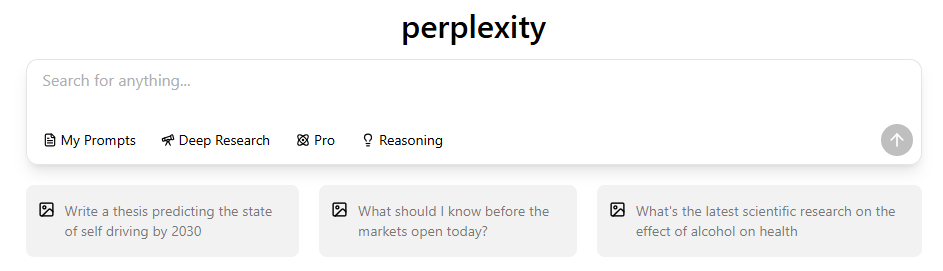
Perplexity AI’s image generator is an AI-powered tool that transforms text prompts into visuals. It is built into the same interface you use for research or Q&A. You can simply type a request like “generate an image of a futuristic city skyline at sunset”, and Perplexity will render an image in seconds.
This feature blends 人工智能 search, reasoning, and visual creativity, making Perplexity not just a chatbot but an all-in-one knowledge and creation platform.
How to Generate Images with 困惑 (Step-by-Step Guide)
Creating images with Perplexity is simple. Here’s how to do it:
- Open PerplexityAI on the web or in the mobile app.

- Sign in with your account (Pro plan may be required for advanced features).
- In the chat bar, type a command like:“Generate an image of a cozy reading room with warm lighting.”

- Press Enter — Perplexity will create your image in a few seconds.

- Save, refine, or regenerate the image if you want a different version.

💡 小贴士 Use descriptive prompts — including lighting, mood, and style — for better results.
For detailed mobile screenshots and a point-by-point walkthrough, check our post How to Use Perplexity on iPhone: Step-by-Step Guide.
Which 人工智能 Models Power 困惑’s Image Generation?
Perplexity uses multiple state-of-the-art 人工智能 模型 for its image feature. Among them are:
- GPT Image 1 (OpenAI) — similar to ChatGPT’s DALL·E 3 model
- Gemini Vision Models — from Google’s multimodal AI stack
- FLUX.1 and Seedream 4.0 — for creative and artistic rendering
- Stable Diffusion-based engines — for stylistic, high-resolution results
Perplexity’s advantage lies in automatic model selection, choosing the most suitable engine for your prompt — whether it’s photorealistic art, digital illustration, or concept design.
To compare Perplexity with other assistants beyond ChatGPT, see Perplexity vs Claude: Which AI Assistant Wins This Year? for side-by-side feature comparisons.
可以 困惑’s 人工智能 Art Match ChatGPT’s DALL·E Quality?
In most cases, yes — 困惑’s image quality is on par with ChatGPT’s DALL·E 3. Both tools rely on OpenAI’s image models, producing detailed, stylistically consistent outputs.
However, Perplexity differs in focus:
- It emphasizes speed and search integration rather than deep artistic control.
- ChatGPT offers more creative fine-tuning, like image editing and inpainting.
- Perplexity excels in context-aware visual generation tied to live search data.
如果您的目标是 research-driven visuals, Perplexity is ideal. For customized art direction, ChatGPT still leads slightly.
困惑人工智能 Image Generation Pricing and Limits
Perplexity offers image generation in both free and paid tiers:
- 免费计划: limited image generation quota per day
- Pro Plan ($20/month): more frequent and higher-resolution generations
- Max Plan (invitation-only): includes extended limits and faster rendering
Each image request counts as an enhanced query, so heavy users might benefit from upgrading.
与 ChatGPT 加, Perplexity’s Pro plan offers lower cost per image and a broader integration of models.
Editing, Refining, and Regenerating Images in 困惑
While Perplexity doesn’t yet provide in-image editing (like cropping or painting), it allows prompt-based regeneration:
- Use “regenerate” or rephrase your prompt to alter style or composition.
- Add modifiers like “cinematic lighting,” “flat design,” “3D render” to guide results.
- Keep iterations concise — Perplexity responds best to short, clear inputs.
Expect more editing and upscaling tools in future updates as Perplexity expands its creative suite.
Can You Use Perplexity-Generated Images Commercially?
目前是, Perplexity-generated images are for personal and educational use only. Commercial rights depend on the underlying AI model used for that generation (e.g., OpenAI, Stability, or Google).
Before using Perplexity images in commercial projects, check the terms of use in Perplexity’s Help Center or contact support.
Troubleshooting: Why Can’t 困惑 Generate My Image?
If Perplexity can’t produce your image, possible reasons include:
- You exceeded your daily image generation limit.
- 您的 prompt contains restricted or unsafe content.
- "(《世界人权宣言》) server or model is temporarily busy.
Try rephrasing your prompt or checking your subscription tier.
困惑 vs ChatGPT: Which Is Better for 人工智能 Image Generation?
| 特点 | 复杂性人工智能 | ChatGPT (DALL-E 3) |
| Integration | Built into search & chat | Built into conversation |
| 模型 | GPT Image 1 + others | 达利 3 |
| 编辑工具 | 有限公司 | Advanced (inpainting) |
| 速度 | Faster | Slightly slower |
| 费用 | Lower overall | Higher (Plus plan) |
结论 Perplexity is better for fast, factual, and contextual visuals, while ChatGPT remains best for creative artistic control.
If you’re deciding between platforms, read our head-to-head test Is Perplexity Really Better Than ChatGPT? We Tested Both for performance, cost, and real-world examples.
Future of 人工智能 Image Generation in 困惑
Perplexity’s roadmap includes:
- Higher-resolution image outputs
- Interactive visual editing tools
- 人工智能 video and 3D generation
- Deeper integration with web and mobile workflows
As AI creativity evolves, Perplexity aims to blend search, knowledge, and art generation into one seamless platform — a true hybrid of factual precision and visual imagination.