
Seedance 2.0 เป็นโมเดลวิดีโอ AI แบบมัลติโมดัลของ ByteDance Seed ที่ใช้สร้างและแก้ไขวิดีโอจากข้อมูลนำเข้าแบบข้อความ ภาพ เสียง และวิดีโอ ชุดคุณสมบัติปัจจุบันของโมเดลนี้เน้นไปที่การสร้างเสียงและวิดีโอร่วมกัน การอ้างอิงแบบมัลติโมดัล การควบคุมการแก้ไข และการจัดการการเคลื่อนไหวและเสียงให้มีความสม่ำเสมอมากขึ้น.
สามารถเข้าถึงได้ผ่านช่องทางประสบการณ์อย่างเป็นทางการและ API รวมถึงพื้นที่ทำงานของเบราว์เซอร์จากผู้ให้บริการภายนอก ตัวเลือกการควบคุม เครดิต ราคา การเข้าถึงตามภูมิภาค และข้อกำหนดของบัญชีจะขึ้นอยู่กับช่องทางที่เลือก.
หนึ่งในตัวเลือกที่ใช้ผ่านเบราว์เซอร์คือ เครื่องกำเนิดไฟฟ้า Seedance 2.0 บน GlobalGPT. หน้าผู้ใช้ปัจจุบันของโปรแกรมนี้จัดวาง Keyframes, References, การปรับปรุงข้อความแจ้งเตือน, Native Audio, อัตราส่วนภาพ, ระยะเวลา และความละเอียดไว้ในพื้นที่ทำงานเดียวกัน.

สถานะปัจจุบันของเวอร์ชัน Seedance 2.0 เป็นอย่างไร?
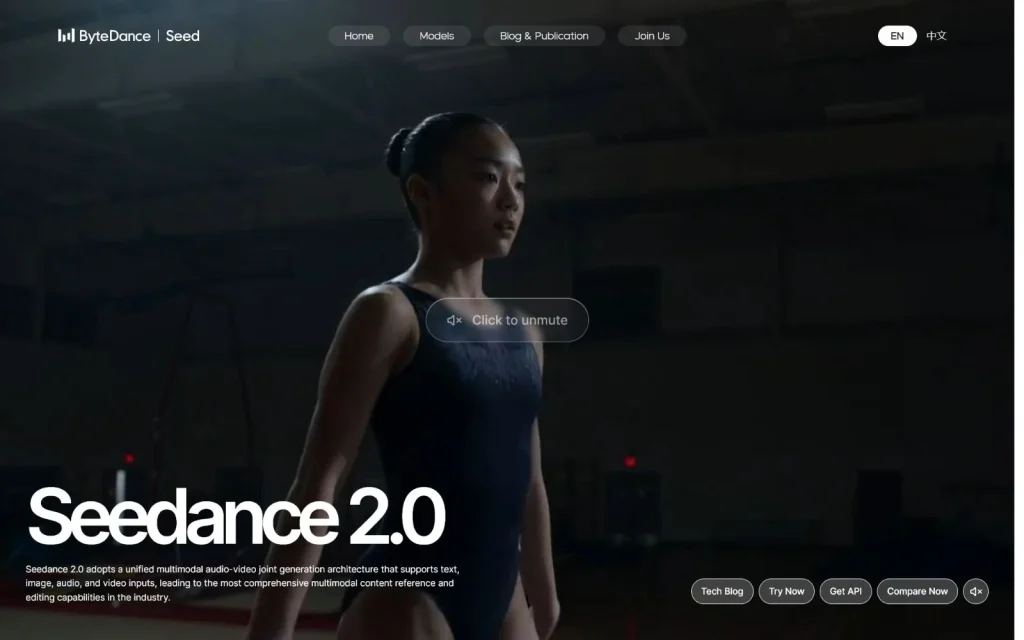
Seedance 2.0 ได้ถูกปล่อยออกมาแล้ว และมีหน้าโมเดล ByteDance Seed อย่างเป็นทางการ. หน้าเว็บที่ตรวจสอบเมื่อวันที่ 22 กรกฎาคม 2026 แสดงว่านี่เป็นโมเดลปัจจุบัน และรวมถึงเส้นทางที่มีป้ายกำกับว่า “ลองใช้ทันที”, “รับ API” และ “Model arena”
หน้าผลิตภัณฑ์อย่างเป็นทางการที่ตรวจสอบเมื่อวันที่ 22 กรกฎาคม 2569 ไม่แสดงวันที่เผยแพร่ต้นฉบับของรุ่นดังกล่าวในเนื้อหาที่มองเห็นได้ ข้อมูลที่มีอยู่ยืนยันสถานะการเปิดตัวในปัจจุบัน แต่ไม่สามารถกำหนดวันที่เปิดตัวในอดีตได้อย่างแม่นยำ จึงจำเป็นต้องมีบันทึกการเปิดตัวอย่างเป็นทางการที่มีวันที่ระบุ เพื่อเพิ่มวันที่ดังกล่าวเป็นข้อมูลพื้นหลังที่ได้รับการยืนยัน.
คุณสมบัติของ Seedance 2.0 ใดที่ได้รับการตรวจสอบแล้วในปัจจุบัน?
หน้าแบบอย่างอย่างเป็นทางการและหน้าจอ GlobalGPT ที่แสดงแบบเรียลไทม์ช่วยยืนยันชั้นต่าง ๆ ของผลิตภัณฑ์ หน้าอย่างเป็นทางการอธิบายความสามารถที่ออกแบบไว้ของแบบอย่าง ส่วนภาพหน้าจอ GlobalGPT แสดงเครื่องมือควบคุมที่มีอยู่ในพื้นที่ทำงานนั้น.
| ความสามารถ | ข้อมูลที่ได้รับการยืนยันแล้วคืออะไร | ขอบเขตของหลักฐาน |
|---|---|---|
| ข้อมูลหลายรูปแบบ | ByteDance Seed ได้จัดรายชื่อแหล่งข้อมูลแบบข้อความ รูปภาพ เสียง และวิดีโอ. | คำอธิบายรุ่นอย่างเป็นทางการ |
| การสร้างเสียงและภาพร่วมกัน | หน้าอย่างเป็นทางการอธิบายถึงสถาปัตยกรรมเสียงและวิดีโอแบบหลายช่องทางที่รวมเป็นหนึ่งเดียว และระบบการส่งออกที่ซิงโครไนซ์แบบเนทีฟ. | คำอธิบายของผู้ให้บริการ; คุณภาพยังคงขึ้นอยู่กับความทันเวลาและเนื้อหาต้นฉบับ |
| ขั้นตอนการทำงานด้านการอ้างอิงและการแก้ไข | ByteDance แสดงการอ้างอิง/การแก้ไขแบบหลายรูปแบบ; GlobalGPT แสดงแท็บ Keyframes และ References. | วิธีการควบคุมที่แม่นยำจะแตกต่างกันไปตามแพลตฟอร์ม |
| การควบคุมการส่งออก | GlobalGPT แสดงการตั้งค่าอัตราส่วนภาพ ความยาว และความละเอียด. | ตัวเลือกและค่าใช้จ่ายเครดิตอาจแตกต่างกันไปตามบัญชี |
| เสียงต้นฉบับ | GlobalGPT มีตัวเลือก "Native Audio"; ByteDance อธิบายว่าเป็นการสร้างเสียงและวิดีโอที่ซิงโครไนซ์กัน. | คุณภาพของภาษาและการซิงโครไนซ์จำเป็นต้องมีการทดสอบผลลัพธ์ |
หากต้องการดูตัวอย่างเพิ่มเติมและข้อสังเกตที่เกี่ยวข้องกับกระบวนการทำงาน โปรดไปที่ คู่มือคุณสมบัติและกรณีการใช้งาน Seedance 2.0.
วิธีเข้าถึง Seedance 2.0 ได้ทันที
เพื่อใช้กระบวนการทำงานแบบตรงในเบราว์เซอร์ ให้เปิด เครื่องกำเนิดไฟฟ้า Seedance 2.0 บน GlobalGPT. นี่เป็นเส้นทางเข้าถึงที่มีความตั้งใจสูง: คุณสามารถตรวจสอบระบบควบคุมปัจจุบันก่อนที่จะตัดสินใจว่าจะใช้เครดิตหรือไม่.
- เปิดโปรแกรมและเข้าสู่ระบบเมื่อได้รับคำขอ.
- เลือก "Keyframes" เมื่อต้องการคำแนะนำเกี่ยวกับเฟรมเริ่มต้น/เฟรมสิ้นสุด หรือเลือก "References" เมื่อต้องการเพิ่มข้อมูลอ้างอิง.
- เขียนคำสั่งที่ครอบคลุมหัวข้อ การกระทำ สภาพแวดล้อม การเคลื่อนไหวของกล้อง แสง และวัตถุประสงค์ด้านเสียง.
- ตรวจสอบเสียงต้นฉบับ อัตราส่วนภาพ ความยาว ความละเอียด และข้อกำหนดเกี่ยวกับเครดิตที่แสดง.
- สร้างการทดสอบสั้นๆ ก่อน แล้วตรวจสอบความต่อเนื่องของการเคลื่อนไหว ความสอดคล้องของตัวตน จังหวะเสียง และข้อผิดพลาดทางภาพ.
การเข้าถึง Seedance อย่างเป็นทางการ เทียบกับการเข้าถึง GlobalGPT
ช่องทางอย่างเป็นทางการและช่องทางบนแพลตฟอร์มมีวัตถุประสงค์ที่แตกต่างกัน หน้าของ ByteDance Seed เป็นแหล่งข้อมูลหลักสำหรับการกำหนดตำแหน่งของโมเดล ข้ออ้างทางเทคนิค การกำหนดกรอบการเปรียบเทียบประสิทธิภาพ และทิศทางของ API ส่วน GlobalGPT ให้พื้นที่ทำงานบนเบราว์เซอร์พร้อมด้วยเครื่องมือควบคุม Seedance 2.0 ที่มีอยู่บนแพลตฟอร์มนั้น.
| เส้นทาง | เหมาะที่สุดสำหรับ | ตรวจสอบก่อนใช้ |
|---|---|---|
| หน้าอย่างเป็นทางการของ ByteDance Seed | ข้อมูลระบุตัวแบบ, ข้อกำหนดของผู้ให้บริการ, ภาพรวมทางเทคนิค, ทิศทางของ API | เอกสารปัจจุบัน, ภูมิภาค, รหัสแบบ, ราคา และเงื่อนไข |
| เครื่องกำเนิดไฟฟ้า GlobalGPT | การสร้างเนื้อหาผ่านเบราว์เซอร์และกระบวนการทำงานแบบรวมหลายโมเดล | การเข้าสู่ระบบ, เครดิต, การตั้งค่าที่มีอยู่, ความเหมาะสมของบัญชี และเงื่อนไขของแพลตฟอร์ม |
หากความพร้อมใช้งานแตกต่างกันตามประเทศหรือบัญชี ให้ใช้ คู่มือเกี่ยวกับความพร้อมใช้งานและสถานะ API ของ Seedance 2.0 ใช้รายการตรวจสอบเบื้องต้นนี้ก่อน แล้วตรวจสอบรายละเอียดที่เปลี่ยนแปลงได้บนหน้าของผู้ให้บริการที่เกี่ยวข้อง.
คุณควรตรวจสอบอะไรก่อนที่จะสร้าง?
- ชื่อรุ่น: ตรวจสอบให้แน่ใจว่าได้เลือก Seedance 2.0 — ไม่ใช่รุ่นความเร็วสูงหรือรุ่นเก่าอื่น —.
- เครดิต: ตรวจสอบข้อกำหนดที่แสดงขึ้นหลังจากปรับเปลี่ยนระยะเวลาหรือความละเอียด.
- สิทธิ์ในการป้อนข้อมูล: อัปโหลดสื่อเฉพาะที่คุณได้รับอนุญาตให้ใช้เท่านั้น.
- เงื่อนไขทางการค้า: ตรวจสอบกฎของแพลตฟอร์มและผู้ให้บริการปัจจุบันก่อนที่จะเผยแพร่ผ่านลูกค้าหรือช่องทางแจกจ่ายแบบเสียค่าใช้จ่าย.
- การตรวจสอบผลลัพธ์: ตรวจสอบใบหน้า มือ ข้อความ ความต่อเนื่องของการเคลื่อนไหว การจัดจังหวะเสียง โลโก้ และองค์ประกอบที่มีลิขสิทธิ์.
รายละเอียดใดของ Seedance 2.0 ที่อาจมีการเปลี่ยนแปลง?
ข้อมูลการเข้าถึง Seedance 2.0 มีผลตามช่วงเวลา ชื่อเวอร์ชัน ตัวเลือกแบบเครื่อง องค์ประกอบควบคุม UI ตัวระบุ API เครดิต ราคา และความพร้อมใช้งานในแต่ละภูมิภาค อาจเปลี่ยนแปลงได้โดยไม่ตรงกับข้อความในคู่มือเวอร์ชันเก่า ดังนั้น ควรตรวจสอบรายละเอียดเหล่านี้กับผู้ให้บริการอย่างเป็นทางการและแพลตฟอร์มที่เลือกไว้ก่อนการใช้งาน.
- รายเดือน: ชื่อเวอร์ชัน, ทางเข้า, องค์ประกอบควบคุม UI, เครดิต, API และความพร้อมใช้งาน.
- ทุกไตรมาส: ภาพหน้าจอ, ตัวอย่างการใช้งาน, การเปรียบเทียบ, คำถามที่พบบ่อย, ลิงก์ภายใน และข้อความส่งเสริมการขาย.
- หลังการอัปเดตเวอร์ชันหลัก: ชื่อหัวข้อ, H1, meta, Quick Answer, schema และข้อความทั้งหมดที่มีวันที่ระบุ.
คำถามที่มักถูกถาม
Seedance 2.0 ออกแล้วหรือยัง?
ใช่ ByteDance Seed มีหน้าเว็บอย่างเป็นทางการสำหรับโมเดล Seedance 2.0 ซึ่งรวมข้อมูลคุณสมบัติล่าสุด เส้นทางการทดลองใช้งาน การเข้าถึง API ผลการทดสอบประสิทธิภาพ และตัวอย่างการใช้งาน.
เวอร์ชัน Seedance 2.0 มีให้ใช้บน GlobalGPT ได้หรือไม่?
ใช่ครับ GlobalGPT แสดงตัวสร้าง Seedance 2.0 แบบเรียลไทม์ พร้อมด้วย Keyframes, References, การปรับปรุงข้อความคำสั่ง, เสียงต้นฉบับ, อัตราส่วนภาพ, ระยะเวลา และความละเอียด การเข้าสู่ระบบ, เครดิต และการตั้งค่าที่มีอยู่อาจแตกต่างกันได้.
Seedance 2.0 รองรับประเภทข้อมูลเข้าแบบใดบ้าง?
คำอธิบายอย่างเป็นทางการของ ByteDance Seed ระบุว่าสามารถรับข้อมูลเข้าได้ทั้งข้อความ รูปภาพ เสียง และวิดีโอ โดยขั้นตอนการรับข้อมูลเข้าที่แน่นอนจะขึ้นอยู่กับแพลตฟอร์มและบัญชี.
Seedance 2.0 รองรับเสียงแบบเนทีฟหรือไม่?
หน้าเว็บอย่างเป็นทางการอธิบายถึงการสร้างเสียงและภาพร่วมกัน และอินเทอร์เฟซ GlobalGPT มีตัวเลือก Native Audio ให้เลือกใช้ โปรดทดสอบการสนับสนุนภาษาและการซิงโครไนซ์กับคำสั่งของคุณเองก่อนที่จะนำไปใช้ในขั้นตอนการผลิต.
รายละเอียดของ Seedance 2.0 ใดที่ควรตรวจสอบก่อนใช้งาน?
ตรวจสอบเวอร์ชันโมเดลที่เลือกไว้ ตัวเลือกการป้อนข้อมูล ตัวควบคุมผลลัพธ์ เครดิตหรือราคา รหัส API ความพร้อมใช้งานตามภูมิภาค และเงื่อนไขการใช้งานปัจจุบันบนเส้นทางที่คุณวางแผนจะใช้.





