

The Perplexity Windows App does not exist as a native desktop application, and there is no official .exe download for Windows 10 or 11. The only supported ways to use Perplexity on Windows are through the browser or by installing it as a Progressive Web App (PWA) via Microsoft Edge or Google Chrome, which provides an app-like experience without relying on unsafe third-party installers.
While Perplexity offers quick, citation-backed answers, its Windows experience is limited to the browser or a basic PWA. Many users still need other AI models for deeper reasoning, long documents, coding, or creative work—areas where Perplexity alone can’t fully meet their needs.
GlobalGPT fills those gaps by giving Windows users a single workspace with 100+ models—including GPT-5.1, Claude 4.5, Gemini 3 Pro, and Sora 2 Pro—so they can handle search, reasoning, and multimodal creation without relying on multiple separate tools.
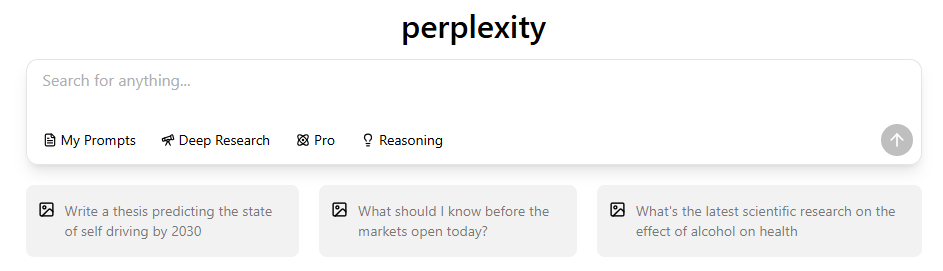
What Is the “PerplexityWindows App” and Why Are Users Searching for It?
| Option | Official Status | Safety Level | Update Method | Offline Support | System Integration |
| Perplexity Web | ✔ Official | High | Automatic via browser | No | None |
| Perplexity PWA (Edge/Chrome) | ✔ Official | High | Automatic via web updates | No | Minimal (windowed mode, taskbar pin) |
| Microsoft Store “Perplexity” App | ✖ Not official | Low / Unknown | Depends on third-party wrapper | No | None (WebView container only) |
| Native Windows App (.exe) | ✖ Not available | N/A | N/A | N/A | N/A |
Users search for a Perplexity Windows app because:
- Competing AI tools now offer real desktop clients.ChatGPT, DeepSeek, and others have official Windows installers, creating the expectation that Perplexity should have one too.
- Perplexity appears in the Microsoft Store. Many users assume anything listed there must be official — even when the publisher is not Perplexity AI, Inc.
- Blog posts and download sites mislead users. Several third-party websites incorrectly describe a “Perplexity Windows installer,” causing further confusion.
- People want faster, app-like access. A native desktop experience feels more convenient than opening a browser tab.
- Perplexity’s UI looks like an app already. The clean interface leads some users to believe a desktop version should exist.
In reality, Perplexity does not offer a native Windows application, and all “Windows app” appearances come from PWAs or unofficial wrappers.
Does PerplexityHave an Official Windows App? (Verified 2025 Status)
Based on Perplexity’s publicly available documentation and platform announcements:
- No Windows installer exists. Perplexity has never released an
.exe,.msix, or any installable desktop package. - Only three platforms are officially supported:
- Web (full experience)
- iOS app
- Android app
- The web version provides the complete feature set. Perplexity’s rapid update cycle relies on deploying UI and search improvements through the browser.
- False download pages cause confusion. Many unofficial websites resemble legitimate distributors but are not affiliated with Perplexity.
- Security verification is essential. If a file claims to be a Perplexity installer, it is unofficial by definition.
Is the Microsoft Store Perplexity App Official or Safe? (Important Warning)
| Risk Category | Severity | Likelihood | Explanation |
| Unknown publisher identity | High | High | User cannot verify who controls the app or its code. |
| Session or token exposure | High | Medium | WebView wrappers may mishandle authentication or store session data insecurely. |
| Data interception or injection | High | Medium | The wrapper could inject scripts or capture traffic passing through the embedded browser. |
| Lack of official updates | Medium | High | If Perplexity updates its web interface, the wrapper may break or behave unpredictably. |
| No security audits or guarantees | High | High | Third-party apps do not undergo Perplexity’s security review process. |
| Misleading appearance of legitimacy | Medium | High | Being in the Microsoft Store makes users wrongly assume the app is official. |
| Enterprise compliance risks | High | Medium | Organizations cannot trust unknown third-party containers for sensitive data. |

The Perplexity-branded app in the Microsoft Store is not official. Evidence:
- The publisher is not Perplexity AI, Inc.
- The app is a WebView wrapper, meaning it simply loads the Perplexity website inside a minimal browser frame.
- Wrappers offer no transparency or security guarantees, since the codebase is unknown.
- Session data may be exposed, because cookies and tokens pass through an app not controlled by Perplexity.
- No update pipeline exists. If Perplexity updates the website, the wrapper may break or behave inconsistently.
- Enterprises should avoid wrapper apps due to regulatory and compliance risks.
The Only Official Ways to Use Perplexityon Windows (Browser + PWA)
| Feature | Browser (Chrome/Edge) | PWA (Progressive Web App) |
| Convenience | Easy to access through any tab; good for multitasking | Opens in a dedicated window; behaves more like a desktop app |
| Performance | Fast; depends on browser environment | Slightly faster feel due to isolated window and reduced tab clutter |
| Reliability | Extremely reliable; always works with latest UI | High reliability; automatically reflects all website updates |
| Interface Experience | Mixed with tabs and browser UI elements | Clean, app-like interface without distractions |
| Update Method | Updates instantly via browser updates | Updates instantly because it is also browser-powered |
| Installation Required | No | Yes (one-click install through Edge/Chrome) |
| Security | Very high; handled directly by browser sandbox | Very high; inherits browser-level security constraints |
| Offline Support | None | None |
| Best For | Multitasking, casual use, quick research | Users wanting an app-like feel and dedicated workspace |
Perplexity officially supports two Windows access methods:
- Browser (Chrome, Edge, Firefox)
- Always up-to-date with the latest features
- Full functionality identical to mobile apps
- No installation required
- Safest method for handling account sessions
- Progressive Web App (PWA)
- Provides an app-like interface
- Can appear in the Start menu or taskbar
- Runs Perplexity in a dedicated window
- Lightweight, fast, and fully official
- Zero security risk compared to third-party installers
Why no other methods are supported:
- Perplexity’s product architecture is web-first
- Updates roll out centrally at the server level
- A desktop client would provide no performance or offline advantage
How to Installthe PerplexityPWAUsing Microsoft Edge (Recommended Method)
Follow these steps:
- Open Microsoft Edge.
- Visit https://www.perplexity.ai/platforms
- Select Apps → Download this site as an app.

- Click Download
- (Optional) Pin it to Start or the taskbar.
- To uninstall, go to Settings → Apps → Installed apps and remove it like any standard program.
How to Installthe PerplexityPWAUsing Google Chrome
- Open Google Chrome.
- Visit https://www.perplexity.ai.
- Select Install

- (Optional) Pin it to Start or the taskbar.
- To uninstall, go to Settings → Apps → Installed apps and remove it like any standard program.
PerplexityPWAvs Microsoft Store App vs Browser: Which Should You Use?
Browser
- Most flexible
- No installation required
- Full safety and immediate updates
PWA (Edge/Chrome)
- Best balance of convenience + safety
- App-like experience
- Official, lightweight, reliable
Microsoft Store Wrapper (Not Recommended)
- Not published by Perplexity AI
- Unknown security model
- No genuine offline or performance benefits
- Potential risk of credential mishandling
Summary
Most users should either:
- Use the browser for multitasking, or
- Install the PWA for an app-like feel
What You Can and Cannot Do with Perplexityon Windows
What you can do
- Run fast, citation-backed searches
- Explore complex topics with linked sources
- Use real-time factual lookup
- Access Perplexity Pro features (if subscribed)
- Sync history across devices
What you cannot do
- Use Perplexity offline
- Work with large files natively on the desktop
- Perform multimodal generation (images, video) natively
- Execute long-form reasoning with multiple models
- Use system-level integrations
Why PerplexityHas Not Released a Native Windows App
Product reasons
- Cloud-based architecture means no on-device compute is required.
- A desktop app would not improve speed, accuracy, or responses.
- Browser-based deployment allows instant feature updates.
Engineering reasons
- Maintaining Windows installers requires patching and version management.
- Testing across Windows builds adds overhead.
- No clear performance benefit to justify investment.
User-experience reasons
- The UI already behaves like an app in PWA mode.
- Perplexity prioritizes consistent cross-platform experience.
Who Should Use Perplexityon Windows—andWho Should Consider Alternatives
Perplexity is ideal for users who:
- Need fast source-backed answers
- Value search accuracy and citations
- Perform daily factual research
- Want a lightweight, minimal setup
Perplexity may not be enough for users who:
- Work with long documents or complex workflows
- Need multimodal generation (image/video)
- Require multiple AI models for comparison
- Depend on desktop-level integration or offline tools
Best Alternatives If You Want a Real AI Desktop Experience on Windows
Limitations Perplexity cannot solve:
- No local processing
- No multi-model reasoning
- No multimedia tools
- No integrated workspace approach
Why alternatives matter:
- Many users need a desktop-style AI environment, not just a search engine.
- A broader model ecosystem enables creation + analysis + reasoning.
Why GlobalGPT Is the Strongest Alternative in 2025

- Combines 100+ leading AI models in one place
- Includes GPT-5.1, Claude 4.5,Gemini 3 Pro,Sora 2 Pro
- Suitable for writing, coding, analysis, research, and multimodal creation
- Replaces the need for multiple subscriptions
- Works smoothly on Windows through a unified interface
- Avoids all risks of unofficial installers
Security Checklist: How to Safely Use Perplexityon Windows
To avoid compromised accounts or unsafe apps, follow these rules:
- Only access Perplexity official site.
- Avoid all
.exedownloads from third-party sites - Do not trust the Microsoft Store app unless the publisher is Perplexity AI
- Use browser profiles to isolate work and personal data
- Log out after using Perplexity on shared devices
- Keep your browser updated for maximum session security
Final Verdict: The Best Way to Use Perplexityon Windows in 2025
The safest and most reliable way to use Perplexity on Windows is through the browser or a PWA installed via Edge or Chrome. These options provide the full official experience without the security risks of unofficial apps or Store wrappers.

