

Quick verdict
The tested Anywhere meshy-v7 route is a useful rapid-prototyping tool, not a reliable shortcut to production-ready geometry. Four of the five planned test cases returned valid GLB files. The mug and bicycle preserved recognizable overall shapes, but hidden-surface projection, fused thin parts, objects stored as a single mesh, and missing PBR detail maps required manual mesh and texture repairs. In the matched robot pair, hosted Smart Topology did not honor the 15k target, did not return quads, showed no clear improvement in mesh edge loops around the joints, and produced more boundary and non-manifold edges than Standard. Route reliability was also mixed: one test case failed twice before task creation and another required its only operational retry.
Meshy 7 arrived in August 2026 with a strong claim: closer geometric alignment between a reference image and the generated 3D asset. But a useful review has to look past the supplied front view. Handles, spokes, small controls, hidden backs, texture projection, and the mesh itself are where a convincing preview can turn into a project requiring manual mesh repairs.
There is also a version caveat. Meshy 7.1 began rolling out on September 10, 2026. The hands-on tests in this article use the separately identified Anywhere route ID meshy-v7. That label does not prove whether every request used Meshy 7, Meshy 7.1, or Meshy‘s separate T2 topology system, so the official product facts and hosted-route results are kept separate.
For creators building a complete image-to-3D workflow, GlobalGPT offers an affordable way to use multiple AI models and functions in one dashboard. You can prepare or refine a reference image, generate the 3D asset, then continue with prompt work, research, writing, or development without moving the project across a separate service for every step.
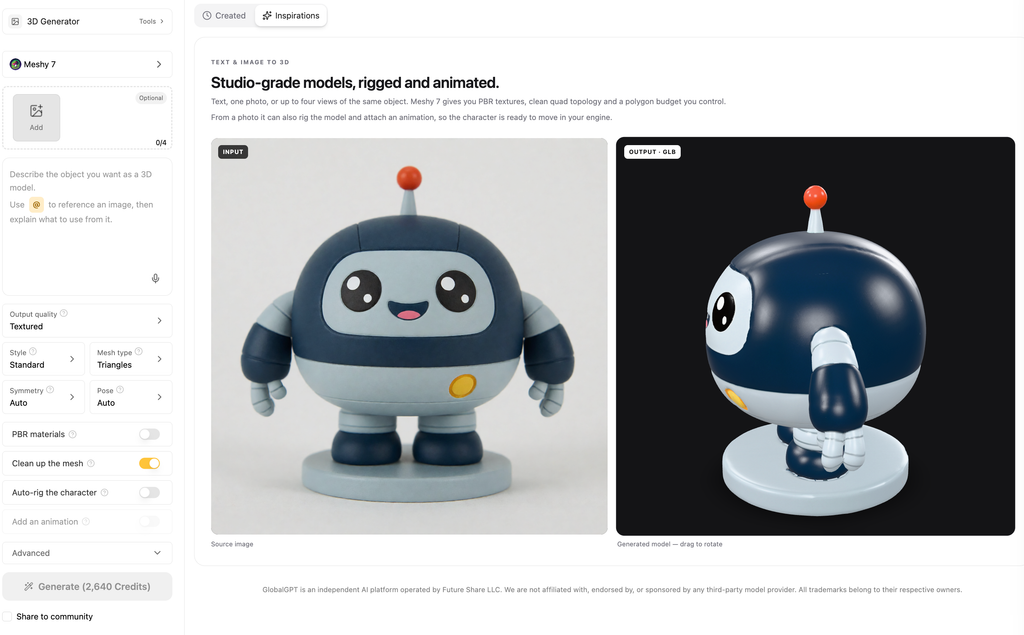
What Meshy 7 Is, and What Changed with Meshy 7.1
Meshy describes Meshy 7 as an image-to-3D foundation model built to align generated geometry more closely with a reference image. The company announced the model in August 2026 and reported stronger results for overall proportion, spatial distribution, and surface detail. Those numbers are vendor benchmarks, not scores from this review.
Meshy 7.1 began rolling out on September 10, 2026, adding an Ultra 4K geometry mode in Meshy‘s own product. That timing matters: an unversioned hosted label such as meshy-v7 should not be called the latest Meshy model, and a hosted result should not be described as 7.1 unless the response identifies it that way.
Release facts and review scope
| Name | Verified context | What this review can claim |
|---|---|---|
| Meshy 7 | Image-to-3D release announced in August 2026 | Official positioning and vendor-reported benchmarks, clearly attributed |
| Meshy 7.1 | Rollout began September 10, 2026 | Freshness warning; not silently assigned to hosted results |
Anywhere meshy-v7 | Hosted route tested through /v1/tasks | Only the observed request, response, file, timing, and cost evidence |
Meshy 7, Meshy T2, and the Anywhere API: Key Differences
Meshy‘s own API documentation identifies Smart Topology as a separate model named meshy-t2. In the Anywhere interface used for these tests, Smart Topology was an option under meshy-v7 and accepted text input only. These are different API offerings. A successful request through Anywhere does not establish that Meshy T2 is part of Meshy V7.
Native documentation vs hosted route
| Product or API option | Input mode | Topology behavior | Evidence boundary |
|---|---|---|---|
| Official Meshy 7/7.1 product | Designed to generate 3D models from images | Version-specific product claims | Official release material, not the hosted response |
Native API meshy-t2 | Documented for single Image-to-3D | Documented triangle output; ignores ordinary topology and remesh fields | Applies to Meshy‘s own API |
Anywhere meshy-v7 Smart Topology label | Text-only in the captured hosted interface | Hosted request accepts a topology field; delivered file must be inspected | Applies to the tested Anywhere API |
A request containing topology=quad is not evidence that the returned GLB contains editable quad topology.
How We Tested meshy-v7 Through the Anywhere API
We planned five test cases and evaluated the first valid output from each successful case. Three single-image tests target different failure modes: a white mug for hidden surfaces and texture projection, a vintage camera for mixed materials and small parts, and a road bicycle for thin structures and open gaps. A separate robot prompt compares the hosted Standard and Smart Topology labels at the same requested 15,000-polygon budget.
- For each test case, we kept the first valid output, including results with visible defects.
- Each operational failure gets at most one retry; a poor but valid asset does not.
- The tests exclude multiview, Ultra, Low-poly, rigging, animation, stability runs, quality rerolls, and named-competitor head-to-head tests.
- Each valid GLB is checked for vertices, stored triangles, open and non-manifold edges, components, UVs, materials, textures, and browser import.
- Displayed estimates are kept separate from response-side billing fields. Quota and margin are never converted into a claimed charge.
First-valid test status
All five test cases have a recorded final result. Four produced valid files, and one failed before task creation. Service failures are reported separately from model quality.
| Test case | Final task status | What can be evaluated |
|---|---|---|
| T01 · mug | Success | First-valid GLB downloaded, inspected, rendered, and scored. |
| T02 · camera | No valid output | Initial submit and the one allowed operational retry both returned HTTP 530 before a task ID. No quality score is assigned. |
| T03 · bicycle | Success after operational retry | The first submit returned HTTP 502 before task creation; the pre-registered retry produced a valid GLB that was inspected, rendered, and scored. |
| T04A · Standard | Success | First-valid GLB inspected under the matched 15k request. |
| T04B · hosted Smart | Success | First-valid GLB inspected against the Standard control. |
Image-to-3D Test 1: Hidden Surfaces on a White Mug
A simple mug can expose surprisingly difficult reconstruction problems. The handle must remain open and attach cleanly at both ends, the rim needs a real cavity, and the unseen rear and underside must form a coherent object. The source also places one cobalt stripe only on the visible front, making unwanted texture projection around the back easy to spot.
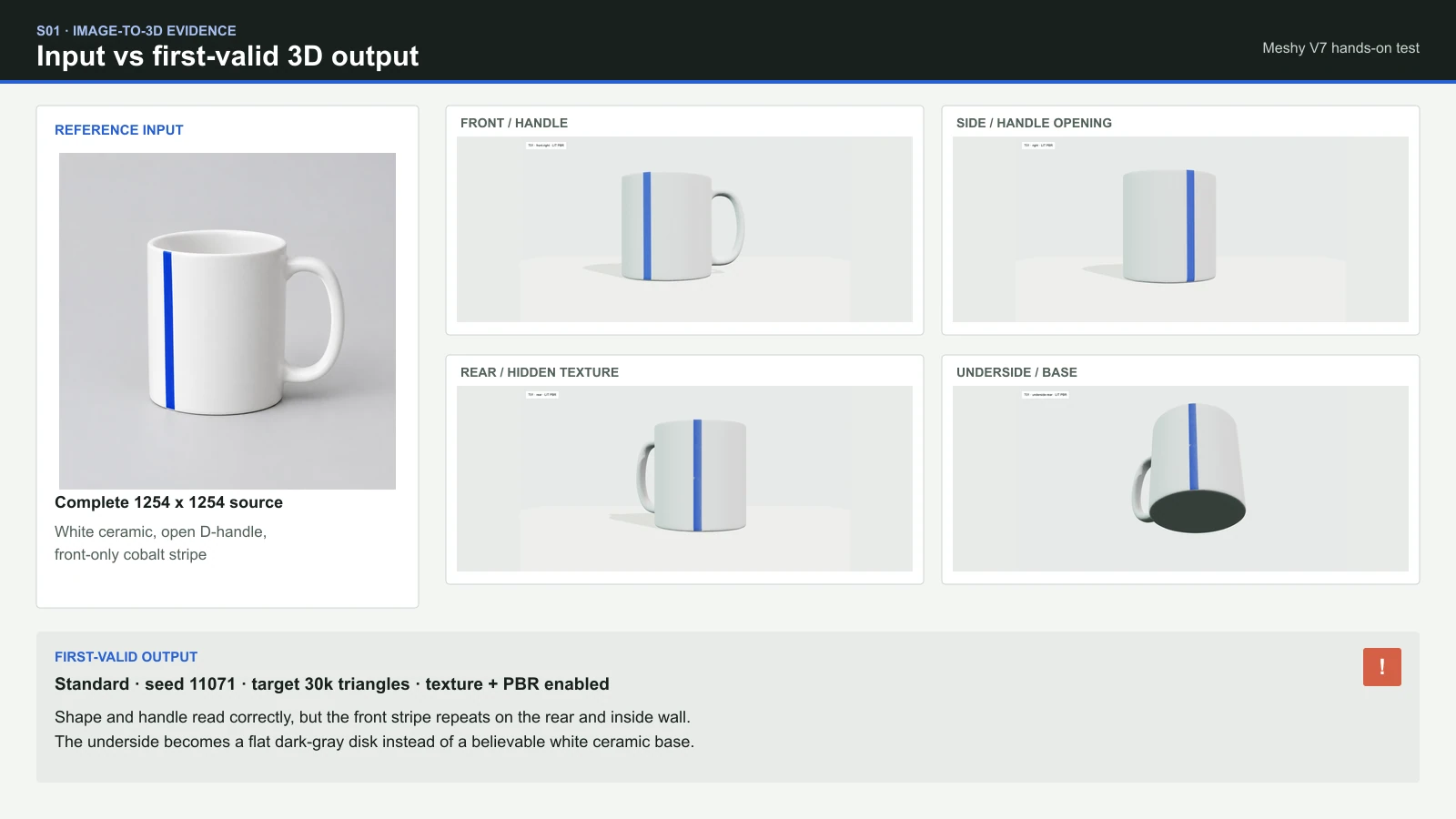
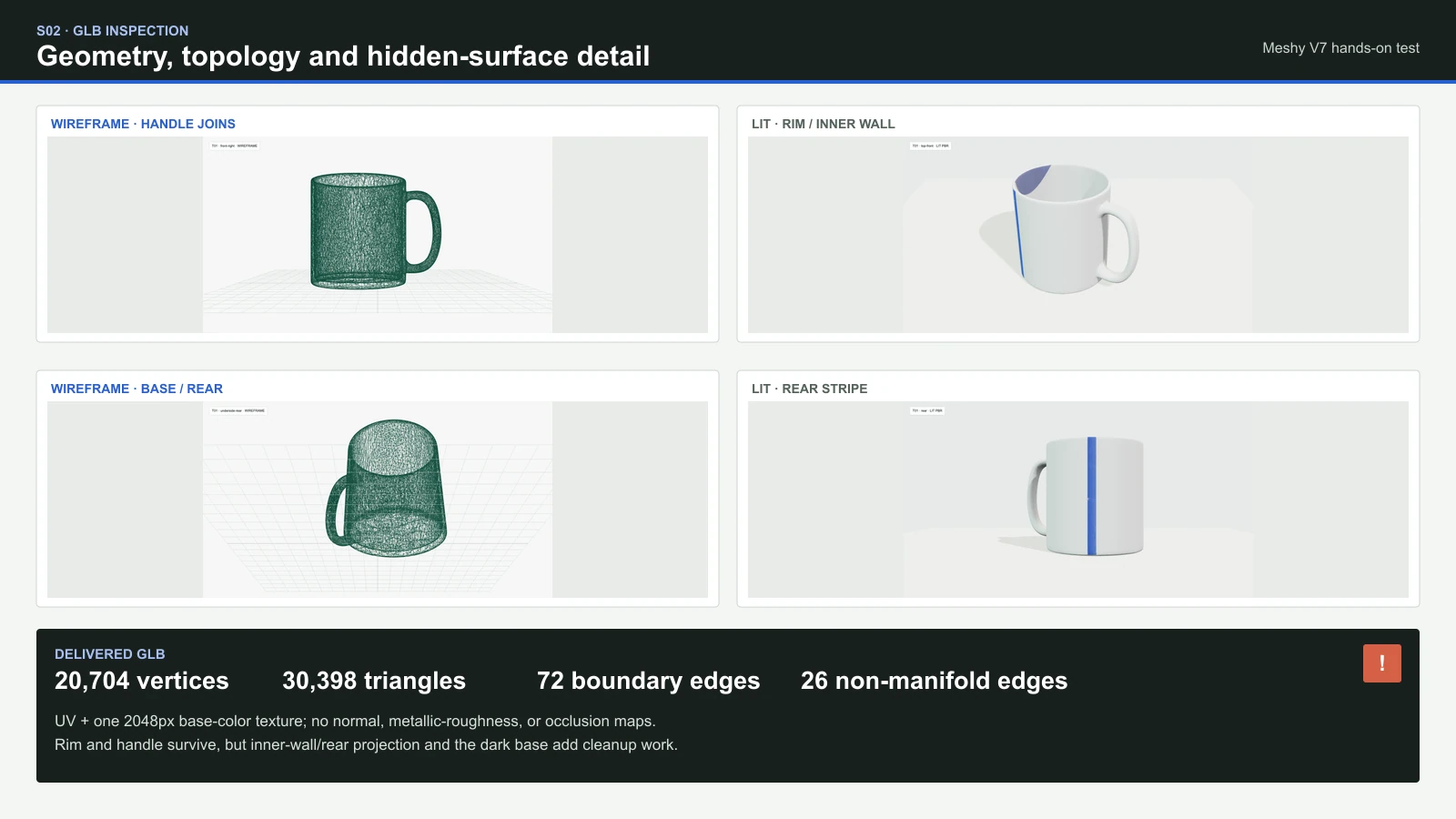
The first-valid result kept the mug’s straight-sided silhouette, open handle, and visible cavity. The result becomes much weaker when rotated. The front-only blue stripe reappears on the rear and continues into the inner wall, while the underside is capped by a flat dark-gray disk instead of a believable white ceramic foot. In other words, the model reconstructed the category and major shape more successfully than it inferred unseen surface appearance.
T01 result: recognizable shape, unreliable hidden surfaces
Each dimension uses a predefined 0-5 rating scale. Higher scores mean better results and less manual repair work. We do not combine these ratings into an overall score.
| Dimension | Rating | Observed first-valid result |
|---|---|---|
| Silhouette and proportion | 4/5 | The mug remains clearly recognizable with useful overall proportions. |
| Handle opening and joins | 3/5 | The opening and both joins survive, but the handle surface and attachments need manual repair. |
| Rim, cavity, rear, and underside | 2/5 | The cavity exists, but the underside becomes a flat dark disk. |
| Front-only stripe projection | 1/5 | The stripe is incorrectly projected onto the rear and inner wall. |
| UVs, materials, and mesh repairs | 2/5 | UVs and a base-color texture are present, but missing PBR maps and topology defects increase manual repair work. |
Image-to-3D Test 2: Materials and Small Parts on a Vintage Camera
The camera combines a circular glass lens, brushed metal, dark leather, two top dials, and two strap loops. The test asks whether those material zones and small components survive as usable structure rather than being painted onto a soft block.
No camera asset was produced. The first submission and the one authorized operational retry both returned HTTP 530 before Anywhere created a task ID. That result belongs in the reliability record, not the image-to-3D quality score: there is no generated lens, dial, strap loop, material, or mesh to judge.
T02 status: operational failure, no quality score
Two HTTP 530 responses, zero task IDs, and zero valid outputs. We stopped this test after the single retry allowed by the test plan.
Image-to-3D Test 3: Thin Geometry and Open Gaps on a Bicycle
A bicycle is a harsher geometry test. Circular wheels, spokes, narrow tubes, the fork, chain, crank, and two pedals all compete for limited geometry, while the open frame triangles must stay open instead of fusing into a slab.
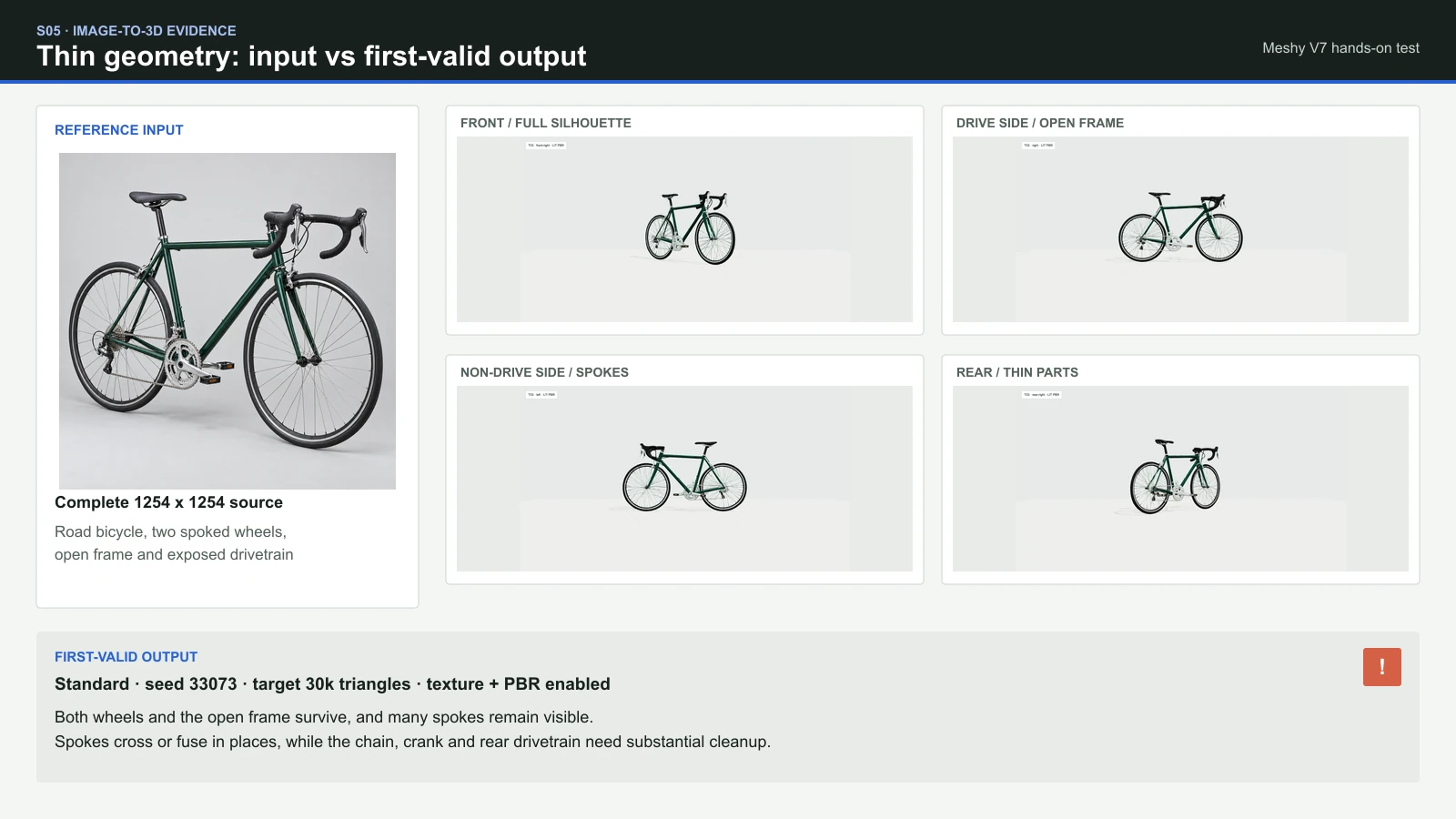
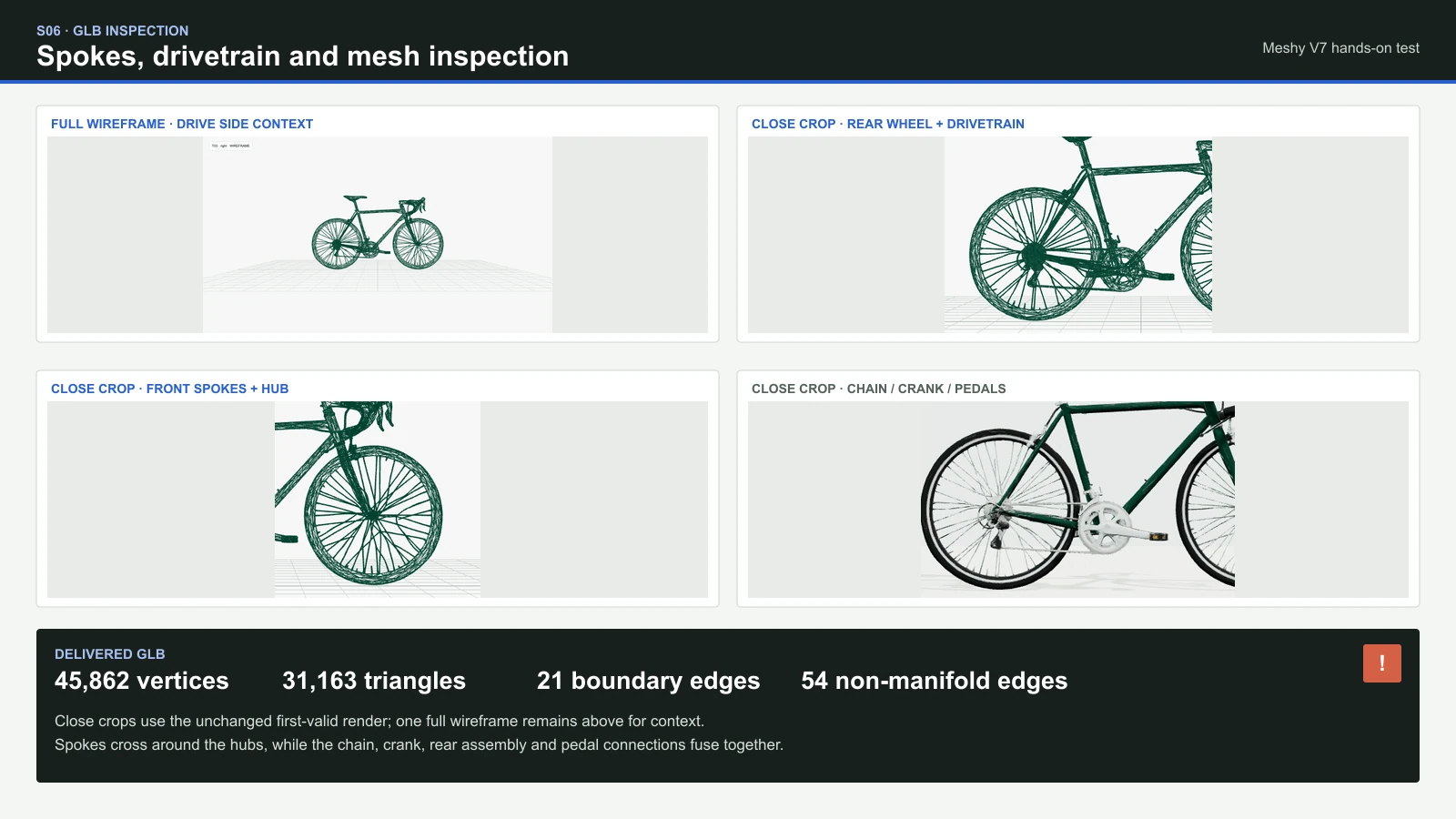
The first-valid bicycle looks convincing from ordinary viewing distance. Both wheels stay broadly round, the main frame silhouette remains recognizable, and the large front and rear frame openings do not fill in. The weakness appears when the mesh is inspected more closely: several spokes bend, double, cross, or fuse around the hubs, while the chain, crank, chainrings, derailleur, and rear hub merge into a mechanical approximation rather than separate editable parts.
T03 result: strong bicycle silhouette, fragile mechanical detail
The bicycle uses the same predefined 0-5 rating scale as the mug. Higher scores mean better results and less manual repair work. We do not combine these ratings into an overall score.
| Dimension | Rating | Observed first-valid result |
|---|---|---|
| Wheel roundness and frame silhouette | 4/5 | Both wheels and the road-bike silhouette survive with only localized shape variation. |
| Preservation of bicycle spokes | 3/5 | Many spokes remain visible, but several bend, double, cross, or fuse around the hubs. |
| Open frame triangles and gaps | 4/5 | The major frame openings remain clear from both sides; smaller cable and component gaps are less reliable. |
| Fork, chain, crank, and pedals | 2/5 | The fork and both pedals are present, but the drivetrain is a fused approximation rather than a coherent assembly. |
| Manual repair work for thin parts | 2/5 | Crossed spokes, fused mechanical parts, 21 boundary edges, and 54 non-manifold edges require substantial manual repair work. |
Does the Hosted Smart Topology Option Improve a Matched 15K Asset?
Both robot tests used the same text prompt, seed, A-pose, requested 15,000-polygon limit, and disabled-texture setting. All other API settings were identical. We changed only the modelType parameter: the first request used standard, and the second used smart-topology.
This comparison evaluates the Smart Topology option in the Anywhere API. It does not independently test Meshy‘s own T2 API. The comparison checks delivered primitive modes, actual triangle count, part completeness, density around the face, hands, and joints, broad-panel sparsity, open and non-manifold edges, and manual mesh repair requirements. A smoother render or smaller file is not enough to declare better topology.
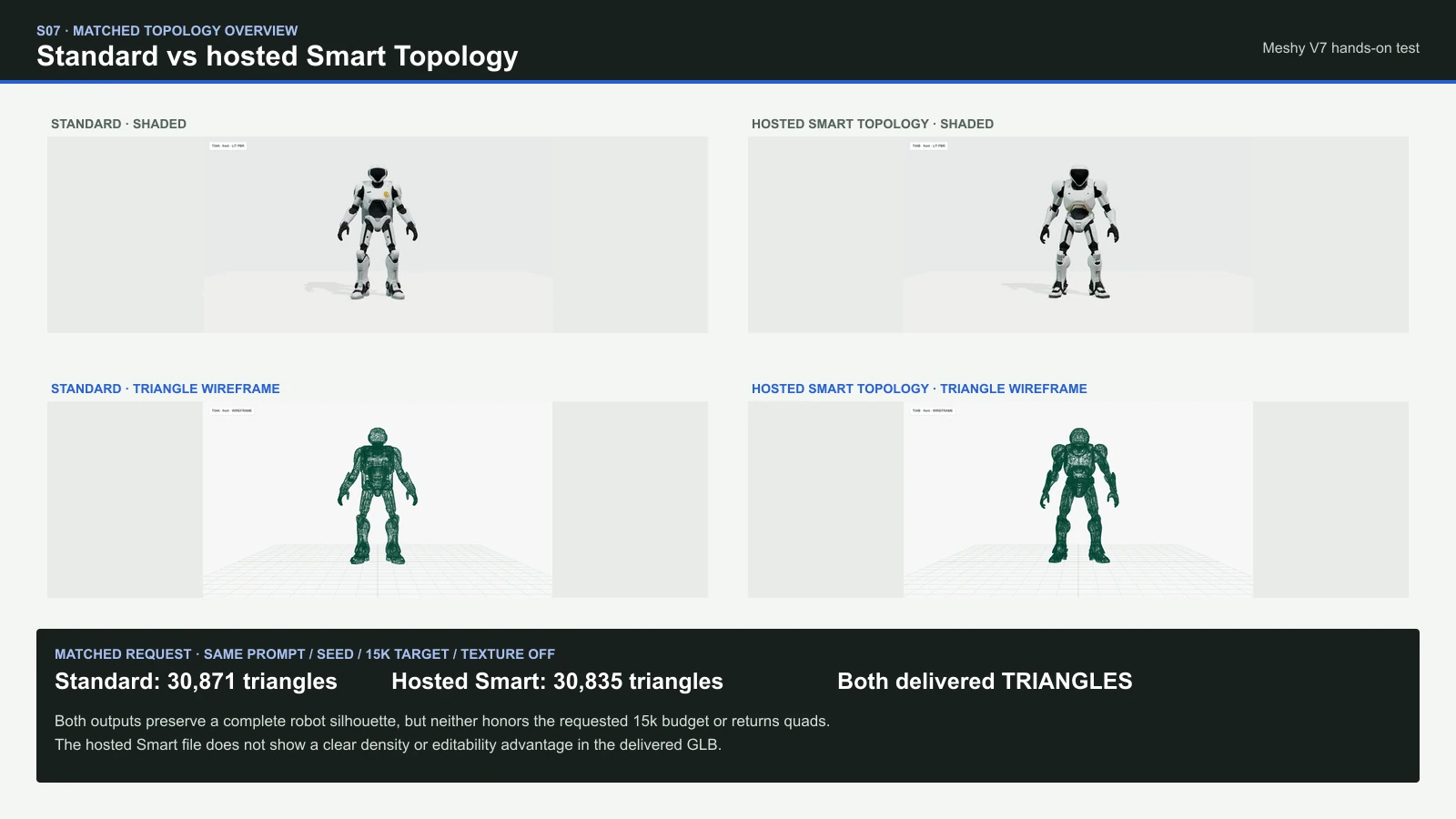
Both first-valid outputs preserve a complete robot silhouette, but neither meets the requested polygon count and face type. Standard contains 30,871 stored triangles and hosted Smart contains 30,835, roughly 2.06 times the requested 15,000 in both cases. Both GLBs store TRIANGLES, so the matched topology=quad request did not produce a quad asset.
Matched first-valid topology comparison
Same prompt, seed, A-pose, 15k target, texture-off request, and camera. Only the hosted modelType changed.
| Delivered evidence | Standard | Hosted Smart Topology |
|---|---|---|
| Stored triangles | 30,871 | 30,835 |
| Primitive mode | TRIANGLES | TRIANGLES |
| Source vertices | 39,336 | 48,043 |
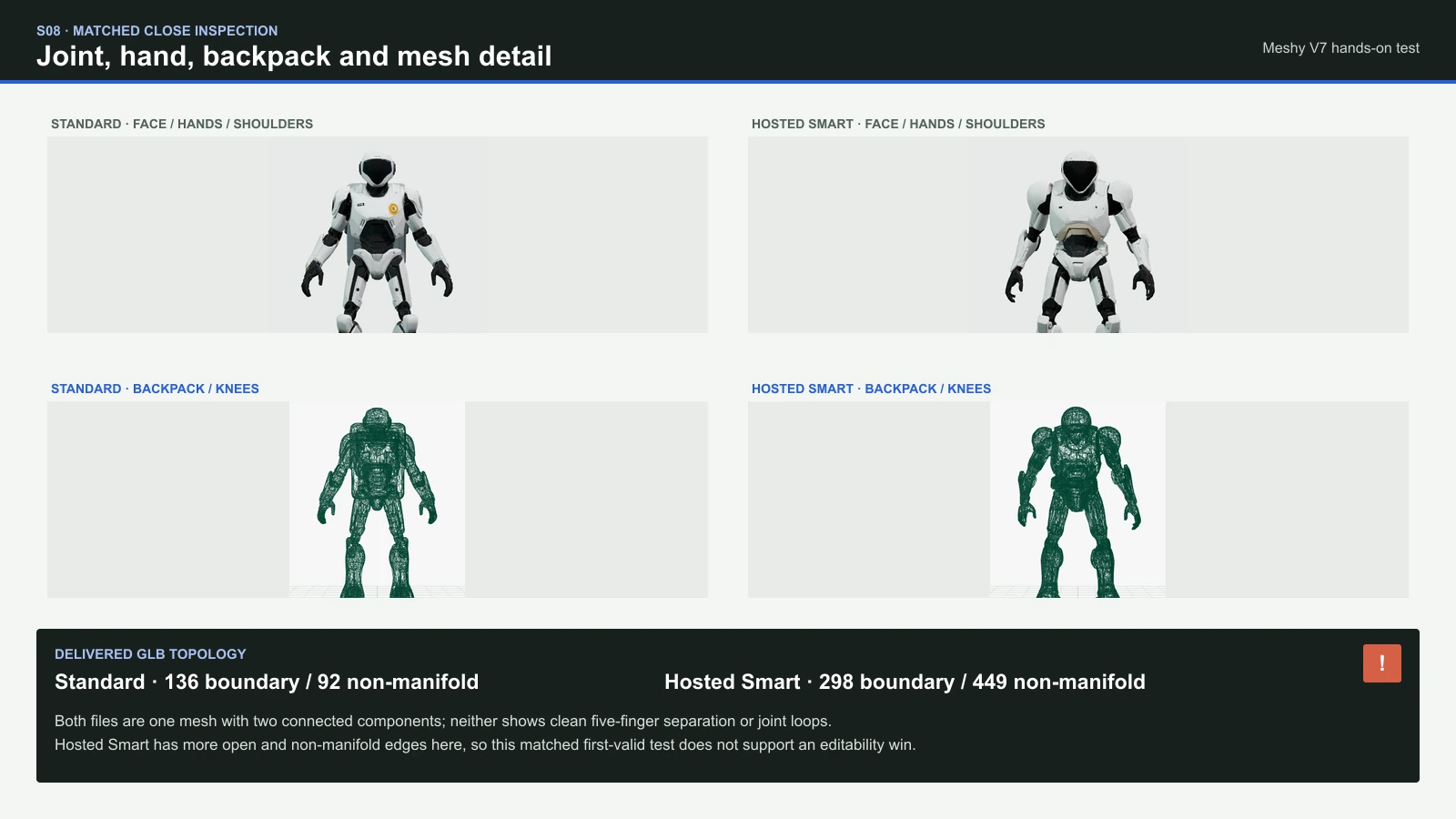
| Boundary / non-manifold edges | 136 / 92 | 298 / 449 |
| Mesh organization | One mesh, two connected components, no skin | One mesh, two connected components, no skin |
| Observed shape | Complete robot; a more clearly defined hard-shell backpack shape; fingers not cleanly separated | Complete robot; the backpack and torso are more visibly fused together; fingers not cleanly separated |
| Editing evidence | No clearly defined mesh edge loops around the joints; substantial work is needed to separate and repair parts | No clearly defined mesh edge loops around the joints; more edge defects and no observed improvement over Standard |
Practical finding: Standard is the cleaner delivered GLB in this one matched pair. That does not prove Standard is universally better, but it does mean this test cannot support an editability win for the hosted Smart label.
PBR, Returned Formats, and Downstream Mesh Usability
Meshy‘s native documentation lists several export targets, but a hosted route can expose a narrower result. This review lists only the files Anywhere actually returned, then separately reports whether the GLB parsed, rendered, included UVs, and carried decodable material maps.
Files and material data actually observed
| Test case | Returned file | UV / texture inventory | Mesh condition |
|---|---|---|---|
| T01 · mug | One valid glTF 2.0 GLB | UVs plus one decodable 2048 x 2048 base-color JPEG; no normal, metallic-roughness, or occlusion map | 30,398 stored triangles; 72 boundary and 26 non-manifold edges; browser render passed |
| T02 · camera | No output | Not evaluable | HTTP 530 before task creation on both allowed submissions |
| T03 · bicycle | One valid glTF 2.0 GLB | UVs plus one decodable 2048 x 2048 base-color JPEG; no normal, metallic-roughness, or occlusion map | 31,163 stored triangles; 21 boundary and 54 non-manifold edges; browser render passed |
| T04A · Standard | One valid glTF 2.0 GLB | UVs plus one decodable 2048 x 2048 base-color JPEG despite the texture-off request; no PBR detail maps | 30,871 triangles; 136 boundary and 92 non-manifold edges; two components |
| T04B · hosted Smart | One valid glTF 2.0 GLB | UVs plus one decodable 2048 x 2048 base-color JPEG despite the texture-off request; no PBR detail maps | 30,835 triangles; 298 boundary and 449 non-manifold edges; two components |
Successfully opening the GLB file is only the first check. Open edges, non-manifold connections, fused parts, detached fragments, texture seams, and awkward density can still make an asset expensive to edit. None of the checks in this review establishes rigging, animation, deformation, or production readiness.
Hosted-Route Speed, Reliability, and Observed Cost
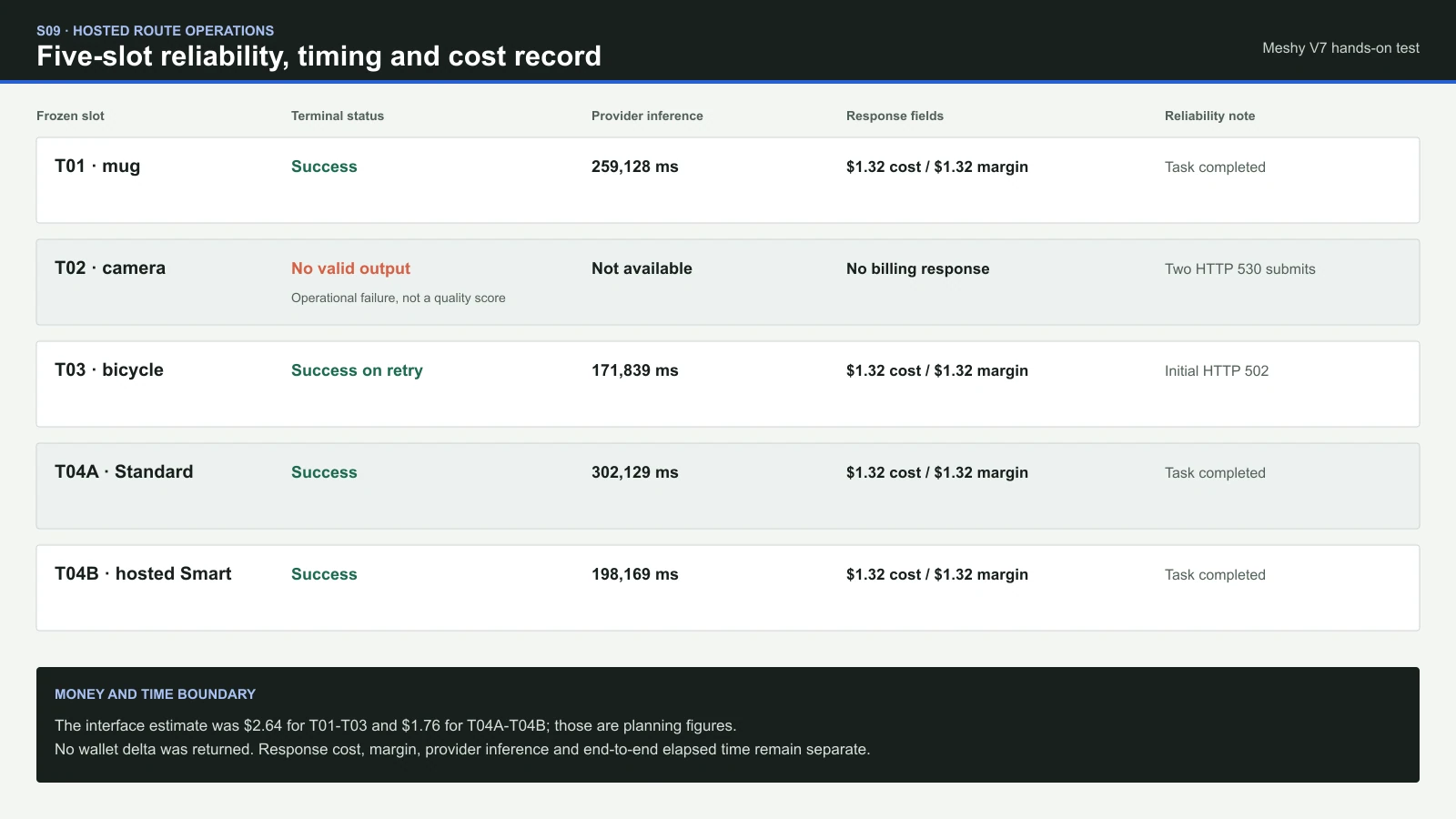
We recorded the time of task submission, task ID receipt, the final status response, file download, and local import. The table separates provider processing time from the total elapsed time we observed. Queue delays and service errors are reported separately from model quality. The interface estimates added up to $11.44 for the five planned test cases. This was an estimated budget, not a confirmed payment.
Processing Time and Cost Records from the Anywhere API
The interface estimate, API cost field, API margin field, and actual account deduction are separate amounts. The table records each amount only where the data was available.
| Evidence | T01 · mug | T02 · camera | T03 · bicycle | T04A · Standard | T04B · hosted Smart |
|---|---|---|---|---|---|
| Submit result | Task ID received about 4 seconds after submission | HTTP 530 before task creation on both allowed attempts | Initial submit returned HTTP 502; the allowed retry received a task ID about 5 seconds after submission | Task ID received about 5 seconds after submission | Task ID received about 4 seconds after submission |
| Provider inference | 259,128 ms, about 4 min 19 sec | Not available | 171,839 ms, about 2 min 52 sec | 302,129 ms, about 5 min 2 sec | 198,169 ms, about 3 min 18 sec |
| End-to-end service observation | The final task status response arrived about 46 min 25 sec after submission timestamps; repeated polling errors mean this is not pure generation time | No task lifecycle to time | About 8 min 17 sec from retry submission to download completion, including status checks and file transfer | About 8 min 49 sec from task submission to download completion | About 9 min 54 sec from task submission to download completion |
| Interface estimate | $2.64 | $2.64 planning estimate; no task or billing response | $2.64 | $1.76 | $1.76 |
Response cost_usd | $1.32 | Not available | $1.32 | $1.32 | $1.32 |
Response margin_usd | $1.32 | Not available | $1.32 | $1.32 | $1.32 |
| Account balance before and after the test | Not available | Not available | Not available | Not available | Not available |
Billing boundary: account balances before and after each test were unavailable. We therefore cannot confirm that $2.64, $1.32, or the reported margin equals the amount actually deducted.
Meshy Pricing and Commercial Use Without Mixing Billing Systems
There are three different money systems to keep apart: Meshy web subscriptions, native Meshy API credits, and the USD estimate or charge shown by a hosted provider. They are not interchangeable.
- Meshy subscriptions: the current official page lists Free, Pro, Studio, and Enterprise. Exact monthly prices and included credits were not reliably exposed during research, so stale third-party figures are omitted.
- Native API credits: Meshy‘s documentation lists operation-level credit costs. These are native API terms and are not treated as hosted-route prices or confirmed V7/7.1 pricing.
- Anywhere hosted route: the captured interface displayed $2.64 for each textured test and $1.76 for each geometry-only test. Final reporting uses returned billing evidence where available.
Meshy‘s help material states that paid-plan users own the assets they generate, subject to Meshy‘s Terms. Rights in uploaded images and other input content remain a separate requirement. Generating an asset does not grant permission to use someone else’s protected material. Free-plan assets use the CC BY 4.0 license, which permits commercial use with attribution. The license does not remove restrictions arising from third-party rights.
Choosing Between Meshy, Tripo, Rodin, Hunyuan 3D, and TRELLIS
We did not test these other models with the same inputs, so these results do not establish an overall winner. Choose according to your project’s generation, export, and editing needs. For a separate geometry-mode test, see our Tripo H3.1 review. For another fast hosted image-to-3D route, see the Hunyuan3D 3.1 Rapid review.
Choose by workflow, not a universal leaderboard
| Route | Useful when | Evidence boundary |
|---|---|---|
Anywhere meshy-v7 | You want a quick recognizable prototype and can inspect or repair the GLB afterward. | This review tests first-valid output, hidden surfaces, thin parts, and one hosted topology pair. |
| Tripo H3.1 | You want a separate hands-on view of another current image-to-3D and geometry-mode workflow. | Read its own test; it was not rerun with the Meshy inputs here. |
| Hunyuan3D 3.1 Rapid | You want to examine another fast hosted image-to-3D route. | Read its own test; no matched winner is claimed in this article. |
| Rodin or TRELLIS | Their available export, editing, or local-workflow options better fit your project. | Context only. No current matched head-to-head was run here. |
A One-Dashboard Image-to-3D Workflow with GlobalGPT
- Start with a clear reference image that shows the entire object. Its outline and openings should be easy to distinguish from the background.
- When one photo is not enough for planning, generate consistent multi-angle reference images before deciding which 3D route to use. This review itself does not test multiview reconstruction.
- Choose the generation settings before starting the test, keep them unchanged, and retain the first valid output.
- Inspect the back, underside, wireframe, UVs, material maps, and small parts before building downstream work around the asset.
- Continue prompt refinement, reference work, research, writing, or development in the same GlobalGPT dashboard. Its affordable multi-model, multifunction setup means you do not need to open and pay for a separate service for every model or stage of the workflow.
Who This Tested Route Is Best For
Recommended users and uses: concept artists, product ideation, previsualization, rough game or scene blocking, and creators who value a fast recognizable starting point more than clean mechanical detail. The route is especially practical when you already expect to inspect the back, underside, topology, and materials before using the asset downstream.
Expect manual repairs if you need: accurate hidden surfaces, clearly separated spokes or drivetrain parts, a strict polygon limit, editable quads, mesh edge loops suitable for joint deformation, separate production parts, watertight geometry, or a complete PBR map set. Service reliability also matters when a failed request or a retry could disrupt your deadline.
Frequently Asked Questions
Is Meshy 7 still the latest Meshy release?
No. Meshy 7.1 began rolling out on September 10, 2026. The hosted route tested here is labeled meshy-v7, and the review does not silently relabel its outputs as 7.1.
Is Meshy Smart Topology part of Meshy V7?
That is not established by the current first-party API documentation. Meshy identifies native Smart Topology as the separate meshy-t2 model. Anywhere exposes a hosted Smart Topology option under meshy-v7, but a hosted interface label does not prove backend equivalence.
Does Smart Topology produce quads?
Meshy‘s native T2 documentation says triangle output and says ordinary topology controls are ignored. For the hosted test, the request includes topology=quad because that is what the captured interface exposes; the article reports the file actually delivered rather than assuming the request was honored.
How much does Meshy cost?
Meshy subscriptions, native API credits, and hosted-provider charges are separate. This article reports each system in its own context and does not use a displayed estimate as proof of the final charge.
Can Meshy outputs be used commercially?
Meshy‘s help material states that paid-plan users own their generated assets, subject to Meshy‘s Terms. Users must also have the rights or permissions needed for their input content. Generating an asset does not grant rights to someone else’s input material. Free-plan assets use the CC BY 4.0 license and require attribution. Review the current terms and any third-party rights before commercial use.
Is Meshy better than Tripo or Rodin?
This test cannot support an overall winner because it does not run a matched multi-model comparison. The better choice depends on reference fidelity, preservation of thin parts, topology needs, willingness to repair the mesh, speed, and the route you can actually access.
Final Verdict: Fast 3D Prototypes That Need Manual Repairs
In these tests of the first valid outputs, the Anywhere meshy-v7 route was good at turning a readable reference into a recognizable 3D starting point. It was much less dependable when the job required accurate unseen surfaces, delicate mechanical parts, a strict polygon target, editable quads, or clean downstream topology. Standard was also the better delivered file in the one matched hosted topology pair. The sensible workflow is to use Meshy for speed, then inspect the complete GLB before committing production work.
If that tradeoff fits your project, try the image-to-3D workflow in GlobalGPT. Its affordable multi-model workspace keeps reference preparation, 3D generation, prompt refinement, research, writing, and development in one dashboard, while leaving the final mesh decision grounded in the file you actually receive.





