간단한 답변
구글은 더 이상 Nano Banana Pro를 단순히 하루에 생성 가능한 이미지 수로만 제시하지 않습니다. Gemini Apps는 요금제, 프롬프트의 복잡도, 기능, 테스트 및 가용성에 따라 변동될 수 있는 컴퓨팅 기반 제한을 적용합니다. Nano Banana 2는 주요 이미지 생성기이며, 유료 Google AI 구독자는 더 세밀한 표현이나 정밀한 제어가 필요할 때 Nano Banana Pro를 사용하여 이미지를 다시 생성할 수 있습니다.
이러한 구분은 중요합니다. “Pro 요금제는 매일 100장의 이미지를 항상 이용할 수 있다”와 같은 주장은 과거의 허용량이나 특정 계정에 한정된 경험을 설명할 수는 있겠지만, 모든 사용자에게 적용되는 신뢰할 수 있는 약속은 아닙니다. 구글은 한도가 변경될 수 있다고 밝혔으며, Nano Banana 2장 할당량에 도달하면 Pro 요금제를 통한 추가 ‘Redo’ 요청도 중단됩니다.
별도의 이미지 및 동영상 편집 도구 사이를 오가지 않고도 Nano Banana Pro 전용 작업 공간을 원하신다면, GlobalGPT의 Nano Banana Pro 발전기 참조 이미지 제어 기능, 해상도 옵션, 그리고 생성 시마다 표시되는 크레딧 비용을 제공합니다. 따라서 실질적인 비교는 “무제한 대 제한”이 아니라, 구글의 요금제 기반 Gemini 워크플로우와 GlobalGPT의 투명한 크레딧 기반 워크플로우 간의 비교입니다.

Gemini 앱에서 Nano Banana Pro 제한 기능이 작동하는 방식
Gemini Apps는 컴퓨팅 기반 사용 제한을 적용합니다. Google에 따르면, 사용 가능한 양은 프롬프트의 복잡성, 사용되는 모델 및 기능, 대화의 길이에 따라 달라집니다. 또한 테스트, 실험 또는 서비스 가용성 상황에 따라 이용 가능 여부가 변경될 수 있습니다.
이로 인해 고정된 일일 이미지 할당량 표는 예전만큼 유용하지 않게 되었습니다. 같은 요금제를 사용하는 두 사람이 항상 동일한 실제 용량을 사용할 수 있는 것은 아닙니다. 특히 한 사람은 간단한 이미지 생성을 하는 반면, 다른 사람은 세부적인 편집, 여러 개의 참조 자료 요청, 또는 복잡한 인포그래픽 작업을 요청하는 경우에는 더욱 그렇습니다.
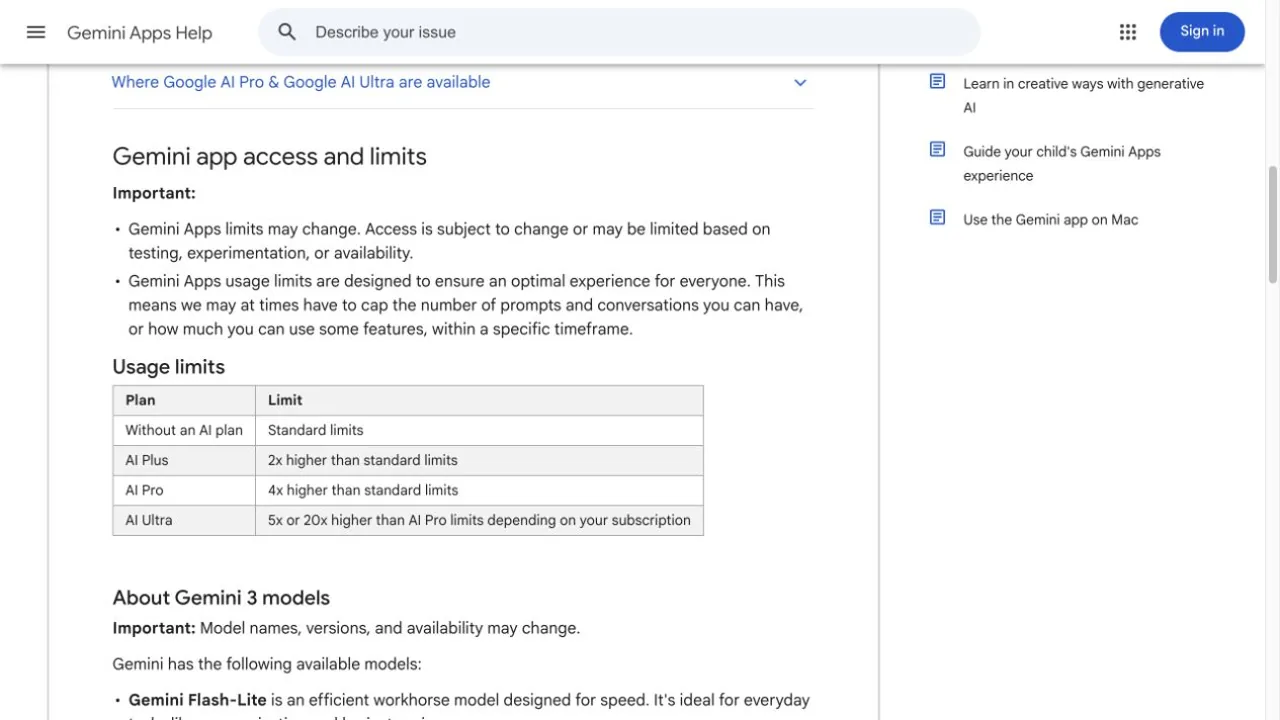
구글의 현재 요금제 비교는 상대적인 이용 한도를 기준으로 합니다. AI Plus는 표준 한도의 2배, AI Pro는 표준 한도의 4배이며, AI Ultra는 구독 요금제에 따라 AI Pro 한도의 5배 또는 20배입니다. 이는 이용 한도의 배율일 뿐, 모든 프롬프트나 이미지의 비용이 동일하다는 것을 보장하는 것은 아닙니다.
Gemini 앱 사용량 단계 — 고정된 이미지 수 아님
구글은 상대적인 전체 접근 수준을 공개하지만, 실제 이미지 사용은 여전히 계산 기반이며 동적으로 이루어집니다.
Source: Google Gemini Apps 도움말 — 사용량 제한 및 업그레이드, 2026년 7월 28일 확인.
이 계층 구조는 플랜을 비교하는 데 도움이 되지만, Nano Banana Pro 이미지의 수를 보장해 주지는 않습니다. 실제 생산 배치에 있어서는 계정에 표시되는 사용 한도 메시지가 여전히 가장 확실한 기준이 됩니다.
Free, AI Plus, Pro, Ultra: 실질적인 차이점
| 계획 | 나노 바나나 2 | Nano Banana Pro로 다시 실행하기 | 가장 적합 |
|---|---|---|---|
| 구글의 AI 계획 없음 | 표준 한도 내에서 이용 가능 | 포함되지 않음 | 가끔씩 이미지를 생성하고 간단한 실험을 해보기 |
| Google AI 플러스 | 2× 표준 전체 접근 | 사용 가능 | 가끔은 좀 더 세밀한 수정이 필요한 정기적인 제작자 |
| 구글 AI 프로 | 4× 표준 전체 접근 | 사용 가능 | 텍스트, 인포그래픽 및 정밀한 편집 작업을 자주 수행 |
| 구글 AI 울트라 | 5배 또는 20배 AI Pro 이용 권한 | 사용 가능 | Gemini를 많이 이용하면서도 해당 요금제의 다양한 프리미엄 기능을 중요하게 여기는 사용자들 |
무료 요금제에서는 Nano Banana 2로 이미지를 생성할 수 있지만, Nano Banana Pro는 유료 Google AI 요금제와 연계되어 있습니다. AI Plus는 Google이 Pro와 함께 ‘Redo’ 기능을 지원한다고 명시한 가장 낮은 유료 요금제입니다. Pro와 Ultra 요금제는 전반적인 이용 한도를 높여주지만, Google은 여전히 사용 한도를 조정할 권리를 보유합니다.
하루 3장, 20장, 100장, 1,000장 등의 오래된 수치는 해당 수치가 본인의 현재 계정 내 정보에 명시되어 있지 않은 한, 구식 통계로 간주해야 합니다. 이러한 수치는 온라인 보고서의 차이가 발생하는 이유를 이해하는 데 유용하지만, 이를 보편적인 권리로 간주해서는 안 됩니다.
나노 바나나 2 대 나노 바나나 프로
Nano Banana 2는 Gemini 앱에서 사용되는 표준 이미지 생성 방식입니다. 구글은 이를 속도, 이미지 품질, 세계 지식, 텍스트 렌더링, 지시 사항 준수, 그리고 여러 참조 이미지 지원 간의 균형이 잘 잡힌 방식이라고 설명합니다. Gemini를 Flash-Lite로 설정하면 Lite 버전을 사용할 수 있으며, 이 버전은 더 빠르고 간편한 작업을 위해 최적화되어 있습니다.
Nano Banana Pro는 보다 특화된 역할을 수행합니다. Google AI 플랜을 사용하고 Gemini를 Pro 모드로 설정하면, 더 세밀한 디테일, 더 강력한 텍스트 및 언어 처리 능력, 더 높은 일관성, 또는 더 정밀한 창작 제어 기능이 필요할 때 기존 이미지를 재가공할 수 있습니다.
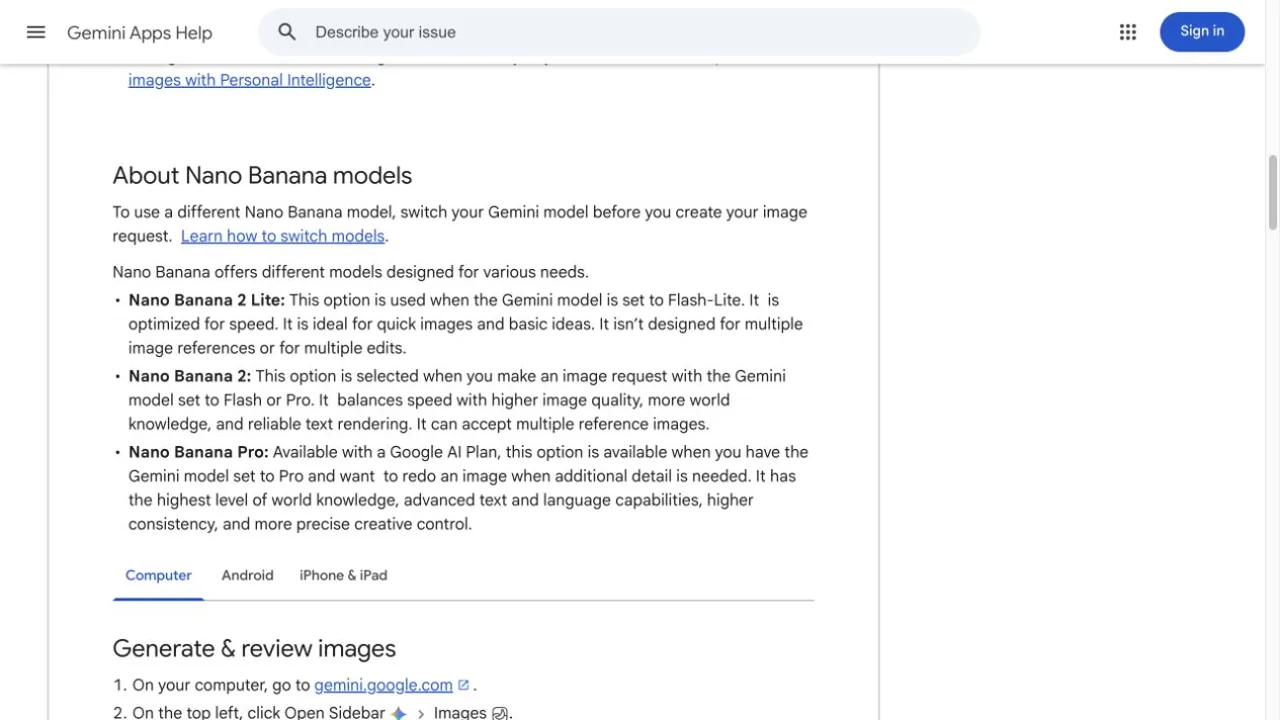
| 모델 | 주요 역할 | 다음과 같은 경우에 선택하세요 |
|---|---|---|
| 나노 바나나 2 라이트 | 빠르고 기본적인 생성 | 빠른 아이디어가 필요하며, 여러 참고 자료나 반복적인 수정은 필요하지 않습니다. |
| 나노 바나나 2 | 기본 균형 조정기 | 일상적인 스타일의 생성물, 신뢰할 수 있는 텍스트, 그리고 여러 개의 참고 이미지를 원하신다면 |
| 나노 바나나 프로 | 유료, 세부 사항에 중점을 둔 재작업 | 기존 결과물에는 더 나은 세계관, 텍스트, 일관성 또는 제어 기능이 필요합니다. |
더 포괄적인 기능 비교를 보려면 다음을 참조하십시오. 나노 바나나 대 나노 바나나 프로.
이 업무에는 어떤 Nano Banana 경로가 적합할까요?
현재 구글 도움말 페이지와 실제 GlobalGPT 인터페이스를 바탕으로 한 사실 정리표.
| 경로 | 액세스/제한 신호 | 문서화된 출력 또는 제어 | 최적의 사용법 |
|---|---|---|---|
| 나노 바나나 2 AI 계획 없음 | 표준, 동적 Gemini 제한값 | 1K 다운로드 | 간헐적인 생성 |
| 나노 바나나 2 구글의 AI 계획 | 플랜별 동적 액세스 범위 확대 | 2K 다운로드 | 일반 이미지 생성 |
| 나노 바나나 프로 프로로 다시 실행 | 유료 Google AI 요금제; Nano Banana 2 이미지 할당량이 소진되면 중단됩니다. | 세부 사항에 중점을 둔 재실행 | 선택한 결과 정제하기 |
| GlobalGPT 나노 바나나 프로 | 선택한 설정에 대해 500 크레딧이 표시됩니다. | 최대 14장의 참조 이미지; 해상도 조절 기능 | 전용 작업 공간에서 한눈에 파악할 수 있는 신용 예산 관리 |
출처: Google Gemini Apps 도움말 — 이미지 생성 및 편집 그리고 GlobalGPT Nano Banana Pro, 2026년 7월 28일 확인.
이 결정은 일일 총 한도를 무조건 달성하려는 것보다는 적절한 제어 시스템을 선택하는 데 더 중점을 둡니다. Gemini는 동적 계정 한도를 표시하는 반면, GlobalGPT는 실행 전에 선택한 발전 비용을 미리 보여줍니다.
예상보다 일찍 한도에 도달할 수 있는 이유
조기 중단에 대한 보고가 반드시 모든 계정에 숨겨진 고정 이미지 수치가 있다는 것을 의미하는 것은 아닙니다. 이는 Gemini가 모델과 특징 전반에 걸친 사용량을 측정하는 방식에서 비롯된 결과일 수 있습니다.
- 프롬프트 복잡도: 세밀한 장면, 정교한 텍스트, 또는 여러 단계로 이루어진 편집 작업은 더 많은 연산 능력이 필요할 수 있습니다.
- 기능 선택: 미디어 생성 작업과 고급 모델은 비교적 가벼운 작업에 비해 할당된 리소스를 더 많이 사용합니다.
- 대화 길이: 긴 대화 내용은 Gemini가 새로운 요청이 들어올 때마다 처리해야 하는 맥락을 추가합니다.
- 가용성: Google은 테스트 기간이나 수요가 급증하는 기간 동안 접근 권한을 조정할 수 있습니다.
- 공유 가능한 이미지 용량: Nano Banana 2 이미지 할당량에 도달하면 더 이상 ‘Redo with Pro’ 요청을 수행할 수 없습니다.
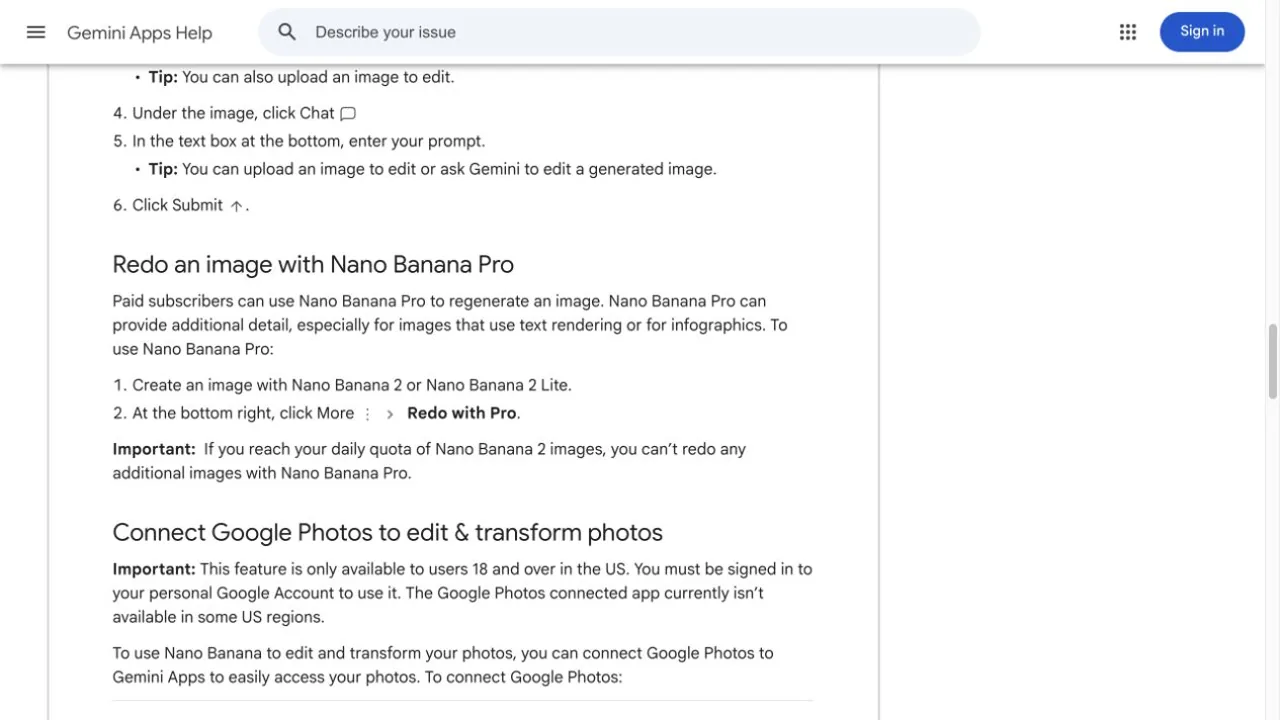
Google에 따르면, Gemini Apps의 각 한도는 주간 한도에 도달할 때까지 5시간마다 갱신된다고 합니다. Gemini는 일반적으로 한도에 가까워지거나 다시 접속이 가능해지면 알림을 표시하므로, 해당 계정과 시점에 가장 적합한 답변으로 계정에 표시된 메시지를 활용하십시오. 해당 계정과 시점에 가장 적합한 답변으로 계정에 표시된 메시지를 활용하십시오.
해상도 및 출력 품질
해상도는 구버전 가이드가 오해를 불러일으킬 수 있는 또 다른 부분입니다. 구글의 현재 Gemini Apps 도움말 페이지에 따르면, Nano Banana 2는 AI 요금제 없이 고해상도로 이미지를 미리 볼 수 있으며 1K로 다운로드할 수 있고, 구글 AI 요금제를 사용할 경우 2K로 다운로드할 수 있다고 명시되어 있습니다. 이는 2026년 7월 28일에 확인된 Gemini Apps의 공식 워크플로우입니다.
다른 제품, API 또는 플랫폼에서는 서로 다른 해결 방안을 제공할 수 있습니다. 클레임을 비교할 때는 이러한 경로를 별도로 구분해야 합니다. 한 인터페이스에서 제공되는 해결 방안이 모든 Gemini Apps 플랜을 자동으로 설명하는 것은 아닙니다.
GlobalGPT에서 Nano Banana Pro 사용
GlobalGPT는 전용 Nano Banana Pro 이미지 작업 공간을 제공합니다. 2026년 7월 28일 기준, 인터페이스에는 최대 14개의 참조 이미지 지원, 화면비 및 해상도 조절 기능, 그리고 선택된 생성 설정에 대한 500 크레딧의 비용이 표시되었습니다.
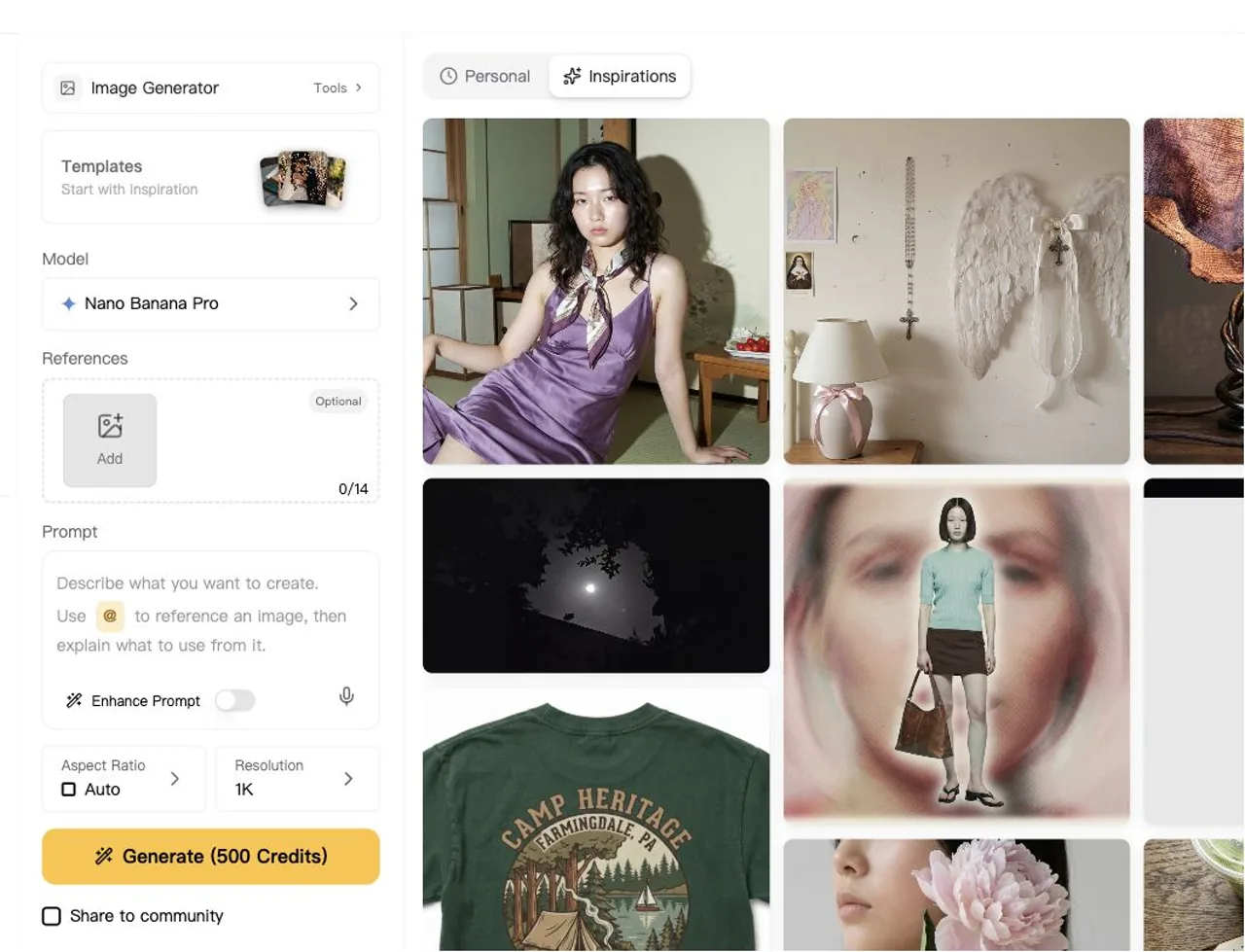
이점으로는 투명성과 다양한 워크플로우 활용이 있습니다. 요청을 실행하기 전에 크레딧 비용을 확인할 수 있으며, 동일한 작업 공간 내에서 다른 이미지, 동영상 및 AI 도구로 바로 이어서 작업할 수 있습니다. 이는 변동 가능성이 있는 예상 일일 이미지 수에 의존하는 것보다 예산 산정이 더 수월할 수 있습니다.
GlobalGPT를 무제한으로 일반화하여 설명해서는 안 됩니다. 해당 상품의 모델 이용 가능 여부, 설정 및 신용 비용은 상품 인터페이스에서 확인할 수 있으며, 시간이 지남에 따라 변경될 수 있습니다. 참조 항목을 많이 사용하는 경우, 가이드에서 실제 업로드 규칙을 확인하시기 바랍니다. Nano Banana Pro 기준 이미지 제한 사항.
이미지 할당량을 더 오래 활용하는 방법
- 질문을 하기 전에 무엇이 바뀌어야 하는지 먼저 결정하세요. 주제, 구성, 문체, 본문 및 제약 사항을 하나의 명확한 요청 사항으로 정리해 주십시오.
- 초안 작성 시 Nano Banana 2를 사용하세요. 더 세밀한 표현이나 정밀한 제어가 정말로 필요한 결과물을 얻으려면 ‘Pro’ 모드로 ‘다시 실행’을 저장하세요.
- 기존 대화 내용이 더 이상 유용하지 않을 때는 새로운 대화를 시작하세요. 긴 대화는 Gemini가 처리하는 양을 늘릴 수 있습니다.
- 그룹 관련 수정 사항. 한 번에 종합적인 수정을 요청하는 것이 여러 번에 걸쳐 사소한 수정을 반복하는 것보다 대개 더 효율적입니다.
- 성공적인 프롬프트 패턴을 유지하세요. 반복적인 실험을 통해 구조를 새로 구축하기보다는, 이미 효과가 입증된 구조를 재사용하십시오.
- 대량 처리를 진행하기 전에 표시된 비용이나 한도를 확인하십시오. 이는 Gemini 앱과 신용 기반 플랫폼 간에 이동할 때 특히 중요합니다.
업그레이드할 가치가 있을까요?
Google AI 업그레이드는 ‘Pro’ 요금제의 ‘Redo’ 기능을 정기적으로 사용해야 하거나, 전체적으로 더 큰 Gemini 액세스 용량 및 해당 요금제에 포함된 기타 기능을 필요로 할 때 합리적인 선택입니다. 반면, 이미지를 가끔씩만 생성하고 Nano Banana 2만으로도 이미 사용 가능한 결과를 얻을 수 있다면 업그레이드를 정당화하기는 어렵습니다.
GlobalGPT는 세대별 사용량 크레딧을 명확히 확인하고 싶거나, 여러 AI 모델과 미디어 도구를 하나의 연결된 작업 공간에서 활용하고자 할 때 고려해 볼 만한 옵션입니다. 하나의 구독이 항상 더 저렴하다고 단정 짓기보다는 실제 인터페이스를 직접 비교해 보시기 바랍니다. Google 측의 구매 결정과 관련해서는 현재 Nano Banana Pro 구독 안내; 설정 방법은 다음을 참조하십시오. Nano Banana Pro에 접속하는 방법.
결론: 구식 할당량 표제 대신 워크플로를 선택하세요. Google의 Gemini 방식은 계획 기반이며 동적으로 적용됩니다. GlobalGPT 방식은 크레딧 기반이며 선택한 생성 비용을 표시합니다. 두 경우 모두, 프로덕션 배치 작업을 계획하기 전에 실제 계정 메시지를 확인하세요.
자주 묻는 질문
Nano Banana Pro에는 일일 한도가 있나요?
네. Gemini 앱에서 Nano Banana Pro를 사용할 수 있는 횟수는 제한되어 있지만, Google은 모든 사용자에게 동일하게 적용되는 고정된 이미지 수를 제시하지는 않습니다. 제한 사항은 요금제, 기능, 프롬프트의 복잡도, 대화 길이, 테스트 및 가용성에 따라 달라집니다.
무료 사용자도 Nano Banana Pro를 사용할 수 있나요?
구글의 현재 도움말 페이지에 따르면, Nano Banana Pro는 이미지를 재구성하는 데 사용되는 유료 구글 AI 기능으로 소개되어 있습니다. AI 요금제를 이용하지 않는 사용자는 표준 한도 내에서 Nano Banana 2를 사용하여 이미지를 생성할 수 있습니다.
왜 온라인에 표시된 수치보다 먼저 한도에 도달한 걸까요?
인용된 수치는 최신 정보가 아닐 수 있거나, 다른 계정, 요금제 또는 상품 경로를 기준으로 한 것일 수 있습니다. Gemini는 컴퓨팅 기반 한도를 적용하며, 복잡한 프롬프트, 고급 기능, 긴 대화, 테스트 및 가용성 여부에 따라 실제 사용 가능량이 달라질 수 있습니다.
Nano Banana 2와 Nano Banana Pro의 제한 사항이 서로 연관되어 있나요?
네. 구글에 따르면, 현재 Nano Banana 2의 이미지 할당량에 도달하면 Nano Banana Pro를 사용하여 추가 이미지를 다시 생성할 수 없다고 합니다.
Nano Banana 제한은 언제 초기화되나요?
해당 계정에 대해서는 Gemini 앱 내에 표시된 안내를 참고하시기 바랍니다. 구글에 따르면, 주간 한도에 도달할 때까지 사용 한도는 5시간마다 초기화되며, 전 세계적으로 현지 시간 자정에 일괄적으로 초기화된다고 가정해서는 안 됩니다. 전 세계적으로 현지 시간 자정에 일괄적으로 초기화된다고 가정해서는 안 됩니다.
Nano Banana Pro는 GlobalGPT에서 무제한으로 사용할 수 있나요?
무제한에 대한 보편적인 약속이 있다고 가정해서는 안 됩니다. GlobalGPT는 인터페이스에 모델 제어 기능과 크레딧 비용을 표시하므로, 사용자는 생성 전에 비용을 예상할 수 있습니다.
2026년 7월 28일 확인한 출처: 사용 제한 및 이미지 생성에 관한 Google Gemini Apps 도움말 페이지와 GlobalGPT Nano Banana Pro의 실제 인터페이스. 제품 제한 사항 및 이용 가능 여부는 변경될 수 있습니다.