2026 BUYER’S GUIDE · MARKETING VIDEO
Your next campaign needs a product reveal, a creator-style hook, and several versions worth testing. Which AI video tool helps your team make those assets—and get them approved?
This guide compares five platforms for UGC, product ads, presenter videos, brand control, and production cost. GLBGPT is our top pick for template-led UGC and multi-model campaign creation.
시작하기 GLBGPT’s creative workspace when your bottleneck is turning product assets into more creative directions. Its homepage brings together UGC inspiration, product-ad examples, and Studios templates you can open with a product image and a presenter.
OUR FIRST PICK
GLBGPT
One creative starting point.
More ways to tell your product’s story.
UGC templates Product ads Multiple models
Product + Presenter → Video
Six Studios styles inspected, with real interface screenshots below.
이 가이드에서는
간단한 답변 · Compare tools · GLBGPT templates · 기타 플랫폼 · Campaign workflow · Enterprise checklist · Cost comparison · 자주 묻는 질문

Which AI marketing video generator should you choose?
01 · OUR TOP PICK
GLBGPT
UGC + product creative
Choose it for ready-made product-video styles, creator-style inspiration, and access to different video models from one platform.
WHEN THE PRESENTER IS CENTRAL
합성
Structured business video
Shortlist it for repeatable presenter-led explainers, localization, and an enterprise video-management workflow.
WHEN BRAND DISTRIBUTION IS CENTRAL
Canva
Branded campaign assets
Consider it when many people need to turn approved templates into videos, presentations, and social assets.
For an enterprise team, the right choice depends on both the assets you need and the controls your organization requires. This comparison uses GLBGPT interface checks and current official product pages. The screenshots show templates, settings, and gallery examples.
Best AI marketing video generators: enterprise comparison
Use this table to shortlist a production workflow. The recommendation labels are editorial judgments about fit; they are not output-quality benchmark scores.
| 플랫폼 | Best marketing use | Why it makes the shortlist | Enterprise purchase question | Cost basis to compare |
|---|---|---|---|---|
| 1. GLBGPT저희가 엄선한 제품 | Template-led UGC, product concepts, and multi-model creative exploration | Six Studios styles; product-image and presenter inputs; UGC and Ads inspiration on the homepage | Confirm required organization controls and permitted user access for your deployment | Plan allocation + the displayed credits for the chosen workflow |
| 2. Creatify | Performance-ad production and creative testing | AdMax, URL-to-video, Brand Kit, Team Space, and an enterprise API offering | Which ad tools, API usage, workspaces, and service support are in the quote? | Credit allowance + enterprise scope |
| 3. Synthesia | Presenter-led marketing explainers and localized business video | Enterprise documentation lists localization, versioning, audit logs, and brand guardrails | Which creation, localization, identity, and publishing controls are included? | Video allowance + seats + contracted enterprise scope |
| 4. Adobe Firefly | Creative production inside an Adobe-centered operation | Enterprise solutions cover reusable production workflows and separate brand-model offerings | Which Firefly products, services, integrations, and model terms does the contract cover? | Licenses + generation usage + selected enterprise services |
| 5. Canva | Brand-controlled video and campaign adaptation across departments | Brand Kit and shared templates, with enterprise identity and access features | Do you need Enterprise-only SSO, SCIM, and permission controls? | Seats + plan-specific AI video allowance |
Product sources: the GLBGPT screens below and the official pages linked in each platform card. Features and plan entitlements were checked September 29, 2026.
1. GLBGPT: our top pick for UGC and product-video variety
Marketing teams rarely need just one kind of video. A product launch may need a handheld recommendation for social, an unboxing for the product page, and a polished product shot for a retargeting ad. GLBGPT gives these briefs a shared starting point, with Studios for guided product videos and a wider model library for other creative directions.
The practical advantage is the starting material: a recognizable style, a product image, and a presenter. That is easier to brief across a marketing team than asking everyone to invent a complete scene from an empty prompt box. For a broader view of creator-focused tools, see our AI 기반 UGC 동영상 생성기 비교.
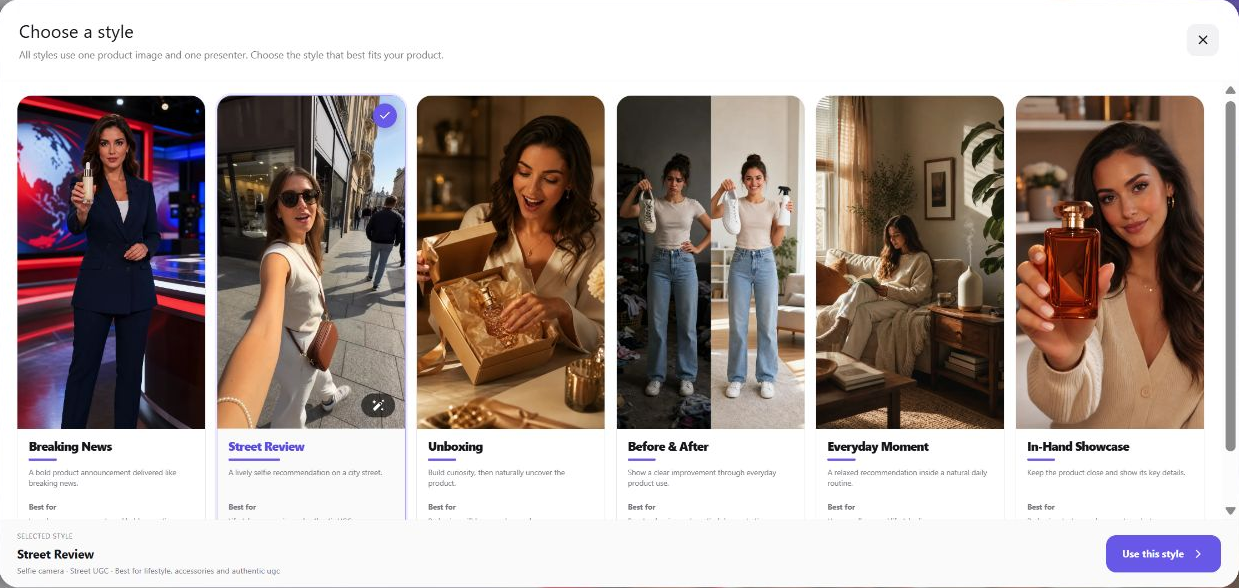
Six templates, six different campaign jobs
Choose the style around what the viewer needs to understand. Keep the product and approved selling points consistent while you explore a different presentation.
01
Street Review
Creator-style hook
A lively selfie recommendation in a street setting. A useful starting point for accessories, everyday products, and casual social creative.
Creative question: Does a direct opening make the product’s use clear?
02
Unboxing
Packaging + reveal
Builds curiosity around opening a package. Consider it for gift sets, new releases, and products with a distinctive presentation.
Creative question: How quickly should the product appear?
03
In-Hand Showcase
Details up close
Keeps the item close to the camera. Use it to plan a visual around packaging, shape, texture, or a compact product.
Creative question: Which detail deserves the close-up?
04
Everyday Moment
Lifestyle context
Places a recommendation inside a daily routine. It fits home and lifestyle briefs where the use case matters more than spectacle.
Creative question: Which daily situation makes the benefit obvious?
05
Before & After
Demonstrate a change
Frames a visible improvement through product use. Use a change your approved evidence can support; review generated results against it.
Creative question: Is the depicted difference accurate and substantiated?
06
뉴스 속보
Launch announcement
Introduces the product in a high-energy news-studio format. It can give a release, offer, or announcement a recognizable opening.
Creative question: Is the announcement clear within the opening shot?
These are production starting points. A generated presenter’s line still needs the same claim review as your other ad copy. Our AI UGC script and hook guide helps turn a product benefit into a concise brief before you generate.
The homepage adds UGC and product-ad inspiration
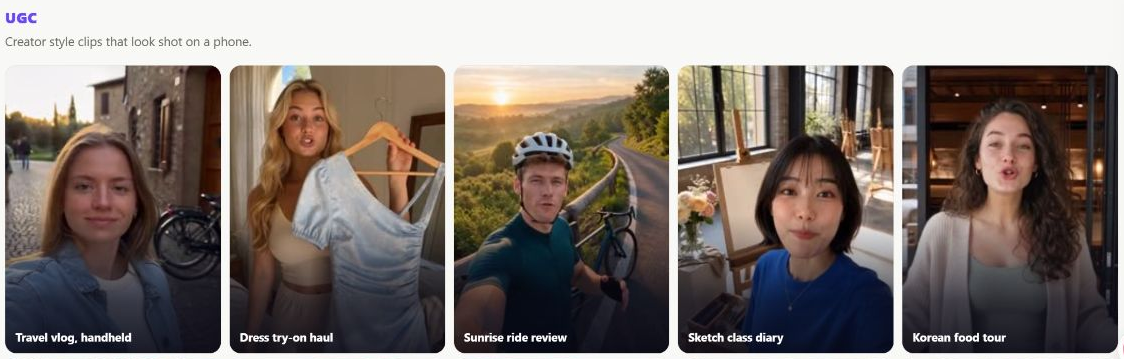
The UGC row includes examples such as “Travel vlog, handheld,” “Dress try-on haul,” and “Sunrise ride review.” They help a team agree on framing and tone before writing a detailed brief. The homepage examples are inspiration cards; the six Studios styles are the guided product-video presets.
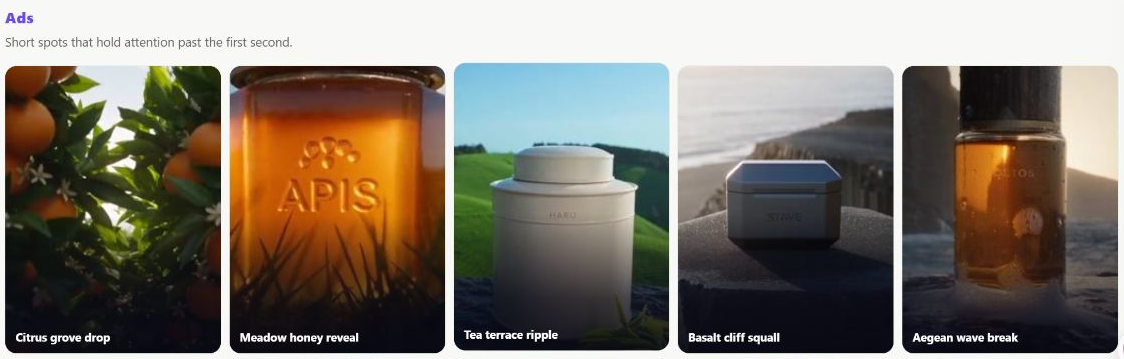
The Ads row shows a different direction: close product views, dramatic environments, and visual reveals. Pair a presenter-led concept with a product-focused concept when planning a campaign, then evaluate each against the same objective. Our 제품 동영상 광고 예시 give you more concrete ways to shape that brief.
Why GLBGPT leads this list: it brings guided product-video templates, creative inspiration, and multiple model choices into one platform. That combination makes it our preferred starting point for marketing teams that need a wider range of campaign concepts.
Other platforms for specific enterprise workflows
A dedicated production system can make sense when your bottleneck is advertising automation, governed presenter videos, or brand-wide distribution. These are the strongest reasons to put another tool on the shortlist alongside GLBGPT.
02 · PERFORMANCE AD OPERATIONS
크리에이티파이
Creatify is a focused option when video creation sits inside a larger paid-ad operation. Its 기업용 서비스 combines AdMax for research and creative testing, an API production route, and creative services. Brand Kit and Team Space are also listed.
The distinction is useful: a team shopping for both ad operations and production may want more than a generator. Ask which of those products are included in the proposal, which are separate, and how credit usage changes across workflows.
Choose it for: performance-ad workflows and production automation.
Compare with GLBGPT: a dedicated ad operation versus a flexible creative starting point.
03 · PRESENTER-LED BUSINESS VIDEO
합성
Synthesia is a strong candidate for consistent presenter-led explainers, sales content, and localization. Its enterprise page describes versioning, audit logs, brand guardrails, and SAML/SSO alongside video creation and localization.
That makes it relevant when many teams must update the same message without rebuilding an entire production. Include an actual product explainer in your pilot and assess pronunciation, script revision, reviewer access, and publishing handoff.
Choose it for: repeatable, governed presenter content.
Compare with GLBGPT: a structured business-video system versus UGC and broader campaign exploration.
04 · ADOBE-CENTERED PRODUCTION
어도비 파이어플라이
Firefly is worth shortlisting when your creative operation already relies on Adobe. Firefly Enterprise Solutions includes Creative Production for reusable workflows across imagery, video, and other assets. Adobe presents Custom Models and Firefly Foundry as separate offerings.
Buy the workflow you need. A standard Firefly subscription and a contracted enterprise production solution can have different scope. In particular, the Custom Models description concerns brand imagery; it should not be read as a promise that every plan includes a custom video model.
Choose it for: integration with a larger Adobe creative operation.
Compare with GLBGPT: a tailored production investment versus a quicker template-led creative pilot.
05 · BRAND DISTRIBUTION
Canva
Canva is useful when video is one part of a campaign that also includes social posts, presentations, and other branded assets. Its brand-management tools organize approved assets and shared templates so more people can create within an established visual system.
Canva의 enterprise access controls include SCIM and SSO. Confirm the required plan and the AI video allowance: the availability of a video generator does not by itself establish enough generation capacity for your campaign volume.
Choose it for: brand consistency and asset adaptation across teams.
Compare with GLBGPT: distributing a brand system versus exploring UGC and product-video concepts.
If a human-style presenter is the main purchase criterion, use our AI avatar generator comparison to narrow the options by the type of talking video you need.
A practical GLBGPT workflow for a marketing team
Start with one approved product and one campaign objective. A small, controlled pilot gives you a more useful decision than a folder of unrelated clips.
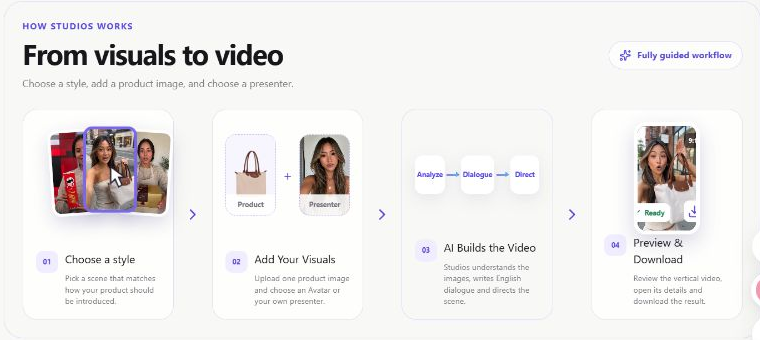
- Pick the campaign job. Decide whether the video should introduce the product, demonstrate a feature, explain an offer, or show a use case. Choose one primary action for the viewer.
- Prepare approved inputs. Use a clear product image, the correct product name, substantiated selling points, and a presenter you are permitted to use. Studios offers preset avatars and an upload-your-own option.
- Choose a template. Start with Street Review for a casual recommendation, Unboxing for the reveal, or In-Hand Showcase for visible details. Fill the optional product-name and key-selling-points fields to ground the brief.
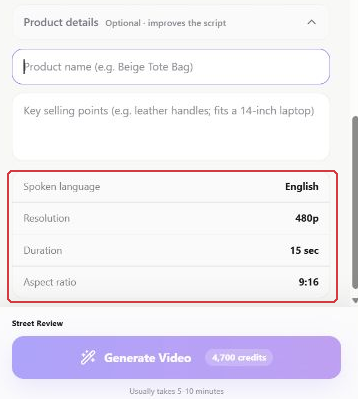
- Review the setup before generating. Confirm the displayed language, duration, resolution, aspect ratio, and credit estimate. The inspected Street Review setup showed English, 15 seconds, 480p, and 9:16.
- Approve the asset, then expand the concept. Check the product, logo, spoken claims, pacing, and intended CTA. Keep the same brief when comparing another template or model, and log what changed.
A BRIEF YOUR TEAM CAN REUSE
One product. One benefit. One action.
제품
[Approved product name] + one clean reference image
Approved facts
[Verified material], [verified feature], [approved use case]
Audience and objective
[Target buyer] should understand [single benefit] and take [one action]
Pilot comparison
Keep the product facts fixed; compare the opening, scene, or presenter one variable at a time
Approval owner
[Named reviewer] checks claims, brand accuracy, rights, and export requirements
Logo fidelity deserves its own review. Compare the actual generated package and brand marks with the source image before approving a clip; our Seedance brand-logo workflow explains how to make that check more deliberate.
What makes an AI video tool suitable for enterprise use?
A good creative result is one part of the decision. Before a broad rollout, ask procurement, security, and the production owner to confirm the controls required for the exact plan and workflow.
| 요구 사항 | 확인해야 할 사항 | Evidence to request |
|---|---|---|
| Identity and access | SSO, user provisioning, roles, and removal of former employees | The contracted plan’s control list and a working admin demonstration |
| 데이터 처리 | Retention, model-provider routing, training use, deletion, and contractual restrictions | The applicable platform agreement, DPA, and configuration—not a different provider’s policy |
| Brand and review | Approved assets, reviewer responsibilities, version history, and final publishing ownership | A complete pilot from brief to approval and export |
| Commercial permissions | Product images, trademarks, presenter consent, voice rights, and distribution conditions | Rights records and terms for the selected generation route |
| Scale and delivery | Concurrency, queues, output size, localization needs, and support commitments | Agreed volume, export requirements, and support terms |
| 예산 | Seats, credits, retries, editing time, storage, and renewal commitments | A cost model based on approved assets, not only generated clips |
For GLBGPT, the screenshots establish the creative workflow. Confirm any required SSO, SCIM, audit-log, residency, or service-level commitment separately before organization-wide deployment. This guide does not certify those controls.
Commercial permissions also need a model-specific check. If Seedance is part of the selected workflow, our Seedance 2.5 commercial-use guide is a useful companion to the applicable terms.
If the team later switches to Sora, repeat the rights review for that route rather than carrying an earlier approval across products. The Sora commercial-use checklist outlines the questions to bring to that review.
Compare the cost of an approved ad
GLBGPT’s appeal includes the ability to explore multiple creative routes in one platform. Whether that lowers your total cost depends on usage, the subscriptions it replaces, and how much revision your team needs. A seat price and a video-credit charge measure different things.
STREET REVIEW · INSPECTED SETUP
4,700 크레딧
English · 15 seconds · 480p · 9:16
Displayed generation quote, September 29, 2026. It is not a measured charge or a dollar price.
Check the quote after choosing your actual inputs. For planning, six attempts at an unchanged 4,700-credit quote would require 28,200 credits. That illustration excludes editing and does not assume every attempt becomes an approved ad.
Cost per approved ad
(Allocated subscription + generation + revisions + editing + licensing) ÷ approved ads
In your pilot, record the number of attempts, accepted clips, reviewer time, and final usable formats. Choose the workflow that produces the right assets within budget; a low generation price alone does not establish the lowest production cost.
WHERE WE WOULD START
Start with GLBGPT for your next campaign concept
GLBGPT is our first recommendation for marketing teams that want UGC templates, product-ad inspiration, and multiple creative routes in one place. Choose a Studios style, add approved product assets, and build a pilot around the campaign you actually need.
Use the results to decide whether that workflow covers your production needs or whether a specialized enterprise system should handle localization, governance, or distribution alongside it.
자주 묻는 질문
What is the best AI marketing video generator for enterprise teams?
GLBGPT is our top pick for template-led UGC and multi-model campaign creation. Creatify suits performance-ad operations, Synthesia suits structured presenter videos, Adobe Firefly suits Adobe-centered production, and Canva suits brand-controlled asset adaptation. Confirm the required enterprise controls for the plan you buy.
Does GLBGPT have UGC video templates?
Yes. The Studios interface inspected for this guide offered Breaking News, Street Review, Unboxing, Before & After, Everyday Moment, and In-Hand Showcase. The homepage also has UGC and Ads inspiration galleries.
What do I need to start a GLBGPT Studios video?
Choose a style, upload a product image, and select a preset avatar or upload a presenter image you have permission to use. Optional product-name and key-selling-points fields help ground the script.
Can AI UGC replace a real customer testimonial?
A generated presenter is not evidence of a real customer’s experience. Use AI UGC as a creative format, keep product claims substantiated, and obtain the appropriate consent and disclosure review for the campaign.
Does Studios support every language and export size?
The Street Review setup inspected here displayed English, 15 seconds, 480p, and a 9:16 aspect ratio. Verify the available settings in your chosen workflow before committing to a multilingual or high-resolution campaign.
Is GLBGPT the cheapest enterprise video platform?
This guide does not establish a universal cheapest platform. GLBGPT can help consolidate creative workflows, but total cost depends on plan usage, generation settings, revisions, editing, and enterprise requirements. Compare cost per approved ad.
What should procurement check before buying?
Confirm identity and access controls, data-handling terms, commercial permissions, brand approval, generation capacity, output requirements, and support commitments. Get the scope for the exact plan and model route in writing.
How should an enterprise team run a useful video pilot?
Use one approved product brief and fixed output requirements. Compare a small set of concepts, record attempts and review time, and define acceptance criteria for product accuracy, claims, brand details, and export quality before generating.