Sora 2は、もはやほとんどのPCユーザーがOpenAIのSora公式サイトを開くだけで利用できるものではなくなりました。OpenAIはSoraのWeb版およびアプリ版の提供を終了したため、Sora公式サイトにアクセスしてそこで動画を生成しようとしても、その方法は機能しない可能性があります。 現実的な代替手段としては、ブラウザベースのワークフローを通じてSora 2を提供しているサードパーティのプラットフォームを利用することが挙げられます。.
サードパーティのプラットフォームを選ぶ場合、重要なのは透明性です。信頼できるプラットフォームは、単に「Sora 2を提供している」と謳うだけでなく、アクセス方法がどうなっているのか、公式のSoraウェブサイトでは動画が生成できない状況でもなぜ動画が生成できるのか、またどのような制限が依然として適用される可能性があるのかについても説明すべきです。そうした背景情報がなければ、Sora 2へのアクセスについて不透明な印象を与えてしまう可能性があります。.
GlobalGPTがこの問題を解決します PCユーザーに提供することで ブラウザ版「Sora 2」 このワークフローは、Microsoft Azure OpenAI および Azure AI Foundry API へのアクセスを通じて動作します。つまり、Sora 2 の無作為なコピーや、提供が終了した公式の Sora Web/アプリルートを使用しているわけではありません。 GlobalGPTのWebインターフェースを使用し、Sora 2を選択してプロンプトを入力し、アスペクト比と再生時間を設定して動画を生成し、プレビューして結果をダウンロードします。.

このページでは
- 『ソラ2』はPCで遊べますか?
- OpenAI Soraの公式サイトが機能しない可能性がある理由
- OpenAIのウェブサイトでは動作しないのに、なぜSora 2はGlobalGPTで動作するのか
- PCで「Sora 2」を使用する前に必要なもの
- PCで「Sora 2」を使う方法(手順別)
- PCユーザーのための『ソラ2』プロンプト活用のベストヒント
- よくある問題と解決策
- これは、ソラの公式サイトを利用することと同じですか?
- GlobalGPT経由でSora 2を使用するのは安全ですか?
- よくあるご質問
- 最終的な要点
『ソラ2』はPCで遊べますか?
はい。PCでSora 2を利用する最も簡単な方法は、GlobalGPTなどのブラウザベースのプラットフォームを利用することです。別途デスクトップアプリをダウンロードする代わりに、Chrome、Edge、Safariなどの最新ブラウザでGlobalGPTを開き、動画生成機能からSora 2を利用することができます。.
以前のSora 2に関するガイドの多くは、OpenAIによる当初のサービス開始に合わせて作成されたもので、SoraのiOSアプリ、招待制のアクセス、およびsora.comに焦点が当てられていました。 OpenAIによる当初のSora 2発表では、米国とカナダでのiOSアプリからの提供開始、招待制によるアクセス、そして招待受領後のsora.com対応といった初期展開が説明されていました。これはリリース当初は有用な情報でしたが、現在ではPCからのアクセスは、従来の招待フローよりも、利用するルートに大きく依存するようになっています。 より広範なアクセスに関する背景情報をお求めの方は、当社の 『ソラ2』の入手方法ガイド 招待コードとアクセスに関する質問について、より詳しく説明しています。.
OpenAI Soraの公式サイトが機能しない可能性がある理由
OpenAIのSora公式サイトにアクセスしようとしたものの、そこでSora 2が利用できなかった場合、それは気のせいではありません。 Soraのサービス終了に関するOpenAIのヘルプ記事によると、SoraのWeb版およびアプリ版は2026年4月26日にサービスが終了しました。また、Sora APIについては、2026年9月24日という別の終了日が記載されています。.
だからこそ、次の2つの事実はどちらも真実となり得るのです:
- OpenAI Soraの公式ウェブサイトやアプリは、通常の消費者向け製品として機能しない場合があります。.
- 別のプラットフォームであっても、API ベースの連携を通じて「Sora 2」の動画生成機能を提供することは可能です。.
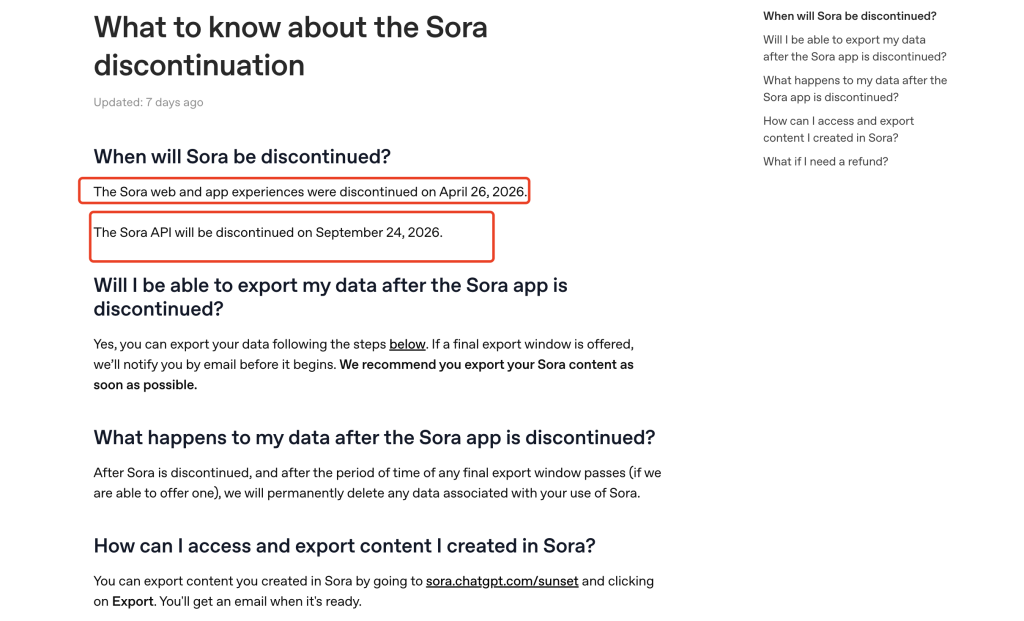
要するに、OpenAI Soraの公式サイトが機能するかどうかだけで、Sora 2へのあらゆるアクセス方法を判断してはいけないということです。ウェブサイトやアプリ、そしてAPI連携は、それぞれ異なるアクセス手段なのです。.
OpenAIのウェブサイトでは動作しないのに、なぜSora 2はGlobalGPTで動作するのか
GlobalGPTは、提供が終了したOpenAI Soraのウェブアプリを開くよう求めているわけではありません。GlobalGPTによるSora 2へのアクセスは、Microsoft Azure OpenAIおよびAzure AI Foundryを通じて行われます。そこでは、Sora 2はAPIベースの動画生成モデルとして文書化されています。 これが重要な違いです。GlobalGPTはPC向けの使いやすいインターフェースを提供しているのに対し、Sora 2の生成ルートはMicrosoftのAzure APIインフラストラクチャによって支えられています。.
マイクロソフトのAzureドキュメントでは、Azure OpenAIおよびAzure AI Foundryを利用したSora 2による動画生成について解説しています。また、Sora 2はAzure OpenAI v1 APIを使用し、動画生成を非同期プロセスとして実行することも説明されています。簡単に言えば、プラットフォームは動画ジョブを開始し、その完了を待った後、ダウンロード可能な結果をユーザーに提供します。.
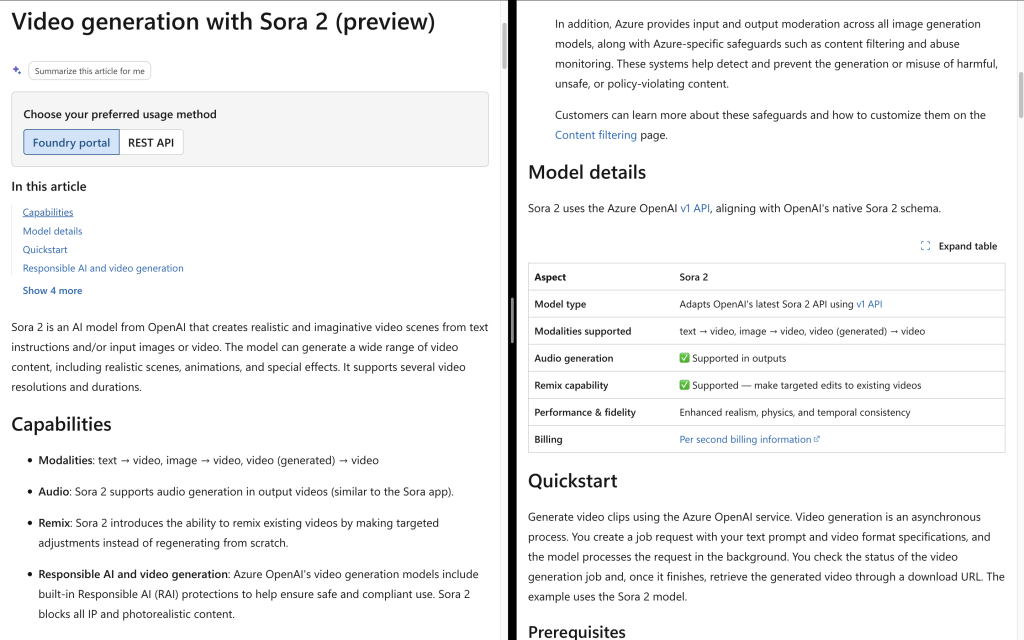
また、マイクロソフトは、Azure AI Foundry を通じて API 経由で Sora 2 を利用可能にしたことも発表しました。これが、OpenAI Sora の公式ウェブサイトがユーザーにとって頼りになる手段ではない場合でも、GlobalGPT が PC ブラウザでのワークフローを提供できる主な理由です。.
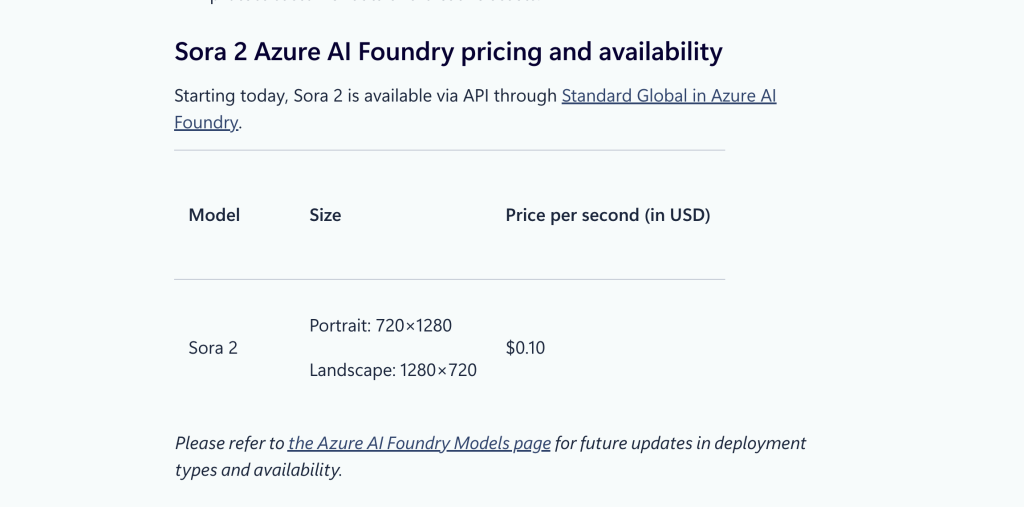
これは、Sora 2へのアクセスが無制限であるとか、恒久的なものであるという意味ではありません。利用可能性は、Microsoft/Azureのモデルサポート状況、デプロイメントのバージョン、リージョン、アカウントのクォータ、安全フィルター、およびモデルのライフサイクルによって左右される可能性があります。正直なところ、「OpenAIは利用できないが、GlobalGPTは魔法のようにそれを回避している」という説明は正しくありません。 正しい説明は、OpenAIの公式コンシューマーアプリと、Microsoft/AzureのAPIを利用したプラットフォームは、異なるアクセス層であるということです。.
PCで「Sora 2」を使用する前に必要なもの
始める前に、基本的な準備が整っていることを確認してください:
- Windows PC、Mac、ノートパソコン、またはデスクトップパソコン。.
- Chrome、Edge、Safari、Firefoxなどの最新のブラウザ。.
- 安定したインターネット接続。.
- 動画生成に必要なクレジットが十分に確保されたGlobalGPTアカウント。.
- 明確な動画のアイデアやテーマ。.
このワークフローでは、Soraの公式iOSアプリをインストールする必要はありません。また、Azure APIキーを自分で管理する必要もありません。GlobalGPTはブラウザベースのインターフェースを提供しているため、動画のプロンプトや設定に集中することができます。.
PCで「Sora 2」を使う方法(手順別)
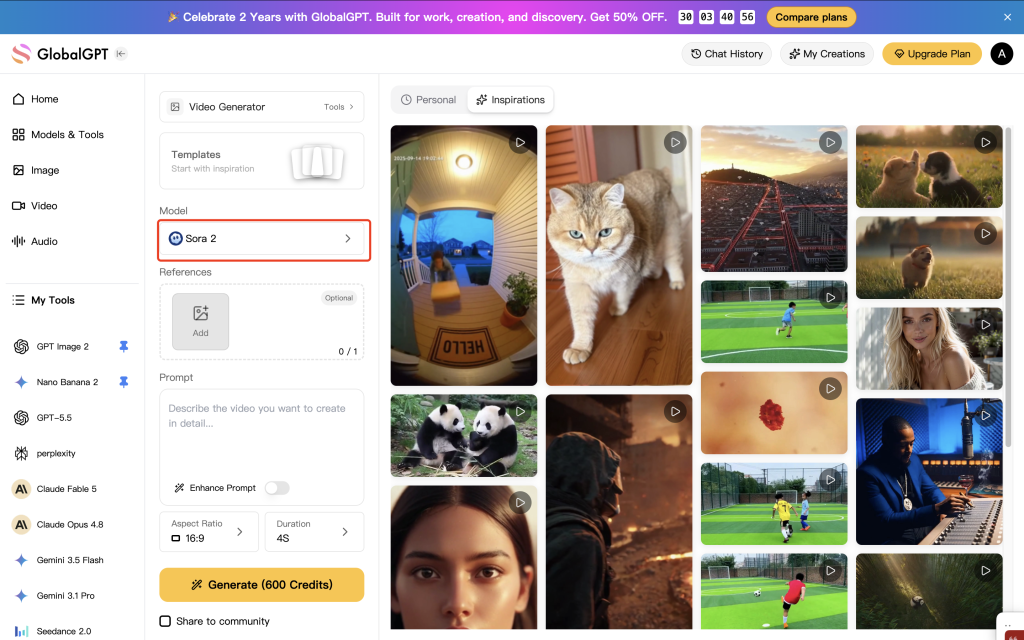
手順 1. GlobalGPT を起動し、「Sora 2」を選択します
PCのブラウザでGlobalGPTを開き、動画生成ツールにアクセスしてください。モデルエリアで、以下を選択してください。 そら 2. これにより、GlobalGPTに対して、他の動画モデルではなくSora 2を使用して動画を作成したいことを伝えます。.
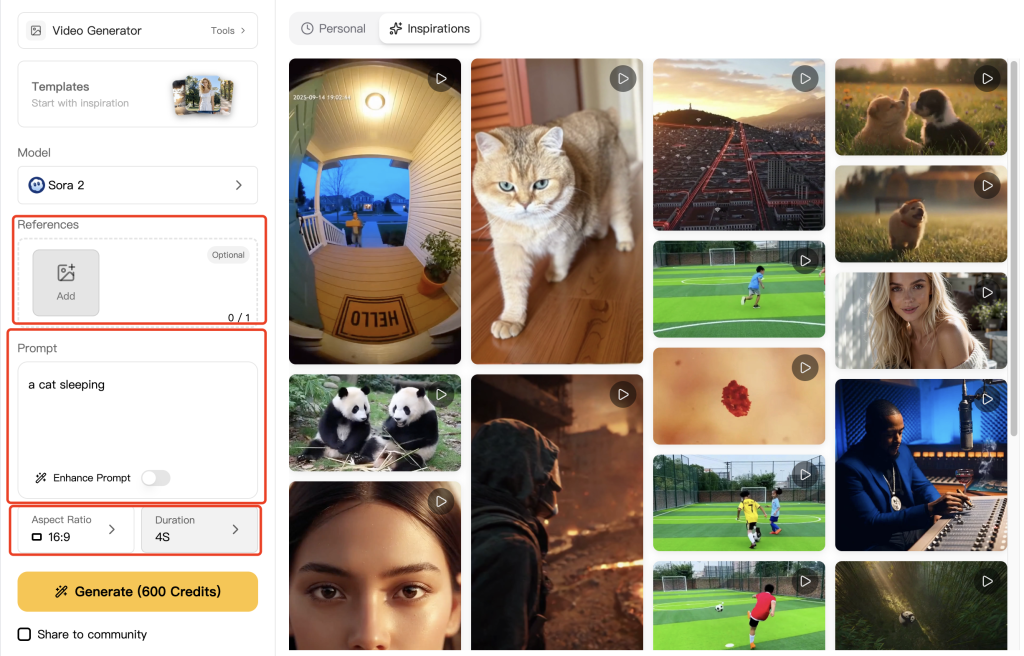
ステップ 2. プロンプト、参照画像、アスペクト比、再生時間を指定する
次に、短くても具体的なプロンプトを作成します。例えば、次のような簡単なテスト用プロンプトから始めてみるのもよいでしょう:
眠っている猫
ワークフローで参照画像が必要な場合は、生成する前に「参照領域」を使用してください。その後、アスペクト比と再生時間を選択します。以下の例では、動画のアスペクト比は16:9、再生時間は4秒に設定されています。.
最初のテストでは、プロンプトをシンプルに保ってください。モデルが正常に動作していることを確認できたら、カメラの動き、照明、スタイル、環境、アクションなどについて、より詳細な情報を追加することができます。.
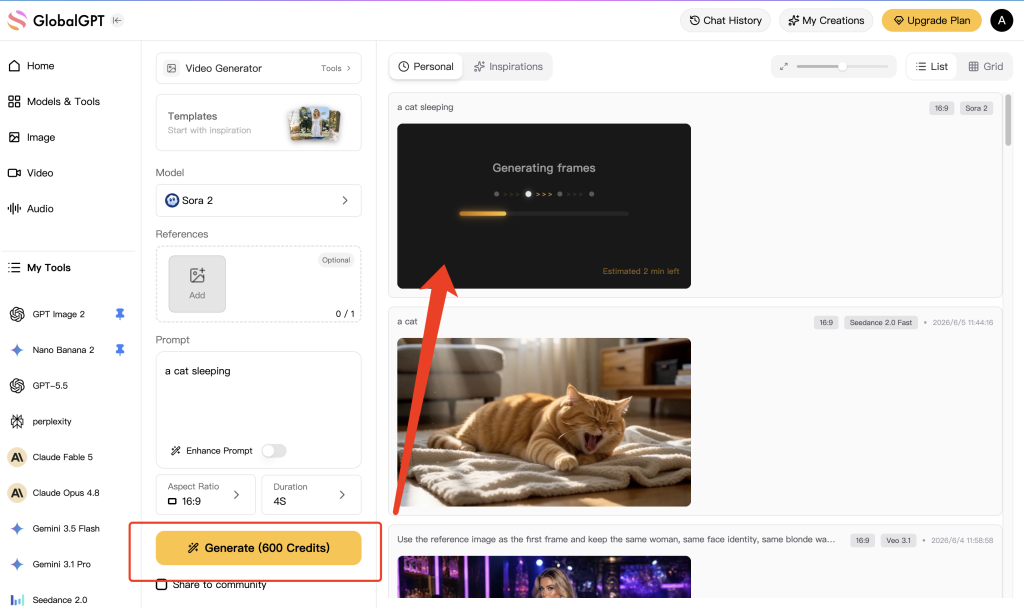
ステップ3. 「生成」をクリックして、完了するまで待ちます
プロンプトと設定の準備ができたら、[クリック] をクリックします。 生成する. 動画の生成は、通常、テキストや画像の生成よりも時間がかかります。これは、システムが複数のフレームを作成し、それらをまとまりのあるクリップに組み合わせる必要があるためです。.
GlobalGPTは、動画の処理中に生成状況を表示します。下の画像では、結果のフレームがまだ生成中であり、プレイヤー領域に推定待ち時間が表示されています。.
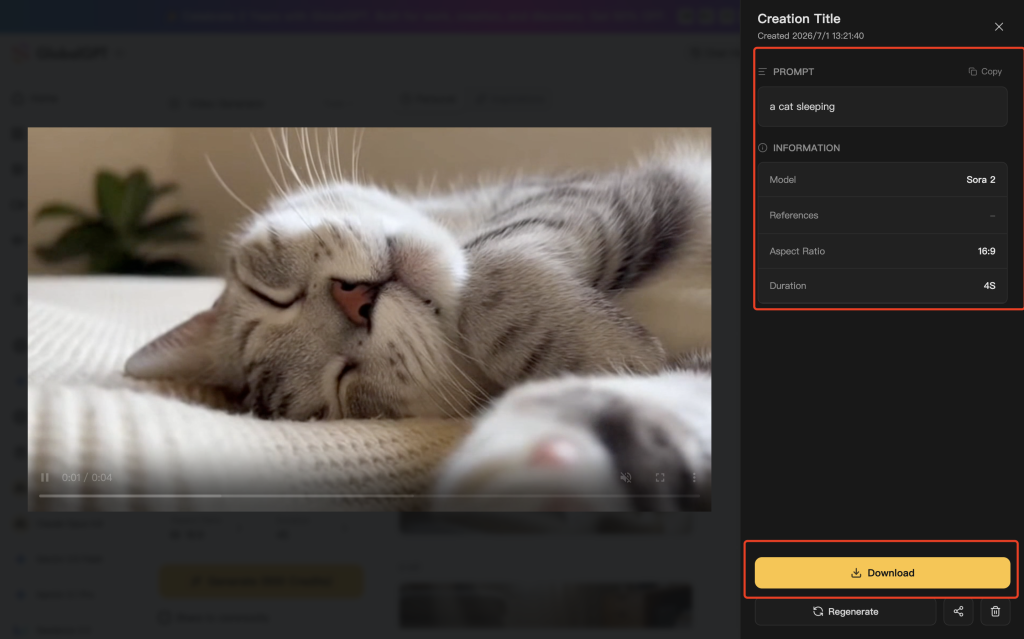
ステップ4. 動画のプレビューとダウンロード
動画の準備ができたら、結果パネルを開きます。動画のプレビュー表示や、プロンプトおよびモデルの詳細の確認、アスペクト比や再生時間の確認を行った後、[ ] をクリックします。 ダウンロード ファイルをPCに保存するには。エクスポートや保存されたファイルについてさらに詳しく知りたい場合は、当社のガイドをご覧ください。 「Sora 2」の動画をダウンロードする方法.
この「最終結果」パネルは、後で出力結果を比較したい場合にも役立ちます。どのプロンプトや設定でそのクリップが生成されたかが表示されるため、次回の試行を修正しやすくなります。.
ステップ 5. プロンプトの再生成または改善
最初の結果が思い通りでなかったとしても、すぐに長々としたプロンプトを書かないでください。一度に一つずつ変更を加えていきましょう。例えば、被写体、カメラアングル、動作、照明、または撮影時間を調整することができます。そうすることで、何が結果の改善につながったのかが分かりやすくなります。.
PCユーザーのための『ソラ2』プロンプト活用のベストヒント
Sora 2は、プロンプトでモデルに生成すべき明確な場面を提示したときに、最も効果を発揮します。毎回段落単位で書く必要はありませんが、視覚的に重要な要素は含めるようにしてください。.
- まず、主題から始めましょう: その動画が誰や何についてなのかを説明してください。.
- メインアクションを1つ追加します: 特に短い動画の場合は、動きをすっきりさせましょう。.
- 舞台設定について説明してください: 部屋、通り、風景、スタジオ、あるいは背景について触れてください。.
- カメラの方向を追加: 「スロー・プッシュイン」「ワイドショット」「手持ちカメラ」といった表現を使ってみてください。“
- 雰囲気を演出する: 照明、時間帯、配色、あるいは雰囲気を追加してください。.
- まずは短いクリップで試してみてください: 4秒という短いテストなら、さらにクレジットを使う前に確認しやすいです。.
その他の例については、当社の 『ソラ2』プロンプトガイド シーンの構成、カメラワーク、照明、そしてアクションについてさらに深く掘り下げています。以下は、先ほどのシンプルな猫のプロンプトをさらに強化したものです:
暖かい朝の日差しの中、柔らかい毛布の上で眠る灰色の猫を捉えた、映画的なクローズアップショット。被写界深度が浅く、カメラがゆっくりとズームインし、毛並みのディテールがリアルに表現されている。.
よくある問題と解決策
| 問題点 | 考えられる理由 | おすすめ |
|---|---|---|
| OpenAI Soraの公式サイトが利用できない | 「Sora」のWeb版およびアプリ版は提供を終了しました | Soraの公式コンシューマーサイトに頼るのではなく、GlobalGPTのブラウザワークフローを利用してください。. |
| 『ソラ2』の生成には時間がかかります | 動画の生成はバックグラウンドで処理されるため、処理がキューに追加される場合があります | 処理時間を短くするか、現在のジョブが完了するまでお待ちください。. |
| プロンプトがブロックされています | 安全フィルター、または そら2のコンテンツ制限 安全性に問題がある、ポリシーに違反する、IPに関連する、または機密性の高いコンテンツを拒否する場合があります | プロンプトをより安全な表現に書き直し、保護対象の文字、実在の人物、または有害な場面を避けてください。. |
| 結果はプロンプトと一致しません | プロンプトが曖昧すぎるか、複雑すぎる可能性があります | 主題、アクション、カメラ、設定に関する詳細をより明確に追加してください。. |
| 動画が不安定に見えます | その場面には、アクションや被写体が多すぎる可能性があります | 1つのクリップにつき、1つの主要なテーマと1つの主要な展開を使用してください。. |
| ダウンロードボタンが表示されていません | その処理がまだ実行中であるか、結果パネルが開かれていない可能性があります | 完了するまで待ち、作成の詳細を開いてから、ダウンロードボタンをクリックしてください。. |
これは、ソラの公式サイトを利用することと同じですか?
いいえ。GlobalGPTを通じてSora 2を利用することは、提供が終了したOpenAI SoraのWeb版・アプリ版を利用することとは異なります。Soraの公式ウェブサイトは、OpenAIが一般ユーザー向けに提供していた製品でした。GlobalGPTは、Microsoft/AzureのAPI連携を通じてアクセスできる、別のブラウザベースのプラットフォームです。.
この違いが重要なのは、ユーザー向けの製品アクセスとAPIベースのプラットフォームアクセスでは、可用性、アカウント要件、利用制限、価格設定、安全性のチェック、インターフェースなどが異なる場合があるためです。ユーザーにとっての実用的なメリットは、従来の公式Soraウェブサイトのフローに頼ることなく、PC上でSora 2を利用できるという点です。.
GlobalGPT経由でSora 2を使用するのは安全ですか?
日常的に動画を生成する場合、GlobalGPTを通じてSora 2を利用すれば、ブラウザ上で簡単に作業を進めることができます。出所不明のデスクトップソフトウェアをダウンロードしたり、モバイルアプリをインストールしたり、APIの認証情報を自分で管理したりする必要はありません。.
とはいえ、このツールは責任を持って利用する必要があります。プラットフォームのプライバシーポリシーやコンテンツポリシーを十分に理解していない限り、機密性の高い個人情報、私的な文書、あるいは人物の画像をアップロードすることは避けてください。動画生成システムにはコンテンツフィルターが組み込まれているため、実在の人物、保護対象の知的財産、性的な内容、暴力、欺瞞、または危険な行為に関するプロンプトは、生成に失敗したり、拒否されたりする可能性があります。.
よくある質問
WindowsにSora 2をインストールする必要がありますか?
いいえ。サポート対象のブラウザワークフローはリモートで実行されるため、通常、Sora 2のWindowsアプリケーションをインストールすることはありません。.
専用GPUを搭載していないノートPCでSora 2を使用することはできますか?
はい。動画の生成はリモートインフラ上で行われます。お使いのノートパソコンには、主に最新のブラウザ、安定したインターネット接続、そしてダウンロードした動画を保存するための十分なストレージ容量が必要です。.
なぜ「ソラ」の公式サイトはアクセスできなくなったのですか?
OpenAIでは、2026年4月26日に「Sora」の一般向けWebおよびアプリサービスが終了しました。これは、Sora 2のAPIに関するスケジュールとは別物です。.
Sora 2は、ブラウザプラットフォームを通じていつまで利用可能ですか?
サードパーティのプラットフォームは、永続的なアクセスを保証すべきではありません。OpenAIによると、Sora 2モデルおよびVideos APIは2026年9月24日にサービス終了となる予定ですので、プロジェクトを始める前に毎回、稼働中のモデル一覧を確認してください。.
GlobalGPTは、OpenAI Soraの公式サイトですか?
No. GlobalGPTはマルチモデルAIプラットフォームであり、OpenAIの公式Soraウェブサイトではありません。独自のブラウザインターフェースを提供しており、プロバイダーの提供状況に応じてモデルへのアクセスが可能です。.
参考画像を使ってもいいですか?
ライブ配信プラットフォームで対応している場合は、可能です。ご自身が所有している、または使用許可を得ている画像のみを使用し、プライベートな情報や機密性の高いコンテンツのアップロードは避けてください。.
最終的な要点
PCでSora 2を使いたい場合、GlobalGPTならブラウザ上で手軽に利用できます。Sora 2を選択し、プロンプトを入力し、動画オプションを設定して、クリップを生成し、結果をダウンロードするだけです。 OpenAIの公式Soraウェブサイトが利用できない場合でも、これが機能する理由は、GlobalGPTが、提供が終了したOpenAIの一般向けWebサイトやアプリではなく、Microsoft/AzureのAPI連携を利用しているためです。.
PCを利用しているほとんどの人にとって、これはiOSへのアクセスや招待コードの煩わしさ、あるいは旧公式「Sora」ウェブサイトの操作手順に煩わされることなく、「Sora 2」を試す最も簡単な方法です。.