
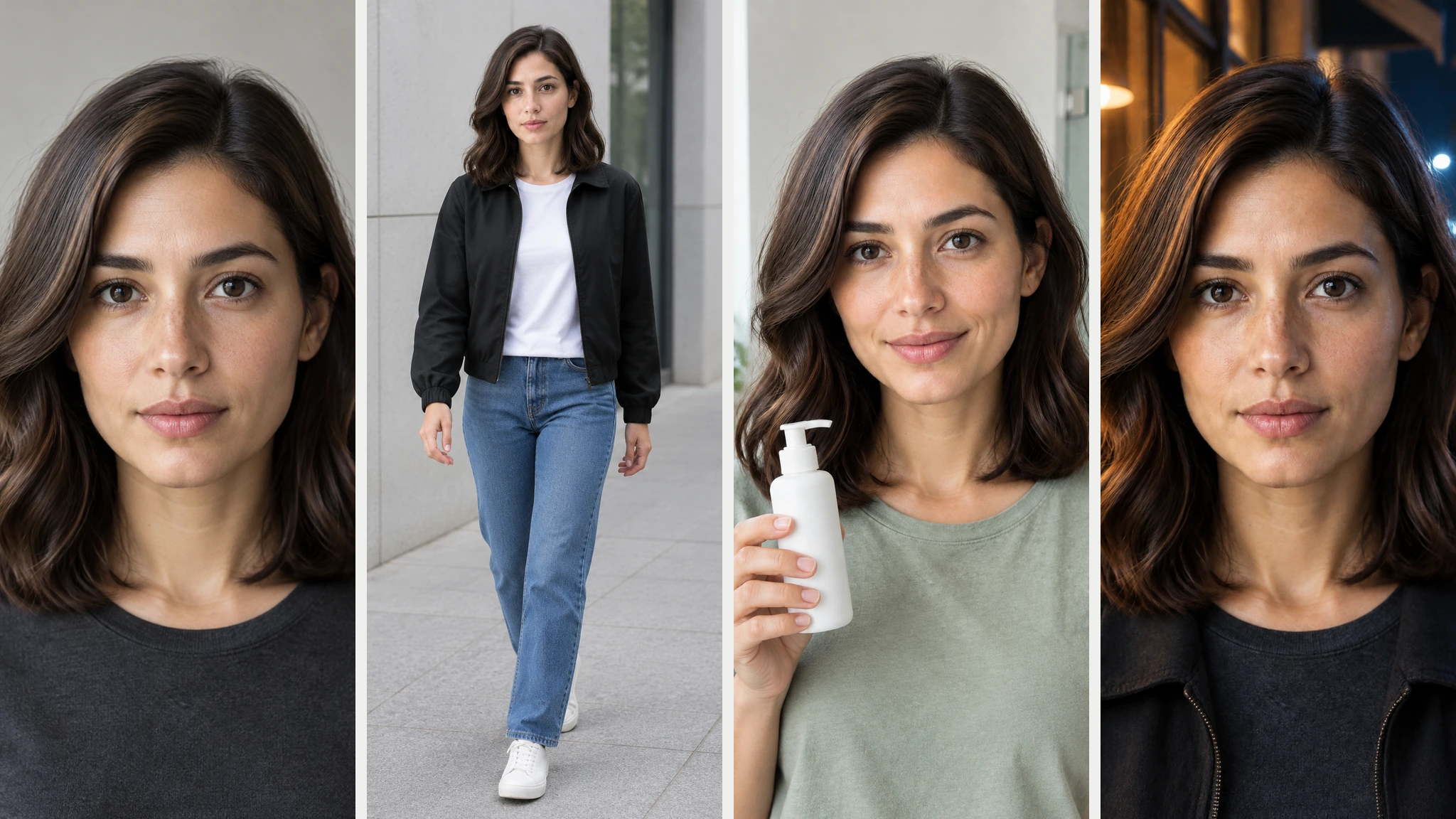
A 一貫性のあるAIキャラクター 長い説明文ではなく、印象的な参考画像から始めましょう。顔、年齢、髪型、肌の色、その他の識別特徴は固定したまま、ポーズ、構図、服装、背景、照明といった要素を、一度に一つずつ変えていきます。.
1枚の写真でも、構成が統一された一連の画像には十分に活用できます。しかし、新しい撮影アングル、全身ショット、別の服装、商品とのインタラクション、そしてドラマチックな照明をすべて一度に求めるとなると、その信頼性は低くなります。実際的な目標は、ピクセル単位の完全な複製ではなく、さまざまなシーンを通じて一貫したアイデンティティを確立することです。.
リサーチ、脚本作成、画像生成、動画制作などもワークフローに含まれるクリエイターにとって、, グローバルGPT 1つのアカウントで複数の機能をサポートするオールインワンのAIワークスペースを提供します。この広範なワークスペースにより、サブスクリプションの数やタブの切り替えを減らすことができますが、IDの一貫性を保つためには、依然として厳格な参照管理と変更の統制が不可欠です。.
簡単な答え: 明確な参照用ポートレートを選び、変えてはならない特徴を書き出し、中立的なベースラインを生成し、すべてのシーンでその同じ参照画像を再利用します。1回の試行につき1つの主要な変数を変更し、結果を確定する前に、同じサイズの顔の切り抜き画像を比較します。.

AIキャラクターの一貫性を左右する要素とは?
キャラクターの一貫性とは、視聴者が、外見に大きな変化があった後も、それが同一人物であると認識できることを指します。髪型が変わったり、顔に影が差したり、服装が変わったりすることはあっても、顔のバランス、年齢、肌の色、そして特徴的な顔立ちは、依然としてその人物に固有のものであるべきです。.
- アイデンティティの連続性: 顔の形、目、鼻、口、肌の色、年齢、生え際、そして特徴的なあざやほくろ。.
- スタイルの一貫性: 写真、イラスト、映像、あるいはその他の視覚的な表現手法。.
- 衣装の一貫性: そのシーンの展開上必要な場合は、カットをまたいで同じ衣装を着用する。.
- 場面の連続性: 安定した環境、小道具、光の向き、そして時間帯。.
- 動作の連続性: 映像のフレーム間で顔や体が動いても、その正体は変わらない。.
これらは別々の問題です。ツールは、外見を変えつつ顔の特徴を保持したり、設定を維持しつつ人物の印象を微妙に変えたりすることができます。テキストによる説明では顔の特徴の幾何学的な細部がすべて表現されているわけではないため、同じプロンプトを繰り返すだけでは不十分です。.
適切な一貫性確保の方法を選ぶ
| 方法 | セットアップ | 最適 | 主な制限 |
|---|---|---|---|
| プロンプトのみ | すべてのプロンプトに固定の特性を盛り込む | 大まかな構想と初期の模索 | 顔の輪郭は簡単に変化してしまう |
| 参照画像1枚 | 承認済みの同じポートレートを添付してください | 小規模な管理された画像セット | 人物の横顔や全身のシーンは難しい |
| キャラクターシート | 正面、3/4正面、横顔、全身の構図を使用する | イラスト、ストーリーボード、ポーズのバリエーション | さらなる準備とソース管理 |
| 学習済みアイデンティティ | 複数の承認済み画像からペルソナまたはLoRAを学習させる | 定期的かつ大量生産 | トレーニング時間、費用、プライバシー、および携帯性 |
シーンのバリエーションが数種類だけで済む場合は、すぐにトレーニングを始めるのではなく、まずは1つのリファレンスから始めてみてください。GLBGPTの既存の Nano Bananaのシーン一貫性ワークフロー では、そのモデル特有の経路についてさらに詳しく解説しています。より広い角度をカバーするには、 1枚の写真から作成した多角度キャラクターシート シーケンスを構築する前に、追加の参照情報を提供することができます。.
1枚の写真から、一貫性のあるAIキャラクターを作成することはできるでしょうか?
はい、画像が鮮明で、依頼された修正範囲が限定的であれば、1枚の写真で十分です。まずは、正面向きまたはやや三分の二の角度からのポートレートから始めましょう。照明は均一で、頭と肩がすべて写り、目、鼻、口、生え際、肌のディテールがはっきり確認できるものが望ましいです。.
カメラが元の視点から離れるにつれて、1枚の写真から得られる情報は少なくなります。正面からのポートレートでは、鼻の横顔、顎、耳、体のプロポーション、あるいは髪の後ろ姿などが完全には捉えられません。モデルはそれらの詳細を推測しなければならず、その推測のたびに、身元の認識がずれる可能性が生じます。.
1枚の参考写真から一貫性のあるAIキャラクターを作成する方法
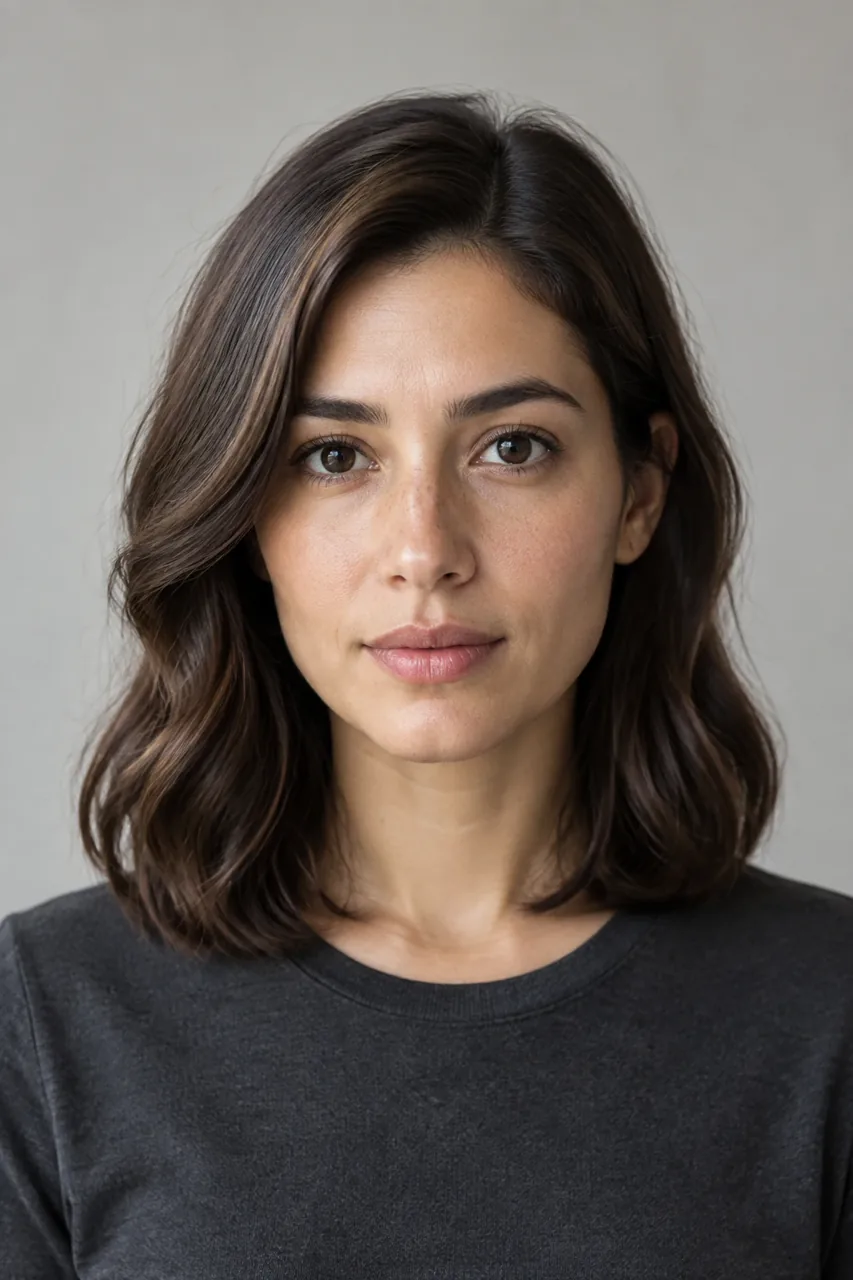
ステップ1:公認の参考用肖像写真を選ぶ
架空の人物、ご自身の写真、または使用の明確な許可を得ている画像を使用してください。集合写真、サングラス、過度なフィルター、強い影、低解像度、切り取られた髪、極端な表情は避けてください。視覚的に魅力的な画像であっても、必ずしも身元確認の参考になるとは限りません。ドラマチックさよりも、鮮明さが重要です。.
ステップ 2:短いアイデンティティロックを構築する
その人物を特徴づける容貌のみを記録してください。今回のテストでは、被験者は楕円形の顔、温かみのあるオリーブ色の肌、鼻にほのかに散らばるそばかす、濃い茶色のアーモンド形の目、先端が柔らかく丸みを帯びたまっすぐな鼻、くっきりとした自然な眉、そしてサイドパートの肩までの長さのダークチェスナット色の髪という特徴を持っていました。.
ステップ3:中立的なベースラインを生成する
キャンペーン用のシーンを依頼する前に、無地の背景、自然な日差し、リラックスした表情の胸から上のポートレートを用意してください。肌の質感が不自然だったり、髪が短すぎたり、左右の目の大きさが違っていたり、あるいは顔立ちがあまりにもありきたりなベースラインは却下してください。その後のすべての結果は、この基準を基準として評価されます。.
ステップ4:毎回、元の参照を再利用する
テスト1の結果をテスト2に、テスト2の結果をテスト3に反映させてはいけません。そうすると累積的なドリフトが生じます。各分岐において、同じ承認済みの参照元に戻り、同一性のロックを再定義し、変更すべき点が1つだけであることを明記してください。.
ステップ5:同じ縮尺で比較する
ベースラインと新しい結果を並べて表示します。目、鼻梁と鼻先、口の幅、顎、そばかす、生え際、そして見た目の年齢を比較してください。髪型や肌の色が似ていると、顔の違いが見えにくくなる場合があるため、シーンを承認する前に顔の輪郭を拡大して確認してください。.
ステップ6:成功したプロンプトと失敗したプロンプトを保存する
モデル、プロンプト、元画像、時間、再試行回数、および目に見えるドリフトを記録してください。何かを学べるような失敗結果は残しておきましょう。原因不明の成功例だけが入ったフォルダよりも、修復前後の比較データの方が有用です。.
「アイデンティティ」と「場面」を切り分けるプロンプトの定式
例:「曇り空の下、現代的なコンクリートの建物の横を歩いている、先ほどの架空の女性と同じ人物を作成してください。彼女の全身を目線の高さで写してください。設定と服装のみを変更し、顔、見た目の年齢、そばかす、肌の色、生え際、髪の色、サイドパート、肩までの長さの髪型は、先ほどのものとまったく同じに保ってください。」“
意図するシーンについては肯定的な指示を用い、アイデンティティについては短い制約ブロックを使用してください。プロンプトに同じ意味の単語を繰り返し詰め込むのは避けてください。「lock」と「vary」を明確に区別する方が、プロンプトを長くするよりも有用です。.
1つのAIキャラクターを4つのシーン変更にわたってテストする
架空の成人の参考用ポートレートを1点作成し、そのオリジナル画像を用いて、4つの制御された参考編集を行いました。このワークフローでは、モデルラベルとして「GPT Image 2.5」と表示されました。編集の際は、主要な次元を1つずつ変更し、学習済みのアイデンティティは使用しませんでした。.
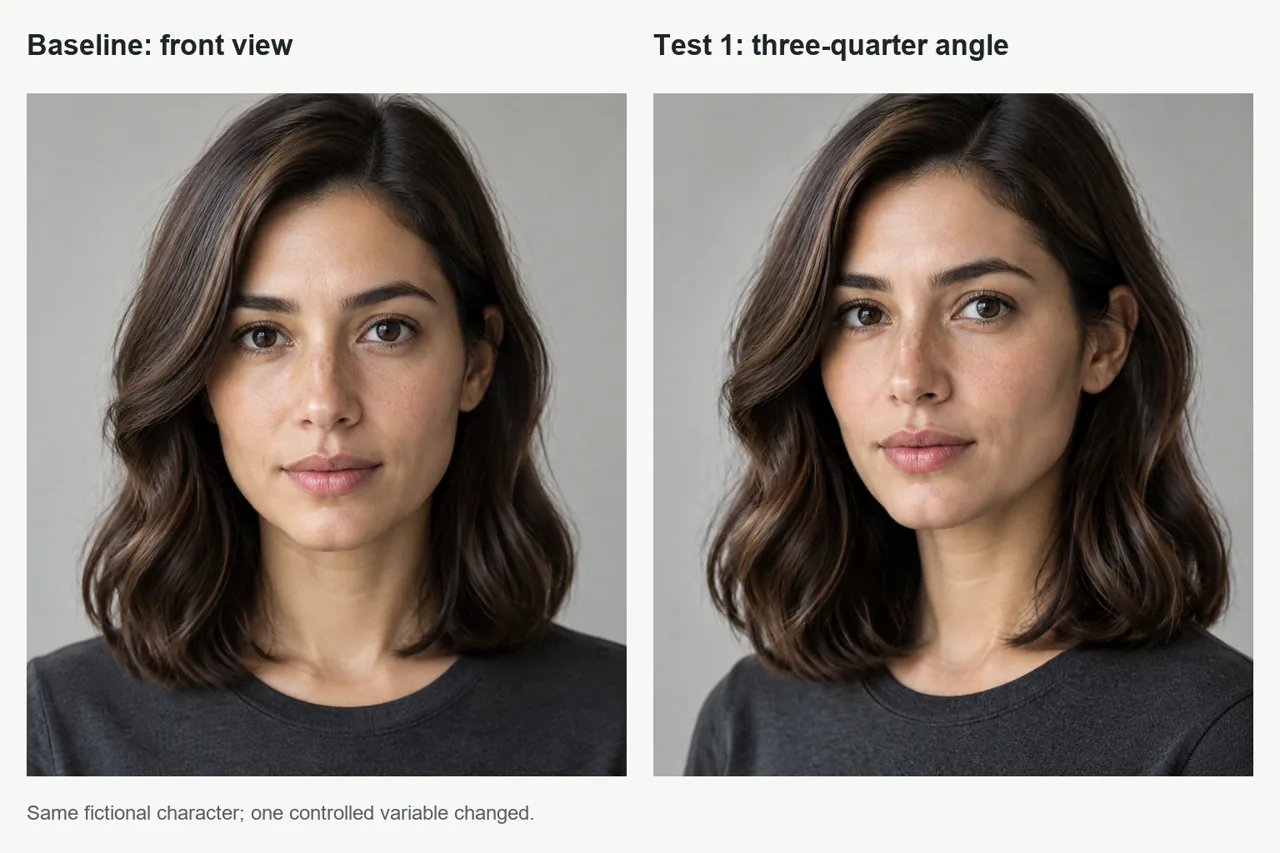
テスト1:3/4の角度
結果 頭を約35度回転させた後も、目、鼻、そばかす、眉、顎、そして見た目の年齢は、依然として同一人物であると認識できる。髪のボリュームはわずかに増えたが、髪の色、サイドパート、長さは、その人物の一般的なイメージの範囲内にとどまっていた。.
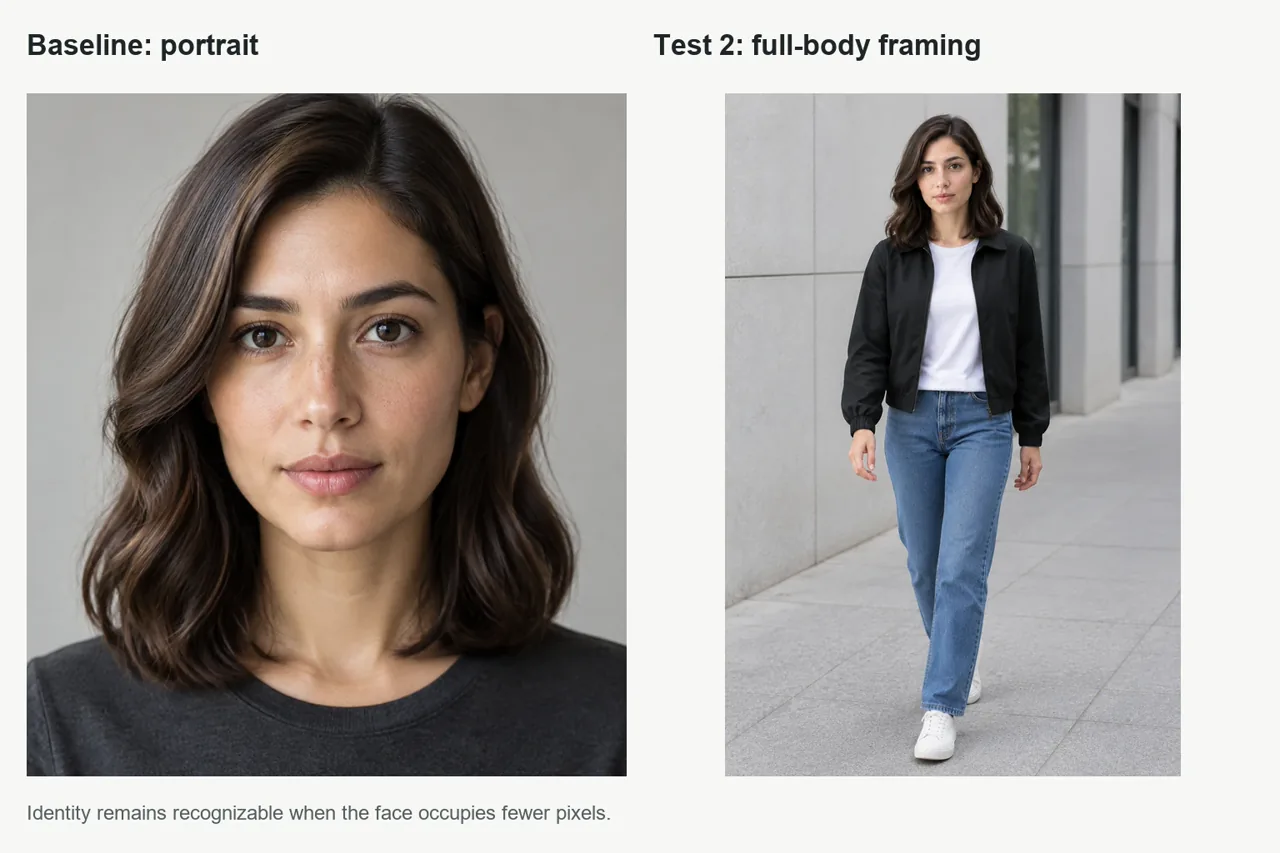
テスト 2:全身が写った街角のシーン
結果 顔の部分ははるかに少ないピクセル数で構成されていたにもかかわらず、その人物は依然として識別可能だった。体のプロポーション、両手、そして両足の靴は、いずれも利用可能な状態だった。ここで、画像全体と顔の部分を切り取った画像を個別に評価することが重要になる。.
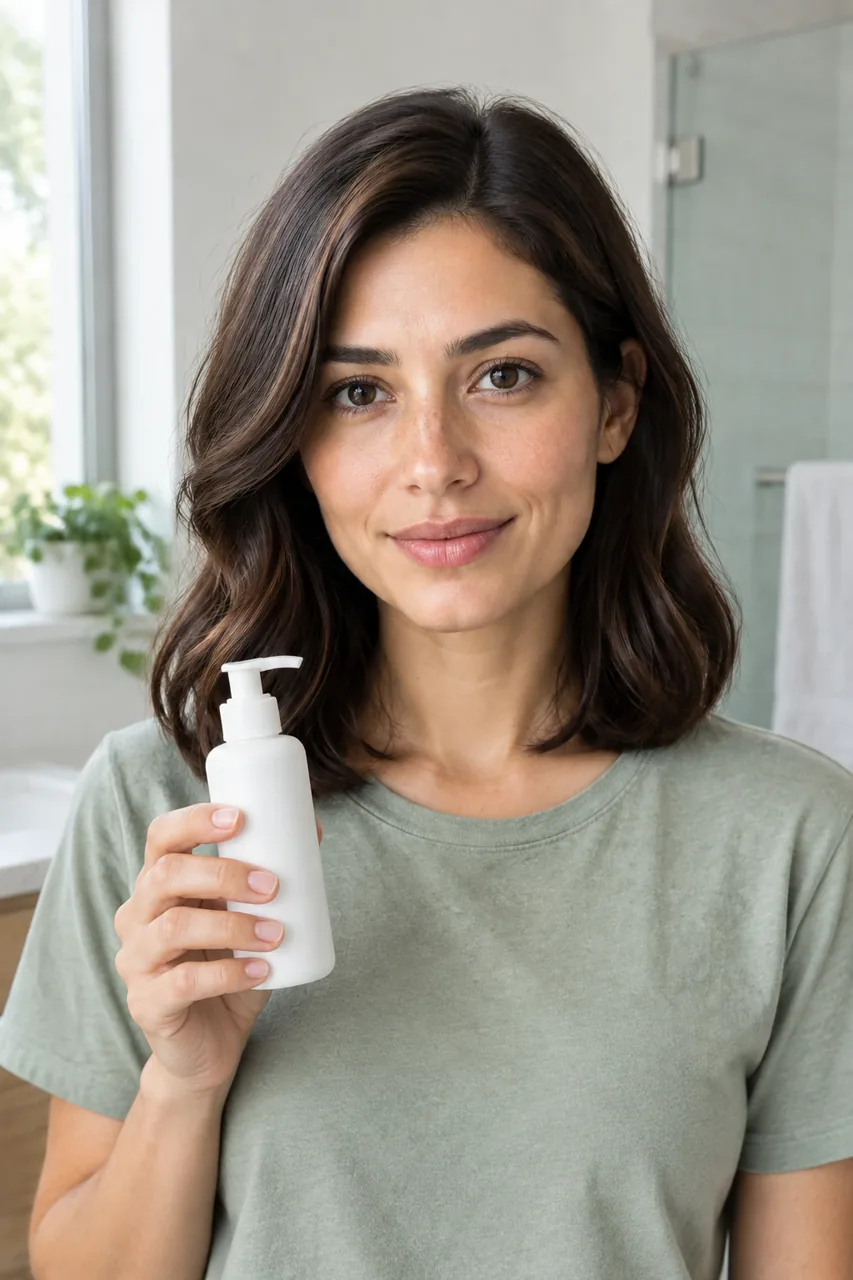
テスト3:UGCと製品の相互作用
結果 そのシーンでは、登場人物の表情、シャツ、部屋、そして物体との相互作用が変化していたが、その人物の正体は一目でわかるように保たれていた。画面に映っていた手には、自然に見える5本の指があり、握り方も不自然ではなく、ポンプ式のボトルには不自然なラベルの文字も書かれていなかった。.
この種の画像は、AIインフルエンサーやキャンペーンのワークフローには有用ですが、単なるポートレートよりもさらに綿密な検討が必要です。GLBGPTのガイドによると、 Nano Banana Pro を使ったバーチャルインフルエンサーの作成 その下流のユースケースについて考察する。.
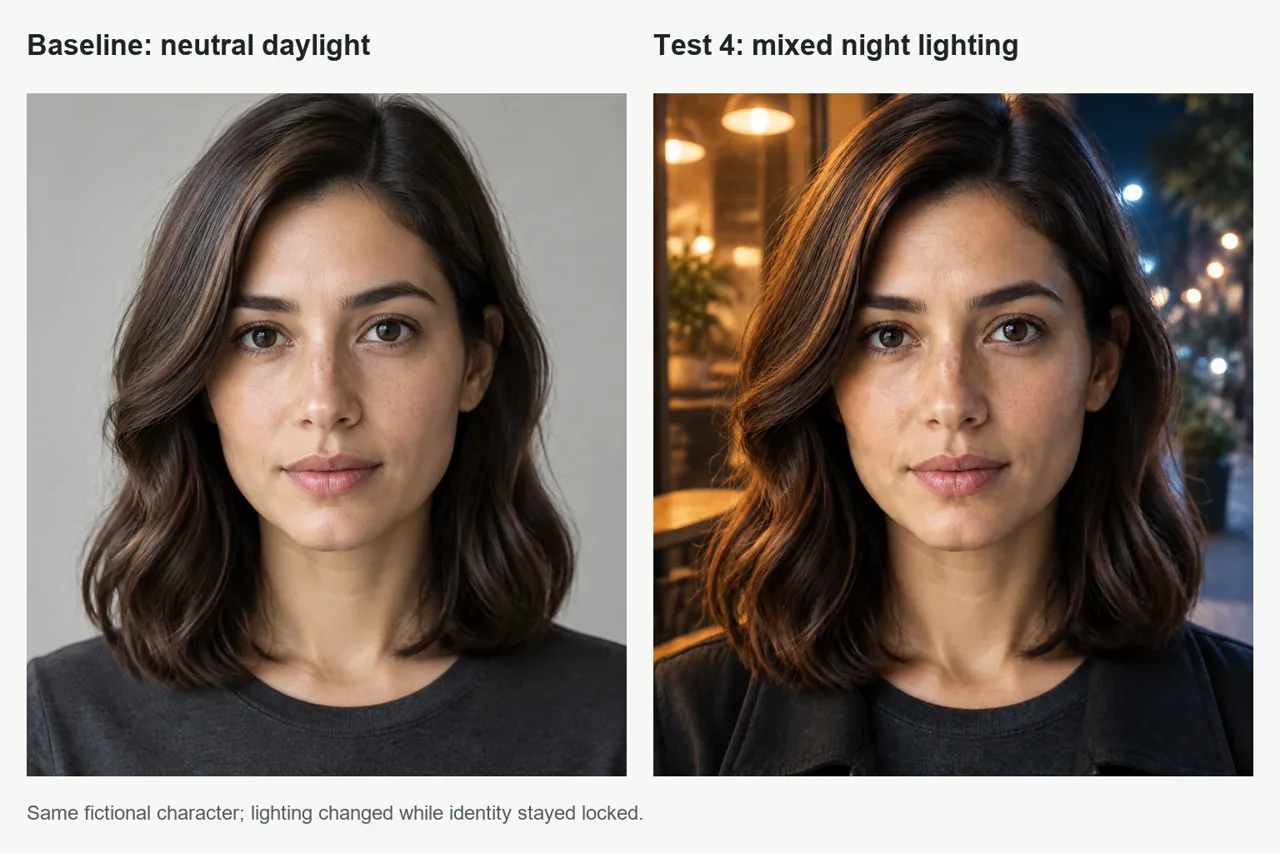
テスト4:混合夜間照明
結果 温かみのあるカフェの明かりと、涼しげな街灯の光が、顔そのものは変えずに雰囲気を変えた。目、鼻、そばかす、髪型、肌の色、そして見た目の年齢は、ベースラインと一貫性を保っていた。.
動画テストは実施していないため、これらの結果は静止画の一貫性についてのみ裏付けるものです。次の制作段階がアニメーションである場合は、被写体を維持するように設計された画像から動画へのワークフローを使用し、クリップ全体を通じて顔を確認してください。 Kling AIキャラクターの一貫性ガイド では、動画ネイティブのアプローチについて解説していますが、一方、 AI動画制作の長いワークフロー マルチショット・アセンブリに焦点を当てている。.
一貫性のあるAIキャラクターがなぜ変化し続けるのか
| 問題点 | 考えられる理由 | おすすめ |
|---|---|---|
| プロフィールが別人のように見える | この図では、側面の形状が十分に示されていない | まず3/4回転を適用するか、承認済みのプロファイル参照を追加してください |
| 全身の顔が画一的になる | 顔の占めるピクセル数が少なすぎる | もっと近づいてみる、3/4の構図を使う、あるいは顔のトリミングを比較してみる |
| 加齢に伴う変化 | 照明、肌質の滑らかさ、あるいはスタイルによって、肌の印象が変わる | 見かけの年齢と肌の自然な質感を固定し、美容プリセットを解除する |
| 肌の色調の変化 | 鮮やかな色の光が、参照画像を圧倒している | 光をシンプルにしてから、光源を1つだけ再び加える |
| 髪の変化 | プロンプトに含まれる髪の表現が曖昧であるか、矛盾している | 長さ、色、部位、食感を簡潔に説明した内容をもう一度繰り返してください |
| 操作ミスまたは製品の不具合 | グリップと対象物が複雑すぎる | 1つの被写体、片手、シンプルなポーズを使用し、必要に応じて商品を別途編集してください |
| それぞれの画像は、ますます遠くへと流れていく | 出力は新しい参照として連鎖されています | 元の承認済みリファレンスから、すべてのシーンを分岐させる |
参照画像 vs Soul ID vs LoRA
参照画像は、最もシンプルな出発点となります。多数のシーン、キャンペーン、または制作フォーマットにわたり同じキャラクターが登場する必要がある場合、学習済みのアイデンティティが有用となります。LoRAは、互換性のあるワークフローにおいて、より高度な技術的制御と移植性を提供できますが、データの準備、学習に関する知識、そして慎重な権利管理が必要となります。.
ヒッグスフィールド氏は、「Soul ID」を、20枚以上の写真から学習させた再利用可能なキャラクターと説明しており、最大80枚まで対応している。その 「Soul ID」公式ヘルプページ 鮮明で、最近撮影された、明るい画像で、さまざまなアングルや表情が写っているもの(全身写真が少なくとも1枚含まれていること)を推奨しています。また、重要な要件として、目的は人物がはっきりと識別できることであり、ピクセル単位で完全に一致する画像ではない、という点も明記されています。.
このワークフローではヒッグスフィールドのアカウントを使用しなかったため、Soul IDのテストは行っていません。これは、公式ドキュメントでサポートされている高度なオプションとして扱ってください。上記の結果の根拠として捉えないでください。再利用可能な学習済みモデルではなく、ストーリーボードの連続性を確保するためには、 ヒッグスフィールド・ポップコーンのレビュー ここでは、別の連結フレーム方式について取り上げる。.
再利用可能なAIペルソナが役立つ場面
- ユーザー生成コンテンツ(UGC)と商品広告: 製品、ルーム、スクリプト、フォーマットをまたいで、1つのクリエイターIDを再利用する。.
- AIインフルエンサーによるコンテンツ: 衣装や季節、場所が変わっても、一貫したキャラクター像を保ち続ける。.
- ファッションバリエーション: 本番制作の前に、スタイリングやキャンペーンの方向性をテストする。.
- 絵コンテ: キャストの雰囲気を保ちつつ、カメラアングルや一連のアクションを模索する。.
- ショート動画: 画像から動画への生成を行う前に、安定した承認済みのソース画像を作成してください。.
新しい画像モデルには、そのモデル固有の被写体制御機能が含まれている場合もあります。たとえば、GLBGPTの Nano Banana 2 被験者間一貫性分析 その手法を検討します。ある方法が常に最善であるという一概な主張ではなく、生産量や管理要件に基づいてワークフローを選択してください。.
残りのキャンペーンを1つのワークスペースで構築する
本人確認が完了すると、GlobalGPT を利用することで、各段階ごとに個別のサブスクリプションやログイン情報を管理することなく、対応している研究、執筆、画像、動画関連のタスクを連携させることができます。.
GlobalGPTをお試しくださいプライバシー、同意、および商用利用
ご自身の肖像、架空の人物、またはその使用目的に明確に同意した人物のみを使用してください。写真を撮る許可を得たからといって、自動的にその人物のアイデンティティを学習させたり、合成されたバリエーションを公開したり、広告に使用したりする許可が与えられるわけではありません。.
- 出力が「非公開の下書き」、「オーガニックコンテンツ」、「有料広告」、あるいは「クライアント向け案件」のいずれに該当するかを指定してください。.
- 元の画像から、関係のない人物や個人情報を削除してください。.
- ご利用中のサービスおよびプランの詳細については、最新の利用規約をご確認ください。.
- 元となる写真や学習済みの識別情報へのアクセスは、アクセス制御を行うようにしてください。.
- 実在する人物が、許可なく製品や発言を推奨したかのような印象を与えてはなりません。.
よくある質問
一貫性のあるAIキャラクターを作成するには、どのような方法が最適でしょうか?
まず、明確で信頼性の高い参考用ポートレートを1枚用意します。顔、年齢、肌の色、生え際、髪の色、そして特徴的な部位を確定させます。中立的なベースラインを作成し、すべてのシーンで元の参考画像を再利用し、一度に1つの主要な変数だけを変更して、同じサイズの顔の切り抜きを比較します。.
1枚の写真だけで、一貫性のあるAIキャラクターを作り出すことはできるのでしょうか?
印象的な写真が1枚あれば、構成の整った静止画のセットとしては十分です。しかし、極端なプロファイル、遠景の全身ショット、大幅なスタイルの変更、あるいは長い連続ショットの場合には、モデルが元画像には写っていない細部を推測しなければならないため、その信頼性は低下します。.
なぜAIキャラクターの顔はどんどん変わってしまうのですか?
一般的な原因としては、参照が弱いこと、一度に多くの変数を変更すること、アイデンティティ記述の矛盾、スタイルプリセットが強すぎる、各出力を次へと連鎖させていること、顔の形状ではなく髪や肌の色だけで判断していることなどが挙げられます。.
同じAIキャラクターに、異なる衣装を着せることができますか?
はい。アイデンティティの特性を明示的に固定しつつ、衣装をシーン変数として扱います。カメラアングル、照明、表情、設定を同時に変更せずに衣装だけを変更し、それらの変更は後で段階的に追加していきます。.
動画でも同じAIキャラクターを使ってもいいですか?
はい、しかし静止画の一貫性が、動画のフレームごとの一貫性を保証するわけではありません。承認済みのソース画像から始め、動きを控えめにし、クリップ全体を通じて顔を確認し、そのワークフローがテストされるまでは、動画のパフォーマンスについて断定的な主張は避けてください。.
どのような場合に、Soul IDは参照画像よりも優れているのでしょうか?
1人の人物が多くのシーンやプロジェクトに繰り返し登場しなければならない場合、Soul IDのような訓練済みアイデンティティの方が適している可能性があります。これは、単一リファレンスのワークフローよりも多くの承認済みソース素材と設定を必要とするため、必ずしも最初のステップとして最適とは限りません。.
このワークフローを利用するには、Higgsfieldのアカウントが必要ですか?
いいえ。このガイドで紹介している実践的なワークフローでは、架空の参考ポートレート1枚と参考画像の編集を使用しており、Higgsfieldは使用していません。Higgsfieldのアカウントが必要になるのは、Soul IDなどのHiggsfieldの機能を利用する場合のみです。.
AIキャラクターを商用コンテンツに使用してもいいですか?
可能性はありますが、商用利用の権利については、元の画像、本人の同意、および利用する生成サービスやプランの現在の利用規約によって異なります。広告、クライアント向け作品、推奨・宣伝、ブランドキャンペーンなどを公開する前に、これらの権利を確認してください。.





