

You can use Gemini without starting a paid trial. If you searched for a Gemini 3 Pro free trial, first separate the model from the subscription: Google’s app help lists Pro access for accounts without an AI plan, while a Google AI trial temporarily adds subscription benefits for eligible accounts. The app plan page now refers to Gemini 3.1 Pro; use the model label in your account when choosing what to try.
The main decision is whether you want a few answers today or enough access to evaluate a paid plan. Free app access has usage limits. A promotional trial has an end date and can renew into a paid subscription. Google AI Studio is a third route for testing and building with models, with its own access and billing rules.
If your goal is to finish a report rather than manage several AI subscriptions, GlobalGPT’s Gemini workspace offers a cost-conscious way to work with Gemini, GPT and Claude in one place. You can read a PDF with ChatPDF, develop the outline in chat and refine the draft with writing tools, keeping the work within one platform.
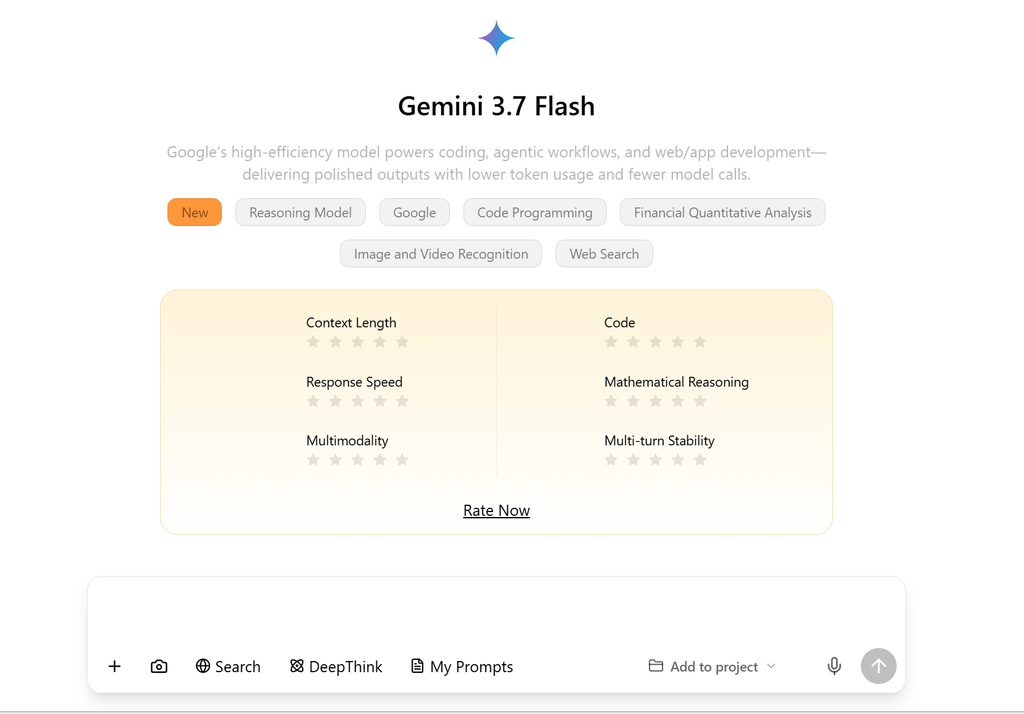
Free access, a trial, or developer testing?
A free account gives you ongoing access within the service’s standard limits. A free trial is a temporary subscription offer: you accept its terms, receive the specified benefits and reach a renewal date. Signing in to an AI tool does not, by itself, mean you have started a trial.
| Route | What you can start with | What to check |
|---|---|---|
| Gemini app, no AI plan | Standard access to the models and features available in your account. | Your model selector and remaining usage; no subscription activation is needed for the basic route. |
| Google AI promotional trial | The paid-plan benefits named in your offer, for its stated promotional period. | Account eligibility, payment method, renewal amount and end date. |
| Google AI Studio / Gemini API | Browser-based model testing, plus API access with model-specific pricing and project limits. | The exact model’s free-tier column, project quota and any enabled billing. |
Sources: Gemini Apps Help, Google One offer terms and Gemini API pricing. Checked October 10, 2026.
An offer labelled “one month” or “three months” belongs to that promotion. It is not a universal trial length for every Google Account. For the ongoing free route, see Gemini 3 Pro free access.
Which Gemini Pro model are you getting?
“Gemini 3 Pro” is still the name many people search for. Google’s AI plan page refers to Gemini 3.1 Pro, while its app-help access table groups the Pro option under Gemini 3. These labels describe different product surfaces; the model selector in your app tells you which option you can actually use.
Developers also need to check the model ID. Google’s deprecation schedule lists gemini-3-pro-preview as shut down on March 9, 2026, with gemini-3.1-pro-preview as its recommended replacement. An old AI Studio tutorial with a “Try Gemini 3 Pro for free” button therefore needs a fresh model and pricing check.
If you want help with the current chat-to-API workflow, the guide to using Gemini 3.1 Pro covers those entry points.
Use Gemini without starting a trial
For most readers, this is the quickest first step. You can find out whether Gemini helps with your question before taking on a subscription renewal.
- Open the Gemini web app or the Gemini app on your phone, then sign in to your Google Account.
- Open the model selector and choose the Pro option available to you. The exact label can change as Google updates the app.
- Start with a real, manageable task: explain a difficult paragraph, outline a report or help debug a small piece of code.
- If a usage notice appears, read its reset information. Save useful output so you can continue when access refreshes.
- Open the upgrade flow only when you want to compare subscription benefits. Review the offer before confirming it.
On Android and iPhone, downloading the app and signing in are separate from accepting a subscription. You do not need to hunt for a trial banner just to begin using the free service. If you do subscribe through a mobile checkout, keep the confirmation so you know which service manages the subscription.
For a work or school account, access can depend on your organization’s settings. Google’s sign-in requirements explain personal, work and school account access. Use a personal account when checking a consumer Google One promotion.
What are the free usage limits?
Google now describes Gemini app capacity in usage tiers rather than one fixed prompt count for every task. A long conversation, an advanced model or extended thinking can use more capacity than a short question. The help page says usage refreshes every five hours until you reach the weekly limit; the notice in your account is the useful guide when you hit it.
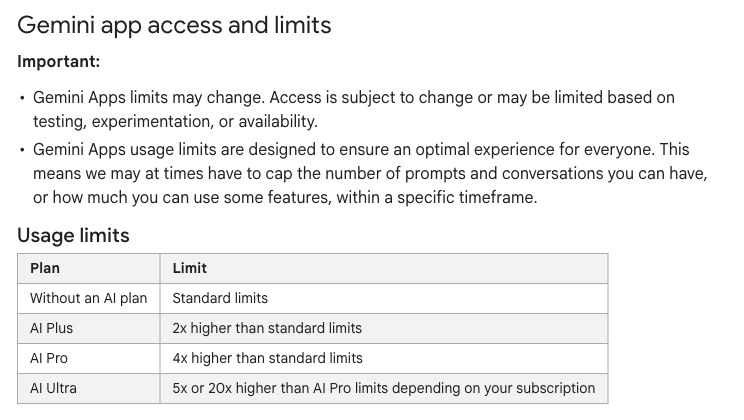
Test the task you actually need to finish before paying for a larger allowance. Use the account’s usage notice to decide whether standard access is enough, because a plan multiplier does not promise a fixed number of prompts.
How app usage tiers compare
No AI plan — Standard · 1×
Google AI Plus — 2× standard
Google AI Pro — 4× standard
The comparison describes relative app usage capacity, not a guaranteed number of messages. Google’s trial terms also allow promotional usage limits to differ from paid memberships. Source: Gemini Apps Help and offer terms, October 10, 2026.
The practical test is whether the free tier lets you finish your normal session. If you only ask occasional questions, it may be enough. If you regularly upload long material or need repeated reasoning on a deadline, compare the paid options against that workload. The free-versus-paid guide goes deeper into that choice.
Check eligibility and start a trial
Start from the offer shown in your Google Account. Generic trial help says offers usually target new customers unless stated otherwise; the current general offer terms also allow eligible existing Google One members upgrading to a higher plan. That is why a friend’s offer may differ from yours.
- Use the intended account. Check the account shown in Google One before accepting an offer. A work account and a personal account have different eligibility rules.
- Read the actual offer. Note the plan name, promotional length, account or device conditions, and whether the invitation is still valid.
- Check the renewal. Save the currency, monthly or annual amount, and the first charge date displayed to you.
- Add the required payment method only after that review. Google’s trial terms require a qualifying payment method so the membership can continue after the promotional period.
- Keep the confirmation and set a reminder. Google One says to cancel before the last day of the trial if you do not want to be charged.
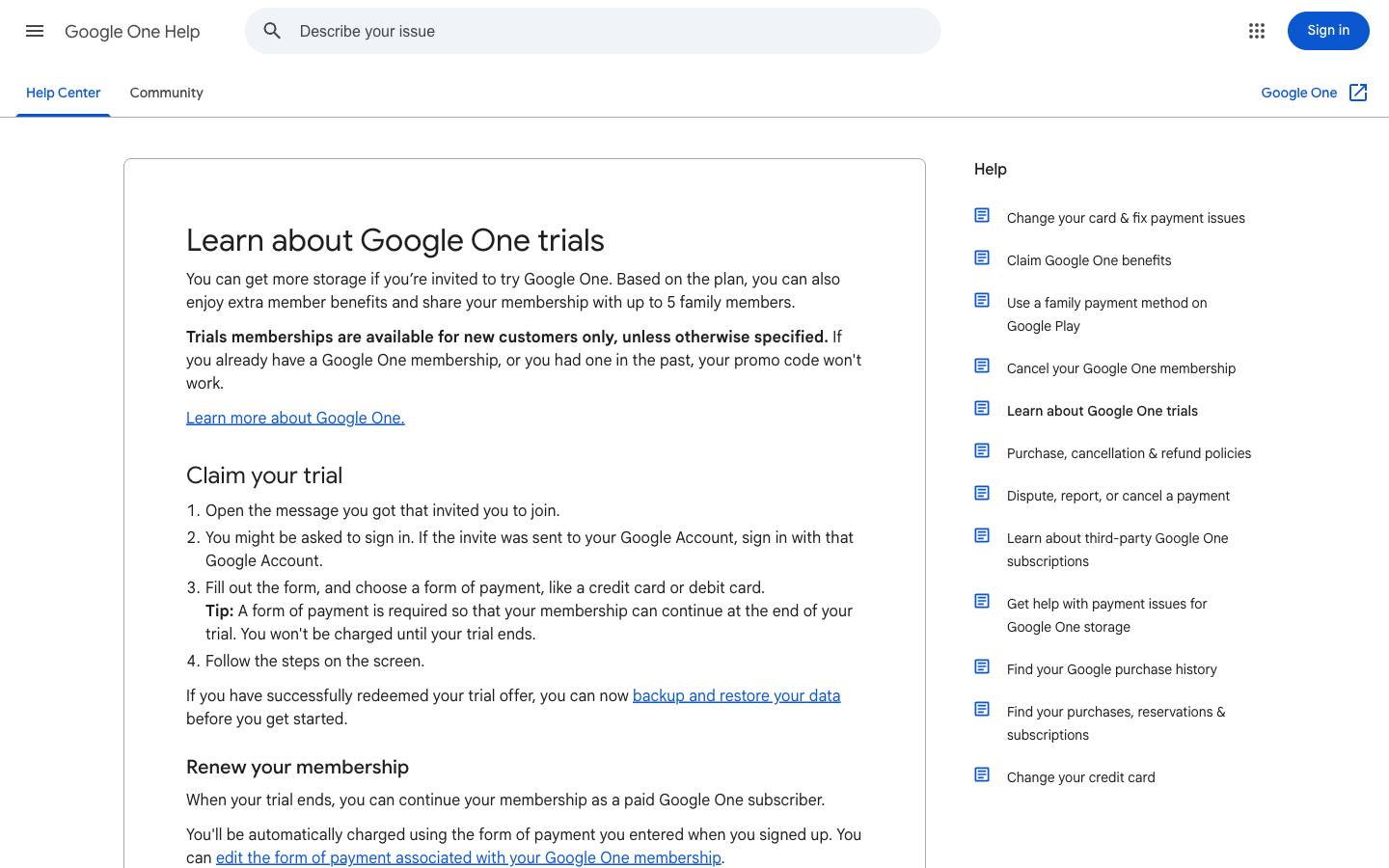
Write the renewal date and amount into your calendar before accepting the trial. Use a real document task during the trial so you can decide whether the subscription earns a place in your budget before the first charge.

The subscription decision is about the full membership, including any storage you use during the trial. Before canceling, check that your files will fit the storage allowance you will keep. Google’s trial and cancellation help explains what happens when an account remains over its storage limit.
Why is the trial offer missing or unavailable?
Common reasons include a previously redeemed promotion, an expired invitation, an ineligible account type, family-plan membership, a subscription billed through another company, or a device-specific condition. Check the explanation next to the offer before changing anything. Leaving a family group or canceling an existing subscription can affect other benefits, so it is worth comparing the total cost first.
A failed payment check does not mean the free Gemini app has disappeared. You can continue with the no-plan route while you resolve eligibility or decide whether a subscription is worth it.
Student offers and eligibility
As of October 10, 2026, Google’s U.S. AI plans page advertises Google AI Pro free for one year for eligible students. The linked student terms describe a 12-month offer and say it must be redeemed by December 31, 2026. The plan included depends on the country or region of your eligible institution; start from Google’s student plans to see the offer for you.
For that offer, Google lists these requirements:
- Be at least 18 and enrolled at an eligible higher education institution.
- Verify student status through SheerID.
- Use a personal Google Account and provide a qualifying payment method.
- Meet the offer’s country, account and subscription conditions. School-issued Workspace for Education accounts and supervised accounts are excluded.
The student offer terms also exclude specified family-group and third-party subscription arrangements. A school email can help with student verification, but the subscription itself belongs on the eligible personal account. Google’s student eligibility help lists the participating offers and country rules.
At the end of the offer, the applicable standard monthly price can begin automatically unless you cancel, subject to local consent requirements. Promotional usage limits can differ from those on a paid membership. Save the terms and end date for the offer you accept; the Gemini student guide can help you plan how to use the tools for study.
Google AI Studio and API access
Use Google AI Studio when you want to try prompts or build an application. Keep browser testing and API billing separate. The Gemini API pricing page lists Gemini 3.1 Pro Preview’s input and output as not available on the API free tier, while also pointing to AI Studio for testing.
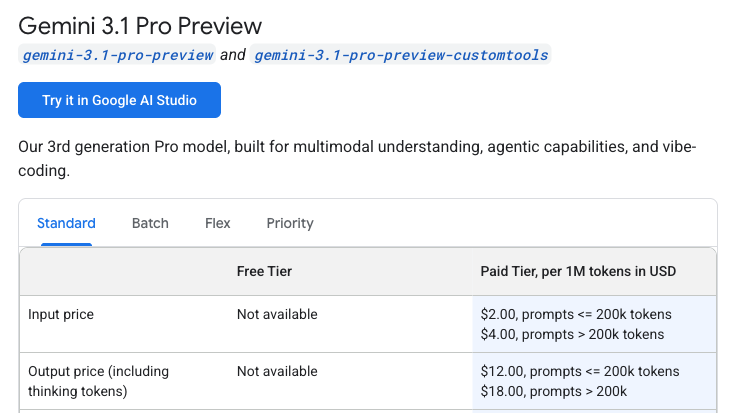
Check the model ID and token rates before connecting a prototype to the API. For a trial comparison, keep app access, AI Studio experimentation and billable API requests in separate budget lines.
- Open AI Studio and select the model you intend to use.
- For an API project, check that model’s current free-tier and paid-tier columns before creating a workload.
- Read the project’s active rate limits and billing state. Do not assume a consumer Google AI trial provides free API calls.
- Start with a small task and choose the model, quota and paid usage that fit your application.
Google applies API rate limits per project. Requests per minute, input tokens per minute and requests per day are separate limits, and exceeding any one can stop a request. Daily request quotas reset at midnight Pacific time, according to the rate-limit documentation.
Also review how your input is handled. Google’s pricing page says content on unpaid services may be used to improve its products. Use appropriate data for a free testing environment. For model IDs and implementation details, continue with the Gemini 3.1 Pro API guide.
Continue your project with GlobalGPT
A trial is useful for deciding whether you like a tool. A finished piece of work is a better test of what to keep paying for. If your week moves from reading documents to drafting and editing, GlobalGPT brings those tasks into one workspace at a lower-cost entry point than maintaining a separate subscription for every model you want to use.
For example, take a PDF report you need to turn into a short briefing:
- Understand the source. Open ChatPDF, upload your PDF and ask for its main argument, assumptions and unanswered questions. Keep the document visible while checking the response.
- Build your outline. Bring the passages you want to use into a Gemini, GPT or Claude chat. Ask for a briefing structure for your particular audience.
- Refine the draft. Move the text into the writing or proofreading tool, then review names, figures and quotations against the report.
These are deliberate handoffs between tools: you choose the material to carry forward. A useful starting question is, “Which three findings in this report matter to a small business owner, and what evidence supports each?” It gives the AI a concrete job and gives you something you can check.

Start with the document or draft you already have. Choose a model for the reasoning or writing stage, then use the dedicated tool for the next edit. That makes the subscription decision about completing your work, with fewer separate accounts and bills to manage.
| GlobalGPT plan | Public annual offer, monthly equivalent | Credits allocated each month |
|---|---|---|
| Basic | $5.80/month, billed annually | 12,000 |
| Pro | $9.70/month, billed annually | 20,000 |
| Unlimited | $23.30/month, billed annually | 52,000 |
GlobalGPT public plan page, October 10, 2026. Annual payment is made upfront; credits are allocated monthly. Unlimited access applies to the models listed by that plan, while other premium work uses credits. Review the amount and terms in your checkout.
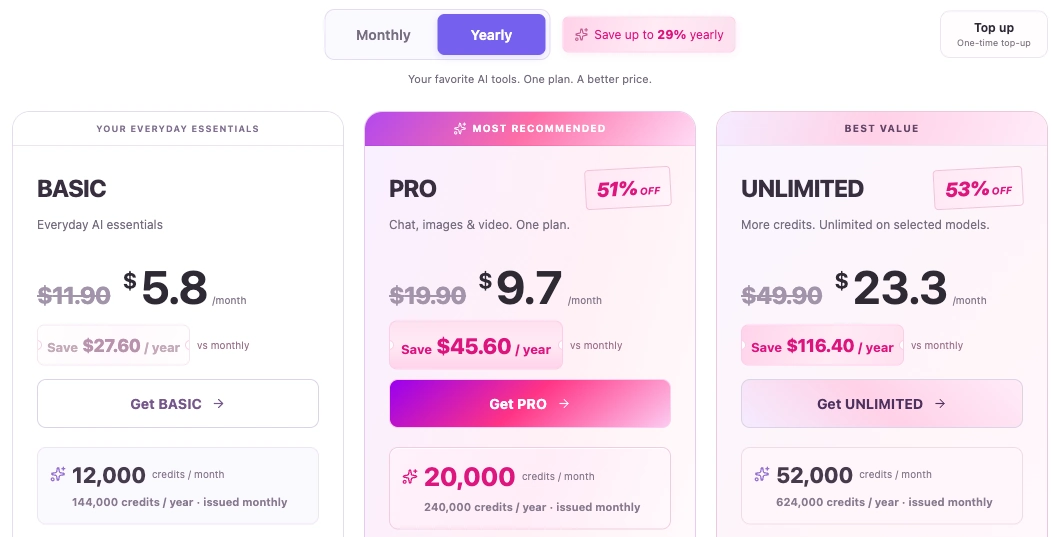
A Google trial helps you decide whether its subscription suits you; this annual offer is a separate budget choice for recurring document work. Estimate how often you will read, draft and revise before committing to a year.
Basic is a low-cost starting point for model chat; Pro adds room for a broader mix of tasks and tools. Choose around the work you expect to do repeatedly. You are buying GlobalGPT’s multi-model workflow, while Google’s promotional offer remains a separate choice managed in your Google Account.
Free trial FAQ
Can I use Gemini 3 Pro for free?
Google’s app-help table lists Pro access for accounts without an AI plan, under standard usage limits. The AI plan page now refers to Gemini 3.1 Pro. Open the Gemini app and check your model selector; free app access does not require activating a paid-plan trial.
How long is the Gemini Pro free trial?
The duration belongs to the offer shown to your eligible account. There is no single trial length that applies to everyone. Check the promotional period and first charge date before confirming. Google’s linked student offer terms separately describe 12 months for qualifying students.
Can I get a trial without a payment method?
Google’s general membership and student offer terms require a qualifying payment method. If you want to use Gemini without setting up a subscription renewal, start with the app’s no-plan access and its standard usage limits.
Will I be charged when the trial ends?
The offer can automatically continue at the applicable subscription price when its promotional period ends. Google One advises canceling before the last day if you do not want to be charged. Keep the cancellation confirmation and review any storage you will lose.
Is there a one-year student offer?
Google’s U.S. AI plans page advertises one year of Google AI Pro for eligible students as of October 10, 2026. The linked terms require redemption by December 31, 2026 and include age, enrollment, region, personal-account, verification and payment requirements. The included plan depends on the institution’s country or region.
Does Google AI Studio give me free Gemini Pro API calls?
AI Studio testing and API usage have different terms. Gemini 3.1 Pro Preview’s API input and output have no free tier on Google’s current pricing page. Check the exact model’s price and your project limits before sending API requests.
Is Gemini 3 Pro unlimited for free?
No. Google describes standard usage limits for accounts without an AI plan. Your model, thinking level, conversation length and features affect usage, and weekly limits can also apply. Paid access raises capacity, but it should not be treated as an unlimited allowance for every task.
Choose your next step
For a few questions today, open Gemini and use the free access available to your account. For a subscription trial, record the renewal terms before accepting. For an API project, check the model’s rate card first. If you want to carry a document through research, writing and editing, open Gemini on GlobalGPT and start with the material you already need to work on.





