

Gemini 3 Flash is still listed by Google as a developer preview model, but it is no longer the newest Flash option. As of July 28, 2026, Google lists Gemini 3.6 Flash and Gemini 3.5 Flash ahead of it. Developers can try supported Flash models through Google AI Studio’s free tier, while everyday users can use the current Flash experience in Gemini products or open Gemini 3.6 Flash directly on GlobalGPT.
The important distinction is between a model name and an access route. Google can update the default model in the Gemini app without requiring users to select an older version. In the API, exact model names matter because developers choose a model ID and pricing tier.
If you want a current Flash model in a multi-model workspace, Gemini 3.6 Flash on GlobalGPT provides a direct model page alongside other leading AI models. This is useful when your work moves between fast Gemini responses, deeper reasoning, research, writing, coding help, image creation, and other AI tasks without managing a separate workspace for every provider.

Quick answer
- Fastest free consumer route: use the current Flash model offered in the Gemini app.
- Best free developer route: use Google AI Studio with a supported free-tier Flash model.
- Current API starting point: Gemini 3.6 Flash, not the older Gemini 3 Flash Preview.
- Multi-model route: open Gemini 3.6 Flash in GlobalGPT and switch models within the same workspace when the task changes.
Is Gemini 3 Flash Still Available?
Yes, but it is now an older option rather than the leading Flash model. Google’s Gemini Developer API pricing page still lists Gemini 3 Flash Preview. The same page places Gemini 3.6 Flash and Gemini 3.5 Flash above it, which is the clearest current signal that users starting a new workflow should check the newer models first.
Google originally announced Gemini 3 Flash on December 17, 2025 and made it available through the Gemini app, AI Mode in Search, Google AI Studio, the Gemini API, and enterprise products. That announcement remains useful historical context, but it does not mean the consumer app will always expose the same model label. Google’s product interfaces and default models change as newer releases arrive.
For a new API project, use the model IDs shown in the current official Gemini API pricing documentation. For an existing project pinned to an older preview model, review Google’s model and deprecation documentation before switching.
Gemini Flash Access Options at a Glance
| Route | Best for | Cost model | What you select |
|---|---|---|---|
| Gemini app | Everyday chat and multimodal help | Free access available; paid plans raise limits or add features | The model options currently shown in your account |
| Google AI Studio | Prompt testing and small developer projects | Free tier for supported models, subject to limits | An exact API model ID |
| Gemini API | Apps, automation, and production integrations | Free tier where available, then usage-based pricing | An exact API model ID and billing tier |
| GlobalGPT | Using Gemini alongside other AI models in one workspace | Platform access and plan limits | A dedicated Gemini model page |
| Vertex AI / enterprise | Governed, large-scale business deployments | Cloud or enterprise pricing | A supported model and deployment configuration |
Which Gemini Flash route unlocks what?
A factual access matrix — availability and billing routes, not capability scores
Sources: Google Gemini 3 Flash announcement, Gemini Developer API pricing, and GlobalGPT Gemini 3.6 Flash; checked July 28, 2026.
The matrix makes the tradeoff simple: use the Gemini app when you want the lowest-friction chat route, AI Studio when you need a model ID and developer controls, GlobalGPT when your workflow spans several model families, and enterprise products when governance matters more than a free start.
How to Use Gemini Flash in the Gemini App
- Open gemini.google.com or the Gemini mobile app.
- Sign in with a supported Google account.
- Start a new chat and check the model selector if your account displays one.
- Choose the current Flash option shown for your account, or use the default model when no manual selector is available.
- Upload or add content only when the interface shows that input type is supported.
The app is the easiest route for ordinary chat, writing, planning, and multimodal assistance because it does not require an API key. The exact model name, limits, and features can vary by account, region, device, and plan. If the interface shows a newer Flash version instead of Gemini 3 Flash, that is expected rather than an error.
How to Use Gemini Flash Free in Google AI Studio and the API
Google AI Studio is the clearest official route for developers who want to test a current Gemini Flash model before building an integration.
- Open Google AI Studio.
- Sign in and open the model selector.
- Choose a current Flash model supported by the free tier, such as Gemini 3.6 Flash when it is available to your account.
- Run a small prompt and check the model’s rate limits before designing a production workload.
- Create an API key only if you need to call the model from your own application.
Google describes the free developer tier as suitable for developers and small projects. It includes limited access to certain models, free input and output tokens, and AI Studio access. Google also states that free-tier content may be used to improve its products, while paid-tier content is not used for that purpose under the terms linked from the pricing page.
Current Gemini Flash API Pricing
As verified on July 28, 2026, Google lists the following standard pricing for its two leading Flash models. Prices are per one million tokens in US dollars. Free-tier access is subject to Google’s model availability and rate limits.
Gemini Flash paid API price by token type
US dollars per one million tokens; bar length compares the paid rates
Source: Google Gemini Developer API pricing, checked July 28, 2026. Both models listed free-of-charge input and output in the Free Tier column.
The paid input rate is identical, but Gemini 3.6 Flash costs $1.50 less per million output tokens than Gemini 3.5 Flash. For output-heavy workloads, that difference is the useful number to compare; for free experiments, rate limits and model availability matter more than the paid bar length.
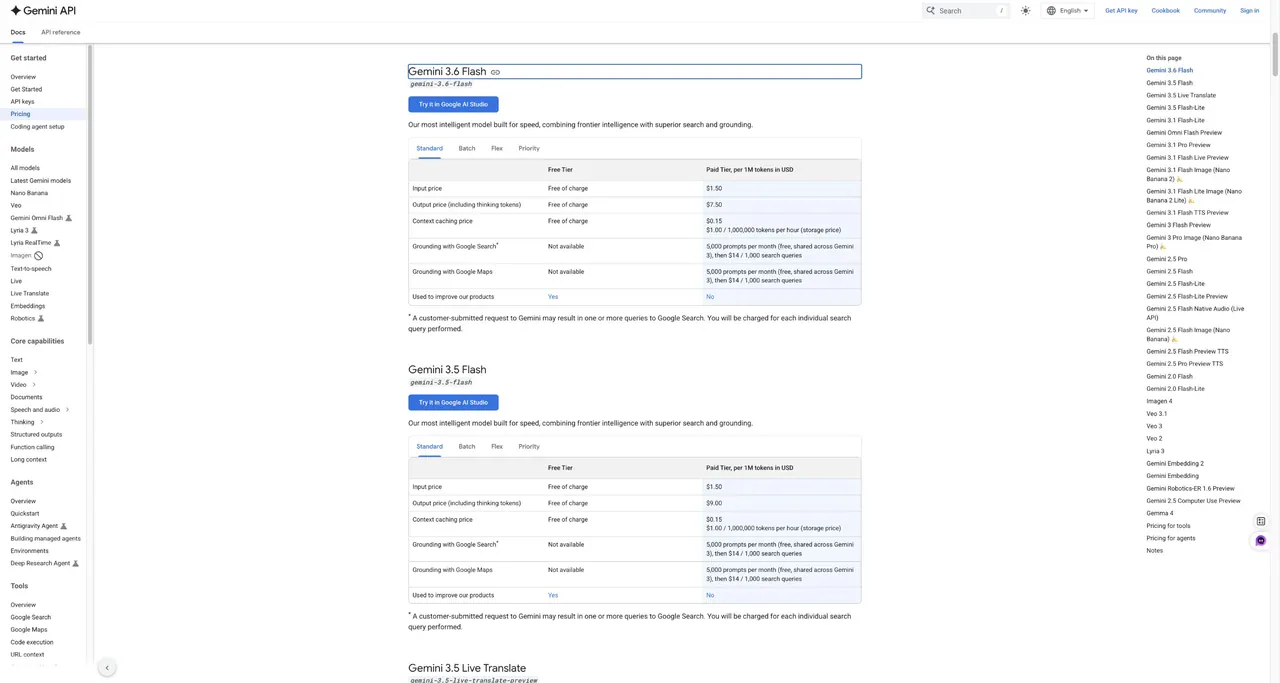
Do not copy an old Gemini 3 Flash price into a new budget without checking the current model row. Preview models, newer releases, batch processing, context caching, grounding, and enterprise deployments can use different rates or rules.
How to Use Gemini 3.6 Flash on GlobalGPT
GlobalGPT provides dedicated pages for multiple Gemini generations, including Gemini 3 Flash, Gemini 3.5 Flash, and Gemini 3.6 Flash. The current Gemini 3.6 Flash page was verified on July 28, 2026.
- Open the Gemini 3.6 Flash model page.
- Sign in to your GlobalGPT account.
- Enter a prompt in the chat box and use the available search, reasoning, or input controls that fit your task.
- Switch to another model from the workspace when the task needs a different strength.
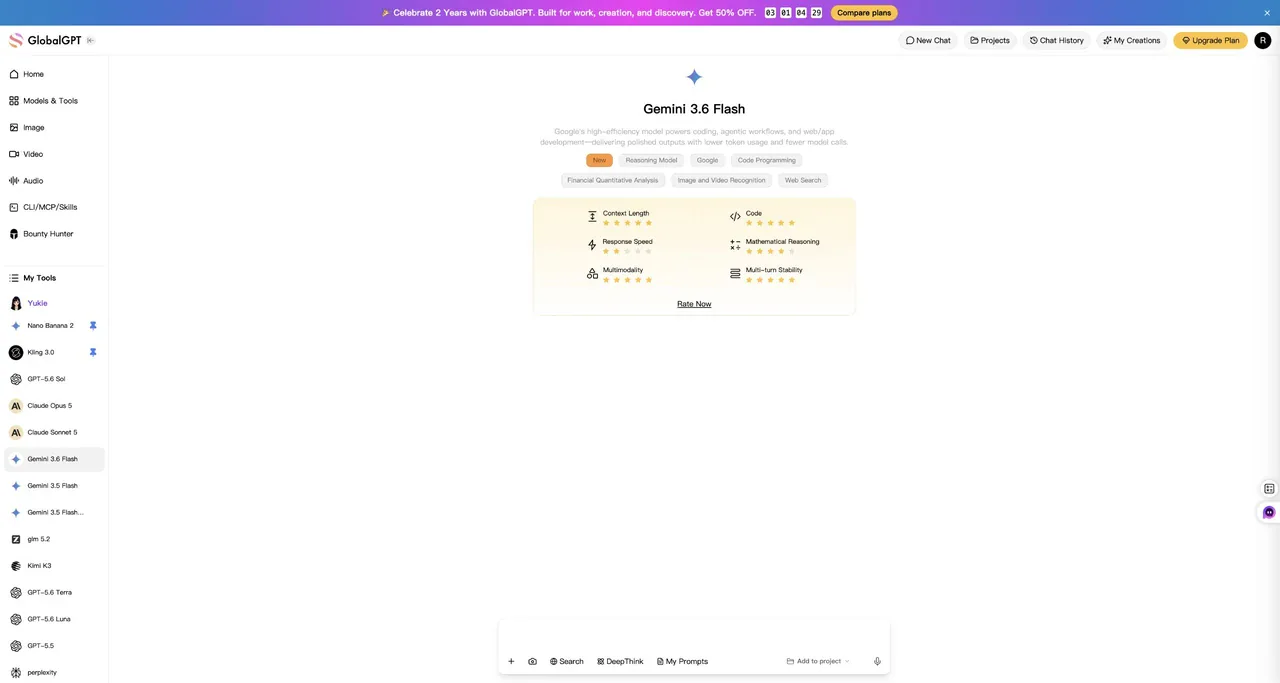
This route is most useful when Gemini is one part of a broader AI workflow. Instead of treating every model as a separate subscription and separate workspace, you can use different model families for research, drafting, reasoning, coding support, image generation, video, and audio work. Check the current GlobalGPT plans for the limits that apply to your account.
Enterprise Access Through Google Cloud
Organizations that need security controls, support, compliance options, governed deployment, or predictable high-volume capacity should use Google’s enterprise routes rather than a consumer chat session. Google’s pricing documentation directs large-scale deployments to its Gemini Enterprise Agent Platform and related Google Cloud services.
Before deployment, confirm the exact model in your region, the data-handling terms, rate limits, context requirements, grounding costs, and whether provisioned throughput is necessary. Enterprise availability should be checked against the current Google Cloud documentation rather than inferred from consumer app access.
What to Do if Gemini 3 Flash Is Missing
The Gemini app shows a newer Flash model
Use the current model shown in the app unless you specifically need compatibility with an older API model. Consumer products often move to newer defaults.
AI Studio does not list the model
Check whether the model is available in your region and account, then review Google’s current model list and rate-limit documentation. Preview models can change or be retired.
An older API model ID fails
Confirm the exact model ID in Google’s documentation. Do not replace it blindly in production code; compare behavior, limits, pricing, and deprecation guidance first.
You only want a fast Gemini chat
Use the newest supported Flash option in the Gemini app, AI Studio, or GlobalGPT rather than spending time looking for a legacy label.
Which Access Route Should You Choose?
- Choose the Gemini app for free everyday chat with minimal setup.
- Choose Google AI Studio for free prompt testing and small developer experiments.
- Choose the Gemini API when you need an application integration, automation, or usage-based production access.
- Choose GlobalGPT when you want Gemini inside a wider multi-model AI workspace.
- Choose Google Cloud enterprise products for governed organizational deployments.
If your main question is whether the original model costs money, see the detailed guide to whether Gemini 3 Flash is free. For a deeper cost breakdown, review Gemini 3 Flash pricing and access costs.
Frequently Asked Questions
Can I still access Gemini 3 Flash for free?
Google still lists Gemini 3 Flash Preview in its developer pricing navigation, but newer Flash models now appear first. Free access depends on the route: the Gemini app offers free consumer access, and Google AI Studio provides a limited free developer tier for supported models.
Is Gemini 3.6 Flash free?
Google’s pricing page showed free-of-charge input and output for Gemini 3.6 Flash in the Free Tier column on July 28, 2026. The free tier has access and rate limits, so it is not the same as unlimited production use.
Do I need an API key?
You do not need an API key for ordinary use in the Gemini app or a GlobalGPT chat page. You need a Google API key when calling the Gemini API from your own application.
Why can’t I find Gemini 3 Flash in the Gemini app?
The app may have moved to a newer default Flash model or may show different options for your account, plan, region, or device. Check the current model selector instead of assuming the older label must remain visible.
Is GlobalGPT the same as the official Gemini app?
No. GlobalGPT is a multi-model AI platform with dedicated access pages for Gemini and other models. The official Gemini app, Google AI Studio, Gemini API, and Google Cloud remain Google’s own product routes.





