18 paid generations · August 2026
Strong full songs. Real control variance.
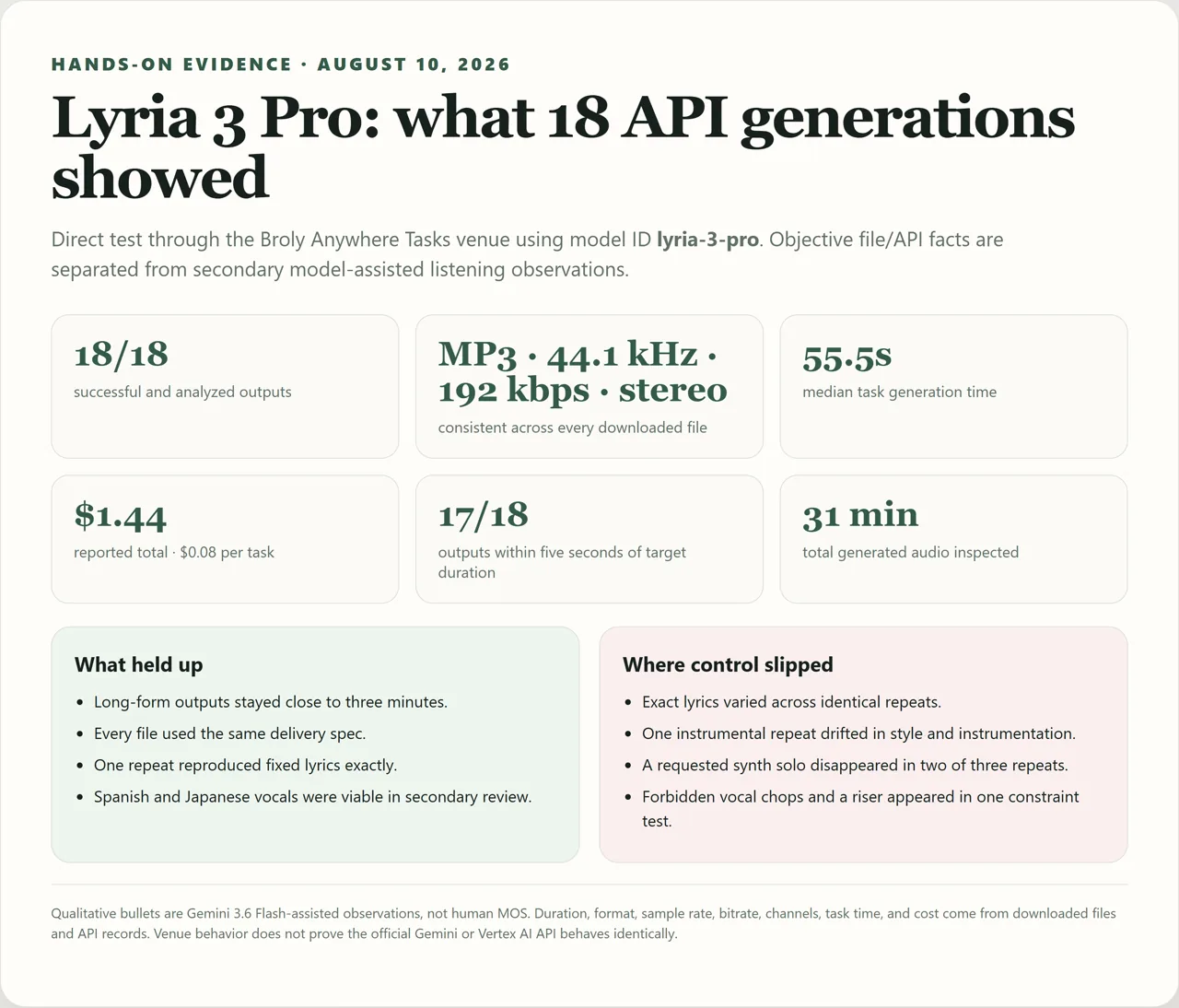
After 18 paid generations, our Google Lyria 3 Pro review found that the model can generate a complete song with vocals, lyrics, verses, choruses, bridges, and a near-three-minute arrangement. It is also less deterministic than the polished demos suggest. Every task succeeded and every output arrived as a 44.1 kHz, 192 kbps stereo MP3, but repeated prompts still lost a synth solo, changed exact lyrics, drifted into the wrong style, and ignored “no vocals” and “no risers” constraints.
The short verdict: Lyria 3 Pro is a strong full-song generator for people who can generate several takes and select the best one. It is not a one-click tool for exact lyrics, exact section timing, or hard negative constraints. At $0.08 per full-song Gemini API request, that selection workflow is affordable, but it still needs listening and editing QA.

Lyria 3 Pro status in 2026: Pro is not the newest Lyria model
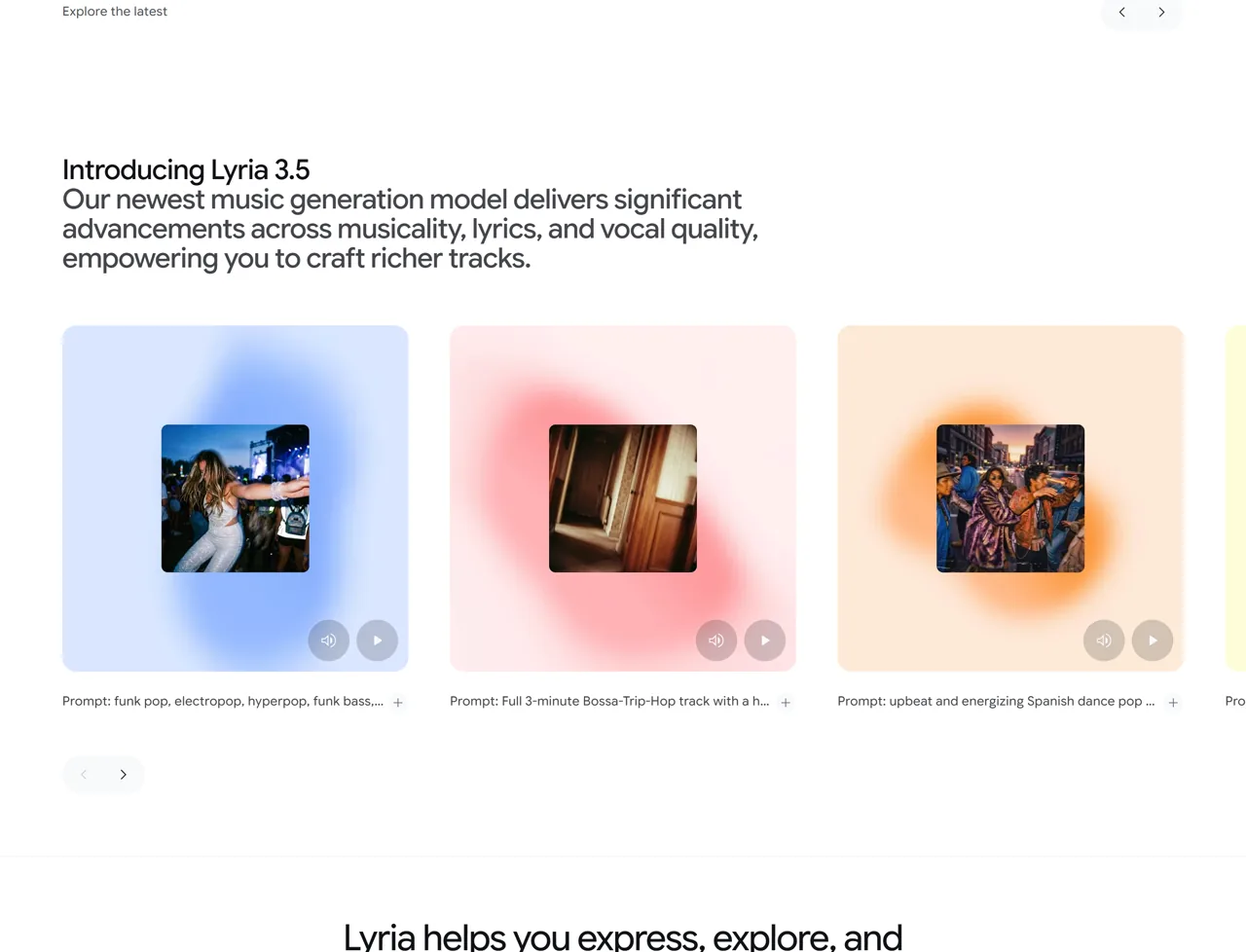
As of August 10, 2026, Google DeepMind describes Lyria 3.5 as its newest music-generation model and promotes it through Flow Music. That does not make Lyria 3 Pro obsolete.
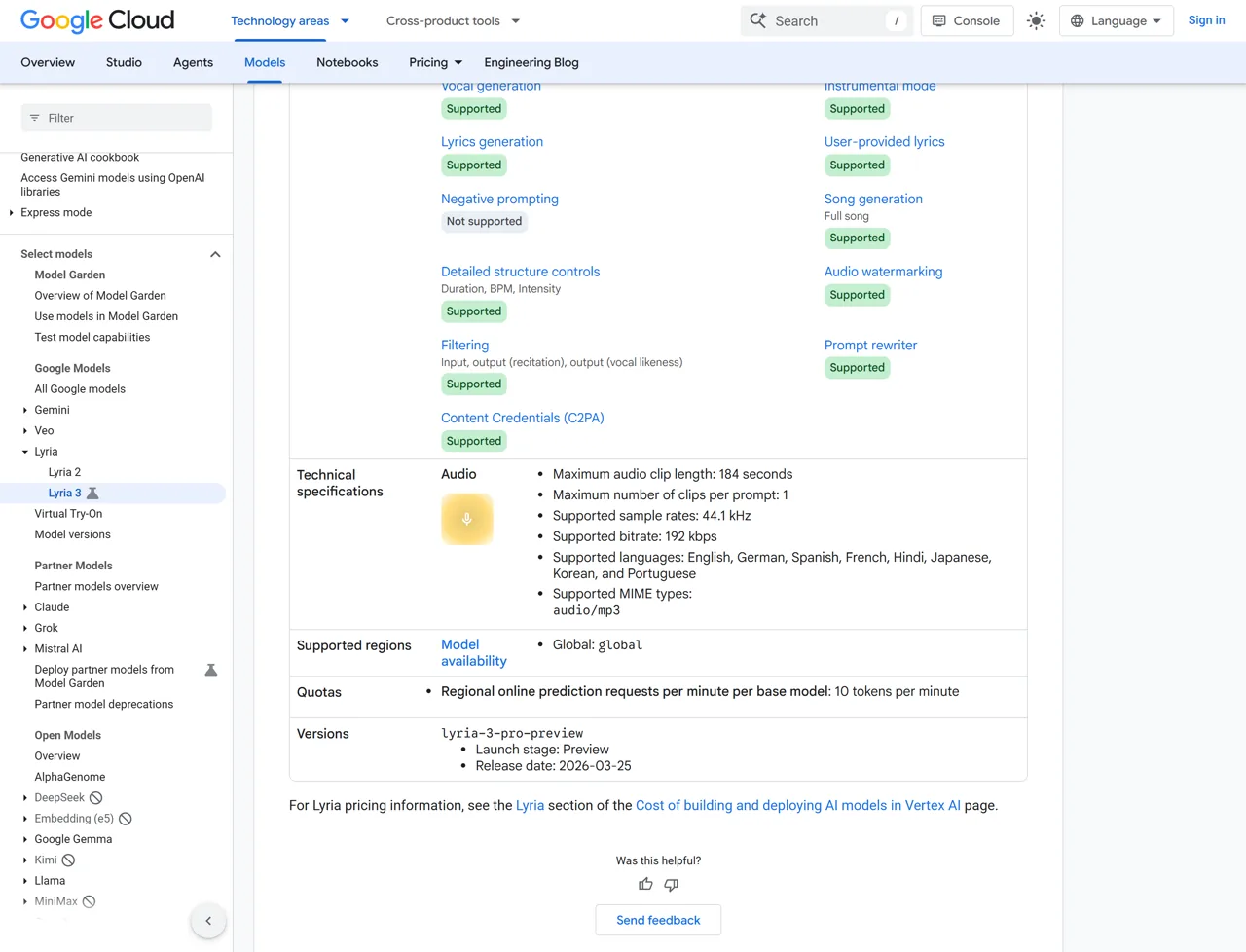
The current Google Cloud Lyria 3 model page still lists Lyria 3 Pro Preview under the model ID lyria-3-pro-preview, with full-song generation, user-provided lyrics, image-to-music input, structural controls, and clips up to 184 seconds.
The naming matters because the surfaces are different. Use Lyria 3.5 when you specifically want the newest Flow Music experience. Use Lyria 3 Pro Preview when you need the documented Gemini Interactions API or Google Cloud model route. This review is about that Pro workflow, with a separate Broly Anywhere test route used to generate the 18 samples.
Quick verdict: is Google Lyria 3 Pro good?
Yes—if you judge it as a high-ceiling generator rather than a deterministic music renderer. The strongest outputs had coherent song arcs, convincing instrument combinations, clean endings, and enough structure to feel composed instead of looped. The long-form test was especially useful: both 180-second requests returned coherent tracks at 176.170 and 177.006 seconds.
The weaknesses showed up in repeatability. One identical instrumental prompt produced a restrained science-fiction cue, then a classical chamber-string piece that dropped several requested instruments. Exact lyrics worked perfectly once but changed in two other repeats. If your release depends on one line, one solo, or one forbidden element never appearing, plan to generate alternatives and inspect every output.
| Best for | Less suitable for |
|---|---|
| Full songs with a clear genre and emotional arc | One-shot exact lyric delivery |
| Long-form instrumentals and cinematic builds | Frame-accurate section timing without DAW checks |
| Drafting multilingual vocal ideas | Hard negative constraints |
| Developers who want a simple per-song API price | Users who need deterministic regeneration |
For a wider category comparison, the existing ElevenLabs vs Lyria 3 Pro vs Mureka music test shows why Lyria fits best when complete musical structure matters more than voice-only control.
What is Lyria 3 Pro?
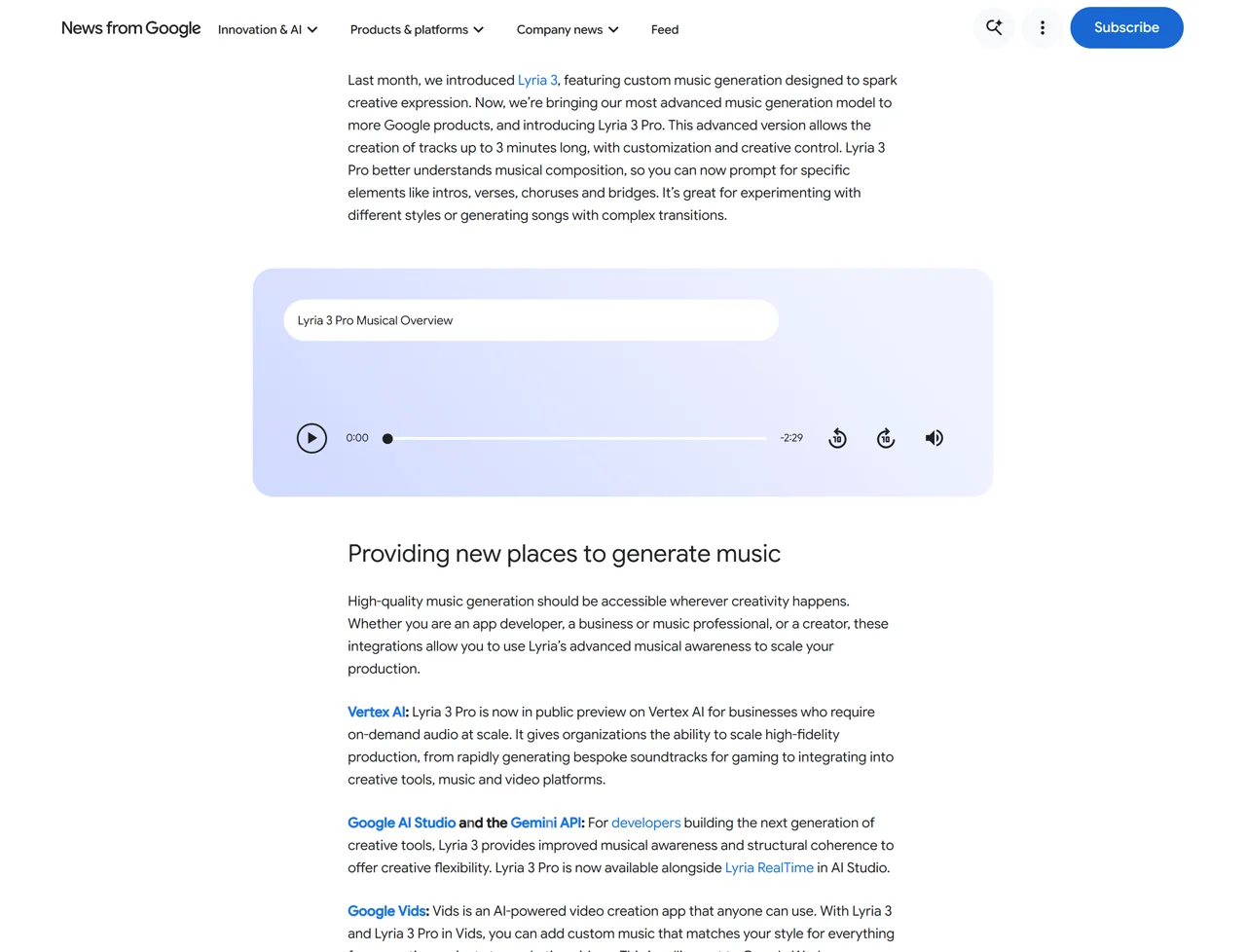
Lyria 3 Pro is Google’s full-song music-generation model in the Lyria 3 API family. Google announced Lyria 3 Pro on March 25, 2026, positioning it for tracks up to three minutes with control over intros, verses, choruses, bridges, lyrics, tempo, and instrumentation. The smaller Lyria 3 Clip model targets fixed 30-second outputs, while Pro is the model for complete arrangements.
The current Gemini music-generation guide says both Lyria 3 models accept text and images and return 44.1 kHz stereo audio.
The Google Cloud Lyria prompting guide documents broader cloud-side inputs, including PDFs and up to 10 reference images. Those are surface-specific capabilities, so do not assume every input type works through every third-party route.
How we tested Lyria 3 Pro
The hands-on test used the Broly Anywhere Tasks API endpoint with model ID lyria-3-pro. This was the user’s authorized test venue, not the official Gemini consumer UI. We ran 18 tasks covering same-prompt repeatability, custom lyrics, timed structure, instrumental fidelity, long-form coherence, BPM/key/instrument control, Spanish and Japanese vocals, and API artifacts.
The evidence has three layers. File and API facts—duration, MP3 format, sample rate, bitrate, channels, task time, and reported cost—come directly from the responses and downloaded audio. A Gemini 3.6 Flash audio pass produced the listening descriptions and best-effort lyric transcriptions used below. It is a model-assisted listening evaluation, not a human panel or human MOS. Exact BPM, key, and section timestamps are treated as provisional when they were not independently measured in a DAW.
| Test metric | Measured result |
|---|---|
| Successful tasks | 18/18 |
| Total generated audio | 1,858.195 seconds |
| File delivery | MP3, 44.1 kHz, 192 kbps, stereo on 18/18 |
| Generation time | 46–75 seconds; 55.5-second median |
| Reported venue cost | $0.08 per task; $1.44 total |
| Duration accuracy | 17/18 within five seconds of target |
| Mean absolute duration error | 2.913 seconds |
Two network reads failed after tasks had already been created. The runner resumed those existing task IDs instead of submitting again, so the set still contained 18 unique tasks and 18 unique outputs.
Lyria 3 Pro music quality: polished sound, uneven control
Overall musicality and mix
The listening evaluation consistently described the strongest outputs as polished, coherent, and well mixed. T01’s synth-pop repeats kept the bright arpeggiated synths, electronic drums, guitar accents, female lead, and hopeful tone. T05’s two post-rock tracks maintained a recognizable long-form build instead of collapsing into an obvious short loop.
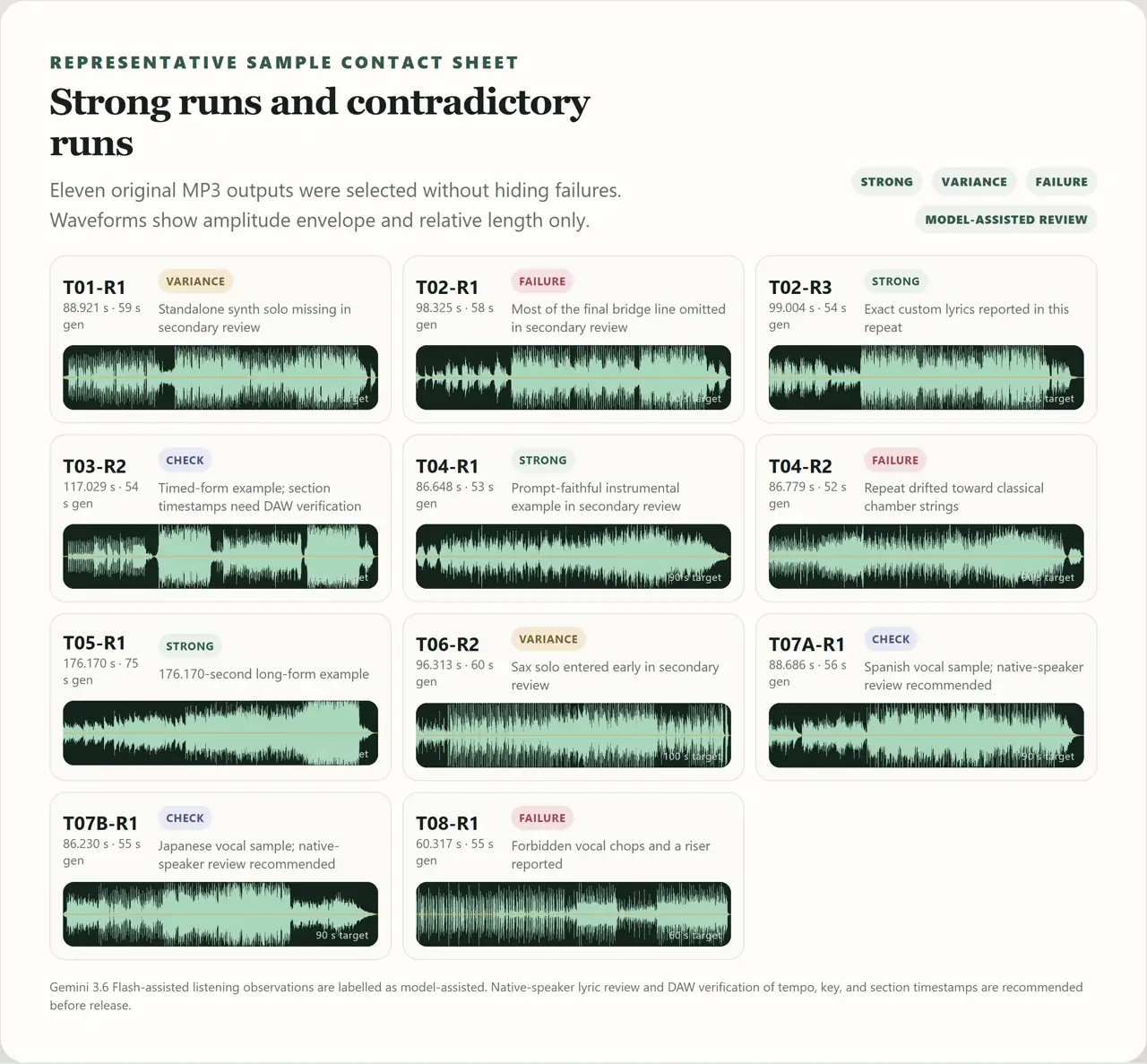
That does not mean every requested detail survived. T01-R1 folded the requested synth lead into the outro instead of creating a standalone solo, while T01-R3 omitted the solo and showed subtle vocal-synthesis artifacts on higher notes. T01-R2 was the cleanest match.
Representative output from the Broly Anywhere Tasks venue.
Exact lyrics: possible, but not deterministic
The custom-lyrics test is the clearest reason to generate multiple takes. T02-R1 omitted most of the final bridge line. T02-R2 added echo repetitions after the chorus. T02-R3 followed the supplied lyric text exactly in the best-effort transcription.
That makes the feature useful, but it changes the workflow. Do not approve a song because the first verse is correct. Compare the complete vocal against the source text, including repeated choruses and the final line, before moving to mixing or distribution.
Representative output from the Broly Anywhere Tasks venue.
Representative output from the Broly Anywhere Tasks venue.
Structure and timed sections
All three 120-second cinematic-electronic outputs were described as following the requested macro order: filtered intro, first verse, wide chorus, cello/granular break, stronger second verse, final chorus, and two-chord ending. The actual files were 115.148 to 117.029 seconds, so none hit the full 120-second target.
The evaluator also produced impossible timestamps beyond the real file duration in some runs. The useful conclusion is therefore limited: Lyria 3 Pro handled the requested sequence, but this test does not prove frame-accurate section placement. Use a DAW if a chorus must land on a specific edit point.
Instrumental fidelity and the biggest repeatability failure
T04-R1 delivered the intended science-fiction suspense cue with a cello ostinato, drone, glass-like texture, controlled peak, and unresolved ending. T04-R2 used the same prompt but drifted toward classical chamber strings. It missed the muted piano pulses, analog drone, and glass harmonics.
Representative output from the Broly Anywhere Tasks venue.
Representative output from the Broly Anywhere Tasks venue.
This pair is more useful than a single perfect demo because it shows the real production risk. A detailed prompt improves the odds; it does not lock the arrangement. Generate at least two takes when instrument identity matters.
Long-form coherence
Both three-minute post-rock requests stayed coherent through the full arc. T05-R1 reached 176.170 seconds and T05-R2 reached 177.006 seconds, then returned to the opening guitar idea. Neither listening report flagged an abrupt genre jump or clipped ending.
Representative output from the Broly Anywhere Tasks venue.
This is where Pro earns its name. Lyria 3 Clip is useful for a loop or short preview; Lyria 3 Pro can sustain an arrangement long enough for a real song draft, trailer cue, or video soundtrack.
Multilingual vocals
The Spanish and Japanese samples were both described as intelligible and close to the supplied lyrics. The best-effort transcriptions suggest that each performance turned the final chorus phrase into an extra musical hook. That is a small creative liberty, but it is still a lyric change.
Representative output from the Broly Anywhere Tasks venue; native-speaker review is recommended.
Google Cloud lists English, German, Spanish, French, Hindi, Japanese, Korean, and Portuguese as supported languages. One Spanish and one Japanese sample cannot prove equal quality across all eight, so native-speaker review remains the sensible release gate.
Negative constraints can fail
T08 asked for no vocals, speech, choir, risers, or cinematic effects. The output still contained short vocal chops and a riser in the listening evaluation, even though the main 124 BPM minimal-techno direction and clean stop were present.
Representative output from the Broly Anywhere Tasks venue.
Google Cloud’s model page explicitly marks negative prompting as unsupported. You can still write positive exclusions in natural language, but the result should be treated as guidance rather than a hard filter.
Lyria 3 Pro prompts: the formula that worked best
Google’s prompt guide recommends combining genre, mood, instrumentation, tempo, vocals, and lyrics. Our strongest prompts added two more layers: a clear section order and an explicit ending behavior.
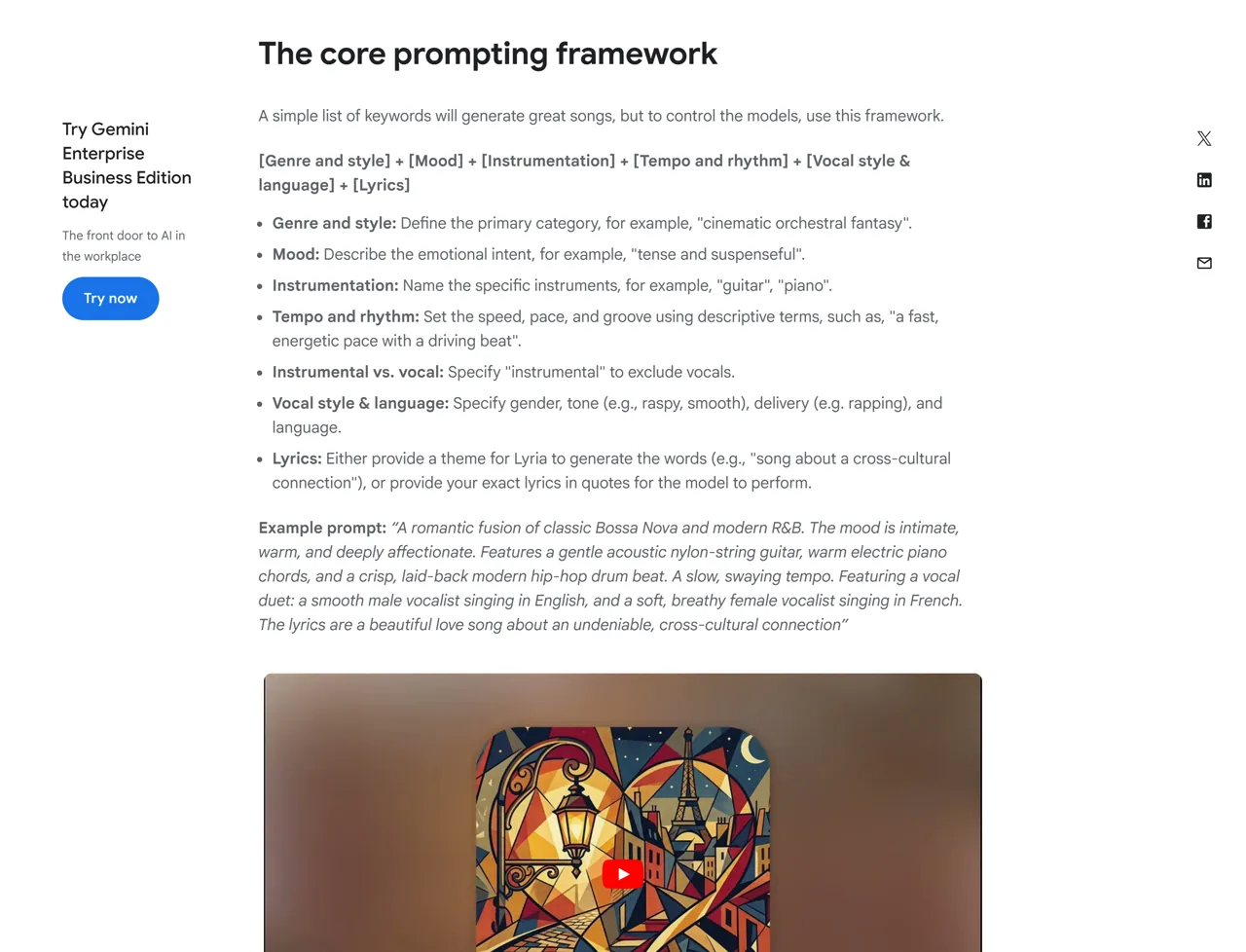
A practical Lyria 3 Pro prompt formula is:
- Length and format: “Create a 90-second instrumental track.”
- Genre and mood: name one primary style and one emotional direction.
- Tempo, key, and meter: use exact values when they matter.
- Instrumentation: list the sounds that define the arrangement.
- Vocals and lyrics: specify voice type, language, diction, and exact text.
- Structure: define intro, verses, choruses, bridge, solo, and outro.
- Ending: request a clean stop, resolved chord, unresolved chord, or fade.
The most common mistake is asking for too many constraints and assuming they are guarantees. The T04 and T08 failures show why the prompt should be followed by a selection pass, not a blind publish step.
Exact prompts used in the test
The prompts below are the exact text sent for the runs discussed in this review.
T01 — same-prompt synth-pop repeatability
Prompt used
PROMPT
Create a polished 90-second English synth-pop song at 112 BPM in 4/4. Mood: hopeful after a difficult night. Instrumentation: warm analog synth bass, bright arpeggiated synth, tight electronic drums, clean electric guitar accents, and a short melodic synth solo. Use one natural female lead vocal with clear diction. Write original lyrics with a 10-second intro, Verse 1, pre-chorus, memorable chorus, Verse 2, repeated chorus, short synth solo, and a clean resolved outro. Keep the mix spacious and radio-ready; avoid spoken narration and crowd sounds.T02 — exact custom lyrics
Prompt used
PROMPT
Create a 100-second alternative-pop song at 96 BPM with intimate piano, muted electric guitar, soft bass, restrained drums, and one expressive male lead vocal. Sing the following original lyrics exactly, preserving the section labels as structure but not speaking the labels. Do not add, omit, reorder, or repeat lyric lines beyond the written repeated chorus.

[Verse 1]
The hallway clock was five minutes slow
Blue morning waited under the door
I packed the map that we never used
And left one light on the second floor

[Chorus]
If the road forgets our names tonight
Follow the river, follow the light
I will be waiting where bridges bend
Holding the note we could not end

[Verse 2]
A paper moon crossed the dashboard glass
The city dissolved in a silver rain
I heard your voice in the radio hiss
Then tuned through the silence again

[Chorus]
If the road forgets our names tonight
Follow the river, follow the light
I will be waiting where bridges bend
Holding the note we could not end

[Bridge]
No final word, no closing sign
Just your small compass next to mine

End with a brief instrumental resolution after the bridge.
T03 — timed structure control
Prompt used
PROMPT
Create a 120-second cinematic electronic song in E minor at 100 BPM and follow this timeline as closely as possible: 0:00-0:10 filtered synth and distant pulse intro; 0:10-0:35 low female vocal verse with sparse kick; 0:35-0:55 wide chorus with full drums and layered harmonies; 0:55-1:15 instrumental break led by cello and granular synth; 1:15-1:38 second verse with stronger bass; 1:38-1:55 final chorus; 1:55-2:00 decisive two-chord ending with no fade. Original English lyrics should describe crossing a city before sunrise. Do not include spoken words or sounds outside the music.T04 — instrumental fidelity
Prompt used
PROMPT
Create a 90-second instrumental cinematic cue with absolutely no vocals, whispers, chanting, speech, or choir. Style: restrained science-fiction suspense at 72 BPM. Instrumentation: low cello ostinato, muted piano pulses, soft analog drone, brushed frame drum, and occasional glass harmonics. Build from a sparse opening to one controlled peak at 1:05, then end on a clear unresolved chord without fading. Keep the acoustic depth coherent and the low end clean.T05 — long-form coherence
Prompt used
PROMPT
Create a full 180-second instrumental post-rock track in D minor, 6/8, around 84 BPM. Begin with fingerpicked electric guitar and room ambience, introduce bass and toms after 30 seconds, add a restrained string quartet after 70 seconds, reach the main crescendo between 2:05 and 2:35, then return to the opening guitar motif and finish cleanly by 3:00. No vocals, choir, speech, or sound effects. Preserve one recognizable four-note motif across the entire piece and avoid abrupt genre changes, looping artifacts, or a clipped ending.T06 — BPM, key, meter, and solo timing
Prompt used
PROMPT
Create a 100-second instrumental neo-soul groove in F-sharp minor at exactly 92 BPM in 4/4. Use Rhodes electric piano, fingerstyle electric bass, dry rim-click drums, muted rhythm guitar, and one tenor saxophone solo from approximately 0:55 to 1:15. Keep the harmony centered in F-sharp minor, use tasteful syncopation, exclude vocals and choir, and end with a deliberate band stop rather than a fade.T07A — Spanish vocals
Prompt used
PROMPT
Create a 90-second Spanish-language acoustic pop song at 104 BPM with nylon-string guitar, upright bass, hand percussion, soft piano, and one natural female lead vocal. Sing these original lines clearly and do not translate them: [Verse] Entre luces de la ciudad, guardo un mapa de papel. Cada calle vuelve a hablar, cada sombra sabe quién. [Chorus] Sigue el río hasta el mar, deja el miedo en la estación. Si la noche vuelve a entrar, encenderé otra canción. Repeat the chorus once, add a short guitar interlude, and finish cleanly without spoken narration.T07B — Japanese vocals
Prompt used
PROMPT
Create a 90-second Japanese-language dream-pop song at 108 BPM with clean electric guitar, warm synth pads, melodic bass, light electronic drums, and one natural female lead vocal. Sing these original lines clearly and do not translate them: [Verse] 夜明け前の駅で、静かな風を待つ。忘れた地図の上、青い光が揺れる。 [Chorus] 川を越えて行こう、名前のない明日へ。小さな歌を抱いて、もう一度歩き出す。 Repeat the chorus once, include a brief instrumental bridge, and end cleanly without spoken narration.T08 — API artifact and negative-constraint test
Prompt used
PROMPT
Create a 60-second instrumental minimal-techno track at 124 BPM in A minor with a dry kick, tight closed hi-hat, rounded mono bass, one metallic percussion motif, and a slowly opening filtered synth. No vocals, speech, choir, risers, or cinematic sound effects. Keep the arrangement deliberately simple and end with a clean one-beat stop so the returned duration, format, sample rate, bitrate, channel count, metadata blocks, and ending behavior can be inspected.Lyria 3 Pro pricing
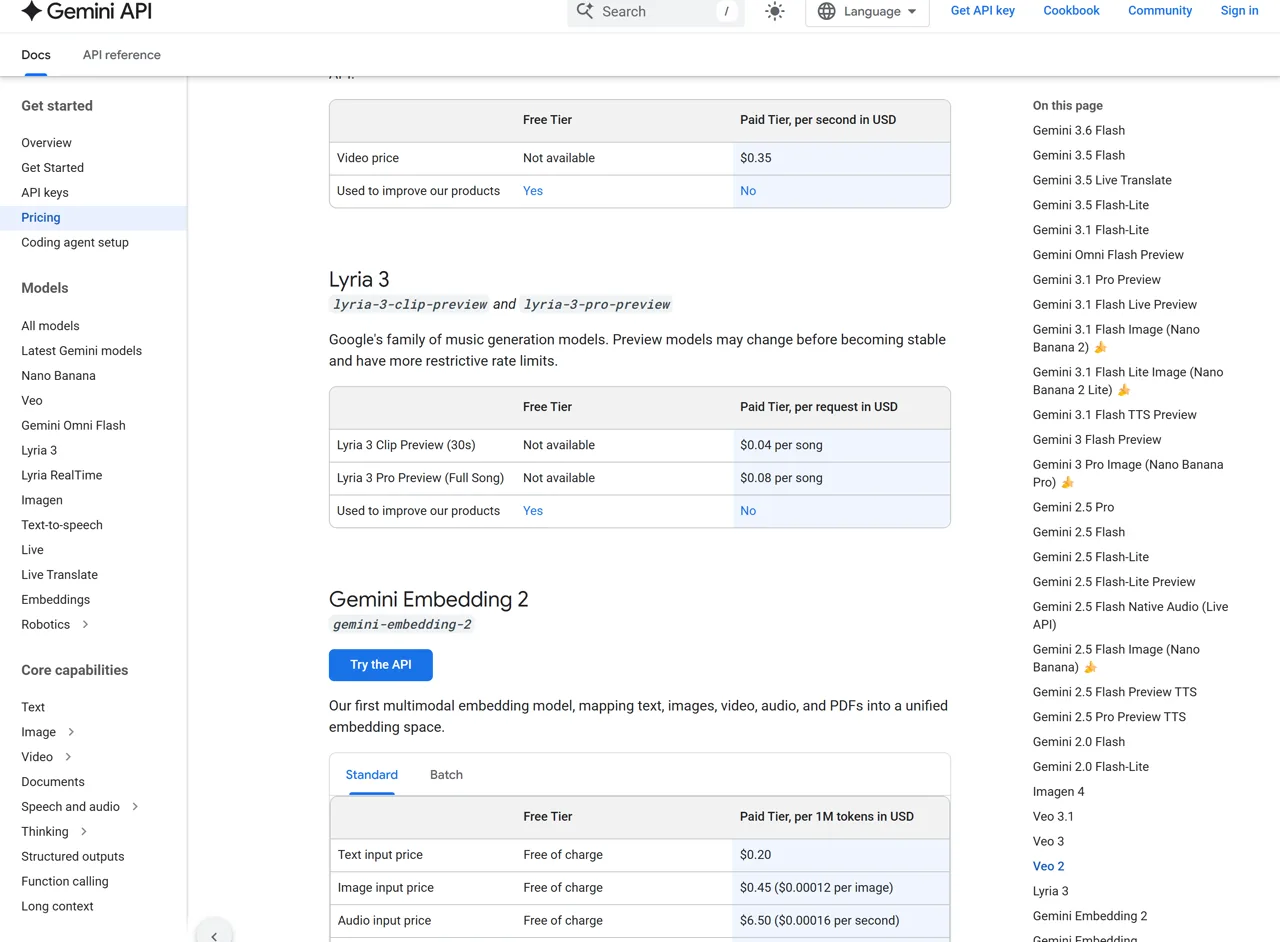
Google’s Gemini Developer API pricing page lists Lyria 3 Pro Preview at $0.08 per full-song request and Lyria 3 Clip Preview at $0.04 per 30-second song. Neither Lyria model has a Gemini API free tier. Pricing is per request, not per token.
ROUTE
Gemini Developer API
MODEL / PRODUCT
lyria-3-pro-preview
REVIEWED MODEL
PUBLISHED PRICE
$0.08 per full song
IMPORTANT LIMIT
No free tier; preview model
ROUTE
Gemini Developer API
MODEL / PRODUCT
lyria-3-clip-preview
PUBLISHED PRICE
$0.04 per 30-second song
IMPORTANT LIMIT
Fixed short-form role
ROUTE
Google Cloud
MODEL / PRODUCT
Lyria 3 Pro Preview
PUBLISHED PRICE
See current Lyria pricing
IMPORTANT LIMIT
Preview terms and quotas apply
ROUTE
Gemini consumer product
MODEL / PRODUCT
Lyria music generation
PUBLISHED PRICE
Subscription access varies by plan/region
IMPORTANT LIMIT
Not the same billing route as the API
ROUTE
Tested Broly Anywhere route
MODEL / PRODUCT
lyria-3-pro
PUBLISHED PRICE
API response reported $0.08 upstream cost
IMPORTANT LIMIT
Venue-specific field, not a retail promise
For subscription context, start with the current Google AI Plus review and hidden limits.
The Google AI Plus vs Pro plan comparison separates the plan limits that are easy to confuse with API access.
For a price-only check, see the current Google AI Plus subscription pricing.
Regional access can change; the Google AI Plus US availability and price review explains why a consumer subscription should not be treated as universal API access.
If price is the deciding factor, the simple math is attractive: 10 Pro generations are $0.80 before taxes or platform adjustments. The hidden cost is curation time. Exact lyrics or instrumentation may require multiple outputs even when the API itself is inexpensive.
Lyria 3 Pro API: model ID, request, and output
For the official Gemini route, use the Gemini Interactions API music workflow with model ID lyria-3-pro-preview. The response provides convenience properties for generated audio and generated text. The audio is base64-encoded; the text can contain lyrics or structural information.
Python example based on Google’s current documentation
PYTHON
import base64
from google import genai

client = genai.Client()

interaction = client.interactions.create(
    model="lyria-3-pro-preview",
    input=(
        "A 90-second cinematic electronic song in E minor. "
        "Begin with a filtered pulse, build into a wide chorus, "
        "add a cello-led instrumental break, and end without a fade."
    ),
)

generated_audio = interaction.output_audio
if generated_audio:
    with open("lyria-song.mp3", "wb") as file:
        file.write(base64.b64decode(generated_audio.data))

lyrics_or_structure = interaction.output_text
if lyrics_or_structure:
    print(lyrics_or_structure)
Google’s guide says MP3 is the default. It also documents response_format={"type": "audio"} for requesting Pro audio output in the format supported by that Interactions API flow, including its documented WAV option. Google Cloud’s current model page is narrower: it lists MP3, 44.1 kHz, and 192 kbps. Name the surface when describing formats instead of presenting one universal spec.
The tested Anywhere route was also asynchronous, but its task schema is venue-specific. It returned a task ID, status, progress, audio URL, timestamps, provider, and cost fields. Do not paste that response shape into Gemini code and assume it is Google’s official schema.
Lyria 3 Pro vs Lyria 3 Clip vs Lyria 3.5
| Model | Best use | Length | Access position in August 2026 |
|---|---|---|---|
| Lyria 3 Clip Preview | Loops, previews, short video music | 30 seconds | Gemini API preview; $0.04/request |
| Lyria 3 Pro Preview | Complete songs, verses, choruses, bridges | Up to 184 seconds on Google Cloud | Gemini/Google Cloud preview; $0.08/request |
| Lyria 3.5 | Newest-generation music quality and Flow Music creation | Up to three minutes in current DeepMind positioning | Promoted through Flow Music; not the model ID used in this API test |
Choose Clip when speed and short-form output matter. Choose Pro when you need a complete song through the documented API. Choose Lyria 3.5 when the newest Flow Music experience matters more than using the Pro API model ID.
Lyria is also narrower than an all-purpose audio model. If the job mixes dialogue, Foley, ambience, and music in one generated scene, the Seed Audio 1.0 voice, SFX, and music review covers that different workflow.
For video production, read how Veo 3.1 handles sound and background audio.
When spoken performance and synchronization are the harder problem, use the practical Veo 3.1 dialogue, audio, and lip-sync workflow.
Safety, SynthID, commercial use, and limitations
Google says Lyria 3 outputs include SynthID watermarking. The current Google Cloud specifications also list Content Credentials (C2PA), input filtering, output recitation filtering, and vocal-likeness filtering. These controls support provenance and safety; they do not remove the need to clear lyrics, reference images, samples, likenesses, and distribution rights for your own project.
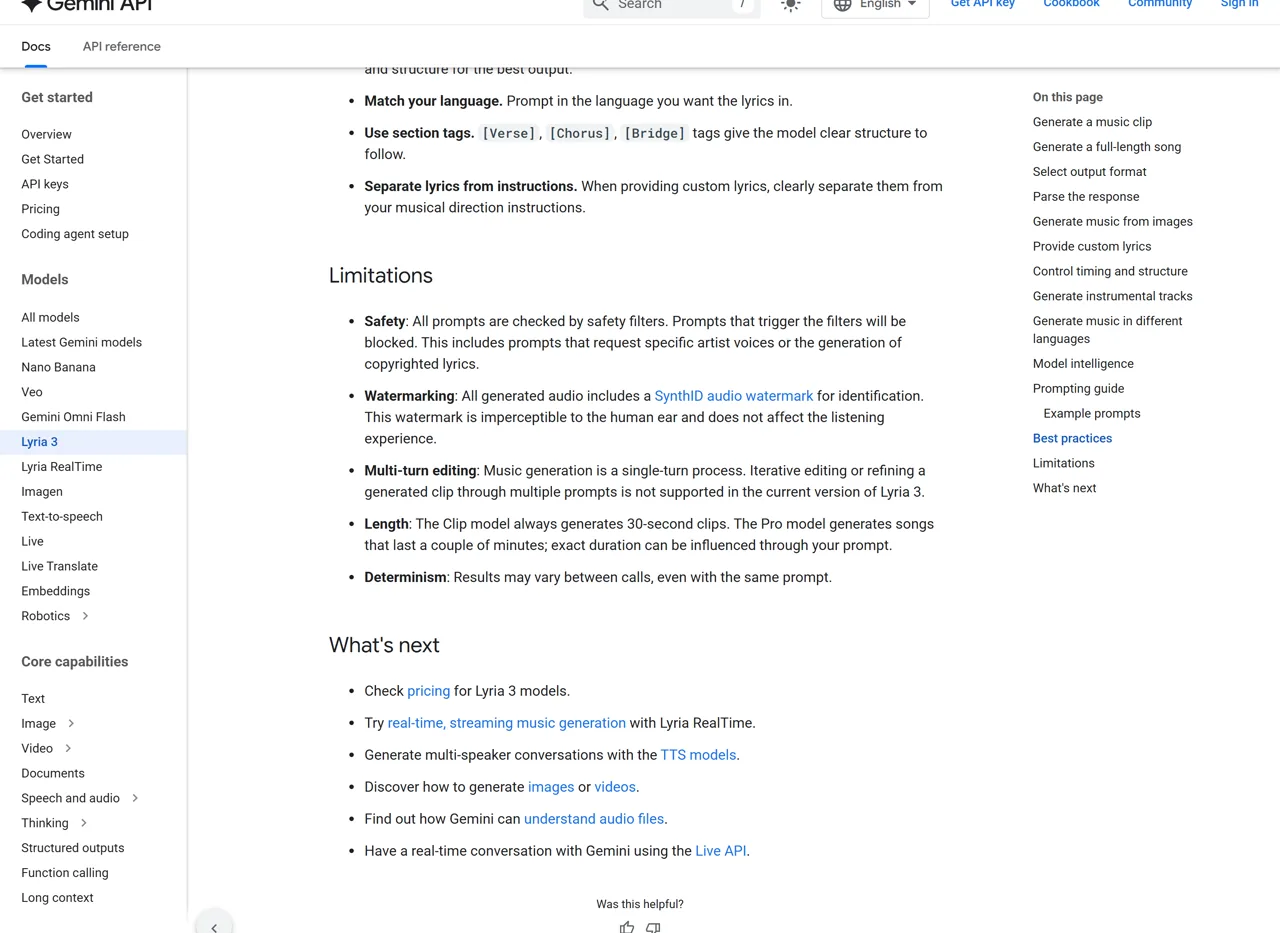
Google Cloud labels Lyria 3 Pro a Generative AI Preview offering. Its page says customers may elect to use the preview for production or commercial purposes and disclose generated output to third parties, subject to the Pre-GA terms and the agreement governing access. That is not the same as an unconditional promise that every generated track is risk-free or exclusive.
The practical limits are straightforward:
- Preview models can change before stable release.
- Gemini API pricing has no free tier for Lyria 3.
- One prompt returns one audio clip on the current Google Cloud model page.
- Negative prompting is not supported as a formal capability.
- Current Gemini music generation is single-turn rather than an in-place multi-turn editor.
- Duration and prompt adherence are variable.
- Exact lyrics, BPM, key, and timestamps still need output-level QA.
Who should use Lyria 3 Pro?
Use Lyria 3 Pro if you are a developer, filmmaker, game creator, songwriter, or content team that wants complete musical ideas through an API and can review multiple candidates. It is especially convincing for cinematic builds, pop structures, long instrumental arcs, and multilingual vocal demos.
Skip it—or keep a second tool nearby—if you need deterministic stems, exact post-generation editing, guaranteed negative constraints, or a final mastered release from one request. Lyria 3 Pro is better at generating a strong take than obeying every instruction as if it were a DAW automation lane.
GlobalGPT’s browser-based audio tools can support surrounding speech and transcription work in one place, but that public page is a separate product surface from the Lyria API tested here. The review does not claim that the page is a verified Lyria 3 Pro route.
Google Lyria 3 Pro FAQ
Is Lyria 3 Pro the newest Google music model?
No. As of August 10, 2026, Google DeepMind calls Lyria 3.5 its newest music-generation model and promotes it through Flow Music. Lyria 3 Pro remains the documented full-song preview model for the Gemini and Google Cloud developer routes under lyria-3-pro-preview.
How much does Lyria 3 Pro cost?
The Gemini Developer API lists Lyria 3 Pro Preview at $0.08 per full-song request. Lyria 3 Clip Preview costs $0.04 per 30-second song. Neither model has a Gemini API free tier, and consumer subscriptions use different plan and regional rules.
How long can a Lyria 3 Pro song be?
Google’s public language says up to three minutes. The current Google Cloud technical page gives a maximum audio clip length of 184 seconds. In our two 180-second tests, the returned MP3 files were 176.170 and 177.006 seconds.
Can Lyria 3 Pro sing exact custom lyrics?
Yes, but not deterministically. One of three repeated custom-lyrics runs matched the supplied text exactly in the listening transcription. Another omitted most of the final bridge line, and the third added echo repetitions. Always compare the complete vocal against the source lyrics.
Can Lyria 3 Pro generate instrumental music with no vocals?
Yes, but a written exclusion is not a hard guarantee. One instrumental test stayed voice-free, while the minimal-techno constraint test added vocal chops despite “no vocals.” Google Cloud also marks negative prompting as unsupported on the current model page.
What is the Lyria 3 Pro API model ID?
The official Gemini and Google Cloud model ID is lyria-3-pro-preview. The hands-on venue in this review used the third-party route ID lyria-3-pro; its task schema and naming should not be substituted for Google’s official Interactions API.
What file format does Lyria 3 Pro return?
Google’s Gemini guide says MP3 is the default and documents a Pro output-format option in the Interactions API. Google Cloud lists 44.1 kHz, 192 kbps MP3. All 18 files from our tested route matched that 44.1 kHz, 192 kbps stereo MP3 specification.
Can Lyria 3 Pro be used commercially?
Google Cloud says customers may elect to use this Preview offering for production or commercial purposes and disclose generated output, subject to its Pre-GA terms and access agreement. Review those terms and clear any lyrics, likenesses, samples, or reference media before distribution.
Can I use Lyria 3 Pro on GlobalGPT?
This review does not claim a verified public GlobalGPT Lyria route. The 18 hands-on generations ran through the Broly Anywhere Tasks API, while GlobalGPT’s public audio page currently presents a separate speech and transcription workspace. Use Gemini or Google Cloud for the documented official API route.
Final verdict
Google Lyria 3 Pro is a credible full-song API model with a low per-request price, coherent long-form output, and unusually detailed prompt controls. The 18-run test also exposed the part that launch demos hide: structural details, exact lyrics, named instruments, and negative constraints can change between identical requests.
That tradeoff is acceptable when you can generate two or three candidates, compare the full song, and keep the strongest take. For that workflow, Lyria 3 Pro is easy to recommend. For deterministic lyric delivery or edit-ready precision from one request, it still needs a human review and a DAW.