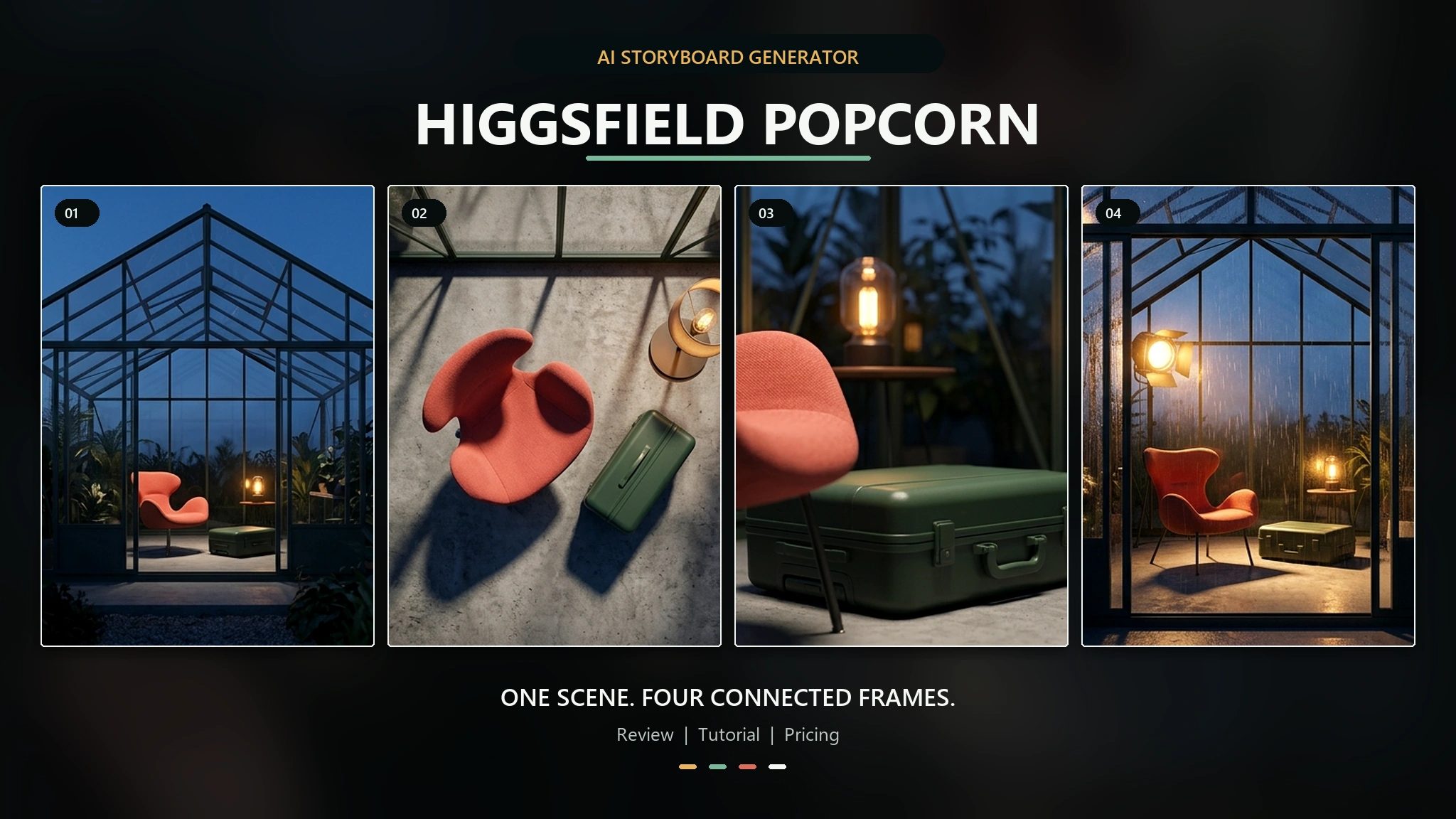
Réponse rapide : Higgsfield Popcorn est un générateur de storyboards basé sur l'IA qui transforme des consignes et jusqu'à quatre images de référence en images enchaînées. Son principal atout réside dans la continuité : au lieu de traiter chaque image comme une tâche distincte, il vous aide à faire évoluer un personnage, un produit, un décor et une direction artistique tout au long d'une séquence. Il s'agit davantage d'un créateur de storyboards basé sur l'IA que d'un éditeur de photos classique.
Popcorn n'est pas un logiciel libre et illimité. Higgsfield propose une formule “ Free ” avec une « utilisation limitée », tandis que son barème tarifaire public prévoit un coût de 1,5 crédit par image Popcorn. Le site ne publie pas de quota garanti de Popcorn pour chaque compte gratuit ; en toute honnêteté, vous pourrez donc peut-être l'essayer avec les crédits disponibles, mais la création répétée de storyboards nécessitera l'utilisation de crédits payants ou promotionnels.
Si vous avez besoin des commandes de storyboard natives de Popcorn, utilisez directement Higgsfield. Si votre principal problème réside dans le coût et la gestion de plusieurs abonnements IA distincts, L'espace de travail IA tout-en-un de GlobalGPT réunit sous un même compte et un même abonnement plusieurs outils de discussion, de recherche, de gestion d’images, de vidéos et d’assistance. Cet espace de travail plus complet peut simplifier la production autour d’un storyboard, mais il ne doit pas être présenté comme un substitut à l’interface spécifique de Popcorn.
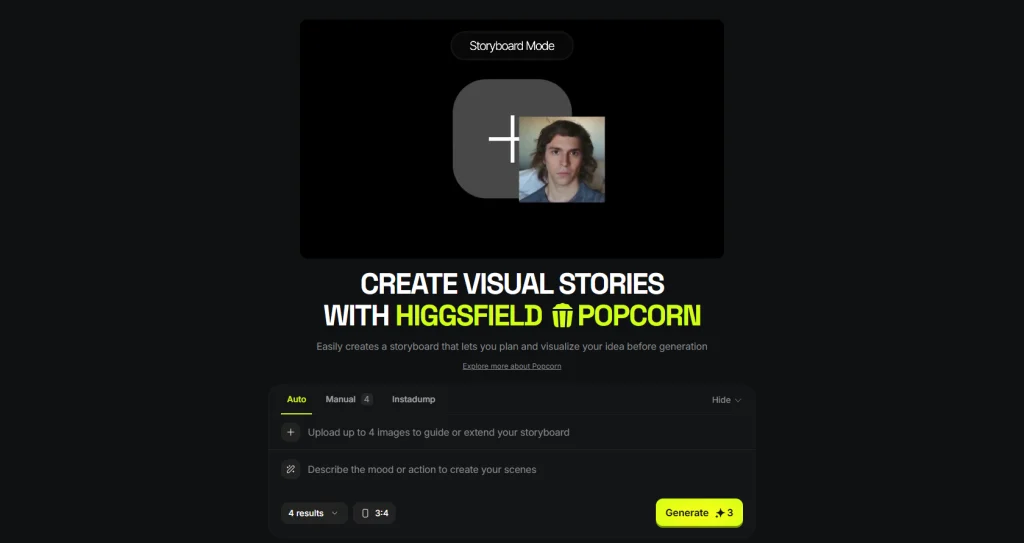

Table des matières
- Qu'est-ce que Higgsfield Popcorn AI ?
- Comment fonctionne Higgsfield Popcorn ?
- Tutoriel sur le pop-corn Higgsfield
- Comment assurer la cohérence des personnages
- Avis sur le pop-corn Higgsfield
- Tarifs et accès gratuit
- Higgsfield Popcorn contre Nano Banana 2
- À qui s'adresse Popcorn ?
- Problèmes courants et solutions
- Foire aux questions
- Verdict final
Qu'est-ce que Higgsfield Popcorn AI ?
Pop-corn Higgsfield Il s'agit d'une fonctionnalité de storyboard visuel intégrée à Higgsfield. La page produit en ligne la décrit comme un outil permettant de planifier et de visualiser une idée avant sa création. Son interface propose les modes « Auto », « Manuel » et « Instadump », vous permet d'importer jusqu'à quatre images de référence, et vous donne la possibilité de choisir le nombre de résultats ainsi qu'un format d'image.
Le mot clé est séquence. Un générateur d'images par IA classique peut créer une image attrayante, mais la deuxième image peut modifier subtilement le visage, la veste, la forme du produit, l'éclairage ou la perspective de la caméra. Popcorn est conçu autour d'images enchaînées, de sorte que la continuité des personnages et des scènes s'intègre naturellement au flux de travail, plutôt que d'être un élément ajouté après coup.
Cela en fait un outil pertinent pour la prévisualisation de films, les concepts de campagne, les publications séquentielles sur les réseaux sociaux, les présentations de produits et les argumentaires visuels. Cela place également Popcorn dans une catégorie plus restreinte que les outils destinés à un usage général Comparatif des générateurs d'images basés sur l'IA: son rôle principal n'est pas simplement de créer la meilleure image prise isolément, mais de faire en sorte que plusieurs images forment une seule et même histoire.
| Objet | Ce qu'il faut savoir |
|---|---|
| Type de produit | Générateur de storyboards par IA et générateur d'images par IA à plusieurs images |
| Point fort principal | Création de séquences visuelles cohérentes à partir de consignes et d'images de référence |
| Entrées de référence | Jusqu'à quatre images sur la page du produit en ligne |
| Modes | Mode automatique, mode manuel et Instadump |
| Coût unitaire public | 1,5 crédit par image Popcorn, vérifié le 3 septembre 2026 |
| Meilleure adéquation | Prévisualisation, concepts publicitaires, séquences narratives et images de campagne cohérentes |
| Ne remplace pas | Une application complète de gestion de storyboards, d'animation ou de montage vidéo |
Popcorn contre Soul ID
Popcorn et Soul ID apportent des solutions à des problèmes connexes mais distincts. Higgsfield’s Guide de cohérence des personnages selon Popcorn, la continuité visuelle est assurée d’une image à l’autre et d’une séquence de storyboard à l’autre au sein d’une même session. Soul ID est une couche d’identité entraînée, conçue pour suivre une personne d’une session à l’autre, d’une image à l’autre, d’une vidéo à l’autre et entre plusieurs modèles.
Utilisez Popcorn lorsque le livrable est un storyboard connecté. Envisagez d'utiliser Soul ID lorsqu'un personnage récurrent doit rester identifiable tout au long d'un processus de production plus vaste. Ne partez pas du principe que toutes les affirmations concernant Soul ID s'appliquent automatiquement à Popcorn.
Comment fonctionne Higgsfield Popcorn ?
Les images de référence servent de repères visuels
Vous pouvez télécharger jusqu’à quatre images pour orienter ou enrichir le storyboard. Un ensemble pratique pourrait comprendre un portrait net du personnage, un décor, un objet important et une référence de style ou d’éclairage. Vous n’êtes pas obligé de remplir tous les emplacements. Une référence peu convaincante ou contradictoire peut semer davantage la confusion qu’un emplacement vide.
Le mode automatique privilégie la vitesse
Le mode « Auto » est la solution la plus rapide lorsque vous connaissez déjà les grandes lignes de l'histoire, mais que vous n'avez pas besoin de diriger chaque image. Rédigez une consigne structurée, choisissez le nombre de résultats et le ratio, puis laissez le système vous proposer la séquence. Ce mode est utile pour la recherche d'idées, les présentations de projets et pour vérifier si un concept dispose d'une palette visuelle suffisamment riche pour être développé davantage.
Le mode manuel privilégie le contrôle au niveau de chaque prise de vue
Le mode manuel s'avère plus pertinent lorsque l'ordre des plans a son importance. Définissez ce qui change à chaque image tout en conservant les détails qui doivent rester fixes. Cela prend plus de temps, mais vous offre davantage de chances de préserver les costumes, les accessoires, la mise en scène et l'intention du réalisateur.
Instadump est un flux de travail distinct permettant une sortie rapide
L'interface « Live Popcorn » propose également « Instadump » comme troisième mode. La page publique du produit de Higgsfield n'explique pas l'intégralité de ses règles de fonctionnement dans le texte affiché ; considérez donc cette fonctionnalité comme une option d'interface distincte et vérifiez son comportement dans votre compte avant de concevoir un workflow client autour de celle-ci.
Tutoriel Higgsfield Popcorn : créer un storyboard étape par étape
Étape 1 : Écrivez le résumé de l'histoire avant de voir l'image de référence
Commencez par une structure en trois temps : le point de départ du personnage, ce qui change, et la fin de la séquence. “ Un coursier entre dans un hôtel calme, découvre une enveloppe rouge et ressort par une cuisine bondée ” donne au générateur une progression plus claire que “ créer un storyboard cinématographique d’espionnage ”.”
Étape 2 : Préparer des images de référence nettes
Utilisez des références présentant un thème unique et évident. Choisissez une image de personnage claire et bien mise en valeur ; un décor sans éléments visuels superflus ; un produit ou un accessoire présenté sous un angle permettant une bonne lisibilité ; et une référence stylistique aux couleurs et à l'éclairage cohérents. Évitez d'utiliser quatre compositions finies sans rapport entre elles qui se font concurrence.
Étape 3 : Choisissez « Automatique » ou « Manuel »
- Sélectionnez « Auto » pour les concepts rapides, l'exploration d'ambiances et les premières maquettes de présentation.
- Choisissez « Manuel » lorsque l'ordre des prises, l'angle de caméra, la cohérence des costumes ou des accessoires est essentiel.
- Essayez Instadump séparément avant de l'utiliser pour un livrable soumis à des délais stricts, car son comportement complet n'est pas documenté dans la documentation publique accessible du produit.
Étape 4 : Rédigez une consigne axée sur la continuité
Faites passer le thème récurrent avant les changements de décor. Higgsfield’s Article officiel sur le flux de travail Popcorn recommande de commencer par identifier le sujet, puis de décrire le cadre et l'action. Voici une structure réutilisable :
[Personnage ou produit] + [action] + [lieu] + [caméra/cadrage] + [éclairage] + [détails qui doivent rester inchangés]
Exemple : “ La femme de la référence n° 1 quitte le hall de l'hôtel pour s'engager dans le couloir de service ; travelling moyen, lumière fraîche du matin. Conserver son visage, sa coupe au carré noire, son manteau vert, son enveloppe rouge et le style réaliste de l'image tirée d'un film, sans rien changer. ”
Étape 5 : Choisissez le nombre d'images et le format d'image
Utilisez moins d'images lorsque vous testez la logique visuelle. Quatre images percutantes sont plus utiles que huit images répétitives ou incohérentes. Optez pour un format vertical pour la planification de contenus courts destinés aux réseaux sociaux, un format carré pour les mises en page de campagne flexibles, ou un format paysage pour la prévisualisation cinématographique. Vérifiez les formats disponibles dans l'interface en ligne, car les préréglages peuvent changer.
Étape 6 : Générer et vérifier la continuité
Ne vous fiez pas uniquement à la plus belle image. Comparez l’ensemble de la bande dessinée et vérifiez la structure du visage, la coiffure, la couleur des vêtements, les objets tenus à la main, la direction de la lumière, le décor en arrière-plan et la position du personnage d’une case à l’autre. Si un élément ne colle pas, modifiez cette contrainte avant de changer l’ensemble de la consigne.
Étape 7 : Affiner une variable à la fois
Si le visage reste stable mais que le pelage change, verrouillez la description du pelage et ne modifiez pas les instructions relatives au visage. Si toutes les images se ressemblent trop, variez la distance de la caméra ou l'action plutôt que d'introduire un nouveau style. Cette approche contrôlée est également utile lors de la création d'un bande dessinée séquentielle à partir d'une seule image source: la cohérence s'améliore lorsque chaque révision poursuit un objectif clair.
Comment créer un storyboard cohérent pour un personnage
On ne crée pas un storyboard cohérent pour un personnage en répétant “ le même personnage ” à chaque phrase. Le modèle a besoin d'un repère visuel stable et d'une liste concise de détails identitaires faciles à comparer d'une image à l'autre.
- Utilisez une seule photo d'identité principale. Un trop grand nombre de portraits différents d'une même personne peut entraîner des incohérences au niveau des traits du visage.
- Citez les traits verrouillés. Reproduisez la coiffure, les traits caractéristiques du visage, les vêtements emblématiques et un accessoire important.
- Il faut distinguer l'identité de l'action. Veillez à ce que la clause d'identité reste inchangée et ne modifiez que la clause d'action ou de paramétrage.
- Conserver l'orientation de l'écran. Si le sujet sort du cadre par la droite, le plan suivant ne doit pas suggérer un revirement inexpliqué.
- Parcourez la séquence en mode miniature. Les images de grande taille masquent des erreurs de continuité qui apparaissent clairement lorsque les images sont placées côte à côte.
Les mêmes principes s'appliquent en dehors de Popcorn. Un espace dédié Flux de travail « Nano Banana » à caractères cohérents montre comment le choix de la référence et les contraintes d'identité répétées influencent les changements de scène dans un éditeur d'images généraliste.
Avis sur Higgsfield Popcorn : ses points forts et ses points faibles
Cette évaluation s'appuie sur l'interface publique en ligne de Higgsfield, sa documentation officielle et les exemples de flux de travail publiés. Elle ne prétend pas avoir réalisé un test de génération payant. Cette distinction est importante, car si les exemples officiels permettent d'expliquer le flux de travail prévu, seules des générations répétées sur un compte réel permettent de mesurer le taux d'échec, la vitesse et la dérive d'identité.
Fort : l'interface commence par la séquence
L'atout majeur de Popcorn réside dans la conception du produit. Le nombre d'images, le format d'image, les références multiples et les commandes automatiques ou manuelles sont tous intégrés au sein d'un seul flux de travail de storyboard. Vous n'avez pas besoin de créer quatre images sans rapport les unes avec les autres, puis de les assembler ailleurs pour vérifier si le récit fonctionne.
Point fort : il favorise à la fois la réflexion créative et l'orientation
Le mode automatique rend l’outil accessible aux créateurs qui souhaitent disposer rapidement d’options. Le mode manuel offre aux réalisateurs, designers et professionnels du marketing une approche plus réfléchie. Ce flux de travail à deux niveaux s’avère plus utile qu’une simple fonction “ cohérence des personnages ” accessible d’un simple clic, car les différentes étapes de production nécessitent des niveaux de contrôle variés.
C'est prometteur, mais il faut le tester : continuité des personnages et des objets
Higgsfield décrit Popcorn comme un outil permettant de préserver l'identité, l'éclairage, la perspective et l'ambiance d'une image à l'autre. Il s'agit là d'allégations du fournisseur, et non d'une garantie que chaque séquence complexe restera stable. Avant d'utiliser cet outil pour une campagne payante, testez précisément le sujet, les tenues, la géométrie des produits et les changements de scène requis par votre projet.
Limité : il ne s'agit pas d'un calendrier de production complet
Popcorn permet d'élaborer le plan visuel. Il ne remplace pas la gestion du timing, le montage des dialogues, le montage audio, le motion design, la validation des plans, le suivi des versions ni le montage vidéo final. Si votre projet doit prendre la forme d'une animation, prévoyez une deuxième étape à l'aide d'un outil de conversion d'images en vidéo ou de génération de vidéo. Le guide pour savoir si Le Nano Banana Pro permet de réaliser des vidéos explique cette même approche axée sur l'image du point de vue de Google sur le marché.
Avantages et inconvénients
| Pour | Cons |
|---|---|
| Une interface axée sur le storyboard plutôt que sur le traitement d'images isolées | Les exemples officiels ne permettent pas de prédire le taux de dérive de votre sujet. |
| Jusqu'à quatre images de référence | Un nombre accru de références peut également entraîner des instructions contradictoires |
| Mode automatique pour la vitesse et mode manuel pour le contrôle de la prise de vue | La continuité manuelle exige toujours une discipline rigoureuse et immédiate |
| Utile pour la prévisualisation, les présentations et les séquences de campagne | Il ne s'agit pas d'un outil complet d'animation, de montage vidéo ou de gestion de production |
| Indiquer clairement le tarif de crédit par image applicable au grand public | Le coût total augmente à chaque image et à chaque révision |
Tarifs du pop-corn chez Higgsfield : est-ce gratuit ?
Le pop-corn Higgsfield n'est pas gratuit à volonté. Le 3 septembre 2026, le Page officielle des tarifs de Higgsfield a qualifié le niveau “ Gratuit ” d’« utilisation limitée » et a fixé le prix de Popcorn à 1,5 crédit par image générée. Le tableau des formules ne précisait pas de quota garanti spécifique à Popcorn pour chaque compte gratuit.
| Plan | Tarif public avec facturation annuelle | Allocation prévue dans le plan publié | Prix du pop-corn |
|---|---|---|---|
| Gratuit | $0 | Utilisation limitée ; aucune allocation fixe pour le pop-corn n'est indiquée | 1,5 crédit par image lorsque des crédits sont disponibles |
| Entrée | $19/mois, facturé annuellement | 270 crédits par mois | 1,5 crédit par image |
| Plus | $47/mois, facturé annuellement | 1 200 crédits par mois | 1,5 crédit par image |
| Ultra | $99 par mois, facturé annuellement | 3 000 crédits par mois au niveau affiché par défaut | 1,5 crédit par image |
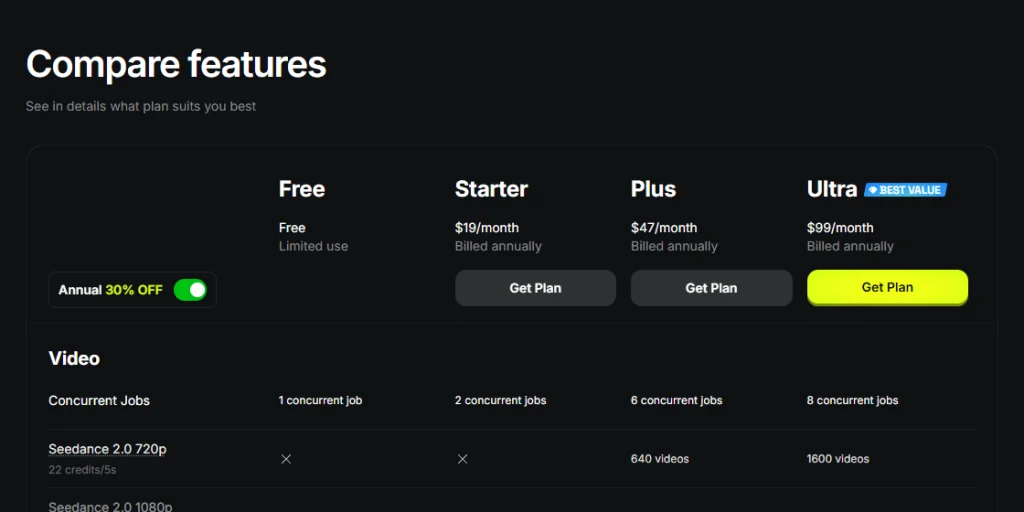
Il s'agit de formules d'abonnement à la plateforme, et non d'abonnements réservés à Popcorn. La page proposait une facturation annuelle ainsi qu'une réduction promotionnelle sélectionnée lors de la vérification. Les taxes, les montants régionaux à la caisse, le contenu des formules et les promotions sont susceptibles de changer. Consultez la page officielle des tarifs avant de prendre votre décision d'achat définitive.
Comment estimer le coût réel d'un storyboard
Utilisez cette formule simple :
Images × 1,5 crédit × nombre de tentatives de séquence complète
- Une première tentative de quatre images coûte 6 crédits.
- Une première tentative de huit images coûte 12 crédits.
- Trois tentatives complètes sur quatre cadres coûtent 18 crédits.
Ce qui compte vraiment, c'est le nombre d'images exploitables, pas la première génération. Commencez par quatre images, peaufinez la logique de la séquence, puis ne l'étoffe que lorsque le personnage et la direction artistique sont bien définis.
Higgsfield Popcorn contre Nano Banana 2
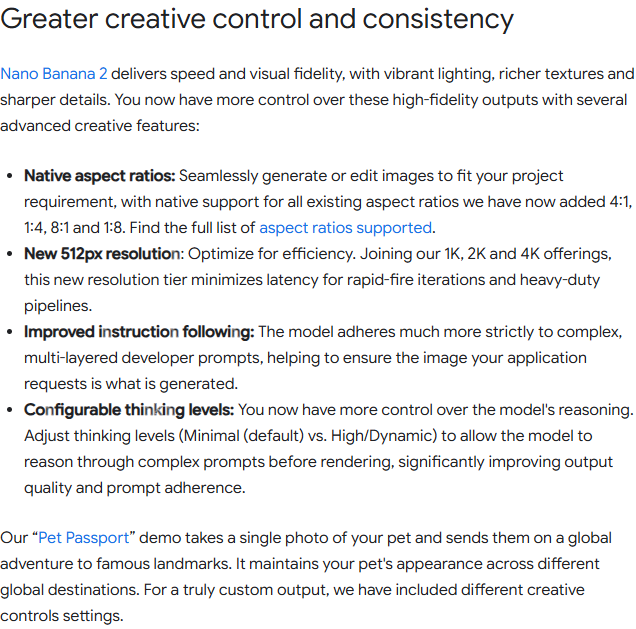
Le mot-clé « comparison » est parfois mal orthographié, mais le nom du produit de Google est Nano Banane. La dernière mise à jour majeure de Flash est la version Nano Banana 2, officiellement baptisée « Gemini 3.1 Flash Image ». Google la décrit comme un modèle de génération et d'édition d'images offrant des fonctionnalités d'édition avancées plus rapides, une meilleure prise en charge des instructions, plusieurs formats d'image, des options de sortie allant de 512 px à la 4K, le rendu de texte et une cohérence visuelle améliorée.
Popcorn et Nano Banana 2 se recoupent, mais ce ne sont pas des produits de même nature. Popcorn est un workflow de storyboard. Nano Banana 2 est un modèle d'image général pouvant être utilisé au sein de différentes applications et API. Celui de Google Annonce officielle n° 2 concernant Nano Banana met l'accent sur la création et l'édition d'images évolutives, et non sur une interface dédiée au storyboard plan par plan.
| Point de décision | Pop-corn Higgsfield | Nano Banane 2 |
|---|---|---|
| Produit phare | Créateur de storyboards basé sur l'IA intégré à Higgsfield | Modèle général de génération et d'édition d'images |
| Meilleur processus de travail | Cadres reliés, présentations visuelles et prévisualisation | Intégrations flexibles pour la création et la retouche d'images, le traitement du texte, la localisation et la production |
| Contrôle de séquence | Modes « Storyboard » automatique et manuel | Cela dépend de l'application, de la structure de l'invite et du processus de référence. |
| Gestion des références | Jusqu'à quatre images de repérage dans l'interface Popcorn en temps réel | Prend en charge la création et la modification à partir de références ; les limites dépendent de la surface d’accès |
| Parcours du développeur | Flux de travail Web natif de Higgsfield ; la page publique renvoie également vers l'ensemble de ses produits MCP et CLI | API Gemini, Google AI Studio, Vertex AI et autres interfaces Google |
| Sélectionnez cette option lorsque | Vous souhaitez que le storyboard lui-même serve de canevas de travail | Vous avez besoin d'un modèle d'image polyvalent pour l'édition, le traitement de texte, l'automatisation ou les applications personnalisées |
Choisissez « Popcorn » lorsque la séquence et l'ordre des images sont le produit l'un de l'autre. Choisissez « Nano Banana 2 » lorsque le modèle d'image doit prendre en charge de nombreux types de travaux visuels. Pour découvrir ce qu'un modèle général est capable de faire avec des points de vue répétés, comparez le Flux de travail en rafale multi-prise Nano Banana.
Le coût est également un aspect qui varie selon chaque écosystème. Higgsfield vend des crédits de plateforme et propose Popcorn au prix de 1,5 crédit par image. Le modèle de Google est accessible via des interfaces destinées aux consommateurs et aux développeurs, avec des règles de facturation différentes. Le Guide sur la tarification, l'API et l'abonnement Nano Banana 2 distingue ces itinéraires au lieu de les regrouper sous un même tarif.
Si aucun de ces deux workflows ne semble convenir, le Comparaison entre le Flux 2 et le Nano Banana Pro apporte un troisième point de vue utile sur le contrôle des invites, le montage et la qualité d'image finale.
À qui s'adresse le pop-corn Higgsfield ?
Utilisez Popcorn si vous êtes :
- Un cinéaste ou un réalisateur qui imagine l'ordre des plans avant le tournage.
- Une équipe créative qui élabore un argumentaire publicitaire autour d'un personnage ou d'un produit.
- Un créateur de contenu sur les réseaux sociaux qui prévoit de publier un carrousel, un Reel ou une story courte.
- Un créateur qui a besoin de plusieurs images pour faire découvrir un même univers visuel.
- Une équipe en contact direct avec les clients qui a davantage besoin d'un storyboard clair et lisible que d'une campagne finale soignée.
Évitez le pop-corn si :
- Une seule image autonome suffit.
- Vous avez besoin d'une animation au cadre près, d'un fichier audio ou d'une timeline de montage complète.
- Exiger une identité validée qui soit conservée d'une session à l'autre et pour différents modèles vidéo.
- Nous avons besoin d'une API de développement native pour une application de production personnalisée.
- Privilégiez le coût par image le plus bas possible plutôt que la facilité d'utilisation du storyboard.
Les créateurs qui apprécient l'approche visuelle de Higgsfield mais qui recherchent un autre niveau de prix, une API différente ou un autre modèle de production peuvent comparer les Les meilleures alternatives à Higgsfield pour les créateurs de vidéos. Pour les équipes qui recourent largement à l'automatisation, le Guide comparatif : GLBGPT, Higgsfield, Magnific CLI et MCP met l'accent sur l'intégration des processus de travail plutôt que sur l'esthétique du storyboard.
Problèmes courants et solutions à essayer
| Problème | Raison probable | À découvrir |
|---|---|---|
| Le visage change d'une image à l'autre | Une identité peu affirmée ou trop de portraits contradictoires | Utilisez une photo de portrait principale bien nette et mettez en avant deux ou trois traits de personnalité. |
| Des vêtements ou des accessoires disparaissent | La consigne met l'accent sur l'action, mais sans s'attarder sur des détails précis | Ajouter une brève mention “ Ne pas modifier ” à chaque cadre du manuel |
| Chaque image est pratiquement identique | La consigne décrit une ambiance, mais pas d'évolution | Attribuez à chaque image une action, une distance ou une fonction de prise de vue bien définie |
| Cette séquence donne une impression de confusion spatiale | L'orientation de l'écran et la localisation géographique n'ont pas été définies | Indiquer systématiquement les entrées, les sorties et le côté de la caméra |
| Les crédits s'épuisent plus vite que prévu | Trop d'images ou de rediffusions de séquences complètes | Créer un prototype comportant quatre cadres et modifier une variable à la fois |
| La formule gratuite ne permet pas de finaliser le storyboard | L'accès gratuit est limité et aucun quota fixe de Popcorn n'est garanti | Vérifiez le solde et le cours en temps réel du compte avant de lancer la génération |
Questions fréquemment posées
Qu'est-ce que le pop-corn Higgsfield ?
Higgsfield Popcorn est un générateur de storyboards basé sur l'IA intégré à Higgsfield. Il utilise des consignes et jusqu'à quatre images de référence pour créer des images visuelles cohérentes entre elles. Son objectif principal est de planifier des séquences présentant une plus grande continuité entre les personnages, les objets, l'éclairage et les environnements qu'une simple série d'images isolées sans lien entre elles.
Le pop-corn Higgsfield est-il gratuit ?
Higgsfield propose une formule gratuite intitulée “ Utilisation limitée ”, mais ne publie pas de quota garanti spécifique à Popcorn pour chaque compte gratuit. Popcorn est facturé à raison de 1,5 crédit par image. Vous pourrez peut-être le tester avec les crédits disponibles, mais la création répétée de storyboards n’est pas gratuite et illimitée.
Combien coûte le pop-corn Higgsfield ?
Le 3 septembre 2026, la page publique des tarifs de Higgsfield indiquait que Popcorn coûtait 1,5 crédit par image générée. Une série de quatre images coûte donc 6 crédits, hors retouches. Les prix des abonnements et les crédits inclus varient en fonction de la formule, de la période de facturation, des promotions, des taxes et de la région.
Combien d'images de référence puis-je mettre en ligne sur Popcorn ?
La page « Higgsfield Popcorn » en ligne indique que vous pouvez télécharger jusqu’à quatre images pour orienter ou compléter un storyboard. Un ensemble utile peut comprendre un personnage, un lieu, un objet et une référence stylistique, mais il vaut parfois mieux se limiter à quelques références claires plutôt que d’utiliser quatre images contenant des informations visuelles contradictoires.
Est-ce que « Higgsfield Popcorn » parvient à conserver le même caractère à chaque image ?
Popcorn est conçu pour améliorer la cohérence entre les cases du storyboard, mais aucun processus génératif ne garantit une correspondance parfaite à chaque essai. Utilisez une référence d'identité forte, réutilisez quelques traits fixes et modifiez une variable principale à la fois. Testez le personnage tel qu'il est avant de valider la production pour le client.
Quelle est la différence entre Higgsfield Popcorn et Soul ID ?
Popcorn met l'accent sur la continuité visuelle au sein des séquences d'images et des storyboards. Soul ID est un système d'identité sophistiqué conçu pour garantir la cohérence d'un personnage d'une session à l'autre, d'une image à l'autre, d'une vidéo à l'autre et d'un modèle à l'autre. Utilisez Popcorn pour la planification des plans ; pensez à Soul ID pour garantir la cohérence d'un personnage tout au long d'un pipeline de production plus vaste.
Le pop-corn Higgsfield est-il meilleur que le Nano Banana 2 ?
Popcorn est le choix le plus adapté si vous recherchez une interface dédiée au storyboard, avec des images reliées entre elles et un contrôle manuel des plans. Nano Banana 2 offre davantage de flexibilité en tant que modèle général de génération et d'édition d'images, notamment pour le texte, la localisation, l'automatisation et les applications personnalisées. Le choix le plus approprié dépend du flux de travail.
Puis-je transformer un storyboard Popcorn en vidéo ?
Vous pouvez utiliser les images du storyboard comme références visuelles ou comme point de départ pour un processus de création vidéo ultérieur, mais il ne faut pas confondre Popcorn avec un logiciel de montage vidéo complet. Vérifiez les options d'exportation en direct ou de transfert disponibles dans votre compte, puis planifiez séparément les animations, l'audio, le timing et le montage final.
Verdict final : le pop-corn Higgsfield vaut-il le coup ?
Higgsfield Popcorn mérite d'être pris en considération lorsque votre véritable défi n'est pas de créer une seule image attrayante, mais de faire en sorte que plusieurs images s'enchaînent comme une séquence. La combinaison de plusieurs références, de la génération automatique d'idées, du contrôle manuel des plans et d'un canevas axé sur le storyboard lui confère une raison d'être évidente.
Le compromis est tout aussi évident. La cohérence doit encore être testée, chaque révision consomme davantage de crédits, et le storyboard ne représente qu’une étape de la production. Utilisez la formule gratuite pour évaluer le déroulement du processus si votre compte dispose de suffisamment de crédits, puis lancez un petit projet de quatre images avant de vous lancer dans une campagne plus importante.
Optez pour Higgsfield Popcorn pour une planification visuelle intégrée. Optez pour Nano Banana 2 pour une création et une retouche d'images plus étendues. Optez pour une plateforme tout-en-un lorsque la consolidation des abonnements et l'accès à de multiples fonctionnalités d'IA priment sur une interface de storyboard native unique.