
As of October 14, 2026, Suno’s official pricing and blog pages do not announce a 2026 Black Friday or Cyber Monday offer. The 20% annual saving is a regular billing option, so treat it as standard pricing when planning your budget.
That leaves a more useful question than “Which coupon should I try?”: what will your next creative project actually cost? A cheaper music subscription can still be the wrong purchase if its downloads do not cover your work, or if you need another set of tools for the voiceover, visuals and video.
If your goal is a finished clip rather than a song alone, GlobalGPT brings multi-model music, BGM, voiceover and video creation into one creative workspace. Start with the project you want to finish, then compare the tools and budget it needs. You do not have to wait for an unannounced sale to make that decision.
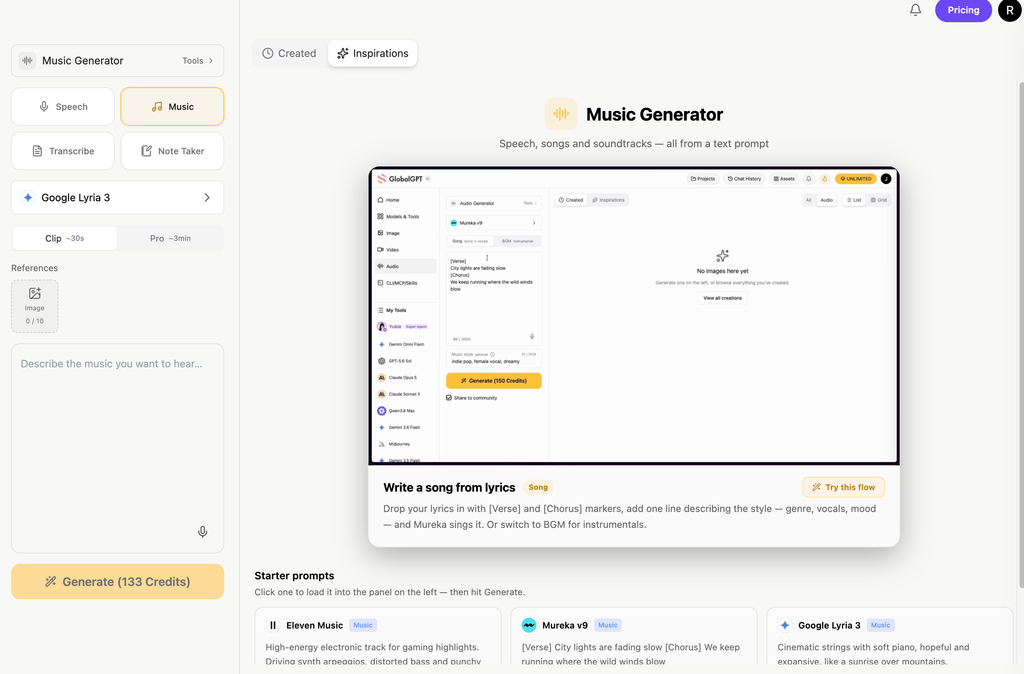
Looking for value across the whole creative project? GlobalGPT’s current annual offer advertises up to 50% savings versus monthly billing, with Pro at $10.75 per month equivalent, billed $129 for the first year. Put the budget toward a workspace for writing, visuals, video and audio, rather than choosing on a music discount alone. This is GlobalGPT’s own offer; Suno’s holiday pricing is a separate decision.
Your options before the holiday rush
No 2026 announcement on its pricing or blog pages as of October 14.
20% on Suno’s annual billing option.
Check your download needs and project tools before committing to a year.
Ve directamente a tu decisión
Is there a Suno Black Friday or Cyber Monday deal in 2026?
For now, compare Suno’s standard prices and decide whether you need a subscription before the holidays. Black Friday falls on November 27, 2026, and Cyber Monday on November 30. A later announcement could change your options, but the calendar alone does not give you a discount or a Suno sale window.
Treat a coupon as useful only when it leads to an official offer with a clear price, eligible plan, billing period and renewal rate. An old promotion, a coupon-directory headline or an annual-price badge cannot establish those details for 2026. There is no confirmed holiday code to recommend here.
If a new offer appears, compare the amount charged today with the next renewal—not just the percentage in the headline. Also check whether the promotion applies to a new account, an existing subscription or a specific billing cycle. A lower first bill is only a good deal when the plan fits the work you will actually do.
For a wider view of your options, compare Ofertas de herramientas de IA para el Black Friday by workflow and current terms. Keep each platform’s seasonal offer separate from its everyday annual saving.
What Suno costs before any holiday deal
Suno’s annual pricing lists Pro at $8 per month, billed annually, and Premier at $24 per month, billed annually. Those rates imply annual subscription amounts of $96 and $288 before tax. They are monthly equivalents of a yearly commitment, not an offer to pay $8 or $24 one month at a time. Taxes are calculated at checkout.
Para USD pricing, Pro is $10 al mes and Premier is $30 per month before tax. Twelve monthly payments total $120 and $360, respectively; annual billing saves $24 on Pro and $72 on Premier at these prices. Suno also has regional-currency prices, so use the currency and amount shown for your checkout rather than converting this USD table yourself.
The annual price is only half the decision
Gratis
50 generation credits per day
No monthly song-download allowance
Personal, non-commercial use
Pro · annual billing
$8 monthly equivalent
2,500 generation credits per month
20 standard song downloads per month
Premier · annual billing
$24 monthly equivalent
10,000 generation credits per month
60 standard song downloads per month
Standard pricing checked October 14, 2026. Annual amounts = monthly equivalents × 12, before tax. These are not Black Friday prices. Suno Studio workflows have a separate download-limit exception.
Pro and Premier offer priority generation and access to Suno’s advanced models; Premier includes Suno Studio. But a larger generation allowance is not automatically a larger finished-project output. You may create several variations to find one track worth using, and your standard song downloads have their own limit.
Annual subscribers receive generation and download allowances monthly. Included generation credits and monthly downloads do not roll over. Purchased top-up generation credits do not expire, but require an active subscription to use; purchased download packs have their own rollover rules. Do not price a year of unused credits as if they were cash savings.
The cost that matters: downloads, commercial use and renewal
Since September 3, 2026, Suno’s standard download allowance is 20 per month for Pro and 60 per month for Premier. Suno says workflows in Suno Studio are not subject to these download limits. That exception matters for Studio users, but it should not be read as unlimited standard song downloads across every Premier workflow.
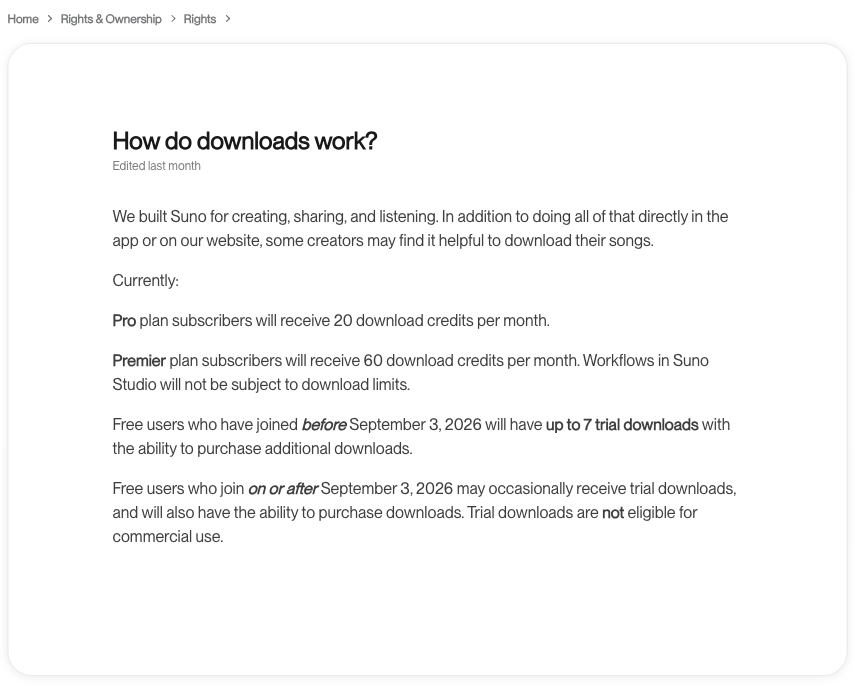
Imagine you need 12 finished background tracks for a month of videos. A standard allowance of 20 downloads may cover that count; it does not tell you how many attempts will be needed to get 12 usable tracks. If you need more than the allowance, additional downloads may add to the bill. Check that cost before treating the subscription price as the entire production budget.
Commercial use is the other part of the decision. The updated paid-subscription rights page says songs downloaded while subscribed receive commercial-use rights. The current terms require permitted downloads through an approved channel, subject to the relevant conditions. Keep the song’s download and subscription records with your project assets.
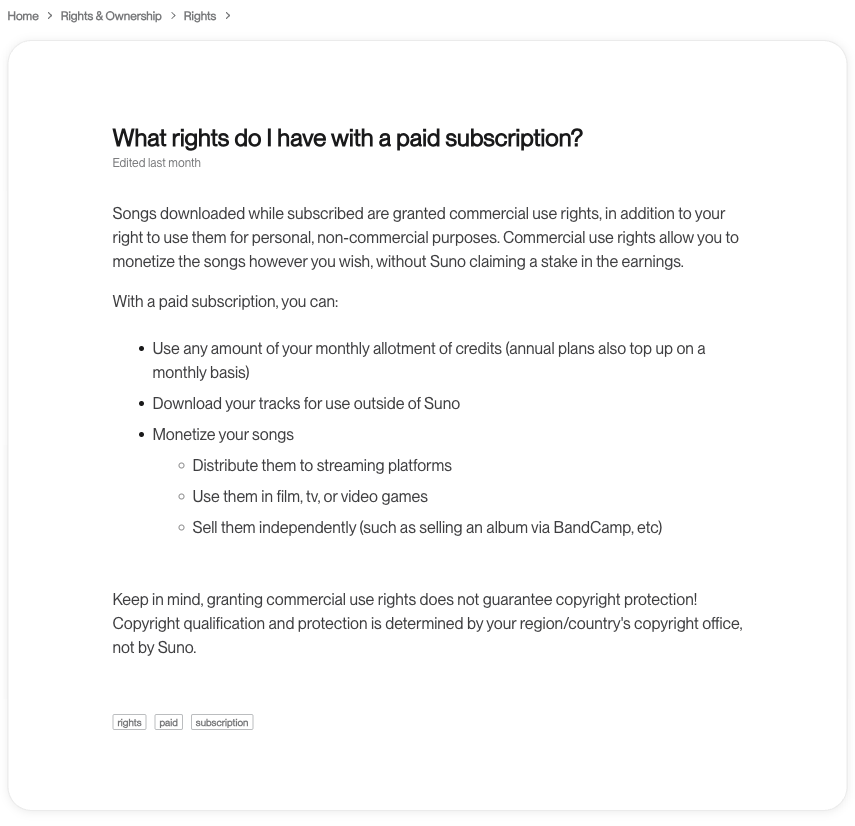
Free-plan songs are intended for personal, non-commercial projects, and trial downloads do not carry commercial-use rights. Do not assume that upgrading automatically clears every song you created on a free account. For an older track, confirm its rights with Suno before using it in paid work. Shared remixes also have specific restrictions; a paid plan is not blanket clearance for someone else’s music or lyrics.
Commercial permission also does not guarantee copyright protection or acceptance by every distributor. Use material you have permission to provide, and distinguish your own original work from remixes and third-party inputs. For a client project, an export you are allowed to use is more valuable than a pile of generations you cannot deliver.
Finally, Suno subscriptions renew automatically. Cancel before the renewal date if you do not want another charge; cancellation leaves access through the paid period. It does not automatically refund that period. The terms generally describe payments as non-refundable, while preserving applicable statutory rights.
Should you wait, pay monthly or commit annually?
Wait only if your project can wait. An unannounced discount is not a production plan. If you have a deadline now, choose tools that can complete the job within your budget; if you are browsing for later, revisit the official pricing when an actual holiday offer is announced.
Use monthly billing as the comparison for occasional work. A yearly saving is measured against a whole year of monthly payments. If you need a music tool for just a few busy months, the lower annual monthly equivalent can still mean spending more overall. Compare the number of months you expect to use it, not the biggest percentage on the page.
Compare a year with the months you need
Choose the annual plan, enter the monthly price you are comparing, and set the number of active months. No holiday discount is assumed.
Static USD reference: Pro $10/month or $96/year; Premier $30/month or $288/year. For three active months, monthly billing totals $30 for Pro or $90 for Premier. Annual billing still means a $96 or $288 commitment, before tax.
Annual pricing checked October 14, 2026. Monthly comparison assumes paying only for the selected active months. Taxes, add-ons, future price changes and any new promotion are excluded. An annual plan’s allowances still refresh monthly.
Choose annual billing when the use is predictable. Regular production, the right download allowance and a tool you already know you want make a yearly commitment easier to justify. Before paying, check the full charge, renewal rate and rights that apply to your actual exports. Then compare that commitment with the rest of your creative stack.
Make your creative budget cover more than one song
A product video needs more than a soundtrack: a clear script, the right voice, visuals and a finished sequence. Buying a music plan first and assembling the rest later can turn one apparent bargain into several separate subscriptions. Reverse that process: list what the project needs, then choose the workspace that covers the most useful parts.
GlobalGPT gives you a practical starting point for music and BGM ideas alongside voiceover, image and video creation. That is useful when you want to turn a brief into creative assets in the same multi-model workspace, instead of optimizing only the cost of a single song tool. Compare one AI subscription against the separate tools you would otherwise buy.
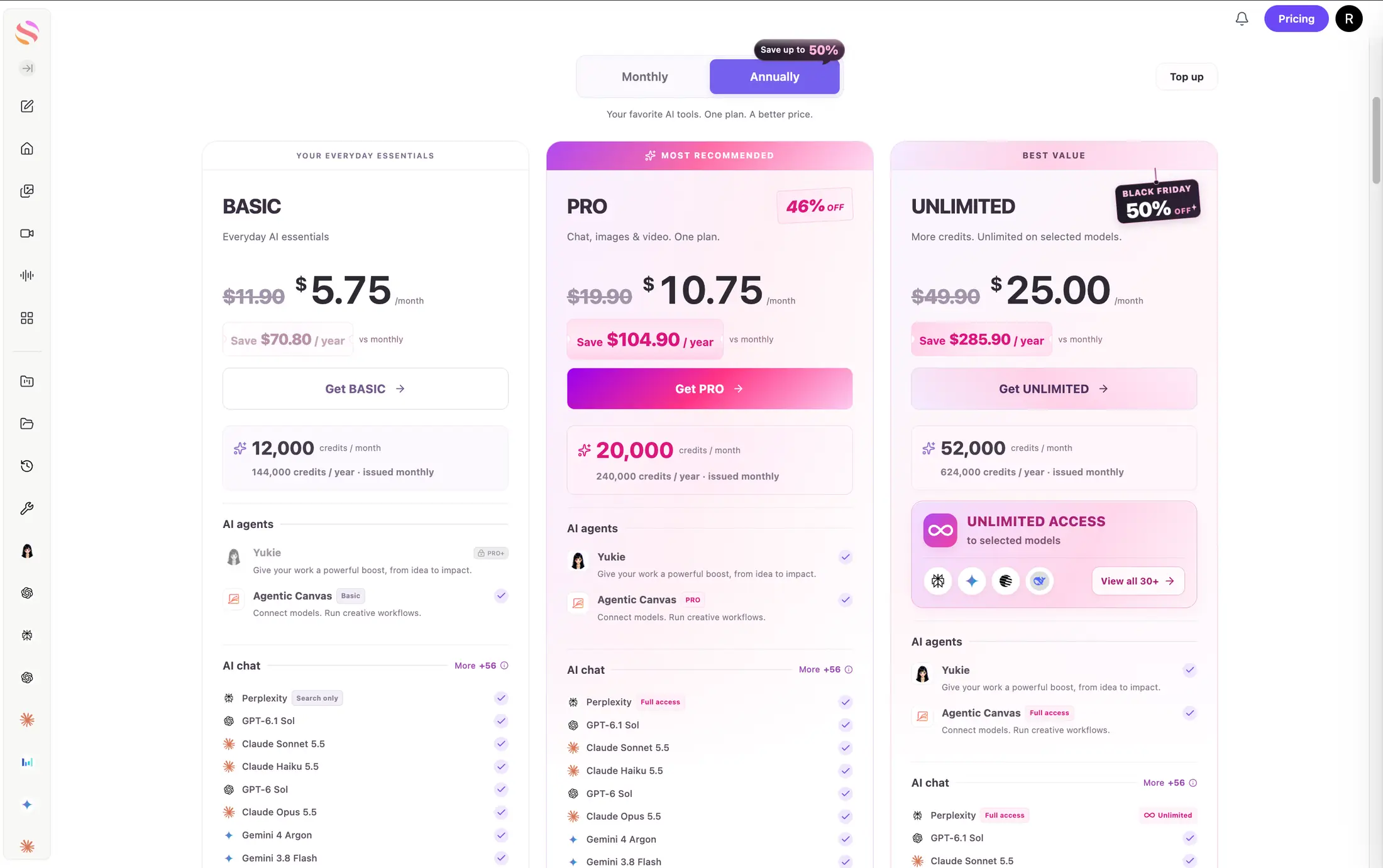
GlobalGPT’s annual offer starts at $69 for the first year. For a creator who needs more than music, Pro at $129 for the first year is the useful middle option: 20,000 credits issued each month, Yukie access and Agentic Canvas Pro alongside chat, image and video tools. Turn one campaign brief into copy and visual assets, then develop the soundtrack in the same broader workflow.
| Plan GlobalGPT | First-year bill | Equivalente mensual | Credits each month |
|---|---|---|---|
| Básico | $69 | $5.75 | 12,000 |
| Pro | $129 | $10.75 | 20,000 |
| Sin límites | $300 | $25.00 | 52,000 |
Pro saves $104.90 in the first year compared with paying its $15 introductory month followed by 11 months at $19.90. Basic saves $70.80 and Unlimited saves $285.90 on the same first-year comparison. Choose Unlimited when the larger monthly credit allowance and unlimited access to selected models fit your workload; it does not mean every model or video generation is unlimited. Check renewal and tax terms before paying.
From a sound idea to a complete creative brief
1. Set the brief
Write the message, audience and mood. Decide whether you need a full song or a quiet instrumental bed.
2. Build the assets
Develop music/BGM, voiceover and visuals around that same direction.
3. Review for delivery
Check timing, the balance under speech and usage rights before the final video edit.
A suggested project workflow; this diagram does not claim an automated end-to-end run.
A BGM starting point for a short product video
We generated one music asset with GlobalGPT using Eleven Music v2 for a fictional insulated travel-mug video. The brief asked for a warm, restrained instrumental cue that would leave space for a voiceover.
Solicitud
30 seconds · text prompt · no reference audio or extra settings
Entregado
MP3 · 30.04 seconds
Turnaround
16.33 seconds total
For a 15-second product edit, this 30-second asset gives you material from which to select a section and try it beneath narration. Keep the same creative brief for the script and visuals, then review the music in that context before choosing the final cut.
Listen for vocals, abrupt changes and an ending that fits your edit. The brief asks for space under a voiceover; audition the result with your own speech track before relying on that balance. This example is the music asset. Trimming, narration mixing and video assembly are the next creative steps.
A generated file does not establish commercial-use permission. Check the applicable terms before using an asset in a paid project.
Read the complete music brief
Create a 30-second instrumental background-music cue for a short vertical product video featuring an unbranded insulated travel mug during a calm morning commute. Warm modern electronic-pop feel, light percussion, soft plucked melody, around 100 BPM. No vocals, no lyrics, no speech, no artist imitation. Keep the midrange sparse for a short voiceover. Begin gently, add a subtle lift around the middle, and finish with a clean resolved ending. Avoid sudden loud hits and environmental sound effects.
For your next short video, start with one repeatable brief: an instrumental cue that leaves room for speech, a concise voiceover and visuals that share the same mood. Listen to the music under the voice, not just on its own. A track that sounds impressive in isolation may be too busy for a message you need viewers to hear.
If you are eligible for an education offer, you can also compare AI audio discounts. Eligibility-based savings are a separate question from Black Friday, and should not be assumed to apply to Suno or every audio tool.
Suno Black Friday FAQ
Is a Suno Black Friday 2026 deal confirmed?
As of October 14, 2026, Suno’s official pricing and blog pages do not announce a 2026 Black Friday or Cyber Monday offer. Check for a later official announcement before making a holiday purchase.
Is Suno’s 20% annual saving a Black Friday offer?
The 20% saving shown on Suno’s annual pricing is a regular billing option. It does not establish that a Black Friday promotion is live.
Is there a confirmed Suno Black Friday promo code?
No confirmed 2026 holiday promo code is recommended here. Check the official offer and checkout terms rather than relying on an old coupon or a discount-directory headline.
Can I use free Suno songs commercially?
Free-plan songs are intended for personal, non-commercial use, and trial downloads do not carry commercial-use rights. Do not assume an upgrade automatically licenses older free-plan songs; confirm the rights for the track with Suno.
How many songs can paid users download?
Suno lists 20 standard song downloads per month for Pro and 60 for Premier. Workflows in Suno Studio are not subject to these download limits. Monthly download allowances do not roll over.
Should I buy an annual music plan for occasional projects?
Compare the annual bill with the monthly payments for the months you expect to use the tool. Include download needs and the other assets your project requires. A lower annual monthly equivalent does not automatically mean a lower total spend.
The useful saving is the one that helps you finish the project. Check whether a real Suno holiday offer exists when you are ready to buy, keep annual pricing separate, and budget for the exports and creative tools you will use. For a broader music-to-video workload, put the whole project first.
Put your next creative project in motion
Bring music ideas, BGM, voiceover and video creation into one multi-model workspace. Start with the brief you already have, and explore the tools that move it forward.
Descubre GlobalGPT