

Use Claude Free for occasional work, Pro for regular individual use, Max when Pro limits repeatedly interrupt valuable sessions, Team for managed collaboration, and Enterprise for metered usage or stronger organizational controls.
If you use Claude to code, the awkward moment is hitting a limit halfway through a fix. Pro costs $20 a month; the next individual tier starts at $100. Before making that jump, work out whether you need longer Claude Code sessions, API calls for your app, or a broader set of development tools.
For developers who want coding tools, app integrations and website creation in one place, GlobalGPT is our best-value pick. Use its CLI in a local project, API in your own app, MCP with an assistant you already use, and Yukie agent to build a website. Pro starts at $15 on monthly billing, with API requests budgeted separately through paid credits. That gives you an affordable way to build a wider workflow before committing to a much larger AI subscription.
Which Claude Plan Should You Choose?
| Your next task | Start here | Why it fits |
|---|---|---|
| Code locally, connect model calls and build a website | GlobalGPT | CLI, API, MCP and Yukie support different stages of the same project, with a lower subscription entry price. |
| Use Claude Code under a personal Claude subscription | Claude Pro; Max if limits repeatedly stop work | Choose the native Claude workflow and enough shared plan capacity for your coding sessions. |
| Build an app around Anthropic API usage | Claude Platform; check Max / Team API credits | Budget token usage and eligible credits in your Console organization. |
| Try Claude for occasional coding questions | Claude Free | Judge the answers before paying for regular sessions. |
Start with the least expensive plan that completes your real task without frequent interruptions. A higher tier is worthwhile when the time lost to limits, missing models, or administration costs more than the upgrade.
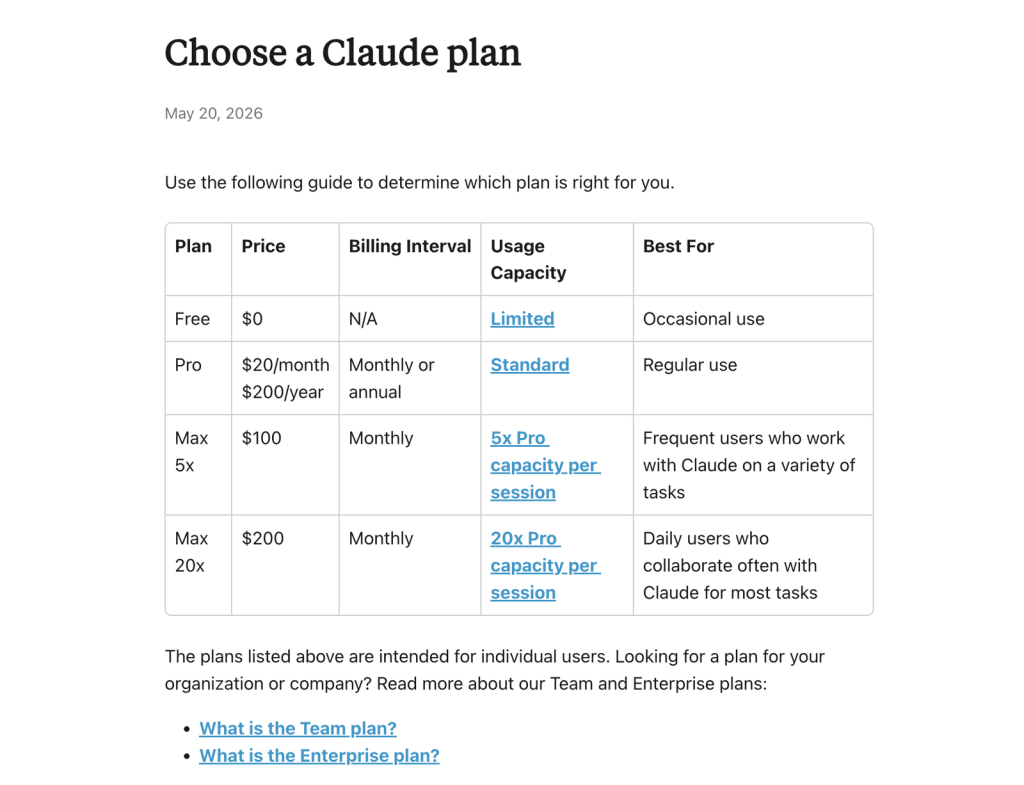
| Plan | Public price | Best fit | Main boundary |
|---|---|---|---|
| Free | $0 | Occasional chat, light writing, and evaluation | Limited usage; no Research, Opus, or Fable |
| Pro | $20/month or $200/year | Regular individual work | Shared plan limits still apply across Claude and Claude Code |
| Max 5x | $100/month | Frequent users who repeatedly hit Pro limits | 5x Pro capacity per session, not unlimited |
| Max 20x | $200/month | Daily heavy users | 20x Pro capacity per session, plus weekly and other caps |
| Team Standard | $25/seat monthly or $20/seat/month annually | Teams of 2–150 | Seat-based capacity and organization administration |
| Team Premium | $125/seat monthly or $100/seat/month annually | Heavy team users | 5x Standard usage at a much higher seat price |
| Enterprise self-serve | $20/seat/month, billed annually, plus usage at API rates | Organizations that prefer metered usage | Seat fee is not the full cost |
| Enterprise sales-assisted | Contact sales | Complex security, compliance, or procurement | Terms vary by agreement |
Building an app needs a separate cost calculation: model tokens, caching and tools determine API spend. The Claude API guide covers that setup; the Max and Team credit allowance is explained below.
Claude Free vs Pro: When Is the Upgrade Worth It?
Claude Free is a good evaluation tier and a reasonable option for occasional summaries, light writing, questions, and basic document work. Free includes Sonnet and Haiku, web search, file creation, Artifacts, and Docs and Slides. Opus, Fable and Research have paid-plan access rules.
Claude Pro is the first sensible paid tier for someone who uses Claude as a weekly work tool. It adds Opus, makes Fable available through usage credits, and includes Research, Claude Code, projects, and other paid productivity features. Choose the $20 monthly option while you assess regular use; the $200 annual option is paid upfront. Anthropic rounds its annual monthly equivalent to $17, while $200 divided by 12 is about $16.67.
- Choose Free if a limit is inconvenient rather than costly.
- Choose Pro if Claude Code is part of your weekly routine, or you regularly need coding help, Research and repeatable projects.
- Do not upgrade only for a model name; upgrade for a workflow or capacity you will actually use.
For a narrower explanation of the free tier, see whether Claude AI is free in 2026.
Claude Pro vs Max: Pay for Capacity, Not Status
Claude Max has two individual tiers: Max 5x at $100 per month and Max 20x at $200 per month. The 5x and 20x labels describe capacity relative to Pro per session. They do not mean unlimited messages or unlimited Claude Code.
Individual monthly price ladder · USD · checked October 10, 2026
Max is a capacity purchase, not a small Pro upgrade
Source: Claude pricing and Max plan details.
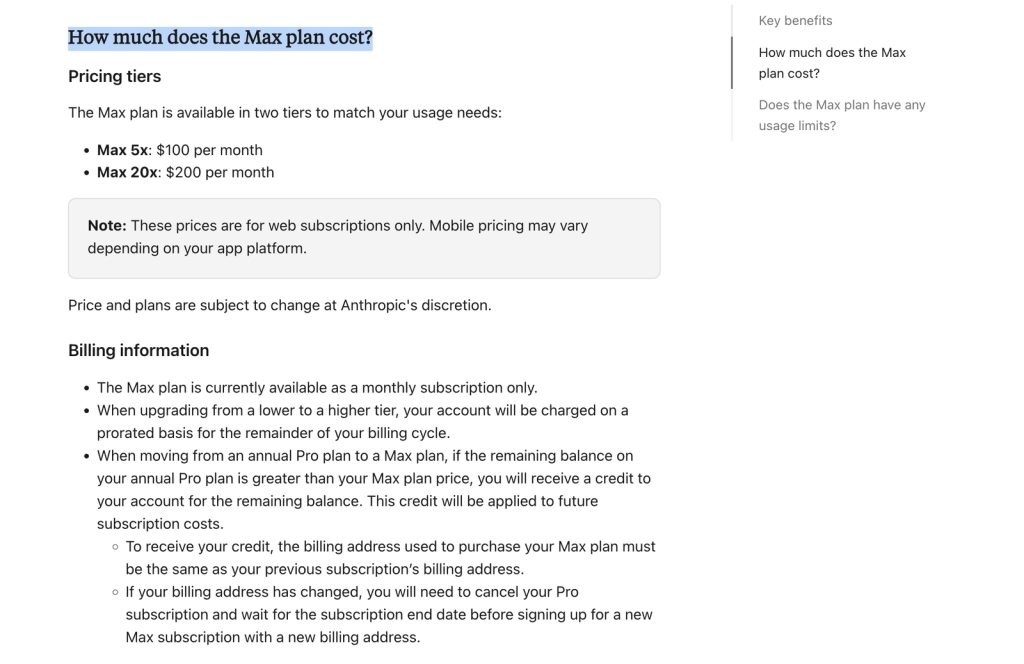
Anthropic’s Max help page says session limits reset every five hours. Max also has an all-model weekly limit and a separate weekly allowance for Fable. Check Settings > Usage for your account’s reset time. Conversation length, attachments, model choice and Research affect how quickly capacity is used; additional model or feature limits may apply.
- Max 5x fits people who are close to satisfied with Pro but regularly lose momentum to limits.
- Max 20x fits people who use Claude through much of the workday and can justify $200 per month through saved time.
- If Pro limits rarely interrupt work, Max usually offers poor value even when its feature list looks stronger.
Which Models and Features Come With Each Plan?
The current plan choice is partly a model-access decision. Anthropic’s October 10 lineup lists Fable 5.1, Opus 5.5, Sonnet 5.5 and Haiku 5.5. The table below compares access by model family; the same model name does not give every plan the same usage allowance.
| Plan | Fable | Opus | Sonnet | Haiku | Context window |
|---|---|---|---|---|---|
| Free | No | No | Yes | Yes | Up to 1M; varies by model |
| Pro | Via usage credits | Yes | Yes | Yes | Up to 1M; varies by model |
| Max 5x / 20x | Up to 50% of weekly limits | Yes | Yes | Yes | Up to 1M; varies by model |
| Team | Premium seats: 50% of weekly limits | Yes | Yes | Yes | Up to 1M; varies by model |
| Enterprise | Yes | Yes | Yes | Yes | Up to 1M; varies by model |
For the role each family plays, compare Claude Haiku, Sonnet, Opus and Fable. Match the model to the work, then choose enough plan capacity to use it comfortably.
The context window is how much material a model can handle in one conversation, not your account’s message allowance. The current pricing table lists up to 1M tokens, varying by model. For a large codebase or long log, consider the files the task actually needs, then budget for the follow-up turns and tests.
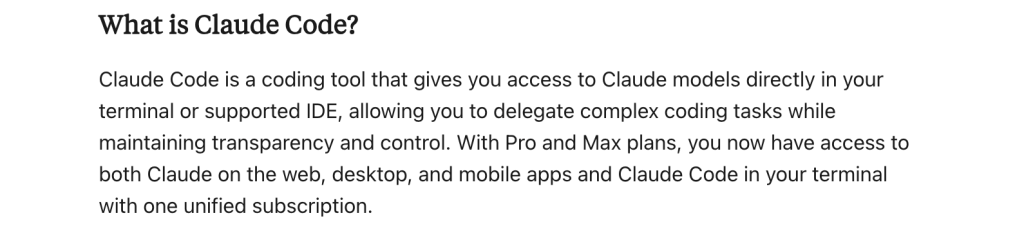
Claude Code and Research: Useful, but They Share Limits
Two paid-plan benefits with different jobs
Claude Code
Included with Pro, Max, Team, and current Enterprise seats. It works in the terminal and supported IDEs, but its activity shares or follows the plan’s usage and billing rules.
Research
Available on paid Claude plans. Research performs multiple searches and citations, uses the same plan limits as normal conversations, and can consume capacity faster.
For individuals, Claude Code is available through Pro or Max and works in the terminal and supported IDEs. The help center states that Claude, Claude Code, and IDE activity use the same plan limits. If you switch Claude Code to API credentials, usage follows the Console account’s API billing. Check which account is active before a long coding session. A debugging session that reads files, proposes a fix and reruns tests can consume more allowance than a short coding question. Track those interruptions before paying for Max.
Research is available on Pro, Max, Team, and Enterprise. It searches across multiple sources and returns citations, but it uses the same limits as ordinary conversations and can consume capacity faster because a single research task may make many searches.
For a fuller coding budget, see Claude Code pricing. If you are setting up a workflow, keep the practical Claude coding walkthrough and Claude vs ChatGPT coding comparison nearby.
Monthly API Credits for Max and Team
Max and Team now include a separate benefit for building apps and agents: monthly Claude Platform API credits. According to the API credit terms, the allowance is available on eligible Max and Team plans, including discounted Team plans.
| Eligible plan | Monthly API credit | Where the balance goes |
|---|---|---|
| Max 5x | $100 | One linked Console organization |
| Max 20x | $200 | One linked Console organization |
| Team Standard / Premium | $20 per Standard seat + $100 per Premium seat; $500 maximum | One pooled organization balance |
You can claim after seven days on an active eligible subscription by linking one Console organization. Max subscribers and Team owners claim through their billing settings; the person linking the Console must have an Owner, Admin or Billing role there. Each Console organization can receive credits from only one plan, and changing the linked organization requires support. The offer is rolling out, so it may not appear in every eligible account immediately.
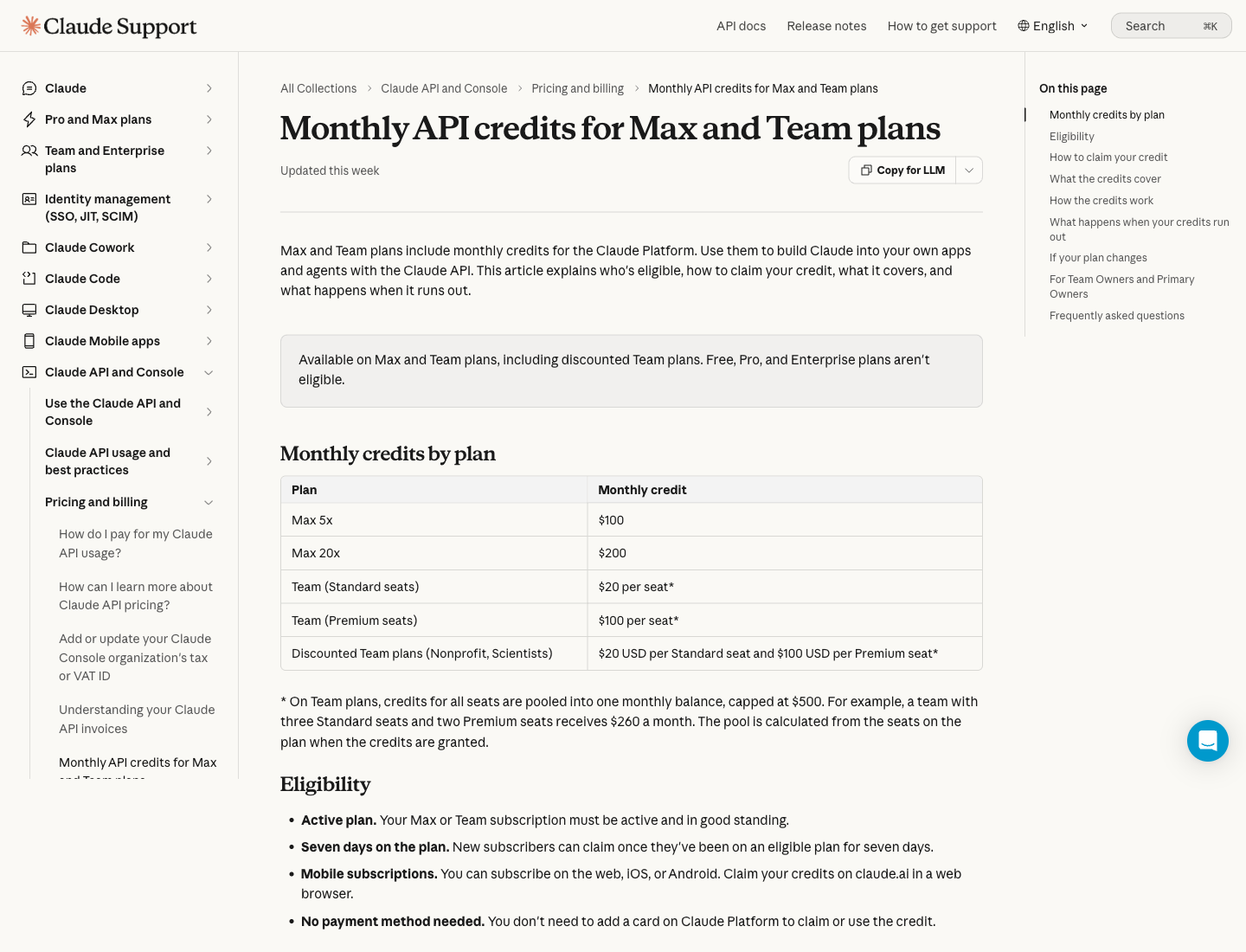
Check which Console organization will receive the allowance before budgeting an app around it. Count a Team credit pool once for the organization, and keep that API budget separate from your interactive chat allowance.
- Use the credits for the Messages API, batch requests, the Console Playground, Managed Agents and the Agent SDK.
- The balance is shared by API keys in the linked organization, refreshes each billing cycle and does not roll over.
- It does not cover interactive Claude Code, Claude app extra usage, or third-party cloud platforms, and it does not raise your chat allowance.
- A team with three Standard and two Premium seats receives $260 monthly—not $500 per person.
For developers running claude -p or the Agent SDK themselves, a key from the linked Console organization can use this API balance. Signing in through a Claude subscription uses the plan allowance instead. For prepaid organizations, purchased credits or auto-reload can fund more usage after the monthly balance runs out; without another balance, API requests stop. Organizations invoiced through Anthropic sales continue under their billing terms.
GlobalGPT for Developers: CLI, API, MCP and Yukie
Paying more for Claude makes sense when extra Claude capacity is what you need. A different problem is having one subscription for coding, another place for model calls and another tool for a website. GlobalGPT brings those jobs closer together. Claude, GPT and other models are the foundation; the useful part is how you put them to work.
| You want to… | Use | What you gain |
|---|---|---|
| Fix a failing test in an existing project | GlobalGPT CLI | Read project files, review code changes and run checks from the terminal. |
| Give your coding assistant more models and tools | GlobalGPT MCP | Ask another model for input or generate site assets inside a compatible assistant. |
| Add AI features to your own application | GlobalGPT API | Use a familiar chat API, plus image, video and audio task endpoints. |
| Turn a website brief into a build you can refine | Yukie agent | Develop the site, review the preview and source, request changes and export code. |
CLI: fix the code where it lives
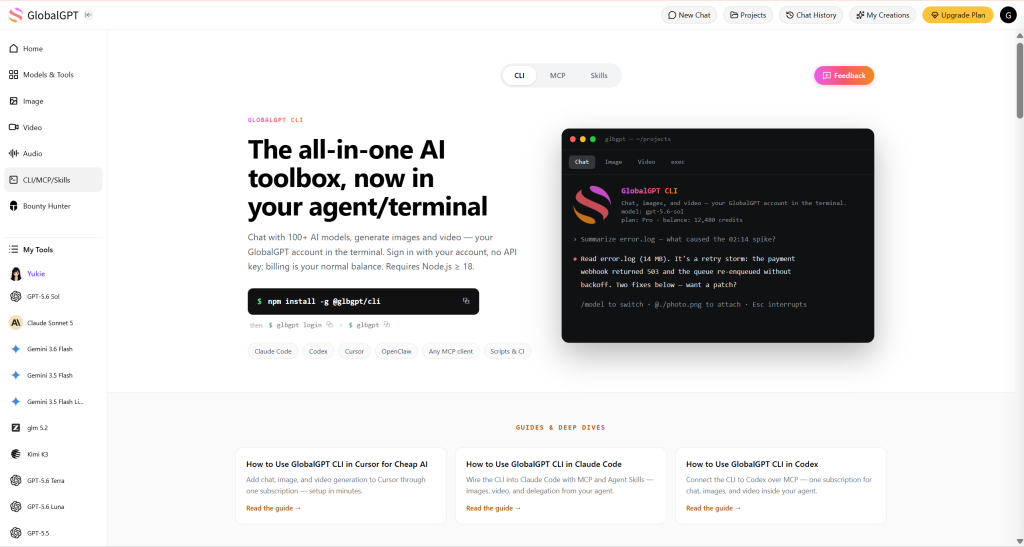
A useful coding assistant should be able to work with the project, not leave you copying snippets between windows. The GlobalGPT CLI can inspect and search files, propose and apply edits, and run commands with the permissions you grant. Review the diff and run the tests in the same project.
For a failing test, give it the error and the relevant files, ask for a focused fix, then inspect the change before accepting it. For repeatable jobs, the CLI also supports scripted requests and structured output. You can choose the model for the task: deeper reasoning for a difficult bug, a lighter option for a routine transformation.
MCP: keep your assistant and add the tools it needs
Already comfortable in Claude Code, Cursor or another MCP-compatible assistant? Connect GlobalGPT through MCP to add model calls and image or video tools to that workflow. Ask another model to examine a tricky approach, or generate a landing-page hero and a short product clip while you work on the site.
The benefit is keeping your familiar assistant as the starting point. It can request a tool, check the task and bring back the result for you to use in the project. Use the MCP setup guide for the connection steps; budget the GlobalGPT tool usage alongside the assistant you already pay for.
API: build the model into your own product
If you are adding an assistant to a SaaS app or an internal tool, start with the GlobalGPT API. Its OpenAI-compatible chat endpoint supports streaming and function calls, with structured output on models that support it. For Claude calls, use the documented chat/completions route. Select the model around the job and its request cost.
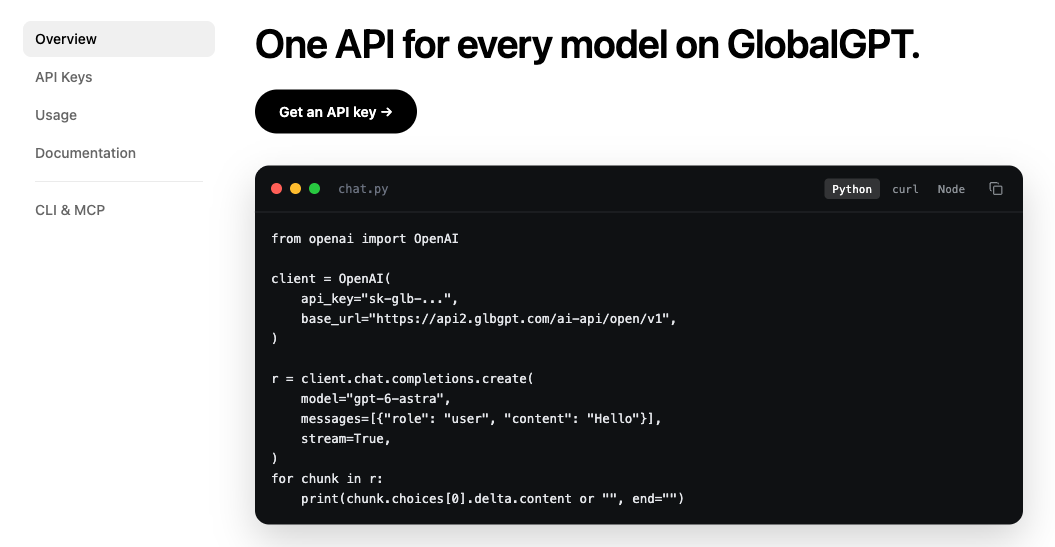
The code and documentation entry is useful when you are ready to move beyond a prompt in a chat window. Connect a small feature first, such as an in-app support assistant or a structured extraction step, then measure the tokens used per successful request. The same developer documentation covers image, video and audio jobs: estimate the media credits, submit a task and collect its output when it finishes.
Yukie agent: build a website you can keep developing
Once the conversation becomes “build this website,” a longer answer is only part of the job. Open the relevant Website recommendation or start a website task in Yukie. Give it the audience, pages, content and visual direction, then develop the site through the agent workflow.
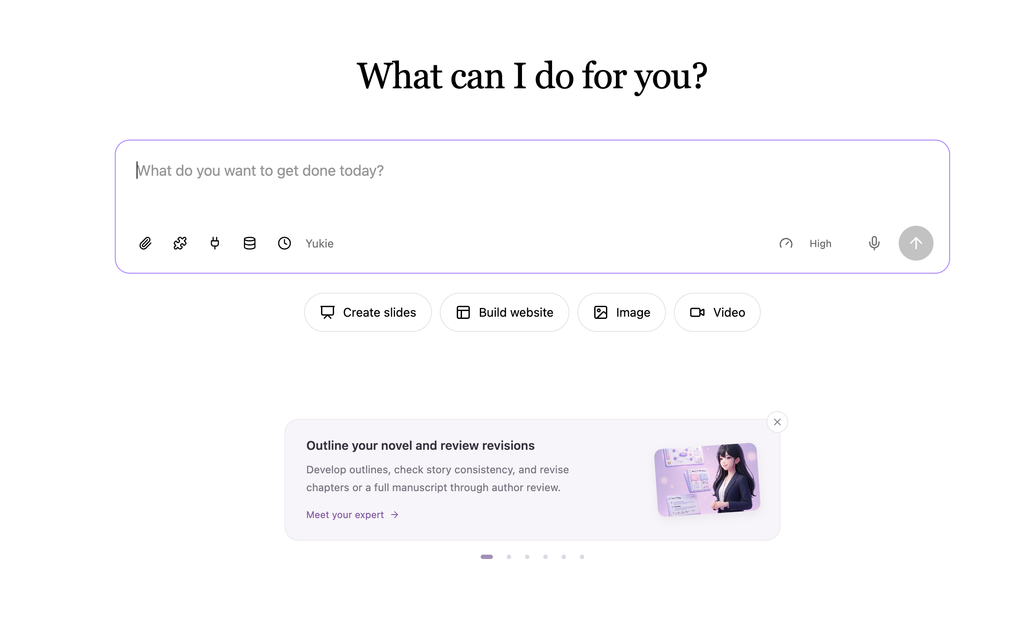
For a product landing page, supply the offer, required sections and existing brand assets. Review the website preview and source, ask Yukie for layout or interaction changes in chat, and export the code when you are ready to continue development. That makes it a practical route from a coding discussion to a website you can inspect and refine.
What does the developer workflow cost?
GlobalGPT Pro costs $15 per month on monthly billing, below Claude Pro’s $20 monthly subscription. Its annual option displays $10.80 per month, paid yearly. For a solo developer using several models and website tools, that lower entry price leaves more room for the actual project.
| Plan | Pay monthly | Monthly equivalent, billed annually | Monthly plan credits |
|---|---|---|---|
| Basic | $8.90 | $5.80 | 12,000 |
| Pro | $15.00 | $10.80 | 20,000 |
| Unlimited | $37.00 | $25.00 | 52,000; selected models also have Unlimited Access |
These are the public USD offers checked October 12, 2026. Monthly-plan credit amounts are shown above; annual plans display 144,000, 240,000 and 624,000 credits per year respectively, with the pricing explanation stating that credits are generally allocated monthly. Review the billed total and renewal terms on the GlobalGPT pricing page.
Choose your workspace plan and API budget separately. GlobalGPT API requests use paid credits. CLI and MCP connect through your GlobalGPT account, and model calls and generation jobs consume credits according to the service used. Anthropic’s Max/Team API allowance belongs to its linked Console organization. Keep these balances separate when costing an application.
Unlimited Access covers the models marked for it; premium calls and other credit-based tasks still need a budget. For a new project, begin with a small representative task and measure its usage before scaling.
Budget for a fix, a feature or a finished website
“Heavy user” is a poor budget estimate. A developer debugging one long session has a different bill from an app serving thousands of short requests. Record what one successful task costs, including retries and revisions. If a representative task costs C credits and you expect N similar tasks, start with N × C, then allow for the extra work you actually see.
| Work to measure | What to record | Use the result to decide |
|---|---|---|
| One bug fix | Model, files read, follow-up turns, tests and credits | Which model handles routine fixes at a sensible cost |
| One API feature | Input/output tokens, model rate and expected request count | How much paid credit to reserve for real application usage |
| One website task | Yukie revisions, generated assets and total credit use | Whether a single workspace covers the tools you actually need |
| Your busiest coding session | Limits reached, reset time and minutes lost | Whether more native Claude capacity is worth the subscription jump |
Claude Team vs Enterprise: Choose by Administration and Billing
Claude Team is designed for 2–150 people. Standard seats cover ordinary team use, while Premium seats provide five times Standard usage for heavier users. Claude Code is included with every Team seat, so a team does not need to buy a separate coding seat under the current plan structure.
| Option | Public price | Usage approach | Choose it when |
|---|---|---|---|
| Team Standard | $20/seat/month annually; $25 monthly | Included seat capacity | 2–150 people need a managed shared workspace |
| Team Premium | $100/seat/month annually; $125 monthly | 5x Standard usage | A subset of the team has heavier Claude or Claude Code workloads |
| Enterprise self-serve | $20/seat/month, billed annually, plus usage at API rates | Consumption-based; no per-seat usage limit | You want enterprise controls with metered usage |
| Enterprise sales-assisted | Contact sales | Contract-specific | Security, compliance, procurement, or service terms need negotiation |
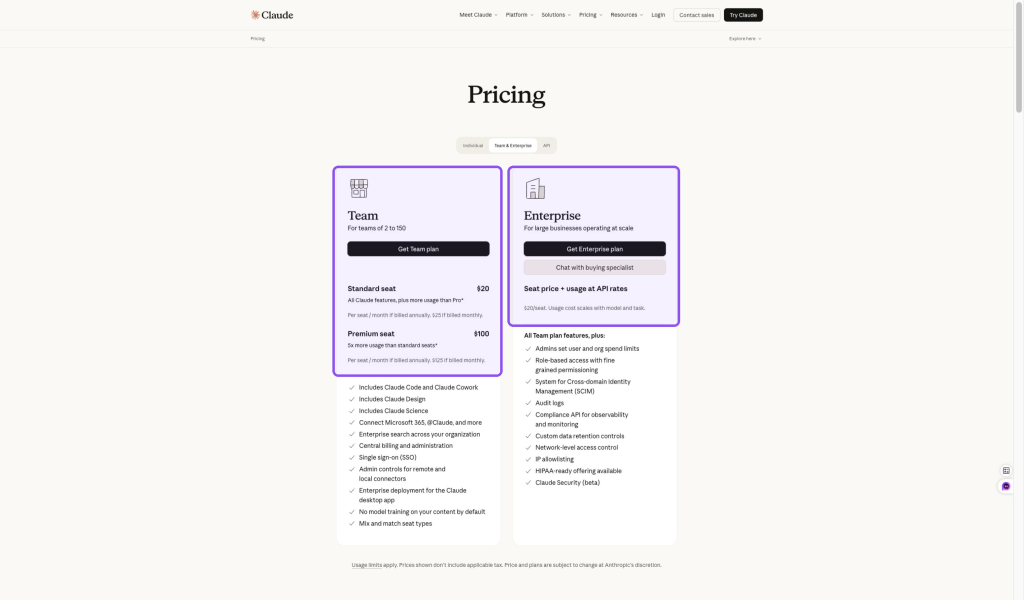
New and self-serve Enterprise seats include Claude Code. Older Enterprise agreements can use different seat types, so an organization on a legacy contract should verify its specific terms rather than applying the newest table automatically.
Usage-based Enterprise has no per-seat usage limit because consumption is billed at API rates. Team and seat-based Enterprise still use included capacity and can enable usage credits. Regulated organizations should use the terms and configuration requirements in their own agreement when choosing where to run Code.
Claude for Education and Nonprofits: Check Eligibility First
Organization programs are not personal coupon codes
Education
Claude for Education is a university-wide institutional plan for students, faculty, and staff. Anthropic does not publish a universal personal student price on the plan page.
Nonprofits
Nonprofit Standard is $8 per user per month. Nonprofit Access is $3 per user per month for eligible organizations based in low- or middle-income countries. The program covers 2–150 seats and requires organization verification; smaller organizations use Goodstack, while larger organizations contact sales.
These programs are organization purchasing paths. A student should not assume that a university program creates a personal discount, and an individual should not treat the nonprofit price as a consumer coupon.
If your main goal is a general promotion rather than an organization plan, review the current Claude discount guide before paying.
Final Decision Checklist
| Your situation | Start here | Upgrade only when |
|---|---|---|
| You use Claude occasionally | Free | The usage interruptions become inconvenient |
| You rely on Claude every week | Pro | Shared Claude and Claude Code limits interrupt valuable work |
| Pro limits repeatedly stop long sessions | Max 5x | You can document that 5x capacity is still insufficient |
| Claude is open most of the workday | Max 20x | The $200 monthly cost is justified by time saved |
| You manage 2–150 people | Team Standard | Heavy users need Premium seats |
| You need enterprise governance or metered usage | Enterprise | Sales-assisted terms are required |
| You want CLI coding, app integrations and website creation | GlobalGPT | Measured project and API usage justify a larger credit budget |
The most reliable upgrade signal is interruption frequency. Track when limits stop real work for a week or two. If those interruptions are rare, keep the cheaper plan. If they repeatedly delay paid or time-sensitive work, upgrade one level and reassess before jumping to the highest tier.
Before buying, check the billing period and renewal date. Claude subscriptions renew automatically; cancel through the original website or app-store channel at least 24 hours before the last day of the term. Cancellation and refund eligibility are separate. See Anthropic’s consumer terms.
If your next job is a bug fix, an AI feature or a new website, start with GlobalGPT’s developer tools. Keep the task small enough to inspect: review the patch, measure the API request, or refine a page in Yukie. Choose the plan around the work you finish and what it costs to keep going.
Frequently Asked Questions
Which Claude plan is best for most individuals?
Pro is the most practical paid starting point for regular individual use: $20 monthly or $200 prepaid annually. Free suits occasional work. Move to Max when Pro limits repeatedly interrupt valuable sessions.
How much is Claude Pro in 2026?
Claude Pro costs $20 per month or $200 paid upfront for a year, before applicable tax. Anthropic displays the annual option as about $17 per month. These are the public USD web prices checked October 10, 2026; app-store and regional prices can differ.
Is Claude Max unlimited?
No. Max 5x and Max 20x provide five or twenty times Pro usage per session. Five-hour session and weekly limits still apply, including a separate Fable limit; additional model or feature caps can also apply.
Does Claude Max have annual billing?
No. As of October 10, 2026, Max is offered as a monthly subscription only: $100 for Max 5x or $200 for Max 20x.
Does Claude Pro include Claude Code and Research?
Yes. Pro includes Claude Code and Research. Code activity shares the plan allowance with Claude, and Research uses the same limits as standard conversations. Research can use capacity faster because it retrieves multiple sources.
Which Claude plans include monthly API credits?
Eligible Max 5x subscribers can claim $100 monthly and Max 20x subscribers $200. Team pools $20 per Standard seat and $100 per Premium seat, up to $500 monthly. Claiming requires an active eligible plan for seven days and one linked Console organization. Free, Pro and Enterprise are not eligible; unused credits expire and do not increase chat or interactive Claude Code limits.
What is the difference between Team and Enterprise?
Team serves 2–150 people with Standard and Premium seats and included usage. Enterprise adds controls such as SCIM, audit logs and custom retention. Its public self-serve price is $20 per seat per month, billed annually, plus model usage billed at API rates; sales-assisted agreements can have their own terms.
Is there a Claude student or nonprofit discount?
Claude for Education is purchased by an institution for its students, faculty and staff. Verified nonprofits can apply for $8-per-user monthly Nonprofit Standard, or $3-per-user Nonprofit Access for qualifying low- or middle-income countries. These are organization programs, not general personal coupons.
Can a family share one Claude Pro account?
Anthropic’s consumer terms prohibit sharing personal account credentials. Each eligible individual needs their own account; Team provides separately assigned seats for organizations. Claude’s consumer service requires users to be at least 18 or the higher local minimum age.
When is GlobalGPT a good choice for a Claude coding user?
GlobalGPT is a strong value choice when your work spans local coding, app integrations and websites. Use the CLI for project files, API for your own app, MCP for tools in an existing assistant, and Yukie to build and refine a site. Pro costs $15 monthly or $10.80 per month billed annually as checked October 12, 2026; API requests use paid credits.
Should I choose the GlobalGPT API, CLI or MCP?
Use the API when you are building model calls into your own software. Choose the CLI when you want to work from a terminal with local project files or scripts. Use MCP to add GlobalGPT models and tools to a compatible assistant you already use. For a website brief you want an agent to develop, start with Yukie.
Official Sources Checked
- Claude pricing
- What is the Max plan?
- Use Claude Code with Pro or Max
- Use Claude Code with Team or Enterprise
- Use Research on Claude
- Claude for nonprofits pricing
- Monthly API credits for Max and Team
- GlobalGPT plans
Prices, plan names, model access, context windows, usage policies, promotions, and eligibility can change. Check the terms presented for your account before buying.





