Eleven v4 Turbo is ElevenLabs’ low-latency speech model for responsive voice applications, with support for more than 90 languages and expressive audio tags. Its published API price is $0.04 per 1,000 characters, half the v4 rate. The important buying question is whether your scripts, chosen voice and delivery requirements survive the speed-focused workflow—not whether a short demo sounds impressive.
The official model directory lists roughly 100 ms median inference latency. That is not a promise that a finished narration will arrive in 100 ms: networking, buffering, application logic and audio length still matter. For a conversational agent, first speech matters; for a creator, a clean downloadable take and an easy revision often matter more.
You can use ElevenLabs’ own tools and API, or generate narration through GlobalGPT alongside the models you use for scripts, images and video. This review covers the official controls and pricing, then publishes six fresh GlobalGPT samples so you can inspect the actual scripts and recordings.
What v4 Turbo does—and where ordinary v4 still fits
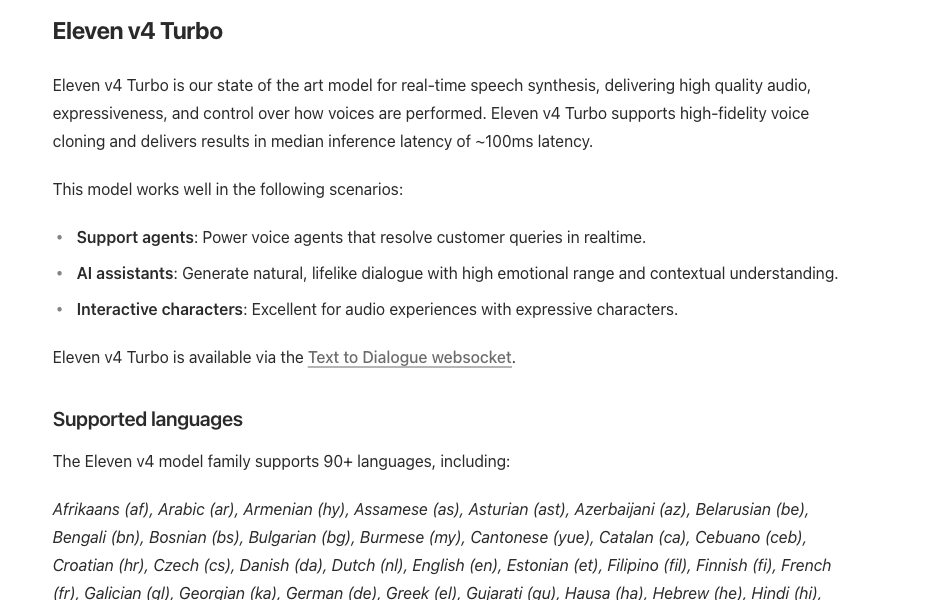
Turbo belongs to the v4 generation. It is not a renamed Turbo v2.5, and old integration examples should not be reused without checking their endpoint and settings. ElevenLabs positions v4 around expressive content production and Turbo around real-time speech. Both can be useful for recorded narration; the difference is a design emphasis rather than a rule that one is always better sounding.
| Décision | v4 Turbo | v4 |
|---|---|---|
| Primary emphasis | Low-latency, expressive voice interaction | Expressive content production |
| Published API rate | $0.04 / 1K characters | $0.08 / 1K characters |
| Registered voices per Text to Dialogue WebSocket | 1 | Up to 10 |
| Un bon point de départ | An agent reply, short explanation, many script variants | A multi-speaker scene or performance-led narration |
The single-voice connection limit matters if you are building a dialogue application. A two-character scene is not merely two names in a prompt: the API has to register the voices it uses. Choose the appropriate model and connection design before treating a text dialogue as an audio production plan.
Expressiveness, language and voice controls
Audio tags let the script carry delivery directions, such as a restrained opening or an excited line. They are useful when a sentence needs to perform a particular role, but more directions are not automatically better. A short sentence with one clear emotional intention is easier to evaluate than a paragraph containing contradictory tags.
The model-specific v4 guidance supports Stability and Similarity. Lower stability permits more variation; a stronger similarity preference can help retain a reference voice, with a possible naturalness trade-off. The generic settings used by older models are not a safe checklist here: the v4 documentation says the Style and Speed sliders and SSML are not supported for this family. A platform may also expose fewer controls than the native API.
Language coverage is broad, but a language count does not certify every brand name, regional accent or mixed-language sentence. A voice speaking its original language and the same voice speaking another language can behave differently. Build a short pronunciation list for proper nouns, acronyms, currencies and measurements before generating a long training video.
How to use Eleven v4 Turbo through the official route
Commencez par le official Text to Speech page for the web experience, or the Text to Dialogue WebSocket guide for a real-time Turbo integration.
- For the official web workflow, open ElevenLabs Text to Speech, paste the spoken script, choose a voice and select the model available to your account. Check the current model selector rather than assuming an old saved project has switched to Turbo.
- Adjust the supported settings for that model. Generate one representative paragraph first, check the pronunciation and delivery, then produce the remaining sections.
- For a real-time application, follow the Text to Dialogue WebSocket guide with model_id=eleven_v4_turbo. Register one voice, send text inputs and play the returned audio chunks as they arrive.
- Keep the approved script and voice identifier with the exported audio. When revising a sentence, preserve the unchanged settings so the edit is meaningful.
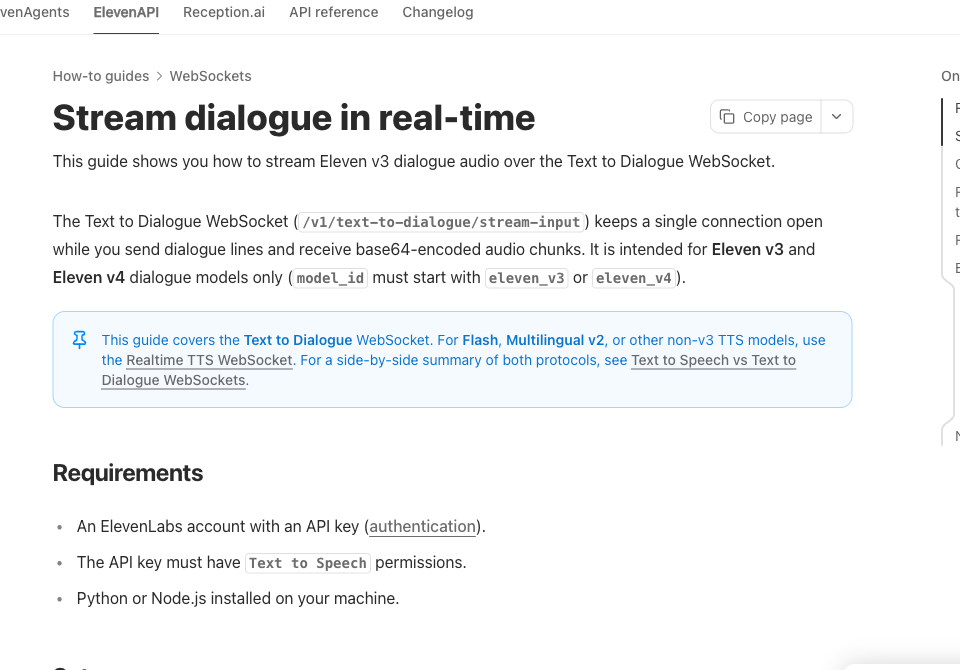
The documented connection is wss://api.elevenlabs.io/v1/text-to-dialogue/stream-input?model_id=eleven_v4_turbo&output_format=mp3_44100_128. It buffers roughly 40 characters and eight words before generating partial audio. A very short answer can therefore appear to stall unless the client flushes the buffer. Use flush:true when appropriate; close_socket:true finishes the session after the remaining audio.
The connection also has an inactivity timeout: the guide specifies 20 seconds without a client message, with a keep-alive mechanism for an intentionally open session. Test turn handling, buffering and disconnects in your own application. Our completed-file tests below measure a different delivery path.
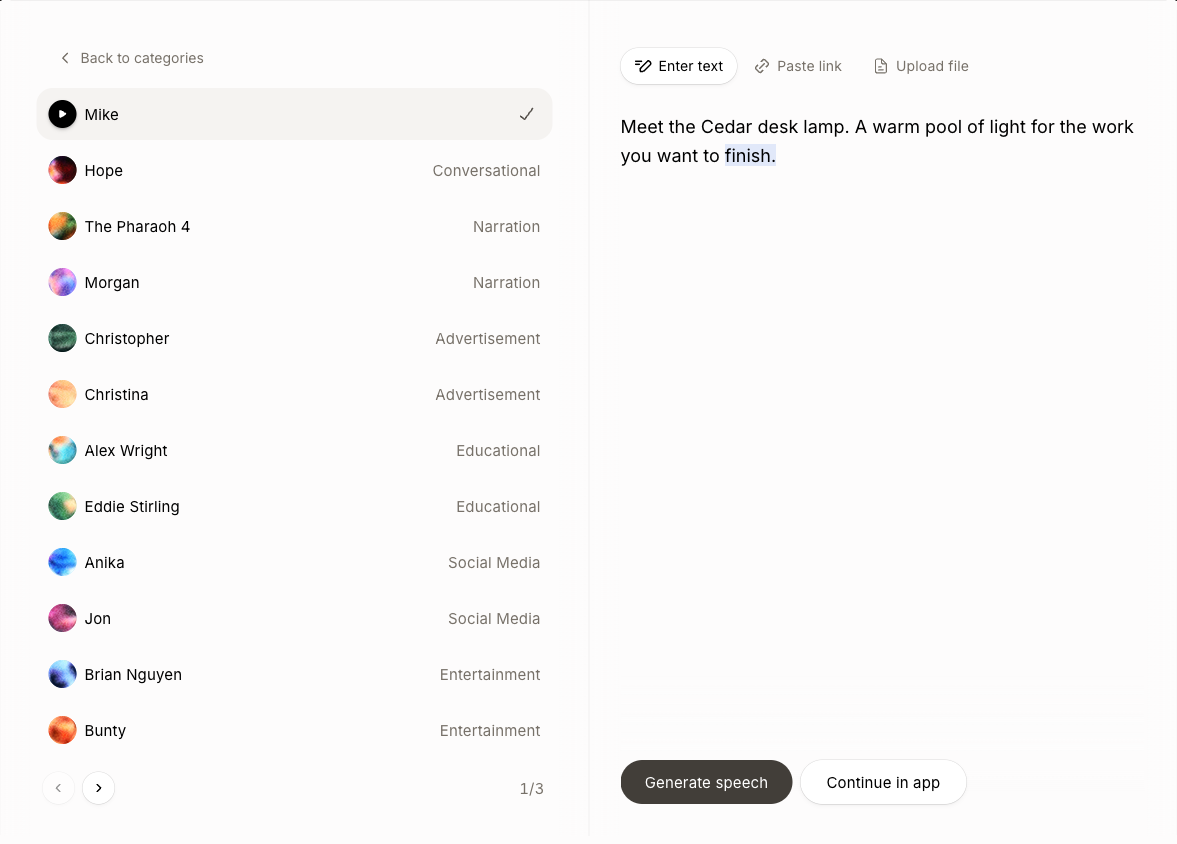
We also tried the public web demo: select Mike, enter “Meet the Cedar desk lamp. A warm pool of light for the work you want to finish,” then click Generate speech. It returned a 5.07-second recording and highlighted the words during playback without requiring a new account. The public demo used v4 and did not expose a Turbo selector, so this checks the official onboarding experience rather than supplying a v4-versus-Turbo benchmark. The six recordings below are the separate GlobalGPT Turbo tests.
Price: API usage is different from a creator subscription
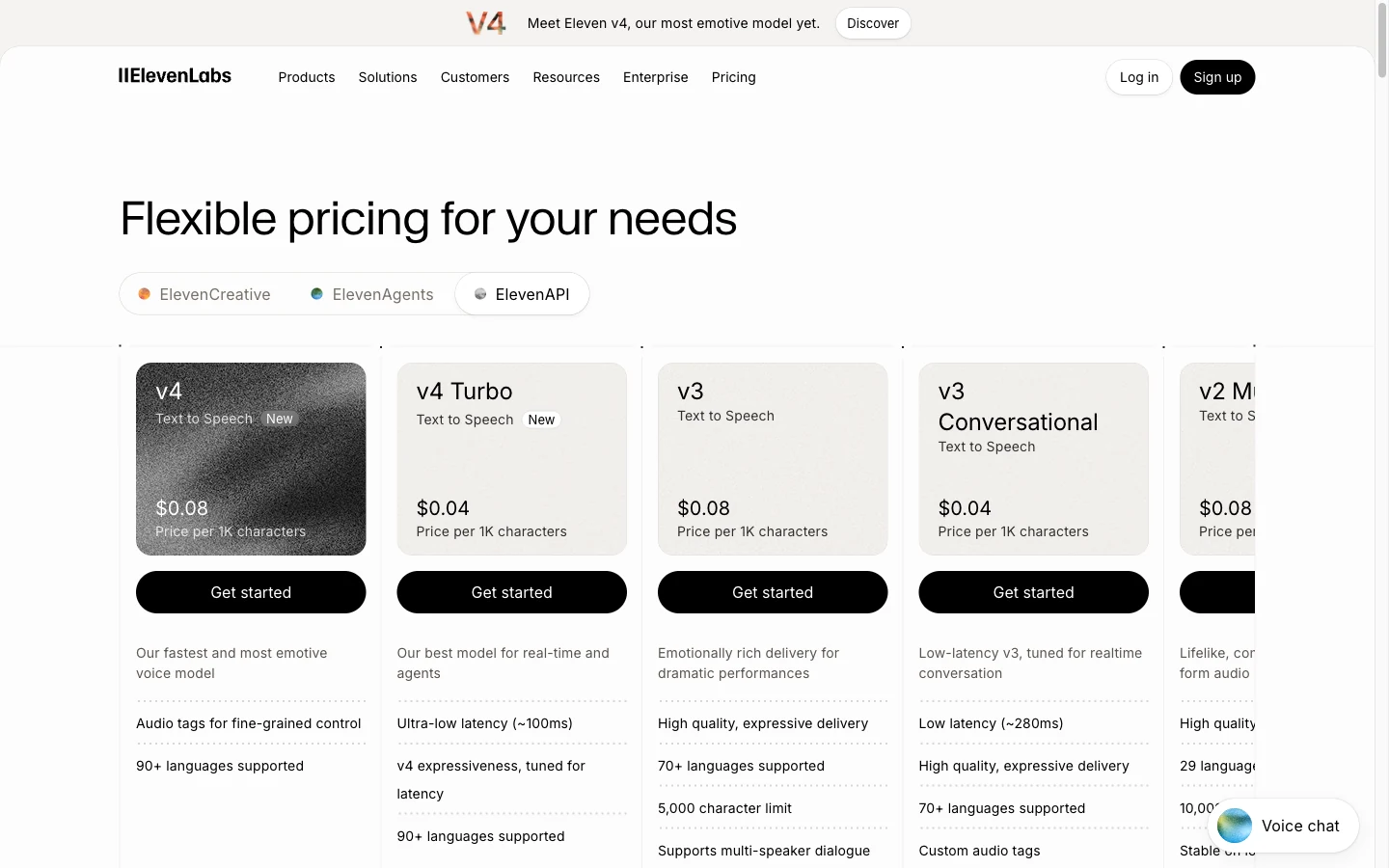
| Generated characters | Turbo API estimate | v4 API estimate |
|---|---|---|
| 10,000 | $0.40 | $0.80 |
| 100,000 | $4.00 | $8.00 |
| 1,000,000 | $40.00 | $80.00 |
Estimate v4 Turbo API character cost
Public ElevenAPI rates checked October 24, 2026: $0.04 versus $0.08 per 1,000 characters. Excludes taxes, voice licensing, transcription, language models and other services. This is not a GlobalGPT credit calculator.For the creator product, the standard monthly cards we checked showed Starter at $6, Creator at $22 and Pro at $99, with 30,000, 121,000 and 600,000 credits respectively. First-month promotions are not the ongoing subscription price. Commercial licensing appears from Starter; check the actual plan and rights for the intended use rather than assuming a free account is a commercial license.
A 1,000-character script made 100 times is 100,000 generated characters. If you make two takes of every script, it becomes 200,000: $8 at the published Turbo API rate. That calculation does not include the language model writing the text, speech recognition, telephony, editing or any separate voice rights. It also does not convert into a GlobalGPT plan allowance.
How to generate a Turbo voiceover in GlobalGPT
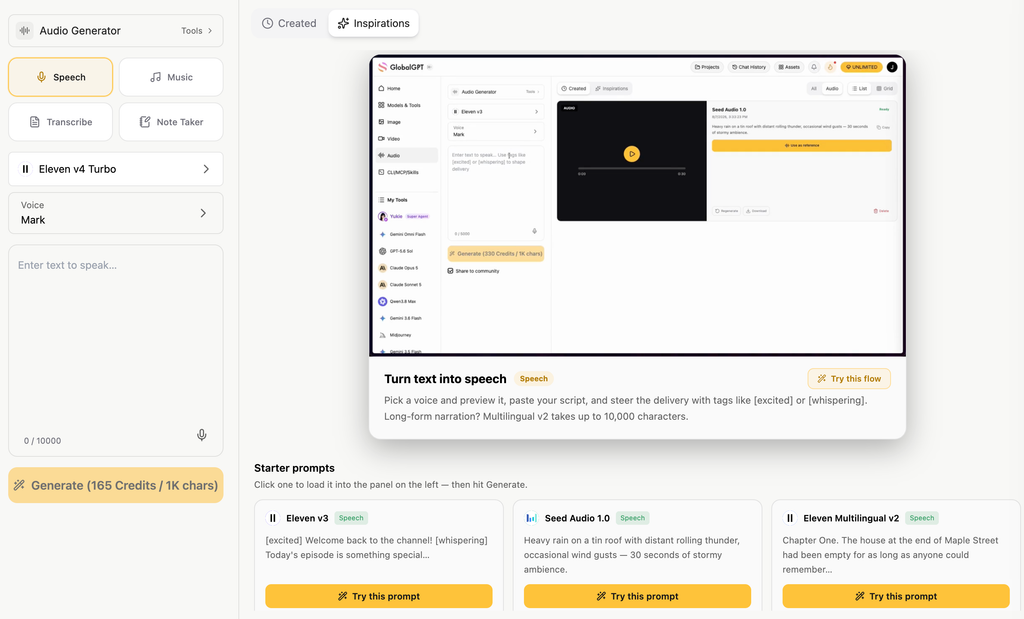
- Ouvrir Générateur audio GlobalGPT and choose Speech. Open the model selector and select Eleven v4 Turbo.
- Choose the available voice, paste only the approved spoken words and any intentional supported delivery tags, and inspect the generation estimate.
- Generate a short section, download the result, and keep the final script with the audio. Use the approved take in a video project; adding narration, captions and a closing card is still a separate editing step.
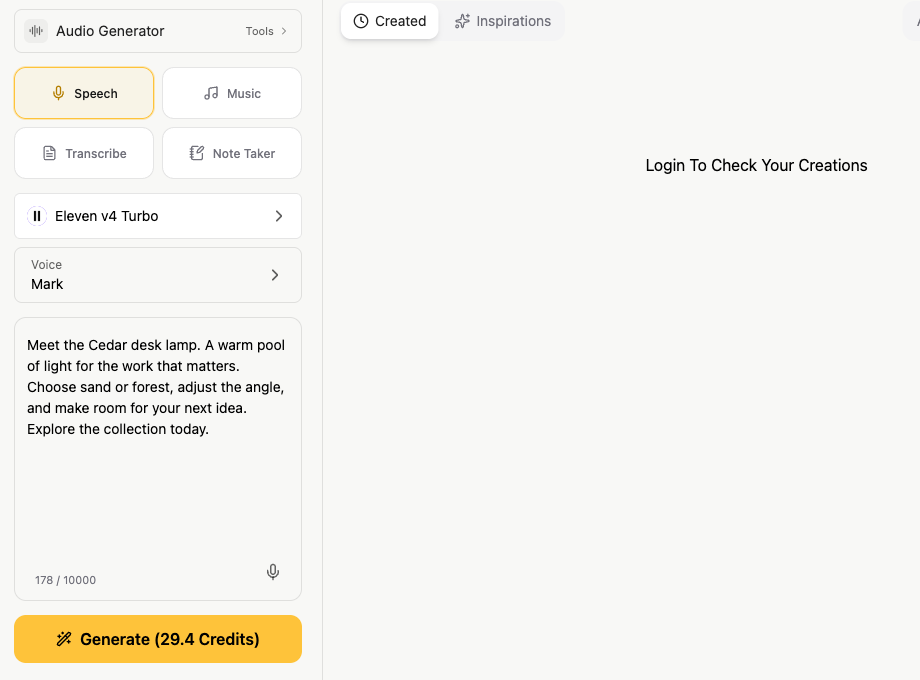
The public form showed 165 credits per 1,000 characters on October 24; the 178-character example displayed a rounded 29.4-credit estimate. Treat the form’s current quote as the relevant check before submitting. The visible default voice in this screenshot is not a verified identifier for our separate test recordings.
Six real samples: what we tested
We submitted six fixed scripts on October 24, 2026, retaining the first successful result for each. Every task succeeded and every MP3 decoded completely. We recorded wall-clock time from submission to the completed-task response, including polling. We did not measure streaming first-audio latency. The test route did not expose a voice ID, so this is not a controlled same-voice comparison against v4.
| Sample | Audio length | Completed-task wait | Éléments à vérifier |
|---|---|---|---|
| Clean Ad | 13.48 s | 15.47 s | Product name and clean wording |
| Numbers | 18.91 s | 12.65 s | Amounts, order code and units |
| Tags | 8.91 s | 10.63 s | Whether direction tags become spoken words |
| Espagnol | 13.40 s | 14.24 s | Brand pronunciation and phrasing |
| Français | 13.24 s | 9.34 s | Brand pronunciation and phrasing |
| Long Narration | 159.56 s | 23.99 s | Ending, pauses and factual wording |
1. Short commercial narration
Meet the Cedar desk lamp. A warm pool of light for the work you want to finish. Choose the sand or forest finish, adjust the angle, and make room for one good idea. Explore the collection today.
The automatic transcript matched the clean script word for word. This is a useful baseline because it separates straightforward text delivery from the extra uncertainty of pronunciation instructions. It is not, on its own, a naturalness score.
2. Numbers and order information
Your order number is C D R four one seven. The desk lamp costs forty-nine dollars and fifty cents. The return window is thirty days. The cable measures one point five meters. Delivery is estimated for October twenty-ninth. Please check the address before confirming your order.
The recognizer rendered the order code as CDR417, the amount as $49.50, and the units and date as ordinary numeric forms. Those are representation changes rather than evidence of missing information. For a production support reply, check each critical number against the written order; never let an appealing voice substitute for that check.
3. Audio tags
[calm] One clear brief. One useful first draft. [excited] Now the launch is ready. [whispers] Start with the detail everyone else missed.
The automatic transcript contained the spoken sentences and did not contain the tag words. That supports a narrow finding: this sample did not transcribe the directions as dialogue. It does not quantify how well each emotion was performed. Listen to the original clip when deciding whether the contrast suits your brand.
4–5. Spanish and French versions
Read the complete A04-spanish input
Conoce la lámpara Cedar. Una luz cálida para concentrarte en lo que importa. Elige el acabado arena o bosque, ajusta el ángulo y prepara tu espacio para una nueva idea. Descubre la colección hoy.
Read the complete A05-french input
Découvrez la lampe Cedar. Une lumière chaleureuse pour vous concentrer sur l’essentiel. Choisissez la finition sable ou forêt, ajustez l’angle et faites place à votre prochaine idée. Découvrez la collection dès aujourd’hui.
Both files completed and had similar short-ad durations, but the automatic transcripts flagged the brand phrase around Cedar. That is a review flag, not proof of a pronunciation error: speech recognition can also mishear an unfamiliar proper noun. These versions have not received native-speaker approval. Keep brand terms in a pronunciation checklist before reusing the scripts in paid placements.
6. A longer production narration
Read the complete A06-long-narration input
A useful product video starts before the camera moves. First, decide what the viewer needs to understand. For our Cedar desk lamp, the message is simple: a focused pool of light for reading, planning, and quiet evening work. We are not promising better sleep, higher productivity, or a medical benefit. We are showing a lamp and a comfortable place to use it. Begin with a clear reference image. Keep the base, stem, shade, finish, and cable visible. The sand version and the forest version are separate products, so give each one a separate file name. Do not ask the video model to remember a color change from an earlier conversation. Include the approved reference with the new request. Next, write a short shot plan. Open on the complete lamp. Move closer to show the shade and the pool of light. End with a clean view that leaves room for the call to action. A gentle camera move is usually easier to review than a spinning product with several scene changes. Save ambitious transformations for concept work, where an unexpected result will not misrepresent the product. When the first clip arrives, watch it from beginning to end. Check the shape of the shade, the number of joints, the position of the cable, and any reflections. A beautiful first frame does not guarantee a usable final frame. If a detail changes halfway through the shot, shorten the clip only if the remaining section still tells the intended story. Otherwise, revise the request and preserve the failed example in your production notes. Now add the voiceover. Read the script aloud before generating it. Brand names, prices, dates, and measurements deserve a separate check. Keep delivery promises out of the voiceover unless the store can honor them in the target market. If you create a Spanish or French version, adapt the phrasing to the audience instead of copying the English sentence structure word for word. Finally, assemble the approved shots, narration, captions, and closing frame. Check the result on a phone as well as a desktop. Leave enough room for platform controls, and make sure the destination page uses the same product name and offer. Export a clearly named version for each language and placement. Keep the source files, the final script, and the approved product reference together. That makes the next revision a small production task instead of a new project. The goal is not to generate the most footage. It is to deliver a video the team can confidently use.
The long script reached its intended closing sentence. One automatic-transcription ambiguity remained around “sand” versus “sound”; apparent repeated words at transcription chunk boundaries did not recur in the local recheck. This is why an automatic mismatch should trigger inspection rather than an immediate claim that the speech model failed. One long file also cannot establish repeat-run voice consistency.
Benchmarks: useful context, not a substitute for your voice
Le Artificial Analysis Provider Voice benchmark listed Eleven v4 Turbo at an Elo of about 1,335 when checked on October 24. It uses provider voices rather than one controlled cloned speaker across every model. The choice of voice itself can influence preference.
Use that benchmark to decide which models deserve a trial. Use your own script to decide which one deserves a production slot. A strong average result can still mispronounce your product name, and a fast model can still need a separate take for a tightly timed CTA.
À qui s'adresse-t-il ?
- Start with Turbo for interactive explanations, rapid short variants and high-volume narration where response time and per-character cost matter. Validate the exact voice and output path.
- Compare ordinary v4 for multi-speaker sessions or performance-led material. Its richer dialogue connection is a practical distinction, not an automatic win for every script.
- Keep a human review step for legal, medical, financial or order-critical wording, unfamiliar brand names and multilingual paid advertising.
For an existing video workflow, try the approved script in GlobalGPT and reuse the take with your visual assets. For more context on the model family, see our v4 versus v4 Turbo comparison et Eleven v4 pricing guide. The practical goal is an accurate, editable recording that fits the task—not a speed claim detached from the final audio.
Useful documentation and current plans
- ElevenLabs models
- v4 model guide
- Real-time dialogue guide
- ElevenAPI pricing
- Creator pricing
- Artificial Analysis Provider Voice benchmark
Questions fréquemment posées
Is Eleven v4 Turbo the same as Turbo v2.5?
No. It is a v4-generation model with its own model ID and documented Text to Dialogue WebSocket route.
Does 100 ms mean an entire voiceover is ready in 100 ms?
No. That is the provider’s approximate median inference latency, not completed-file delivery time or a guarantee for your application.
How much does Eleven v4 Turbo cost?
The official API rate checked October 24, 2026 is $0.04 per 1,000 characters. Creator subscriptions and GlobalGPT credits use different billing systems.
Can Turbo register several voices on one connection?
The official Text to Dialogue WebSocket guide allows one registered voice per Turbo connection; v4 supports up to ten.
Can I use it in GlobalGPT?
Yes. Select Speech and Eleven v4 Turbo in Audio Generator, check the available voice and current credit estimate, then generate and review your script.