
The best AI video platform for an agency is the one that fits its client deliverables, review process and commercial obligations. A social-content studio needs fast variations; a team producing spokesperson videos needs reliable presenters and language review; a larger agency may need shared budgets, permissions and client-by-client project separation. Those are different buying decisions.
Our shortlist is GlobalGPT for flexible creative production, Runway for a shared generative-video workspace, HeyGen for presenter-led content and localization, and Synthesia for structured business video. We compare their documented capabilities and current public plans below. This is a workflow-based selection, not a claim that we generated the same ad in every platform.
GlobalGPT is especially worth evaluating when the job begins with a brief rather than a finished script: text, image, video and audio models sit alongside Yukie and Canvas. That can reduce the friction of moving from planning to visual variations. Formal team governance should still be checked separately from creative capability.
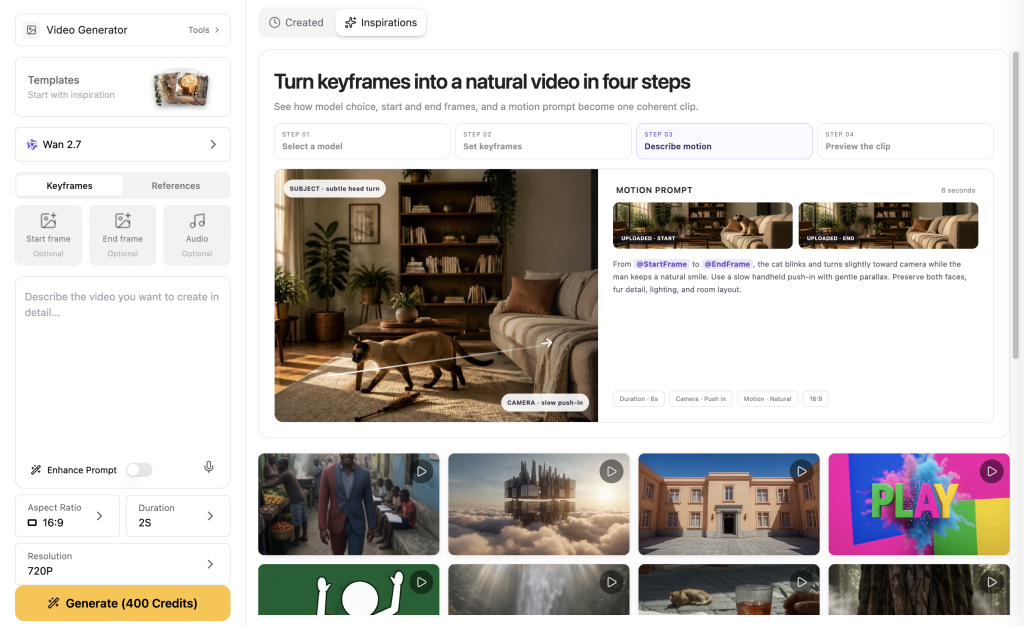
Match the platform to the agency you actually run
| Agency workload | Start by evaluating | Pourquoi ce choix est judicieux | Check before buying |
|---|---|---|---|
| Mixed social and product creative | GlobalGPT | Scripts, references, multiple media models, Yukie and Canvas | Exact model credits, account entitlements, delivery workflow |
| Several creatives sharing generative projects | Runway Team | Pooled credits, shared references and frame comments | Minimum seats, customer data terms and workspace boundaries |
| Spokesperson ads and multilingual campaigns | HeyGen | Avatar production and editable translation workflows | Paid commercial rights, script review, language-specific quality |
| Training, explainers and repeatable business video | Synthèse | Reusable presenters, templates and structured personalization | Plan-specific editing, collaboration and usage limits |
Start with the mix of work in the next month, not the largest feature list. If eight of ten deliverables are edited customer interviews, a generator will mainly support scripts, cutaways and versions. If the workload is product concepts that would otherwise need a studio shoot, reference handling and usable generation quality matter much more.
Write down one representative client brief, the required output sizes, the number of review rounds and the delivery date. Trial that job with the people who will actually use the tool. A beautiful ten-second clip is a weak procurement test if the agency sells thirty-second ads with captions, usage rights and two client revisions.
GlobalGPT: useful when production spans several model types
GlobalGPT’s appeal is the breadth of work that can happen under one subscription. You can develop the positioning and script with a text model, build approved product references with an image model, generate motion, and prepare narration. Yukie provides a task-oriented conversation; Canvas keeps visual assets and review context together. This is more concrete than simply counting the models on a menu.
On October 24, the GlobalGPT monthly page displayed promotional prices of $8.90 for Basic, $15 for Pro and $37 for Unlimited, with 12,000, 20,000 and 52,000 monthly credits respectively. These are current offers, not guaranteed renewal rates. Unlimited applies to selected marked models; premium video generations can still use credits. Check the exact workflow quote and required account access before pricing client work.
For an agency, the useful habit is to separate approved material from exploratory material. Keep the client’s factual brief, product reference, draft scene and approved result clearly labeled. A new visual branch should be an experiment until someone checks it; it should not silently replace the asset approved for delivery.
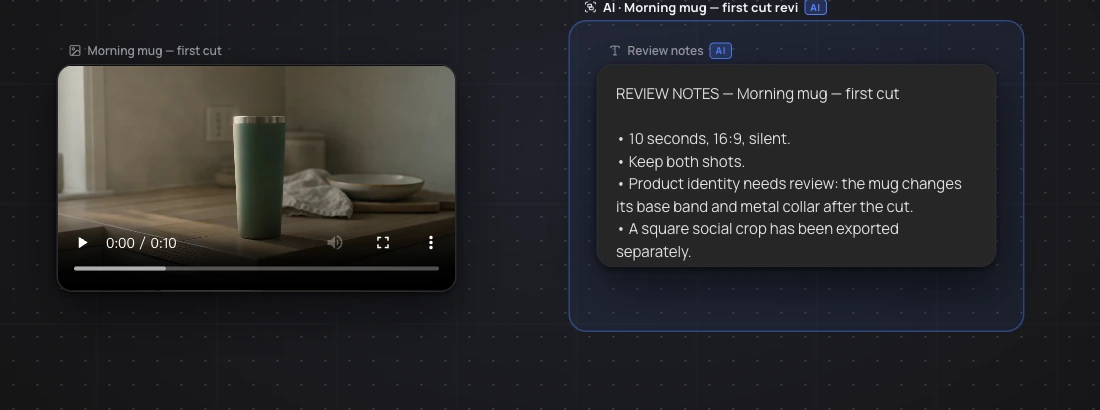
Canvas is helpful for explaining why a version exists. A note beside the frame can say “retain the mug silhouette; change the crop only,” which is much more actionable than “make it better.” It is not proof of role-based client permissions, a legal approval record or a finished timeline export. Confirm those requirements directly if they are mandatory in your procurement process.
Runway: inspect the Team plan, not just the solo price
Runway already offers multiple models, agent-assisted creative work and audio-related capabilities. A fair comparison should recognize those features. Its particularly relevant agency distinction is the Team workspace: shared projects and references, frame-level comments, colleague mentions and pooled generation credits.
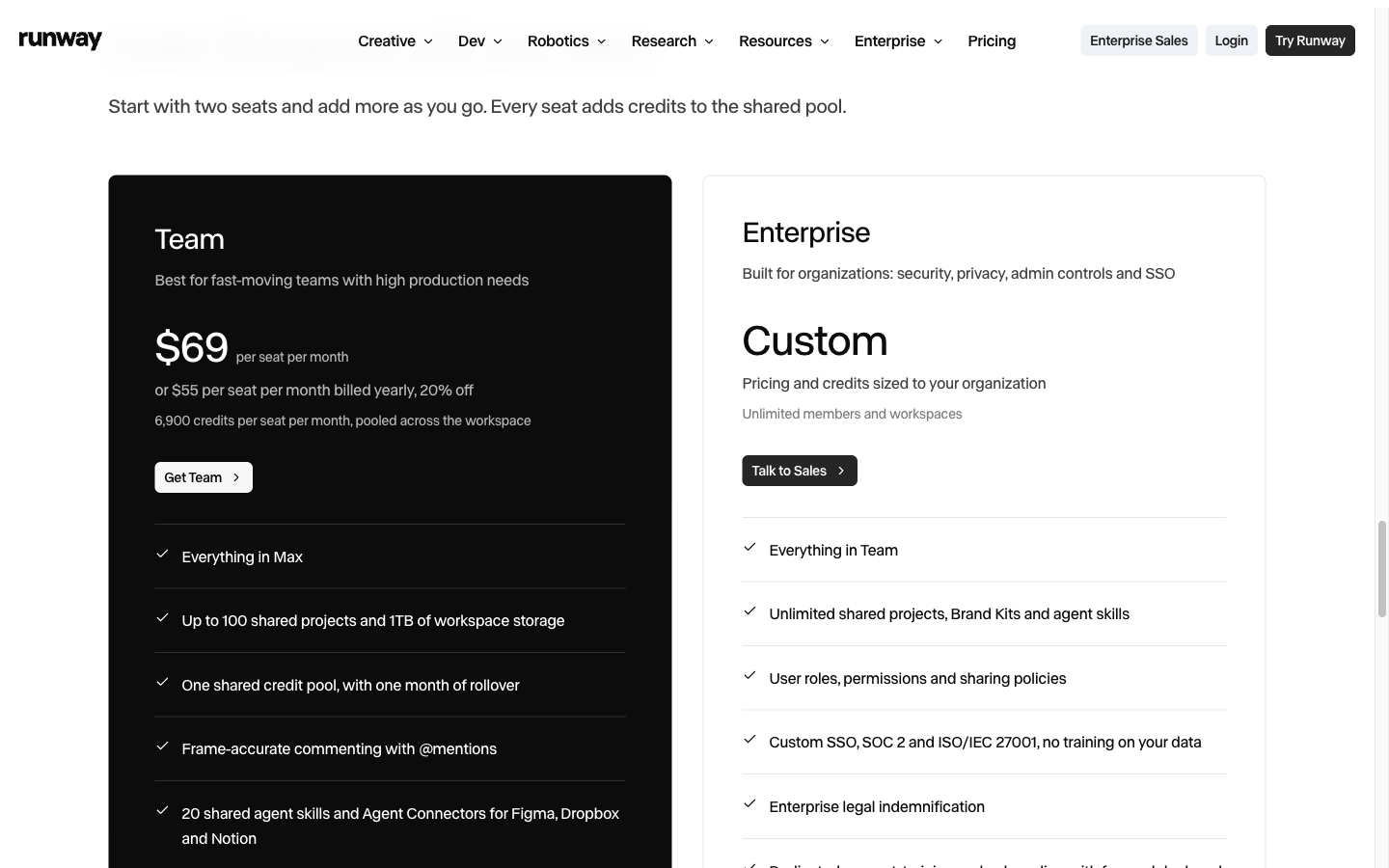
The Team page lists two to nine seats at $69 per seat per month, or $55 per seat per month with annual billing. The two-seat monthly minimum is therefore $138, not $69 for the whole agency. Each seat contributes 6,900 monthly credits to the pool, with a one-month rollover. The page also lists 100 projects and 1 TB of storage.
Those details matter when a producer and designer must work in the same project. They do not automatically settle confidentiality. Runway’s general terms allow commercial use subject to conditions and input rights, while specific no-training protections are listed for Enterprise. If a client contract bans training use or requires SSO and detailed roles, verify the plan that actually provides it.
HeyGen: choose it around the presenter and language workload
HeyGen is a strong candidate when a recognizable speaker is central to the asset: explainers, sales introductions or localized presenter ads. It is no longer accurate to describe it as an avatar-only tool; its offering also includes a Video Agent and other generative capabilities. The practical question is whether its presenter workflow saves your team time on the jobs it repeats.
The public monthly Creator plan is $29, Pro starts at $49, and Business is $149 plus $20 per additional seat per month. Business adds a shared workspace and business integrations. Do not compare a single-person Creator price with a multi-person workspace without adding the people and features you require.
The free plan is an evaluation path, not a client-delivery license. The terms distinguish personal or internal noncommercial use on Free from permitted commercial use on paid plans, subject to rights and policy obligations. A free sample that looks usable can still be the wrong asset to send to a paying client.
Synthesia: best considered for repeatable structured video
Synthesia is worth considering for agencies producing business explainers, training and presenter-based variations. Its reusable avatars and template-oriented production are a different strength from generating a cinematic product shot. The public monthly plans checked were $29 for Starter and $89 for Pro; enterprise collaboration and governance require their own review.
Its personalization features demonstrate why “batch” needs a precise meaning. Filling a template with different names or messages is not the same as generating accurate new product motion for every SKU. Decide whether your client needs personalized language around a fixed layout, new visuals, or both. Procurement becomes clearer when those workloads are separated.
A real revision reveals more than a demo reel
In our October 14 Yukie case, a fictional travel-mug brief produced a two-shot, ten-second silent video. We then asked for a separate square version. Keeping both outputs showed exactly what the revision changed—and what it did not.
The square version kept the mug in frame but cut off part of the cloth prop. More seriously, the rim, lower band and proportions varied between the original shots; changing the crop did not repair those details. For a mood-board concept, the clip can still communicate a direction. For a literal product demonstration, those changes need correction or replacement with real footage.
This is the kind of acceptance decision an agency should make before adding a polished end card. Separate “file delivered,” “creative direction approved” and “product accurate enough to publish.” An attractive output may pass the first two and fail the third. Keep the failed version and its reason, so the next operator does not accidentally reuse it.
Calculate approved-output cost, including human time
Estimate cost per approved video
Editable planning example, not a vendor quote or measured production cost. Include all rejected takes in your generation spending. Use a currency consistently.Suppose a month uses $30 of subscription allocation, $20 of extra generation and tools, and four hours of review at $25 an hour. Ten approved videos cost $15 each under those assumptions; five approved videos cost $30 each. The figures are a planning example, not a measured platform result. The same subscription can produce very different economics depending on how much of the output survives review.
| Cost line | What belongs in it | Common budgeting mistake |
|---|---|---|
| Platform access | Required seats and billing period | Comparing an annual equivalent with a monthly bill |
| Génération | Approved and rejected takes, references, voice and resizes | Counting only the final successful render |
| Les personnes | Briefing, fact checks, language review, edit and client comments | Treating an automated generation as zero production time |
| Droits | Talent, voice, music, stock, permitted placements and term | Assuming tool access grants every underlying right |
| Livraison | Source files, caption formats and revisions | Selling unlimited changes in a fixed-fee package |
A practical agency pilot and handoff checklist
- Choose a representative brief with a real product reference and approved claims. Avoid using confidential client material in a trial until data terms are settled.
- Produce a first concept and log the input, model, settings and generation quote. Review the whole clip, including the last frame.
- Request a specific revision: a new crop, a shorter CTA, or a scene replacement. Check whether the change preserves the approved parts.
- Assemble the required aspect ratios, narration and captions. Review on a phone, including the placement’s safe zones.
- Deliver a named master, derivatives, approved script, source assets and a short usage-rights record. Keep client approval separate from your internal visual review.
A shared folder needs a naming rule. For example, client-product-en-9x16-hookA-v03-approved.mp4 tells a media buyer far more than final-final2.mp4. Include the campaign or offer date if prices change. Keep a clean master without burned-in text when localization is likely.
Before cancelling a trial, export the assets and project information you need and verify that someone else can open them. File availability, editable project portability and continued output rights are separate questions. Ask the vendor and read the applicable plan terms rather than assuming that downloading an MP4 settles all three.
Which platform should your agency start with?
For mixed creative work, start a bounded pilot in GlobalGPT and see how much of the brief, reference, motion and voice work your team can keep together. For shared generative production with formal frame comments, inspect Runway Team. For presenter localization, test HeyGen with a real target-language reviewer. For repeatable structured business video, evaluate Synthesia with your actual template.
You can also use our Exemples de publicités vidéo pour des produits to define the deliverable before buying tools, and the Yukie video workflow guide to see a more detailed task-to-output path. Choose on the work you can reliably approve and hand over, not the number of impressive clips you can generate.
Useful documentation and current plans
Questions fréquemment posées
Can an agency deliver free-plan AI videos to clients?
Do not assume so. Check the specific license. For example, HeyGen’s Free terms exclude advertising and client work; a paid plan still requires rights to the inputs.
Is GlobalGPT a team approval system?
It supports creative workflows with multiple models, Yukie and Canvas. This review does not verify client-isolated permissions, SSO or formal approval controls; evaluate those separately.
What is the minimum monthly Runway Team cost?
The checked Team offer starts at two seats at $69 per seat per month, or $138 monthly before additional usage and taxes.
What should an agency measure in a trial?
Measure how many deliverables pass review, how much revision and editing they need, and whether the source files, rights and final formats meet the client contract.